7 Best PhantomBuster Alternatives Tested and Ranked (2026 Honest Breakdown)

7 Best PhantomBuster Alternatives Tested and Ranked (2026 Honest Breakdown)

Milosh Potikj

B2B Content Strategist & Writer

Updated atUpdated: July 13, 2026Read time58 min read
Best PhantomBuster alternatives compared
Quick Answer

Linked Helper is the best PhantomBuster alternative for users who prioritize account control, lower cost, and LinkedIn-specific outreach depth. Unlike PhantomBuster's cloud handoff, Linked Helper runs from your own machine or VPS environment, so your LinkedIn session stays in an environment you control rather than on vendor cloud infrastructure. Pricing starts at $15/mo, or $8.25/mo on a 12-month license, versus PhantomBuster's $69/mo execution-credit model. We compared these tools against Linked Helper's 11 direct CRM connectors, Sales Navigator and Recruiter support, and account-safety controls.

ToolArchitectureStarting price (from, /mo)Price vs PhantomBusterComposite rating (reviews)
PhantomBuster (baseline - the tool you're replacing)Cloud$69/mox1.004.08 (209)
Linked HelperDesktop standaloneStandard ($15/mo)x0.224.77 (825)
ExpandiCloudBusiness ($99/mo)x1.434.19 (331)
WaalaxyBrowser extensionPro ($42/mo)x0.614.57 (2,026)
Dux-SoupBrowser extensionPro Dux ($14.99/mo)x0.224.42 (139)
HeyReachCloudGrowth ($79/mo)x1.144.55 (73)
DripifyCloudBasic ($59/mo)x0.864.61 (1,172)
SkyleadCloudAll-in-one ($100/mo)x1.453.43 (144)

Architecture, starting price, and composite rating for PhantomBuster alternatives

Pricing data as of July 2026. 'Starting price' is each tool's cheapest paid entry plan (monthly): Linked Helper Standard ($15/mo), Expandi Business ($99/mo), Waalaxy Pro ($42/mo), Dux-Soup Pro Dux ($14.99/mo), HeyReach Growth ($79/mo), Dripify Basic ($59/mo), Skylead All-in-one ($100/mo). Price vs PhantomBuster is each tool's entry monthly price divided by PhantomBuster's $69/mo (x1.00). Composite rating is the unweighted mean of each tool's G2, Capterra, and Trustpilot scores, with the total number of reviews across those three platforms shown in parentheses. No vendor in this list publishes a dedicated 20-seat agency tier, so a 20-seat projection is intentionally omitted.

Publisher disclosure

This article is published by Linked Helper. Linked Helper is our product and our top recommendation. First-hand observations are reported by the author where applicable; rankings and recommendations follow the same evaluation framework for every tool below.

Safety terms used below: IPQualityScore (IPQS) is an independent fraud-prevention service that rates IP addresses from 0-100; it is not LinkedIn's enforcement verdict.

li_at is the LinkedIn login cookie, JSESSIONID carries the CSRF token, and AED is LinkedIn's extension-ID probing label. The detailed definitions and source links sit in the Methodology Deep-Dive.

Key takeaways

  • Linked Helper is our pick because the findings point to custody, not just features: it was the only ranked tool where no cloud-session or Chrome-extension handoff applied, while the tested alternatives either assigned vendor infrastructure, copied li_at, or left extension traces that add risk.
  • In live cloud tests, 7 of 8 account assignments we could score came back high-risk on IPQualityScore; six were datacenter IPs and one was a proxy/recent-abuse residential IP, so the first login signal can look weak before any outreach behavior is judged.
  • Shared infrastructure showed up in the results: Dripify and Skylead both used HostRoyale Technologies Pvt, and Dripify, HeyReach, and Skylead each reused a same-/24 or same-IP pattern across test accounts - the logo differs, the servers don't.
  • The extension teardown found li_at or full LinkedIn cookie-jar transfer in PhantomBuster, Expandi, Waalaxy, HeyReach, and Dux-Soup Cloud paths; that is your LinkedIn login in cookie form, so the practical question is who can act as the account.
  • Trial language was uneven in first-hand signup: Expandi showed 7 days with a card despite a 14-day public claim, Dux-Soup required a card and showed 0 trial days, and Skylead required a card for 7 days, so evaluate cancellation risk before connecting LinkedIn.

What Is PhantomBuster?

PhantomBuster is a cloud-based data-extraction and automation platform, not a LinkedIn-only outreach tool. Founded in 2016 and headquartered in France, it runs automations in PhantomBuster's cloud and lets users collect, enrich, export, and trigger actions across LinkedIn, Sales Navigator, Twitter/X, Instagram, Google Maps, and other websites.
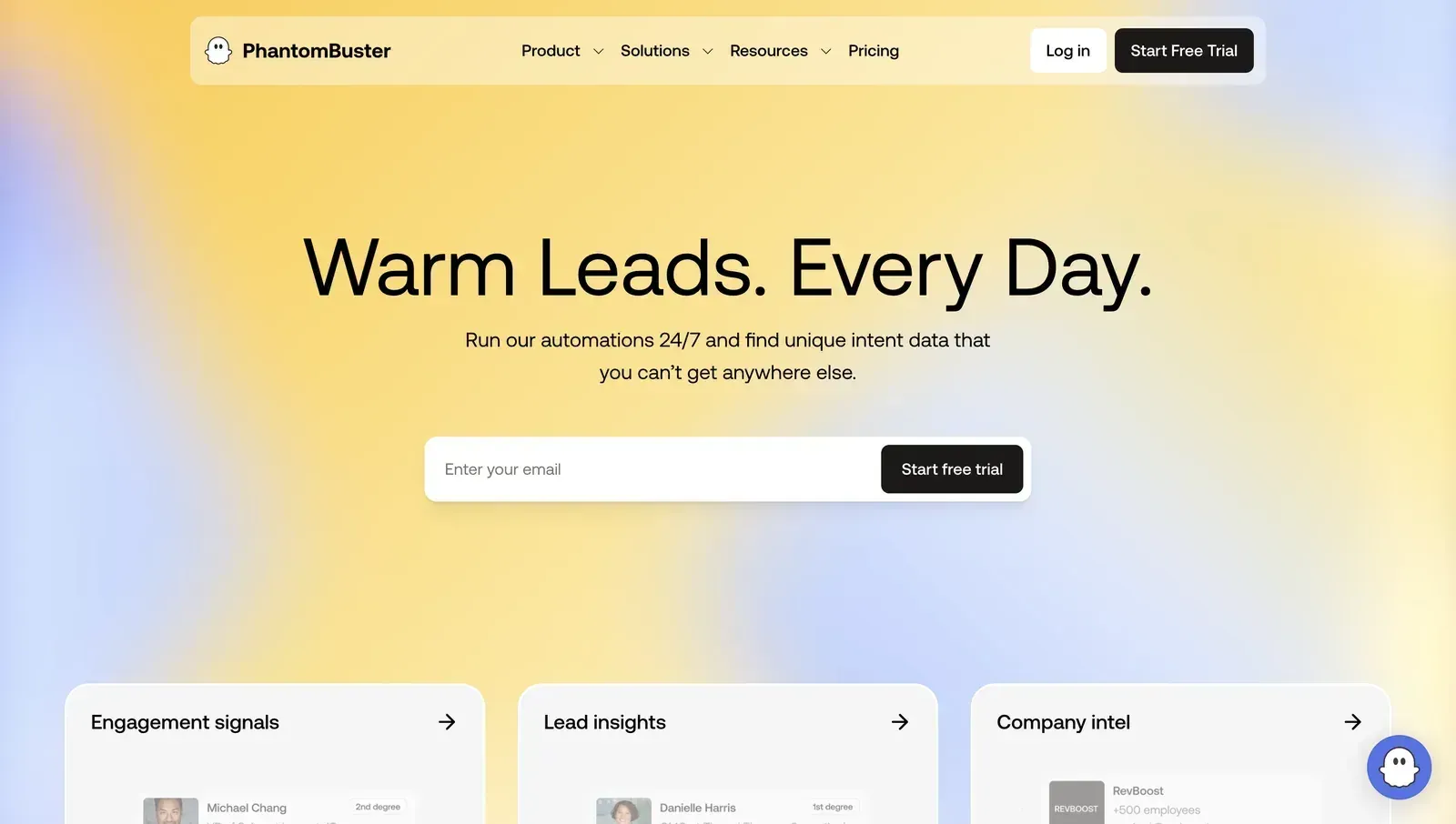
What Is PhantomBuster?

Its product model is built around individual "Phantoms" and multi-step "Flows." For LinkedIn work, common examples include profile scraping, Sales Navigator export, contact enrichment, and routing data into Google Sheets, Zapier, webhooks, or a CRM. Key PhantomBuster features include:

  • 100+ automations in the Phantom library, including LinkedIn Profile Scraper and Sales Navigator Exporter.
  • Phantom + Flow workflow building for chaining extraction, enrichment, and outreach steps.
  • Cloud execution with scheduled runs and execution-time billing.
  • Google Sheets, Zapier, webhook, HubSpot, Salesforce, and Pipedrive export paths.
  • Multi-platform scraping across LinkedIn, Instagram, Twitter/X, Google Maps, Reddit, YouTube, Slack, and more.

For a deeper anchor-specific breakdown, see our in-depth PhantomBuster review and safety analysis.

PhantomBuster at a Glance

PhantomBuster is mainly a cross-platform data-collection tool. It becomes less compelling when the buyer's main problem is controlled, repeatable LinkedIn outreach, because the LinkedIn session handoff and credit-based cloud model add trade-offs a dedicated LinkedIn tool does not have to accept.

Strengths

  • Broad source coverage across LinkedIn, Sales Navigator, Google Maps, Instagram, Twitter/X, Facebook, YouTube, Slack, GitHub, Product Hunt, and other public sources.
  • A large Phantom library for common scraping, enrichment, export, and lightweight outreach tasks.
  • Zapier and Make through webhooks, Google Sheets, HubSpot, Salesforce, and Pipedrive paths for moving extracted data into the rest of the stack.
  • Workflow flexibility for technical growth, RevOps, and lead-research operators.

Limitations

  • LinkedIn setup uses a cloud one-click session handoff, so the LinkedIn login can be operated from PhantomBuster's cloud environment.
  • Execution-time billing can become hard to forecast when large scrapes, retries, or failed runs consume the monthly allocation.
  • LinkedIn actions still sit under LinkedIn's restriction model, especially when scraping and outreach run from the same account.
  • The Phantom + Flow model has a learning curve, and Capterra/G2 users mention setup complexity, failed Phantoms, stale data, and support friction.
  • Native CRM breadth is thinner than Linked Helper's 11 direct CRM connectors.

Typical Use Case

Technically comfortable growth and operations teams use PhantomBuster when they need lightweight automation across several websites and value Zapier-style glue more than LinkedIn-specific session control.

Why Users Look For PhantomBuster Alternatives

Across 4,800+ reviews on G2, Capterra, and Trustpilot and 360+ Reddit threads about these tools, the same contradiction appears: users leave PhantomBuster worried about LinkedIn safety, then often evaluate cloud or extension tools that keep the same core session-custody exposure. Price and reliability complaints usually travel with that safety concern rather than replacing it.

ThemeNegative mentions
Account safety / LinkedIn restriction risk35
Setup complexity / Phantom + Flow learning curve31
Reliability / failed runs or stale data27
Execution-credit pricing unpredictability25
Support responsiveness and billing friction21

Why users leave PhantomBuster and similar LinkedIn automation tools

Counts combine G2, Capterra, Trustpilot, and Reddit discussion analysis reviewed as of July 2026.

These themes appeared consistently across G2, Capterra, Trustpilot, and Reddit discussions. The switch pattern is not just "find a cheaper scraper"; it is a search for a LinkedIn workflow that reduces session risk, keeps costs readable, and still gives enough campaign depth to replace manual outreach.

How We Evaluated These Alternatives

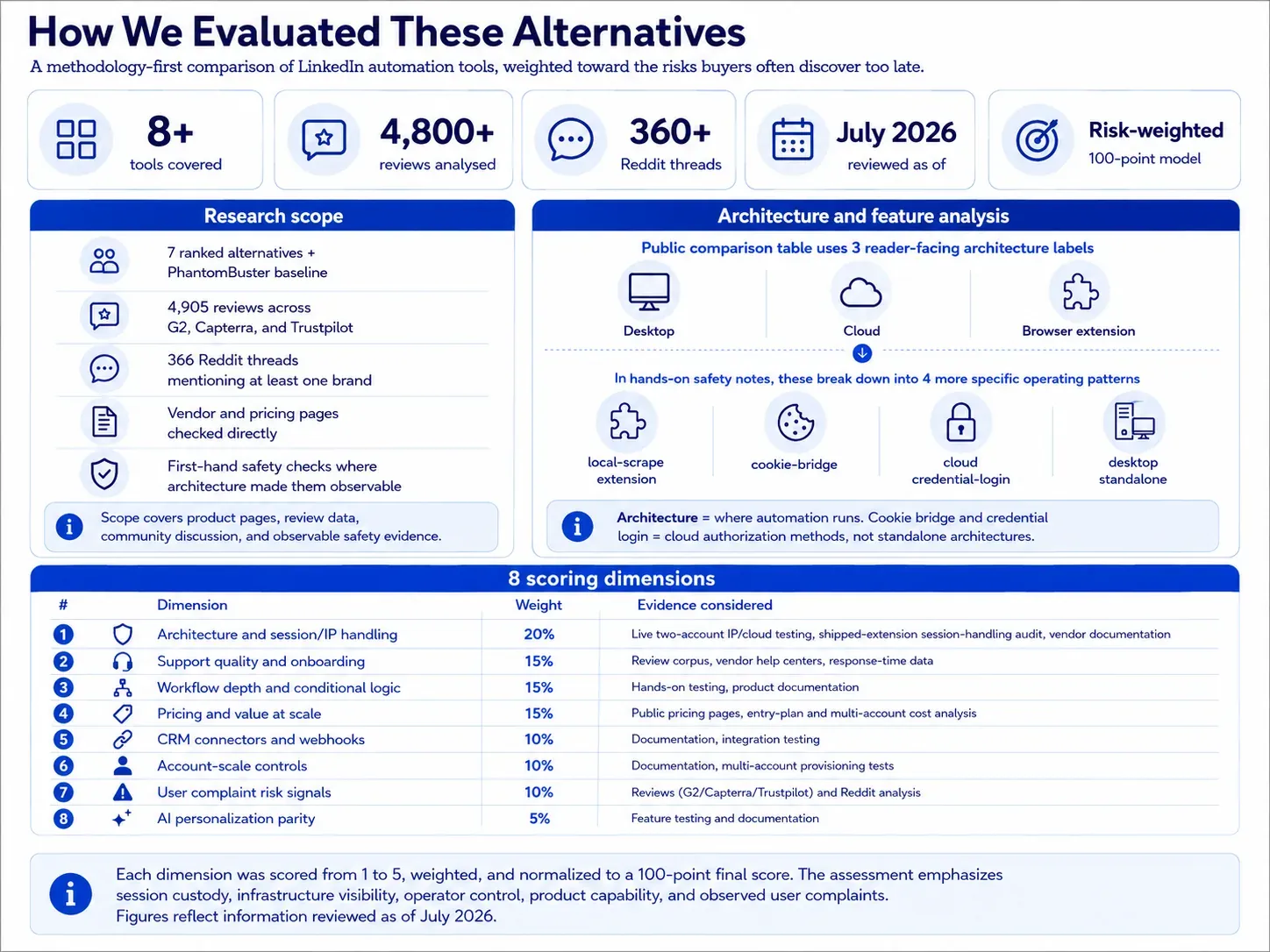
We weighted this comparison toward the risk buyers usually discover too late: where the LinkedIn session runs, what infrastructure LinkedIn sees, and whether the tool gives the operator enough control to keep activity conservative.
How We Evaluated These Alternatives

8+ tools, 4,800+ reviews, 360+ Reddit threads analysed (as of July 2026).

1. Research scope

The scope covers 7 ranked alternatives plus the PhantomBuster baseline, 4,905 reviews across G2, Capterra, and Trustpilot, 366 Reddit threads mentioning at least one brand, vendor/pricing pages checked directly, and first-hand safety checks where the architecture made those checks observable.

2. Product and feature analysis

The main table uses three reader-facing architecture labels: Desktop, Cloud, and Browser extension. In the hands-on safety notes, those break down into local-scrape extension, cookie-bridge, cloud credential-login, and desktop standalone, because that is the level where session custody and observed risk differ. Architecture is where automation runs; cookie bridge and credential login are cloud authorization methods, not standalone architectures.

Scoring dimensionWeightEvidence considered
Architecture and session/IP handling20%Live two-account IP/cloud testing, shipped-extension session-handling audit, vendor documentation
Support quality and onboarding15%Review corpus, vendor help centers, response-time data
Workflow depth and conditional logic15%Hands-on testing, product documentation
Pricing and value at scale15%Public pricing pages, entry-plan and multi-account cost analysis
CRM connectors and webhooks10%Documentation, integration testing
Account-scale controls10%Documentation, multi-account provisioning tests
User complaint risk signals10%Reviews (G2/Capterra/Trustpilot) and Reddit analysis
AI personalization parity5%Feature testing and documentation

LinkedIn automation scoring model

Each dimension was scored from 1 to 5, weighted, and normalized to a 100-point final score. The assessment combines public documentation, user-review analysis, live product testing, IP/session inspection, and browser-extension analysis. Pricing data and architecture labels reflect information reviewed as of July 2026.

Architecture labelWhat it meansWhere automation runsIP LinkedIn seesWho holds the session
DesktopA local app or user-controlled VPS runs the automationUser's machine or user-controlled VPSUser IP, VPS IP, or assigned dedicated proxyUser-controlled environment
CloudCampaigns run inside the vendor's web app and cloud infrastructureVendor cloudVendor-assigned IP, proxy, or dedicated IPVendor-managed cloud session
Browser extensionA browser extension operates inside the user's active LinkedIn browser sessionUser's browserUser IPUser's browser session; the extension reads or acts within that session

LinkedIn automation architecture glossary

Architecture labels describe where automation runs. They do not by themselves determine the final product score; risk also depends on session transparency, proxy controls, throttling, workspace governance, and observed user complaints. Labels reflect public information reviewed as of July 2026.

Session-access methodWhat it meansApplies to
Credential loginThe user connects or logs into LinkedIn through the vendor's cloud app, creating a cloud-managed sessionCloud tools
Cookie bridgeA browser extension or handoff flow transfers an existing browser session to the vendor cloudCloud tools with extension-assisted setup

Cloud session-access methods

Credential login and cookie bridge are authorization/session-access methods, not separate product architectures. Both can result in automation running from the vendor cloud once the session is connected.

7 Best PhantomBuster Alternatives Compared

The table below keeps the scan layer simple: architecture, entry price, trial length, composite rating, LinkedIn platform coverage, and event/group capabilities. The deeper session-custody evidence lives in the brand sections and the Methodology Deep-Dive, where it can be stated without cramming long caveats into table cells.

ToolArchitectureStarting price/moFree trial (days)Composite rating (reviews)LinkedIn platformsEvents & groups
PhantomBusterCloud$69144.08 (209)LinkedIn, Sales NavigatorYes
Linked HelperDesktop$15/mo144.77 (825)Basic, Sales Navigator, RecruiterYes
ExpandiCloud$99/mo7 observed; 14 advertised4.19 (331)Basic, Sales NavigatorNo
WaalaxyBrowser extension + cloud-bridge$42/mo144.57 (2,026)Basic, Sales NavigatorNo
Dux-SoupHybrid (Extension / Cloud)$14.99/moNot stated (0 observed)4.42 (139)Basic, Sales NavigatorNo
HeyReachCloud$79/mo144.55 (73)Basic, Sales Navigator, RecruiterNo
DripifyCloud$59/mo74.61 (1,172)Basic, Sales Navigator, RecruiterNo
SkyleadCloud$100/mo73.43 (144)Basic, Sales Navigator, RecruiterNo

Top PhantomBuster alternatives compared by price, architecture, ratings, and LinkedIn coverage

As of July 2026 - G2, Capterra, Trustpilot, vendor pricing pages, and vendor documentation. Composite rating is the unweighted mean of G2, Capterra, and Trustpilot where available; review count appears in parentheses.

As of July 2026 - G2/Capterra/Trustpilot + vendor pricing pages. Linked Helper is the first ranked row because it is the publisher's product and the recommendation; PhantomBuster appears only as the baseline the reader is replacing.

1. Linked Helper

Linked Helper is the one ranked alternative where the LinkedIn session stays off vendor infrastructure: actions run through your desktop or VPS, using your IP or a proxy you control. Buyers leaving PhantomBuster for safety and cost get that custody shift at $15/mo, with the trade-off that LH remains LinkedIn-first.
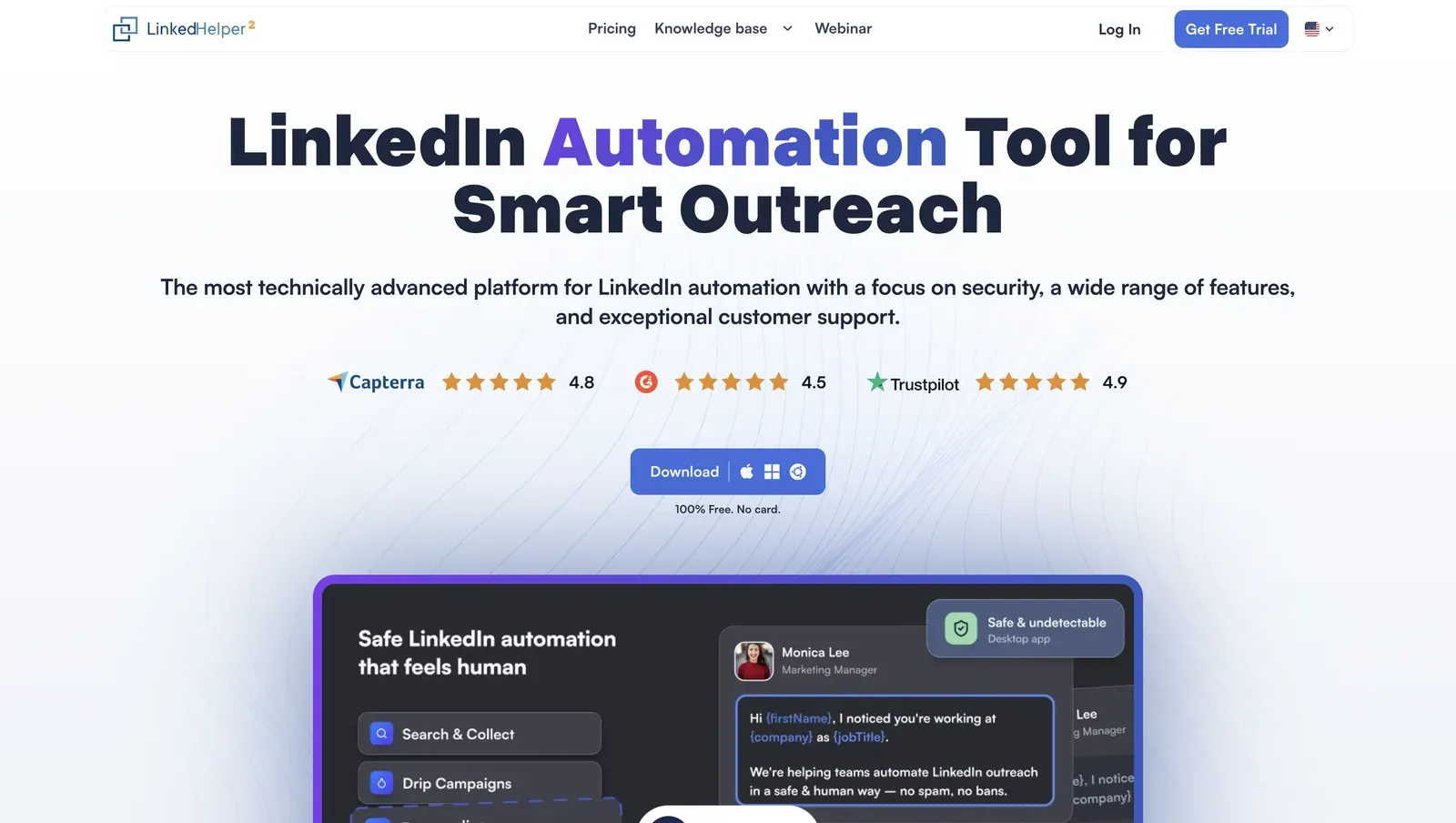
Linked Helper home page - July 2026

Linked Helper's homepage presents the desktop app, public ratings, and security-first positioning - July 2026

Founded in 2016 and headquartered in Wilmington, Delaware, Linked Helper covers LinkedIn connection requests, follow-ups, InMails, Sales Navigator and Recruiter workflows, CRM sync, and event/group engagement. Its annual Standard license is $8.25/mo equivalent. The evidence base is broad for this roster: 800+ analyzed reviews, plus 60+ Reddit mentions with no negative LH sentiment in the analyzed set.

Quick facts about Linked Helper

  • Founded: 2016
  • HQ: United States (Wilmington, Delaware)
  • Pricing: $15/mo ($8.25/mo annual), 14-day free trial
  • G2: 4.5★ (142) · Capterra: 4.9★ (252) · Trustpilot: 4.91★ (431)
  • Last 6 months: 4.61★ across 23 recent reviews; still above 4.5★
  • Architecture: Desktop app with built-in browser engine; VPS + Web Version for 24/7 access

Vendor pricing & feature pages (as of 2026-04-22 to 2026-06-08) + G2/Capterra/Trustpilot/Reddit (computed 2026-07-08)

Key Features

  • Web Version — login-based browser access to a Linked Helper instance running on a VPS, which gives 24/7 control without handing the LinkedIn login to a SaaS backend.
  • AI ICP detection — AI reads collected profiles against the Ideal Customer Profile, so the weekly invite budget is spent on better-matched leads instead of noisy search results.
  • AI messages in-flow — generated invites and follow-ups can auto-send or wait for manual review before release, which keeps personalization inside the campaign workflow.
  • Proxy quality checkper-account proxies can be scored before connecting an account, so a bad datacenter/VPN signal is visible before LinkedIn sees it.
  • CRM and history export — 11 direct CRM connectors plus full messaging-history export give teams contact sync and conversation backfill.

The overall review pattern is clearly positive. Among the 825 reviews analyzed, relatively few met the negative-review threshold. Positive feedback consistently centers on support, pricing, long-term use, and the desktop architecture. The main criticism comes from older reviews describing a steeper learning curve, but that theme is far less common in recent feedback, indicating continued product refinement over time.

What reviewers say about Linked Helper

Real-world scenario

The practical use case is controlled personalization: the scenario here is using AI personalization to support the ICP action of converting as many LinkedIn profiles into qualified leads as possible within LinkedIn’s weekly invitation limit. The assigned Reddit card reflects this operator pattern in the wild: Linked Helper handles sequencing, while AI-generated personalization improves the relevance of each outreach instead of sending the same message to everyone.

Reddit
ChatGPT
sequencing and follow-ups go through linked helper, but I write the actual message copy myself then ask AI to give me like 4 variations so I'm not blasting the exact same sentence to everyone.

Where this bites: Linked Helper is not native multichannel software. It can enrich and export emails, but it does not run built-in email drip sequences, so email-first teams should pair it with a dedicated email tool. Desktop control and advanced filters also create more setup work than a one-click cloud signup.

Safety signal: The safety claim is not zero restriction risk. The point is lower custody plus conservative pacing; one reviewer framed slower operation as the cost of staying under LinkedIn detection patterns.

Would be great for it to be faster, but I understand the limitations and bot detection that LinkedIn has in place.

Read the full review on Trustpilot

Trustpilot
Rating: 5 out of 5
JS
John Sukkar

Bottom line

Teams prioritizing LinkedIn session control, low entry cost, and control over account infrastructure have the clearest reason to start with Linked Helper.

If always-on multichannel email is mandatory, keep a dedicated email tool beside it; if the lead pain is PhantomBuster-style cloud session custody, Linked Helper's desktop app, VPS path, Web Version, and proxy checks answer it directly.

2. Expandi

Expandi is a cloud-bridge tool: its connector passes the LinkedIn login to vendor cloud, and our two same-geo test accounts drew opposite assigned IP risk profiles. Sales teams wanting onboarding calls, native email follow-ups, and AI drafting still reach for it, but at $99/mo it is premium-priced, not a cheaper escape.

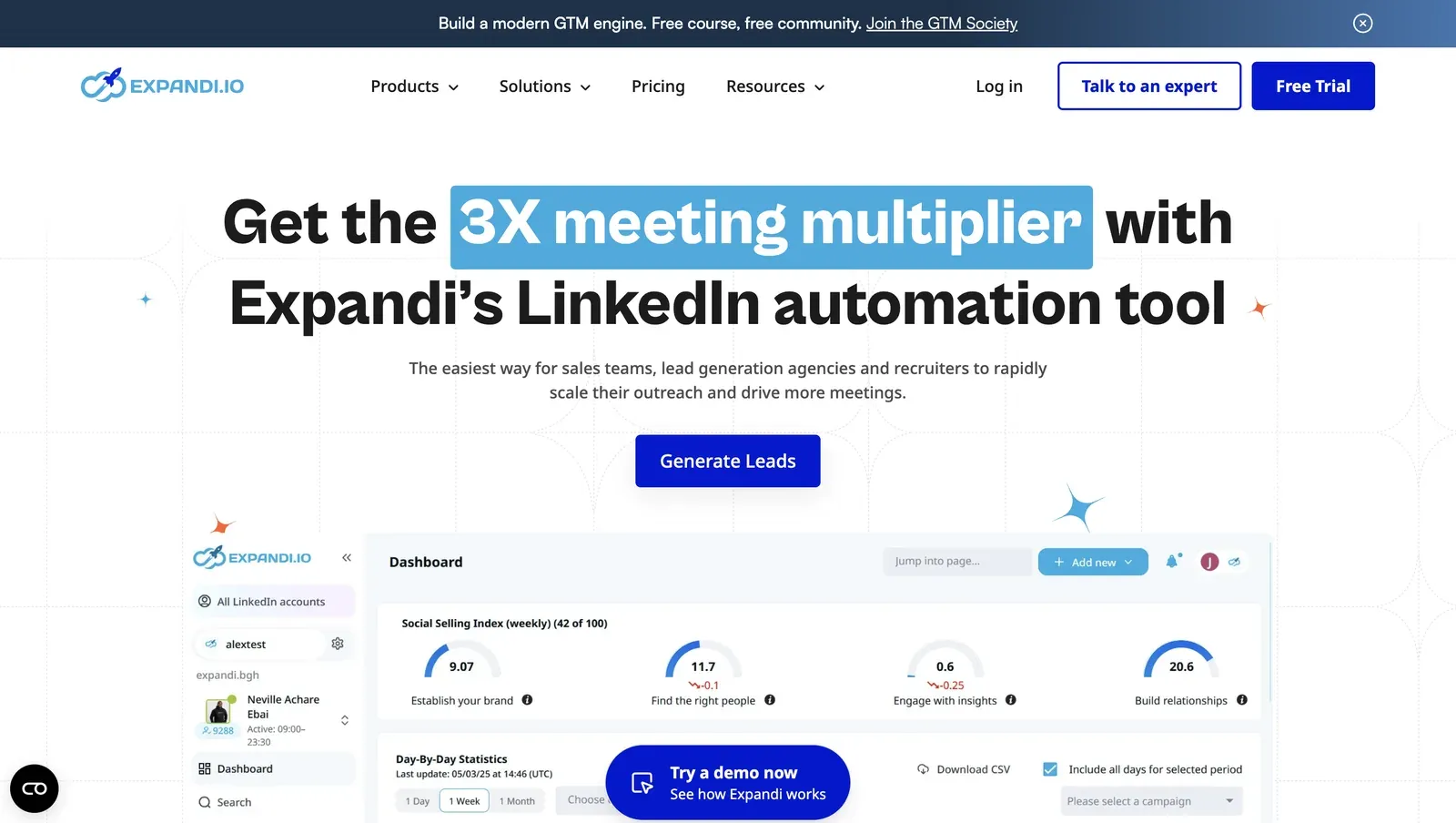
Expandi homepage - July 2026

Expandi's homepage frames the product around LinkedIn automation for sales teams, agencies, and recruiters - July 2026

Expandi, founded in 2019 and listed from Ohio, runs LinkedIn outreach from the cloud for sales teams, lead-generation agencies, and recruiters. The public plan starts at $99/mo Business, or $79/mo equivalent annually, and the product combines LinkedIn campaigns with email follow-ups, CRM/webhook integrations, and guided onboarding. In practice, that cloud model removes local uptime work, which means the account's operating environment depends on Expandi's login flow, proxy assignment, and session handling.

Quick facts about Expandi

  • Founded: 2019
  • HQ: Ohio, USA
  • Pricing: $99/mo ($79/mo annual), vendor advertises 14 days but first-hand signup showed 7 days with card required
  • G2: 4.1★ (98) · Capterra: 4.4★ (31) · Trustpilot: 4.07★ (202)
  • Last 6 months: 4.66★ (trending up) across 38 reviews — onboarding-call praise is driving the rise
  • Architecture: cloud-bridge / session-upload (vendor-cloud custody)

Vendor pricing & feature pages (as of 2026-04-22 to 2026-05-11) + G2, Capterra, Trustpilot & Reddit reviews (computed 2026-07-08)

Key Features

  • Cloud campaign execution — Expandi runs LinkedIn activity from its cloud after account connection, which reduces local uptime work but shifts session custody to the vendor environment.
  • LinkedIn plus email follow-ups — native email follow-ups can sit in the same sequence, a multichannel convenience that still depends on the LinkedIn account connection being handled safely.
  • Smart limit ranges — the pricing page describes smart ranges for connections, messages, InMails, and event invites; those controls throttle volume but do not remove restriction risk.
  • Proxy controls after setup — Expandi documents custom proxy support per LinkedIn account, while the live onboarding test did not offer add-your-own proxy before the assigned IP was used.
  • CRM and webhook integrations — HubSpot, Pipedrive, and Salesforce are covered through webhooks/API, which makes campaign handoff possible without making CRM breadth the safety control.
  • AI Analyzer — Expandi documents AI-generated messages and sentiment analysis, so the AI layer helps draft and classify outreach rather than changing where the LinkedIn session runs.

The pattern is onboarding: the recent ratings lift reads like a human-support halo, not a safety proof. The strongest fresh praise is about live onboarding calls, practical setup help, and strategy coaching, while the same review set still contains account-restriction and billing-friction reports.

What reviewers say about Expandi

Real-world scenario

The cleanest switching story is an inbound one: a reviewer arrived from Dripify and praised Expandi's functionality plus two onboarding calls. That story explains why buyers try Expandi, but it does not answer the session-custody question by itself.

coming from dripify, blown away by advanced functionality and customer service. Had 2 onboarding calls to make sure runs safely and smoothly

Read the full review on Trustpilot

Trustpilot
Rating: 5 out of 5
DR
Dan Rémi

Where this bites: the negative cluster is not just generic dislike. It concentrates around account restrictions, inconsistent operational guidance, and $99 cancellation friction, which matters because a premium PhantomBuster alternative has to reduce risk, not just add onboarding.

Reported limitations

The same price objection shows up outside reviews, including the assigned Reddit cost thread.

Reddit
BootstrappedStacks
when a tool asks for $99/mo per user, I'm basically looking at a bill that will kill my profit margin.

Be careful - your LinkedIn account can be disabled if it's brand new. I would only use this if your account is over a month old. My LinkedIn account got disabled… the support team gave me a refund.

Read the full review on Trustpilot

Trustpilot
Rating: 5 out of 5
EE
Edgar Estrada

Safety and Setup Notes

What was checkedResult
Login modelCredentials login — Expandi starts a fresh LinkedIn session from vendor infrastructure, so LinkedIn sees a new cloud-side login rather than only the user's normal browser.
Can I choose the desired location?Yes — 96 locations; country choice helps with geography, but it does not prove the assigned IP has a clean reputation.
Can I add my own proxy?No at onboarding; vendor docs support BYO proxy later in the proxies tab, which means the first connection can happen before the user vets the exit IP.
Can I select a timezone when adding an account?Yes — this reduces one geo/timezone mismatch, but it does not change who controls the cloud exit IP.
Cloud IP for account 191.165.182.32 — Free SAS, Brittany / Saint-Grégoire, France
OS / browser for account 1 (tool-reported)Chrome / Mac OS X
Account 1 IPQualityScore resultFraud 100/100 via IPQualityScore (IPQS), an independent IP-quality signal, not LinkedIn's enforcement verdict; proxy Yes, recent abuse Yes, residential connection type, high abuse velocity — high-risk on IPQS's own scale.
Cloud IP for account 2 (same geo)2a01:cb00:8428:a00::0 — Orange France, Centre-Val de Loire / Beaugency, France
OS / browser for account 2 (tool-reported)Chrome / Mac OS X — identical fingerprint to account 1
Account 2 IPQualityScore resultFraud 0/100 via IPQS; proxy No, recent abuse No, residential connection type, abuse velocity none — a clean IP-quality signal.
Same IP or /24 across the two accounts?No — different IPs, no shared /24, different providers; two accounts created from the same geography still inherited different risk profiles.
Is a credit card required for the trial?Yes — practical trial friction because the account can be charged if cancellation goes wrong.
Trial duration7 days observed; the pricing page claims 14, so the public trial claim is contested.

Expandi — live cloud/IP test (June 2026, two accounts, registered from France)

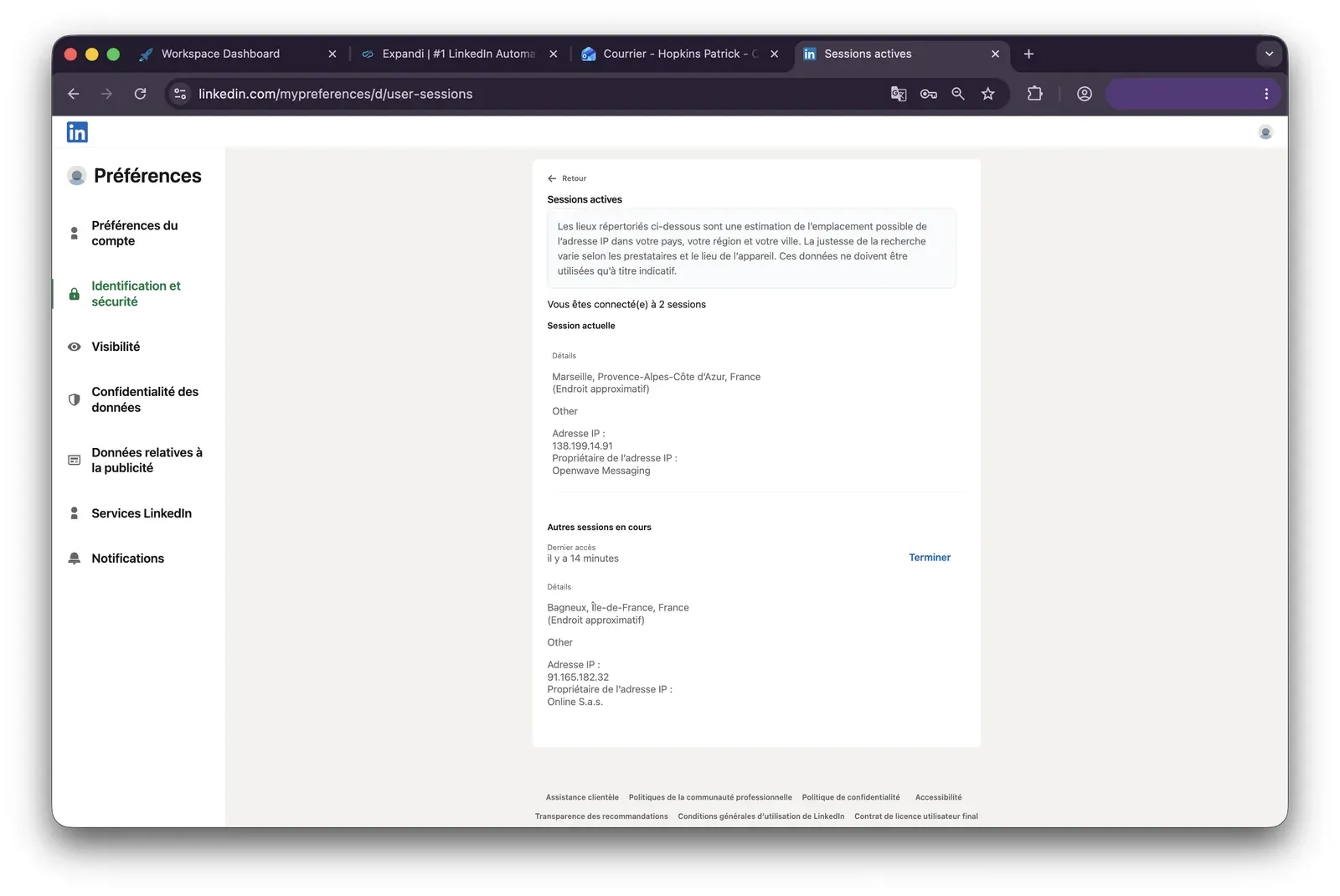
Expandi active sessions IP evidence - July 2026

LinkedIn's active-sessions page shows the extra session and provider behind one Expandi test account - July 2026

What was checkedFinding
Ships a public extension?Yes — official Expandi.io connector that links the account, not the unrelated similarly named Expandi AI extension.
Architecture verdictCloud-bridge / session-upload — an extension copies the LinkedIn login to the vendor cloud, which then highly likely runs the account from vendor datacenter infrastructure, meaning rented-server addresses rather than the user's normal residential/mobile connection; this is a high-risk custody pattern.
Reads the LinkedIn session cookie (li_at)?Yes — li_at is the LinkedIn login in cookie form; the connector copies it to app.expandi.io, so the vendor cloud can act as the account.
Direct LinkedIn (Voyager) API calls?Yes — the connector makes LinkedIn Voyager requests, which adds an API-request-map signal because cloud-side activity cannot perfectly reproduce a normal browser session.
Fires synthetic (isTrusted=false) clicks?No — no synthetic click automation was found in the connector, so this specific extension signal was not present in the shipped connector.
Blocks LinkedIn telemetry?No — LinkedIn telemetry was not blocked, so the connector was not hiding by stripping trackers.
Enforced daily cap in the code?None found — the connector exposes no delay, limit, or working-hours dials, so safety limits are not enforced in the extension itself.
On LinkedIn's AED probe list?Not in my June 2026 snapshot — AED (Active Extension Detection) is LinkedIn's hardcoded extension-probe list; absence then means this extension ID was not listed, not that future detection is impossible.

Expandi connector extension — source-code teardown (June 2026)

Quick facts about Expandi

I read the two tests as one custody finding: identical setup did not produce a predictable operating footprint. The practical risk is the assignment process, not a single bad row in a table.

The extension teardown points the same way: Expandi's shortcut is to move the login into vendor custody, so the exposure shifts from how carefully the user browses to what Expandi's cloud presents. A desktop/VPS model removes that vendor-cloud assignment step; the control difference is the point.

Bottom line

Sales teams and agencies wanting onboarding help, native email follow-ups, and AI-assisted message work reach for Expandi; the review pattern shows that human onboarding is the clearest convenience. If the priority is leaving PhantomBuster's vendor-held session model behind, Linked Helper's desktop app plus VPS and Web Version gives always-on operation without moving the LinkedIn session into a vendor-held cloud.

3. Waalaxy

Founded in 2019 in France after the ProspectIn rebrand, Waalaxy covers LinkedIn outreach, cold email follow-ups, HubSpot/Pipedrive sync, and Make/Zapier/n8n bridges to 2,000+ apps. Its annual Pro equivalent is $20.5/mo with a 14-day free trial on the vendor pricing page, so budget-sensitive growth and sales teams notice it before some higher-priced cloud tools. Mechanically, the user connects a logged-in account and builds campaigns around it.

3. Waalaxy

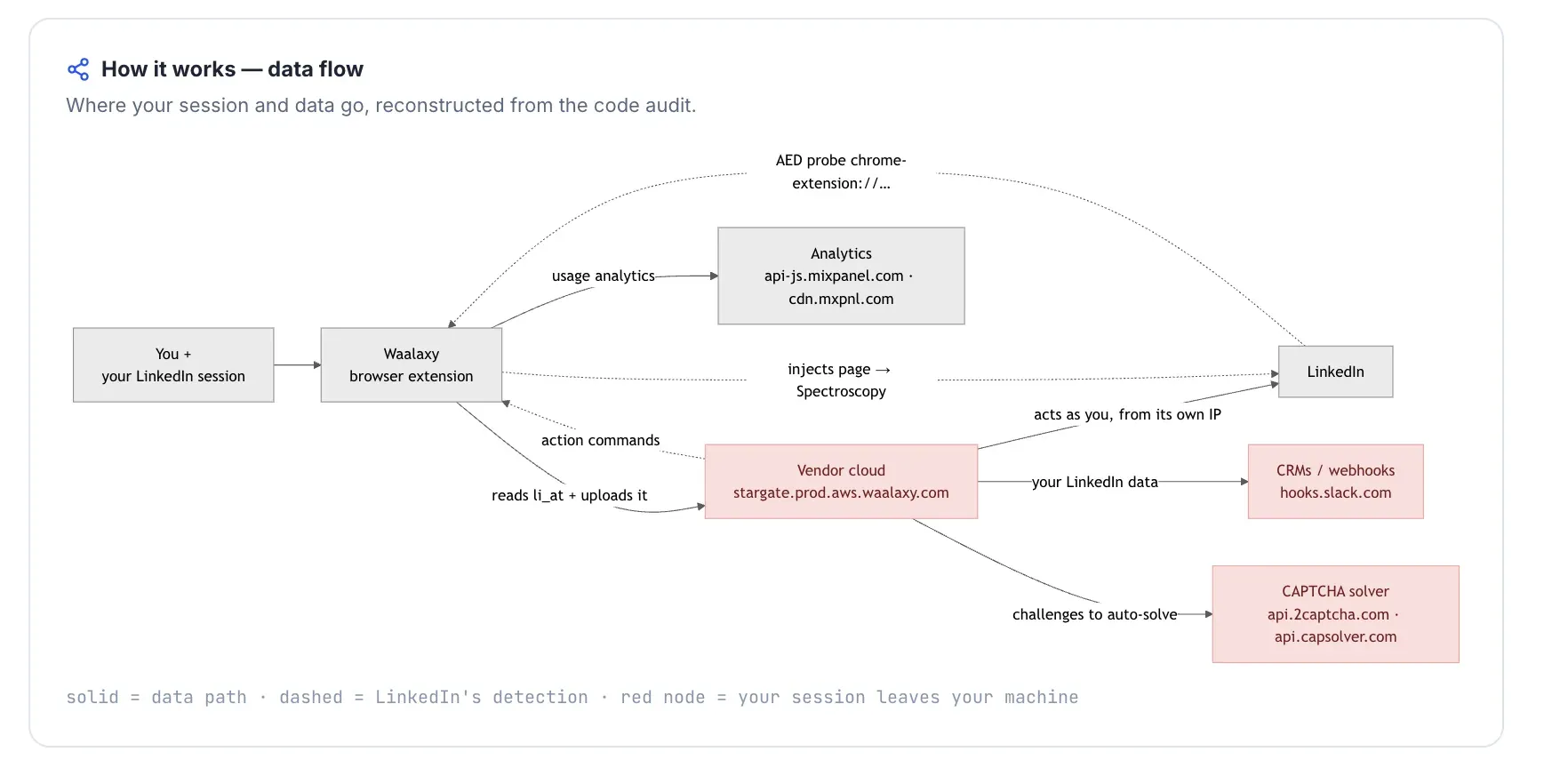
Waalaxy's UI praise hides the sharpest finding: its Chrome extension copies the live LinkedIn cookie jar into Waalaxy's cloud and is on LinkedIn's AED probe list. Sales teams wanting a lower-priced PhantomBuster alternative still reach for it at $42/mo, but the browser session is not kept inside the browser.

Quick facts about Waalaxy

  • Founded: 2019 (as ProspectIn; rebranded Waalaxy)
  • HQ: France (SAS Waapi; GDPR jurisdiction)
  • Pricing: $42/mo Pro ($20.5/mo annual), 14-day free trial
  • G2: 4.6★ (528) · Capterra: 4.4★ (252) · Trustpilot: 4.71★ (1,245)
  • Last 6 months: 4.84★ (trending up) across 362 reviews
  • Architecture: cookie-bridge / session-upload browser extension (copies the LinkedIn login to vendor cloud)

Vendor pricing & feature pages (as of 2026-05-27) + G2, Capterra, Trustpilot & Reddit reviews (computed 2026-07-08)

Key Features

  • LinkedIn + email sequences — Native cold email sequences and automated email follow-ups are listed on Waalaxy's pricing page.
  • Waami AI assistant — AI message generation, smart reply detection, and 25 email-finder credits/mo sit in the Pro plan.
  • CRM and workflow sync — HubSpot and Pipedrive are native paths, with Make/Zapier/n8n bridges to 2,000+ apps from the vendor site.
  • Sales Navigator prospecting — Recorded platform support covers Basic LinkedIn and Sales Navigator; Recruiter support is unconfirmed and likely absent, so do not treat it as a Recruiter workflow tool.
  • Campaign sequence management — Waalaxy combines LinkedIn actions and follow-ups in campaign sequences; this is a usability convenience, not a safety claim.

The useful read is topic polarization: Trustpilot carries Waalaxy's largest sample, and recent praise centers on support, UI ease, and the AI assistant. The trailing-six-month lift means the product is not collapsing; the risk signal clusters in billing, renewal, and session-safety complaints.

What reviewers say about Waalaxy

Real-world scenario

The switch evidence is narrow but honest: one Trustpilot reviewer arrived from Linked Helper because Waalaxy felt easier, while another review points back toward Linked Helper on pricing. The card below is the ease/UI win; it is not a safety verdict.

Where this bites: The cautionary set concentrates around renewal/pricing and reliability. Waalaxy can be well-liked and still carry two concerns a PhantomBuster switcher is trying to reduce: billing surprise and account exposure.

Reported limitations

Account risk also appears directly in Trustpilot. We are using one safety card here because the CMS renders a single account-risk report as a proof card, but the paired pattern matters: another reviewer reported a shadow-ban after too many connection requests with no warning, which lines up with the missing enforced cap found in teardown.

1 day after i signed up for waalaxy, my linkedin account had an attempted hack from India - never had this happen before so definitely not a coincidence

Read the full review on Trustpilot

Trustpilot
Rating: 1 out of 5
LA
Luqman Aziz

The assigned Waalaxy Reddit signal says the same custody problem in plainer language.

Reddit
smallbusiness
tools like lemlist and waalaxy charge $50-100/month and store your linkedin session, your leads, your messages on their servers.

Safety and Setup Notes

What was checkedFinding
Ships a public extension?Yes — Waalaxy - LinkedIn Automation Tool, the connector used to link the account to Waalaxy
Architecture verdictCookie-bridge / session-upload hybrid — the extension copies the LinkedIn login to Waalaxy cloud, which means local browser use and cloud-side account use can both exist
Reads the LinkedIn session cookie (li_at)?Yes — uploads the full LinkedIn cookie jar including li_at and JSESSIONID to stargate.prod.aws.waalaxy.com; this is the LinkedIn login in cookie form, so whoever holds it can act as the account
Direct LinkedIn (Voyager) API calls?Yes — 80 Voyager signals with LinkedIn internal API headers, which adds an API-request-map surface LinkedIn can compare against normal browser behavior
Injects code into LinkedIn's page (DOM)?Yes — 13 named web-accessible-resource injection bundles were documented, so the extension leaves page-level traces for LinkedIn's scanners to probe
Fires synthetic (isTrusted=false) clicks?Yes — 48 synthetic-event signals and 4 programmatic-click signals, meaning some actions are distinguishable from real browser clicks
Blocks LinkedIn telemetry?Yes — strips the x-cki header on LinkedIn requests; blocking telemetry is itself a detectable behavior
Enforced daily cap in the code?None found — no enforced daily invite cap, working-hours guardrail, or randomization; delay presets can be 0 ms, so safety pacing is user-managed
On LinkedIn's AED probe list?Yes — LinkedIn's hardcoded extension-probe list includes Waalaxy's extension ID, so installed can be visible before automation starts

Waalaxy extension — source-code teardown (July 2026)

Quick facts about Waalaxy

Honest read: I could verify the extension path, not a live Waalaxy assigned IP test, so this is a custody-and-detection finding rather than an IP-quality finding. The pattern is stronger than a normal browser add-on: the extension creates a cloud bridge for the account login while leaving extension-level traces LinkedIn can probe.

For a PhantomBuster switcher, Waalaxy changes the interface and channel mix, but not the core account-control problem. Why Linked Helper is different: no public Chrome extension to probe, no vendor cloud copy of the LinkedIn session, and 24/7 use via VPS + Web Version.

Bottom line

Sales and growth teams wanting native LinkedIn + email sequencing, integrations, and a lower entry price than PhantomBuster reach for Waalaxy; the review record also credits UI and support.

If the priority is leaving PhantomBuster because vendor custody is the concern, Linked Helper's desktop app and VPS + Web Version answer the 24/7 need without adding a browser-extension cloud bridge.

4. Dux-Soup

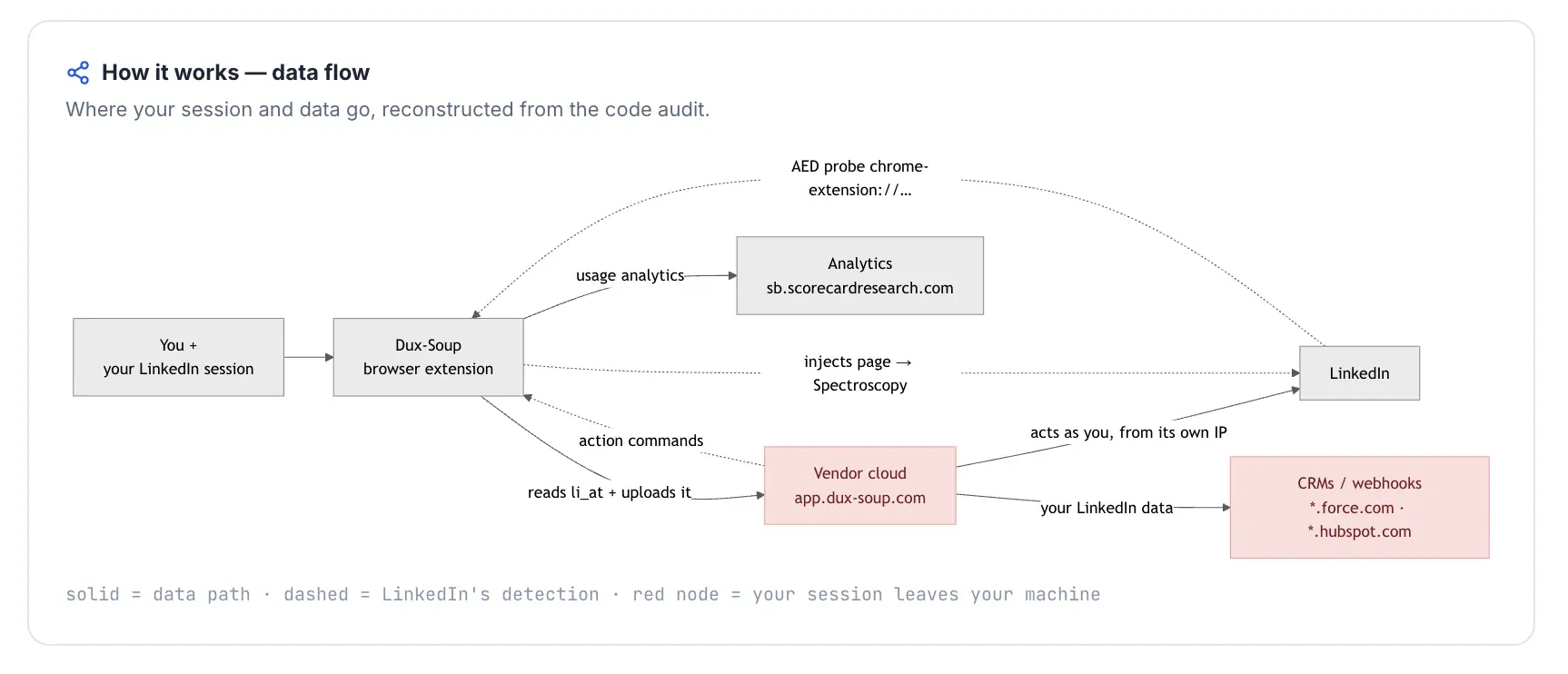
Dux-Soup answers the cheap-extension question with a split finding: local plans keep the session in your browser, but LinkedIn can see the extension before it acts and its clicks are synthetic, while Cloud Dux copies the LinkedIn login to Dux-Soup's cloud so vendor infrastructure can act as the account. Operators comparing entry price still notice the $14.99 floor.

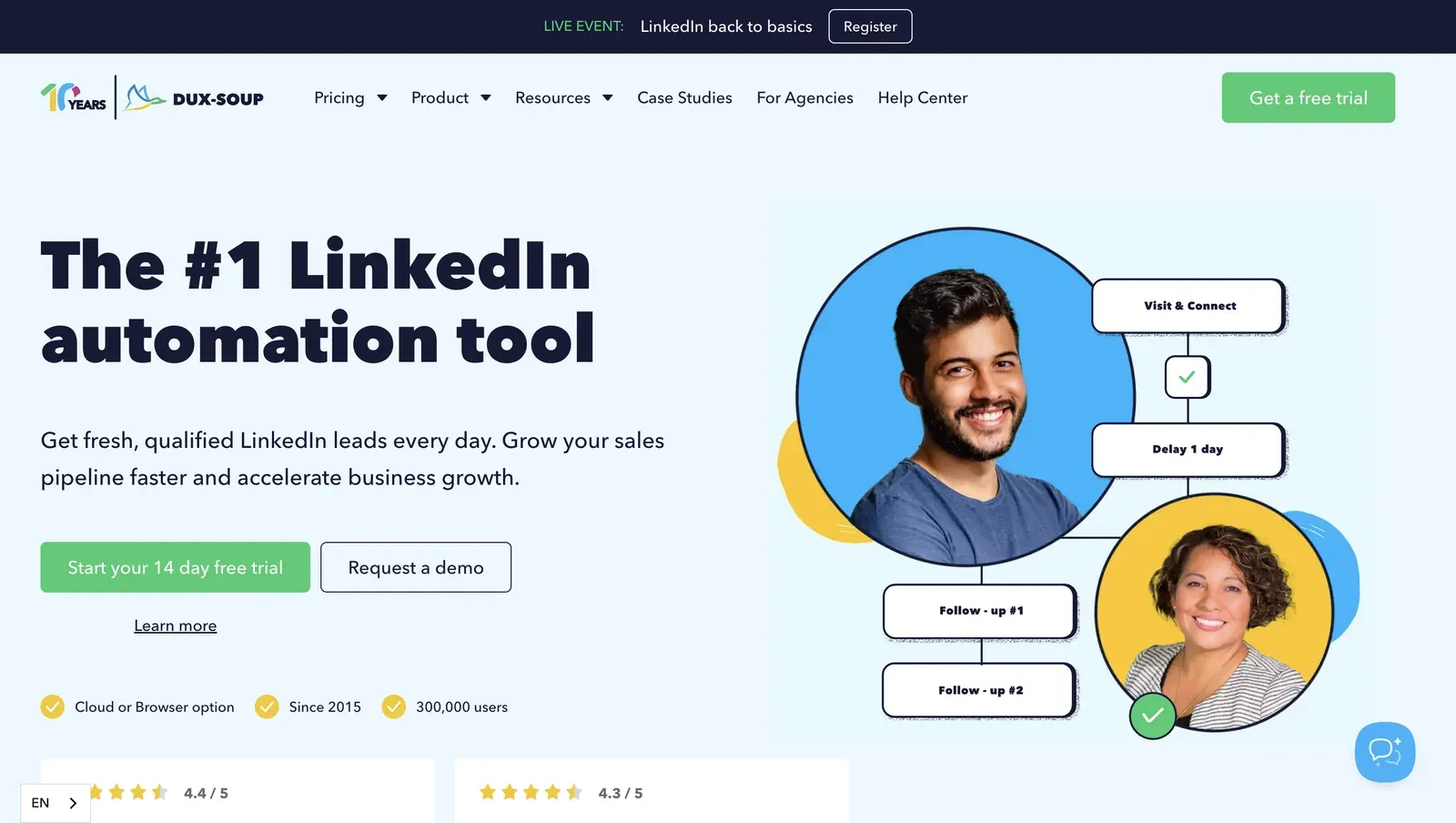
Dux-Soup homepage - July 2026

Dux-Soup's homepage shows the Cloud or Browser option and a sample Visit & Connect sequence - July 2026

Founded in 2015 in the Netherlands, Dux-Soup covers LinkedIn profile visits, connection requests, follow-ups, InMail via Sales Navigator/Recruiter, CRM pushes, and a Remote Control API. Growth marketers and solo operators wanting low entry cost often start with Pro Dux because annual billing drops to $11.25/mo; Cloud Dux adds always-on execution, which is the point where the safety model changes.

Quick facts about Dux-Soup

  • Founded: 2015
  • HQ: Netherlands
  • Pricing: $14.99/mo ($11.25/mo annual)
  • Trial: vendor lists a trial, but day count is not stated; first-hand signup required a card and showed 0 trial days
  • G2: 4.3★ (81) · Capterra: 4.0★ (16) · Trustpilot: 4.95★ (42) — sharp platform split
  • Architecture: local extension on Free/Pro/Turbo; Cloud Dux copies the LinkedIn login to vendor infrastructure, which changes which IP and fingerprint LinkedIn sees

Vendor pricing & feature pages (as of 2026-04-22 to 2026-05-27) + G2, Capterra, Trustpilot & Reddit reviews (computed 2026-07-08)

Key Features

  • Chrome-extension workflow — supports browser-based LinkedIn profile visits, connection requests, and follow-ups through local plans. This approach carries additional compliance and account-safety risk, as browser-extension automation appears on LinkedIn’s AED probe list.
  • Cloud Dux upgrade — adds always-on execution by moving the operating session into vendor-controlled infrastructure.
  • CRM integrations — connects to HubSpot, Salesforce, Pipedrive, Freshsales, SharpSpring, and HighLevel for profile-data handoff.
  • Remote Control API — lets a lead-management system control the Dux-Soup robot through an external command URL.
  • Sales Navigator support — supports InMail via Sales Navigator/Recruiter and can visit Sales Navigator profiles without a Sales Navigator subscription.
  • Per-action throttling — exposes configurable delays and action limits, but the teardown found no hard daily cap that prevents high-volume settings.

The platform split is the finding: Trustpilot's 4.95★ support-heavy score sits above G2 and Capterra, where reliability, billing, and restriction complaints show up. That makes Dux-Soup look calmer in aggregate than it feels in the long-form B2B reviews, so the praise has to travel with the trade-off cards.

What reviewers say about Dux-Soup

Real-world scenario

Because the review set has no Dux-Soup switching story, the scenario comes from the assigned Reddit thread that names Dux-Soup in the buyer's safety question. The useful part is not a product verdict; it is the operator warning that cheap LinkedIn automation still becomes risky when volume and setup are mishandled.

Reddit
Botdog
We've seen a lot of people mess these up and get restricted.

Where this bites: the same corpus that praises setup and support also contains restriction, billing, and reliability failures. The billing complaint matters in a PhantomBuster-alternatives article because a low entry price only helps if the account count and trial terms stay predictable.

Reported limitations

It got me banned. Any chrome extension or desktop app can be flagged by LinkedIn — and they banned my account.
g2 0.0★
View Original

Safety and Setup Notes

What was checkedResult
Login modelExtension session — on local plans the browser runs on the user's machine, so LinkedIn sees the user's own environment rather than a vendor cloud login
Can I choose the desired location?No
Can I add my own proxy?No — no proxy-quality checker was available in the tested flow
Can I select a timezone when adding an account?No
Cloud IP for account 1n/a — extension tool; the observed exit was the local machine in France, so there was no vendor cloud IP to score
Account 1 IPQualityScore resultNo response — no vendor cloud exit IP; IPQualityScore is an independent IP-quality signal, not LinkedIn's enforcement verdict
Cloud IP for account 2 (same geo)n/a — no second vendor cloud IP for the extension flow
Account 2 IPQualityScore resultn/a
Same IP or /24 across the two accounts?n/a — local extension flow, not a two-cloud-exit-IP setup
Is a credit card required for the trial?Yes
Trial duration0 days — the pricing page lists a trial, but the matrix had no day count

Dux-Soup — live cloud/IP test (July 2026, two accounts, registered from France)

What was checkedFinding
Ships a public extension?Yes — Dux-Soup for LinkedIn Automation, the main Chrome-extension entry point
Architecture verdictHybrid / multi-mode — Free, Pro, and Turbo run locally; Cloud plan is cookie-bridge / session-upload, where the extension copies the login to the vendor cloud
Reads the LinkedIn session cookie (li_at)?Yes on Cloud plan — li_at is your LinkedIn login in cookie form, so copying it to app.dux-soup.com lets vendor infrastructure act as the account
Direct LinkedIn (Voyager) API calls?Yes — local modes call LinkedIn's internal Voyager API from the user's browser, which means the session stays local but the request map still has to look human
Fires synthetic (isTrusted=false) clicks?Yes — programmatic click signals were present; isTrusted=false means the browser event was not generated by a real user gesture
Blocks LinkedIn telemetry?Yes — stripping tracker endpoints is itself a detectable behavior if the page reports that telemetry disappeared
Enforced daily cap in the code?None found — default invite limits are conservative, but user-raisable settings mean the tool does not force a safe ceiling
On LinkedIn's AED probe list?Yes — Active Extension Detection is LinkedIn's extension-ID probing; being listed means the install is visible before any automation runs

Dux-Soup extension — source-code teardown (July 2026)

Quick facts about Dux-Soup

I read this as a split, not a clean pass: local modes leave the account closer to the user's browser, but LinkedIn can still identify the installed extension and the browser events do not look like ordinary human clicks.

The Cloud upgrade removes that local advantage by turning the extension into a bridge to vendor infrastructure; for a PhantomBuster replacement, the bargain plan only helps if you avoid the cloud handoff. Linked Helper's desktop model changes the pivot: no Chrome extension ID, no cookie upload, and real browser events, while Web Version on a VPS covers the 24/7 use case.

Bottom line

Solo operators and small sales teams wanting a low monthly bill and a Chrome-native LinkedIn workflow reach for Dux-Soup, especially when support responsiveness matters. If you stay on local plans, Dux-Soup avoids a pure cloud-only model; if session control is the priority, Linked Helper keeps the session off vendor servers, avoids extension probes, and uses VPS + Web Version for 24/7 operation without the Cloud Dux handoff.

A 2025 Trustpilot reviewer who had used Dux-Soup since 2020 said they had never landed in "LinkedIn Jail" while using it.

5. HeyReach

HeyReach is the multi-account agency tool whose architecture creates the contradiction: its login bridge copies your LinkedIn login cookie to vendor cloud, and both trial accounts surfaced as datacenter traffic, a rented-server footprint personal sessions rarely use. Agencies wanting sender rotation reach for it at $79/mo, but the 4.55★ composite rests on only 73 reviews.

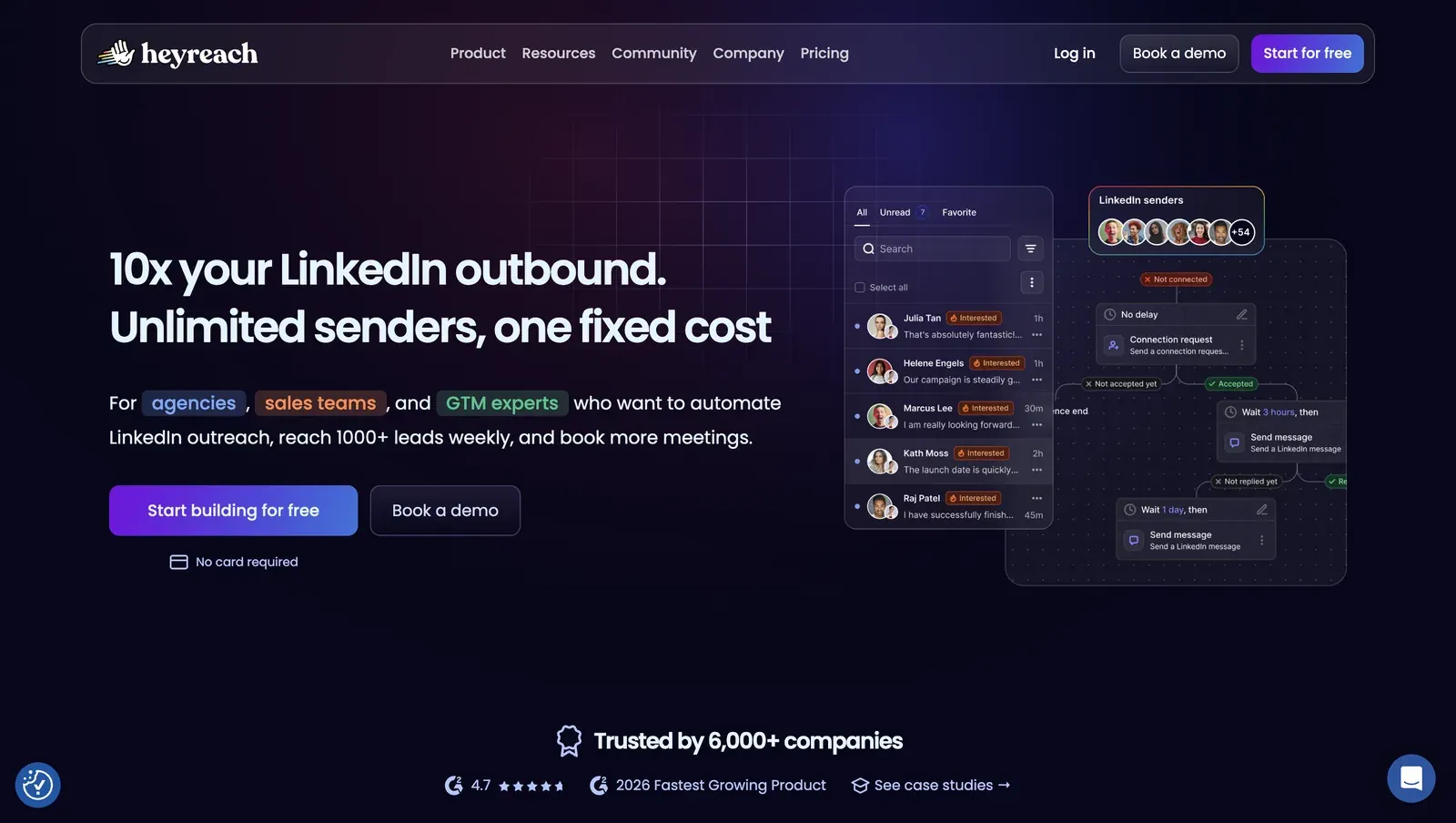
HeyReach product homepage - July 2026

HeyReach presents shared LinkedIn senders and a campaign-flow preview for high-volume outbound teams - July 2026

Founded in 2023 and based in North Macedonia, HeyReach is a cloud outreach platform for coordinating multiple LinkedIn senders, shared replies, and Clay/CRM handoffs. The annual entry is $59 per sender per month, so its scale story is still per-seat economics rather than PhantomBuster-style execution credits. It supports Basic LinkedIn, Sales Navigator, and Recruiter; event/group engagement and native email sequences are not verified as shipped.

Quick facts about HeyReach

  • Founded: 2023
  • HQ: North Macedonia
  • Pricing: $79/mo per sender ($59/mo annual), 14-day free trial, no credit card
  • G2: 4.6★ (21 listed; 10 in the analyzed review set) · Trustpilot: 4.04★ (50) · Capterra: no analyzed reviews
  • Composite: 4.55 (73); analyzed-review mean: 4.12★ (60 rated)
  • Last 6 months: too few to trend (3 rated reviews)
  • Architecture: Cloud-bridge / session-upload extension — the login is copied to vendor cloud

Vendor pricing & feature pages (as of 2026-04-22 / 2026-04-30) + G2, Capterra, Trustpilot & Reddit reviews (computed 2026-07-08)

Key Features

  • Sender rotation — multiple LinkedIn senders can be coordinated from one workspace for account-distributed outreach.
  • Unified inbox — replies from connected senders are collected into a shared team inbox for follow-up.
  • CRM and enrichment handoff — 31 native integrations are listed, including HubSpot and Breakcold, for moving lead data into the outreach workflow.
  • Custom proxy path — like other cloud tools, HeyReach supports custom proxies; the safety question is whether the user can vet the proxy before LinkedIn sees it.
  • LinkedIn account coverage — Basic LinkedIn, Sales Navigator, and Recruiter are supported, a category-standard coverage point rather than a safety differentiator.

The honesty signal is denominator size: the gap between the clean-looking composite and the lower analyzed-review mean is not cosmetic. G2 supplies a small favorable sample, Capterra supplies no analyzed-review depth, and Trustpilot carries most of the public caution evidence; in practice, that means the review score cannot carry the safety claim by itself.

What reviewers say about HeyReach

Real-world scenario

The usable switch story is churn without a named destination: a long-term agency user said the support and data mismatch issues had already pushed some client work off HeyReach. That is the relevant PhantomBuster-alternative scenario because the buyer is not just replacing a tool; they are trusting a vendor to run multiple client accounts.

Where this bites: the caution set clusters around support decline, execution reliability, and seat billing rather than confirmed LinkedIn account restrictions. That matters because the praise cluster is agency-scale usage; when the product manages many senders, support and billing failures multiply across client accounts.

Reported limitations

Account-risk signal: reviewers did not report a confirmed HeyReach account restriction in the analyzed set, but one user did object to the tool acting through their profile in a way they read as spam behavior.

Did not like that it was automatically following and basically spamming people using my profile.

Read the full review on Trustpilot

Trustpilot
Rating: 1 out of 5
GH
Gail Hawkins

Vendor-not-immune context: the assigned Reddit card is low-score, so we treat it as color rather than a headline statistic. It still reinforces the safety premise: enforcement can reach the vendor brand itself, not only end users.

Reddit
EntrepreneurRideAlong
the key insight: when LinkedIn bans a tool's company page AND the founder's profile, they're not punishing individual users. they're sending a message to the entire company.

Safety and Setup Notes

The HeyReach field tables use the IPQS, li_at, JSESSIONID, and AED terms defined above. The point to watch is custody: account linking moved the session into vendor infrastructure, then the live test showed what LinkedIn saw from that setup.

What was checkedResult
Login modelCredentials login plus login extension — a LinkedIn session is created or copied into HeyReach infrastructure
Can I choose the desired location?Yes — 154 locations
Can I add my own proxy?Yes — no proxy-quality checker
Can I select a timezone when adding an account?No
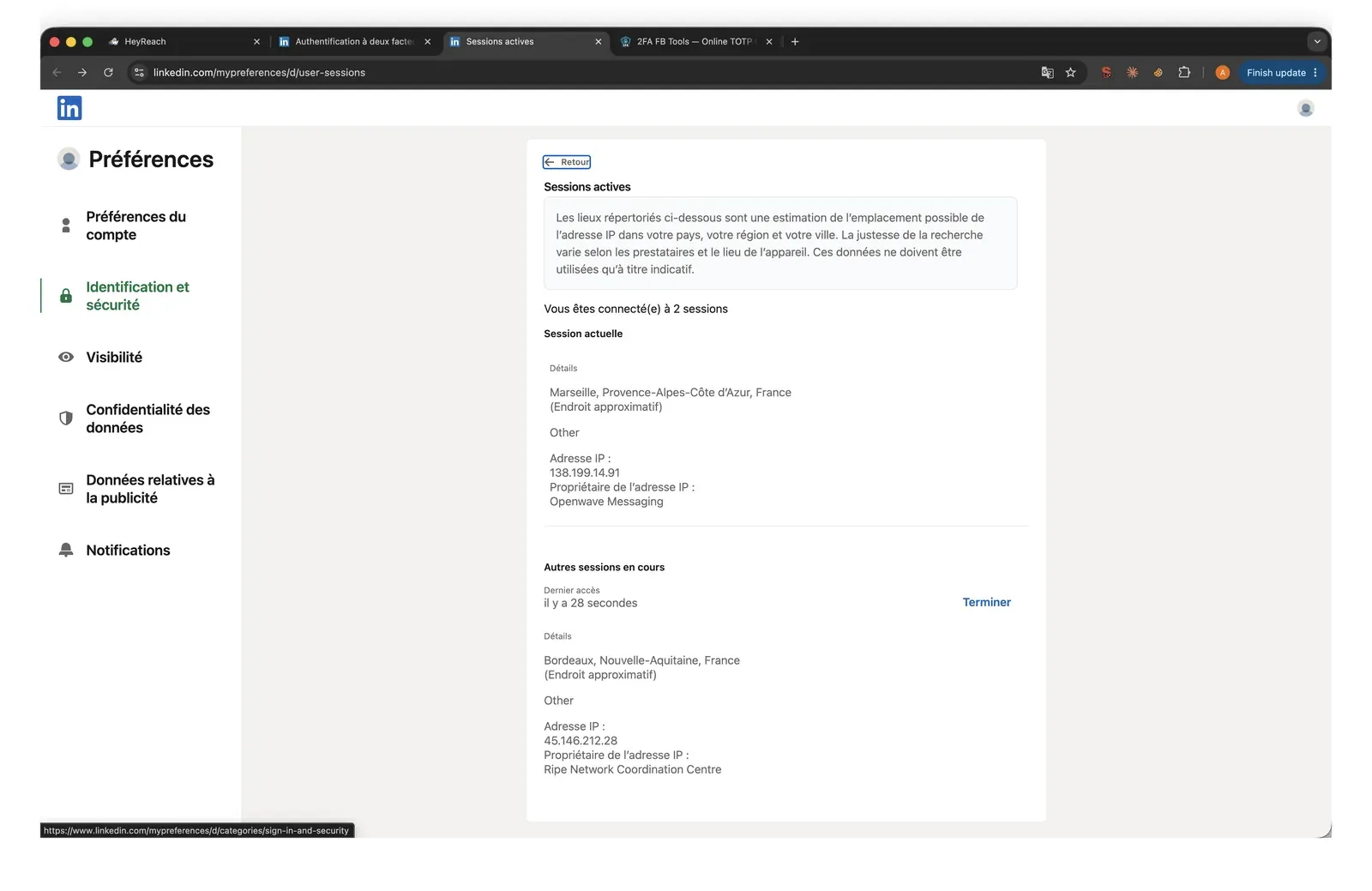
Cloud IP for account 145.146.212.28 — Altinea SAS (ASN 41405), Ile-de-France / Paris, FR
OS / browser for account 1 (tool-reported)Chrome / Windows; IPQS read Mac 10.15 / Chrome 135.0
Account 1 IPQualityScore resultfraud 100/100 · proxy Yes · VPN Yes · recent abuse Yes · Data Center · high-risk on IPQS's own scale
Cloud IP for account 2 (same geo)45.146.212.36 + 45.146.212.149 — Altinea SAS (ASN 41405), Ile-de-France / Paris, FR
OS / browser for account 2 (tool-reported)Chrome / Windows — identical fingerprint to account 1
Account 2 IPQualityScore resultfraud 100/100 · proxy Yes · VPN Yes · recent abuse Yes · Data Center · high-risk on IPQS's own scale
Same IP or /24 across the two accounts?No same IP; same /24 and same provider — two independent accounts, near-identical footprint
Is a credit card required for the trial?No
Trial duration14 days

HeyReach — live cloud/IP test (June 2026, two accounts, registered from France)

HeyReach LinkedIn active sessions datacenter IP - July 2026

LinkedIn active sessions showed HeyReach adding a cloud session beside the local browser session - July 2026

What was checkedFinding
Ships a public extension?Yes — account-linking / login bridge
Architecture verdictCloud-bridge / session-upload — the extension copies the LinkedIn login to HeyReach cloud
Reads the LinkedIn session cookie (li_at)?Yes — copies the full linkedin.com cookie jar, including li_at, JSESSIONID, and related cookies, to api.heyreach.io; that lets vendor infrastructure act as the account
Direct LinkedIn (Voyager) API calls?Yes — one-time /voyager/api/me call during account linking, so the setup flow touches LinkedIn's internal API
Fires synthetic (isTrusted=false) clicks?Yes, but inside the extension popup rather than injected into linkedin.com; low direct page-risk in this teardown
Blocks LinkedIn telemetry?No telemetry stripping found — the rule set blocks LinkedIn logout instead, which makes normal user-side revocation harder
Enforced daily cap in the code?None found — limits are cloud-side, not auditable in the shipped extension
On LinkedIn's AED probe list?Not in the June 2026 snapshot — absence from that list on one date is not a safety guarantee because the list changes

HeyReach login extension — source-code teardown (June 2026)

The combined pattern is the finding: a login bridge that transfers custody, cloud sessions that inherit rented-server exposure, and logout blocking all point in the same direction.

I would not treat positive self-reported safety reviews as enough to override that mechanism, especially with such a small rating base. The Linked Helper contrast is custody: desktop or VPS execution keeps the LinkedIn session in an environment the operator controls, while Web Version gives browser access without handing the session to a vendor cloud.

Bottom line

Agencies wanting coordinated sender rotation and a shared inbox reach for HeyReach because it centralizes client-account outreach.

If the priority is leaving PhantomBuster's cloud-session exposure rather than swapping one vendor-run session for another, Linked Helper's desktop app plus VPS and Web Version keeps the operating model out of a vendor-run multi-account cloud and avoids the thin-sample trust problem.

6. Dripify

Dripify is the mirror case for PhantomBuster: credentials-login cloud automation made LinkedIn see the test accounts from the same rented-server datacenter block, a footprint personal sessions rarely use. Revenue teams wanting one campaign workspace still reach for Dripify at $59/mo.

Founded in 2019 and listed from Texas, US, Dripify is a server-run LinkedIn and email sequence product. The useful draw is consolidation: one builder for LinkedIn touches, follow-ups, and native cold email, with a 7-day no-card trial and $39/mo annual entry price for teams comparing it with PhantomBuster's execution-credit model. The 1,100+ reviews are broad enough that the pattern is not a thin-sample artifact: praise centers on sequence setup, while the caution layer centers on billing friction and rigid campaign control.

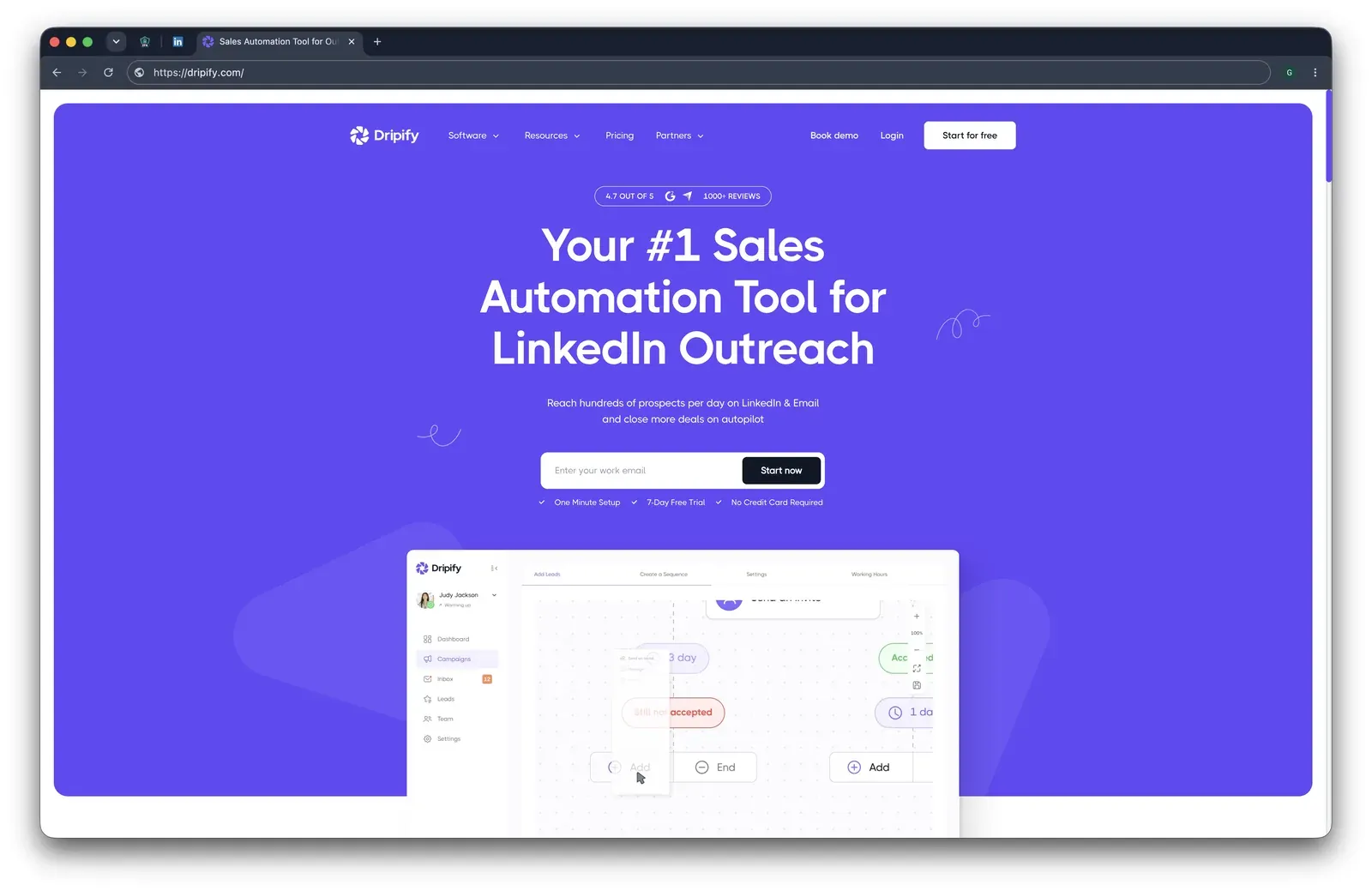
Dripify product homepage - July 2026

Dripify presents LinkedIn and email outreach as one campaign-sequence workflow - July 2026

Quick facts about Dripify

  • Founded: 2019
  • HQ: Texas, US
  • Pricing: $59/mo ($39/mo annual), 7-day free trial, no credit card
  • G2: 4.5★ (267) · Capterra: 4.7★ (476) · Trustpilot: 4.62★ (429)
  • Last 6 months: 4.67★ (flat) across 64 reviews
  • Architecture: Cloud with credential login

Vendor pricing & feature pages (as of 2026-04-22 / 2026-05-04) + G2, Capterra, Trustpilot & Reddit reviews (computed 2026-07-08)

Key Features

  • Visual drip sequences — LinkedIn and email steps run from one sequence builder for connection, message, and email follow-up.
  • Native cold email — Dripify includes email outreach, a capability Linked Helper does not ship natively.
  • Reply-aware stops — sequences stop when a lead replies so a user can take over the conversation.
  • Daily-limit rangesaction caps use min/max ranges, which adds scheduling variation but does not change where the LinkedIn session runs.
  • CRM and automation connectorsintegrations include HubSpot, Salesforce, Pipedrive, Zoho, ActiveCampaign, Zendesk, Intercom, plus Make, Zapier, and Google sync paths.

The pattern is polarity: Dripify's review story is less about a platform split than a praise-versus-limitation split. Recent praise clusters around setup, support, and LinkedIn-plus-email sequencing; the negative set clusters around cancellation path, lower-tier limits, campaign failures, and team-plan rigidity. That matters for a PhantomBuster switch because the workflow may feel calmer at first, while the operating model still needs a safety and control check.

What reviewers say about Dripify

Real-world scenario

The on-angle story is a restriction report: The assigned Reddit narrative is not a migration win; it is a churned user connecting aggressive Dripify use to account loss. That does not prove Dripify alone caused the restriction, but it is the direct brand-named safety narrative in the brief.

Reddit
LinkedInTips
I was using dripify a long time ago (linkedin automation tool) and was aggressive with it and got my account banned.

Where this bites: The caution cards are not abstract "learning curve" complaints. They point to subscription cancellation friction, lower-tier limits, workflow rigidity, and execution reliability, which are the trade-offs to weigh before treating Dripify as a direct PhantomBuster escape route.

Reported limitations

Account-risk signal: The platform-review safety signal is mixed: some reviewers praise Dripify for avoiding flags, while others report LinkedIn checkpoints and login failures under campaign load.

LinkedIn has gotten too smart about these tools and it won't let me login, gives me too many puzzles to solve or two factor logins... fails to login when I have a Dripify campaign going.

Read the full review on Trustpilot

Trustpilot
Rating: 2 out of 5
EM
Erin Monahan

Safety and Setup Notes

The Dripify live test is a cloud-infrastructure finding, not an extension finding. The table uses the IPQS and datacenter terms defined above; the conclusion is about observed vendor infrastructure, not LinkedIn's enforcement.

What was checkedResult
Login modelCredentials login — Dripify cloud starts a fresh LinkedIn session from vendor infrastructure
Can I choose the desired location?No
Can I add my own proxy?No — no proxy-quality checker
Can I select a timezone when adding an account?Yes
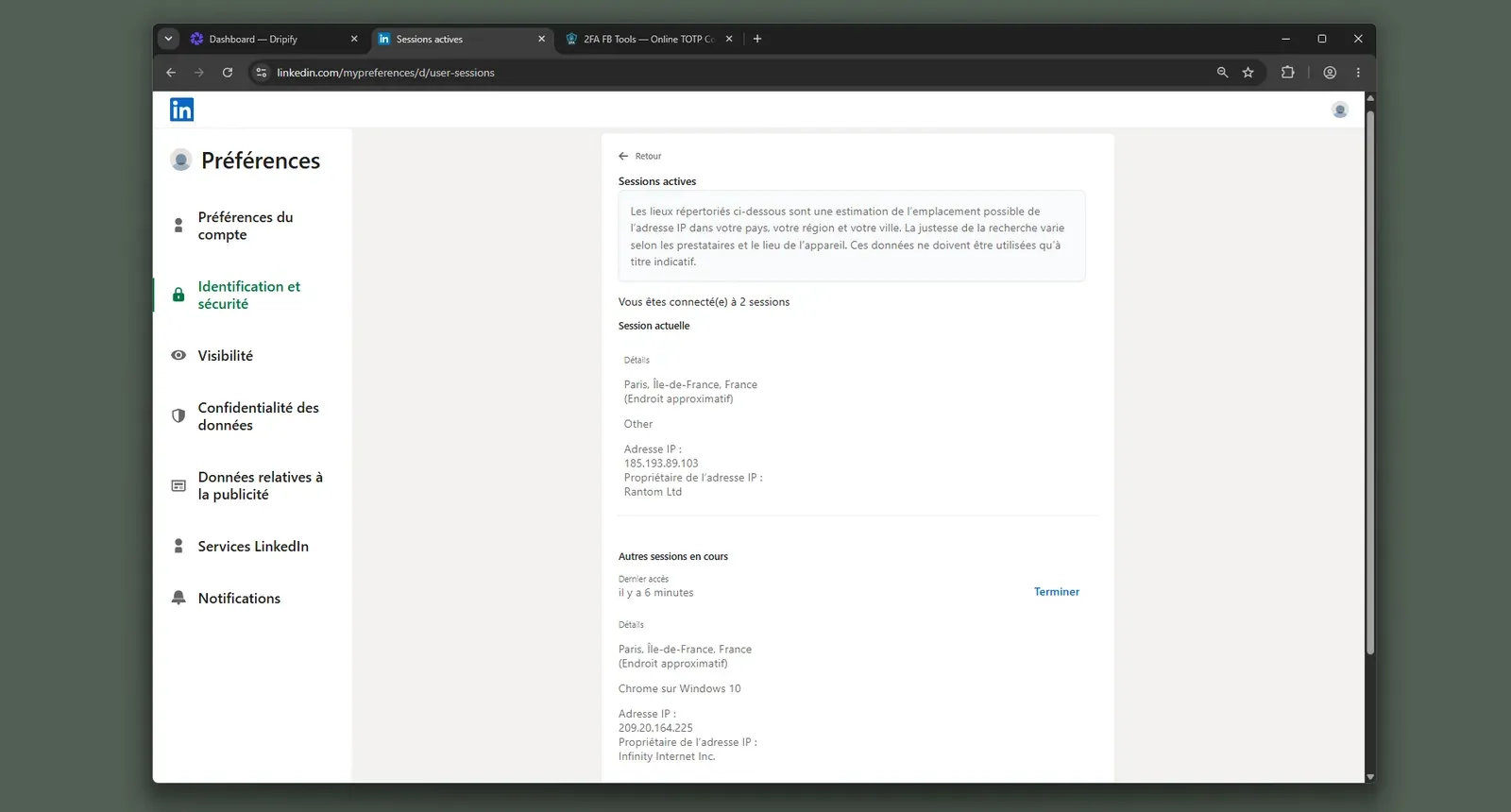
Cloud IP for account 1209.20.164.225 — HostRoyale Technologies Pvt, Ile-de-France / Paris
OS / browser for account 1 (tool-reported)Chrome / Windows (IPQS reads OS as Mac 10.15; the source appears field-swapped)
Account 1 IPQualityScore resultfraud 94/100 · proxy Yes · VPN Yes · Data Center · high-risk on IPQS's own scale
Cloud IP for account 2 (same geo)209.20.164.94 — HostRoyale Technologies Pvt, Ile-de-France / Paris
OS / browser for account 2 (tool-reported)Chrome / Windows — identical fingerprint to account 1
Account 2 IPQualityScore resultfraud 94/100 · proxy Yes · VPN Yes · Data Center · high-risk on IPQS's own scale
Same IP or /24 across the two accounts?No same IP; same /24 and same provider — two independent accounts, near-identical footprint
Is a credit card required for the trial?No
Trial duration7 days

Dripify — live cloud/IP test (June 2026, two accounts, registered from France)

Dripify LinkedIn active sessions datacenter IP - July 2026

LinkedIn active sessions showing the added cloud session alongside the local browser session - July 2026

Dripify ships no public LinkedIn extension, so there was nothing to tear down. AED is not the detection surface here.

The practical cost is control: the tested accounts inherited the vendor-assigned infrastructure rather than a network the operator could vet first. I would treat Dripify as a convenience-first cloud sequence tool, not as a safety escape from PhantomBuster.

Bottom line

Sales teams wanting one native LinkedIn-plus-email sequence builder reach for Dripify, and that email capability is a real Linked Helper gap. If the priority is moving off PhantomBuster without keeping the LinkedIn session token on vendor servers, Linked Helper's desktop app plus VPS and Web Version is the cleaner custody trade-off; pair it with a dedicated email tool when multichannel outreach is mandatory.

One Trustpilot reviewer said that after using Dripify Advanced for 6+ months, their account had grown from 800 to 3,500+ contacts.

7. Skylead

Both Skylead trial accounts landed on the same flagged datacenter observed IP, the rented-server kind that makes a personal LinkedIn session stand out from normal residential or mobile logins. Teams wanting native LinkedIn-plus-email sequences still reach for Skylead, but at $100/mo it is the roster-high option.

Skylead product homepage - July 2026

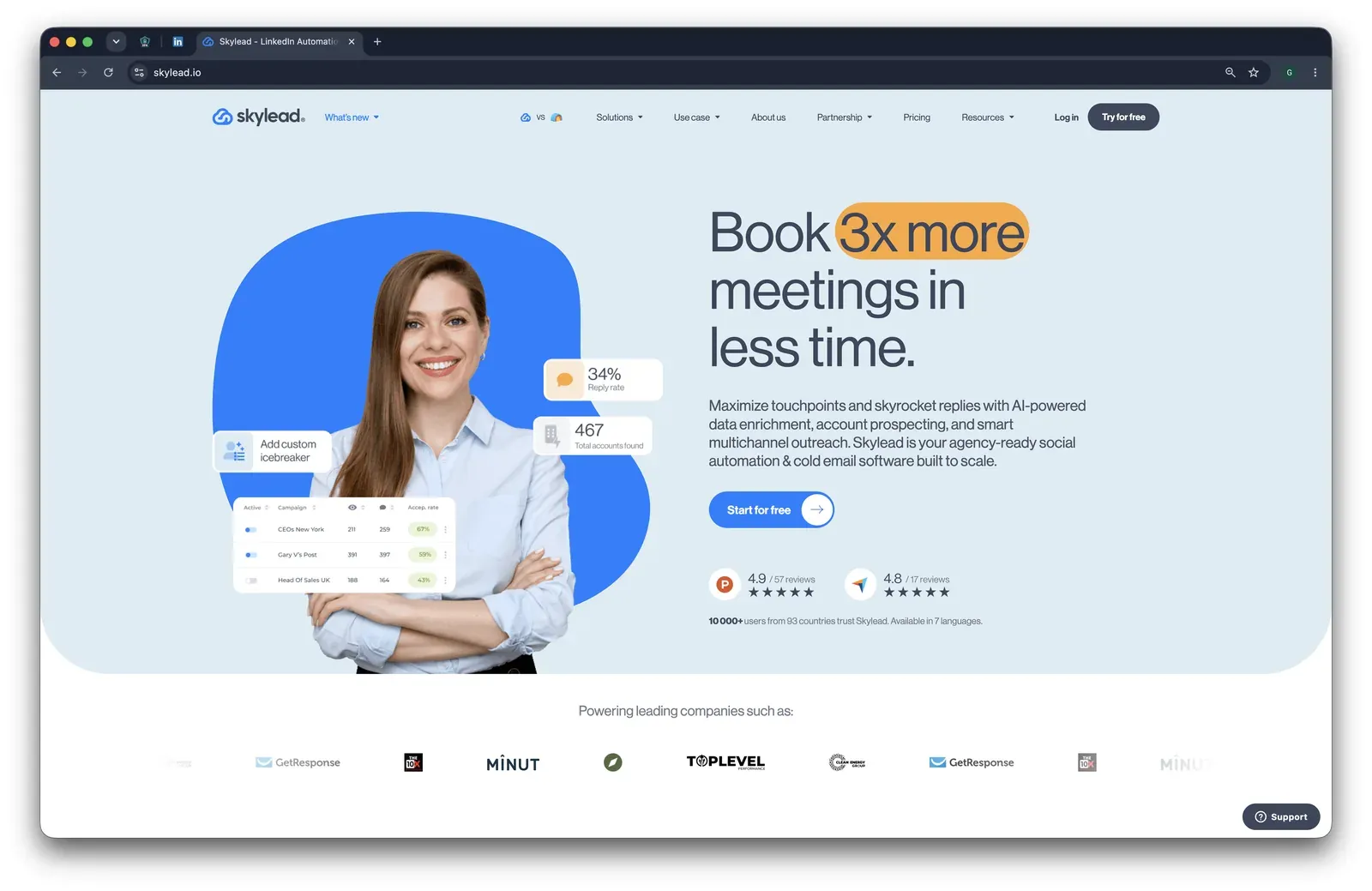
Skylead's public homepage positions the product around multichannel outreach and account prospecting - July 2026

Skylead is a 2019, UK-based cloud tool for smart sequences across LinkedIn and email: the platform logs into the LinkedIn account from vendor infrastructure, so setup is browser-light but session custody moves off the user's machine. The All-in-one plan runs about $1,200/year for one account because no annual discount is visible, and it includes a 7-day trial, native email automation, spintax, paid and free InMails, and support for Basic LinkedIn, Sales Navigator, and Recruiter.

Quick facts about Skylead

  • Founded: 2019
  • HQ: United Kingdom
  • Pricing: $100/mo (no annual discount visible), 7-day free trial with credit card required
  • G2/Capterra: 4.5★ (125) / 4.8★ (17); Trustpilot has 2 reviews, too thin to score
  • Composite rating: 3.43 (144) — dragged by the 2-review Trustpilot component
  • Architecture: Cloud with credential login (vendor-cloud session custody)

Vendor pricing & feature pages (as of 2026-04-22) + G2, Capterra, Trustpilot & Reddit reviews (computed 2026-07-08)

Key Features

  • Smart sequences — LinkedIn and email steps can run in one workflow, with automation handing off to one-to-one conversation.
  • Native email automationEmail automation, email warm-up, and unlimited email accounts are included in the public plan.
  • LinkedIn account types — Basic LinkedIn, Sales Navigator, and Recruiter are supported, a category-standard coverage point rather than a safety differentiator.
  • Custom proxy path — Skylead exposes 91 locations and BYO proxy support, which matters only if the user supplies and vets a clean proxy.
  • Spintax and variables — Spintax, Liquid syntax, and uploaded-list variables support message variation inside campaigns.
  • CRM connectors — HubSpot, Pipedrive, and Salesforce are listed as CRM destinations.

The rating signal is split: the review-count-weighted average is 4.52★ across 144 reviews, but the article's unweighted composite is 3.43 because a 2-review Trustpilot component gets equal platform weight. That means the low composite is an honesty flag about sample shape, not a clean verdict that Skylead is a 3.4-star product; the missing 6-month trend also means there is no fresh review wave to lean on.

What reviewers say about Skylead

Real-world scenario

The switch story is narrow: the brief has one switching case, and it is Apollo to Skylead for LinkedIn automation, not a PhantomBuster or Linked Helper migration. That still explains why buyers with email already in the stack notice Skylead's combined flow.

I have been using apollo and the linkedIn automations is just not good enough. When I tried skylead I was amazed by how easy it was.
G2 4.5★
View Original

Where this bites: praise clusters around campaign setup and multichannel flow, while the hard negatives concentrate on re-use failures, billing friction, and LinkedIn security stops. The negative corpus is thin, so the limitation evidence should read as specific reports, not a broad failure rate.

Reported limitations

Account-risk signal: reviewers did not report a confirmed permanent ban, but one otherwise-positive user did report LinkedIn security stopping campaigns, which is a detection/throttling signal and not just a UX complaint.

A few times are compaigns got stopped due to linekdin security and that can be improved.

Read the full review on G2

G2
Rating: 5 out of 5
US
U S.
General Manager

Reddit context: Skylead's Reddit coverage is sparse; the assigned thread is an evaluation prompt about scaling without account risk, so it supports the question readers bring to this card rather than a Skylead-specific complaint.

Reddit
linkedinautomation
curious what's actually working for people at scale without the account risk.

Safety and Setup Notes

Skylead ships no public LinkedIn extension, so there was nothing to tear down. That lowers the on-page extension-detection surface, but the safety story is still the live cloud test because Skylead logs into LinkedIn from vendor infrastructure.

What was checkedResult
Login modelCredentials login — Skylead starts a fresh LinkedIn session from vendor infrastructure, so the session runs outside the user's browser.
Can I choose the desired location?Yes — 91 locations.
Can I add my own proxy?Yes — no proxy-quality checker, so the user has to vet proxy quality before connecting LinkedIn.
Can I select a timezone when adding an account?Yes.
Cloud IP for account 158.97.254.1 — HostRoyale Technologies Pvt, Ile-de-France / Paris.
OS / browser for account 1 (tool-reported)Chrome / Linux; IPQualityScore (IPQS), an independent IP-quality service, read Mac 10.15 / Chrome 135.0.
Account 1 IPQualityScore result100/100 fraud · proxy yes · VPN yes · recent abuse yes · connection type Data Center — high-risk on IPQS's independent scale, not LinkedIn's enforcement verdict.
Cloud IP for account 2 (same geo)58.97.254.1 — HostRoyale Technologies Pvt, Ile-de-France / Paris.
OS / browser for account 2 (tool-reported)Chrome / Linux; IPQualityScore read Mac 10.15 / Chrome 135.0 — identical fingerprint to account 1.
Account 2 IPQualityScore result100/100 fraud · proxy yes · VPN yes · recent abuse yes · connection type Data Center — high-risk on IPQS's independent scale, not LinkedIn's enforcement verdict.
Same IP or /24 across the two accounts?Same IP, same /24, same provider — two independent accounts were given a near-identical cloud footprint.
Is a credit card required for the trial?Yes.
Trial duration7 days — matches the pricing page.

Skylead — live cloud/IP test (July 2026, two accounts, registered from France)

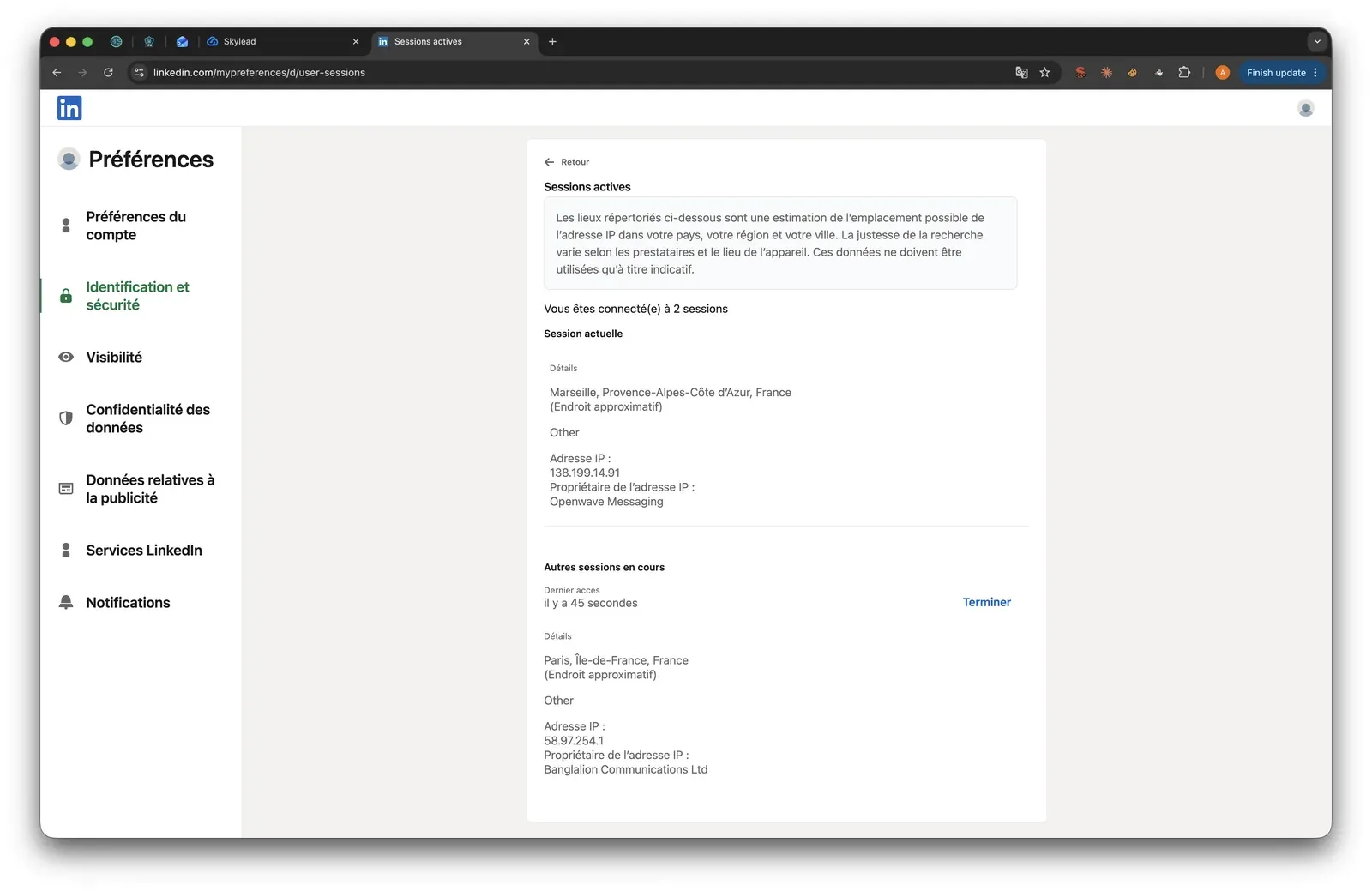
Skylead LinkedIn active sessions - July 2026

LinkedIn's active-sessions view showed duplicate cloud sessions created during the Skylead test - July 2026

The issue I saw was not one unlucky lookup; it was the absence of effective separation between accounts. In my test setup, Skylead's default cloud path made two accounts look like they were being operated from the same rented-server footprint.

That means the marketed dedicated-IP story did not translate into isolation unless the user supplies and vets a proxy. That is the practical cost of credential-login cloud architecture: setup moves out of your browser, but the LinkedIn session also moves onto infrastructure you do not control.

Bottom line

Teams wanting LinkedIn-plus-email sequences in one workflow reach for Skylead because it combines smart sequences, email automation, and account-type coverage. If the priority is reducing vendor-side session exposure after PhantomBuster, Linked Helper keeps the LinkedIn session on your desktop or VPS and uses Web Version for remote access, while Skylead remains a premium cloud-login path.

A July 2024 G2 reviewer praised Skylead's Sales Navigator import flow but listed AI-generated tailored messaging as a missing feature.

How To Choose The Right PhantomBuster Alternative

Start with the disqualifying red flag: if a tool needs durable custody of your LinkedIn session in a vendor cloud, every other feature sits on top of that exposure. After that, judge setup friction, CRM depth, and whether the workflow is actually LinkedIn-specific.

Red flag to checkWhat to preferThe trade-off
You want the smallest session-custody surfaceDesktop standalone with user-controlled IP, proxy, and session environmentInitial setup takes more care than a one-click cloud signup.
The vendor logs into LinkedIn from its own cloudCloud credential-login only when workspace orchestration matters more than LinkedIn-specific custodyThe session runs in vendor infrastructure, so scrutinize location, proxy, timezone, and pause controls.
The extension copies a browser session into the cloudA cookie-bridge setup only after you understand exactly what gets handed overLow setup friction can mean the session leaves the browser and operates from vendor servers.
The extension works inside the logged-in browserA local-scrape extension only if lower custody exposure is worth extension visibilityThe session may stay local, but extension scanning and direct request patterns still add risk signals.

Red flags for choosing a PhantomBuster alternative

Decision logic reflects architecture labels, pricing checks, and safety-source review completed as of July 2026.

Secondary filters come after that. Check whether the product supports Sales Navigator or Recruiter, whether it can push leads into the CRM your team already uses, how clearly it states limits, and whether the At-a-Glance plan is the plan you would actually run rather than a teaser tier that lacks the needed controls.

Our Recommendation: Linked Helper

Linked Helper earns the recommendation because it is one of the lowest-cost options here and does not make the lower bill depend on vendor-side LinkedIn session custody. Beyond the safety architecture, its real edge is value at scale: a low tool bill leaves budget for the operational work that actually protects accounts.

The price gap matters in daily operations. Linked Helper starts at $15/mo, or $8.25/mo equivalent on a 12-month Standard license, and licenses can be bought in bulk with 10-50% seat-count discounts. That gives agencies and multi-account teams room to pay for clean proxies, onboarding, or a VPS without turning software spend into the dominant cost line.

The VPS + Web Version setup is the practical bridge for people who like cloud convenience. Web Version is login-based web access to your Linked Helper instance running on a VPS, so the team can start, pause, and configure campaigns from a browser while the LinkedIn session stays in an environment the operator controls. Linked Helper also has 11 direct CRM connectors, plus Zapier and Make through webhooks, which is broader than PhantomBuster's native CRM set for LinkedIn outreach use cases.

The honest friction is channel scope: Linked Helper is LinkedIn-first and does not include native multichannel email sequencing in the same builder. Teams that need cold email should pair it with a dedicated email tool rather than moving the LinkedIn session into a cloud tool just to get another channel.

For a concrete scale example, see an agency case study running 30 LinkedIn accounts.

What users say about Linked Helper

LinkedIn Safety & Risk Reduction

No tool eliminates LinkedIn restriction risk. Safety work is account operations first and tool selection second: conservative volume, gradual warm-up, stable IP, clean proxy choices, human pacing, and stopping when LinkedIn shows a warning.

LinkedIn's own Prohibited software and extensions page says it does not permit third-party software, crawlers, bots, browser plug-ins, or browser extensions that scrape, modify, or automate activity on LinkedIn. That is the policy baseline for every product in this article.

Use an operator checklist:

  • Keep new accounts around 20-30 connection requests per day, then warm up by 5-10 actions per week.
  • Prefer IP stability over frequent IP changes; rotating IPs can create the session-origin mismatch you are trying to avoid.
  • Run campaigns during believable working hours, with randomized delays and stop-on-reply rules.
  • Pause immediately after warnings, CAPTCHA prompts, repeated logouts, or unusual profile-view spikes.
  • Keep profile visits, invites, messages, likes, and event/group actions under one total activity budget, not separate maximums.

If a warning already happened, use what to do if LinkedIn restricts your account before restarting. For day-to-day prevention, follow how to keep LinkedIn automation within safe daily limits.

Safety note: No tool eliminates ban risk. Results depend on account age, daily action volume, and activity patterns.

Methodology Deep-Dive

I used the deep methodology only for facts that could be directly observed: what a tool's cloud setup shows LinkedIn, what a shipped extension does with the logged-in browser, and what PhantomBuster's own connector reveals about session handoff. These checks add evidence; they do not predict enforcement outcomes.

3. First-hand testing

Beyond the review set, I relied on two safety checks: live cloud sign-up tests for cloud tools and static source-code teardown for published Chrome extensions. The cloud sign-up tests used two accounts registered from France; the PhantomBuster anchor finding comes from its shipped extension rather than a live LinkedIn login.

3. First-hand testing

CheckQuestions it answeredExample finding
Live cloud sign-up testWhere does the session run, whose IP does LinkedIn see, can the user choose location or bring a proxy, and what does IP reputation show?Cloud-tool results are summarized in the brand cards above where a live test was run.
Source-code teardownWhat does the extension read from the browser, where does session data go, does it call LinkedIn directly, and is the extension visible to LinkedIn's scanners?PhantomBuster's extension facilitates a one-click handoff of the LinkedIn login cookie to its cloud setup flow.

First-hand safety checks used in this comparison

First-hand observations reflect the tested versions and sign-up flows reviewed as of July 2026. Vendors can change extension code, onboarding flows, and infrastructure after publication.

TermWhat it isWhy it matters
IPQualityScore (IPQS)An independent fraud-prevention service that rates any IP address on a 0-100 fraud scale, with 75+ treated as high-risk on its own scale.It is an independent IP-quality signal, not LinkedIn's enforcement verdict, but it shows whether the assigned IP resembles abuse-prone proxy or datacenter traffic.
Datacenter vs residential/mobile IPIP addresses are classified by origin: rented server infrastructure versus home or mobile networks.For LinkedIn, a personal account operating from a rented server can stand out because most genuine sessions come from residential or mobile networks.

Live sign-up test terms

These terms explain the network-side checks used in live sign-up testing. Definitions reflect source review as of July 2026.

TermWhat it isWhy it matters
li_at / JSESSIONIDThe LinkedIn login in cookie form: li_at is the session cookie and JSESSIONID carries the CSRF token.Whoever holds them can act as the account, so a tool that uploads them hands session control to vendor infrastructure.
Cloud bridgeAn extension or handoff flow that copies the LinkedIn login cookie to a vendor cloud, which then runs the account from its own IP.It creates cloud-side custody without a normal fresh login and can leave the user unable to see the vendor's copy in LinkedIn active sessions.
AEDActive Extension Detection is the label visible in LinkedIn's production JavaScript for extension-probe results; LinkedIn's page code checks for known extension IDs on visits.Being on the list means installation is visible to LinkedIn before the tool performs any action.
Passive DOM/page scanLinkedIn page code can look for extension traces such as injected UI or chrome-extension:// references.A tool can be detected even if its extension ID is not yet on a hardcoded list.
Synthetic (isTrusted=false) eventsBrowser events fired by code rather than a real user carry a read-only isTrusted=false flag.It is one more automation signal when an extension clicks or types through injected code.
BrowserGateAn independent investigation that reverse-engineered LinkedIn's production JavaScript and documented extension scanning, page scanning, and fingerprinting mechanics.It gives public context for why extension visibility and browser traces matter.

Source-code teardown terms

These terms explain the code-side checks used in extension teardown. Definitions reflect source review as of July 2026.

These definitions sit beside Linked Helper's security study, which combines static code audits of LinkedIn automation extensions with live cloud-tool sign-up testing.

Research Limitations

I can read extension code and observe sign-up behavior, but I cannot see a vendor's cloud-side internals after a session reaches its servers. Where the evidence points beyond the browser boundary, the conclusion is "highly likely," not certain. The tests are dated observations, not a tripwire, and a bad signal adds risk rather than proving that a specific account will be restricted.

First-Hand PhantomBuster Findings

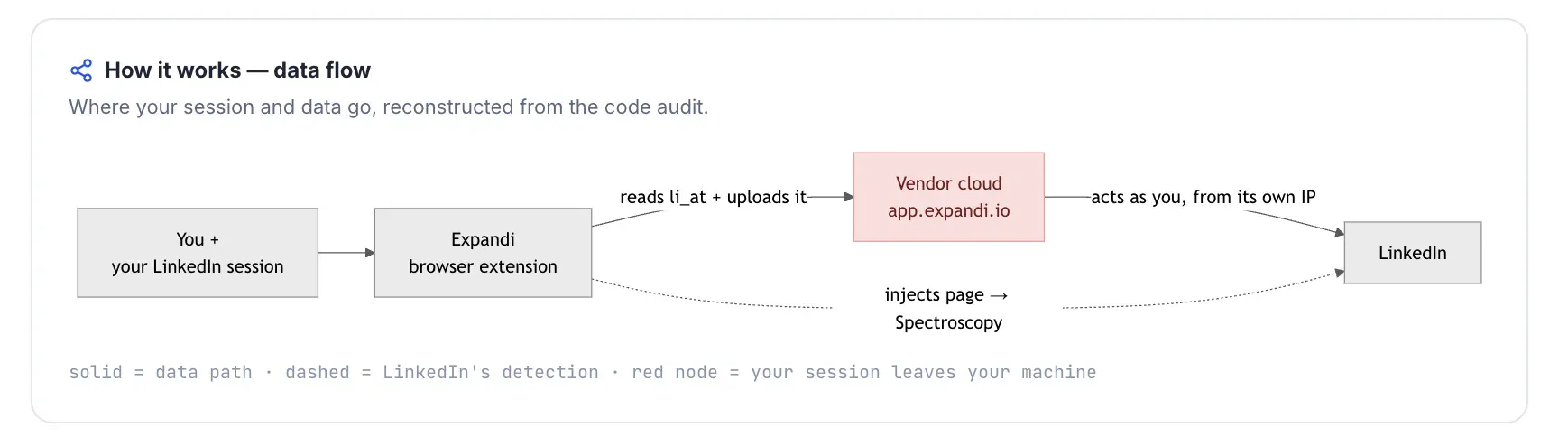
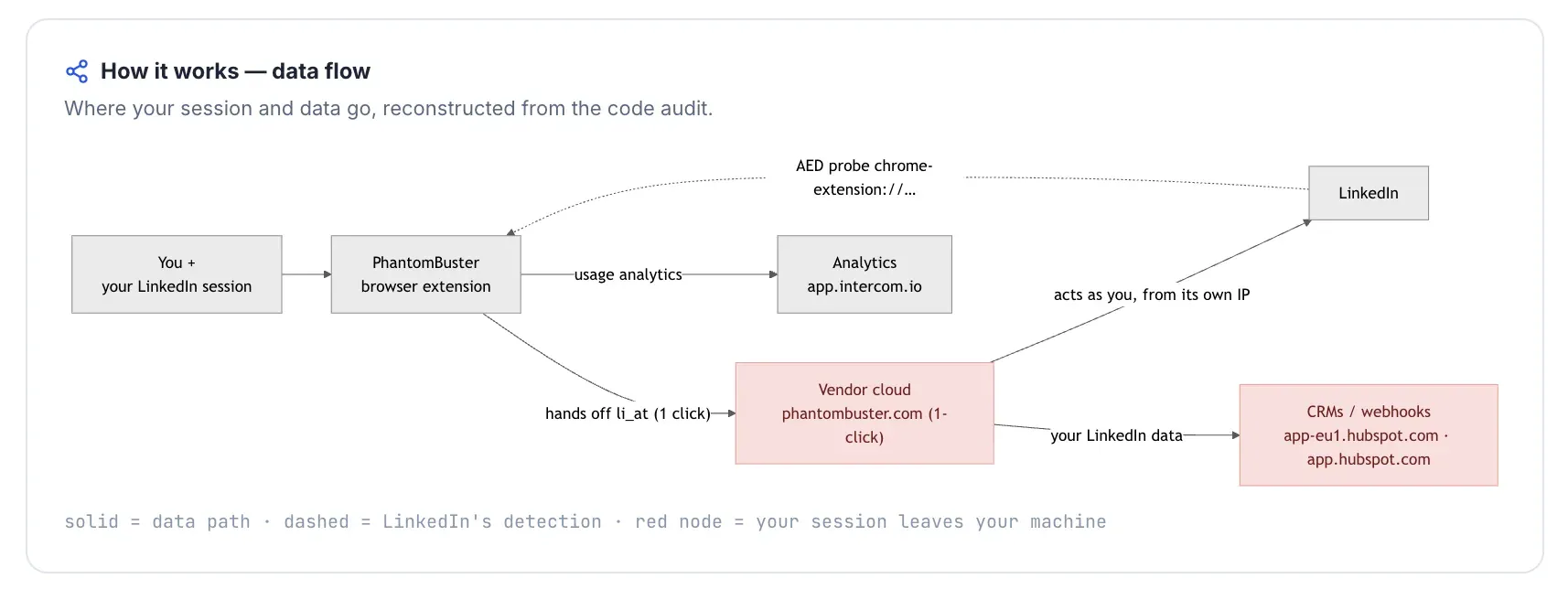
Architecture: PhantomBuster is a cloud-bridge setup for LinkedIn. Its Chrome extension is AED-listed, and its primary LinkedIn setup path facilitates one-click movement of the user's login cookie into the PhantomBuster cloud flow.

Findings: The extension reads li_at and JSESSIONID, uses the Chrome cookies permission across LinkedIn and many other platforms, and injects a "Get cookie" style setup action into PhantomBuster's own web app. The extension does not inject directly into linkedin.com pages, but it does make direct Voyager requests from the browser service worker and uses static LinkedIn request headers. No extension-side daily cap, random delay, or working-hours control was found in the package; those controls, if used, live in the cloud product rather than in the connector.

Bottom line: The important finding is not that PhantomBuster silently steals a password; that is not what the teardown shows. The finding is that the official setup flow makes LinkedIn session handoff easy, and once the cloud holds that session, the account inherits the cloud-session and infrastructure risks this article is designed to help readers avoid.

Methodology And Sources

Publisher disclosure

This article is published by Linked Helper. Our recommendation is our own product. We compared it against the alternatives above using one scoring model, public third-party sources, vendor documentation, and first-hand safety observations where those observations were technically possible.

The comparison uses G2, Capterra, Trustpilot, Reddit discussions, vendor pricing and documentation pages, Linked Helper's Zendesk knowledge base, Linked Helper's security study, IPQualityScore, BrowserGate, and LinkedIn's Help Center policy page. The Methodology Deep-Dive explains what first-hand testing can and cannot prove; the scoring model above explains how those sources were weighted.

FAQ

PhantomBuster can be useful for LinkedIn data extraction, but its cloud session handoff creates a meaningful account-safety trade-off. LinkedIn still restricts scraping and automation, and PhantomBuster users remain responsible for volume, targeting, message quality, and account behavior.

Try Linked Helper free for 14 days

The most technically advanced platform for LinkedIn automation with a focus on security, a wide range of features, and exceptional customer support. Trusted by over 10,000 businesses worldwide.