
 Updated: September 18, 2026
 50 min read
We analyzed 16 LinkedIn automation extensions to see what they do with sessions, cookies, browser calls, and vendor servers.
We also signed up for 7 cloud services with two accounts each, then checked the exit Internet Protocol (IP) addresses they assigned against an independent fraud-reputation database.
The third part of the research looked at LinkedIn’s own page code. That code includes an extension scanner with 6,167 targets, a Document Object Model (DOM) “spectroscope,” and a 48-point device fingerprint that can travel with session requests.
This guide shows which signals can raise account risk, which automation architectures expose more of those signals, and how you can audit any extension yourself in about five minutes.
TL;DR: 9 Things to Know Before You Install Anything
- LinkedIn can scan Chromium-based browsers for known extensions. This is called Active Extension Detection (AED). As of mid-June 2026, LinkedIn’s code probed 4,934 Chrome extension IDs, with the list growing by roughly 12 per day.
- Cookie-bridge tools create one of the highest-risk setups. These extensions read your LinkedIn
li_atsession cookie and upload it to the vendor’s cloud, which can then run your account from a data center IP. We found this pattern in code across 9 widely used tools. - Reading cookies is not the same as exporting your session. Some tools read cookies but keep the session local. The real question is where the cookie value goes, so we traced that path for every tool in this guide.
- Blocking LinkedIn telemetry can expose the tool instead of hiding it. Some extensions block LinkedIn tracking endpoints. If one endpoint still reports back, LinkedIn may see that other telemetry paths are being blocked.
- Your device fingerprint can travel with session requests. LinkedIn collects 48 device signals, including graphics, audio, fonts, local IP through Web Real-Time Communication (WebRTC), and automation flags. That fingerprint is encrypted and attached to Application Programming Interface (API) requests during the session.
- Detection is better understood as a scoring model. Extension presence, code traces, network anomalies, and account behavior can all add risk signals. Conservative daily limits help, but they do not fix a risky architecture.
- Manual outreach is not restriction-proof. High volume, bulk profile opening, and too many “I don’t know this person” reports can affect manual users too.
- Cloud tools can leave a visible IP trail. In our 7-tool cloud test, five of the six server-side tools placed accounts behind data center or proxy IPs rated high-risk by an independent fraud database. One vendor gave both test accounts the same IP, and three unrelated tools routed through the same upstream provider.
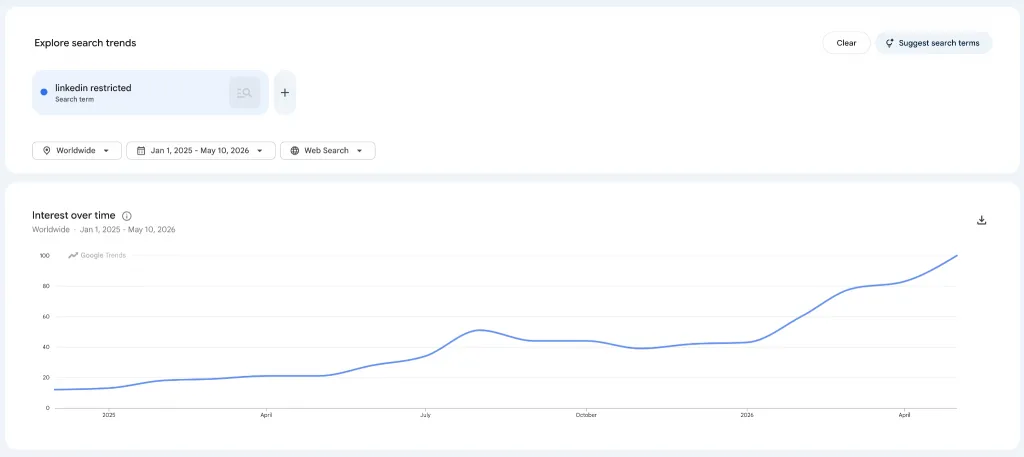
- Account safety is not a niche concern. Across nine English-speaking markets, roughly 12,050 monthly searches relate to LinkedIn restrictions, account limitations, identity verification, or bans.
Why You Can Trust This Report
This guide is based on three sources of evidence: product history, extension code, and live cloud testing.
The first source is Alexander Erin, founder of Linked Helper, who has been in that role since October 2016.
He wrote the first version of Linked Helper, which was a Chrome extension. At its peak, it ranked first for the “LinkedIn” search query in the Chrome Web Store and had an audience of about 80,000 users. He also saw LinkedIn’s early detection systems affect competing extensions. In August 2019, he had three days to patch Linked Helper against a second detection wave.
After that, the team decided to leave the Chrome Web Store and rebuild Linked Helper as a standalone desktop application.
The second source is code.
For this report, we downloaded the real published extensions of 16 competing tools, de-minified them, and traced what they do with your LinkedIn session. We checked the code file by file and kept line references where the behavior could be verified.
We also used the BrowserGate investigation, which analyzed LinkedIn’s production JavaScript from December 2025 to March 2026. That work documented detection systems that our expert had already described from the defender’s side since 2019.
The third source is a live test.
Code can show what an extension can do, but it cannot show which IP address a cloud service assigns after your session reaches its servers. To check that part, we signed up for 7 cloud tools using two accounts per tool from the same country, France.
For each account, we recorded the exit IP, the IP’s reputation in IPQualityScore (IPQS), the device type, the operating system (OS) shown by the cloud, and whether the companion extension appeared on LinkedIn’s scan list. IPQS is an independent fraud-intelligence database, and IPQS lists LinkedIn among its customers on its website.
By the end of this guide, you will have three practical outputs:
- A risk map of the main automation architectures
- A code-level checklist for auditing any extension
- Safer operating benchmarks for cases where benchmarks still apply
Why Account Safety Is the Main Issue
LinkedIn account restrictions remain a major concern for sales teams, recruiters, founders, agencies, and growth teams. Every month, people search for answers about restrictions, identity checks, invitation limits, and sudden account enforcement.
Most advice stops at daily activity limits and message volume. Those are important, but they are only part of the risk picture. LinkedIn can also observe technical signals, including browser extensions, device fingerprints, cloud-session environments, and IP reputation.
This report focuses on that technical layer. Instead of guessing what LinkedIn may detect, we look at how automation tools are built, what signals they expose, and how each architecture can affect account risk.
1. The Architectures Behind LinkedIn Automation Risk
Marketing labels such as “cloud,” “AI,” “Chrome extension,” and “safe” do not explain account risk on their own.
The real questions are:
- How does the tool access your account?
- Where does the work run?
- Where does your data go?
- What traces does the setup leave behind?
Most LinkedIn automation tools can be mapped to the building blocks below. Some tools use one model, while others combine several models inside the same product.
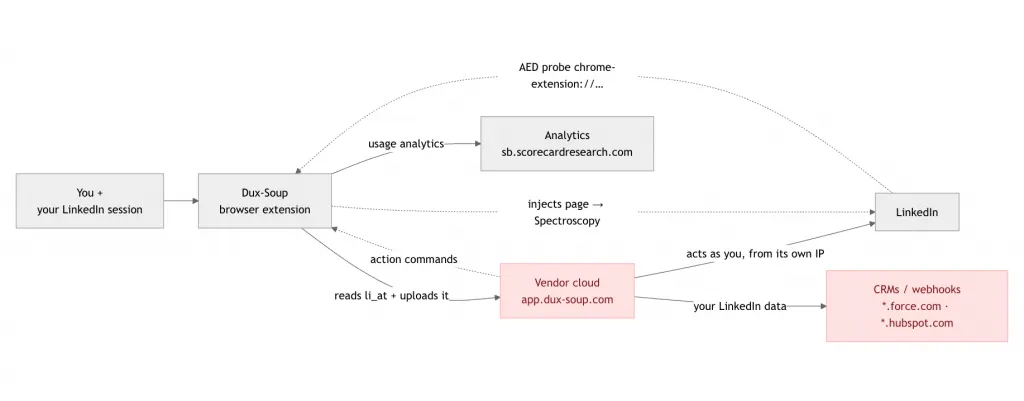
Dux-Soup Chrome Extension Data Flow. Red nodes show your LinkedIn session or data leaving for a vendor’s cloud. Grey nodes show data that stays in your browser.
1.1 Browser Extensions That Run Inside Your Browser
A browser extension can combine several automation patterns. The difference between those patterns matters because some keep your session local, while others move session data into a vendor cloud.
a) Local Scraping Through Your Own Session
In this model, your LinkedIn session stays on your machine. The extension calls LinkedIn’s internal API, known as Voyager, directly from your browser while using your existing LinkedIn login.
Technically, this can look like fetch(..., {credentials: "same-origin"}) with a CSRF token header derived from your JSESSIONID cookie. Cross-Site Request Forgery (CSRF) tokens help prove that a request belongs to the current logged-in browser session.
Only the scraped results, such as profiles or emails, are uploaded to the vendor. Your session token itself is not exported.
Verified examples from our audit include Octopus CRM, GetProspect, Findymail, Apollo, and Dux-Soup on its Turbo, Pro, and Free plans. Octopus CRM had the cleanest implementation in this group because it did not request the Chrome cookies permission and used local Voyager calls such as fetch(voyager, {credentials:"same-origin", "CSRF-token": U()}).
The upside is that your IP, browser session, and device fingerprint stay consistent. Your session token does not leave your browser.
The risk comes from the requests themselves.
- A bare Voyager request without the surrounding page traffic can create an unnatural request pattern, which we cover in §2.7.
- The extension can also remain visible to LinkedIn’s extension scanners, which we cover in §2.1 and §2.2.
There is also a maintenance risk.
Many extensions rely on hard-coded assumptions about LinkedIn’s internal API structure, request formats, headers, and parameters. If LinkedIn changes those expectations, an outdated extension can start sending malformed or unusual requests until the vendor detects the change, ships a fix, and users install the update.
b) Cookie-Bridge or Session-Upload Extensions
In this model, your LinkedIn session leaves your machine. The extension reads the LinkedIn cookie jar through calls such as chrome.cookies.getAll(...), picks out values such as li_at, JSESSIONID, or li_a, and sends those values to the vendor’s server.
After that, the vendor’s cloud can act as your account from its own IP address. As our expert said about one such tool, “the extension serves as a bridge to pump the cookie out, and has no other purpose.”
The table below shows what we found in the code. It also separates tools that export session data from tools that keep the LinkedIn session local and send only results.
| Tool | What the Code Does | Vendor Destination |
|---|---|---|
| Waalaxy | Reads all LinkedIn cookies through chrome.cookies.getAll({url:"https://www.linkedin.com"}), packages them into authDataFromExtension.cookie, and uploads the session bundle to the cloud (background.js:91370-91432). | stargate.prod.aws.waalaxy.com |
| Kaspr | Extracts li_a, li_at, sessionId, and LinkedIn identifiers, then sends them to the vendor’s /linkedin/sync endpoint (background.api.js:157-169; cookie collection starts in background.events.js:87-89). | api.kaspr.io |
| Wiza | Reads li_at, li_a, and the LinkedIn cookie jar through Chrome’s cookies API, then hands the data to the Wiza controller for cloud processing (background.ts-D9M8FI6v.js). | wiza.co / wiza.com |
| Lemlist | Reads LinkedIn cookies, converts them into a full name=value cookie string, uploads it to /linkedin/updateCookie, and re-syncs whenever li_at changes (background-D7SnJp7X.js). | app.lemlist.com |
| Prospeo | GET_LINKEDIN_COOKIES extracts li_at and li_a from LinkedIn cookies and forwards requests through the vendor proxy layer (background.js-bab59bf8.js). | prod.prospeo.io |
| Surfe | Collects JSESSIONID, li_at, and li_a from LinkedIn cookies and sends them to Surfe’s backend (background.js). | api.surfe.com |
| HeyReach | Reads li_at, maps the LinkedIn cookie jar, and uploads it through /CreateLinkedInAccountFromCookies, marketed as a special login connector (popup.js, linkedIn_request_utility.js, heyReach_request_utility.js). | api.heyreach.io |
| Dux-Soup Cloud plan | Reads LinkedIn session cookies, including the full LinkedIn cookie jar through cookies.getAll({domain:"linkedin.com"}), then bundles session state with localStorage, browser data, and browser fingerprinting data. The package is sent through the cloud-control channel when a Cloud plan is connected, and the transfer happens automatically as part of the cloud-session setup flow (sw.js). | app.dux-soup.com |
Expandi connector (expandi.io) | Stores li_at, intercepts Voyager traffic through injected code, collects profile data, and forwards the session bundle to Expandi’s cloud environment (background.js, linkedin/injected.js, content.js). | app.expandi.io |
| Apollo | Does not request cookies permission. It uses LinkedIn through the logged-in browser context with credentials:"include" or same-origin authentication, without exporting session cookies. | app.apollo.io (results only) |
| PhantomBuster | Does not silently upload sessions, but auto-fills LinkedIn cookies into setup fields on PhantomBuster pages for one-click transfer (contentscript.js). | phantombuster.com |
Expandi AI, non-official (expandi.ai) | Uses a page bridge that exposes all available cookies to app.expandi.ai. The background code calls unfiltered chrome.cookies.getAll({}), returning the full browser cookie jar (KonnectorContent.js, background.js). | app.expandi.ai |
| Octopus CRM | Does not request cookies permission. It uses local Voyager requests with browser-managed authentication and sends only results to the vendor API (content.js, main-es2018...js). | api.octopuscrm.io (results only) |
| GetProspect | Does not request cookies permission. It performs local Voyager requests through browser session state and does not export li_at (foreground.bundle.js, manifest audit). | api.getprospect.com (results only) |
| Findymail | Derives CSRF tokens from local JSESSIONID access through document.cookie. It does not request cookies permission and does not export the LinkedIn session (salesnav_profile.js, manifest.json). | app.findymail.com (results only) |
| Lusha | Has no LinkedIn cookie access. It uses authenticated requests against Lusha-owned services only (background.js, manifest.json). | plugin-services.lusha.com |
| ZoomInfo | Does not request cookies permission and showed no LinkedIn session access in the manifest or audit traces. | zoominfo.com (results only) |
| Dux-Soup Turbo, Pro, and Free | Uses local-browser automation mode. Voyager interception happens in the user’s browser, with no cloud session upload found in this mode. | Not applicable |
Expandi: The Most Interesting Case in the Dataset
Expandi (via Expandi connector extension) deserves a closer look because it shows several techniques used in the LinkedIn automation market. Those techniques may reduce some risks, but they can also leave signals that detection systems can observe.
Understanding how those techniques work and where they still leave signals behind provides a useful framework for evaluating every other automation tool.
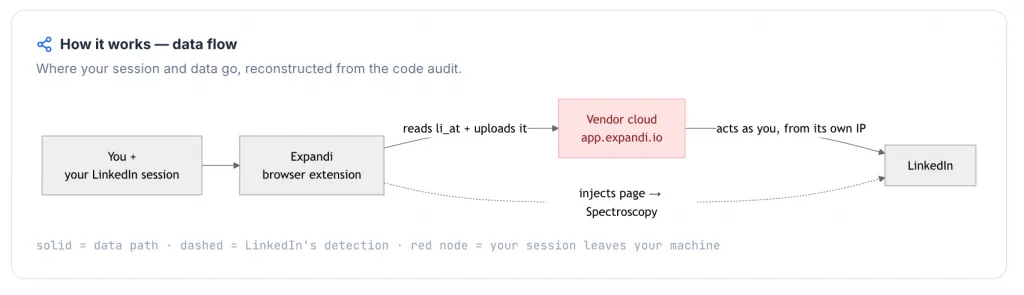
Expandi Connector Chrome Extension Data Flow, reconstructed by code audit. Red nodes show your LinkedIn session or data leaving for a vendor’s cloud. Grey nodes show data that stays in your browser.
Technique 1: Inject a Script Into LinkedIn’s Page Context
A content script normally lives in an isolated world and cannot touch the page’s XMLHttpRequest.
To work around that limit, Expandi injects a real <script src="chrome-extension://ohcplcf…/linkedin/injected.js"> node into the live DOM (linkedin/content.js:2-7).
That node carries a literal chrome-extension:// URL inside the page. LinkedIn’s Spectroscopy scanner (§2.2) can passively walk the DOM, look for that substring, extract the 32-character extension ID, and report it.
No target list is needed for this detection path. A claim such as “we’re not on the AED list” does not settle the issue if the extension injects a visible chrome-extension:// resource. In that case, the delivery method becomes the footprint.
Confidence: Found in code. The injection is explicit, and the Spectroscopy mechanism is documented in the BrowserGate production-code analysis.
Technique 2: Monkey-Patch XMLHttpRequest.prototype.send
Expandi’s injected.js:3-27 overrides the page’s native send method, so every Voyager API response your browser fetches can be copied out to the extension. The patch runs in the same global context as LinkedIn’s own JavaScript, which is the point of injecting the script into the page.
A patched send method is no longer native, and any script on the page can test it. For example, Function.prototype.toString.call(XMLHttpRequest.prototype.send) returns the wrapper’s source instead of "function send() { [native code] }", and Expandi makes no attempt to mask toString.
A clean reference from a fresh same-origin <iframe> also would not match the page’s modified send. That creates a detectable difference between the original browser API and the page’s current state.
LinkedIn already ships probes in this class. The internal APFC/DNA fingerprinting engine group discussed in §2.6 includes direct anti-bot checks and a signals feature for detecting inconsistent browser claims. LinkedIn also loads the external HUMAN/PerimeterX script from li.protechts.net (§2.8a), which is designed to detect tampering such as modified prototypes and toString behavior.
Confidence: The patch is found in code. The detection path follows from how the patch works.
We did not find telemetry blocking in this path, so any verdict from those probes can still be reported back. We are not claiming we watched LinkedIn flag a specific Expandi user. The narrower claim is that the detection capability exists, and the patch is visible enough to fall within that range.
Technique 3: Send a Separate Voyager GraphQL Email Call
Expandi’s injected.js:34-44 issues a programmatic GET /voyager/api/graphql request with withCredentials:true. It builds a CSRF-token from your JSESSIONID (injected.js:30-31) to pull contact-info or email data that a normal profile view does not fetch by default.
LinkedIn can see this as a request-map anomaly (§2.7). It is an API call with no matching user action, fired after load on profiles where the user did not open “Contact info.”
At scale, “every viewed profile also pulls its email” becomes a recognizable enrichment-scraper pattern. It is visible in server-side logs without any help from the browser. The call rides your real session and carries the encrypted fingerprint header, but the behavioral shape is the giveaway.
Confidence: Found in code. The call is explicit, and the anomaly is server-observable by design.
The Most Serious Finding: Some Extensions Collect More Than LinkedIn Data
The most serious variant is a full cookie-jar collection across every site where you are logged in, not just LinkedIn. The expandi.ai extension by Konnector, a different vendor from Expandi.io, returns chrome.cookies.getAll({}) to its web app across all domains.
Even the routine-looking isInstalled handshake can expose the full cookie jar (KonnectorContent.js:10-28, background.js:19). That moves the issue beyond LinkedIn automation risk and into broader account-security risk.
PhantomBuster Example
PhantomBuster sits in a separate category. It auto-fills your li_at cookie into its cloud setup page with one click (contentscript.js:5265-5266). That is not a silent POST, but it places the session one button away from transfer.
PhantomBuster is also capable of harvesting session cookies for 15 platforms (background.js:5140-5230). This is why §1.2a treats cookie replay as the worst class.
c) DOM Automation Inside the LinkedIn Page
Some extensions automate LinkedIn by clicking buttons for you and injecting their own panels, buttons, or controls into the LinkedIn page.
This creates two detection surfaces. Every injected element can have a unique selector that a scanner can look for (§2.2), and every programmatic click carries isTrusted:false. From the normal extension API, as our expert put it, “you cannot fake it – it’s always false” (§2.5).
In practice, few tools inject heavily into the page. But tools that do create signals LinkedIn can inspect without needing a target list, because the scanner can look directly at what changed inside the page (§2.2).
1.2 Cloud Services That Run on Vendor Servers
A cloud service needs a way into your LinkedIn account before it can automate anything. In practice, there are two main entry points.
a) Cookie Replay Through a Synced Session
This is the server-side half of the cookie-bridge model from §1.1b. It is one of the highest-risk setups because your session can be reused outside your own browser.
The risk comes from several signals happening at once:
- One session can appear on two IPs in parallel. Yours while you keep browsing LinkedIn, and the vendor’s data center IP while the cloud runs automation. Our expert called this “a guaranteed tell.”
- Cookie replay is not the same as a normal login. It does not create a visible entry in LinkedIn’s “active sessions” page, so you cannot see it from your account settings.
- Dux-Soup’s Cloud plan takes the cookies silently when the Cloud plan is connected.
- If the cloud replays the cookie inside its own browser, the device fingerprint may not match the one your session has always used (§2.6).
- If the cloud skips the browser and calls the Application Programming Interface (API) directly, it can create an unnatural request map (§2.7).
Once the session has moved to a vendor cloud, you are no longer watching the environment that acts as your LinkedIn account.
b) Fresh Login on the Vendor Side
The second path is a fresh login from the vendor’s environment. The service spins up a Virtual Private Server (VPS) or browser emulator and logs in with your username, password, email code, and two-factor authentication (2FA) code.
Some vendors describe this approach privately. One social-posting tool told us it logs in through a VPS with a Multilogin-style browser, then does everything else through the API. Another well-known prospecting suite described “a real browser for the rare actions, the rest over the API.”
(We’re not naming them, but… PhantomBuster, to its credit, documents its cloud-browser architecture publicly.)
Our expert rates this path as less risky than cookie replay. A fresh login from a new machine and location can at least resemble something a real person might do. It still leaves the cloud’s IP, geography, timezone, and fingerprint attached to your account, which we cover in §2.9 and §2.10.
What the Cloud Does Next: API-Only vs. Emulated Browser
After logging in, the cloud still has to perform the work. It can either use an emulated browser, call LinkedIn’s APIs directly, or combine both.
Our expert marks cloud-side execution as an estimate, not a directly proven fact. His assessment is direct: “I think they all hammer the API directly. All of them. With 95% probability.”
He gives three reasons for that estimate:
- API calls are much simpler than parsing LinkedIn pages that constantly change.
- LinkedIn has not yet hardened the API enough to stop services that have publicly admitted API use.
- Real-time inbox features in these tools’ dashboards usually require direct API access. Pulling one fresh conversation for one specific person on demand is not something a background scraping browser can reliably do on that schedule.
The system-level risk is that API-only clouds depend on hardcoded requests. LinkedIn only has to change the API with a special header, per-user endpoint names, or a similar mutation, and every hardcoded client can break or start looking unusual.
BrowserGate’s analysis found that part of this infrastructure already exists. An encrypted fingerprint blob is injected into the Hypertext Transfer Protocol (HTTP) headers of every API request made by a real browser session (§2.6 and §2.7). The infrastructure to separate real browser traffic from bare API clients appears to be deployed. Moving from collection to enforcement is LinkedIn’s decision.
This caveat matters throughout the report: From the outside, you cannot prove which method a cloud uses — an API client can imitate a login, too. We report what we see in the code and mark cloud-side behavior as “highly likely.”
What We Measured When We Signed Up (7 Tools, 2 Accounts Each)
Code analysis stops at the extension boundary. The cloud itself is a black box for the user, although LinkedIn may see more.
One thing the black box cannot fully hide is the exit IP it puts behind your account and the device fingerprint it shows. To test that, we signed up for seven cloud tools with two accounts per tool, all from the same country, France.
We then checked each assigned IP in IPQualityScore (IPQS). Testing two accounts per tool matters because it shows whether a vendor reuses infrastructure across customers.
What Is IPQualityScore (IPQS)?
IPQS is an independent fraud-prevention service with more than 10 years on the market. It rates IP addresses using signals from its own network of honeypots, traps, crawlers, and abuse feeds.
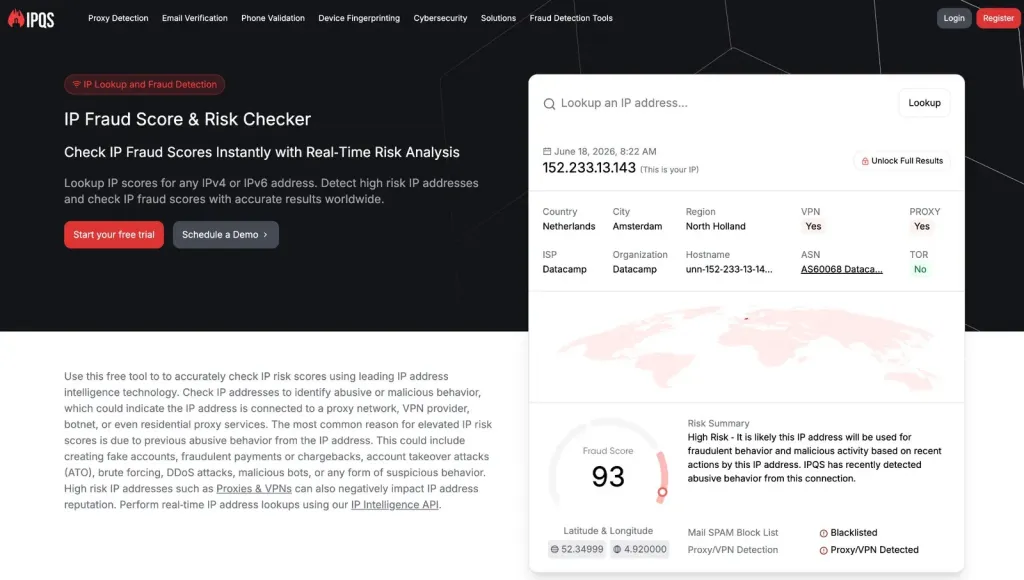
For each IP, IPQS returns several useful fields:
fraud_score, from 0 to 100.- Proxy, Virtual Private Network (VPN), and Tor indicators.
- Connection type, such as data center, residential, or mobile.
- Geolocation data.
- Recent abuse history.
There is no official cutoff that turns an IP into a safety verdict. Still, IPQS’s own examples treat scores above 75 as high risk, and the company claims about 99.95% accuracy for proxy and VPN detection.
We use IPQS as an independent reference point for what a modern anti-fraud system may see. A heavily abused IP, a known proxy endpoint, or a data center address shared by many unrelated accounts can all become signals that risk systems commonly evaluate.
Data center IPs are not automatically malicious. They are often less trusted than residential or mobile connections because they come from hosting providers rather than consumer networks. In LinkedIn’s context, they can become more revealing when many accounts appear from the same cloud infrastructure.
IPQS was also useful because its geolocation data often matched what LinkedIn displayed in account security sessions during our tests. Some proxy providers advertised locations that did not match the country identified by IPQS or LinkedIn, which creates another risk factor: geographic mismatch between the claimed and observed connection location.
IPQS is not LinkedIn’s private risk engine. Its score is not an account-safety verdict or a legal determination. It is an independent benchmark for comparing the quality and reputation of the IP automation tools placed behind user accounts.
Cloud Sign-Up Test Results
| Tool | Door In | IP Fraud Score in IPQS (2 IPs) | All Data Center? | Shared or Reused Infrastructure | Location Control and Own Proxy |
|---|---|---|---|---|---|
| Skylead | Login/password | 100 / 100 100 / 100 | Yes | Same exact IP for both accounts: 58.97.254.1; HostRoyale; shared with 2 others | 91 countries · own proxy supported |
| HeyReach | Cookie + login | 100 / 100 100 / 100 | Yes | Same /24; Internet Service Provider (ISP) Altinea SAS; extension also blocks logout | 154 countries · own proxy supported |
| Dripify | Login/password | 94 / 100 100 / 100 | Yes | Same /24; HostRoyale, Autonomous System Number (ASN) 203020 | No location control listed · own proxy not supported |
| We Connect | Login/password | 94 / 100 87 / 100 | Yes | HostRoyale for account 1; M247 for account 2 | 69 countries · own proxy supported |
| Expandi | Login + connector extension | 100 / 0 0 / 100 | No, one was residential | One IP flagged, one clean | 96 countries · own proxy not supported |
| Meet Alfred | Login/password | 0 / 100 0 / 100 | Mixed | Clean IPs; spoofs a mobile User-Agent (UA), OS, and UA differ by account | 247 countries · own proxy supported |
What the Table Shows
1. Skylead is the clearest cautionary example.
Both test accounts came out behind the exact same data center IP, 58.97.254.1, with an IPQS fraud score of 100. Two profiles on one data center IP match the kind of account-clustering pattern LinkedIn’s parallel-access logic can evaluate (§2.9).
2. The flagged infrastructure was shared, and not just within one brand.
Dripify, Skylead, and We Connect are all routed through the same upstream provider, HostRoyale Technologies (ASN 203020). If one provider block becomes less trusted at LinkedIn’s end, several tools can be affected at once.
3. HeyReach added a separate control issue.
Its IPs had fraud scores of 100, and its extension blocked logout in two ways: a webNavigation intercept (background.js:1-17) and a declarativeNetRequest rule (rules.json:1-14). That can stop the user from invalidating the session after handing over the full cookie array through api.heyreach.io/.../CreateLinkedInAccountFromCookies.
4. Meet Alfred was the clean contrast in this test.
It was the only tool that gave both accounts clean IPs with fraud scores of 0, and it spoofed a mobile User-Agent. But a clean IP addresses only one signal. The tool still places credentials in its cloud and acts as the user from a different machine.
5. Nobody checks the IP they give you.
None of the 7 tools shipped a proxy-quality checker. A tool can assign a flagged address, or a user can add a weak proxy, without getting a clear warning. “Location control” also usually means country-level control, not state or city-level control (§2.9).
We cannot see what these servers do internally, and we mark the execution mode as “highly likely”. But the IP, the shared infrastructure, the fingerprint, and the scan-list status are not inferences: we measured them (see the IPQS sidebar above).
1.3 Browser-Based Tools That Control a Full Browser
Browser-based automation uses a full browser environment rather than only a lightweight extension or bare API client. This category splits into two very different models.
Cloud Browser-Based Tools
A cloud browser-based tool runs a browser such as headless Chrome or Puppeteer on the vendor’s server. PhantomBuster is the only vendor in this group that publicly admits this architecture.
This model still has weaknesses.
Puppeteer is detectable, and an entire anti-bot industry exists around detecting browser automation.
Multi-account hosting also creates correlation risk when many “users” share one server’s graphics processing unit (GPU), audio stack, and other fingerprint traits.
Desktop Standalone Tools
A desktop standalone tool runs a separate Chromium-based browser on the user’s machine. Linked Helper uses this model.
This creates a smaller detection surface than a Chrome extension or cloud account farm. There is no Chrome Web Store ID for LinkedIn’s Active Extension Detection scanner to probe (§2.1), no extension code injected into the LinkedIn page (§2.2 and §2.3), and the account keeps the user’s local IP and machine fingerprint.
There is also a structural advantage. LinkedIn can analyze any public Chrome Web Store extension at leisure and build a detector before deploying anything. Against a standalone desktop application, detection tests have to be shipped into production, where they can be observed.
Browser-based does not automatically mean safe. It only reduces some technical exposure. The developer’s choices around fingerprinting, navigation, timing, and click simulation still affect risk.
Worked Example: Dux-Soup Uses Several Patterns in One Package
Most tools fit into one row of the architecture map. Dux-Soup is different because config.getEdition() ships a different architecture depending on the plan.
That makes Dux-Soup a useful example for this guide. One product shows local scraping, session upload, AED exposure, telemetry blocking, and high-volume limits in different parts of its setup.
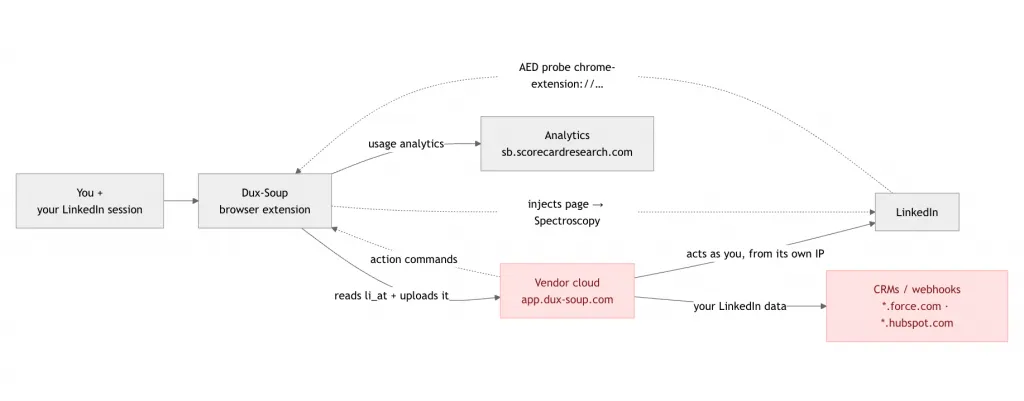
Dux-Soup Chrome Extension Data Flow. Red nodes show your LinkedIn session or data leaving for a vendor’s cloud. Grey nodes show data that stays in your browser.
- Free, Pro, and Turbo use local scraping (§1.1a). Voyager is called in the user’s browser with a
CSRF-tokenderived fromJSESSIONID, so the session stays local. Risk level: medium. - Cloud uses session upload (§1.1b and §1.2a). The service worker runs
chrome.cookies.getAll({domain:"linkedin"}), then sends the full cookie jar,localStorage, andnavigatordata toapp.dux-soup.comthroughPUT /api/{user}/sessions/{domain}. It then drives the account through a Socket.io channel (sw.js:1,libs/socket-io/socket.io.js:1562). This was the broadest session payload we found in any tool. - The extension is confirmed on LinkedIn’s AED list (§2.1). The extension ID
ppdakpfeaodfophjplfdedpcodkdkbaland probe filefetchforwarder.jsappear indetection_db.json. On every visit, LinkedIn can fetchchrome-extension://…/fetchforwarder.js, and a successful hit can flag that the extension is installed before the user clicks anything. - The anti-detect setup creates its own signal (§2.8).
declarativeNetRequestrules blockli/track,sensorcollect,protechts, andmerchantpool(rules.json; UI togglekilltracking). Those rules sit in static JSON that anyone can read, and the resulting telemetry silence can become an anomaly. - The limits mix conservative and aggressive settings (§6).
maxinvitesdefaults to a reasonable 20/day. The same UI raisesmaxvisitsto 500/day and offers a “Turbo” scan of about 10 pages/minute, which is far beyond normal human browsing behavior.
2. The Detection Surface: What LinkedIn Can See, Collect, and Compare
This is the technical core of the guide. For years, much of LinkedIn’s detection logic could only be described from a defender’s experience. In 2026, the BrowserGate investigation changed that by taking apart LinkedIn’s production JavaScript, including one module of about 2.7 MB.
That analysis found three systems working together inside LinkedIn’s pages:
- Active Extension Detection (AED) actively probes your browser for installed extensions (§2.1).
- Spectroscopy passively scans the DOM for traces left by extensions (§2.2).
- APFC/DNA collects a 48-characteristic device fingerprint (§2.6).
Those signals feed into LinkedIn’s telemetry pipeline, including the li/track endpoint (§2.4). The extension scan runs in Chromium-based browsers, including Chrome, Edge, Brave, Opera, and Arc. BrowserGate found a literal userAgent.indexOf("Chrome") (check) in the code.
The target list also keeps growing. It went from 38 extensions in 2017 to about 461 in 2024, then to 4,934 in June 2026. That is a growth of roughly 12 new entries per day, which shows the list is maintained, not abandoned.
4,934 refers to unique Chrome extension IDs, while 6,167 refers to the broader list of ID-and-file probe targets.
What follows is each detection vector: mechanism → what reaches LinkedIn’s servers → who it catches → how to check it yourself.
2.1 The Extension Scanner (AED): Installed Can Mean Visible
LinkedIn’s page code includes a hardcoded array of {extension id, file} pairs. These can include files such as logos, popup.html, manifest.json, or any resource the extension exposes through web_accessible_resources.
The page silently runs fetch() calls against paths such as chrome-extension://<id>/<file>. If the request succeeds, LinkedIn can tell that the extension is installed.
The production details matter because the scan is designed to stay quiet:
- It can run as a parallel volley of about 6,200 fetches through
Promise.allSettled. - It can also scan one by one with a configurable
staggerDetectionMsdelay, which makes it less obvious in the Network tab. - It can wait for browser idle time through
requestIdleCallback, so you do not feel lag. - Errors are swallowed by empty
catchblocks, so the console stays clean. - Results leave as an
AedEvent {browserExtensionIds: [...]}.
If the extension is on LinkedIn’s list, the fact that it is installed can be recorded on every visit before the user clicks anything.
You can check this in about three minutes.
Open linkedin.com, go to DevTools, then open Sources and search all loaded files for your extension’s ID. You can find the ID in chrome://extensions.
Then open Network, filter by li/track, and reload LinkedIn. You can watch the batched telemetry POSTs leave the page. A deeper check is to search LinkedIn’s JavaScript bundles for AedEvent or chrome-extension://.
2.2 The DOM Spectroscope: The Scanner That Does Not Need a List
A second system scans the live page itself. It recursively walks the entire DOM, including text nodes and attribute values, looking for the substring chrome-extension://.
When it finds that string, it extracts the 32-character extension ID and reports a SpectroscopyEvent.
This is different from AED because it doesn’t need a target list. A new extension can still be detected if it injects an element, style, iframe, or script that points back to its own chrome-extension:// resources.
Together, AED and Spectroscopy cover two common extension states.
- AED can detect an installed but silent extension.
- Spectroscopy can detect an extension that actively modifies the LinkedIn page.
This is the scanner that applies to the DOM automation model from §1.1c.
2.3 Page Snapshots From a Web Worker
At random moments, a background worker can collect a structural snapshot of the page. The snapshot includes tags without their text content, plus script/style elements with content.
The snapshot is encrypted and sent for server-side trace hunting. You cannot see what LinkedIn searches for because that search does not happen in your browser.
We know this mechanism from direct history. It is the algorithm that detected Linked Helper’s first Chrome extension version in August 2019. The short-term fix was to make every user’s extension copy structurally unique, which bought time. That experience is one reason Linked Helper left the Chrome Web Store and rebuilt as a standalone desktop application.
We tell it as a fact of history. LinkedIn had this class of page-structure detection seven years before the current BrowserGate findings.
2.4 The Telemetry Pipeline: li/track
The systems above converge on https://www.linkedin.com/li/track. The method name in the code is fireTrackingPayload.
This endpoint receives behavioral events, such as mouse movement, clicks, and typing, along with scanner verdicts such as AedEvent and SpectroscopyEvent.
The transport is engineered for reliability:
- Events batch up to 29 per request.
- Failed requests retry up to 4 times.
- Payloads compress with Lempel-Ziv (LZ) compression through
compressToBase64.
Sibling endpoints handle fingerprint data, including /platform-telemetry/li/apfcDf and /apfc/collect.
Remember these names because they return in §2.8. Extensions that try to block LinkedIn telemetry need to block the full set. Missing one endpoint can expose the blocking itself.
2.5 isTrusted: The Click Flag a Content Script Cannot Normally Flip
Every DOM event carries a read-only isTrusted flag. A real human click returns true.
An event created by an extension content script returns false. That includes dispatchEvent, new MouseEvent, and programmatic .click() calls. Through the normal extension API, our expert’s point is direct: “you can’t fake it. It’s always false.”
One precise caveat (so the claim survives scrutiny). Events generated through the chrome.debugger API can return isTrusted:true. But Chrome then shows a permanent yellow “this browser is being debugged by an extension” banner. The loophole exists, but it does not hide.
As of our expert’s last direct knowledge, LinkedIn was not yet mass-enforcing on this flag. His comment was “a matter of time.” It costs LinkedIn one if statement.
2.6 The 48-Point Fingerprint (APFC): Your Machine’s Technical Passport
What is a browser fingerprint?
A browser fingerprint is a technical snapshot of your machine. It can include which GPU renders a test image, how your audio stack processes a signal, which fonts you have, your screen, CPU cores, random access memory (RAM), timezone, and other traits.
Each signal can look harmless on its own. Together, they can become close to unique. They are also hard to fake well because convincing spoofing requires reproducing another machine’s quirks, not only changing a browser string.
LinkedIn’s production fingerprinting engine, internally named APFC/DNA, collects 48 characteristics. The main groups are:
- Hardware and operating system (OS): CPU cores, RAM, 6 screen metrics, touch, battery, and platform.
- Graphics, audio, and fonts: canvas hash, WebGL vendor and renderer, 65 additional WebGL parameters, AudioContext oscillator and compressor response, and installed fonts.
- Network: local IP through WebRTC, connection type, downlink, and round-trip time (RTT).
- Environment: timezone measured in two ways, language, plugins, Multipurpose Internet Mail Extensions (MIME) types, cameras, microphones, speakers through
enumerateDevices, and storage quirks. - Direct anti-bot signals:
webdriver, automation framework detection, incognito mode, and a feature namedsignalsthat can flag spoofed OS, browser, resolution, or language combinations.
One detail is worth calling out. Do Not Track is collected but excluded from the hash. In other words, LinkedIn records the preference, but it does not stop the broader fingerprinting flow described here.
The snapshot is encrypted with RSA public-key encryption through apfcDfPK, stored in globalThis.apfcDf, and then attached as an HTTP header to later API requests in the session. BrowserGate references SyncCollectionHandler and the feature flag sync.apfc.headers for this behavior.
That means the fingerprint is not sent once and forgotten. It can travel with the actions your session makes.
This creates two major problems for cloud automation:
- A cloud service that never collected your real fingerprint cannot reproduce it. As our expert put it, “to spoof it, you’d first have to collect it.”
- Collecting some fingerprint data is not enough. You’d have to collect it the exact way LinkedIn does (“if they draw a different triangle, it’s a different hash”). And the
signalslie-detector exists precisely because crude spoofing is already common enough to detect.
2.7 The Request Map: One Action Creates Many Requests
Open any LinkedIn profile with DevTools running, and you will see a group of requests fire together. A normal page visit can include markup, Voyager calls, telemetry, prefetches, and other supporting requests.
An API-only tool can create a different shape. The profile data is accessed, but the surrounding profile page visit does not happen. As our expert described it, “the profile is accessed, but the profile page is never visited, the accompanying requests never fly.”
That is a request-map anomaly. It can be visible from server-side logs alone.
LinkedIn also has several active options available: per-user endpoint renaming, special headers, and decoy requests served to fresh trial accounts. As noted in §2.6, the special fingerprint header already exists in production.
An API-only cloud has two hard choices. It can try to forge that header without honestly collecting the fingerprint behind it, or it can send requests without the same browser-backed context. Both choices can leave a pattern.
2.8 Blocking Telemetry: The Anti-Detect Setup That Can Expose Itself
Some extensions try to hide by blocking LinkedIn’s detection and telemetry endpoints through the webRequest API. The weakness is that the blocklist has to be complete.
If the extension misses one endpoint, that surviving endpoint can report that other telemetry paths are being blocked. Our expert called this “an outright ban signal.”
The current list a blocker would need to cover, based on production code, includes:
li/track/platform-telemetry/li/apfcDf/apfc/collect/sensorCollect- the
li.protechts.netiframe - the
merchantpool1.linkedin.comscript
The longer that list becomes, the easier it is for LinkedIn to add one new endpoint before the extension’s next release.
Manifest V3 adds an important detail. Blocking webRequest listeners are gone for public extensions, but declarative blocking through declarativeNetRequest still works.
For auditors, that makes inspection easier because the blocklist now sits in a static JSON file inside the extension package.
2.8a LinkedIn’s External Anti-Bot Stack
LinkedIn does not rely only on its own JavaScript. It also loads external anti-bot and scoring systems.
The BrowserGate analysis identified three important pieces:
- HUMAN Security, formerly PerimeterX: a hidden
0×0iframe fromli.protechts.net, positioned atleft: -9999pxwitharia-hidden, loaded withuc=scrapingin the URL. Related cookies include_px3and_pxvid. - Merchant Pool: a second fingerprinting script from
merchantpool1.linkedin.com, tied to the user’s session cookie. - Google reCAPTCHA v3 Enterprise: invisible scoring on page load.
These systems switch on through internal feature flags such as pemberly.tracking.*. That means LinkedIn can test detection on user segments and increase coverage without changing the product flow users see.
This is the code-level confirmation of the expert’s old warning: “nothing prevents them from implementing it at any moment.“
2.9 IP, Geolocation, and Parallel Sessions
One cookie active on two IPs at the same time (§1.2a) is one of the clearest network-level signals.
IP geolocation is reliable enough to create risk signals. It is about 80% accurate at the state level and gets the city right about two-thirds of the time. A user who appears in two states at once can therefore create a low-noise anomaly.
Cloud proxy controls usually do not fully solve this. Many tools let users choose a country, not a state or city. Working in parallel, such as the user browsing locally while the cloud runs the same account from another region, adds the same kind of signal.
Our sign-up report in §1.2 showed the practical problem. The IP assigned by the cloud was usually a data center address that an independent fraud database had already rated as high risk. IPQS fraud scores were 94 or higher in five of the six server-side tools.
The infrastructure was also shared. Dripify, Skylead, and We Connect are all routed through HostRoyale Technologies, ASN 203020, and Skylead handed both our test accounts the same IP on the same /24.
So “a dedicated IP in your country” may sound safer than it is. In our test, we often measured a flagged data center IP on shared infrastructure, and none of the tested tools checked the reputation of the IP before assigning it.
2.10 Timezone and Locale
Timezone and locale are smaller signals, but they still add context. As our expert put it, “a wrong timezone is one more point.”
The fingerprint collects the timezone twice, using two methods. A partial spoof can therefore expose itself if the values do not match. It also collects system languages.
A “US-based” session running from a machine set to UTC+5 with a mismatched locale is the kind of inconsistency the signals feature is built to flag.
2.11 The Behavioral Layer: Manual Users Can Trigger It Too
The earlier sections focus on tool detection. This layer focuses on behavior, which is why manual LinkedIn users can also face restrictions.
The main behavioral risks are easy to understand:
- Volume: Historical observations from our expert’s support load showed that about 500 invites per day could lead to restriction within about two weeks. Sending one connection request every 5 seconds could trigger a logout. Today’s ceiling is lower because LinkedIn uses a rolling limit of about 100 invites per week for most accounts, with up to about 200 for aged, high-Social Selling Index (SSI) profiles and about 250 with Sales Navigator.
- How profiles are opened: Bulk pasting profile URLs can look like a scraper pattern. Arriving through name search looks more like a normal user flow. Mass URL opening is a documented restriction trigger, even when a person does it manually.
- Recipient reactions: Acceptance rate matters, and so do “I don’t know this person” reports. Even at an 80% acceptance rate, 400 invites per day leave 80 people per day deciding if they should ignore, reject, or report the request.
- Parallel access from different countries: This connects back to §2.9. Using the account locally while a cloud service acts from another country can add network-level risk signals.
Architecture and behavior are separate layers. A cleaner setup can still create risk if the account behaves unrealistically, and manual work can still trigger restrictions when volume or patterns look automated.
3. It Is a Scoring Model: How LinkedIn Sanctions Escalate
None of the detection signals in §2 should be treated as a single on/off switch. The expert framing fits what we found across the code, cloud tests, and behavior patterns: “It all works like a scoring model, every item adds points toward a ban.”
That means LinkedIn does not need one perfect signal. It can compare many smaller signals across your browser, extension behavior, IP address, session history, and outreach patterns.
The sanctions ladder is well known among users who have hit enforcement:
- Warning: LinkedIn may show a message that says “you may be using automation tools.”
- Temporary restriction: The account may be limited until you complete identity verification, such as SMS verification or ID upload.
- Permanent ban: When LinkedIn shows “LinkedIn Member” instead of a name, that usually means the account no longer exists.
Risk builds across layers. An installed extension can add one signal (§2.1), code traces can add more (§2.2–§2.8), network anomalies can add another group (§2.9–§2.10), and account behavior can push the score further (§2.11).
A lower-risk architecture does not protect reckless behavior. If you send too many invites, open profiles in bulk through URLs, or trigger too many “I don’t know this person” reports, behavior alone can create restriction risk.
The opposite case is even more important for tool choice. Careful behavior does not fix a risky architecture. Sending 15 invites per day will not remove the technical signals created when your session cookie is replayed from a data center in another country.
4. The 5-Minute Code Audit Checklist
You do not need to be a security researcher to do a first-pass audit of a Chrome extension. You can unpack the extension with a Chrome Extension package (CRX) viewer, or install it and inspect the local extension files.
On macOS, installed Chrome extensions are commonly stored under ~/Library/Application Support/Google/Chrome/Default/Extensions/. Once you have the files, search for the patterns below.
This is the same audit logic behind the code claims in this report. Do not judge a permission alone. Trace what the value does and where it goes.
| # | What to Look For | What It Means | Risk | Real Example From Our Audits |
|---|---|---|---|---|
| 1 | manifest.json → permissions | Broad access can be suspicious, especially cookies for all sites. (Manifest version itself is not a signal) | Depends | PhantomBuster: session cookies of 15 platforms (background.js:5140-5230) |
| 2 | host_permissions | Every domain your data could flow to, including third-party analytics domains. | Depends | – |
| 3 | content_scripts | The tool injects code into pages, which is required for the DOM automation model in §1.1c. | Medium | – |
| 4 | chrome.cookies.getAll/get + li_at / JSESSIONID → trace where the value is sent | If the value lands in a POST body to the vendor, you are looking at session upload, one of the highest-risk classes. Reading alone proves nothing, so judge by destination. | High | Waalaxy: cookies.getAll → akatsuki/cloudData; Kaspr: POST {li_a, li_at} → api.kaspr.io/linkedin/sync |
| 5 | credentials:"same-origin" + CSRF-token + Voyager URLs | This usually means local scraping through the logged-in browser session. The session stays local, but the request pattern can still matter. | Medium | Octopus CRM: fetch(voyager, {credentials:"same-origin", "CSRF-token":U()}) |
| 6 | Direct calls to LinkedIn API endpoints, not only Voyager | The tool may create an unnatural request map because API activity appears without the normal page visit around it (§2.7). | Medium | – |
| 7 | webRequest / declarativeNetRequest rules naming li/track, platform-telemetry, apfc, sensorCollect, protechts, or merchantpool | The tool may be blocking telemetry, which can create its own detection signal if any endpoint still reports back (§2.8). | High | Documented in the Waalaxy teardown |
| 8 | createElement + appendChild inside LinkedIn pages | The tool injects UI or code into linkedin.com, which can create unique selectors visible to Spectroscopy (§2.2). | Medium | – |
| 9 | dispatchEvent, new MouseEvent, new KeyboardEvent, or programmatic .click() | These actions can create isTrusted:false events (§2.5). | Medium | – |
| 10 | Hardcoded LinkedIn request bodies or headers | The tool can break or start looking unusual if LinkedIn changes the API. The apfc header already rides real browser requests (§2.6). | Medium | Waalaxy: hardcoded invite request |
| 11 | manifest.json → web_accessible_resources | Each declared resource can become an AED target (§2.1). If the ID and file pair is on LinkedIn’s 6,167-entry list, installation can be visible on every visit. | High | – |
When you write an audit verdict, keep the claim tied to the evidence. If the code shows a cookie being sent to a vendor domain, say that directly. If server-side behavior cannot be observed from outside, mark it as “highly likely” and explain the risk path.
A useful template for writing up verdicts, borrowed from the expert: “The extension serves as a bridge to pump out cookies and has no other purpose” or, for clouds: “the service highly likely operates via direct API calls; the risks are A, B, C.”
Accusation = code point. Everything else = “highly likely.”
5. The Master Risk Table
This table turns the findings into plain language. It shows the problem, what it threatens, and where we found or measured it.
For server-side behavior, we mark the claim as “highly likely” because you cannot fully prove a cloud server’s internal execution from the outside. We only state as fact what we found in code or measured directly during sign-up.
| # | Problem | In Plain Words | What It Threatens | Where Found |
|---|---|---|---|---|
| 1 | Cookie-bridge or session upload | Your login session is copied to someone else’s cloud. | The account can be driven from a foreign IP, and you may not see it in “active sessions.” | In code: Waalaxy, Kaspr, Prospeo, Wiza, Surfe, Lemlist, HeyReach, Dux-Soup Cloud plan, Expandi connector |
| 2 | Full cookie-jar harvest across all sites | Sessions from other logged-in sites can leak, not only LinkedIn. | This creates account-compromise risk beyond LinkedIn. | In code: “expandi” by Konnector (expandi.ai); PhantomBuster, 15 platforms, one-click |
| 3 | Direct LinkedIn API calls | The tool talks to LinkedIn internals without the page traffic around it. | It can create an unnatural request map (§2.7). | In code, local class: Octopus CRM, GetProspect, Findymail, Apollo, Dux-Soup Turbo/Pro. Highly likely, cloud class: the cookie-bridge tools above, server-side |
| 4 | Blocking LinkedIn telemetry | The tool blocks LinkedIn trackers to hide activity. | One missed endpoint can report that other telemetry paths are being blocked (§2.8). | Documented in the Waalaxy teardown |
| 5 | Injecting UI or code into the page | Tool buttons or scripts live inside linkedin.com. | Spectroscopy and snapshot scanners can inspect those traces (§2.2–§2.3). | Expandi connector, injected.js, XMLHttpRequest (XHR) monkey-patch |
| 6 | Parallel IPs on one session | You and the cloud use the same cookie at the same time. | It creates a serious parallel-access signal (§2.9). | Consequence of row 1 by design |
| 7 | Login from vendor servers | A fresh session starts from the vendor’s VPS. | The account inherits a foreign fingerprint, geography, and data center IP (§2.6, §2.9). | Highly likely: several cloud suites based on private vendor admissions; PhantomBuster documents this publicly |
| 8 | Programmatic clicks | The tool clicks inside your browser through code. | It can create isTrusted:false events (§2.5). | Every DOM automation tool by definition |
| 9 | Extension on LinkedIn’s AED list | LinkedIn can know the extension is installed before you act. | It can become a standing entry in the account’s risk profile (§2.1). | List of 6,167 targets. Check your tool’s ID in §2.1. Confirmed example: Dux-Soup, ppdakpfeaodfophjplfdedpcodkdkbal + probe fetchforwarder.js in detection_db.json |
| 10 | Flagged or shared cloud exit IP | The cloud places your account behind a flagged data center IP, sometimes shared across accounts or vendors. | Data center reputation and shared /24 patterns can add network risk (§2.9). | Measured in sign-up audit (§1.2): Skylead, same IP for both accounts; Dripify, HeyReach, We Connect, and Expandi flagged by IPQualityScore (IPQS); HostRoyale shared by 3 tools |
6. How to Automate More Safely
These benchmarks only make sense when the architecture is already clean. If your tool uses session upload, shared cloud infrastructure, or uncontrolled proxy setups, daily limits alone will not remove the technical risk described above.
Use these checks before you run any LinkedIn automation:
- Keep invites around 15-20 per day. This matches what LinkedIn’s rolling limit of about 100 invites per week allows. The older “50-70 per day” advice predates the weekly cap.
- Withdraw pending invites every 3 weeks or so. A large pile of ignored invites can become its own negative signal.
- Watch your acceptance rate. If acceptance drops, the problem is usually targeting or message fit, not only the daily limit.
- Warm up profiles before automation. Use about a month of normal manual activity, a real photo, and a real employer before automating a newer or quiet account.
- Open profiles through name search, not bulk URL pasting. As noted in §2.11, mass URL opening can restrict manual users too.
- Use one IP per account with matching geography. Keep the same city or state where possible, and align timezone and locale with the account’s normal location (§2.9–§2.10).
- Do not run parallel sessions. Avoid using the account locally while a tool runs it from the cloud. Also, avoid two devices, two regions, or local plus cloud activity at the same time.
A lower-risk approach combines a cleaner architecture, stable session origin, realistic pacing, and behavior that looks like a normal LinkedIn member using the account.
7. Why Linked Helper Uses a Desktop Architecture
Full Disclosure
This report is published by Linked Helper, so we should be direct about our own position. Our architecture comes from lessons we learned when the first version of Linked Helper was still a Chrome extension.
That experience showed us something important: every extension carries detection surfaces that standalone desktop software does not need to carry. We decided not to keep tuning an extension around those signals.
Here is how that choice maps to the risks covered in this report.
No Extension Footprint
Linked Helper is not a browser extension. There is no Chrome Web Store ID, no extension package installed into Chrome, and no extension resource for LinkedIn’s AED scanner to probe (§2.1).
There is also no code injected into LinkedIn pages. Extension interfaces, content scripts, buttons, and injected panels can become visible to Spectroscopy and page-snapshot analysis (§2.2–§2.3).
Linked Helper keeps campaign controls, queues, and dashboards inside the desktop app. The LinkedIn page is not modified with Linked Helper panels or extension scripts.
No Cloud Session Handoff
Your LinkedIn session stays on your machine. Linked Helper does not upload li_at, li_a, cookie jars, browser storage, or session bundles to a vendor cloud.
That removes several risk patterns discussed earlier in the report:
- No remote browser acts on your behalf
- No cloud account farm runs your session
- No shared vendor exit infrastructure is assigned to your account
- No hidden cloud replay of your LinkedIn session is needed
Linked Helper also does not run LinkedIn automation through a separate API replay layer. Many cloud products depend on reproducing LinkedIn API traffic, which can create a request pattern that differs from a normal browser session.
Linked Helper works through its own local browser engine instead. The actions happen in a browser environment on your machine, using your authenticated LinkedIn session and your IP address, or the proxy you assign.
Separate Identity for Each Account
Linked Helper separates browser identity by account. Running several LinkedIn accounts through one browser profile can create correlation signals, so each Linked Helper instance uses separate cookies, storage, and caches.
Each instance can also generate its own browser fingerprint characteristics. That reduces the chance that several accounts appear to come from the exact same device setup.
There is also wrong-account protection. If you try to log in to a different LinkedIn account into an existing instance, Linked Helper logs the current account out instead of silently mixing sessions.
For teams or users managing several accounts, proxy control matters too. Linked Helper lets you assign one proxy per instance, so you control the network identity connected to each account.
That is different from many cloud tools, where the vendor chooses the exit IP for you. Linked Helper also includes an integrated IP reputation checker based on IPQualityScore (IPQS) data, so you can evaluate proxy quality before running campaigns.
Behavior Controls Still Matter
Architecture only reduces some technical risk signals. LinkedIn can also evaluate how the account behaves, so account behavior still matters.
Linked Helper includes controls that help you avoid obvious machine-like patterns:
- In-page navigation: Linked Helper can search and click through LinkedIn’s own interface instead of jumping straight through profile URLs.
- Daily action limits: Conservative defaults help reduce unrealistic activity spikes.
- Rolling 24-hour limits: Limits are measured across rolling windows, not only calendar days.
- Randomized delays: Time between actions varies instead of repeating the same interval.
- Randomized daily volumes and schedules: Campaign activity can change from day to day instead of repeating identical numbers.
- Message variations: You can rotate several message versions so outreach does not look like one repeated template.
These controls do not make automation risk-free, they help you keep the account closer to normal LinkedIn behavior.
The Honest Caveat
No vendor can promise complete safety, including Linked Helper. The behavioral layer described in this report evaluates humans and automation alike.
Poor outreach, excessive volume, low acceptance rates, unusual account activity, and weak targeting can create risk no matter which software you use. A cleaner architecture reduces some technical signals, but it does not make reckless account behavior safe.
The useful question is not “safe or unsafe.” The useful question is how many detectable signals the architecture exposes before your behavior is even counted.
Linked Helper is built to keep the session local, avoid extension and cloud-session handoff signals, isolate account identities, give you control over IP setup, and support more realistic pacing.
Methodology Note
Static analysis was performed on publicly distributed extension packages in May-June 2026. The cloud sign-up audit tested 7 tools with 2 accounts each in June 2026.
Versions change, and vendors ship updates. The classifications in this report reflect the code we read and the IPs we were assigned during testing. File references, line references, exit IPs, IP reputation, and companion-extension scan-list status are available where measured.
A server’s internal behavior is marked “highly likely” throughout the report because we cannot prove every server-side execution method from the outside. We only state as fact what we can show in code or measure directly.
This guide is the map. Each per-brand teardown provides deeper evidence, and the Dux-Soup example in §1 shows how one product can combine several architectural patterns across different plans. Linked Helper is not affiliated with, endorsed by, or an official partner of LinkedIn.