
Quick takeaways
- Best low-cost full workflow: Linked Helper starts at $15/month, with Pro at $45/month and annual Standard at $8.25/month. Octopus CRM starts lower at $9.99/month, but it is a browser extension with different safety and scaling tradeoffs.
- Best agency price gap: HeyReach Agency costs $999/month for 50 senders. Expandi would cost $4,950/month for 50 seats. Linked Helper Pro for 50 accounts is listed at $1,575/month, or $865/month annually.
- Main safety factor: session handling. Linked Helper keeps the LinkedIn session on the user’s machine. Some cloud and hybrid tools run accounts from vendor infrastructure or pass session data to the vendor’s cloud.
- Main cloud tradeoff: convenience vs control. Cloud tools can be easier for 24/7 and multi-account workflows, but in our tests, HeyReach and Dripify assigned datacenter or low-reputation IPs, with two test accounts in the same /24 range.
- Best fit depends on workflow: SDRs need CRM sync and reply detection. Recruiters need InMail and Recruiter or Sales Navigator support. Agencies need account isolation, proxy control, workspace access, and clear billing.
How we researched this
This guide uses public vendor pages and pricing pages, public review data from G2, Capterra, Trustpilot, Reddit, structured feature checks, and first-hand safety checks run in 2026.
For tools with Chrome extensions, we downloaded the published Chrome Web Store package, unpacked it, and reviewed the shipped code. We checked permissions, cookie access, li_at and JSESSIONID handling, session transfer, LinkedIn page injection, direct Voyager API calls, endpoint blocking, captcha-related handling, external vendor domains, and safety-related defaults.
For selected cloud tools, we connected two LinkedIn test accounts from the same declared location, France, and recorded what the vendor assigned in practice: assigned session IP, IP reputation, browser or user-agent behavior, operating system signals, location controls, proxy controls, timezone controls, and whether the assigned setup could be replaced with a user-owned proxy.
We also checked whether each tested setup exposed practical account-control options: desired-location selection, bring-your-own proxy support, number of listed proxy or location options, timezone control, and proxy-quality checking where available.
Where a claim comes from our own test, the relevant tool section says so and gives the scope. Where we did not test a tool end to end, we do not present the result as first-hand evidence. IPQualityScore results are treated as independent IP-quality signals, not LinkedIn’s own enforcement verdict.
The section on LinkedIn detection also uses technical research from Linked Helper founder Alexander Erin, who documented LinkedIn’s extension-detection patterns after building LinkedIn automation tools since 2016.
Disclosure
This article is published by Linked Helper, a desktop LinkedIn automation platform included in this comparison. Linked Helper appears first because it is the publisher’s recommended option, so we make that relationship explicit.
To keep the comparison useful, we separate public-source data from first-hand findings. Competitor claims are tied to pricing pages, public reviews, documentation, extension checks, live cloud/IP tests, or clearly marked architecture-based analysis.
Some cloud and extension tools have real advantages, including 24/7 operation, multi-sender workflows, shared inboxes, simple setup, and lower entry pricing. We include those advantages where they matter. No LinkedIn automation tool removes restriction risk.
Why architecture matters before features
Manual LinkedIn prospecting gets hard to scale once the workflow turns into a daily loop: searches, profile visits, connection requests, follow-ups, reply checks, and CRM updates. For many teams, that can mean hours each day on work that needs human judgment but not manual clicking.
Visible features look similar across LinkedIn automation tools. Most promise campaigns, limits, personalization, inboxes, CRM sync, and analytics. The difference appears after the LinkedIn account is connected.
Some tools run activity from the user’s own machine. Some run from vendor-side cloud infrastructure. Some work inside the user’s Chrome session as browser extensions. That choice affects which IP LinkedIn sees, where the authenticated session is handled, whether browser-extension signals exist, and how much control the user gets over location, timezone, proxy setup, and account separation.
- Desktop apps such as Linked Helper run through a separate built-in browser session on the user’s machine, VPS, dedicated server, or assigned proxy environment.
- Cloud platforms execute activity from vendor infrastructure, usually through a web dashboard. That can be convenient for always-on workflows, but the session environment depends on the vendor’s setup unless the tool exposes strong proxy, location, and timezone controls.
- Browser extensions operate inside the user’s installed browser and can interact with the LinkedIn page and session. They may keep the session local, but extension IDs, injected resources, page behavior, and direct LinkedIn calls can become browser-side signals.
This comparison adds session handling, IP setup, location and timezone controls, proxy visibility, CRM coverage, pricing, and public restriction-report patterns to the feature comparison. A low-cost tool with limited session visibility creates a different trade-off from a local tool where the user controls more of the environment but must manage setup more carefully.
Try Linked Helper free for 14 days. Your IP, your data, your machine. No credit card required.
Quick Comparison: Best LinkedIn Automation Tools 2026
The table below compares 10 LinkedIn automation tools across pricing, trial terms, deployment type, CRM coverage, IP setup, architecture risk, session handling, public restriction-report patterns, and public ratings. “Best” depends on your use case, team size, budget, and account-control needs. Linked Helper appears first as the publisher’s disclosed recommendation.
How to read the table
- IP setup shows what kind of IP environment the tool uses or gives the user access to: user IP, assigned proxy, cloud IP, dedicated IP, or vendor-managed setup.
- Session handling shows where the LinkedIn session appears to live after the account is connected: on the user’s machine, on vendor infrastructure, or through a handoff model.
- Architecture risk is our practical assessment based on deployment architecture, session handling, IP control, extension behavior, and public restriction signals.
- Public restriction-report pattern comes from public reviews and community reports. It shows recurring patterns, not guaranteed outcomes, and should not be read as a restriction rate.
- Account-control checks summarize what we could verify about location selection, bring-your-own proxy support, proxy/location count, timezone control, and IPQualityScore results. These are control signals, not guarantees of account safety.
We also checked account-control signals where we had first-hand evidence: desired-location selection, bring-your-own proxy support, listed proxy or location options, timezone control, proxy-quality visibility, assigned session IPs, and IPQualityScore results. These findings are explained inside the relevant tool sections rather than treated as a separate ranking. They are control signals, not guarantees of account safety.
| Tool | Type | Starting price | Free trial | CRM | Session handling | G2 rating | Trustpilot rating | Capterra rating |
|---|---|---|---|---|---|---|---|---|
| Linked Helper | Desktop | $15/mo | 14 days full | 11 native + webhooks | Local app session | 4.5/5 (149) | 4.8/5 (447) | 4.9/5 (263) |
| HeyReach | Cloud | $79/seat | 14 days | HubSpot, Pipedrive, Clay | Session handoff to cloud | 4.6/5 (70) | ~4.0/5 (51) | 5.0/5 (2) |
| Expandi | Cloud | $99/seat | 7 days | Zapier, HubSpot | Vendor-side cloud session | 4.3/5 (152) | 4.4/5 (217) | 4.4/5 (31) |
| Dripify | Cloud | $39/mo | 7 days | HubSpot, Zapier | Vendor-side cloud session | 4.5/5 (338) | 4.6/5 (469) | 4.7/5 (477) |
| PhantomBuster | Cloud | $56/mo annual | 14 days | Zapier, API | Session handoff to cloud | 4.3/5 (139) | ~3.8/5 (100) | 4.5/5 (64) |
| Waalaxy | Extension | Free plan (80/mo) | Free plan | HubSpot, Zapier | Hybrid browser/cloud session | 4.5/5 (1,315) | 4.7/5 (1,286) | 4.4/5 (253) |
| MeetAlfred | Cloud | $59/mo | 14 days | Built-in CRM | Vendor-side cloud session | 3.4/5 (37) | 4.5/5 (924) | 2.8/5 (13) |
| Octopus CRM | Extension | $9.99/mo | 7 days | CSV only | Browser extension session | 4.3/5 (118) | — | — |
| Dux-Soup | Cloud + extension | $14.99/mo | Free basic | CSV, Zapier | Browser extension or cloud session, depending on plan | 4.4/5 (88) | ~4.6/5 (43) | 4.0/5 (16) |
| Skylead | Cloud | $100/mo | 7 days | HubSpot, Salesforce | Vendor-side cloud session | 4.5/5 (127) | 2.9/5 (2) | 4.8/5 (17) |
Sources: official pricing pages, G2, Capterra, public documentation, and first-hand checks where stated in the relevant tool sections. Checked in June 2026.
Linked Helper
Linked Helper is a desktop LinkedIn automation app. Standard is $15/month, Pro is $45/month, and annual billing drops Standard to $8.25/month. Linked Helper offers a 14-day full-feature free trial with no credit card.
The tool runs through its own built-in browser engine on the user’s machine, VPS, or dedicated server. LinkedIn activity therefore uses the user’s local IP address or a proxy assigned by the user, rather than a default vendor-side cloud environment. For multiple accounts, users can assign a dedicated HTTP, HTTPS, SOCKS, or SOCKS5 IPv4 proxy per account and check proxy quality inside the app.
Ratings and footprint: 500,000+ users since 2016 across 180+ countries; G2 4.5/5 (May 2026, 149 reviews); Capterra 4.9/5 (263 reviews); Trustpilot 4.8/5 (447 reviews). The company operates from Delaware (US) with 24/7 support, averaging a 15-minute first response.
What it covers: 11 direct CRM connectors, including HubSpot, Pipedrive, Salesforce, Close.io, Zoho CRM, Zoho Recruit, ActiveCampaign, HighLevel, Streak, Capsule CRM, and Instantly; outgoing webhooks for Zapier and Make workflows; Message Variations, spintax, 8 built-in variables, custom variables, and AI-assisted message drafts; team workspaces with role-based access on all tiers; proxy checking; activity emulation such as button clicks, mouse movements, and typing; and VPS installation for 24/7 operation.
Two features most roundups skip: Data Enrichment, which adds emails, phone numbers, and profile signals inside the workflow, and AI Comments, which can draft a relevant comment on a lead’s post before an invite. A practical warm-up sequence can look like: post like → AI-assisted comment → wait → invite.’
Verified research note. Linked Helper was not part of the Chrome extension teardown because it does not ship a Chrome extension for LinkedIn automation. It runs as a desktop app through its own built-in browser engine on the user’s machine, VPS, or dedicated server.
That means LinkedIn activity runs from the user’s local environment or from a proxy assigned by the user, rather than from Linked Helper’s vendor-side cloud infrastructure. This gives users more control over session origin, IP setup, pacing, and account separation. No tool eliminates restriction risk, and LinkedIn’s Terms of Service prohibit third-party automation. Linked Helper’s advantage is architecture and control, not a guarantee.
Honest gaps: the desktop model needs the machine on (or a VPS) for 24/7 runs, and there is no native non-LinkedIn email or multichannel sequencing beyond integrations.
Download Linked Helper and start your free trial. Local execution and account-control features start at $15/month. No credit card required.
HeyReach
HeyReach is a cloud LinkedIn outreach platform built for agencies. Pricing: $79/seat/month (Growth), $999/month for Agency (50 senders), $1,999/month for Unlimited; the Growth plan includes a 14-day free trial with no credit card. Its core strength is multi-sender rotation plus Unibox, a shared inbox across connected accounts, so a team running many senders can distribute connection requests while keeping each account under LinkedIn’s daily limits. It integrates with HubSpot, Pipedrive, Clay, Zapier, and Make; native email is not included (requires a separate Instantly subscription).
Verified research note. We unpacked HeyReach’s Chrome extension and reviewed how it handles LinkedIn login. In the tested extension, the background script read the li_at session token and sent LinkedIn cookie data to api.heyreach.io, which allows the connected account to be operated from HeyReach’s cloud environment. We also found logout-blocking behavior for LinkedIn’s /uas/logout endpoint and direct Voyager API calls.
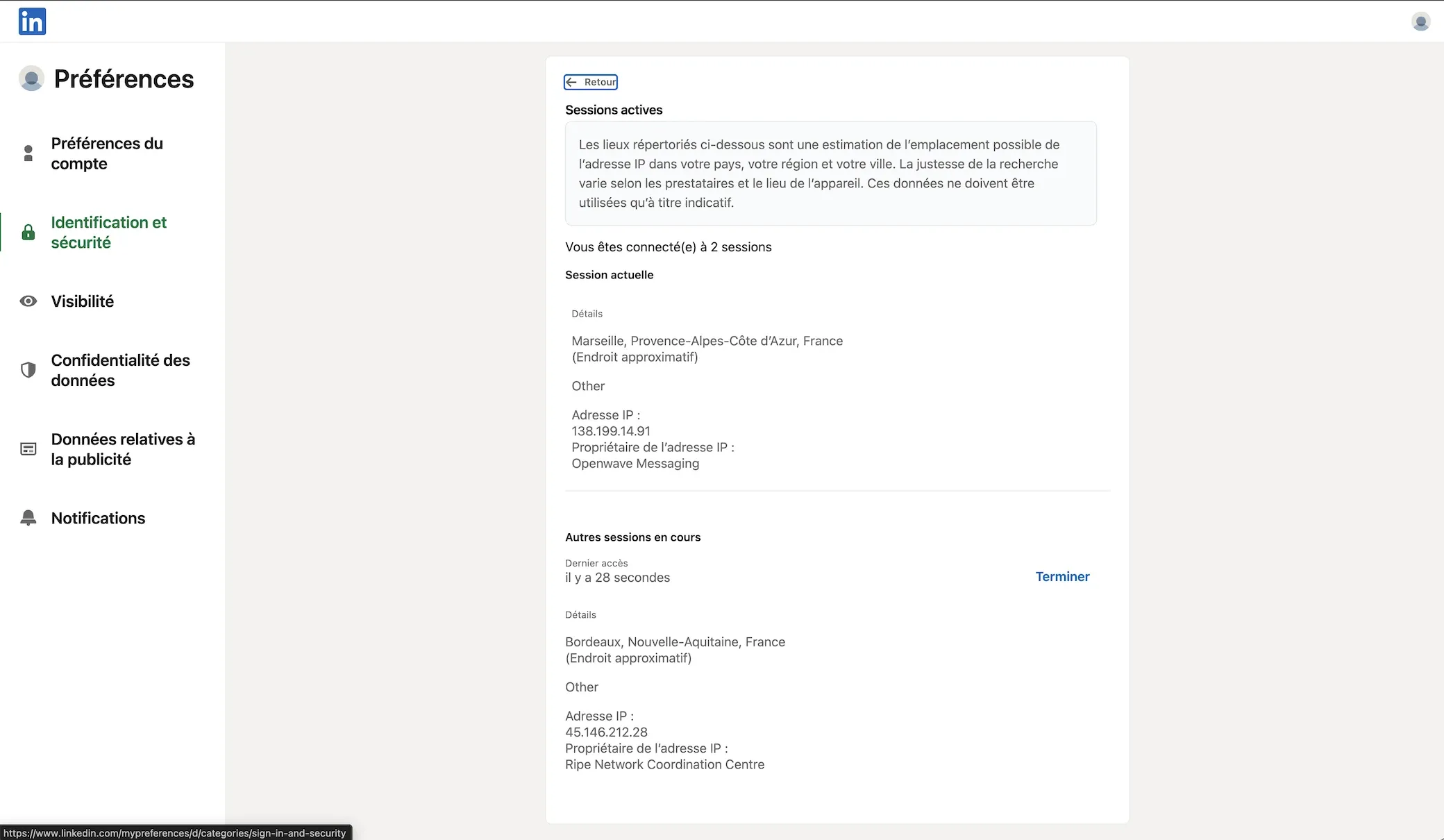
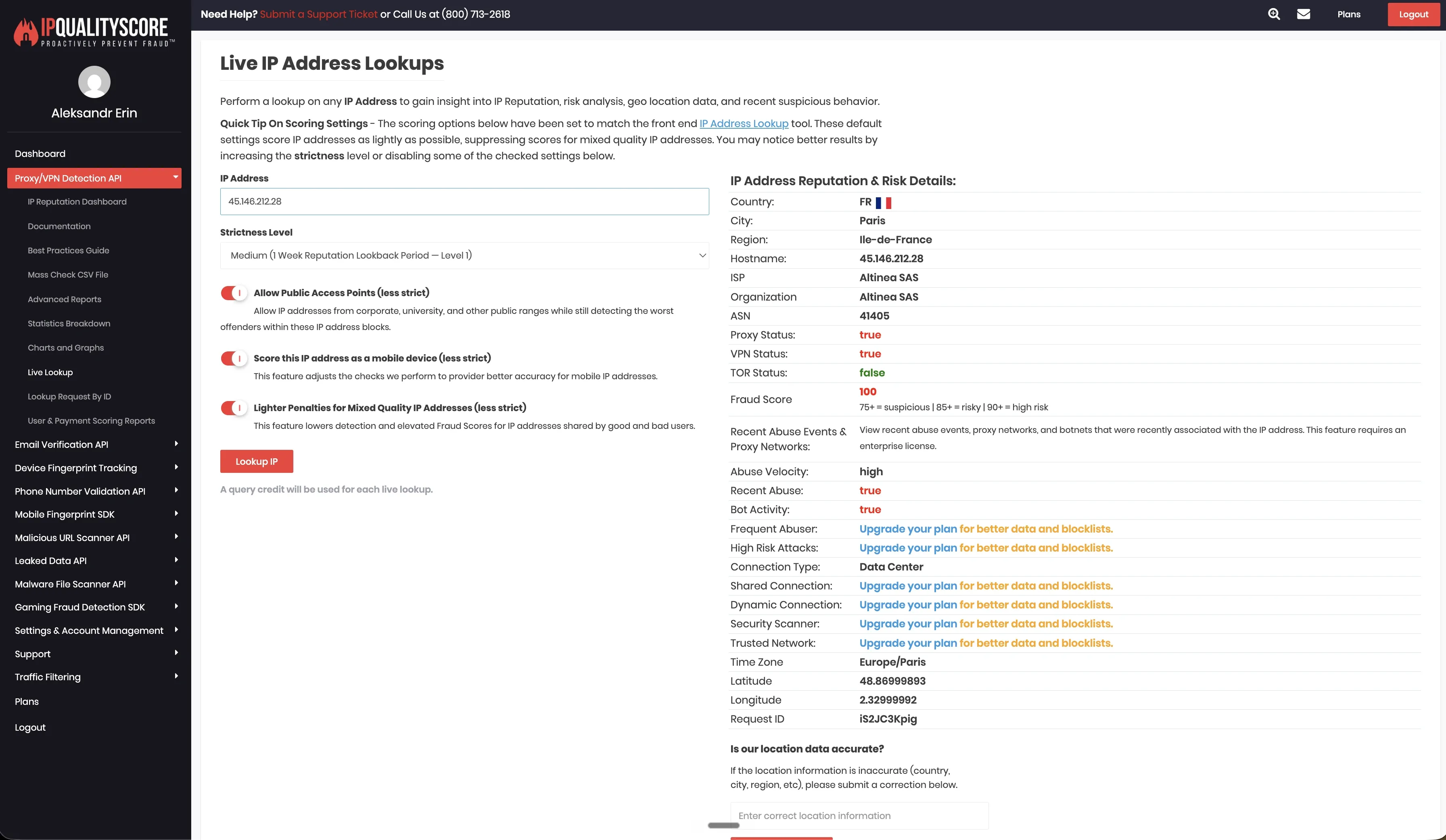
In the June 2026 live cloud test from France, both test accounts landed in the same /24 range: 45.146.212.28 and 45.146.212.36. For 45.146.212.28, IPQualityScore returned Data Center as the connection type, marked Proxy and VPN as positive, and returned a fraud score of 100/100. This is an IP-quality signal from our test setup, not LinkedIn’s own enforcement verdict.
HeyReach supports bring-your-own proxies, desired-location selection, and 154 listed proxy locations. That gives teams more account-environment control than tools with no proxy controls, but proxy quality still becomes part of the setup. Timezone selection was not exposed when adding an account in our review, so location choice can still leave a mismatch between session geography, working hours, and the account’s normal pattern.
Cost and fit: at $79 for a single seat, HeyReach is priced for high-volume agencies; the Agency plan works out to about $20/sender/month at 50 senders and includes white-label branding. For solo users, a lower-priced single-account tool covers the same need at less cost.
User-reported restrictions: HeyReach shows a “Many” pattern of restriction reports across review platforms. As with any third-party automation, multi-sender rotation still falls under LinkedIn’s Terms of Service and can lead to limits or bans, so evaluate proxy quality, session visibility, and account isolation before scaling.
Reader takeaway: HeyReach is designed for agency-scale multi-account operations, and its unified inbox centralizes sender conversations in one view. The trade-off is session custody and setup control. HeyReach operates connected accounts from its cloud environment, and the default IP we checked returned high-risk IPQualityScore signals. Teams using HeyReach at scale should review proxy quality, session visibility, timezone consistency, and account isolation before increasing volume.
Expandi
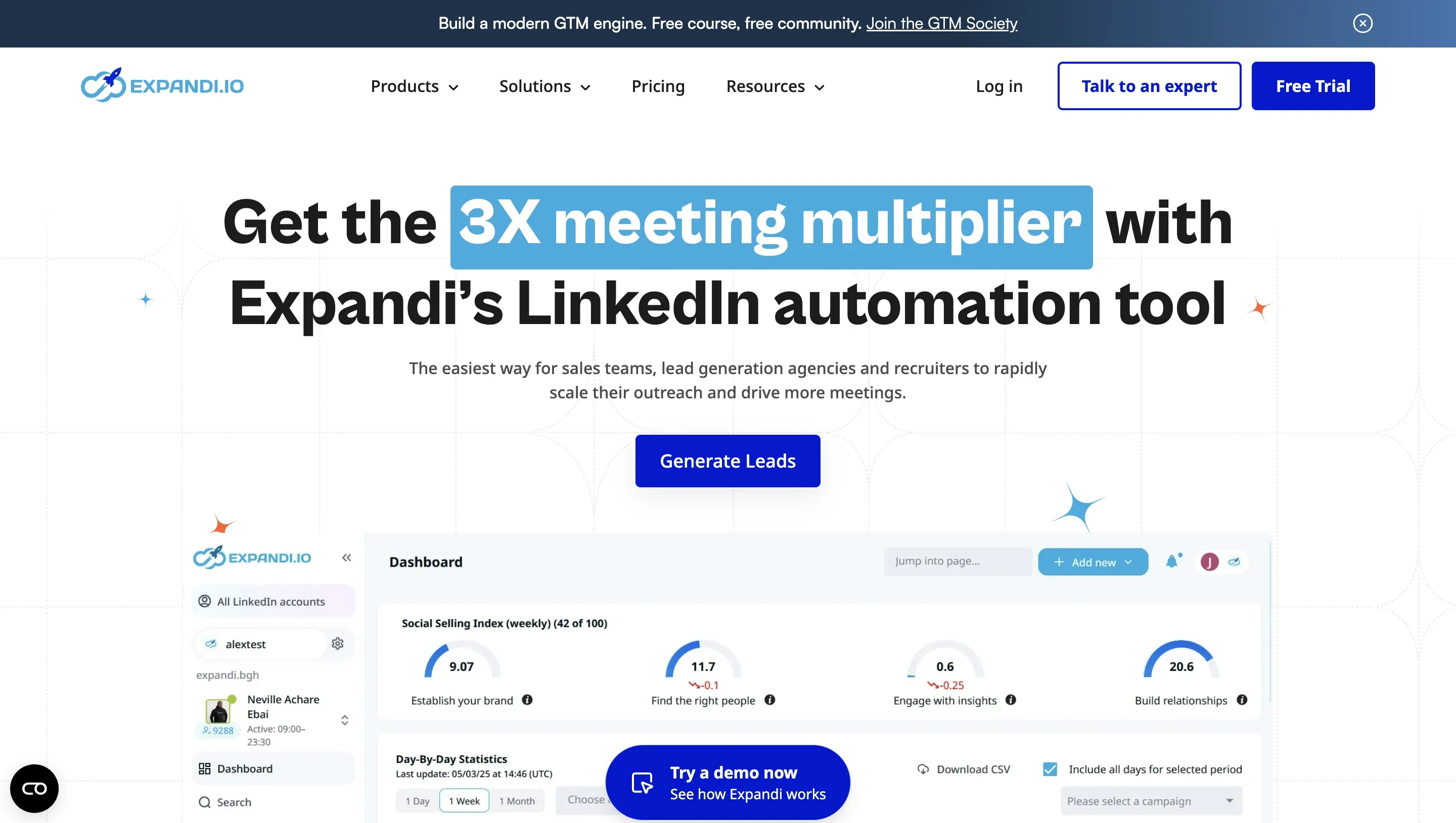
Expandi is a cloud LinkedIn outreach platform at $99/seat/month, or $79/month on annual billing. One of Expandi’s main account-control claims is a dedicated IP per account, so each profile should route through its own IP rather than a shared pool, alongside smart warm-up sequences, conditional if/then logic, and dynamic personalization. A pricing detail worth checking: GIF and image personalization use Hyperise ($69/month) and Sendspark ($49/month), so a full setup can reach $197+/month per seat rather than the advertised $99. On G2, Expandi holds 4.3/5 (May 2026, 139 reviews), with recurring complaints around billing and campaign rigidity.
Verified research note. We tested Expandi’s cloud setup with two LinkedIn accounts in June 2026 and unpacked the Expandi Connector extension. In the tested connector, the extension read the li_at cookie, read JSESSIONID for CSRF handling, interacted with LinkedIn’s page and network layer, and sent session-related data to app.expandi.io.
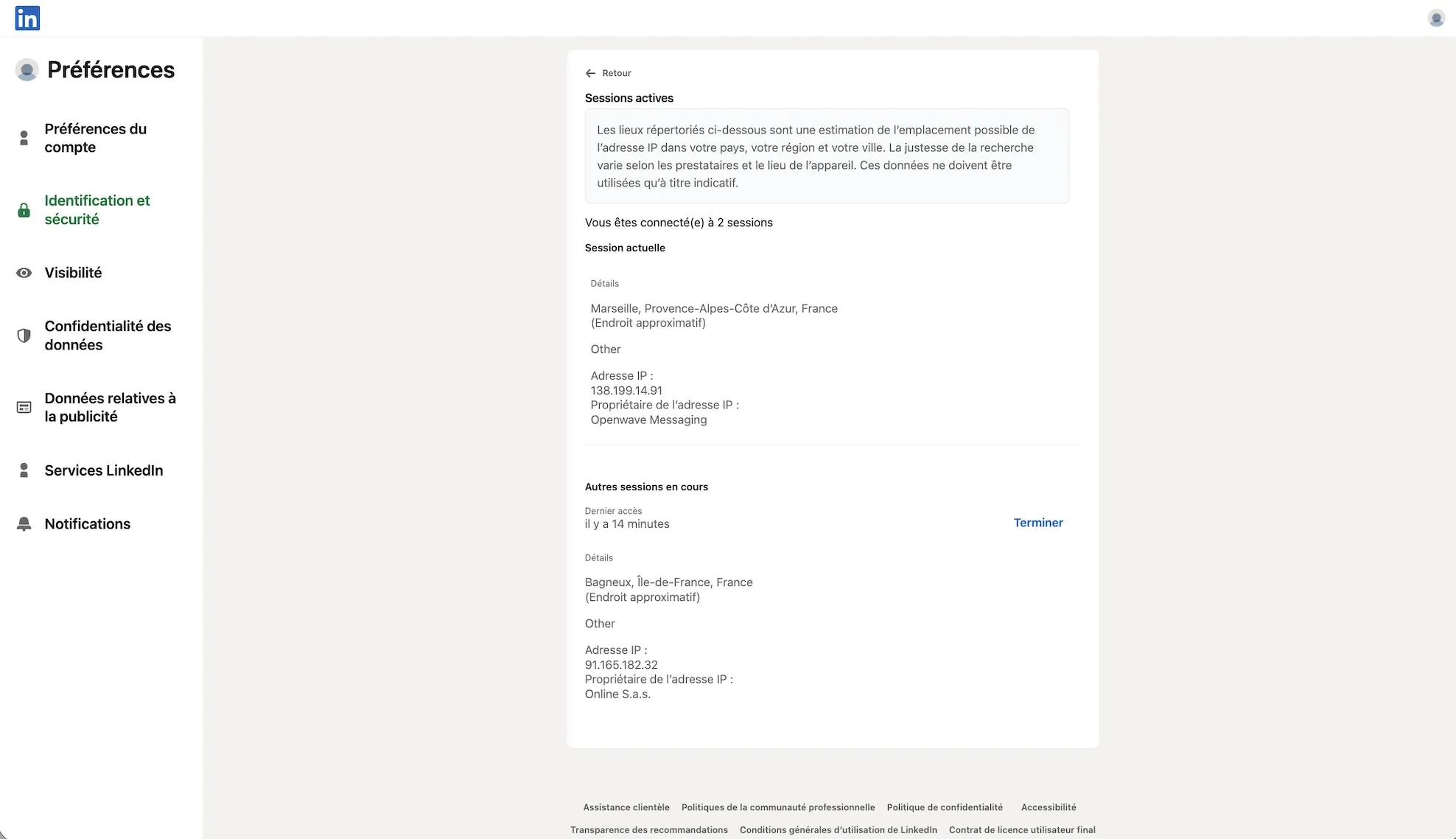
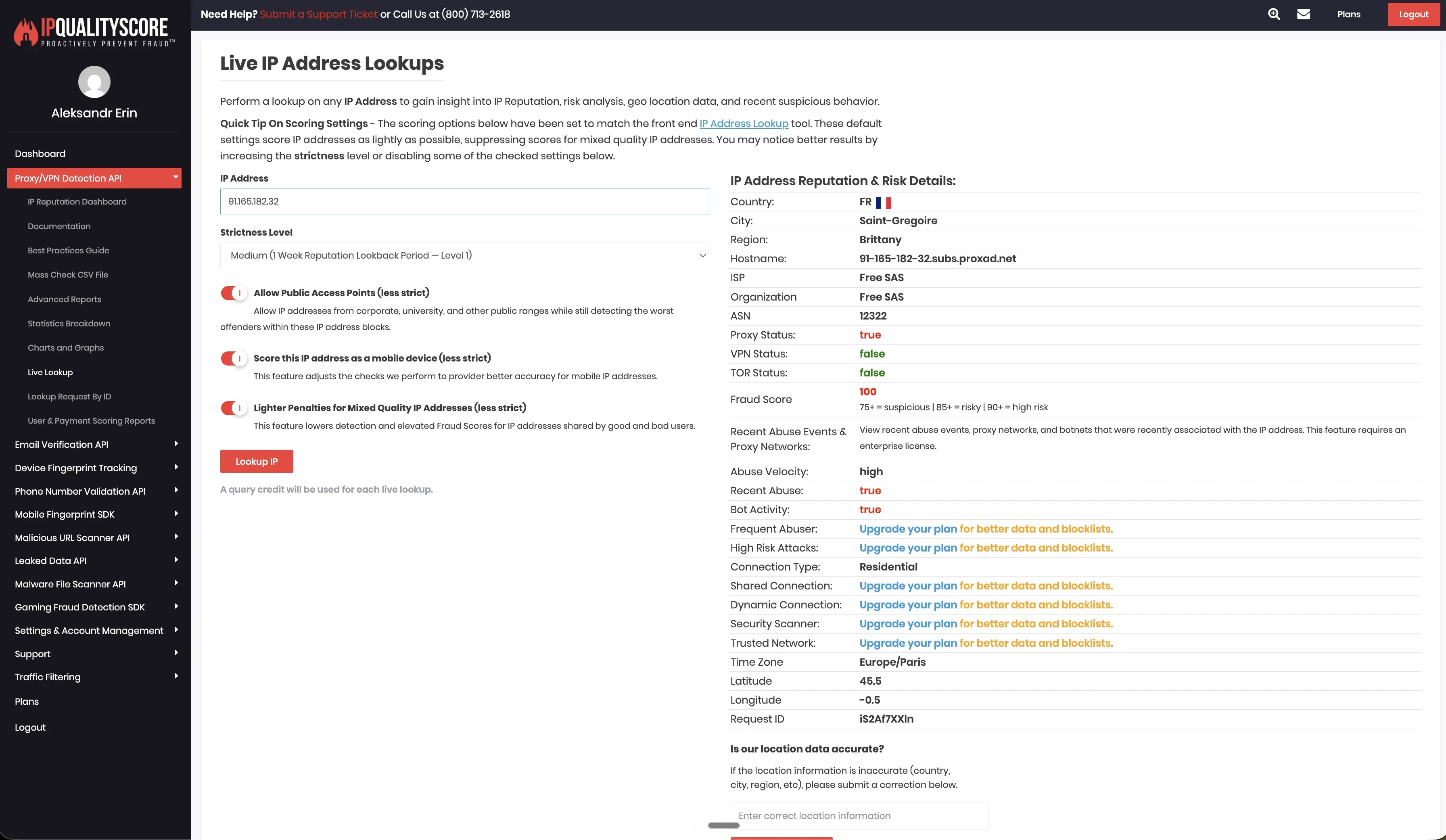
The default IP setup was mixed in our test. One account routed through 91.165.182.32, while the other used an IPv6 address. IPQualityScore results were also mixed: one observed IP showed higher-risk hosting or datacenter signals, while the other showed fewer risk signals in that lookup. This describes the footprint we observed in the tested setup, not a permanent verdict on every Expandi account.
Expandi allowed desired-location selection, listed 96 locations, and exposed timezone selection in our review. Bring-your-own proxy support was not available in the tested setup. These controls can help with consistency, but the setup still depends on Expandi’s vendor-side cloud environment and vendor-assigned IP infrastructure.
User-reported restrictions (public reviews):
- “Within just a few hours of connecting Expandi, my account was frozen.” Trustpilot, 2025
- “Account got restricted twice in three months.” G2, 2025
Reader takeaway: Expandi targets growth marketers and offers cloud execution, LinkedIn-plus-email sequences, and more campaign logic than a LinkedIn-only tool. The trade-off is session custody and vendor-side infrastructure. Before moving high-value accounts, buyers should check assigned IP visibility, timezone behavior, session custody, and the real cost after personalization add-ons.
Dripify
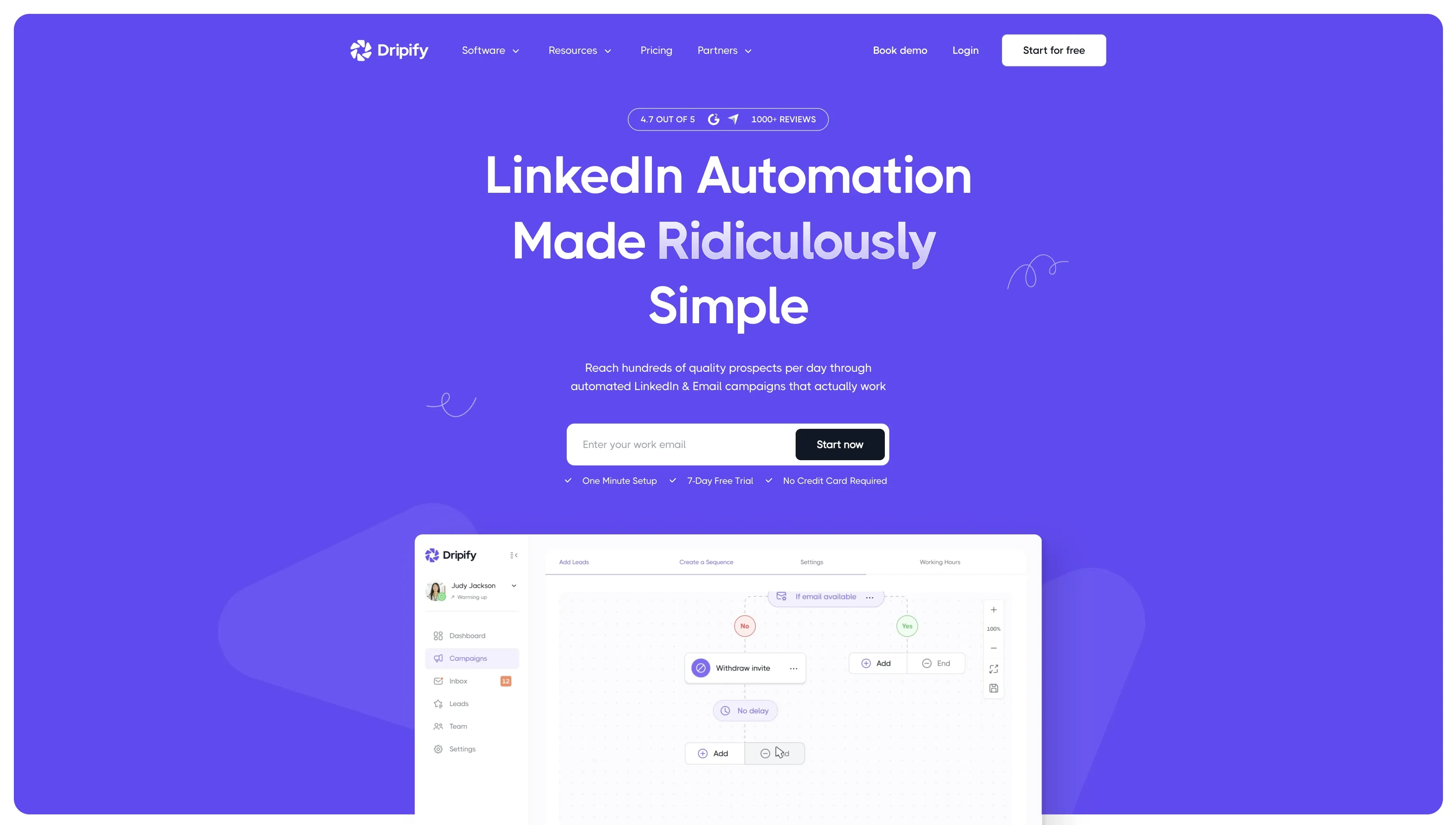
Dripify is a cloud LinkedIn automation tool for drip campaigns, team tracking, and 24/7 execution. Pricing (annual) is $39/month Basic, $59/month Pro, $79/month Advanced; monthly rates are higher. Pro covers unlimited campaigns, full daily quotas, and a unified inbox; the team dashboard shows per-rep acceptance and reply rates, and A/B testing for connection messages is on Advanced. It integrates with HubSpot and Zapier. Plan-based limits: Basic allows one drip campaign, launched campaigns have limited editing, and there is no desktop mode for teams that need local session control.
Verified research note. Dripify does not ship a public LinkedIn Chrome extension, so there was no extension teardown for this tool. Users connect through the cloud product, and LinkedIn activity runs from Dripify’s vendor-side environment.
In our June 2026 live cloud test from France, two LinkedIn test accounts received datacenter IPs in the same /24 range: 209.20.164.225 and 209.20.164.94. IPQualityScore flagged both observed IPs for spam and proxy signals in that setup. This describes the default footprint we saw in the test, not a permanent verdict on every Dripify account or LinkedIn’s own enforcement logic.
Dripify did not offer desired-location selection or bring-your-own proxy controls in the tested setup. Timezone selection was exposed, but without location or proxy control, users still depend on the vendor’s default IP assignment. That matters for teams that need tighter control over session origin, account separation, and location consistency.
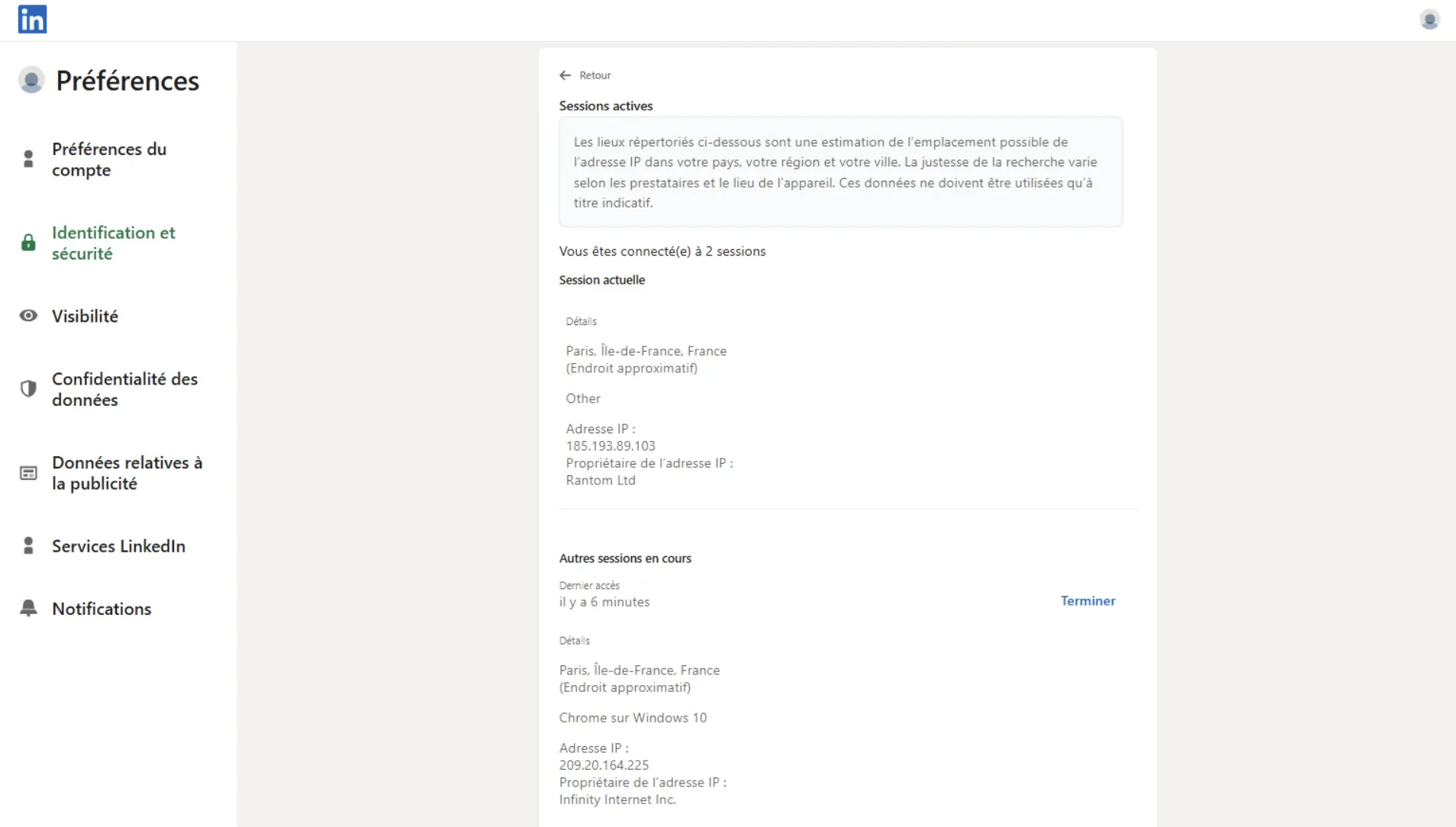
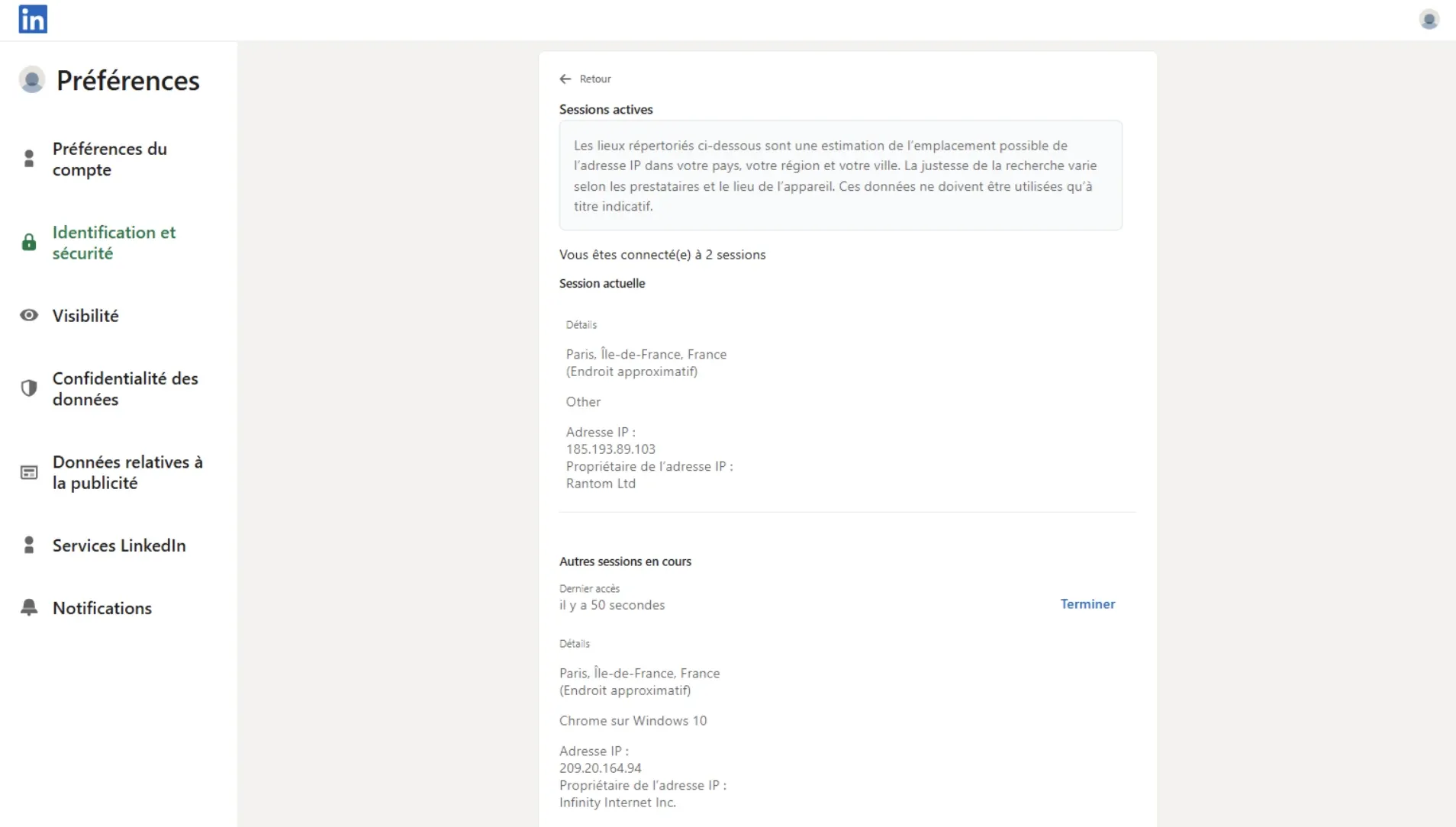
We checked both observed IPs through IPQualityScore. IPQS classified the tested IPs as datacenter/proxy IPs and showed high spam or abuse-risk signals (84/100 for both IPs). This describes the default footprint we observed in that test setup, not a permanent verdict on every Dripify account.
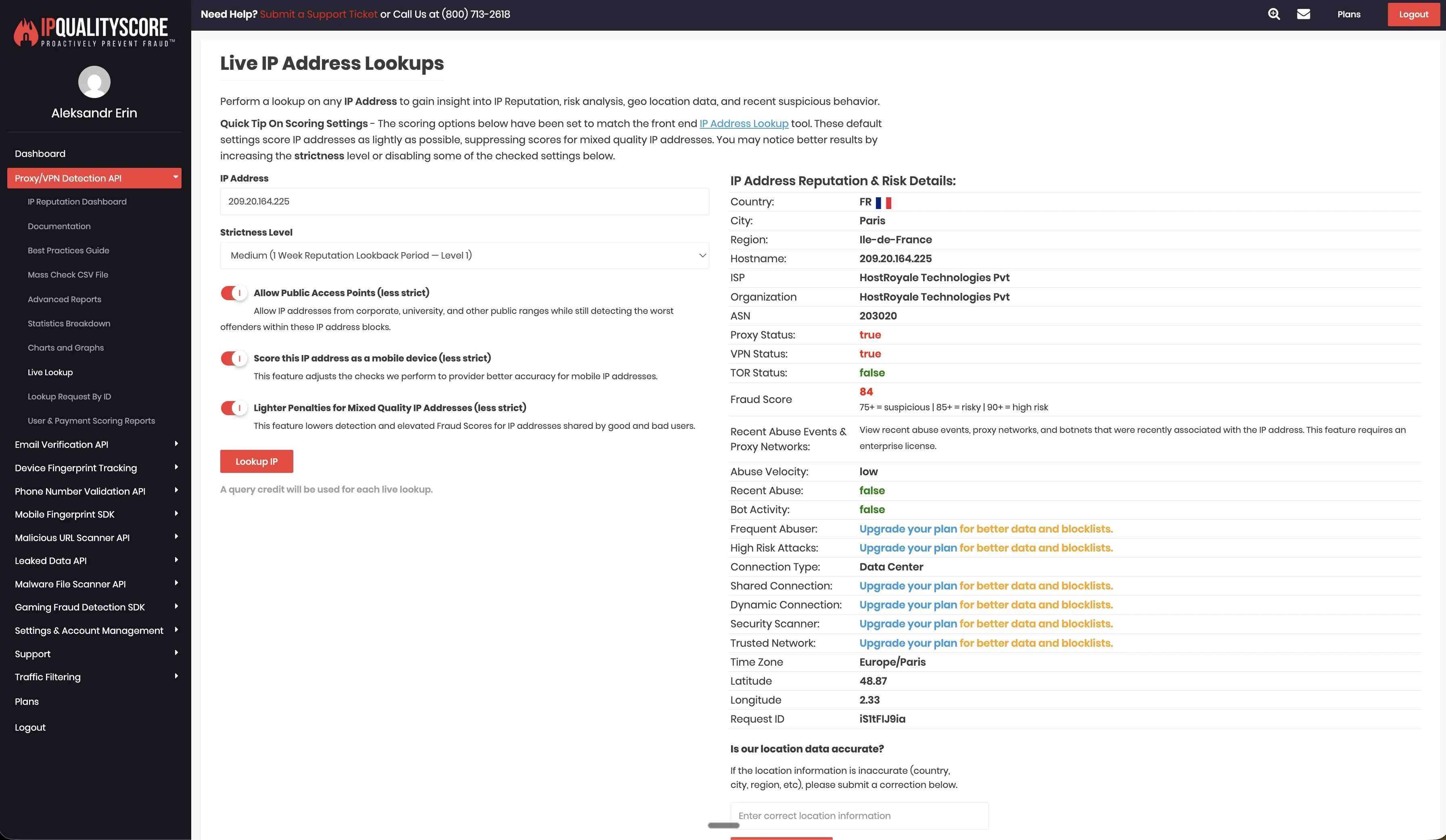
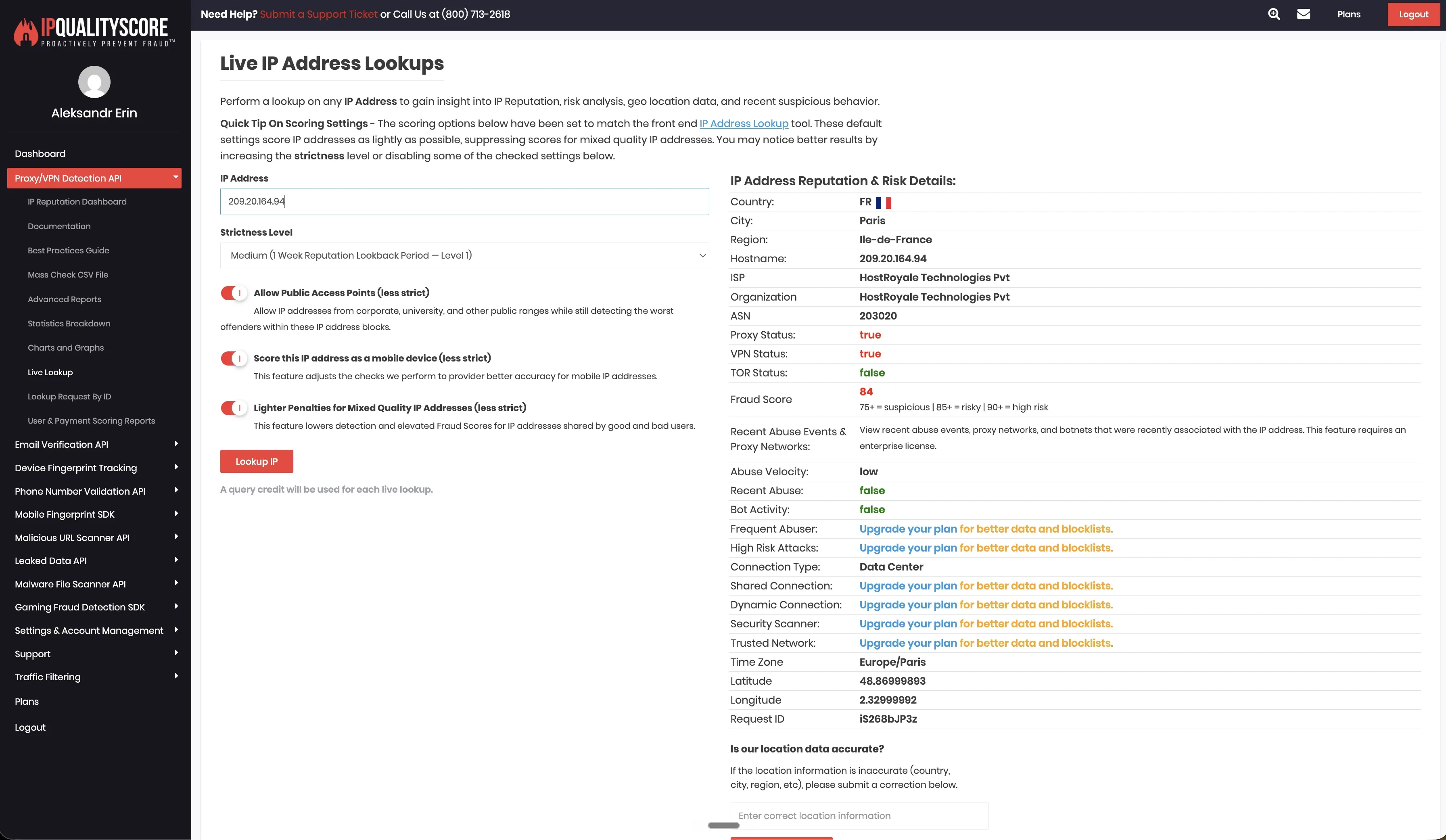
We did not find bring-your-own-proxy support in the tested setup. That means the default account environment depended on Dripify’s vendor-side infrastructure rather than a proxy selected and verified by the user.
User-reported restrictions (public reviews):
- “Billing issues with no recourse” after a LinkedIn restriction. Capterra, 2025
- Users report “LinkedIn warnings and temporary restrictions” despite safety controls. G2, 2025
Reader takeaway: Dripify targets sales-team managers and provides per-rep tracking and always-on cloud execution at a mid-market price. The trade-off is vendor-side session handling and limited account-environment control in the tested setup. Multi-account teams should review IP assignment, location consistency, proxy options, and session visibility before scaling.
PhantomBuster
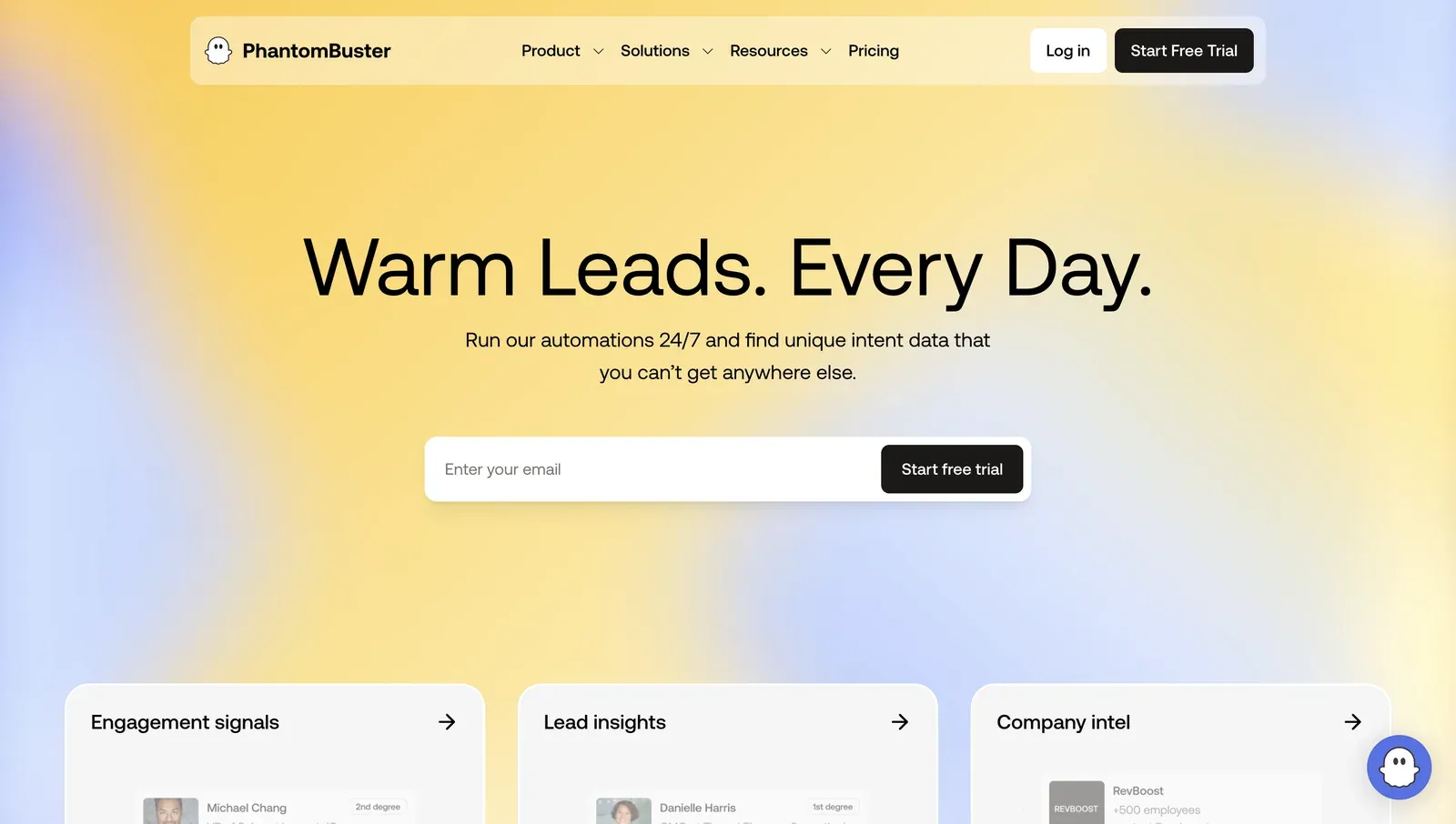
PhantomBuster uses an execution-hour model: $69/month Starter (20 hours) and $159/month Pro (80 hours), reduced to $56 and $128 on annual billing. The 14-day trial includes 2 hours and 5 slots. Its strength is data extraction: 100+ code-free “Phantoms” scrape LinkedIn search results, export event attendees, and build multi-step pipelines across LinkedIn, Sales Navigator, Google Maps, and X; most B2B workflows depend on Sales Navigator for lead quality.
Verified research note. We reviewed PhantomBuster’s LinkedIn connection flow as part of the 2026 session-handling checks. In the tested flow, connecting LinkedIn passed the session into PhantomBuster’s cloud environment, after which Phantoms ran from vendor infrastructure rather than from the user’s local machine.
In our review, PhantomBuster stored the LinkedIn session token server-side. We also recorded a default IP that was detected as a proxy.
Reader takeaway: PhantomBuster targets technical marketers and focuses on scraping, enrichment, and custom automation pipelines. For standard LinkedIn outreach, the execution-hour model can become limiting because heavy users may consume monthly hours faster than expected.
Waalaxy
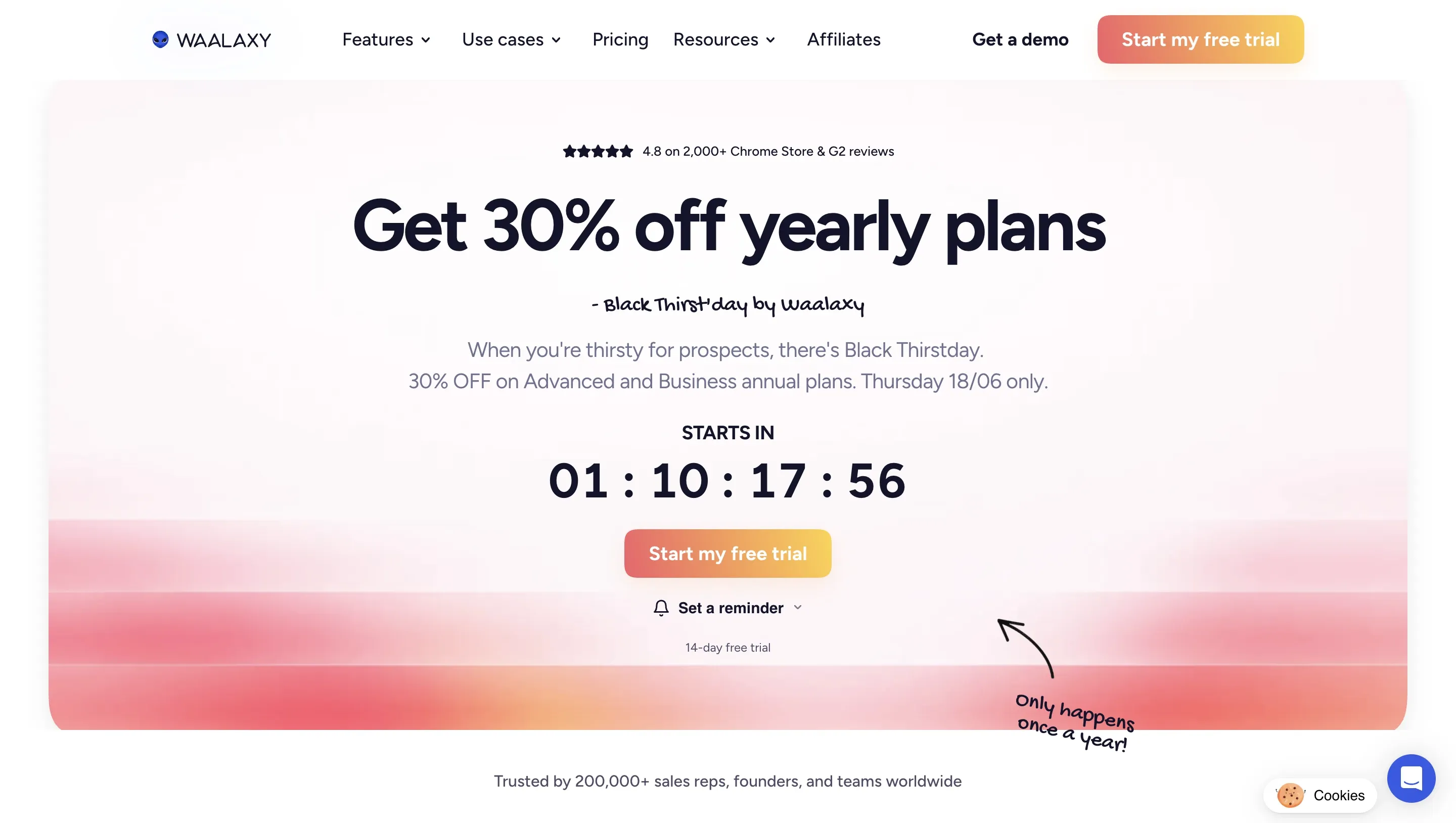
Waalaxy offers a free plan (80 invites/week) and paid tiers up to €139/month (Business), combining LinkedIn and email in one interface, which makes it a low-friction entry point for solo users. The free tier is limited; unlimited connection requests require the Advanced plan (€99/month). On G2, Waalaxy holds 4.5/5 (May 2026, 1,207 reviews).
Verified research note. We unpacked the Waalaxy Chrome extension in June 2026 and reviewed its Manifest V3 package. In the tested package, the extension requested Chrome cookies permission, read LinkedIn cookie data, mapped JSESSIONID to a CSRF token, uploaded cookies to Waalaxy’s cloud backend, injected into LinkedIn pages, and supported both local extension and cloud modes.
From the account-control side, Waalaxy did not provide bring-your-own proxy support in our review. We did not run a live cloud/IP test on Waalaxy, so this section does not report assigned session IPs, IPQualityScore results, default proxy behavior, location count, or timezone behavior.
Reader takeaway: Waalaxy targets beginners and budget-sensitive solo users and provides a LinkedIn-plus-email entry point. The trade-off is the browser-extension and cloud-mode setup: in the reviewed package, LinkedIn cookie data could be synced with Waalaxy’s backend, and the extension still operated inside LinkedIn pages.
MeetAlfred
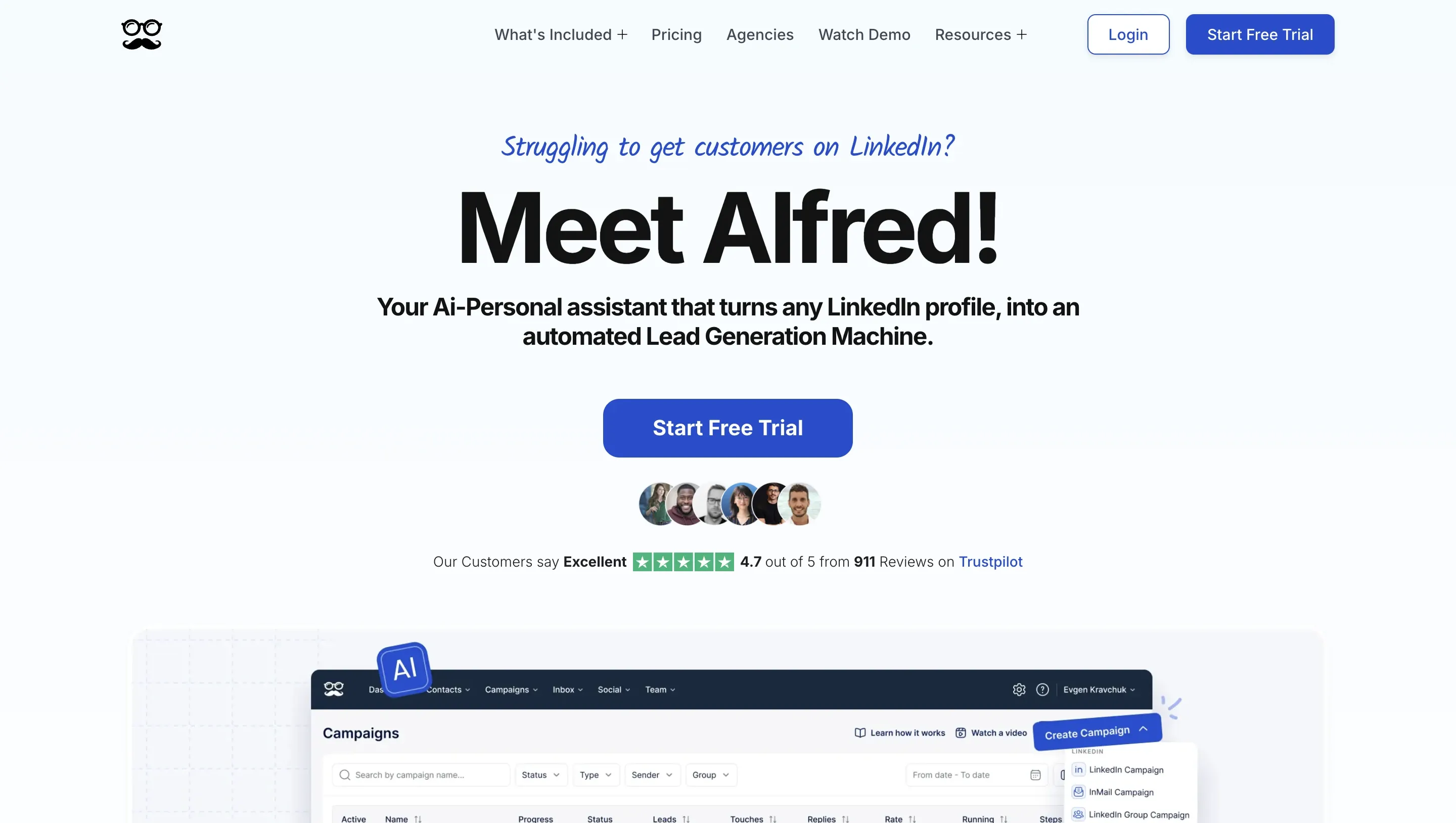
MeetAlfred costs $59 to $345/month and includes a built-in CRM, covering LinkedIn, email, and X sequences in one interface, which removes the need for a separate CRM subscription for small teams. The Business plan supports InMail automation, at a higher price than Linked Helper Pro. On G2 it holds 3.4/5 (May 2026, 37 reviews), with documented reliability complaints, and setup complexity exceeds single-channel tools.
Verified research note. MeetAlfred did not require a public Chrome extension teardown in this comparison, so we scoped it to the live cloud test.
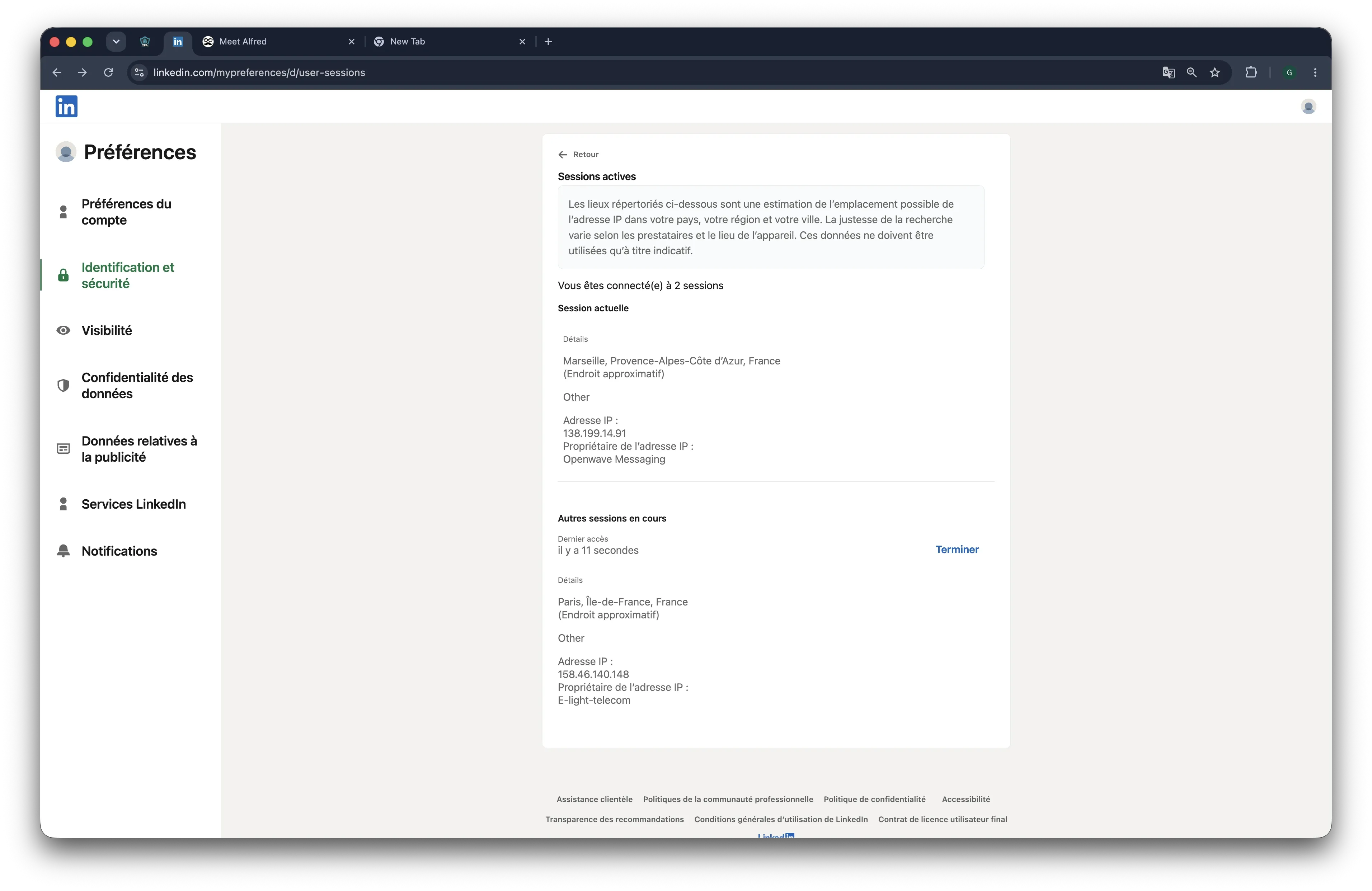
In our June 2026 test from France, the two connected LinkedIn accounts appeared on 109.238.196.65 and 158.46.140.148. Both sessions presented mobile browser signals: one as Chrome Mobile on iOS, the other as Chrome Mobile on Android.
MeetAlfred exposed desired-location selection, bring-your-own proxy support, 247 listed locations, and timezone selection in our review. Those controls give users more ways to align the session environment with the account’s expected location and working pattern. The remaining trade-off is custody: LinkedIn activity still runs from vendor-side infrastructure, with cloud-controlled device, browser, IP, and location signals.
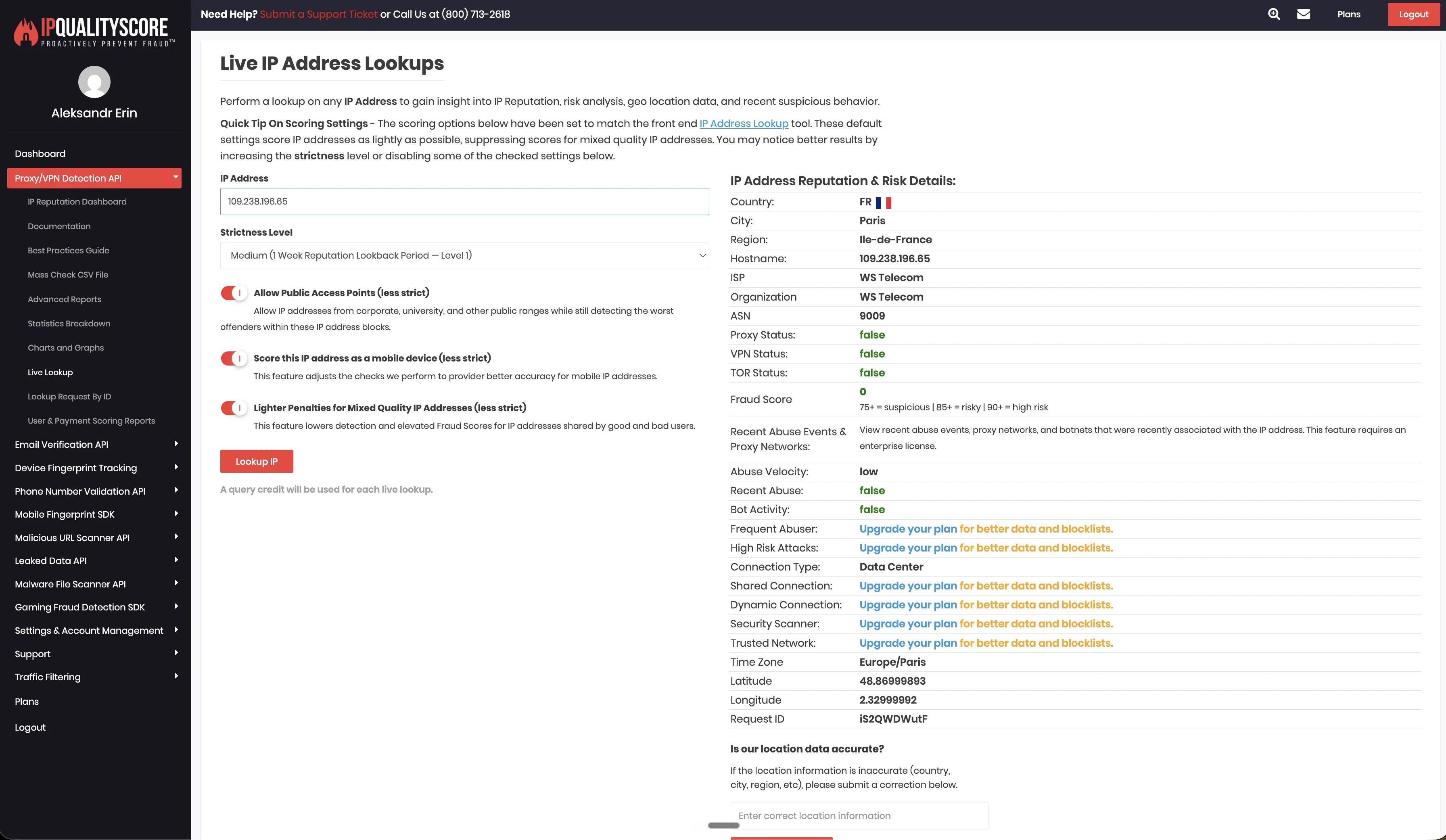
Reader takeaway: MeetAlfred targets small teams and combines LinkedIn, email, and X touches with a built-in CRM in one interface. The trade-off is reliability and control over the cloud session environment. Cloud execution can be convenient because users do not need to keep a local app or VPS active, but teams should still test session consistency, proxy quality, timezone logic, and connection stability before scaling.
Octopus CRM
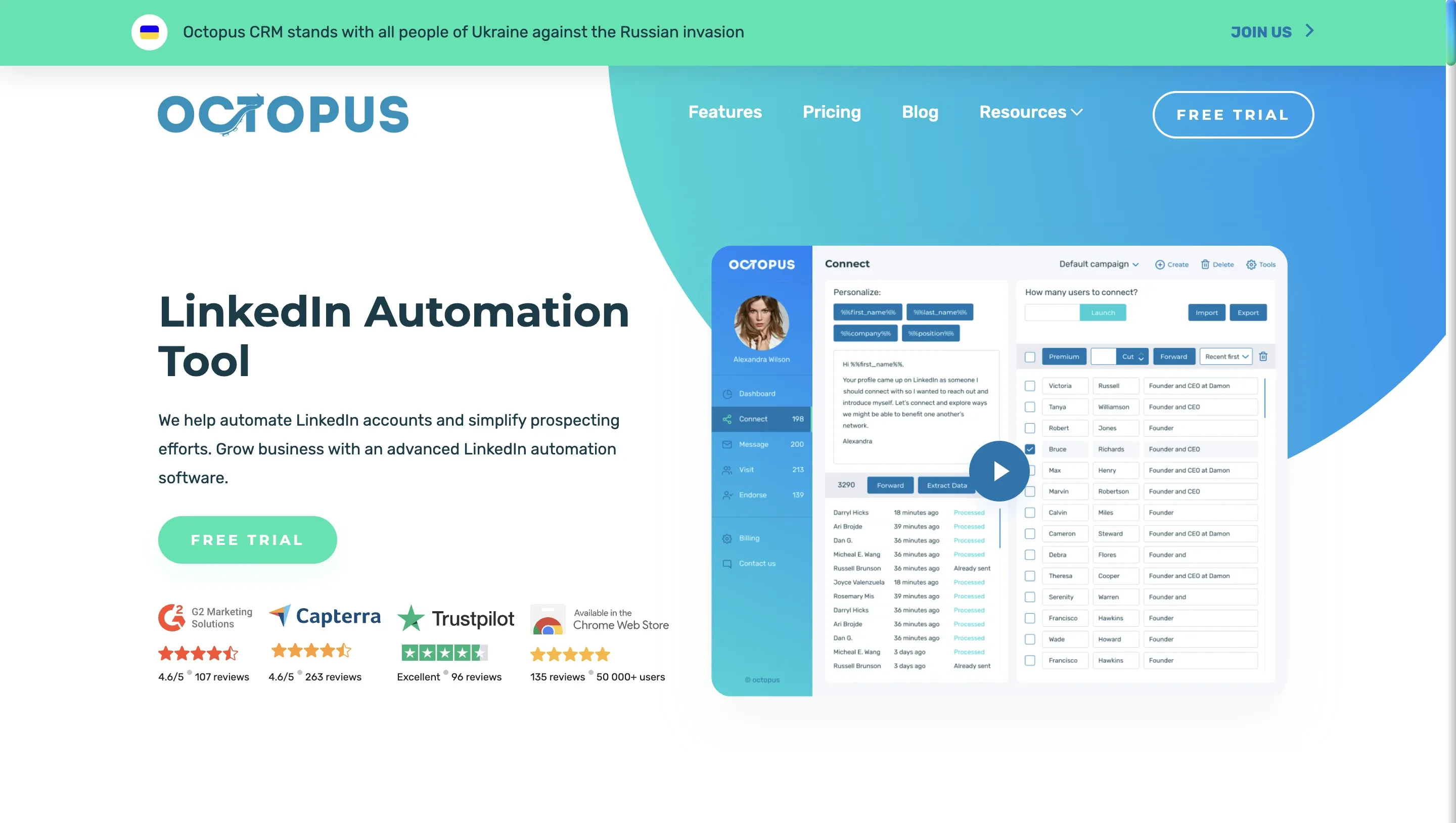
Octopus CRM is a Chrome extension at $9.99 to $39.99/month, the lowest paid entry price in the category, and it works across Free, Premium, Sales Navigator, and Recruiter Lite accounts. Despite the name it is not a true CRM (no pipeline views or deal tracking), the funnel logic is basic compared with conditional-branching tools, and user reviews report unreliable safety mechanisms. On G2 it holds 4.3/5 (118 reviews).
Verified research note. We unpacked Octopus CRM’s published Chrome extension in June 2026 and reviewed its Manifest V3 package. Unlike cloud-bridge tools, the tested extension did not request the Chrome cookies permission and did not read or upload the li_at session token to a vendor cloud.
That makes Octopus CRM cleaner on session custody than many cloud-connected extensions. However, it still runs as a Chrome extension inside LinkedIn pages. The tested package read JSESSIONID locally for CSRF handling, injected a content script into LinkedIn pages, and made direct Voyager API calls.
From the account-control side, the local extension setup runs through the user’s own browser and IP address rather than vendor-side cloud infrastructure. We did not see bring-your-own proxy support, desired-location selection, or timezone selection in the reviewed setup. For users who need those controls, the account environment is handled outside the product, through the user’s own browser, device, network, or separate proxy setup.
Reader takeaway: Octopus CRM targets first-time testers on a tight budget with low volume. On the session-custody axis, it was one of the lower-exposure Chrome extensions we reviewed: the li_at token stayed local in the tested package. The trade-off is still browser-extension exposure: the tool injects into LinkedIn pages and makes direct Voyager API calls, while advanced account-environment controls are limited.
Best LinkedIn Automation Tools for B2B Lead Generation
The B2B lead-generation funnel on LinkedIn follows five steps: Sales Navigator search, prospect-list import, connection sequence, reply detection, and CRM handoff. Per industry benchmarks, connection acceptance rates range from 15 to 30% with personalized notes and 5 to 15% without; ICP fit, personalization depth, and warm-up stage drive the gap.
Five features determine whether a tool supports serious SDR outreach:
- Sales Navigator list import (saved searches with 50+ filters, or CSV)
- Personalization tokens: {first_name}, {company}, spintax, AI drafts
- Auto-reply detection that pauses the sequence when a prospect responds
- Daily-limit enforcement (20 to 40 connections/day)
- CRM sync via native connector or webhook on connection acceptance
Tool recommendations by team size:
- Solo SDR, budget under $50/month: Linked Helper Standard at $15/month covers the core SDR workflow.
- 5-person sales team needing 24/7 cloud: Linked Helper Pro at $45/month + VPS.
- Agency billing 10+ clients: Linked Helper Pro at $45/month with bulk discount up to 30%.
Automation does not replace an SDR; it handles repetitive volume so the SDR can write strategy, qualify replies, and close. Spintax and AI-generated per-prospect drafts keep messages from looking identical, which matters because uniform messaging is a classic automation signal.
Best LinkedIn Automation Tools for Recruiters
Recruiters need four capabilities that not every tool supports:
- InMail automation to 2nd and 3rd-degree connections
- Boolean search string support
- Candidate profile export (CSV or direct CRM push)
- ATS sync via Zapier to Greenhouse, Lever, or Workable
InMail automation is available in Linked Helper Standard and Pro, HeyReach, MeetAlfred Business, and Skylead. Waalaxy basic plans and Octopus CRM do not support InMail.
One LinkedIn limitation: In regular LinkedIn and Sales Navigator workflows, InMail targets 2nd- and 3rd-degree contacts plus open profiles. If a lead becomes a 1st-degree connection during that workflow, the follow-up should move to a regular message step. Recruiter workflows can behave differently, because Recruiter messaging treats some 1st-degree communication as InMail-style messaging.
Linked Helper and Expandi support Salesforce. HeyReach integrates with HubSpot and Breakcold. For other tools, ATS integration usually runs through Zapier. LinkedIn Recruiter account support varies by tool. Linked Helper works with LinkedIn Recruiter accounts and Sales Navigator. Expandi supports Recruiter-based campaigns. Octopus CRM supports basic LinkedIn, Sales Navigator, and Recruiter accounts.
Your recruiter workflow starts in LinkedIn Recruiter with a boolean search. You can:
- Import candidates into a Linked Helper campaign.
- Send InMail to non-connections.
- Push accepted connections to your ATS via webhook.
Recruiter tools need personalization features beyond basic {first_name} tokens. Spintax generates message variations so candidates won’t receive identical outreach. This is a classic sign of automation done badly, and can lead to flagging by LinkedIn and even account suspension.
AI-generated drafts reference prospect-specific details (current role, recent activity, shared connections). Without message uniqueness, recruiter outreach triggers spam detection faster than sales outreach, because LinkedIn monitors InMail rejection rates separately. Personalization helps to make you look legitimate and protects your account.
The price comparison is clear. For in-house recruiters: Linked Helper Pro gives you everything you need for $45/month. For recruiting agencies at scale, HeyReach Agency is priced at $999/month for 50 seats.
Best LinkedIn Automation Tools for Agencies Managing Multiple Accounts
Agency-volume LinkedIn automation requires three capabilities:
- Per-client campaign isolation (no cross-client data leakage)
- Team dashboards with role-based permissions
- White-label reporting for client deliverables
Two tools focus on agency operations.
HeyReach offers multi-sender rotation, Unibox, API-based campaign management, and white-label on Agency/Unlimited plans. Linked Helper, meanwhile, provides team workspaces with granular access control (Owner, Admin, Member, Guest), license transfers between workspaces, and remote control of accounts on teammates’ machines. Plus, workspaces are available on all license tiers, not only Pro.
Tools like Octopus CRM and Dux-Soup can support multiple accounts, but they’re less purpose-built for agency-scale workflows. Running client accounts through a single browser session creates contamination risk. Sharing sessions, cookies, or campaign data across client accounts triggers cross-account flags and restrictions.
What does this cost at scale? HeyReach Agency at $999/month covers 50 LinkedIn accounts. Running 50 accounts on Expandi costs $4,950/month at the $99/seat rate.
Linked Helper Pro for 50 accounts costs $1,575/month with bulk discount (30% off), or $865/month on annual billing. If you don’t need all the features of the Pro tier, 50 Standard licenses cost $525/month, or $288/month annually. Bulk and duration discounts stack automatically on one invoice.
Linked Helper’s workspace architecture enables agency operators to assign roles and grant access to LinkedIn accounts without sharing passwords. Operators can transfer licenses between workspaces and monitor campaigns remotely via the web interface.
On the other hand, HeyReach’s Unibox consolidates all client inboxes into a single view. So when choosing between platforms, consider your toppriority: IP control and price (Linked Helper) or zero-setup multi-sender rotation (HeyReach).
What LinkedIn Automation Tools Do — and How They Actually Work
A LinkedIn automation tool executes repetitive LinkedIn actions on your behalf. The kinds of tasks these tools can do break down into four categories: outreach, prospecting, content distribution, and engagement tools.
Eight LinkedIn actions you can automate with software:
- Connection requests with personalized invitation notes
- Message sequences with scheduled follow-ups and reply detection
- InMail to 2nd/3rd-degree connections (requires paid LinkedIn)
- Profile visits that generate prospect notifications
- Data scraping: names, titles, companies, emails into exportable formats
- Engagement: likes, comments, endorsements at controlled volume
- Content scheduling for LinkedIn posts
- CRM sync via native connectors or webhooks
Three different deployment architectures can be used to keep your accounts safe.. Desktop apps (Linked Helper) run their own isolated browser engine on your machine. Cloud tools (Expandi, Dripify, HeyReach) execute from vendor servers. At the browser level, extensions (Octopus CRM, Dux-Soup) inject JavaScript into Chrome.
Browser extensions can create detectable browser-environment signals because they operate inside Chrome and interact with the page directly. Desktop tools avoid this extension-specific vector because they do not run inside the user’s everyday Chrome session.
LinkedIn enforces a weekly limit of ~100 invitations on free accounts and ~200 on Premium. Basic (free) members receive only 5 personalized invitation messages per month. For serious B2B outreach, you’ll need a Premium or Sales Navigator subscription.
One common confusion: LinkedIn bots and LinkedIn automation tools are not the same category.
Bots operate without volume controls, send identical messages at scale, and ignore LinkedIn’s behavioral thresholds. Automation tools operate within configurable daily limits, randomize delays between actions, and support per-message personalization. Both violate LinkedIn ToS, but tools with safety controls carry measurably lower detection risk than uncontrolled bots.
How LinkedIn Detects Automation — and How to Stay Safe in 2026
LinkedIn uses 5 specific detection mechanisms.Each mechanism has its own individual mitigation you can use to protect account health.
1. IP pattern analysis. A shift from residential IP to datacenter IP triggers a session origin mismatch. Mitigation: consistent residential IP. Desktop tools provide this by default.
2. Click interval uniformity. Clicks at uniform 3-second intervals signal non-human behavior. Mitigation: randomized delays. Linked Helper adds variable pauses and micro-jitter.
3. Volume spikes. Jumping from 5 daily connections to 80 overnight flags the account. Mitigation: gradual warm-up over 3 to 4 weeks.
4. Session origin mismatch. IP rotation (changing IPs between requests) is a red flag, not a safety feature. Mitigation: IP stability. Same residential IP every session.
5. Extension fingerprinting. LinkedIn runs client-side JavaScript to detect installed extensions. The platform checks local files and sends page snapshots to servers. Desktop tools avoid this vector entirely.
| Week | Connections/day | Messages/day | Profile visits/day | Delay range | Weekly total | Safety status |
|---|---|---|---|---|---|---|
| 1 | 5 to 10 | 5 | 10 to 15 | 45 to 120 sec | ~35 to 70 | Warming up |
| 2 | 10 to 15 | 5 to 10 | 15 to 25 | 35 to 90 sec | ~70 to 105 | Building trust |
| 3 | 20 to 25 | 10 to 15 | 25 to 40 | 30 to 75 sec | ~140 to 175 | Establishing pattern |
| 4+ | 25 to 30 | 15 to 20 | 40 to 60 | 25 to 60 sec | ~175 to 210 | Sustained |
Use these as starting ranges, not fixed limits. Adjust by account age, plan, and acceptance rate.
What happens if LinkedIn catches you? LinkedIn applies two restriction types:
- Temporary: 24 to 72 hours, usually resolves after reducing activity
- Permanent: may not be removable, even after contacting LinkedIn support
Message uniqueness adds a sixth protection layer. Identical messages sent to hundreds of profiles triggers content-pattern detection. Linked Helper supports Message Variations, spintax, 8 built-in variables, custom variables, and AI-assisted drafts for per-prospect message variation.
Session isolation adds another layer: Linked Helper runs its own browser session that LinkedIn can’t distinguish from a standard Chrome login. Manual browsing in your regular browser doesn’t interfere with automated actions. LinkedIn sees both sessions as normal user activity.
Desktop vs Cloud: Which LinkedIn Automation Architecture Is Right for You?
| Attribute | Desktop (Linked Helper) | Cloud (Expandi, Dripify, HeyReach, MeetAlfred, Skylead, PhantomBuster, Waalaxy cloud mode |
|---|---|---|
| IP origin | Your residential IP or self-assigned proxy | Vendor-assigned IP, vendor proxy, or user-provided proxy, depending on the tool |
| Requires PC | Yes, or VPS for 24/7 | No |
| Ban risk level | Lower (residential IP + isolated session) | Medium to higher (server IP patterns) |
| 24/7 operation | VPS required (one-time setup) | Built-in |
| Data ownership | Local: your machine or VPS | Vendor server (provider-controlled) |
| Price range | $15 to $45/month | $39 to $199/month per seat |
| Example tools | Linked Helper | Expandi, Dripify, HeyReach, Skylead |
| Best for | SDRs, founders, compliance teams | Agencies scaling 10+ accounts |
Cloud tools promise a ‘dedicated IP’ per account. But no vendor lets you see or verify that IP.
Desktop tools on VPS with residential proxies achieve the same 24/7 operation with full IP control. Linked Helper validates proxy quality before each session: fraud score, country, prior usage.
Data ownership matters more than most articles acknowledge.
Desktop apps store all prospect data locally. With cloud tools, your data lives on vendor infrastructure. That means a vendor breach can expose it. Or a vendor shutdown may erase it. For GDPR, CCPA, or internal security policies, local storage removes that risk.
How should you decide? If your company prohibits storing prospect data on third-party servers, desktop is the only option. If you need 20+ simultaneous accounts with minimal technical overhead, cloud tools offer better operational scale at higher cost and lower control.
CRM Integration Guide: LinkedIn Automation to HubSpot, Salesforce, and Pipedrive
Three integration tiers exist:
- Native API connector: direct export from Linked Helper to the CRM, with field mapping depending on the connector. Linked Helper supports HubSpot, Salesforce, Pipedrive, Close.io, Zoho CRM, Zoho Recruit, ActiveCampaign, HighLevel, and Streak, Capsule CRM, Instantly.
- Webhook (Zapier/Make/Automatic.ai): tool fires an HTTP request on a trigger event. Requires middleware.
- CSV export: manual file transfer, no live sync.
Data fields per contact: name, company, LinkedIn URL, job title, email (if enriched), campaign name, reply status, connection date, outreach step. Linked Helper transfers messaging history and associates records with Contact and Company objects across its native CRM integrations. Instantly is supported separately.
Linked Helper webhooks can be configured to trigger on selected campaign events, depending on how the workflow is set up. Incoming webhooks (CRM to Linked Helper) are planned and will allow external events to trigger or pause campaigns.
Before relying on any tool’s “native HubSpot” claim, verify whether the integration is a direct API sync or a Zapier pass-through. The two behave differently for automation triggers and field mapping completeness.
How to Set Up Your First LinkedIn Automation Campaign
Step 1: Install and connect. Download Linked Helper for Windows, macOS, or Ubuntu. Link your LinkedIn account through the built-in browser. Your regular browser won’t be used.
Step 2: Create the campaign first. In Linked Helper, the campaign container exists before leads are added.
Step 3: Build your prospect list. Three sources work:
- Sales Navigator saved searches (50+ filters for industry, role, company size, geography, seniority; 1,000 account results per search)
- Regular LinkedIn search (no paid subscription required, fewer filters)
- CSV import from an external database
Target 200+ leads per campaign for meaningful performance data.
Step 4: Configure campaign steps.
- Connection request with personalized note ({first_name}, {company} variables, spintax)
- 3-day wait after acceptance → Message 1
- 5-day wait if no reply → Message 2
- Auto-like or endorse between messages to stay visible
Before sending an invite, you can add lighter engagement steps such as viewing the profile, following the lead, or liking a recent post. These steps can warm up the interaction before the connection request, especially when the lead list is cold.
Step 5: Set daily limits. New accounts: 15 to 35 connections/week. Established accounts: 30 to 40/day. Follow the warm-up protocol.
Step 6: Monitor weekly. Acceptance rate target: above 25%. Reply rate target: above 8%. Below those thresholds, adjust message copy or refine targeting.
Cloud tools differ in workflow order depending on which one you use. Most import leads first, then build campaigns around the imported list.
Free vs Paid LinkedIn Automation Tools: What You Actually Get
| Tool | Free offer | Limit | What free lacks |
|---|---|---|---|
| Linked Helper | 14-day full trial | All features, 14 days | No permanent free plan |
| Waalaxy | Free plan | 80 invites/week | Sequences, CRM sync, unlimited requests |
| PhantomBuster | 14-day trial | 2 hours, 5 slots | Full execution hours, Pro Phantoms |
| Dux-Soup | Free plan | Basic prospecting | Sequences, CRM, targeting |
| Octopus CRM | 7-day trial | 5 invites/day | Safety throttling, funnel logic |
Free tiers consistently lack four capabilities:
- Safety throttling (randomized delays, warm-up mode)
- Dedicated IP or residential session isolation
- Advanced sequence settings and personalization controls
- CRM sync via native connectors or webhooks
Pipeline math: at a $2,000 average contract value, one closed deal covers over 11 years of Linked Helper Standard at $8.25/month, or over 3 years of Pro at $24.75/month. Free tools work for testing. Paid tools produce results at scale.
A common question: “Is a $15/month LinkedIn automation tool worth paying for?” Linked Helper Standard includes automated connection requests, message sequences, profile scraping, CSV export, and CRM sync. Without automation, manual prospecting can cost you 3 to 5 hours per day. That means the $15/month license pays for itself within the first day of use.
For teams graduating from free tiers, Linked Helper’s 14-day trial offers the lowest-risk evaluation path. Every feature is available and no credit card is required.
Conclusion: Choose Your Tool by Architecture, Then Use Case
Pick your deployment architecture before you compare features.
Desktop delivers safety and data control. Cloud delivers 24/7 convenience at scale. Decide what matters most to you, then match your persona:
- SDRs and founders: Linked Helper Standard, $15/month
- Sales teams needing 24/7 operation: Linked Helper Pro on a VPS, $45/month
- Agencies with 5+ client accounts: Linked Helper Pro with team workspaces, $45/month per seat
- In-house recruiters: Linked Helper Standard, $15/month
- Solo testers: Linked Helper 14-day free trial
Follow the warm-up protocol. Set conservative daily caps. Personalize every message. Monitor acceptance rates weekly. LinkedIn’s Terms of Service prohibit third-party automation, so every tool on this list carries inherent ToS risk. The question is not whether to accept that risk, but how to minimize it through architecture, volume discipline, and smart account behavior.
The comparison table at the top of this article provides the quickest reference for matching your persona to the right tool. Bookmark it for future evaluations.
Download Linked Helper and run your first campaign. 14 days free, all features, no credit card.
Frequently Asked Questions
Which LinkedIn automation tool has the lowest ban rate?
Linked Helper carries the lowest detection risk. The tool uses its own isolated browser session (not Chrome), UI-level mouse emulation, configurable daily limits, and randomized delays. It routes through your current IP address, making detection less likely. With cloud tools, vendor IPs increase that risk.
What daily limits should I set to avoid LinkedIn restrictions?
Set 20 to 30 connections/day on new accounts. Established accounts can handle 30 to 40/day. LinkedIn’s weekly limit is ~100 invitations/week on free accounts, ~200/week on Premium. Ramp gradually over 4 weeks.
Does LinkedIn automation work with a free account?
Free accounts face severe limits. Basic members receive 5 personalized messages/month with a 200-character cap. Blank invitations work but trigger higher rejection rates. A Premium or Sales Navigator subscription is necessary for serious B2B outreach.
Which tools integrate natively with HubSpot?
Linked Helper, HeyReach, Expandi, Dripify, and MeetAlfred all offer native or webhook-based HubSpot integrations. Linked Helper pushes data on connection acceptance or reply. Verify whether “native HubSpot” means direct API sync or Zapier middleman.
How long between follow-up messages in a sequence?
Wait 3 to 5 days between connection acceptance and Message 1. Follow-up 2: 5 to 7 days after no reply. Third touch (InMail or final message): 10 to 14 days. Shorter intervals increase report rates and flag accounts.
Are free LinkedIn automation tools useful?
Waalaxy’s free plan allows 80 invites per week. PhantomBuster’s trial includes 1,000 AI credits, 100 URL finder credits, 2 hours of execution time, and 5 automation slots. Linked Helper’s 14-day trial unlocks all features at no cost. No free tier covers teams running 50+ messages/week.
Does Linked Helper integrate with Salesforce?
Yes, natively. “Automatic CRM contact creation?” Yes, via native connectors or webhooks on connection acceptance. Expandi supports Salesforce. HeyReach supports HubSpot and Breakcold. No tool is categorically “deepest” in CRM integration. Integration depth depends on the specific use case and the CRM platform you already run.