
 AI Context Analysis
 Goal Alignment
 Safe Comment Automation

More Visits to Your Profile
Every relevant comment puts your profile in front of the post author's network. It helps you reach the right people before direct outreach and can bring more visits to your profile.
Linked Helper's LinkedIn comment generator uses AI to read each post and the author's profile, then writes a comment that fits your goal and tone. Add it as a campaign step to warm up leads before an invite or a message.


Generic comments can make your next message feel like part of a spam sequence.
AI Commenter helps you turn comments into goal-driven, personalized first touches.
 Without AI Commenter
 Cold First Touch

 With AI Commenter
 Warm First Touch
This LinkedIn post comment generator reads the post and the author's profile before it writes, so each comment responds to what the person actually said.
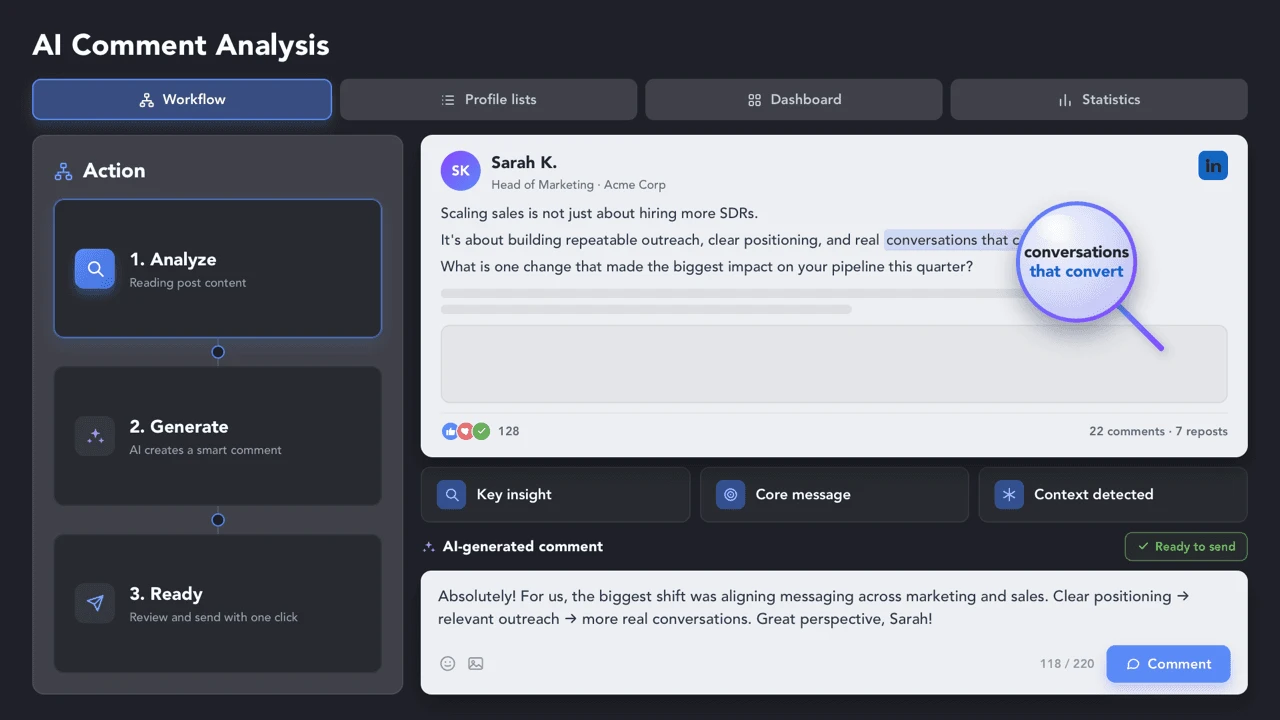
Set the comment goal in your own words, and AI will adapt it to each post and author — whether you want to ask a question, add expert context, agree with the author, or politely challenge the idea.

Choose the voice — Friendly, Professional, or Casual — and control the comment length, from short 1–2-sentence replies to longer 5-sentence responses, so comments match your communication style and fit your target audience.

Relevant AI-generated comments do more than warm up the next message. They help you get seen by the right people, build trust as an expert, and stay visible around conversations that can turn into sales, recruiting, networking, or partnership opportunities.


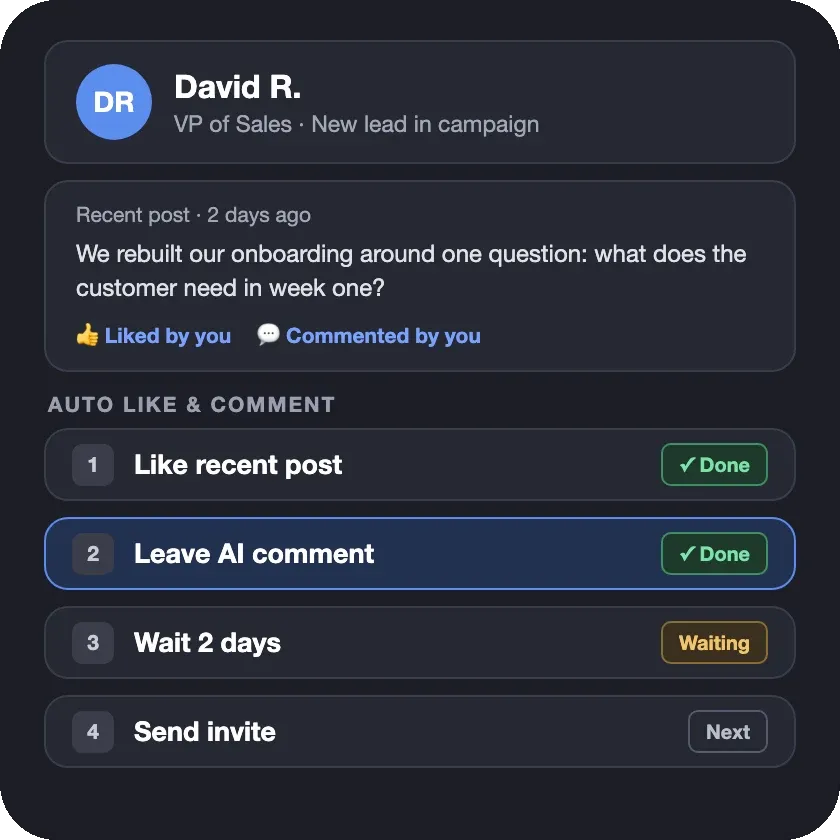
AI Comments writes the text. Auto Commenter & Liker decides where it goes: the Auto Like & Comment action picks each lead's recent posts or articles, likes them, and leaves the comment within one campaign step.
Set how many posts to process, skip content older than the number of days you choose, and follow up with an invite or a message.
AI Commenter helps you turn LinkedIn engagement into a repeatable campaign step — not a manual task your team has to repeat for every lead.
 Auto
Add AI-generated comments directly into multi-step campaigns. Build a sequence that auto-likes a post, leaves a smart AI comment, waits for a few hours or days, and then sends an invite or direct message.

 Recommended
Set up your workflow once and let Linked Helper run it in the background. Combine AI Commenter with Auto-Collect to keep finding new leads and warming them up automatically.
 Full Control
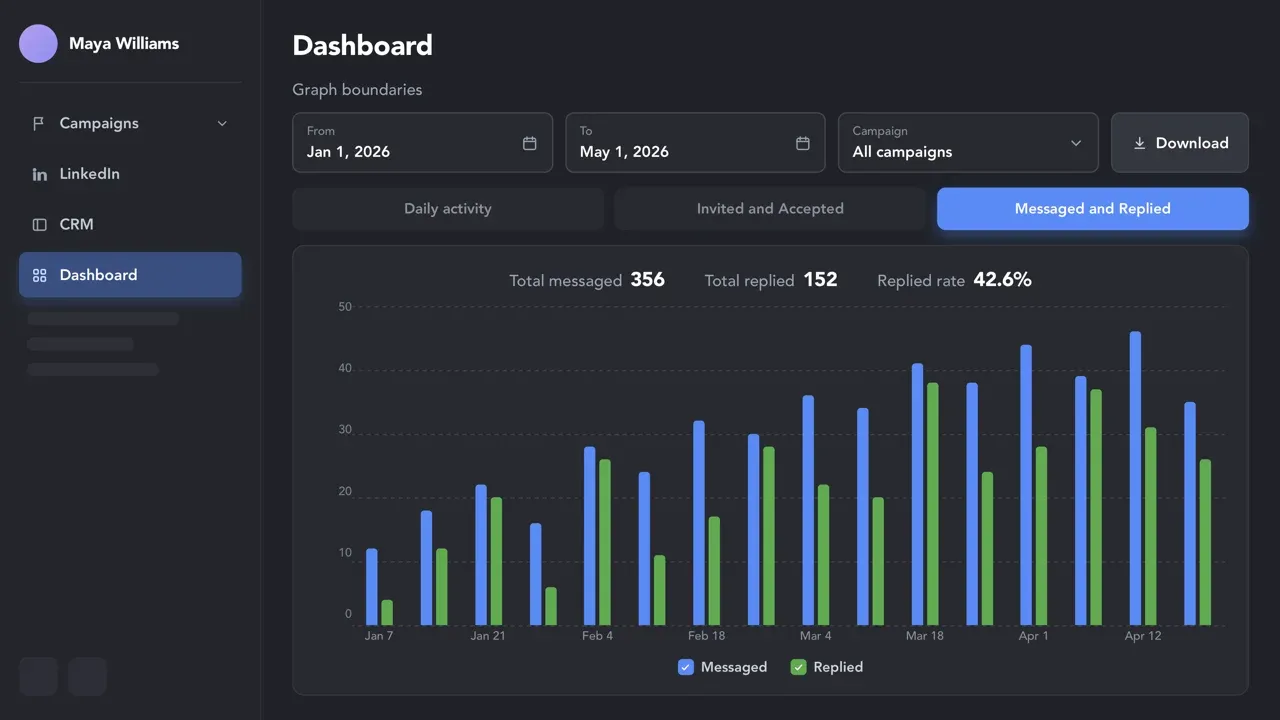
Track every auto-comment, profile visit, invite, and connection request in one dashboard — so you can measure how AI commenting supports your outreach flow.
AI Comments warms up leads with relevant comments. Two more AI tools handle the steps around it: choosing who to engage and writing the messages that follow.
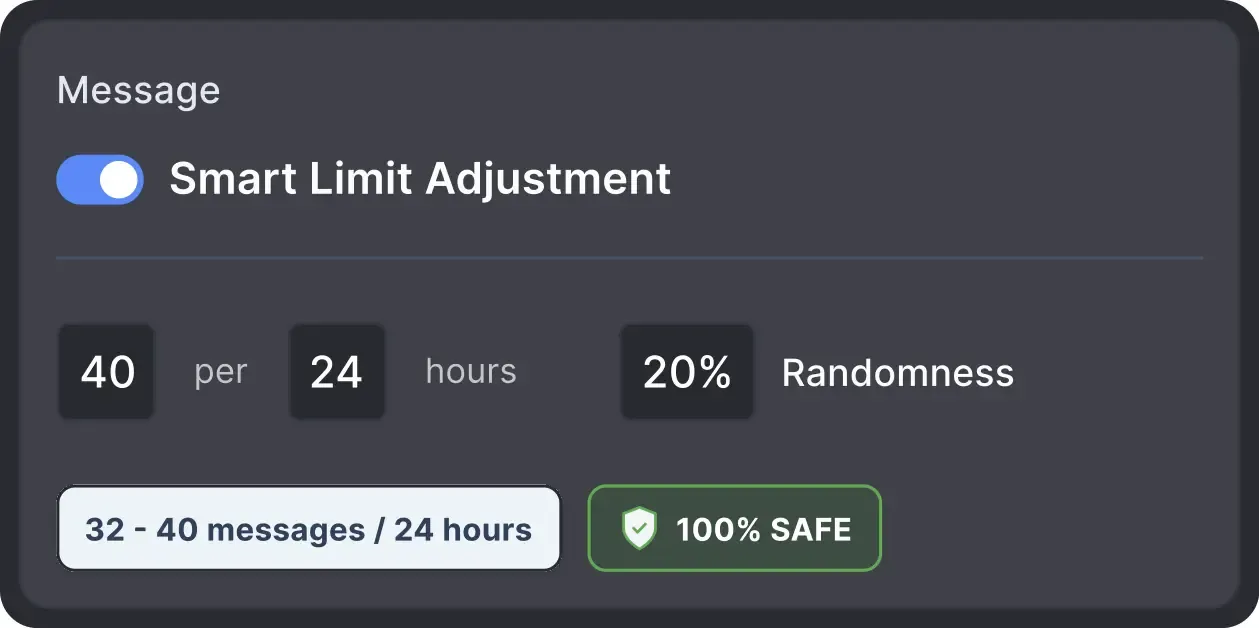
No automation tool can guarantee zero risk, but Linked Helper runs every comment within daily limits, working hours and human-like pacing that you control.

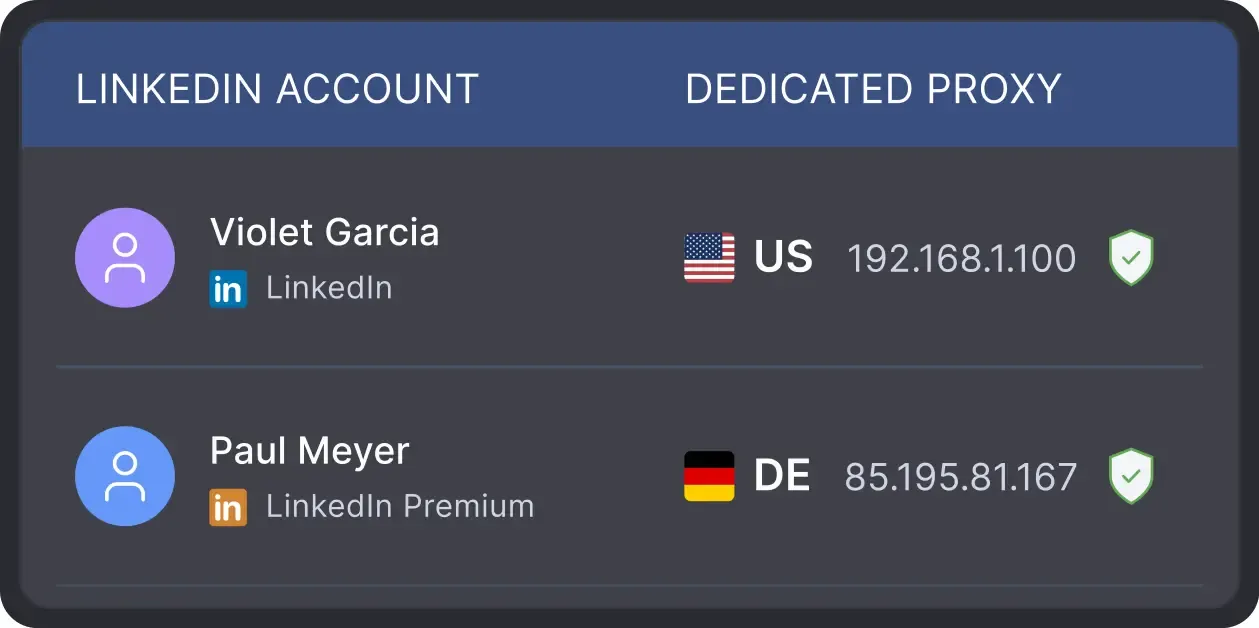
Linked Helper works in a real browser, acts at a human pace with mouse movements, typing and randomized delays, follows your working hours and daily limits, and runs from your own IP or a proxy you choose.
 Real BrowserHuman-like ActionsWorking HoursDaily LimitsYour Own IPDedicated Proxy
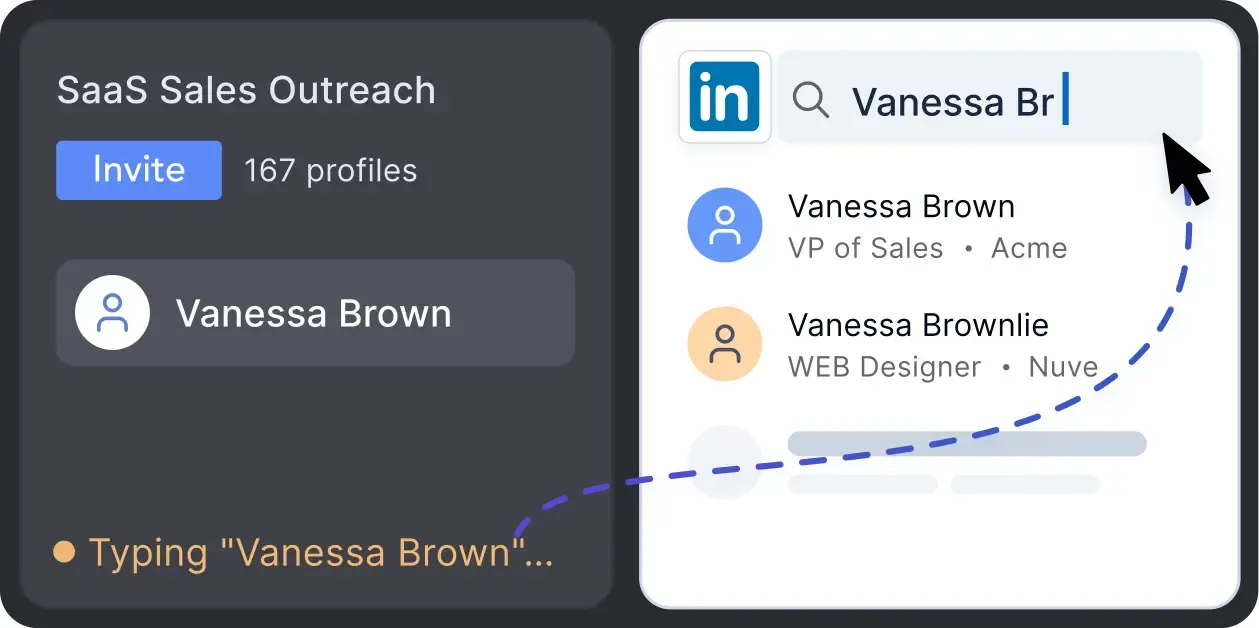
Mimics human actions with mouse movements and clicks, typing, and randomized delays. Navigates via LinkedIn search rather than direct URLs.
Operates within safe, recommended daily quotas and works on a "human-like" schedule (e.g., 9 AM - 5 PM) with random shifts to avoid robotic patterns.
All activity comes from your local IP address or a chosen dedicated proxy, not a suspicious server, avoiding a major red flag for LinkedIn.

Basic

Premium

Sales Navigator

Recruiter
Basic
Premium
Sales Navigator
Recruiter
From finding leads to closing deals, Linked Helper automates every step of your outreach funnel. Explore the features that cover every step of your outreach.


Real reviews from Linked Helper users who like, comment on, and engage with their leads' content before outreach.




The overall functionality is super. Linked Helper includes all the tools we need for social selling on LinkedIn: automated liking and commenting, friending, sending messages. Even more, we can upload the contacts for LinkedIn campaigns. We use this tool both for our and our clients' needs. Totally recommended for saving time for you or your sales on everyday tasks.

By connecting a Sales Navigator Pro account and building a filtered list on LinkedIn, I had Linked Helper running Monday to Friday, warming up those leads by liking their content, following them, sending connection requests, and starting conversations.
The tool executes every action as slowly and safely as it can, so it doesn’t raise any red flags with LinkedIn’s systems, and in my case, it worked flawlessly.

Linked Helper is essential for creating your network to reflect your ideal client profile. You can literally tell the system your ICP, and it hunts these people down like they owe it money, and boom! Connection made. In addition, your brand awareness through the process is amazing.
I use it DAILY in my sales role to view, follow, and endorse people who fit my ideal customer profile (ICP) at target accounts.
In addition, viewing connections and endorsing them has helped me become more engaged with the community. It's been one of the best tools I have ever used in any sales role at any company.
Setting up campaigns is a breeze, and I particularly love that you can target post commenters, engagers, and event attendees. This flexibility really sets Linked Helper apart. My connection request acceptance rate is impressive, hovering around 20-30%.

The LinkedIn automations are amazing: it follows, likes, endorses, sends automatic customised messages and a lot more. If you are looking for a LinkedIn automation tool at a reasonable rate, then this is the right choice.
Great variety of activity options to engage with potential clients. Smart detection of replies. I've fully automated communication campaigns with potential clients, and Linked Helper 2 imitates human behavior.
I’ve been using Linked Helper for about a year now, and I’m really happy with it! It works just like a real human, and I haven’t had any issues with my LinkedIn accounts since I started. I’ve had some bad experiences with other automation tools that got me blocked, but Linked Helper has been great. Plus, their support team is awesome. Overall, I’m super satisfied!
No chatbots. No waiting days for a reply. Get fast, expert help from real people
who are committed to your success, anytime you need it.
Aleksandra T.
Business Owner, Supplies and Equipment
A huge shout-out to their Customer Support and Client Support teams—the helpdesk is incredibly responsive, professional, and always provides clear solutions to any technical questions.
 Review
24/7 LIVE CHAT & EMAIL
Get a real human response in minutes, not days.
REMOTE ASSISTANCE
If you're truly stuck, we can connect to your computer and guide you.
IN-DEPTH KNOWLEDGE BASE
Step-by-step video tutorials and articles for every feature.
Standard plan includes the full LinkedIn automation toolkit, with usage limits on some advanced features.
Pro plan increases advanced feature and integration limits, and adds full message history export.

All your data stays on your device in local folders you can access directly.

Each account has its own isolated storage - no data mixing.

With outgoing webhooks, Linked Helper can send data to third-party systems.

Data is stored in local folders on your device. No app, no internet required to access your files.

Install the app on a new device and pick up right where you left off.

Share LinkedIn accounts and campaign data without manual exports.
With incoming and outgoing webhooks, Linked Helper can receive data from and send data to third-party systems.

Your data is automatically backed up to the cloud - no risk of losing it if something happens to your device.

Switch devices or reinstall the app without moving files manually.
Local tax may apply
Join our weekly live training for a kick-start, or explore our library of bite-sized guides at your own pace. We provide every resource to help you scale safely.

A 60-minute live walkthrough to kick-start your LinkedIn lead generation. Register now to join live or receive the recording by email even if you can’t attend.


BLOG POST
VIDEO TUTORIAL
AI Commenter is the LinkedIn comment generator built into Linked Helper campaigns. For each lead, it reads the post text and the author's profile, takes the comment goal you wrote in your own words, and writes a comment for that post. You choose the tone (Friendly, Professional, or Casual), the language, and the length, from 1–2 sentences to 5 sentences. It is part of the Auto Like & Comment action, so a comment can run as a campaign step before an invite or a message. You can try it during the 14-day free trial with no credit card. The monthly Standard plan includes 250 AI credits and Pro includes 500: compare AI credits on each plan.
Let AI read each post and the author's profile, write a comment in your tone, and run it as a campaign step before your invite or message. Try it free for 14 days, no credit card required.








 Save My Spot