9 Best Waalaxy Alternatives for LinkedIn Automation in 2026

9 Best Waalaxy Alternatives for LinkedIn Automation in 2026

Milosh Potikj

B2B Content Strategist & Writer

Updated atUpdated: July 10, 2026Read time67 min read
9 Best Waalaxy Alternatives for LinkedIn Automation in 2026
Quick Answer

Linked Helper is the best Waalaxy alternative for teams that care most about account control, workflow depth, and scaled cost. Waalaxy gives you a quick cloud-connected outreach setup; Linked Helper runs automation from your own machine, VPS, or assigned proxy environment, with deeper LinkedIn data sources and a built-in CRM. Tools we compared: Linked Helper, La Growth Machine, Expandi, Lemlist, Dux-Soup, Dripify, Skylead, Octopus CRM, and HeyReach. The scoring covered architecture, session access, pricing, scrape depth, CRM depth, support signals, and user complaint patterns.

ToolArchitectureAutomation method20-seat agency cost (from, /year)Cost vs Waalaxy
Linked HelperDesktopHuman input (real browser clicks)$1,58459% cheaper
WaalaxyCloudReverse-engineered API$3,840Baseline
La Growth MachineCloudReverse-engineered API$24,000 est.525% more expensive
ExpandiCloudReverse-engineered API$18,960394% more expensive
LemlistCloudReverse-engineered API$20,880 est.444% more expensive
Dux-SoupCloudReverse-engineered API$4,45216% more expensive
DripifyCloudReverse-engineered API$18,960394% more expensive
SkyleadCloudReverse-engineered API$24,000525% more expensive
Octopus CRMCloudReverse-engineered API$5,997.6056% more expensive
HeyReachCloudReverse-engineered API$11,280194% more expensive

Architecture, automation method, and 20-seat agency cost, side by side

Pricing data as of July 2026. For the 20-seat agency scenario, costs use the feature-appropriate agency tier per brand (Linked Helper Standard, Dux-Soup Cloud Agency, Dripify Advanced, Waalaxy Pro, HeyReach Growth, Expandi Business, Skylead All-in-one, Octopus CRM Unlimited; La Growth Machine and Lemlist estimated), annual billing where available. Cost vs Waalaxy uses Waalaxy's $3,840/yr scenario as the baseline.

Publisher disclosure

This article is published by Linked Helper. Linked Helper is our product and our top recommendation. First-hand observations are reported by the author where applicable; rankings and recommendations follow the evaluation framework below.

Key takeaways

  • Linked Helper is our pick because the findings kept pointing to custody, not convenience: the alternatives either handed sessions to a vendor cloud, exposed Chrome-extension signals, or both, while Linked Helper keeps execution in a user-controlled desktop/VPS environment with proxy checks before launch.
  • In the live cloud/IP checks that exposed vendor-assigned IPs, Dripify, Skylead, and HeyReach put both test accounts on datacenter IPs, meaning rented-server addresses rather than residential or mobile lines. IPQualityScore (IPQS), an independent IP-quality service, rated those Dripify, Skylead, and HeyReach addresses 94-100/100; Expandi's first assigned IP also scored 100/100. That is not LinkedIn's verdict.
  • The shared-infrastructure problem showed up inside the roster: Dripify and Skylead both landed on HostRoyale datacenter infrastructure, and each reused a same-/24 footprint across test accounts. The logo differs, the servers do not, so provider-level reputation can become a cross-tool exposure.
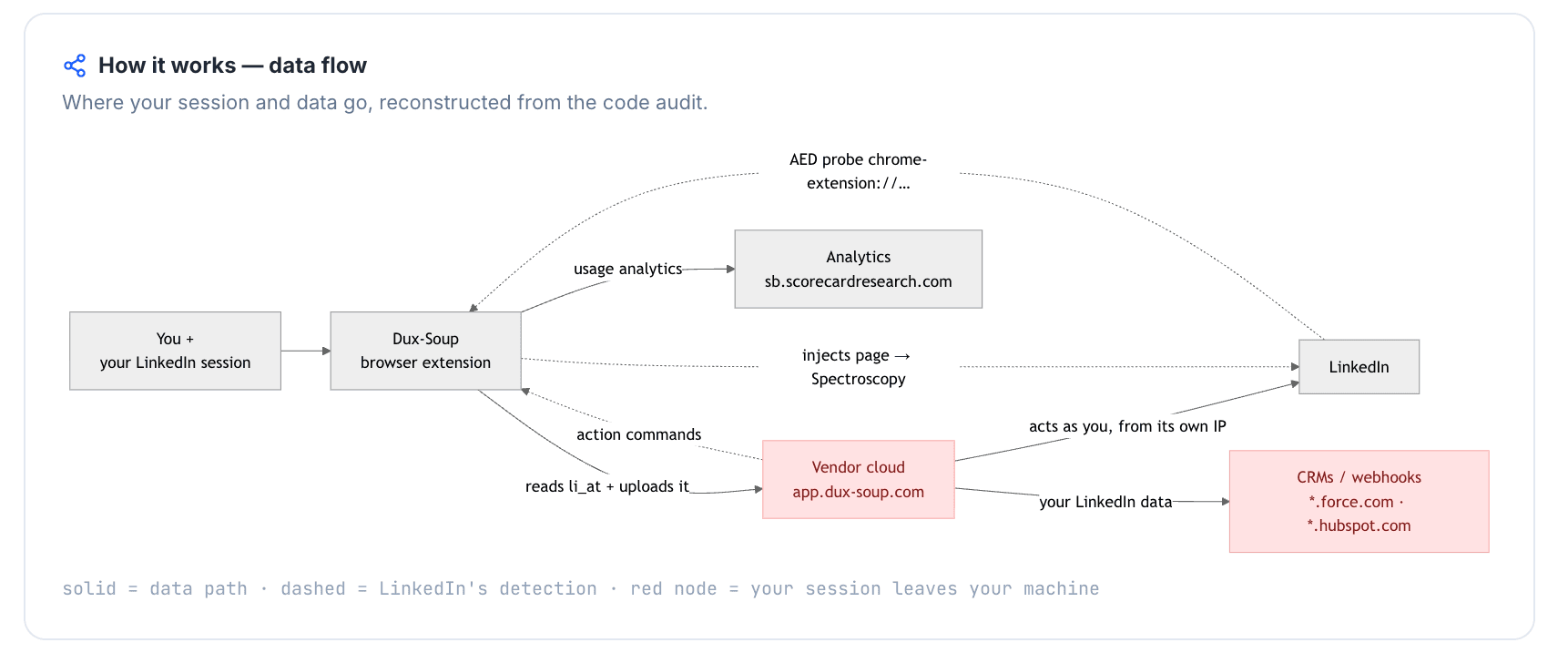
  • The connector teardowns found LinkedIn session material leaving the browser in Waalaxy, Expandi, Lemlist, HeyReach, and Dux-Soup Cloud mode. The practical issue is custody: a copied li_at session cookie or full cookie jar gives the vendor cloud a working copy of the LinkedIn login.
  • Trial friction was part of the hands-on record, not just a review complaint: Expandi showed a 7-day card-backed trial while its page advertised 14 days, Dux-Soup's live signup showed card required and a 0-day trial despite no-card trial messaging, and Skylead required a card before testing deliverability.

What Is Waalaxy?

Waalaxy is a LinkedIn automation and cold-email outreach tool built around a Chrome extension and cloud account connection. It is commonly used by sales teams, recruiters, marketers, and founders that want prospecting sequences, LinkedIn actions, email steps, and enrichment in one outreach workspace.
What Is Waalaxy?

The product grew out of ProspectIn, was founded in 2019, and is headquartered in Montpellier, France. Its public positioning centers on LinkedIn prospecting, email enrichment through Dropcontact, sequence templates, analytics, Waami AI messaging, Zapier/native integrations, and a freemium entry tier.

This is the factual profile only. The switching case starts with architecture, session custody, price at scale, and the depth of LinkedIn data sources.

Waalaxy at a Glance

Waalaxy's convenience is real, but the trade-offs are concentrated in the same places switching buyers usually inspect first: session custody, paid add-ons, LinkedIn data depth, and price movement once the team grows past a single account.

Waalaxy snapshot

  • Strengths: Fast onboarding, sequence templates, a large tutorial/community footprint, GDPR-oriented messaging, Dropcontact enrichment, and a freemium entry point.
  • Limitations: Browser-to-cloud session custody, LinkedIn Inbox as a paid add-on, no Kanban-style CRM view, pricing complexity at team scale, and a narrower lead-source set than tools built around post, event, group, and company-follower scraping. For source-depth context, see our guide to LinkedIn scraping tools, methods, and best practices.
  • Typical users: Solo users or small teams that want a quick cloud-connected starter setup and do not need deep LinkedIn workflow control, a built-in CRM, or strict off-vendor session custody.

Why Users Switch From Waalaxy

The switch pattern is not one complaint; it is a cluster. Across more than 6,000 reviews and 400 Reddit discussions, Waalaxy's negative signals concentrate around account safety, onboarding/billing friction, reliability/support, price, and workflow depth.

ThemeNegative mentions
Account safety and restriction-risk concerns75
Onboarding friction and surprise billing70
Reliability and support quality55
Price and value, including annual-discount tension40
Feature and automation depth37

Waalaxy switching themes by negative-mention volume

Theme counts combine reviews from G2, Capterra, and Trustpilot with Reddit discussions reviewed as of July 2026.

The account-safety cluster matters because Waalaxy's convenience depends on a cloud-connected setup. That is different from a local desktop model where the LinkedIn session and automation environment stay under the operator's control. For the product-to-product contrast, we also maintain a deeper side-by-side of Waalaxy and Linked Helper.

The workflow-depth cluster shows up differently. Buyers leaving a starter outreach tool usually ask whether the replacement can collect leads from more LinkedIn surfaces, route them into a CRM, enrich or segment them, and avoid duplicate outreach. That is where a flat sequence builder starts to feel limiting even when the first campaign was easy to launch.

How We Researched These Alternatives

We treated this comparison as a control problem before a feature checklist: where the LinkedIn session runs, what infrastructure LinkedIn sees, which controls the operator gets, and how cost changes when one sender becomes a team.

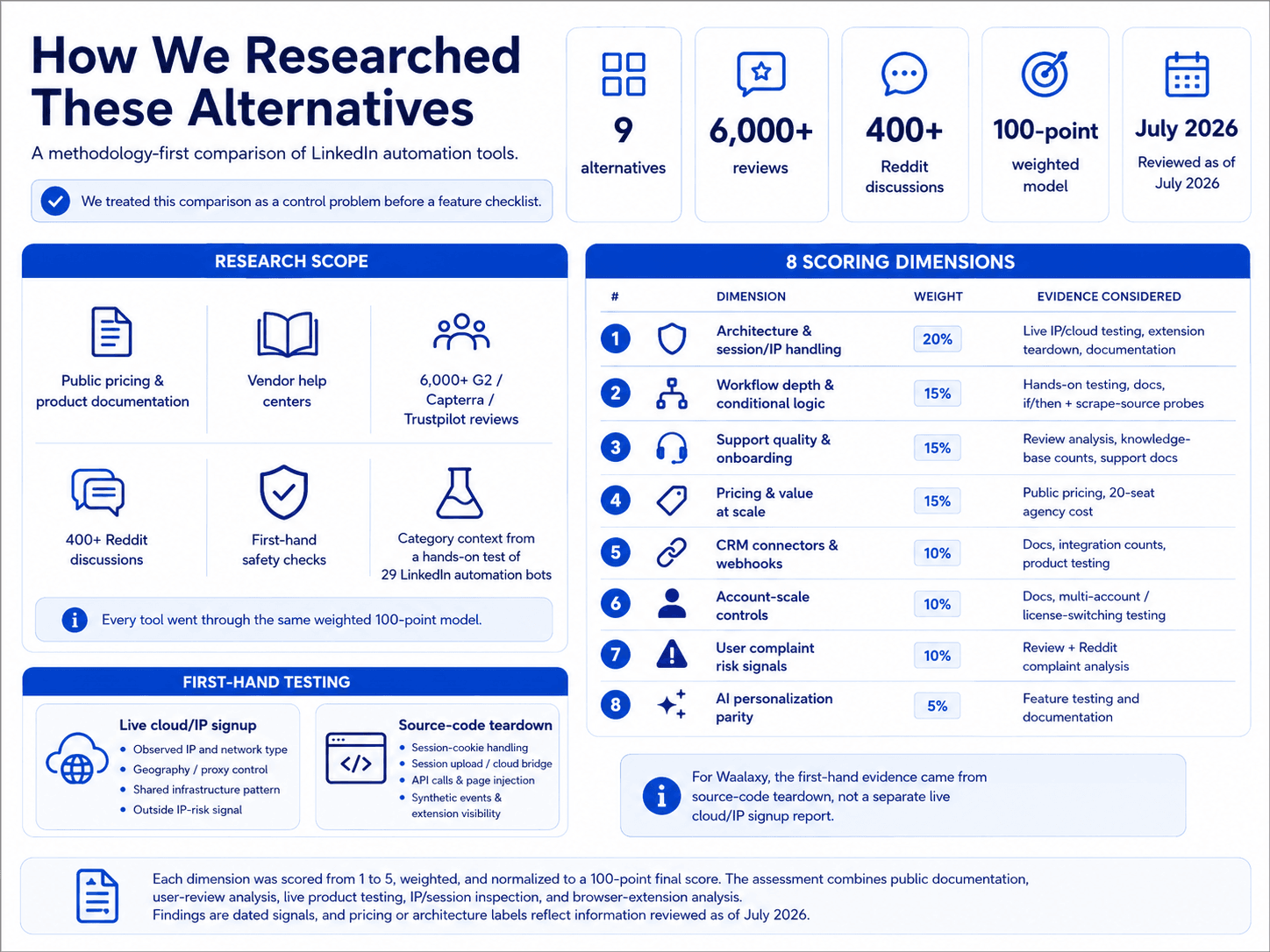
9 alternatives, more than 6,000 reviews, and more than 400 Reddit discussions analyzed as of July 2026.
How We Researched These Alternatives

1. Research scope

The evidence set combined public pricing and product documentation, vendor help centers, more than 6,000 G2/Capterra/Trustpilot reviews, more than 400 Reddit discussions, and first-hand safety checks where the product surface made them observable. For broader hands-on category context, see our hands-on test of 29 LinkedIn automation bots.

Every tool then went through the same weighted 100-point model. That kept quick onboarding from outweighing weak session custody, shallow workflow depth, or steep team pricing.

Scoring dimensionWeightEvidence considered
Architecture and session/IP handling20%Live two-account IP/cloud testing, Chrome-extension teardowns (session-upload / browser-to-cloud classification), documentation
Workflow depth and conditional logic15%Hands-on testing, product documentation, if/then and scrape-source probes
Support quality and onboarding15%Review analysis, knowledge-base article counts, support-channel documentation
Pricing and value at scale15%Public pricing, documented 20-seat agency cost per brand
CRM connectors and webhooks.10%Documentation, documented integration counts, product testing
Account-scale controls10%Documentation, multi-account / license-switching testing
User complaint risk signals10%Review and Reddit analysis (restriction / billing / reliability complaints)
AI personalization parity5%Feature testing and documentation

LinkedIn automation scoring model

Each dimension was scored from 1 to 5, weighted, and normalized to a 100-point final score. The assessment combines public documentation, user-review analysis, live product testing, IP/session inspection, and browser-extension analysis. Pricing data and architecture labels reflect information reviewed as of July 2026.

2. Product and feature analysis

We mapped lead sources, workflow logic, CRM depth, integrations, and AI personalization against public documentation and hands-on behavior. The price check came after that: we looked for the point where an entry plan stops matching the feature set a growing team actually needs.

3. First-hand testing

First-hand testing handled the parts of the comparison that public copy cannot prove: the observed IP, the session handoff, extension behavior, and whether the operator could inspect or change the environment before launching. We used the same safety model behind Linked Helper's security study, then applied article-specific checks to the tools in this comparison.

For Waalaxy, the first-hand evidence is source-code teardown evidence, not a separate live cloud/IP signup report.

CheckQuestions it answeredExample finding
Live cloud/IP signupWhere does the account appear to run, what IP does LinkedIn see, can the operator choose geography or bring a proxy, and how risky does the IP look?In one cloud-tool check, both test accounts exited through the same HostRoyale hosting-network IP with a maximum outside IP-risk score. Waalaxy itself was handled through extension teardown rather than a separate live cloud/IP report.
Source-code teardownDoes the extension read LinkedIn session cookies, upload them, call LinkedIn APIs directly, inject into the page, trigger synthetic events, block telemetry, or appear on LinkedIn's extension-detection surface?Waalaxy's extension copied the LinkedIn cookie jar to Waalaxy cloud infrastructure and was visible on LinkedIn's extension-detection surface.

First-hand safety checks used for Waalaxy alternatives

First-hand checks were performed on publicly obtainable product flows and extension builds available during the test window. Findings are dated signals, not permanent product claims, and pricing or architecture labels reflect information reviewed as of July 2026.

Live IP and Cloud Test

The live IP and cloud test starts with a real signup flow, connects a test LinkedIn account, and records where the account appears to run. The point is narrow: capture the observed IP, network type, location control, proxy control, timezone control, and any shared infrastructure pattern.

TermMeaningSo what
IPQualityScore (IPQS)IPQualityScore is an independent fraud-prevention service that rates IP risk on a 0-100 scale, with 75+ treated as high-risk on its own scale.It is an outside risk signal, not LinkedIn's verdict, but a high fraud score can make a cloud login or automation environment look less like a normal user session.
Datacenter vs residential/mobile IPDatacenter IPs come from hosting networks; residential and mobile IPs come from consumer ISP or carrier networks.A sudden datacenter origin can stand out when the LinkedIn account normally uses a personal residential or mobile connection.

Live cloud/IP inspection terms

Chrome Extension Teardown

The Chrome extension teardown reads the published extension build. We check whether it reads session cookies, sends session data to a vendor URL, calls LinkedIn APIs directly, injects code into LinkedIn pages, triggers synthetic events, blocks telemetry, or appears on LinkedIn's extension-detection surface.

TermMeaningSo what
li_at / JSESSIONIDThese are LinkedIn login/session values; whoever holds them can act as the account in a live LinkedIn session.Uploading them to vendor infrastructure gives the vendor cloud a working copy of the user's LinkedIn session.
Cloud bridgeA browser extension or handoff flow transfers an existing LinkedIn browser session to vendor cloud infrastructure, which can then run actions from a different environment.It can create a split between the user's visible browser session and the vendor-managed automation session.
AEDAED is a shorthand used in this methodology for LinkedIn's extension-detection surface, derived from public production JavaScript behavior documented by independent researchers.Being visible on that surface is not an instant restriction; it adds one detection signal.
Passive DOM/page scanThe extension reads or manipulates LinkedIn page structure from inside the browser.This can make the tool dependent on page internals and visible extension behavior.
Synthetic eventsThe extension triggers browser events programmatically rather than relying only on normal user input.Synthetic activity can add a behavioral signal if it differs from normal user interaction.
BrowserGateBrowserGate is an independent investigation of how websites can inspect browser extensions and client-side signals.It helps explain why extension visibility can matter even when a tool does not announce itself in the page.

Extension teardown terms for LinkedIn automation safety

What These Tests Can And Cannot Prove

The published Waalaxy extension was inspectable from the client, but server-side internals were not fully knowable. When the extension clearly sends session material to a cloud endpoint, the cloud-side implication is highly likely; the exact server-side execution path remains vendor-controlled.

No tool eliminates the risk of LinkedIn restrictions. These findings are dated signals in a scoring model, not restriction predictions, because extension code, authorization flows, endpoint names, and LinkedIn's own detection surface can change after the test window.

First-Hand Waalaxy Findings

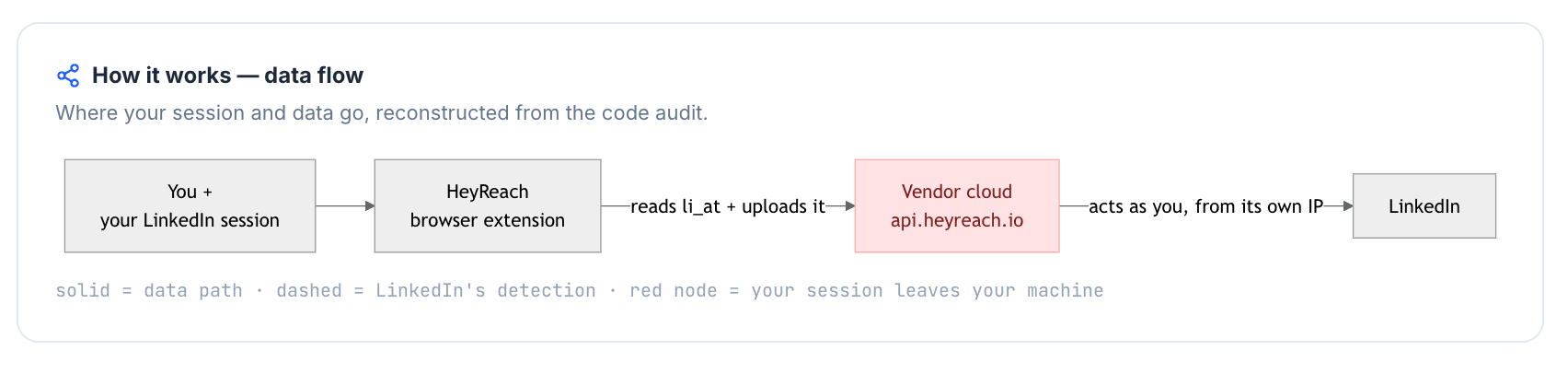
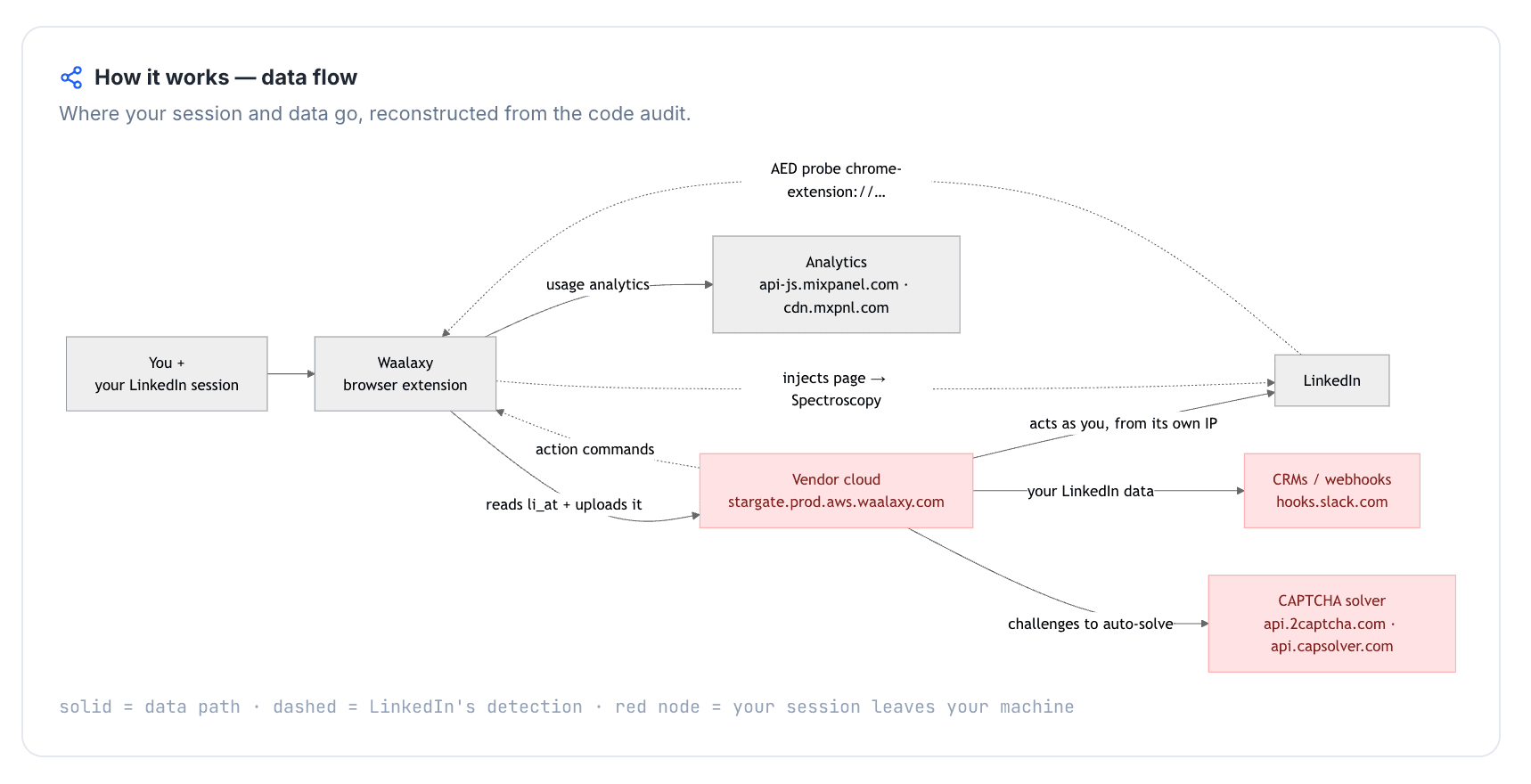
The Waalaxy teardown showed a cloud-bridge pattern: the extension reads the live LinkedIn session from the browser and sends session material to Waalaxy cloud infrastructure. That is the technical reason this article treats Waalaxy's safety trade-off as structural rather than only behavioral.
First-Hand Waalaxy Findings

Observed Waalaxy signals:

  • The extension reads LinkedIn cookies, including session-bearing values, and sends the cookie jar through an authDataFromExtension.cookie payload to a Waalaxy cloud endpoint.
  • The receiving infrastructure includes stargate.prod.aws.waalaxy.com, so the session handoff is not limited to the user's local browser.
  • The extension operates inside LinkedIn pages and includes direct LinkedIn API/Voyager behavior, which means the browser extension is not only a passive UI layer.
  • The extension build was visible on LinkedIn's AED surface, adding an extension-detection signal.
  • Synthetic event behavior and telemetry-header modification appeared in the extension behavior, which adds more observable client-side surface.

The result is not "instant restriction." It is a higher session-custody and detection-surface concern than a desktop model where the automation environment remains under the user's control.

4. Architecture-level analysis

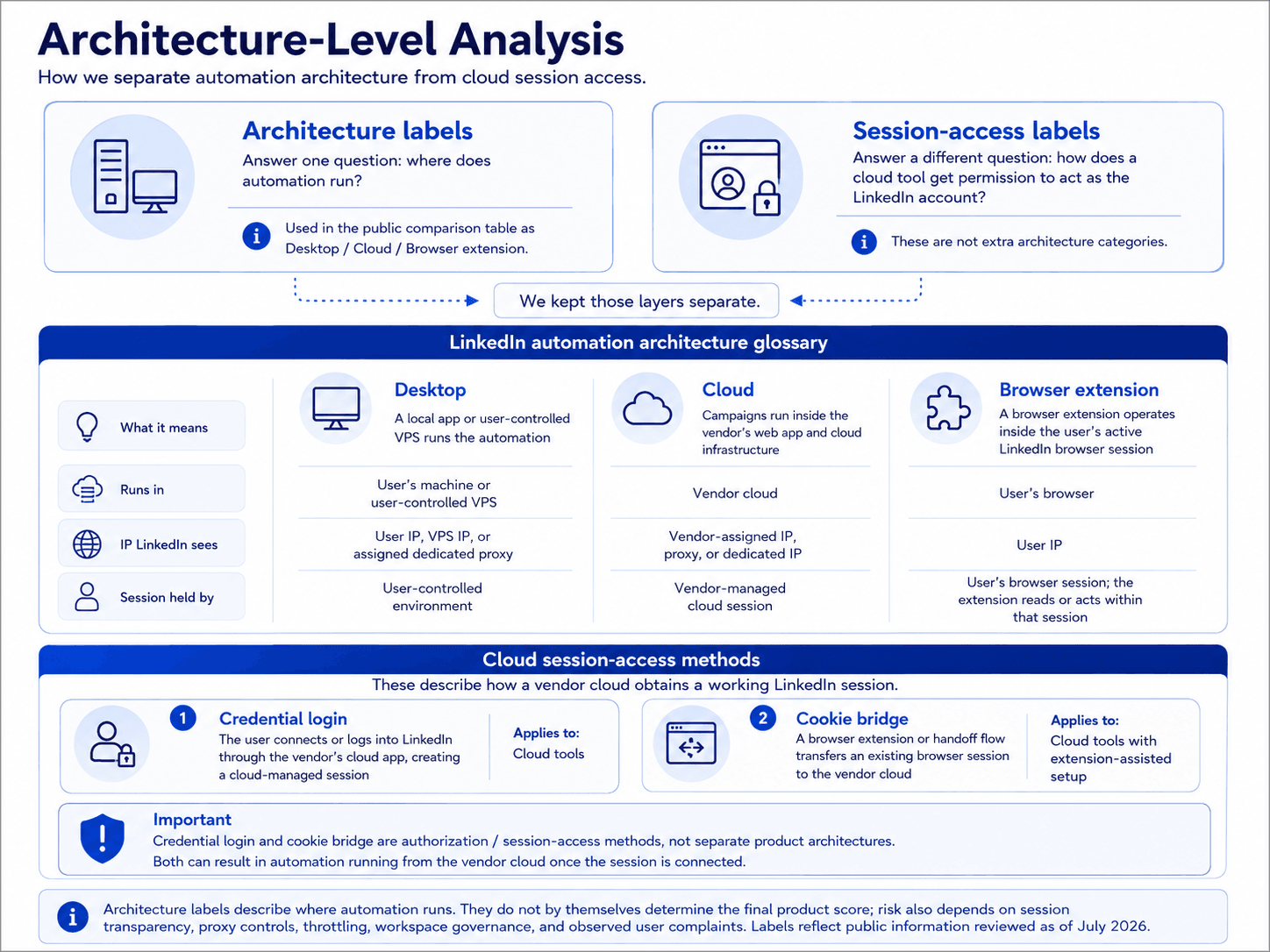
Architecture labels answer one question: where does automation run?

Session-access labels answer a different question: how does a cloud tool get permission to act as the LinkedIn account?
4. Architecture-level analysis

We kept those layers separate, then used clean Desktop / Cloud / Browser extension labels in the public comparison table.

Use the glossary below as the map for those public labels; the brand safety notes get more specific where the evidence calls for it.

Architecture labelWhat it meansWhere automation runsIP LinkedIn seesWho holds the session
DesktopA local app or user-controlled VPS runs the automationUser's machine or user-controlled VPSUser IP, VPS IP, or assigned dedicated proxyUser-controlled environment
CloudCampaigns run inside the vendor's web app and cloud infrastructureVendor cloudVendor-assigned IP, proxy, or dedicated IPVendor-managed cloud session
Browser extensionA browser extension operates inside the user's active LinkedIn browser sessionUser's browserUser IPUser's browser session; the extension reads or acts within that session

LinkedIn automation architecture glossary

Architecture labels describe where automation runs. They do not by themselves determine the final product score; risk also depends on session transparency, proxy controls, throttling, workspace governance, and observed user complaints. Labels reflect public information reviewed as of July 2026.

The second reference table covers cloud session access. These are not extra architecture categories; they describe how a vendor cloud obtains a working LinkedIn session.

Session-access methodWhat it meansApplies to
Credential loginThe user connects or logs into LinkedIn through the vendor's cloud app, creating a cloud-managed sessionCloud tools
Cookie bridgeA browser extension or handoff flow transfers an existing browser session to the vendor cloudCloud tools with extension-assisted setup

Cloud session-access methods

Credential login and cookie bridge are authorization/session-access methods, not separate product architectures. Both can result in automation running from the vendor cloud once the session is connected.

5. How user feedback was used

User feedback was risk evidence, not a popularity score. We read more than 6,000 G2/Capterra/Trustpilot reviews and more than 400 Reddit discussions, then clustered the negative signals into account-safety, onboarding/billing, reliability/support, price, and workflow-depth themes. That let complaint patterns feed the scoring model without turning one vivid anecdote into a verdict.

6. Why you can trust this research

You can trust this research because every claim is traceable and dated. Architecture and safety findings come from live IP checks and published extension builds. Cost figures come from public pricing at a documented 20-seat agency scenario. Complaint patterns come from reviews and Reddit discussions.

Where a cloud-side internal could not be observed directly from the client, it is labeled highly likely rather than certain. Every finding is a dated signal that should be rechecked before a large migration. No tool eliminates restriction risk; this research reduces avoidable uncertainty rather than promising a safe outcome.

9 Best Waalaxy Alternatives Compared

The comparison table is a scan layer, not the whole argument. It keeps each row short so the detailed brand sections can handle proof, setup notes, pricing nuance, and use-case trade-offs without overloading the table.

ToolPrimary pullArchitectureAutomation methodMulti-channelPrice (entry/mo)Avg rating (reviews)On LinkedIn AED list?
Linked HelperDeep LinkedIn automationDesktopHuman input (real browser clicks)No (LinkedIn-first)$15/mo4.84 (825)No
La Growth MachineNative multichannel outreachCloud (browser-widget bridge)Reverse-engineered APIYes$60/mo4.62 (102)Not tested
ExpandiGuided LinkedIn personalizationCloud-bridge (session-upload)Reverse-engineered APINo$99/mo4.11 (331)No
LemlistEmail-first cold outreach with LinkedIn stepsCloud-bridge / session-upload extensionReverse-engineered APIYes, higher tier$79/mo4.48 (795)Yes
Dux-SoupBudget browser-based LinkedIn automationHybrid browser extension (local-scrape on Pro/Turbo; cookie-bridge on Cloud)Reverse-engineered APINo$14.99/mo4.46 (139)Yes
DripifyVisual workflow builder & analyticsCloud with credential loginReverse-engineered APIYes$59/mo4.63 (1,172)n/a
SkyleadSmart multichannel sequencesCloud with credential loginReverse-engineered APIYes$100/mo4.49 (144)n/a (no public extension)
Octopus CRMBudget LinkedIn automationLocal-scrape Chrome extensionReverse-engineered APINo (LinkedIn-only)$9.99/mo4.43 (591)Yes
HeyReachAgency multi-account outreachCloud-bridge (session-upload extension + cloud)Reverse-engineered APINo (LinkedIn-only)$79/mo4.23 (73)No

Top Waalaxy alternatives compared by architecture, channel scope, price, ratings, and AED visibility

As of July 2026 · public pricing pages, review platforms, vendor documentation, and first-hand safety checks where observable.

1. Linked Helper

Linked Helper's safety argument starts with custody: LinkedIn runs in a desktop app on hardware and IPs you control, so the live login is not operated from a vendor cloud. Teams leaving Waalaxy for safer LinkedIn-first automation use it at $15/mo, accepting that cold email needs a separate tool.
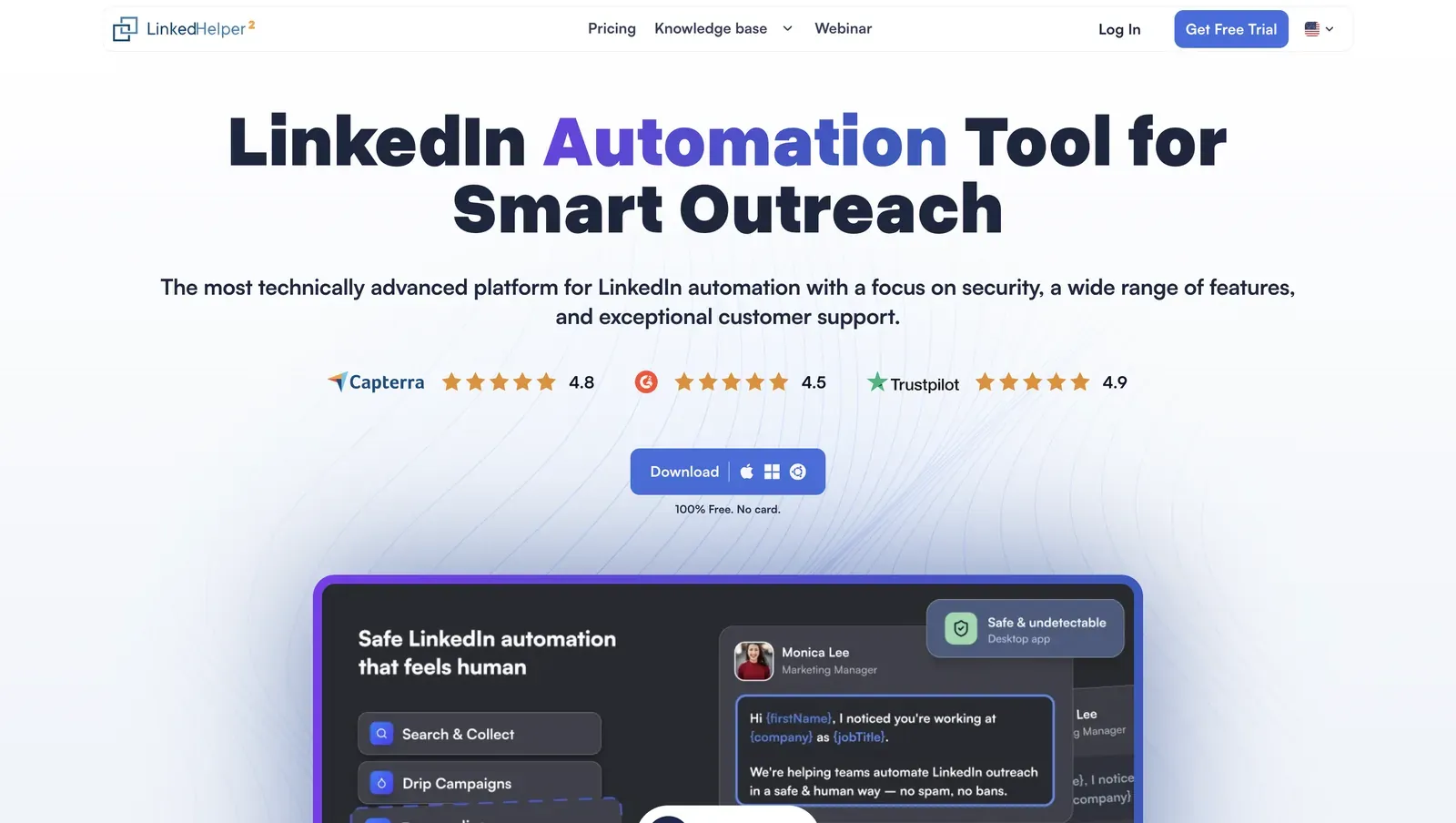
Linked Helper home page - July 2026

Homepage showing desktop-first positioning and review badges - July 2026

Founded in 2016 and headquartered in Wilmington, DE, Linked Helper is a Windows/macOS/Ubuntu application with its own browser engine for connection requests, follow-ups, scraping, and CRM workflows. The annual Standard license works out to $8.25/mo, includes a 14-day no-card trial, and costs $1,584/year for 20 seats. In practice, that makes it the recommendation when Waalaxy's risk profile is the trigger, not when the buyer wants a native multichannel suite.

Quick facts about Linked Helper

  • Founded: 2016
  • HQ: United States (Wilmington, DE)
  • Pricing: $15/mo Standard ($8.25/mo annual), 14-day free trial
  • G2: 4.5★ (142) · Capterra: 4.9★ (252) · Trustpilot: 4.91★ (431)
  • Last 6 months: 4.85 ★ across 23 fresh reviews; positive recent average
  • Architecture: desktop app with built-in browser engine

Vendor pricing and feature pages fetched 2026-04-22 to 2026-06-08; review aggregates computed 2026-07-09

Key Features

  • Human-like automation — real browser clicks and keystrokes, Smart daily limits, randomized action delays, and configurable working-hour windows help mimic natural activity patterns, although LinkedIn restrictions still depend on overall account behavior and activity volume..
  • Per-account proxy controlHTTP/HTTPS/SOCKS/SOCKS5 IPv4 proxies can be assigned per account, with a visible quality check before the account connects.
  • 13 LinkedIn scrape sources — post, event, group, company, Sales Navigator, and messaging-history workflows give Linked Helper more LinkedIn data entry points than Waalaxy's 3-source surface.
  • Built-in CRM plus 11 direct CRM connectors — the CRM plug-in stores profile data, tags, notes, IDs, mutual connections, and messaging history before sending records outward.
  • AI ICP detection — AI scores prospects against your Ideal Customer Profile before outreach, helping filter low-fit leads before spending LinkedIn's limited weekly invitation quota.
  • AI message generation — AI generates personalized connection requests and follow-up messages using profile data and conversation context. Messages can be sent automatically or queued for manual review before delivery.

What reviewers say about Linked Helper

**The review pattern shifted over time rather than showing persistent weaknesses: **around 18 of 140 reviews in 2024 highlighted interface usability issues, but only 3 of 210 reviews in 2025 mentioned the same concern, with no recurring complaints appearing in 2026. This decline suggests that the product has been actively refined in response to user feedback, while current praise clusters around security, price versus cloud rivals, and multi-account support.

Real-world scenario

Where the advanced case shows up: for this article, the useful Linked Helper scenario is not another list-cleaning story; it is message variation at scale. A Reddit user describes the older manual workaround, and the product-side implication is narrower: AI-generated variants and spintax reduce repeated-message patterns, while in-flow AI review removes the scrape-to-external-AI round trip.

Reddit
ChatGPT
sequencing and follow-ups go through linked helper, but I write the actual message copy myself then ask AI to give me like 4 variations so I'm not blasting the exact same sentence to everyone.

Bottom line

Linked Helper is the recommendation for readers whose Waalaxy concern is account custody plus shallow LinkedIn depth: it keeps execution on controlled desktop/VPS hardware, supports proxy vetting and Web Version (login-based web access to a Linked Helper instance running on a VPS for cloud-equivalent 24/7 operation), and adds CRM, scrape-source, and message-personalization depth. If native cold email and multichannel sequencing are the priority, pair Linked Helper with a dedicated email tool rather than treating it as a full multichannel suite.

Linked Helper's support docs also say one license can be reassigned between accounts, but not used simultaneously.

2. La Growth Machine

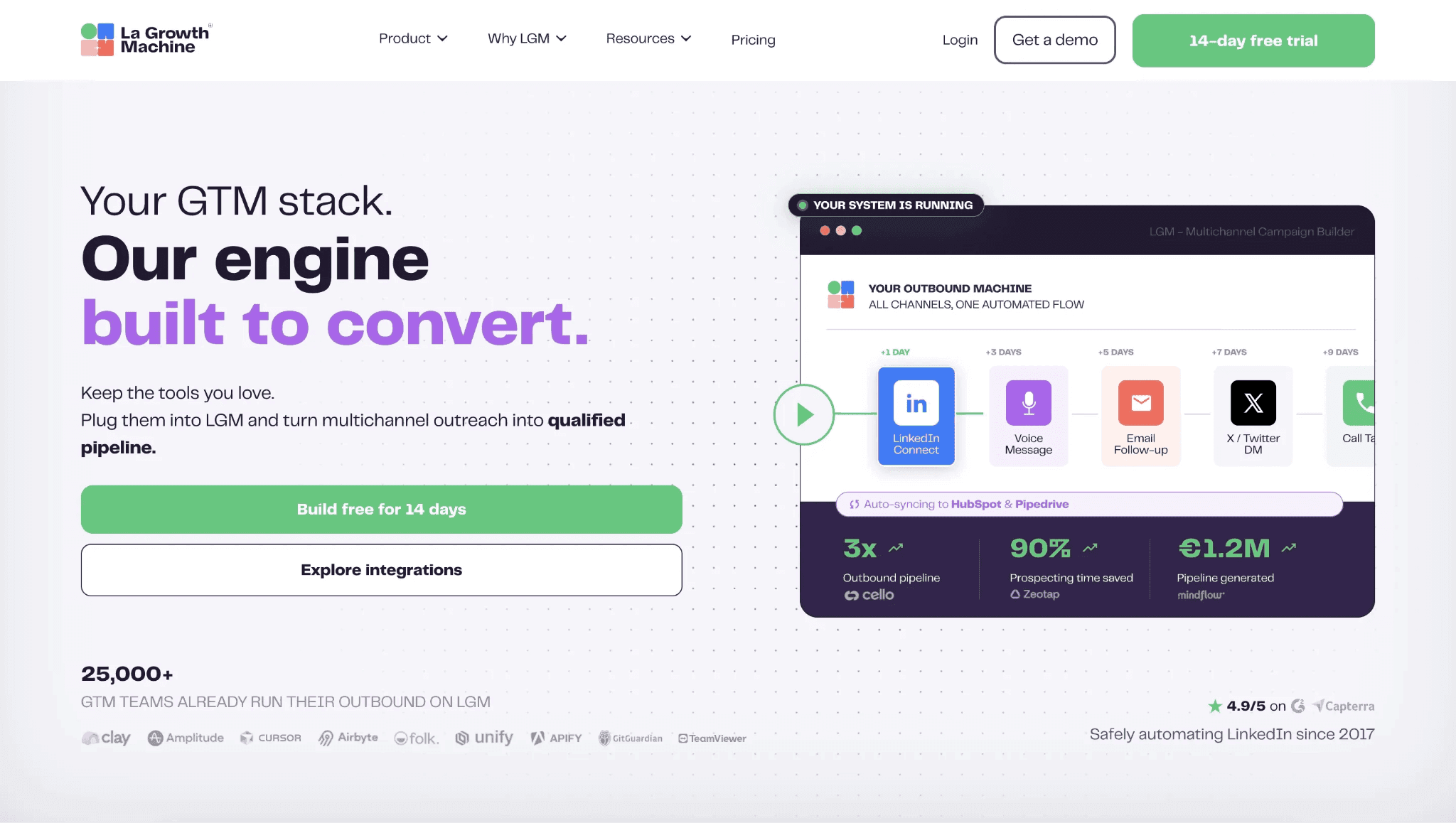
Founded in 2019 in Saint-Mandé, France, La Growth Machine is a sales-engagement platform for LinkedIn, email, X/Twitter, voice notes, and webhooks. Its pricing page starts at $70/month, dropping to $60/month with annual billing. A 14-day free trial is available.

2. La Growth Machine

The trade-off is channel breadth. LGM's browser-widget bridge runs LinkedIn automation from vendor-managed infrastructure, so account owners can't use their own proxies or keep execution local. In return, growth teams get a single workspace for LinkedIn, email, X (formerly Twitter), and voice notes. At 20 seats, this article estimates the annual cost at $26,400.

Quick facts about La Growth Machine

  • Founded: 2019
  • HQ: France (Saint-Mandé)
  • Pricing: $60/mo ($50/mo annual), 14-day free trial
  • G2: 4.6★ (51) · Capterra: 4.9★ (45) · Trustpilot: too few to average (6; negative skew)
  • Last 6 months: too few to trend (3 rated reviews; below the 10-rating floor)
  • Architecture: cloud browser-widget bridge to vendor cloud

Vendor pricing & feature pages + G2, Capterra, Trustpilot & Reddit reviews (computed 2026-07-09)

Key Features

  • Native multichannel sequencing — Coordinates LinkedIn, email, X/Twitter, voice notes, and webhooks in one sequence, per the pricing page.
  • Email finder and CRM — Adds contact enrichment and CRM handling inside the same workspace, reducing export handoffs.
  • AI intent and message generation — The features page cites intent detection and AI message generation for reply sorting and drafts.
  • API, webhooks, and Zapier — Gives technical teams integration routes beyond the native app, with 22 native integrations recorded for routing data out.

The rating story is split. G2 and Capterra have enough reviews to show; Trustpilot is too thin to score and carries the harsher reliability, pricing, and email-security complaints, so the aggregate rating is product praise with a newer caution signal.

What reviewers say about La Growth Machine

Real-world scenario

The anchor-relevant switching story is a Capterra reviewer who moved from Dux-Soup to Waalaxy, then to La Growth Machine.

D'abord sur Dux Soup, puis par Walaaxy. La Growth Machine a changé le jeu.
Capterra 5.0★
View Original

The assigned Reddit signal frames voice notes as a tactic, not a tool endorsement.

Reddit
salestechniques
The lesson for my team wasn't 'voice notes are magic'. The lesson was 'breaking the pattern is magic'.

Reported Limitations

The structural limitation: LGM uses reverse-engineered LinkedIn API emulation, which means LinkedIn sees a tool-built request pattern rather than a full browser session. Like every tool in this list, it operates an authenticated LinkedIn session. In LGM's case, that session runs off-device: the LinkedIn session token, the login credential that lets software act as the account, is held outside the user's machine. With no bring-your-own proxy support, the user cannot choose the IP LinkedIn sees.

Where breadth thins out: The comparison data shows 2 LinkedIn scrape sources, no spintax, and no disclosed conditional workflow depth. That makes LGM broader across outreach channels, but narrower for deep LinkedIn-only list building, message variation, or if/then campaign control.

Reported limitations

The safety caveat: There were no LinkedIn restriction complaints in the LGM review set, so the safety signal is data custody. When email inboxes and LinkedIn outreach sit in one cloud workflow, a sync failure can expose the wrong data to the wrong account. The same reviewer said they had to stop using the tool, turning the bug from a support gripe into a churn trigger.

A critical bug synced emails from one MS Office user into another user's inbox, exposing internal communication and damaging our email reputation.

Read the full review on Trustpilot

Trustpilot
Rating: 2 out of 5
CU
Christian Uetz

Bottom line

The reason buyers consider La Growth Machine is channel breadth: LinkedIn, email, X, voice notes, and webhooks in one sequence builder. The cost is a higher per-seat model and narrower LinkedIn extraction. If the Waalaxy switch is about session custody and LinkedIn depth, Linked Helper keeps execution on controlled desktop/VPS hardware and pairs with a dedicated email tool.

A G2 reviewer also said La Growth Machine replaced PhantomBuster, DropContact, and Lemlist in their stack.

3. Expandi

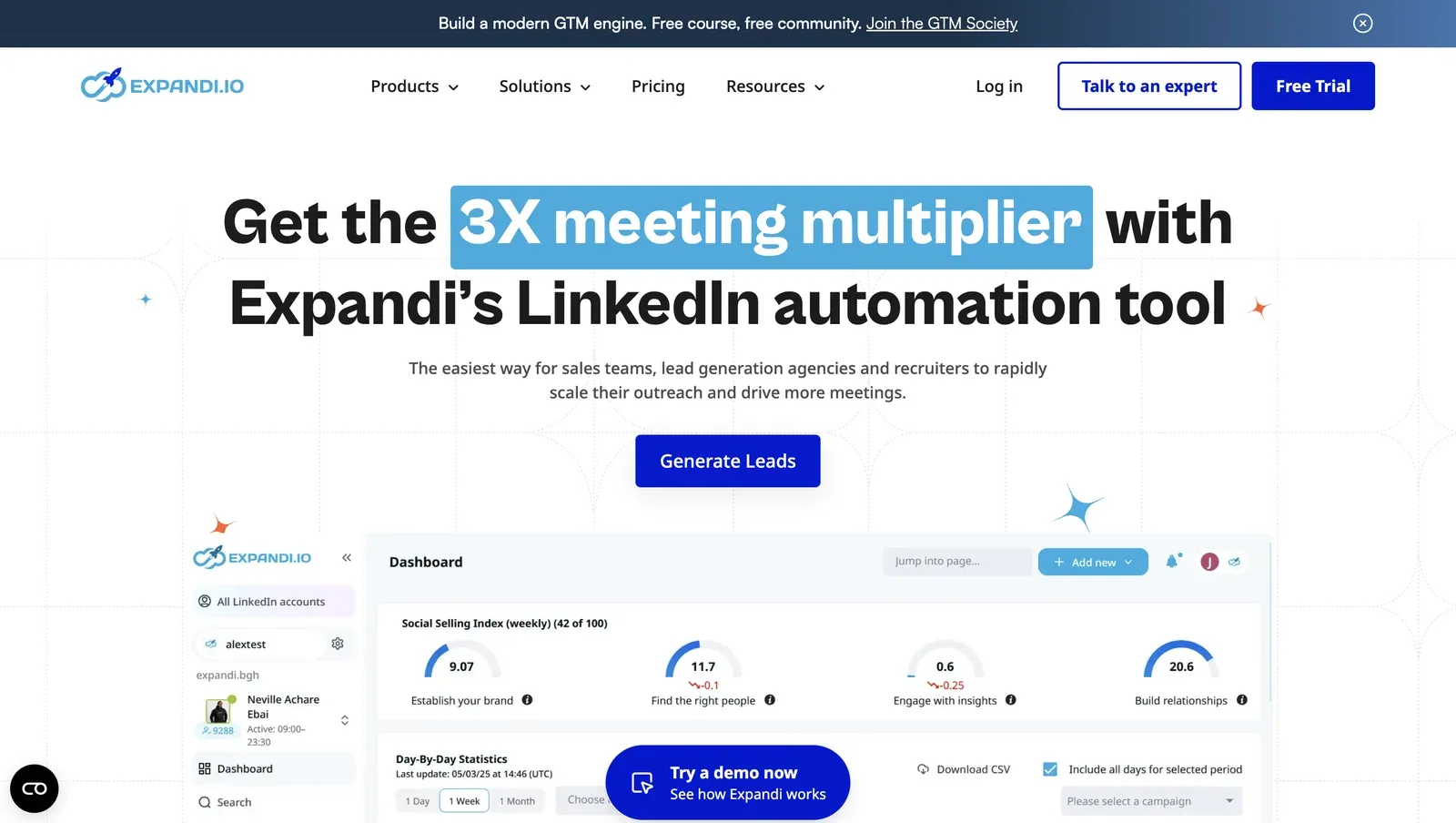
Expandi is a web app for LinkedIn connection-request and follow-up campaigns, with contact records, inbox history, tags, and native integrations. Founded in 2019 and listed in Ohio, it is used by lead-generation agencies, sales teams, recruiters, and founders that want guided setup around outreach campaigns. Annual billing brings the seat to $79/mo; in this article's 20-seat agency scenario, the documented Business-tier cost is $18,960/year.

Expandi homepage - July 2026

Expandi's homepage presents LinkedIn automation for sales teams, lead-generation agencies, and recruiters - July 2026

The sharpest safety finding is not its country proxy menu. In our test, the assigned cloud IP could not be replaced on the trial, and the connector still moved the LinkedIn login off-device. Teams looking for guided personalization evaluate Expandi anyway at $99/mo.

Quick facts about Expandi

  • Founded: 2019
  • HQ: Ohio, US
  • Pricing: $99/mo ($79/mo annual), observed 7-day trial with credit card required; vendor page advertises 14 days
  • G2: 4.16★ (98) · Capterra: 4.35★ (31) · Trustpilot: 4.07★ (202)
  • Last 6 months: 4.65★ (trending up, onboarding-support heavy) across 37 reviews
  • Architecture: cloud-bridge / session-upload extension; credential login also offered in tested onboarding

Vendor pricing & feature pages (fetched 2026-04-22/2026-05-11) + G2, Capterra, Trustpilot & Reddit reviews (computed 2026-07-09)

Key Features

  • Country proxy selection — Expandi offered 96 selectable locations in the live setup, but the tested trial did not expose bring-your-own proxy, which means a questionable assigned IP could not be replaced before launch.
  • Dynamic placeholders — custom variables support personalized outreach; the verified facts do not confirm spintax or AI-personalization for Expandi.
  • Contact CRM and inbox — contacts, inbox/history, and tags sit inside Expandi; the documented gap is no visual pipeline/Kanban, so CRM depth stays contact-level.
  • Smart limit ranges — the pricing page documents randomized action-limit ranges, which means pacing is a cloud-app setting rather than a local connector guardrail.
  • Sales Navigator list import — the help page requires a Premium LinkedIn account and Sales Navigator subscription, so lead collection still depends on a paid LinkedIn tier.
  • Seat transfer — the workspace help page allows a seat transfer once per month, which matters for teams rotating LinkedIn accounts.

The pattern is support-skewed: Expandi's recent rating rise is real, but the review set shows it is driven mostly by solicited Trustpilot onboarding-call praise. That matters because the strongest positives are concierge setup and support, while the strongest cautions are safety, reliability, and cancellation friction. In practice, the ratings support an onboarding story, not a conclusion that the session-risk problem improved.

What reviewers say about Expandi

Real-world scenario

The live consideration set: One Reddit evaluator was not praising Expandi; they were trying to move from Excel into a more reliable sales workflow and had narrowed the shortlist to Expandi, Linked Helper, and Lemlist.

Reddit
smallbusiness
One of the most painful things for me is a need to switch from my excel to some kind of a reliable workflow like notion, a crm, a sales nav and smth that actually automates sending messages, by now I choose between expandi, linked helper or lemlist.

Where this bites: The paired cautions are not generic bad reviews. They land on the failure modes Waalaxy switchers care about: account restrictions, setup failures, and cancellation friction after a card-backed trial.

Reported limitations

Account-risk report: The safety complaints are recurring enough to keep one standalone account-risk card outside the limitations carousel.

Within just a few hours of connecting Expandi, my account was frozen, and to this day I still can't restore access to it.

Read the full review on Trustpilot

Trustpilot
Rating: 1 out of 5
AL
Artemi Leben

Safety and Setup Notes

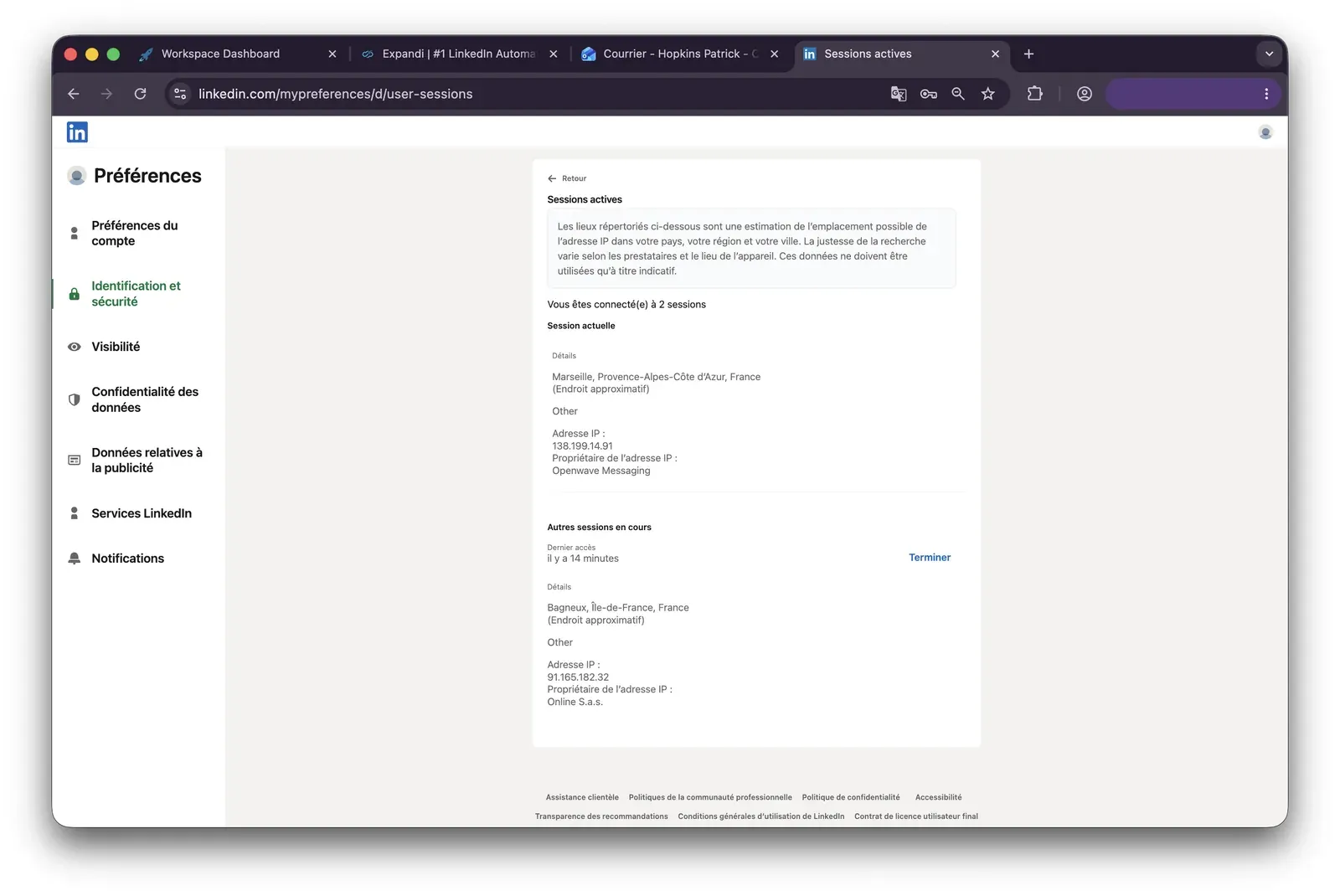
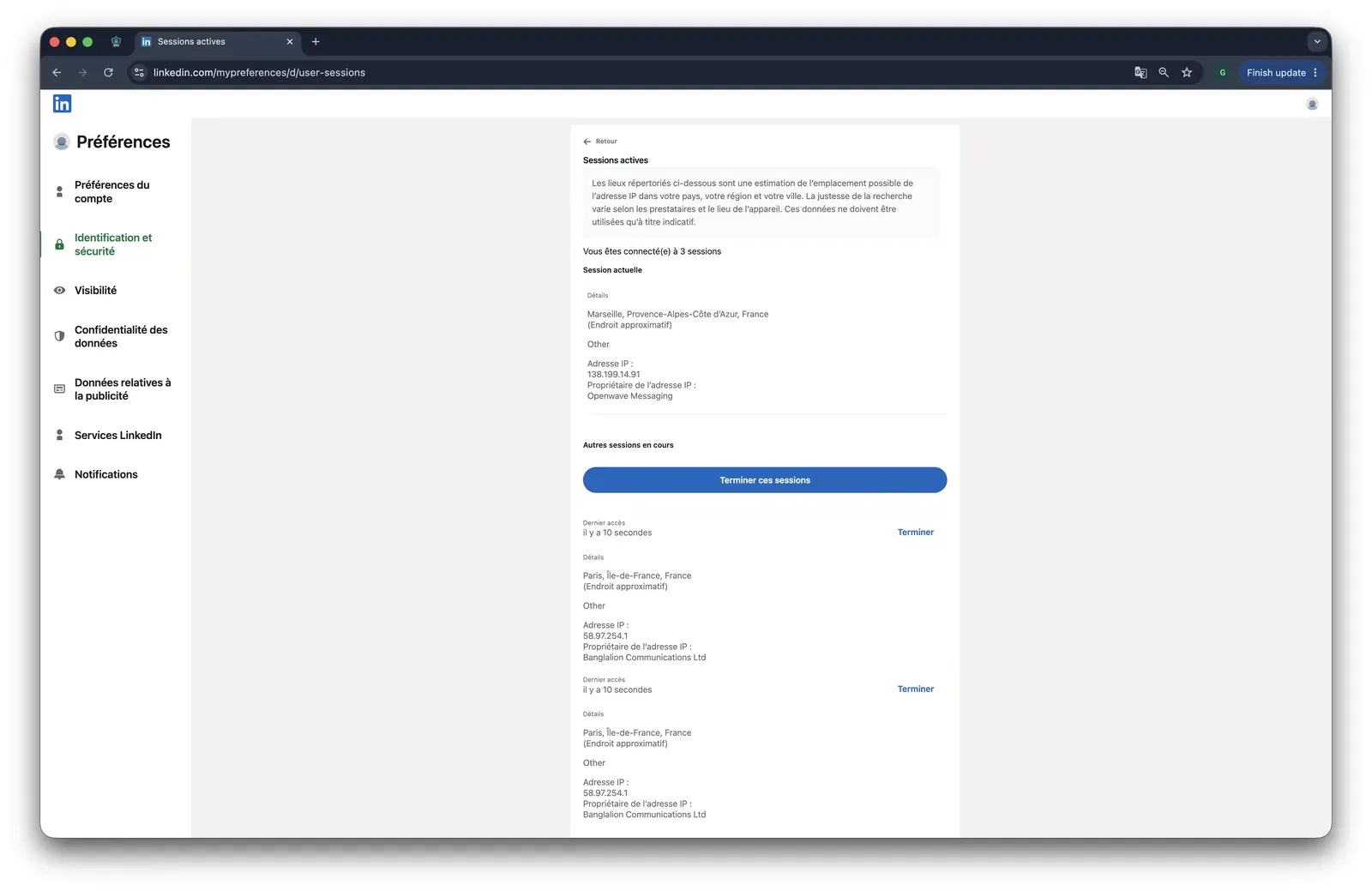
Expandi active sessions evidence - July 2026

LinkedIn active sessions after an Expandi account connection, showing the extra session/IP evidence used in the safety read - July 2026

What was checkedResult
Login modelCredentials login — Expandi starts a fresh LinkedIn session from vendor infrastructure; the connector path can also upload the session cookie.
Can I choose the desired location?Yes — 96 locations.
Can I add my own proxy?No on the tested trial — BYO proxy is documented separately, but it was not exposed here, so the assigned exit IP could not be replaced during setup.
Can I select a timezone when adding an account?Yes.
Cloud IP for account 191.165.182.32 — Free SAS, Brittany / Saint-Grégoire, FR.
OS / browser for account 1 (tool-reported)Mac 10.15 / Chrome 135.0.
Account 1 IPQualityScore resultFraud 100/100; proxy yes; recent abuse yes; residential connection; high abuse velocity; bot status yes — high-risk on IPQualityScore's scale, an independent IP-quality signal rather than LinkedIn's enforcement verdict.
Cloud IP for account 2 (same geo)2a01:cb00:8428:a00::… — Orange France, Centre-Val de Loire / Beaugency, FR.
OS / browser for account 2 (tool-reported)Mac 10.15 / Chrome 135.0 — identical fingerprint to account 1.
Account 2 IPQualityScore resultFraud 0/100; proxy no; VPN no; recent abuse no; residential connection; abuse velocity none.
Same IP or /24 across the two accounts?No — different ISPs and no shared /24; the shared OS/browser fingerprint is the correlation signal across accounts.
Is a credit card required for the trial?Yes.
Trial duration7 days — the pricing page claims 14.

Expandi — live cloud/IP test (June 2026, two accounts, registered from France)

Quick facts about Expandi

What was checkedFinding
Ships a public extension?Yes — official Expandi Connector, used to connect a LinkedIn account.
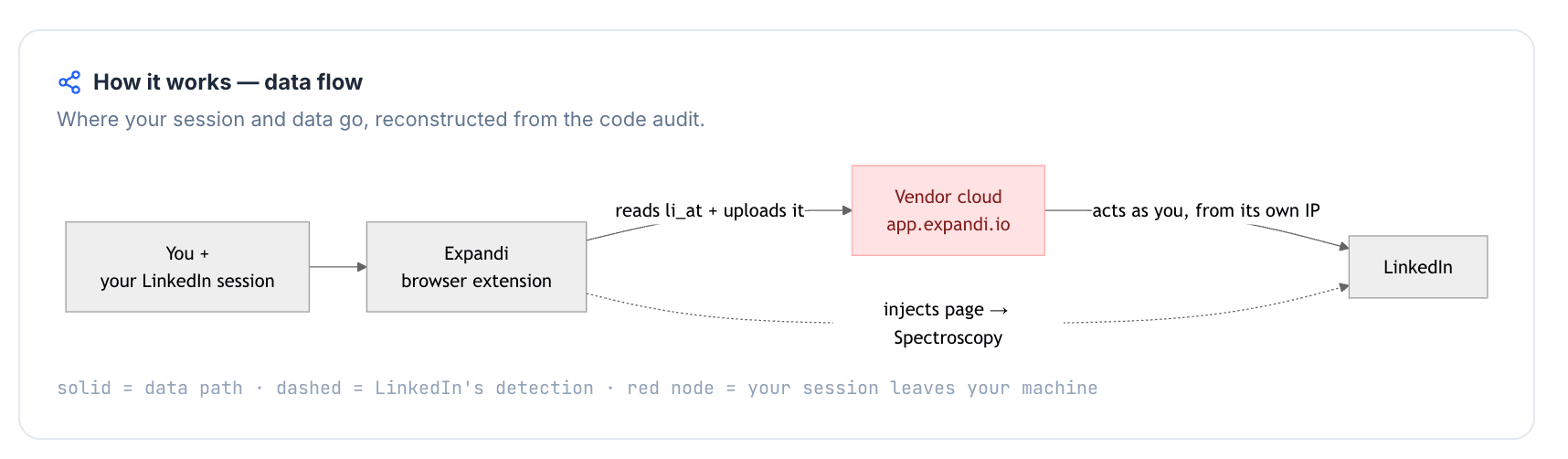
Architecture verdictCloud-bridge / session-upload — the extension copies the LinkedIn login into Expandi's cloud, which means the account can be operated from vendor infrastructure.
Reads the LinkedIn session cookie (li_at)?Yes — li_at is the LinkedIn login in cookie form; the connector copies it to app.expandi.io, so whoever holds it can act as the account without the password.
Direct LinkedIn (Voyager) API calls?Yes — contact-info enrichment uses Voyager calls, and the teardown found interception of LinkedIn API responses.
Injects code into LinkedIn's page (DOM)?Yes — the teardown documents an injected script and XHR-prototype patch on LinkedIn, which creates page-level evidence separate from normal browser use.
Fires synthetic (isTrusted=false) clicks?No — the extension automates no UI actions.
Blocks LinkedIn telemetry?No — LinkedIn tracking endpoints were not blocked, so telemetry can still report the browser-side view of the session.
Enforced daily cap in the code?None found — the connector exposes no rate-limit, scheduling, or safety dials, so pacing lives cloud-side and outside the user's browser controls.
On LinkedIn's AED probe list?No in the June 2026 snapshot — AED is LinkedIn's extension-probe surface, and absence from one snapshot does not prove safety because the list changes.

Expandi Connector extension — source-code teardown (June 2026)

The honest read: I would treat the missing replacement path as the practical risk, not just either IP result: the setup let me choose a country, but not vet or swap the exit address before the account carried it. The teardown points the same way: once the login is copied into the cloud, user-side safety controls become advisory because the exposed part of the request path is no longer on the operator's machine. Linked Helper's local/VPS for cloud-equivalent 24/7 operation model keeps that handoff out of the path, so the operator can use their own IP or a checked proxy instead of accepting a vendor-assigned one.

Bottom line

Expandi's strongest case is hands-on onboarding, custom-variable personalization, and a contact inbox inside a $99/mo cloud workflow.

If Waalaxy's core problem is session custody plus shallow LinkedIn depth, Linked Helper answers on the narrower axis: local/VPS execution, user-controlled proxy quality, 13 scrape sources, and CRM depth without handing the session to a cloud connector.

A June 2026 extension check also found a separate Shavron/Konnector Chrome extension using the Expandi label, so these safety findings apply to the official Expandi Connector only.

4. Lemlist

Operated by LEMPIRE SAS in Paris and founded in 2018, Lemlist centers on email sequences, Lemwarm, and a lead database, with LinkedIn touches available on the Multichannel Expert plan. The public pricing page shows a 14-day trial and $63/mo annual-equivalent entry pricing, while this article's 20-seat agency estimate is $20,880/yr; in practice, the budget changes once a team needs LinkedIn plus email rather than email alone.

Lemlist home page - July 2026

Lemlist's demo page foregrounds social proof and a lead-capture flow - July 2026

The safety read starts at the connector. Lemlist's LinkedIn layer is a cloud-bridge extension, so the LinkedIn login moves into lemlist's cloud and LinkedIn execution carries vendor-held session risk. Cold-outreach teams evaluating deliverability, support, and cadences still put it on the shortlist, starting at $79/mo.

Quick facts about Lemlist

  • Founded: 2018
  • HQ: France (LEMPIRE SAS, Paris)
  • Pricing: $79/mo ($63/mo annual), 14-day free trial
  • G2: 4.5★ (263) · Capterra: 4.6★ (385) · Trustpilot: 4.1★ (146) — sharp platform split
  • Last 6 months: 4.69★ (trending up) across 54 reviews
  • Architecture: cloud-bridge / session-upload extension

Vendor pricing & feature pages (fetched 2026-04-22 to 2026-04-23) + G2, Capterra, Trustpilot & Reddit reviews (computed 2026-07-09)

Key Features

  • Email sequences and Lemwarm — Lemlist's center of gravity is cold email, deliverability warmup, and follow-up cadence management.
  • LinkedIn touches on multichannel plans — LinkedIn actions sit behind the email-led workflow and require the higher multichannel tier, so the entry price does not describe the LinkedIn use case.
  • Lead database and email-finder connectors — Apollo, Clay, Clearout, Leadfuze, Lusha, and Uplead connectors support contact sourcing before outreach.
  • CRM and no-code connectors — Close.io, HubSpot, Pipedrive, Salesforce, Zoho CRM, Zapier, and Make cover handoff into sales systems.
  • AI personalization — Lemlist markets AI-powered personalization on its site, but this is a category feature rather than the safety difference in this article.
  • Team and analytics views — reviewer praise points to team management and statistics as the operational layer after campaigns are running.

The split matters: G2 and Capterra read higher at 4.5★ and 4.6★, while Trustpilot's 4.1★ carries more billing, refund, and reliability anger. That means Lemlist's recent support praise is real, but it should not be read as proof that LinkedIn safety or billing friction has disappeared; those issues sit in a different part of the review mix.

What reviewers say about Lemlist

Real-world scenario

Where the Waalaxy comparison lands: The assigned Reddit example is a one-thread corroboration, not broad popularity proof. It matters because the poster names lemlist and Waalaxy on the same session-custody concern that the first-hand extension table below tests directly.

Reddit
smallbusiness
Tools like lemlist and waalaxy charge $50-100/month and store your linkedin session, your leads, your messages on their servers.

The trade-off is not just safety: Negative reviews cluster around reliability, support misses, complexity, and pricing transparency. Those complaints are separate from the extension architecture, which means the review downside is operational as well as technical.

Reported limitations

Account-risk signal: The safety complaint is not only from detractors; even a 5★ G2 reviewer names LinkedIn account suspension as the downside, which makes the architecture table below load-bearing rather than theoretical.

What do you dislike about lemlist? Linkedin tools may get your account suspended.

Read the full review on G2

G2
Rating: 5 out of 5
NG
NOT GIVEN

Safety and Setup Notes

What was checkedFinding
Ships a public extension?Yes — lemlist connector extension, about 90,000 Chrome Web Store users
Architecture verdictCookie-bridge / session-upload — the connector copies the LinkedIn login to lemlist's cloud, so LinkedIn steps carry vendor-cloud session custody
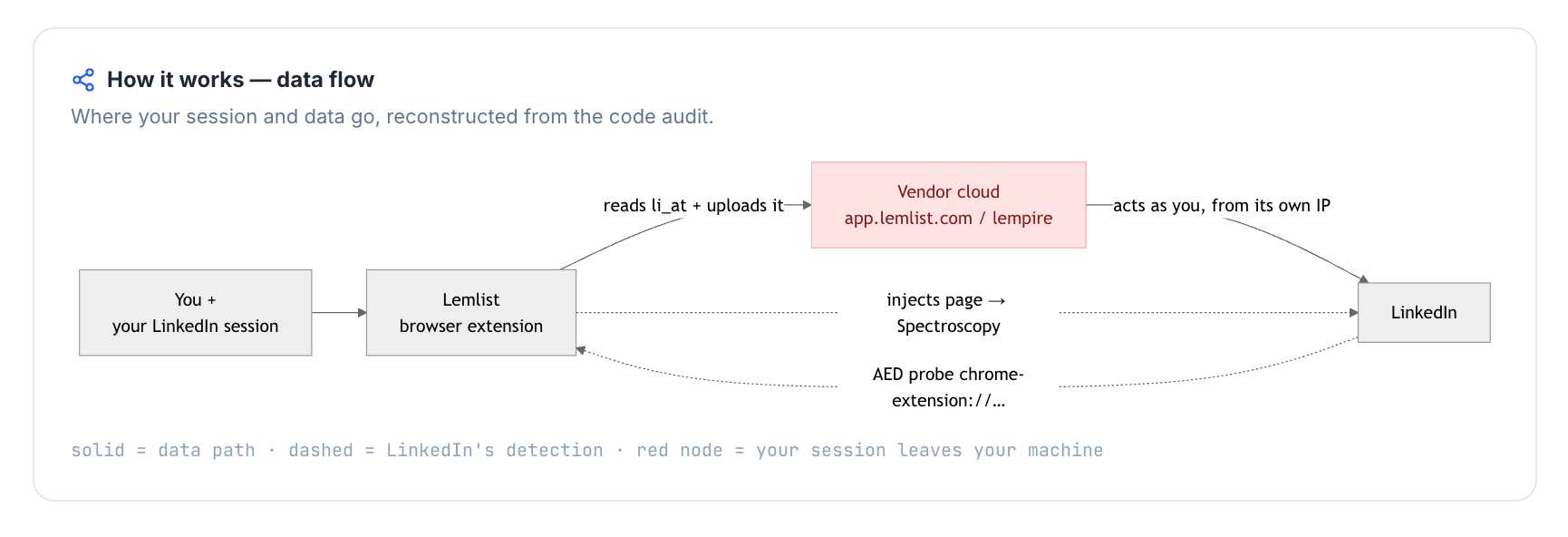
Reads the LinkedIn session cookie (li_at)?Yes — it copies the full LinkedIn cookie string, including li_at (the LinkedIn login cookie), to app.lemlist.com, so lemlist's cloud can act as the logged-in account
Direct LinkedIn (Voyager) API calls?No — actions are driven by injected content-script UI and synthetic DOM events, so the risk shifts from raw API replay to visible page injection and machine-generated input
Injects code into LinkedIn's page (DOM)?Yes — content-script UI is injected into LinkedIn pages, which means the page can expose an extension footprint to passive scans
Fires synthetic (isTrusted=false) clicks?Yes — synthetic-event and programmatic-click signals were present; these are machine-created events, not browser-trusted human input
Blocks LinkedIn telemetry?No — no tracker-blocking rules were found, so the extension is not trying to hide by stripping LinkedIn telemetry
Enforced daily cap in the code?None found — only very short delay and interval values appeared in the bundle, so safe-volume control is not an auditable code guardrail
On LinkedIn's AED probe list?Yes — AED is LinkedIn's hardcoded extension-probe list; being listed means the installed extension can be visible on page load before outreach starts

Lemlist connector extension — source-code teardown (July 2026)

Quick facts about Lemlist

The honest read: I would treat Lemlist's LinkedIn layer as an email platform crossing into LinkedIn, not as a LinkedIn-native safety design. The risk is cumulative: the same connector creates vendor-cloud session custody, a probeable extension footprint, page injection, and machine-generated interaction signals, so the account exposes several detection surfaces before campaign volume is even considered. Linked Helper is the contrast on this axis because its LinkedIn work runs from the user's own machine or VPS, which keeps the browser state under the operator's control.

Bottom line

The Lemlist case starts with cold email, Lemwarm, and email-tool connectors before LinkedIn steps; its review upside is support and email-workflow convenience. If LinkedIn account safety and richer data workflows are the priority, Linked Helper runs from the user's machine or VPS with Web Version access and adds 13 scrape sources, a built-in CRM, and deeper workflow controls.

No live cloud/IP test was run for Lemlist, so the safety evidence here is the July 2026 connector teardown rather than an IP-quality scan.

5. Dux-Soup

Dux-Soup is a 2015 Netherlands-based LinkedIn prospecting tool with browser and remote-control options for basic prospecting workflows and CRM handoff. Individual prospectors and small sales teams use it when they want a low-cost entry before a heavier cloud sales suite. The pricing page puts the annual Pro equivalent at $11.25/mo, then steps up to $55/mo and $99/mo; in practice, the cheap Waalaxy alternative story changes once a buyer needs higher-tier automation.

Dux-Soup home page - July 2026

Dux-Soup homepage showing Cloud or Browser positioning, the 2015 badge, and a lead-flow preview - July 2026

The safety question is which tier you are really buying. Cheaper local modes leave LinkedIn in your Chrome extension, while the Cloud tier becomes a cookie-bridge setup, meaning the login is copied to Dux-Soup's cloud.

Quick facts about Dux-Soup

  • Founded: 2015
  • HQ: Netherlands (Supertec B.V.)
  • Pricing: $14.99/mo Pro Dux ($11.25/mo annual); Turbo $55/mo; Cloud $99/mo
  • Trial: pricing page claims no-card free trial; live signup observed card required + 0-day trial
  • G2: 4.3★ (81) · Capterra: 4.0★ (16) · Trustpilot: 4.95★ (42) — sharp platform split
  • Last 6 months: too thin to trend (7 rated reviews)
  • Architecture: hybrid browser extension — local-scrape on Free/Pro/Turbo; cookie-bridge on Cloud

Vendor pricing, About, integration, and support pages (fetched 2026-04-22 to 2026-05-27) + G2, Capterra, Trustpilot & Reddit reviews (computed 2026-07-09)

Key Features

  • LinkedIn visit/connect/follow-up actions — like the rest of this list, Dux-Soup operates the user's authenticated LinkedIn session; what changes by tier is where that session runs.
  • Drip campaign sequencing — sends ordered LinkedIn follow-ups with working-hour controls, but without if/then workflow branching or spintax randomization.
  • Lead dashboard and tags — Turbo and Cloud add lead tracking, tagging, and a central inbox.
  • CRM and workflow integrations — the integrations page lists 11 native integrations for CRM and workflow handoff.
  • Sales Navigator URL targeting — Dux-Soup can visit Sales Navigator-sourced profile URLs through basic LinkedIn, which helps when a list was built elsewhere.
  • Remote Control API — lets a lead-management system trigger Dux-Soup actions instead of requiring every action to start manually in the browser.

The split is support versus operations: Trustpilot praise is dominated by human support, while G2 and Capterra carry the operational complaints. That rating divergence matters because an averaged Dux-Soup review score can hide the exact issues a Waalaxy switcher is trying to avoid.

What reviewers say about Dux-Soup

Real-world scenario

A Dux-Soup-or-Botdog Reddit discussion gives the practical version of the risk: the issue is not only which tool someone buys, but how easily LinkedIn automation can be mis-run once volume rises.

Reddit
Botdog
We've seen a lot of people mess these up and get restricted.

Reported Limitations

Where this bites: The cautionary reviews cluster around billing surprises, product reliability, and support misses. The product gaps behind those complaints are concrete enough to name:

  • no custom proxy, so Cloud-tier IP exposure cannot be swapped by the user;
  • no multi-channel sequencing, so email follow-up needs another tool;
  • one LinkedIn account per Google user, with no license switching;
  • no verified GDPR DPA, which gives EU procurement another legal check;
  • no spintax or if/then workflow branching;
  • 2 LinkedIn scrape sources, which means fewer ways to build lead lists before outreach.

Reported limitations

It got me banned. Any chrome extension or desktop app can be flagged by Linkedin - and they banned my account.

Safety and Setup Notes

What was checkedResult
Login modelExtension session — local modes run from the user's browser; Cloud exposure is covered in the extension teardown
Can I choose the desired location?No — bound to the registration geography
Can I add my own proxy?No — no proxy-quality checker
Can I select a timezone when adding an account?No
Cloud IP for account 1Not applicable — the local extension path uses the user's own machine
OS / browser for account 1 (tool-reported)n/a / n/a — not reported by the tool
Account 1 IPQualityScore resultNo vendor cloud IP to score; IPQualityScore (IPQS) is an independent IP-quality signal, not LinkedIn's enforcement verdict
Cloud IP for account 2 (same geo)Not applicable — no vendor cloud exit IP in the local extension path
OS / browser for account 2 (tool-reported)n/a / n/a — not reported by the tool
Account 2 IPQualityScore resultNo vendor cloud IP to score
Same IP or /24 across the two accounts?Not applicable — no vendor cloud exit IP for either local extension account
Is a credit card required for the trial?Yes
Trial duration0 days — the pricing page claims a free trial with no credit card required

Dux-Soup — live cloud/IP test (July 2026, two accounts, registered from France)

What was checkedFinding
Ships a public extension?Yes — Dux-Soup for LinkedIn Automation
Architecture verdictHybrid, multi-mode — local-scrape on Free/Pro/Turbo; cookie-bridge/session-upload on Cloud
Reads the LinkedIn session cookie (li_at)?Yes on Cloud — copies li_at (your LinkedIn login in cookie form), the full cookie jar, localStorage, and navigator data to app.dux-soup.com; No on Turbo/Pro/Free
Direct LinkedIn (Voyager) API calls?Yes — references LinkedIn Voyager API endpoints, which means automation follows a reverse-engineered API path rather than a normal human request map
Fires synthetic (isTrusted=false) clicks?Yes — synthetic and programmatic click signals were present, so the browser events can look machine-fired rather than user-fired
Blocks LinkedIn telemetry?Yes — tracker-blocking rules target LinkedIn telemetry endpoints, which can itself become an anomaly if the page's normal telemetry map goes missing
Enforced daily cap in the code?None enforced — defaults exist, but visit and invite ceilings can be raised
On LinkedIn's AED probe list?Yes — AED (Active Extension Detection) is LinkedIn's hardcoded extension probe list, so installed is visible before automation starts

Dux-Soup extension — source-code teardown (July 2026)

Quick facts about Dux-Soup

My read is that Dux-Soup is two safety profiles under one logo. The lower tiers behave like a visible browser-extension tool: the session stays on the machine, but LinkedIn can still see the extension footprint and the programmatic interaction pattern. The Cloud tier crosses the higher-risk line because the login can be copied to vendor infrastructure and is highly likely to run through a vendor server IP; for LinkedIn, that adds a datacenter-vs-residential mismatch, where datacenter means rented server infrastructure rather than a home or mobile line.

Bottom line

Dux-Soup remains a budget browser-extension option for basic LinkedIn prospecting with support and CRM handoff. If the priority is Waalaxy-style convenience without repeating off-device session exposure, Linked Helper's desktop app plus VPS keeps the LinkedIn session under operator control and adds more LinkedIn scrape sources, message-level if/then/spintax, and CRM depth.

No explicit switched-from or switched-to Dux-Soup stories appeared across the 139 Dux-Soup reviews analyzed.

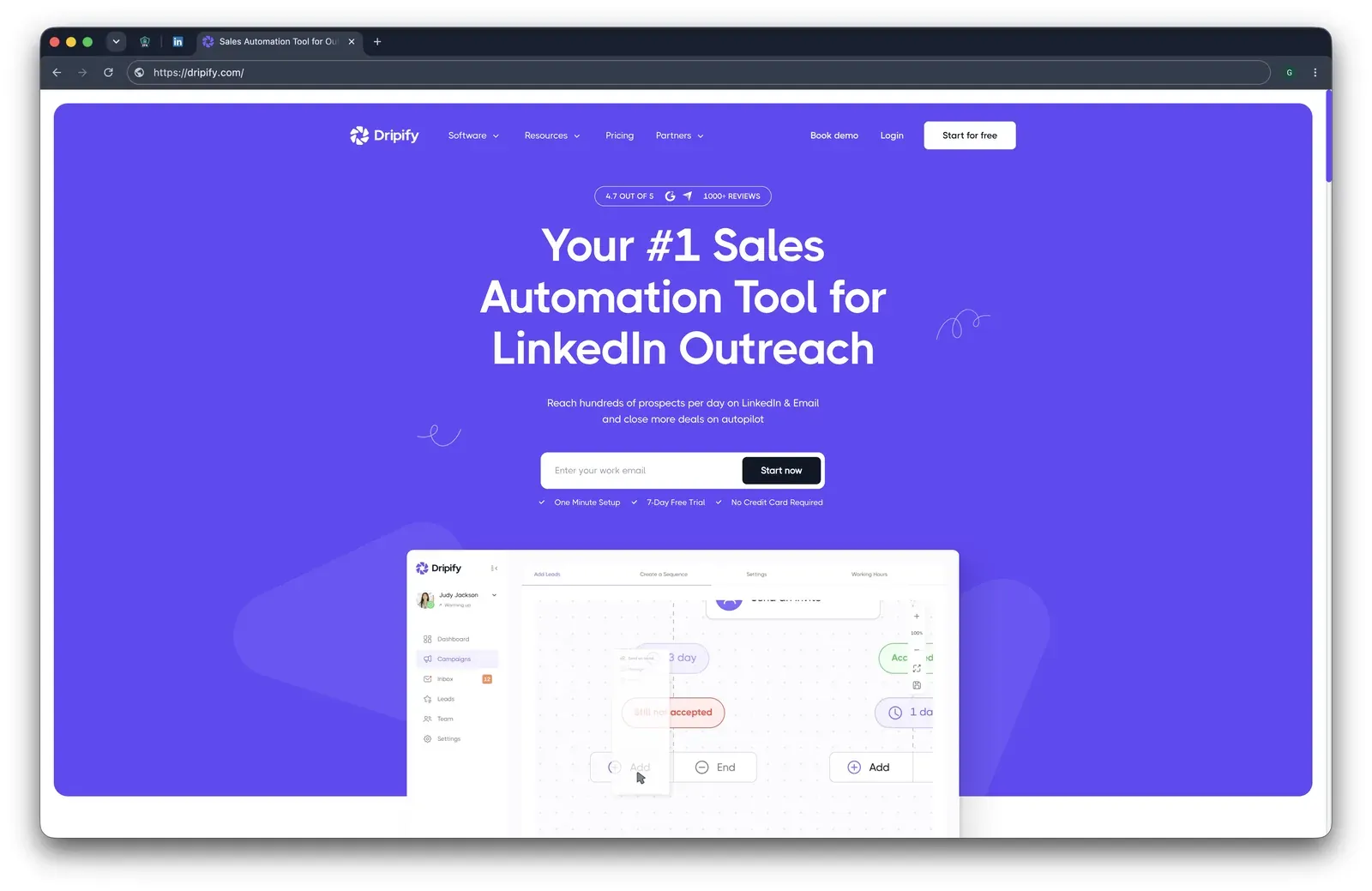
6. Dripify

Founded in 2019 and based in Austin, Texas, Dripify is an off-device outreach tool for connection requests, follow-ups, and email steps. The Basic plan drops to $39/mo when billed annually, and the trial runs 7 days without a credit card. The review base is broad: 4.63★ across 1,172 reviews, with the last six months at 4.67★ across 64, which means sentiment is steady while the hard complaints concentrate in narrower operational pockets.

Dripify homepage and campaign builder - July 2026

Dripify's homepage shows LinkedIn and email outreach positioning beside a sequence-builder preview - July 2026

The first-hand risk read is infrastructure control. Dripify's cloud test put both accounts on the same rented-server IP block, not a residential or mobile line, so its throttles do not control the server footprint LinkedIn sees. Sales teams comparing visual sequence builders still consider it from $59/mo.

Quick facts about Dripify

  • Founded: 2019
  • HQ: Austin, Texas, USA
  • Pricing: $59/mo ($39/mo annual), 7-day free trial
  • G2: 4.5★ (267) · Capterra: 4.7★ (476) · Trustpilot: 4.62★ (429)
  • Last 6 months: 4.67★ (flat) across 64 reviews
  • Architecture: Cloud with credential login

Vendor pricing & feature pages (fetched 2026-04-22 to 2026-05-04) + G2, Capterra, Trustpilot & Reddit reviews (computed 2026-07-09)

Key Features

  • LinkedIn + email sequences — Native LinkedIn and email steps sit in one flow, with built-in email finder and verification.
  • Daily-limit ranges — Dripify's Range safeguard lets users set 1-10 action ranges, which limits volume but does not change the cloud IP LinkedIn sees.
  • AI personalization — AI icebreakers, message generation, and image/video personalization support outreach variants.
  • Lead CRM tagsTags and segmentation organize leads inside Dripify; profile-dependent filters become useful after the profile is scraped.
  • IntegrationsMake, Zapier, and Google are the native integration set, so broader CRM routing usually runs through connectors rather than direct CRM sync.

The praise pattern: The strongest positive theme is launch friction: reviewers describe Dripify as quick to set up and easier to operate than older extension tools. The caution is that ease is not universal; the lowest-rated reviews cluster around guidance gaps, plan gates, and reliability when campaigns or uploads fail.

What reviewers say about Dripify

Real-world scenario

The migration pattern: Dripify's cleanest switching evidence is users arriving from lighter extension tools, especially Octopus CRM and Dux-Soup, because they wanted a more complete outreach workflow. That is an upgrade-to-Dripify pattern, not evidence that Dripify users are leaving in volume.

Reported Limitations

The operational caveat: The sharpest negatives focus on value and cancellation rather than day-to-day praise. Capterra's value-for-money score is 4.29, its weakest sub-rating, which makes the price-gating complaints material even though the overall rating remains high.

The depth gap: Dripify's breadth is channel mix, not LinkedIn data depth:

Reported limitations

Account-risk signal: This is not a volume claim. Reported Dripify account-restriction mentions were rare in the review set, so the reader-facing issue is the mechanism, not a broad wave of restrictions.

Reddit
LinkedInTips
I was using dripify a long time ago (linkedin automation tool) and was aggressive with it and got my account banned.

Safety and Setup Notes

Dripify ships no public LinkedIn extension, so there was nothing to tear down; the safety story is the live cloud login test.

What was checkedResult
Login modelCredentials login — Dripify logs into LinkedIn from vendor infrastructure, so LinkedIn sees a fresh server-side session rather than the user's browser session
Can I choose the desired location?No — the operator cannot choose the exit location, so geography is assigned by the vendor setup
Can I add my own proxy?No — Dripify assigns a vendor location-dedicated IP; without BYO proxy or a quality checker, the user cannot pre-vet the exit IP
Can I select a timezone when adding an account?Yes — timezone can match geography, but it does not change the server IP classification
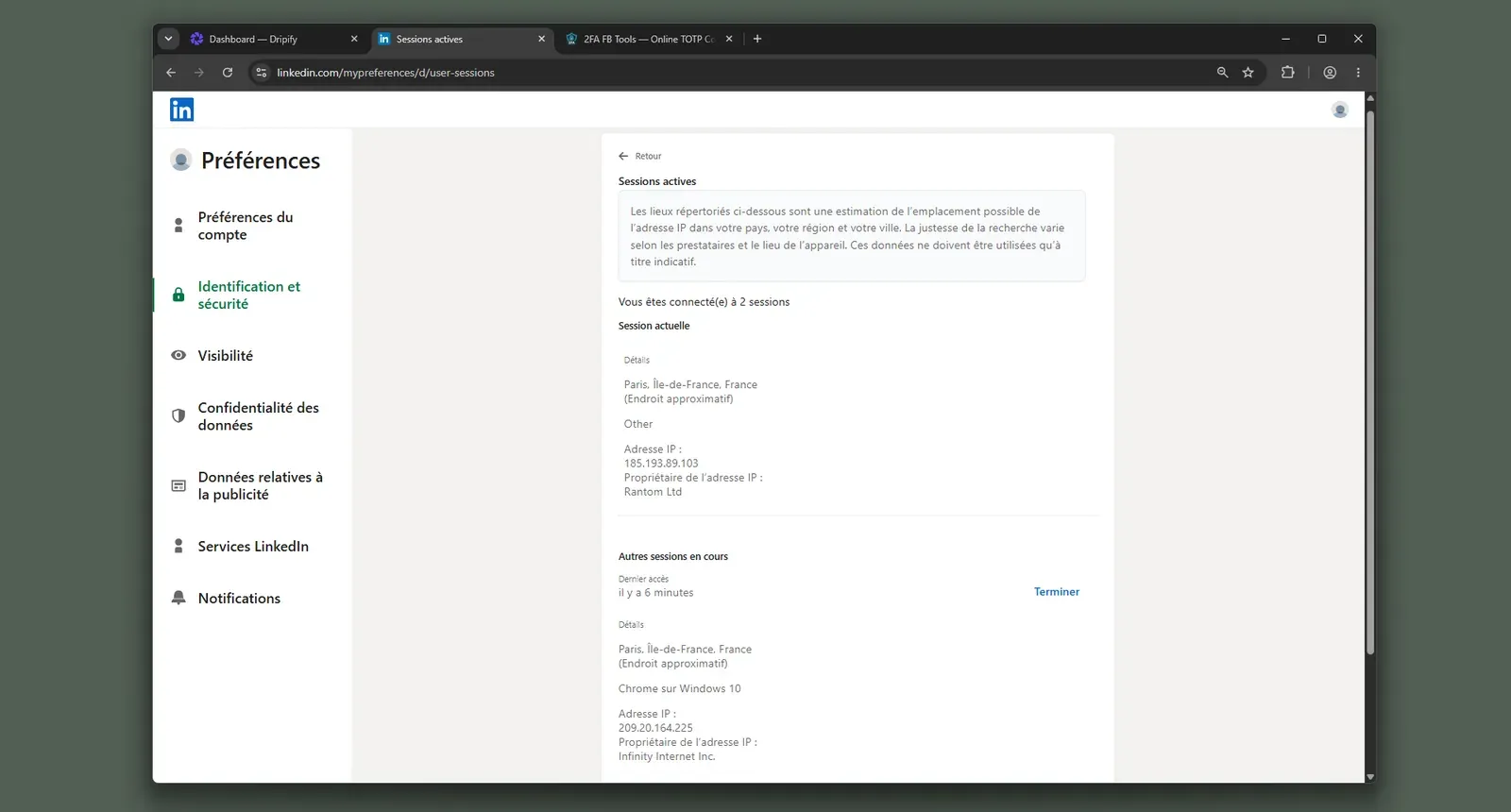
Cloud IP for account 1209.20.164.225 — HostRoyale Technologies Pvt, Île-de-France (Paris)
OS / browser for account 1 (tool-reported)Chrome / Windows
Account 1 IPQualityScore resultIPQualityScore (IPQS), an independent IP-quality signal, not LinkedIn's enforcement verdict: fraud 94/100 · proxy Yes · VPN Yes · connection type Data Center — high-risk on IPQS's scale
Cloud IP for account 2 (same geo)209.20.164.94 — HostRoyale Technologies Pvt, Île-de-France (Paris)
OS / browser for account 2 (tool-reported)Chrome / Windows — identical fingerprint to account 1, which weakens account separation
Account 2 IPQualityScore resultfraud 94/100 · proxy Yes · VPN Yes · connection type Data Center — high-risk on IPQS's scale
Same IP or /24 across the two accounts?No same IP; same 209.20.164.x /24 and same HostRoyale provider — two independent accounts had near-identical server footprints; that provider also appeared for Skylead and We-Connect in the test set
Is a credit card required for the trial?No — lower trial friction, but it does not reduce session-custody exposure
Trial duration7 days — matches the public pricing page

Dripify — live cloud/IP test (July 2026, two accounts, registered from France)

Dripify active sessions cloud IP evidence - July 2026

LinkedIn active sessions showed Dripify adding a second Chrome session from a hosting IP during the test - July 2026

Honest read: In my July 2026 check, the important point was not any single server value; it was the lack of operator control before LinkedIn saw the session. Dripify can slow actions with ranges, but a cloud credential login still puts the account into a vendor-run environment, so throttling and custody are different risk layers. Linked Helper's local/VPS-controlled execution narrows that exposure because the session environment is chosen by the operator before automation starts.

Bottom line

Dripify is easiest to justify when the buyer wants an always-on visual sequence builder with native email steps; the positive reviews show why setup can feel quick and operationally simple. If Waalaxy's account-safety worry is the reason you're switching, Linked Helper keeps the LinkedIn session in user-controlled local or VPS execution and adds deeper LinkedIn workflows, CRM, and scrape-source coverage.

The analyzed reviews recorded 12 switched-in Dripify stories and one switched-out story, with Octopus CRM as the most common arrival source.

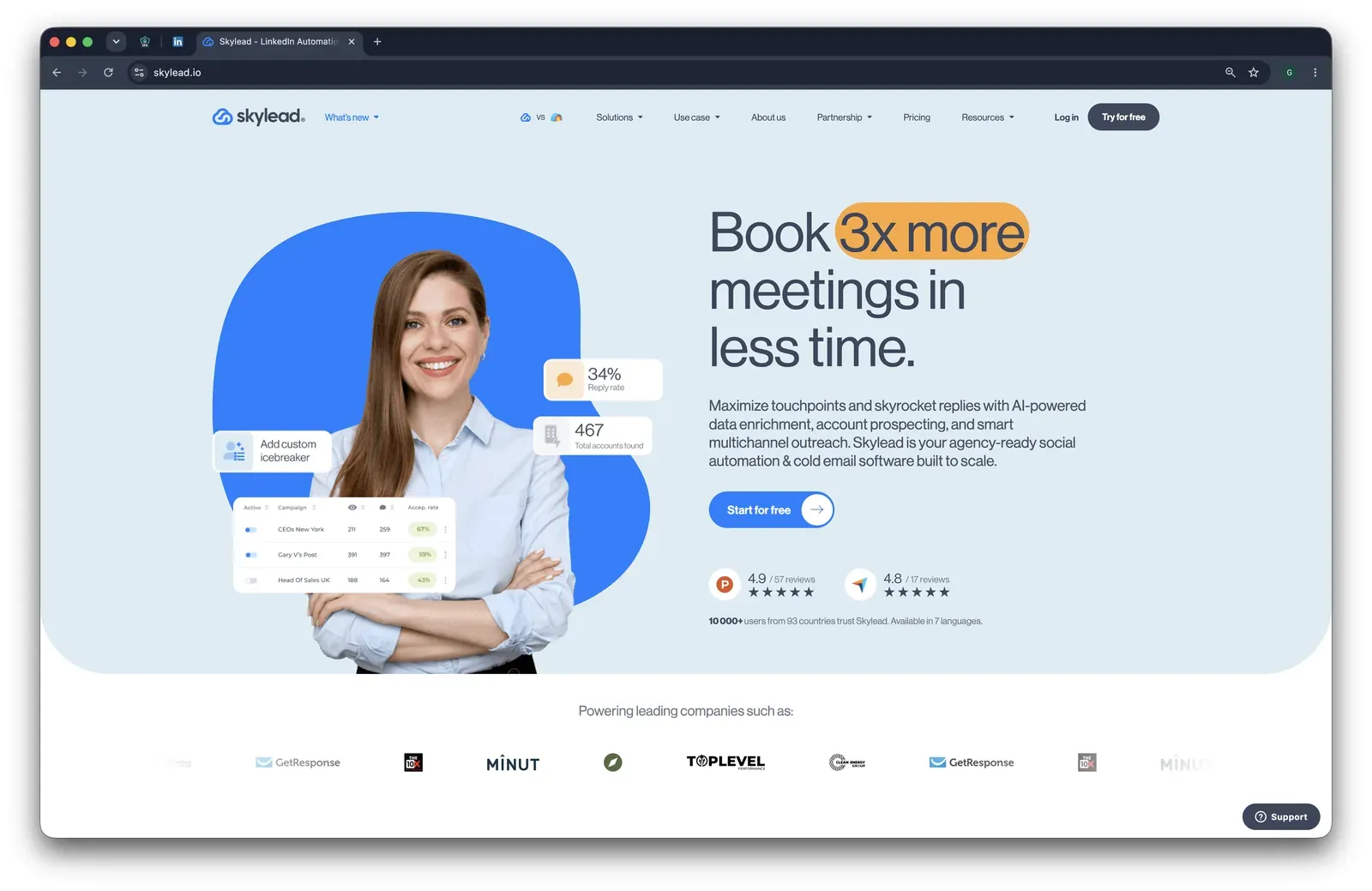
7. Skylead

Founded in 2019 under United Kingdom jurisdiction, Skylead sells one All-in-one plan at about $1,200/year for one account; the 20-seat agency scenario in this article is $24,000/year. Instead of a browser extension, setup happens inside Skylead's hosted connection flow. The product centers on behavior-based campaign branching and LinkedIn plus email follow-up. Its 7-day trial is advertised publicly, but the sign-up check required a credit card, which makes the cancellation friction below worth noticing.

Skylead homepage - July 2026

Skylead's public homepage emphasizes AI enrichment, account prospecting, and multichannel outreach - July 2026

The custody trade-off sits behind the smart-sequence pitch. Skylead is cloud with credential login, so LinkedIn sees a vendor-run session rather than your own device. In our two-account check, both accounts drew the same high-risk server address. Sales teams comparing behavior-based LinkedIn/email paths still evaluate it at $100/mo.

Quick facts about Skylead

  • Founded: 2019
  • HQ: United Kingdom
  • Pricing: $100/mo All-in-one; 7-day free trial advertised, card required in our sign-up check
  • G2: 4.5★ (125) · Capterra: 4.8★ (17)
  • Trustpilot: too thin to average (2 reviews)
  • Last 6 months: no printable trend (0 rated reviews in the window)
  • Architecture: Cloud with credential login

Vendor pricing & feature pages (as of 2026-04-22) + G2, Capterra, Trustpilot & Reddit reviews (computed 2026-07-09)

Key Features

  • Smart sequences — behavior-based steps can move people who interact with a campaign into a dedicated follow-up path.
  • Sales Navigator URL import — users can start from a Sales Navigator search URL without a CSV, though Skylead records 3 LinkedIn scrape sources, so the data reach is narrower than Linked Helper's 13-source coverage.
  • LinkedIn plus email steps — Skylead can run LinkedIn and email outreach in one sequence, with email-delivery reliability complaints carried in the limitations below.
  • Spintax and Liquid syntax — the pricing page lists message-variation syntax for rotating outreach copy.
  • Smart Inbox — Skylead documents an inbox/CRM layer, but the reviewer complaint about missing internal CRM and custom tags means we treat it as a light inbox, not a tag-based CRM.

The review caveat: Skylead's visible review base is positive, but not fresh enough to treat as safety proof. The newest substantive reviews cluster in mid-2024, the trailing-6-month window has no rated reviews, and the negative pool contains only two strict low-star core-pain reviews. That means the high G2/Capterra scores are useful satisfaction context, not independent evidence that the cloud setup is low-risk.

What reviewers say about Skylead

Real-world scenario

The switching story: The clearest switching case is narrow: a G2 reviewer came from Apollo because they wanted easier LinkedIn automation, not because they had evaluated Skylead's safety model.

I have been using apollo and the linkedIn automations is just not good enough. When I tried skylead I was amazed by how easy it was
G2 4.5★
View Original

Where this bites: The trade-off cards cluster around price, campaign interruption, cancellation friction, and send speed. The CRM-depth gap is especially relevant for a Waalaxy reader: Skylead has behavior-based sequences, but the inbox layer is not the same as a fuller contact-management system with tags and segmentation.

Reported limitations

Account-risk signal: Even a satisfied reviewer reported LinkedIn security stopping campaigns, so the safety issue is not only theoretical.

A few times are compaigns got stopped due to linekdin security and that can be improved.

Read the full review on G2

G2
Rating: 5 out of 5
US
U S.

Safety and Setup Notes

What was checkedResult
Login modelCredentials login — Skylead starts a fresh LinkedIn session from vendor infrastructure, so session custody leaves the user's device.
Can I choose the desired location?Yes — 91 locations.
Can I add my own proxy?Yes — no built-in proxy-quality checker, so the buyer must verify proxy quality elsewhere.
Can I select a timezone when adding an account?Yes.
Cloud IP for account 158.97.254.1 — HostRoyale Technologies Pvt, Ile-de-France (Paris, FR).
OS / browser for account 1 (tool-reported)Mac 10.15 / Chrome 135.0.
Account 1 IPQualityScore resultFraud 100/100 · proxy yes · VPN yes · recent abuse yes · Data Center — IPQualityScore (IPQS) is an independent IP-quality signal, not LinkedIn's enforcement verdict; on its own scale, 75+ is high-risk.
Cloud IP for account 2 (same geo)58.97.254.1 — HostRoyale Technologies Pvt, Ile-de-France (Paris, FR).
OS / browser for account 2 (tool-reported)Mac 10.15 / Chrome 135.0 — identical fingerprint to account 1.
Account 2 IPQualityScore resultFraud 100/100 · proxy yes · VPN yes · recent abuse yes · Data Center — for LinkedIn, a personal account operating from a rented server IP stands out from normal residential or mobile usage.
Same IP or /24 across the two accounts?Same IP and same /24, same provider — two independent accounts carried a near-identical vendor-cloud footprint.
Is a credit card required for the trial?Yes — trial access still creates payment friction before the buyer can assess deliverability.
Trial duration7 days.

Skylead — live cloud/IP test (June 2026, two accounts, registered from France)

Skylead ships no public LinkedIn extension, so there was nothing to tear down. AED (Active Extension Detection), LinkedIn's extension-ID probe list, is not applicable here; the safety story is the live cloud test.

Skylead LinkedIn active sessions - July 2026

LinkedIn's active-sessions view captured duplicate Skylead-opened Paris sessions on the same server-side address - July 2026

The pattern is custody: The finding is not one score in isolation; it is the lack of account isolation. Two accounts set up in the same controlled location inherited the same vendor-side footprint, and I had no built-in way to verify the assigned IP quality before connecting LinkedIn. That is the practical cost of cloud credential login: the workflow convenience is real, but the session reputation is decided by Skylead's infrastructure unless you bring and vet your own proxy.

Bottom line

Skylead's main draw is conditional branching and LinkedIn-plus-email follow-up inside a premium per-seat tool with a light inbox. If the Waalaxy pain you are solving is account exposure plus CRM depth, Linked Helper keeps execution on hardware you control, adds a fuller CRM, and covers 13 LinkedIn scrape sources rather than Skylead's 3.

A June 2026 check treated Skylead's vendor "Dedicated IP" wording as a claim rather than a verified fact.

8. Octopus CRM

Founded in 2018 and headquartered in the United States, Octopus CRM packages LinkedIn prospect collection, connection requests, follow-ups, a Smart Inbox, and basic analytics for one-person prospecting. The vendor page lists Starter at a $6.99/mo annual equivalent and a 7-day no-card trial; the 20-seat agency comparison uses its Unlimited tier at $5,997.60/year. The review base is broad enough to use: 590 rated reviews average 4.41★ across G2, Capterra, and Trustpilot.

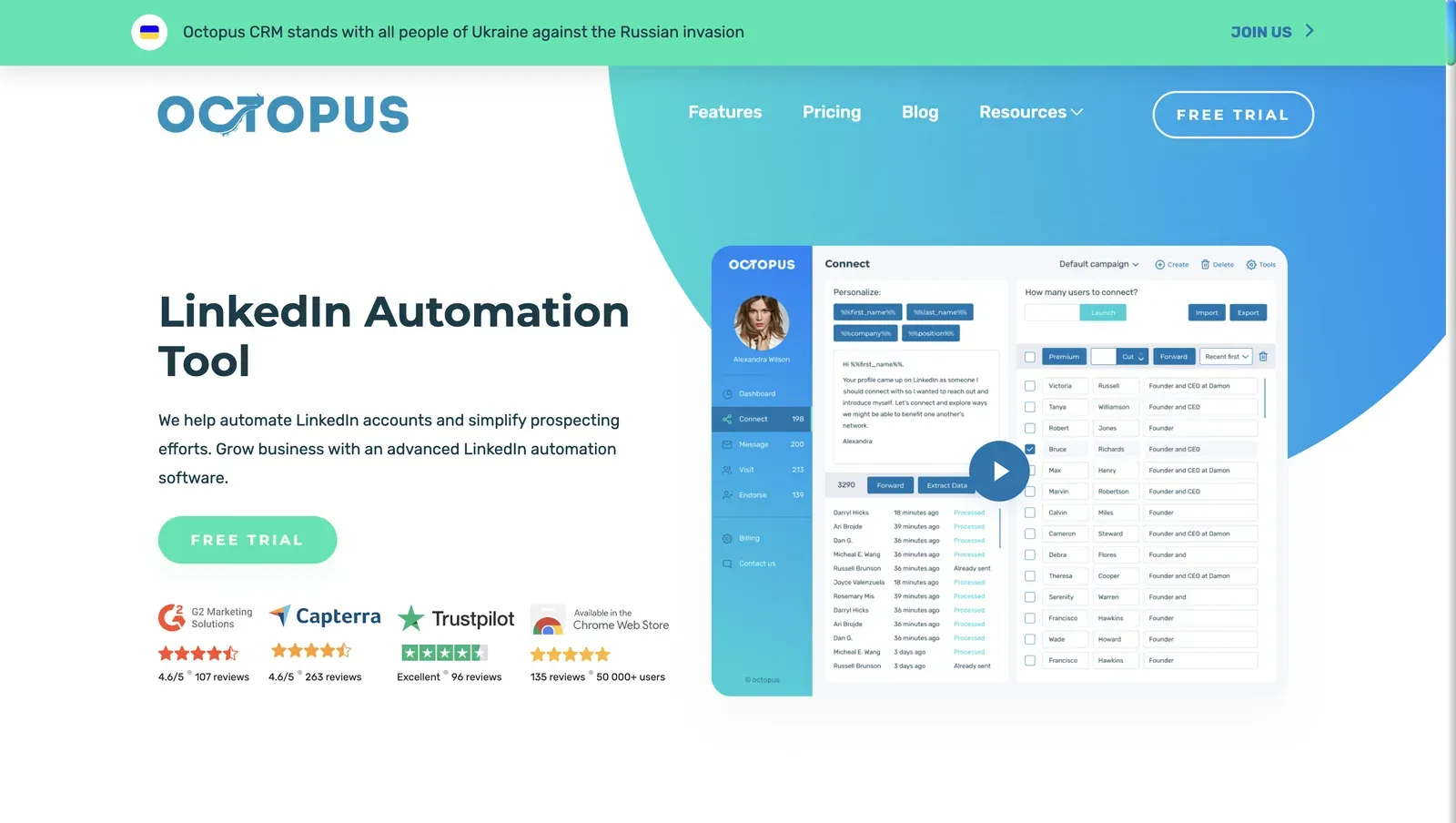
Octopus CRM home page - July 2026

Homepage showing LinkedIn automation messaging, review badges, and a campaign dashboard preview - July 2026

The teardown came back as local-scrape, not cloud-bridge. Your LinkedIn login stays in your browser, but LinkedIn can still see the extension footprint before any campaign runs. Solo operators on a tight budget compare its $9.99/mo LinkedIn mini-CRM against browser-open execution and thin workflow depth.

Quick facts about Octopus CRM

  • Founded: 2018
  • HQ: United States
  • Pricing: $9.99/mo ($6.99/mo annual), 7-day free trial, no credit card
  • G2: 4.4★ (115) · Capterra: 4.6★ (273) · Trustpilot: 4.23★ (202)
  • Last 6 months: below the 10-review trend floor
  • Architecture: local-scrape Chrome extension; session stays local, extension footprint remains visible

Vendor pricing and feature pages fetched 2026-04-22 to 2026-06-01; G2, Capterra, Trustpilot, and Reddit reviews computed 2026-07-09

Key Features

  • Chrome extension execution — the add-on runs inside the user's authenticated LinkedIn browser session, which keeps the IP local but leaves extension traces LinkedIn can probe.
  • Connection and follow-up sequences — like every tool in this list, it sends LinkedIn invitations and follow-up messages; the trade-off is the visible browser-extension footprint.
  • Smart Inbox CRM — a lightweight inbox stores prospects and conversations for LinkedIn follow-up, so Octopus reads more like a LinkedIn-side CRM helper than a full sales pipeline.
  • Three LinkedIn scrape sources — source coverage is narrow, which means fewer LinkedIn surfaces feed prospecting than in deeper scrape-source tools.
  • Small integration footprint — 2 native integrations make it limited for HubSpot- or Zapier-heavy workflows, so those teams should treat it as a sidecar rather than the system of record.
  • Working-hours and delay controls — controls exist in the options UI, but no hard daily cap was found in the shipped code, so the settings guide behavior rather than enforce a guardrail.

The contradiction matters more than the average: G2 (115), Capterra (273), and Trustpilot (202) all sit in the four-star range, while recent volume is too thin to print a trend. The useful signal is the split inside the same topics: reviewers praise safe background outreach and support, then paired caution cards name lockouts, manual lead movement, and support failures.

What reviewers say about Octopus CRM

Real-world scenario

The practical buyer context: the strongest Reddit signal is not a migration story; it is the simple daily task that sends budget buyers toward tools like Octopus. In a high-score B2B marketing thread where Octopus was discussed negatively among options, the job was removing a repetitive LinkedIn outreach routine.

Reddit
b2bmarketing
Before I was doing all that manually every morning which was eating like 30min on its own.

Where this bites: the cautionary record clusters around LinkedIn limits firing unpredictably, manual lead-stage movement, browser-open operation, and billing/support friction. Value-for-money is Octopus's weakest Capterra sub-rating at 3.79, which means the low entry price does not erase the refund and annual-vs-monthly complaints.

Reported limitations

Account-risk signal: one review-reported lockout lines up with the teardown mechanism below. It does not prove Octopus causes every restriction, but it shows why the extension footprint matters: LinkedIn can score the setup and the sending pattern together.

LinkedIn has spotted using Octopus CRM and has locked me out of my account for a couple of days.

Read the full review on Trustpilot

Trustpilot
Rating: 1 out of 5
MR
Mr Radford

Safety and Setup Notes

What was checkedFinding
Ships a public extension?Yes — Octopus - All-in-One LinkedIn Automation, the product's main browser entry point
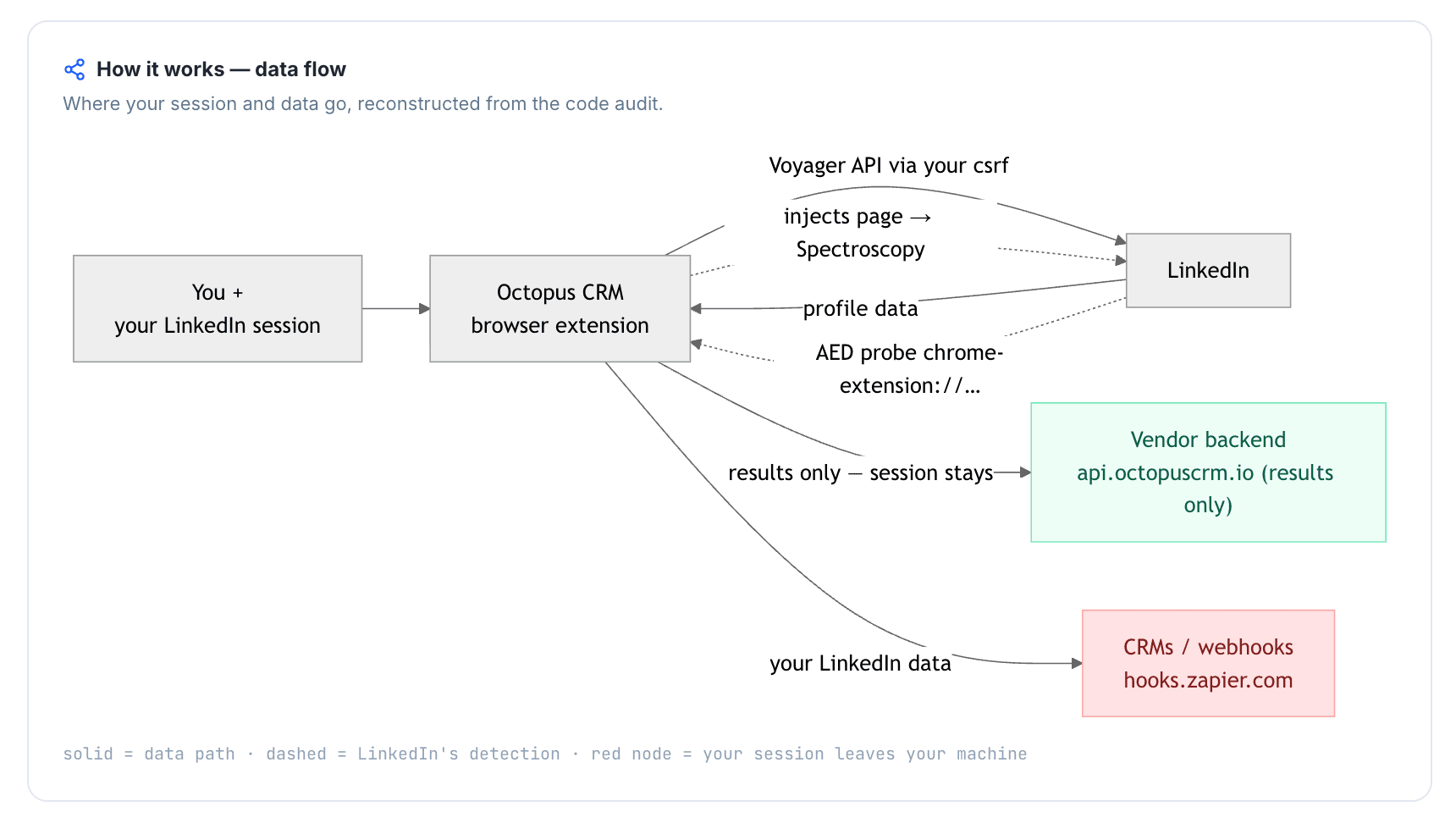
Architecture verdictLocal-scrape — the extension reads LinkedIn data inside the user's browser and uploads only scraped results, so the login and IP stay on the user's machine
Reads the LinkedIn session cookie (li_at)?No — no chrome.cookies permission; the LinkedIn login in cookie form stays local, so Octopus does not hand account custody to a vendor cloud
Direct LinkedIn (Voyager) API calls?Yes — UI-less LinkedIn API calls were present, which means LinkedIn can see an automation-shaped request map rather than normal page navigation alone
Injects code into LinkedIn's page (DOM)?Yes — content scripts run on linkedin.com at document start, creating a page-visible extension trace
Fires synthetic (isTrusted=false) clicks?Yes — synthetic-event and programmatic-click signals were present, which means some actions do not carry the browser's normal trusted-event marker
Blocks LinkedIn telemetry?No
Enforced daily cap in the code?None found — UI limits and working hours exist, but no hard package-level cap was found
On LinkedIn's AED probe list?Yes — LinkedIn's Active Extension Detection list can probe for this extension, so installed status is visible before outreach starts

Octopus CRM extension — source-code teardown (July 2026)

Quick facts about Octopus CRM

My read: Octopus wins one important point against Waalaxy-style cloud bridges because account custody stayed local. But this is still an extension-shaped signal stack: page injection, AED visibility, API-like calls, and synthetic events all point in the same direction, which means LinkedIn can score the setup before it judges message volume. On this article's axis, Linked Helper goes one layer lower by avoiding the Chrome-extension surface altogether while still supporting VPS for cloud-equivalent 24/7 operation and access.

Bottom line

Octopus CRM's case is price plus a lightweight LinkedIn inbox: prospect lists, follow-ups, and Smart Inbox at an entry price Waalaxy buyers notice. If the switching reason is account-safety evidence plus deeper LinkedIn workflows, Linked Helper answers that axis directly: desktop/VPS execution avoids Chrome-extension visibility, and its CRM plus 13 scrape sources cover more of the prospecting workflow.

A positive G2 claim that Octopus "does not emulate browser activity" was excluded after the teardown contradicted it.

9. HeyReach

Founded in 2023 and headquartered in North Macedonia, HeyReach centers on a multi-sender LinkedIn dashboard: account rotation, shared conversations, analytics, and 31 native integrations. The Growth plan is $59/seat/mo on annual billing ($711/year), with a 14-day no-card trial; at 20 senders, the article's agency scenario lands at $11,280/year, which means the per-sender model compounds fast when client accounts stack up.

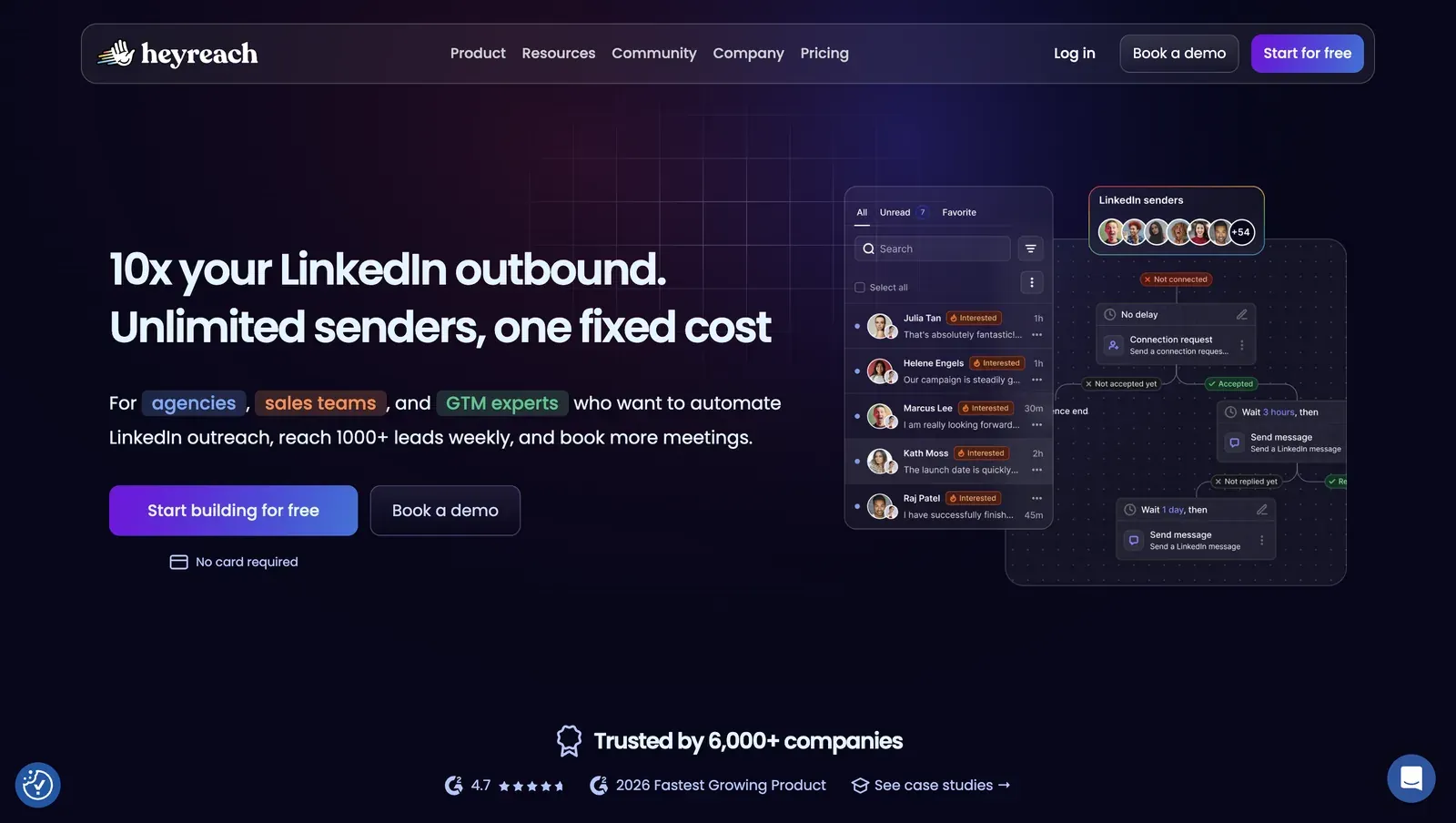
HeyReach home page - July 2026

Homepage preview showing the multi-sender inbox and campaign-flow positioning - July 2026

For agency teams, the catch is custody at sender scale. HeyReach's cloud-bridge connector copies the LinkedIn login to HeyReach's cloud, and both test accounts used high-risk datacenter IPs, rented-server addresses that stand out against normal residential or mobile LinkedIn logins. Agencies running many senders still evaluate its unified inbox and rotation controls at $79 per sender.

Quick facts about HeyReach

  • Founded: 2023
  • HQ: North Macedonia
  • Pricing: $79/mo Growth ($59/mo annual), 14-day free trial
  • G2: 4.6★ (21) · Trustpilot: 4.04★ (50) — platform split
  • Capterra: profile has only 2 written reviews, too thin to average
  • Last 6 months: too few rated reviews to compare (2 in the trailing window)
  • Architecture: cloud-bridge (session-upload extension + vendor cloud)

Vendor pricing, about, and feature pages fetched 2026-04-22 to 2026-04-30; review aggregates computed 2026-07-09; first-hand safety checks June 2026

Key Features

  • Multi-sender console — multiple LinkedIn sender accounts can be managed from one agency-facing dashboard, which is the main convenience HeyReach sells.
  • Unified Inbox — the pricing page lists a shared inbox for handling replies across senders, so the CRM claim is an inbox workflow rather than a full contact database.
  • Account rotation — campaigns can rotate activity across senders, which can distribute volume but does not remove the cloud-bridge session-custody risk.
  • Bring-your-own proxiesproxy fields are available, but the first-hand setup found no proxy-quality checker, so operators still need to verify IP quality before launch.
  • 31 native integrations — HeyReach has a broad integration surface for agency operations, while its LinkedIn data coverage stays at 3 scrape sources.
  • LinkedIn-only campaign scope — no native email channel appears in the selected dimensions, so multichannel outreach needs another tool.

The review split matters more than the average: G2 is cleaner, while Trustpilot carries the larger sample and most of the reliability, billing, and safety pushback. The praise cards also bunch tightly: several 5★ Trustpilot quotes arrived in a short burst, so the strongest read is the pattern, not any single safety testimonial.

What reviewers say about HeyReach

Real-world scenario

Where agencies arrive: one Trustpilot switching card came from an agency owner moving away from La Growth Machine toward HeyReach's multi-account flow. The quote is thin, but it matches the product's clearest pull: coordinated sender management.

I switched from LGM to HeyReach because their platform works so much better for me as an agency owner.

Read the full review on Trustpilot

Trustpilot
Rating: 5 out of 5
BJ
Barbara Jovanovic

Where the trade-off shows up: the same agency scale that makes rotation attractive also makes reliability, billing, and reputation problems more expensive. A lost sequence or incorrect sender count is not just one user's inconvenience; in a client-account workflow, it can become an account-management issue.

Reported limitations

Account-risk signal: the assigned Reddit card is not a user restriction report; it is a vendor-level warning. For this article's Waalaxy lens, that matters because it points to platform dependency at the company layer, not just one noisy campaign.

Reddit
EntrepreneurRideAlong
When LinkedIn bans a tool's company page AND the founder's profile, they're not punishing individual users. They're sending a message to the entire company.

Safety and Setup Notes

HeyReach active sessions datacenter IP - July 2026

LinkedIn active-sessions view showing a HeyReach-added datacenter session during the test - July 2026

What was checkedResult
Login modelCredentials Login; Extension — HeyReach can start a cloud session from credentials or copy a browser session through its connector
Can I choose the desired location?Yes — 154 locations
Can I add my own proxy?Yes — no proxy-quality checker observed
Can I select a timezone when adding an account?No
Cloud IP for account 145.146.212.28 — Altinea SAS (ASN 41405), Ile-de-France / Paris
OS / browser for account 1 (tool-reported)Chrome / Windows
Account 1 IPQualityScore resultfraud 100/100; proxy yes; VPN yes; recent abuse yes; data center; abuse velocity high — high-risk on IPQualityScore's own scale, an independent IP-quality signal, not LinkedIn's enforcement verdict
Cloud IP for account 2 (same geo)45.146.212.36 and 45.146.212.149 — Altinea SAS (ASN 41405), Ile-de-France / Paris
OS / browser for account 2 (tool-reported)Chrome / Windows — identical fingerprint to account 1
Account 2 IPQualityScore resultfraud 100/100; proxy yes; VPN yes; recent abuse yes; data center; abuse velocity high — high-risk on IPQualityScore's own scale, an independent IP-quality signal, not LinkedIn's enforcement verdict
Same IP or /24 across the two accounts?No same IP; yes same /24 and same provider — two independent accounts had a near-identical cloud footprint
Is a credit card required for the trial?No
Trial duration14 days

HeyReach — live cloud/IP test (June 2026, two accounts, registered from France)

What was checkedFinding
Ships a public extension?Yes — login/connector extension that links the account; zero-automation wrapper
Architecture verdictCookie-bridge / session-upload — the extension copies the LinkedIn login to HeyReach's cloud, which then runs the account from vendor infrastructure
Reads the LinkedIn session cookie (li_at)?Yes — uploads the full linkedin.com cookie jar (li_at, JSESSIONID, li_a, and related cookies) to api.heyreach.io, cancels LinkedIn logout in two ways, and can re-harvest cookies on demand; whoever holds those cookies can act as the account
Direct LinkedIn (Voyager) API calls?Yes — one-time /voyager/api/me profile lookup during linking with a constructed Cookie header
Injects code into LinkedIn's page (DOM)?No — no content scripts on linkedin.com; automation appears cloud-side after linking, so there is no observed LinkedIn-page Spectroscopy footprint
Fires synthetic (isTrusted=false) clicks?Yes, but inside the popup only; no programmatic LinkedIn-page clicks were observed
Blocks LinkedIn telemetry?No
Enforced daily cap in the code?None found in the extension — limits are cloud-side and unauditable from the shipped code
On LinkedIn's AED probe list?No — not in the June 2026 snapshot; absence is not safety because LinkedIn's hardcoded extension-probe list changes

HeyReach connector extension — source-code teardown (June 2026)

Quick facts about HeyReach

My read: the issue is pooled custody, not any one row by itself. HeyReach keeps a vendor-side copy of the login alive, and the cloud test showed accounts landing in the same datacenter neighborhood instead of a user-controlled residential or mobile line; for LinkedIn, that adds parallel-access and infrastructure signals a user cannot fully inspect before sending. On this article's axis, Linked Helper's desktop/VPS model is different because license switching keeps execution on controlled hardware rather than pooling live sessions in a vendor cloud.

Bottom line

HeyReach's case is agency sender management: one dashboard for many senders, rotation, and a unified inbox, with LinkedIn-only scope and cloud-bridge custody. If Waalaxy's account-safety concern is the reason you are switching, Linked Helper is the cleaner match: run accounts on desktop/VPS hardware you control, use switchable licenses instead of per-sender pooling, and keep deeper LinkedIn workflows inside the same stack.

One Trustpilot reviewer said they had already moved a few clients to other platforms, though the destination was not named.

How To Choose a Waalaxy Alternative

Start with risk control, then check workflow depth and cost. A lower entry price is not useful if the replacement recreates the same session-custody concern, lacks the lead sources you need, or becomes expensive once every account needs its own seat.

Decision pointArchitecture pathWhat to verify before switching
Session custody is the main concernDesktop standaloneConfirm where the LinkedIn session lives, whether the tool can run from a stable user-controlled IP, and how proxy quality is checked.
Cloud convenience is more important than custodyCloud credential-loginVerify login method, IP location controls, workspace permissions, daily limits, and whether the vendor lets you bring a dedicated proxy.
You want browser-based collection with local session useLocal-scrape browser extensionCheck extension visibility, LinkedIn API behavior, permissions, and whether actions run only inside the active browser.
You want a fast handoff from browser to cloudCookie bridge or browser-to-cloud handoffCheck whether LinkedIn cookies or session data are copied to vendor infrastructure and how the tool explains active-session visibility.

Risk-first checklist for choosing a Waalaxy alternative

After architecture, evaluate operating depth:

  • Lead sources: search-only collection is different from post, event, group, company-follower, Sales Navigator, Recruiter, and CSV-driven collection.
  • CRM depth: a built-in CRM, deduplication, message history, tags, and webhooks reduce spreadsheet work.
  • Team cost: recalculate annual cost at your actual seat count, not only the public entry price.
  • Migration friction: export audiences, pause old automations, and relaunch at conservative limits rather than running two tools against the same account.

Do not resolve this decision tree to a named competitor. Use it to eliminate unsafe or mismatched architectures first, then compare workflow depth and cost.

Our Recommendation

Linked Helper is the recommendation because it answers the custody question and the operating-depth question together. It keeps LinkedIn automation in a user-controlled desktop or VPS environment, then adds the CRM, data-source, and routing depth that Waalaxy switchers usually look for next.

The strongest Linked Helper advantages for this comparison are practical:

  • Multi-source LinkedIn collection from search, Sales Navigator, Recruiter, groups, events, post engagement, company pages, CSV imports, and other surfaces.
  • A built-in CRM plus 11 direct CRM connectors, webhooks, tags, message history, and deduplication controls.
  • Advanced workflow control through campaign filters, message-sequence logic, variables, spintax, and reply-aware routing.
  • Stable-IP operation through local desktop use, dedicated proxies, or VPS plus Web Version for cloud-equivalent 24/7 access.

The honest friction point is channel scope. Linked Helper is LinkedIn-first; it does not replace a dedicated cold-email or multichannel sequencer. If email sequencing is central to the campaign, pair Linked Helper with an email tool instead of forcing LinkedIn automation software to own every channel.

What users say about Linked Helper

LinkedIn Safety & Risk Reduction

The safest migration is not only a safer tool choice; it is a cleaner cutover. Stop the old automation, avoid parallel tools on the same account, re-warm activity limits, keep IP location stable, and treat every warning or checkpoint as a signal to pause.

LinkedIn's User Agreement prohibits unauthorized automation, scraping, bots, and attempts to bypass service limits. That means tool architecture changes the risk surface, but policy exposure never disappears.

Safety note: No tool eliminates the risk of LinkedIn restrictions. Results depend on account age, daily action volume, message quality, recipient reactions, and activity patterns.

Use this cutover checklist when moving away from Waalaxy:

  • Stop the old campaign before connecting a new tool. Two automation layers on one LinkedIn account can create overlapping actions, inconsistent sessions, and unclear troubleshooting.
  • Export your audiences, tags, and campaign history first. Keep a fallback CSV before rebuilding lists in a new CRM or campaign builder.
  • Rebuild limits conservatively. Start with lower daily actions, working hours, randomized delays, and stop-on-reply behavior before increasing volume.
  • Keep IP geography stable. Stability matters more than "rotation" for LinkedIn accounts; for provider research, use our guide to the best proxies for LinkedIn automation (42 providers tested).
  • Pause on warnings. If LinkedIn temporarily restricts activity, follow a recovery process like what to do when LinkedIn temporarily restricts your account instead of trying to automate through the checkpoint.

No tool eliminates restriction risk; LinkedIn still evaluates behavior, volume, identity signals, and recipient feedback. The practical goal is to reduce avoidable signals and keep the operator in control of the session, IP, pace, and recovery path.

Methodology And Sources

This article is published by Linked Helper. Linked Helper is our product and our recommendation. First-hand observations are reported by the author in the labeled methodology sections; rankings and recommendations follow the evaluation framework above.

The comparison uses public vendor documentation, public pricing pages, G2/Capterra/Trustpilot review analysis, Reddit discussion analysis, Linked Helper help-center documentation for Linked Helper product facts, and first-hand extension or cloud/IP checks where observable. Pricing, architecture labels, and safety observations should be rechecked before any large migration because vendors can change plans, onboarding flows, extensions, and proxy/session behavior.

FAQ

Waalaxy is a LinkedIn outreach tool, but it is not the recommendation for safety-first switching. The main trade-off is its cloud-connected setup. If account control, deeper LinkedIn data sources, and lower scaled cost matter more than quick setup, Linked Helper is the stronger replacement.

Try Linked Helper free for 14 days

The most technically advanced platform for LinkedIn automation with a focus on security, a wide range of features, and exceptional customer support. Trusted by over 10,000 businesses worldwide.