
 Updated: September 29, 2026
 38 min read
In an era where inboxes are flooded with cold messages and generic networking requests, one approach consistently stands out: alumni networking. People are far more likely to respond to someone who shares the same educational background. That simple connection — attending the same school — can instantly transform a cold outreach into a warm introduction. Response rates are often significantly higher because alumni relationships naturally carry a sense of trust, familiarity, and shared experience.
Yet most professionals overlook one of the most powerful tools for activating these relationships: LinkedIn Alumni. Hidden inside LinkedIn is a massive database of graduates from more than 23,000 colleges and universities, allowing you to explore where alumni work, what roles they hold, and how they progressed in their careers. It’s essentially a built-in intelligence layer for understanding your extended professional network.
The surprising reality is that many professionals spend years trying to build connections from scratch while ignoring a network they already belong to. Your alumni community may include founders, investors, hiring managers, and industry leaders — people who are often far more willing to engage simply because you share the same alma mater.
This guide will show you how to unlock the full potential of the LinkedIn Alumni tool. We’ll start with the fundamentals: how to access the alumni dashboard, understand its data, and navigate the filtering system. From there, we’ll move into more advanced strategies, including targeted alumni networking for career growth, job searching, partnerships, recruiting, and industry research.
You’ll also learn practical techniques for identifying high-value connections, crafting outreach messages that get replies, and using alumni insights to map entire industries.
By the end of this guide, you’ll know how to turn your existing professional network into a strategic advantage — and tap into one of the most underused resources on LinkedIn.
What Is the LinkedIn Alumni Tool? (And Why It’s Your Secret Networking Advantage)
The LinkedIn Alumni Tool is a free feature on LinkedIn that allows you to explore and connect with graduates from more than 23,000 colleges and universities worldwide. Instead of sending random connection requests, the tool lets you identify people who share the same educational background — one of the strongest signals of trust in professional networking.
At its core, the LinkedIn Alumni Tool is a searchable database of alumni profiles. It aggregates data from LinkedIn members who listed a specific school in their education history and organizes it into a dynamic dashboard. From there, you can analyze where alumni work, what industries they are in, and how their careers evolved.
The real power comes from its filtering capabilities. You can search alumni by multiple criteria, including:
- Location
- Company
- Industry
- Job title or function
- Field of study
This turns LinkedIn into a strategic networking engine rather than a simple directory. Instead of guessing who to contact, you can identify exactly the type of professional you want to connect with.
There are two main ways to access the tool. The fastest option is to go directly to https://www.linkedin.com/search/results/schools/ and select your school. You can also navigate through a university’s LinkedIn page and click on the “Alumni” tab, which opens the same dashboard populated with graduates from that institution.
It’s important to distinguish the LinkedIn Alumni Tool from other LinkedIn networking features. Unlike LinkedIn Groups, which rely on active participation and discussions, the Alumni Tool functions as a structured database of verified graduates. It also differs from Advanced Search, because the shared school connection is automatically built into the filtering system.
This context matters. LinkedIn currently has over 310 million monthly active users, including more than 40 million students and recent graduates. In such a massive network, generic outreach often gets ignored. But when you reach out to someone who attended the same university, your message immediately feels more relevant and personal.
That’s why the Alumni Tool is so powerful. Instead of blind networking, you gain a strategic filter that helps you find warm connections inside the world’s largest professional network.
How to Access and Navigate the LinkedIn Alumni Tool: A Step-by-Step Guide
Learning how to use LinkedIn Alumni takes only a few minutes, but many professionals never discover how powerful the tool actually is. Once you know where to access it and how to navigate the dashboard, you can quickly find relevant alumni across industries, companies, and locations. Below are the three main ways to access the tool and what you’ll see once inside.
Method 1 – Direct URL Access (Fastest)
The quickest way to access the LinkedIn Alumni dashboard is through the direct URL.
- Go to linkedin.com/alumni.
- LinkedIn will automatically detect your school based on the education section of your profile.
- You’ll be instantly redirected to your alma mater’s alumni analytics page.
This method is ideal if you already have your education listed on LinkedIn. It removes the need to search manually and takes you straight to the alumni dashboard where you can begin filtering connections.
Method 2 – Through Your School’s LinkedIn Page
Another common way to access the LinkedIn Alumni Tool is through a university’s LinkedIn page.
- Use LinkedIn search to find your school or university name.
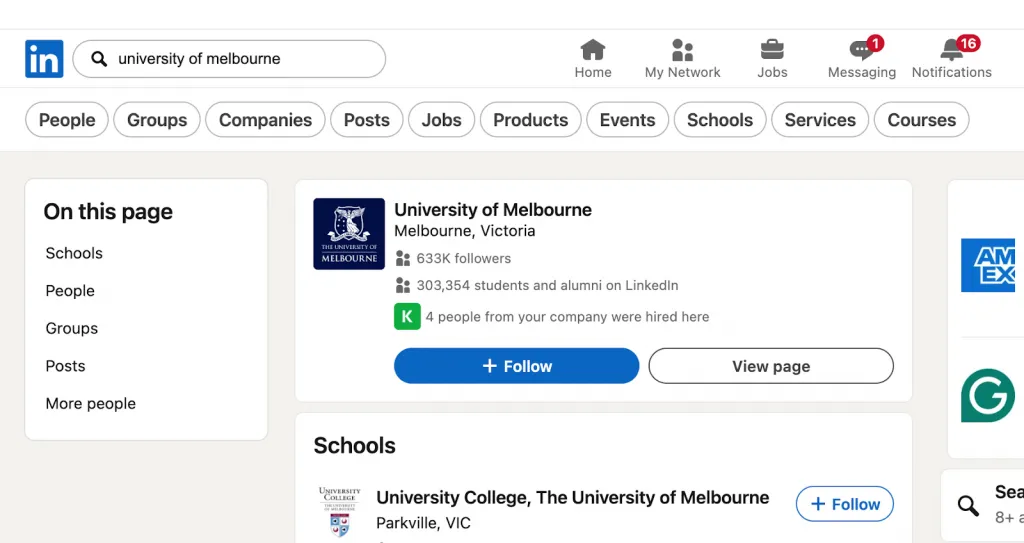
- Click the official school page (not a company page or unofficial group).
- On the page navigation menu, select the “Alumni” tab.
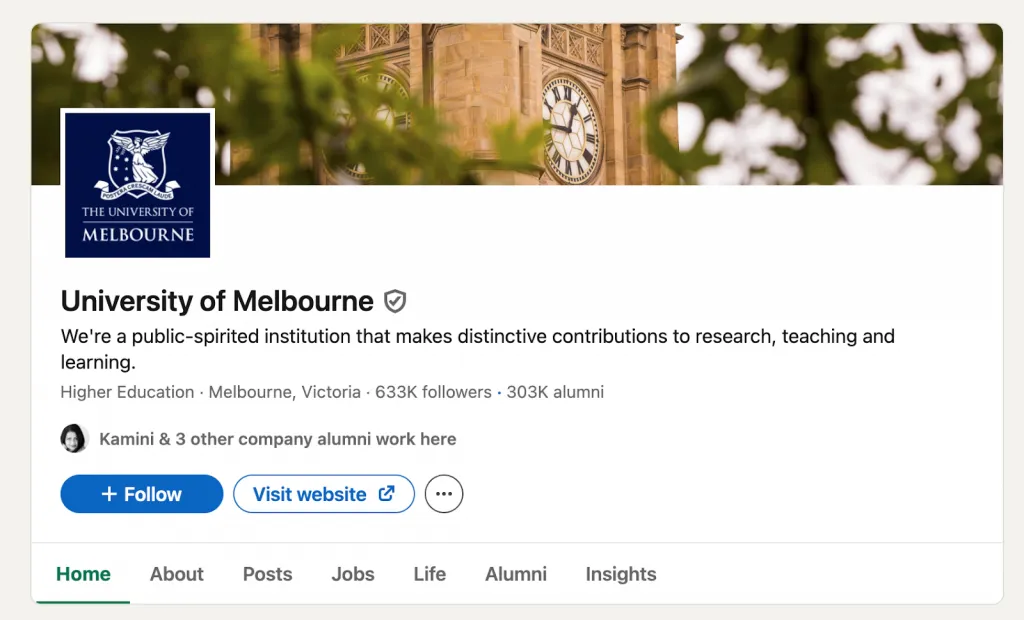
- This opens the Career Insights dashboard, where alumni data is displayed.
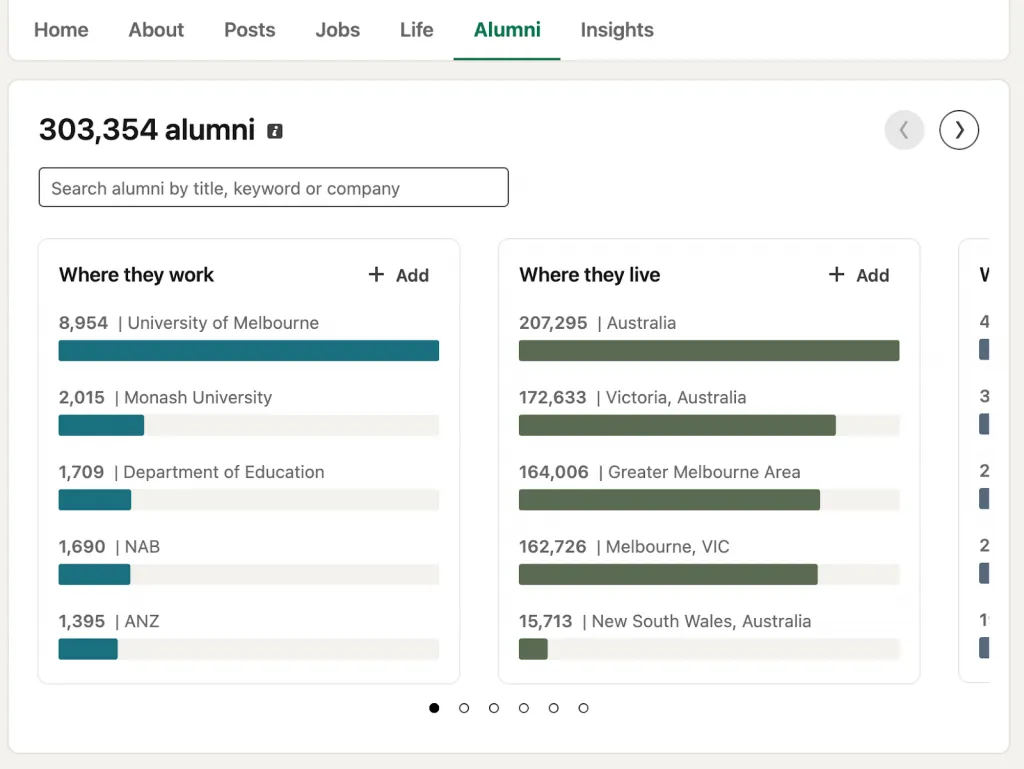
This method is useful if you want to explore multiple universities — for example, if you completed several degrees or want to analyze another school’s alumni network.
Method 3 – Using LinkedIn Navigation
There is also a more indirect route through LinkedIn’s internal navigation and alumni communities.
- Click your profile icon.
- Navigate to Groups.
- Look for alumni-related communities you’ve joined.
Alternatively, you can search for “[School Name] Alumni” within LinkedIn Groups and join relevant alumni communities connected to your university.
While this method doesn’t open the analytics dashboard directly, it can still help you expand your alumni networking opportunities through active communities.
What You’ll See on the Alumni Dashboard
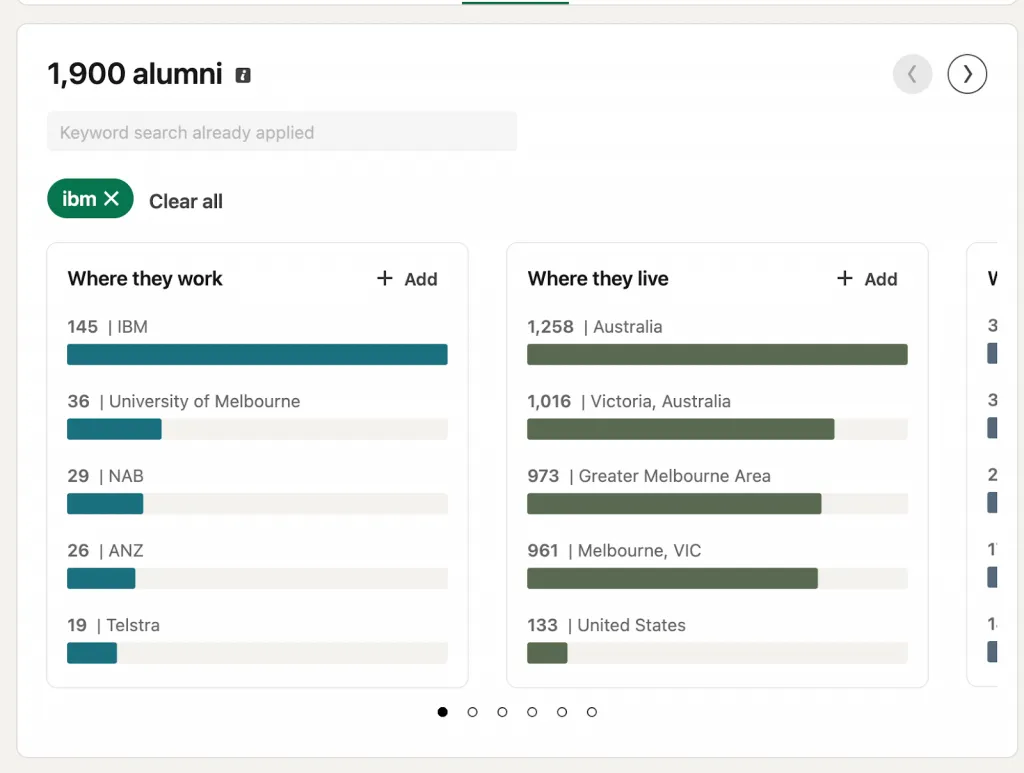
Once you access the LinkedIn Alumni dashboard, you’ll see a data-rich overview of your school’s graduate network.
Key elements include:
- Total number of alumni from your institution currently on LinkedIn
- Visual analytics charts showing where alumni work and live
- Top companies employing graduates
- Common industries and job functions
- An interactive filter system for refining results
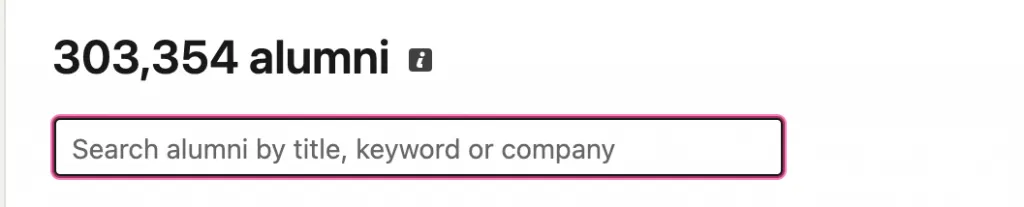
There’s also a search bar that allows you to look up specific companies, job titles, or keywords within the alumni network.
Together, these features transform your alumni network from a static list of graduates into a powerful career intelligence tool.
Mastering the 6 Core Filters: How to Narrow Down 100,000+ Alumni to Your Ideal Connections
The LinkedIn Alumni dashboard gives you six powerful search filters. Used individually they’re helpful — but when combined, they become a strategic networking engine. Instead of scrolling through thousands of alumni profiles, you can narrow a massive pool of contacts down to a precise list of professionals you actually want to connect with.
Whether your goal is a new job, industry insights, mentorship, or partnerships, these LinkedIn alumni filters help you quickly identify the right people.
Below are the six core filters and how to use them effectively.
Filter 1 – Where They Live (Geography)
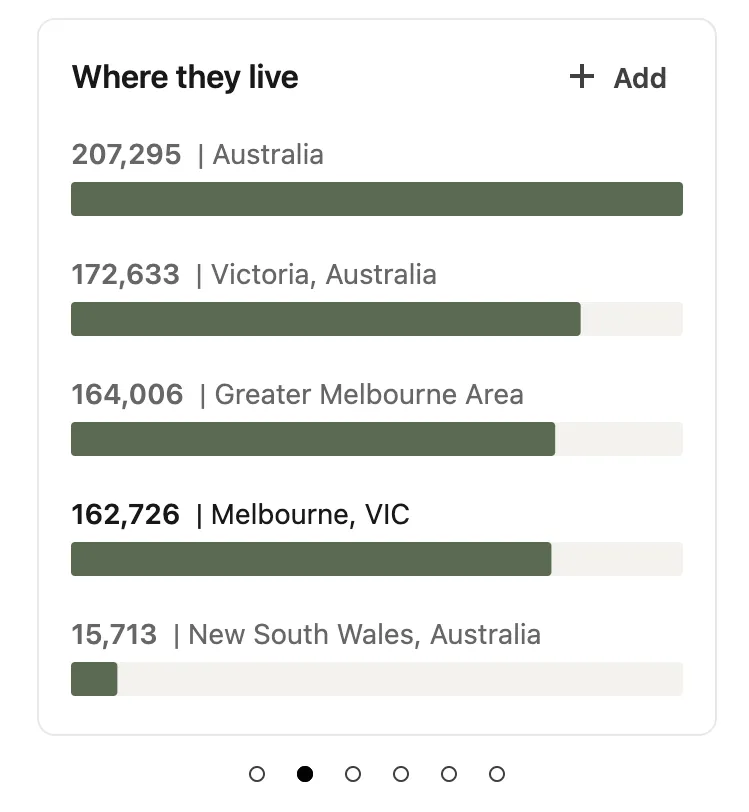
The location filter shows where alumni are currently living and working. This is especially useful if you’re planning to relocate or want to build a strong network in a specific city.
For example, if you’re moving to a new market, connecting with alumni already working there can help you understand the local industry landscape.
Use cases:
- Relocating to a new city
- Building local professional connections
- Identifying regional industry hubs
Pro tip:
Combine location + company filters to find alumni working at specific companies in a target city.
Example:
Search for alumni in San Francisco working in the tech industry to build a relevant local network.
Filter 2 – Where They Work (Company)
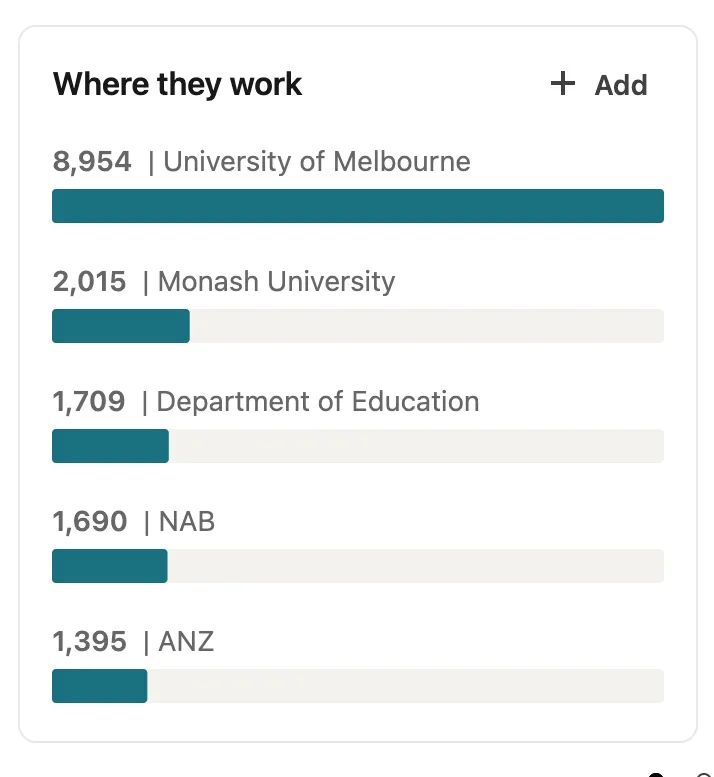
The company filter shows which organizations employ alumni from your university. This is one of the most powerful features for job seekers and recruiters.
You can instantly see which companies frequently hire graduates from your school — giving you insight into potential hiring pipelines.
Use cases:
- Target companies for job applications
- Identify organizations that value your school’s graduates
- Find insiders who can provide referrals
Pro tip:
Look for clusters of alumni at specific companies. High concentrations often indicate active hiring pipelines.
Example:
Filter for alumni working at Google, Microsoft, or your list of target companies and identify potential connections within those organizations.
Filter 3 – What They Do (Job Function)
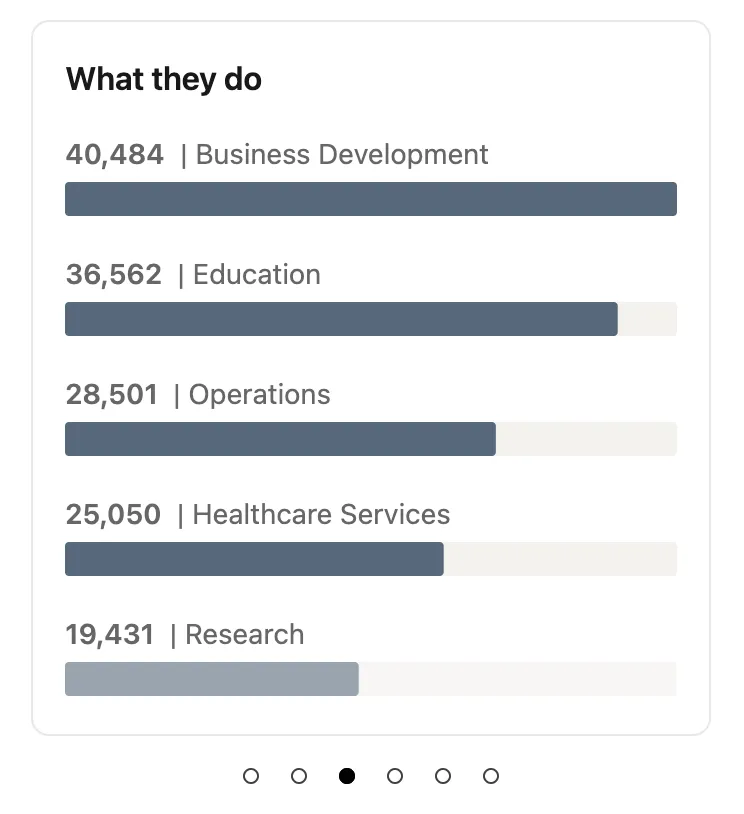
The job function filter allows you to explore the roles alumni currently hold. This helps you understand how graduates from your school progress through their careers.
You can search by specific titles or broader professional categories.
Use cases:
- Explore career paths
- Identify mentors in your field
- Understand role progression within an industry
Pro tip:
Start broad (e.g., “Marketing” or “Finance”) and then narrow down to specific titles like “Growth Marketing Manager” or “Investment Analyst.”
Example:
Search for “Product Manager” to see alumni who hold similar roles across different companies.
Filter 4 – What They Studied (Major or Degree)
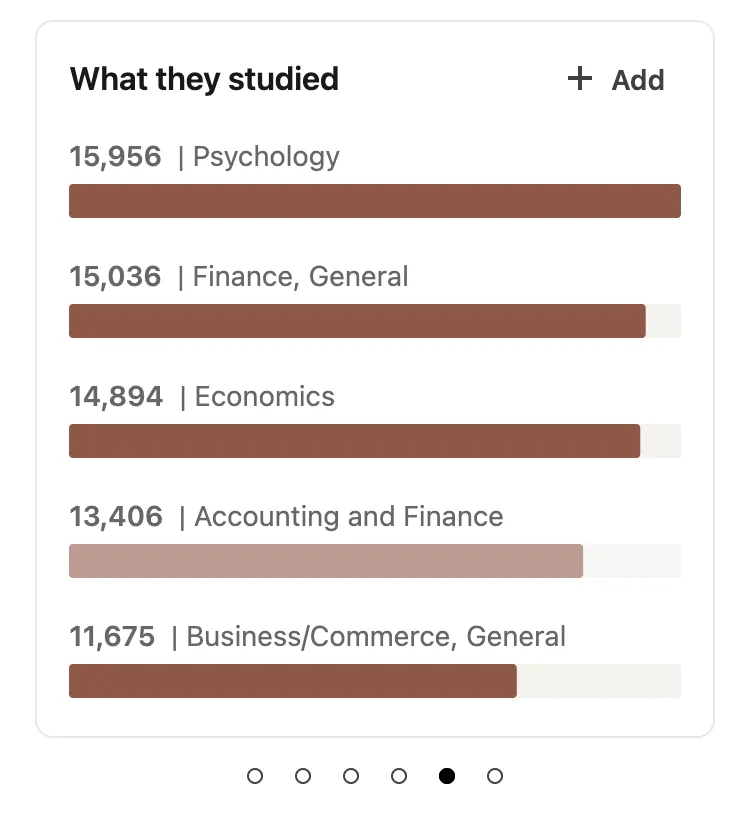
The education filter shows what alumni studied during their time at your university. This is useful for evaluating how different majors translate into real-world careers.
It’s particularly valuable if you’re considering a career transition or trying to understand the long-term impact of different academic disciplines.
Use cases:
- Evaluate career outcomes for specific majors
- Research degree return on investment
- Validate potential career changes
Pro tip:
Compare multiple academic disciplines to see how they diverge professionally.
Example:
Analyze how Engineering majors progressed compared to Business majors across industries and companies.
Filter 5 – What They’re Skilled At (Skills)
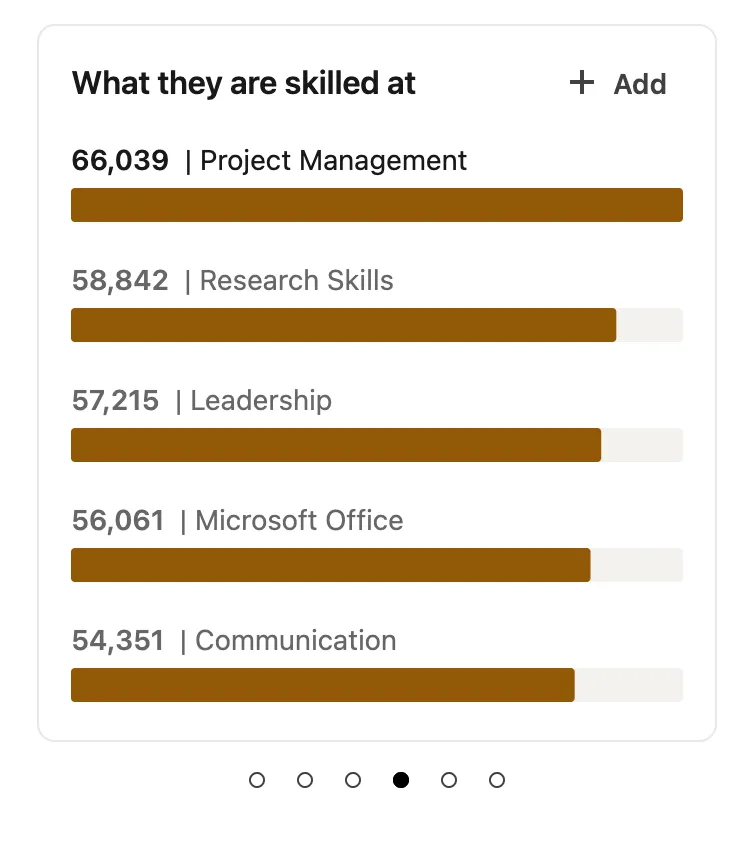
The skills filter highlights the most common professional capabilities listed by alumni on their profiles. This feature helps you understand which skills are most relevant within your alumni network.
It’s also a powerful way to identify subject-matter experts.
Use cases:
- Identify skill gaps in your own profile
- Discover emerging capabilities in your field
- Find specialists for collaboration or mentorship
Pro tip:
Look for trending technical skills to understand where industries are heading.
Example:
Filter for AI, Machine Learning, or Python to find technical experts within your alumni community.
Filter 6 – How You’re Connected (Degrees of Connection)
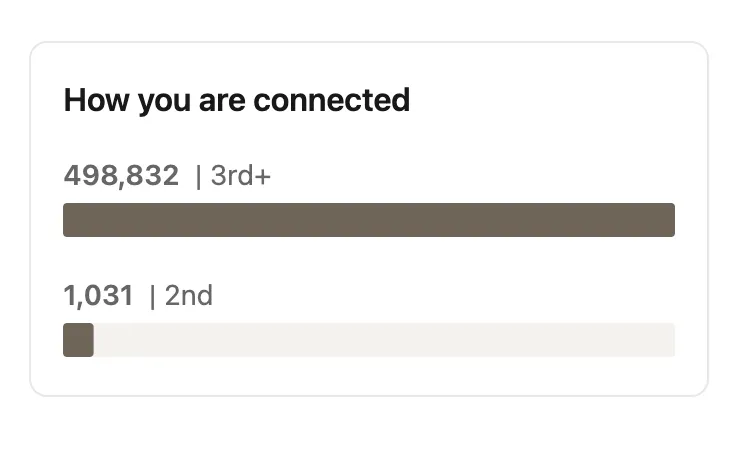
The connection filter shows how closely you’re connected to each alumni profile on LinkedIn.
Typically, you’ll see:
- 1st-degree connections (people you’re already connected with)
- 2nd-degree connections (mutual connections)
- 3rd-degree connections (extended network)
This filter helps you prioritize warm introductions rather than cold outreach.
Use cases:
- Identify mutual connections
- Request introductions
- Prioritize high-probability outreach
Pro tip:
Start with 1st- and 2nd-degree connections, as these contacts typically have much higher response rates.
Example:
Check which alumni within your direct network could introduce you to someone at your target company.
Why Combining Filters Is So Powerful
Individually, each filter provides useful information. But when combined, they create highly targeted searches.
For example:
- Location + Company + Job Title → Find alumni working at your dream company in a specific city
- Skills + Industry + Job Function → Identify experts in a niche field
- Degree + Company + Location → See where graduates from your major are building careers
This layered filtering turns the LinkedIn Alumni Tool from a simple directory into a strategic networking system — allowing you to identify exactly the right people within a network that may include tens or even hundreds of thousands of alumni.
Why Alumni Networks Matter More Than Ever in 2025: Key Trends and Insights
In today’s competitive job market, professional networking has shifted dramatically. Cold outreach and generic connection requests are becoming less effective, while targeted, relationship-based networking is gaining momentum. One of the most powerful forms of this approach is the alumni network — a built-in community of professionals who share a common educational background.
Research consistently shows that referrals remain one of the most effective ways to land opportunities. Roughly 35% of jobs are filled through referrals, and connections built through shared experiences — such as attending the same university — often produce significantly higher response rates than cold messages.
This shift is happening at scale. With over half of LinkedIn users holding a college degree (about 58%), educational background has become one of the strongest signals for identifying relevant professional connections. In practical terms, this means alumni-based networking is not just convenient — it’s strategically powerful.
Below are three key reasons alumni networks have become essential for career growth in 2025.
The Warm Introduction Advantage
The biggest benefit of an alumni network is the built-in trust factor.
When you reach out to someone who attended the same university, the interaction immediately feels more personal. Even if you graduated years apart, the shared institution creates a sense of familiarity and community.
Psychologically, people tend to respond more positively to those they perceive as part of the same group. A message from a “fellow graduate” carries a very different tone than one from a complete stranger.
In practical terms, this often translates into higher acceptance and reply rates. Hiring managers, founders, and senior professionals are far more likely to respond to someone who shares their educational background.
This is why alumni outreach frequently outperforms traditional cold networking.
Building Career Insights from Alumni Data
Another powerful advantage of alumni networks is the ability to analyze real career outcomes.
Instead of guessing where a degree might lead, you can look at actual alumni trajectories. For example, if you studied Computer Science, you can explore:
- Which companies graduates commonly join
- What roles they move into after graduation
- How careers progress over time
This data turns the alumni network into a form of career intelligence.
Students, career changers, and professionals considering further education can use this information to evaluate real-world outcomes before committing years of time and significant financial investment.
In other words, alumni networks help answer an important question:
“What does this degree actually lead to?”
Alumni Networks as Mentorship Pipelines
Beyond hiring and referrals, alumni networks also function as powerful mentorship pipelines.
Using alumni search tools, you can identify experienced professionals who are several steps ahead in your desired career path. Many of them are surprisingly open to helping fellow graduates.
The key is targeted outreach.
Instead of asking vague questions, reach out with a specific request, such as:
- A 15-minute informational call
- Advice on developing a specific skill
- Insights about breaking into a particular company or industry
Because alumni have already walked a similar path, their guidance tends to be practical and relevant.
Over time, these connections can evolve into long-term professional relationships — turning your alumni network into one of the most valuable assets in your career.
7 Powerful Ways to Use the LinkedIn Alumni Tool (Based on Your Career Stage)
The LinkedIn Alumni Tool is much more than a simple directory of graduates. When used strategically, it becomes a powerful engine for job search, networking, hiring, mentorship, and career planning. The key is understanding how to apply the tool based on your specific career stage and goals.
Below are seven practical ways professionals use the alumni tool to create real opportunities.
1. Job Seekers – Find Warm Introductions to Target Companies
For job seekers, the LinkedIn Alumni Tool is one of the fastest ways to turn a cold application into a warm introduction.
Step-by-step process:
- Search for your target company using the alumni filters.
- Narrow results by department or job role (for example: “Marketing,” “Engineering,” or “Product”).
- Identify alumni currently working there.
- Send a personalized connection request referencing your shared school.
Example message:
“Hi [Name], I noticed we both graduated from [School]. I’m currently exploring Product Management opportunities at [Company] and would love to hear about your experience there. If you have time, I’d really appreciate a quick 15-minute call.”
Pro tip:
Start with alumni who graduated within the past 5–10 years. The shared experience is usually stronger, which increases response rates.
2. Career Changers – Validate Your Transition Path
If you’re considering a career change, the alumni tool can help answer a critical question:
“Has anyone from my background successfully made this transition?”
Use the filters “What they studied” and “What they do.”
Example scenario:
You studied Business but want to transition into Data Science.
Steps:
- Filter alumni who studied Business or similar majors.
- Then filter by job title: Data Scientist or Data Analyst.
- Review their career paths.
If multiple alumni made the same transition, it proves the path is realistic.
Next step:
Reach out to 2–3 alumni who successfully transitioned and ask about:
- Skills they learned
- Certifications or degrees they pursued
- First job they obtained in the new field
This insight can save years of trial and error.
3. Recruiters – Build a Targeted Talent Pipeline
Recruiters can use the alumni tool to create high-quality candidate pipelines with strong cultural fit.
Instead of searching randomly, the filters allow recruiters to identify candidates with the exact profile they need.
Example scenario:
You’re hiring software engineers in Austin.
Use filters such as:
- Location: Austin
- Job title: Engineer
- Company: Competitor organizations
This approach surfaces professionals who:
- Already work in the industry
- Have relevant experience
- Share educational backgrounds with other employees
Pro tip:
Cross-reference results with your company’s university recruiting partnerships. Schools that already produce successful hires often become long-term talent pipelines.
4. Relocating Professionals – Build a Local Network Before Moving
Relocating to a new city can be challenging without an existing professional network.
The alumni tool helps you build connections before you even arrive.
How to do it:
- Use the “Where they live” filter to select your future city.
- Identify alumni working in industries similar to yours.
- Send connection requests explaining your upcoming move.
Purpose of these conversations:
- Learn about the local job market
- Understand cost of living and salary expectations
- Discover industry networking events and professional communities
Best timeline:
Start building relationships 3–6 months before your move.
This preparation often leads to job leads or introductions before you relocate.
5. Mentees – Find Mentors in Your Desired Field
Another powerful use of the alumni tool is finding mentors who have already achieved the career outcomes you want.
Steps:
- Filter by target job title (for example: Product Director, VP Marketing).
- Look for alumni with 10+ years of experience.
- Prioritize senior roles such as Director, VP, or C-level executives.
When reaching out, avoid asking for a job. Instead, focus on career advice.
Example message:
“Hi [Name], I noticed we both attended [School]. I really admire your path from [School] to [Company]. I’m currently working toward a career in [Field] and would love your advice on which skills I should focus on to move toward a role like [Target Role].”
Most senior professionals are surprisingly open to helping fellow alumni.
6. Alumni Groups & Community Managers – Engage Alumni at Scale
Universities, alumni associations, and community managers can use insights from the LinkedIn Alumni Tool to strengthen their engagement strategies.
Instead of treating alumni as a single group, the data allows you to segment communities more effectively.
For example:
- Alumni in technology industries
- Alumni living in specific cities
- Alumni working in finance, consulting, healthcare, etc.
These insights enable targeted initiatives such as:
- Industry-specific networking events
- Mentorship matching programs
- Job postings relevant to specific career tracks
Strategic approach:
Use alumni data to identify the largest professional clusters, then build community programs around them.
This increases participation and makes alumni engagement far more meaningful.
7. Graduate Students & Career Pivots – Research Industry Paths
For students and professionals considering further education, the alumni tool provides valuable career outcome data.
Instead of relying on marketing materials from universities, you can examine real-world results.
Example use case:
You’re deciding whether to pursue a Master’s degree or MBA.
Using the alumni filters, you can analyze:
- Which roles graduates move into
- Which companies hire them
- How their careers progress over time
Questions the tool can help answer:
- Do most engineers eventually pursue MBAs?
- Is an MBA required to reach VP-level marketing roles?
- What percentage of graduates from a certain degree end up in a specific industry?
This kind of research turns the alumni network into a career intelligence database.
Instead of guessing, you can base major career decisions on actual alumni outcomes.
How to Search Like a Pro: Advanced Filtering Tactics for Maximum Results
The real power of the LinkedIn Alumni Tool isn’t just in the filters themselves — it’s in how you combine them strategically. With the right approach to filtering and advanced search, you can transform thousands of alumni profiles into a small, highly relevant list of people worth connecting with.
Below are six practical strategies professionals use to optimize alumni searches and get better results with less effort.
Strategy 1 – Start Specific, Then Widen
A common mistake when using alumni search is starting too broad. This often produces tens of thousands of results, making it difficult to identify meaningful connections.
Instead, begin with very specific filters, then gradually loosen them if needed.
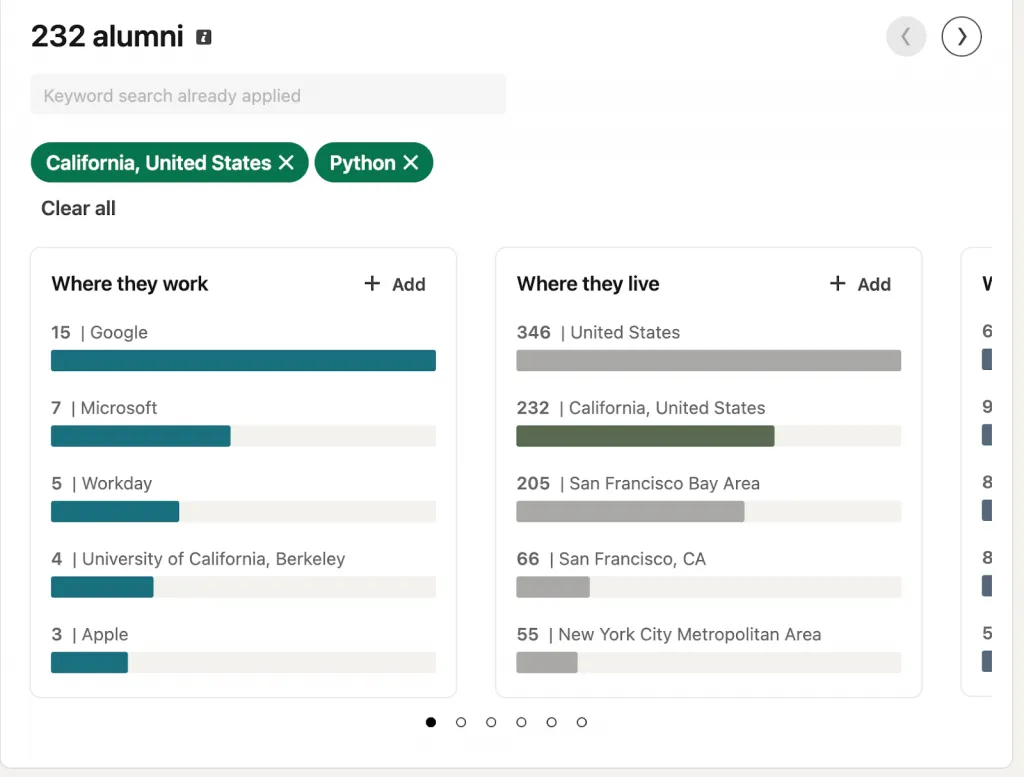
For example:
- Location: Austin
- Job title: Product Manager
- Graduation timeframe: Last 5 years
This might return only 10–15 results, which is ideal for targeted networking.
If the search becomes too narrow, you can gradually expand it by:
- Removing the graduation year filter
- Expanding location from Austin → Texas
- Broadening job titles from Product Manager → Product
This approach prevents the overwhelm that comes from sorting through 50,000+ irrelevant profiles.
Strategy 2 – The “Company + Function” Combo
One of the most powerful advanced search tactics is combining company and job function filters.
This lets you identify professionals who work in a specific role inside a specific organization.
Example:
- Company: Google
- Function: Product Management
The result is a targeted list of alumni who already work in the exact environment you’re interested in.
Benefits of this strategy include:
- Highly relevant connections
- Better conversation starters
- Higher response rates to outreach
Instead of sending dozens of random messages, you can focus on a small group of pre-qualified contacts.
Strategy 3 – Peer Cohort Identification
Networking tends to work best when there is a shared career stage.
One effective tactic is filtering alumni by graduation year to identify your peer cohort.
People who graduated 5–10 years before you are often the most valuable connections because:
- They recently navigated the same career decisions
- They remember the early career challenges you face
- They are more approachable than senior executives
Build a small list of 5–10 alumni who represent your “future self.”
Follow their careers, engage with their content, and reach out periodically with thoughtful questions.
Over time, these relationships can evolve into valuable mentorship connections.
Strategy 4 – Skill Gap Analysis
Another advanced use of the alumni tool is career skill analysis.
By filtering alumni based on skills, you can identify which capabilities are most common among professionals in the roles you want.
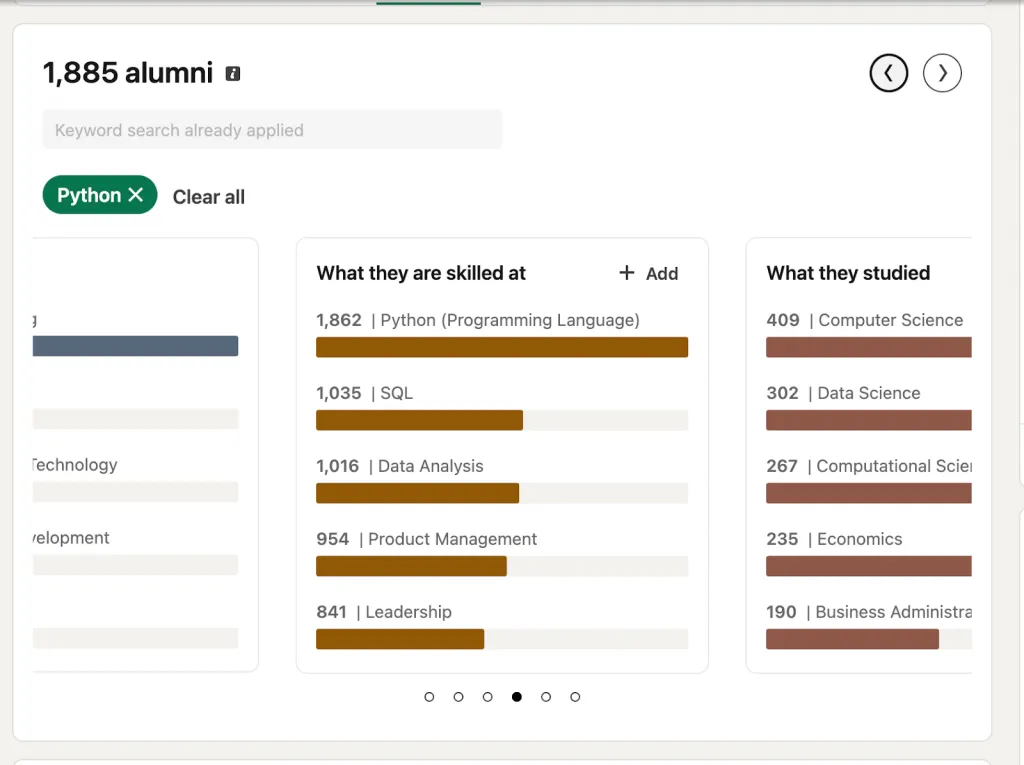
For example, if you’re trying to move into AI or machine learning, search for alumni profiles listing skills such as:
- Machine Learning
- Python
- Artificial Intelligence
- Data Analysis
Patterns quickly emerge. If certain skills repeatedly appear among alumni in desired roles, that’s a strong signal about what the market values.
Use this data to prioritize your own learning and professional development.
Strategy 5 – The Relocation Pre-Game
If you plan to move to a new city, alumni search can help you build a future professional network before you arrive.
A smart approach is to start preparing about six months before relocating.
Steps:
- Filter alumni by target city and target industry.
- Create a list of 20–30 professionals working in your field.
- Begin engaging with their content on LinkedIn.
Simple actions such as liking posts, commenting thoughtfully, and sharing relevant insights help establish familiarity.
By the time you move, you’ll already have warm connections in the new location.
Strategy 6 – Industry Trend Spotting
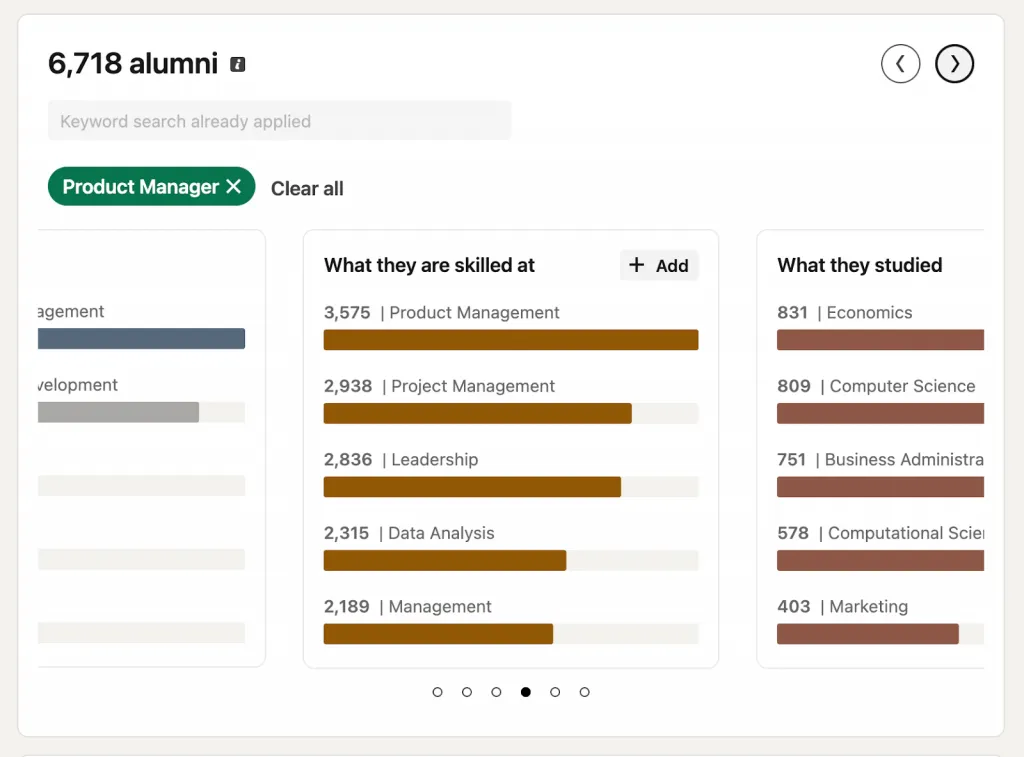
The alumni tool also provides valuable career market intelligence.
By observing where alumni work and how they change companies, you can identify broader industry patterns.
For example, you might notice:
- Many alumni leaving Company A for Company B
- A growing concentration of alumni entering a new industry
- Certain companies hiring heavily from your university
These trends can reveal emerging opportunities and highlight organizations worth exploring.
If dozens of alumni are joining a particular company or industry, it’s often a signal that the organization is growing or investing heavily in talent.
Using these insights can help guide your own career strategy and job search decisions.
LinkedIn Alumni Groups vs. Alumni Tool: When to Use Each (and How to Build One)
Many professionals discover the LinkedIn Alumni Tool but overlook another valuable networking resource: LinkedIn alumni groups. While both features help you connect with graduates from your school, they serve very different purposes.
Understanding when to use each — and how they complement each other — can significantly improve your professional networking strategy.
Alumni Tool vs. Alumni Groups – Key Differences
| Feature | Alumni Tool | Alumni Groups |
|---|---|---|
| Purpose | Search and filter alumni profiles | Community discussion and engagement |
| Best For | Job search, targeted networking | Mentoring, job postings, events |
| Interaction Style | Browse profiles and send connections | Two-way conversations and discussions |
| Data Focus | Career insights and alumni trends | Member advice, questions, and discussions |
| Who Creates It | LinkedIn automatically generates it | Institutions or alumni members |
| Membership | Open if you attended the institution | Join-based; may be private or moderated |
In simple terms, the Alumni Tool helps you find people, while LinkedIn alumni groups help you build relationships with them.
The two features work best when used together.
For example, you might use the alumni tool to identify potential connections, then interact with those same professionals inside alumni groups through discussions and community engagement.
How to Find and Join Alumni Groups
Finding LinkedIn alumni groups is relatively simple, but many professionals never search for them.
Start with these steps:
- Search “[School Name] Alumni” in LinkedIn’s Groups search.
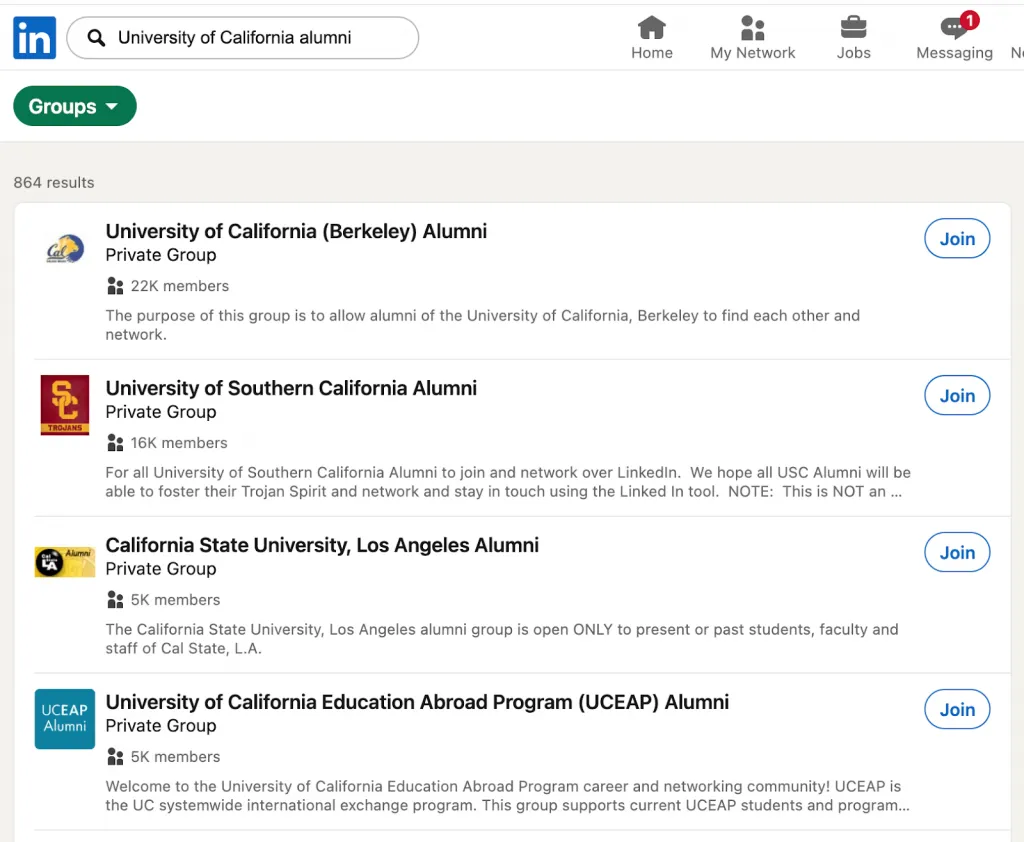
- Visit your university’s official LinkedIn page, which often links to the main alumni group.
- Explore both official and unofficial groups.
Many schools have multiple alumni communities, including:
- University-wide alumni groups
- Department-specific groups (e.g., Engineering Alumni)
- Program groups (MBA, Master’s programs)
- Cohort-based groups (e.g., Class of 2020)
- Regional groups (New York Alumni, Singapore Alumni)
Join all groups relevant to your goals, especially those related to your field or location.
How Alumni Groups Drive Real Value
Active alumni groups can provide significant career benefits.
Job Postings
Alumni frequently share job opportunities within their professional networks. These postings are often less competitive than public listings because they circulate within smaller communities.
Mentorship Matching
Many alumni groups naturally connect junior and senior graduates. Experienced professionals often enjoy helping fellow alumni navigate early career decisions.
Event Coordination
Groups commonly organize:
- Virtual networking events
- Alumni reunions
- Industry webinars
- Career panels
These events create opportunities to expand your professional network in a structured setting.
Industry Insights
Discussions inside alumni groups often include conversations about:
- Market trends
- Career transitions
- New technologies
- Industry hiring shifts
This can provide valuable real-time perspective from professionals working in the field.
Peer Support
Alumni communities can also be helpful during challenging career moments, including:
- Layoffs
- Salary negotiations
- Career pivots
Members frequently share advice and resources to help others navigate these transitions.
Best Practices for Alumni Group Engagement
To get the most value from LinkedIn alumni groups, focus on contributing before asking for help.
Effective engagement strategies include:
- Share career milestones, such as promotions or new roles.
- Post job opportunities within your company or network.
- Ask specific questions rather than vague requests for advice.
- Respond to other members’ posts before asking for assistance yourself.
- Thank people who help you and update them on outcomes.
Active participation builds credibility and makes others more likely to support you.
For Institutional Leaders: Creating a Thriving Alumni Group
Universities and alumni associations can also use LinkedIn groups to strengthen long-term community engagement.
Setup
Create an official alumni group and invite graduating students to join before they leave campus.
This ensures the community grows consistently with each new graduating class.
Moderation
Establish clear community guidelines to maintain respectful and productive discussions.
Appoint moderators who can encourage participation and manage conversations.
Content Strategy
Successful alumni groups regularly post content such as:
- Alumni success stories
- Company updates from graduates
- Industry insights
- Career resources
Consistent content keeps members engaged.
Engagement Programs
Institutions can also organize activities such as:
- Monthly alumni webinars
- Virtual job fairs
- Mentorship matching programs
- Industry panels
These initiatives transform the group into an active career resource.
Subgroups for Better Targeting
Large alumni communities benefit from structured subgroups.
Examples include:
- Boston Alumni
- Tech Industry Alumni
- MBA Class of 2020
LinkedIn allows organizations to create up to 20 subgroups, making it easier to organize members by location, industry, or graduation cohort.
How the LinkedIn Alumni Tool Works: The Technology Behind Your Network
The LinkedIn Alumni Tool may look simple on the surface, but behind the dashboard is a sophisticated system that organizes millions of professional profiles into a searchable alumni network. Understanding how it works helps you use the tool more strategically and interpret its insights correctly.
Below is a breakdown of the core functionality powering the alumni search experience.
Data Collection
The foundation of the LinkedIn Alumni Tool is the education data users include on their profiles.
When you list a school in the Education section of your LinkedIn profile, LinkedIn stores structured data such as:
- School or university name
- Degree or program
- Field of study
- Graduation year
LinkedIn then matches profiles that contain the same institution and groups them into a shared alumni database. This process allows the platform to track alumni networks across more than 23,000 educational institutions worldwide.
The system is dynamic and continuously updated. Every time a LinkedIn member edits their profile — adding a new job, skill, or location — the alumni database refreshes automatically. This means the insights you see in the alumni dashboard reflect real-time professional data rather than static records.
The Filtering Algorithm
At its core, the alumni tool is powered by a filtering engine built on LinkedIn’s broader search infrastructure.
When you open your school’s alumni page, LinkedIn first identifies the total pool of members who listed that institution. This becomes the base alumni dataset.
When you apply filters such as:
- Location
- Company
- Job title or function
- Skills
- Field of study
The system dynamically combines those filters and recalculates results instantly.
For example, a search might start with 120,000 alumni from a particular university. After applying filters like “San Francisco + Product Manager + Technology industry,” the system might narrow that list to only a few hundred highly relevant profiles.
The interface clearly displays both the total alumni population and the filtered subset, making the filtering process transparent and easy to understand.
Insights & Analytics Dashboard
In addition to profile searches, the alumni tool provides an analytics dashboard that visualizes aggregated career data.
You’ll see charts highlighting:
- Top companies employing alumni
- Industries where graduates work
- Cities and regions with the highest alumni concentration
- Common job functions
Importantly, these insights are aggregated statistics, meaning the platform does not expose private information beyond what individuals have already chosen to display publicly on their profiles.
This approach ensures the dashboard remains privacy-conscious while still offering useful career insights.
Integration with LinkedIn Search
Technically, the alumni tool is a specialized interface built on top of LinkedIn’s broader search system.
Because of this, many alumni searches can also be recreated using LinkedIn Advanced Search if needed.
For example, if the alumni dashboard is unavailable, you can still find alumni by:
- Opening a company page.
- Clicking “People.”
- Applying filters such as School, location, or job title.
Using the “All Filters” option in LinkedIn search also allows you to specify a university name to identify alumni working at specific companies.
This integration ensures that even outside the dedicated alumni interface, LinkedIn’s broader data and search functionality can still help you locate relevant alumni connections.
10 Alumni Networking Mistakes That Kill Your Response Rate (And How to Fix Them)
Alumni networking can dramatically improve your outreach results — but only if it’s done correctly. Many professionals unknowingly make mistakes that reduce response rates and weaken potential relationships. Below are 10 common alumni networking mistakes, along with practical fixes to improve your approach.
1. Sending Generic Connection Requests
Why it fails:
Messages like “Fellow [School] alum – let’s connect!” feel robotic and impersonal. The recipient knows the same message could be sent to thousands of people.
Fix:
Add context and personalization.
Example:
“Hi [Name], I noticed you’re working at [Company] as a [Role]. I graduated from [School] in 2015 and am currently exploring similar opportunities. Would you be open to a quick 15-minute conversation?”
Impact:
Generic outreach may get around 10% response rates, while personalized messages can reach 40% or higher.
2. Only Reaching Out When You Need Something
Why it fails:
If the first interaction is a request, it feels transactional.
Fix:
Engage with alumni before contacting them.
Actions to take:
- Like their LinkedIn posts
- Leave thoughtful comments
- Share or respond to their insights
Spend 2–3 weeks building familiarity before making an ask.
3. Asking for a Job Directly
Why it fails:
Requesting a job immediately puts the other person in an uncomfortable position.
Fix:
Ask for advice or insights instead.
Example questions:
- “How did you break into this role?”
- “If you were starting today, what skills would you focus on?”
Good conversations often lead to referrals naturally, without forcing the issue.
4. Ignoring Alumni Within Your Own Cohort
Why it fails:
Many people assume senior alumni are the most valuable contacts, but peers are often more responsive.
Fix:
Start with alumni who graduated 2–5 years before you.
Advantages include:
- Shared generational experiences
- Similar career stages
- Greater willingness to help
These connections are often the easiest to build.
5. Not Following Up
Why it fails:
Networking relationships disappear quickly without follow-up.
Fix:
Send a thank-you message within 24 hours after a conversation.
Then maintain the relationship by:
- Sharing updates about your progress
- Checking in every 3–6 months
Setting calendar reminders can help maintain these connections.
6. Sending Identical Messages to Dozens of Alumni
Why it fails:
Mass outreach is easy to recognize and usually ignored.
Fix:
Focus on quality over quantity.
Instead of messaging 50 people, identify the top 10 most relevant alumni and personalize each message.
Before reaching out, ask yourself:
- Did I read their profile?
- Do I know where they work?
- Can I reference something specific?
7. Not Preparing for the Conversation
Why it fails:
Unprepared conversations waste the other person’s time and reduce the likelihood of future help.
Fix:
Prepare 3–5 specific questions before the call.
Examples:
- “What skills helped you transition into this role?”
- “What should someone know before joining this industry?”
Spending five minutes reviewing their profile shows professionalism and respect.
8. Ignoring Alumni Outside Your Target Field
Why it fails:
Limiting your outreach to one industry reduces potential opportunities.
Fix:
Connect with alumni in adjacent fields.
These connections can reveal:
- Transferable skills
- Emerging industries
- Unexpected career paths
Cross-industry insights often lead to surprising opportunities.
9. Not Using Alumni Data for Career Decisions
Why it fails:
Many professionals ignore the data insights available within alumni networks.
Fix:
Use alumni data to research career outcomes before committing to a path.
For example:
- Where do English majors typically end up professionally?
- Which companies hire graduates from your program?
This research helps you make data-informed career decisions.
10. Giving Up If the Tool Doesn’t Work
Why it fails:
Sometimes the alumni tool has technical glitches, leading people to assume the feature is unavailable.
Fix:
Use LinkedIn Advanced Search as a workaround.
Steps:
- Go to LinkedIn search.
- Select All Filters.
- Enter your school name in the School field.
- Add filters such as company, location, or job title.
- View results.
This method replicates the core functionality of the alumni tool.
When to Use the Alumni Tool: Strategic Timing for Maximum Results
The LinkedIn Alumni Tool is most powerful when used proactively. Many professionals only open it when they urgently need a job or referral. By then, it’s often too late to build meaningful relationships. The best strategy is to use the tool at key moments throughout your career so that your professional network is already warm when opportunities appear.
Below are the most effective times to use the alumni tool and how to approach each situation.
Before You Need Something (3–6 Months Ahead)
The most effective networking happens before you actually need help.
Instead of waiting until a job search begins, start building relationships three to six months in advance.
Actions to take:
- Create a “future network” list of alumni working in companies or roles that interest you.
- Follow their profiles and content.
- Engage with their posts by commenting or sharing insights.
This proactive approach builds familiarity over time. When you eventually reach out, you’re no longer a complete stranger — which significantly increases response rates.
The result: a warm network ready when an opportunity arises.
During an Active Job Search
If you are already searching for a job, the alumni tool becomes a powerful daily research engine.
A good timeline is to activate structured alumni outreach two to three months into your job search.
Recommended strategy:
- Research 5–10 alumni at target companies each day.
- Send 2–3 highly personalized messages per week rather than mass outreach.
- Focus on meaningful conversations rather than volume.
Keep a simple tracking system to stay organized. Record:
- Who you contacted
- When you reached out
- Whether they responded
This helps you manage follow-ups and maintain a professional approach.
Career Transition Moments
The alumni tool is especially valuable when considering a career pivot.
Before switching industries or roles, use alumni data to validate whether the transition is realistic.
For example, ask:
Do alumni with my background successfully move into this field?
Steps:
- Filter alumni who studied a similar major or started in similar roles.
- Identify those now working in your target industry.
- Reach out to 3–5 people who successfully made the transition.
Ask specific questions about:
- Skills required for the switch
- Challenges they faced during the transition
- Steps they would recommend today
This insight can dramatically reduce uncertainty during career changes.
Geographic Transitions
Relocating to a new city is another ideal moment to use the alumni tool.
Start preparing about six months before your move.
Steps to follow:
- Filter alumni by target city and industry.
- Build a list of professionals working in your field.
- Start conversations and attend virtual alumni events in that region.
By the time you arrive in the new city, you’ll already have several warm connections, making networking and job searching much easier.
During Alumni Events and Reunions
Networking events are much more productive when you prepare in advance.
Before attending an alumni gathering:
- Use the alumni tool to identify potential attendees.
- Research two or three people you’d like to meet.
- Prepare thoughtful conversation topics.
After the event, follow up quickly.
Send a connection request within 24 hours, referencing something specific from your conversation. Then nurture the relationship by scheduling a short follow-up call if appropriate.
When Considering Further Education
The alumni tool can also help you evaluate whether additional education is worth pursuing.
Use it to research real career outcomes for graduates from specific programs.
Questions you can explore:
- Do professionals in your target role typically have an MBA or master’s degree?
- Which companies hire graduates from certain programs?
- How do career trajectories differ by degree?
Ideally, conduct this research 6–12 months before enrolling in a new program. Alumni outcomes provide valuable real-world data that helps you make more informed educational decisions.
The LinkedIn Alumni Network Is Your Unfair Advantage – Here’s How to Activate It
The LinkedIn Alumni Tool is one of the most powerful — and most underused — networking resources available today. It’s completely free, built directly into LinkedIn, and gives you access to a massive community of professionals who share something meaningful with you: the same alma mater.
That shared connection changes everything.
Instead of sending cold messages to strangers, you’re reaching out to fellow alumni, which immediately adds context, familiarity, and credibility. In a professional world where inboxes are crowded and attention is limited, this simple connection can dramatically increase response rates and open doors that would otherwise remain closed.
The value of the alumni network is enormous:
- Access to graduates from 23,000+ educational institutions
- Six powerful filters that help you identify the exact people you want to meet
- Career insights showing where alumni work, which industries they enter, and how careers evolve
- A foundation for mentorship, job opportunities, relocation planning, and industry research
But like any network, its value only appears when you actively use it.
Below is a simple 30-day action plan to start activating your alumni network.
Week 1: Build the Foundation
Start by exploring the system.
- Log in to LinkedIn and visit linkedin.com/alumni
- Explore your school’s alumni dashboard and filters
- Join your institution’s official alumni group (if one exists)
This step helps you understand the size and structure of your network.
Week 2: Conduct Targeted Research
Next, identify your professional priorities.
- Choose 3–5 target companies you’d like to explore
- Use alumni filters to find graduates working there
- Narrow results by department or role
Create a list of 15–20 potential connections.
Week 3: Begin Engagement
Now it’s time to reach out.
- Send personalized messages to 5–10 alumni
- Mention your shared school and a specific reason for contacting them
- Follow their profiles and engage with their content
Avoid generic connection requests — thoughtful outreach makes a huge difference.
Week 4: Nurture the Relationships
If conversations start, focus on building genuine connections.
- Schedule 2–3 informational conversations
- Ask specific questions, not vague requests for advice
- Follow up with people who offer helpful insights
These early relationships often become the foundation of your professional network.
Final Thoughts
Your alma mater is likely more valuable than you realize.
The shared experience of attending the same institution is a powerful social signal that cuts through the noise of modern professional networking. The LinkedIn Alumni Tool simply makes that network visible and searchable.
Use it intentionally. Be genuine in your outreach, specific in your questions, and patient as relationships develop.
Great professional networks aren’t built overnight — but with the right system, they grow much faster.