LinkedIn Audience Network: Linked Helper Strategies for Max ROI in 2026

LinkedIn Audience Network: Linked Helper Strategies for Max ROI in 2026

LinkedIn CPMs are up 30% in 2025 — and most advertisers are paying more for less reach.
As competition crowds the LinkedIn feed, costs rise, frequency spikes, and high-intent audiences become harder to scale. But while many teams accept this as the new normal, others are quietly doing the opposite: cutting acquisition costs by up to 47% using LinkedIn Audience Network, then turning those cheaper clicks into $200K+ sales pipelines with Linked Helper.

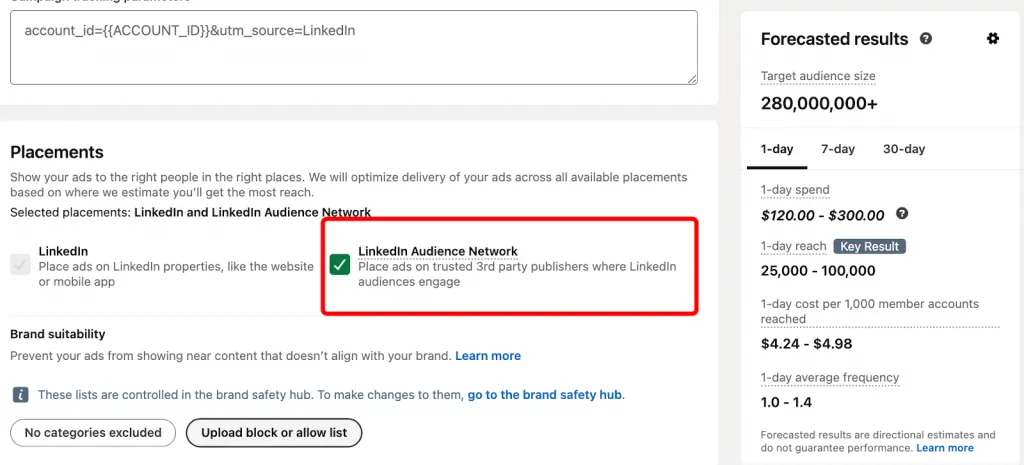
Enable LinkedIn Audience Network settings in Campaign Manager

The problem isn’t LinkedIn targeting — it’s limited inventory. The solution is extending that same precision beyond LinkedIn itself. LinkedIn Audience Network (LAN) places your ads across premium partner websites and mobile apps, while still targeting by job title, seniority, company size, industry, and matched audiences. You get the reach LinkedIn can’t provide on its own, often at significantly lower CPMs.

Of course, off-platform traffic is colder — and that’s where most campaigns fail. The difference is what happens next. 

By using Linked Helper to automatically connect with, nurture, and follow up with LAN leads inside LinkedIn, advertisers are seeing 2–3× higher conversion rates, transforming low-cost impressions into real conversations, booked calls, and closed deals.

In this guide, you’ll get a full breakdown of how LinkedIn Audience Network works, how to combine it with Linked Helper for scalable demand generation, and a real-world case study from Hugh Lorch, who generated $118K in revenue in just 45 days. If LinkedIn feels more expensive than ever, this is the play most advertisers still aren’t using.

What Is LinkedIn Audience Network? (Why Linked Helper Users Love It)

LinkedIn Audience Network is LinkedIn’s off-platform advertising network that lets your LinkedIn ads appear beyond LinkedIn itself — on 1,000+ vetted partner websites and mobile apps — while still reaching logged-in LinkedIn members using your exact LinkedIn targeting. That means the same job titles, seniority, industries, company sizes, and matched audiences you’d use in-feed are now delivered at display-network scale. In simple terms: LinkedIn ads beyond LinkedIn, without losing targeting precision.

You enable it directly inside LinkedIn Campaign Manager. Just toggle “LinkedIn Audience Network” on in placements, and LinkedIn automatically extends delivery to its partner inventory. 

Reporting stays clean and transparent: performance is split between LinkedIn (on-platform) and LAN (Audience Network). When you see “LAN” in reports, it simply means impressions, clicks, or conversions that happened outside LinkedIn via the Audience Network — usually at lower CPMs and higher reach.

This is where Linked Helper users get a compounding advantage. You can export your ICP or engaged audience from Linked Helper, use it for LAN targeting, then import LAN clicks back into Linked Helper for automated connection requests, follow-ups, and nurture sequences. Ads create awareness at scale; Linked Helper turns that attention into conversations. In Hugh Lorch’s setup, this workflow saved 90% of manual prospecting time while accelerating pipeline creation — proving that LAN isn’t just cheaper reach, it’s a force multiplier when paired with automation.

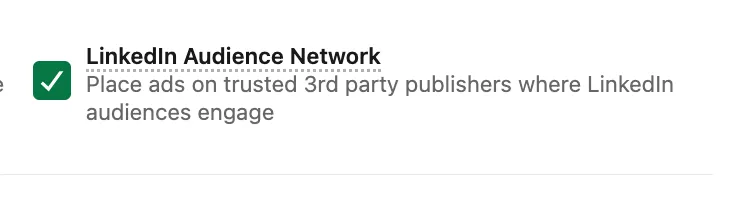
LinkedIn Audience Network toggle for expanded ad reach

Quick answers:

  • What is LinkedIn Audience Network? LinkedIn’s ad network that shows your ads on partner sites/apps to logged-in LinkedIn members using your usual targeting.
  • What does “LAN” mean in reports? Traffic and results delivered through LinkedIn Audience Network, not the LinkedIn feed itself.

How Does LinkedIn Audience Network Actually Work?

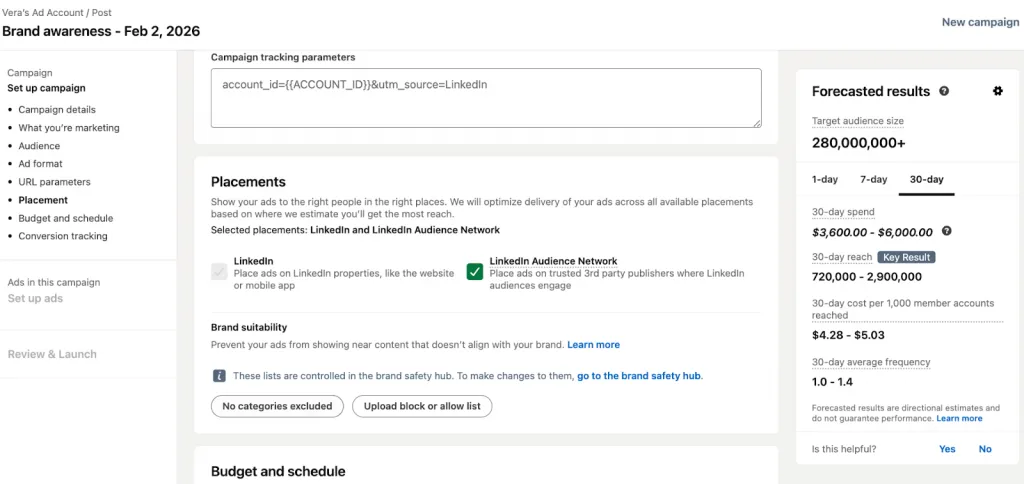
Performance breakdown showing LinkedIn vs Audience Network metrics example
Performance breakdown showing LinkedIn vs Audience Network metrics example checked

Behind the scenes, it runs like a real-time ad exchange:

  • Publishers (apps, business sites, platforms) send bid requests
  • LinkedIn matches those requests with your campaign targeting
  • If your campaign qualifies and wins the auction → your ad is served
    All while verifying the user is a logged-in LinkedIn member, not anonymous traffic.

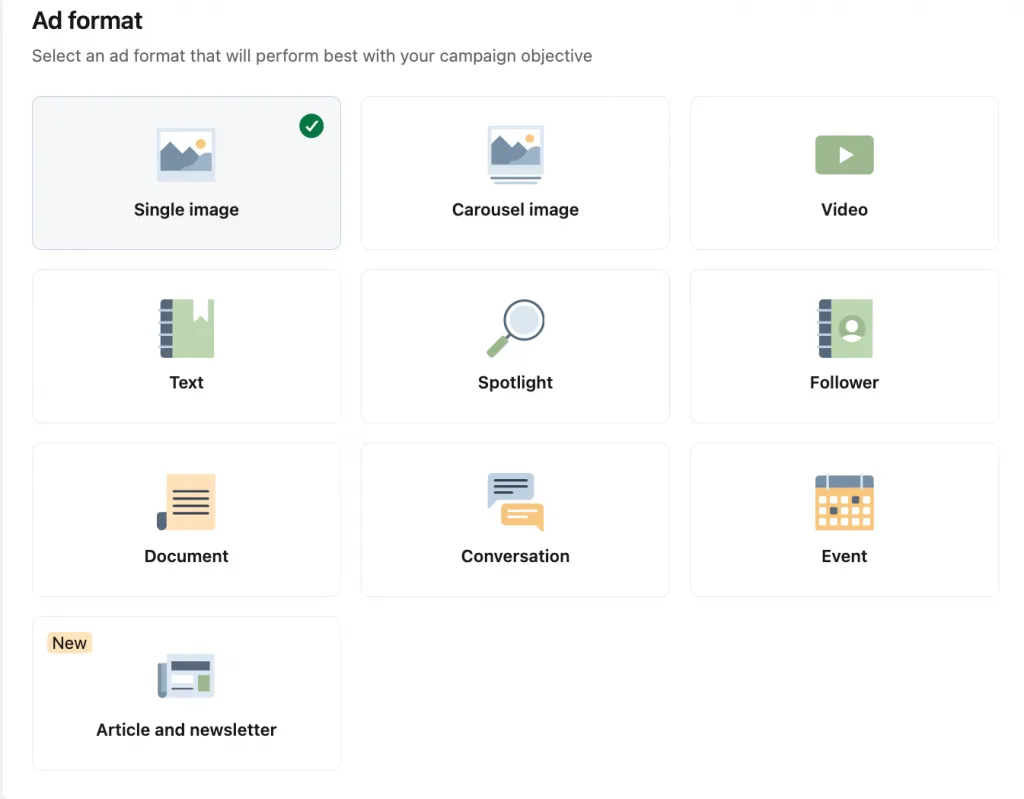
Ad formats stay the same:

ad format Performance breakdown showing LinkedIn vs Audience Network metrics example
  • Single image ads
  • Video ads
  • Carousel ads
  • Document ads
    No “cheap display banners.” It’s native LinkedIn creative — just delivered off-platform.

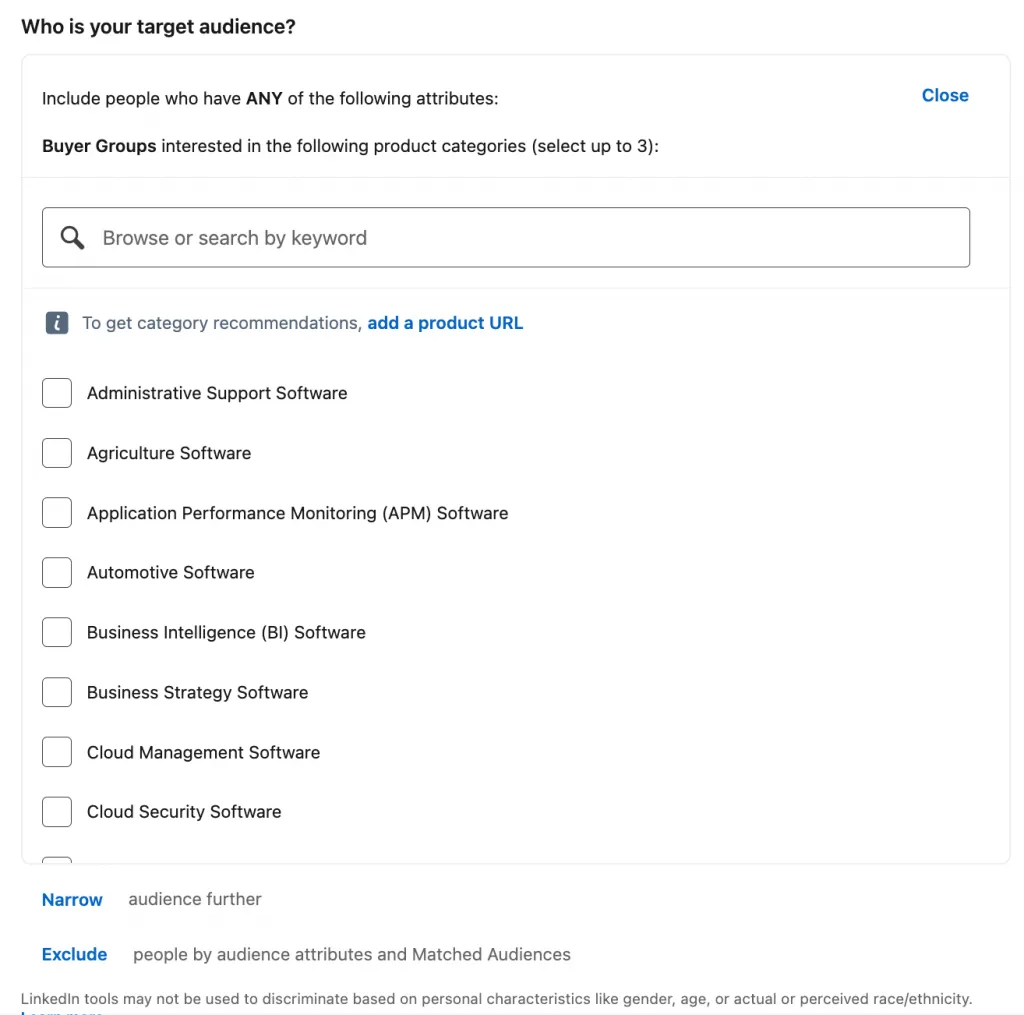
Targeting stays the same:

Performance breakdown showing LinkedIn vs Audience Network metrics example choose tagret
  • Job title
  • Skills
  • Seniority
  • Company size
  • Industry
  • Matched audiences
  • Retargeting
    It works across ALL placements — LinkedIn feed + LinkedIn Audience Network — with no targeting dilution.

Smart optimization layer:
LinkedIn’s algorithm doesn’t treat LAN as separate traffic — it optimizes across LinkedIn + LAN together based on your campaign goal:

  • Clicks
  • Leads
  • Conversions
  • Impressions
    So delivery shifts dynamically to wherever performance is strongest at the lowest cost.

Real-world example:
Target: “VP Marketing — US Tech companies”
That same executive:

  • Sees your ad in their LinkedIn feed
  • Then sees it again on a business news site or mobile app via LAN
    Same person. Same targeting. Multi-surface exposure. Higher recall.

Linked Helper Integration Layer (the revenue engine)

This is where LAN stops being “cheap traffic” and becomes pipeline:

Flow:

  1. LAN drives low-cost reach + clicks
  2. Click data / audiences are imported into Linked Helper
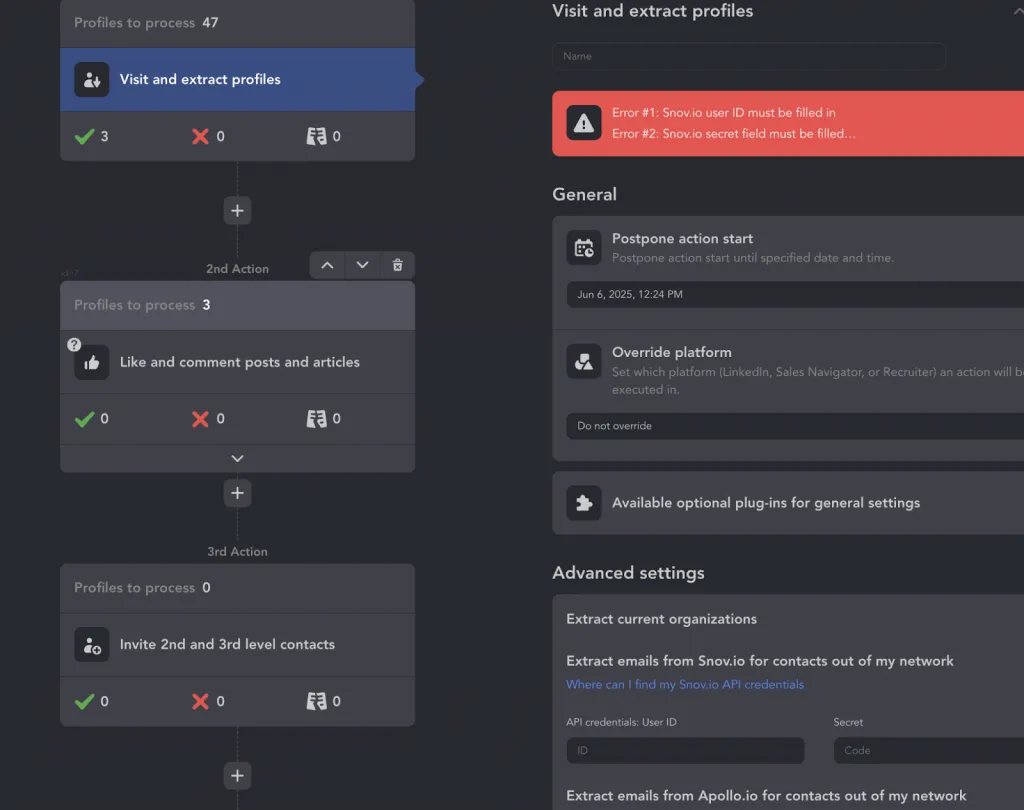
  3. Linked Helper auto-runs:
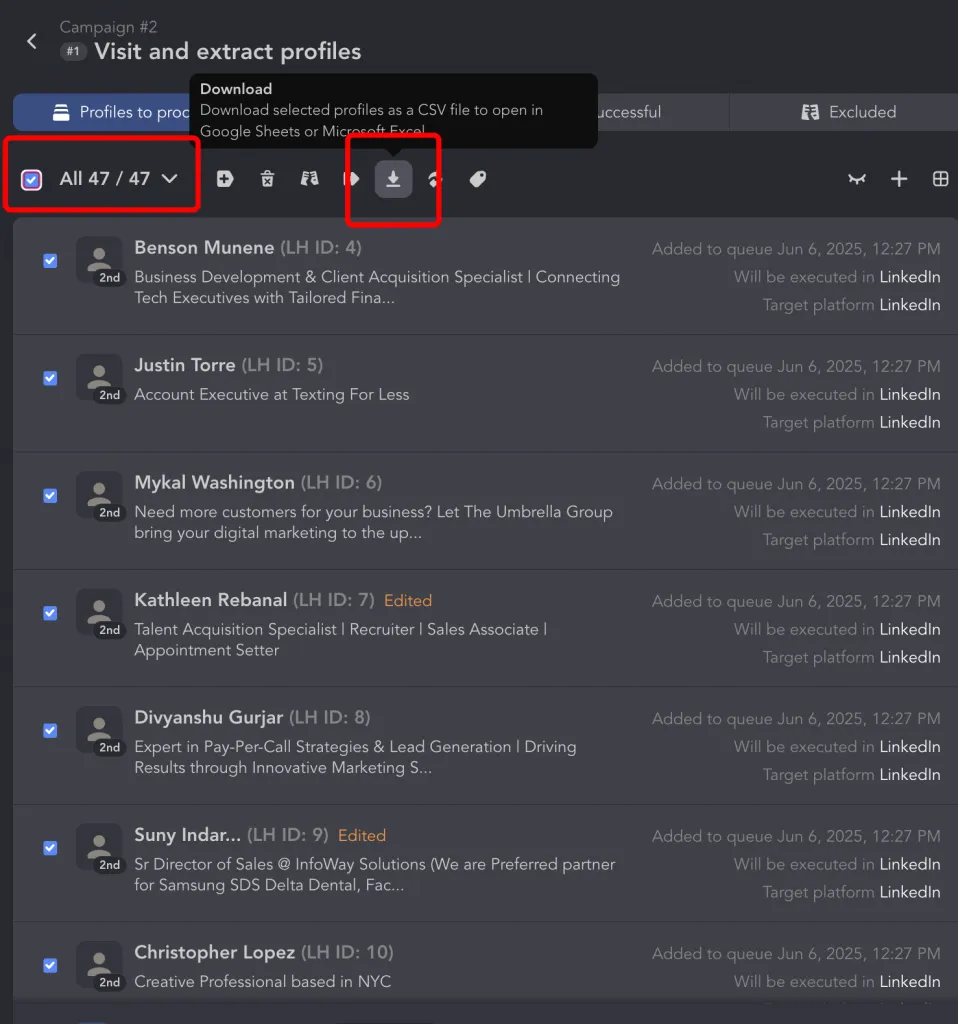
visit and extract linked helper
  • Connection requests
  • Follow-ups
  • Message sequences
  • Multi-touch nurturing
  1. Ad awareness → DM trust → booked calls

Effect:
LAN builds familiarity.

Linked Helper builds relationships.
Together = conversion amplification, not just impressions.

LinkedIn-Only vs LAN vs LAN+Linked Helper: Choose Wisely

Decision framework:

  • Brand awareness: LAN + Linked Helper
  • High-ticket ABM: LinkedIn only
  • Scale lead gen: LAN + automation
MetricLinkedIn Only+ LinkedIn Audience Network (LAN)+ LAN + Linked Helper
ReachLinkedIn feed only+ 1,000+ partner sites & apps+ Auto follow-up on LinkedIn
CPM$15–25$8–12 (≈47% lower)$8–12 + higher LTV
ControlMaximumFull context + block listsPrecision ICP + automation
Lead qualityHigh intent, low scaleHigher volume, colder2–3× nurtured & warmed
Max ROI leverTargeting precisionCheap reachConversion amplification

How to decide (simple framework)

Choose LinkedIn Only if:

  • You’re running high-ticket ABM
  • Tight account lists, few decision-makers
  • You need maximum control and context per impression

Choose LAN (+ optionally Linked Helper) if:

  • You want brand awareness at scale
  • CPMs are killing your reach
  • You need frequency beyond the LinkedIn feed

Choose LAN + Linked Helper if:

  • You’re scaling lead generation or demand gen
  • You want cheaper reach and higher conversions
  • You’re ready to automate follow-ups, not just buy clicks

LAN solves the cost and scale problem.
Linked Helper solves the “cold traffic” problem.

That’s why, in the Hugh Lorch case, combining LAN + Linked Helper led to faster pipeline creation, massive time savings, and real revenue — not just impressions.

Rule of thumb:

  • Awareness → LAN + Linked Helper
  • Precision ABM → LinkedIn only
  • Scalable lead gen → LAN + automation

Complete LinkedIn Audience Network Publishers List + Safety Controls

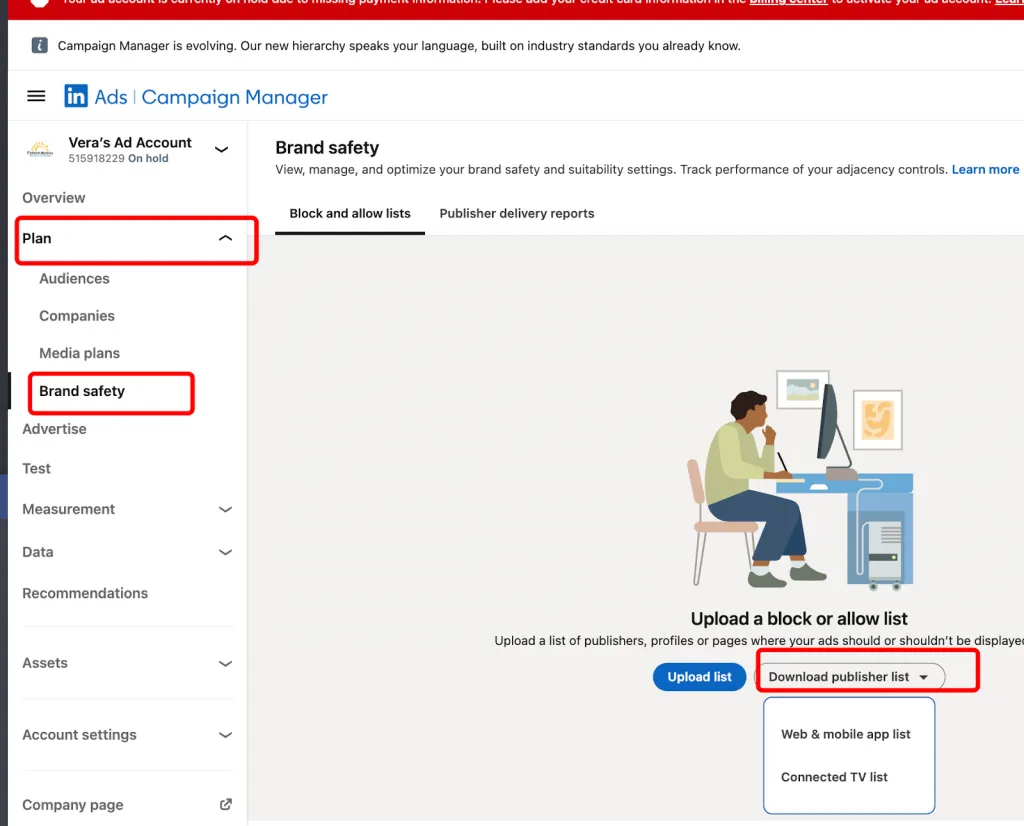
If you’re asking for a LinkedIn Audience Network list of publishers, the good news is: LinkedIn gives you full transparency and control — you just have to know where to look. Inside Campaign Manager, you can download a complete CSV of websites and mobile apps where your ads may appear across the Audience Network. This includes vetted business media, apps, and professional content partners used to extend LinkedIn’s reach beyond the feed.

Step-by-step: how to access and control LAN publishers

  1. Go to Campaign Manager → Brand Safety
  2. Click Download publisher list to export a CSV of web + app inventory
  3. Review placements by category, app vs web, and context
  4. Block any risky, irrelevant, or low-quality environments
  5. Upload custom blocklists or allowlists — LinkedIn supports up to 100,000 domains

This means LAN isn’t a “black box display network.” You decide where your brand appears, and you can refine placements continuously as performance data comes in.

Why this matters for performance (and not just safety):
Most advertisers leave LAN wide open — which is fine for reach, but not for efficiency. The real edge comes from pairing placement control with downstream filtering. That’s where Linked Helper adds a bonus layer: instead of importing every click, you only pull high-signal users — people who visited your site, viewed profiles, or showed repeat engagement. Low-quality placements get blocked at the ad level; low-intent users get filtered out at the automation level.

Result:

  • Cleaner brand exposure
  • Better CPM efficiency
  • Higher-quality conversations, not just traffic

Is LinkedIn Audience Network Worth It? (The 2026 Answer)

Short answer: yes — but only in the right setup.
In 2026, LinkedIn Audience Network (LAN) has matured from a “nice-to-have” reach extension into a serious performance lever. Advertisers using it correctly are seeing ~47% lower CPMs and up to 75% cheaper video views, while expanding reach to new, qualified audiences LinkedIn’s feed alone can’t deliver. The key question isn’t whether LAN works — it’s when it makes sense for your goals and budget.

✅ YES, LinkedIn Audience Network is worth it when:

  • You’re running awareness or traffic campaigns
    → LAN drives scale efficiently, and 63% of converters are unique (people you wouldn’t have reached in-feed).
  • You need more volume at lower CPMs
    → Especially valuable when feed CPMs spike or frequency caps out.
  • You pair LAN with Linked Helper automation
    → Ads create awareness; Linked Helper converts that awareness into conversations, making LAN traffic economically viable for B2B demand gen.

❌ NO, LinkedIn Audience Network is not worth it when:

  • You’re an ultra-premium brand with zero tolerance for off-platform placements
    → Even with blocklists and allowlists, some brands require absolute context control.
  • Your monthly budget is under $5K
    → LAN needs volume to let the algorithm optimize; at low spend, it won’t move the needle meaningfully.

The 2026 verdict

LinkedIn Audience Network isn’t a replacement for LinkedIn feed ads — it’s a multiplier. On its own, it’s a cost-efficient way to buy reach and views. Combined with automation (like Linked Helper), it becomes a full-funnel engine: cheaper exposure → higher frequency → automated follow-up → pipeline.

Rule of thumb for 2026:

  • Want efficient awareness and traffic? → LAN is worth it
  • Want scalable B2B lead gen? → LAN + Linked Helper
  • Want hyper-controlled, low-volume ABM? → Stick to LinkedIn-only

Used intentionally, LAN is no longer optional — it’s how smart teams keep LinkedIn profitable as costs rise.

How to Set Up LinkedIn Audience Network + Linked Helper (7 Steps)

Step 1 — Build Your ICP in Linked Helper

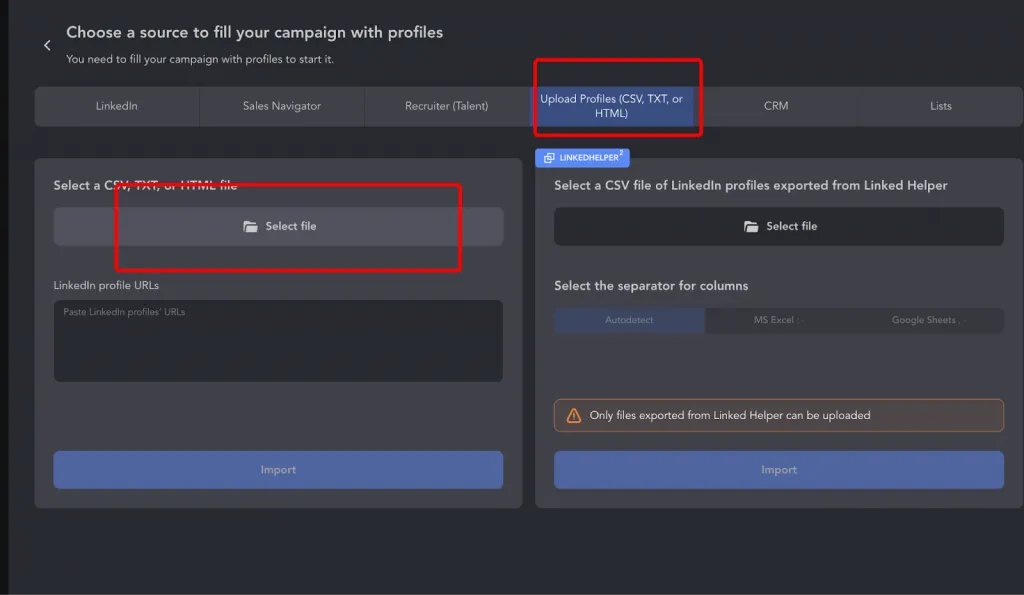
Start where conversions actually happen: people. Use Linked Helper to export your ideal customer profile from Sales Navigator — job titles, seniority, industries, company size. Export the lead list to CSV and upload it to LinkedIn as a Matched Audience

download profiles llinked helper

This ensures LAN reach stays tightly aligned with your real ICP, not broad guesswork.

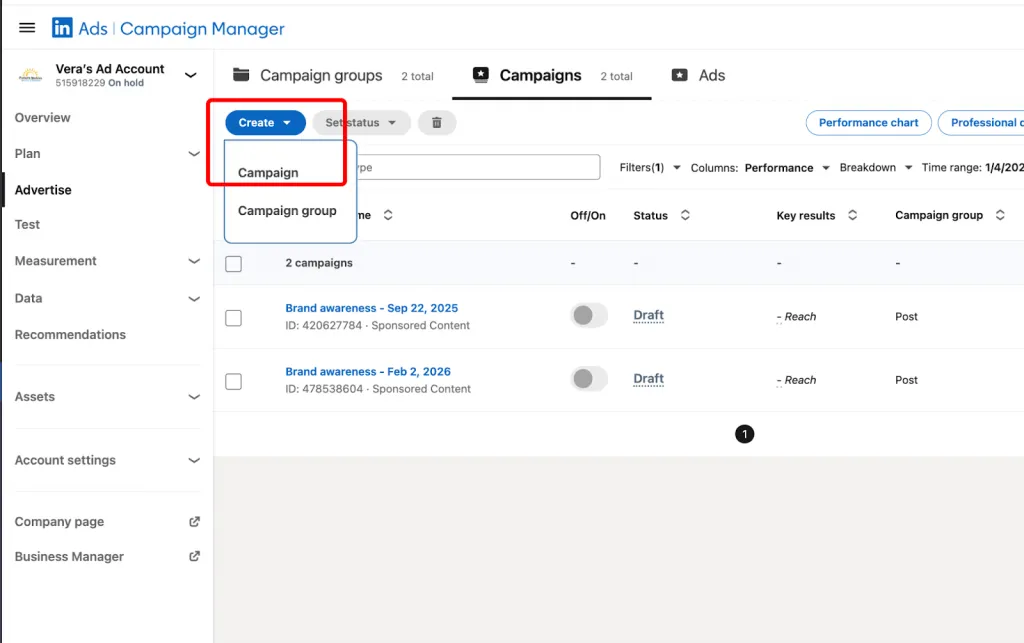
Step 2 — Create a Sponsored Content Campaign

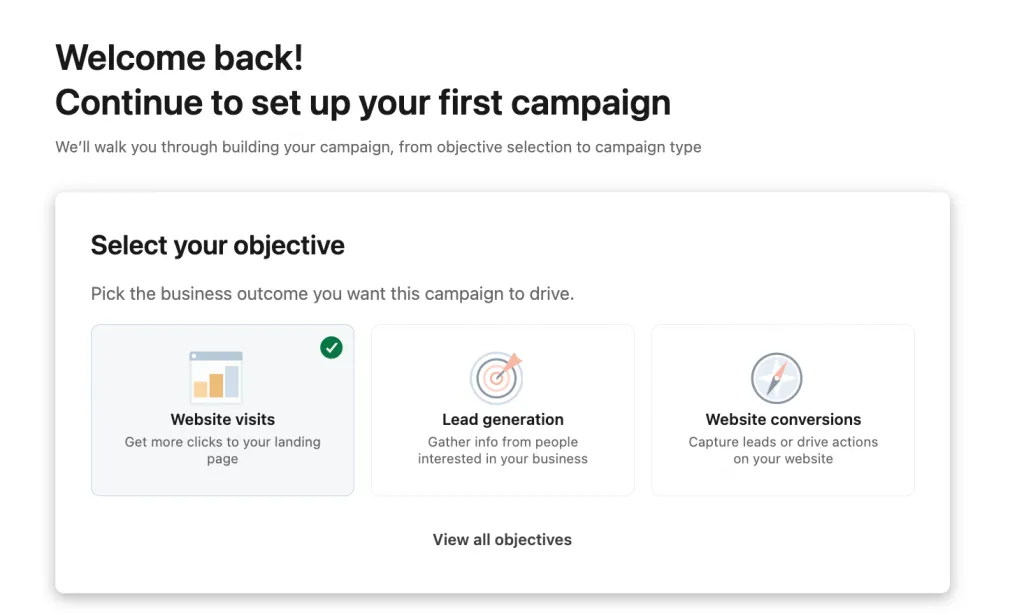
In LinkedIn Campaign Manager, create a new Sponsored Content campaign. Choose an objective that works well with LAN:

create campaign ads manager
  • Website visits (best for retargeting + automation)
  • Lead generation
  • Video views (top-of-funnel awareness)
    These objectives allow LinkedIn’s algorithm to optimize delivery across both feed and Audience Network.
select objective webiste visits

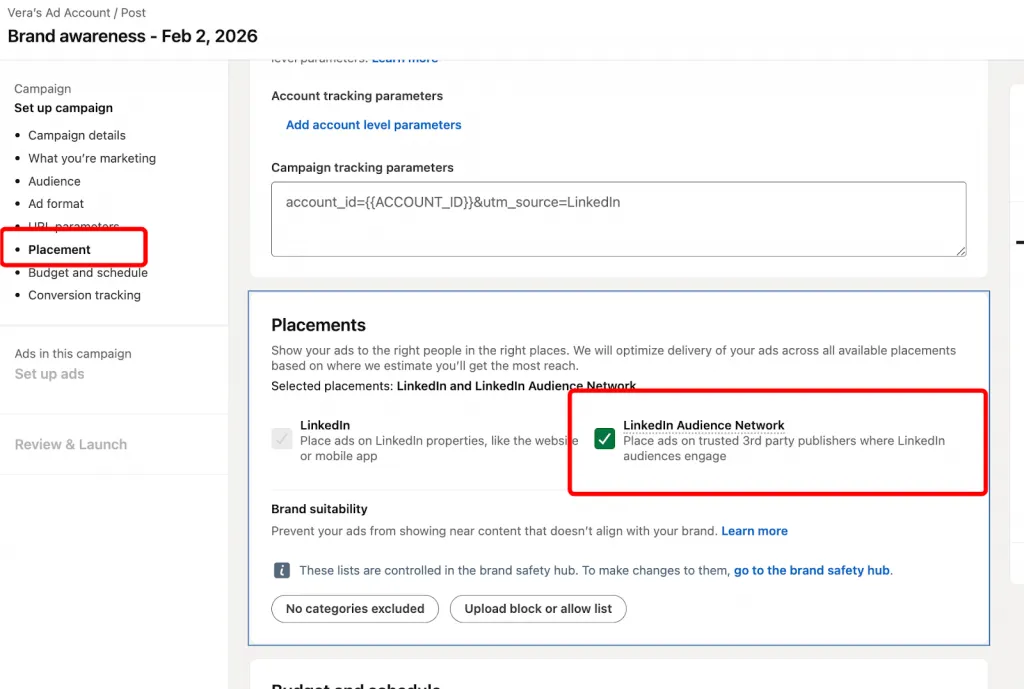
Step 3 — Turn LinkedIn Audience Network ON

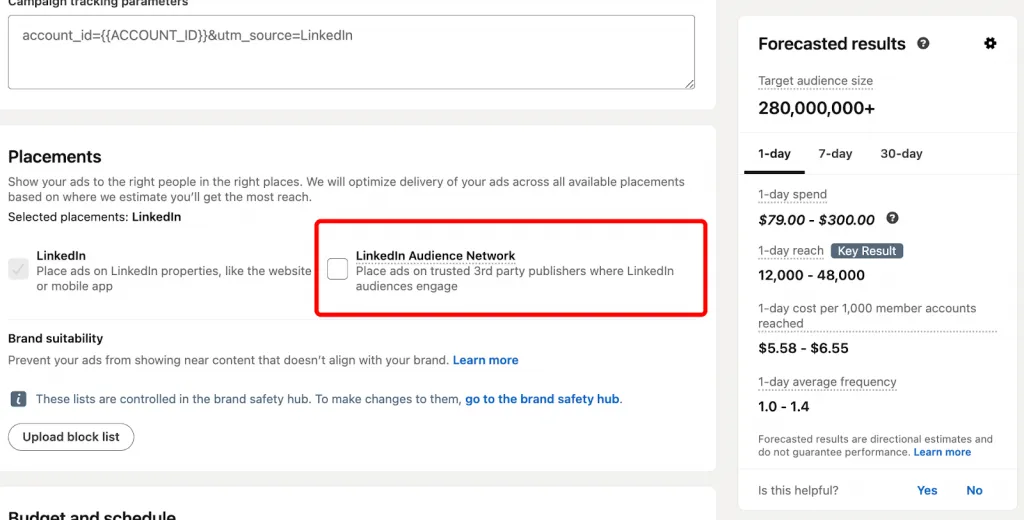
Go to Placements and toggle “LinkedIn Audience Network” ON.
This single switch unlocks delivery across LinkedIn’s vetted partner websites and mobile apps — while keeping your original targeting intact.

“LinkedIn Audience Network toggle in Campaign Manager placements”

Step 4 — Upload a Publisher Block List

Navigate to Brand Safety and download the LinkedIn Audience Network publishers CSV.

  • Review categories and placements
  • Identify low-quality or irrelevant environments
  • Block roughly the bottom 20% of worst performers
    Upload your custom blocklist or allowlist (up to 100K domains supported) to keep LAN brand-safe and efficient.

Step 5 — Launch a $500 Test Budget (7 Days)

Don’t overthink it. Launch with a $500 test over 7 days to give the algorithm enough data.
After the test, analyze:

  • CPM
  • CPC
  • Click quality
  • Placement breakdown: LinkedIn vs Audience Network

This tells you if LAN is outperforming the feed for your ICP.

Step 6 — Import LAN Conversions into Linked Helper

Now activate the multiplier. Import LAN-driven website visitors or conversions into Linked Helper.

select files linked helper

Automatically trigger:

  • Connection requests
  • Follow-ups
  • A 5-message or email nurture sequence
    You’re converting anonymous awareness into identifiable LinkedIn conversations — at scale.

Step 7 — Scale the Winners

Compare cost per lead:

  • If LAN < LinkedIn feed CPL → scale
  • Shift budget to a 70/30 split (LAN / LinkedIn)
  • Double down on creatives and placements driving conversations, not just clicks

How to Check + Optimize LAN Performance (Linked Helper Analytics)

To make LinkedIn Audience Network (LAN) profitable, you don’t watch vanity metrics — you watch where results come from and what happens after the click. The winning teams review LAN daily at the ad level and weekly at the pipeline level inside Linked Helper.

What to check daily (non-negotiable)

1. Placement breakdown
In Campaign Manager, split performance by:

  • LinkedIn feed
  • Audience Network (LAN)

Never judge LAN in aggregate — it plays by different rules.

2. Core metrics that matter

  • CPM – LAN should be materially lower
  • CPC – often lower or similar
  • CTR – usually lower than feed (this is normal)
  • Cost per conversion – the real KPI

LAN often shows lower CTR but a MUCH lower cost per result. If conversions are cheaper, CTR is irrelevant.

Optimization checklist (do this in order)

✅ Block the bottom 20% of publishers
From your LAN placement report:

  • Sort publishers by CPA / cost per conversion
  • Block the worst-performing ~20%
  • Keep the long-tail winners
    This alone often lifts LAN efficiency within 48–72 hours.

✅ Run a clean LAN ON vs OFF test
Create two campaigns:

  • Identical creative
  • Identical targeting
  • Identical budget
  • One with LAN ON, one OFF

Compare cost per conversion, not CTR. If LAN wins on cost, it earns budget.

✅ Tighten your ICP using Linked Helper data
Ads tell you who clicks.
Linked Helper tells you who actually engages.

Use Linked Helper analytics to:

  • Identify which job titles accept connections
  • See who replies vs who ignores
  • Refine your matched audiences and exclusions

Then feed that insight back into LAN targeting.

✅ A/B test Linked Helper follow-up sequences
LAN traffic is colder — messaging matters more.

Inside Linked Helper:

  • Test short vs long sequences
  • Test direct CTA vs soft value message
  • Test connection-only vs connection + follow-up

Small sequence improvements often outperform any ad-side tweak.

The mindset shift that makes LAN work

LinkedIn feed = intent-heavy, expensive
LAN = awareness-heavy, cheap

The mistake is judging LAN like feed ads.

The right system is:

  • LAN → cheap reach
  • Linked Helper → qualification + warming
  • Analytics → budget flows to what converts, not what looks good

If you optimize placements + ICP + sequences, LAN stops being “extra inventory” and starts being a scalable acquisition channel.

LinkedIn Audience Network Examples with Linked Helper

Below are real, practical LinkedIn Audience Network examples showing how LAN becomes a revenue channel when paired with Linked Helper, not just a cheaper media buy.

Example 1: SaaS Awareness → $118K Pipeline in 45 Days

Goal: Top-of-funnel awareness for a B2B SaaS audience
Setup:

  • LinkedIn Audience Network enabled
  • Sponsored content to ICP (Sales + Marketing leaders)

LAN performance:

  • 47,000 impressions
  • $9 CPM (vs $17–20 in-feed)

On its own, this looks like a standard awareness play. The difference came after the click.

Linked Helper layer:

  • LAN-driven visitors were imported into Linked Helper
  • Automated warm-up actions (profile views, follows)
  • Multi-step personalized connection + follow-up sequences

Impact:

This is the exact workflow used in the LinkedIn 15X system built by Hugh Lorch — where ads create familiarity and Linked Helper converts attention into conversations.

Example 2: Agency Lead Generation → 27% Meeting Rate

Goal: Consistent sales calls for a B2B agency
Setup:

  • LAN traffic sent to a simple landing page
  • Visitors tracked and segmented

LAN → Linked Helper flow:

  1. Prospect views content via LAN
  2. Imported into Linked Helper as website visitors
  3. Sequence launched:
    • Profile view
    • Connection request
    • Value-driven DM (no pitch)
    • Soft CTA → call booking

Results:

  • 27% meeting booking rate from LAN-origin leads
  • Higher reply rates than cold LinkedIn-only outreach
  • Sales team focused only on qualified conversations

Why it worked: prospects had already seen the brand via LAN. The Linked Helper sequence didn’t feel cold — it felt familiar.

Why these examples work (pattern to copy)

Across both cases:

  • LinkedIn Audience Network delivered cheap, scalable awareness
  • Linked Helper handled:
    • ICP precision
    • Warm-up actions
    • Timed, personalized follow-ups
    • Long-tail re-engagement

As Hugh Lorch puts it:

“You don’t need more manual work. You need systems.”

LAN brings the volume.
Linked Helper brings the system.

Together, they turn LinkedIn from a cost center into a predictable sales machine.

Advanced LAN + Linked Helper Strategies

  1. Split test matrix: 4 campaigns (LAN on/off × 2 creatives)
  2. Custom publisher scoring: CPA per domain → dynamic block lists
  3. LAN retargeting: Website visitors → LinkedIn feed + email finder
  4. Sequence personalization: LAN source → custom messaging paths

Once LAN is profitable, the real gains come from system-level optimization. These advanced strategies are how teams move from “good CPL” to predictable, scalable pipeline using LinkedIn Audience Network + Linked Helper.

1. Split-Test the Right Way (4-Campaign Matrix)

Most tests are flawed. The clean way to test LAN is a 2×2 matrix:

  • Campaign A: LAN ON + Creative 1
  • Campaign B: LAN ON + Creative 2
  • Campaign C: LAN OFF + Creative 1
  • Campaign D: LAN OFF + Creative 2

Keep everything else identical:

  • Targeting
  • Budget
  • Objective

This isolates:

  • The true impact of LAN vs feed
  • Whether creative behaves differently off-platform

What usually happens:
LAN wins on cost per conversion, while the feed wins on CTR. You scale based on cost, not clicks.

2. Custom Publisher Scoring (Beyond “Block the Bottom 20%”)

Advanced teams don’t just block blindly — they score publishers.

Workflow:

  1. Export LAN publisher performance
  2. Calculate CPA per domain/app
  3. Assign tiers:
    • Tier 1: Scale (cheap, converting)
    • Tier 2: Watch
    • Tier 3: Block
  4. Update dynamic blocklists weekly

This turns LAN from a broad network into a curated performance inventory.

3. LAN Retargeting Stack (Where ROI Explodes)

LAN is strongest at first touch. The close happens elsewhere.

High-conversion stack:

This creates multi-channel frequency:

  • Display exposure
  • LinkedIn feed reinforcement
  • DM + email follow-up

Few B2B teams do this — which is why it works.

4. Sequence Personalization by LAN Source (Case Study Pattern)

Advanced personalization isn’t about the name token — it’s about context.

Inside Linked Helper:

  • Tag leads as LAN-sourced
  • Route them into custom message paths

Example (from Hugh Lorch’s playbook):

  • LAN leads → lighter, value-first opener
  • Feed leads → more direct business framing

Why?
LAN prospects recognize the brand but didn’t “raise their hand.” Treating them like hot inbound kills replies.

In Hugh Lorch’s LinkedIn 15X system, this sequencing approach:

  • Increased acceptance rates
  • Lifted reply quality
  • Contributed to 2–3× more qualified leads
  • Helped generate $118K in 45 days for one client

The Advanced Mindset

LAN isn’t a placement.
Linked Helper isn’t an automation tool.

Together, they form a demand system:

  • LAN = scalable attention
  • Linked Helper = controlled conversation
  • Analytics = budget flows to what converts

Once you operate at this level, LinkedIn stops being expensive — it becomes predictable.

Why LAN “Doesn’t Work” + Linked Helper Fixes

When people say “LAN doesn’t work”, they’re usually right — for their setup. LAN fails when it’s treated like a cheaper version of LinkedIn feed ads. It isn’t. Below are the real failure points and how Linked Helper fixes each one.

Problem: Low CTR

Why it happens:
LAN ads appear off-platform — users are reading news, browsing apps, not actively scrolling LinkedIn. CTR will almost always be lower than in-feed.

Linked Helper fix:
Stop optimizing for CTR. Optimize for cost per lead / cost per conversation. LAN’s job is awareness and frequency; Linked Helper converts that exposure into replies and meetings through follow-ups.

Problem: Bad placements

Why it happens:
Most advertisers never touch publisher controls, so budgets leak into low-performing environments.

Linked Helper fix:
Upload custom blocklists and exclusions, then filter again downstream:

  • Block bottom 20% of publishers by CPA
  • Only import high-signal users into Linked Helper
    This double filter cleans both media spend and outreach quality.

Problem: “No pipeline” results

Why it happens:
LAN traffic is cold. Clicks don’t equal intent.

Linked Helper fix:
Run multi-touch sequences:

  • Profile views
  • Connection requests
  • Value-first DMs
  • Timed follow-ups

LAN builds familiarity. Linked Helper builds trust. Pipeline appears after the conversation layer.

Problem: Wasteful spend

Why it happens:
Advertisers launch LAN straight into conversion objectives without warming the audience.

Linked Helper fix:
Use the right progression:

  1. Awareness / traffic via LAN
  2. Retargeting + automation
  3. Conversion campaigns only after engagement

This mirrors how B2B buyers actually decide.

LinkedIn Audience Network FAQs

What is LinkedIn Audience Network?
LinkedIn Audience Network (LAN) lets you run LinkedIn ads on partner websites and mobile apps while still using LinkedIn’s professional targeting data (job title, seniority, company size, industry, etc.). In short: LinkedIn ads beyond LinkedIn, without losing targeting precision.

How do I enable LinkedIn Audience Network?
Go to Campaign Manager → Placements and toggle “Audience Network” ON. Once enabled, LinkedIn automatically delivers your ads across both the LinkedIn feed and its partner inventory.

Where can I find the LinkedIn Audience Network publisher list?
In Campaign Manager → Brand Safety, click Download publisher list to export a CSV of all websites and apps in the Audience Network. You can review placements and upload custom blocklists or allowlists.

Is LinkedIn Audience Network worth it for B2B?
Yes — when used correctly. LAN typically delivers ~47% cheaper reach, and when paired with Linked Helper nurturing, many teams see 2–3× higher ROI through multi-touch follow-ups that turn awareness into conversations.

Why does LAN performance look worse than LinkedIn feed ads?
That’s normal. LAN usually has lower CTR because it’s off-platform. What matters is cost per result. The significantly lower CPM often more than offsets the CTR drop, especially when conversions are supported by retargeting and Linked Helper automation.

Final CTA Section

If LinkedIn ads feel expensive, it’s because most teams stop at the click. The smarter play is cheaper reach + automated follow-up. Here’s how to start — today:

Your next moves:

  1. Download the LinkedIn Audience Network publisher list
    → Block risky or low-quality sites before you spend
  2. Start your Linked Helper 14-day free trial
    → Set up auto-connections, follow-ups, and nurture sequences
  3. Launch a $500 LinkedIn Audience Network test
    → 7 days is enough to see if LAN beats feed costs
  4. Auto-nurture LAN leads
    → Turn awareness into conversations, not dead clicks
  5. Scale what works
    → Shift budget to LAN when cost-per-lead beats LinkedIn feed

LAN cuts the cost of attention.
Linked Helper multiplies the value of every click.

👉 Get Linked Helper Free Trial and turn LinkedIn into a predictable growth channel.

Get Linked Helper Free Trial

0 0 votes
Article Rating

About the author

  • Margarita Servar

    Margarita is a Content Manager and author at the Linked Helper blog, dedicated to providing practical and useful material. She conducts research and tests automation tools, drawing on practical experiences and interviews with LinkedIn marketing experts.

    View all posts
Subscribe
Notify about
guest

0 comments
Old
New Popular
Intertext Reviews
View all comments