
 Updated: September 29, 2026
 40 min read
What Are LinkedIn Conversation Ads? (And Why They’re Different)
LinkedIn Conversation Ads are an interactive messaging format that delivers ads directly into a user’s LinkedIn inbox. Instead of showing a static banner or a single promotional message, conversation ads on LinkedIn create a guided, multi-path interaction where recipients choose how the conversation continues.
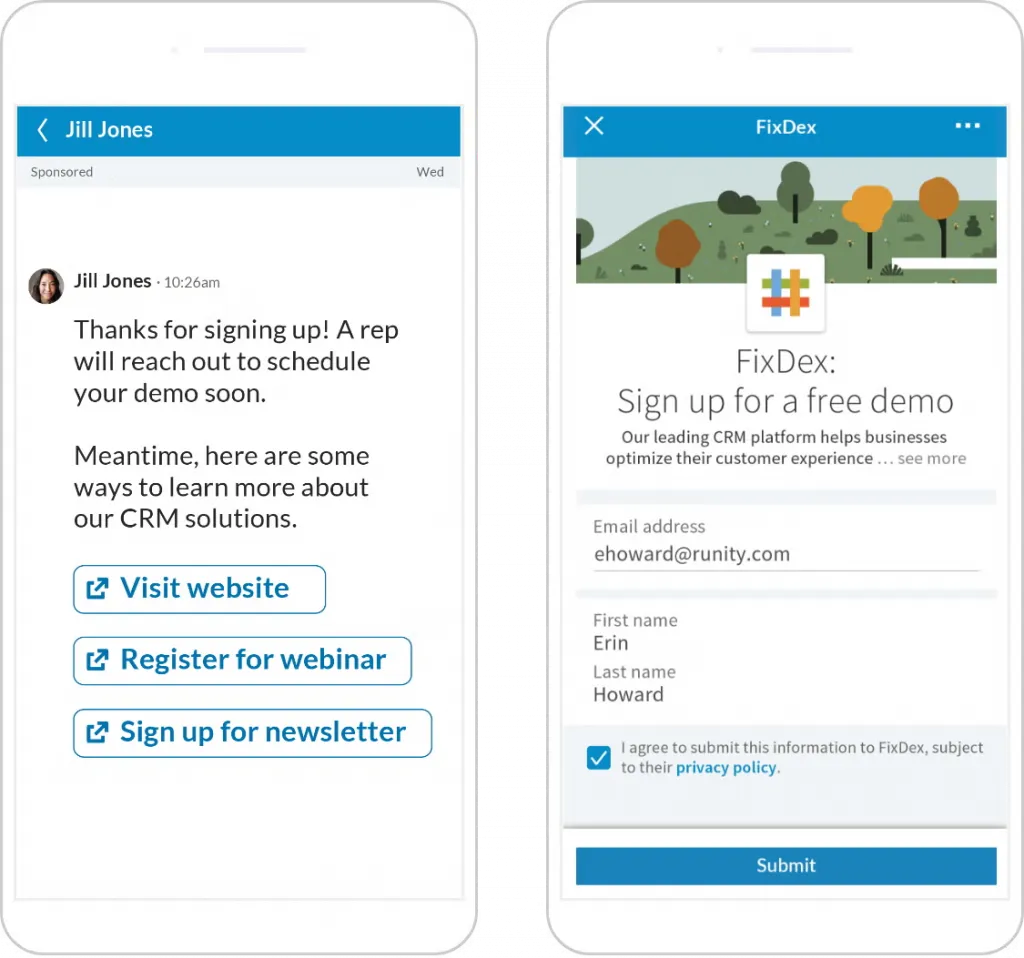
Each LinkedIn conversation starter ad includes response buttons that lead to different follow-up messages. This creates branching conversations, allowing prospects to select what they’re interested in — effectively self-qualifying as they move through the message flow.
This structure is very different from traditional display ads or single-message campaigns. Rather than interrupting users in the feed, linkedin conversation ads engage them in a space designed for professional communication.
The performance difference is noticeable. Many campaigns see 50–60% open rates and 2–5% click-through rates, while top-performing campaigns can reach 8–10% CTR.
Because of this engagement and built-in qualification, more B2B marketers are shifting toward conversation ads on LinkedIn in 2026 as a way to generate higher-intent leads.
In this guide, we’ll cover how LinkedIn conversation starter ads work, how to set them up, key specifications, copywriting strategies, and optimization tactics to improve campaign performance.
How Conversation Ads Work: The Interactive Messaging Experience
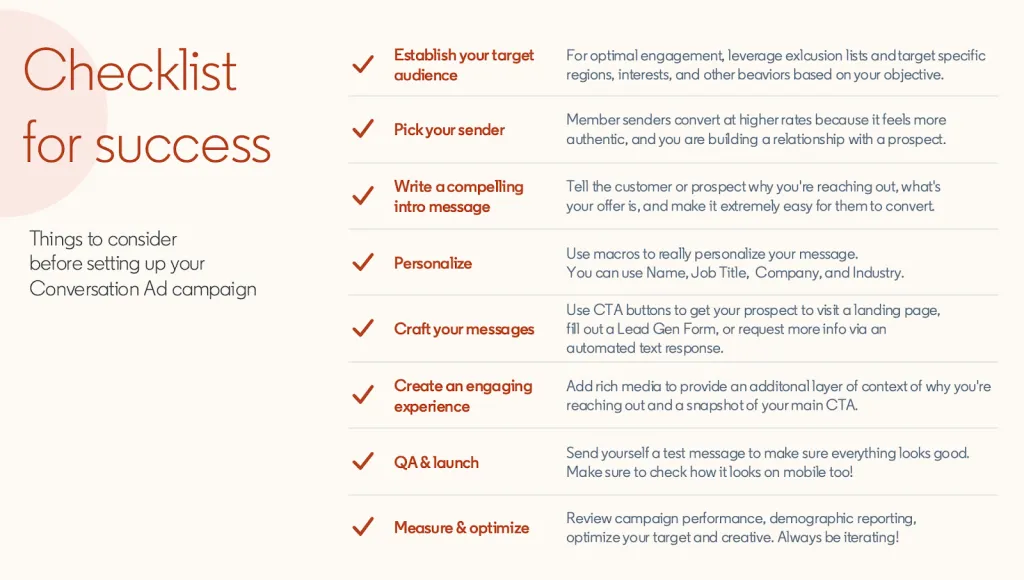
LinkedIn Conversation Ads are delivered directly to a user’s LinkedIn inbox, where they appear as a message from a company representative or brand. Because the placement is inside the messaging environment — rather than the feed — the format feels closer to a direct conversation than a traditional advertisement.
The core mechanic behind linkedin conversation ads is branching logic.
Instead of presenting one static call-to-action, the message includes multiple clickable options. When a user clicks a button, the conversation continues with a new follow-up message tailored to that choice.
Each message layer can include up to 5 CTA buttons, and a full LinkedIn conversation starter ad can contain up to 50 total buttons across the entire flow.
This creates a choose-your-own-path experience.
Example flow:
Initial message:
“Hi Alex — many B2B teams are focused on pipeline growth this quarter. What are you exploring right now?”
Buttons:
- Generate more leads
- Improve conversion rates
- See customer case studies
Each button opens a different follow-up message with relevant resources, links, or offers.
This structure turns conversation ads on LinkedIn into a built-in qualification system. Prospects effectively segment themselves by the choices they make.
Instead of sending one broadcast message to everyone, marketers can guide users through a short interactive journey that identifies their interests and intent.
The result: the campaign feels more like a one-to-one conversation than a mass marketing message.
Conversation Ads vs Message Ads: Which Format Do You Need?
Both Message Ads and LinkedIn Conversation Ads deliver sponsored messages to the LinkedIn inbox, but they work very differently.
Message Ads are straightforward: one message, one CTA, and one action.
Conversation Ads introduce a layered interaction with multiple choices and follow-up messages, creating a more engaging experience.
Key Differences
| Metric | Message Ads | Conversation Ads |
|---|---|---|
| Open Rate | Higher (60–70%+) | Slightly lower (50–60%) |
| Click-Through Rate | 0.5–2% | Higher: 2–5% (top 8–10%) |
| Response Type | Single interaction | Multiple interactions |
| Cost-per-Send | Lower ($0.50–1.50) | Higher ($0.75–2.00+) |
| Lead Quality | Requires higher volume | Typically higher-quality leads |
| Setup Complexity | Simple | Moderate to complex |
| Best For | Quick actions | Lead qualification, ABM |
Message Ads work best when the goal is speed and simplicity.
Use them when you need:
- Time-sensitive offers (webinars, events, launches)
- Broad outreach campaigns
- Simple calls-to-action such as “Register now”
- Budget-constrained campaigns with lower cost-per-send
Example:
A company promoting a webinar might send a single message with one button: “Reserve Your Spot.”
When to Use Conversation Ads
Conversation ads on LinkedIn are more effective when the campaign requires engagement and qualification.
They work well for:
- Complex B2B sales cycles
- Multi-touch nurturing campaigns
- Account-based marketing (ABM) programs
- Lead qualification before sales outreach
- Awareness campaigns where prospects explore multiple resources
Example:
A SaaS company targeting enterprise buyers might send a LinkedIn conversation starter ad asking prospects whether they want to:
- Explore product features
- Read case studies
- Calculate ROI
- Book a demo
Each path delivers different content, helping the company identify which prospects are most sales-ready.
LinkedIn Conversation Ads Technical Specifications & Limits
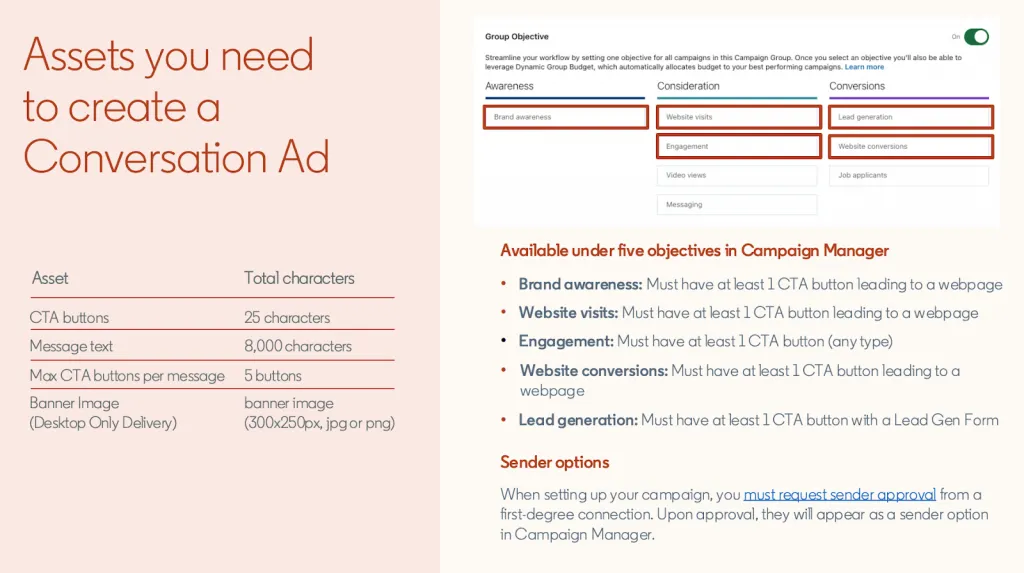
When creating linkedin conversation ads, understanding the format’s technical limits is important. These specifications determine how messages appear in the LinkedIn inbox and how interactive the conversation flow can become.
The format allows fairly long messages and multiple interaction paths, but successful conversation ads on LinkedIn usually stay concise to maintain a natural messaging experience.
Below is a clear reference table covering the main limits and requirements.
Ad Component Specifications
| Component | Specification | Notes |
|---|---|---|
| Ad Name | 255 characters max | Internal campaign organization only; not visible to users |
| Subject Line | 60 characters max | Appears as the first line in the inbox preview; keep it conversational and attention-grabbing |
| Intro Message | 8,000 characters max | Supports rich text (bold, italics, bullets) and up to 10 emojis |
| Follow-up Messages | 8,000 characters each | Each conversation layer can also include up to 10 emojis |
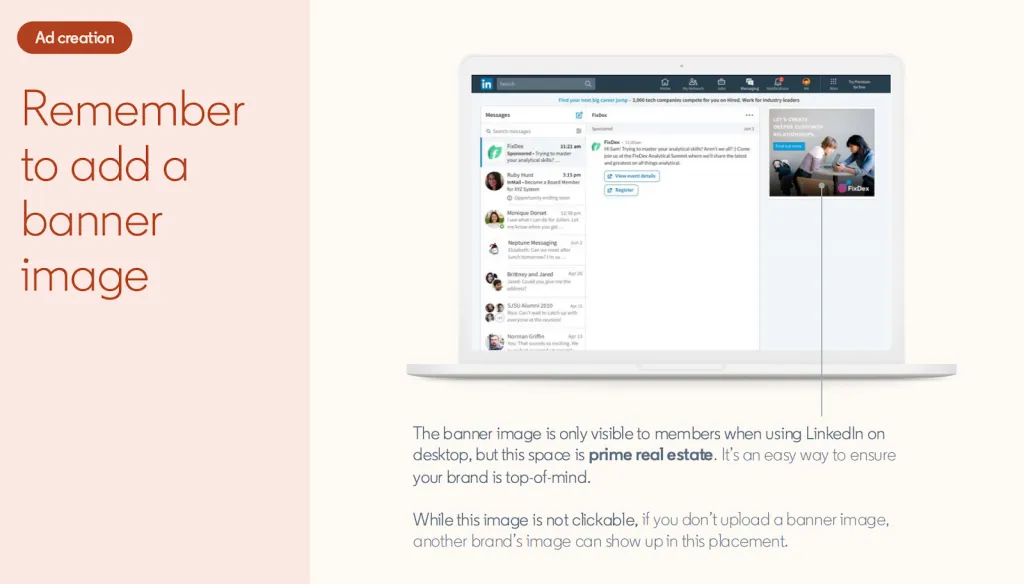
| Banner Image | 300 × 250 pixels | Displays on desktop; mobile rendering may vary |
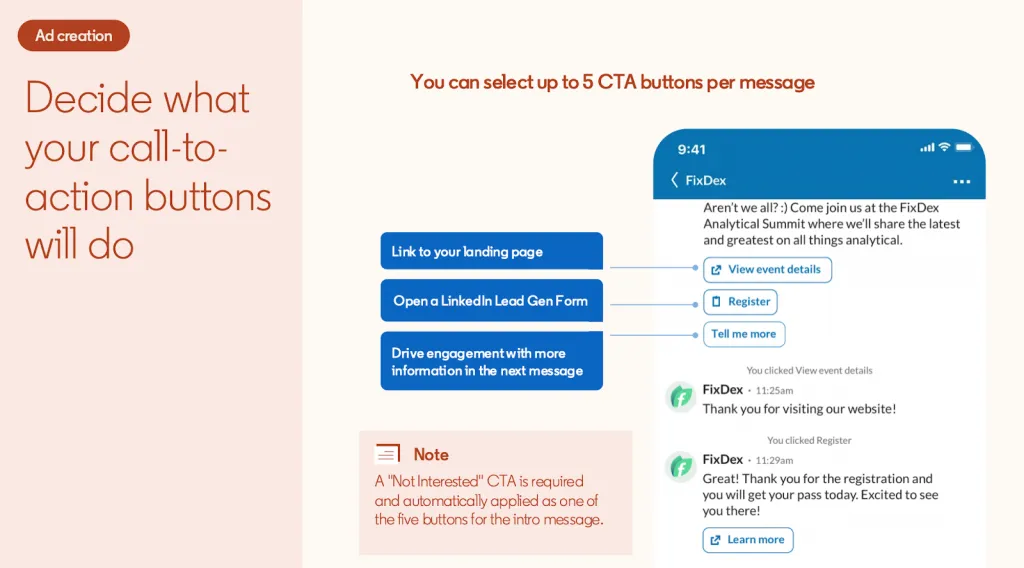
| CTA Buttons Per Message | Up to 5 | One “Not Interested” button is automatically included and counts toward the limit |
| Total Buttons Per Campaign | 50 maximum | Includes all buttons across every message layer |
| CTA Button Text | 25 characters max | Keep short and action-focused |
| Destination URL | 2,000 characters max | Must include http:// or https://; avoid special characters |
| Custom Footer | 20,000 characters max | Typically used for legal terms, disclaimers, or compliance language |
| Message Layers | 2–5 recommended | LinkedIn best practice for conversational flows |
| Macros / Dynamic Fields | Supported | Examples: first name, last name, company, job title, industry |
Why These Limits Matter
Even though the intro and follow-up messages allow up to 8,000 characters, most effective linkedin conversation starter ads use far less.
Long messages can feel like marketing emails rather than conversations. Shorter messages (100–300 words) usually perform better because they resemble real LinkedIn messaging behavior.
Similarly, while you can technically create dozens of branches, keeping 2–5 message layers helps maintain a clear user journey and prevents overwhelming prospects with too many choices.
Design Considerations for Desktop & Mobile
Because conversation ads on LinkedIn appear inside the messaging interface, the experience varies depending on device.
Banner Image Behavior
The 300 × 250 banner image primarily displays on desktop. On mobile devices, the image may appear smaller or in a different layout depending on screen size. Many campaigns treat the banner as a supporting visual rather than a core conversion element.
Message Display on Mobile
A large portion of LinkedIn messages are opened on mobile devices. This affects several elements:
- Subject lines should stay under ~40–50 characters to avoid truncation
- Paragraphs should be short for easy scanning
- CTA buttons should be concise
CTA buttons also wrap onto multiple lines on smaller screens, which is another reason to keep the button text well under the 25-character limit.
Rich Text Formatting
LinkedIn allows bold text, italics, and bullet points inside messages. However, in an interactive messaging format, heavy formatting can make the message feel like a document rather than a conversation.
Best practice is to keep formatting minimal and maintain a tone that feels like a natural one-to-one message rather than a formal marketing asset.
Setting Up High-Converting Conversation Ad Campaigns: A Strategic Framework
Successful linkedin conversation ads are not just messages — they are structured interaction funnels. Every element, from targeting to CTA design, influences whether recipients engage or ignore the message.
The framework below outlines 7 strategic steps for building high-performing conversation ads on LinkedIn, from audience targeting to conversation flow optimization.
Step 1 – Define Your ICP and Targeting Strategy
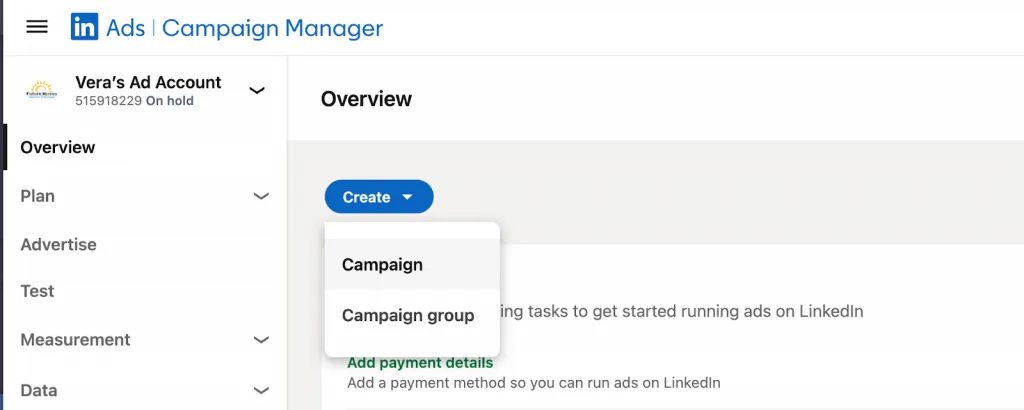
High-performing linkedin conversation starter ads start with a clearly defined Ideal Customer Profile (ICP).
Instead of targeting a broad audience, combine multiple LinkedIn targeting filters to reach decision-makers who closely match your ICP.
Common targeting layers include:
- Job title
- Seniority
- Industry
- Company size
- Geography
- Company attributes
For example, a SaaS company might target:
- C-level marketing leaders
- Located in US, UK, and Canada
- At companies with 200–2000 employees
- In B2B technology or SaaS
At the same time, it may exclude:
- Marketing agencies
- Vendors or consultants
- Existing customers
- Competitor companies
Many marketers also upload TAM (Total Addressable Market) lists, such as target account lists for ABM campaigns.
Best practice: keep audience segments relatively small and focused. Segments of 800–900 members often perform well because the messaging feels more personalized.
Step 2 – Choose Your Campaign Objective and Outcome
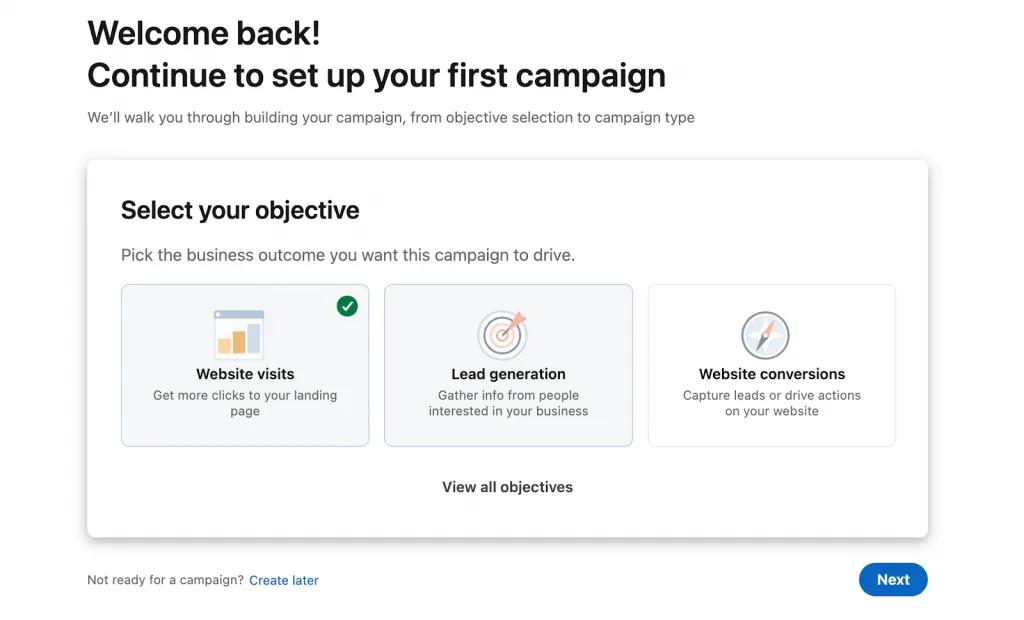
Before building your interactive messaging format, decide what success looks like.
Conversation ads on LinkedIn support several campaign objectives:
- Brand Awareness
- Website Visits
- Lead Generation
- Conversions
Your chosen objective should shape the entire conversation flow.
Examples:
Lead Generation objective
- Use LinkedIn Lead Gen Forms in CTA buttons
- Capture information directly inside LinkedIn
Website Visits objective
- Send users to a specific landing page
- Example: case study or product page
Event registration
- Conversation path leads to webinar signup page
Defining the outcome first ensures the conversation architecture guides users toward the desired action.
Step 3 – Select Your Sender (Critical for Open Rates)
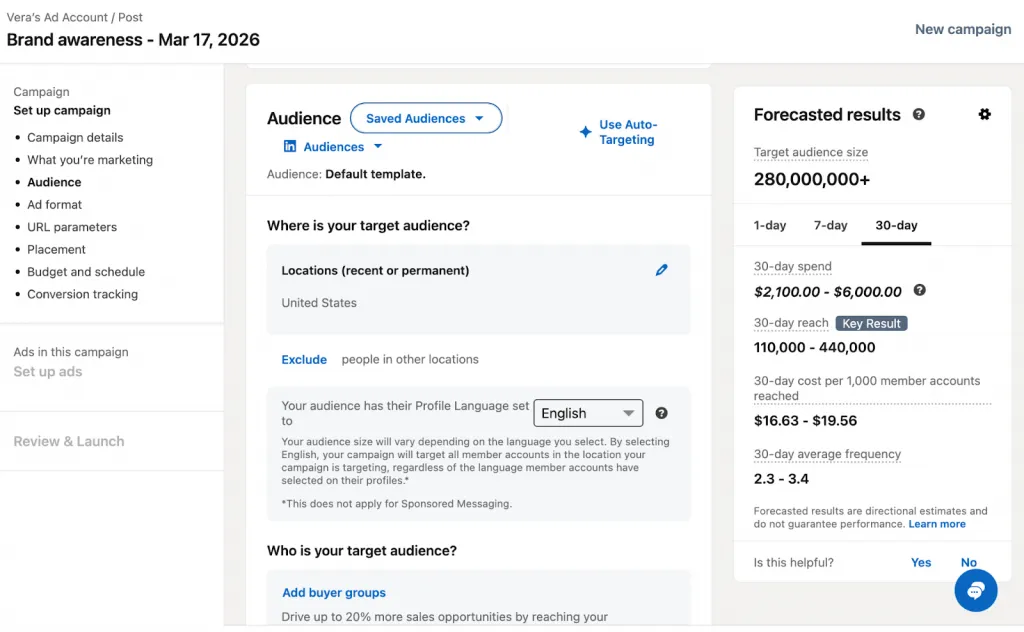
The sender identity plays a major role in linkedin conversation ads performance.
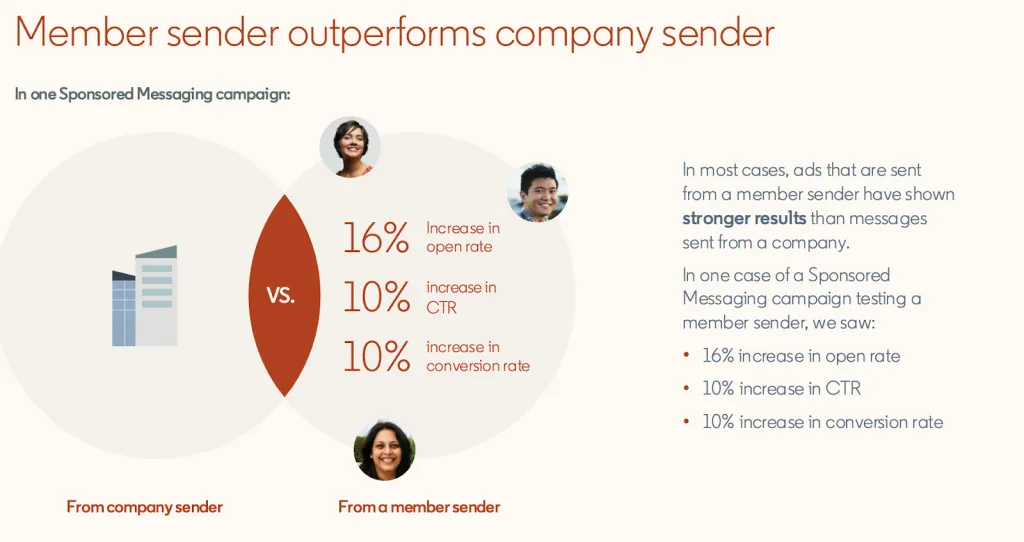
Unlike standard ads, these messages appear to come from a real person. The sender must be either a first-degree connection or approved by the recipient.
Research from several campaigns shows that sender selection can affect open rates significantly. Some industries even report ~5% higher open rates with female senders.
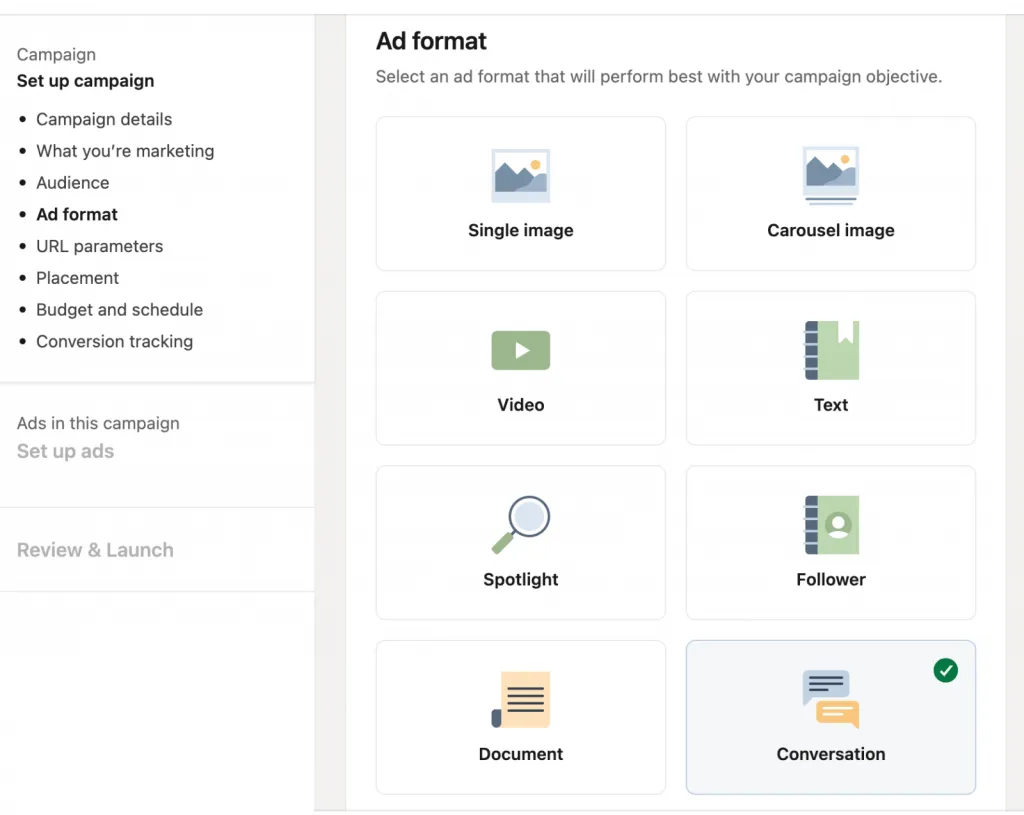
Strong sender characteristics include:
- Relevant role (e.g., marketing executive messaging marketing leaders)
- Active LinkedIn presence
- Credible title aligned with the audience
Avoid sending from generic company profiles or irrelevant job roles.
Example:
Instead of
“Sales Manager – Company Name”
Use
“VP of Marketing – Company Name” when targeting marketing leaders.
Best practice: test multiple senders to determine which generates the highest engagement.
Step 4 – Craft Your Subject Line (The Gateway)
The subject line is the first thing recipients see in their LinkedIn inbox.
With a 60-character limit, every word matters.
High-performing subject lines are usually:
- Short
- Conversational
- Slightly curiosity-driven
Common high-performing keywords include:
- Exclusive invitation
- Quick question
- Connect
- Opportunities
- Join us
Personalization can also increase relevance.
Examples:
- “Exclusive: 3 ways to reduce churn (your choice)”
- “[First Name], quick idea for you”
- “Join 200+ marketing leaders”
- “Quick question about [industry] trends?”
Testing multiple variations (benefit-focused vs curiosity-driven) can reveal what resonates with your audience.
Step 5 – Design Your Conversation Flow (The Architecture)
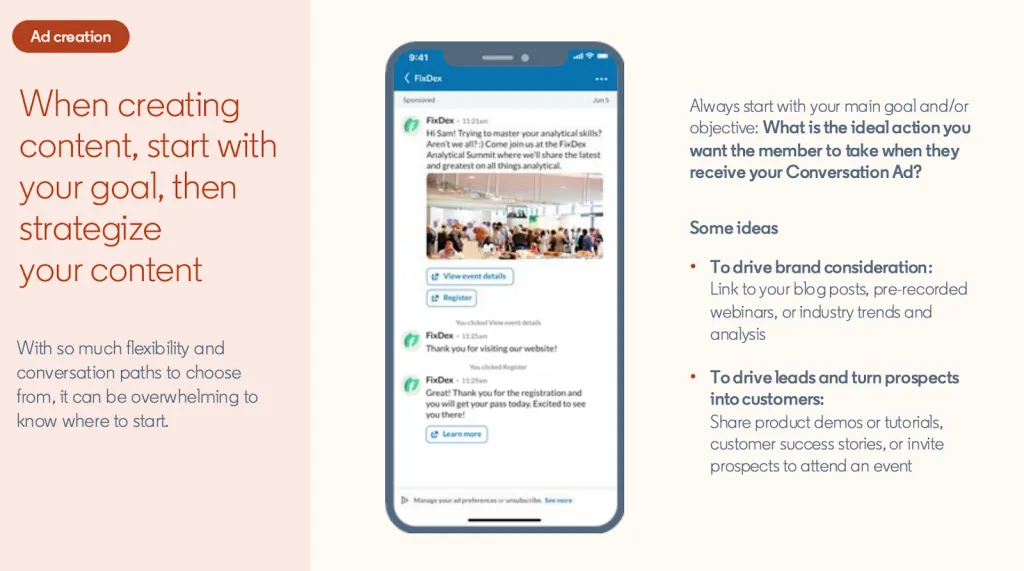
The structure of conversation ads on LinkedIn is what makes them powerful.
Each campaign consists of multiple message layers, where users choose how the conversation continues.
Recommended structure:
- 2–5 layers
- 2–5 CTA buttons per message
Typical conversation architecture:
Intro Message
↓
“Which challenge are you facing?”
↓
[Lead Generation] [Conversion] [Customer Retention]
Path A → resource → download CTA
Path B → case study → demo CTA
Path C → insight → webinar CTA
Example flow:
Layer 1 – Intro
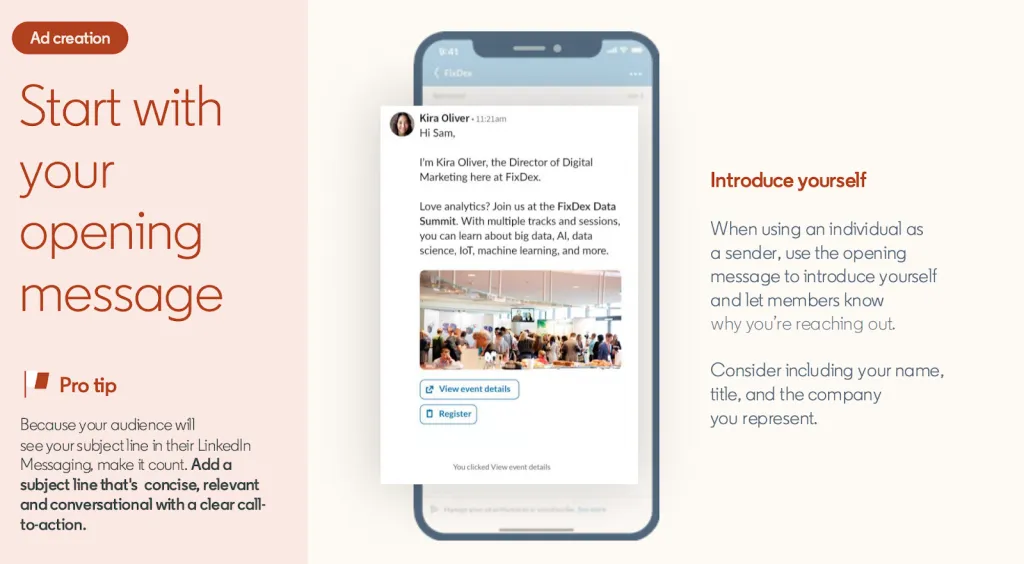
“Hi [First Name], many marketing teams are focusing on pipeline growth this quarter. Which area are you exploring?”
Buttons:
- Generate more leads
- Improve conversion
- See case studies
Layer 2
Each button leads to a tailored message and resource.
Final layer
Conversion action:
- Demo booking
- Resource download
- Lead form submission
Monitoring drop-off points is critical. If engagement drops sharply at Layer 2, the message or options may not be clear enough.
Step 6 – Write Compelling Copy for Each Layer
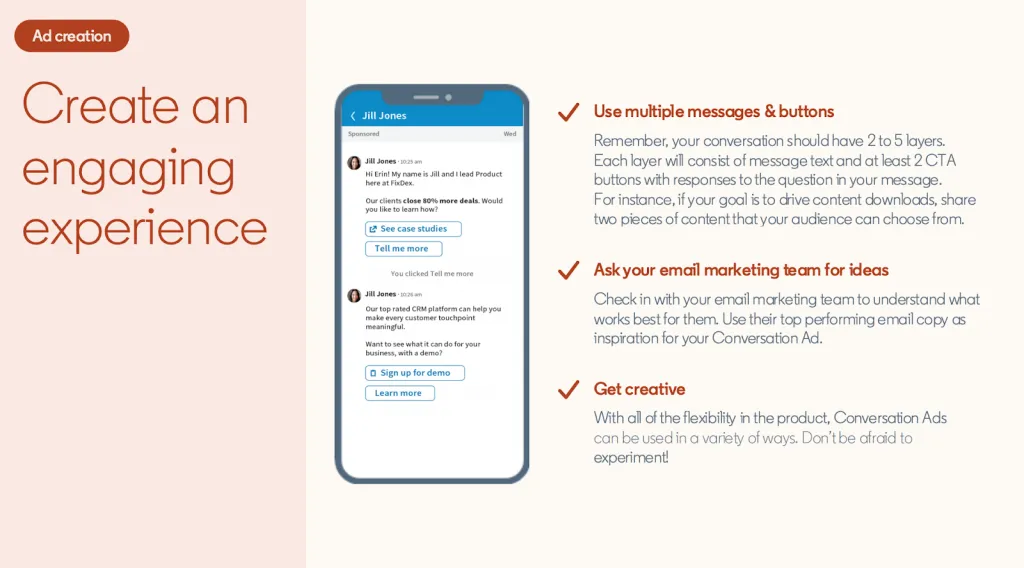
Copywriting determines whether the interactive messaging format feels natural or promotional.
Intro Message (Most Important)
Although LinkedIn allows 8,000 characters, high-performing messages are usually under 500 characters.
Best practices:
- Lead with value
- Ask a simple question
- Keep tone conversational
Example:
“Hi [First Name], we’ve helped over 200 SaaS companies reduce churn by 25%. I’m curious if this is something your team is thinking about right now.”
The message should naturally lead to the CTA choices.
Follow-Up Messages
Follow-up messages should directly match the path the user selected.
Example:
User clicked: “Improve conversion rates”
Follow-up message:
“Got it! Many teams we work with improved conversion by simplifying their lead qualification process. Want to see how they did it?”
Recommended message length:
150–300 characters
Copy Best Practices
Effective linkedin conversation ads copy typically follows these principles:
- Use conversational language
- Focus on prospect benefits
- Avoid heavy jargon
- Write short sentences
- Include social proof where possible
Example:
“Teams like HubSpot and Drift used this approach to increase pipeline by 30%.”
Use dynamic personalization macros, such as:
- {{firstName}}
- {{jobTitle}}
- {{company}}
- {{industry}}
Personalization makes the message feel closer to a real conversation.
Step 7 – Optimize CTA Buttons for Maximum Engagement
In linkedin conversation starter ads, each CTA button represents a different conversation path.
The wording of these buttons strongly affects engagement.
CTA Writing Best Practices
Button text is limited to 25 characters, so clarity is essential.
Strong examples:
- Download guide
- See case studies
- Watch demo
- Book consultation
Avoid weak or generic CTAs like:
- “Click here”
- “Submit”
- “Learn more”
CTA Button Actions
CTA buttons can trigger different actions:
- Open a LinkedIn Lead Gen Form
- Link to a landing page
- Trigger another message in the conversation flow
- Allow opt-out with “Not interested”
Button Placement Strategy
The number of buttons influences user choice.
Recommended approach:
- 2–3 buttons → clear decision path
- 4–5 buttons → broader exploration
Buttons should usually be ordered as:
- High-intent action
- Alternative option
- Educational content
- Low-intent exploration
- Not interested
Example:
- Book demo
- See case studies
- Download guide
- Learn more
Related reading:
- LinkedIn Lead Gen Forms: Best Practices and Examples
- Full LinkedIn advertising guide
- How long should a LinkedIn post or message be?
Proven Conversation Ad Copy Frameworks for B2B
The most effective linkedin conversation ads don’t rely on generic sales messages. Instead, they follow proven copy frameworks that guide prospects into an interactive messaging format while offering clear value.
Below are six battle-tested frameworks used in high-performing conversation ads on LinkedIn, including structure, examples, and ideal use cases.
Framework 1 – The Problem-Aware Hook
Structure
Pain Point Acknowledgment → Insight or Statistic → Offer
This approach immediately signals that you understand the recipient’s challenge. It works well when your audience is already aware of a problem but may not know the best solution.
Example
“Marketing directors in {{industry}} are telling us their biggest challenge right now is predictable pipeline growth.
Teams we work with have been reducing that gap by 30–40% using a new outbound scoring model.
Worth a quick 5-minute chat to see if it’s relevant for your team?”
Button options
- Share your approach
- Show me examples
- Not now
When to use
- Cold audiences
- Problem-aware prospects
- Mid-funnel engagement
Framework 2 – The Opportunity Lead
Structure
Exclusive Access → Specific Benefit → Offer
Instead of highlighting a problem, this framework focuses on a potential upside or opportunity.
It positions the sender as someone offering valuable insights rather than selling.
Example
“We’ve helped 45 SaaS companies improve pipeline conversion by 20–35% this year.
I’ve got a few case studies from teams in {{industry}} that might be relevant for you.
Want me to send one over?”
Button options
- Send case studies
- Schedule 15-min chat
- I’ll pass
When to use
- Warm audiences
- Decision-makers
- Prospects who already know your brand
Framework 3 – The Question-Driven Engagement
Structure
Genuine Question → Multiple-Choice Answers → Branching Paths
This format is particularly powerful for linkedin conversation starter ads because it uses the platform’s branching conversation logic.
Instead of pitching immediately, you ask a question that lets prospects self-identify their priorities.
Example
“Quick question:
Of these challenges, which is weighing most on your marketing team right now?”
Buttons:
- Generating qualified leads
- Improving pipeline conversion
- Scaling outbound
- None of these
Each option leads to a different conversation path, delivering tailored content or resources.
Benefit
This framework acts as a real-time qualification system.
When to use
- Lead qualification funnels
- Multi-persona campaigns
- Account-based marketing programs
Framework 4 – The Social Proof Lead
Structure
Recognizable Names → Outcome → Offer
People trust results from companies similar to theirs. This framework uses credibility and peer validation to build trust quickly.
Example
“Companies like Notion, Airtable, and Monday.com recently improved their outbound pipeline by 30%+ using intent-driven prospecting.
We documented how they approached it. Want to take a look?”
Button options
- Show me
- Learn more
- Not interested
When to use
- Brand awareness campaigns
- Competitive positioning
- Audiences that value peer benchmarks
Framework 5 – The Time-Sensitive Urgency
Structure
Exclusive Offer → Deadline → Clear Action
Urgency can significantly improve engagement in conversation ads on LinkedIn, but it should be used sparingly to avoid feeling overly promotional.
Example
“We’re hosting a private roundtable for marketing leaders next week on scaling outbound pipelines in 2025.
There are 15 spots available, and we’re inviting a few leaders in {{industry}} to join. Interested?”
Button options
- Reserve spot
- Learn details
- Maybe later
When to use
- Event promotion
- Limited-time campaigns
- Product launches or promotions
Framework 6 – The Educational Authority
Structure
Credibility Marker → Insight → Offer
This framework positions your brand as a trusted source of industry knowledge, which works well for early-stage engagement.
Example
“Our latest 2025 B2B Pipeline Benchmark Report uncovered something surprising:
Companies using multi-touch outbound are generating 2.7x more qualified opportunities than traditional outreach models.
We’re sharing the report with a small group of marketing leaders this week. Want a copy?”
Button options
- Send the report
- Share with team
- Not now
When to use
- Thought leadership campaigns
- Top-of-funnel awareness
- Educational lead generation
Choosing the Right Framework
Different frameworks perform better depending on audience awareness and campaign goals.
A simple rule of thumb for linkedin conversation ads:
- Cold audiences → Problem-aware or educational frameworks
- Warm audiences → Opportunity or social proof
- Qualification funnels → Question-driven format
- Events or launches → Time-sensitive urgency
By aligning the framework with the audience’s stage in the buying journey, linkedin conversation starter ads can guide prospects naturally through an engaging interactive messaging format rather than a traditional sales pitch.
LinkedIn Conversation Ads Best Practices: 15 Tactics That Drive Results
Running effective linkedin conversation ads requires more than writing a message and pressing launch. The highest-performing campaigns follow proven tactics that improve open rates, engagement, and lead quality.
Below are 15 practical best practices that consistently improve results when running conversation ads on LinkedIn.
1. Layer Your Targeting (Don’t Spray and Pray)
Broad targeting reduces relevance and increases cost per send.
Instead, combine multiple targeting filters:
- Job title
- Seniority
- Industry
- Company size
- Geography
Example audience:
800–900 C-level marketing leaders in the US, UK, and Canada, excluding agencies and vendors.
You can also upload TAM lists (Total Addressable Market) or integrate first-party data for account-based targeting.
More precise targeting improves message relevance, which typically increases open and click-through rates while lowering wasted spend.
2. Use Conversational, Not Salesy, Tone
LinkedIn conversation starter ads work best when they feel like a natural professional message.
Avoid:
- Corporate language
- Overly formal phrasing
- Heavy business jargon
Example:
Good
“Hey {{firstName}}, quick thought—teams in your space are solving pipeline gaps this way…”
Bad
“Greetings {{firstName}}, we would like to inform you of a compelling enterprise solution…”
Use short sentences, contractions, and a tone that sounds like a colleague reaching out, not a corporate broadcast.
3. Lead With Value, Not the Ask
Starting with a request (like booking a meeting) is one of the fastest ways to lose engagement.
Instead:
- Provide context
- Share an insight
- Then introduce the offer
Example structure:
“Based on what we’re seeing with SaaS companies right now, many are struggling with lead qualification.
Teams using this approach reduced wasted sales time by 35%.
Would it be useful to see how they did it?”
This approach builds credibility before asking for action.
4. Personalize With Macros (But Don’t Overdo It)
linkedin conversation ads support dynamic fields such as:
- {{firstName}}
- {{jobTitle}}
- {{company}}
- {{industry}}
Used correctly, personalization can improve open rates by 10–15%.
Example:
“Hi {{firstName}}, we recently worked with a team similar to {{company}} on improving outbound response rates.”
Avoid overusing macros in every sentence, which can make messages feel robotic.
5. A/B Test Subject Lines Ruthlessly
The subject line has the largest influence on open rates.
Test variations such as:
- Curiosity vs direct benefit
- Personalized vs non-personalized
- Social proof vs outcome-driven
Example tests:
- “Exclusive invitation” vs “{{firstName}}, quick idea for you”
- “Join 200+ marketing leaders” vs “How we reduced CAC by 40%”
Strong subject lines often produce 55–65% open rates.
6. Keep Messages Short and Scannable
Although messages in conversation ads on LinkedIn can contain thousands of characters, engagement drops quickly with long text.
Best practice:
150–300 characters per message
LinkedIn data shows messages over 500 characters often see lower engagement.
Write short paragraphs and keep the message easy to read on mobile.
7. Design Clear Conversation Flows (2–5 Layers)
The most effective interactive messaging format uses structured conversation paths.
Recommended structure:
- 2–3 main branches
- 2–5 layers total
Too few paths creates a rigid experience. Too many paths can overwhelm users.
Monitor drop-off rates by layer to identify where users disengage.
8. Use Multiple CTA Buttons to Give Choices
A single CTA often feels like a forced decision.
Using 2–4 CTA buttons allows recipients to choose what interests them.
Example:
“Which would be most useful?”
Buttons:
- See demo
- Watch case study
- Download guide
- Not now
Choice makes the interaction feel more natural and increases engagement.
9. Exclude Previous Converters and Competitors
Budget efficiency improves significantly when irrelevant audiences are removed.
Common exclusions include:
- Existing customers
- Competitors
- Roles outside your ICP
- Companies you cannot service
Regularly reviewing audience demographics can reduce wasted spend by 30–40%.
10. Include Social Proof in Follow-Up Messages
The first message should introduce the opportunity or challenge.
Follow-up messages should provide proof.
Examples include:
- Client logos
- Case study snippets
- Specific results
- Third-party research
Example:
“Three SaaS companies in your space increased outbound pipeline by 28% using this model.”
Social proof builds trust before the conversion ask.
11. Use Conditional CTA Logic for Qualification
One of the biggest strengths of linkedin conversation ads is conditional logic.
Example:
If a prospect clicks:
“Struggling with lead generation”
The next message addresses that challenge.
If they click:
“Already have a solution”
The follow-up might highlight integrations or optimization strategies.
This approach creates personalized conversations at scale.
12. Test Sender Identity and Seniority
Sender identity strongly influences engagement.
Observed trends include:
- Female senders sometimes generate ~5% higher open rates
- Sender titles should match the audience’s seniority
- Active LinkedIn profiles perform better
Example:
A VP of Marketing messaging marketing leaders often performs better than a junior sales rep.
Test different senders and track results.
13. Include Rich Media When Engagement Dips
Adding visual elements can improve engagement when messages feel repetitive.
Options include:
- Banner images (300 × 250 px)
- Branded graphics supporting the message
- Video links (with expanded support rolling out in 2025)
Images appear mainly on desktop, so they should reinforce the message rather than carry it.
Always test campaigns with and without images.
14. Set Budget and Bid Strategy for Auction Success
LinkedIn Conversation Ads use a cost-per-send (CPS) model.
Typical CPS range:
$0.50 – $3.00 per send
Factors affecting cost include:
- Audience competitiveness
- Geography (US and UK tend to be higher)
- Seniority level (C-suite costs more)
Best practice:
- Start with $50–$100+ daily budget
- Monitor send volume and CPS
- Adjust bids if campaigns are not winning auction placements
Frequency caps currently allow up to 3 sends per person within 7 days, with 21 days before retargeting the same user again.
15. Measure and Optimize by Drop-Off Layer
The real optimization opportunity in conversation ads on LinkedIn comes from analyzing engagement across each message layer.
Key metrics to track:
- Open rate
- Click-through rate
- Conversion rate per path
Common issues:
High opens but low clicks → intro message unclear
Uneven button clicks → CTA options unbalanced
Low form completion → form friction
Optimization steps:
- Rewrite the intro message
- Reorder CTA buttons
- Simplify conversation branches
- Test new offers or resources
Improving even one layer of the conversation flow can significantly increase campaign performance across the entire funnel.
LinkedIn Conversation Ads Benchmarks: What Good Performance Looks Like in 2025
Performance for linkedin conversation ads can vary depending on several factors, including industry, targeting precision, audience familiarity with your brand, and the strength of the offer.
However, across most B2B campaigns in 2025, the format consistently delivers higher engagement than traditional LinkedIn feed ads.
For context, typical Sponsored Content campaigns often generate 0.3–0.5% click-through rates, while conversation ads on LinkedIn regularly achieve several times that level of engagement.
Industries such as B2B SaaS, professional services, and technology tend to see the strongest results due to longer sales cycles and higher interest in educational content.
The single biggest performance variable remains message quality and conversation design.
Industry Benchmarks (Typical Ranges)
The table below shows typical performance ranges for linkedin conversation starter ads based on aggregated campaign data and industry benchmarks.
| Metric | Benchmark Range | Top Performers | Notes |
|---|---|---|---|
| Open Rate | 50–60% | 70%+ | Driven by subject line, sender identity, and audience relevance |
| Click-Through Rate | 2–5% | 8–10% | Interactive flows increase engagement compared to single-message formats |
| Conversion Rate (click → action) | 10–20% | 25%+ | Higher when using native lead forms or strong offers |
| Cost-per-Send (CPS) | $0.75–$1.50 | $0.50–$1.00 | Lower with niche audiences and less competitive segments |
| Cost-per-Click (CPC) | $0.50–$1.50 | $0.25–$0.75 | High CTR combined with low CPS reduces CPC |
| Cost-per-Lead | $5–$15 | $2–$8 | Often lower than many other LinkedIn ad formats |
| Cost-per-Demo | $25–$75 | $15–$40 | Highly dependent on offer and follow-up quality |
| Engagement Rate | 10–25% | 30%+ | Includes opens, clicks, and form submissions |
These benchmarks demonstrate why many marketers increasingly prioritize linkedin conversation ads for lead generation and qualification campaigns.
Why Conversation Ads Often Outperform Feed Ads
The performance difference comes from the interactive messaging format.
Instead of competing for attention in the feed, the ad appears inside the LinkedIn inbox, which users already associate with professional communication.
Additionally, branching conversation flows allow recipients to choose what interests them, which increases engagement and helps qualify prospects earlier in the funnel.
Because of this structure, conversation ads on LinkedIn often produce:
- Higher click-through rates
- Higher lead quality
- More engaged prospects
However, results can vary widely depending on targeting and messaging strategy.
Key Performance Indicators to Track
To evaluate the effectiveness of linkedin conversation starter ads, marketers should monitor both primary performance metrics and deeper engagement indicators.
Primary KPIs
These metrics determine overall campaign success.
Open Rate
The percentage of recipients who open the message from their inbox.
Strong campaigns typically exceed 50%.
Click-Through Rate (CTR)
The percentage of recipients who click a CTA button inside the conversation flow.
Form Completion Rate
The percentage of users who complete a Lead Gen Form or other conversion action after clicking.
Cost-per-Qualified-Lead
Total campaign spend divided by the number of qualified leads generated.
Secondary KPIs
These metrics provide insight into engagement quality.
Engagement Rate
The percentage of recipients who interact with the campaign through opens, clicks, or form submissions.
Drop-Off Rate by Layer
Tracks where users exit the conversation flow.
Example:
If many users leave after Layer 2, the message or CTA options may not be compelling enough.
Button Click Distribution
Analyzes which CTA buttons receive the most clicks. This can reveal which value propositions resonate with your audience.
Time-to-Action
Measures how quickly recipients interact with the message after it’s delivered.
Optimization KPIs
These metrics help improve efficiency over time.
Cost-per-Send (CPS)
Used to evaluate auction competitiveness and bid efficiency.
Audience Size
For best delivery and relevance, many campaigns perform best with 500–1,500 recipients per segment.
Exclusion Rate
The percentage of potential recipients excluded through targeting rules, ensuring the campaign reaches only the most relevant prospects.
Monitoring these metrics together helps marketers identify which parts of their conversation ads on LinkedIn are working and where improvements can unlock better engagement, lower costs, and higher-quality leads.
Related reading:
10 Common Mistakes That Sabotage LinkedIn Conversation Ad Performance (And How to Fix Them)
Even well-funded linkedin conversation ads campaigns can underperform when basic strategic mistakes are present. Because the format relies on engagement and interaction, small issues in copy, targeting, or flow design can dramatically reduce results.
Below are 10 common mistakes marketers make with conversation ads on LinkedIn, along with the root cause, impact, and practical fixes.
1. Unclear or Generic Subject Lines
Root cause
Rushed copywriting or reliance on generic templates.
Impact
Low open rates — often 30–40% instead of the typical 50–60% benchmark.
Example
Bad:
“Exciting announcement from our team”
Good:
“{{firstName}}, quick insight on Q1 {{industry}} trends”
Fix
- Write conversational subject lines
- Use personalization macros when appropriate
- Lead with curiosity or a clear benefit
- Test multiple variations through A/B experiments
2. Linear, Single-Path Conversation Flows
Root cause
Campaigns are designed like email messages rather than an interactive messaging format.
Impact
You can lose 30–50% of potential engagement because different audience segments need different conversation paths.
Example
Instead of one CTA:
Use branching options:
“Which challenge matters most?”
- Generate more leads
- Improve conversion rates
- Reduce churn
Each option leads to a tailored message and resource.
Fix
Design 2–3 branches at the intro level, each addressing different personas or pain points.
3. Targeting Too Broadly (Or Too Narrowly)
Root cause
Two extremes:
- “More reach equals more leads”
- Overly restrictive ICP targeting
Impact
Broad targeting → unqualified clicks and higher cost-per-send.
Tiny audiences → campaigns fail to deliver.
Fix
Aim for a balanced audience size of 800–1500 people.
Combine multiple criteria such as:
- Job title
- Seniority
- Industry
- Company size
This improves relevance and delivery.
4. Leading With Product, Not Problem
Root cause
Company-centric messaging that focuses on product features.
Impact
Messages feel promotional and disengaging.
Example
Bad:
“Our platform includes 50+ automation features for marketing teams.”
Good:
“We’re seeing marketing teams reduce admin work by 15 hours per week using a new automation approach.”
Fix
Start with the prospect’s challenge or insight, then introduce the product as the solution later in the conversation.
5. Messages That Are Too Long
Root cause
Trying to communicate everything in a single message.
Impact
Messages longer than 500 characters tend to see lower engagement, especially on mobile.
Fix
- Keep messages between 150–300 characters
- Break ideas into multiple conversation layers
- Focus each message on one clear idea
Shorter messages better match the messaging-style UX of LinkedIn inbox conversations.
6. Too Many CTA Buttons (Analysis Paralysis)
Root cause
Offering too many possible actions.
Impact
Users hesitate when faced with too many choices, which lowers click rates.
Example
Poor approach:
- Book demo
- Watch webinar
- Download guide
- View pricing
- Learn more
Fix
Limit most messages to 2–4 CTA buttons.
Example:
“Which would be most helpful?”
- See demo
- Watch case study
- Not now
Clear choices increase engagement.
7. Poor Sender Selection
Root cause
Using generic company senders or random employees.
Impact
Open rates can vary 5–10% depending on sender credibility.
Messages from irrelevant senders are more likely to be ignored.
Fix
Choose senders who:
- Match the audience’s seniority
- Are credible in their role
- Are active on LinkedIn
Example:
A VP of Marketing messaging marketing leaders is more effective than a generic sales rep.
Test multiple senders to identify top performers.
8. Not Excluding Previous Converters
Root cause
Campaign audiences are reused without exclusions.
Impact
Budget is wasted messaging people who already converted.
This also creates audience fatigue.
Fix
Always exclude:
- Existing customers
- Previous form submitters
- Demo bookings
- Sales-qualified leads
This keeps linkedin conversation starter ads focused on new opportunities.
9. Weak or Generic CTAs
Root cause
Using default button text such as “Learn more.”
Impact
Low click-through rates because the action lacks clear value.
Example
Weak CTA:
“Click here”
Strong CTAs:
- Download guide
- See demo
- Watch case study
- Schedule 15-min chat
Fix
Use specific, action-driven CTA text that clearly communicates the benefit.
10. Ignoring Mobile Optimization
Root cause
Designing messages primarily for desktop viewing.
Impact
Many recipients open conversation ads on LinkedIn on mobile devices. Poor formatting reduces readability and engagement.
Fix
- Keep text short and scannable
- Test messages on mobile before launching
- Ensure CTA buttons wrap cleanly
- Avoid large text blocks
Designing with mobile-first messaging significantly improves engagement.
The Pattern Behind Most Conversation Ad Failures
Most underperforming linkedin conversation ads fail for one core reason: they treat the campaign like a traditional advertisement rather than a conversation.
Successful campaigns behave more like guided messaging interactions:
- Short messages
- Clear choices
- Personalized paths
- Relevant senders
When these elements are implemented correctly, conversation ads on LinkedIn can deliver significantly higher engagement and lead quality than most other B2B ad formats.
LinkedIn Conversation Ads Setup Checklist: Launch-Ready Framework
Launching effective linkedin conversation ads requires preparation across targeting, messaging, and campaign configuration. The checklist below provides a practical, step-by-step framework you can use to ensure your conversation ads on LinkedIn are fully optimized before, during, and after launch.
Pre-Launch Checklist
Use this phase to design the strategy and conversation flow before creating the campaign.
Audience & Targeting
Define your Ideal Customer Profile (ICP)
Confirm audience size (ideal range: 800–1500 recipients)
Build layered targeting criteria (minimum 3–4 filters):
- Job title
- Seniority
- Industry
- Company size
- Geography
Upload TAM list or account list if running ABM
Create exclusion lists:
- Competitors
- Previous converters
- Existing customers
- Non-relevant roles
Sender Preparation
Select a credible sender aligned with the target audience
Ensure sender profile is active on LinkedIn
Confirm recipients can receive messages from the sender
Brief sender on campaign purpose and messaging
Conversation Architecture
Brainstorm 3–5 subject line variations
Draft conversation flow structure
Map 2–3 main branches
Design 2–5 message layers
Example flow:
Intro → Challenge selection → Resource path → Conversion CTA
Copywriting
Write intro message using value-first approach
Draft follow-up messages for each branch
Ensure tone is conversational, not sales-heavy
Keep messages 150–300 characters where possible
CTA & Conversion Setup
Design 4–6 CTA variations to test
Confirm CTA button text ≤25 characters
Prepare destination URLs or landing pages
Create LinkedIn Lead Gen Form if using native lead capture
Creative Assets
Prepare banner image (300 × 250 px) if using visuals
Ensure image supports the message rather than distracts
Testing & Strategy
Plan A/B tests:
- Subject lines
- CTA wording
- Sender variations
Define initial budget allocation ($50–$100+ daily recommended)
Establish success metrics:
- Open rate target
- CTR target
- Conversion target
Launch Checklist
Once preparation is complete, configure the campaign in LinkedIn Campaign Manager.
Campaign created in LinkedIn Campaign Manager
Objective selected (Lead Generation, Website Visits, etc.)
Audience targeting configured
Inclusion and exclusion lists applied
Sender added and approved
Messaging Setup
Subject line entered (≤60 characters)
Intro message reviewed and finalized
Conversation branches created
Follow-up messages added for each path
CTA Configuration
CTA buttons created
Button text verified (≤25 characters)
URLs or Lead Gen Forms connected to buttons
Quality Assurance
Test message sent internally for QA
Mobile readability checked
CTA button links verified
Conversation logic confirmed
Budget & Delivery Settings
Budget and bid set
Frequency cap configured (max ~3 sends per person within 7 days)
Campaign launched
Monitoring dashboard created
Post-Launch Checklist (Days 1–7)
The first week is critical for identifying early performance signals in linkedin conversation starter ads.
Monitor delivery and cost-per-send (CPS)
Check open rates (target 50%+ within first few days)
Analyze CTR by CTA button
Identify which options drive engagement
Review audience demographics to confirm targeting accuracy
Early Optimization
Run A/B tests on subject lines
Test new CTA variations
Adjust message wording if engagement is low
Monitor conversion rates:
- Lead form completion
- Landing page actions
Post-Launch Checklist (Week 2+)
After sufficient data is collected, focus on deeper optimization.
Analyze drop-off by conversation layer
Identify where users leave the conversation flow
Calculate key metrics:
- Cost-per-lead
- Cost-per-demo
- Conversion rate
Campaign Optimization
Exclude low-performing targeting segments
Refine messaging based on engagement patterns
Reorder CTA buttons if one option dominates clicks
Simplify conversation paths if drop-off is high
Scaling
Increase budget if performance exceeds KPI targets
Launch additional campaigns for:
- New audience segments
- New offers or content
- Different conversation frameworks
Prepare the next wave of conversation ads on LinkedIn based on insights from the first campaign.
Advanced Conversation Ad Strategies: Beyond the Basics
Once you’ve mastered the fundamentals of linkedin conversation ads, the next step is using the format strategically across the full marketing funnel. Advanced campaigns move beyond simple lead generation and turn conversation ads on LinkedIn into tools for account-based marketing, multi-touch nurturing, persona qualification, and brand authority.
Below are several advanced strategies experienced B2B marketers use to maximize the impact of this interactive messaging format.
Account-Based Marketing (ABM) With Conversation Ads
Use case
High-value target accounts where individual deals may be worth tens or hundreds of thousands of dollars.
Strategy
Instead of broad audience targeting, focus on a small set of strategic accounts (10–100 companies).
Steps:
- Upload your target account list as a custom LinkedIn audience.
- Build personalized conversation flows for that account segment.
- Tailor messaging using dynamic fields like:
- {{company}}
- {{industry}}
- {{jobTitle}}
Example intro message:
“We’ve recently worked with three companies similar to {{company}} in {{industry}} to improve their outbound pipeline. Curious if this is something your team is exploring right now?”
Conversation flow
Different branches can address roles within the account:
Intro → “What’s your focus right now?”
- Marketing strategy
- Sales pipeline
- RevOps / operations
Each branch delivers role-specific messaging and resources.
Metrics to track
- Meeting bookings
- Pipeline value created
- Deal velocity
ABM-focused linkedin conversation starter ads often produce fewer leads but significantly higher-quality opportunities.
Multi-Touch Nurture Sequences
Use case
Products with long B2B sales cycles that require multiple interactions before conversion.
Strategy
Instead of running a single campaign, create a sequence of conversation ads over time.
Example nurture structure:
Campaign 1 – Awareness
Problem-focused messaging introducing the industry challenge.
Campaign 2 – Education
Share guides, reports, or case studies addressing the problem.
Campaign 3 – Demand Generation
Invite prospects to:
- Book a demo
- Start a trial
- Join a strategy call
Use retargeting audiences to reach people who opened or clicked previous campaigns but did not convert.
Measurement
Track:
- Conversion rate by touchpoint
- Engagement progression across campaigns
- Time-to-conversion
This strategy turns conversation ads on LinkedIn into a structured nurture funnel.
Multi-Persona Branching
Use case
Products that serve multiple roles within an organization.
Example personas:
- Marketing leaders
- Sales leaders
- Operations or RevOps teams
Strategy
Use the first message to identify the recipient’s role.
Example intro:
“Quick question — which best describes your role?”
Buttons:
- Marketing
- Sales
- Operations
Each path then delivers persona-specific messaging and resources.
Example structure:
Intro → Persona selection → Role-specific content → Conversion CTA
Marketing branch example:
“Many marketing teams are focused on improving pipeline attribution right now. Want to see how teams are solving it?”
Sales branch example:
“Sales leaders we work with are prioritizing faster deal cycles. Want to see the playbook?”
Benefits
- Better message relevance
- Higher engagement rates
- Automatic persona segmentation
This is one of the most powerful applications of linkedin conversation ads.
Conversation Ads for Thought Leadership
Use case
Brand awareness and positioning executives as industry experts.
Unlike many formats, conversation ads on LinkedIn can support awareness campaigns while still creating engagement.
Strategy
Lead with insights, research, or industry data rather than product promotion.
Example message:
“Our latest research uncovered something surprising about B2B pipeline generation in 2025: companies using intent signals are creating 2.3× more opportunities.”
Follow-up CTA:
“Want to see the full report?”
Flow example:
Insight → Resource offer → Lead Gen Form → Thank-you message with additional content.
Metrics to track
- Reach
- Engagement rate
- Content downloads
- Brand interaction signals (via LinkedIn Insight Tag)
This approach positions your brand as an authority rather than a vendor.
Retargeting Non-Converters
Use case
Prospects who engaged with your campaign but did not convert.
These users are often your most promising leads because they already showed interest.
Strategy
Create a separate campaign targeting:
- Users who opened the message
- Users who clicked a CTA
- Users who visited the landing page
Deliver new messaging with a different angle.
Example retarget message:
“Saw you checking out our guide earlier.
A few teams asked for real examples, so we put together a short case study showing how a SaaS company increased pipeline by 40%. Want to see it?”
Possible CTA options:
- Show case study
- Book quick walkthrough
- Not now
Frequency guidance
Because linkedin conversation starter ads have delivery limits (roughly 3 sends per person within 7 days), spacing out retargeting campaigns helps avoid fatigue.
This strategy often produces higher conversion rates because the audience is already partially qualified.
Why Advanced Strategies Matter
Basic campaigns focus on single-touch engagement. Advanced strategies use conversation ads on LinkedIn to build:
- Account-level relationships
- Multi-step nurture journeys
- Persona-specific messaging
- Thought leadership positioning
When integrated into broader demand generation or ABM programs, linkedin conversation ads become more than a lead generation tool — they become a scalable conversation engine for B2B marketing.
Related reading:
- Account-Based Marketing on LinkedIn
- 8 LinkedIn Strategies for B2B Marketing and Sales + Best Practices
Conversation Ads in Action: Real-World Example
Understanding strategy is useful—but seeing how LinkedIn Conversation Ads perform in real campaigns helps illustrate their true potential. Below are two realistic case study examples showing how companies use conversation ads to generate pipeline, book meetings, and drive measurable ROI.
Example 1: SaaS Lead Generation Campaign
Scenario
A B2B SaaS company offering marketing automation software targeted marketing directors at mid-market companies (50–500 employees) in the United States and Canada.
Campaign goal: generate qualified demo bookings.
Strategy
Intro Message
“Marketing teams at mid-market companies are spending 6+ hours every week on manual workflows.
We’ve helped teams automate most of that.
Worth a quick look?”
CTA options
- See demo
- Watch case study
- Not now
Conversation Flow
If “See demo”
“Happy to walk you through it.
Pick a time that works for you:”
→ Scheduling link via booking tool
If “Watch case study”
“Here’s how one company saved 12 hours per week using automation.”
→ Case study video link
Results
- Open Rate: 58%
- CTR: 4.2%
- Demo Bookings: 23 from 400 sends (5.75% conversion)
- Cost-per-Demo: $34
- Average Deal Size: $40K (18-month contract)
Estimated ROI: ~24:1
Key Learnings
- Specific time-saving metrics (e.g., hours saved per week) drove stronger engagement than generic productivity claims.
- Providing multiple CTA options increased clicks compared to a previous single-CTA campaign (2.1% CTR).
- The high-intent CTA “See demo” outperformed the case study option by 2.5×.
- Retargeting video viewers with a meeting link later converted 8% into booked demos
Example 2: ABM Thought Leadership Campaign
Scenario
An executive recruitment firm targeted CFOs at enterprise companies (10,000+ employees) for potential long-term talent placement partnerships.
Campaign goal: awareness and qualified executive conversations.
Strategy
Intro Message
“{{firstName}}, 73% of enterprise CFOs say hiring senior finance leaders is harder in 2025.
We just released a guide on building world-class finance teams.
Would you like a copy?”
CTA options
- Send guide
- Schedule chat
- Not interested
Conversation Flow
Layer 2
Messaging adapts based on CTA choice and includes contextual details such as:
- company growth stage
- recent funding or M&A activity
- industry hiring trends
Layer 3
A short testimonial or insight from a peer CFO or industry leader, reinforcing credibility.
Results
- Open Rate: 62%
- CTR: 3.8%
- Lead Form Submissions: 12 from 300 sends (4% conversion)
- Qualified Meetings: 6 (50% of form submissions)
- Cost-per-Meeting: $45
Projected Pipeline:
$150K+ annual retainer × 6 opportunities = $900K potential pipeline
Key Learnings
- Insight-first messaging significantly outperformed direct sales pitches in awareness campaigns.
- Adding company-level personalization improved open rates by about 8% compared to generic targeting.
- A three-layer conversation flow (insight → qualification → authority) converted better than a simple two-step flow.
- The peer testimonial in Layer 3 generated the highest engagement, with 35% of Layer-2 users clicking through.
What These Examples Show
Across both campaigns, LinkedIn Conversation Ads performed best when campaigns focused on:
- clear audience targeting
- value-driven messaging
- multiple CTA options
- structured conversation flows
When executed correctly, conversation ads can deliver high open rates, strong engagement, and meaningful pipeline impact, particularly for B2B SaaS, consulting, and enterprise services.