
 Updated: September 18, 2026
 26 min read
LinkedIn profiles have changed significantly in 2025—and these changes will matter even more in 2026. The platform is no longer just a digital résumé; it’s now a dynamic personal branding hub driven by visibility, storytelling, and strategic content placement.
Recruiters, clients, and collaborators skim profiles faster than ever, relying on visual cues and highlighted proof of value rather than long summaries alone. If your profile doesn’t immediately show who you are and why you matter, it’s likely being skipped.
One of the most important updates shaping this shift is the linkedin featured section. This section sits directly below your headline and about section, making it the most visible area of your profile. Unlike experience descriptions that require scrolling, the
Featured section on LinkedIn allows you to spotlight exactly what you want people to see first—your portfolio, media mentions, lead magnets, case studies, or high-performing posts. In 2025, this feature has evolved from a “nice-to-have” into a must-use branding asset.
Data shows that profiles with a fully completed Featured section receive up to 30% more profile views, largely because LinkedIn’s algorithm favors profiles that actively use interactive and visual elements. Simply put, the feature on top of profile LinkedIn isn’t decoration—it’s a performance driver. It influences how long visitors stay on your profile, whether they click through your content, and ultimately whether they reach out.
This guide is designed to help you use that advantage intentionally. You’ll learn what the Featured section is, how to set it up step by step, why it plays a critical role in personal branding, and how to apply actionable strategies depending on your goal—job searching, client acquisition, or thought leadership.
We’ll focus on practical use cases rather than theory, so you can implement changes immediately.
Your Featured section is prime real estate on your LinkedIn profile—use it wisely to attract job offers, client leads, and meaningful connections. In a crowded, competitive LinkedIn landscape, this is one of the few areas where you have full control over the first impression you make.
What Is LinkedIn’s Featured Section? (And Why It’s Critical in 2026)
What Exactly Is the Featured Section?
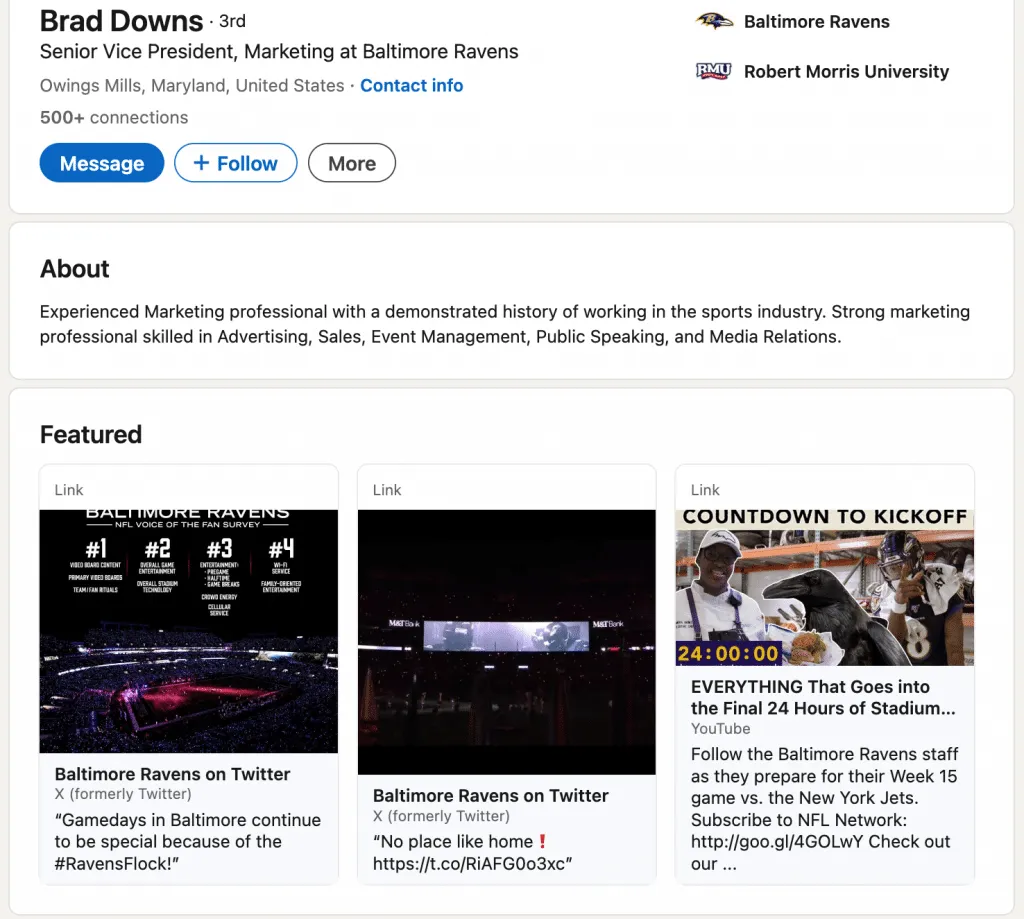
So, what such LinkedIn Featured section actually is? In simple terms, it’s a curated content area positioned directly below your intro card and above your Activity section. This placement makes it one of the most visible parts of your profile—often the first section people notice when they scroll. Unlike text-heavy areas, the Featured section stands out visually thanks to large thumbnail images that immediately draw attention.
The feature in LinkedIn is designed to highlight selected content rather than list information. While sections like Experience, Skills, and Education focus on structured career data, the Featured section functions differently. It allows you to show your value instead of just describing it. Think of it as a dynamic portfolio embedded into your profile rather than a static résumé.
What makes the feature on top of profile LinkedIn especially powerful is its flexibility. You can showcase LinkedIn posts, long-form articles, external links (such as websites or landing pages), and media files like PDFs, presentations, or videos. This means your profile can evolve in real time—promoting a new project, a recent achievement, or a key message without rewriting your entire profile.
In essence, the Featured section acts as a living, visual highlight reel. It gives visitors immediate context about what you do, what you’re proud of, and what you want them to engage with—before they even reach the rest of your profile.
Why Should You Care About Your Featured Section?
Understanding why important LinkedIn Featured section is comes down to visibility and trust. This section sits near the top of your profile, making it one of the first elements visitors see right after your headline.
By highlighting media mentions, awards, certifications, or standout accomplishments, you instantly establish credibility and social proof. Instead of asking people to scroll and interpret your experience, you show authority upfront. The visual nature of thumbnails and images also makes your profile far more engaging than text-heavy sections, helping you stand out in seconds.
Beyond perception, the Featured section is a powerful growth tool. It allows you to control the narrative of your professional brand by deciding exactly what content represents you first.
You can drive traffic to your website, portfolio, blog, or booking page—turning profile views into real leads and opportunities. When used strategically, this section doesn’t just support your profile; it actively works for you, shaping how others understand your value and why they should connect, hire, or collaborate with you.
What’s the Difference Between Featured Section and Other Profile Elements?
If you’re wondering what difference featured section vs endorsements really means, the answer is control and visibility. The in what difference LinkedIn Featured section stands apart is that it’s fully curated by you, visually driven, and placed at the top of your profile. Unlike other sections that are either automatic, chronological, or dependent on others, the Featured section lets you decide exactly what story visitors see first.
| Profile Element | Purpose & Key Difference |
|---|---|
| Featured Section | Curated by you, visual, positioned at the top of your profile; highlights chosen content |
| Experience Section | Chronological job history; structured and mandatory |
| Skills & Endorsements | Skills validated by connections; indexed by LinkedIn’s algorithm |
| Recommendations | Written testimonials from others; credibility-based but not editable |
| Activity | Real-time feed of posts, comments, and engagement |
In short, while other profile elements describe or validate your background, the Featured section actively presents your value in a way that’s immediate, visual, and intentional.
Understanding LinkedIn Featured Section Benefits & Use Cases
How Does the Featured Section Improve Your Profile Visibility?
Understanding how improve LinkedIn Featured section starts with how LinkedIn’s algorithm works. Profiles that use featured content tend to rank higher in search results because LinkedIn prioritizes profiles with interactive, media-rich elements.
When you add featured posts, links, or documents, you signal activity, relevance, and value—three factors the platform rewards with increased exposure.
Just as important is human behavior. Recruiters and potential clients don’t read profiles line by line—they scan.
The Featured section sits near the top of your profile and is visually impossible to miss, making it the fastest way to communicate credibility and intent. Research shows that profiles with a completed Featured section receive up to 30% more profile views, which directly translates into more connection requests, inbound messages, and real opportunities.
Knowing how make Featured section LinkedIn work strategically means turning passive views into active interest—before someone even reaches your Experience section.
What Types of Professionals Benefit Most From a Featured Section?
Understanding how use featured section LinkedIn depends largely on your professional goal — but certain roles gain outsized value from it. Freelancers and consultants can showcase portfolios, case studies, and client results, turning their profile into a conversion-focused landing page.
Job seekers benefit by highlighting measurable achievements, certifications, and thought leadership that help them stand out beyond a standard CV.
Sales professionals can use the Featured section to display client testimonials, success stories, and case study outcomes, building instant trust before the first message.
Content creators gain a clear advantage by featuring their best-performing blog posts, videos, newsletters, or articles—guiding visitors directly to their strongest work. For business owners, the section becomes a credibility hub to showcase company milestones, press mentions, partnerships, and awards.
Career changers may benefit the most strategically. By curating content that demonstrates transferable skills—projects, learning progress, or relevant insights—they can reshape how recruiters perceive their background.
In all cases, the Featured section helps professionals control first impressions and clearly communicate value within seconds of a profile visit.
How to Create Your LinkedIn Featured Section: Step-by-Step
Step 1 – How to Access the Featured Section on Your Profile
If you’re wondering how create Featured section on LinkedIn or how start LinkedIn Featured section, the process is simple but best done on desktop for full functionality.
Start by going to your LinkedIn profile. Near the top of your profile page, locate the “Add profile section” button.
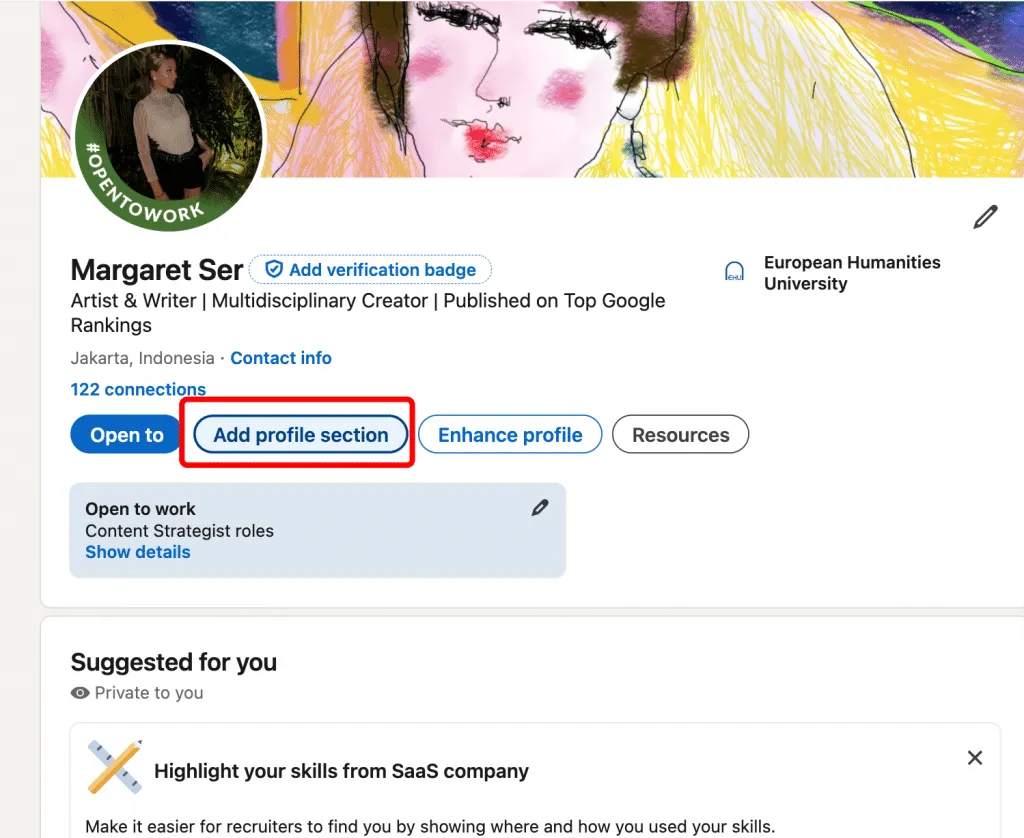
Click it, then open the “Recommended” dropdown menu. From there, select “Add Featured.”
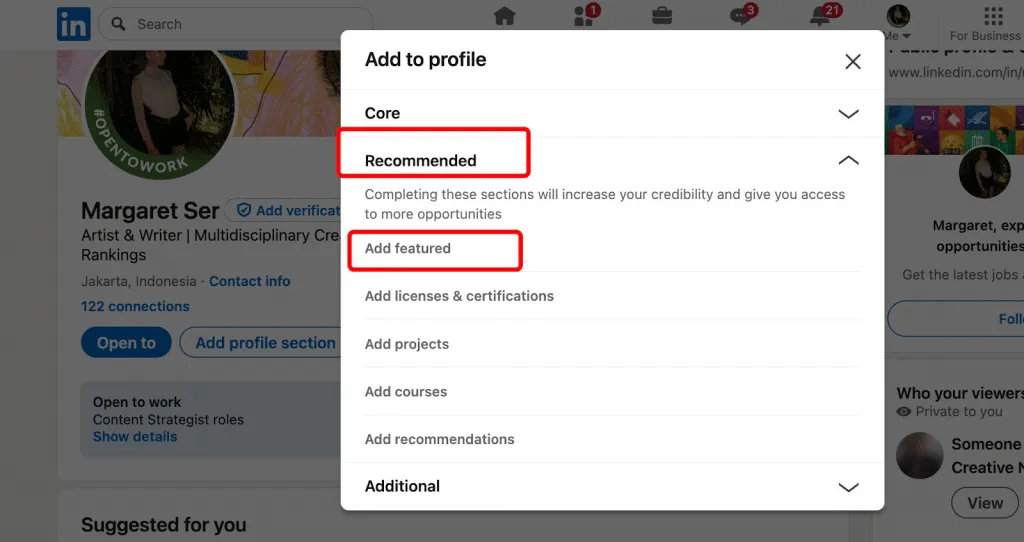
Once enabled, the Featured section will appear near the top of your profile, ready for you to add posts, links, articles, or media.
Using desktop ensures all options are visible and reduces issues that sometimes occur on the mobile app.
Step 2 – What Content Types Can You Add? (And Which Are Best)
Once you know how get Featured section on LinkedIn, the next step is choosing the right content to place feature on top of profile LinkedIn.
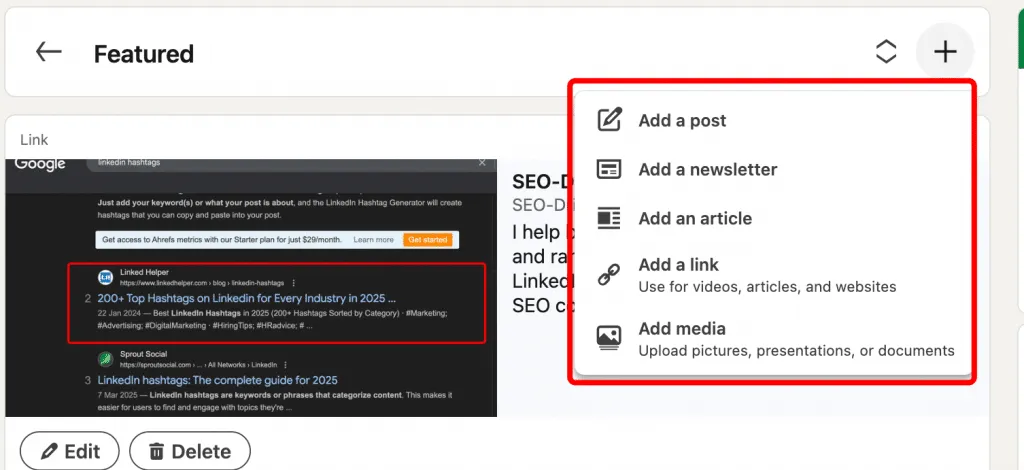
Not all content types perform equally, so selecting strategically matters. If your goal is visibility and engagement, understanding how make Featured post on LinkedIn and which formats work best will give you a strong advantage.
Below is a quick comparison of the main content types you can add to your Featured section and how they typically perform:
| Content Type | Best For | Visibility | Engagement Level |
|---|---|---|---|
| LinkedIn Posts | Thought leadership | High | Very High |
| LinkedIn Articles | In-depth expertise | Medium | High |
| External Links | Traffic generation | High | Medium |
| Media (PDF / Images) | Portfolio showcase | Medium | Medium |
| Videos | Engagement | Very High | Very High |
How to choose:
- Use LinkedIn posts for fast credibility and reach
- Add articles to show depth and expertise
- Include external links to drive traffic off LinkedIn
- Use media files to visually prove your skills
- Prioritize video whenever possible for maximum engagement
Step 3 – How to Select Content to Feature (Strategic Approach)
Choosing the right content is the core of how choose Featured section LinkedIn effectively. The goal isn’t to show everything you’ve done, but to highlight what best supports your professional story and goals.
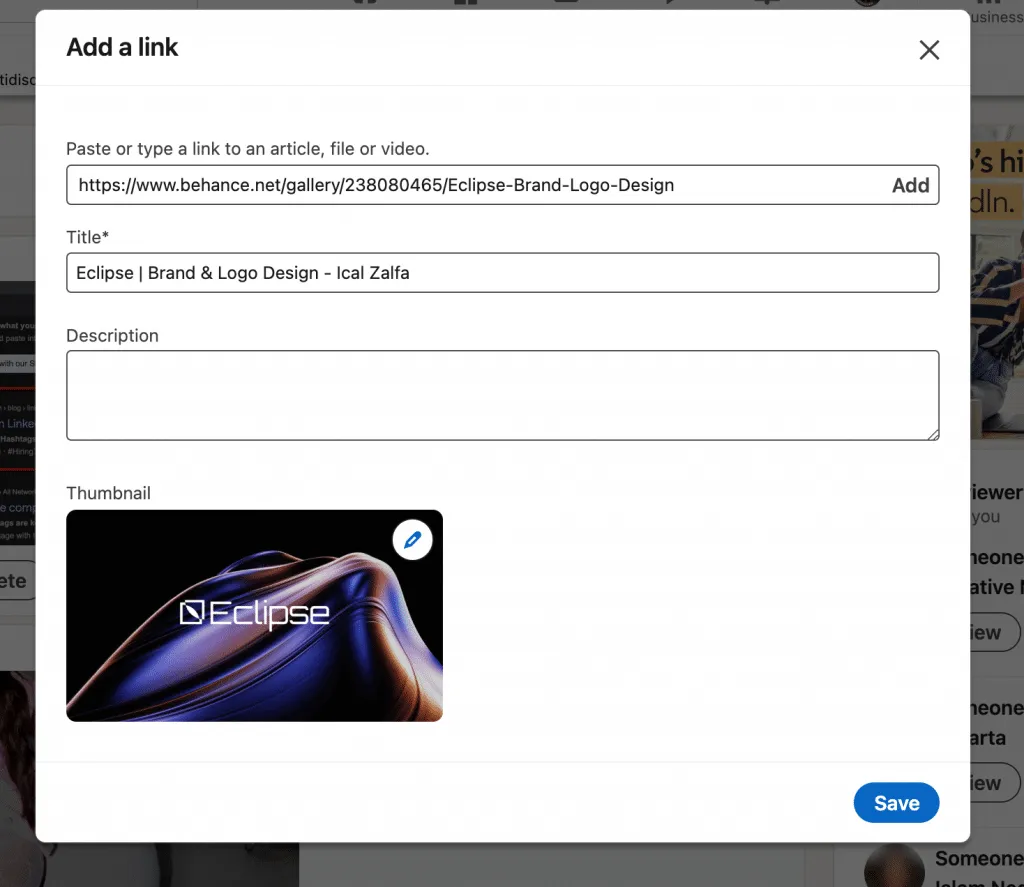
Always prioritize quality over quantity—4–6 items is the sweet spot for strong visual impact without overwhelming visitors.
Before adding anything, do an alignment check. Ask yourself whether the content reinforces your expertise, positioning, and the opportunities you want next. Strong selections provide clear proof of impact—posts with high engagement, case studies with measurable results, or content that demonstrates outcomes and metrics.
Just as important is relevance: feature recent work and rotate out outdated content to keep your profile current. Diversity also matters—mix posts, articles, external links, and media to create a well-rounded narrative and to ensure how make Featured public on LinkedIn works in your favor across different content formats.
Example prompts to guide your selection:
- Does this piece demonstrate my core expertise?
- Would my ideal client or employer want to see this?
- Does this content show strong social proof (likes, comments, shares)?
When selected strategically, your Featured section becomes a focused, high-impact snapshot of your professional value.
Step 4 – How to Arrange & Organize Your Featured Content
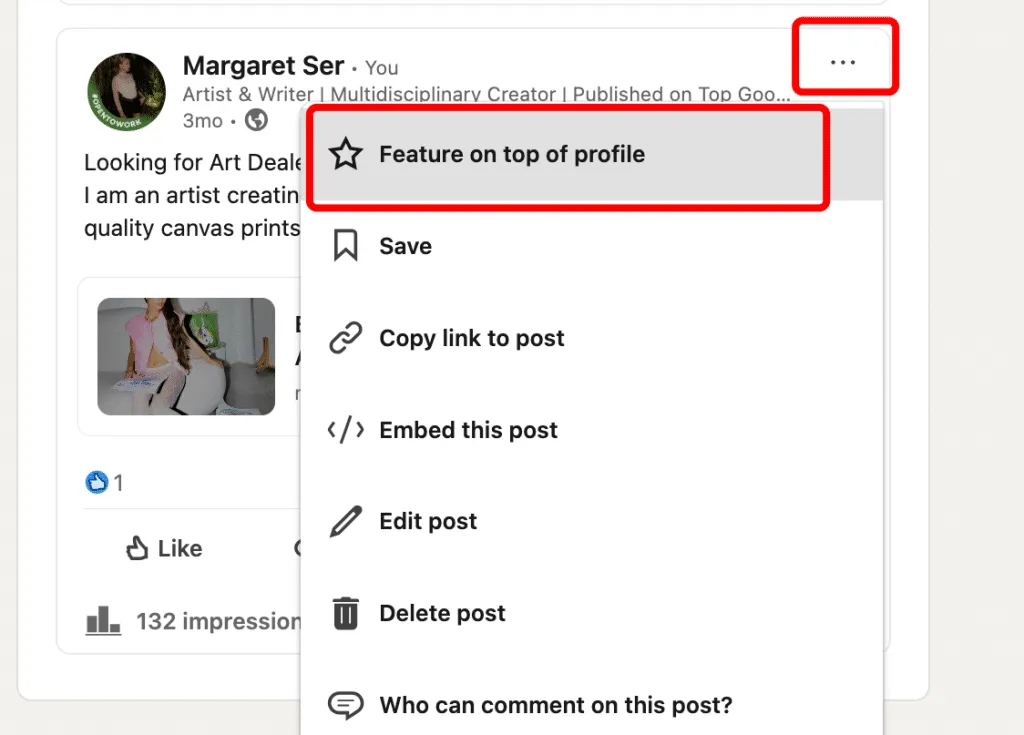
Understanding how configure Featured section LinkedIn is essential once your content is selected. LinkedIn displays featured items in a horizontally scrollable carousel, meaning the first item gets the most attention and sets the tone for everything that follows.
Best practice is to lead with your strongest, most relevant piece—this is your hook. Choose the content that best represents your expertise or delivers the clearest proof of impact. After that, arrange complementary content that adds depth and variety, such as a thought leadership post, a case study, or a media mention.
When deciding the order, prioritize relevance first, then factor in engagement and recency. This approach ensures visitors immediately understand your value while still seeing fresh, high-performing content as they scroll. Knowing how set up LinkedIn Featured section strategically turns the carousel into a guided experience rather than a random content list.
Step 5 – How to Update and Refresh Your Featured Section
Knowing how update LinkedIn Featured section is just as important as setting it up. Your Featured section should evolve with your career, not stay static. The recommended frequency is a quarterly review, with updates added whenever you publish new content, complete major projects, or reach measurable milestones.
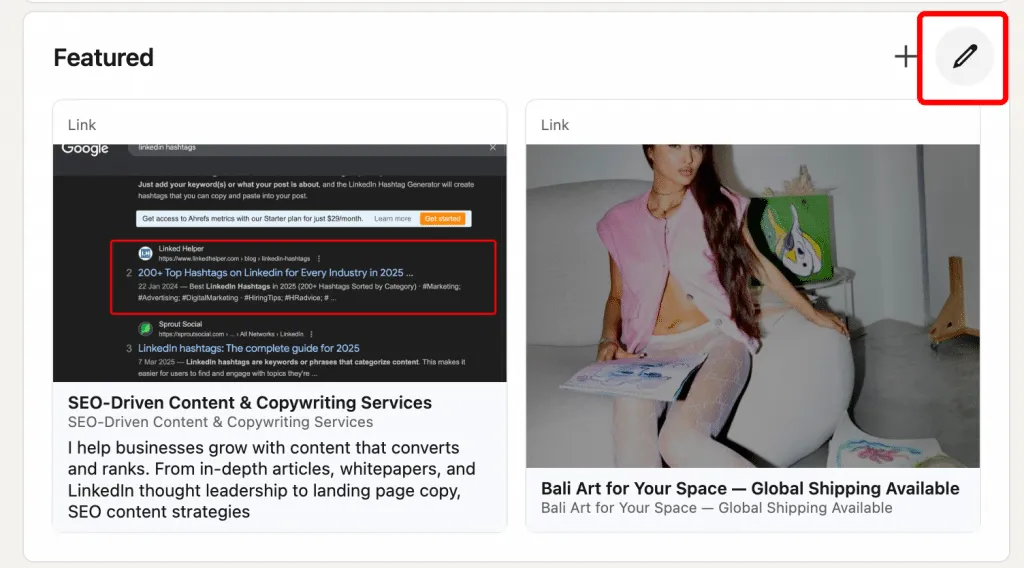
Start by removing underperforming or outdated items that no longer reflect your current goals or expertise. Then add fresh achievements, articles, case studies, or portfolio pieces that show recent impact.
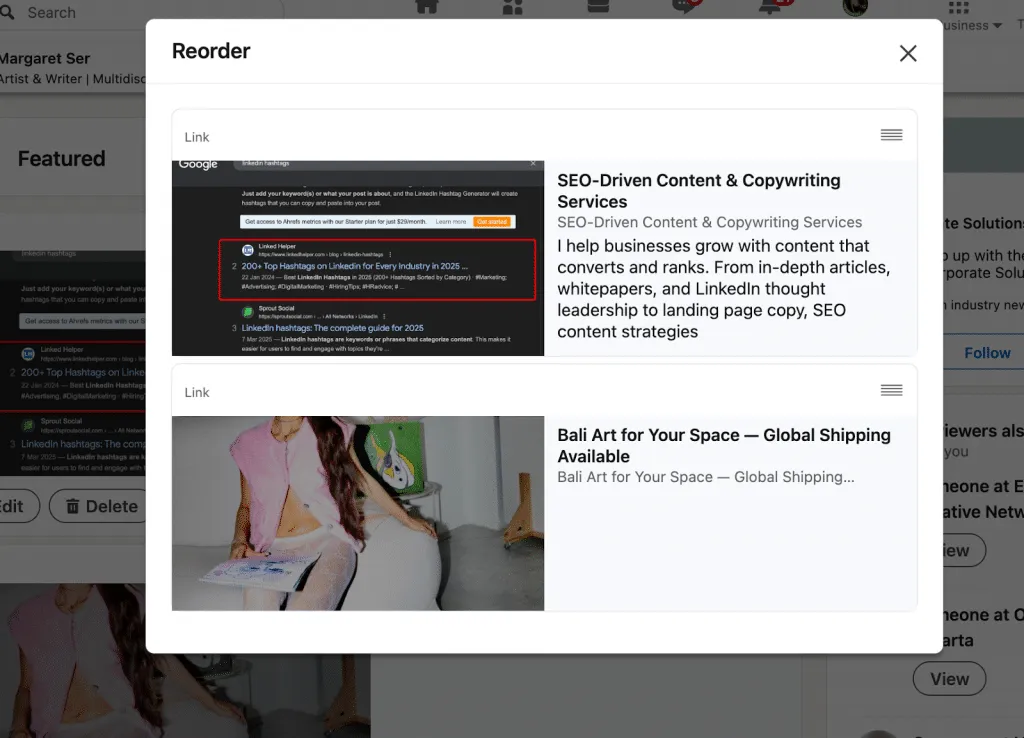
Seasonal updates are especially effective—align your Featured section with career transitions, new roles, launches, or major projects to keep it relevant and timely.
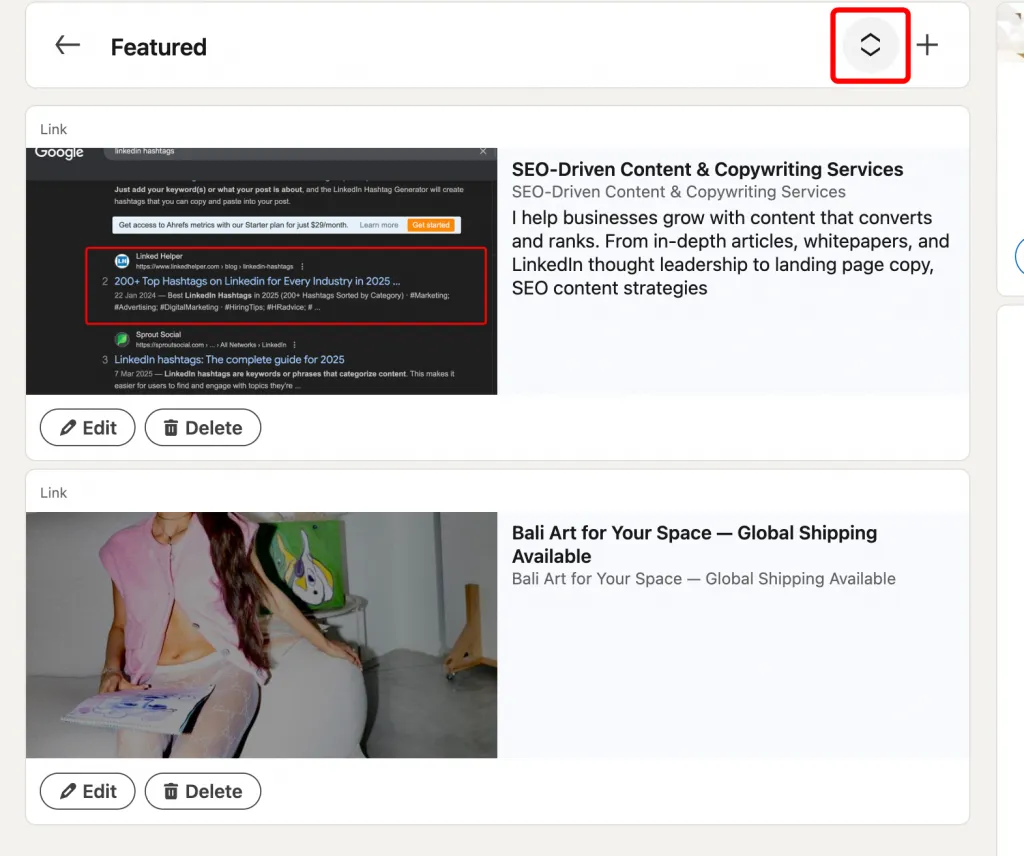
Regular maintenance is the key to how refresh Featured section successfully. A consistently updated Featured section signals activity, relevance, and professionalism—both to LinkedIn’s algorithm and to the people viewing your profile.
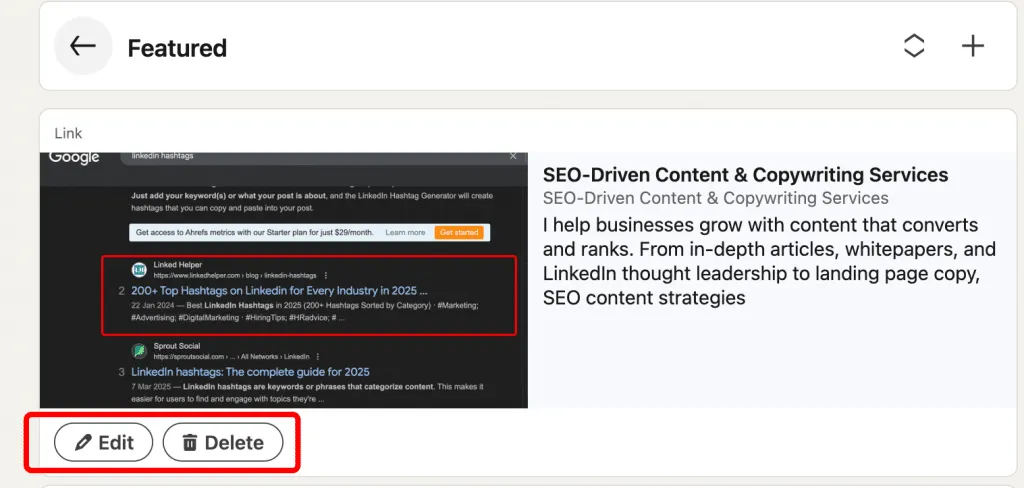
How Does the Featured Section Work? (Mechanics & Algorithm)
How Does LinkedIn Display Your Featured Content?
To understand how works LinkedIn Featured section, it helps to look at how the platform presents it visually.
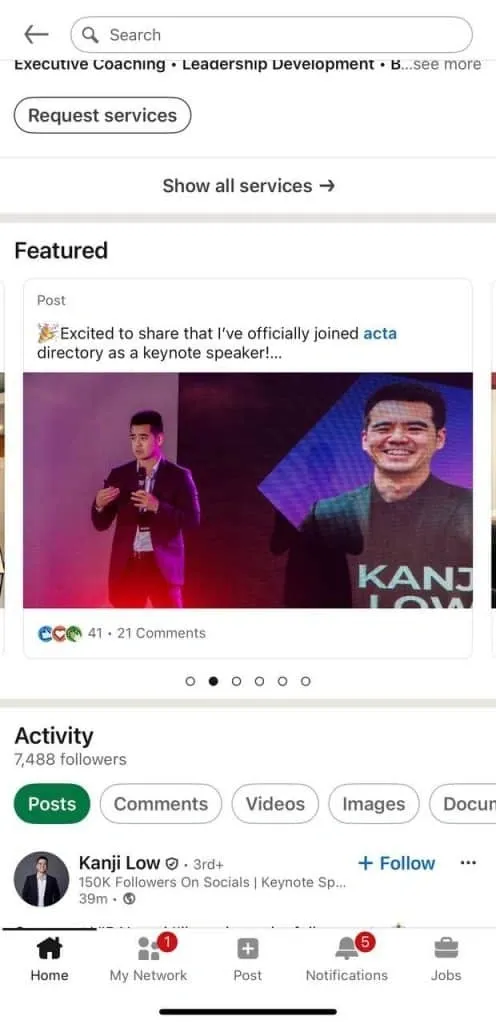
The Featured section appears as a horizontal, carousel-style layout with large thumbnail images, making it highly noticeable compared to text-based sections.
This design draws attention immediately and encourages interaction rather than passive reading.
In terms of how display featured content, LinkedIn shows this section on both desktop and mobile profiles. On mobile, users can swipe through featured items, ensuring your content remains accessible and engaging across devices.
Each featured item includes a title or headline, a thumbnail image, and a short description that provides context at a glance. When someone clicks on a featured item, it opens in a new window or page—whether that’s a LinkedIn post, article, document, or external link—allowing deeper engagement without disrupting the profile experience.
How Does LinkedIn’s Algorithm Factor in Featured Content?
Understanding how LinkedIn algorithm featured section works is key to increasing reach. LinkedIn prioritizes profiles that actively use rich, interactive elements, and profiles with featured content are more likely to appear higher in search results. When recruiters search for specific skills or roles, profiles that showcase relevant featured items often surface first because they signal clarity, relevance, and engagement readiness.
From a LinkedIn Featured section visibility standpoint, engagement plays a major role. Featured items that receive clicks, likes, comments, or shares send positive signals to the algorithm, boosting overall profile exposure.
Content format also matters—video, presentations, and image-rich assets tend to perform better than plain text links. By choosing high-quality, engaging content for your Featured section, you’re not just improving aesthetics—you’re actively working with the algorithm to increase discoverability and inbound opportunities.
Best Practices: How to Optimize Your Featured Section for Maximum Impact
How to Choose the Right Content for Your Featured Section
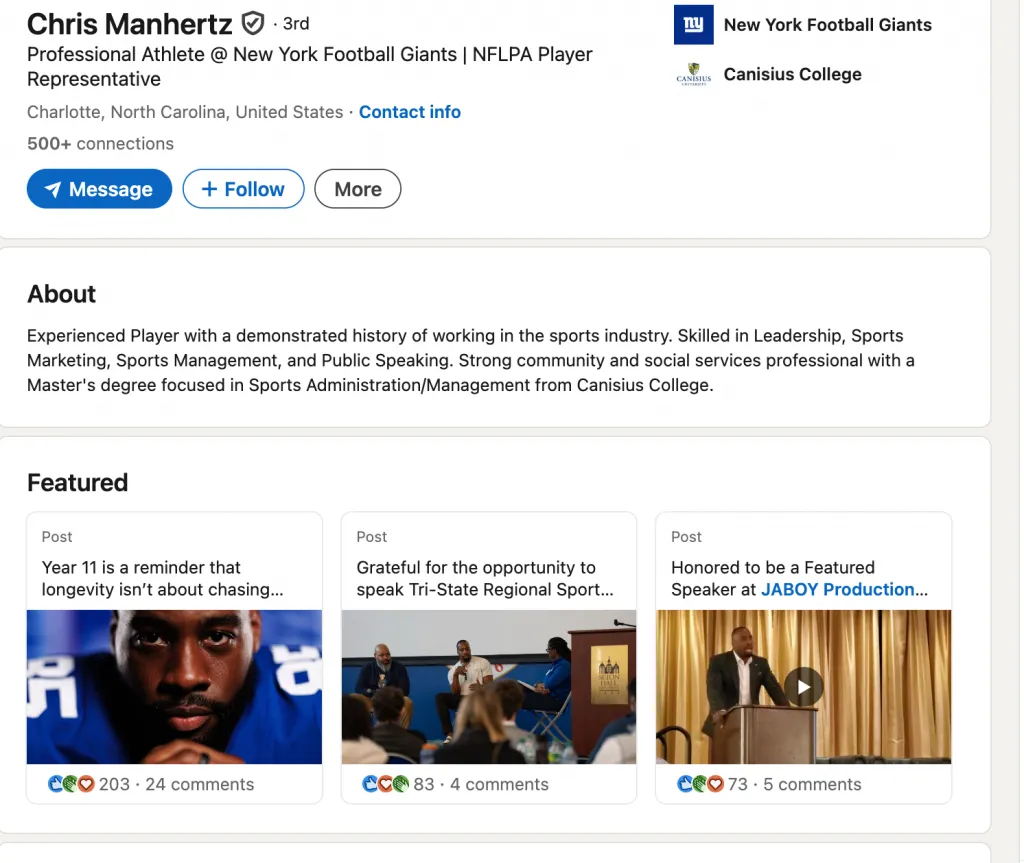
Selecting the best content Featured section LinkedIn starts with intention, not volume. The goal is to feature content that proves your value quickly and clearly. When deciding what feature LinkedIn, ask whether each item supports the role, clients, or opportunities you want next—not just what you’ve done in the past. Knowing how select Featured section content means treating it like a highlight reel, not a storage space.
Content Selection Checklist
- Does it showcase measurable results? (e.g., “Grew team from 5 to 25 people”)
- Does it align with your target job or ideal client?
- Is it recent (ideally from the last 6–12 months)?
- Does it include strong visual elements (images, videos, slides)?
- Does it tell a clear story or demonstrate your unique approach?
Industry-Specific Examples
- Marketing: Campaign case studies, content calendar templates, engagement metrics
- Design: Portfolio pieces, before/after visuals, design system documentation
- Sales: Deal breakdowns, outreach templates, client testimonials
- Technology: GitHub projects, technical articles, open-source contributions
- Consulting: Client case studies, proprietary frameworks, research insights
When curated strategically, your Featured section becomes proof of competence—helping viewers instantly understand not just what you do, but how well you do it.
How to Use Your Featured Section to Tell Your Professional Story
To master how feature profile LinkedIn, think of your Featured section as a carefully edited highlight reel, not a random content list. This is where storytelling meets strategy.
A strong LinkedIn Featured section strategy follows a clear narrative arc—Problem → Solution → Results—guiding viewers through your professional value in seconds.
Start with your strongest signal.
Item 1: Lead with your signature achievement or core expertise—the result you’re best known for or want to be hired for.
Item 2: Follow with a thought leadership piece, such as an article or post, that explains how you think and approach challenges.
Item 3: Add a case study or client success story that proves your solution works in real-world conditions.
Item 4: Include industry recognition, awards, or media mentions to reinforce credibility.
Items 5–6: Use additional slots for supporting case studies, innovative projects, or experimental work that shows depth and range.
When arranged intentionally, your Featured section becomes a visual story that answers three questions instantly: What do you do? How do you do it? Why should someone trust you?
How to Make Your Featured Section Stand Out Visually
To learn how optimize Featured section LinkedIn, focus on visual clarity and consistency. A Featured section design LinkedIn that’s clean and professional immediately signals credibility and draws attention to your most important content. Start with high-quality images and thumbnails—1080 x 1080 pixels works best for clarity across devices.
Ensure any text on images is legible and aligns with your personal or company brand. Maintaining a consistent color palette, font, and style across all featured items creates a cohesive, polished look. Tools like Canva make it easy to design professional thumbnails for external links or media files, even if you’re not a graphic designer.
Avoid cluttered, low-resolution, or overly busy visuals that distract from your message. By combining consistency, readability, and quality imagery, your Featured section becomes not just an information hub but a visually engaging showcase that reinforces your professional brand.
How to Drive Traffic From Your Featured Section
Knowing how get clicks Featured section LinkedIn starts with featuring content that motivates action. Include external links to high-value assets such as your blog, portfolio, or landing pages. Pair these links with a clear call-to-action in your post or article copy—for example, “Read the full case study” or “Download the free template”—to encourage visitors to click.
Tracking engagement is essential for improving results. Use UTM parameters to measure traffic from LinkedIn to your website and monitor which items generate the most interest. You can also feature lead magnets like guides, templates, or checklists to capture emails directly from your profile. By strategically designing your Featured section, you not only increase Featured section traffic, but you also turn passive profile visits into tangible leads and measurable opportunities.
Why Isn’t Your Featured Section Working? Common Issues & How to Fix Them
Why Doesn’t Your Featured Section Appear on Your Public Profile?
If you’ve noticed why featured section not showing or that your LinkedIn Featured section not working, it usually comes down to visibility or syncing issues. Sometimes, your Featured items appear when you view your own profile but aren’t visible to others.
Here’s how to fix it:
- Check privacy settings: Make sure your profile visibility is set to Public.
- Try on desktop: The mobile app can lag in displaying recent updates.
- Clear browser cache and refresh: Old cache can prevent changes from appearing.
- Wait 24–48 hours: LinkedIn may take time to sync updates across servers.
- Verify content privacy: Ensure each featured item is set to public and not restricted.
Following these steps ensures your Featured section is visible to everyone, solving issues around why not visible and making your profile showcase your top content as intended.
Why Can’t You Add Certain Content Types to Featured?
If you’re wondering why cannot add Featured or facing featured section upload issues, it’s usually due to platform limitations or content restrictions. LinkedIn doesn’t allow all media types or external links to be featured, and some options may be restricted depending on your account type or region. Additionally, content must comply with LinkedIn’s community standards, and only first-party content you’ve created can typically be added.
To fix LinkedIn Featured not working, try these steps:
- Use the desktop version instead of the mobile app, which sometimes restricts uploads.
- Refresh your browser cache and cookies to clear outdated data.
- Ensure your content adheres to LinkedIn’s standards and is eligible to be featured.
- If the issue persists, contact LinkedIn support for assistance.
By following these steps, you can resolve most upload issues and ensure your Featured section showcases the content you want.
How to Troubleshoot Low Engagement on Featured Content
If you’re asking why low engagement Featured LinkedIn or noticing that your LinkedIn Featured section not performing, the issue often comes down to content relevance, freshness, or presentation. Even strong achievements can go unnoticed if they aren’t showcased strategically.
Here’s how to fix it:
- Rotate content quarterly: Test different items to see what resonates with your audience.
- Ensure visual appeal: Use high-quality thumbnails and clear, readable text.
- Check external links: Broken or slow-loading links hurt engagement.
- Add fresh content: Recent achievements or posts outperform stale items.
- Feature video content: Videos typically get higher clicks and engagement than static images.
- A/B testing: Track which featured items generate the most profile views and adjust accordingly.
By optimizing your Featured section with these tactics, you can boost visibility, drive clicks, and turn your top content into measurable opportunities.
Advanced Featured Section Strategies: Industry-Specific Approaches
How To Use Featured Section as a Job Seeker
For those wondering how to leverage the LinkedIn Featured section job search, the key is to showcase proof of your skills and achievements upfront. A well-curated job seeker Featured section allows recruiters to see your value immediately—before they scroll through your experience or education.
Suggested Featured Items:
- Feature 1: Recent achievement or award that highlights your impact
- Feature 2: Thought leadership article about your industry or role
- Feature 3: Case study demonstrating results from a previous position
- Feature 4: Certification or training completion relevant to your career goals
- Feature 5: Testimonial or recommendation video from a manager, client, or colleague
By strategically arranging these items, your Featured section acts as a visual résumé and credibility builder, increasing the likelihood that recruiters notice, connect, and reach out for opportunities.
How To Use Featured Section for Sales & Business Development
For sales professionals, a strategically curated featured section sales can be a game-changer. The LinkedIn Featured business development section allows you to showcase proof of results, establish trust, and position yourself as an expert before prospects even reach out.
Suggested Featured Items:
- Feature 1: Client success story or case study demonstrating measurable results
- Feature 2: Article outlining your sales methodology or framework
- Feature 3: Testimonial video from a satisfied client
- Feature 4: Industry research or market analysis relevant to your niche
- Feature 5: LinkedIn post with strong engagement metrics highlighting thought leadership
By presenting this content prominently, your Featured section helps you build credibility upfront, making it easier to generate leads, nurture relationships, and close deals.
How To Use Featured Section as a Consultant/Freelancer
For independent professionals, a well-crafted featured section freelance or featured section consultant can transform your LinkedIn profile into a client-attracting tool. By showcasing your best work upfront, you immediately demonstrate credibility and expertise.
Suggested Featured Items:
- Feature 1–2: Standout portfolio projects highlighting your skills
- Feature 3: Case study demonstrating measurable results for a client
- Feature 4: Thought leadership article within your niche
- Feature 5: Client testimonial or media mention validating your impact
- Feature 6: Free resource or guide to capture leads and grow your network
By curating these items, your portfolio LinkedIn becomes a dynamic showcase that attracts high-quality clients, establishes trust quickly, and encourages meaningful connections.
How To Use Featured Section for Content Creators & Thought Leaders
For professionals aiming to establish authority, a featured section content creator or thought leader featured LinkedIn can showcase influence and expertise effectively. By highlighting high-impact content, you can attract sponsorships, speaking opportunities, and strategic partnerships.
Suggested Featured Items:
- Feature 1: Your most viral or high-engagement LinkedIn post
- Feature 2: Long-form article demonstrating your expertise area
- Feature 3: Media mention or interview link to build credibility
- Feature 4: Video content such as webinars, tutorials, or YouTube clips
- Feature 5–6: Guest articles or publications on external platforms
Curating your Featured section with these items positions you as a recognized authority in your niche, giving visitors instant proof of your thought leadership and increasing professional opportunities.
Why Your LinkedIn Featured Section Matters More in 2026 Than Ever Before
Why Recruiters Pay Attention to Your Featured Section
Understanding why important Featured section is crucial for job seekers and professionals looking to stand out. Recruiters typically spend only seconds reviewing each profile, and your Featured section sits in the “immediate attention zone,” making it one of the first elements they notice.
A well-curated Featured section recruiter sees provides instant evidence of your skills, accomplishments, and thought leadership. It separates serious professionals from those with incomplete or generic profiles, often becoming the deciding factor in whether a recruiter reaches out or moves on. By strategically using this space, you ensure your top achievements and content are impossible to miss, increasing your chances of landing interviews, opportunities, and meaningful connections.
Why Visual Content Trumps Text-Heavy Profiles
Knowing why Featured section important is key to understanding LinkedIn’s evolution. The platform is increasingly visual, with videos and images consistently outperforming text in engagement and reach. Your Featured section leverages this shift by putting your best work front and center, making it immediately visible to profile visitors.
From a cognitive perspective, human brains process images 60,000 times faster than text, meaning strong visuals can communicate expertise almost instantly. Video content in the Featured section drives even higher engagement—often 5x more than static posts. By prioritizing visuals, your visual profile LinkedIn becomes more memorable, credible, and effective at capturing attention in a fast-scrolling environment.
Why LinkedIn Featured Section Boosts Your Personal Brand
A featured section personal brand is one of the most powerful tools for establishing authority and credibility on LinkedIn. By showcasing awards, media mentions, client wins, or standout projects, you build trust through visible social proof that reinforces your expertise.
The LinkedIn branding featured section also differentiates you from competitors—many professionals leave this space empty or underutilized. With carefully curated content, you create multiple touchpoints, allowing visitors to see your best work immediately and understand your unique value proposition. In essence, the Featured section doesn’t just display achievements; it actively strengthens your personal brand and professional reputation.
How to Get Started: 7 Quick Wins to Implement Today
Quick Win #1 – Add Your Best Post in the Next 15 Minutes
A fast way to boost your profile is knowing how add Featured post LinkedIn quickly. Start by identifying your highest-engagement post—sort by reactions or comments to see what resonated most with your audience. Then, feature it immediately in your Featured section.
This quick action gives you instant visibility and credibility, making it the easiest and fastest win for improving your profile without creating new content.
Quick Win #2 – Feature a Case Study or Client Win
Boost your profile by adding a featured case study LinkedIn or client story featured. Choose one piece of content that demonstrates measurable impact—like “3x revenue growth” or a successful project outcome—and add it to your Featured section. If you don’t have a written case study, record a short 2-minute video summarizing the client’s results. This provides immediate proof of your capabilities and credibility.
Quick Win #3 – Create a Simple Thumbnail for External Links
Enhance featured external link LinkedIn items or learn how feature blog post by creating a professional thumbnail. Use Canva’s free LinkedIn template to design a visually appealing image, then upload it along with your link to a website, portfolio, or blog. This quick 5-minute task requires no cost but dramatically improves visual appeal and click-through rates.
Quick Win #4 – Feature a Media Mention or Award
Boost credibility by adding any featured media mention LinkedIn or awards featured section items. If you’ve been quoted, interviewed, or recognized in the media, featuring it immediately provides third-party validation that recruiters and clients trust. This quick addition signals authority and professionalism without extra content creation.
Quick Win #5 – Set a 90-Day Featured Rotation Schedule
Maintain profile freshness and algorithm favor by implementing a featured rotation strategy. Schedule a review every 3 months to remove low-engagement content and add new projects, achievements, or high-performing posts. Learning how update Featured section regularly ensures your profile stays relevant and continues to attract views, connections, and opportunities.
Wrap-Up: Your Action Plan for LinkedIn Featured Section Success
Key Takeaways:
- The Featured section is your profile’s most valuable real estate.
- Positioned near the top, it ensures immediate visibility and impact.
- Curated content lets you control your professional narrative.
- Visual, proof-based content builds credibility and drives engagement.
- Regular updates maintain algorithm favor and keep your profile fresh.
Immediate Action Items (Next 24 Hours):
- Add 1 high-performing post to your Featured section.
- Create or add 1 external link (portfolio, blog, or case study).
- Feature 1 item that demonstrates measurable impact.
- Schedule a quarterly review on your calendar to refresh content.
Long-Term Strategy (Next 90 Days):
- Test different content types and track engagement metrics.
- A/B test the order of featured items to optimize clicks and attention.
- Rotate content quarterly to maintain freshness and relevance.
- Monitor which items drive profile views, connection requests, and inbound opportunities.
By following this plan, your LinkedIn Featured section becomes a dynamic, strategic asset that elevates your personal brand, attracts opportunities, and positions you for professional success.