
 Updated: October 3, 2026
 28 min read
Most people have no idea this feature even exists, yet it can change your entire LinkedIn strategy in minutes.
This guide will show you exactly what an Open Profile is on LinkedIn, what Open Profile means on LinkedIn, and how you can use it to unlock messaging access to millions of professionals.
If you’ve ever wished you could bypass connection requests, extend InMail limits, and open LinkedIn to reach decision-makers instantly—this is the feature built for you.
With LinkedIn Open Profile, you can:
- Open Profile ON → anyone can message you for free
- Their Open Profile ON → you can send a free InMail (even on Free account)
- Free account → no invite messages, but Open Profile InMails work
- Benefits → direct messaging, higher replies, more visibility (B2B, sales, recruiting)
- Build a predictable pipeline without spending more on ads or InMail credits
And yet — most professionals don’t even know Open Profile exists, or they enable it without understanding how to use it strategically.
This guide fixes that.
By the end, you’ll know how to make the LinkedIn Open Profile feature work for you—not just as a setting, but as a revenue, opportunity, and visibility engine.
What Is a LinkedIn Open Profile? (And Why Most Professionals Miss Out)
If you’ve ever wondered what is open profile on LinkedIn, here’s the clearest possible explanation:
LinkedIn Open Profile lets anyone message you directly, even without a connection.
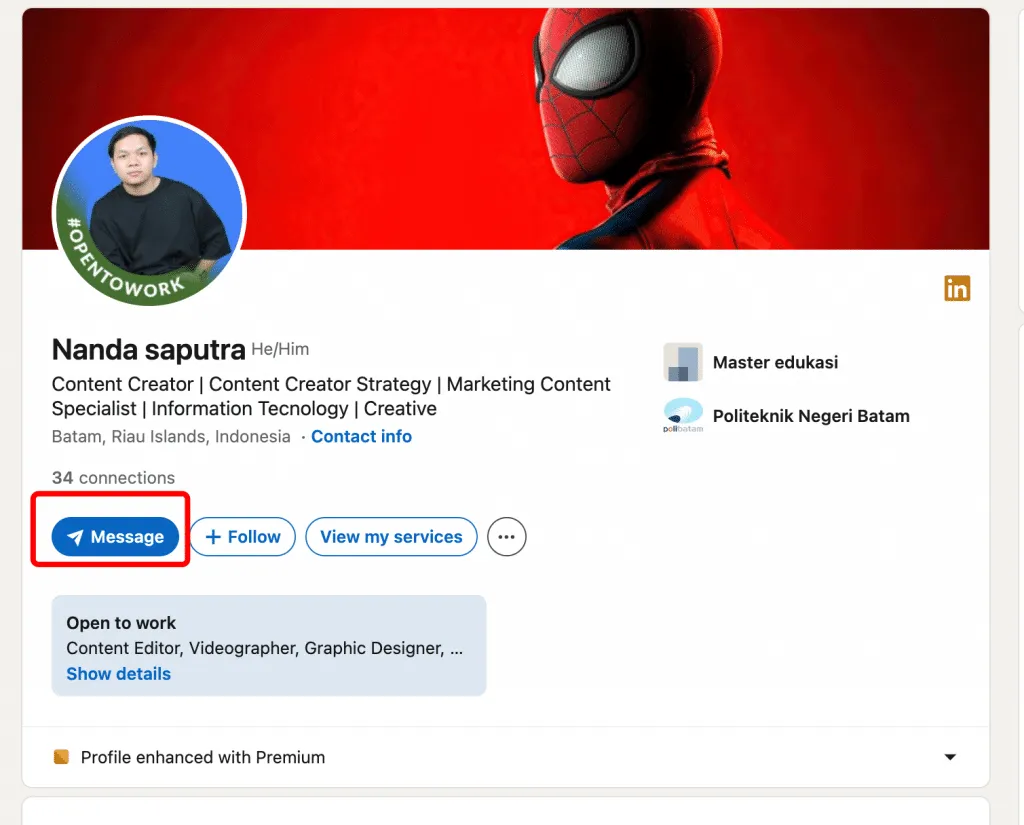
Open profile means anyone can send you a free message, even if they are your 1st-degree connection and do not have paid InMail credits.
Most professionals miss out on this feature because they misunderstand what it actually does. So let’s clear up the confusion around what does open profile mean on LinkedIn:
- It’s NOT #OpenToWork Open Profile has nothing to do with job-seeking signals.
- It’s NOT your public visibility setting It doesn’t change who can view you—only who can message you.
- It’s NOT a paid InMail InMail is paid outreach. Open Profile is simply you removing the messaging barrier without credits.
The core difference
- Standard Profile: Only existing connections (and sometimes 2nd-degree connections) can message you. Everyone else waits till you accept their invitation.
- Open Profile: Anyone, even those without LinkedIn Premium, can contact you immediately —no connection request, no approval, no delay.
This makes Open Profile a quiet power feature: it gives people access to you that most users unintentionally block.
Real-World Example #1: The Recruiter
A recruiter loves your background but:
- they’ve hit their weekly connection limit
- you’re not in their network
- they don’t want to use an InMail credit
If you have Open Profile enabled → they can message you directly.
If not → the opportunity disappears.
Real-World Example #2: Project Collaboration
- You post that you’re looking for someone for a new project (sales expert, developer, or a niche consultation)
- With Open Profile ON → the right person can message you instantly
- With Open Profile OFF → they may never reach out
How Open Profile Works: The Mechanics
Here’s how the LinkedIn open profile feature actually functions:
- You enable Open Profile.
- Anyone without Premium can contact you immediately.
- Their message lands in your “Other” inbox tab.
- You choose whether to respond—your privacy stays intact.
- Open Profile doesn’t affect profile visibility (that’s a different setting).
- Works on both desktop and mobile.
In short: Open Profile removes friction—if someone wants to reach you for the right reasons, they no longer have to wait for connection approval.
Who Should Enable Open Profile? (4 Professional Archetypes)
Not everyone needs to turn on Open Profile on LinkedIn, but for some professionals, it’s a straight-up advantage. Below are the four groups who benefit the most from the LinkedIn open profile feature—and exactly why.
1. Sales Professionals & Business Development Reps
If your work revolves around outreach, relationships, and generating conversations, you should absolutely consider enabling open profile on LinkedIn.
Why:
You need fast, direct access to decision-makers—especially the ones who don’t sit around accepting connection requests all day.
Benefit:
- Reduced friction in prospecting — when decision-makers have Open Profile enabled
- Faster pipeline generation — no need to wait for connection approval
- Direct access to VPs, Directors, and C-suite who have Open Profile turned on
Important note:
Open Profile must be enabled by the prospect, not the seller.
Sales reps can identify and prioritize leads with Open Profile for faster outreach.
Warning:
Open Profile won’t fix sloppy outreach.
If your message is spammy, generic, or pushy, you’ll burn bridges faster than you build them.
Real-World Example:
An Account Executive targets a VP of Sales at a dream account.
The VP has Open Profile ON → the AE can message them instantly and keep momentum.
If Open Profile is OFF → the AE must wait for a connection or use paid InMail.
2. Recruiters & Talent Acquisition Teams
For recruiters, enabling Open Profile on LinkedIn is basically a competitive advantage.
Why:
You need a way to reach passive candidates who have Open Profile enabled —
especially those who:
- ignore cold connection requests
- don’t check paid InMails for weeks
Benefit (when the candidate has Open Profile ON):
- Faster replies (no waiting for connection approval)
- No need to spend InMail credits
- Easier access to otherwise hard-to-reach profiles
Open Profile does not replace outreach — it removes friction only when the candidate enables it.
Context:
Recruiters often hit LinkedIn’s weekly connection request limits.
If a candidate has Open Profile ON, recruiters can message them directly without sending an invite or using InMail credits.
Real-World Example:
A recruiter targets a top engineer at a competitor.
The engineer has Open Profile ON → the recruiter messages them instantly, no invite, no InMail, no delay.
If Open Profile is OFF → the recruiter must rely on connection requests or paid InMail.
3. Freelancers & Service-Based Entrepreneurs
If your business thrives on inbound leads and relationship-building, LinkedIn open profile becomes one of the simplest “set it and forget it” growth levers.
Why:
Clients need a frictionless way to reach you the moment they discover your work.
Benefit:
- Higher-quality leads
- More warm inbound messages
- Passive pipeline from your content
- Essentially a soft “open for business” sign
Context:
When you enable open profile on LinkedIn, it signals availability—without needing #OpenToWork or any status posts.
Real Example:
A consultant publishes a strong piece of thought leadership. A founder reads it, loves it, and messages them directly—no need to wait for a connection acceptance that could kill the momentum.
4. Job Seekers & Career Changers
For active or passive job seekers, enabling LinkedIn open profile makes you dramatically easier to reach.
Why:
Recruiters search by skills — not by connection degree. If they can’t message you, they move to someone they can.
Benefit:
- More recruiter outreach
- Faster interview pipelines
- Higher visibility for relevant roles
- Better chances for industry transitions
Context:
LinkedIn is built around messaging. If you restrict who can contact you, you’re slowing your own job search.
Real Example:
A product manager wanting to move into fintech gets discovered by a recruiter. Because their Open Profile is on, the recruiter messages them right away— no delays, no friction, no missed opportunity.
6 Strategic Benefits of Enabling Open Profile
If you’re wondering why important LinkedIn Open Profile is in today’s networking and business landscape, here are the six advantages that actually move the needle—each one practical, actionable, and rooted in real outcomes.
1. Direct Access to Decision-Makers
If you rely on conversations to move your career (or quota) forward, this is the #1 reason to enable Open Profile.
Actionable Benefit:
- You remove all friction for people to message you
- Anyone — including C-suite, VPs, directors, founders — can contact you instantly
- No connection request, no waiting, no InMail credits required
This applies to inbound only.
Turning on Open Profile does not give you an outbound advantage.
When speed matters, LinkedIn open profile becomes an unfair advantage.
2. Save InMail Credits (Premium Users)
Most Premium users get a small monthly pool of InMail credits, and they run out quickly—especially for recruiters and sales teams.
Actionable Benefit (for people messaging you):
- If you have Open Profile enabled, others can message you for free
- No InMail credits required on their side
- No hesitation like “is this worth spending an InMail on?”
Clarification:
- This benefit applies only to inbound messages
- Open Profile being ON helps others reach you, not the other way around
This alone makes Open Profile a cost-saving tool hiding in plain sight.
3. Increased Inbound Opportunities
Enabling Open Profile doesn’t just help you reach people—it makes it easier for people to reach you.
Actionable Benefit:
- Attract unsolicited business inquiries.
- Generate passive leads from your content, comments, and activity.
- Signal that you’re open to new business, partnerships, or projects without needing #OpenToWork.
Approachable profiles get more opportunities.
4. Faster Relationship Building
A surprising amount of momentum dies in the “connection pending” stage. Open Profile removes that bottleneck completely.
Actionable Benefit:
- Start conversations immediately.
- Accelerate sales cycles, hiring cycles, and collaboration timelines.
- Maintain momentum at the exact moment someone wants to talk to you.
Speed builds trust. Slow responses kill deals.
5. Demonstrate Approachability & Credibility
One underrated reason why important LinkedIn Open Profile matters: it shapes how others perceive you.
Actionable Benefit:
- You signal that you’re active, responsive, and engaged.
- You look like someone who collaborates easily and communicates openly.
- You strengthen your reputation as an accessible, credible professional or leader.
In a world of hidden inboxes and ignored requests, openness stands out as authority.
6. Competitive Advantage in B2B Outreach
Here’s the secret no one talks about: most professionals don’t use Open Profile strategically—even though it’s free for Premium subscribers.
Actionable Benefit:
- You become more reachable than your competitors.
- You gain first-mover advantage in your industry’s outreach landscape.
- You stand out as someone proactive, modern, and easier to do business with.
People choose the path of least resistance. Open Profile makes you that path.
How to Enable Open Profile: Step-by-Step Setup Guide
If you’ve been wondering how to open profile on LinkedIn, or even how to find Open Profile on LinkedIn, this is the simplest guide you’ll ever use. Follow these four steps—each one designed to be visual, intuitive, and quick.
Step 1: Navigate to Your Settings & Privacy
Start by opening your LinkedIn homepage.
Do this:
- Click the “Me” icon in the top-right corner
- Select “View Profile”
- Look for the three-dot menu or Edit Profile option
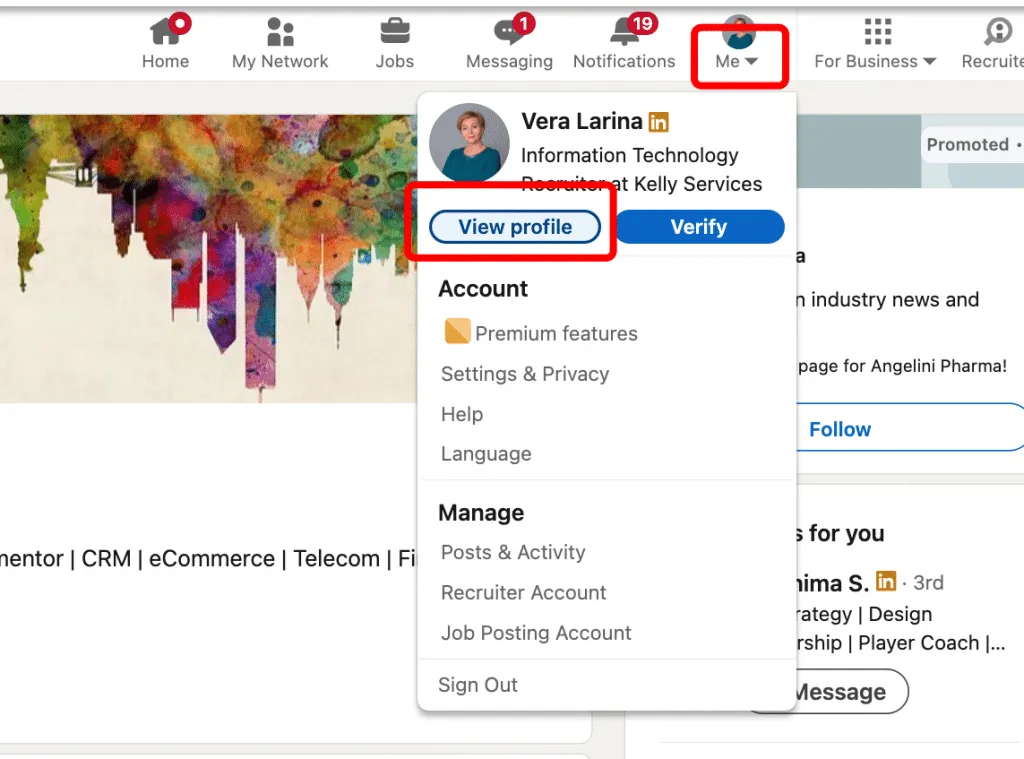
This is the starting point for anyone asking how to open profile in LinkedIn or where to find the Open Profile toggle.
Step 2: Access Your Profile Visibility Settings
Once you’re on your profile page:
Do this:
- Click the pencil icon (top right of your profile header)
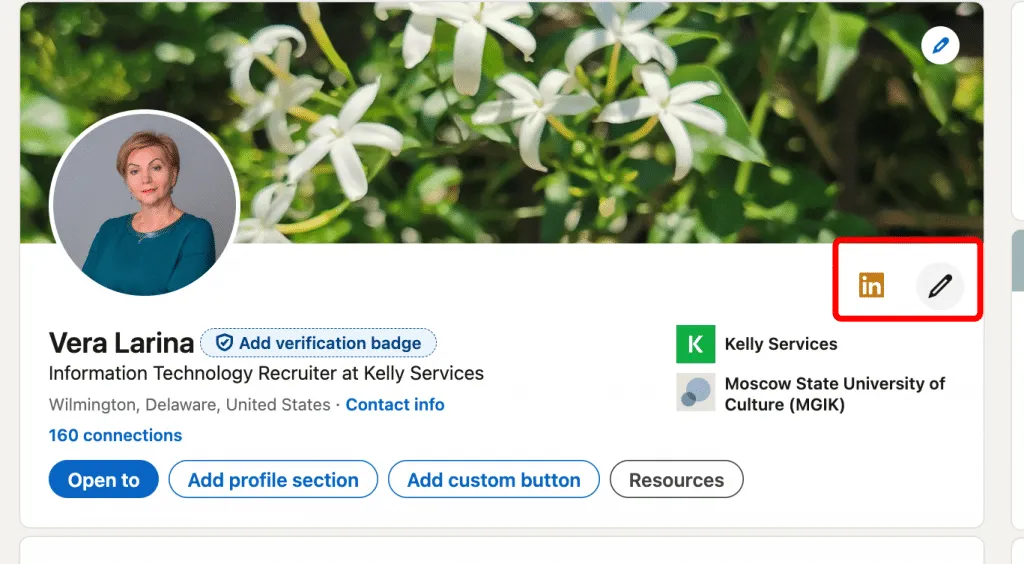
- Find the Premium settings
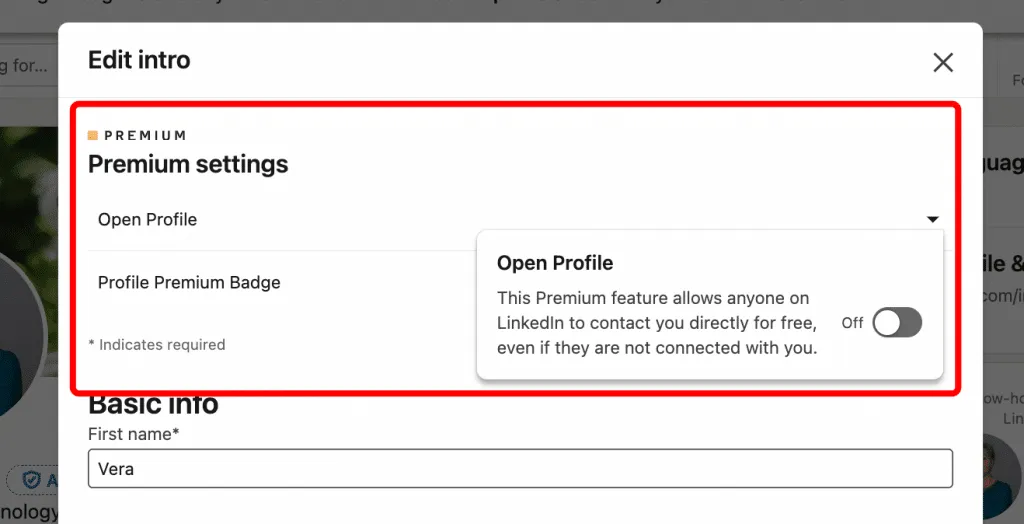
- Click the dropdown arrow
This is the crucial step for locating Open Profile—it’s the answer to how to find open profile on LinkedIn.
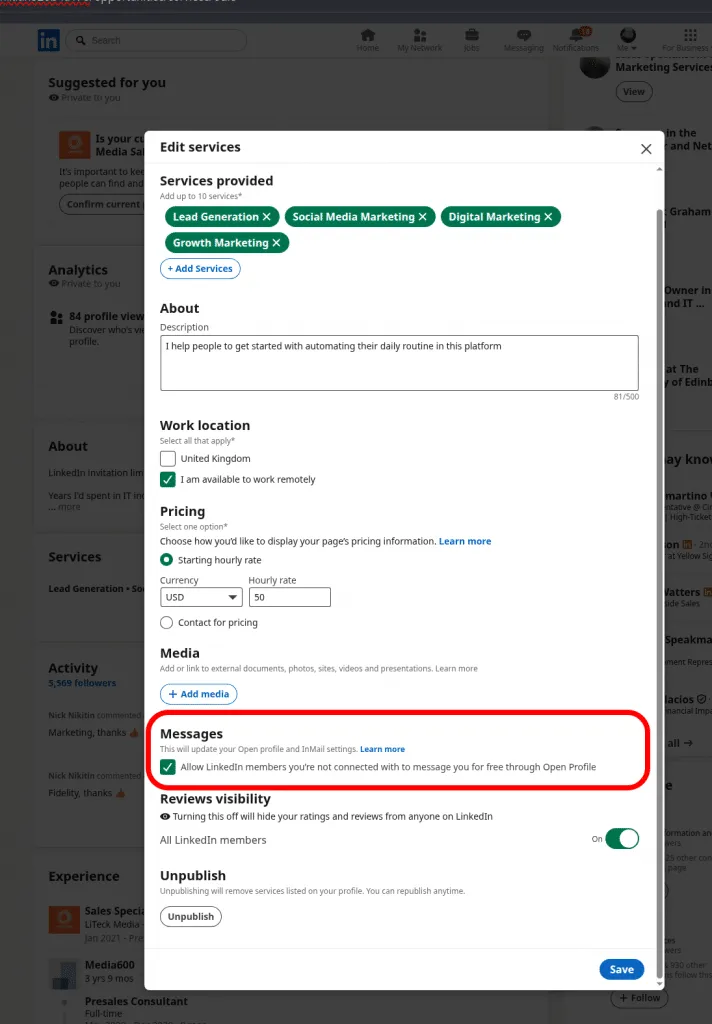
Step 3: Toggle On “Open Profile”
Inside the dropdown menu, you’ll see the option you’ve been looking for:
Do this:
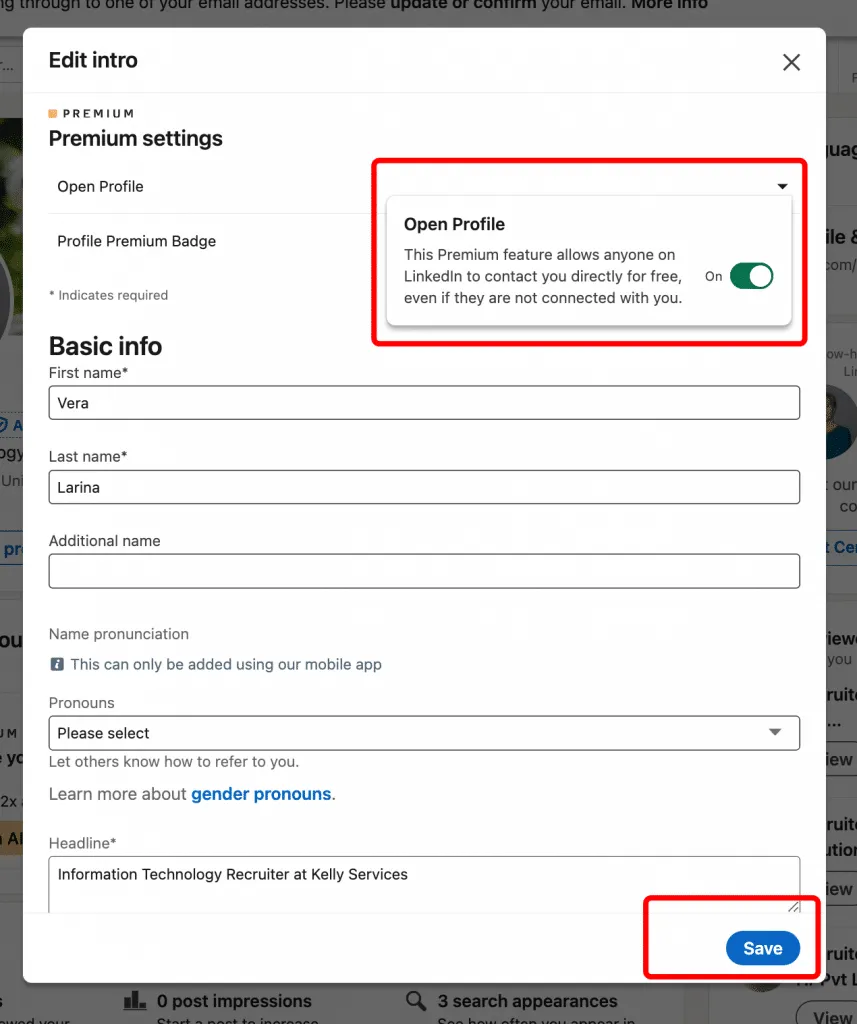
- Find the Open Profile toggle
- Slide it to the RIGHT (or tap once)
This is the core action for anyone searching how to open profile on LinkedIn step-by-step.
Step 4: Save Your Changes
Now finalize your settings.
Do this:
- Scroll down and click “Save”
- Refresh your page if needed
Important Note
Open Profile is a LinkedIn Premium feature.
If you don’t have Premium, you won’t see the Open Profile toggle.
Workaround (no Premium):
If you don’t want to buy Premium, enabling Services can still make your profile more open to inbound messages — people can reach out to you directly through service inquiries.
Pro Tip
The steps are identical on mobile.
The “Edit Profile” pencil → Premium dropdown → Open Profile toggle all follow the same flow in the LinkedIn app.
Open Profile vs. Other LinkedIn Visibility Settings (What’s the Difference?)
| Feature | Open Profile | #OpenToWork Badge | Public Profile | InMail |
|---|---|---|---|---|
| What it does | Allows any LinkedIn member to message you for free (even without connection) | Displays a badge signaling you’re open to new roles | Makes your LinkedIn profile visible to search engines & external viewers | Enables paid messaging to people you’re not connected to |
| Who can see it | All LinkedIn members | All LinkedIn members (or recruiters only, depending on settings) | Anyone on the internet | LinkedIn Premium users sending InMail |
| Cost | Requires Premium (any tier) | Free | Free | Costs InMail credits (or Premium plan) |
| Messaging | Unlimited free direct messages from anyone | Does not enable messaging | Does not affect messaging | Paid one-off messages to non-connections |
| Privacy | Medium — opens your inbox to more people | Low — visible signal that you’re job seeking | Low — profile is publicly searchable | High — tightly controlled, only visible to recipients |
| Best for | Sales, recruiting, B2B outreach, inbound leads | Active job seekers or people exploring roles | Agencies, consultants, content creators, personal branding | Precise, targeted outreach with tracked delivery |
Understanding how Open Profile differs from LinkedIn’s other visibility tools helps you use it strategically—not accidentally. Below are the three most common features people confuse with Open Profile.
Open Profile vs. #OpenToWork
These two features send completely different professional signals:
Open Profile
- Meaning: “Anyone can message me freely.”
- Purpose: Expands communication access
- Best for: Business development, networking, recruiting, partnerships, consulting, and brand-building
#OpenToWork
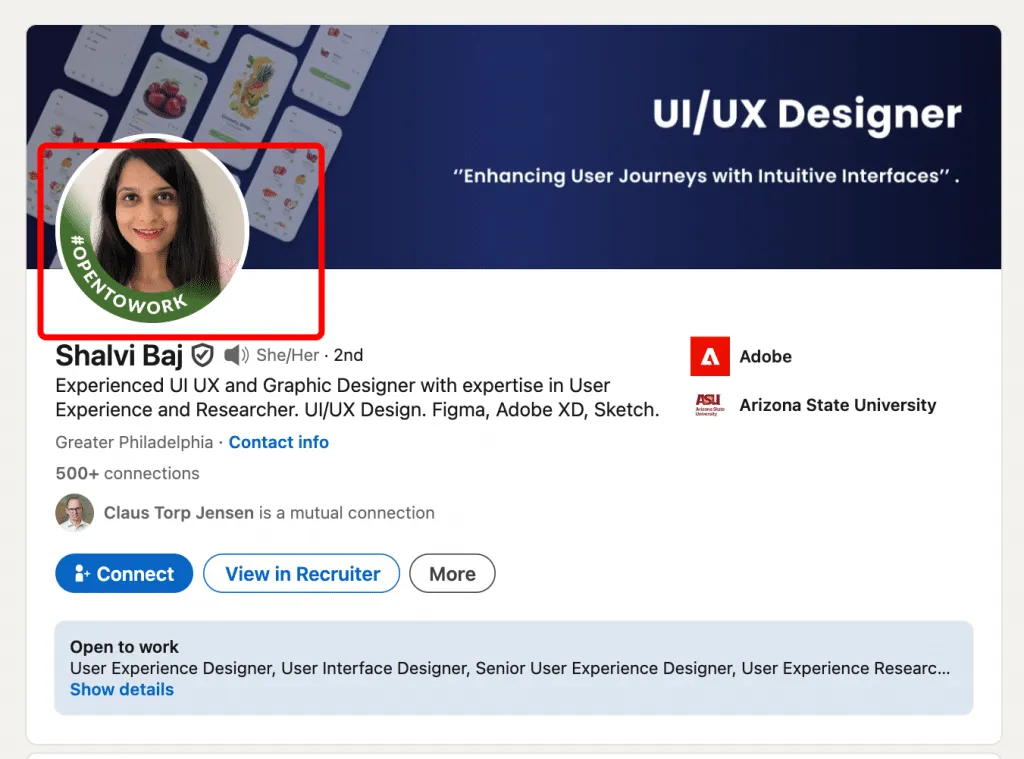
- Meaning: “I’m actively job searching.”
- Purpose: Signals availability to recruiters and hiring managers
- Best for: Finding new roles
- Visibility: Shows a green banner around your profile photo (optional)
Key Insight:
You can enable Open Profile and #OpenToWork at the same time, but they target different audiences and goals.
Open Profile vs. Public Profile Visibility
These features control totally different things on LinkedIn:
Open Profile
- Only affects who can message you
- Makes messaging free for all LinkedIn users
- Does NOT make your profile public outside LinkedIn
- Does NOT change who can view your content or activity
Public Profile Visibility
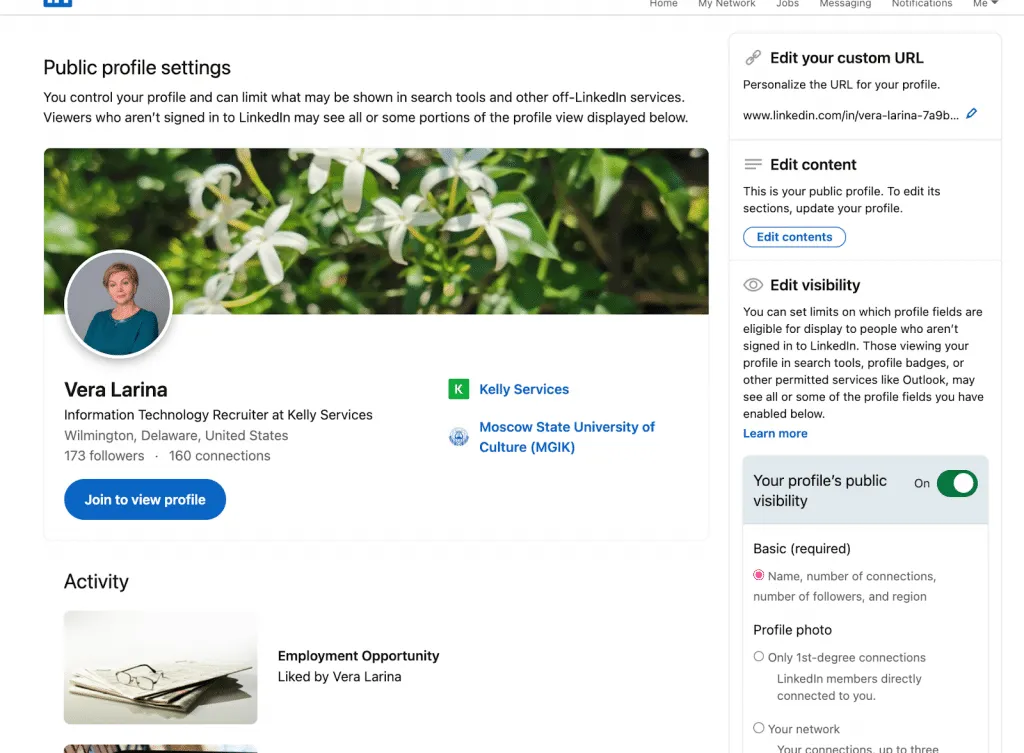
- Controls what parts of your profile are visible to:
- Non-LinkedIn users
- Search engines (Google, Bing, etc.)
- Logged-out visitors
- Found in Settings → Visibility → Edit your public profile
Important Distinction:
Enabling Open Profile does not expose your personal data publicly. It only opens your inbox.
Open Profile vs. InMail
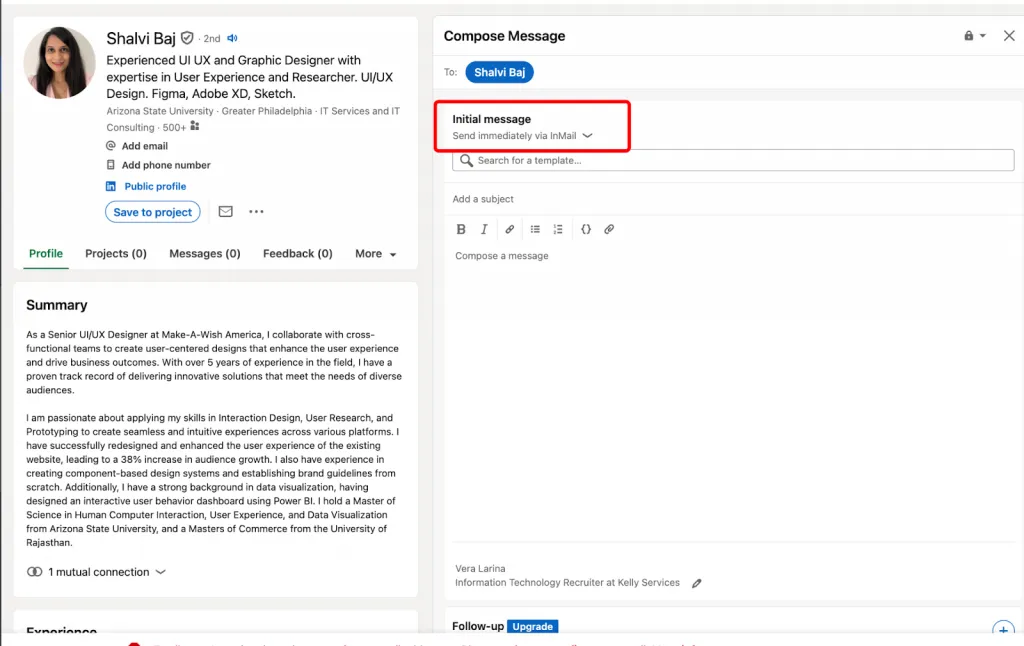
Many professionals misunderstand how these overlap:
InMail
- Premium messaging feature
- Monthly credit limitation
- Used for targeted outreach at scale
- Requires careful budgeting
Open Profile
- Free messaging access for anyone
- Unlimited incoming/outgoing messages
- No credit usage or monthly limitations
Winning Strategy:
Use Open Profile + InMail together for maximum communication reach.
- InMail → For outreach to people who don’t have Open Profile enabled
- Open Profile matters on the recipient’s side, not yours
- Having Open Profile ON does not give you outbound privileges
How to use this in Linked Helper:
- In Sales Navigator, search and identify leads with Open Profile
- Prioritize those profiles for outreach
- Message them directly:
- No connection request
- No InMail credits
- No waiting
Open Profile is an outbound accelerator only when the lead enables it.
Your own Open Profile setting impacts inbound only.
This hybrid approach dramatically improves ROI for anyone in B2B, sales, recruiting, consulting, or content-driven growth.
9 Proven Strategies to Maximize Your Open Profile Results
If you want to know how to use Open Profile on LinkedIn effectively—not just enable it—these strategies will help you turn your LinkedIn open profile into a consistent source of opportunities, clients, partnerships, and recruiter outreach.
This is exactly how to make Open Profile work to your advantage.
1. Optimize Your Profile Before Enabling Open Profile
Your LinkedIn open profile is only as strong as the impression your profile makes.
Do this first:
- Complete every section (100% profile strength)
- Upload a professional headshot
- Rewrite your headline + summary to be value-driven
- Add rich media (videos, PDFs, articles, case studies)
- Make your positioning unmistakably clear
Weak profile → weak messages.
Strong profile → qualified inbound leads.
This is foundational if you want to know how to make Open Profile work properly.
2. Craft a Clear, Benefit-Focused Headline
Your headline determines whether the right people message you.
Bad: “Sales Executive at Company XYZ”
Good: “Enterprise SaaS Sales | Help B2B Teams Close 40% More Deals | ex-HubSpot”
Your headline should answer:
- Who do you help?
- What results do you deliver?
- Why should someone message you?
This is one of the easiest ways to optimize how to use Open Profile on LinkedIn for better inbound.
3. Write a Summary That Attracts Your Ideal Outreach
Your “About” section is your conversion engine.
Structure it like this:
- Start with a strong value statement (the problem you solve)
- Add 2–3 quantifiable achievements
- End with a CTA: “Open to partnership discussions, recruiting collaborations, and consulting engagements.”
Keep paragraphs short, skimmable.
Example for recruiters:
“On the lookout for top sales talent? I’ve placed 200+ high-performing reps in fast-growth SaaS companies. Let’s connect.”
This is exactly how to make Open Profile work for targeted inbound.
4. Use a Clear Call-to-Action in Your About Section
Tell people exactly why they should message you.
Examples:
- “ Open to collaborations, podcast invitations, and speaking opportunities.”
- “ Message me for partnership inquiries or consulting requests.”
Your CTA guides your inbound traffic and dramatically improves message relevance—especially important for a LinkedIn open profile.
5. Leverage Content to Attract High-Quality Inbound
If you want better leads in your inbox, publish better content.
Use this 70/20/10 strategy:
- 70%: thought leadership + insights
- 20%: educational content
- 10%: soft promotional content
Types of content that work best:
- Industry lessons
- Case studies
- Carousels/presentations
- Personal career stories
- Tactical how-to posts
High-value content = high-value open profile messages.
6. Respond Quickly to Open Profile Messages
Speed builds trust.
To maximize your LinkedIn open profile:
- Respond within 24 hours
- Use message templates for common inquiries
- Move conversations to calls when relevant
- Keep tone warm + authoritative
Fast responders close more deals, secure more interviews, and convert more leads.
7. Keep Your Profile Dynamic
LinkedIn rewards active, evolving profiles.
Update quarterly:
- Your headline
- About section
- Achievements and wins
- New projects or clients
- Skills and endorsements
Dynamic profiles attract 2–3x more inbound messages—critical when learning how to use Open Profile on LinkedIn effectively.
8. Use Open Profile for Targeted Outreach (Multi-Channel Strategy)
Don’t just receive messages.
Use your LinkedIn open profile to send smarter, warmer outreach.
Tactics:
- Identify Open Profile decision-makers
- Message them directly (no credits needed)
- Follow up via email for multi-touch communication
- Combine with Sales Navigator + content engagement
This omni-channel workflow increases response rates by 30%+.
This is the advanced version of how to make Open Profile work for business development and sales.
9. Monitor Message Quality & Re-Optimize as Needed
Not all inbound is good inbound.
Audit your message quality monthly:
- What types of people are messaging you?
- Are inquiries aligned with your goals?
- Does your headline attract the wrong audience?
If needed:
- Update your summary/CTA
- Shift your content strategy
- Temporarily disable then re-enable Open Profile
Think of it as ongoing optimization for your LinkedIn open profile.
7 Advanced Open Profile Tactics for Sales, Recruitment & Business Development
Once your LinkedIn open profile is live, the next step is using it strategically, not passively. These are advanced, multi-touch, high-converting frameworks that show you how to use Open Profile for lead generation at a professional level.
These tactics go beyond “send more messages” — they help you build a predictable, repeatable open profile messaging strategy that increases outreach efficiency and inbound quality.
1. Open Profile + Sales Navigator Prospecting Workflow
This is where your LinkedIn open profile becomes a true revenue engine.
How it works:
- Use Sales Navigator to identify ICP decision-makers
- Filter by seniority, industry, buying power
- Cross-check which prospects have Open Profile enabled with advanced filters in Linked Helper
- Message them directly — no InMail credits wasted
- Move promising prospects into your campaign list
End-to-end workflow:
Find → Research → Message → Add to CRM/Campaign → Follow-up
Pro Tip:
Use automation tools (HubSpot sequences, Apollo, Clay, or Salesflow) to track:
- Open rates
- Response rates
- Follow-up timing
- Meeting booked conversion
This is one of the most efficient ways to understand how to use Open Profile for lead generation at scale.
2. Create a Signature “First-Touch” Message Template
Your first-touch message sets the tone for the entire relationship.
Use this personalization formula:
[Relevant observation] + [Value proposition] + [Specific CTA]
Example template:
“Hi [Name], I noticed you recently led [initiative]. We’ve helped [similar companies] achieve [specific outcome]. Would you be open to a 15-min chat to explore if this aligns with your goals?”
A/B test every variable:
- Opening line
- Social proof used
- CTA phrasing
- Message length
Then track:
Open rate → Response rate → Meeting rate
This is core to a scalable open profile messaging strategy.
3. Open Profile “Cold Outreach” Campaign Framework
This is a structured, multi-touch, low-friction campaign that consistently converts.
Week 1: Personalized Open Profile message
Week 3: Follow-up message from a different angle
Week 5: Connection request with a custom note
Week 7: Add them to your nurture email sequence
Why it works:
Multi-touch outreach increases conversion rates by 40–60%.
This framework multiplies the impact of your LinkedIn open profile and creates a long-term pipeline.
4. Combine Open Profile With LinkedIn Content Strategy
Your content warms up your audience before outreach.
Publish 2x weekly:
- Thought leadership
- Insights
- Case studies
- Short stories with lessons
- Industry breakdowns
Then do this:
- Track who views your profile or content
- Identify warm leads (they’re already curious)
- Message them: “Saw you checked out my recent post on [topic] — thought you’d find value in [resource/insight].”
You turn passive viewers → active prospects using your open profile messaging strategy.
5. Use Open Profile to Build a “Prospect Pipeline Database”
Your inbox becomes a goldmine of intelligence.
Track every inbound message:
- Sender’s company
- Role + seniority
- Stated pain points
- Buying timeline indicators
- Objections
- Industry patterns
Build a simple spreadsheet or CRM pipeline.
Then use your database to:
- Trigger follow-ups
- Personalize campaigns
- Re-engage dormant opportunities
- Identify emerging trends
This transforms your LinkedIn open profile into a data-driven lead engine.
6. Strategic Timing: Message Right After Target’s Activity
Timing = relevance = replies.
Watch for:
- New posts
- Comments
- Job changes
- Company announcements
- Profile updates
Then send your message immediately while attention is high.
Template angle:
“Great point on your recent post about [topic]. We’re seeing similar patterns with [client types], and thought you’d find this useful…”
This dramatically increases message visibility — especially powerful inside an open profile messaging strategy.
7. Combine Open Profile With Video Messages
Video is a massive differentiator in outreach.
Use Loom or Claap to send:
- 30–60 second intro
- Personalized insight
- Clear, simple CTA
Why it works:
- Video shows up with a thumbnail preview
- Humanizes you immediately
- Increases trust and interest
- Boosts reply rate by 50%+
Example structure:
- Quick intro (5 sec)
- One insight tailored to them (20–30 sec)
- Invite to a 10–15 min chat (10 sec)
This tactic supercharges how to use Open Profile for lead generation in ways text alone simply can’t.
Related reading:
5 Open Profile Mistakes That Kill Your Results (And How to Fix Them)
If your LinkedIn Open Profile isn’t delivering the opportunities you expected, you’re not alone. Most people use it incorrectly — which is exactly why open profile not working is one of the most common user complaints.
Below are the five biggest mistakes that tank your outcomes, plus the exact fixes to get your results back on track. These are the non-negotiable LinkedIn open profile best practices.
Mistake #1: Enabling Open Profile Without Optimizing Your Profile
Problem:
You turned on Open Profile, but your profile is incomplete or weak:
- Low-quality photo
- Generic headline
- Empty or vague summary
- No proof of expertise
Consequence:
You get few inbound messages — or worse, only low-quality leads and spam.
This is the #1 reason behind people asking “why open profile not working?”
Solution:
Optimize BEFORE enabling:
- Fill out 100% of your profile
- Add media, achievements, and credibility markers
- Rewrite your headline and About section focused on value
Turn on Open Profile only after optimization is complete.
Review results after 14 days and refine.
Mistake #2: Sending Generic, Non-Personalized Messages
Problem:
You copy-paste the same outreach to 20, 50, or 100 prospects.
Consequence:
90% ignore it.
This is the most common cause of why no response to open profile messages — your outreach looks automated and low-effort.
Solution:
Use templates, but personalize each message with:
- A reference to their recent post
- A specific accomplishment
- Something relevant about their company
- A unique observation
Rule:
One personalized line → transforms generic outreach into relevance.
Mistake #3: No Follow-Up Strategy
Problem:
You send one message and never follow up.
Consequence:
Most people never see it — the “Other” inbox on LinkedIn hides messages.
No follow-up = no conversion.
Solution:
Use a simple 3-touch follow-up system:
- Day 1: Initial message
- Day 14: Value add (PDF, insight, resource, article)
- Day 28: Light nudge or connection request
This alone can double or triple your response rate.
Mistake #4: Sending Overly Salesy Opening Messages
Problem:
Your first message is basically:
- “Want to buy our product?”
- “Book a demo?”
- “Let’s talk ASAP.”
Consequence:
Instant delete.
People ignore pushy sales energy from strangers — especially through Open Profile.
Solution:
Follow LinkedIn open profile best practices:
Lead with value, not a pitch.
Message flow:
- Message 1: Insight, observation, or resource
- Message 2: Ask a question to open a conversation
- Message 3: Soft CTA to a call/meeting
Warm them up before you ask.
Mistake #5: Ignoring Responses & Killing Your Reputation
Problem:
You receive inbound messages through Open Profile…
and respond days or weeks later (or never).
Consequence:
You look unreliable, disorganized, or not serious.
This destroys trust and kills any potential deals or opportunities.
Solution:
Set a personal response SLA: respond within 24 hours.
Even a short message is enough:
“Thanks for reaching out — I’ll review this and get back to you on Tuesday.”
Consistency builds your brand. Silence kills it.
5 Tools That Amplify Your Open Profile Results
Open Profile gives you access — but tools or open profile give you scalability, speed, and tracking.
Here are five LinkedIn outreach tools that multiply your outreach power without increasing your workload.
1. LinkedIn Sales Navigator (Built-in)
This is your core engine for finding high-intent Open Profile prospects.
What it does:
- Identify Open Profile prospects with advanced filters in Linked Helper
- Export curated lead lists
- Track leads, engagement, and conversions
- Prioritize decision-makers in your ICP
Why it works:
Most people with Open Profile turned on are already open to conversations, making them ideal targets.
Cost: ~$99.99/month
2. Outreach Automation Tools (Apollo, Hunter)
These tools extend LinkedIn Open Profiles into a multi-channel lead-gen system.
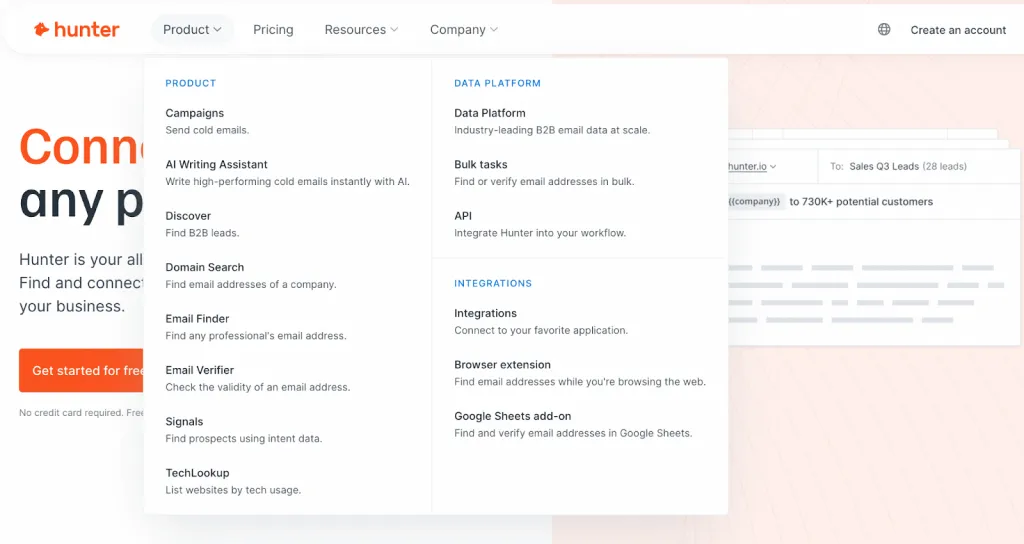
What they do:
- Send free messages to Open Profiles (Linked Helper — no InMail needed)
- Automate outreach directly on LinkedIn with limits control and delays (Linked Helper)
- Find verified email addresses for prospects (Apollo, Hunter)
- Combine LinkedIn messages with email follow-ups
- Automate personalized sequences
- Track opens, clicks, and replies
Why it works:
A prospect might miss your LinkedIn message — but they won’t miss consistent follow-ups across multiple channels.
Cost: $50–150/month depending on scale
3. Email Sequencing Platforms (Mailchimp, HubSpot Free)
Perfect for warming up Open Profile leads who don’t respond on LinkedIn.
What they do:
- Add prospects to automated nurture flows
- Drip value-based emails over weeks
- Track open rate → reply rate → conversion
Why it works:
LinkedIn messages start the relationship. Email sequences build trust over time.
Cost: Free–$100+/month
4. Video Personalization Tools (Loom, BombBomb)
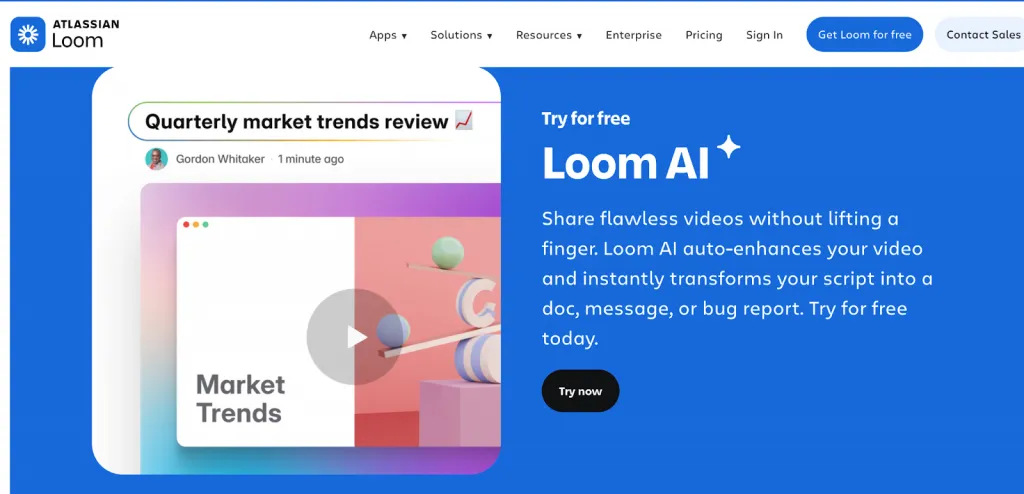
Your secret weapon for pattern break outreach.
What they do:
- Record 30–60 sec personalized videos
- Embed video previews directly in LinkedIn messages
- Increase attention, engagement, and credibility
Why it works:
Video thumbnails stand out in the inbox — and boost reply rates by 50%+.
Cost: Free–$20/month
5. CRM Integration (HubSpot, Pipedrive, Salesforce)
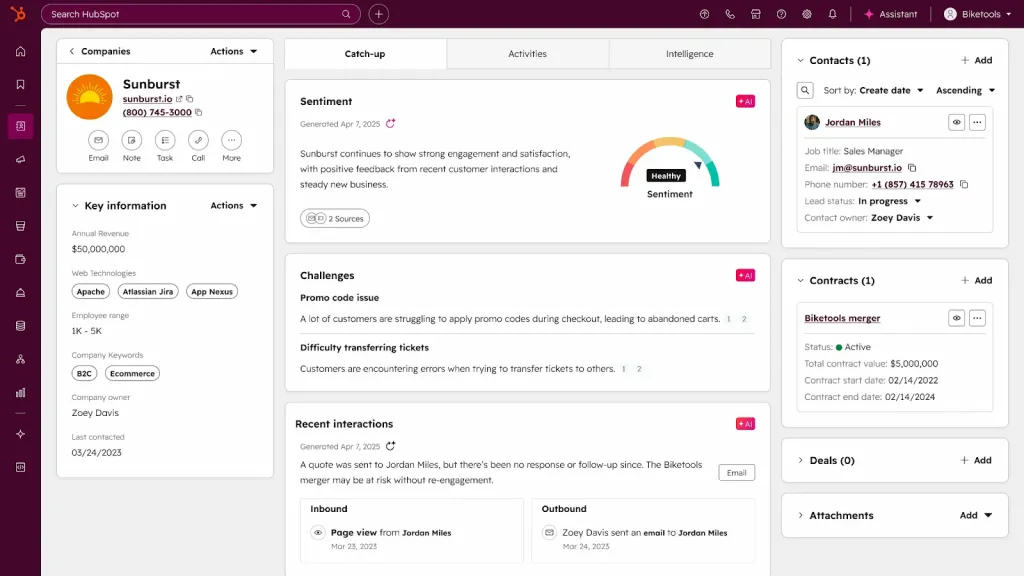
Where your Open Profile strategy becomes a fully trackable pipeline.
What it does:
- Log all Open Profile conversations
- Track deal stages and lead score
- Automate reminders and follow-ups
- Sync activity from LinkedIn + email
Why it works:
Without a CRM, you lose leads.
With a CRM, you build a predictable revenue machine.
Cost: Free–$500+/month depending on plan
Alternatives to the tools mentioned:
Open Profile Action Plan: Your 30-Day Implementation Guide
This is your step-by-step blueprint for how to start with Open Profile, when to enable Open Profile, and how to get the best results from day one. Follow this roadmap and you’ll build momentum, data, and predictable inbound + outbound results.
Week 1: Prepare & Optimize
Before you enable anything, you prepare the engine.
Tasks:
- Audit your entire LinkedIn profile (photo, headline, About, experience, skills)
- Update your headline to be value-driven, not job-title driven
- Refresh your About section with a CTA
- Write 2–3 content pieces you’ll publish next week
- Create 3–5 first-touch message templates (value-first)
- Research your ideal prospect persona (pain points, decision-makers, buying triggers)
Goal:
Become “conversion ready” before enabling LinkedIn Open Profile — because a weak profile kills results.
Week 2: Enable & Test
This is when to enable Open Profile — only after Week 1 prep.
Tasks:
- Enable Open Profile inside your Premium settings
- Send 10–15 personalized Open Profile messages to warm prospects
- Monitor:
- Response rate
- Message quality
- Tone and sentiment
- Refine templates based on what gets replies
Goal:
Validate your messaging before scaling.
Week 3: Build Content & Scale
Turn on the growth engine.
Tasks:
- Publish 2 content pieces (thought leadership or problem-solving posts)
- Send 20–30 personalized messages to target prospects
- Create 2–3 follow-up template variations
- Track all replies, dates, and statuses in a simple spreadsheet or CRM
Goal:
Start building consistent traffic: profile views → messages → conversations.
Week 4: Analyze & Optimize
Switch from “doing” to “evaluating.”
Tasks:
- Review your core metrics:
- Response rate
- Meeting rate
- Average response time
- Message quality
- Identify your best-performing message angles
- Refine targeting (industry, role, company size)
- Adjust your CTA if needed
- Plan your next 30-day sprint based on data, not guessing
Goal:
Turn the system into a predictable monthly outreach engine.
Final Checklist
Use this to confirm your entire Open Profile system is active: LinkedIn Premium account active
Profile fully optimized (100% complete + strong headline + CTA)
Open Profile enabled
First 3 outreach messages sent
Response tracking system in place (spreadsheet or CRM)
Follow-up strategy defined (3-touch minimum)
Weekly content plan created
Performance metrics tracked (weekly + monthly)
Related reading: