
 Updated: October 23, 2026
 20 min read
The awkward part of buying AI cold calling software is that two vendors can promise more conversations while selling completely different jobs. One gets your salesperson through the ringing and voicemail. The other supplies the voice that speaks to the prospect. Pick the wrong kind and you haven't automated your bottleneck—you've bought a new workflow.
My first pick for a rep-led outbound team is Nooks; for a team building an AI voice workflow, I'd start with Retell AI. Orum suits larger calling teams, Bland AI gives you visual conversation paths, Vapi lets developers choose the underlying providers, and Synthflow fits an enterprise rollout with implementation support. The voice-agent picks belong on your shortlist for permitted outreach and consented follow-up, not as a shortcut around calling rules.
I configured isolated Retell AI and Vapi assistants, compared pricing calculators and setup guides, read user accounts, and calculated three workloads; I didn't place live calls or complete test conversations. Linked Helper publishes this blog and makes LinkedIn automation software; it isn't one of the calling-tool picks.
What is AI cold calling software?
AI cold calling software either helps a human salesperson make outbound calls or uses a synthetic voice to conduct conversations. AI-assisted dialers detect answers, skip voicemail and prepare reps; autonomous voice platforms handle dialogue and trigger follow-up actions. Choose between them by deciding who should speak when a prospect answers.
The best AI cold calling software at a glance
Choose the speaking role first, then compare the cost and controls.
| Tool | Best for | Standout feature | Starting price | Main trade-off |
|---|---|---|---|---|
| Nooks | Rep-led prospecting | Adaptive dialing and live coaching | Custom | Key modes require data sharing |
| Orum | Larger SDR teams | Adjustable answer detection | Custom; nine-seat minimum | Coaching costs extra |
| Retell AI | Configurable AI voice workflows | Text, simulation and web testing | AI voice from $0.07/min | Model and extras change total |
| Bland AI | Visual conversation paths | Node-based Pathways builder | Start: $0.14/talk minute | Telephony and volume limits |
| Vapi | Developer-owned voice stacks | Choice of AI providers | $0.05/min hosting, plus providers | You own the implementation |
| Synthflow | Supported enterprise deployment | Flow Designer and campaign controls | Contracts from $30,000/year | Enterprise commitment |
What makes the best AI cold calling software?
A useful caller gets the right conversation to the right person—and leaves you enough control to stop the wrong one.
I looked for five things that affect that outcome:
-
Who speaks after pickup? Nooks and Orum connect a salesperson. Retell AI, Bland AI, Vapi and Synthflow can supply the speaking agent. An AI summary or voicemail detector doesn't turn a dialer into an autonomous seller.
-
Qualification and handoff: Can you decide which answers qualify a lead, what the agent should never promise, and when to transfer or stop? A transcript is useful; a reliably routed next step is what your sales team needs.
-
Control over the call: With human dialers, check answer detection, canceled parallel calls and number reputation. With voice agents, check interruptions, opt-outs, test cases and failure handling before connecting customer systems.
-
A bill you can reconstruct: Count connected minutes, failed attempts, phone numbers, model charges and required seats. A low platform fee can leave most of the actual voice stack outside the advertised price.
-
Fit for the permitted audience: In the US, the FCC treats AI-generated voices as artificial or prerecorded voices under the TCPA. Applicable consent requirements still matter. Your deployment needs a review of recipients, line types, consent, recording and suppression rules; a vendor's outbound feature isn't permission to call a list.
I haven't ranked these tools by meeting conversion or voice latency: that would need a controlled calling pilot. The picks reflect workflow fit, configuration evidence and buying conditions. Email-only agents and meeting recorders don't make this list because they don't solve the phone workflow.
1. Nooks: Best for rep-led prospecting
Nooks is my pick when your reps should do the talking but shouldn't spend their day listening to ringing phones. It brings parallel dialing, account context and a shared salesfloor into the same workflow.
Pros — Nooks
-
Adaptive dialing adjusts active lines using pickup predictions.
-
Phone-tree navigation and gatekeeper handling have separate controls.
-
Live listen-in and whisper coaching support distributed teams.
Cons — Nooks
-
Adaptive and Turbo require workspace Data Sharing and a standard Nooks number.
-
Pricing is custom; connected data providers can require separate subscriptions.
The feature I like most is the choice between a fixed parallel-line count and Adaptive dialing. If your list mixes numbers that often answer with colder contacts, a single aggressive setting isn't necessarily the right fit for every call block. Adaptive adjusts the number of active lines; your rep still handles the conversation.
There's a useful distinction in the phone-tree settings, too. Auto Navigate Dial Trees tries to reach your contact or an operator. Skip Gatekeepers decides whether a receptionist gets connected to your rep. I'd keep the latter decision tied to your sales motion: for some accounts, the receptionist is your route in.
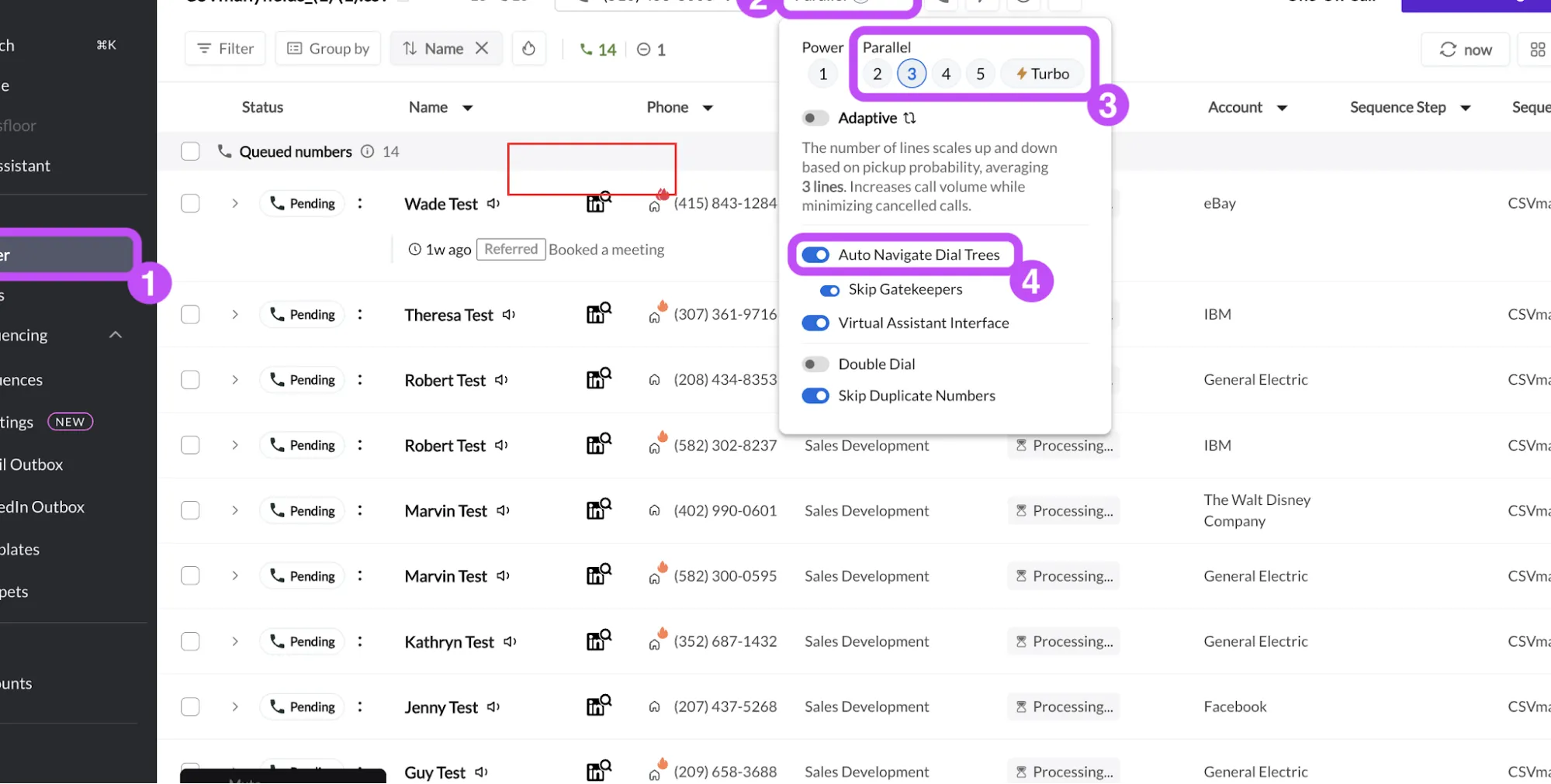
Inside Nooks, Auto Navigate Dial Trees and Skip Gatekeepers let you choose whether a receptionist reaches your rep. (Image source: Nooks)
The catch is that Adaptive and Turbo need a Parallel Dialing seat, a standard rather than branded Nooks number, and workspace Data Sharing. If your policy rules out that sharing, don't buy on the assumption you'll use those modes.
A January 11, 2025 r/sales comment from u/Ruzro captures why I'd check the handoff during a pilot:
“There's a feature called parallel dialing and it really helps getting connected calls.”
“Sometimes people get delayed connection (approx 6-7seconds)”
That's a dated user's experience, not a current latency measurement. My pilot question would be whether your rep can respond naturally when the prospect first says hello. Skip Nooks if you want a synthetic voice to conduct the sales conversation for you.
Nooks pricing
Custom.
-
Scope the Dialer, coaching and data products separately; no public seat price or billing term is listed.
-
Existing ZoomInfo, Cognism or LeadIQ connections require the relevant provider subscription.
2. Orum: Best for larger SDR teams
Orum is worth a close look when you already have a team of callers and want more control over how they reach live answers. Its nine-seat minimum makes that team context important from the start.
Pros — Orum
-
Admins can cap parallel dialing for the organization or individual reps.
-
Default and Fastest detection modes offer a concrete speed-versus-accuracy choice.
-
Power, parallel and click-to-call workflows sit alongside call history and summaries.
Cons — Orum
-
The public offer starts at nine seats, with custom pricing.
-
AI Coaching is an add-on; live battlecards are marked coming soon.
The control I'd pay attention to is Detection Mode. Default balances speed and accuracy; Fastest can connect a rep earlier but may also bridge more voicemails. That's a much more useful distinction than a blanket promise that AI makes dialing faster. If your reps spend their recovered time talking to answering machines, the faster setting isn't helping.
Orum's parallel dialer connects the first live answer it detects and cancels the remaining calls. Admins can limit the number of simultaneous dials, including setting it to one. I'd start new reps conservatively and judge the result on usable conversations, not the biggest dial count on the dashboard.
The catch is that rep-level detection choices and organization-level parallel limits are different controls. The detection guide lets individual reps choose Default or Fastest; it doesn't offer an admin lock for that mode. A manager who needs a uniform process should include that in the evaluation.
Skip Orum if you're buying for one or two callers, or if your aim is to replace the speaking rep. I'd also keep coaching out of the base-price assumption: the product page gives it a separate add-on treatment.
Orum pricing
Custom; minimum nine seats.
-
Core dialing — quote required for the actual team and contract.
-
AI Coaching — additional add-on.
-
Ascend Limited — an option for occasional dialers; calling allowance and price need to be scoped.
3. Retell AI: Best for configurable AI voice workflows
Retell AI is where I'd start if you want to build a speaking agent and inspect the pieces behind its behavior and bill. It offers several ways to check an agent before you put a telephone number in front of customers.
Pros — Retell AI
-
Text, simulated conversation and browser audio tests serve different purposes.
-
Model, voice and optional features have separate cost components.
-
Twenty concurrent calls are included with pay-as-you-go access.
Cons — Retell AI
-
The advertised minute range isn't a ceiling for every configuration.
-
Batch dials and optional features add charges beyond the basic voice rate.
I created a blank Single-Prompt Agent and opened its Test LLM panel. Manual Chat and AI Simulated Chat were separate choices; the panel also showed a per-message cost for the selected model. I configured a synthetic prompt without external actions, but didn't run a conversation. The distinction matters: checking instructions in text won't measure spoken turn-taking.
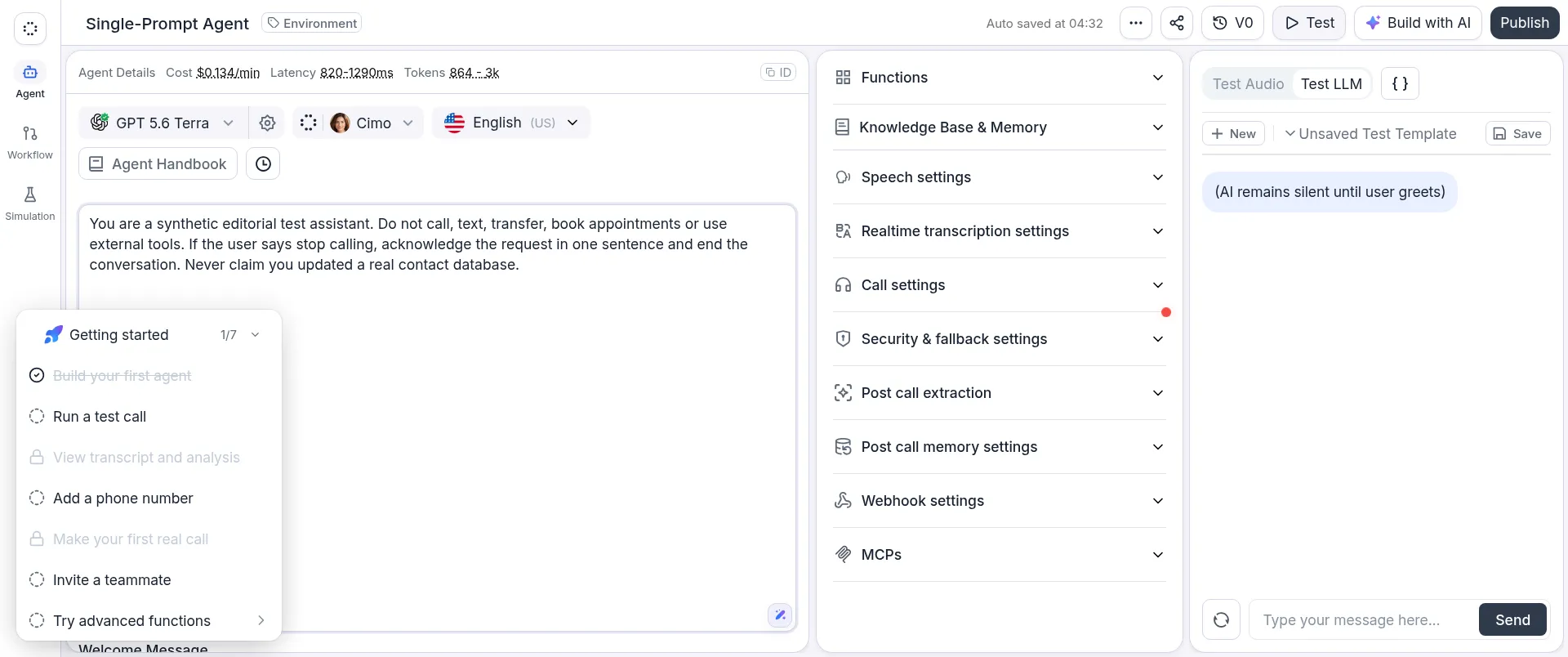
Inside my Retell AI workspace, I saved a synthetic qualification prompt and opened Manual Chat without sending a test message.
Things I Noted — Retell AI
I set Retell's public calculator to 5,000 minutes with GPT 4.1 mini, Retell's platform voice and Retell telephony. It returned $489/month: $0.0978/min before number rental, batch-dial charges or optional extras. I'd budget from that component breakdown, not the cheapest headline rate.
An April 17, 2026 Retell community question from ukrmeat555 captures the need:
“I need to know the price BEFORE making the call.”
The support reply recommended calculating the configuration's component costs. That's the approach I use in the workload comparison.
The catch is that a voice platform still needs your qualification logic, escalation policy and connected-system checks. Skip Retell AI if nobody on your team can own those decisions after launch. I'd choose it for a team willing to build and maintain a focused workflow, rather than expecting a ready-made salesperson.
Retell AI pricing
AI voice from $0.07/min, pay as you go; $10 signup credit.
-
Advertised AI voice range — $0.07–$0.31/min; selected models and extras can take the total higher.
-
Batch calling — $0.005 per dial; telephony and phone numbers are separate.
-
Credit-funded usage — prepaid; phone numbers and other recurring items bill separately.
4. Bland AI: Best for visual conversation paths
Bland AI is my pick when you want a branching conversation you can inspect node by node. Its Pathways builder gives qualification logic a visible structure, which is useful when several people need to review what the agent should do next.
Pros — Bland AI
-
Pathways combines nodes, conditions and webhook actions.
-
Draft and production versions can be kept separate.
-
Talk-minute pricing includes the language model, transcription and voice.
Cons — Bland AI
-
Carrier costs sit outside the talk-minute rate.
-
Start has a 100-call daily limit; native scheduling and some transfer features need Enterprise.
A simple script quickly becomes less simple once you add a wrong number, an existing customer and someone who wants a human. I'd rather review those branches explicitly than keep adding exceptions to one long prompt. Pathways is appealing for that reason, particularly if an operations person needs to understand the flow without reading application code.
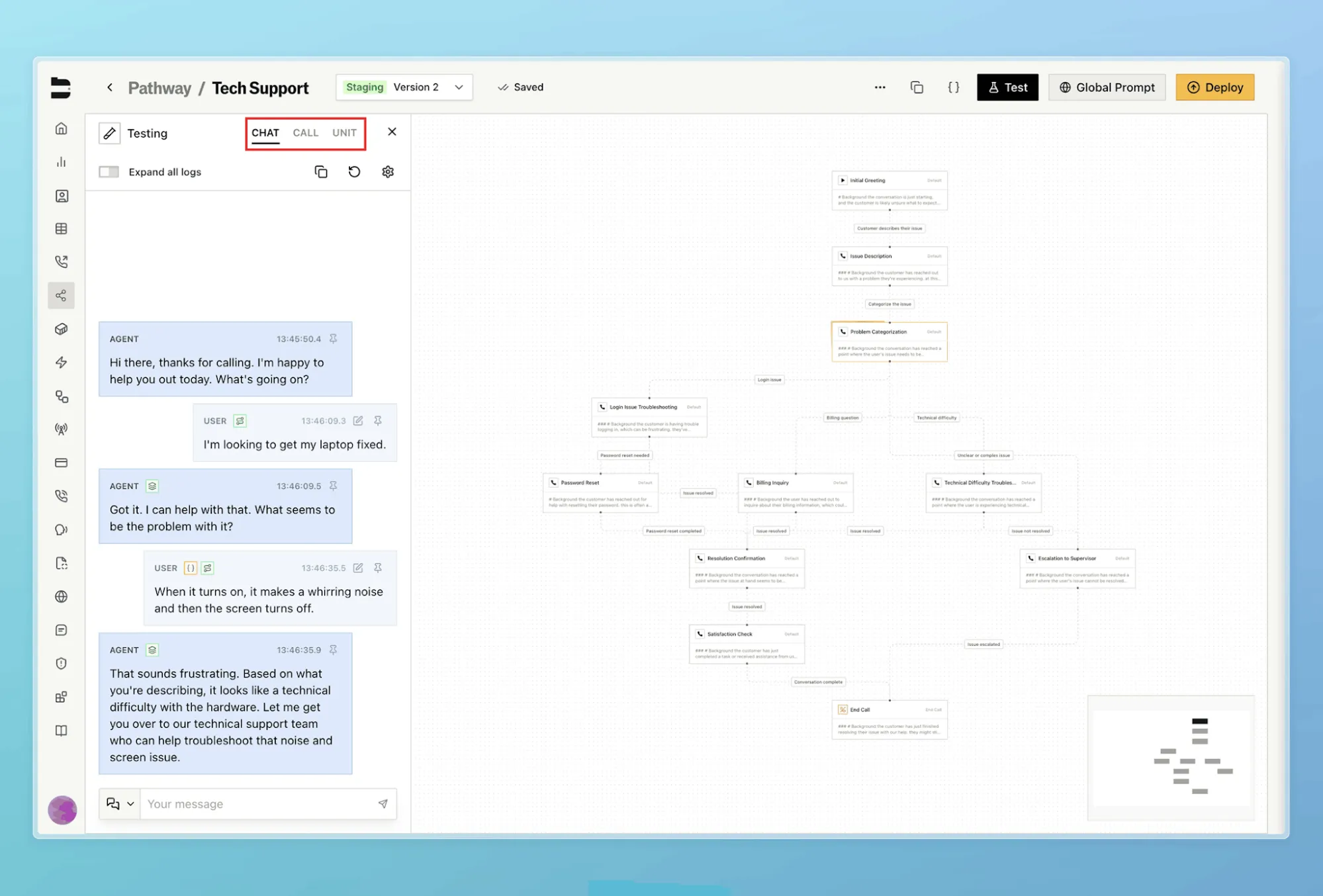
Inside Bland AI, separate Chat, Call and Unit modes let you choose how to check a pathway's behavior. (Image source: Bland AI)
You still have to check the plan against the action. The current pricing matrix puts the appointment scheduling node and warm/live transfers in Enterprise. A webhook you build yourself isn't the same purchase as a ready-to-use scheduling node.
The catch is that minutes aren't the only reason you'll outgrow Start. Its daily call cap can force a move to Build even when your conversations are short. And an unanswered attempt on Bland telephony still has a minimum charge, so a weak contact list affects more than your results.
I'd skip Bland AI if you're expecting the entry plan to handle the whole meeting-booking workflow without additional setup. For a narrow qualification flow with clearly defined branches, though, I like how directly the builder maps to the job.
Bland AI pricing
Start has no platform fee and costs $0.14/talk minute; telephony is separate.
-
Start — 10 concurrent calls and 100 calls per day.
-
Build — $299/month plus $0.12/talk minute; 50 concurrent calls and 2,000 calls per day.
-
Enterprise — custom; includes additional scheduling, transfer and control features.
5. Vapi: Best for developer-owned voice stacks
Vapi is the strongest fit here if your developers want to choose the model, transcription and voice providers themselves. I'd treat it as the foundation for a calling application, not a finished sales workflow.
Pros — Vapi
-
You can choose the providers behind the assistant.
-
Tools and structured outputs support custom qualification workflows.
-
The free account lets you create and edit an assistant.
Cons — Vapi
-
The hosting fee excludes the providers that make the assistant work.
-
My free account required a card before its text chat would run.
The attraction is control. If you already have a backend that checks eligibility, records outcomes or routes leads, Vapi gives you a way to connect that logic to a voice assistant. You can also use multiple assistants in a Squad when a conversation needs a handoff between roles.
I like that flexibility for a product team building voice into an existing service. I like it much less for a sales manager who simply needs next week's call blocks to run. Provider choice brings extra decisions about cost, response behavior and what happens when one component fails.
Things I Noted — Vapi
I created a blank assistant, added a synthetic opt-out instruction and opened Chat from the Talk menu. The editor was accessible, but Chat required a payment method for the pay-as-you-go organization. I didn't add a card or run the conversation. I'd separate “can I configure it?” from “can I test it without billing setup?” when planning your first session.
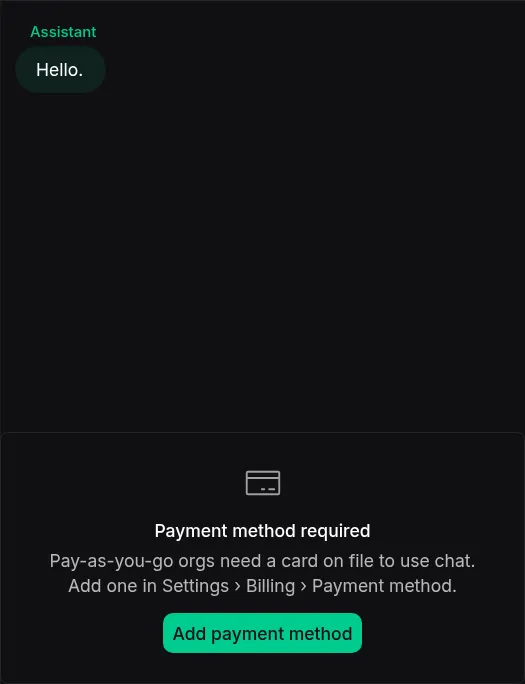
Inside my Vapi trial workspace, Chat required a card on file even though the assistant editor was available.
The catch is the headline price. The hosting charge is only one line in the stack. Vapi's own example calculator adds transcription, language-model and voice charges; paid transport and an optional success package can add more. Comparing hosting alone with Bland's included AI components would give you the wrong answer.
Skip Vapi if you don't have technical ownership for the workflow. If you do, I'd evaluate it with a fixed provider configuration and a saved set of difficult conversations, so you can tell whether a cheaper model actually improves the economics.
Vapi pricing
$0.05/min hosting, billed from prepaid credits, plus provider costs; $5 signup credit.
-
Base access — four concurrent calls and 14-day raw data retention.
-
Core — optional $29/month prepaid auto-renew package; ten concurrent calls and 30-day retention.
-
Providers and transport — separately priced; the workload table shows the current example range rather than a guaranteed all-in rate.
6. Synthflow: Best for supported enterprise deployment
Synthflow makes sense when the project includes implementation support, telephony design and an enterprise review—not just an agent prompt. Its current offer starts with an annual enterprise contract.
Pros — Synthflow
-
Flow Designer supports multi-stage conversations.
-
Enterprise scoping covers routing, integrations, security and launch support.
-
Campaign controls can reserve capacity for other calls.
Cons — Synthflow
-
Entry commitment starts at $30,000 annually.
-
Campaign creation uses the API and needs Enterprise activation.
I'd consider Synthflow for an operations team that wants help getting a defined voice workflow into service. The builder offers a single-prompt approach and a flow-based approach, but you can't freely combine the two: changing modes requires rebuilding. Decide how much branching you'll need before investing in the first version.
Things I Noted — Synthflow
The scheduling guide has a trap I'd resolve before launch: an outbound campaign's calling window doesn't override the agent's business hours. If the campaign is allowed to dial while the agent is closed, those recipients fail instead of waiting. The hours also follow the agent's timezone, not the recipient's.
That makes schedule design part of your campaign setup. I'd use the campaign window for outbound timing and check any additional agent-hours restriction against it, especially when one workspace serves several regions.
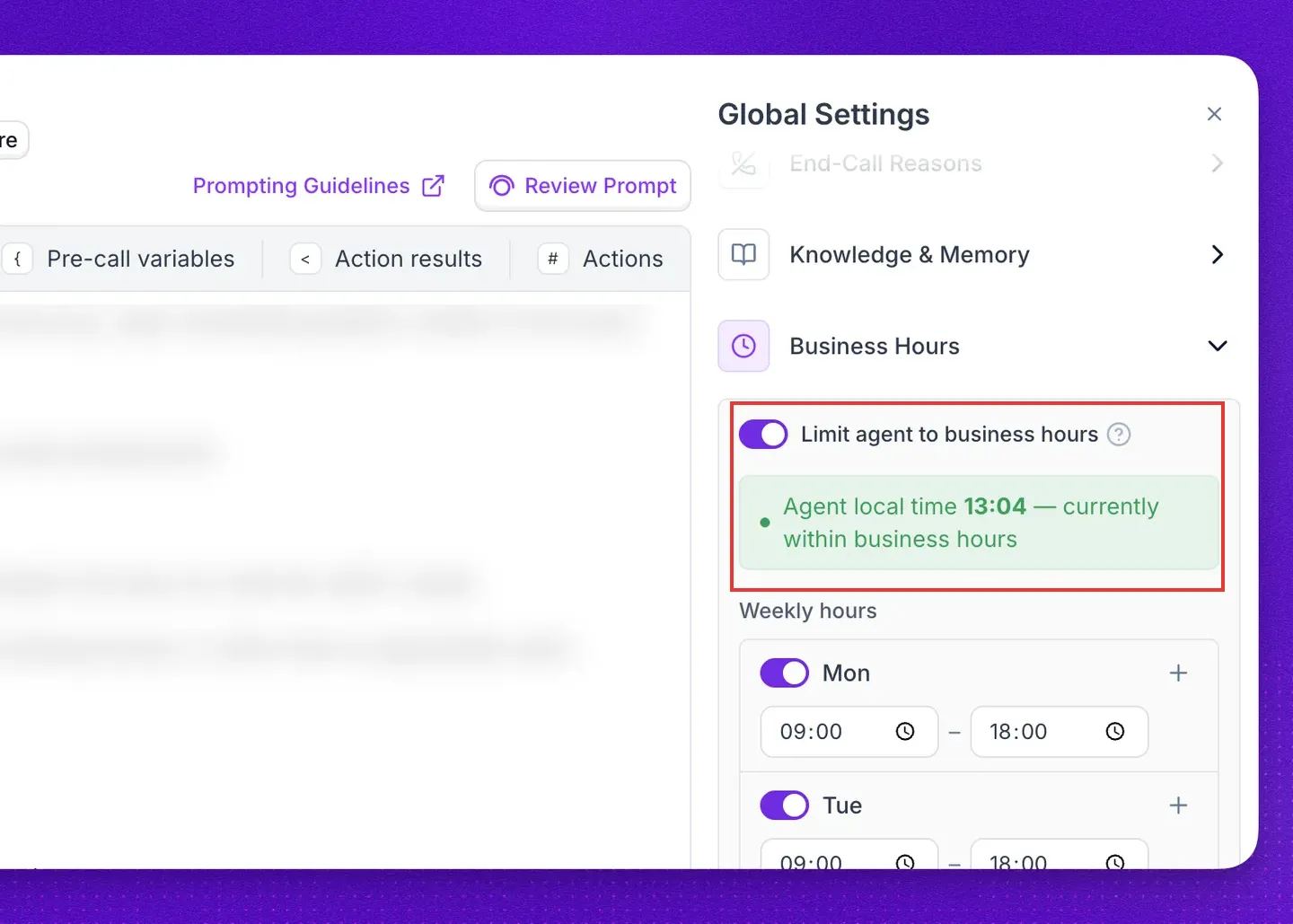
Inside Synthflow, the business-hours panel shows the agent's local time and whether its schedule currently permits calls. (Image source: Synthflow)
The catch is the scope of the purchase. This is overkill for a solo operator looking for an inexpensive experiment. I'd shortlist it when support, telephony and governance are part of the requirement, then evaluate the actual contracted allowance against your workload.
Synthflow pricing
Enterprise contracts from $30,000 annually.
- Custom scope — volume, concurrency, telephony, integrations, security and launch support determine the final agreement.
What the same workload costs
Dial volume and failed attempts can change the buying decision even when connected minutes stay the same.
These are my annualized calculations, not vendor quotes or measured campaign results. Each scenario assumes US outbound calls, five connected minutes per answered call, a 25% answer rate, 20 calling days per month and an even distribution of attempts. There are no transfers, voicemail conversations, paid knowledge bases or optional quality add-ons. Taxes, implementation and contact data are excluded.
| Monthly workload | Answered calls | Total attempts | Attempts per calling day |
|---|---|---|---|
| 1,000 connected minutes | 200 | 800 | 40 |
| 5,000 connected minutes | 1,000 | 4,000 | 200 |
| 20,000 connected minutes | 4,000 | 16,000 | 800 |
The next table prices the voice-processing portion of that same workload, plus the stated platform subscription and attempt charges. Carrier usage and number rental still need adding; the Bland rows also include its minimum charge for unsuccessful attempts on Bland telephony. Other transport-specific failed-attempt fees aren't modeled. The engines aren't identical, and these figures don't rank their voice quality or guarantee the same booking features.
| Tool and configuration | 1,000 min/month: annual subtotal | 5,000 min/month: annual subtotal | 20,000 min/month: annual subtotal | Add before budgeting |
|---|---|---|---|---|
| Retell AI: platform voice, GPT 4.1 mini, batch dialing | $1,041.60 | $5,208 | $20,832 | Telephony, number rental, selected extras |
| Bland AI: Start, then Build for higher daily volume | $1,788 | $11,328 | $34,548 | Carrier and number charges |
| Vapi: hosting + example Deepgram/OpenAI/ElevenLabs range | $981.60–$1,546.80 | $4,908–$7,734 | $19,632–$30,936 | Transport, numbers, optional package |
| Synthflow: scoped Enterprise | Quote; $30,000/year entry commitment | Quote | Quote | Contracted allowances and overages |
For Retell AI, I used $0.0828 per connected minute for the named AI components, plus $0.005 for each batch dial. For Bland AI, I added the $0.015 minimum for unanswered attempts on Bland telephony; it isn't an extra fee on top of every connected call. Vapi's example provider range is $0.0818–$0.1289/min including hosting. Its model usage varies, so that row is a planning range.
Here's the surprise: Bland's Start plan doesn't fit the middle scenario's 200 daily attempts. The calculation uses Build there, even though Start would be cheaper on minutes alone. The rate-only Start-to-Build crossover is 14,950 connected minutes a month; the daily limit can move your upgrade much earlier.
For the smallest scenario, Bland's separate Agent Phone plan is worth checking first. It costs $29.99/month after an eligible $14.99 first month: $344.88 for the first year, then $359.88/year at the regular rate. It includes a single US number and US/Canada voice and SMS, with one account-wide concurrent call, 20 calls per hour and 50 per day. Our 40-attempt day can fit numerically if you spread calls out, need only that one agent and have no competing inbound calls; check that the intended workflow fits the plan's light-usage scope. The two larger scenarios exceed its daily cap. This is a light-usage alternative, not the same capacity as Start or Build.
Nooks and Orum need a different budget: quoted seats, any data/coaching extras and the people making the calls. I'd compare them on usable conversations per rep-hour. A voice-platform minute subtotal doesn't tell you whether replacing or supporting that rep is the right move.
Check your existing stack first
An existing calling workflow may be enough if your problem is preparation or follow-up rather than dialing capacity.
Before adding Nooks or Orum, list what your CRM and sales-engagement subscription already provide: calling tasks, a dialer, recordings, notes and disposition sync. Check the actual plan you're paying for. Rebuying those features only makes sense if the new dialer removes a bottleneck you can name.
For an AI voice workflow, start with the system that owns the lead's status and opt-out record. Decide where the qualification result lands, who handles a requested human follow-up, and which system prevents the next attempt after a refusal. A convincing voice demo won't settle those questions.
LinkedIn prospecting tools such as Linked Helper can support a separate prospecting workflow, but they don't provide the calling engine compared here. Buying one doesn't supply phone permission or solve call routing.
Related reading:
Which AI cold calling software should you choose?
| Your scenario | My pick | What decides it |
|---|---|---|
| Preserve the human conversation | Nooks or Orum | Start with Nooks for its rep workspace and adaptive controls; compare Orum when you have the team size and want to tune detection and dialing behavior. |
| Build a configurable speaking agent | Retell AI | Several testing paths. |
| Build a visual, branching conversation | Bland AI | Check the daily call cap before settling on a plan. |
| Developers will own the stack | Vapi | Provider-level control. |
| Enterprise deployment | Synthflow | A scoped implementation and support relationship. |
For any voice agent, begin with one permitted use case and a short list of failure conditions: refusal, wrong person, unclear answer, unavailable human and failed booking. I'd rather see those handled cleanly than hear one polished demo call.