
 Updated: October 26, 2026
 21 min read
Quick picks by hiring task
The best AI recruiting tool depends on where your hiring process gets stuck. I'd start with Juicebox for a new sourcing workflow, SeekOut for more search control, and Metaview for interviews you still want a person to lead. Paradox, HireVue, and Eightfold tackle larger scheduling, interviewing, and matching problems.
AI recruiting tools use machine learning or generative AI to help find candidates, interpret job requirements, conduct or summarize interviews, and coordinate hiring workflows. Some assist a recruiter; others conduct candidate-facing conversations. The useful distinction is what the software produces, what evidence you can inspect, and which decisions remain with your team.
How I evaluated these tools and publisher disclosure
I regenerated notes in Metaview's built-in demo, compared live pricing selectors, read product guides and recruiter discussions, and calculated three hiring-team budgets. Linked Helper publishes this guide and makes software for LinkedIn outreach; it isn't one of these six picks.
The best AI recruiting tools at a glance
| Your bottleneck | Tool | Why I'd shortlist it | Important limit |
|---|---|---|---|
| Building a sourcing workflow from a job brief | Juicebox | Natural-language search, projects, and outreach drafts | ATS integration requires Business |
| Refining a search without surrendering filter control | SeekOut | AI search alongside filters and Boolean search | Contact credits and exports are separate allowances |
| Writing up interviews your team already conducts | Metaview | Recruiting-specific notes and scorecard assistance | Notes and Sourcing have separate prices |
| Scheduling many applicants across managers or locations | Paradox | Conversational booking and rescheduling | Needs calendar/ATS setup; custom price |
| Running structured, repeatable initial interviews | HireVue | Approved questions, rubrics, and response evidence | AI Interviewer is a separate buying decision from video recording |
| Matching existing and external talent to enterprise roles | Eightfold | Role-specific match explanations | Enterprise implementation and custom pricing |
What makes the best AI recruiting tools useful?
A useful AI recruiting tool removes a specific piece of work while leaving you enough evidence to review the result. I wouldn't buy one because it promises to “automate hiring.” That's too broad to test and too easy to misunderstand.
For a sourcing tool, I'd want to see how a job brief becomes search criteria. For an interview assistant, I'd want to trace a summary back to the conversation. For a scheduler, I'd care about the awkward cases: a panel, a different location, or a candidate changing the time.
These are the five criteria I'd use to narrow your shortlist:
-
A clear output. Does it give you a list, a contact record, interview notes, a booking, or an assessment? You'll make a better comparison when the two tools produce the same thing.
-
Controls you can inspect. Can you edit search filters, approve questions, review supporting responses, or correct a summary? A confident AI answer isn't enough when your team needs to explain what happened.
-
The plan that includes the feature. “AI included” doesn't tell you whether you get conversational search, an autonomous agent, or a few writing credits. I checked the relevant product and plan, not just the cheapest number on the page.
-
A workable handoff. A CSV export, a one-way ATS export, and a two-way integration solve different problems. Decide which handoff you need before comparing subscription prices.
-
A sensible candidate experience. Decide where people can ask questions, request help, or speak with a recruiter. Faster administration is useful; making a hiring decision harder to understand isn't.
I kept this shortlist focused on AI workflows you might add to your recruiting stack. If you mainly need job posting, pipeline stages, and a shared candidate database, start with an ATS comparison instead.
1. Juicebox: Best for starting with a plain-language sourcing brief
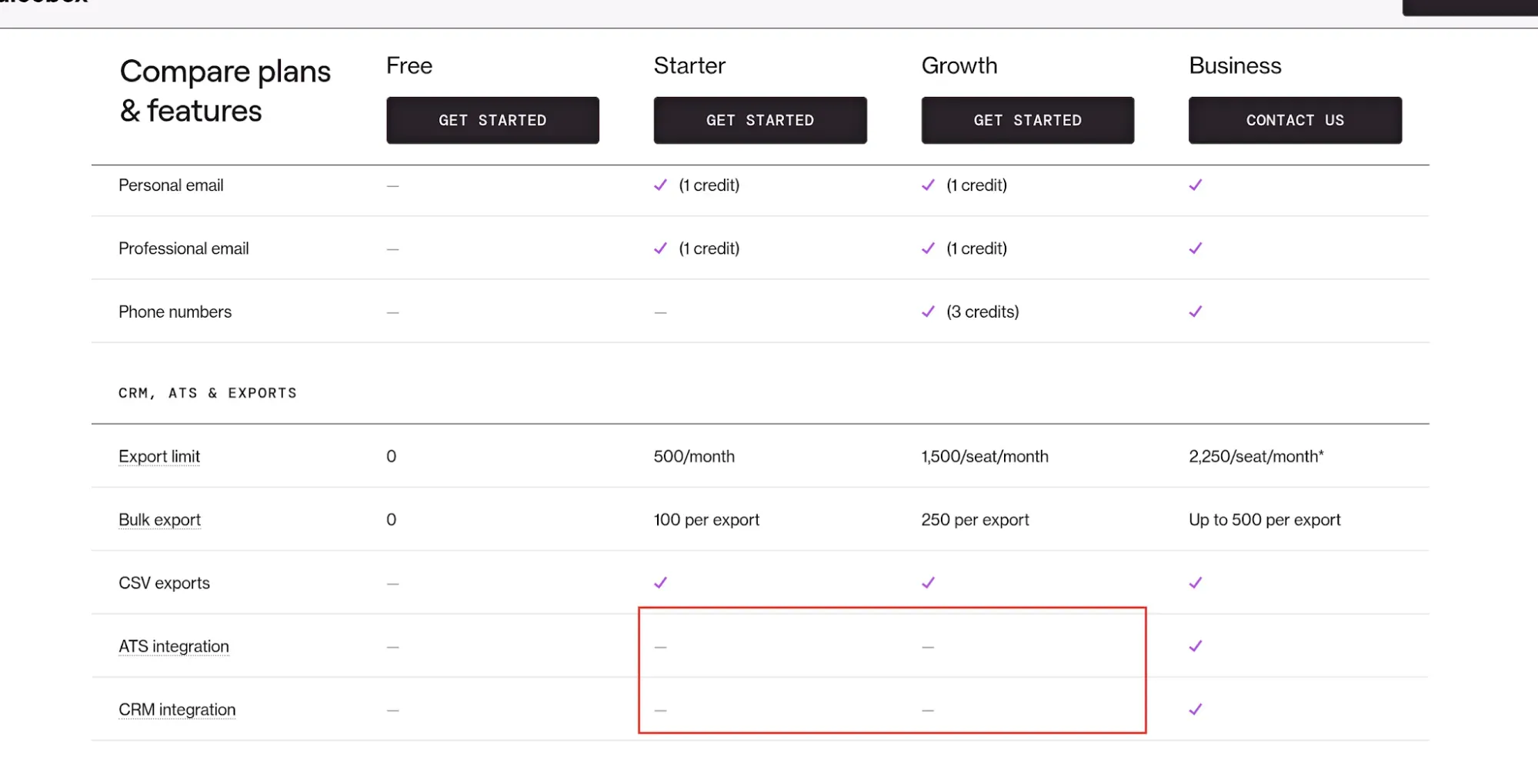
Juicebox includes CSV exports on Starter and Growth, but ATS and CRM integrations require Business. (Image source: Juicebox)
Juicebox pros:
-
Natural-language search and unlimited projects on Starter
-
Growth supports up to five paid seats
-
Agents can create shortlists instead of sending outreach
Juicebox cons:
-
ATS and CRM integrations require Business
-
Background Agents cost extra
-
Starter includes one seat
Juicebox is my starting pick if you want to describe a role in ordinary language and build a sourcing workflow around it. Its appeal is the connection between search, projects, and outreach drafts. You don't have to make a separate buying decision for each of those steps.
I like the option to have an Agent build a shortlist without automatically emailing people. For a fictional search such as a support engineer with Python and customer-facing experience, I'd first review how the search interprets those requirements. Only then would I consider letting an agent keep looking in the background. I haven't measured Juicebox's candidate relevance.
The plan boundary matters once colleagues join you. Starter is a one-seat workspace, Growth supports a small team, and Business adds ATS/CRM integration and hiring-manager collaboration. If your manager needs to review shortlists inside the same workflow, don't assume five recruiter seats include that arrangement.
A recruiter on Reddit, u/catapooh, put the writing benefit in perspective in August 2026: “The outreach drafts save a little time although i usually rewrite the opening line.” The same commenter used Juicebox for the front end of recruiting, then moved people into an ATS. That's also where I'd place it: useful sourcing support, with a person still owning the message and the hiring process.
Things I Noted — Juicebox
I switched between monthly and annual pricing, and both Starter and Growth dropped by the same dollar amount per seat. The percentage saving therefore differs by plan. I'd compare the actual annual bill and the collaboration gate, rather than repeat the page's blanket discount badge.
Juicebox pricing:
From $99/seat/month, billed annually, for Starter; limited free searches available.
-
Starter — one seat, 500 contact credits and 500 export credits per month
-
Growth — $179/seat/month annually; up to five paid seats, 1,500 contact and export credits per seat/month
-
Business — custom annual contract; ATS/CRM integration and hiring-manager seats
-
Monthly billing — Starter $119; Growth $199 per seat
-
Agents — $199/agent/month extra on paid plans; separate from manual-search allowances
2. SeekOut: Best for AI search with hands-on filter control
SeekOut pros:
-
Core combines AI search with 30+ filters
-
Separate monthly and annual purchase options
-
Export rules distinguish contact retrieval from file downloads
SeekOut cons:
-
Core's 500 contact credits don't match its 1,000 exports
-
ATS rediscovery requires a separate integration package
-
Some Assist capabilities depend on your license
SeekOut would be my choice if you already know how to source and want AI to help you refine the search. Core includes AI search, standard Power Filters, and more than 30 filters. That combination is more interesting to me than a chat box alone: you have criteria to work with after the initial request.
There's a useful warning in the Smart Match guide: switching between Smart Match and Boolean clears the active search terms. If you've spent time tuning a difficult search, keep a copy before changing modes. I like having both approaches, but I'd want that transition to preserve my work.
I also wouldn't assume Core includes every conversational feature shown elsewhere on SeekOut's site. Its Help Center ties some SeekOut Assist functions to particular licenses. Start with the search behavior you actually need, then check that behavior against the package you're buying.
I compared the annual and monthly selectors myself. The billing changes, but the contact and export allowances stay put. Annual payment is worthwhile if you've already validated your sourcing workflow; it doesn't buy a bigger contact budget.
Things I Noted — SeekOut
The export guide answers a question the pricing card leaves open: downloading a profile only includes contact information you've already retrieved. A thousand exports therefore doesn't mean a thousand email addresses. Core also lists ATS export, while ATS rediscovery sits in a different package. I'd skip Core if searching your existing ATS records is the main reason you're shopping.
For a team that wants search control and can work with those boundaries, SeekOut is worth a close look. If you mainly want a single prompt to run an autonomous outreach operation, I'd start with a different shortlist.
SeekOut pricing:
Core is $149/user/month, paid annually upfront, or $179/user/month billed monthly; a 14-day trial is advertised.
-
Core — 500 contact credits and 1,000 exports per month
-
Sourcing — custom; higher allowances and additional search features
-
Sourcing + Integration — custom; ATS rediscovery and integration support
3. Metaview: Best for keeping interviewers focused on the conversation
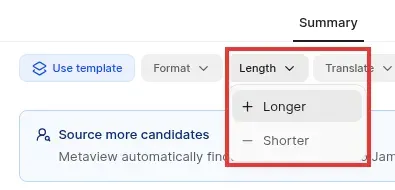
In Metaview's built-in demo, Length lets you request longer or shorter notes. I used Longer and saw a second version appear.
Metaview pros:
-
Recruiting-specific notes and scorecard assistance
-
Notes Pro includes unlimited calls
-
Autojoin can be disabled for individual calls
Metaview cons:
-
Free Notes is limited to 25 calls and basic transcription
-
Sourcing and Reports aren't automatically included in Notes
-
Notes won't repair an inconsistent interview rubric
Metaview is the tool I'd consider first when your recruiters conduct good interviews but dread writing them up. Its Notes product helps turn a conversation into a usable recruiting record. You still lead the interview and decide what the answers mean.
In the free workspace, I opened the built-in Demo Interview and found notes organized under the interview questions. The Length menu offered Longer and Shorter. I clicked Longer, and the interface moved from Version 1 to Version 2 while showing “Adding detail to section titles.” That's a small but useful editing loop: you can adjust the write-up without starting again from a blank page. It was a vendor demo, so I'm judging the workflow here, not transcription accuracy.
My minor gripe was the “Source more candidates” banner above the interview notes: I came to edit a conversation and was immediately offered another workflow. Metaview also lets you disable calendar autojoin for an individual call. That control matters if your calendar mixes interviews with conversations you don't want recorded. I'd settle the recording and review workflow before turning on automatic capture across a team.
One Metaview user, u/PrimaryIngenuity5936 on Reddit in July 2026, praised summaries aligned with an agreed rubric, then added that it “still doesn't fix the interviewer who wings the questions anyway though.” I agree with the distinction. You can't recover an answer to a question nobody asked.
I'd skip this purchase if your actual problem is too few candidates or too much scheduling. Notes can make interview administration easier, but they don't replace a sourcing database or a coordinator. Review summaries against recordings before sharing them.
Things I Noted — Metaview
Metaview's pricing page separates Notetaker from Sourcing. That small tab changes both the bill and what you're counting: calls for Notes, profiles for Sourcing. I wouldn't use the Sourcing price to budget for interview notes.
Metaview pricing:
Notes Pro is $60/user/month; Free Notes allows 25 calls per month with basic transcription.
-
Notes Pro — unlimited calls and priority processing
-
Enterprise — tailored volume, support, and security features
-
Reports — separate flat-fee add-on; amount requires a quote
4. Paradox: Best for coordinating high-volume interviews
Paradox pros:
-
Scheduling and rescheduling through SMS, WhatsApp, chat, or email
-
Handles panels, rooms, locations, and hiring events
-
Workday integration supports candidate status updates
Paradox cons:
-
No public subscription total to model
-
Calendar and ATS configuration are part of the rollout
-
Scheduling doesn't solve a shortage of suitable applicants
Paradox is my pick when the bottleneck is getting applicants and hiring managers into the same interview. Its conversational scheduling can offer times, handle rescheduling, and send reminders through channels candidates already use. That's a more specific reason to buy it than “AI recruiting.”
The interesting part is the coordination underneath the conversation. A panel can involve several calendars, a room, and a location. If you recruit across stores or facilities, a simple booking link may leave a coordinator doing the hard work anyway. Paradox is built around those more complicated arrangements.
I read its scheduling walkthrough and the Workday integration details. The latter connects candidate communication, scheduling, and status updates to the ATS workflow. I'd want that handoff demonstrated with your particular system; an integration logo alone doesn't tell you which information travels in each direction.
What I like about this use case is how clearly you can evaluate it. Give the vendor a fictional panel interview, move one interviewer's availability, then have the candidate reschedule. You'll see whether the workflow handles the change or pushes the problem back to a coordinator. I haven't run that exercise in a customer workspace.
The catch is the setup. Someone still needs to define interview types, availability, routing, and the point at which a person takes over. If your team books only a handful of straightforward interviews, I'd improve the scheduler you already own before taking on another platform.
For a high-volume team with mature ATS processes, though, Paradox is worth a close look. I'd choose it for coordination, and keep sourcing quality and hiring judgment as separate evaluation questions.
Paradox pricing:
Custom. Subscription, implementation, and any usage charges need to be included in the same quote.
5. HireVue: Best for structured AI-led initial interviews
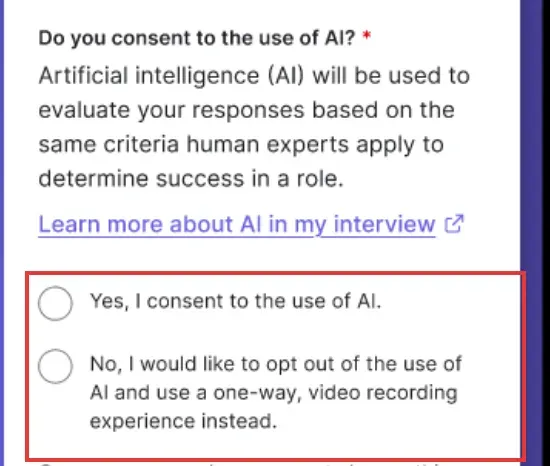
HireVue's public tour shows an AI-consent choice and a one-way video alternative. (Image source: HireVue)
HireVue pros:
-
Job descriptions feed editable questions and answer rubrics
-
AI Interviewer can ask probing follow-up questions
-
Script locking, version history, and human review controls
HireVue cons:
-
AI Interviewer and ordinary video interviewing are distinct products
-
No verified public price for the required configuration
-
A scoring rubric still needs careful human design
HireVue is the option I'd investigate when you want an AI-led initial interview with a defined question set and reviewable evidence. Its AI Interviewer can suggest questions and rubrics from a job description, then let your team customize and approve them before the interview runs.
I like that the workflow starts with approval of the content. A vague requirement such as “great communicator” gives both people and software too much room to improvise. I'd replace it with a job-related question and clear examples of what a useful answer contains. The rubric deserves as much attention as the interview interface.
HireVue's product walkthrough separates the stages: approved content, questions and follow-ups, response evaluation, then recruiter review in the ATS. Script locking and version history are useful here. If the team changes a question halfway through a hiring round, you'll want to know which version each person encountered.
There's also a distinction worth making about scoring. HireVue says its AI-scored video assessments analyze the response transcript, rather than facial expressions, appearance, body language, or tone of voice. That is its explanation of that assessment's inputs; it doesn't mean every HireVue product works identically, or that an assessment is appropriate for every role.
I'd skip HireVue if you only need notes from interviews a recruiter already leads. Metaview addresses that narrower problem. I'd shortlist HireVue when repeatable interview delivery and structured evaluation justify a larger rollout, with people reviewing the evidence and choosing the next step.
Before buying, the demonstration I'd prioritize is a borderline fictional answer. Does the explanation help a recruiter understand the score, or merely repeat it? That's more useful than watching a polished ideal response receive a high mark.
HireVue pricing:
Custom; specify AI Interviewer, assessments, integrations, and implementation in the requested configuration.
6. Eightfold: Best for enterprise matching across roles and talent pools
Eightfold pros:
-
Match explanations cover skills, work, and title relevance
-
Supports external candidates and internal mobility use cases
-
Recruiters can act independently of the displayed match order
Eightfold cons:
-
Enterprise pricing and implementation require a quote
-
Match results depend on job and profile information
-
A match score isn't an overall rating of a person
Eightfold is the platform I'd consider when your organization has substantial talent data and needs to connect it to many different roles. Its matching model compares a person with a particular job and can explain the relationship through skills, experience, and title relevance.
The detail I like most is the scope of the score. Eightfold's model explanation uses a scale from 0 to 5 in half-point increments, but the score belongs to a candidate–job pairing. Change the role or update the underlying information and the match can change. I wouldn't carry that number into a discussion about someone's suitability for a completely different job.
Its engineering explanation also distinguishes skills used recently from skills listed somewhere in a person's history. That's a useful question for a recruiter to investigate. A skill from years ago and one used every week may both appear on a résumé, but they suggest different follow-up questions.
For an internal mobility program, I'd want managers to use the match explanation to discover possibilities they might have missed. Then I'd have them check those possibilities with the person. Inferred skills are a starting point for a conversation, not a substitute for it.
The interface guidance says reviewers can inspect the relevance breakdown and choose actions regardless of the ranking. I prefer that to treating a sorted list as a decision queue everyone must follow. My evaluation would focus on whether the explanations help your recruiters make better-informed judgments about your actual roles.
I'd skip Eightfold if you're a small team mainly looking for a self-serve sourcing seat. Its broader talent model and integration work make more sense when you're coordinating hiring and mobility across an organization. The point is to use the data you already have more thoughtfully, not simply add another score.
Eightfold pricing:
Custom; scope the talent pools, modules, integrations, and rollout services together.
What the same workload costs
These are subscription calculations from current list prices, in USD before tax, checked October 23, 2026. They exclude staff time and existing email/ATS subscriptions. A contact-credit use is not a complete email-and-phone record; confirm the required contact type is covered. The sourcing scenarios assume no autonomous Agent or two-way ATS integration; candidate coverage and search quality haven't been shown to be equivalent.
Scenario 1: One sourcer, 500 contact-credit uses and 500 exports a month
| Tool and plan | Annual subscription | Billing basis | Extra cost for this scope | Limit to check |
|---|---|---|---|---|
| Juicebox Starter | $1,188 | $99 × 12, annual commitment | No Agent included or required | 500 contact and export credits/month; one seat |
| SeekOut Core | $1,788 | $149 × 12, paid upfront | No integration package included | 500 contact credits; email/phone allocation needs confirmation |
Juicebox is $600 less per year in this subscription calculation; confirm the contact types included before treating the allowances as equivalent. I'd start there if you're building a new sourcing workflow. I'd pay the difference for SeekOut only after seeing whether its search controls improve your team's work. Neither number tells you how many suitable candidates you'll find.
Scenario 2: Five sourcing seats at the same per-person workload
| Tool and plan | Annual subscription | Billing basis | Extra cost for this scope | Limit to check |
|---|---|---|---|---|
| Juicebox Growth | $10,740 | $179 × 5 × 12, annual commitment | Agents and Business integration excluded | Five paid seats; hiring-manager seats require Business |
| SeekOut Sourcing | Quote required | Team package priced by agreement | ATS integration may require another package | Core supports organization sharing, but five-seat purchase terms are unverified |
Juicebox gives you a public five-seat total; SeekOut's dedicated team package needs a quote. Multiplying Core by five produces $8,940, but I wouldn't use that number as an available team offer until the purchase terms are confirmed. If ATS rediscovery or two-way integration is mandatory, neither entry-level sourcing setup is a complete solution.
Scenario 3: Five interviewers, 40 calls each per month
| Tool and plan | Annualized subscription | Billing basis | Extra cost for this scope | Limit to check |
|---|---|---|---|---|
| Metaview Notes Pro | $3,600 | $60 × 5 × 12 monthly payments | Reports add-on excluded | Free's 25 calls/user/month doesn't cover this volume |
| HireVue AI Interviewer | Quote required | Configuration-specific | Implementation/integrations unknown | Conducts interviews; not an equivalent notes-only substitute |
For the notes workload, I'd budget for Metaview Pro. The HireVue row marks a different purchase, not a cheaper or more expensive alternative: you're changing who conducts the interview. Paradox and Eightfold likewise need separate scoped quotes for scheduling and enterprise matching. Unknown totals aren't zero-dollar plans.
Check your existing recruiting stack first
Check the capabilities in your current ATS before adding another subscription. Start with three concrete questions: can it draft a job description, help search your existing candidate records, or support structured interview feedback? If those already cover your bottleneck, a new tool may add another place to maintain the same information.
For scheduling, check the booking and calendar tools your team already uses. A simple one-to-one interview may need little more than an available time slot. Panels, locations, conversational rescheduling, and ATS status updates are where I'd investigate a specialist.
Linked Helper has a separate role when your workflow involves LinkedIn outreach. Its AI-assisted messages and recruiter workflows can help prepare and organize that communication. I wouldn't treat its customer-fit positioning as evidence of a candidate-assessment system. Choose it for the outreach task you need, rather than expecting it to replace interview notes, an ATS, or employment assessments.
Related reading:
Which AI recruiting tool should you choose?
Choose the tool that handles the next piece of work your team can't comfortably manage.
| Your scenario | My recommendation and conditions |
|---|---|
| A new sourcing workflow | If you need a new sourcing workflow, I'd begin with Juicebox, then compare SeekOut if your sourcers want more control over filters and search modes. Use the same job brief for both. Review the interpreted criteria before you judge the resulting list, and keep contact retrieval separate from export volume in your budget. |
| Interviews happen, but feedback arrives late | If interviews are already happening but feedback arrives late, I'd investigate Metaview. Agree on questions and a rubric first; otherwise you'll get a cleaner record of an inconsistent conversation. |
| A larger operation | For a larger operation, the choice separates into three jobs. I'd shortlist Paradox for scheduling coordination, HireVue for structured AI-led interviews, and Eightfold for matching talent to roles across an enterprise. Those aren't interchangeable platforms just because all three use AI. |
My first purchase would be the smallest one that resolves a demonstrated bottleneck. Expand only after the handoff works: the shortlist reaches your ATS, the notes help a debrief, or the rescheduled interview reaches the right calendar.