Goodbye LinkedHelper 1 as a Chrome extension: Download the advanced version

Goodbye LinkedHelper 1 as a Chrome extension: Download the advanced version

Linked Helper 1 is gone. The original Chrome extension has been fully discontinued — any listing you still see in the Chrome Web Store is the legacy, unsupported version. The current product is Linked Helper 2: a standalone desktop app for Windows, macOS and Linux that does everything the old extension did, plus much more, and is far harder for LinkedIn to detect. 

Automation via plugin technology is simply less secure. That is why we rebuilt Linked Helper from the ground up — from a Chrome extension into a downloadable desktop application that never injects code into LinkedIn pages and never calls the LinkedIn API.
Quick Takeaway

  • Linked Helper 1 (Chrome extension) has been discontinued and replaced by Linked Helper 2 — a standalone desktop app. There is no supported extension version.
  • The standalone app is safer: it never injects code into LinkedIn pages and never calls the LinkedIn API — its activity looks like ordinary human clicking.
  • It does far more than the old extension: profile and company scraping, Data Enrichment for emails and phones, auto-invites, staged auto-replies, bulk outreach, AI-written messages and AI ICP detection.
  • You control daily and weekly action counts; Smart daily limits randomize those counts and start times to stay within LinkedIn’s ~100 invites/week ceiling.
  • Setup takes about 15 minutes, works with free, Premium, Sales Navigator and Recruiter accounts, and includes a free trial. 

The old Linked Helper Chrome extension is gone. Linked Helper 1 has been fully replaced by Linked Helper 2 — a standalone desktop app for Windows, macOS and Linux. Download it and start your free trial in about 15 minutes.

linked helper app
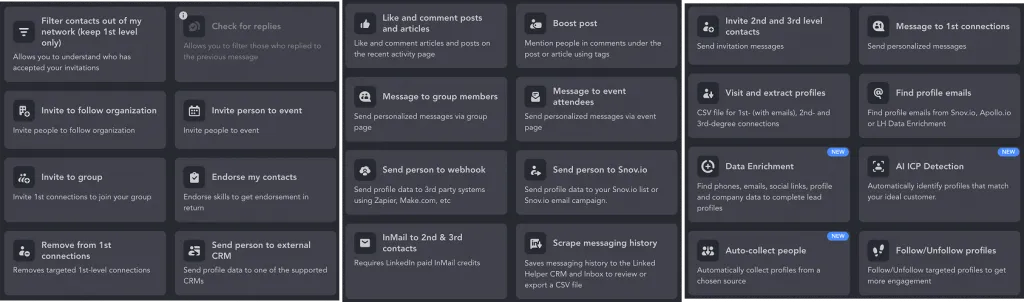
Linked Helper actions.

Why is the updated version more advanced?

Profound security

Your account stays protected because the standalone app runs in its own independent browser — it never embeds code into LinkedIn pages and never sends requests through the LinkedIn API. To LinkedIn, every action looks like an ordinary human clicking in a regular browser. On top of that, start-time randomization adds a random delay to every campaign launch, so even the timing patterns look human.

Robust functions

The standalone app does significantly more than the old extension. Beyond liking posts, auto-invitations to events and auto-checking responses, it includes Data Enrichment (collect emails and phones without visiting profiles), an AI message generator, AI ICP detection for filtering your ideal customer profile automatically, SPINTAX message randomization, bulk outreach with message variants, and Workspaces for team and agency collaboration — something a single-user browser plugin could never offer. 

For teams and agencies

Workspaces lets multiple users share licenses, LinkedIn accounts and data credits under a single managed environment — a major upgrade from the single-user extension model.

Customizable limits

Smart daily limits let you set target action counts that are then randomized automatically — so LinkedIn never sees a suspiciously consistent 50 invites every day at the same time. LinkedIn’s commonly observed weekly invitation ceiling is around 100 invites per week (up to ~200 for accounts with strong SSI scores or Sales Navigator). Linked Helper respects these limits by default and gives you full control to set conservative custom ceilings per action type, per account, aligned to your funnel priorities.

Download Linked Helper 2
Available for Windows, macOS and Linux. Start your 14-day free trial — no card required

Download Linked Helper 2

and get 14-day free trial right now

DOWNLOAD

If you are not yet in our list of users, then join.
We give you a trial version to start your experience with our LinkedIn tool.

Features that attract customers while you sleep

Collecting and extracting data

Build your lead base with profile and company scraping campaigns. Set up filters by industry, location, job title or group membership — the app collects names, contact details, profile URLs and website links and exports them to your CRM or a CSV file.

Go further with Data Enrichment: the action finds verified business emails and phone numbers for 1st, 2nd and 3rd-degree connections without visiting each profile individually — saving hours of manual research.

Use AI ICP detection to filter the scraped list automatically by your ideal customer profile criteria, so you only pass qualified leads to the outreach stage.

Set up Auto-collect to re-run profile collection every X days on autopilot — your lead database stays current without manual intervention. 

Automation of interactions

Stay active on LinkedIn even while you focus on other work. The app visits target profiles, likes posts and articles, leaves comments, sends auto-invitations to groups, events and company pages, and removes irrelevant contacts from your network.

Combined with Auto-collect, it keeps both your database and your activity feed running without your daily input.

Scheduled auto-replies by stage

Save outreach templates for every stage of the funnel — from cold invite to follow-up to re-engagement. Messages go out automatically without your daily involvement. 

Keep each message unique with three built-in variation tools:

  • SPINTAX — define word and phrase alternatives (e.g. {Hi|Hello|Hey} {first_name}) that the app rotates across sends, so LinkedIn’s algorithm sees natural human variety rather than identical bot messages. 
  • Message variants — create multiple full message versions sent in equal proportions across your campaign.
  • AI message generator — generate up to 30 AI-written messages per day tailored to each recipient’s profile, with no manual drafting required.

Explore more in the blog post IF-THEN-ELSE operator explained: how to create super custom messages in Linked Helper.

Bulk outreach

Once your audience is warmed up, launch bulk message campaigns to your entire qualified list at once. Use AI-generated messages or SPINTAX templates to keep outreach personal at scale. Export the full response history as a file to analyze reply patterns, refine your offer and improve the next campaign cycle. 

TRY FREE

It works faster than dozens of assistants

  1. Download Linked Helper software & register

Download the Linked Helper 2 desktop app for Windows, macOS or Linux — setup takes about 15 minutes. Works with free LinkedIn accounts as well as Premium, Sales Navigator and Recruiter plans. Unlike the deprecated Chrome extension, the standalone app runs in its own independent browser, so your automation is fully isolated from LinkedIn’s page-level detection.

  1. Research your competitors and the market

Log in and run a search for companies or people that match your target market — filter by keyword, niche, location, industry or group membership. Download the list and run AI ICP detection to automatically score and filter prospects against your ideal customer profile criteria before investing time in outreach. Use the resulting data to sharpen your USP and identify keywords that improve your company page visibility in LinkedIn search.

  1. Warm-up targeted leads to build trust

It is important to set up personal communication, especially with B2B customers. Executive contact details, names, emails, phone numbers, and profile descriptions will help you craft effective and personal pitches for the outreach. Upload the list of persons, save it to the CRM, and sort it by lists and tags.

  1. Set up targeted responses to build trust

In the B2B business community, it is valuable to showcase interest in key individuals and companies before contacting them directly. You can automatically visit profiles, which will lead them to your page as a result. Be active in strategic business groups even when offline thanks to auto-likes, prefabricated comments copy, and auto-invitations to events.

  1. Outline your pitch templates

Write down offer scenarios for potential customers at all stages of the pipeline – from cold leads to follow-ups to past clientele. Messages will be sent automatically without your daily participation. Set up bulk mailings with your unique offer to each target audience. Learn about safe ways to set up LinkedIn messaging automation and how to respect LinkedIn’s weekly invitation limits to keep your account in good standing.

  1. Performance analysis

After finding and attracting customers to your services or products, evaluate the feedback to get more conversions in the future. The tool checks for responses, which you can download as a file. Analyze the tendencies in responding to your proposal and work on these objections when planning the next strategy.

AUTOMATE NOW

LinkedIn drives 80% of B2B leads from social media — here’s how to reach them

According to Sprout Social (2026), 80% of B2B leads generated through social media come from LinkedIn. With more than 1.3 billion members worldwide, the platform is the single most effective B2B channel — provided your automation stays undetected and your account stays safe (Source:
Sprout Social, 2026 — https://sproutsocial.com/insights/linkedin-statistics/).

Download software that is the most reliable form of automation

300K+ marketers, recruiters, businessmen, and other B2B community members choose our software.

No robotic action to beat detection

LinkedIn can recognize most automation tools. Linked Helper is far more protected than any Chrome extension because the standalone app never injects code into LinkedIn pages and never uses the LinkedIn API — it opens an independent browser and clicks buttons exactly as a human would.

Beyond navigation, the app mimics human timing patterns. Start-time randomization adds a random delay before each campaign begins, so your action schedule never looks mechanical. Smart daily limits randomize the number of invites and messages sent each day within your chosen ceiling — LinkedIn sees varied, human-like activity rather than a consistent bot rhythm.

Subscribe

to get tips you are interested in

Custom pauses & limits

LinkedIn enforces activity limits to combat spam — the most commonly observed ceiling is around 100 connection invitations per week for standard accounts (up to ~200 for accounts with a high Social Selling Index or a Sales Navigator subscription). Linked Helper’s Smart daily limits let you set a weekly target per action type; the app then distributes and randomizes the daily count automatically, so you always stay within platform rules without managing the numbers by hand.

The code is never visible to the social network

Automation extensions embed application code into pages upon activation. This will not happen when our software is running. You get an independent browser that simply performs the assigned tasks in front of your eyes by clicking buttons like a real human being instead of sending API requests.

The unique set of metadata

If you manage your own LinkedIn account on your PC via Linked Helper, then the tool accesses the social network via the same IP address that you usually use. If there are several accounts added to your Linked Helper, then each of them will have unique fingerprints, cache, and cookie data.

Moreover, you can buy proxies and assign a custom IP address to each account, which makes LinkedIn think that these accounts are being managed from different computers in different places. Also, our software doesn’t address the API of the social platform, so it will not receive signals from a third-party service, unlike cloud systems.

Everything the old Chrome extension could not do — profile and company scraping, Data Enrichment for emails and phones, auto-invites, staged auto-replies, bulk outreach and AI-written messages — is in the standalone app. Try it free and see why 250,000+ marketers and recruiters switched.

Try Linked Helper free

FAQ

Is there still a Linked Helper Chrome extension?

No. The original Linked Helper 1 ran as a Chrome extension, but it has been discontinued and replaced by Linked Helper 2, a standalone desktop application for Windows, macOS and Linux. Any ‘Linked Helper Chrome extension’ listing you find is the deprecated legacy version, not the current product.

Is Linked Helper legit and safe to use?

Yes. Linked Helper is an established tool used by more than 250,000 marketers, recruiters and B2B professionals. Because the standalone app never injects code into LinkedIn pages and never uses the LinkedIn API, it behaves like a human clicking in a normal browser, which makes it far safer than typical browser-extension automation.

Is using Linked Helper legal?

Linked Helper is legal to download and use. As with any automation tool, third-party automation is against LinkedIn’s User Agreement, so the app is built to mimic human behavior, respects LinkedIn’s activity limits and lets you set conservative custom limits to keep your account safe.

Why is the standalone app better than the old Chrome extension?

The standalone app runs in its own independent browser instead of embedding code into LinkedIn’s pages, so the social network cannot see the automation. It also does more – profile and company scraping, Data Enrichment, auto-invites, staged auto-replies, bulk outreach and AI-generated messages – and gives each LinkedIn account its own fingerprint, cache and cookies plus optional proxy support.

How much does Linked Helper cost?

Linked Helper offers a free trial, after which it is available on Standard and PRO licenses billed monthly or for longer terms at a discount. PRO adds more advanced actions and a larger Email Finder credit allowance; see the pricing page for current rat

Which LinkedIn accounts and operating systems does it support?

Setup takes about 15 minutes and works with free LinkedIn accounts as well as Premium, Sales Navigator and Recruiter. The app runs on Windows, macOS and Linux.

3.2 23 votes
Article Rating

About the author

  • Margarita Servar

    Margarita is a Content Manager and author at the Linked Helper blog, dedicated to providing practical and useful material. She conducts research and tests automation tools, drawing on practical experiences and interviews with LinkedIn marketing experts.

    View all posts
Subscribe
Notify about
guest

0 comments
Old
New Popular
Intertext Reviews
View all comments