
 Updated: October 12, 2026
 24 min read
Linked Helper wins on price, control and safety. It starts at $15 per account per month while LinkedFusion starts at $65.95, and your session and IP stay on your own machine. LinkedFusion positions itself as a cloud tool that runs campaigns without your computer, which is quicker to start. That speed suits people who accept the detection and security trade-offs of a cloud tool.
We make Linked Helper, so you should know whose guide this is. In October 2026 we signed up for LinkedFusion, checked and cross-checked everything and talked to its support team to get the details straight. The screenshots below come from those tests.
The two are built in opposite ways. Linked Helper, which many people type as LinkedHelper, is a desktop app that runs on your own computer or VPS. LinkedFusion is a cloud platform that runs from the vendor's servers. That one difference decides who holds your LinkedIn session, which IP LinkedIn sees, what you pay per account and how much control you keep.
Key takeaways
- Linked Helper starts at $15 per month per account (Pro $45). LinkedFusion Professional starts at $65.95 per month. On annual billing that becomes $8.25 and $24.75 for Linked Helper and $46.95 for LinkedFusion.
- Linked Helper runs as a desktop app with its own built-in browser engine on Windows, macOS or Ubuntu. Deploy it on a VPS or VDS and you get a cloud-like setup with the benefits of both worlds. LinkedFusion runs fully in the cloud.
- LinkedFusion says each account gets a dedicated IP. The one our test account received was a data-center address that IPQualityScore scored 99 out of 100 for fraud risk.
- At the start of October the ratings on the major review sites look like this: 4.78 across 893 reviews for Linked Helper against 4.32 across 25 for LinkedFusion.
- At 20 accounts, hosting and proxies included, Linked Helper costs about $420 a month against $1,319 for LinkedFusion Professional, before an email finder.
Which Is Better, Linked Helper or LinkedFusion?
Linked Helper leads on price, ratings, richness of features and, above all, control. LinkedFusion leads on cloud convenience, for those who accept the risks that come with it.
| Linked Helper | LinkedFusion | |
|---|---|---|
| Architecture | Desktop app | Cloud |
| Session lives on | Your machine | Their servers |
| IP LinkedIn sees | Your IP or your own proxy | An IP the vendor assigns |
| LinkedIn password | Optional, used for auto-login only | Needed to connect the account |
| Price per account | $15 per month | $65.95 per month |
| Email steps | Via integration | Built in, through your own mailbox |
| G2 | 4.5 (149) | About 3.6 (10) |
| Capterra | 4.9 (278) | 4.8 (15) |
| Trustpilot | 4.8 (466) | No profile found |
| All sites, weighted | 4.78 (893 reviews) | 4.32 (25 reviews) |
Prices checked October 2026. Ratings from G2, Capterra and Trustpilot.
Which Tool Has More Features?
Linked Helper has more built in. That means 30+ features, 15 native integrations (with Zapier, Make and webhooks on top) and deeper AI features. LinkedFusion positions itself as a LinkedIn-first cloud tool, and its clear edges are an email step inside the same sequence, a native Zapier connection and a published API.
| Feature | Linked Helper | LinkedFusion |
|---|---|---|
| Architecture and session | Local (desktop) | Cloud |
| Your proxy | Yes | Partial, a custom proxy is an option next to the IP it assigns |
| Proxy quality checker | Yes | No |
| Randomized delays | Yes | No |
| Pause on risk signals | Partial, an action pauses for 4 hours after repeated suspicious errors | No |
| If/then branching | Partial, routing by outcome and IF-THEN-ELSE in templates | No, sequences are linear |
| Reply detection | Yes | Yes, per its tutorial video |
| Email outreach | Via Snov.io / Instantly | Built in, through your own SMTP mailbox |
| Data enricher | Yes, 620 or 3,100 data credits a month | Email finder keys are not in the subscription, bring your own |
| AI message generation | Yes | No, support says the current version has none |
| Lead sources | 23 | Search URLs, CSV, Google Sheets, group, event, post and webhook |
| Native CRM integrations | HubSpot, Salesforce, Pipedrive and 12 more | HubSpot and Pipedrive on monthly billing, the others from Grow |
| Webhooks | In + Out | In + Out, plus native Zapier |
| Public API | No | Yes, per its API documentation |
| Workspaces | Yes | Team admin and members |
| Bulk discounts | up to −50% | No |
| Starting price (monthly) | $15 | $65.95 |
Quick key. Yes means the feature is there and works. Partial means it works, with strings attached. No means we tested the tool and did not find it. Where a cell quotes the vendor's own pages or the vendor's support instead of our test, it says so.
Does LinkedFusion Have an Email Finder and AI Messages?
Not in the subscription. LinkedFusion's comparison page lists email finder services, but its pricing page says, "Email Finder API keys are not included in our Subscriptions," so you bring a key from a third-party finder and pay that provider separately. We asked support about AI personalization, and the answer was that the current version does not have an AI personalization module. Support added that a new version is coming out for select customers under a controlled roll-out.
If you plan to enrich cold lists with emails, budget for a separate finder. In Linked Helper the finder is built in, with 620 data credits a month on Standard and 3,100 on Pro that never expire, and AI messages run on the app's own AI credits.
How Much Do Linked Helper and LinkedFusion Cost?
Linked Helper is cheaper at every size, and the gap widens with every account you add. It starts at $15 per account per month against $65.95 for LinkedFusion, and at 20 accounts the Standard plan costs $240 against $1,319. The reason is bulk discounts. Linked Helper applies them automatically, 10% off from 10 licences and 20% off from 20, and they go up to 50% off for larger teams. LinkedFusion prices per user, and in our test each user could connect only one LinkedIn account, so every extra account is one more full subscription and we found no volume discount.
| Accounts | Linked Helper Standard | LinkedFusion Professional | Difference |
|---|---|---|---|
| 1 | $15 per month | $65.95 per month | 77% less |
| 10 | $135 per month | $659.50 per month | 80% less |
| 20 | $240 per month | $1,319 per month | 82% less |
| 20, over 12 months | $2,880 | $15,828 | $12,948 saved |
List prices in USD billed monthly, checked October 2026, excluding taxes, add-ons and hosting. Linked Helper Standard includes the 10% and 20% volume discounts.
Linked Helper sells licences for 1, 3, 6 or 12 months instead of an auto-renewing subscription. The $8.25 figure is a 12-month licence billed once at $99. One licence runs one LinkedIn account at a time, so we quote prices per account. Duration and bulk discounts stack, and bulk discounts apply when the licences are on one invoice (licensing and discounts).
Does LinkedFusion's Pricing Page Match What the App Charges?
Not at the top plan. LinkedFusion's public pricing page lists three plans, and the top one, Ultimate, costs $135.95 per month with 100 invites and 300 message credits a day.
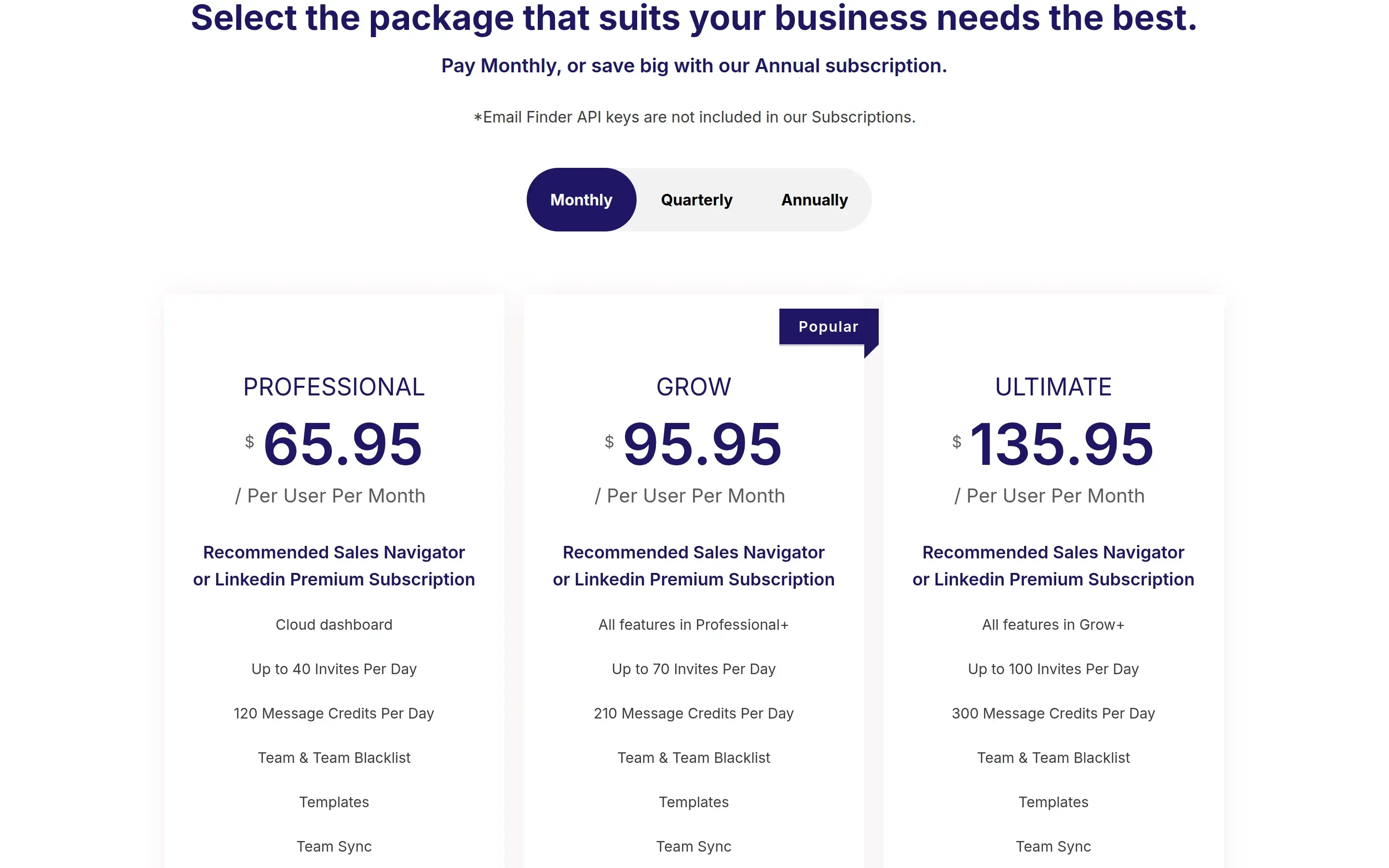
LinkedFusion's public pricing page, October 2026. Professional is $65.95, Grow $95.95 and Ultimate $135.95 per user per month, billed monthly.
Inside the app the same row of plans ends with a plan called Unlimited at $1995 per month, with 120 invites and 360 message credits a day.
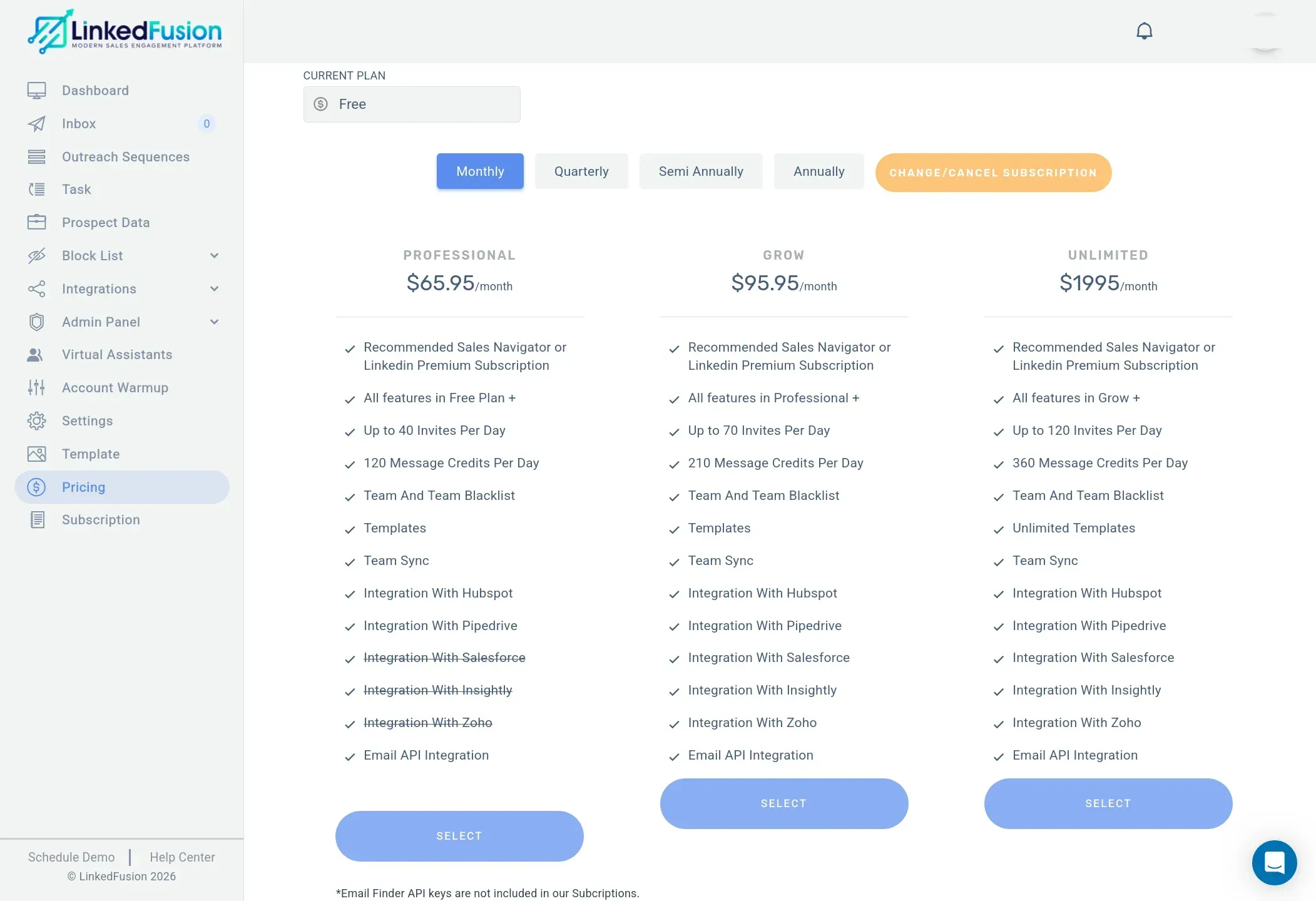
LinkedFusion's pricing page inside the app. The third plan is called Unlimited and costs $1995 per month. Salesforce, Insightly and Zoho are struck through on Professional.
The checkout agrees with the app and not with the website. It asks for $1,995.00 per month for "LinkedFusion Unlimited Monthly", and the annual option is $19,950.
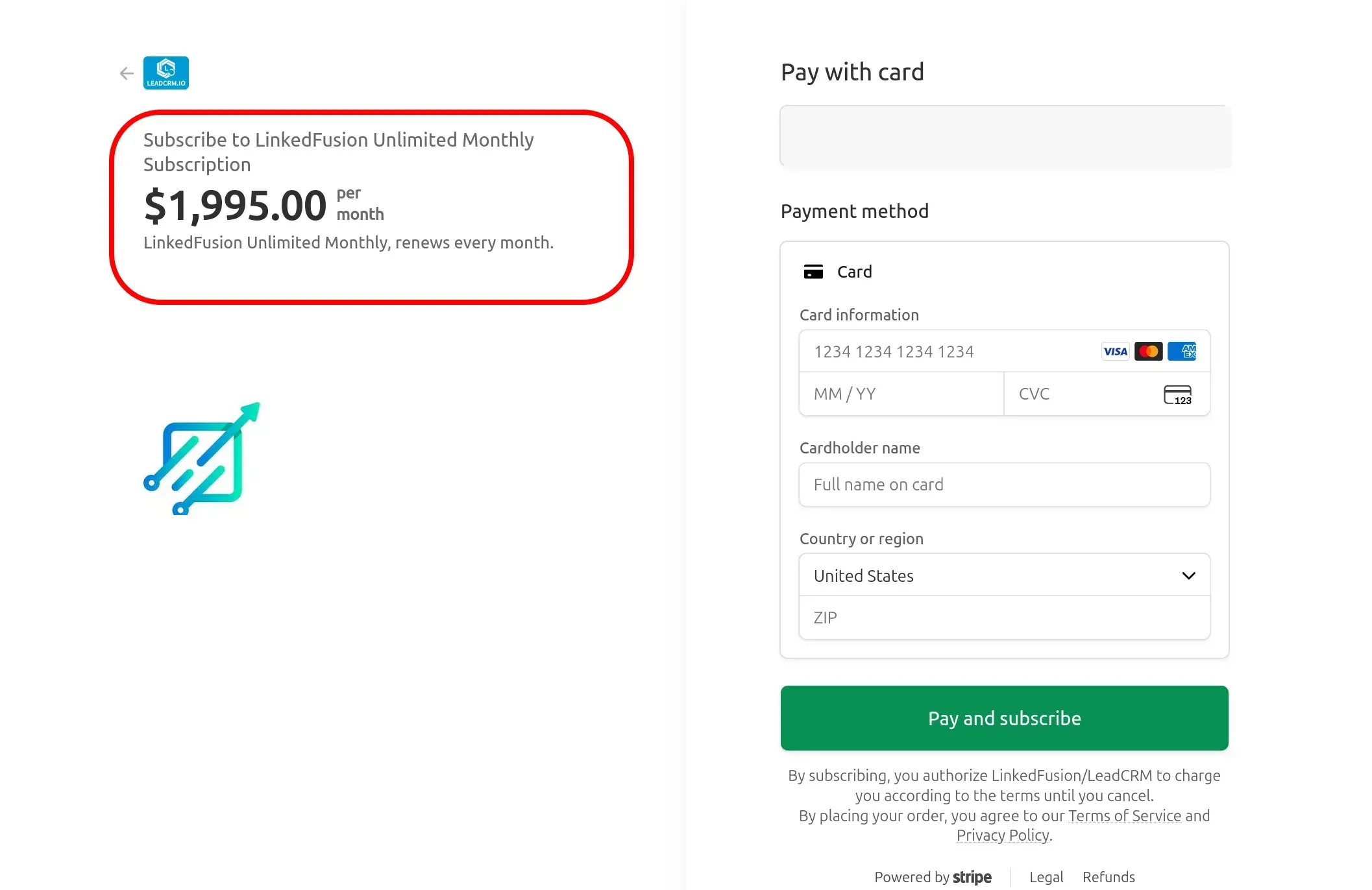
The Stripe checkout that opens from that plan. The payee is shown as LinkedFusion/LeadCRM, and the email field is painted over.
We cannot tell whether the website leaves out a plan or shows an outdated one, so check the plan name and the checkout total before you enter a card. It matters most to agencies that grow into the top tier. The same frames show another catch. On Professional the app strikes through Salesforce, Insightly and Zoho, and the website also strikes through Close.io on monthly billing, so on that billing those CRMs start with the $95.95 Grow plan.
What Does a 20-Account Agency Really Pay?
A 20-account team pays about $420 a month with Linked Helper and $1,319 with LinkedFusion Professional, even after counting the hosting we added. List prices are only part of the bill, so we ran the full cost for one scenario. Five managers, 20 LinkedIn accounts, outreach feeding HubSpot, campaigns running 24/7, 400 email lookups per account and 850 follow-ups. Linked Helper lives on your own machines, so we added the hosting it needs. LinkedFusion is cloud, so it needs none.
| Cost line | Linked Helper Standard | LinkedFusion Professional |
|---|---|---|
| Licences | $240 (20 × $15, 20% volume discount) | $1,319 (20 × $65.95) |
| Servers | $100 (5 Windows VPS at about $20, assumption) | Included |
| Proxies | $80 (20 at about $4, assumption) | Included, an IP the vendor assigns |
| Email finder, 8,000 lookups | Included (12,400 credits a month that never expire) | Email finder keys are not included, bring your own |
| Total per month | $420 | $1,319 plus an email finder |
| Total per year, annual billing | $312 per month, $3,744 | $939 per month, $11,268 |
Monthly cost for 20 accounts, USD, October 2026. VPS and proxy prices are our assumptions, not vendor prices. LinkedFusion figures use the Professional plan, which has native HubSpot.
Annual billing does not close the gap. LinkedFusion drops to $46.95 per account, still about three times the Linked Helper bill.
Which Plan Is the Cheapest Way In?
At Linked Helper the cheapest plan is also the real minimum. Standard at $15 per account passes every check we set for a minimum viable setup, which we defined as the cheapest plan that still runs a real outreach campaign. LinkedFusion Professional at $65.95 passes most of them too, so the difference is price and what sits behind each check. Here is what each entry plan gives you.
| What you need | Linked Helper Standard, $15 | Linked Helper Pro, $45 | LinkedFusion Professional, $65.95 |
|---|---|---|---|
| Multistep sequences | Yes, no step limit | Yes | Yes, up to 10 steps |
| If/then branching | In message templates, plus routing by outcome | Same as Standard | No, sequences are linear |
| Stop when a lead replies | Yes | Yes | Yes, per its tutorial video |
| Daily volume | 150 actions in 24 hours by default | No plan cap | 40 invites and 120 message credits a day |
| Lead export to CSV | Yes | Yes | Yes |
| Message history export | No | Yes | We did not find it |
| CRM and webhook sends | 20 profiles a day | Unlimited | HubSpot and Pipedrive on monthly billing, the other four CRMs from Grow |
| Email finder credits per month | 620 | 3,100 | None, email finder keys are not included |
Entry plans compared, October 2026. Linked Helper from its licensing page, LinkedFusion from its pricing page, its help center and our test.
Source for the Linked Helper columns is the licensing and discounts article of its help center.
Standard is the real minimum. It has the multistep sequences, reply stop and safety settings that most solo outreach needs, for $15. LinkedFusion's $65.95 buys you the same core plus an email step and a cloud runtime, at 4.4 times the price. Move up to Pro only if you need message export, bigger credit pools or more than 20 CRM sends a day.
Which Is Better for Agencies, Linked Helper or LinkedFusion?
Linked Helper is the better fit for agencies on price, client access and control, though LinkedFusion includes Team Blacklist and Team Sync on every plan.
| Linked Helper | LinkedFusion | |
|---|---|---|
| Manager seats | Free, unlimited users in your first workspace | Teammates need paid licences to automate their own accounts |
| Client access | Guest role, cannot manage campaigns | Client can see the dashboard, inbox, prospect data and templates |
| Where clients sign in | The same app, with your logo and name if you switch it on | app.linkedfusion.io, branded LinkedFusion unless white label is arranged |
| White label | Your own logo and name in the app | On request through support, no public price |
| Proxy per account | Your own, one for each account | An IP the vendor assigns, custom proxy optional |
| Duplicate prevention across accounts | List Manager in a cloud workspace, or an exclude list | Team Blacklist and Team Sync on every plan |
| Price at 20 accounts | $240 per month | $1,319 per month |
Agency features compared, October 2026. Linked Helper from its help center, LinkedFusion from its pricing page and our test.
What Do You Get With Linked Helper?
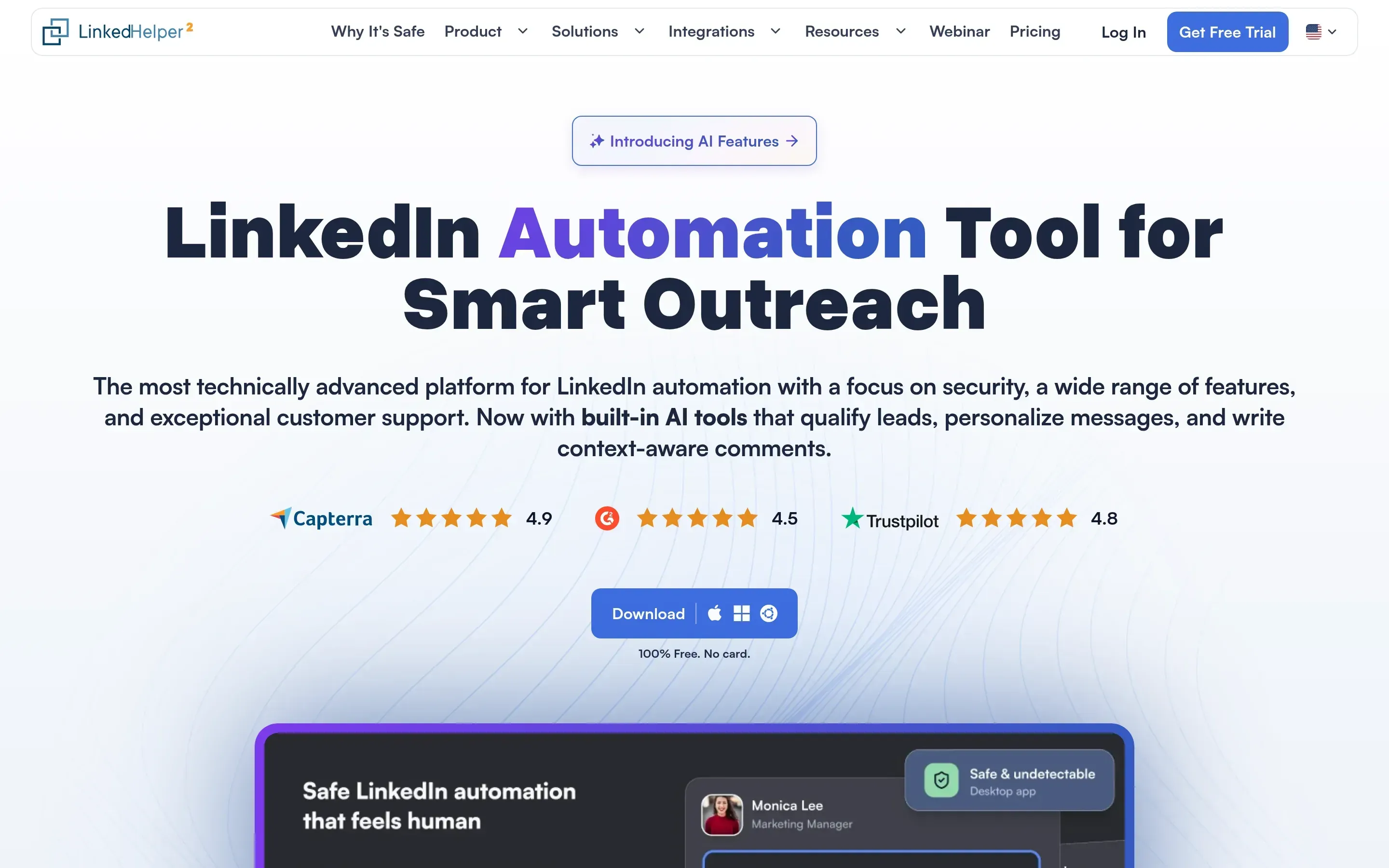
Linked Helper home page, October 2026.
Linked Helper has been built around one network, LinkedIn, for ten years. Invitations, messages, profile visits, endorsements and post engagement are all actions you chain into one campaign, and each account can use its own HTTP, HTTPS, SOCKS or SOCKS5 proxy.
- Custom campaign builder with reply detection and stop conditions
- Built-in CRM with tags, notes, auto-tagging and CSV export
- Sales Navigator, Recruiter Lite, Recruiter, groups, events and post engagement support
- Data enrichment credits, AI messages and AI-assisted reply editing
- Daily limits, smart daily limits, randomized delays, working hours and a choice of typing-speed settings
- Per-account proxy assignment with a built-in proxy checker
- Webhooks, Zapier, Make and direct CRM integrations
| Plan | Monthly price | Annual equivalent | Best for |
|---|---|---|---|
| Trial | Free for 14 days | Free for 14 days | Testing the app before paying |
| Standard | $15 per month | $8.25 per month | Core automation, campaigns, CRM and export |
| Pro | $45 per month | $24.75 per month | Higher limits, advanced actions, enrichment |
Unlike classic cloud tools, we have no servers that run your campaigns. You install Linked Helper wherever you choose, on a laptop or on a VPS you rent, and that setup gives you control. Your cookies, your session and, by default, your lead data stay on that machine, and LinkedIn sees its IP or a proxy you choose. On a VPS, campaigns run around the clock, and you can log in from any device and give a teammate access. It is also LinkedIn-first, so teams that need native cold-email sequencing should pair it with a dedicated email tool.
What Do You Get With LinkedFusion?
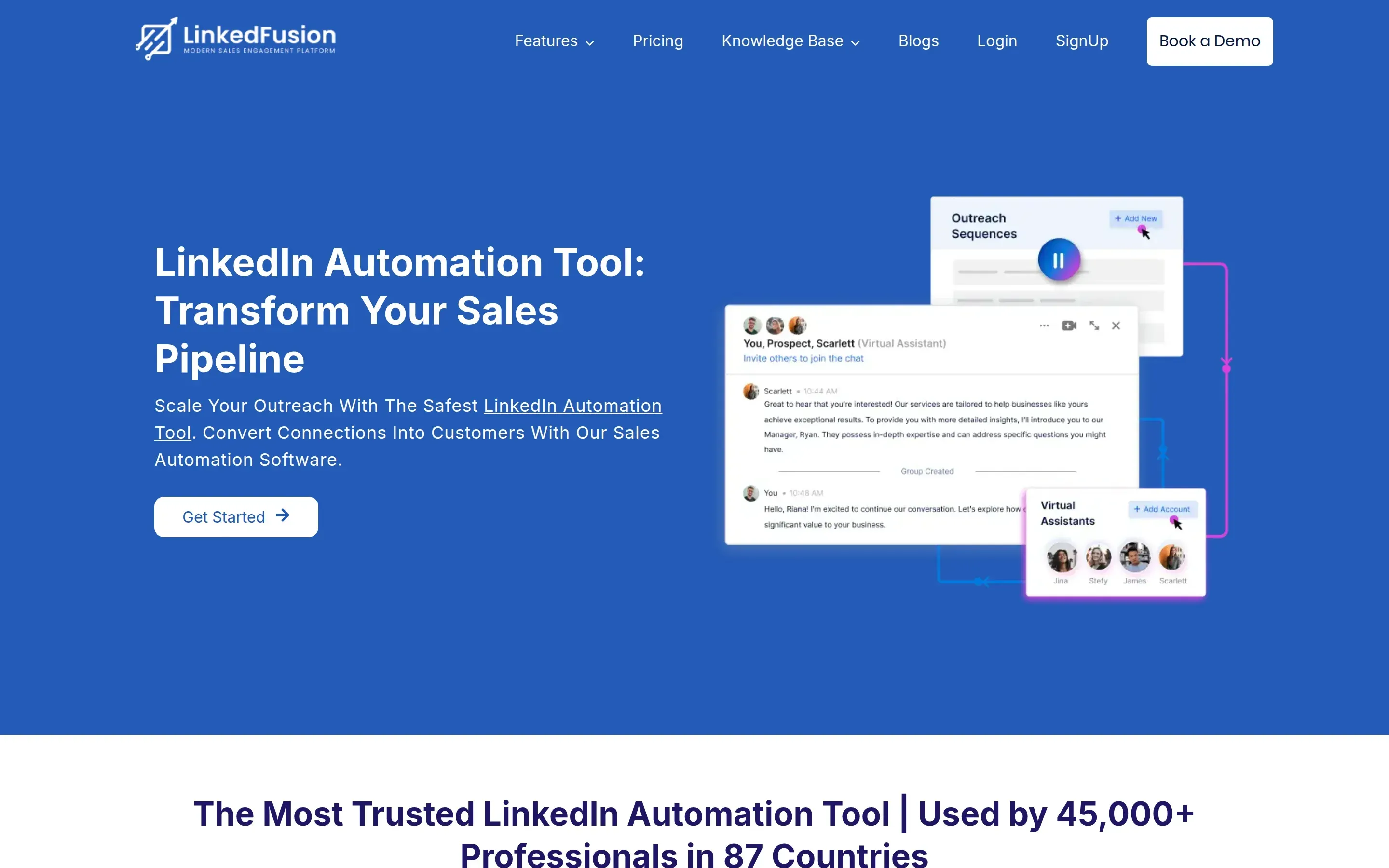
LinkedFusion home page, October 2026.
LinkedFusion positions itself as a cloud LinkedIn outreach tool. Campaigns run without your own computer, and the vendor holds the session. It adds a smart inbox, templates and team features from the first plan.
- Runs in the cloud, so campaigns continue when your computer is off
- Sequences with a connection request, follow-ups, working hours and automatic withdrawal of old invites
- An email step inside the same sequence, sent through your own SMTP mailbox
- Team Blacklist and Team Sync on every plan
- Native HubSpot and Pipedrive, plus webhooks, Zapier and Google Sheets
- A smart inbox with tags and notes, and published API documentation
| Plan | Monthly price | Annual equivalent | Best for |
|---|---|---|---|
| Professional | $65.95 per month | $46.95 per month | One account on HubSpot or Pipedrive |
| Grow | $95.95 per month | $67.95 per month | Salesforce, Zoho or higher daily volume |
| Ultimate | $135.95 per month on the website | $95.95 per month on the website | Highest daily volume, see the price check above |
Who Is Behind LinkedFusion?
In the liability clause, LinkedFusion's terms of use name Master Your Network LLC, written there as "Knows as Kennected." Its privacy policy tells users they also agree to the privacy policy of its parent company, Kennected. We did not find a standalone company page or headquarters on the product site.
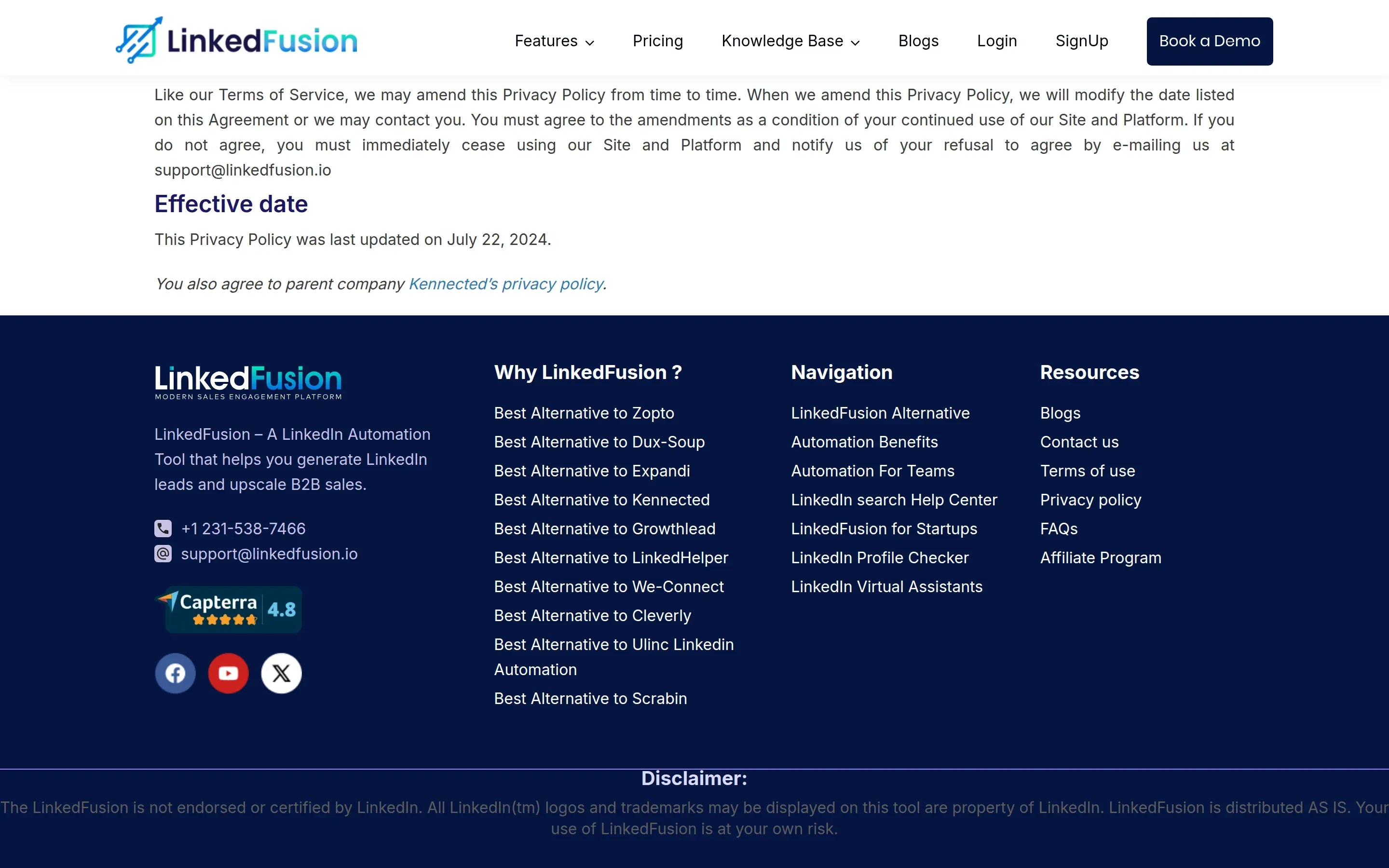
The end of LinkedFusion's privacy policy, October 2026. Users also agree to the privacy policy of the parent company, Kennected.
Is Linked Helper or LinkedFusion Safer?
Linked Helper keeps your session and IP on your side, while LinkedFusion holds both in its cloud. This is where the two differ most, so we tested it instead of describing it.
Is LinkedFusion a Safe Cloud Tool?
To connect an account, LinkedFusion asks for your LinkedIn email and password, not a cookie or a login through LinkedIn, and walks you through two-step verification if LinkedIn asks for it. Its privacy policy lists the password among the data it may collect, "not in human-readable format." Linked Helper asks for a password only for auto-login, and you can leave it out.
LinkedFusion says each account gets a dedicated IP. Its home page reads, "Get Dedicated local IP address for your LinkedIn Account. LinkedFusion supports 190+ countries. No one in the world would use the same IP." We added a LinkedIn account to a test workspace and looked at what LinkedIn saw. The session came from 154.12.140.168, an address owned by Cogent Communications in Fort Worth, Texas.
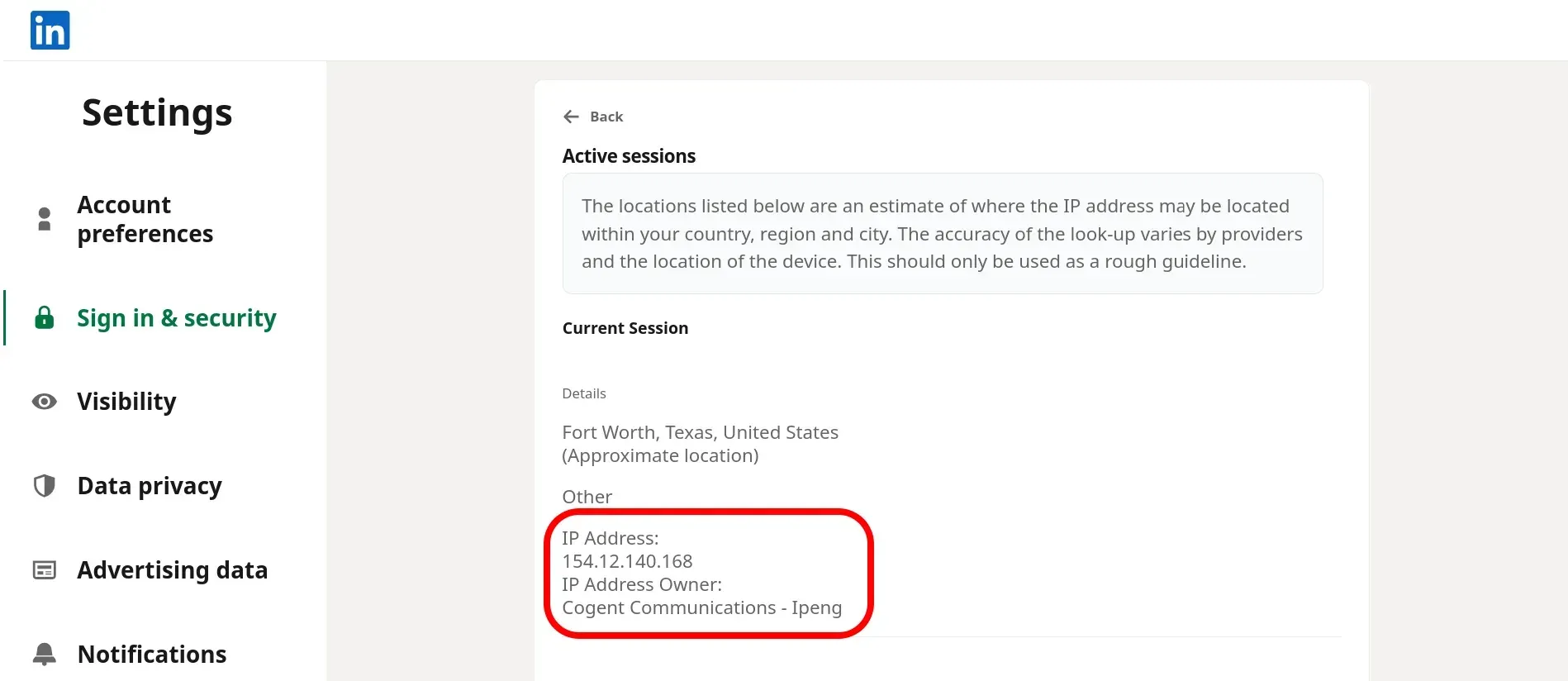
LinkedIn's active-sessions page for our LinkedFusion test account. It shows the IP that LinkedIn recorded for the session, 154.12.140.168, owned by Cogent Communications in Fort Worth.
A dedicated IP is not a clean IP. In a cloud tool you get whatever address the vendor hands out, and nobody is insured against a bad one. Our IPQualityScore check showed it. The address scored 99 out of 100 for fraud risk, with proxy and VPN both flagged, and recent abuse and bot activity both true. That is one account, so it is no verdict on every LinkedFusion IP, but it is a risk you cannot check or fix yourself without bringing your own proxy.
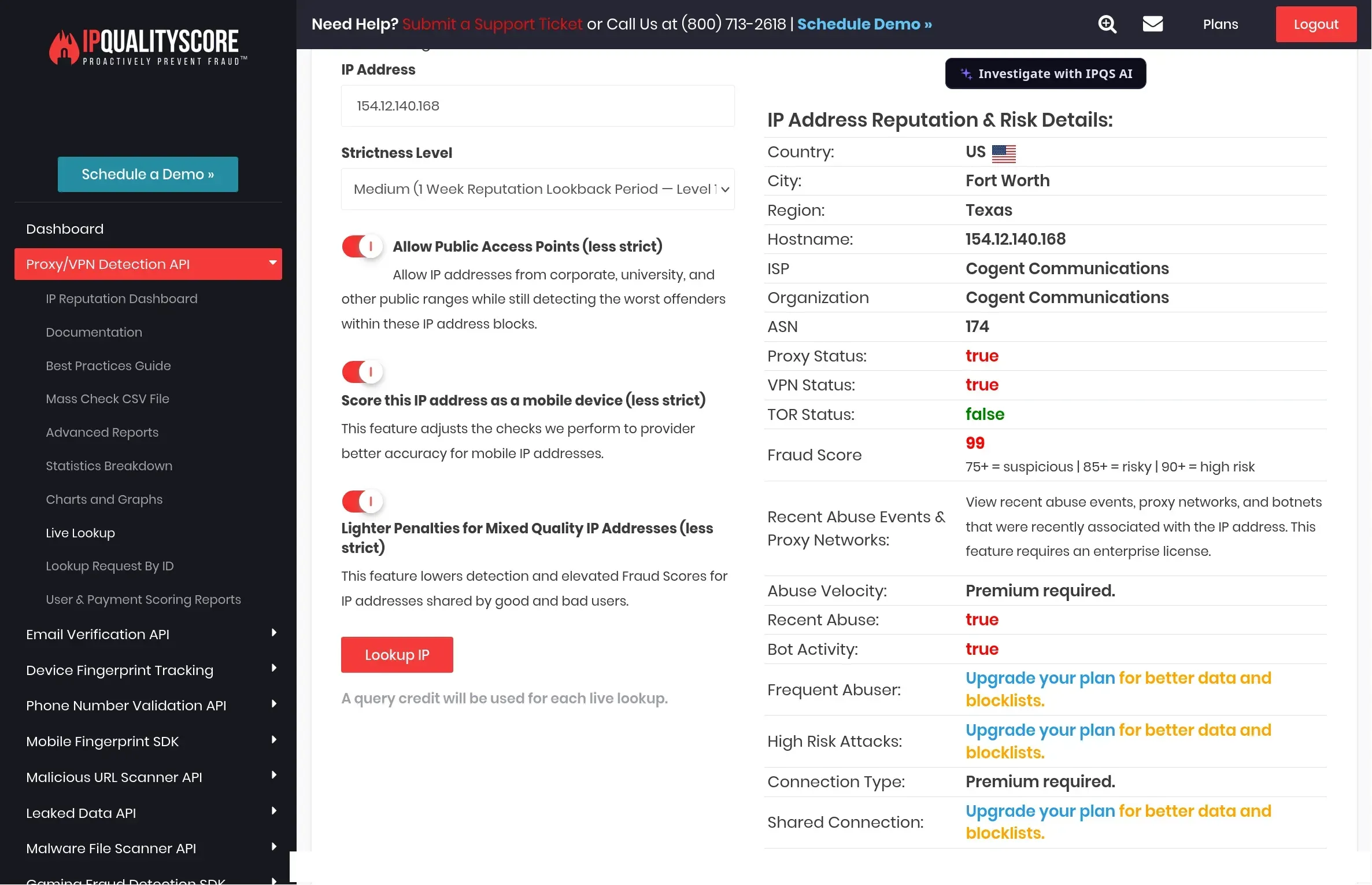
IPQualityScore lookup of the IP seen in that session. It is an independent signal about the address, not a decision by LinkedIn. The name of our IPQS account is painted over.
A second lookup agrees on the kind of network. It lists the same address as a data center and transit address, which is a hosting network and not a home or mobile connection.
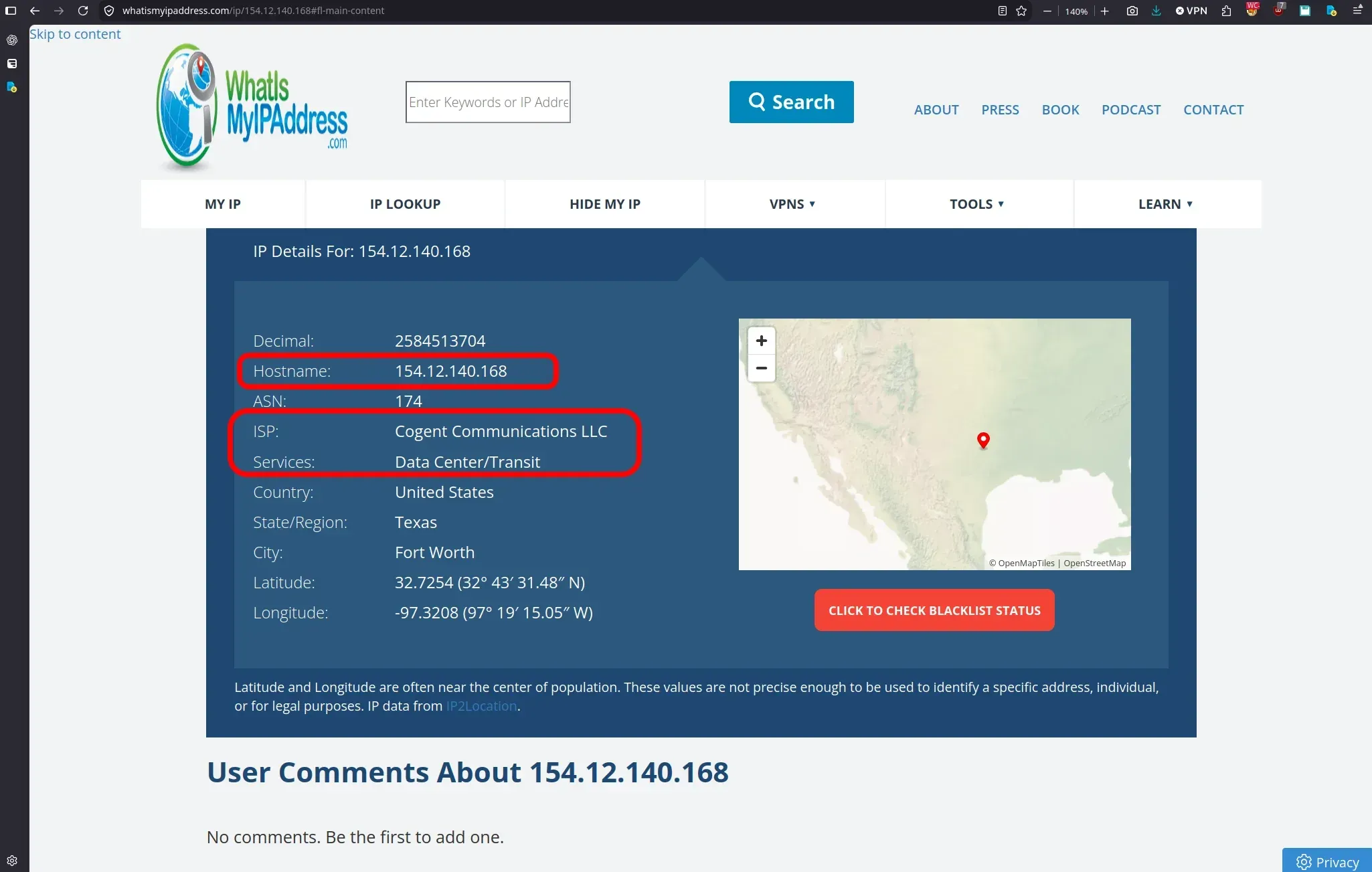
A second lookup of the same address. The services line reads Data Center/Transit.
You can ask LinkedFusion for another address, but you cannot check the one you get. The app has a Request IP button that warns it will disconnect your LinkedIn account, and we found no IP quality check anywhere in the app. LinkedFusion's help center article on safer outreach does not mention an IP or a proxy once, and in our campaign settings we found no randomized delays and no automatic pause on risk signals.
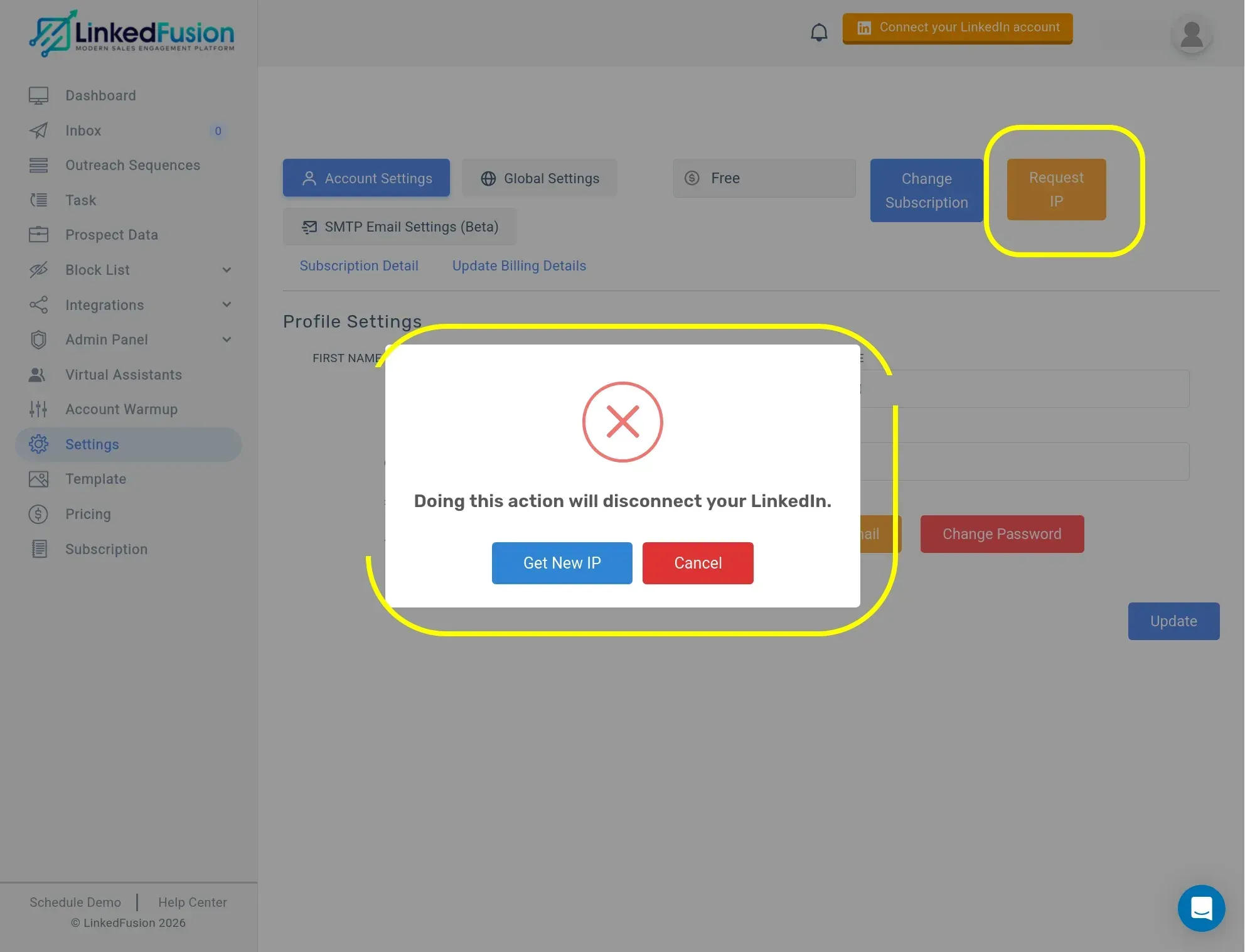
LinkedFusion's Request IP button. Asking for a new address disconnects your LinkedIn account. Personal details in the form are painted over.
LinkedFusion's account controls help in other ways. You choose the country of the IP, and a custom proxy is an option. However, they do not remove the cloud-custody trade-off, because the session and the address that LinkedIn sees stay with the vendor.
How Does Linked Helper Keep You in Control?
Linked Helper's answer is different. Activity runs from your own IP or a proxy you control, with daily limits, randomized delays, working hours and a proxy checker visible in the app. Linked Helper was not part of the cloud test, because it does not run from vendor infrastructure. On the password, the help center says it is used for auto-login only; you can skip it and log in by hand, and if you do not want it stored on our servers you can keep it locally on your machine.
The proxy checker shows what you would otherwise discover after a restriction. For each proxy it reports the country, a fraud score from IPQualityScore and whether the IP has been used by bots, crawlers or VPN and proxy services. A proxy is marked Good or Bad, and the app recommends replacing a Bad one. It warns rather than blocks, so the decision stays yours.
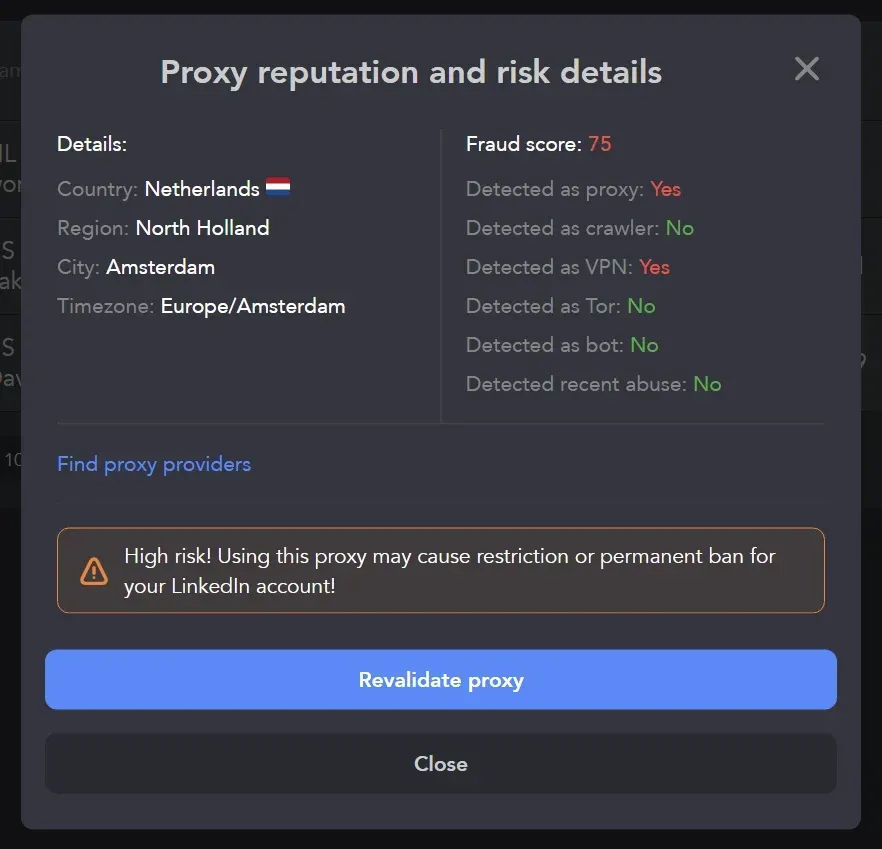
Linked Helper proxy checker on a test proxy. A fraud score of 75 triggers the high-risk warning.
Pacing is set in the same app. The default daily limit is 150 actions, with a Smart Daily Limit Adjustment that varies the daily count so it never lands on the same round number, and separate limits per action type. The help center recommends 150 for accounts older than a year and advises against raising it.
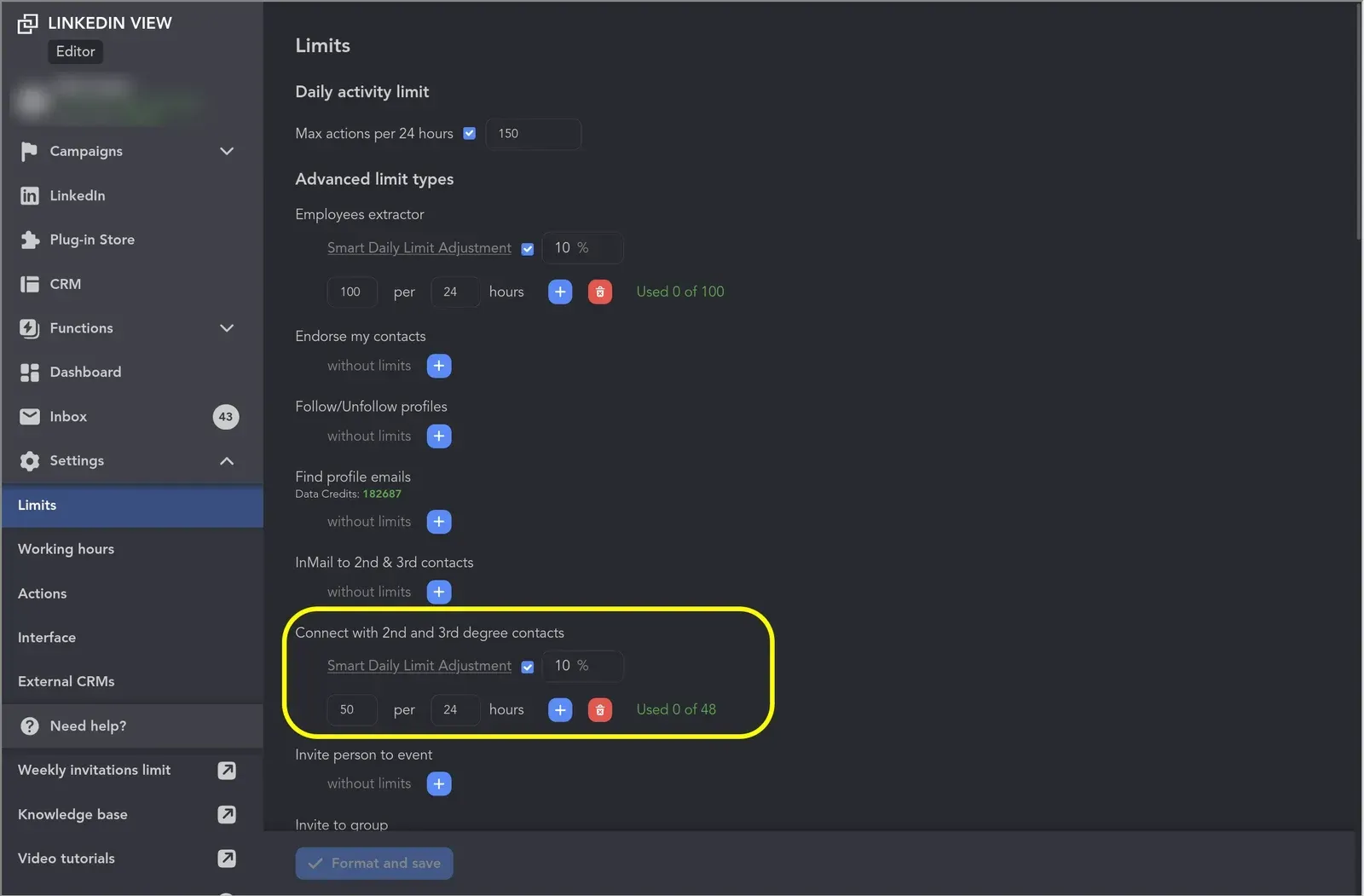
Linked Helper limits settings. The default cap is 150 actions per 24 hours, with per-action limits below it.
Do Campaigns Stop When the Computer Is Off?
Only if you leave Linked Helper on a laptop you close (the help center says so too). Run it on a VPS you rent and campaigns stay online around the clock, from an environment you control.
LinkedFusion's own comparison page names exactly this as a weakness of Linked Helper and says it "runs 24/7, even when your system is turned off." That is true of its cloud, and the price is that the machine, the session and the IP belong to the vendor.
How Responsive Is LinkedFusion's Support?
Slower than its pages promise. LinkedFusion's comparison page offers support "via a dedicated account manager" and says, "we will get you up and running within minutes." We put six questions to the chat on a weekend, about email and AI credits, follow, like and endorse limits, Salesforce and what happens to a licence when a client leaves.
The first reply came from an operator labelled AI Agent and said the team would be back tomorrow. A person answered the next day, in the afternoon, and covered Salesforce and AI personalization. The questions on email credits, on follow, like and endorse limits and on reassigning a licence stayed without an answer. A second message asking for the rest had not been read when we captured it.
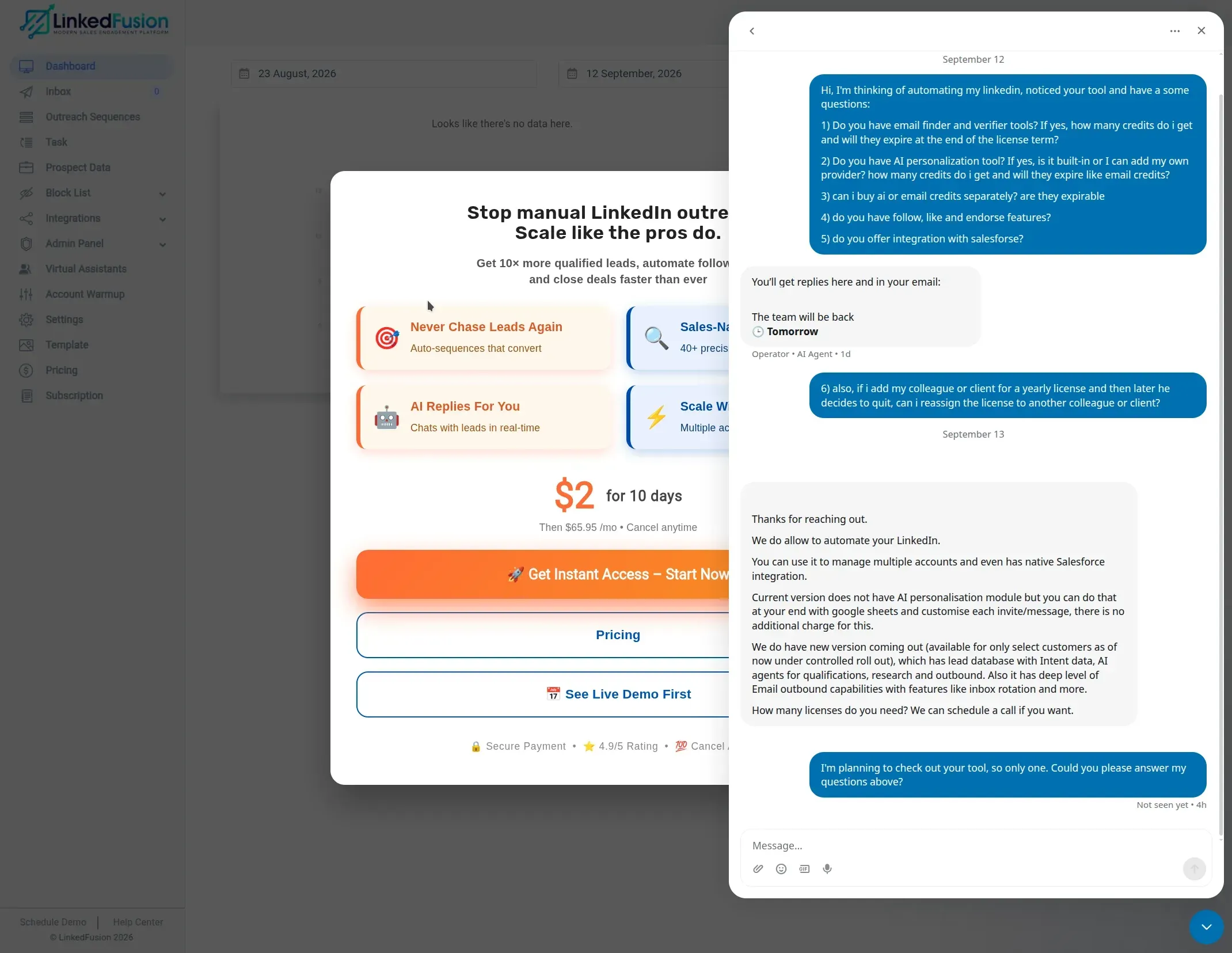
LinkedFusion's support chat from our test account. The first reply is from an operator labelled AI Agent, and a person answered on the next day. Names and email are painted over.
When we asked in Dutch, the reply came in English. That is a small thing, but it matters if your team does not work in English.
What Do Users Say About Each Tool?
Users rate Linked Helper higher, and there are far more of them. Counting every review together, Linked Helper has 893 reviews at a weighted average of 4.78 out of 5, and LinkedFusion has 25 at 4.32.
| Site | Linked Helper | LinkedFusion |
|---|---|---|
| G2 | 4.5 (149 reviews) | About 3.6 (10 reviews) |
| Capterra | 4.9 (278 reviews) | 4.8 (15 reviews) |
| Trustpilot | 4.8 (466 reviews) | No profile found |
| All sites, weighted | 4.78 (893 reviews) | 4.32 (25 reviews) |
Weighted by review count, so treat it as a summary and not as an official score. G2 and Capterra block automated checks, so the LinkedFusion figures come from our review dataset, which holds no review after July 2025. LinkedFusion shows a Capterra 4.8 badge on its own site.
G2 reviewers of Linked Helper often mention time savings, campaign control, follow-up automation and value for money. LinkedFusion reviewers like the HubSpot sync and how easy the platform is to set up, and recurring complaints concern downtime and platform disruptions. Ratings were checked in October 2026.
Which One Should You Choose?
Pick Linked Helper for price, features and control. Pick LinkedFusion only if you want campaigns running in the vendor's cloud without a machine of your own and accept the resulting security and detection risks.
| Your situation | Better fit |
|---|---|
| Lowest cost per account | Linked Helper |
| Your own IP and session stay with you | Linked Helper |
| Many accounts, volume discounts | Linked Helper |
| Campaigns online without any machine of your own, and you accept the risks of a cloud tool | LinkedFusion |
How Do You Switch From LinkedFusion to Linked Helper?
In six steps, using the 14-day Linked Helper trial, which needs no card.
- Write down what you actually use in LinkedFusion, such as the email step, Team Blacklist and Google Sheets sources. The email step is the one thing Linked Helper handles through an integration instead of natively.
- Open Prospect data in LinkedFusion and use Export Leads. In our test the export holds lead data and no conversation history, so copy any messages you need first.
- Download the Linked Helper desktop app for Windows, macOS or Ubuntu and start the 14-day trial. No credit card is needed. The first-campaign guide walks you through it.
- Sign in to LinkedIn inside the app. A proxy is optional if you run only your own account. For several accounts on one machine, assign each its own HTTP, HTTPS, SOCKS or SOCKS5 proxy (IPv4) and run the built-in proxy checker. Residential, ISP and mobile proxies are the better choice, because datacenter IPs are the ones most often flagged.
- Rebuild one campaign in the campaign builder and load your exported profile URLs from the CSV. Set daily limits, working hours and delays, and turn on reply detection so the sequence stops for people who answer.
- Run it on a small batch and compare replies in the built-in CRM. We recommend not running both tools on the same LinkedIn account at the same time. Cancel LinkedFusion from the Subscription section of its dashboard when you are satisfied.
Where Can You Read More About LinkedFusion?
For more on LinkedFusion, see the list of LinkedFusion alternatives.
To see other tools side by side, browse all comparisons, reviews and alternatives.