
 Updated: October 12, 2026
 22 min read
Linked Helper costs far less for a team, keeps your LinkedIn session on your own machine and lets managers in for free. At 20 accounts the monthly bill is about $420 with Linked Helper against $1,580 for Meet Alfred. Meet Alfred positions itself as a cloud platform for LinkedIn, email and X outreach that runs without your computer. That convenience suits people who accept the security and detection risks that come with a cloud tool.
We make Linked Helper (some people write it LinkedHelper), so you should know whose guide this is. In October 2026 we signed up for Meet Alfred, checked and cross-checked everything, and talked to support to get the details straight. The screenshots below come from those tests.
The two are built in opposite ways. Linked Helper is a desktop app that runs on your own computer or VPS. Meet Alfred runs your campaigns from its own cloud servers, and it asks for your LinkedIn login to do that. That difference decides who holds your session, what you pay per account once a team grows, and how much control you keep.
Key takeaways
- At 20 accounts Linked Helper costs about $420 a month against $1,580 for Meet Alfred Teams billed monthly, hosting and proxies included. On annual billing it is $312 against $940.
- Managers are free in Linked Helper. In Meet Alfred every LinkedIn account is a paid seat, and the Teams plan has no published volume discount schedule.
- Linked Helper keeps the LinkedIn session on your machine, and the password is optional. Meet Alfred connects an account with a LinkedIn login and password, and its cloud runs the campaigns.
- Meet Alfred's help center says campaign lead export is exclusively for Teams plans, yet its pricing page lists lead export on Business. In our trial account HubSpot showed as Coming Soon.
- At the start of October the ratings on the three review sites we checked look like this: G2 4.5 against 3.2, Capterra 4.9 against 2.8, Trustpilot 4.8 against 4.7. Weighted by review count, that is 4.78 across 893 reviews against 4.63 across 954.
Which Is Better, Linked Helper or Meet Alfred?
Linked Helper leads on price, control and AI features. Meet Alfred leads on cloud convenience and on multichannel sequences with email and X.
| Linked Helper | Meet Alfred | |
|---|---|---|
| Architecture | Desktop app | Cloud |
| Session lives on | Your machine | Vendor cloud |
| LinkedIn login | Optional password | Login and password |
| Price per account | $15 per month | $79 per month (Teams) |
| Free trial | 14 days, no card | 7 days, no card |
| Email and X steps | Email via integration | Built in, from Business |
| G2 | 4.5 (149) | 3.2 (30) |
| Capterra | 4.9 (278) | 2.8 (13) |
| Trustpilot | 4.8 (466) | 4.7 (911) |
| All three, weighted | 4.78 (893 reviews) | 4.63 (954 reviews) |
Prices checked October 2026. Ratings from G2, Capterra and Trustpilot.
Which Tool Has More Features?
Linked Helper has more built in on the LinkedIn side: 23 lead sources, 15 direct CRM integrations, an email finder and AI for messages, comments and lead scoring. Meet Alfred has the wider channel set, with LinkedIn, email and X in one sequence.
| Feature | Linked Helper | Meet Alfred |
|---|---|---|
| Architecture and session | Desktop app, session on your machine | Cloud, session managed by the vendor |
| Lead sources | 23 source types across LinkedIn, Sales Navigator, Recruiter and CSV | 10+ source types, including posts, ads and newsletters |
| Email and X in the sequence | Email via Snov.io or Instantly | Yes, from Business |
| If/then branching | Routing by outcome, no flow canvas | We did not find it |
| A/B testing | No | We did not find it |
| Email finder | Built in, 620 credits a month on Standard | We did not find one |
| AI messages, comments and lead scoring | Yes, on built-in credits | Name, title and company merge fields |
| Native CRM integrations | 15 | HubSpot and Salesforce on Teams per its help center |
| Webhooks | In and out | In and out, from Business |
| Public API | No | Key-based API with 8 actions |
| Workspaces and roles | 4 workspace roles and 4 account access levels | Owner, Admin and Member, with team workspaces |
| White-label | Your own logo and name in the app | Custom domain and email, on Teams |
Meet Alfred values come from its help center, pricing page and our trial account. We say we did not find a feature when its docs and pricing page do not show it.
Quick key. Yes means the feature is there and works. We did not find it means we looked in the vendor's help center, on its pricing page and in our trial account and it was not there.
Does Meet Alfred Export Leads and Connect to Your CRM?
Not on every plan, and its own pages disagree. The help center article on exporting campaign data says: "this feature is exclusively available for Teams plans." The pricing page, checked in October 2026, marks lead import and export as available on Business and not on Individual, while the Individual plan description lists "Export Data".
Native CRM is murkier. A help center article describes connecting HubSpot, and lists it for the Teams, Agency and Enterprise plans. In our trial account the Integrations screen showed HubSpot as Coming Soon, Salesforce locked behind the Team plan, and Zapier locked behind a Premium plan.
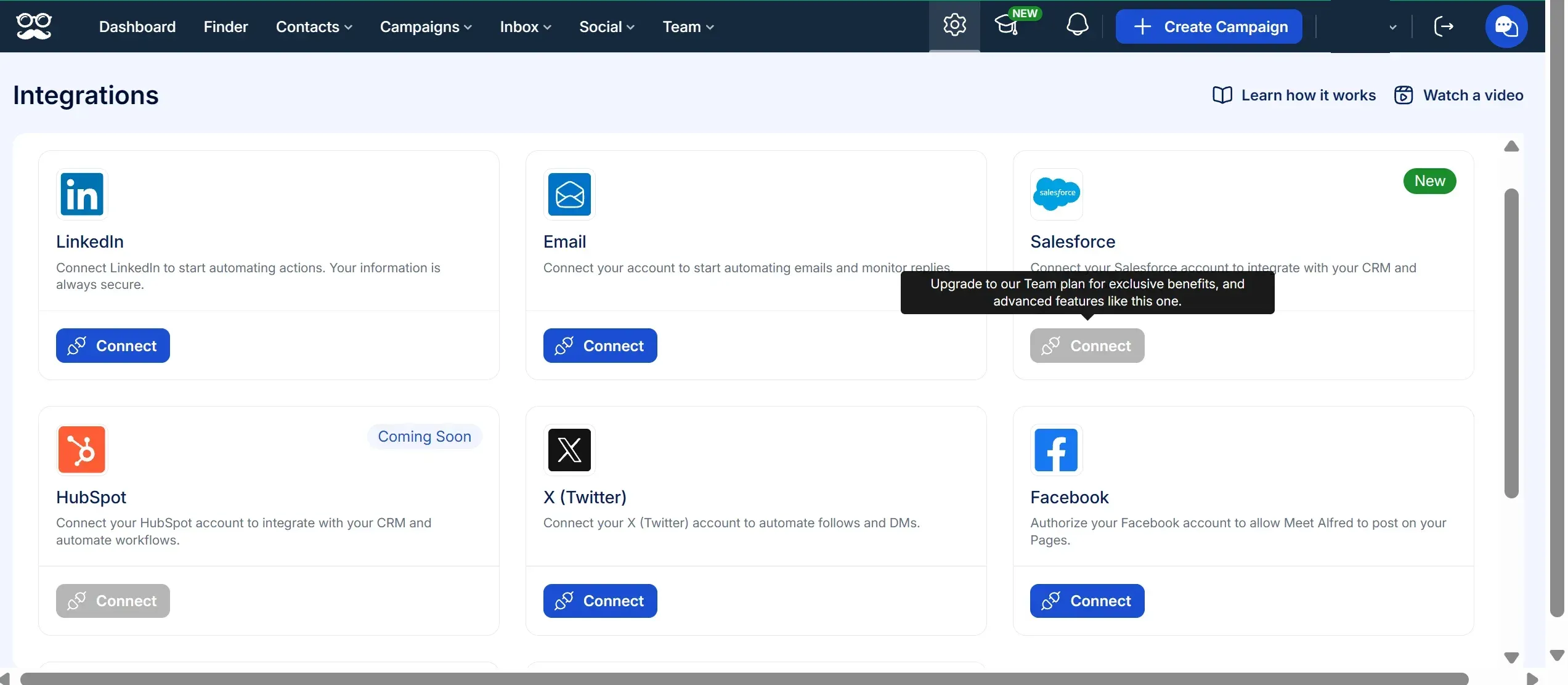
Meet Alfred Integrations screen in our trial account. HubSpot is Coming Soon and Salesforce needs the Team plan. We did not test a paid Teams account.
If you move leads into a CRM, ask support before you buy and get the answer in writing. Linked Helper sends profiles to 15 direct integrations, with 20 sends a day per account on Standard and unlimited on Pro.
How Much Do Linked Helper and Meet Alfred Cost?
Linked Helper is cheaper at every team size, and the gap widens with every account you add. Linked Helper Pro costs $45 per account per month and Standard $15, against $79 for a Meet Alfred Teams seat. At 20 accounts the Pro plan costs $720 against $1,580. The reason is volume pricing. Linked Helper applies 10% off for 10 to 19 licences and 20% off for 20 to 49 licences bought together, up to 50% off for larger teams. Meet Alfred publishes no volume schedule for Teams, and in our checkout the price per seat stayed the same from 3 seats to 23.
| Accounts | Linked Helper Pro | Meet Alfred Teams | Difference |
|---|---|---|---|
| 5 | $225 per month | $395 per month | 43% less |
| 10 | $405 per month | $790 per month | 49% less |
| 20 | $720 per month | $1,580 per month | 54% less |
| 20, over 12 months | $8,640 | $18,960 | $10,320 saved |
List prices in USD billed monthly, checked October 2026, excluding taxes, add-ons and hosting. Meet Alfred Teams starts at 3 seats. Linked Helper Pro includes the 10% and 20% volume discounts bought on one invoice.
The monthly Meet Alfred numbers come from the checkout of our own trial account, where 20 seats on Teams showed $1,580. On annual billing the pricing page now shows Teams at $47 per seat, which makes 20 seats $940 a month.
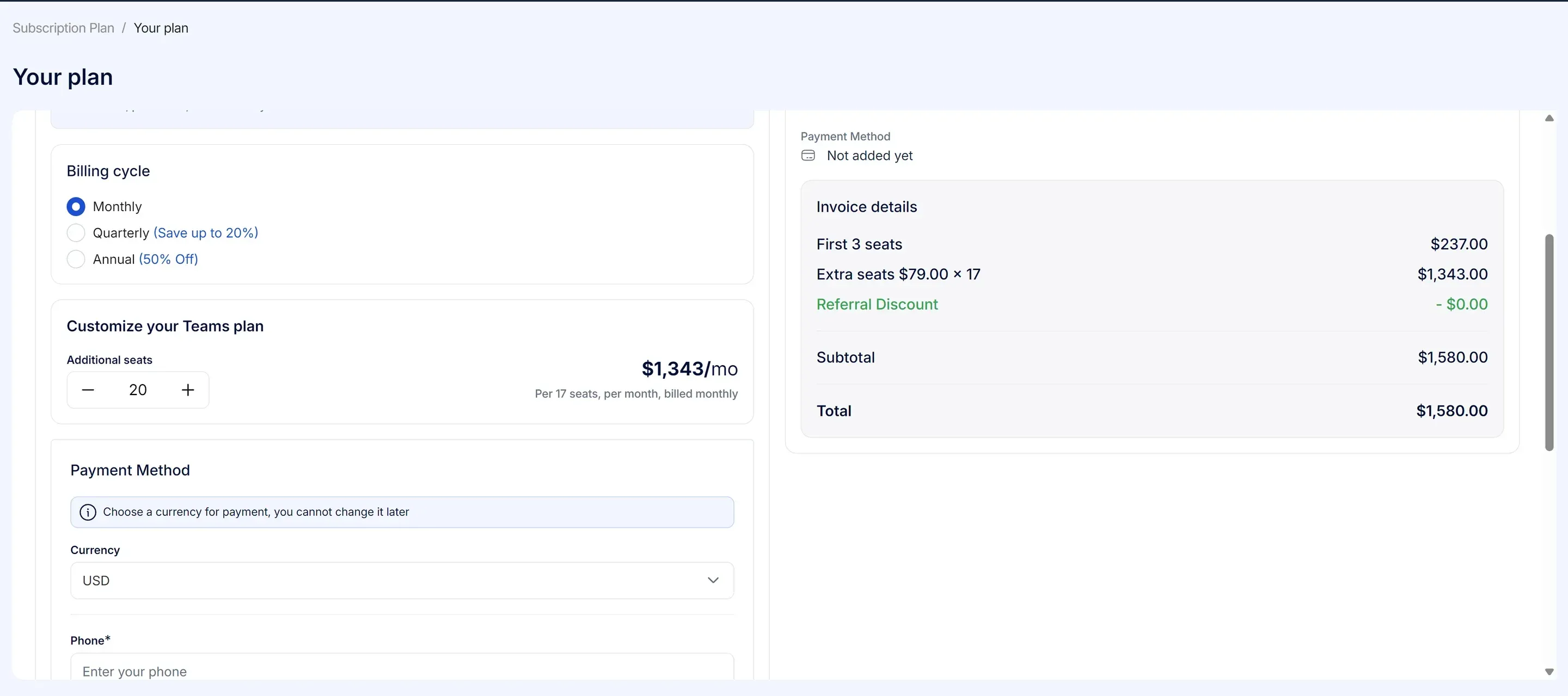
Meet Alfred checkout in our trial account. 20 seats on the Teams plan, billed monthly: 3 seats at $237 plus 17 at $79.
Linked Helper sells licences for 1, 3, 6 or 12 months instead of an auto-renewing subscription. One licence runs one LinkedIn account at a time, so we quote prices per account. Duration and bulk discounts stack, and bulk discounts apply when the licences are on one invoice. Linked Helper prices exclude local tax, which checkout adds unless you enter a VAT ID. Meet Alfred support told us the listed prices are fixed and checkout adds no charges, and we did not confirm that at a paid checkout.

Meet Alfred support answer on taxes, from our trial account.
What Does a 20-Account Agency Really Pay?
A 20-account team pays about $420 a month with Linked Helper and $1,580 with Meet Alfred, even after counting the hosting we added. List prices are only part of the bill, so we ran the full cost for one scenario. Five managers, 20 LinkedIn accounts, outreach feeding HubSpot, campaigns running 24/7, 400 email lookups per account and 850 follow-ups. Linked Helper lives on your own machines, so we added the hosting it needs. Meet Alfred is cloud, so it needs none.
| Cost line | Linked Helper Standard | Meet Alfred Teams |
|---|---|---|
| Licences | $240 (20 × $15, 20% volume discount) | $1,580 (20 seats at $79) |
| Managers | $0, users in the first workspace are free | Included in the seats |
| Servers | $100 (5 Windows VPS at about $20, assumption) | Not needed |
| Proxies | $80 (20 at about $4, assumption) | Default system IP, own proxy optional |
| Email finder, 8,000 lookups | Included (12,400 credits a month that never expire) | We did not find an email lookup |
| HubSpot | Native, included | Native on Teams per its pricing page, Coming Soon in our trial |
| Total per month | $420 | $1,580 plus the missing email finder |
| Total per year, annual billing | $312 per month, $3,744 | $940 per month, $11,280 |
Monthly cost for 20 accounts, USD, October 2026. VPS and proxy prices are our assumptions, not vendor prices. Linked Helper figures exclude local tax.
Annual billing narrows the gap but does not close it. Meet Alfred drops to $47 a seat, and the Linked Helper bill with 12-month licences is $132 for licences plus $180 for hosting and proxies. We priced Teams because it is the plan that manages many accounts from one dashboard. Without it every account is managed on its own.
Which Plan Is the Cheapest Way In?
At Linked Helper the cheapest plan is also the real minimum. Standard at $15 per account passes every check we set for a minimum viable setup, which we defined as the cheapest plan that still runs a real outreach campaign. Meet Alfred's entry plan is cheaper on paper than its Teams seat, but it lacks several things a solo outreach needs. Here is what each entry plan gives you.
| What you need | Linked Helper Standard, $15 | Linked Helper Pro, $45 | Meet Alfred entry plan |
|---|---|---|---|
| Multistep sequences | Yes, no step limit | Yes | Yes, unlimited steps |
| Active campaigns | Unlimited | Unlimited | 3 active campaigns |
| If/then branching | In message templates, plus routing by outcome | Same as Standard | We did not find it |
| Stop when a lead replies | Yes | Yes | Yes |
| Email and X steps | Via integration | Via integration | No, from Business |
| Sales Navigator | Yes | Yes | No, from Business |
| Lead export to CSV | Yes | Yes | Business and above per its pricing page, Teams only per its help center |
| CRM and webhook sends | 20 profiles a day | Unlimited | No integrations or webhooks, from Business |
| Email finder credits per month | 620 | 3,100 | We did not find one |
Entry plans compared, October 2026. Linked Helper from its licensing page, Meet Alfred from its help center, pricing page and our trial. The entry plan is Individual on its pricing page and Basic in its help center and support chats; Business was called Pro.
Source for the Linked Helper columns is the licensing and discounts article of its help center.
Standard is the real minimum. It has the multistep sequences, reply stop, CSV export of leads and safety settings that most solo outreach needs, for $15. Meet Alfred's entry plan has multistep sequences and reply stop, and you need Business for email, X and Sales Navigator, and its pages disagree on whether lead export starts at Business or Teams. Move up to Linked Helper Pro only if you need message export, bigger credit pools or more than 20 CRM sends a day.
What Do You Get With Linked Helper?
Linked Helper has been built around one network, LinkedIn, for ten years. Invitations, messages, profile visits, endorsements and post engagement are all actions you chain into one campaign, and each account can use its own HTTP, HTTPS, SOCKS or SOCKS5 proxy.
- Custom campaign builder with reply detection and stop conditions
- Built-in CRM with tags, notes, auto-tagging and CSV export
- Sales Navigator, Recruiter Lite, Recruiter, groups, events and post engagement support
- Data enrichment credits, AI messages and AI-assisted reply editing
- Daily limits, smart daily limits, randomized delays, working hours and a built-in proxy checker
- Free workspace seats for managers and guest access for clients
- Webhooks, Zapier, Make and direct CRM integrations
| Plan | Monthly price | Annual equivalent | Best for |
|---|---|---|---|
| Trial | Free for 14 days | Free for 14 days | Testing the app before paying |
| Standard | $15 per month | $8.25 per month | Core automation, campaigns, CRM and export |
| Pro | $45 per month | $24.75 per month | Higher limits, advanced actions, enrichment |
Unlike classic cloud tools, we have no servers that run your campaigns. You install Linked Helper wherever you choose, on a laptop or on a VPS you rent, and that is where the control comes from. On a VPS campaigns run around the clock, you can log in from any device and you can give a teammate access. It is also LinkedIn-first, so teams that need native cold-email sequencing should pair it with a dedicated email tool.
What Do You Get With Meet Alfred?
Meet Alfred positions itself as a safe multichannel outreach platform for sales teams, agencies and recruiters, and its home page says it has "175,000+ registered users from 92 countries". It runs in the cloud on every plan, so campaigns continue with your laptop closed.
- Runs in the cloud on every plan, with an IP address the vendor assigns and an option to add your own proxy
- LinkedIn, email and X steps in one sequence, from the Business plan
- 10+ lead source types, including people who engaged with a post, a company page, LinkedIn ads and newsletters
- A key-based API with 8 actions, plus webhooks and Zapier from Business
- Owner, Admin and Member roles, impersonation of team accounts and white-label with a custom domain on Teams
- Daily limits that depend on the type of the connected LinkedIn account, with working hours and randomized timing
| Plan | Monthly price | Annual equivalent | Best for |
|---|---|---|---|
| Individual | $59 per month | $35 per month | One LinkedIn-only account |
| Business | $99 per month | $59 per month | Multichannel outreach and Sales Navigator |
| Teams | $79 per month | $47 per month | Several accounts in one dashboard |
Meet Alfred pricing page, October 2026, per seat. Annual billing saves 40%. Teams starts at 3 seats.
Who Holds Your LinkedIn Session With Meet Alfred?
Meet Alfred does, by its own description. Its help center says "all campaigns run through Meet Alfred's secure cloud-based infrastructure". That is the trade a cloud tool makes, and it is where you should look first when you compare the two.
How Does Meet Alfred Connect a LinkedIn Account?
With a LinkedIn login and password. In our test the sign-up asked for them and offered a "Stay logged in" option. The help center page about custom proxies adds that "the only way to reset the cloud bot's memory and clear the error is to fully reconnect your LinkedIn account." Meet Alfred's data sits in Amazon data centers in the United States, and its security page says passwords are encrypted in the database. Another of its pages mentions "ISO-level security, SOC-2 readiness", and we did not find a certificate behind that line.
The vendor describes each account as getting a dedicated IP. Support also told us that LinkedIn's weekly invitation limit is detected and the campaign keeps running without invites until it clears.
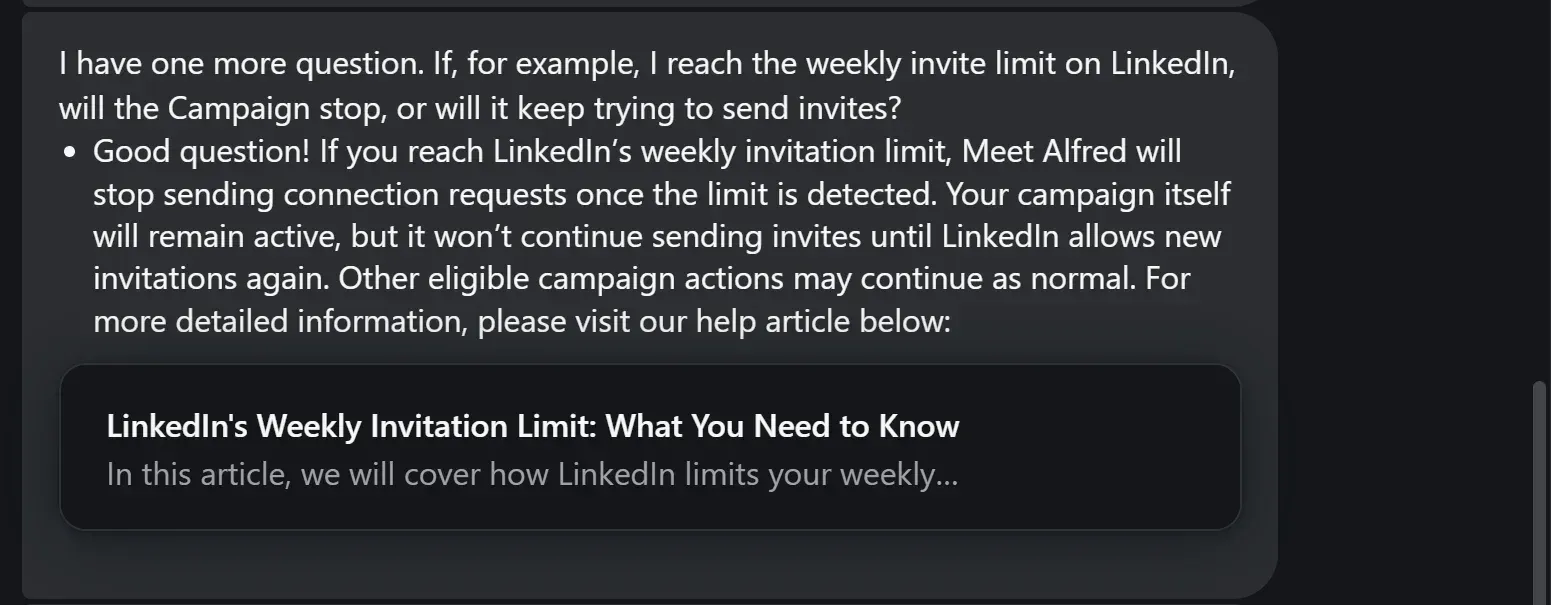
Meet Alfred support answer from our trial account about LinkedIn's weekly invitation limit.
How Does Linked Helper Keep You in Control?
Linked Helper creates the LinkedIn session inside the desktop app on your machine and does not upload it for campaign execution. The password is used only for automatic login: if you do not add it you log in manually, and if you do not want it on our servers you can store it locally on your machine. Pacing is set in the same app. The default daily limit is 150 actions over a rolling 24 hours, and a proxy checker tells you a proxy's fraud score before you use it.
Do Campaigns Stop When the Computer Is Off?
Only if you leave Linked Helper on a laptop you close (the help center says so too). Run it on a VPS you rent and campaigns stay online around the clock, from an environment you control.
Which Is Better for Agencies, Linked Helper or Meet Alfred?
Linked Helper gives managers and clients access in the first workspace for free and charges only for LinkedIn accounts. Meet Alfred charges for every account as a paid seat and offers the stronger white-label.
| Linked Helper | Meet Alfred | |
|---|---|---|
| Manager seats | Unlimited in the first workspace, free | 3 seats in the Teams plan, extra seats paid |
| Client access | Guest with a Viewer role | An account without email, managed by the agency |
| Separate space per client | A workspace per client, or one workspace with an account per client | Team workspaces, owners can impersonate all accounts and admins all but the owner's |
| White-label | Your own logo and name in the app | Custom domain and email, on Teams |
| Proxy per account | Your own proxy for each account | Vendor-assigned IP, described as dedicated, own proxy optional |
| Volume pricing | 10% from 10 licences, up to 50% | None published for Teams, quote-based on Unlimited |
Agency features compared, October 2026. Linked Helper from its help center and workspaces page, Meet Alfred from its help center, pricing page and our checkout.
What Does Meet Alfred Say About Linked Helper?
Meet Alfred publishes a page about us, and parts of it are out of date. It says, in its words, that Linked Helper "lacks advanced team features like workspaces, role-based permissions, and shared inbox management", that agencies "cannot rebrand the platform" and that it "relies on standard variables and custom fields rather than AI-driven message optimization."
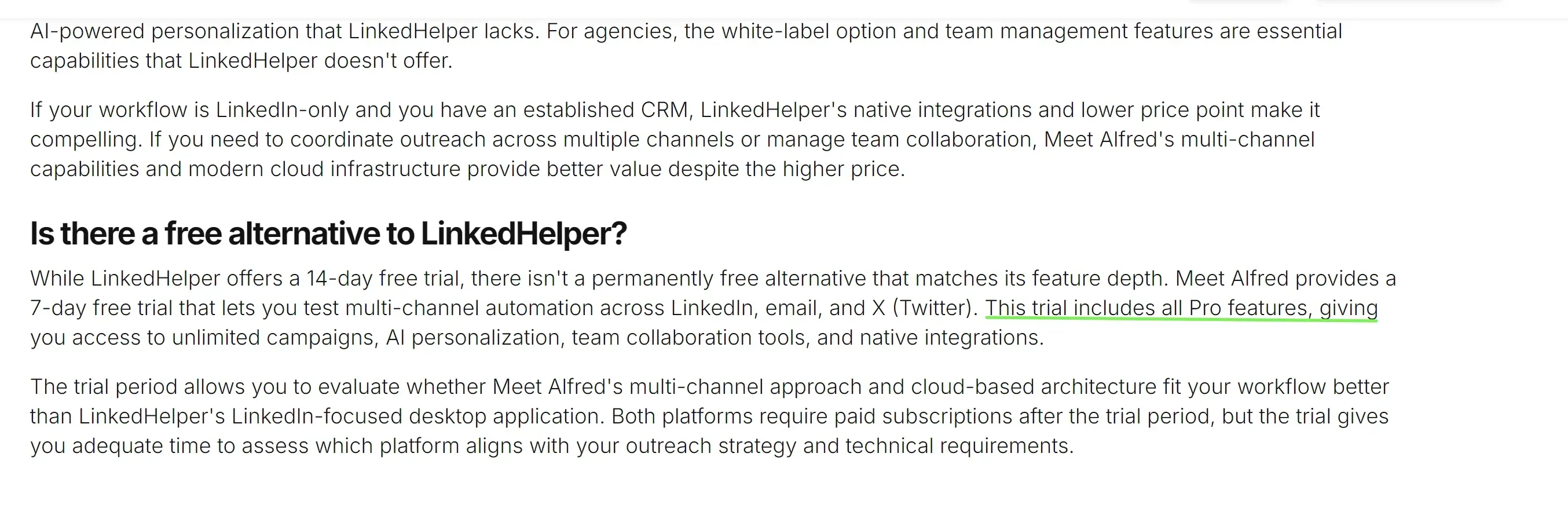
Text from Meet Alfred's own comparison page about Linked Helper, dated February 2026.
Linked Helper has workspaces with owner, admin, member and guest roles, lets you replace the logo and name in the app, and has built-in AI messages, comments and lead scoring. On inbox the page is only partly right: the standard inbox works per account, and the Cloud Storage version shows the conversations of every workspace account in one feed.
How Do Support and Billing Work at Meet Alfred?
Support answers quickly on weekdays and does not answer at weekends. Its home page promises a response "in under 3 minutes". We wrote on a weekend and got the reply after it.
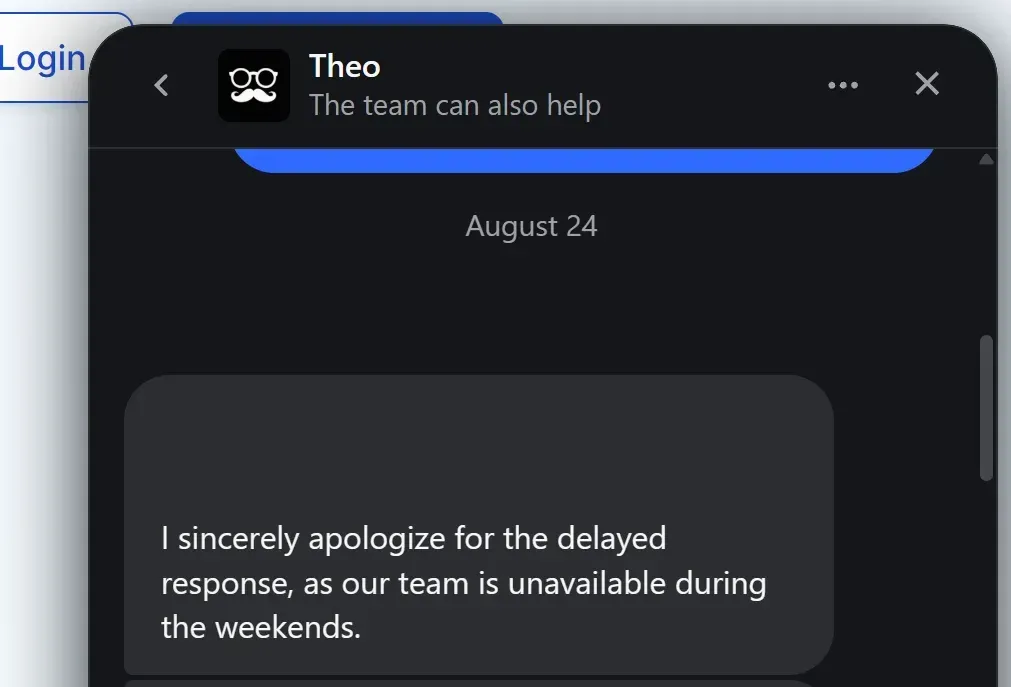
Meet Alfred support chat from our trial account. Agent name hidden.
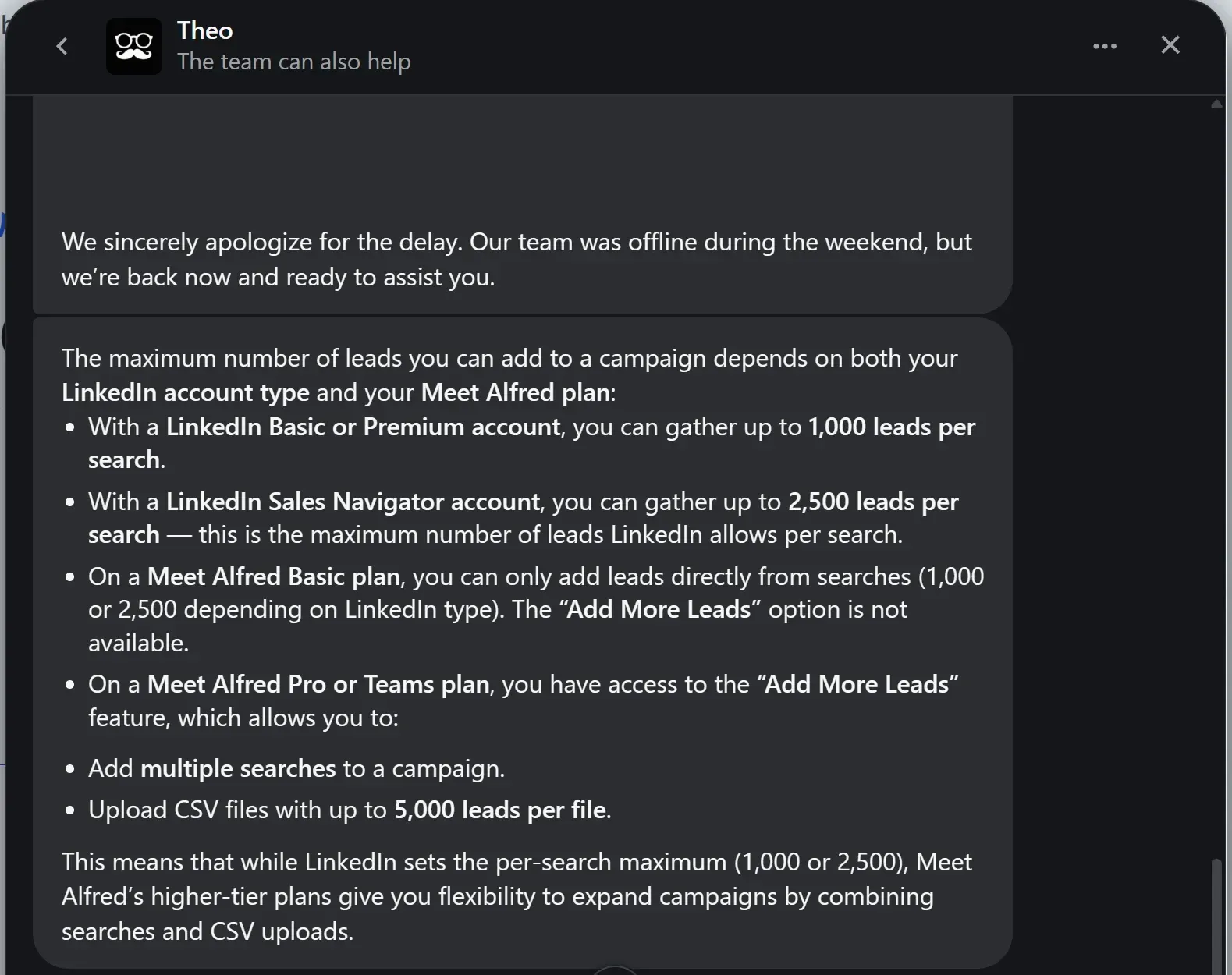
The same chat. Support also explained lead limits per plan: 1,000 or 2,500 leads per search and CSV uploads of up to 5,000 leads on Pro or Teams. Agent name hidden.
On billing, the help center says "Once upgraded, we do not offer refunds, but you can cancel your subscription anytime." Deleting an account is permanent, and the help center says there are no backups. Linked Helper's terms also say it does not refund license fees already paid.
What Do Users Say About Each Tool?
Users rate Linked Helper higher on all three review sites, and the gap is widest on G2 and Capterra, where Meet Alfred has far fewer reviews. Counting every review together, Linked Helper has 893 reviews at a weighted average of 4.78 out of 5, and Meet Alfred has 954 at 4.63.
| Site | Linked Helper | Meet Alfred |
|---|---|---|
| G2 | 4.5 (149 reviews) | 3.2 (30 reviews) |
| Capterra | 4.9 (278 reviews) | 2.8 (13 reviews) |
| Trustpilot | 4.8 (466 reviews) | 4.7 (911 reviews) |
| All three, weighted | 4.78 (893 reviews) | 4.63 (954 reviews) |
The weighted average multiplies each site's score by its number of reviews and divides by the total. Trustpilot carries most of Meet Alfred's reviews, so the weighted score hides a wide spread between sites. The three sites have different audiences and review rules.
Meet Alfred reviewers praise how simple it is to use and its support on routine questions. Complaints about it cluster around disconnects that force you to log in again, and around billing and cancellation.
Which One Should You Choose?
Pick Linked Helper for price, control and AI. Pick Meet Alfred only if you want a ready-made cloud setup with LinkedIn, email and X steps and are willing to hand the session and the detection risk to the vendor.
| Your situation | Better fit |
|---|---|
| Lowest cost per account | Linked Helper |
| Your own session and password stay with you | Linked Helper |
| Many accounts, volume discounts | Linked Helper |
| Free manager and client access | Linked Helper |
| LinkedIn, email and X in one sequence | Meet Alfred |
How Do You Switch From Meet Alfred to Linked Helper?
In six steps, using the 14-day Linked Helper trial that needs no card.
- Export what you need from Meet Alfred first. The Export All button on the Connections page produces a CSV of your connections, and lead export from campaigns needs a Teams plan. Deleting an account is permanent with no backups.
- Write down what you actually use in Meet Alfred, such as email and X steps. Email steps are the one thing Linked Helper handles through an integration instead of natively.
- Download the Linked Helper desktop app for Windows, macOS or Ubuntu and start the 14-day trial. The first-campaign guide walks you through it.
- Sign in to LinkedIn inside the app. For several accounts on one machine, assign each its own proxy and run the built-in proxy checker. Residential, ISP and mobile proxies are the better choice, because datacenter IPs are the ones most often flagged.
- Rebuild one campaign in the campaign builder. Set daily limits, working hours and delays, and turn on reply detection. Run a small batch and compare replies in the built-in CRM. Do not run both tools on the same LinkedIn account at the same time.
- Cancel Meet Alfred in Billing under Subscription Plan when you are satisfied. Paid time is not refunded, so cancel at the end of the period you paid for.
Where Can You Read More About Meet Alfred?
Two pages go deeper on Meet Alfred: our Meet Alfred review and the list of Meet Alfred alternatives.
To see other tools side by side, browse all comparisons, reviews and alternatives.