
 Updated: October 12, 2026
 21 min read
Linked Helper costs $15 per account per month, and a sequence stops on its own when a lead replies. Octopus CRM positions itself as a light Chrome extension with the lowest entry price, and its first plan that can run campaigns is $21.99. Octopus CRM is quick to install, which suits someone on a free LinkedIn account who keeps Chrome open and accepts that the extension is visible to LinkedIn.
We make Linked Helper, so you should know whose guide this is. In October 2026 we signed up for Octopus CRM, checked and cross-checked everything, and talked to its support team to get the details straight. The screenshots below come from those tests and from its public pages.
The two tools look alike from the outside, and both run on your own machine. Linked Helper is a desktop app with its own built-in browser engine that runs on your own computer or VPS. Octopus CRM is a Chrome extension that works inside the browser you already use. If you searched for LinkedHelper vs Octopus CRM, the differences that decide it are the price of the plan you will really need, what happens after a reply, and what scaling to many accounts costs.
Key takeaways
- Linked Helper Standard is $15 per month ($8.25 on annual billing) and includes sequences, CSV export of leads and reply stop. At Octopus CRM the $9.99 Starter plan ticks 3 of 11 rows. Campaigns and export start at Advanced, $21.99.
- Octopus CRM sells its Unlimited plan, $39.99, with a weekly-limit bypass. In late August its support told us LinkedIn has blocked those extra invites, while its website still promises a bypass without risk.
- Octopus CRM does not stop a sequence when a lead replies. You tick "Skip responded users" before every launch. Linked Helper moves a replied lead out of the workflow by itself.
- At 20 accounts, hosting and proxies included, Linked Helper costs about $420 a month against about $890 to $1,010 for Octopus CRM.
- Octopus CRM wins on entry price and on how fast you can start. Both tools stop when the machine is off, so 24/7 needs a VPS for either of them.
Which Is Better, Linked Helper or Octopus CRM?
Linked Helper leads on the price of a plan that really runs campaigns, on reply handling and on running many accounts. Octopus CRM leads on entry price and speed of setup.
| Linked Helper | Octopus CRM | |
|---|---|---|
| Architecture | Desktop app | Chrome extension |
| Session lives on | Your machine | Your browser |
| Cheapest plan | $15 per month | $9.99 per month |
| Cheapest plan that runs campaigns | $15 per month | $21.99 per month |
| Free trial | 14 days, no card | 7 days, no card, Unlimited plan |
| Runs with the computer off | No, use a VPS | No, use a VPS |
| Stops a sequence on reply | Yes, automatically | No, you tick a box at each launch |
| Team workspace | Yes, free seats | No |
| 20 accounts, monthly | About $420 with hosting | About $890 to $1,010 with hosting |
Prices checked October 2026, billed monthly.
What Does Octopus CRM's Unlimited Plan Add for $39.99?
The top plan is sold on two promises, a way around LinkedIn's weekly invite limit and a safety feature called Activity Control. Octopus CRM's own support described both differently from its website. We asked support what Unlimited includes and what Activity Control does, and the answers came from three places.
First, the bypass. The website's FAQ says you can bypass the weekly limit and send a higher volume of invitations "without any risk to your LinkedIn account", by sending connection requests by email.
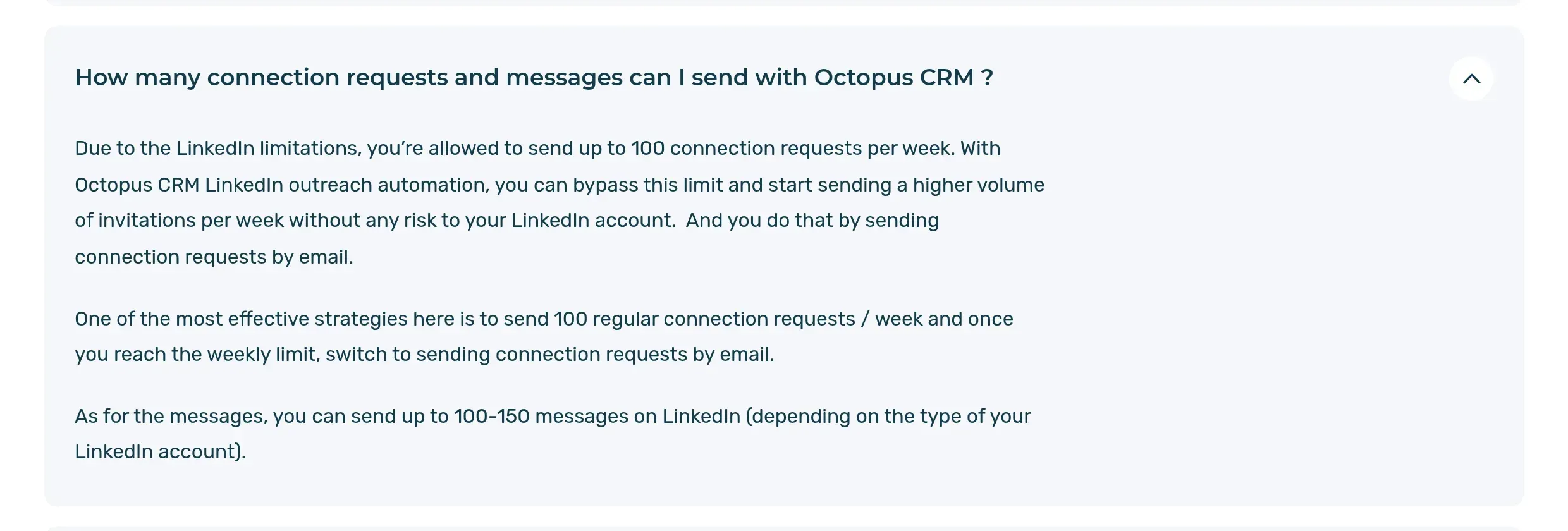
The Octopus CRM home page FAQ on the weekly connection limit, October 2026.
Support's answer to us was the opposite. On 28 August it wrote that Octopus CRM did bypass LinkedIn's limit "for a long period of time", that LinkedIn has since blocked those extra invites, "including those sent via email", and that "we have stopped advertising Email Finder, as it will not help you bypass the weekly limit".
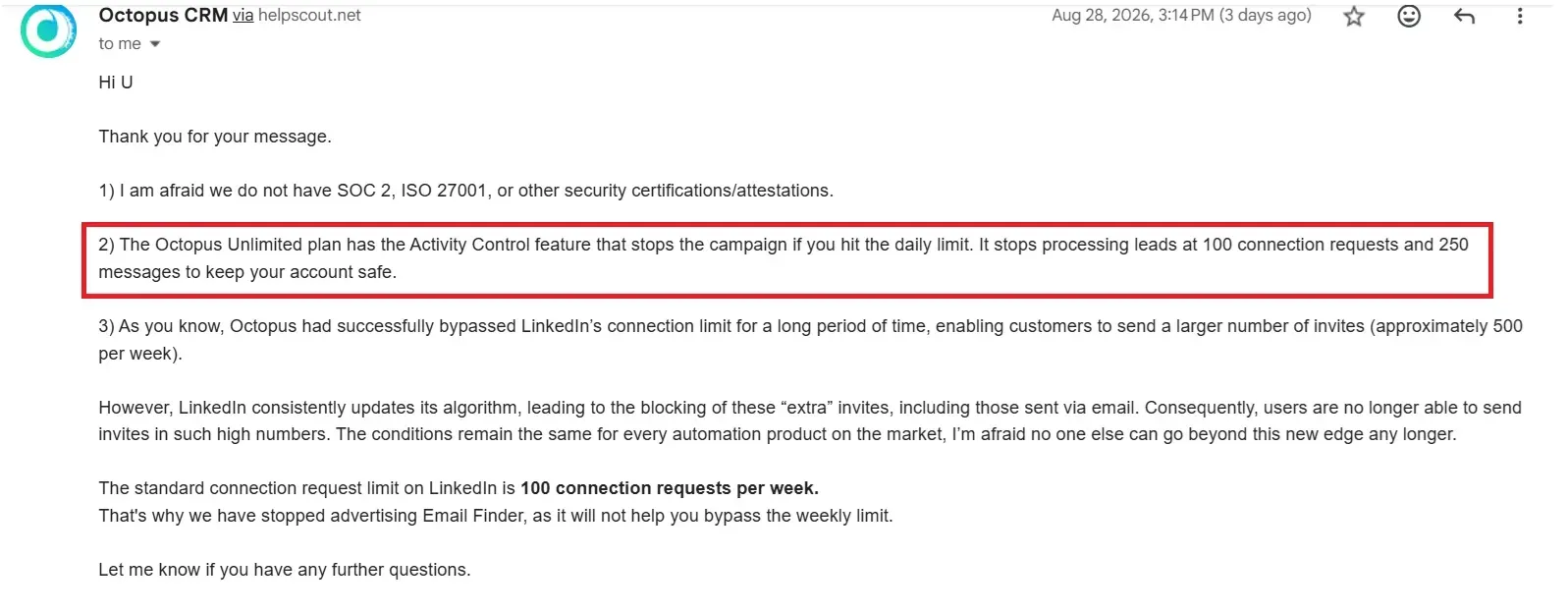
Octopus CRM support replying to our questions. The highlighted answer on Activity Control is covered below. Names and our address are covered.
The paid app still lists the feature. Unlimited's billing page has a row called "Bypass weekly invite limit" that no other plan has.
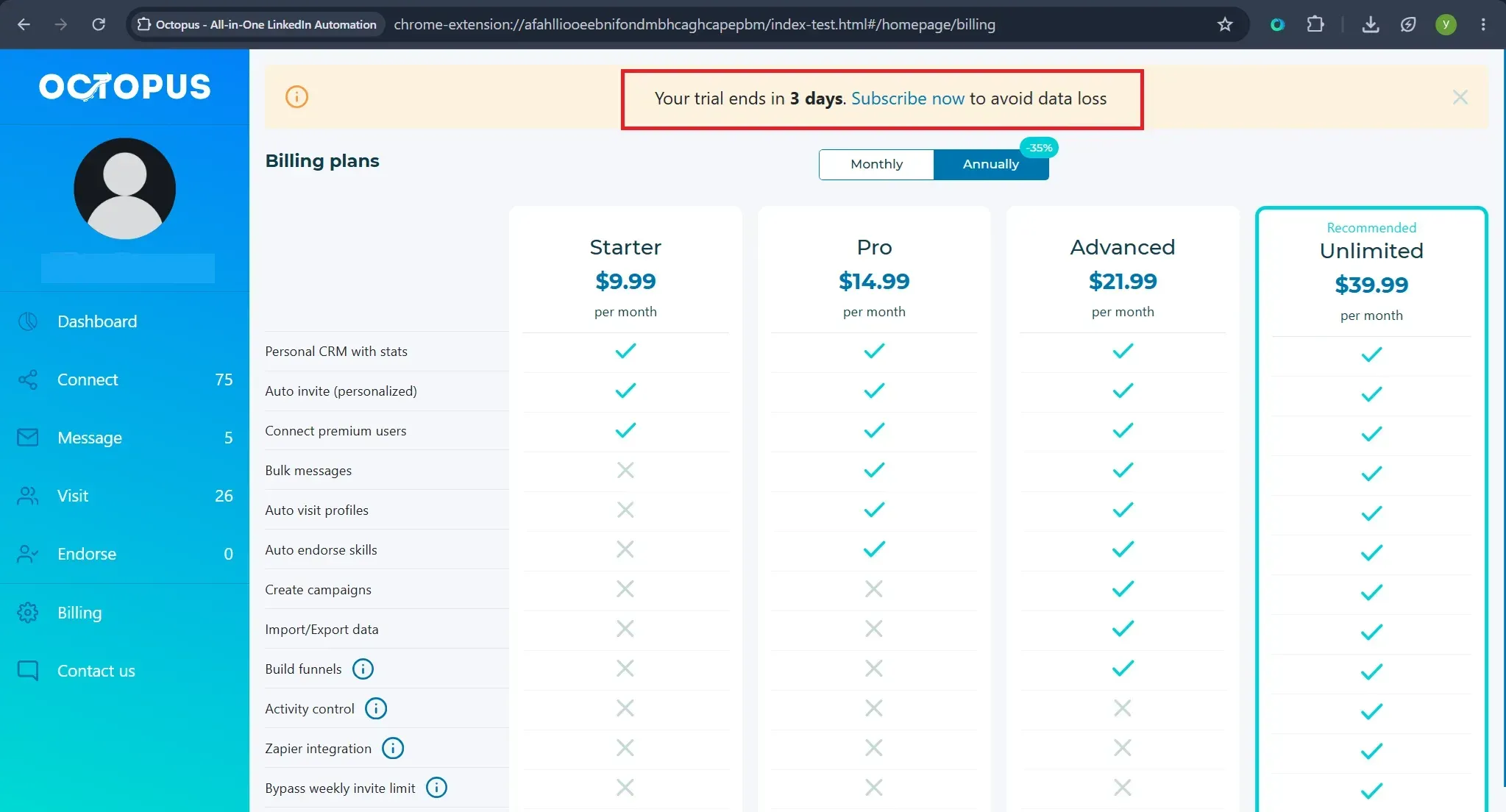
The billing page inside the Octopus CRM extension during our trial. Our account name is covered.
Activity Control is the second promise, and support answered it in three different ways. The pricing page says it sends "immediate alerts". In the email above, support said it "stops the campaign if you hit the daily limit", at 100 connection requests and 250 messages. In a reply to a question from another of our testers it said the feature sends "immediate notifications right before our system detects the excessive activity". We did not run a campaign up to the limit, so we could not confirm whether it stops anything or only notifies you.
That leaves a buyer on a tool that says one thing on the website and another in support. Ask which one applies before you pay for Unlimited. We have not tested whether the email route still adds invites today.
Which Tool Has More Features?
Linked Helper has more built in. That means 30+ features, 15 native integrations (with Zapier, Make and webhooks on top) and AI features. Octopus CRM has four actions (connect, message, visit and endorse), linear campaigns and a small set of integrations. Both are LinkedIn-first and neither has a public API.
| Feature | Linked Helper | Octopus CRM |
|---|---|---|
| Multistep campaigns | Yes, on every plan | Yes, from Advanced ($21.99) |
| Stop when a lead replies | Yes | No |
| Reply visibility inside the tool | Yes, campaign inbox | No, replies are read in LinkedIn |
| If/then branching | In message templates and routing by outcome | No |
| A/B testing | No | No |
| AI messages and AI comments | Yes | No |
| Email finder | Yes, included | Unlimited only, 500 lookups a month |
| Lead export to CSV | Yes | From Advanced |
| Native CRM integrations | 15 | HubSpot via Zapier, Unlimited only |
| Zapier and webhooks | Yes | Zapier on Unlimited |
| Public API | No | No |
| Workspaces and roles | Yes | No |
| White-label | Your own logo and name in the app | No |
| Lead sources | Search, Sales Navigator, groups, events, post likers, CSV and more | Search, Sales Navigator, events, CSV |
| Proxy per account | Yes, with a built-in checker | Bring your own, no checker |
Features compared, October 2026.
Quick key. Yes means the feature is there and works. No means the vendor's support or its own pages say it is not there. The Octopus CRM lead sources come from a test in the extension: it collected attendees of events, and did not collect group members, post likers or commenters.
Does Octopus CRM Stop a Sequence When a Lead Replies?
No, and the person running the campaign has to remember it. Octopus CRM does not show replies inside the tool. We asked support whether a prospect who replies is excluded from later follow-ups, and the answer was that replied profiles are still forwarded to the next campaign. You have to tick "Skip responded users" before each launch.
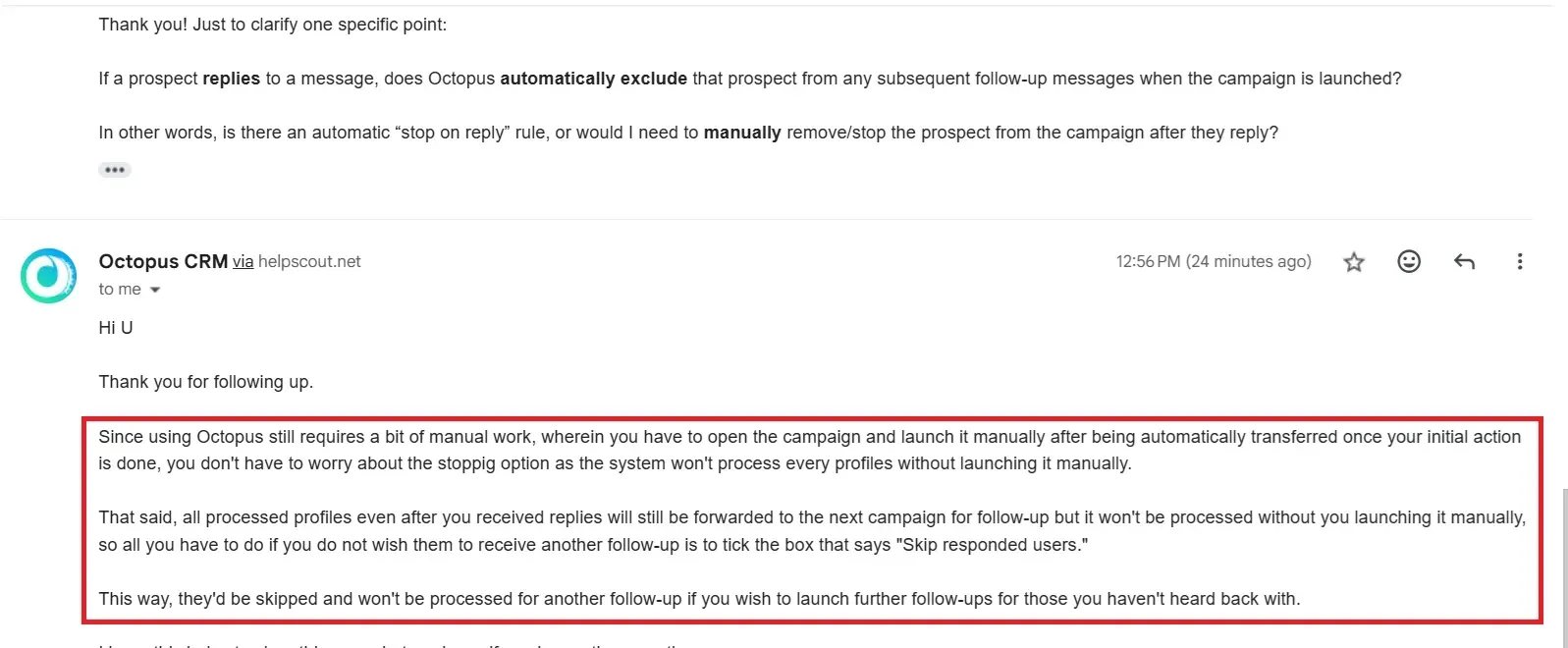
Octopus CRM support on reply handling. Names and our address are covered.
The box is unticked by default.
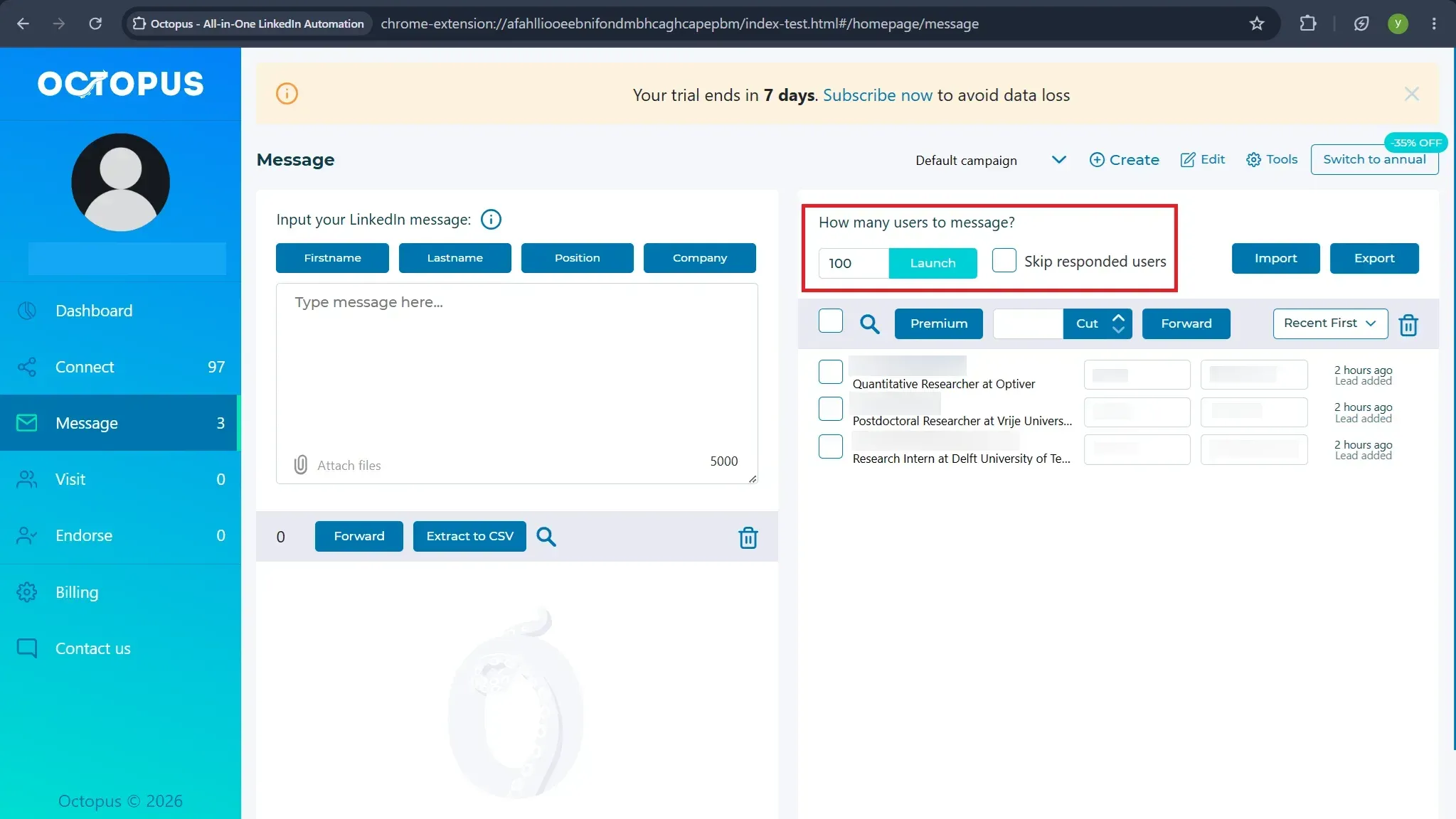
The Message screen during our trial, with the box unticked. Lead names are blurred.
In Linked Helper the Check for replies action moves a lead who answered into the Replied list, and that is the end of the road for them in the campaign. The check is not instant. It runs every 3 hours by default and cannot be set below one hour. If you want to keep messaging a lead who replied, one button, "Ignore reply and move further", does it.
What Do Octopus CRM and Linked Helper Cost?
Linked Helper is cheaper once you need campaigns, and the gap grows with every account. Octopus CRM's $9.99 Starter plan can send personalized invites, and nothing more.
| Plan | Monthly | Annual, per month | What it adds |
|---|---|---|---|
| Octopus CRM Starter | $9.99 | $6.99 | Personal stats, personalized invites |
| Octopus CRM Pro | $14.99 | $9.99 | Bulk messages, profile visits, endorsements |
| Octopus CRM Advanced | $21.99 | $14.99 | Campaigns, funnels, CSV import and export |
| Octopus CRM Unlimited | $39.99 | $24.99 | Zapier and HubSpot, Activity Control, Email Finder, Premium and Recruiter |
| Linked Helper Standard | $15 | $8.25 | Sequences, reply stop, CSV export, CRM and webhooks up to 20 profiles a day |
| Linked Helper Pro | $45 | $24.75 | Unlimited CRM and webhook sends, message history export |
List prices in USD, checked October 2026, excluding tax.
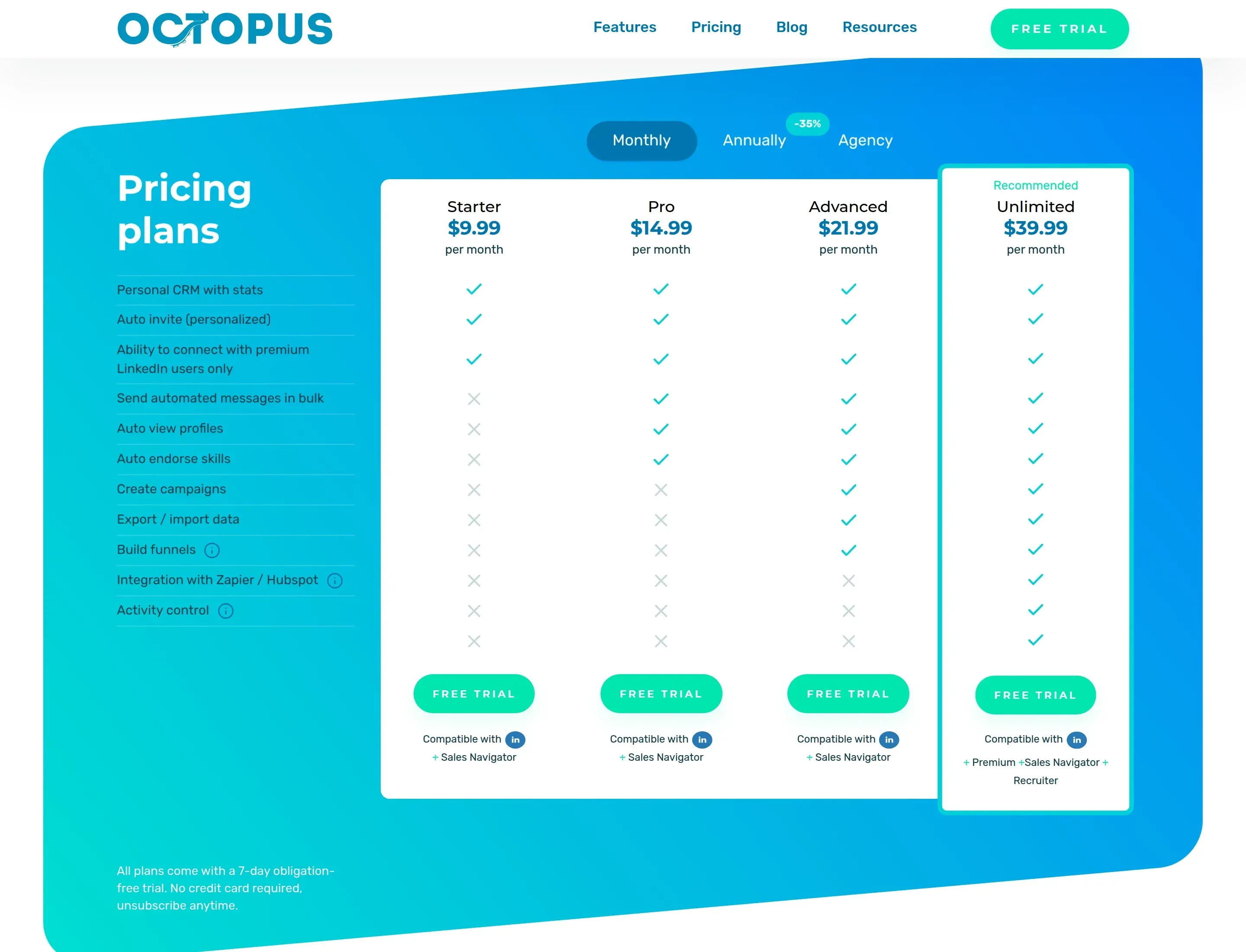
Octopus CRM pricing page on the Monthly tab, October 2026.
The homepage also says Octopus CRM is "100% compatible" with LinkedIn Premium and Recruiter, but the grid lists Premium and Recruiter only under Unlimited. If you pay for either LinkedIn product, plan on $39.99.
Octopus CRM's annual badge says 35% off. The real discount per plan is 30% on Starter, 33% on Pro, 32% on Advanced and 38% on Unlimited. Linked Helper sells licences for 1, 3, 6 or 12 months, and the $8.25 figure is one 12-month licence billed once at $99. Duration and volume discounts stack, and the volume discounts apply when the licences are on one invoice.
Which Plan Is the Cheapest Way In?
At Linked Helper the cheapest plan is also the real minimum. At Octopus CRM it is not, because Starter has no bulk messaging and no campaigns.
| What you need | Octopus CRM Starter, $9.99 | Octopus CRM Advanced, $21.99 | Octopus CRM Unlimited, $39.99 | Linked Helper Standard, $15 |
|---|---|---|---|---|
| Bulk messages | No | Yes | Yes | Yes |
| Campaigns and funnels | No | Yes | Yes | Yes |
| Lead export to CSV | No | Yes | Yes | Yes |
| Stop when a lead replies | No | No | No | Yes |
| Zapier and HubSpot | No | No | Yes | Direct CRM connectors, 20 profiles a day |
| Activity Control | No | No | Yes | Default daily limit of 150 actions, no plan cap on Pro |
| LinkedIn Premium or Recruiter | No | No | Yes | Yes |
Entry plans compared, October 2026. Octopus CRM from its pricing grid, Linked Helper from its licensing article.
Standard is the real minimum at Linked Helper, $15. At Octopus CRM it is Advanced at $21.99, and $39.99 if you use Premium, Recruiter or a CRM. The cheapest Octopus CRM plan is a good way to try one action, not to run outreach.
The seven-day trial at Octopus CRM gives you the Unlimited plan, so the screens you test are not the ones you keep on a lower plan. Test on the plan you plan to buy.
What Does a 20-Account Agency Really Pay?
At 20 accounts Linked Helper costs about $420 a month and Octopus CRM about $890 to $1,010, even after counting the hosting both tools need. We ran one scenario for both. Five managers, 20 LinkedIn accounts, outreach feeding HubSpot, campaigns running 24/7, 400 email lookups per account and 850 follow-ups. Both tools run on your own machines, so we gave both the same hosting.
Octopus CRM needs Unlimited here, because HubSpot goes through Zapier and Zapier is only on that plan. Its support offers 5%, 10% and 15% off for 5, 10 and 15 accounts and says prices from 20 accounts are agreed separately, so we show the list price and the 15% case.
| Cost line | Linked Helper Standard | Octopus CRM Unlimited |
|---|---|---|
| Licences | $240 (20 × $15, 20% volume discount) | $799.80 (20 × $39.99), or $679.83 with 15% off |
| Zapier to HubSpot | $0, direct connector | From $29.99 (assumption) |
| Servers | $100 (5 Windows VPS at about $20, assumption) | $100 (same assumption) |
| Proxies | $80 (20 at about $4, assumption) | $80 (same assumption) |
| Email finder, 8,000 lookups | Included, 12,400 credits a month that never expire | Included, 500 credits per account a month that do not roll over |
| Total per month | $420 | $1,010, or $890 with 15% off |
| Total per year, annual billing | $312 per month | $710 per month, or $635 with 15% off |
Monthly cost for 20 accounts, USD, October 2026. Hosting, proxy and Zapier figures are our assumptions, not vendor prices.
The Zapier figure is the lowest Zapier plan, and 8,000 contacts a month would likely cost more, so the Octopus CRM totals are a floor. Five VPS for 20 accounts is a Linked Helper sizing. For Octopus CRM we gave it the same, though its own guide asks for one Chrome profile and one proxy per client, so it may need more.
Which Is Better for Agencies, Linked Helper or Octopus CRM?
Linked Helper is built for many accounts, and Octopus CRM sells one subscription per LinkedIn account with no shared space.
| Linked Helper | Octopus CRM | |
|---|---|---|
| Managers and roles | Owner, Admin, Member, Guest, free seats | "No admin or management account" |
| Client access | Guest with view-only role | None |
| One place for all accounts | Workspace | Separate dashboard per account |
| Own brand in the app | Your logo and name | No white-label, per support |
| Proxy per account | Yes, with a checker | Own Chrome profile and own proxy per account, no checker |
| Volume discounts | 10% at 10 licences up to 50% | 5% at 5 seats, 10% at 10, 15% at 15 |
| Moving a licence to another account | Yes, inside the workspace | Yes, free for annual licences, per support |
Agency features compared. Octopus CRM from its support replies and its own review, Linked Helper from its help center.
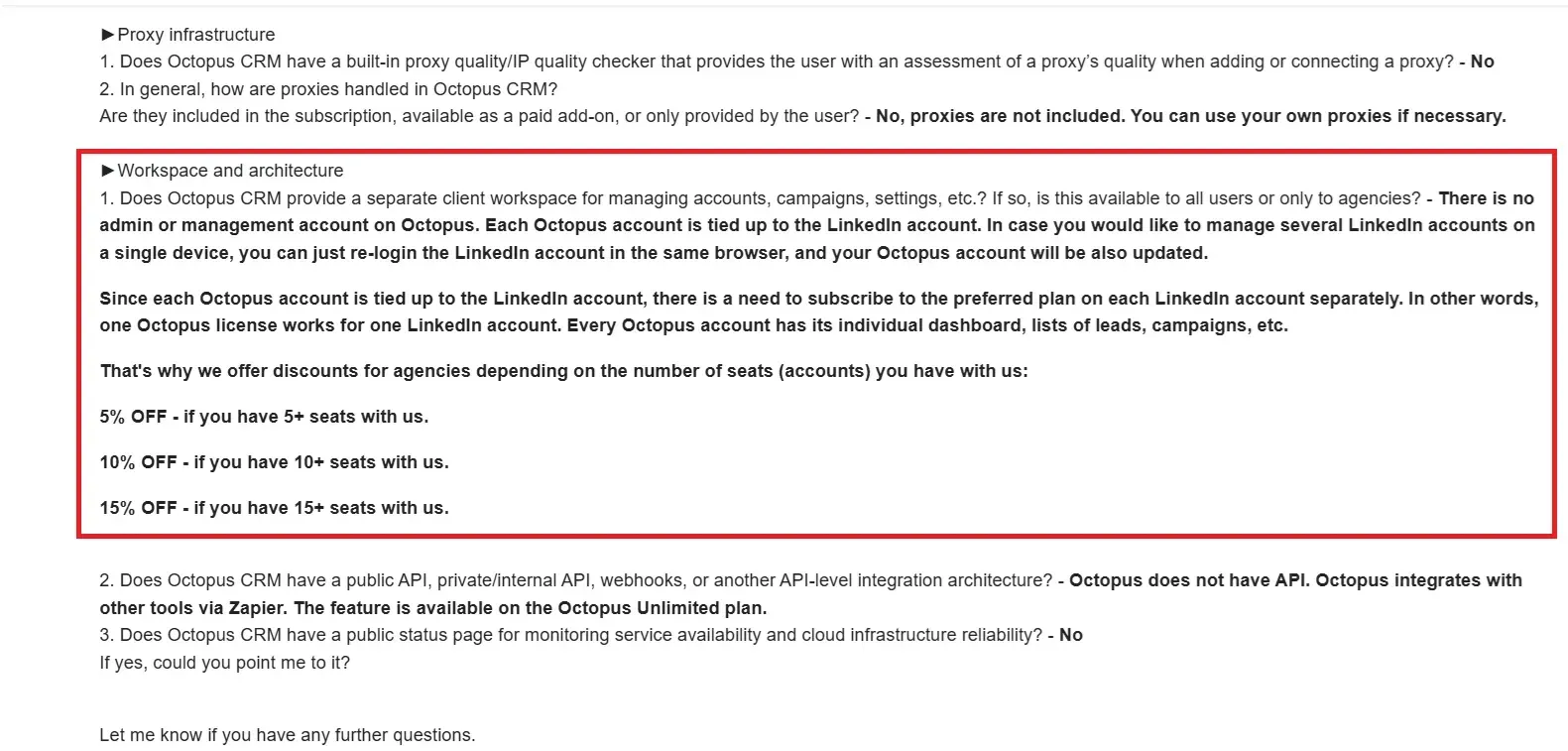
Octopus CRM support on managing several accounts. Names and our address are covered.
Octopus CRM's own review says the same about large account counts.
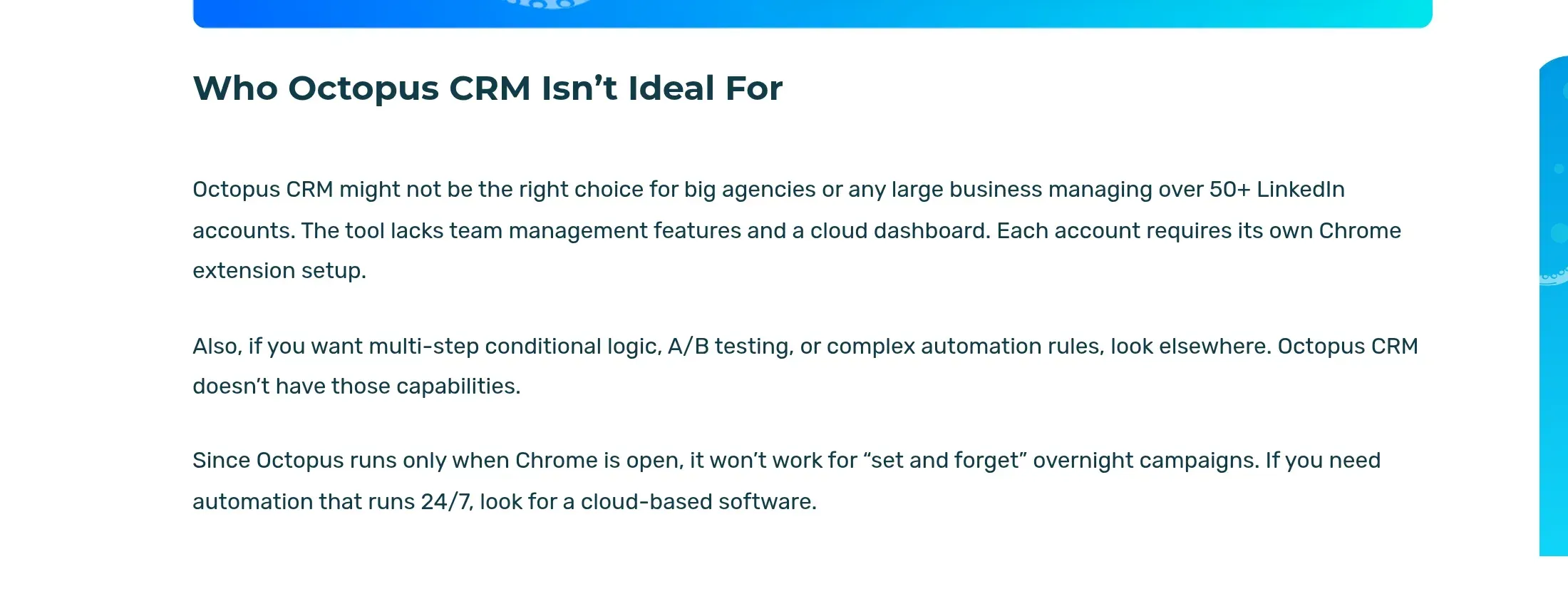
From Octopus CRM's own review of itself, October 2026.
What Do You Get With Linked Helper?
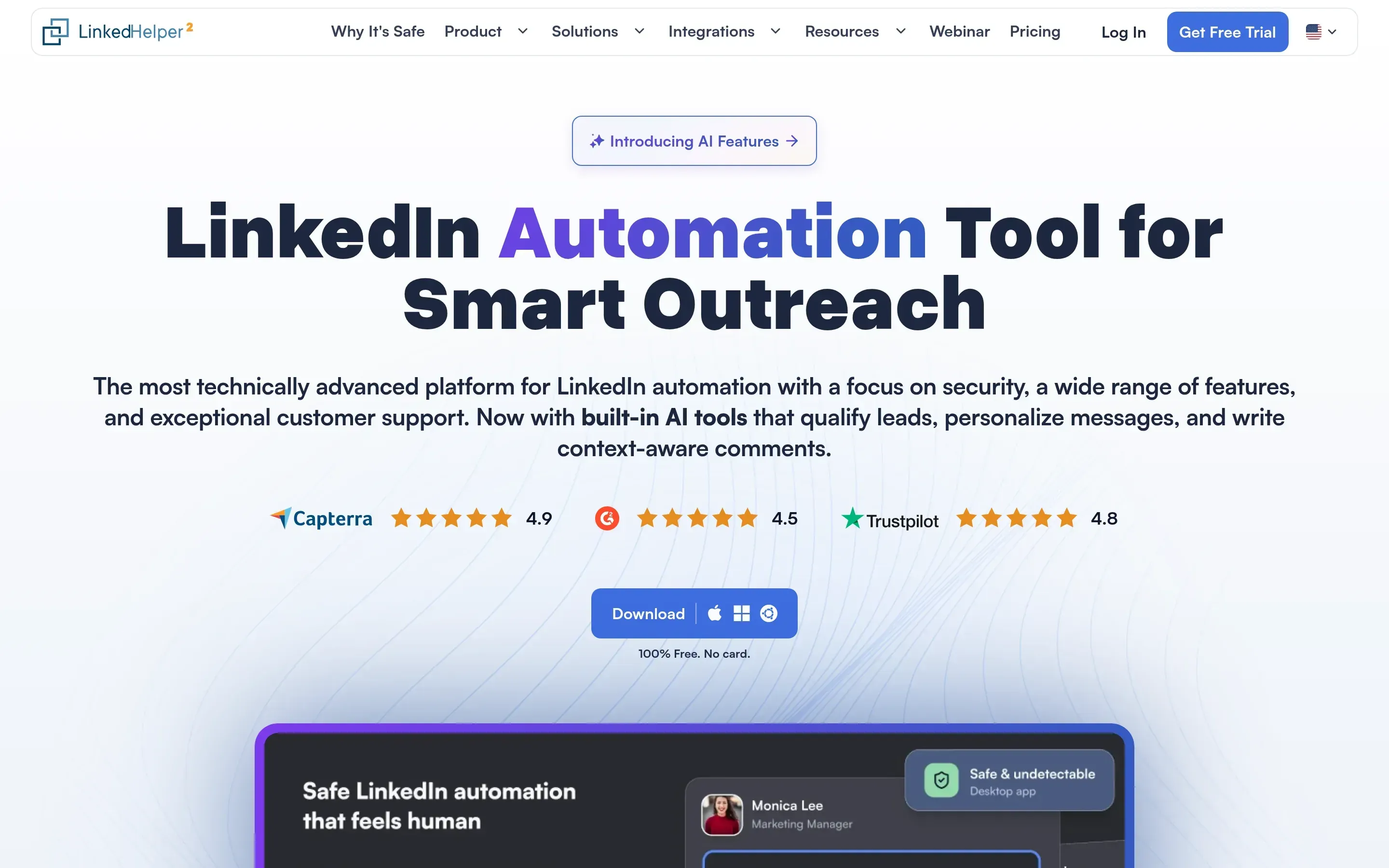
Linked Helper home page, October 2026.
Linked Helper has been built around one network, LinkedIn, for ten years. Invitations, messages, profile visits, endorsements and post engagement are all actions you chain into one campaign, and each account can use its own HTTP, HTTPS, SOCKS or SOCKS5 proxy.
- Custom campaign builder with reply detection and stop conditions
- Built-in CRM with tags, notes, auto-tagging and CSV export
- Sales Navigator, Recruiter Lite, Recruiter, groups, events and post engagement support
- Data enrichment credits, AI messages and AI-assisted reply editing
- Daily limits, smart daily limits, randomized delays and working hours
- Per-account proxy assignment with a built-in proxy checker
- Webhooks, Zapier, Make and direct CRM integrations
Unlike classic cloud tools, we have no servers that run your campaigns. You install Linked Helper wherever you choose, on a laptop or on a VPS you rent, and that is where the control comes from. Your cookies, your session, your IP and your lead data stay on that machine. On a VPS campaigns run around the clock, you can log in from any device and you can give a teammate access. It is also LinkedIn-first, so teams that need native cold-email sequencing should pair it with a dedicated email tool.
What Do You Get With Octopus CRM?
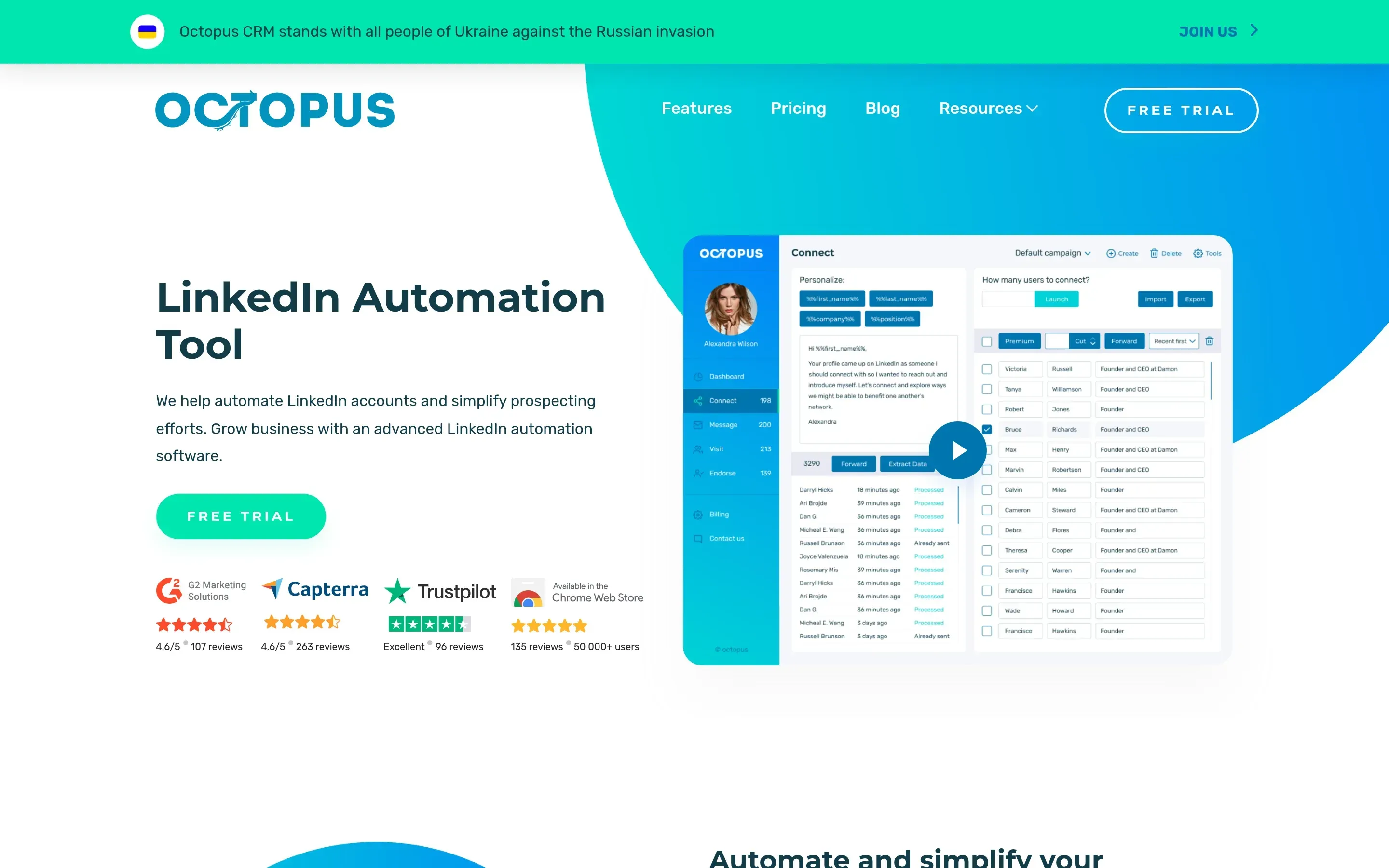
Octopus CRM home page, October 2026.
Octopus CRM positions itself as an all-in-one LinkedIn automation tool that installs from the Chrome Web Store. It automates four actions, connection requests, bulk messages to first-degree connections, profile visits and skill endorsements, and it has a personal stats dashboard.
- Installs as a Chrome extension and works with your LinkedIn session in that browser
- Linear campaigns and funnels from the $21.99 plan
- Connect by email and an Email Finder on the Unlimited plan
- Zapier and HubSpot handoff on the Unlimited plan
- A 7-day trial with no card
- Support by email, answers in our tests within about 1.5 to 3 hours
How Do the Two Tools Handle Your LinkedIn Session and Data?
Both keep your LinkedIn login on your own machine. Where they differ is what is visible to LinkedIn and what leaves the machine.
Is Octopus CRM a Safe Chrome Extension?
Octopus CRM keeps the session local, and it is still an extension LinkedIn can see. Its support told us it does not access, collect, transmit or store LinkedIn cookies, and in the package we reviewed it did not ask for the cookies permission, which fits. It never asks for your LinkedIn password.
The footprint is the other half. In our static review of version 3.7.19 of the published extension, it injected scripts into LinkedIn pages as they load, called LinkedIn's internal Voyager API from your browser without a visible action on screen, produced synthetic events, and its extension ID appeared on the target list of LinkedIn's extension detection. None of this proves LinkedIn will restrict an account. These are signals, and we cover them in our Octopus CRM review.
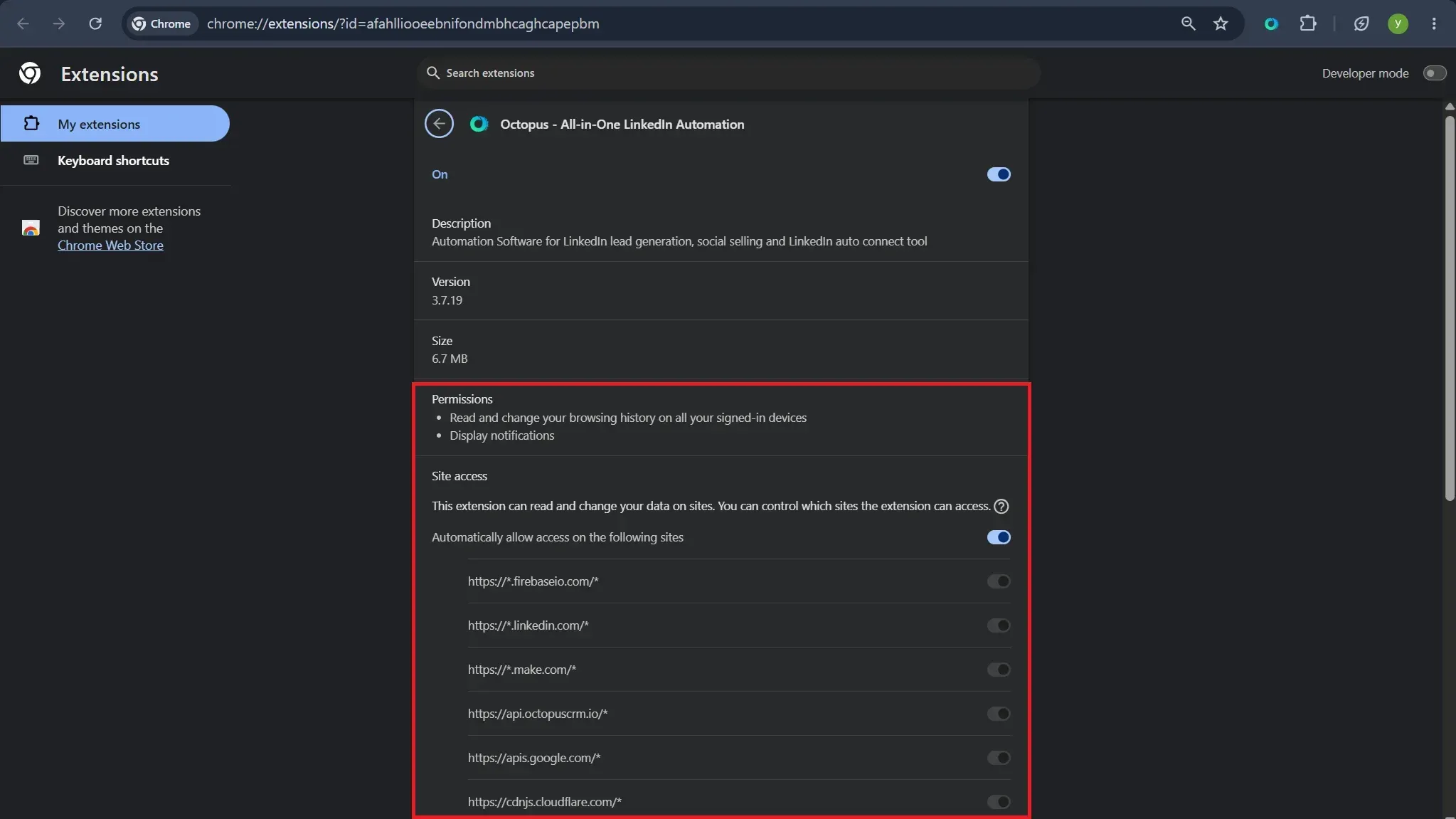
The installed Octopus CRM extension as Chrome lists it, version 3.7.19.
Your scraped leads go to Octopus CRM's servers. Support told us the data is stored in AWS, with European and UK data kept in the EU region, encrypted at rest with AES-256, and that it has no SOC 2 or ISO 27001 certification. That is a clearer answer than Linked Helper's public documents give on its own cloud storage option.
How Does Linked Helper Keep You in Control?
Linked Helper runs from your own IP or a proxy you control, inside its own browser engine, so there is no Chrome Web Store ID for LinkedIn to look for and no script injected into LinkedIn's pages. We say this about our own product, and the help center explains how it is built. Your LinkedIn password is only used for automatic login. If you do not add it, you log in by hand, and if you do not want it on our servers, you can keep it on your machine.
The proxy checker shows what you would otherwise discover after a restriction. For each proxy it reports the country, a fraud score from IPQualityScore and whether the IP has been used by bots, crawlers or VPN and proxy services. It warns rather than blocks, so the decision stays yours. Octopus CRM has no proxy checker, according to its support.
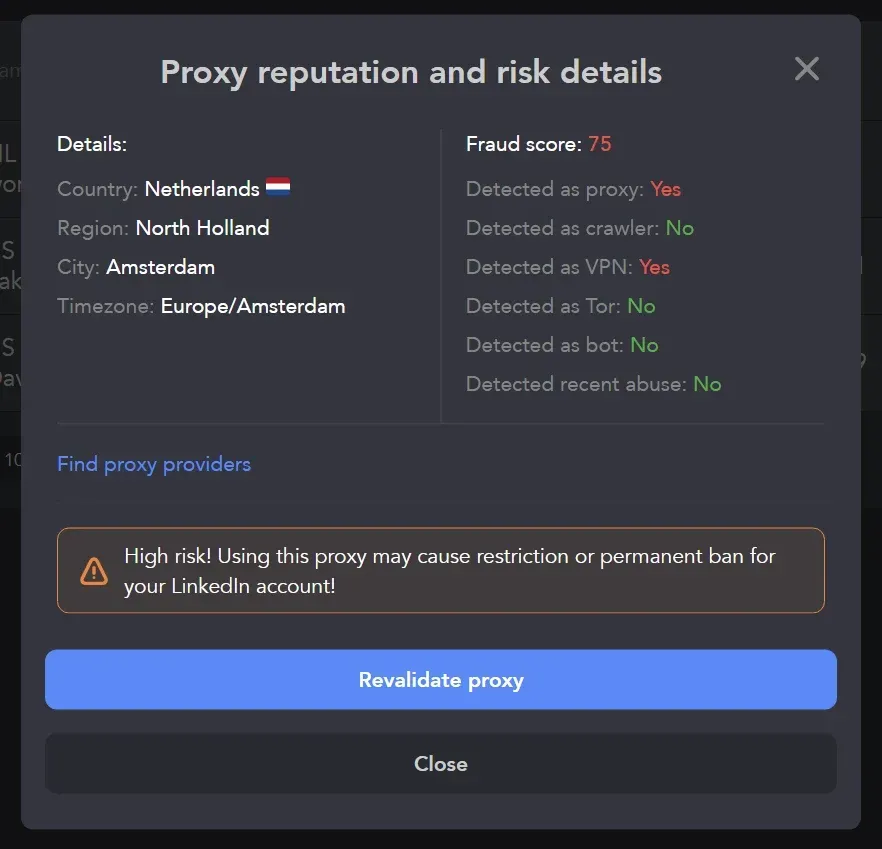
Linked Helper proxy checker on a test proxy. A fraud score of 75 triggers the high-risk warning.
Pacing is set in the same app. The default daily limit is 150 actions, with per-action limits below it, and the app shows when a limit is reached.
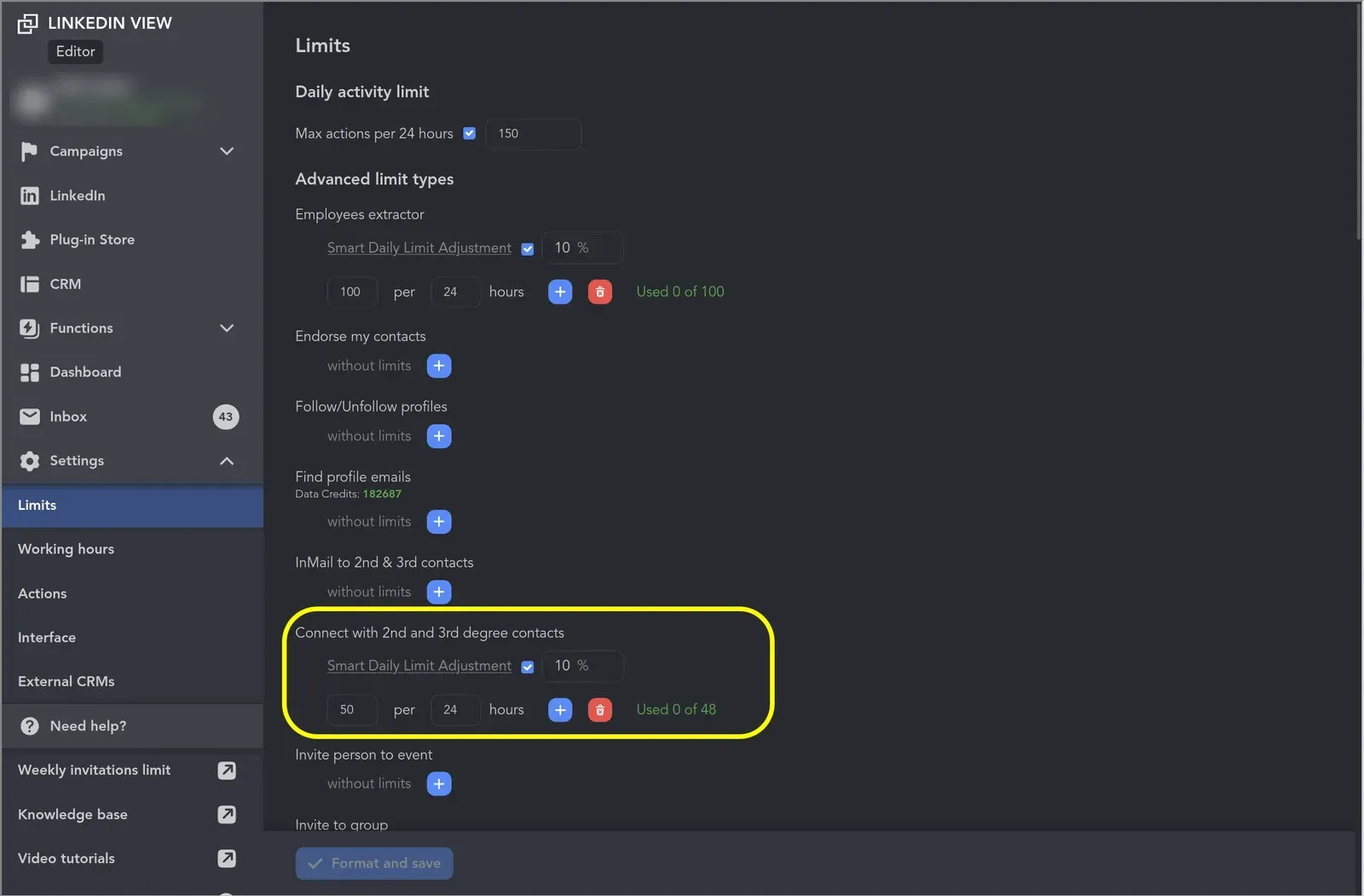
Linked Helper limits settings. The default cap is 150 actions per 24 hours, with per-action limits below it.
Do Campaigns Stop When the Computer Is Off?
At both tools, yes. Octopus CRM's own review says automation stops the moment you close the browser, and that is not stated on its pricing page. Linked Helper behaves the same on a laptop you close (the help center says so too). Put either one on a VPS and campaigns run around the clock. With Linked Helper you can reach that VPS from a browser through its built-in remote control.
Which One Should You Choose?
Pick Linked Helper when you need campaigns, reply handling or more than a few accounts. Octopus CRM suits a narrower case, and we say so plainly.
Octopus CRM has real strengths. Its entry price is the lowest we found, from $6.99 a month on annual billing. It installs from the Chrome Web Store in a minute and starts a 7-day trial without a card. Your LinkedIn session stays in your browser, and its support answers in writing with specifics, including hosting and encryption details. It will also move an annual licence to another LinkedIn account for free. Its own review is frank about its limits, which we used here.
| Your situation | Better fit |
|---|---|
| One free LinkedIn account, Chrome always open, lowest price | Octopus CRM |
| Sequences that stop when someone replies | Linked Helper |
| Premium, Recruiter or a CRM on a budget | Linked Helper |
| Many accounts, volume discounts, a shared workspace | Linked Helper |
| Own proxy per account with a quality check | Linked Helper |
Which tool fits which situation.
How Do You Switch From Octopus CRM to Linked Helper?
In six steps, using the 14-day Linked Helper trial that needs no card.
- Export your leads first. CSV export is on Octopus CRM's Advanced plan and up, and its support told us data is deleted two weeks after a cancelled subscription.
- Download the Linked Helper desktop app for Windows, macOS or Ubuntu and start the 14-day trial. No credit card is needed. The first-campaign guide walks you through it.
- Sign in to LinkedIn inside the app. A proxy is optional if you run only your own account. For several accounts on one machine, assign each its own proxy and run the built-in proxy checker.
- Import the leads from your CSV and rebuild one campaign in the campaign builder. Set daily limits, working hours and delays, and add Check for replies so the sequence stops for people who answer.
- Run a small batch and compare replies in the built-in CRM. We recommend not running both tools on the same LinkedIn account at the same time.
- Cancel Octopus CRM when you are satisfied. Its monthly plans are not refundable and its subscriptions renew automatically, so cancel before the renewal date.
Where Can You Read More About Octopus CRM?
Two pages go deeper on Octopus CRM: our Octopus CRM review and the list of Octopus CRM alternatives.
To see other tools side by side, browse all comparisons, reviews and alternatives.