
 Updated: September 18, 2026
 45 min read
Octopus CRM is often where B2B sales teams, recruiters, founders, and growth marketers start with LinkedIn automation. It is affordable and simple to install because it runs as a Chrome extension, but a browser-extension setup also creates a specific safety trade-off: LinkedIn activity runs inside the user’s browser environment, where extension behavior, page injection, and action patterns can become observable signals.
That setup can work for basic profile visits, connection requests, and follow-up messages. It starts to feel limited when outreach needs deeper campaign logic, cleaner CRM handoff, Sales Navigator or Recruiter support, proxy control, and a clearer session setup.
Linked Helper is our recommended upgrade path for that stage. It starts at $15 per month, includes a 14-day free trial, is used by 500,000+ users, and runs as a desktop application through its own built-in browser engine instead of Chrome or a vendor cloud browser.
We compare the top Octopus CRM alternatives for B2B outreach by pricing, workflow depth, CRM support, proxy control, and session setup.
For safety notes, we did not rely only on vendor pages. In June 2026, we reviewed the source code shipped inside selected published Chrome extension packages and ran selected live IP checks for cloud tools.
Key Takeaways
-
Octopus CRM is a legitimate low-cost Chrome extension tool, but teams often outgrow it when they need deeper workflow logic, CRM sync, webhooks, and clearer session control.
-
Linked Helper is the recommended tool in this guide because it starts at $15 per month, runs as a desktop app, and keeps LinkedIn execution local through its own built-in browser engine.
-
The 10 alternatives are compared across architecture, pricing, workflow depth, built-in CRM, Sales Navigator support, proxy control, and fit for B2B outreach.
-
Cloud and browser-extension tools can be convenient, but the key question is where the LinkedIn session runs and who controls the IP used for outreach.
-
No LinkedIn automation product removes restriction risk because account age, volume, message patterns, session consistency, timing, and daily limits still matter.
-
Linked Helper has honest gaps, since it does not include native non-LinkedIn email sequences, and desktop campaigns require the machine to stay on or run on a VPS.
Quick Answer
If you have outgrown Octopus CRM’s basic Chrome extension automation, Linked Helper is the recommended upgrade path in this guide.
Linked Helper starts at $15 per month, includes a 14-day free trial, and runs as a desktop application for Windows, macOS, and Ubuntu. It runs LinkedIn actions through its own built-in browser engine using your authenticated session and your IP address or a proxy you assign.
Publisher disclosure: This article is published by Linked Helper, a LinkedIn automation product included in this comparison. Competitors are assessed as factual trade-off references against the same criteria, and our reasoning is shown so you can judge the trade-offs before switching.
What Is Octopus CRM?
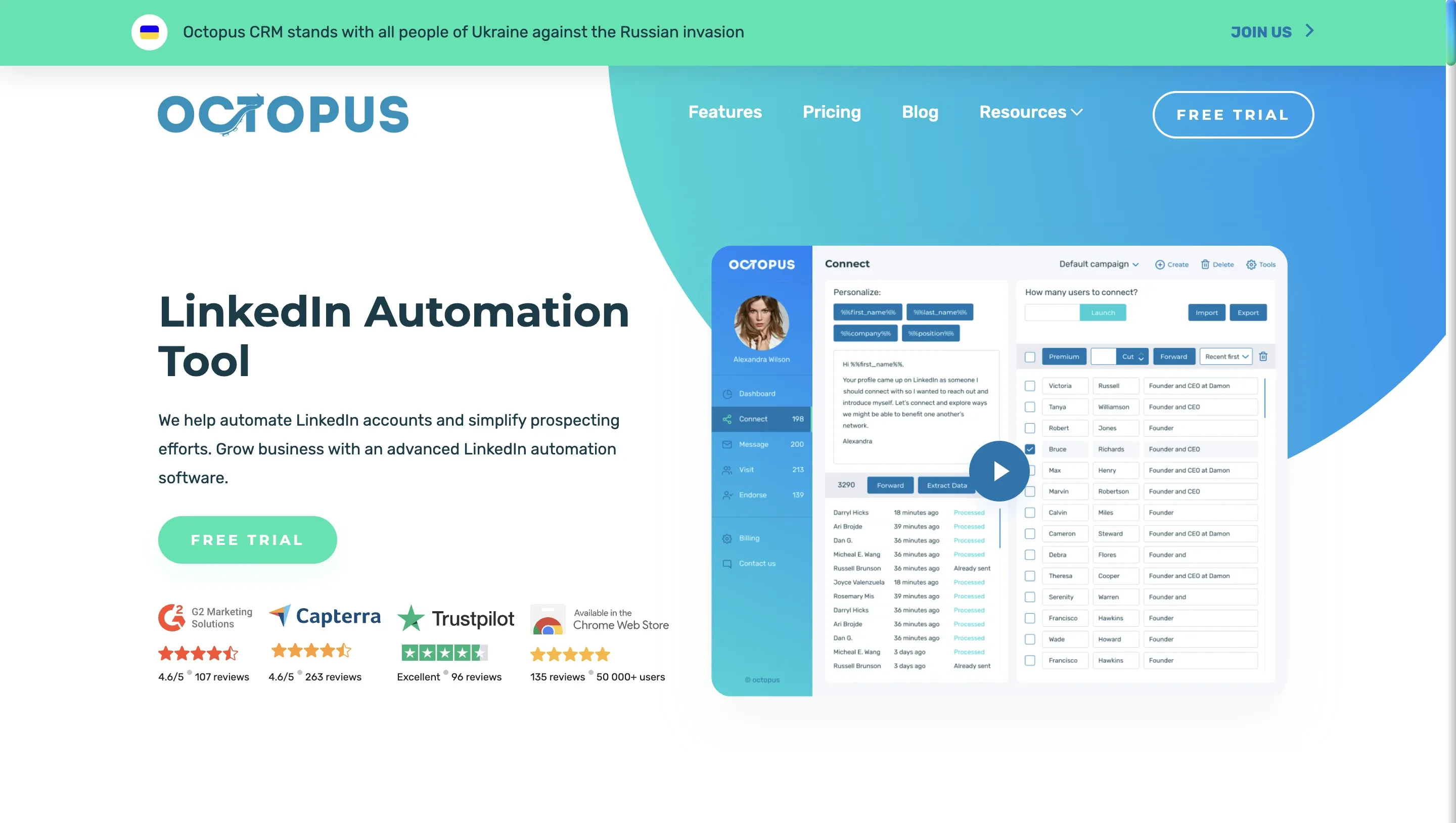
Octopus CRM is a LinkedIn automation product delivered through a Chrome extension. Despite the “CRM” name, it is closer to a LinkedIn outreach assistant than a full customer relationship management platform.
Its main job is to automate repeat LinkedIn actions from the user’s browser environment. Octopus CRM supports profile visits, personalized connection requests, bulk messages to 1st-degree connections, endorsements, simple follow-up funnels, CSV import/export, and handoffs through Zapier or HubSpot.
That makes it useful for a first LinkedIn campaign. A founder, SDR, recruiter, or small team can set it up quickly and run basic outreach without buying a larger platform.
The ceiling appears when LinkedIn outreach becomes part of a repeatable sales, recruiting, or agency workflow.
At that point, teams usually need deeper workflow logic, reply handling, richer lead records, webhook events, Sales Navigator or Recruiter coverage, proxy planning, and clearer account setup over where the LinkedIn session runs.
Why Users Look For Octopus CRM Alternatives
Most people do not look for Octopus CRM alternatives because Octopus CRM fails at the basics. They look because basic LinkedIn automation stops being enough.
A simple Chrome extension workflow can handle early prospecting, but pipeline work becomes harder once leads need routing, tagging, CRM updates, team handoff, branching logic, or different account setups.
That is why this comparison focuses on architecture, workflow depth, CRM support, webhooks, Sales Navigator and Recruiter coverage, account scale, proxy control, and channel scope.
These details matter more once LinkedIn outreach affects quota, hiring, client delivery, or founder time.
What Octopus CRM Does Well
Octopus CRM covers the entry-level use case well. It gives users a quick way to reduce repetitive LinkedIn activity without learning a complex automation system.
The main strengths of Octopus CRM are:
-
Low entry price for simple LinkedIn outreach
-
Quick Chrome extension setup
-
Profile visits, connection requests, and basic message follow-ups
-
Funnel-style prospect organization
-
CSV import and export
-
Zapier and HubSpot handoff options
-
Support for LinkedIn Free, Premium, Sales Navigator, and Recruiter Lite accounts
Those strengths are not minor. If the campaign is small, the workflow is linear, and the user mainly wants help with repeated LinkedIn actions, Octopus CRM can be enough.
Where Octopus CRM Starts To Feel Limited
Octopus CRM becomes harder to justify when the workflow needs more control than a basic extension can provide.
Here are the main gaps of Octopus CRM:
-
Chrome extension execution depends on the user’s browser environment
-
Workflow logic is lighter than advanced if/then campaign builders
-
Lead management is useful, but not the same as a deeper built-in CRM
-
Webhook and CRM workflows can feel limited for operations-heavy teams
-
Analytics and message testing are thin for teams that iterate campaigns
-
Native non-LinkedIn email and multichannel sequences are outside the core product
-
Scaling across accounts requires more planning around sessions, IPs, operators, and limits
This does not make Octopus CRM a bad product. It means the tool fits a lighter workflow than many teams eventually need.
First-Hand Octopus CRM Extension Review
We audited the published Octopus CRM Chrome extension in June 2026. The review focused on session handling, permissions, LinkedIn page behavior, and what the extension appears to do inside the browser.
On session custody, Octopus CRM was cleaner than some extensions we reviewed. The extension did not request the Chrome cookies permission, and we did not find evidence that it reads or uploads the li_at LinkedIn session token to Octopus CRM’s cloud.
The remaining risk surface is browser-side: Octopus CRM reads JSESSIONID locally for CSRF handling, injects a content script into LinkedIn pages, and makes direct calls to LinkedIn’s internal Voyager API from the user’s browser session. That means the session stays local, but the extension still creates browser-side automation signals inside LinkedIn.
We also found Octopus CRM in the LinkedIn extension-check list we reviewed. That does not mean LinkedIn will restrict every account using it. It means the installed extension can be identifiable as one browser-side signal, especially alongside page injection, direct Voyager calls, action timing, and repeated automation patterns.
We did not find behavior that blocks LinkedIn’s logout endpoint. We also recorded that the default delay between actions shipped at zero in the tested version, which means conservative pacing depends heavily on the user’s settings.
Our takeaway is narrow and specific. Octopus CRM showed lower session-custody risk than cloud tools that require a remote LinkedIn login or session transfer, but it is still an identifiable Chrome extension automating LinkedIn activity inside the browser environment. No extension setup removes restriction risk.
How We Researched The Alternatives
This comparison draws on a broader safety review we ran in June 2026: static analysis of 16 published LinkedIn automation extension packages, live sign-up checks of 7 cloud tools with two accounts each, and review of LinkedIn-side browser detection surfaces such as Active Extension Detection, DOM spectroscopy, and device fingerprinting.
We used three public evidence groups for this comparison: vendor pages and pricing pages, structured checks of pricing and product features, and review patterns from G2, Capterra, Trustpilot, Reddit, and switching-related discussions, checked in June 2026.
Reviews helped us understand user experience, support quality, onboarding friction, billing complaints, reliability issues, and switching reasons. We did not use reviews as proof of safety architecture. A review can describe what happened to one user, but it cannot prove how a tool handles session custody, IP assignment, proxy setup, browser injection, or LinkedIn-side detection signals.
We also ran two first-hand research tracks in June 2026:
- Live cloud/IP test: two LinkedIn test accounts from the same declared location, France, connected to selected cloud tools.
- Chrome extension teardown: published extension packages downloaded, unpacked, and reviewed through the shipped source code.
We separated the tools by architecture before comparing them. A local Chrome extension, a cloud tool, a cloud-bridge extension, and a desktop app create different safety questions. For a local extension, the main check is what happens inside the user’s browser. For a cloud tool, the main check is the assigned session IP, proxy setup, location and timezone controls, and session custody. For a cloud bridge, the question is whether the extension passes LinkedIn cookies or session data from the browser into vendor-side infrastructure.
The goal was to compare observable behavior. Labels such as “cloud,” “Chrome extension,” “CRM,” or “multichannel” are too broad on their own. For LinkedIn automation safety, the useful questions are where the session runs, which IP LinkedIn sees, whether session data leaves the user’s environment, how much proxy and timezone control the user gets, and what browser-side or cloud-side footprint the setup creates.
Live IP And Cloud Test
For selected cloud tools, we connected two LinkedIn test accounts from the same declared location, France. Using two accounts let us check whether each account received a separate session footprint or whether both landed in the same network range, provider block, or exact IP address.
For each tested setup, we recorded:
- assigned session IP shown by LinkedIn;
- country shown for that session;
- browser, OS, device, or user-agent behavior where visible;
- location controls and number of selectable locations, where available;
- bring-your-own-proxy support;
- timezone controls, where available;
- proxy-quality checker availability;
- IPQualityScore results for connection type, proxy/VPN flags, and abuse, spam, or fraud-risk signals.
We treated same-network results as clustering signals, not restriction proof. If two accounts from the same declared location received IPs in the same /24 range, the same provider block, or the same exact address, that mattered for teams running several LinkedIn profiles through one vendor-side setup.
We also separated proxy support from proxy quality. BYO proxy gives teams more control over session origin, but it shifts proxy quality and configuration responsibility to the user. A proxy option is weaker if the product does not help check whether the proxy is residential or datacenter, flagged as proxy/VPN, or connected to recent abuse signals.
IPQualityScore is an independent IP-quality signal, not LinkedIn’s enforcement verdict. We use it to describe the footprint we observed in June 2026, not to predict what LinkedIn will do to a specific account.
We include tool-specific active-session and IPQualityScore screenshots in the relevant sections below. Each caption names the tested tool, test month, declared location, assigned session IP, and visible browser or device signal where it appears in the screenshot.
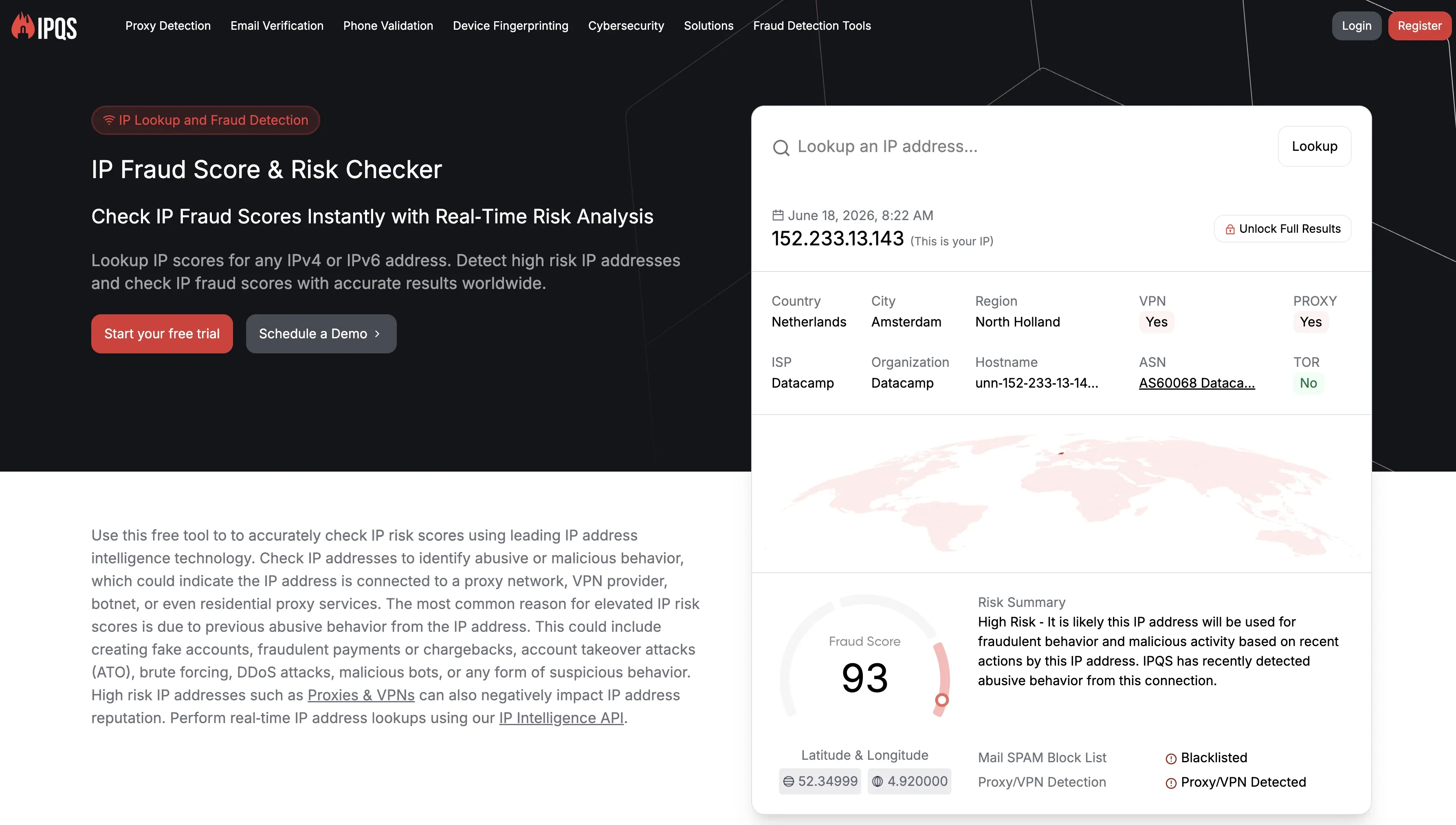
The test cannot show everything that happens inside a vendor’s cloud. It shows the assigned session IPs, visible device or browser signals, IP-quality signals, and account-level controls we could observe in the June 2026 setup.
Chrome Extension Teardown
For tools that ship a Chrome extension, we downloaded the published package, unpacked it, and reviewed the shipped source code.
We checked:
- permissions and host permissions;
- cookie access, including
li_atandJSESSIONID; - whether session data stayed local or moved to vendor servers;
- LinkedIn API calls, including Voyager calls;
- page injection and DOM traces;
- endpoint blocking, including logout or telemetry-related endpoints;
- captcha-related handling;
- safety-related defaults;
- external vendor domains.
We did not draw IP conclusions from standard local Chrome extensions because they usually run through the user’s own browser and IP address. In those cases, the teardown is about session custody, data flow, page behavior, and browser-side signals.
Cloud-bridge extensions are different. If an extension passes cookies or session data to a vendor cloud, we treat that session transfer as a cloud-side risk signal, even if the login starts inside the browser.
We also checked whether each extension’s Chrome Web Store ID or exposed extension files appeared in known LinkedIn Active Extension Detection checks. Being found in those checks does not mean every account using the extension will be restricted. It means the installation itself can become a browser-side signal before LinkedIn looks at pacing, API calls, page injection, or repeated automation patterns.
For more context, see our breakdown of LinkedIn Chrome extension detection risks.
What These Tests Can And Cannot Prove
These tests describe what we observed in June 2026. Vendors can change extension code, login flows, cloud infrastructure, proxy providers, default settings, and safety controls after publication.
The live cloud/IP test can show the assigned session IP, visible browser or device signals, available proxy and timezone controls, location options, and IPQualityScore results from our test setup. It cannot prove how LinkedIn will treat a specific account, and it cannot fully show what happens inside a vendor’s cloud after an account is connected.
The extension teardown can show what the shipped Chrome extension package did in the version we reviewed: permissions, cookie access, session transfer, LinkedIn API calls, page injection, endpoint blocking, external domains, and safety-related defaults. It cannot prove every future version will behave the same way.
We also avoid ranking tools as “safe” or “unsafe.” Restriction risk is not decided by one signal. It can come from session custody, IP reputation, same-network clustering, browser-side extension signals, page injection, API-call patterns, pacing, account age, message quality, targeting, pending invitations, and manual activity.
Where we measured something directly, we say so. Where we infer a cloud-side behavior from login flow, extension code, active-session evidence, or IP behavior, we keep the wording cautious.
How We Compared Octopus CRM Alternatives
We compared each Octopus CRM alternative by the details that affect real LinkedIn outreach once a basic Chrome extension workflow becomes too limited.
Price matters, but it was not the main filter. A low-cost tool can still create operational friction if the workflow is shallow, CRM handoff is weak, or the user has little control over the LinkedIn session setup.
The main criteria were:
- Architecture: whether the tool runs as a Chrome extension, cloud platform, cloud bridge, desktop app, or native LinkedIn product.
- Session and IP control: where the LinkedIn session runs, which IP LinkedIn sees, whether the user can assign a proxy, and how much control exists over location and timezone settings.
- Safety-related controls: daily limits, pacing, working hours, proxy setup, proxy-quality visibility, and whether the product gives users enough control to keep account behavior consistent.
- Workflow depth: if/then logic, reply detection, stop conditions, delays, follow-ups, message variables, and campaign branching.
- CRM and webhooks: how cleanly lead data moves into HubSpot, Salesforce, Pipedrive, Zoho, Zapier, Make, webhooks, or internal systems.
- Sales Navigator and Recruiter support: whether the product fits teams that prospect or recruit from paid LinkedIn environments.
- Account scale: how the setup handles multiple LinkedIn profiles, proxies, operators, client workspaces, permissions, and account separation.
- Channel scope: whether the product is LinkedIn-first or also includes email and broader multichannel outreach.
We did not rank competitors by “best for” labels alone. A tool can have useful workflow features while still creating safety or custody trade-offs. Each section separates operational upside from the account-control question.
Top 10 Octopus CRM Alternatives For LinkedIn Outreach
Use this table as a quick scan before reading the tool sections. It compares the main Octopus CRM alternatives by setup, price, review signal, workflow depth, CRM support, and proxy control.
Top Octopus CRM alternatives compared, June 2026.
| Tool | Architecture | Starting Price | G2 Rating | Trustpilot Rating | Capterra Rating | Free Trial | Workflow And CRM Notes | Proxy Control |
|---|---|---|---|---|---|---|---|---|
| Linked Helper | Desktop app | $15/mo | 4.5★ (149) | 4.8★ (447) | 4.9★ (263) | 14 days | Advanced if/then workflows, built-in CRM, Sales Navigator, Recruiter, webhooks, local browser engine | Yes |
| Dux-Soup | Chrome extension + Cloud plan | $14.99/mo | 4.4★ (88) | ~4.6★ (43) | 4.0★ (16) | Available | Pro and Turbo run locally; Cloud runs from Dux-Soup infrastructure; Turbo adds drip campaigns and lead management | No on entry plans |
| Waalaxy | Chrome extension | $19/user/mo | 4.5★ (1,302) | 4.7★ (1,286) | 4.4★ (253) | 14 days | Unlimited campaigns, automated follow-ups, CRM sync, Sales Navigator, and Recruiter Lite imports | No |
| Dripify | Cloud | $59/user/mo | 4.5★ (338) | 4.6★ (469) | 4.7★ (477) | 7 days | LinkedIn and email sequences, CRM dashboard, inbox, analytics, webhooks on higher plans | No |
| Expandi | Cloud | $99/mo | 4.3★ (152) | 4.4★ (217) | 4.4★ (31) | 7 days | Decision flows, tags, notes, templates, integrations, blacklists, campaign recovery | Yes |
| HeyReach | Cloud | $79/sender/mo | 4.6★ (70) | ~4.0★ (51) | 5.0★ (2) | Available | Unlimited campaigns, unified inbox, workspaces, permissions, API, webhooks, Instantly, and Smartlead integrations | Yes |
| Meet Alfred | Cloud | $59/user/mo | 3.4★ (37) | 4.5★ (924) | 2.8★ (13) | Not confirmed on pricing page | LinkedIn automation, basic CRM, Smart Inbox, templates, Sales Navigator on Pro | Yes |
| lemlist | Cloud | $109/user/mo for Multichannel | 4.6★ (1,633) | 4.5★ (176) | 4.6★ (387) | 14 days | Email, LinkedIn, SMS, WhatsApp add-on, task management, CRM integrations, API | No |
| La Growth Machine | Cloud | €60/identity/mo | 4.6★ (56) | 3.0★ (7) | 4.9★ (45) | 14 days | LinkedIn and email on Basic, calls on Pro, enrichment, HubSpot, Pipedrive, Zapier, Make, API | No |
| LinkedIn Sales Navigator | Native LinkedIn product | Varies by region/account | 4.5★ (2,203) | n/a | n/a | Search, lead lists, alerts, InMail credits; not an automation tool | n/a |
The sections below use the same structure for each tool. Linked Helper is the disclosed publisher recommendation; the other products are included as trade-off references so you can compare the switch from Octopus CRM with less guesswork.
1. Linked Helper
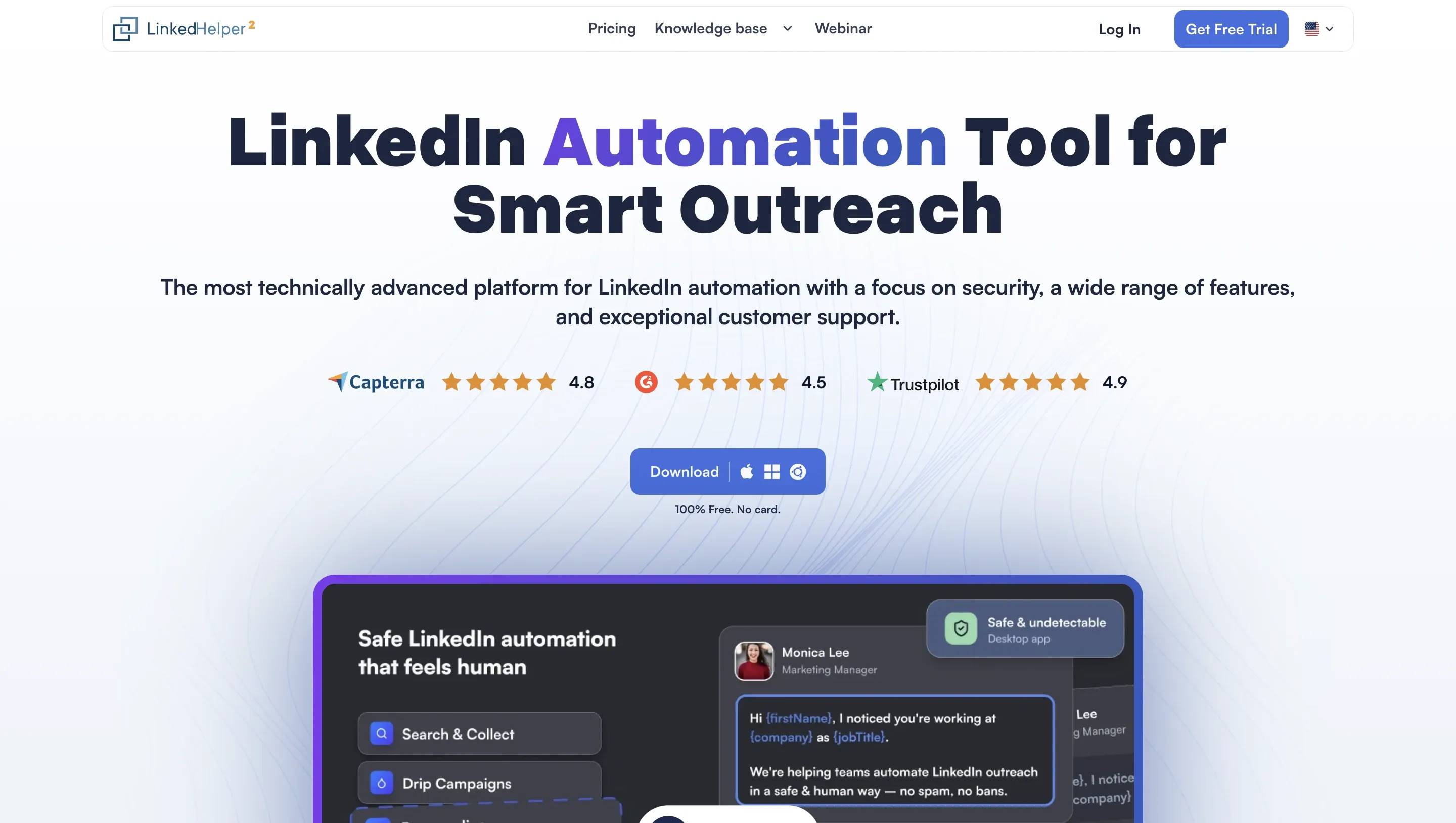
Linked Helper is the publisher of this article and our disclosed recommendation. It is a desktop LinkedIn automation application for users who have outgrown basic Chrome extension workflows and need deeper campaign logic, built-in CRM records, webhooks, Sales Navigator or Recruiter support, and more control over session setup.
Linked Helper starts at $15 per month on the Standard plan, or $8.25 per month billed annually, with a 14-day free trial. The Pro plan starts at $45 per month, or $24.75 per month billed annually.
Linked Helper is used by 500,000+ users and has been active worldwide for 9 years. The typical fit is a solo SDR, recruiter, founder, growth marketer, or agency operator who wants more LinkedIn workflow control without moving to cloud-platform pricing.
Key Features
Linked Helper runs on Windows, macOS, and Ubuntu through its own built-in browser engine. It is not a Chrome extension, not a cloud tool, and not a product that uses your current Chrome session.
Here are the main features of Linked Helper:
-
Custom campaign workflows for outreach, recruiting, engagement, organization-page extraction, and CRM handoff
-
Built-in CRM with tags and notes
-
Reply detection and follow-up control
-
Sales Navigator, Recruiter Lite, and Recruiter support
-
11 native CRM integrations, including HubSpot, Pipedrive, Salesforce, and Zoho, plus webhooks
-
Data Enrichment credits
-
Custom variables, spintax, image personalization, and AI-assisted messages for hyper-personalized outreach
-
Daily limits, randomized delays, working hours, and mouse-movement emulation for safer pacing
-
Optional HTTP, HTTPS, SOCKS, or SOCKS5 proxy assignment per account
What Reviewers Highlight
G2, Franck O., 5/5: He said Linked Helper helps him send more than 100 connection requests and follow-up messages, but noted that the product takes some time to understand.
Trustpilot, Victor Julio Coupé, 5 stars: He reported that an agency page grew from 195 to 301 followers in two months while Linked Helper handled invitations in the background.
Reviewers often like the flexibility. The strongest positive theme is that users can build more detailed LinkedIn sequences without paying cloud-platform prices.
Limitations
Linked Helper is strongest for LinkedIn-focused automation, not full multichannel outreach. It does not include native non-LinkedIn email sequences, full email automation, or dedicated native A/B testing.
Because Linked Helper is a desktop app, campaigns need the app running on the user’s machine, VPS, or dedicated server. For remote setup, users can access the running app through Microsoft RDP, VNC, or Linked Helper’s built-in remote control in the browser.
First-Hand Research Notes
Linked Helper was not part of the Chrome extension teardown because it does not ship a Chrome extension for LinkedIn automation. Actions run through Linked Helper’s own built-in browser engine on the user’s machine, VPS, or dedicated server.
That gives users more control over session custody and IP setup. The LinkedIn session does not need to be uploaded to a vendor cloud, and each account can run through the user’s own IP address or a dedicated HTTP, HTTPS, SOCKS, or SOCKS5 IPv4 proxy.
This does not remove restriction risk. It gives users more control over session origin, proxy setup, pacing, working hours, and account separation through daily limits, randomized delays, activity emulation, per-account proxy assignment, and a built-in proxy checker.
Best For
SDRs, recruiters, founders, growth marketers, and agency operators who want deeper LinkedIn workflows without moving execution fully to a vendor cloud. It is also a good match for users who care about stable IP and session control.
Try Linked Helper free for 14 days - No credit card required
2. Dux-Soup
Dux-Soup is one of the closest Octopus CRM alternatives in price. Its entry plans use a Chrome extension model, while Cloud Dux adds always-on cloud execution. In the cloud setup we reviewed, the extension acted as a bridge between the user’s browser session and Dux-Soup’s cloud environment, passing LinkedIn session data to support remote execution. Cloud settings are managed through the extension rather than through a separate SaaS dashboard.
Its entry plan, Pro Dux, starts at $14.99 per month, or $11.25 per month billed annually. Turbo Dux starts at $55 per month, and Cloud Dux starts at $99 per month.
Key Features
Pro Dux covers basic LinkedIn automation, including connection invitations, 1st-degree messages, post likes, profile visits, tagging, activity logs, and CSV downloads.
Turbo Dux adds the deeper parts:
-
Unlimited drip campaigns
-
Campaign statistics
-
Lead management dashboard
-
Central inbox
-
Contact management
-
CRM and tool integrations
Cloud Dux adds cloud-based, always-on automation to Dux-Soup’s managed infrastructure.
What Reviewers Highlight
G2, Tyron G., 5/5: He liked the web and Chrome versions, CRM integrations, imports, and support that helped him get started in under an hour.
G2, Jack S., 5/5: He reported a 65% increase in booked meetings and said Dux-Soup saved him more than 10 hours per week.
Reviewers mainly praise Dux-Soup for easy setup, browser-based automation, CRM connections, and time saved on prospecting.
Limitations
G2, Tyron G., and Jack S.: Both praised the tool but pointed to a dated interface, slower performance, or a need for a more modern UI.
Trustpilot, John Collins, 2 stars: He said Dux-Soup worked well as a standalone product but reported serious data integrity issues with Pipedrive syncing.
The main tradeoff is that Dux-Soup is not one architecture. Pro, Turbo, and Free run locally in the browser, while Cloud Dux moves execution to Dux-Soup infrastructure.
First-Hand Research Notes
We unpacked the published Dux-Soup Chrome extension package in June 2026 and reviewed the shipped source code. Dux-Soup uses different architectures by plan, so the safety trade-off depends on which edition is connected.
For the local extension plans, Free, Pro, and Turbo, automation runs through the user’s browser. The LinkedIn session stays on the user’s machine, while the extension injects into LinkedIn pages and makes direct LinkedIn API calls from the browser.
Cloud Dux uses a different custody model. In the Cloud Dux flow we reviewed, the extension synced the LinkedIn cookie jar, including li_at and JSESSIONID, along with local storage and browser-related data into Dux-Soup’s cloud environment to support always-on execution. That moves more session custody away from the local browser and into Dux-Soup’s infrastructure.
The account-environment controls were limited. Dux-Soup did not provide location selection, a list of available proxy locations, bring-your-own proxy support, or timezone selection when adding an account. For cloud use, that leaves less control over whether session location, timezone, and proxy setup match the account’s normal pattern.
3. Waalaxy
Waalaxy is a Chrome-extension-led LinkedIn prospecting product with a cloud mode. It is most relevant to users who want quick setup, simple campaign templates, and basic CRM-style lead tracking, while accepting the trade-offs of an extension-plus-cloud model.
Its current public pricing starts at $19 per user per month for the Pro plan, with a 14-day free trial. The Advanced plan starts at $39 per user per month, and Business starts at $69 per user per month.
Key Features
-
Chrome extension-led setup with cloud mode
-
Pre-built LinkedIn prospecting sequences
-
Automated LinkedIn follow-ups
-
Imports from LinkedIn Basic, Sales Navigator, and Recruiter Lite
-
CRM Sync with 2,000+ tools
-
Team collaboration and duplicate prevention
-
API access, Make, Zapier, and n8n modules on higher plans
-
LinkedIn and email multichannel campaigns on Business
What Reviewers Highlight
G2, Paulo F., 4.5/5: He praised Waalaxy’s clear UX, LinkedIn extension performance, documentation, free plan, and fair pricing.
Trustpilot, Sina, 5 stars: She reported using Waalaxy for ToumAI, sending 47 LinkedIn requests, and getting a 15% acceptance rate with personalization and multichannel follow-up.
Users like Waalaxy because it is quick to start, easy to understand, and friendly for early LinkedIn campaigns.
Limitations
G2, Paulo F.: He said Waalaxy did not let him build a fully customized sequence the way some other tools do.
Trustpilot, Joe Bow, and Frank: Their reviews raised concerns about refund friction, customer support, sponsored-message results, and campaign performance.
Waalaxy looks strongest for quick setup and beginner campaigns, while the weaker themes are customization depth, billing friction, and control for more complex workflows.
First-Hand Research Notes
We unpacked the Waalaxy Chrome extension in June 2026 and reviewed the shipped source code. Waalaxy is a Chrome-extension-led product with cloud mode, so the safety question is both browser-side behavior and how the browser session connects to the cloud backend.
In the code we reviewed, the extension requested Chrome cookies permission, read LinkedIn cookie data, and synced browser-session data with Waalaxy’s cloud backend. The package also included local extension behavior, cloud-mode hooks, login-related handling, and references to third-party captcha-solving services.
From the account-control side, Waalaxy did not provide bring-your-own proxy support in our review. We did not run a live cloud/IP test on Waalaxy, so we do not make claims here about assigned session IPs, IPQualityScore results, default proxy behavior, location count, or timezone behavior.
4. Dripify
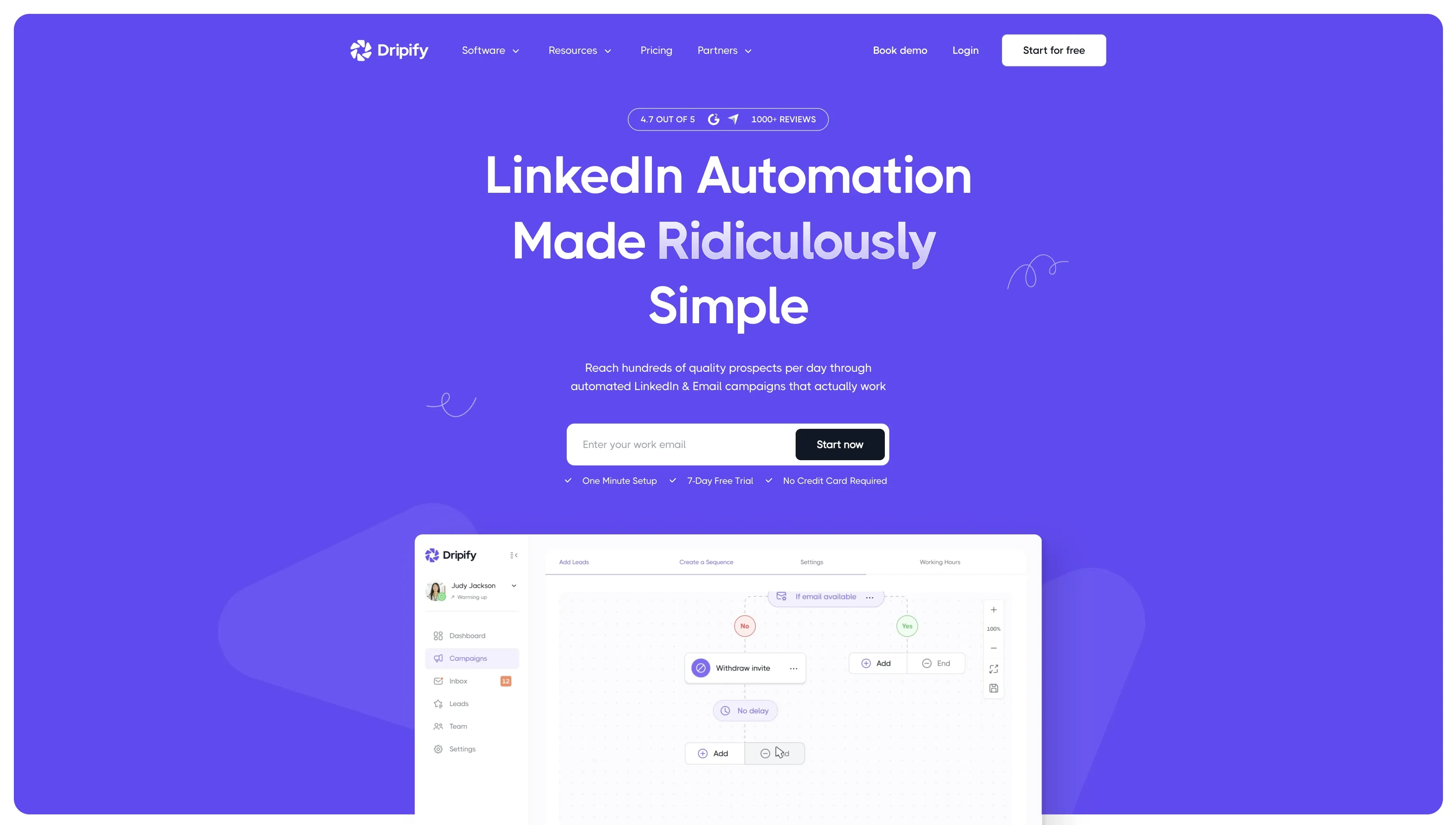
Dripify is a cloud LinkedIn and email outreach platform built around managed sequences, dashboards, team features, and campaign reporting. It is a bigger step up from Octopus CRM than a simple Chrome extension alternative.
Its Basic plan starts at $59 per user per month, or $39 per user per month billed annually, with a 7-day free trial. Pro starts at $79 per month, and Advanced starts at $99 per month.
Key Features
-
Cloud-based LinkedIn automation
-
LinkedIn and email sequences
-
Sequence templates
-
Reply-based campaign control
-
Dedicated inbox on Pro
-
Advanced analytics and reports
-
Webhook integration on Pro
-
Multi-team management and step analytics on Advanced
What Reviewers Highlight
G2, Glenis G., 5/5: She liked importing a Sales Navigator search URL, automatic pausing when someone replies, and the intuitive sequence builder.
Trustpilot, Tracy, 5 stars: She praised Dripify for structured outreach, better visibility, and helpful onboarding support.
The strongest review theme is managed workflow. Users like that Dripify turns LinkedIn outreach into a cleaner dashboard with sequences and reply handling.
Limitations
G2, Glenis G.: She said the reply inbox could be smoother and wanted better tagging, sorting, and bulk-save options.
G2, Alejandro T.: He liked the product but disliked that users could not edit a sequence after it was running.
Dripify is easy to launch, but heavier operators may run into limits on inbox, sequence editing, and workflow control.
First-Hand Research Notes
Dripify does not ship a public LinkedIn Chrome extension, so there was no extension teardown. Users connect to LinkedIn through the Dripify web app, and activity runs from Dripify’s cloud infrastructure rather than from the user’s local browser.
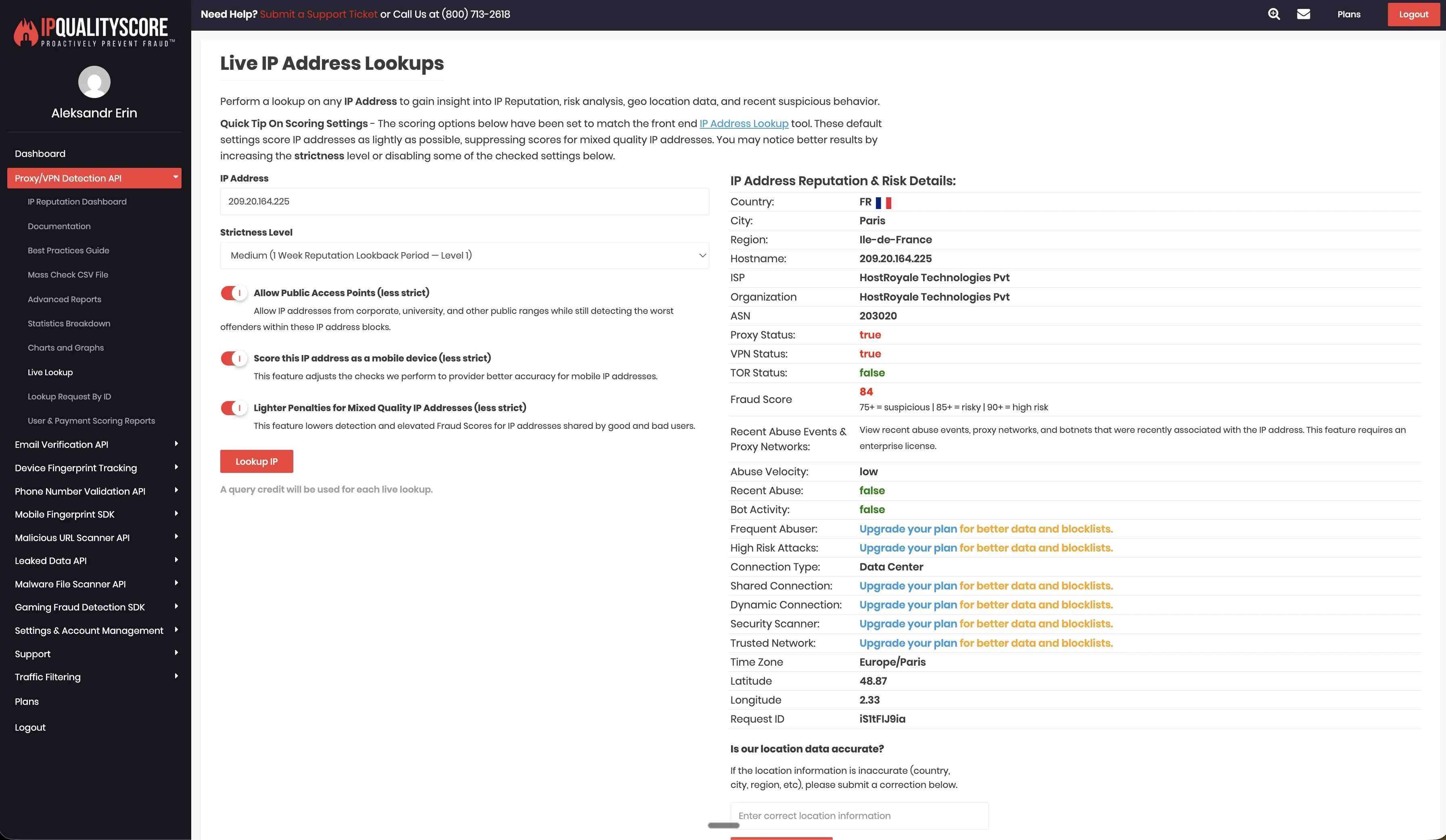
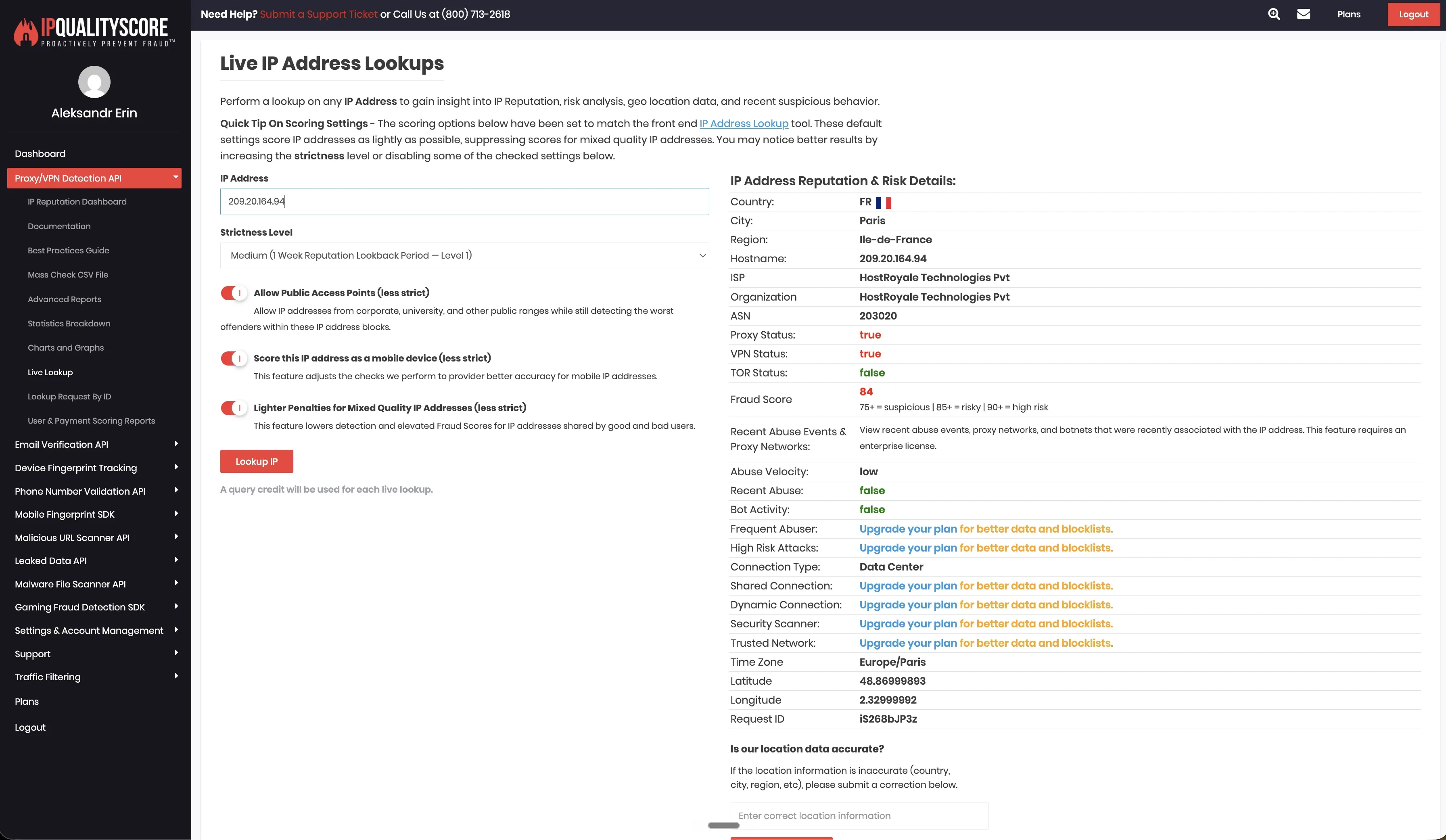
In our June 2026 live cloud test from France, two LinkedIn test accounts received datacenter IPs in the same /24 range: 209.20.164.225 and 209.20.164.94.
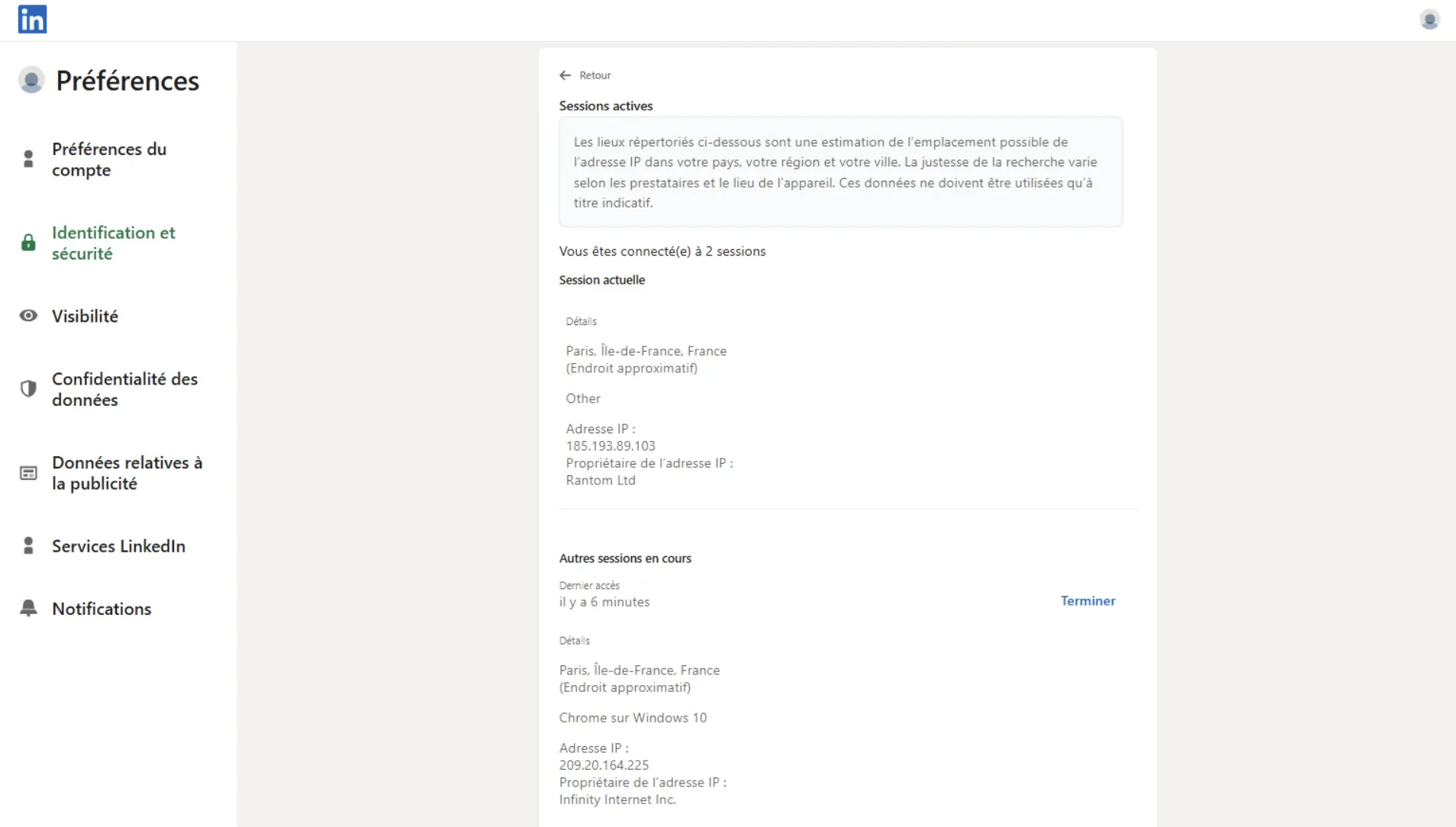
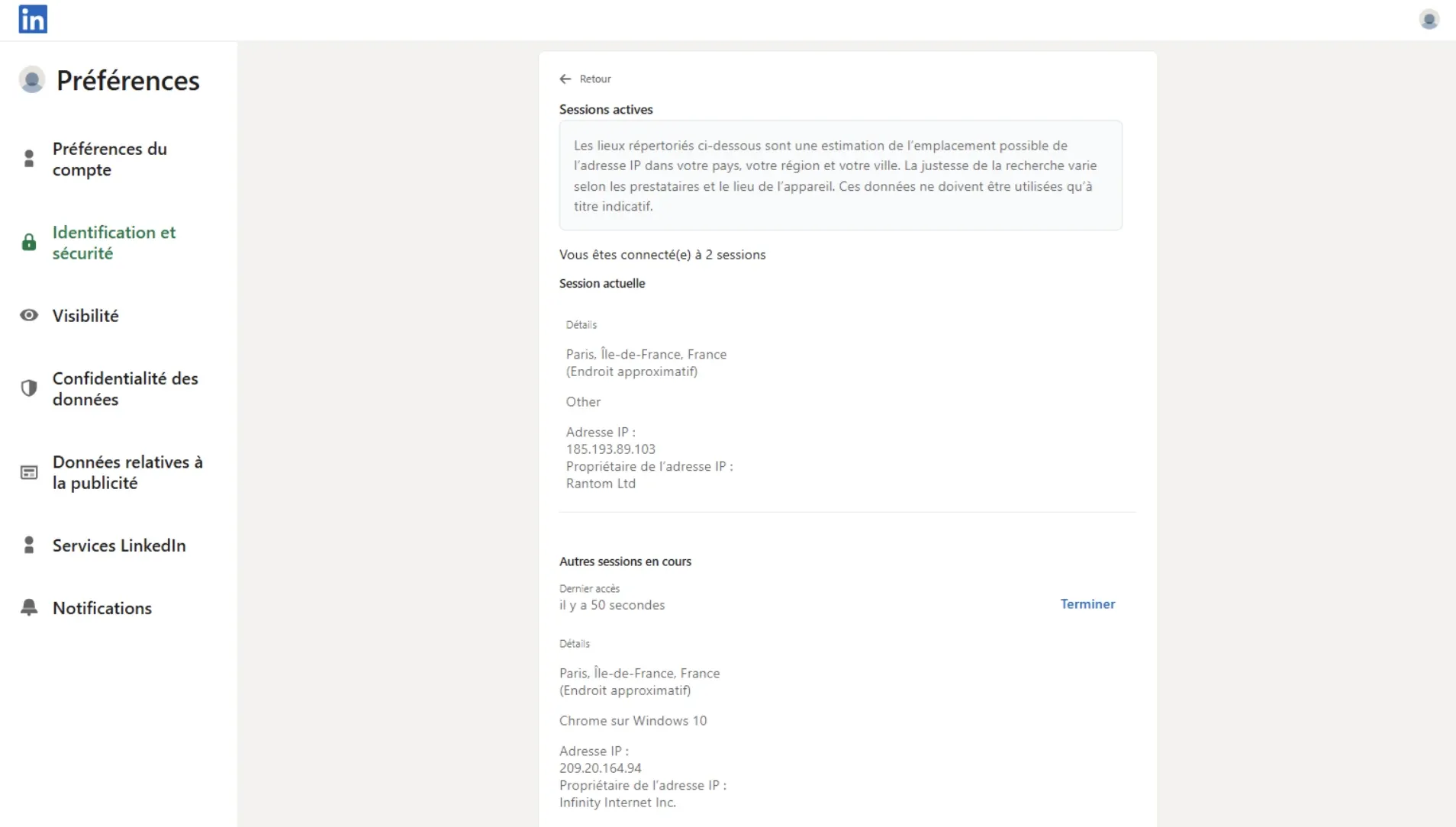
We checked both observed IPs through IPQualityScore. IPQS classified the tested IPs as datacenter/proxy IPs and showed high spam or abuse-risk signals (84/100 for both IPs). This describes the default footprint we observed in that test setup, not a permanent verdict on every Dripify account.
The account-environment controls were mixed in our review. Dripify allowed timezone selection, but it did not expose desired-location selection, bring-your-own proxy support, or a proxy-quality checker in the tested setup. That gives users some control over working-hours consistency, while leaving less control over the assigned session IP, location choice, and proxy quality.
5. Expandi
Expandi is a cloud LinkedIn outreach platform with personalization, decision flows, templates, campaign recovery, and agency features. It is priced higher than Octopus CRM and Linked Helper, but it gives users a broader managed platform.
Its Business plan starts at $99 per month, or $79 per month billed annually, with a 7-day free trial. Agency pricing is custom and starts from 10+ seats.
Key Features
-
Cloud-based LinkedIn outreach platform
-
Smart sequences and decision flows
-
LinkedIn and email multichannel outreach
-
Dynamic placeholders, tags, notes, and templates
-
Image and video personalization add-ons
-
Blacklist and duplicate prevention
-
Proxy support and country-based IP setup
-
Agency roles, permissions, reporting, and white-label options
What Reviewers Highlight
Trustpilot, Mark Chin, 5 stars: He praised Expandi for campaign organization and follow-ups, while noting that the product has a learning curve.
Trustpilot, Paul Pagano, 5 stars: He praised support, outreach guidance, and the team’s help with campaign strategy.
The positive review pattern is support plus campaign depth. Users who like Expandi often value onboarding, guidance, and richer outreach setup.
Limitations
Trustpilot, David, 4 stars: He said the tool “worked ok” overall but reported a LinkedIn ban issue, which should be treated as one user report, not proof of cause.
Trustpilot, Smile IT Solutions, and Angela Cvengros: Their reviews raised issues around campaign setup, uploads, Microsoft 365 connection problems, cancellation, refunds, and privacy concerns.
Expandi’s upside is campaign depth and support, but the review risk sits around setup friction, account issues, and cancellation or billing experience.
First-Hand Research Notes
Expandi is a cloud LinkedIn outreach platform with two relevant connection paths: users can connect through the cloud login flow, and Expandi also provides a Cloud Bridge Extension. We reviewed that extension in June 2026. In the code we reviewed, the extension’s main role was to pass LinkedIn session data from the user’s browser into Expandi’s cloud environment.
We also ran a June 2026 live cloud test from France with two LinkedIn test accounts. In that setup, LinkedIn activity was handled through Expandi’s vendor-side cloud environment rather than staying fully local in the user’s browser.
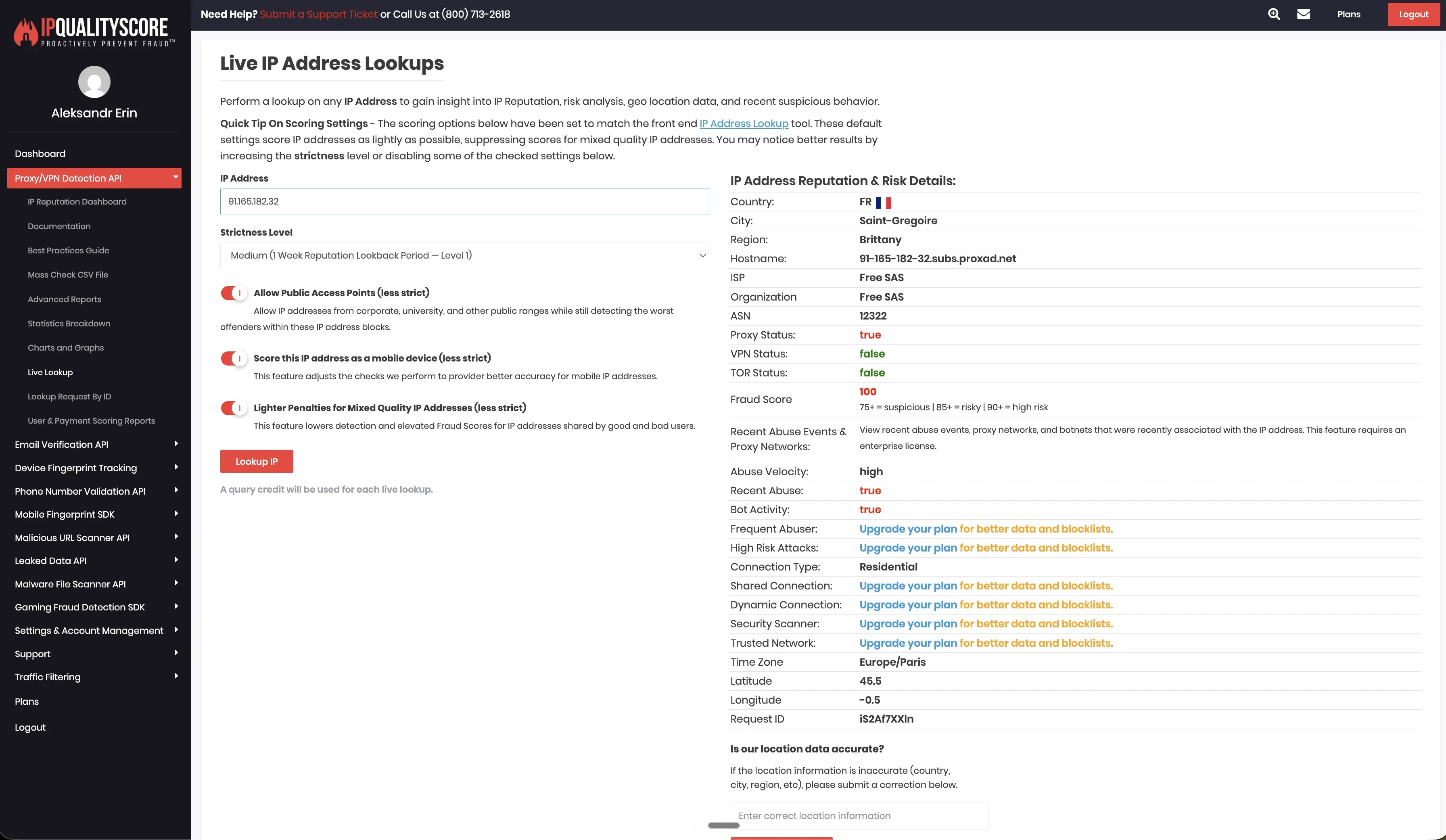
The two tested accounts appeared on different types of IPs. One account used 91.165.182.32, while the second used an IPv6 address.
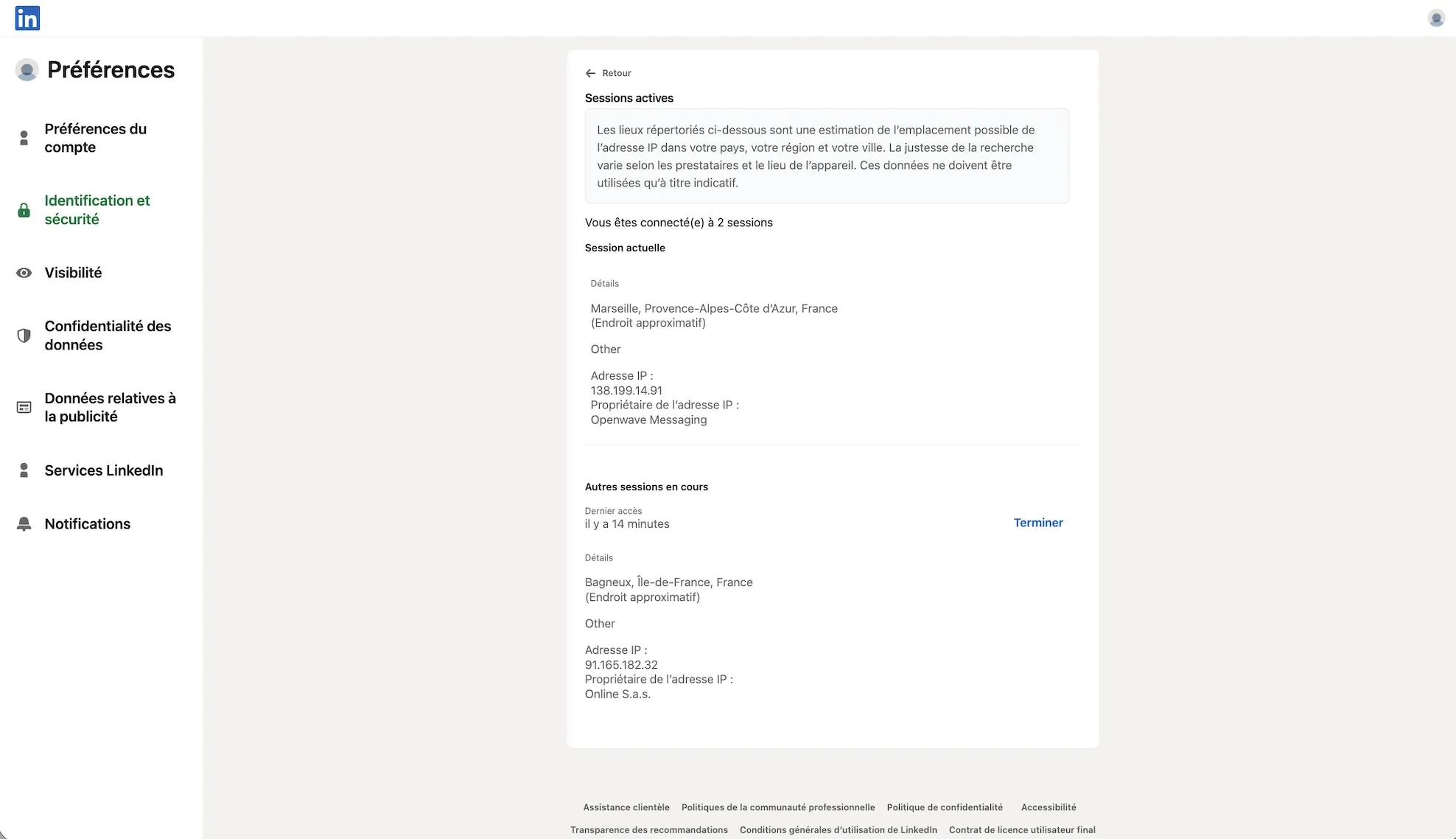
We checked the observed IPs through IPQualityScore. The result was mixed: one IP showed higher-risk (100/100) hosting or datacenter signals, while the other appeared cleaner in that lookup. This describes the footprint we observed in our test setup, not a verdict on every Expandi account.
Expandi exposed more account-environment controls than some cloud tools in our review. It allowed desired-location selection, listed 96 locations, and exposed timezone selection. Those controls can help with session consistency, but they do not change the core custody trade-off: LinkedIn activity still runs from vendor-side cloud infrastructure.
6. HeyReach
HeyReach is a cloud LinkedIn outreach platform with multi-account campaign management, a shared inbox, sender rotation, and workspace-style separation. These are useful operational features, but they are separate from the safety question: where the LinkedIn session runs, what IP is used, and how much infrastructure control the user gets.
The Growth plan starts at $79 per seat per month, with yearly billing lowering the cost to $63 per seat per month on the pricing page view we checked. HeyReach also offers a 14-day trial for the Starter/Growth plan, including 3 LinkedIn accounts, with no credit card required.
Key Features
-
Multi-account LinkedIn outreach
-
Unlimited campaigns
-
Connection requests, messages, follows, and profile views
-
Unified inbox
-
Workspaces, permissions, and client separation
-
API access and custom webhooks
-
Integrations with Clay, Make, Zapier, HubSpot, Instantly, and Smartlead
-
Bring-your-own proxy support
What Reviewers Highlight
G2, Kunal S., 4.5/5: He liked managing multiple LinkedIn accounts, sending about 100 prospects per day, using attachments, and not opening each LinkedIn account manually.
Trustpilot, Diandra Escobar, 5 stars: She praised multi-sender outreach, account rotation, the unified inbox, Clay integration, and flat pricing.
HeyReach gets its strongest praise from teams that manage many sender accounts and need a shared inbox instead of profile-by-profile work.
Limitations
G2, Panos S.: He praised the platform but said the lack of auto-save can cause lost progress during campaign setup.
Trustpilot, Kazi Islam, and Ernest: Their reviews raised concerns about slower support responses, bugs, and product reliability.
The clear trade-off is between scale and custody and upkeep. HeyReach is built for multi-account operations, but support for speed, bugs, and session maintenance still needs attention.
First-Hand Research Notes
HeyReach uses a login Chrome extension as a cloud bridge. We unpacked the HeyReach login extension in June 2026 and reviewed the shipped code. The extension read the li_at cookie, copied LinkedIn cookie data to api.heyreach.io, included logout-blocking behavior for LinkedIn’s /uas/logout endpoint, and issued direct Voyager calls.
We also ran our June 2026 live cloud test from France with two LinkedIn test accounts. In the default setup, the accounts appeared on 45.146.212.28 and 45.146.212.36, which were in the same /24 datacenter range. Browser and device signals showed Chrome on Windows.
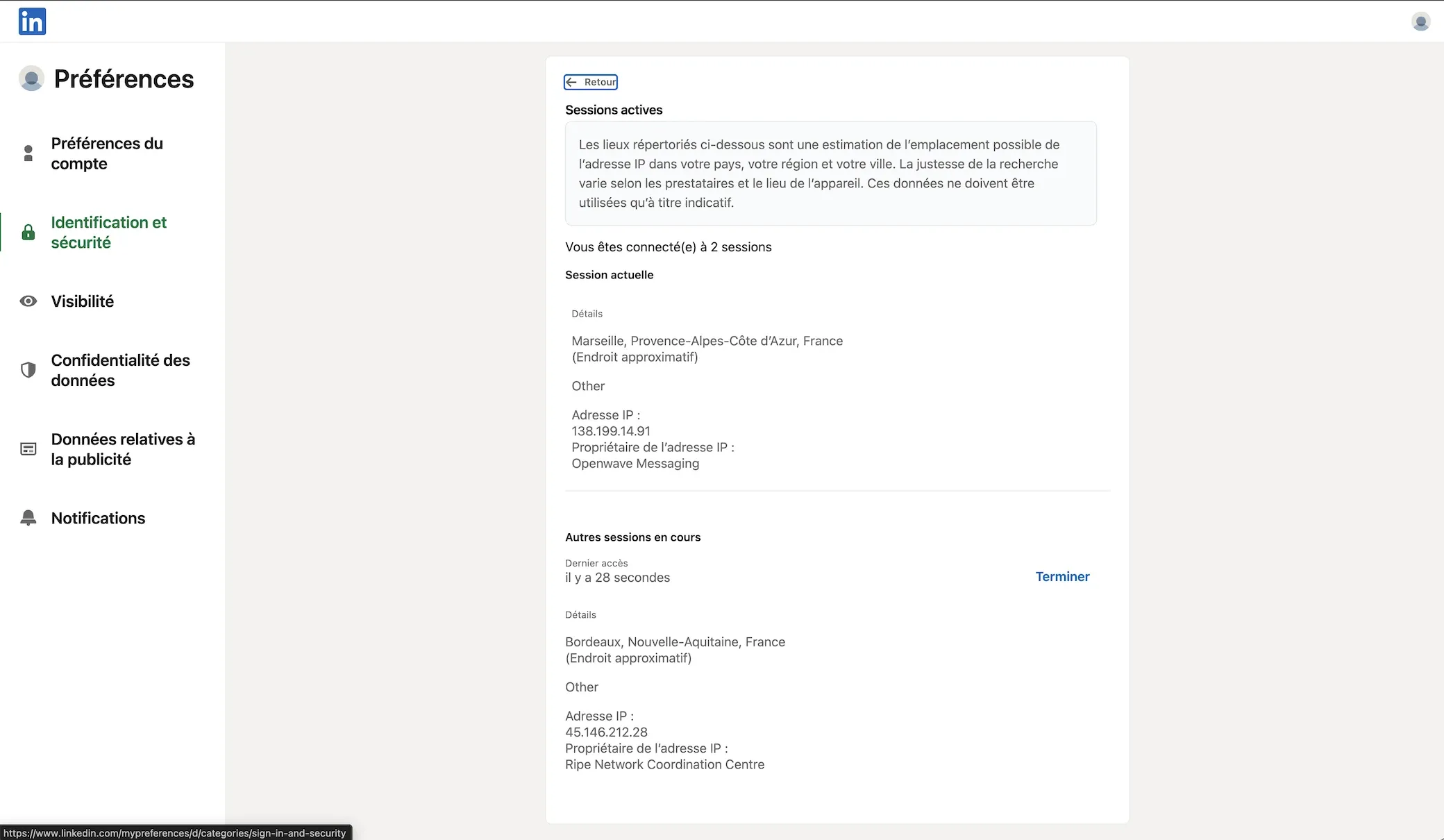
We checked the observed IPs through IPQualityScore. For 45.146.212.28 and 45.146.212.36, IPQS returned Altinea SAS, ASN 41405, Paris, France, with Data Center as the connection type. It also marked Proxy and VPN as positive and returned a fraud score of 100/100. This is an IP-quality signal from our test setup, not LinkedIn’s enforcement verdict.
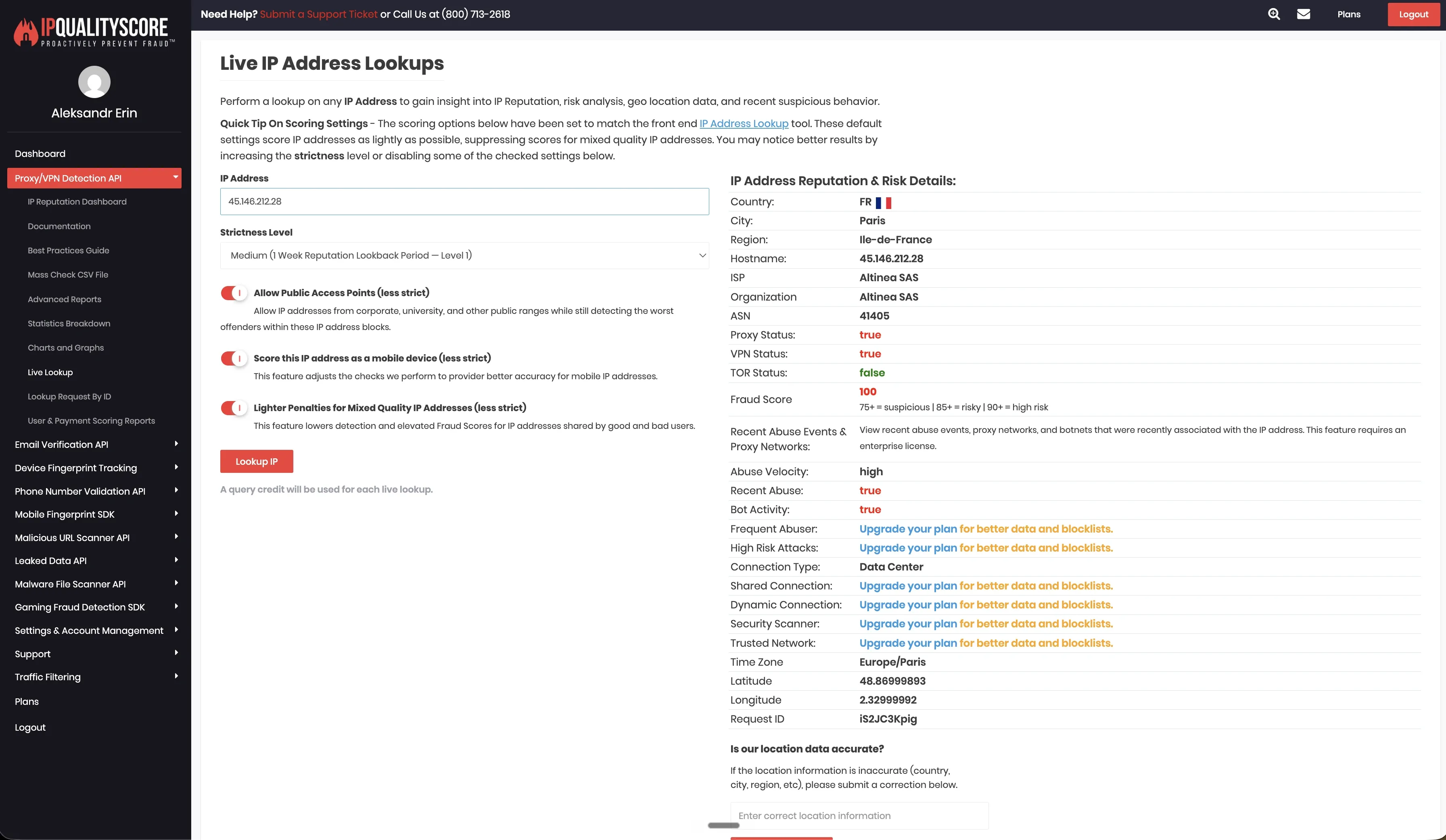
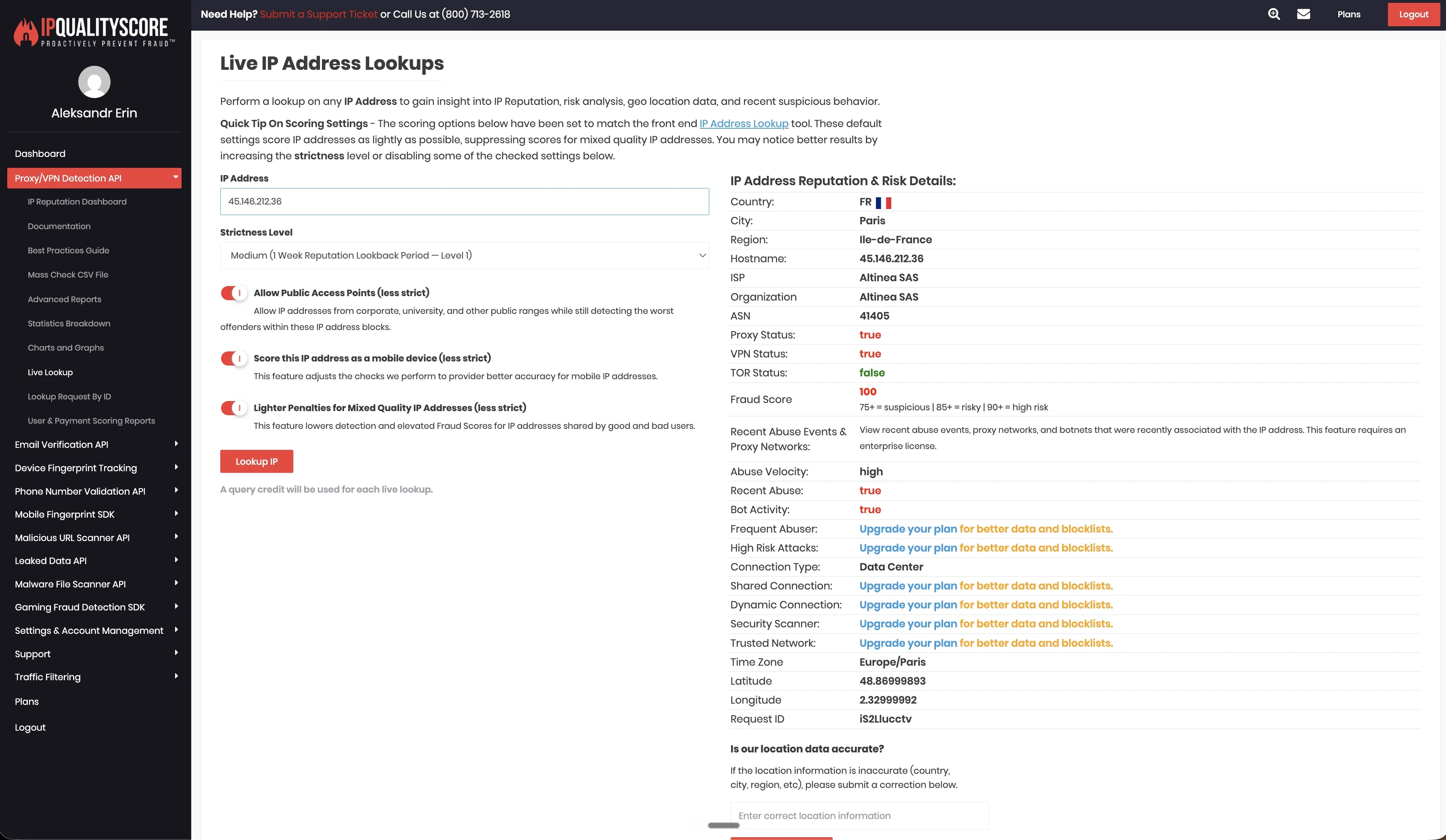
HeyReach supported bring-your-own proxy setup, desired-location selection, and 154 listed proxy locations in our review. That gives users more location choice than tools with no proxy controls, but proxy quality becomes the user’s responsibility. Timezone selection was not exposed when adding an account, so location choice can still leave a mismatch between session geography, working hours, and the account’s normal pattern.
7. Meet Alfred
Meet Alfred is a cloud outreach platform that combines LinkedIn automation, email automation, a LinkedIn CRM, a Smart Inbox, templates, reporting, and team features. It fits small and mid-sized teams that want LinkedIn and email touches from one dashboard.
The Basic plan starts at $59 per user per month, or $29 per user per month billed annually. The Pro plan starts at $99 per user per month, while the Team plan starts at $79 per user per month on monthly billing.
Key Features
-
Cloud-based LinkedIn automation
-
LinkedIn and email outreach
-
Smart LinkedIn Inbox
-
Built-in LinkedIn CRM with tags and notes
-
Sales Navigator and InMail support on Pro
-
LinkedIn Groups, Events, and CSV campaigns on Pro
-
Zapier and webhook integrations
-
Team inbox and white-label options on Team
What Reviewers Highlight
Trustpilot, Chris, 5 stars: He praised the automated outreach, interface, and live chat support.
Trustpilot, Lior Tzur, 5 stars: He said the product helped him get LinkedIn and other outreach channels working from one place, with support when needed.
Positive reviews usually focus on convenience: users like having LinkedIn, email, CRM, inbox, and support inside one cloud dashboard.
Limitations
Trustpilot, K P, 1 star: The review described reliability issues, downtime, poor support, and refund frustration.
Trustpilot, Sergio, 3 stars: He reported that Step 3 messages failed for 12 days and that technical support was slow to resolve the issue.
Many users like the all-in-one outreach setup, while negative reviews focus on reliability, disconnections, and support escalation.
First-Hand Research Notes
We did not review a public LinkedIn Chrome extension for Meet Alfred. Our first-hand review was limited to the June 2026 live cloud/IP test.
In the France test, the two connected LinkedIn accounts appeared on 109.238.196.65 and 158.46.140.148. Both sessions presented mobile browser signals: one as Chrome Mobile on iOS, the other as Chrome Mobile on Android.
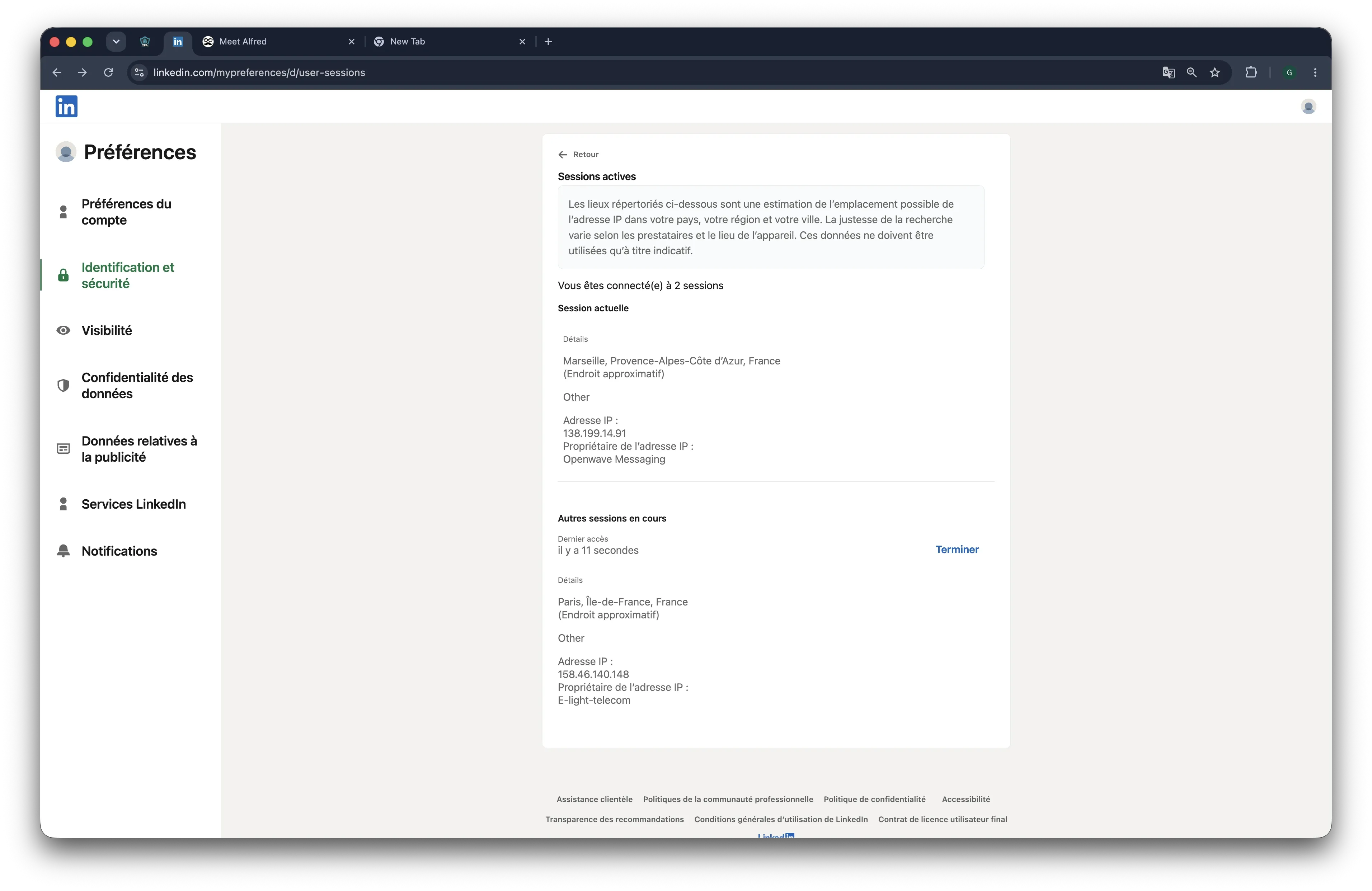
We checked the observed IPs through IPQualityScore. The final IPQS wording should follow the screenshot evidence, but the broader safety point is already clear: the mobile-session signals do not remove the cloud trade-off. LinkedIn activity still runs from vendor-side infrastructure with cloud-controlled device, browser, and location signals.
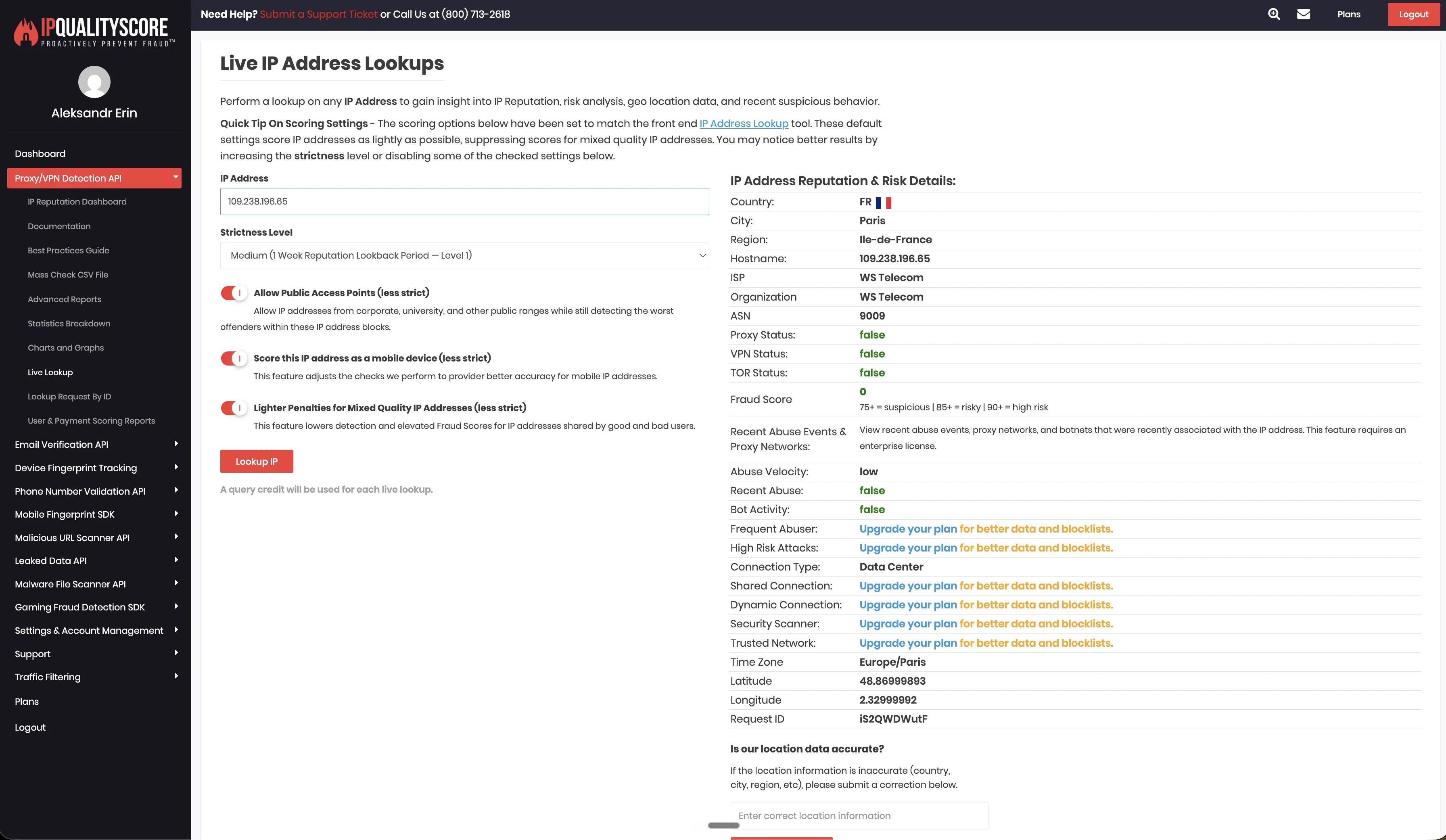
Meet Alfred exposed more account-environment controls than some cloud tools in our review. It allowed desired-location selection, bring-your-own proxy setup, 247 listed locations, and timezone selection. Those controls can help with consistency, but they still depend on the quality of the assigned or user-provided proxy and on how closely the session setup matches the account’s normal pattern.
8. lemlist
Lemlist is a cloud multichannel outreach platform centered on cold email. LinkedIn, calls, SMS, and WhatsApp can be added to broader campaigns, so it is relevant when LinkedIn is one channel in a larger outbound sequence.
The current Multichannel plan starts at $109 per user per month, or $87 per user per month billed annually, with a 14-day free trial. The Email plan starts at $39 per month, or $31 per month annually, but LinkedIn automation sits in the Multichannel plan.
Key Features
-
Email-led multichannel outreach
-
LinkedIn automation
-
SMS and WhatsApp campaign steps
-
Built-in call dialer and VoIP integrations
-
Lead database, email finder, and verifier
-
Unified inbox and task management
-
Deliverability hub and email warm-up
-
CRM integrations and API access
What Reviewers Highlight
G2, Caroleo N., 5/5: He liked running email, LinkedIn, and WhatsApp in one workflow, along with AI personalization, lemwarm, and a straightforward interface.
Trustpilot, Lucas, 5 stars: He praised support for helping with contact exports and campaign setup, calling the experience smooth.
Lemlist’s strongest review signal is multichannel breadth, especially for teams that start with cold email and add LinkedIn touches later.
Limitations
G2, Caroleo N.: He liked the product but flagged the learning curve, price growth as contact volume increases, and a need for more granular reporting.
Trustpilot review summary: Trustpilot’s public summary notes complaints about slow support, UI issues, bugs, and reliability problems.
Lemlist is credible for email-led outbound, but it is not the cleanest Octopus CRM upgrade for users who mainly need LinkedIn-first session control.
First-Hand Research Notes
We unpacked the lemlist Chrome extension in June 2026 and reviewed the shipped code. lemlist’s LinkedIn setup works through the user’s local Chrome profile with the LinkedIn account already logged in, so we do not describe it as a standard cloud-only LinkedIn execution model.
The code included cookie-handling logic related to the li_at cookie and a listener that reacted when li_at changed. We also saw code that could send LinkedIn cookie values to lemlist-controlled infrastructure, but the exact workflow should be confirmed before making a stronger session-transfer claim.
We did not find a logout-blocking rule or local Voyager API calls. LinkedIn actions appeared to rely more on page-level browser behavior than direct Voyager calls, but this point should be treated cautiously unless confirmed with the person who ran the teardown.
For LinkedIn account-environment controls, lemlist did not provide desired-location selection, a list of available proxy locations, bring-your-own proxy support, or timezone selection. That fits the local Chrome-profile setup: LinkedIn activity appears to rely on the user’s own browser environment rather than an assigned cloud IP pool.
9. La Growth Machine
La Growth Machine is a cloud multichannel outbound platform for LinkedIn, email, calls, and X. It fits teams that want to build outreach flows across several channels instead of running LinkedIn as a standalone motion.
The Basic plan starts at €60 per month per identity, with a 14-day free trial. The pricing page defines an identity as the seat used to automate across LinkedIn, email, and X.
Key Features
-
LinkedIn, email, calls, and X outreach
-
Multichannel sequences
-
Multichannel inbox
-
Data enrichment and verified emails
-
LinkedIn Basic and Sales Navigator imports
-
HubSpot, Pipedrive, Make, Slack, API, and webhook integrations
-
CRM sync and CRM workflow triggers on higher plans
-
Team management
What Reviewers Highlight
G2 public summary: Reviewers highlight ease of use, multichannel campaigns across LinkedIn, email, and Twitter/X, and support.
G2 product details: The page describes imports from LinkedIn or CSV, data enrichment, multichannel sequences, HubSpot and Pipedrive sync, and a multichannel inbox.
La Growth Machine appeals to teams that want LinkedIn, email, X, enrichment, and CRM sync in one outbound system.
Limitations
Trustpilot, Vadym O, 1 star: He reported serious issues after paying for 20 identities, including bugs with webhooks, inboxes, tracking, working hours, replies, and campaign progress.
Trustpilot, Christian Uetz, and Tobias, 2 stars: Their reviews raised concerns about email sync bugs, email reputation, feature gating, support quality, and higher-cost plan requirements.
10. LinkedIn Sales Navigator

LinkedIn Sales Navigator is LinkedIn’s own sales prospecting product, not a third-party automation tool. It belongs in this comparison because many teams use it before automation to find better leads, save accounts, track buying signals, and organize prospect lists.
Sales Navigator Core starts at $119.99 per license per month, or $1,079.88 per license per year. Sales Navigator Advanced starts at $159.99 per license per month, or $1,799.88 per license per year, while Advanced Plus uses custom pricing.
Key Features
-
Native LinkedIn prospecting product
-
50+ advanced search filters
-
Lead and account lists
-
Saved searches and real-time alerts
-
50 monthly InMail credits
-
Lead and account recommendations
-
Buyer intent and relationship insights
-
CRM integrations on higher plans
Limitations
Sales Navigator does not run outreach automation. It does not send bulk connection requests, build LinkedIn sequences, trigger follow-ups, stop campaigns after replies, run if/then logic, or send webhook events.
It also does not replace an outreach CRM. Sales Navigator helps users find and save leads, but it does not manage automated campaign steps the way Linked Helper, Octopus CRM, HeyReach, Dripify, or similar tools do.
How To Choose The Right Octopus CRM Alternative
The best Octopus CRM alternative depends on the reason you want to switch. A cheaper tool may be enough if you only need basic LinkedIn actions, but most users leave starter tools because their outreach has become harder to control.
For sales teams, recruiters, founders, and agencies, the real decision comes down to execution, data flow, and account control. A tool may look good in a feature table, but it still needs to match the way your team works every day.
Use these questions before choosing a tool:
-
Where does the LinkedIn session run? Check if the tool runs inside Chrome, on vendor cloud servers, or on your own machine.
-
Which IP does LinkedIn see? Check the quality and exclusivity of the IP, not only whether it stays the same. A “stable” cloud IP can still be a weak setup if hundreds of LinkedIn accounts use the same address around the clock.
-
How deep is the workflow builder? Basic sequences are fine for simple outreach, but serious campaigns need if/then logic, reply detection, delays, and stop conditions.
-
How does lead data move? Check CRM handoff into HubSpot, Salesforce, Pipedrive, Zoho, Zapier, Make, webhooks, or your internal system.
-
Does it support your LinkedIn setup? Sales teams may need Sales Navigator, while recruiters may need Recruiter or Recruiter Lite workflows.
-
Can it scale without chaos? Multi-account outreach needs separate schedules, proxies, operators, permissions, and clean account organization.
-
Does it cover the right channels? LinkedIn-first tools are better for LinkedIn control, while tools like Lemlist and La Growth Machine make more sense when email is the main channel.
This is why we do not treat all alternatives as equal. A tool can look similar in a feature table while creating a very different LinkedIn footprint. The important differences are session custody, IP quality, proxy control, timezone control, browser-extension exposure, cloud execution, and pacing controls.
For Octopus CRM users, the decision should start with the safety architecture: where the LinkedIn session runs, who controls the IP, whether the extension is identifiable in the browser, and whether the tool gives enough control over timing, limits, and account separation.
LinkedIn Safety Before Switching Tools
No LinkedIn automation tool removes restriction risk. Account age, profile strength, daily volume, message quality, targeting, timing, and session consistency still matter.
LinkedIn’s own LinkedIn User Agreement restricts unauthorized automated methods, scraping, browser plugins, and attempts to bypass access limits, so no automation tool should be framed as risk-free.
The tool controls part of the risk. The operator controls the rest.
Those signals can include fast action patterns, sudden volume spikes, weak targeting, unstable IP origin, geography mismatch, browser changes, and session changes. Our safety review treated those signals as cumulative. A tool can add risk through session custody, extension visibility, direct LinkedIn API calls, injected page behavior, telemetry blocking, cloud IP reputation, fingerprint mismatch, or unstable account location. None of these signals proves a restriction by itself, but together they shape the footprint LinkedIn can evaluate.
Architecture matters because each setup creates a different LinkedIn footprint:
- Chrome extensions run through the user’s browser session, but extension activity can still be visible inside the browser environment through injected scripts, known extension IDs, page behavior, and automation patterns.
- Cloud tools run automation on vendor infrastructure, which can mean server IPs, shared proxy pools, device or browser fingerprints, timezone settings, and location signals the user does not fully control. If an account is used from one country or device profile and automation starts from another IP range or browser environment, that mismatch becomes part of the LinkedIn footprint.
- Desktop tools run on the user’s computer, using the user’s authenticated session and IP address, or a proxy the user assigns. This gives the user more direct control over session origin, IP setup, timing, and account separation, though it still does not remove restriction risk.
Linked Helper’s safety position is based on user control, not a promise that automation is risk-free. It runs as a desktop application on Windows, macOS, or Ubuntu and performs LinkedIn actions through its own built-in browser engine.
Linked Helper is neither a Chrome extension nor a cloud LinkedIn automation platform. It uses the authenticated LinkedIn session, IP address, or dedicated HTTP, HTTPS, SOCKS, or SOCKS5 IPv4 proxy assigned to that LinkedIn account. It also gives users safety-related controls such as randomized delays, smart daily limits, working hours, click and mouse-movement emulation, per-account proxy assignment, and a built-in proxy checker. These controls do not remove restriction risk, but they make the session origin, IP setup, pacing, and account separation more visible and configurable for the user.
How To Reduce LinkedIn Automation Risk
The advantage is a stable session origin, not IP rotation. Frequent IP changes can look suspicious on LinkedIn, especially if location, timezone, browser behavior, and action patterns also change.
A lower-risk setup keeps the session origin stable, avoids parallel access, and controls the pace of actions.
Use these rules before running any LinkedIn automation tool:
-
Keep daily limits conservative
-
Avoid running the same LinkedIn account from multiple tools, devices, or locations at the same time
-
Increase volume slowly
-
Use randomized delays instead of fixed timing
-
Keep the IP location stable
-
Avoid changing location, timezone, and browser setup at the same time
-
Stop automation when a lead replies
-
Review active conversations manually
-
Pause campaigns if LinkedIn shows warnings or unusual behavior appears
-
Personalize messages with relevant variables, context, or prospect-specific details instead of sending generic spam-style templates
-
Use message variations, spintax, and randomized wording so large campaigns do not send identical text to every lead
-
Keep targeting narrow so outreach goes to people who plausibly match the offer
Linked Helper gives the operator more settings for limits, timing, session origin, and account setup. It still cannot remove LinkedIn’s enforcement risk, and that point should stay visible.
If the computer-on requirement is a concern, Linked Helper can also run on a VPS or dedicated server. That gives users 24/7 operation while still keeping IP and session-origin decisions under their control.
Our Recommendation: Linked Helper
Linked Helper is our disclosed recommendation for Octopus CRM users who need more than basic Chrome extension automation. It is a desktop app for Windows, macOS, and Ubuntu, and it runs LinkedIn actions through its own built-in browser engine instead of Chrome or a vendor cloud browser.
That setup gives users more control over the LinkedIn session, IP address, timing, limits, and campaign logic. Linked Helper starts at $15/month, or $8.25/month billed annually, with a 14-day free trial. The Pro plan starts at $45/month, or $24.75/month billed annually.
Linked Helper covers the main gaps that push users beyond Octopus CRM:
-
Built-in CRM with tags, notes, and lead history
-
Reply detection and stop conditions
-
CRM integrations and webhook handoffs
-
Sales Navigator, Recruiter Lite, and Recruiter support
-
Optional proxy assignment per LinkedIn account
-
VPS or dedicated server setup for 24/7 operation
Linked Helper does not include native non-LinkedIn email sequences, and desktop campaigns require the machine to stay on unless you run it on a VPS or dedicated server.
Ready To Upgrade From Octopus CRM?
Octopus CRM can be useful when your LinkedIn workflow is simple. It starts to feel limited when outreach needs better follow-up control, CRM handoff, Sales Navigator or Recruiter workflows, webhooks, reply tracking, and a clearer session setup.
Linked Helper is built for that next stage. It gives you desktop execution, advanced campaign logic, built-in CRM, webhooks, CRM integrations, proxy options, and timing controls without moving your LinkedIn session to a vendor cloud browser.
Try Linked Helper free for 14 days and test the workflow with your own LinkedIn account, your own limits, and your own campaign structure.
Start your 14-day Linked Helper Trial Now
Methodology And Sources
This comparison uses public vendor pages and pricing pages, structured checks of pricing and product features, and review patterns from G2, Capterra, Trustpilot, Reddit, and switching-related comments.
Where available, we added first-hand tests from June 2026. For selected Chrome extensions, we downloaded the published extension packages, unpacked them, and reviewed permissions, cookie handling, session-transfer behavior, LinkedIn API calls, page injection, endpoint blocking, and safety-related defaults.
For selected cloud tools, we connected two test LinkedIn accounts from the same declared location, France, and checked the observed IP addresses, browser or user-agent behavior, proxy controls, and IPQualityScore signals for connection type, proxy or VPN flags, and abuse indicators.
These findings describe what we saw during testing, not a permanent verdict on any vendor or a prediction for any specific LinkedIn account. Vendor infrastructure, extension code, pricing, and safety settings can change. Linked Helper publishes this article and is the disclosed recommendation.
Linked Helper is not affiliated with, endorsed by, or partnered with LinkedIn.