
 Updated: October 12, 2026
 22 min read
Linked Helper keeps your session, your IP and your LinkedIn password under your control, and at 20 accounts it costs about a quarter of We-Connect: $312 to $420 a month against $1,180 to $1,580. We-Connect positions itself as a cloud sequencer with a visual branching builder, and it starts faster, because a cloud tool is up in minutes. That speed suits people who accept the security and detection risks of running LinkedIn from a vendor's cloud.
We make Linked Helper, so you should know whose guide this is. In October 2026 we signed up for We-Connect, checked and cross-checked everything, and talked to its support team to get the details straight. The screenshots below come from those tests.
The two are built in opposite ways. Linked Helper is a desktop app that runs on your own computer or VPS. We-Connect is a cloud platform that runs from the vendor's servers, and you hand it your LinkedIn email and password. That one difference decides who holds your session, which IP LinkedIn sees, what you pay per account and how much control you keep.
Key takeaways
- We-Connect's help center and its support assistant describe the IP as residential. In our test of two accounts, both IPs were data-center addresses with IPQualityScore fraud scores of 94 and 87, and both reported the same browser fingerprint.
- Linked Helper Standard starts at $15 per account per month, We-Connect Growth at $69 per seat. On annual billing that is $8.25 against $49.
- At 20 accounts, hosting and proxies included, Linked Helper Standard costs about $420 a month, or $312 on 12-month licences. We-Connect Professional costs $1,580 a month, or $1,180 billed annually, and has no email finder.
- After the We-Connect trial you need an active account to reach your campaigns, and message history cannot be exported to CSV.
- We-Connect has a visual branching builder, A/B tests, email steps and a public API. Linked Helper has an email finder, message history export on Pro and a built-in proxy checker.
Which Is Better, Linked Helper or We-Connect?
Linked Helper leads on price, control and ratings. We-Connect leads on cloud convenience and on a visual builder.
| Linked Helper | We-Connect | |
|---|---|---|
| Architecture | Desktop app | Cloud |
| Session lives on | Your machine | Their servers |
| LinkedIn password | Optional, can stay on your machine | Required, entered into We-Connect |
| Price per account | $15 per account per month | $69 per seat per month (Growth) |
| Free trial | 14 days, no card | 14 days, no card |
| Email steps | Via integration | Built in from Professional |
| G2 | 4.5 (149) | 4.6 (84) |
| Capterra | 4.9 (278) | 4.7 (70) |
| Trustpilot | 4.8 (466) | No profile found |
| All sites, weighted | 4.78 (893 reviews) | 4.65 (154 reviews) |
Prices checked October 2026. Ratings from G2, Capterra and Trustpilot.
At the start of October the ratings on the major review sites look like this. We-Connect has no Trustpilot page that we could find, so its weighted score covers two sites.
Which Tool Has More Features?
Neither wins every row. We-Connect builds more of the sequence for you in the cloud, and Linked Helper covers more of the data side: the email finder, message history on Pro, 15 direct integrations and per-account proxies with a built-in checker.
| Feature | Linked Helper | We-Connect |
|---|---|---|
| Architecture and session | Local desktop app, session stays on your machine or VPS | Vendor cloud, no extension |
| Your proxy | Yes, one per account | Yes, bring your own IP and port |
| Proxy quality checker | Yes, IPQualityScore score in the app | No |
| Visual branching builder | No, routing by outcome and if/then in messages | Yes, on every plan |
| A/B testing | No | Yes |
| Email steps in a sequence | Via Snov.io or Instantly | Yes, from Professional |
| Email finder | Yes, 620 or 3,100 credits a month | No |
| AI comments | Yes | No |
| Unified inbox | Per account | LinkedIn, Sales Navigator and Recruiter, per account |
| Message history export | Pro only | No |
| Public API | No | Yes, on every plan |
| Native CRM integrations | 15 direct integrations, HubSpot, Pipedrive, Salesforce, Zoho and more | HubSpot, Salesforce, Pipedrive, Zoho |
| Webhooks | Out on all plans, in on Cloud storage only | Out, in is marked Soon |
| Lead sources | 23, including search, groups, events, post engagers and CSV | Search, Sales Navigator, Recruiter, groups, events, posts and CSV |
| Workspaces | Roles, client guests and access lists | Free team members with page permissions |
| Starting price (monthly) | $15 | $69 |
Quick key. Yes means the feature is there and works. No means we checked the product, its help center and, for We-Connect, its support, and did not find it.
Does We-Connect Have an Email Finder and Message Export?
Not yet for email, and not at all for message history. The help center says email enrichment is planned, and we asked support to be sure. They told us the system collects emails only from first-degree connections or profiles that show a public email, and that there is no confirmed release date for broader email enrichment.
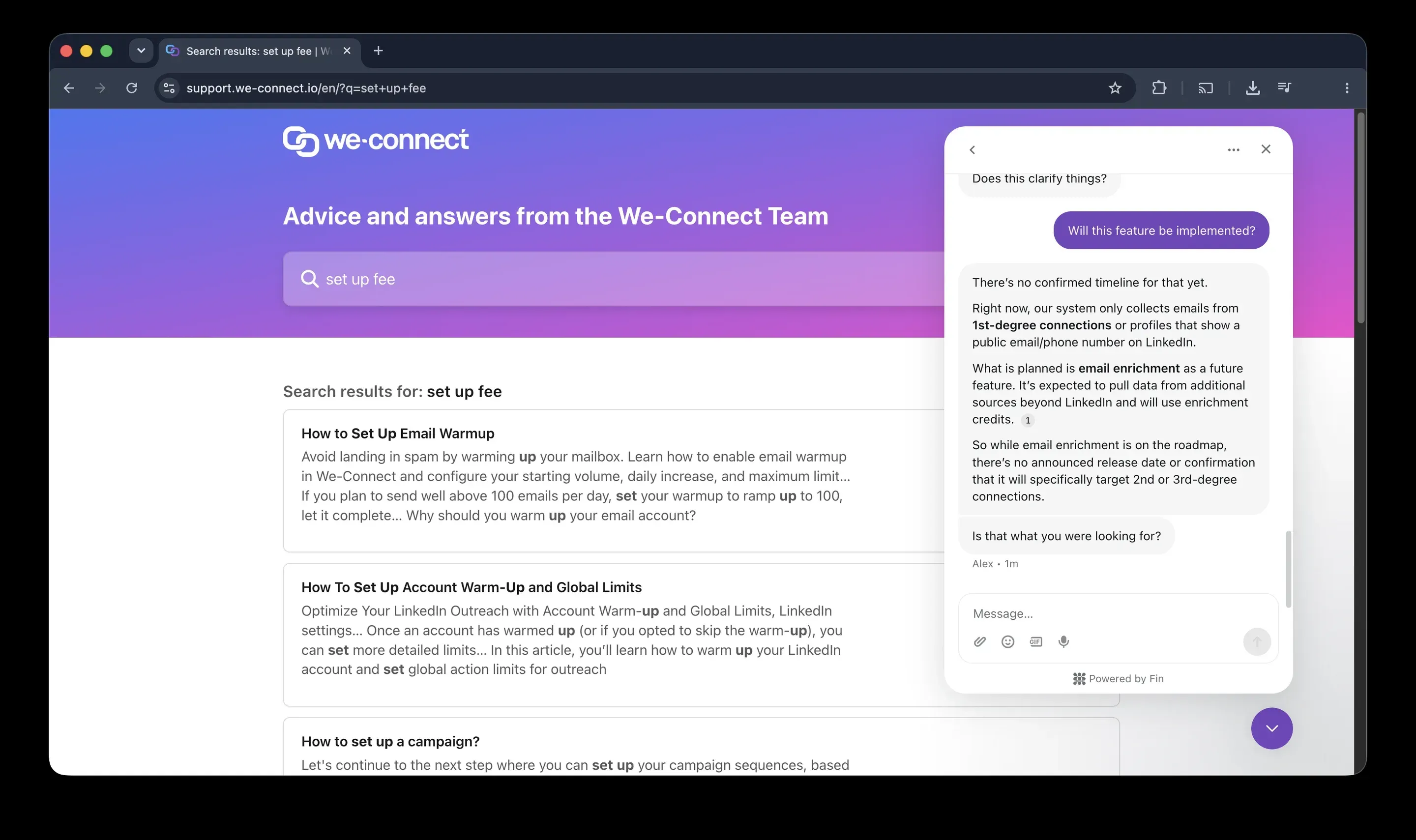
We-Connect support chat from our trial account. Emails come only from first-degree connections or public profiles, and email enrichment has no release date.
The product pages label Email Enrichment as Soon, so plan for a separate finder today. Linked Helper includes one: Standard comes with 620 data credits a month and Pro with 3,100, and they never expire.
How Much Do We-Connect and Linked Helper Cost?
Linked Helper costs less at every size. At 20 accounts the licences alone are $240 a month against $1,380 to $1,580 on We-Connect.
| Accounts | Linked Helper Standard | We-Connect Growth | We-Connect Professional |
|---|---|---|---|
| 1 | $15 per month | $69 per month | $79 per month |
| 10 | $135 per month | $690 per month | $790 per month |
| 20 | $240 per month | $1,380 per month | $1,580 per month |
| 20, billed for 12 months | $132 per month | $980 per month | $1,180 per month |
Monthly licence cost, USD, October 2026. Licences only, no hosting. We-Connect is per seat, and Agency from 10 seats is priced on request, so these are list prices.
We-Connect's pricing page shows $49 and $59 in large type, but those are annual-billing prices. Switch to Monthly and Growth is $69, 41% more than the headline. Scale is shown at $99 and marked Soon, and Agency is custom from 10 seats.
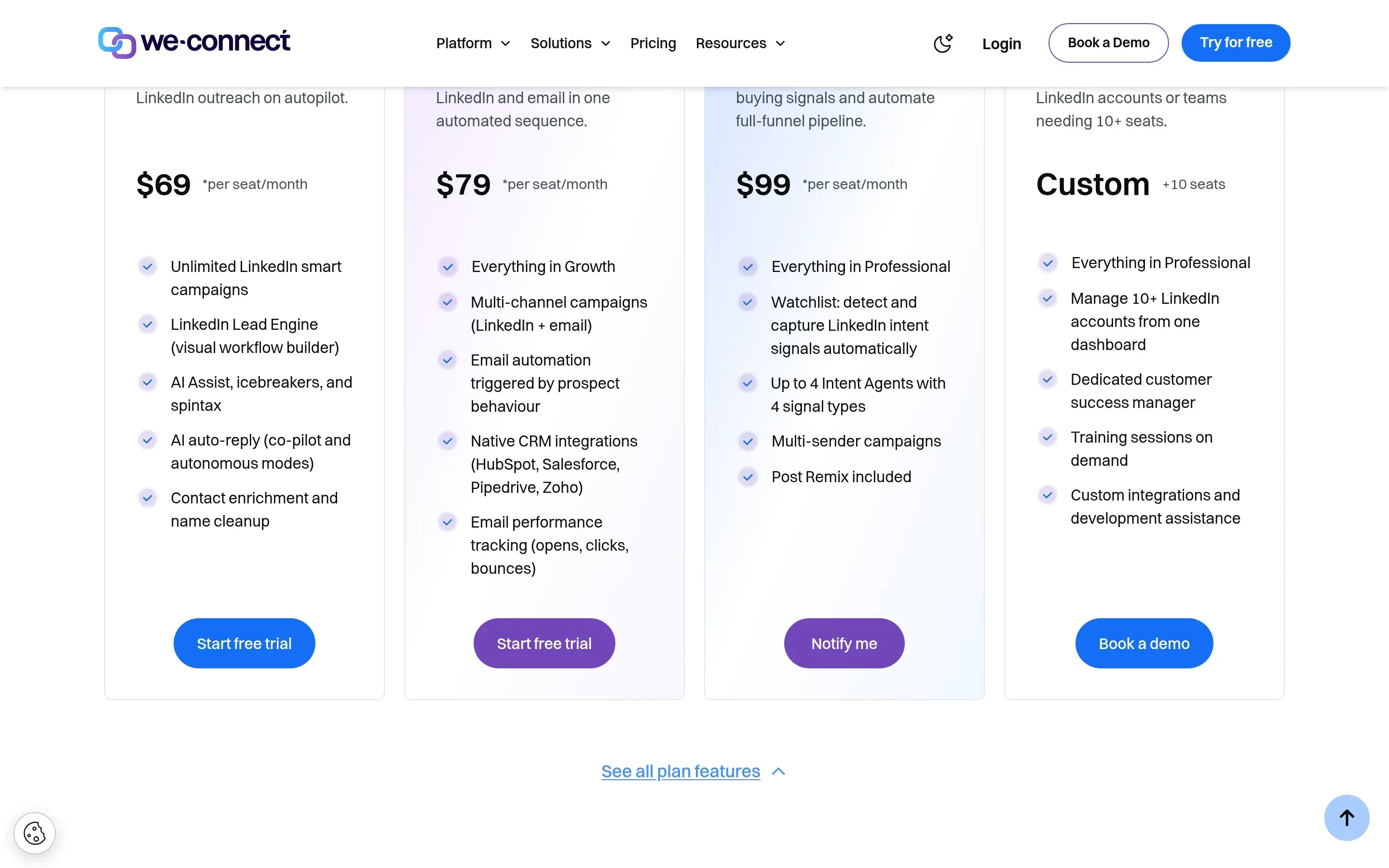
We-Connect pricing page with the Monthly switch on, October 2026. Growth at $69, Professional at $79, Scale marked Soon and Agency on request.
Linked Helper sells licences for 1, 3, 6 or 12 months instead of an auto-renewing subscription. The $8.25 figure is a 12-month Standard licence billed once at $99. One licence runs one LinkedIn account at a time, so we quote prices per account. Duration and bulk discounts stack, and bulk discounts apply when the licences are on one invoice (licensing and discounts).
What Does a 20-Account Agency Really Pay?
A 20-account team pays about $420 a month with Linked Helper and $1,580 plus tax with We-Connect Professional, even after counting the hosting we added. We ran the full cost for one scenario. Five managers, 20 LinkedIn accounts, outreach feeding HubSpot, campaigns running 24/7, 400 email lookups per account and 850 follow-ups. Linked Helper lives on your own machines, so we added the hosting it needs. We-Connect is cloud, so it needs none. We priced Professional because it is the plan with ongoing native HubSpot, which Growth shows only as a limited-time offer.
| Cost line | Linked Helper Standard | We-Connect Professional |
|---|---|---|
| Licences | $240 (20 × $15, 20% volume discount) | $1,580 (20 × $79) |
| Servers | $100 (5 Windows VPS at about $20, assumption) | Included |
| Proxies | $80 (20 at about $4, assumption) | Included |
| Email finder, 8,000 lookups | Included (12,400 credits a month that never expire) | Not available, needs a third-party tool |
| Total per month | $420 | $1,580 plus tax and an email finder |
| Total per month, annual billing | $312, or $3,744 a year | $1,180, or $14,160 a year |
Monthly cost for 20 accounts, USD, October 2026. VPS and proxy prices are our assumptions, not vendor prices. We-Connect figures exclude tax.
Annual billing does not close the gap. We-Connect Professional drops to $59 per seat, still about four times the Linked Helper bill. Growth is cheaper at $980 a month billed annually, but it has no email steps and its native CRM is a limited-time offer. Agency pricing for 10 or more seats is not public: the page says Book a demo, and the discount that starts at 25 seats is shown only after you log in. We did not get a quote, so we do not guess one.
Which Plan Is the Cheapest Way In?
At Linked Helper the cheapest plan is also the real minimum. At We-Connect, Growth is a working LinkedIn-only plan with branching, and Professional is where email and durable CRM begin. Here is what each entry plan gives you.
| What you need | Linked Helper Standard, $15 | Linked Helper Pro, $45 | We-Connect Growth, $69 | We-Connect Professional, $79 |
|---|---|---|---|---|
| Multistep sequences | Yes, no step limit | Yes | Yes | Yes |
| If/then branching | In message templates, plus routing by outcome | Same as Standard | Yes, visual builder | Yes, visual builder |
| Stop when a lead replies | Yes | Yes | Yes | Yes |
| Campaigns running at once | One at a time, the runner switches by priority | Same as Standard | Up to five | Up to five |
| Lead export to CSV | Yes | Yes | Yes | Yes |
| Message history export | No | Yes | No | No |
| CRM and webhook sends | 20 profiles a day | Unlimited | Native CRM integrations shown as limited time | Native CRM integrations |
| Email steps in the sequence | Via Snov.io or Instantly | Via Snov.io or Instantly | No | Yes |
| Email finder credits per month | 620 | 3,100 | None | None |
Entry plans compared, October 2026. Linked Helper from its licensing page, We-Connect from its pricing page, help center and our support chats.
Sources are the Linked Helper licensing article and the We-Connect pricing page, help center and our support chats.
Standard is the real minimum at Linked Helper: multistep sequences, reply stop and safety settings for $15. We-Connect Growth buys you the visual builder and branching at $69, 4.6 times the price, and email and durable CRM start only at Professional. Move up to Linked Helper Pro only if you need message export, bigger credit pools or more than 20 CRM sends a day.
What Do You Get With Linked Helper?
Linked Helper has been built around one network, LinkedIn, for ten years. You chain invitations, messages, profile visits, endorsements and post engagement into one campaign, and each account can use its own HTTP, HTTPS, SOCKS or SOCKS5 proxy.
- Custom campaign builder with reply detection and stop conditions
- Built-in CRM with tags, notes, auto-tagging and CSV export
- Sales Navigator, Recruiter Lite, Recruiter, groups, events and post engagement support
- Data enrichment credits, AI messages and AI comments
- Daily limits, smart daily limits, randomized delays and working hours
- Per-account proxy assignment with a built-in proxy checker
- Webhooks, Zapier, Make and direct CRM integrations
- Workspaces with roles, client guests and access lists
| Plan | Monthly price | Annual equivalent | Best for |
|---|---|---|---|
| Trial | Free for 14 days | Free for 14 days | Full functionality, no credit card |
| Standard | $15 per month | $8.25 per month | Core automation, campaigns, CRM and export |
| Pro | $45 per month | $24.75 per month | Message history export, higher limits, bigger credit pools |
Unlike classic cloud tools, we have no servers that run your campaigns. You install Linked Helper wherever you choose, on a laptop or on a VPS you rent, and that setup gives you control. Your cookies, your session, your IP and your lead data stay on that machine. On a VPS campaigns run around the clock, you can log in from any device and you can give a teammate access.
What Do You Get With We-Connect?
We-Connect positions itself as a cloud LinkedIn platform with an AI layer, and its builder goes further than ours on branching. Its Lead Engine is a visual builder with conditions on replies, connection status and AI lead scores, and it is included on every plan.
- Runs in the cloud, so campaigns continue with your computer off
- Visual workflow builder with branching and A/B tests on every plan
- LinkedIn plus email steps in one sequence from Professional
- Public REST API and outgoing webhooks on every plan
- Campaigns pause automatically when LinkedIn restricts the account and resume after a week
- Built-in duplicate suppression across campaigns and accounts
- A separate white-label reseller program with a custom domain and Stripe billing
| Plan | Monthly price | Annual equivalent | Best for |
|---|---|---|---|
| Growth | $69 per seat | $49 per seat | LinkedIn-only outreach |
| Professional | $79 per seat | $59 per seat | LinkedIn plus email, native CRM |
| Scale | $99 per seat, marked Soon | $79 per seat | Intent signals, not yet sold |
| Agency | Custom from 10 seats | Custom | Agencies, on request |
Is Linked Helper or We-Connect Safer?
We believe Linked Helper is, because it keeps your session and IP on your side while We-Connect holds both in its cloud. This is where the two differ most, so we checked it instead of describing it.
Is We-Connect a Safe Cloud Tool?
You give We-Connect your LinkedIn email and password. Its help says to enter your LinkedIn credentials, and in our chat the setup needs the email, the password and, if LinkedIn asks, a security PIN. We did not find where the LinkedIn session is stored: the help center does not say. Its data processing agreement says customer data is stored in data centers in the United States, and promises EU-only processing if it cannot meet the transfer requirements.
On the IP, the vendor's wording is strong. Its help center has a row labelled “Real Residential IPs,” and its support assistant told us the IPs are real residential addresses, not data-center proxies. The pricing page says a dedicated country-based IP is assigned to each account.
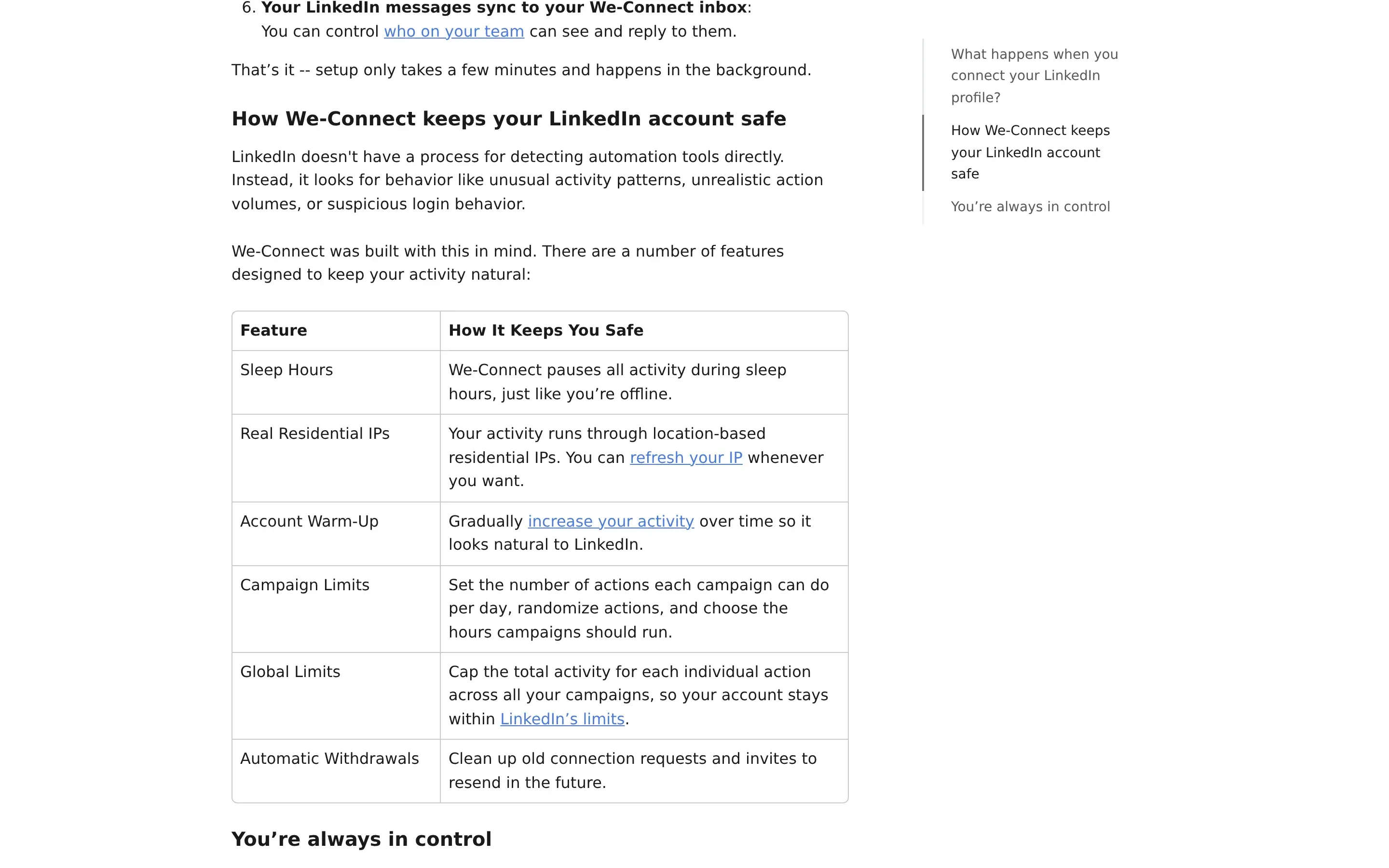
We-Connect help center, October 2026. The row is labelled Real Residential IPs.
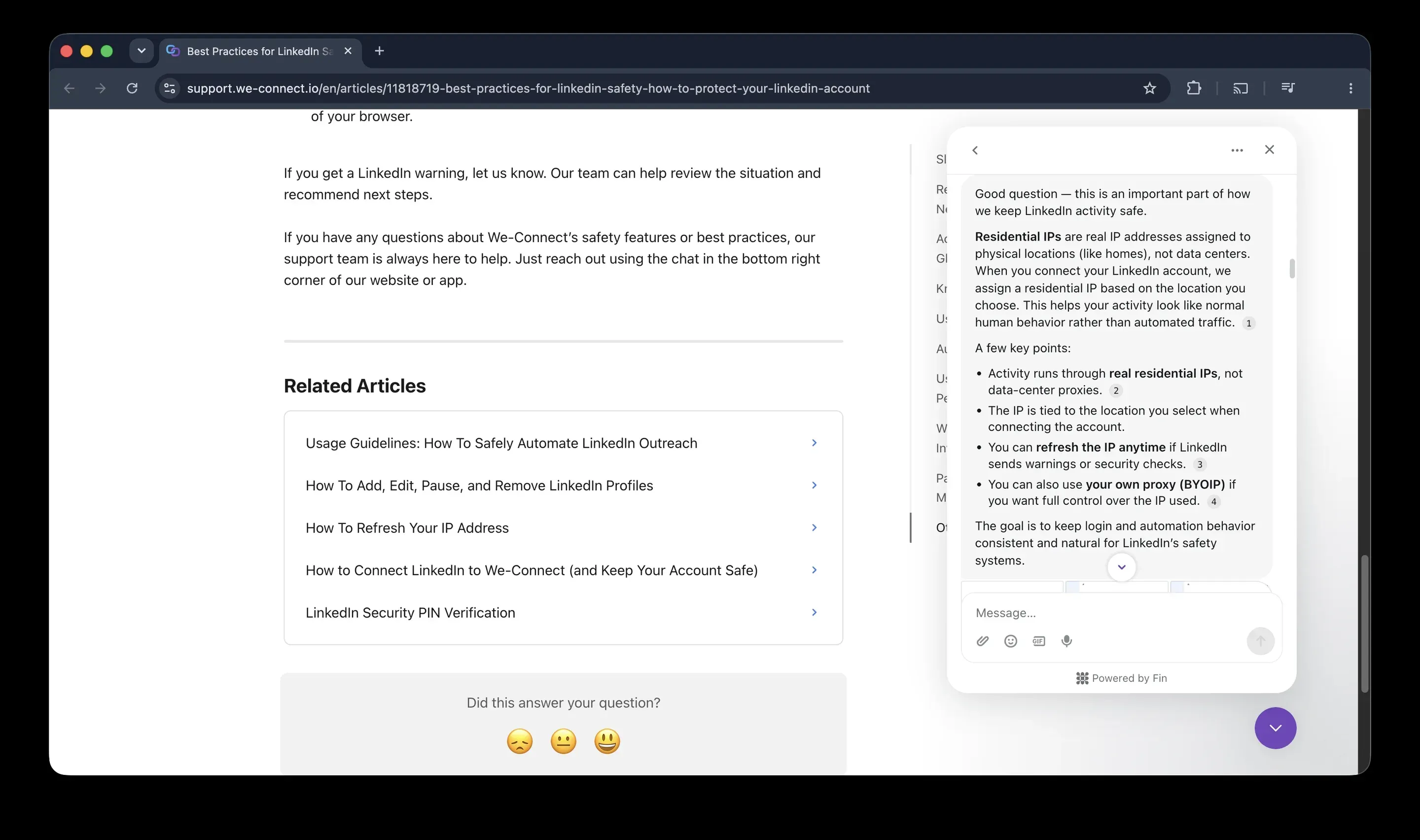
We-Connect's support assistant, from our chat. It describes the IP as residential and says it is not a data-center proxy.
Our test did not match. We signed up for two accounts from France, and We-Connect assigned each a different IP. Both were data-center addresses, and both carried proxy and VPN flags on IPQualityScore.
| Account 1 | Account 2 | |
|---|---|---|
| IP | 185.255.166.73 | 168.91.75.167 |
| Provider | HostRoyale Technologies (ASN 203020) | M247 Europe (ASN 9009) |
| Connection type | Data Center | Data Center |
| Fraud score | 94 out of 100 | 87 out of 100 |
| Proxy, VPN | Yes, Yes | Yes, Yes |
| Recent abuse | No | Yes |
| Browser fingerprint reported | Mac 10.15, Chrome 135 | Mac 10.15, Chrome 135 |
IPQualityScore results for the two IPs We-Connect assigned to our two test accounts. This is an independent IP-quality signal, not LinkedIn's decision.
A dedicated IP is not a clean IP. Both accounts also reported the same fingerprint despite different networks, which suggests shared infrastructure, though we did not take the platform apart to prove it. Two accounts in one country are a sample, so this is no verdict on every We-Connect account, but you cannot check or fix the IP from inside the product. Support confirmed there is no tool that checks or validates proxies. Refreshing the IP or bringing your own proxy are the only levers you get.
How Does Linked Helper Keep You in Control?
Linked Helper's answer differs. Activity runs from your own IP or a proxy you control, and Linked Helper does not run from vendor infrastructure, so it was not part of the cloud test. The LinkedIn password is used only for auto-login. If you do not add it, you sign in by hand, and if you do not want it stored on our servers, you can store it locally on your machine (the help center says so).
The proxy checker shows what you would otherwise discover after a restriction. For each proxy it reports the country and a fraud score from IPQualityScore, and it indicates whether the IP has been used by bots, crawlers or VPN and proxy services. A proxy is marked Good or Bad, and the app recommends replacing a Bad one. It warns rather than blocks, so the decision stays yours.
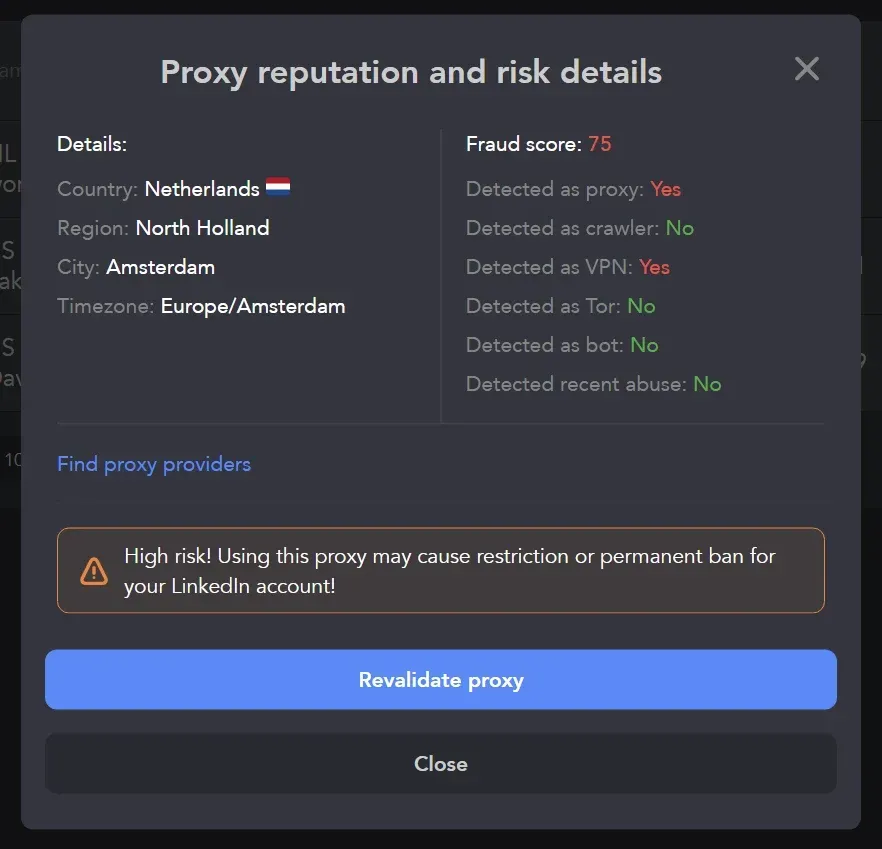
Linked Helper proxy checker on a test proxy. A fraud score of 75 triggers the high-risk warning.
Pacing is set in the same app. The default daily limit is 150 actions, with a Smart Daily Limit Adjustment that varies the daily count and separate limits per action type.
We-Connect also has pacing controls, and they are good. It has global limits, warm-up, sleep hours and a pause when LinkedIn restricts the account that resumes after a week. Linked Helper's campaigns runner runs one campaign at a time per account and switches between them by priority, while We-Connect runs up to five.
Do Campaigns Stop When the Computer Is Off?
Only if you leave Linked Helper on a laptop you close (the help center says so too). Run it on a VPS you rent and campaigns stay online around the clock, from an environment you control. We-Connect runs without your computer by design, and support confirmed it.
What Happens to Your Data if You Leave We-Connect?
You lose access to your campaigns when the subscription ends, and you cannot export the conversations. We asked support whether we could reach our data after the trial. The answer was that you need an active account to have access to your campaigns.
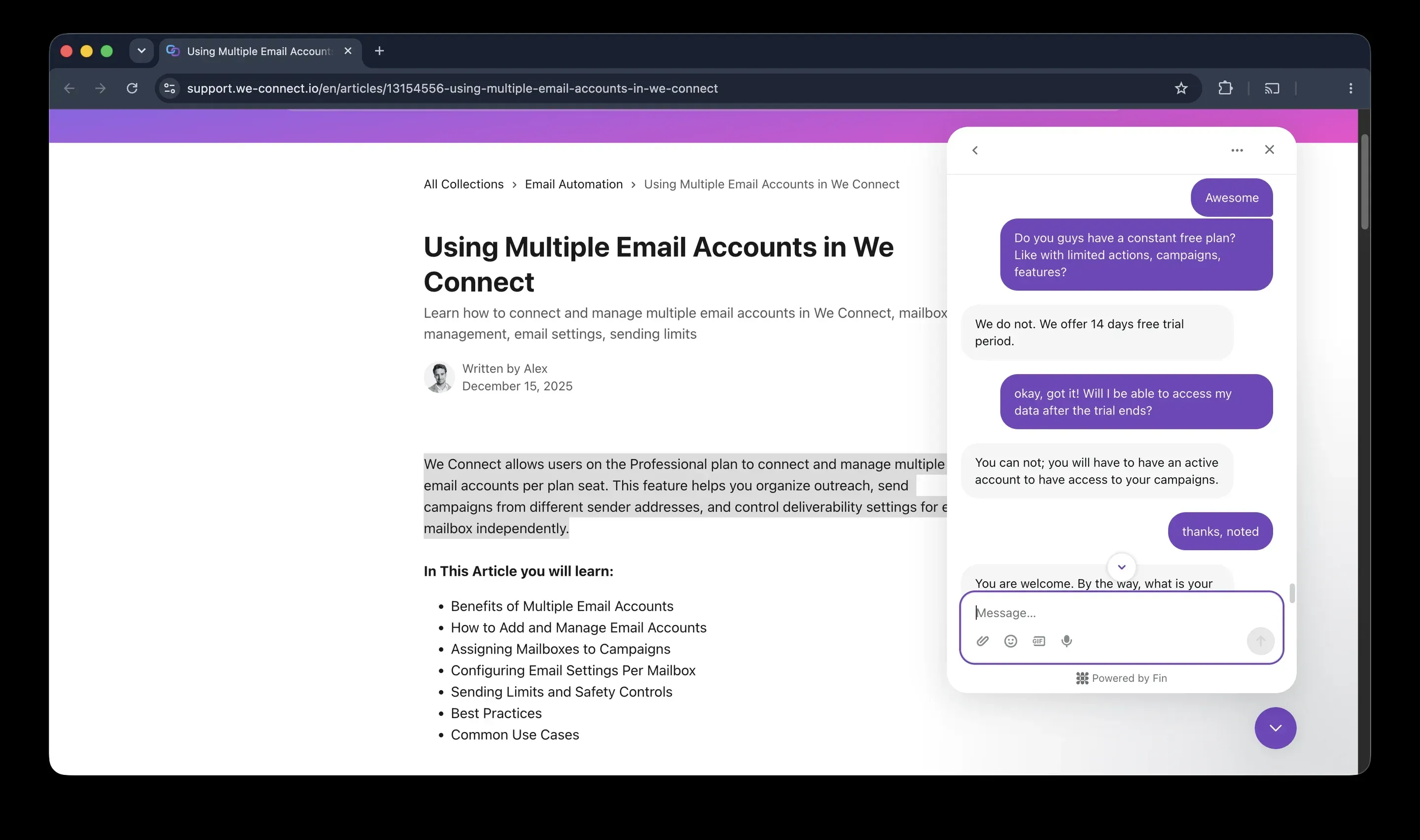
We-Connect support chat from our trial account. After the trial you need an active account to reach your campaigns.
Contacts and campaign reports export to CSV, with up to 16 fields, and that works on every plan. Message conversations are not part of those exports. Support suggested syncing message conversations to HubSpot instead.
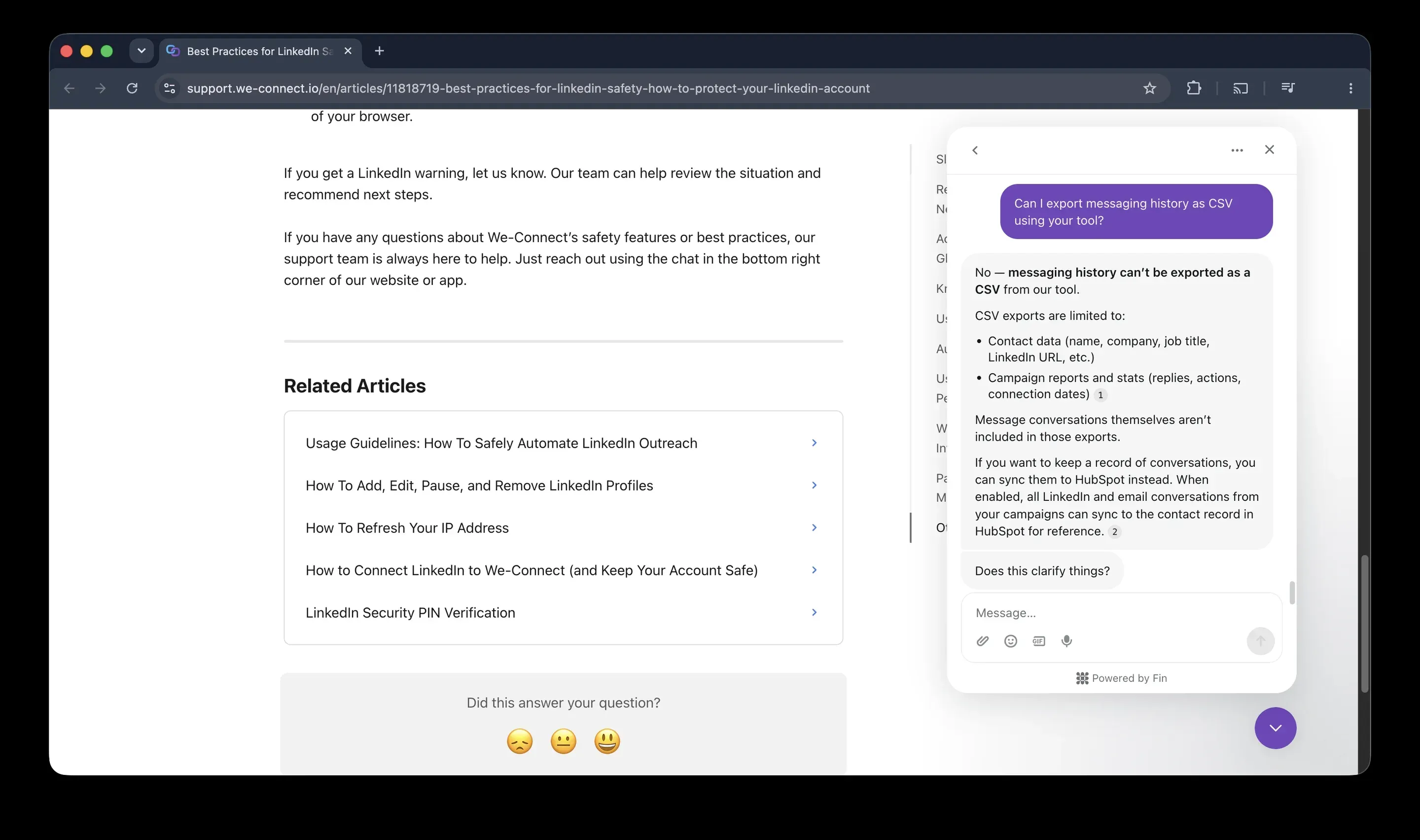
We-Connect support chat from our trial account. Message conversations are not included in CSV exports.
The customer terms say that after termination you may export your data during any wind-down period We-Connect makes available, and that it has no obligation to store or maintain your data after termination, except what its data processing agreement and the law require.
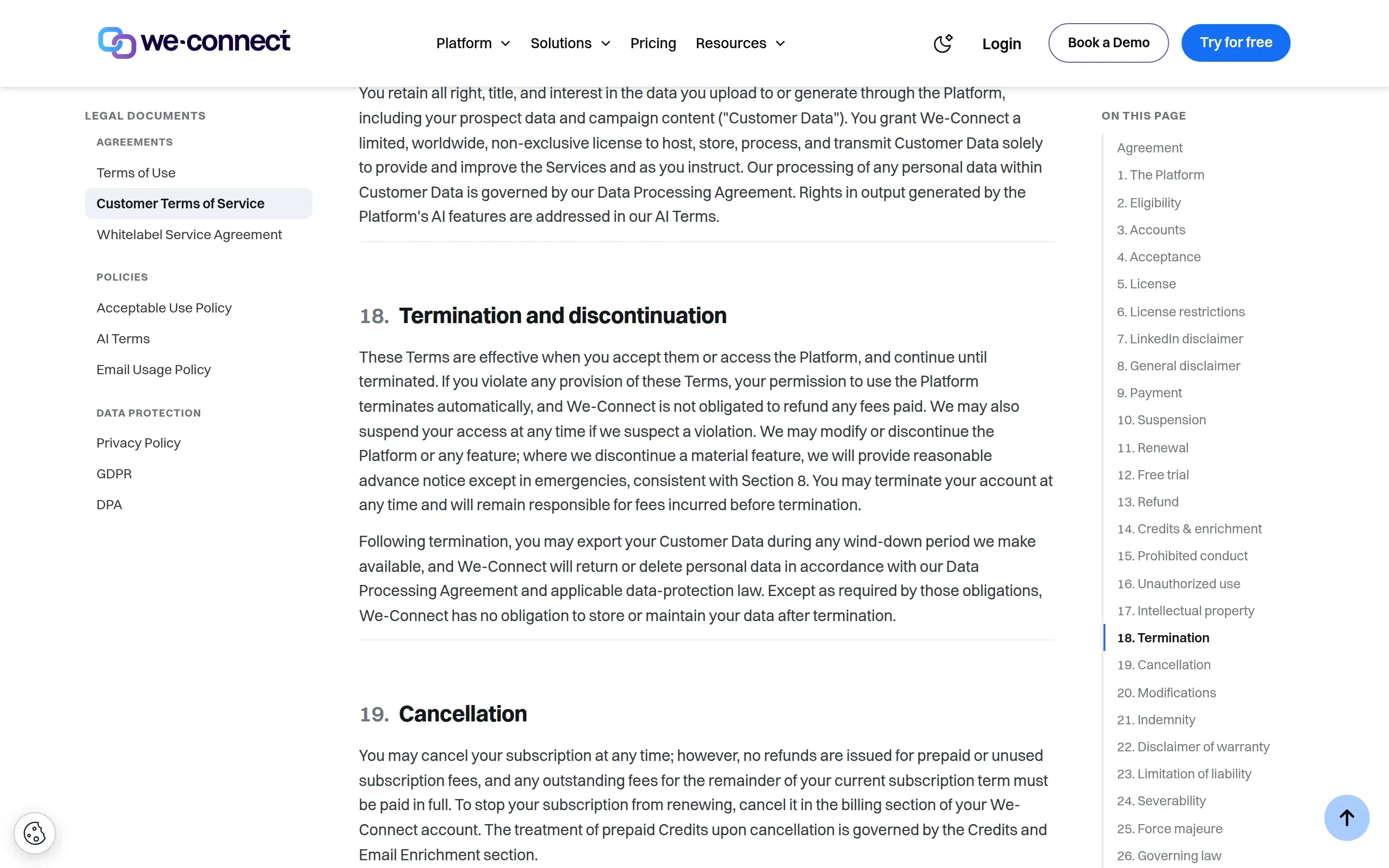
We-Connect customer terms, section 18, October 2026.
The tools take different approaches to data control and compliance paperwork. With local storage, which is the default, Linked Helper keeps campaign data in a database on your machine, and Pro exports message history to CSV or a webhook. Standard does not export it, although the history is kept in the database. We-Connect is stronger on paperwork: it has a GDPR page, a data processing agreement with a list of sub-processors and a promise to delete your data within 90 days of cancellation. Neither tool lists SOC 2 or ISO certificates.
Which Is Better for Agencies, Linked Helper or We-Connect?
Linked Helper is cheaper and keeps each client in an isolated workspace. We-Connect automates more of the agency chores and sells white-label as a separate program.
| Linked Helper | We-Connect | |
|---|---|---|
| Manager seats | Unlimited in the first workspace, no extra cost | Free team members, no extra seat |
| Client access | Guest with a Viewer role on the client's account | Read-only shared access, no client login without white-label |
| White-label | Your own logo and name in the app | Separate paid reseller program with own domain and Stripe billing |
| Proxy per account | Yes, your own | An assigned IP, or bring your own |
| Duplicates across accounts | Manual with CSV, or Cloud storage | Built in |
| Price for 20 accounts | From $240 a month in licences | From $1,380 a month, Agency from 10 seats on request |
Agency features compared, October 2026. Linked Helper from its help center, We-Connect from its help center, pricing page and our support chats.
What Do Users Say About Each Tool?
Users rate both tools well, and Linked Helper has more reviews. Counting every review together, Linked Helper has 893 reviews at a weighted average of 4.78 out of 5, and We-Connect has 154 at 4.65.
| Site | Linked Helper | We-Connect |
|---|---|---|
| G2 | 4.5 (149 reviews) | 4.6 (84 reviews) |
| Capterra | 4.9 (278 reviews) | 4.7 (70 reviews) |
| Trustpilot | 4.8 (466 reviews) | No profile found |
| All sites, weighted | 4.78 (893 reviews) | 4.65 (154 reviews) |
The weighted average multiplies each site's score by its number of reviews and divides by the total. The sites have different audiences and review rules, so treat it as a summary and not as a single official score.
We-Connect reviewers praise ease of use and support, and the tool scores higher than Linked Helper on G2. Ratings were checked in October 2026.
Which One Should You Choose?
Pick Linked Helper for price, control and your own IP. Pick We-Connect only if you want a ready-made cloud setup with a visual builder and email steps, and accept the security and detection risks that come with it.
| Your situation | Better fit |
|---|---|
| Lowest cost per account | Linked Helper |
| Your own IP, session and password stay with you | Linked Helper |
| Many accounts, public volume discounts | Linked Helper |
| Visual branching and email steps from the cloud | We-Connect |
How Do You Switch From We-Connect to Linked Helper?
In six steps, using the 14-day Linked Helper trial that needs no card.
- Export what you need from We-Connect before the subscription ends: contacts, saved lists and campaign reports. Message history is not part of the export, so sync it to HubSpot first if you want a record.
- Download the Linked Helper desktop app for Windows, macOS or Ubuntu and start the 14-day trial. No credit card is needed. The first-campaign guide walks you through it.
- Sign in to LinkedIn inside the app. A proxy is optional if you run only your own account. For several accounts on one machine, assign each its own proxy and run the built-in proxy checker.
- Rebuild one campaign in the campaign builder. Linked Helper has no visual branching canvas, so route people by outcome, and turn on reply detection so the sequence stops for people who answer.
- Run it on a small batch and compare replies in the built-in CRM. We recommend not running both tools on the same LinkedIn account at the same time.
- Cancel We-Connect in the Billing section before the renewal date. Prepaid fees are not refunded, so check whether you pay monthly or annually.
Where Can You Read More About We-Connect?
For more on We-Connect, see our We-Connect review.
To see other tools side by side, browse all comparisons, reviews and alternatives.