
 Updated: October 23, 2026
 20 min read
The best AI sales agent depends on which job you want off your plate. I'd start with Salesforce Agentforce for opportunity-based coaching, Sybill for post-call CRM updates, or Qualified Piper for inbound conversations. If your sales process crosses several apps, Lindy and Relevance AI give you more room to shape the work.
The expensive mistake is buying another prospecting tool when your team already has meetings—and keeps losing the next step afterward. A booking, a suggested task, and an updated CRM record are three different deliverables. Choose yours before comparing subscriptions.
I ran a synthetic drafting check in Lindy, inspected accessible onboarding and workspace screens, and compared official guides, pricing, and user discussions for capabilities I couldn't exercise. Linked Helper publishes this article.
An AI sales agent uses customer context and instructions to carry out or coordinate a sales job, such as qualifying a visitor, researching an opportunity, or updating a CRM. Its autonomy depends on the tools and permissions you give it: some agents recommend the next move, while others can send messages or change records.
Best AI sales agents at a glance
Your existing CRM and the action you need are better starting points than a universal winner.
| Tool | Best for | Standout capability | Pricing model | Main trade-off |
|---|---|---|---|---|
| Salesforce Agentforce Sales | Coaching on live opportunities | Role-play grounded in deal context | Sales add-on option: $125/user/month; base CRM extra | Requires a configured Salesforce environment |
| Dynamics 365 Sales agents | Finding risks in Microsoft-based pipelines | Opportunity research across CRM and communications | Professional base: $65/user/month, paid yearly; agent consumption extra | Research recommendations aren't autonomous closing |
| Sybill | Updating CRM after calls | Field-specific prompts and CRM Autofill | Business: $90/user/month, billed annually | Business includes 10 Autofill fields |
| Qualified Piper | Converting inbound website demand | Qualification, booking, and routing | Custom | Capacity and integration scope need a sales quote |
| HubSpot Breeze Prospecting Agent | Outreach from an existing HubSpot CRM | Plays with account context and guardrails | Eligible paid subscription plus credits; standard rate 100 credits/lead | Credit charge starts before the prospect replies |
| Lindy | Coordinating sales work across apps | Lead triage, owner routing, and response drafts | From $29.99/active user/month, billed monthly | A credit pool doesn't guarantee a number of completed workflows |
| Relevance AI | Building a tailored sales operations workflow | Per-tool human approval within an agent | Custom | Your team owns configuration and failure handling |
What makes the best AI sales agents?
A useful agent completes a defined handoff with the right data and a clear owner for exceptions.
-
A specific output. Decide whether you're buying research, a draft, a sent message, or a CRM update. “AI-powered” doesn't settle that question.
-
Useful customer context. An agent should work from the records and conversations that affect your deal, without treating every old note as current truth.
-
Control over actions. Reading an account record and changing its close date deserve different permissions. Look for approval controls where mistakes would reach a buyer or alter your pipeline.
-
A reliable handoff. Qualification needs routing, booking needs the correct owner, and a post-call task needs someone accountable for it. A fluent answer is only part of the job.
-
An understandable meter. Seats, leads, actions, credits, and website sessions buy different things. Include the parent CRM and required integrations in your budget.
1. Salesforce Agentforce Sales: Best for coaching on real opportunities
Salesforce Agentforce Sales is my pick for a team that wants reps to rehearse a deal using the context already in Salesforce.
Pros — Salesforce Agentforce Sales
-
Sales Coach connects role-play and feedback to opportunity context.
-
Feedback separates strengths, improvements, and next steps.
Cons — Salesforce Agentforce Sales
-
The Sales add-on sits on top of your CRM investment.
-
Coaching helps the rep prepare; it doesn't take over the buyer negotiation.
A generic chatbot can help you practice a pitch. Salesforce's advantage is making that practice part of the opportunity workflow. Its Sales Coach tutorial leads a seller through a buyer conversation and then breaks the feedback into things to keep and things to change. For a manager reviewing several late-stage deals, that's a more useful starting point than asking everyone to invent their own practice prompt.
I particularly like the separation between feedback and execution. You can use an agent to make a rep better prepared without handing it permission to make commercial promises. I'd choose this when your Salesforce records are useful enough to ground the exercise and someone already owns enablement.
The catch is the surrounding platform. Agentforce setup, grounding, and CRM administration are part of the project. If you're a solo seller looking for something you can point at an inbox today, I'd skip this.
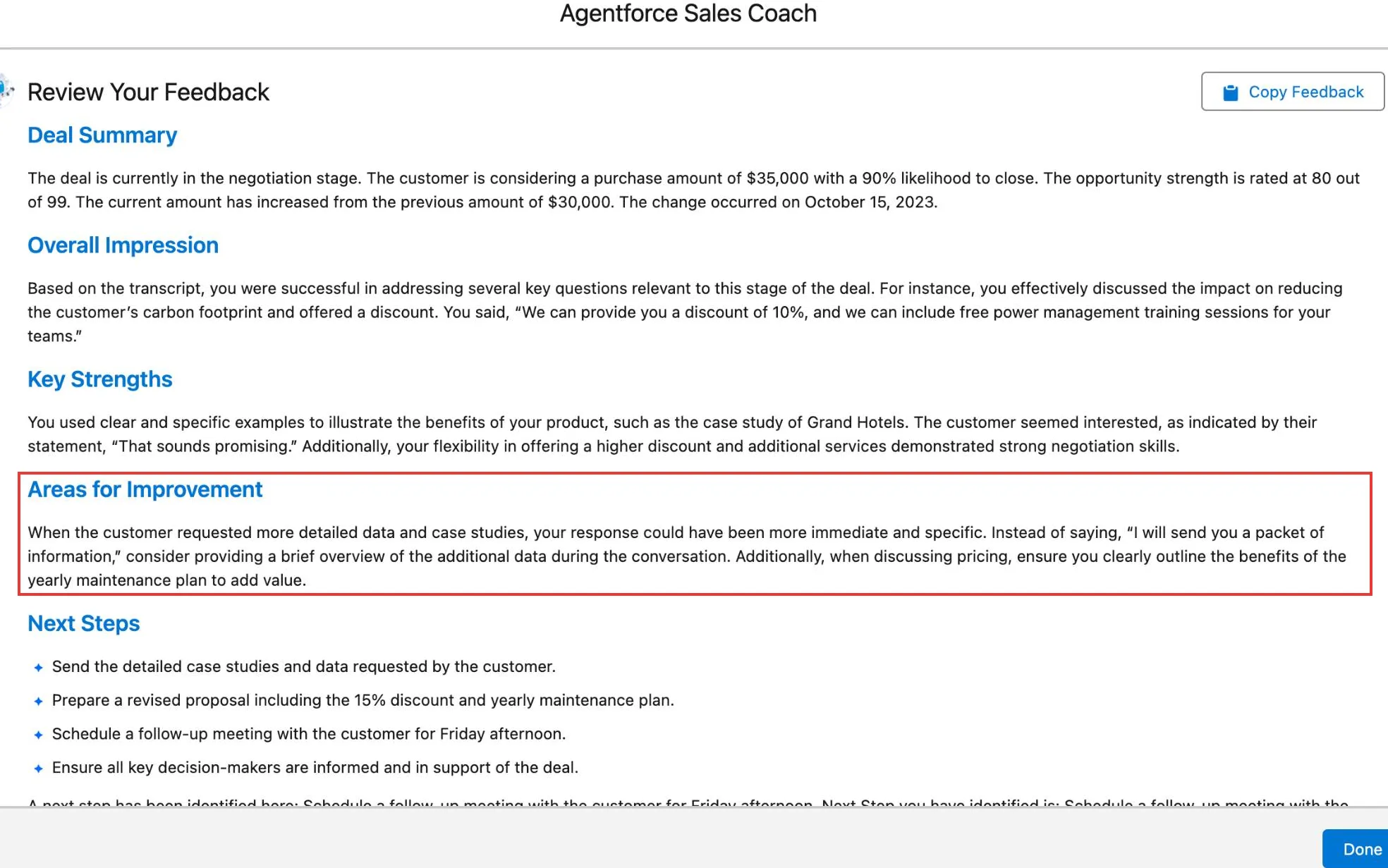
Inside Agentforce Sales Coach, feedback separates strengths from concrete changes to make before the next buyer conversation. (Image source: Salesforce)
Salesforce Agentforce Sales pricing
The general Sales add-on is $125/user/month, plus underlying CRM licensing. Confirm Sales Coach entitlement for your edition; this is a budgeting option, not a verified minimum coaching price.
-
Employee usage — unmetered under this add-on; don't extend that promise to prospect-facing conversations.
-
Separate metered option — standard actions consume 20 Flex Credits; the $500/100,000-credit rate works out to $0.10 per standard action.
-
Contract scope — base licensing and applicable data or other consumption charges still matter.
2. Dynamics 365 Sales agents: Best for spotting opportunity risks
Dynamics 365 Sales agents suit teams that need help finding which open deals deserve attention before the next pipeline review.
Pros — Dynamics 365 Sales agents
-
Sales Opportunity Agent combines CRM, email, meeting, and web context.
-
Research can highlight stakeholder gaps and suggest next actions.
Cons — Dynamics 365 Sales agents
-
Azure and agent consumption sit alongside the Sales subscription.
-
Initial scope and refreshes affect how much research runs.
Sales Opportunity Agent looks beyond a neat CRM stage label. It can connect a stalled conversation, missing stakeholder, or outdated close date to a deal that needs attention. I like this for managers whose hardest question is “Which opportunity has quietly gone cold?” rather than “Where can I find another email address?”
The seller still needs to judge the recommendation. A research agent can surface weak engagement; it can't make the buyer approve a budget. I'd use it to prepare a focused review, then give each suggested next step a human owner.
Things I Noted — Dynamics 365 Sales agents
The setup guide makes initial scope unusually important: activation processes matching open opportunities, not just deals created afterward. I'd narrow that first batch before increasing refresh frequency. Otherwise, you can spend capacity researching a backlog before the team has learned what to do with the findings.
There's also a product-name trap. Microsoft stopped new Sales Close Agent instances on September 30 and plans to remove existing instances on October 30, 2026. I'd build a new evaluation around the current Opportunity Agent, not an older “autonomous closing” demo.

Inside Dynamics 365, the opportunity summary flags a missed close date and prolonged buyer silence before the seller opens the full research. (Image source: Microsoft)
I also compared the Sales Premium billing choices in the trial setup. Paying monthly came to $1,890 per user over the same one-year term, versus $1,800 paid yearly. That's a $90 difference in base seats before agent usage. Monthly payments don't mean a monthly commitment.
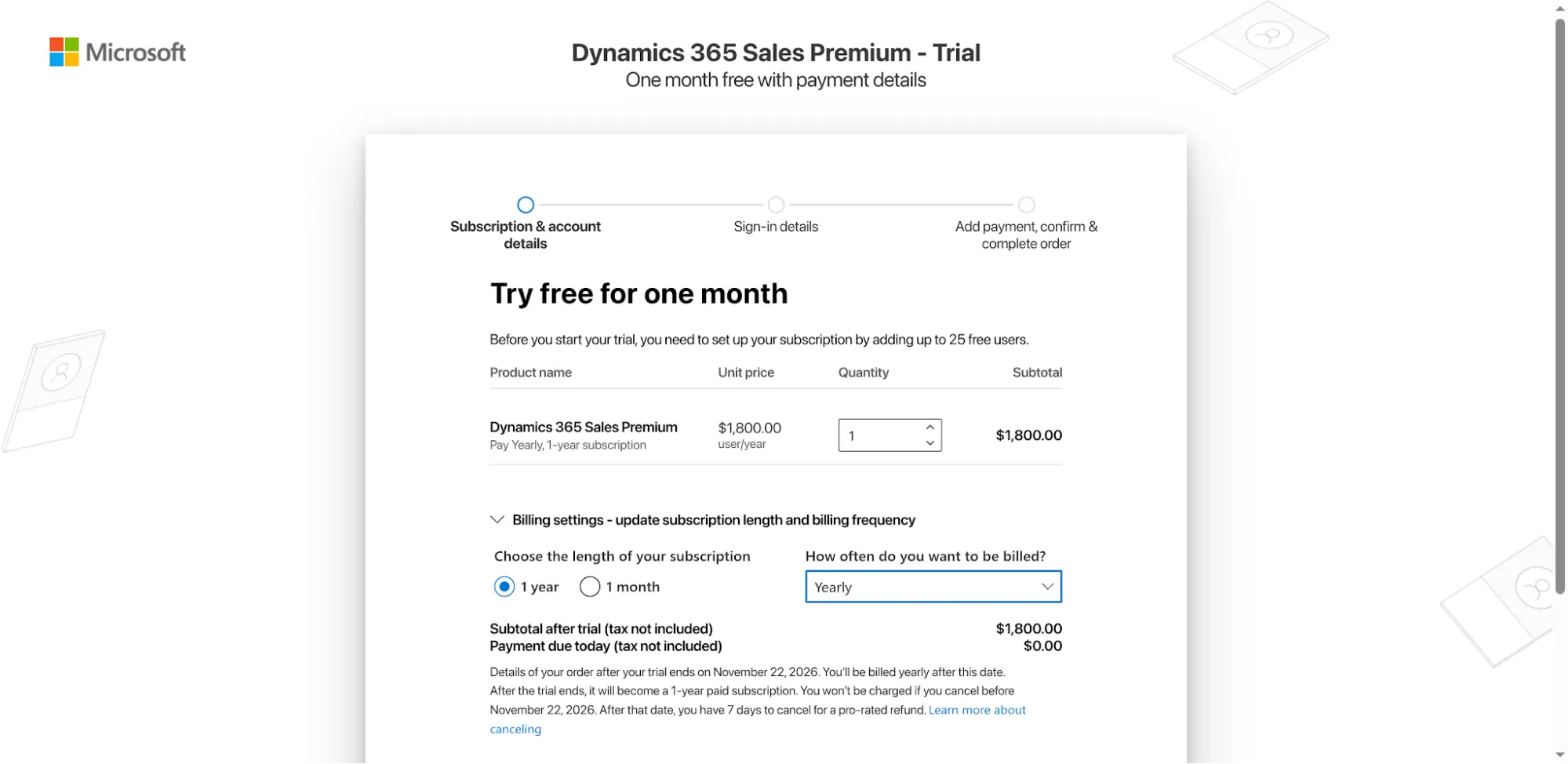
Inside the Dynamics trial signup, payment frequency and subscription length are separate choices.
The catch is setup and consumption management. My new-account route led to a payment-details step, so the Opportunity Agent assessment rests on its guides. Skip this if you need a standalone assistant without a Microsoft sales environment.
Dynamics 365 Sales agents pricing
Sales Professional base seats cost $65/user/month, paid yearly; agent consumption is additional.
-
Sales Premium — $150/user/month, paid yearly, with 1,000 Copilot Credits per user/month included.
-
Agent deployment — requires Copilot Studio licensing, Azure, and admin configuration; base seats aren't unlimited agent usage.
3. Sybill: Best for turning sales conversations into CRM updates
Sybill is my pick when your reps have the conversations but leave the CRM a meeting behind.
Pros — Sybill
-
CRM Autofill uses field-specific prompts for structured updates.
-
Business connects deal context across calls, email, CRM, and Slack.
Cons — Sybill
-
Business caps CRM Autofill at 10 fields.
-
The initial setup can update historical deals as well as future ones.
Sybill lets you turn calls and emails into CRM fields rather than another summary someone has to copy. That matters when a buyer's next step belongs in a reportable field, not halfway down a transcript. I'd start with a small set of fields your team actually uses: next step, decision process, and a clearly evidenced risk.
The distinction I like most is between an internal Deal Summary and CRM Autofill. They're configured separately. You can keep a useful working summary without assuming every line should become a shared CRM update.
A Reddit commenter, u/Schrutebucks101, put the benefit plainly:
“We use Sybill and it updates HubSpot CRM based on call recordings and emails”
There are integration edges to check. In a LinkedIn feedback thread displayed as two months old, Ariel Browne wrote:
“Broken: merging deal records in our CRM breaks the sync between Sybill. Love the product otherwise!”
That historical report makes merged-record handling a sensible pilot check; the thread doesn't tell us whether it was later fixed.
Things I Noted — Sybill
The Autofill guide says first-time setup backfills your last 30 deals. I'd inspect those records and preview the field prompts before enabling it, then compare the updates afterward. A new integration can change historical records, so don't treat activation as a future-calls-only switch.
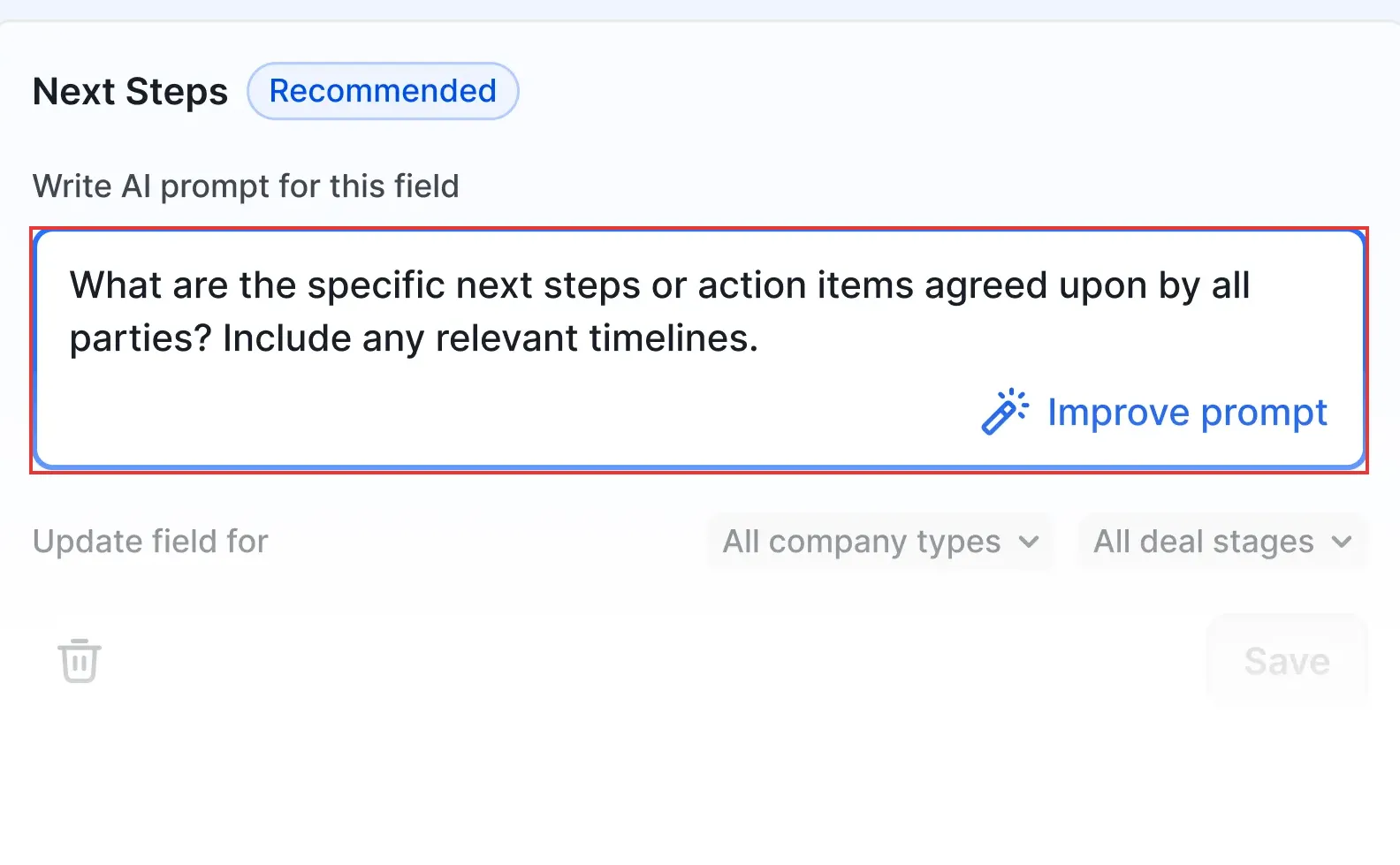
Inside Sybill, a field-specific prompt defines which agreed next steps should become a CRM update. (Image source: Sybill)
The catch is the field allowance. Skip Business if your rollout needs dozens of mapped fields from day one; its technical flexibility doesn't remove the plan limit.
Sybill pricing
From $90/user/month, billed annually, for Business with CRM Autofill.
-
Free — 500 AI credits/user/week and limited meeting summaries.
-
Business — 10 Autofill fields and 5,000 AI credits/user/week; CRM Autofill itself uses no AI credits.
-
Enterprise — custom pricing for unlimited Autofill fields and AI usage.
4. Qualified Piper: Best for qualifying inbound website visitors
Qualified Piper fits a B2B website with steady demand where visitor questions, routing, and meeting handoffs are the work you want an agent to handle.
Pros — Qualified Piper
-
Premier combines website and email conversations with meeting booking.
-
Routing and workflow actions connect conversations to downstream systems.
Cons — Qualified Piper
-
Pricing is custom, with separate website and email capacity measures.
-
Enterprise adds capabilities such as agent handoff and MCP/API access.
Piper's appeal is continuity. A visitor can ask a question, qualify for the right path, and move toward a meeting while they're still interested. I'd favor it when you're already paying to bring suitable buyers to your site and the weak link is what happens after they arrive.
The useful comparison isn't “chatbot versus salesperson.” It's whether the agent sends the right visitor to the right owner with the right context. A polite answer that leaves your CRM empty hasn't finished the job.
Things I Noted — Qualified Piper
Piper's certification walkthrough uses a test URL parameter to keep a draft experience away from ordinary visitors. It also asks you to verify qualified and disqualified paths and check that expected lead data reaches Salesforce or your marketing platform. I like that launch standard: test the handoff, not just the conversation.
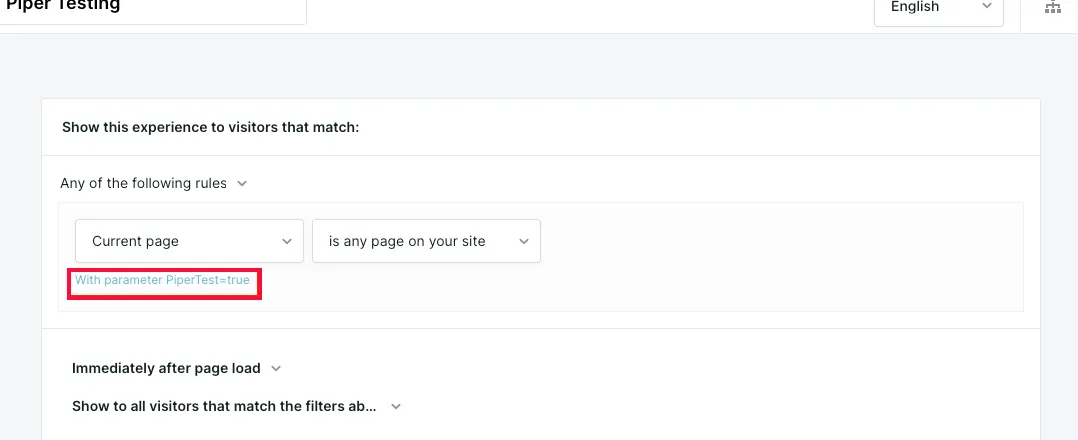
Inside Piper's experience builder, a test URL parameter lets you check qualification and booking before launch. (Image source: Qualified)
The catch is fit. Skip Piper if you don't yet have enough relevant inbound traffic to justify this infrastructure. More conversation capacity won't create demand for you.
Qualified Piper pricing
Custom, based on the package and capacity.
-
Premier — 250,000 monthly web sessions, 2,500 active email contacts, and one agent profile.
-
Enterprise — 2 million monthly web sessions, 10,000 active email contacts, and additional integration capabilities.
5. HubSpot Breeze Prospecting Agent: Best for outreach from your existing CRM
HubSpot Breeze Prospecting Agent is the practical starting point if your contact history already lives in HubSpot and you want that context carried into outreach.
Pros — HubSpot Breeze Prospecting Agent
-
Plays combine audience, context, outreach, and guardrails.
-
An eligible Starter subscription can provide access; Sales Hub Professional isn't the universal entry requirement.
Cons — HubSpot Breeze Prospecting Agent
-
Generating personalized outreach consumes credits, including for manually enrolled leads.
-
Included credits are shared with other eligible features and expire monthly.
The advantage is using the record you already have. A play can draw on CRM engagement and follow controls such as maximum emails and minimum delays. I like this for a team that wants a repeatable first-touch process without rebuilding its customer context elsewhere.
I set up a free HubSpot workspace and clicked Prospecting Agent from the Sales menu. It took me straight to an upgrade screen. Storing contacts in the free CRM doesn't give you somewhere to configure this agent, so I'd budget for eligible access before planning the pilot.
The catch is when the meter starts. You pay for generated outreach, not a reply or a booked meeting. Bringing your own contact list doesn't remove that charge. Skip this if your business case assumes every credit corresponds to a new qualified opportunity.
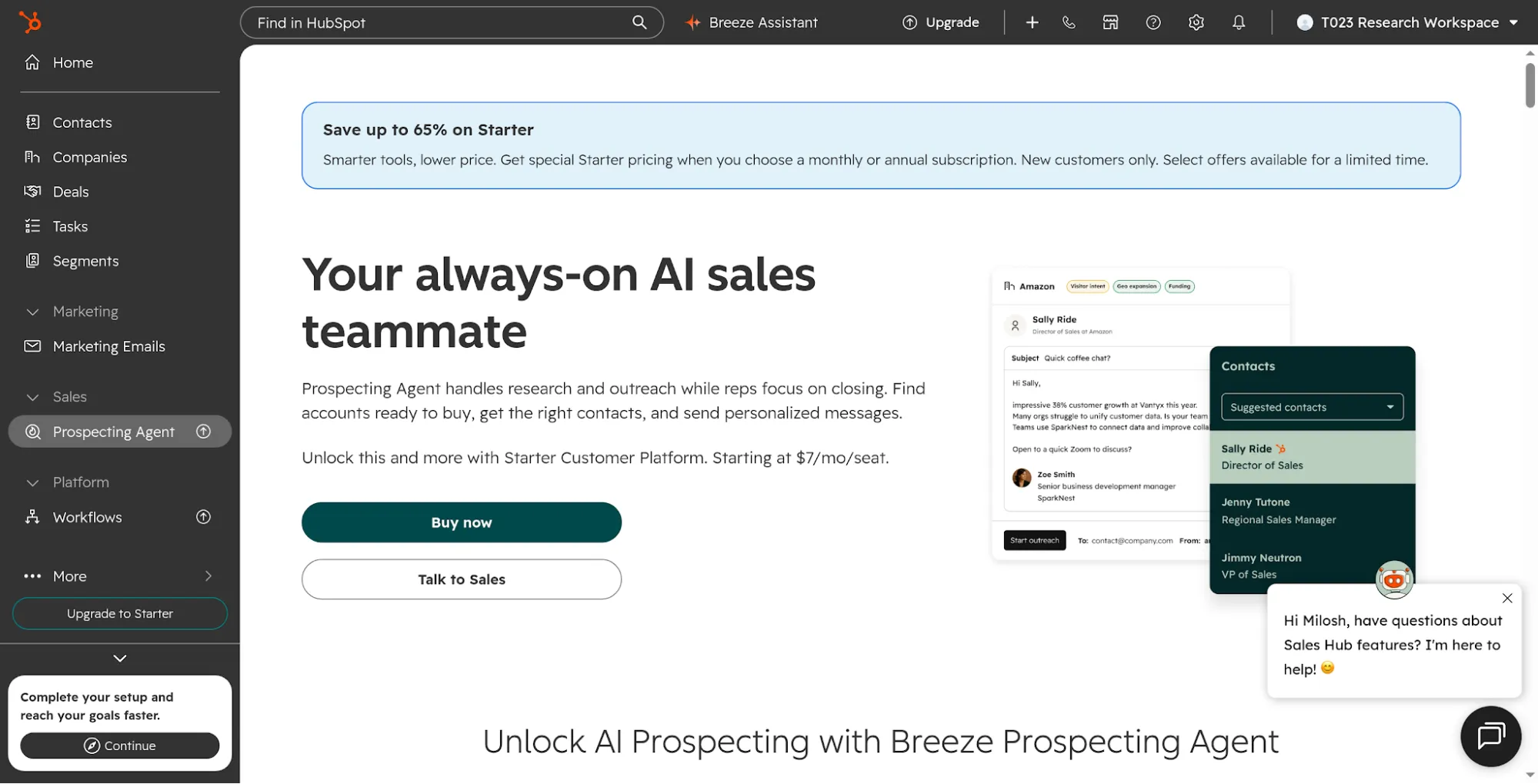
Inside my free HubSpot workspace, Prospecting Agent opens an upgrade screen. The price shown is a limited new-customer promotion.
HubSpot Breeze Prospecting Agent pricing
An eligible paid subscription plus credits; the standard rate is 100 credits per outreach lead.
-
Extra credits — $0.010 each.
-
Standard Sales Hub monthly pools — Starter 500; Professional 3,000; Enterprise 5,000. Pools aren't additive.
-
Flexible contracts — separate rate sheet; the calculation below may not apply.
6. Lindy: Best for coordinating a small team's sales work
Lindy is my pick for a small team that wants an AI teammate to move a bounded piece of sales work between the tools it already uses.
Pros — Lindy
-
The lead-routing use case combines enrichment, assignment, and a response draft.
-
Active users share a workspace credit pool.
Cons — Lindy
-
Credits measure usage rather than a guaranteed number of finished leads.
-
Voice calling isn't intended for outbound cold-call campaigns.
A useful first job is simple: take a form fill, check the company, find the right owner, and draft a response. Lindy's current approach centers on an AI teammate connected to your tools, with reusable skills and routines. I'd start there before trying to automate every exception your sales team has accumulated.
The appeal is a low initial subscription cost and a job you can define in ordinary language. The responsibility is making your routing rules precise. “Send this to enterprise” is less helpful than “Keep the existing account owner; use the enterprise queue only when there's no owner.”
Earlier user experiences are mixed. In a 2025 Reddit thread, u/dancingcagedbeast wrote, “I built an outreach agent with Lindy it was very easy.” Another commenter, u/Stock_Difference_542, found it “a little glitchier than I hoped for.” Those comments concern an older product version, so I checked a narrow task in the current app.
Things I Noted — Lindy
I signed up without connecting a mailbox and gave Lindy two fictional leads to classify and draft replies for. It kept an unknown budget unknown, but turned a requested demo date into “Confirming your demo.” Nothing was sent. I'd review commitments in the draft before connecting that workflow to a real inbox.
The Workspace tab gave me a separate setup requirement: built-in workspace routines need Lindy Teammate in Slack. Standalone chat worked without that connection, so I'd evaluate those as two different rollout steps.
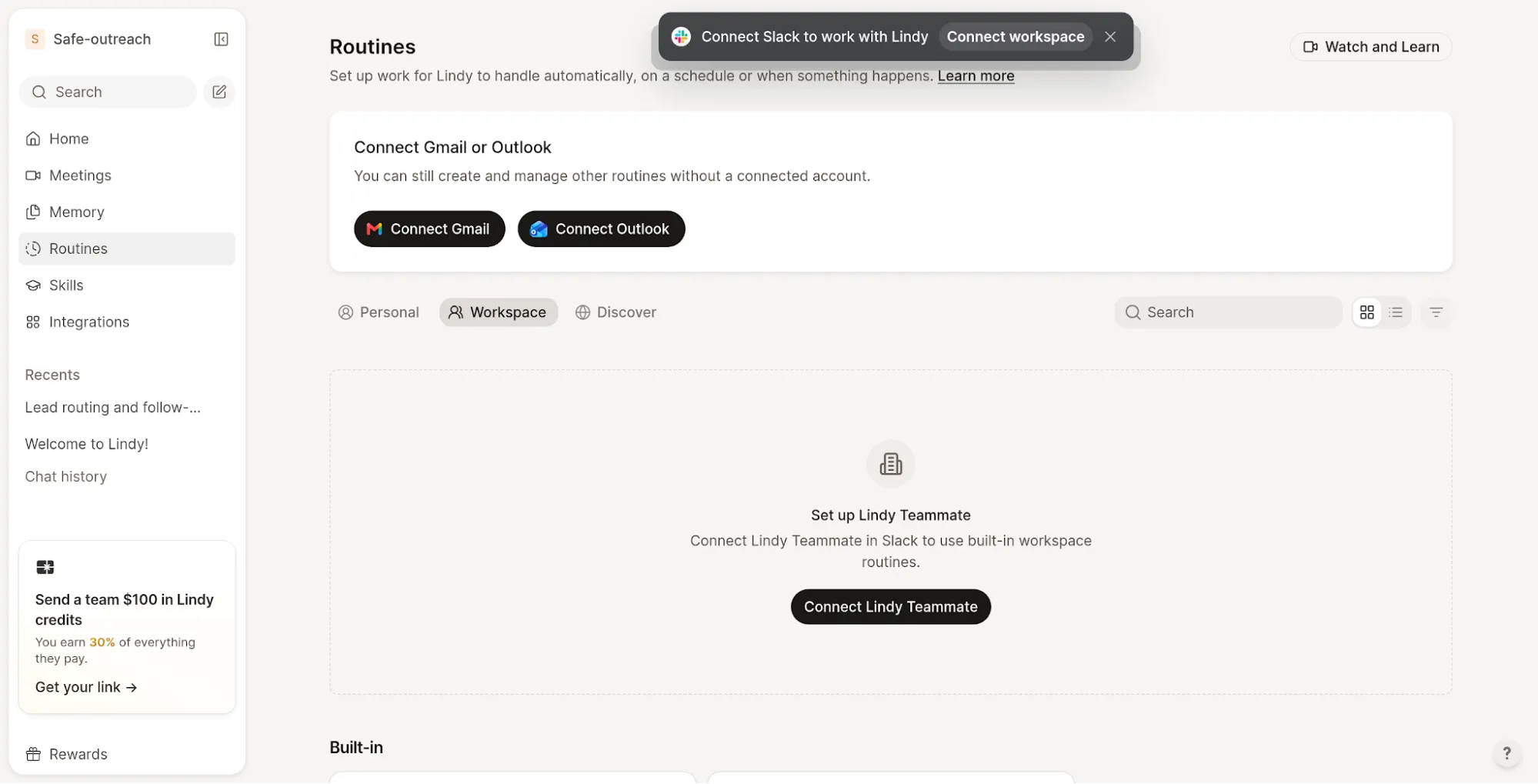
Inside my Lindy workspace, built-in team routines require a Slack Teammate connection; the standalone chat was available without it.
The catch is assuming a general agent is a ready-made sales department. Skip Lindy for high-volume cold-call campaigns: its phone FAQ explicitly rules out that use case. For a manageable internal handoff, I'd put it on the trial list.
Lindy pricing
From $29.99/active user/month, billed monthly, with 3,000 credits per user in a shared pool.
-
Trial credit — $50 in credit value, expiring after seven days; no card required.
-
Top-ups — $10 per 1,000 credits; monthly included credits don't roll over.
-
Voice — additional phone-number and usage costs need to be included if you add calling.
7. Relevance AI: Best for building your own sales operations agent
Relevance AI suits a team whose workflow is distinctive enough to justify building and maintaining its own agent.
Pros — Relevance AI
-
Tools can perform work such as web research, CRM updates, and email actions.
-
Each tool can have its own approval mode.
Cons — Relevance AI
-
Current pricing is custom Enterprise pricing.
-
Your team must maintain prompts, tools, integrations, and exception handling.
Relevance AI's onboarding introduced a Research & Enricher and a Post-call Actioner as parts of an agent team. I reached that setup flow; the execution controls here are based on its tool guides. The reason I'd choose Relevance AI is control over the steps. You can give an agent research tools, a CRM action, and an email action without treating all three as equally safe to run unattended. That flexibility matters when your sales process has a specific qualification model or a handoff that off-the-shelf software keeps getting wrong.
My favorite detail is per-tool approval. Research can run automatically while a send or write tool waits for explicit approval. I'd begin with that split, then relax approval only after reviewing the actual outputs. It gives you a practical middle ground between approving every lookup and trusting every external action.
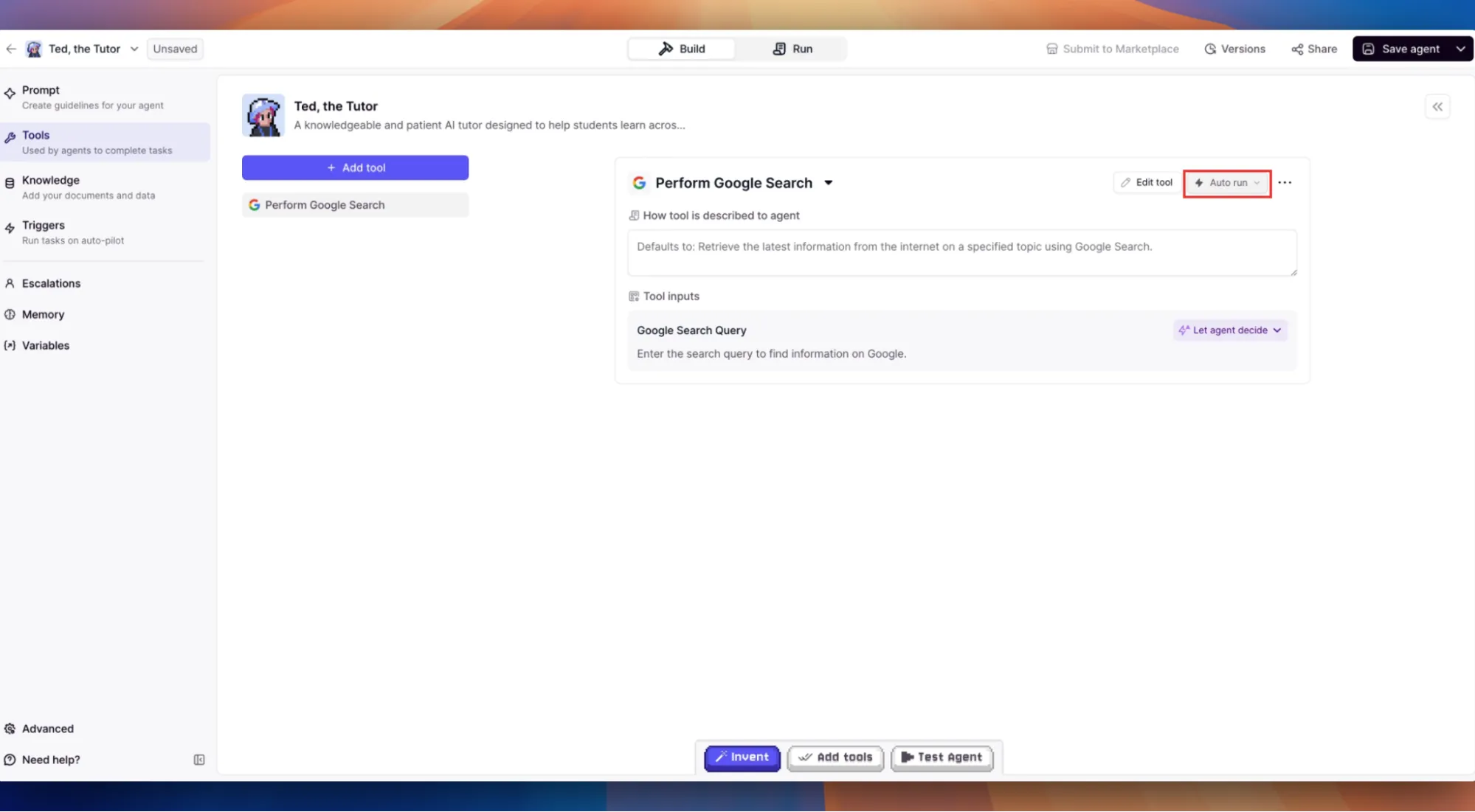
Inside Relevance AI, each tool has its own execution setting; this search tool is set to Auto run. (Image source: Relevance AI)
The catch is ownership. A template is a starting point, not someone who will notice a renamed CRM field next month. Skip this if no one on your team can maintain tool inputs and follow up on failed runs.
Relevance AI pricing
Custom Enterprise pricing, with custom Actions and Vendor Credits.
-
Enterprise — unlimited agents, tools, users, projects, and workforces within the contracted usage model.
-
Budgeting — get the action and model-usage allowance for your actual workflow; older public self-service prices aren't a reliable current starting price.
What will the same outreach workload cost?
The cleanest comparison is between configurations that generate the same kind of output, so I'd separate subscription choice from agent usage.
These calculated annual HubSpot extra-credit charges assume constant monthly outreach, untouched included pools, and the standard rates above. Subscription, tax, and other services are excluded.
| Monthly outreach leads | Starter: annual extra credits | Professional: annual extra credits | Enterprise: annual extra credits |
|---|---|---|---|
| 100 | $1,140 | $840 | $600 |
| 500 | $5,940 | $5,640 | $5,400 |
| 1,000 | $11,940 | $11,640 | $11,400 |
Formula: max(0, monthly leads × 100 − included credits) × $0.010 × 12. Higher tiers save only $300–$540 annually versus Starter in this model. I'd never upgrade a CRM subscription just for that allowance without checking the much larger subscription difference.
The other agents need different budgets. Five Sybill Business seats cost $5,400/year before the CRM, and Autofill doesn't consume its AI-credit allowance. Five Salesforce Sales add-on seats cost $7,500/year before base licensing and applicable extras. Five Lindy users cost $1,799.40/year before top-ups, with 15,000 pooled credits each month. Those are useful baselines, but they don't buy the same outcome.
I'd ask every vendor to price the same sample records and expected actions. A research step, a retry, and a sent email can each affect consumption; none of those is automatically a meeting.
Which AI sales agent should you choose?
Choose the agent closest to the work your team already needs to finish.
| Your scenario | My pick | What decides it |
|---|---|---|
| Salesforce pipeline; reps need better preparation | Agentforce Sales Coach | Opportunity-based coaching within Salesforce. |
| Dynamics pipeline; deal priorities are unclear | Sales Opportunity Agent | Opportunity research in your existing Dynamics environment. |
| Calls are happening but the CRM stays stale | Sybill | A direct fit for post-call CRM updates. |
| Inbound conversion | Qualified Piper | Enough traffic and routing complexity to use it. |
| Outreach from an existing HubSpot database | Breeze Prospecting Agent | Start with the credit math. |
| A small cross-app handoff | Lindy | A bounded task across the tools your team uses. |
| A workflow you will own as an internal system | Relevance AI | Your team owns and maintains the workflow. |
Before adding another subscription, check what your CRM already does. A deterministic assignment rule or reminder may solve a predictable handoff without an agent. I'd reserve AI for the part that needs interpretation, such as extracting a changed next step from a conversation.
Linked Helper’s LinkedIn workflow tools are adjacent to these choices, but I haven't ranked it as an autonomous sales agent. For a deeper sourcing-to-booking comparison, the related AI SDR tools article covers dedicated outbound agents.
A pilot I'd run before expanding access
Use a small set of sample records with a confirmed next step, a changed date, and a question the record doesn't answer. Check the draft or update against those facts. An agent should preserve the changed date, leave the unknown unanswered, and route an exception to the right person.
Then repeat one record to check duplicate handling. Inspect the CRM destination, not just the agent's success message, and record the credits or actions consumed. That gives you a useful acceptance test before you expand access to real customer workflows.
Related reading: