
 Updated: October 26, 2026
 25 min read
A green health score is comforting until the customer with that score cancels. I'd choose customer success software by what happens after a warning: which signal changed, who owns the next step, and where the renewal decision lives.
Quick recommendation
For a mature CS operation with dedicated administrators, Gainsight is worth a close look. For teams already working in HubSpot, I'd price Service Hub before adding another database. Between those two, the useful differences are workflow design, customer collaboration, and how much data preparation your team can handle.
How I compared these platforms
I compared current pricing and help guides, followed Vitally's official product tour, checked public customer discussions, and calculated three team budgets. Linked Helper publishes this blog and makes a separate LinkedIn automation product; it isn't one of these customer-success platforms.
Customer success software brings account information, product usage, health signals, and post-sale work into one place. It helps a CSM decide which customer needs attention and coordinate onboarding, adoption, renewals, and expansion. A help desk organizes support requests; a CRM holds relationships and deals. Some products combine these jobs, but their entry plans don't necessarily include customer-success features.
The best customer success software at a glance
| Tool | Best for | Standout feature | Starting price | Main trade-off |
|---|---|---|---|---|
| Vitally | Coordinating account work | Internal Hubs and Docs | Custom | Health-segment priority needs care |
| Gainsight | Enterprise CS operations | CS context in renewals | Custom | Renewal Center needs separate scoping |
| ChurnZero | In-product adoption | Segmented WalkThroughs | Custom | Needs reliable product signals |
| Planhat | Flexible customer data | Configurable profiles and metrics | Custom | Requires data-model ownership |
| ClientSuccess | Renewal operating cadence | Renewal Health view | Custom | Goals and add-ons affect scope |
| Custify | Guided health configuration | Concierge onboarding | Custom | Internal data work remains |
| Velaris | Coordinated success plans | Plans, tasks, and viewers | Custom | Customer Portal is separate |
| HubSpot Service Hub | Existing HubSpot teams | CRM-native CS workspace | $90/seat/month, billed annually | $1,500 required onboarding |
What makes the best customer success software?
The useful platform is the one that turns your customer data into work someone can actually complete. A dashboard full of red accounts isn't a retention process. I looked for the connection between the signal, the action, and the person responsible for it.
Health you can explain. Can a CSM tell why an account's score changed? I favor visible inputs, sensible segmentation, and a way to distinguish missing data from a genuinely inactive customer. Otherwise, your team ends up arguing with the traffic lights.
Plans with owners and dates. A success plan should connect the customer's goal to milestones and responsibility. Internal tasks and a plan shared with the customer solve different problems. I'd check which one you're buying before treating a feature-list tick as agreement.
Renewals with commercial context. An adoption task doesn't replace a renewal opportunity. Contract dates, account ownership, and the renewal record need to meet somewhere your team can maintain them. The right place may already be your CRM.
Data you can keep current. Connecting an application is only the beginning. You'll need matching account identifiers, useful events, and someone responsible for the sync. I'd rather start with three trustworthy signals than import every event and spend the next quarter fixing definitions.
A bill tied to the real workload. Seats, managed accounts, add-ons, and onboarding can change the comparison. I separate a public minimum from a price for your team, and a license subtotal from the full first-year budget.
That leaves out standalone ticketing, survey, and onboarding tools unless they also cover the ongoing customer-success job. It also keeps LinkedIn outreach software out of a category it doesn't belong to.
1. Vitally: Best for coordinating account work across a CS team
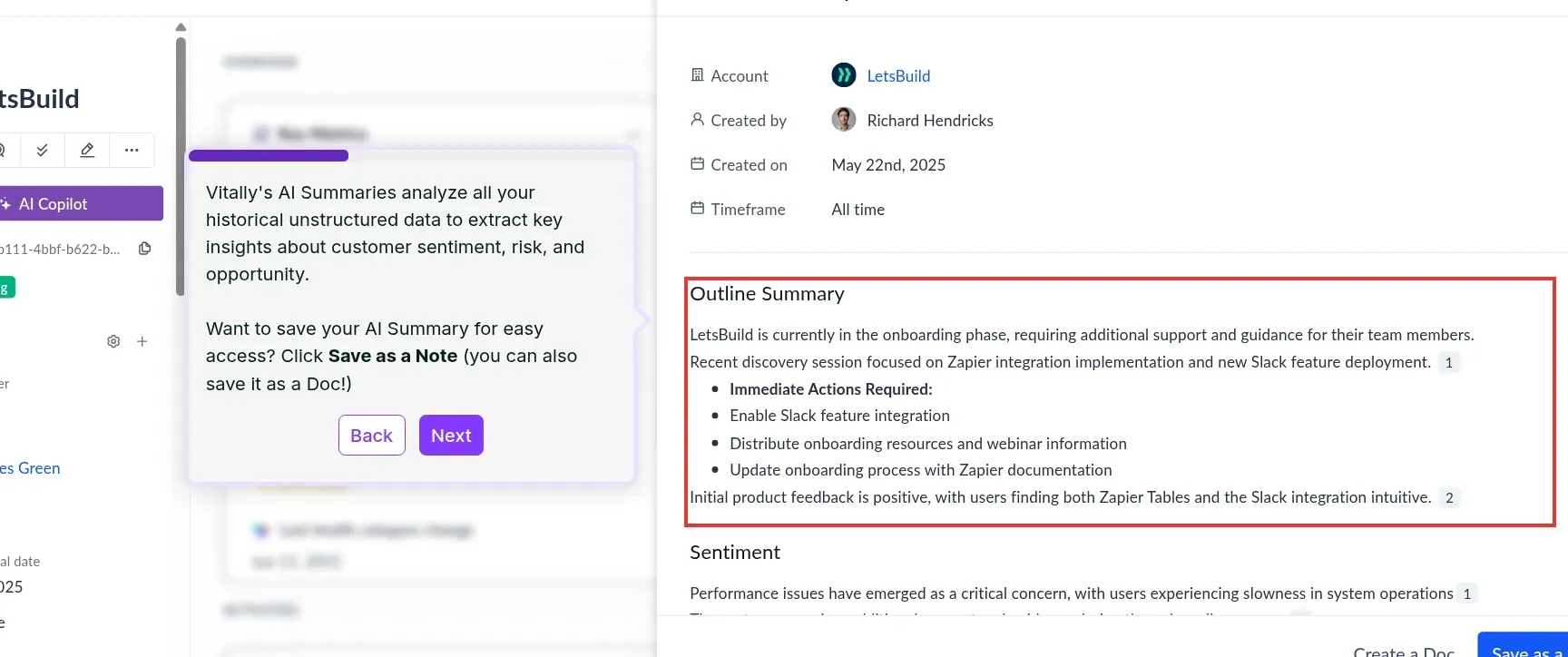
Inside Vitally, the account-summary tour shows context you can retain as a Note or Doc. (Image source: Vitally)
Vitally pros
-
Unlimited automations, observer seats, and Docs across plans
-
Segment-specific health equations with weighted inputs
-
Hubs combine internal dashboards, tasks, and account context
Vitally cons
-
Trial sandbox follows a personalized demo
-
Overlapping health segments need a deliberate priority strategy
Vitally is my pick when your customer-success problem is scattered work: a dashboard in one tab, an account plan in another, and a CSM trying to remember which task matters next. Its Hubs bring internal work into tailored spaces, while Docs give you a place for account-level collaboration. I like the emphasis on the CSM's working day rather than another executive dashboard.
The pricing structure helps keep that discussion focused. Tech-Touch, Hybrid-Touch, and High-Touch share the core feature set, including unlimited automations and observer seats. You're choosing a service model and commercial package, not assuming that every extra colleague needs a full seat. The exact bill still needs a quote.
The public tour shows an account summary you can save as a Note or Doc. I like the handoff from catching up to keeping a useful account record. For customer collaboration, check the sharing mode: a public Doc link is read-only, while invited customers can interact with exposed tasks.
Things I Noted — Vitally
Vitally recalculates health hourly, and an account in several health-score segments uses the equation for the segment it joined most recently. It can also exclude null inputs and redistribute their weight. I'd put an account with missing usage data and overlapping segments into the evaluation first. Otherwise, the score may change because of classification rather than customer behavior.
The appeal of configuration control also appears in a January 17, 2025 r/CustomerSuccess comment from osnap88: “I can handle a lot of config on my own without bothering my ops team.” That's a useful aspiration for your demo, not a reason to skip the data checks.
The catch is that an internal Hub isn't a customer portal. Skip Vitally if your only requirement is a shared project checklist; you'd be buying a much broader account-management system. For a team juggling ongoing customer work, that broader scope is the reason to consider it.
Vitally pricing
Vitally pricing: Custom for Tech-Touch, Hybrid-Touch, and High-Touch; a dedicated trial sandbox follows a personalized demo.
2. Gainsight: Best for a mature enterprise CS operation
Gainsight pros
-
Customer 360, Health Scorecards, and Success Plans
-
CS packages include 10 or 20 full users
-
Renewal Center connects CS context with Salesforce opportunities
Gainsight cons
-
Renewal Center is an add-on
-
Customer allowances depend on the package and user count
Gainsight is worth a close look when customer success is already an operation with administrators, defined processes, and several teams sharing account responsibility. Customer 360, Health Scorecards, playbooks, and success plans give those teams a common working framework. I'd choose it for the coordination problem, not simply because a larger customer wears its logo.
The compelling renewal use case is specific. Renewal Center brings customer-success context into work on Salesforce opportunities, so the team discussing commercial terms can also consider account health. If your CSM sees falling adoption while a renewal owner sees an apparently healthy pipeline, connecting those views has a practical purpose.
The catch is the package boundary. Renewal Center is an add-on, and an administrator must configure its opportunity mapping. I'd put that scope into the quote from the start instead of comparing a baseline CS price with someone else's complete renewal package. A renewal dashboard doesn't populate or reconcile itself.
Things I Noted — Gainsight
Gainsight's pricing table pairs Essentials with 10 full users and 100 customers per user; Enterprise pairs 20 users with 200 customers per user. The nominal multiplications are 1,000 and 4,000 customers; the quote still needs to confirm how those allowances are allocated. The seat footprint can matter before your account volume does: a five-CSM team shouldn't compare those packages with five individually priced CRM seats as if the purchasing units were identical.
A January 11, 2026 r/CustomerSuccess comment by mercilesskiller captures that boundary: “GS feels better for us now. Would have been too much when we were building the CS team originally.” The commenter was discussing a more complex business after moving from ChurnZero.
For a large team that needs this structure, the configuration work may be worthwhile. I'd skip Gainsight for a small group that only wants a readable health dashboard and a renewal reminder. You need someone who will own the system after the implementation team leaves.
Gainsight pricing
Gainsight pricing: Custom for CS Essentials and Enterprise; confirm whether the Renewal Center add-on is included in the quoted package. The separate Gainsight PX trial isn't a trial of Gainsight CS.
3. ChurnZero: Best for acting on adoption signals inside your product
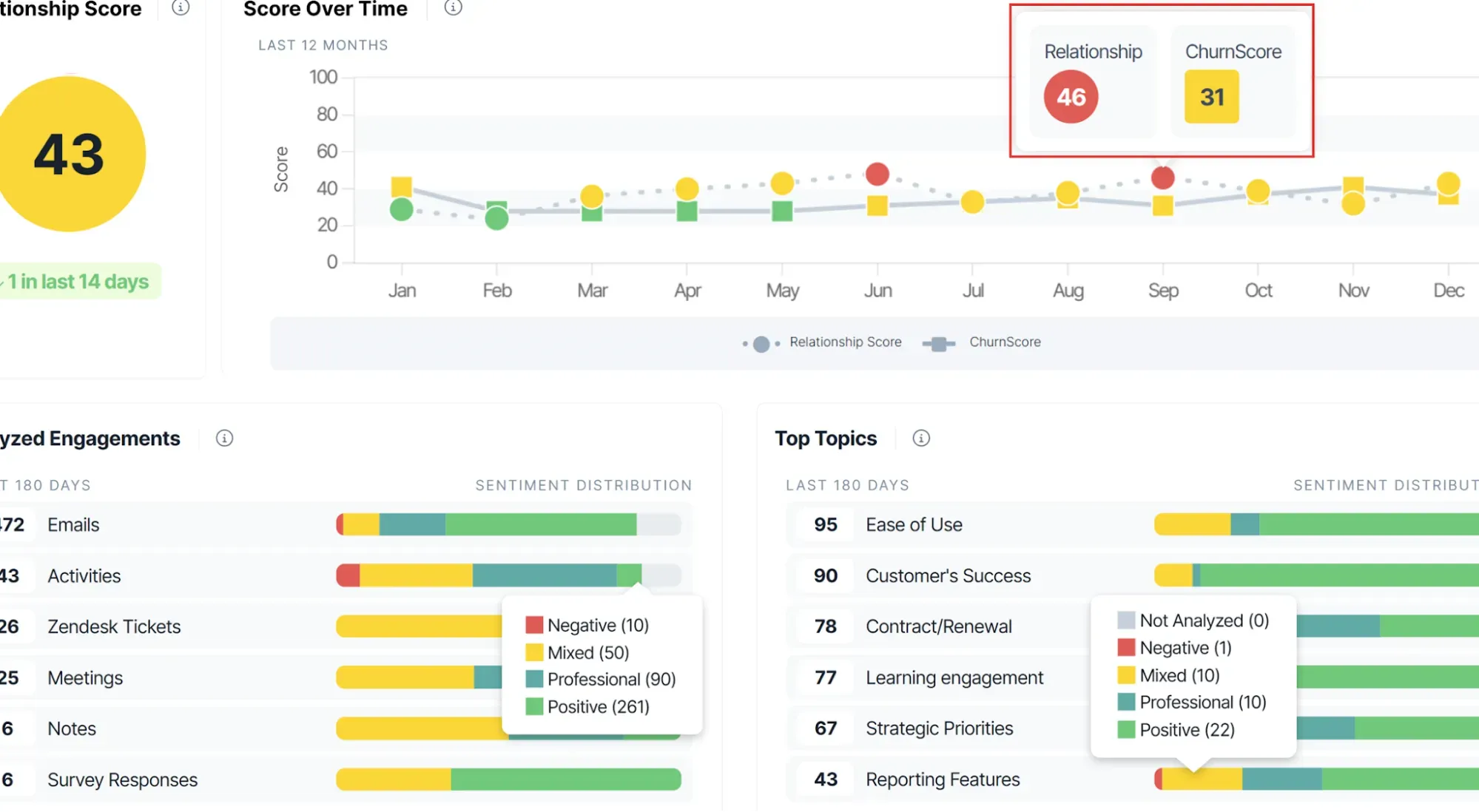
Inside ChurnZero, you can compare relationship sentiment with ChurnScore instead of treating them as the same signal. (Image source: ChurnZero)
ChurnZero pros
-
WalkThroughs target account and contact segments
-
In-app interactions can trigger automation
-
Self-guided product tour available
ChurnZero cons
-
Behavioral targeting needs usable product data
-
No verified public dollar schedule for the evaluated scope
ChurnZero is worth considering when your team needs to reach customers where they use your product. Its in-app WalkThroughs let you guide a selected audience with pop-ups, sliders, and tooltips, rather than relying only on another email or a CSM remembering to follow up.
I like that channel for a concrete adoption problem: an account has access to a useful feature, but the relevant users haven't started using it. You can target an account or contact segment, guide those users, and use their interaction with the walkthrough as an input to later automation. The value is the link between a signal and an action in context.
The catch is that in-app engagement creates work for someone outside customer success. Your CS team can decide what guidance customers need, but the product data and integration still have to support that decision. I'd skip ChurnZero if you only need to track occasional renewal conversations and don't have a meaningful in-product adoption journey.
Things I Noted — ChurnZero
ChurnZero lets you exclude activities created by plays and journeys from Engagement AI. I'd check that setting before trusting an engagement trend: a scheduled touchpoint isn't the same signal as a customer choosing to reply. Its ChurnScore factors can also use the most recent AI signal instead of just a count, which gives you a useful demo question about recent risk.
In a December 30, 2025 r/CustomerSuccess discussion, bloodontherisers complained that “plays (automation/emails/etc.) and the journey are two separate features.” I'd use that experience to ask for a complete journey-to-action walkthrough, including who maintains each part.
I'd judge the first rollout by whether the intended users receive useful guidance and the CSM gets a clear next step. A tour can't tell you whether it will reduce churn in your business.
ChurnZero pricing
ChurnZero pricing: Custom quote required; a public self-guided tour is available.
4. Planhat: Best for teams that need a configurable customer data model
Planhat pros
-
Native integrations and an open API
-
Custom metrics, fields, profiles, and pages
-
Projects, tasks, automations, and dashboards in one platform
Planhat cons
-
Pricing and professional-services scope require a quote
-
Data design needs a named internal owner
Planhat is a strong candidate when your customer model doesn't fit neatly into a company record and a few notes. It combines a configurable data layer with customer-facing operations, so you can organize metrics, profiles, tasks, and dashboards around how your business actually works.
I like that flexibility when your team needs an overall customer view while still working on individual projects. The buying question is whether your team can maintain that model—not whether the demo contains enough charts.
Planhat's platform spans CRM, customer-success, and professional-services applications. Its common capabilities include integrations, an open API, custom fields, automations, and project management. That makes it worth comparing when handoffs between teams are part of the problem. It also makes a precise scope essential: “we need Planhat” isn't a definition of the workflows you're buying.
Things I Noted — Planhat
Planhat's group health is an arithmetic average that includes the parent company; it isn't weighted by revenue. Consider a parent scored 8, a large subsidiary scored 2, and two small subsidiaries scored 9. The mean is 7, even though the account carrying most of the revenue may be in trouble. I'd read the entity-level health next to contract value, not turn the group number into a renewal verdict.
The configuration experience also varies. On r/CustomerSuccess in August 2026, icerebellumi called it “clean, fast” while EPP1C reported “lots of technical issues and setup still lingering.” I'd settle the data-ownership and implementation responsibilities early.
The catch is ownership. A flexible system still needs someone to decide which account identifiers match, which metrics matter, and which team can change them. Planhat offers onboarding and technical-deployment services, but I'd include your continuing internal responsibility in the budget too.
Skip it if your immediate need is a simple reminder list and nobody can own the data model. If you've already outgrown disconnected account spreadsheets and want to build a consistent operating view, the configuration options are the reason I'd put it on the shortlist.
Planhat pricing
Planhat pricing: Custom; application scope and professional services are quoted.
5. ClientSuccess: Best for making renewals a repeatable operating process
ClientSuccess pros
-
Renewal Health joins ARR, health, ownership, and timing
-
Weighted SuccessScore profiles by customer type
-
No setup or implementation fees
ClientSuccess cons
-
Startup includes one sample goal per customer
-
Growth custom reports and customer portal are add-ons
ClientSuccess is my pick for a team that wants renewal conversations to start from an organized book of business. Its Renewal Health view brings together ARR, SuccessScore, renewal date, assigned CSM, customer type, and Last Touch. That gives you a useful starting point for deciding which account needs attention this week.
The part I like is the combination of commercial timing and relationship context. A low-health account renewing next month deserves a different conversation from one with a distant renewal date. Keeping those fields together makes the prioritization question easier to answer without asking a CSM to assemble it from several reports.
There is more structure underneath than a list of dates. Contract and revenue management separates recurring and one-time line items, while renewal records can sit in forecast, booked, active, and overdue states. Automatic renewal forecasting and booking depend on the relevant configuration. I'd make those definitions part of your team's rollout so “booked” doesn't become shorthand for money already collected.
Things I Noted — ClientSuccess
Startup supports up to 500 customers and 10 full licenses; Growth supports up to 5,000 customers and 50 licenses. Yet the goal allowance is different: Startup includes one sample goal per customer, while Growth allows three goals per customer. A small team can fit the customer count and still need a more capable planning package. I'd check the goals you actually need before choosing by portfolio size.
The catch is that no implementation fee doesn't mean instant implementation. ClientSuccess gives a four-to-six-week estimate for most rollouts. Skip the entry package if your requirements already include extensive goal tracking or custom reporting. For a team that wants a disciplined renewal process, the narrower scope may be a useful starting point.
ClientSuccess pricing
ClientSuccess pricing: Custom for Startup, Growth, and Enterprise; no setup or implementation fees; personalized demos and proof-of-concept evaluations instead of a self-serve trial.
6. Custify: Best for teams that want help configuring customer health
Custify pros
-
Concierge onboarding includes implementation verification and training
-
Global Health Score combines underlying health measures
-
No setup fees
Custify cons
-
Your development team still participates in onboarding
-
Default terms use annual advance payment and automatic renewal
Custify is worth a close look if you know which customer problems matter but need help turning them into a workable health model. Its concierge process starts with defining success, then involves development guidance, implementation verification, and training. I like that it treats configuration as part of the job rather than pretending that connecting a data source finishes it.
The Global Health Score gives you a way to combine underlying scores and choose their influence. You can assign no, low, medium, or high impact and work with a 0–100 distribution. That's useful when different signals deserve different weight: a completed milestone and a brief login shouldn't automatically have equal importance.
Custify also offers Signals for changes in activity and segment-specific engagement. I'd start by selecting a small set of changes that justify a real action. A health model becomes useful when a CSM knows what to do with it; adding more inputs can just make the color harder to explain.
Things I Noted — Custify
The pricing page says there are no setup fees, but the standard terms still use annual payment in advance and an automatically renewing annual contract. The notice deadline is at least 15 calendar days before the term ends. I'd put that date into your procurement calendar when you sign, not when next year's invoice arrives. Your signed order should settle any different terms.
The catch is that concierge help doesn't remove your internal data work. Skip Custify if nobody can supply the identifiers, usage events, and account definitions the implementation needs. For a team willing to do that work but wanting guidance on the setup, the onboarding approach is a meaningful reason to consider it.
Custify pricing
Custify pricing: Custom; no setup fees; standard terms call for annual payment in advance.
7. Velaris: Best for teams coordinating success plans and account work
Velaris pros
-
Success plans, playbooks, tasks, and time tracking
-
Five users and unlimited viewers in the base license
-
Customer 360 includes plans, activities, files, and deals
Velaris cons
-
Customer Portal is a separate complementary product
-
More than five users needs additional commercial scope
Velaris is worth considering when the account plan and the work around it keep drifting apart. Its customer view brings together communications, activity, plans, files, and deals, while its execution tools cover onboarding plans, account plans, and QBR templates. I'd focus on that connection between the plan and the next task.
I like the distinction between someone doing the work and someone who needs to follow it. The base license includes five users and unlimited viewers, so the commercial discussion can separate your core operators from colleagues who only need visibility. A finance or leadership stakeholder doesn't automatically have to be treated like another CSM.
The planning tools include task scheduling, notes and mentions, and time tracking. That combination is interesting when customer success also coordinates substantial delivery work. You can evaluate a concrete sequence: the account has a goal, the plan contains milestones, and someone owns the tasks required to reach them.
The catch is collaboration scope. Customer Portal is a complementary product, so don't assume that “success plans included” means the same package gives customers a shared workspace. I'd put external access, customer permissions, and any portal cost into the evaluation from the beginning.
For a two-CSM team, the five-user starting package deserves attention even if the workflows are appealing. For ten CSMs, it isn't a ten-user quote. Skip Velaris if your main need is a low-cost individual task list. If several people coordinate ongoing customer work and more colleagues need visibility, the user/viewer split is a practical reason to shortlist it.
Velaris pricing
Velaris pricing: Custom; the base license includes five users, unlimited viewers, and three custom objects; Customer Portal is separate.
8. HubSpot Service Hub: Best for customer success inside an existing HubSpot CRM
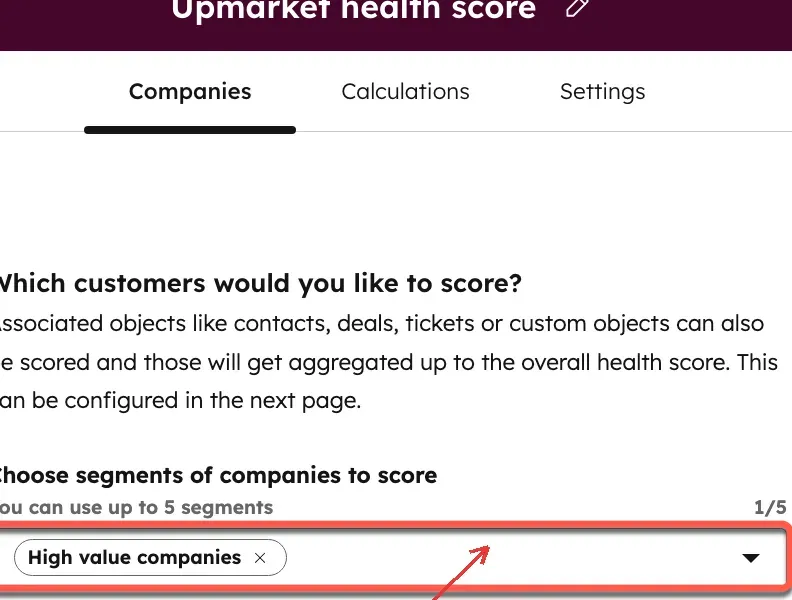
Inside HubSpot, a health score can target a customer segment instead of treating every account alike. (Image source: HubSpot)
HubSpot Service Hub pros
-
Customer-success work stays with your HubSpot records
-
Up to 50 health scores in the current help guide
-
Public per-seat pricing supports a concrete starting budget
HubSpot Service Hub cons
-
Customer-success workspace needs Professional or Enterprise
-
Professional adds mandatory paid onboarding
-
A Service Seat is required for full workspace access
HubSpot Service Hub is the first option I'd price if your customer records already live in HubSpot. Its customer-success workspace gives CSMs a place to review account activity, tasks, and health without building another copy of the customer database. The strongest reason to choose it is the stack you already use.
The important price is Professional, not the free CRM or Starter headline. Professional includes the customer-success workspace, while full use requires an assigned Service Seat and the relevant permissions. An administrator without that seat can access the Summary tab, but that isn't equivalent to equipping every CSM.
I like the health-score setup's connection to CRM properties. You choose the company or contact population, set the inputs, and the activated score becomes a matching record property. The current help guide allows up to 50 health scores, so older comparisons built around one Professional score or ten Enterprise scores need revisiting.
Things I Noted — HubSpot Service Hub
At the annual Professional rate, five Service Seats cost $5,400 a year. Add the required $1,500 onboarding fee and the first-year subtotal becomes $6,900 before extras and tax. That's a useful budgeting anchor, but it doesn't prove that the package matches every dedicated CSP's success-plan or renewal workflow.
The catch is that familiarity doesn't settle fit. I'd ask your team to map its actual post-sale process before deciding that a CRM-based workspace covers it. Skip a move to HubSpot solely for this feature if you're happy with another CRM and would create a migration project just to avoid evaluating a dedicated platform.
HubSpot Service Hub pricing
HubSpot Service Hub pricing: From $90/Service Seat/month, billed annually, for Professional; required one-time onboarding costs $1,500. Free tools don't include the equivalent customer-success workspace.
What the same workload costs
A public seat price gives you a useful starting budget; a custom quote is still needed to compare complete customer-success deployments. I calculated three identical workloads for four products with explicit seat or account packaging. Each asks for health scoring, success plans, and renewal tracking, with every CSM needing operational access.
These are annual USD list-price calculations checked October 23, 2026, excluding tax. HubSpot's figures are known seat-and-onboarding subtotals, not a claim that its configuration matches every dedicated CSP. External integration work, other subscriptions, and any extra modules still need scoping. “Quote” means the total is unknown, not zero.
Two CSMs managing 100 accounts
| Tool and plan | Annual subscription | Required or conditional extras | Known first-year subtotal | Scope to settle |
|---|---|---|---|---|
| HubSpot Professional, 2 seats | $2,160 | $1,500 onboarding | $3,660 | Success-plan and renewal workflow fit |
| Gainsight CS Essentials | Quote | Renewal Center if required; quote | Unknown | Lists 10 full users; capacity allocation needs confirmation |
| ClientSuccess Startup | Quote | No setup/implementation fee | Unknown | One sample goal per customer |
| Velaris base license | Quote | Portal if required; quote | Unknown | Includes 5 users, not a 2-user price |
Five CSMs managing 500 accounts
| Tool and plan | Annual subscription | Required or conditional extras | Known first-year subtotal | Scope to settle |
|---|---|---|---|---|
| HubSpot Professional, 5 seats | $5,400 | $1,500 onboarding | $6,900 | Other Hub/integration costs, if needed |
| Gainsight CS Essentials | Quote | Renewal Center if required; quote | Unknown | 10 full users; 100 customers/user, allocation unverified |
| ClientSuccess Startup or Growth | Quote | No setup/implementation fee | Unknown | Startup reaches 500-account limit; goals may require Growth |
| Velaris base license | Quote | Portal if required; quote | Unknown | 5 included users; account scope needs quote |
Ten CSMs managing 1,000 accounts
| Tool and plan | Annual subscription | Required or conditional extras | Known first-year subtotal | Scope to settle |
|---|---|---|---|---|
| HubSpot Professional, 10 seats | $10,800 | $1,500 onboarding | $12,300 | Any required Enterprise-only workflow |
| Gainsight CS Essentials | Quote | Renewal Center if required; quote | Unknown | 10 full users × 100 customers/user; confirm allocation |
| ClientSuccess Growth | Quote | No setup/implementation fee | Unknown | Up to 50 full licenses and 5,000 customers |
| Velaris base plus additional users | Quote | Extra users; portal if required | Unknown | 5 additional operational users needed |
The HubSpot arithmetic is seats × $90 × 12, plus onboarding once. Moving from two to five CSMs adds $3,240 in annual seat costs; moving from five to ten adds $5,400. For an existing eligible subscription, your incremental bill can differ from these new-purchase scenarios.
I'd take a different lesson from the quoted products: headcount alone doesn't tell you the package. ClientSuccess's 500-account boundary and goal allowance can move a small team up a tier, while Gainsight's listed starting package already includes ten full users. Velaris distinguishes operators from viewers. Those are concrete questions to settle before comparing totals.
Vitally, ChurnZero, Planhat, and Custify also need quotes for these workloads. I haven't supplied invented dollar totals for them. Give each vendor the same account counts, operator/viewer split, data sources, and renewal requirements, then separate recurring fees, implementation, and optional modules in the reply.
Check your existing stack first
An existing CRM may cover your immediate problem before you buy a separate customer-success platform. Start with the work your team keeps dropping.
Missing renewal ownership: if your CRM already has account owners and renewal opportunities, make those records reliable first. A new CSP still needs an accurate renewal date and a clear owner.
Unanswered tickets: fix the support queue and escalation process. A health score can flag trouble, but it won't resolve the customer's issue for you.
Missing adoption signals: work with whoever owns product analytics to define a few useful events and match them to customer accounts. Buying software won't decide what “active” means for your product.
Already paying for Service Hub: check your edition and assigned Service Seats. Free CRM, Starter, and an administrator login aren't interchangeable with the paid customer-success workspace. I'd settle that entitlement question before paying for another system.
Which customer success software should you choose?
Start with the workflow that is breaking today, then choose the smallest package that fixes it. I'd narrow the list to two tools and give both the same synthetic account history, success-plan requirements, and renewal scenario.
| Your scenario | Recommendation |
|---|---|
| Daily work or enterprise renewals | If scattered daily work is the problem, I'd start with Vitally. If you need an enterprise operation with CS context connected to Salesforce renewals, compare Gainsight, with Renewal Center explicitly scoped. |
| In-product guidance or customer data model | If customers need guidance inside your product, ChurnZero deserves a look. If the hard part is expressing your customer hierarchy and data model, I'd evaluate Planhat with whoever will maintain it. |
| Renewals, health setup, or delivery tasks | If renewal prioritization needs structure, look at ClientSuccess. If defining and implementing health is the bottleneck, Custify offers a guided setup approach. If account plans and delivery tasks need to stay together, compare Velaris, with the portal scoped separately when customers need access. |
| Existing HubSpot team | For an existing HubSpot team, I'd price HubSpot Service Hub Professional first. Keep it if it handles the real workflow; don't keep it merely because you recognize the logo. |
Other tools I considered
Totango appears in many older customer-success comparisons, but its current site now leads to Odie, a Customer Knowledge Engine. I haven't carried forward an old Totango free plan or package price as an available buying option. Existing customers should evaluate their own contract and transition path.