
 Updated: October 26, 2026
 20 min read
Quick picks
GlockApps is my pick for recurring inbox-placement checks, mail-tester for a quick message audit, and Google Postmaster Tools for understanding Gmail-specific problems. If your problem is authentication, start with MXToolbox or dmarcian. Developers checking application emails before release should look at Mailtrap Email Sandbox.
A delivery problem can send you shopping for the wrong fix. A clean SPF record doesn't tell you which folder a message reached. A spam score doesn't tell you what Gmail thinks of your domain. And a warm-up subscription doesn't make an unwanted message welcome.
I ran public DNS checks, explored GlockApps and Mailtrap setup screens without sending, compared official guides and pricing, and read user discussions; I didn’t measure real-recipient placement improvements.
Linked Helper publishes this blog and makes a separate LinkedIn automation product. It isn't one of these seven picks.
What are email deliverability tools?
Email deliverability tools help you find problems that affect whether messages reach recipients' inboxes. They can inspect message content and authentication, test placement across seed inboxes, or monitor sending signals over time. Each measures a different part of the journey; passing one check doesn't mean an email will reach every recipient's inbox.
Best email deliverability tools at a glance
| Tool | Best for | Standout | Starting price | Main trade-off |
|---|---|---|---|---|
| GlockApps | Recurring placement tests | Seed-inbox results | Free 2 credits; Essential $85/month or $708/year | Test inboxes aren't your audience |
| mail-tester | Quick message audits | Message and server checks together | Free 3 tests/24 hours; 50 tests/month for $10 | No cross-provider placement measurement |
| MXToolbox | DNS troubleshooting | Linked SPF, DKIM and DMARC lookups | Free lookups; Delivery Center $129/month | Paid monitoring is a separate purchase |
| Google Postmaster Tools | Gmail-specific diagnosis | First-party compliance and spam signals | Free | Personal Gmail only; low-volume gaps |
| dmarcian | DMARC reporting | Identify sending sources and alignment issues | Business Basic $24/month or $239.88/year | Reports need DNS setup |
| Mailtrap Email Sandbox | Application email QA | Capture and inspect staging messages | Free; Basic $17/month or $168/year | Doesn't test real inbox placement |
| Validity Engage | Complex email programs | Placement and reputation in a wider platform | Custom pricing | Scope and cost need a tailored proposal |
The quickest way to narrow this list is to name the evidence you're missing: a message check, a placement sample, or ongoing reports. I'd buy for that gap before adding another dashboard.
What makes the best email deliverability tool?
A useful tool tells you what failed and gives you a sensible next step. I care less about an impressive health score than whether you can trace it to a specific sending decision.
-
The right measurement. Message analysis, seed placement, DMARC reports and recipient complaints answer different questions. Your tool should make its scope clear.
-
A setup you can support. A DNS lookup takes seconds; ongoing DMARC reporting needs a reporting record, and first-party dashboards need domain verification. Someone has to own that setup.
-
Results you can act on. A failed alignment check is useful when you can identify the sending service responsible. An unexplained red score leaves you guessing.
-
Enough capacity for repeat checks. Count message variants, sending domains and retests. One monthly campaign can need several tests after you change its content or infrastructure.
-
A price for your actual workflow. Check whether you're buying messages, test credits, domains or users. A low entry price isn't helpful if it covers the wrong unit.
1. GlockApps: Best for recurring inbox-placement tests
GlockApps pros:
-
Seed-inbox testing helps compare placement before and after changes
-
Essential includes 30 test credits per month on monthly billing
-
Bundles placement testing with DMARC and monitoring allowances
GlockApps cons:
-
Seed results don't reproduce every subscriber's inbox
-
Test credits and DMARC-message allowances need separate budgeting
I'd pick GlockApps when your question is, “Where does this version of my email land?” You send a test through your normal sending setup to its seed addresses, then use the placement results to investigate provider differences. That's much closer to a folder-placement question than running a content score alone.
I signed up and walked through the manual test setup, selecting providers and creating a test configuration without connecting a mailbox. The first screen felt busy with release notes and several testing routes, but the manual path let me get to a seed list before making any connection. I canceled the unused test before sending.
The workflow makes most sense when you can repeat it. If you've changed your sending domain, authentication or message, keep the other variables steady and compare the next result. Otherwise, you'll have a new score without knowing which change mattered.
Things I Noted — GlockApps
The setup warned that putting more than 25 seed addresses in the To field could affect test precision, and offered grouping by 25. I like that reminder: the way you send a test should resemble the campaign you’re trying to diagnose.
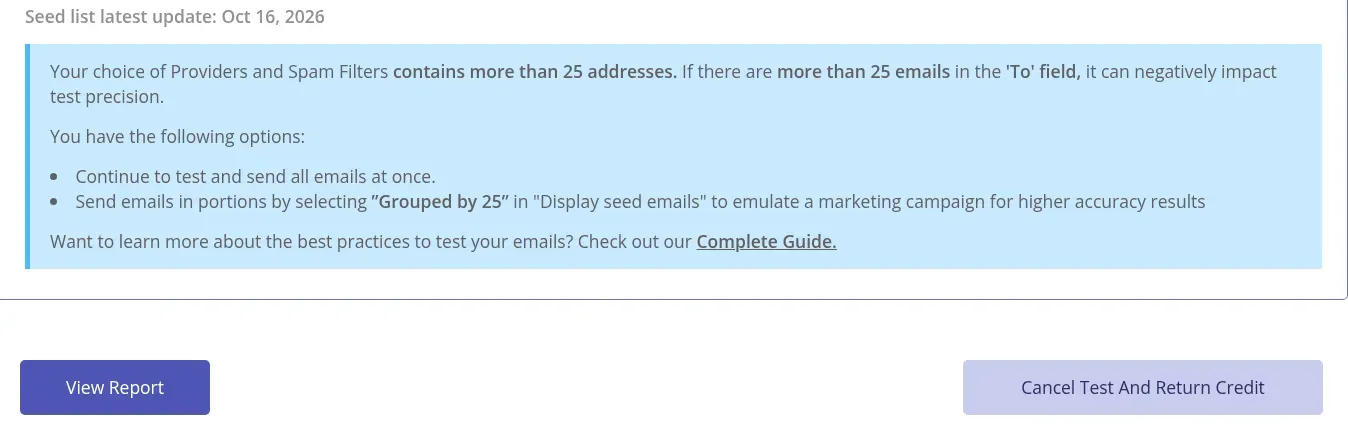
Inside GlockApps, the manual-test setup warns about large To lists and offers grouped sending.
The catch is representativeness. Seed addresses are a test sample, while your subscribers have their own histories and relationships with you. I'd skip a recurring subscription if you only want to inspect one newsletter's formatting or headers. Start with a smaller diagnostic and spend here when repeated placement checks will change a decision.
GlockApps pricing
Free account includes 2 test credits. Essential is $85/month with 30 credits/month, or $59/month equivalent billed $708 annually with 360 credits/year.
2. mail-tester: Best for a quick message audit
mail-tester pros:
-
Three free tests per rolling 24 hours
-
Checks a received message alongside server and authentication details
-
Paid plans add API and embedded-result options
mail-tester cons:
-
A strong score doesn't predict Gmail or Outlook placement
-
Anyone with the exact test address can access its report
mail-tester is where I'd start with an occasional newsletter that needs a sanity check. You send a copy to its generated address and get a report covering the message and sending configuration. There's no reason to buy an enterprise monitoring suite before you've checked the basics.
I like the low commitment. Three free tests in 24 hours leave room for an initial check and a couple of fixes. When I switched the pricing page between Monthly and One Time Payments, the same 50-test quantity cost $10 per month or $25 as a one-time pack. I’d choose by how often I’ll return, rather than treating those as the same commitment.
The catch is the meaning of the score. mail-tester uses a default SpamAssassin installation; other receiving systems can make different decisions. I'd use a good result as permission to move on to the next check, never as a promise that the campaign will reach the inbox.
In a July 2026 r/Emailmarketing discussion, u/ogharieb wrote: “It’s occasional, I tried both Glockapps and mail tester, one says I’m good while the other shows bad results”. That’s the distinction I’d check first: were the tools answering the same question?
There's also a practical privacy boundary: the report is accessible to anyone who knows its exact testing address. Use a synthetic message without customer details. Skip mail-tester as your main tool if you need ongoing alerts or a provider-by-provider placement history.
mail-tester pricing
Free for 3 tests per rolling 24 hours. Paid monthly plans start at $10 for 50 tests; the pricing page also offers one-time packs from $5 for 10 tests, excluding VAT.
3. MXToolbox: Best for diagnosing DNS and authentication problems
MXToolbox pros:
-
Free public lookups work without a paid account
-
Results link to related SPF, DKIM and DMARC checks
-
Paid Delivery Center combines monitoring and placement allowances
MXToolbox cons:
-
Green configuration checks don't measure inbox placement
-
Delivery Center's $129 monthly price is excessive for occasional lookups
MXToolbox is my first stop when an authentication result points to a DNS problem. Its public SuperTool lets you inspect records and follow related checks without committing to a monitoring platform. That's useful when you're trying to understand a failure before deciding who needs to fix it.
I ran its free MX and SPF lookups on example.com, a reserved example domain. Moving from the MX result to the SPF check took me directly to the record and its individual validation results. I like having the next diagnostic close at hand; you don't need to keep finding a new tool for each record type.
Things I Noted — MXToolbox
The SPF lookup returned green configuration checks alongside v=spf1 -all, a valid policy for a domain that sends no mail. That small detail explains a big buying mistake: a valid record and permission to send are different things. Neither tells you a message's destination folder.
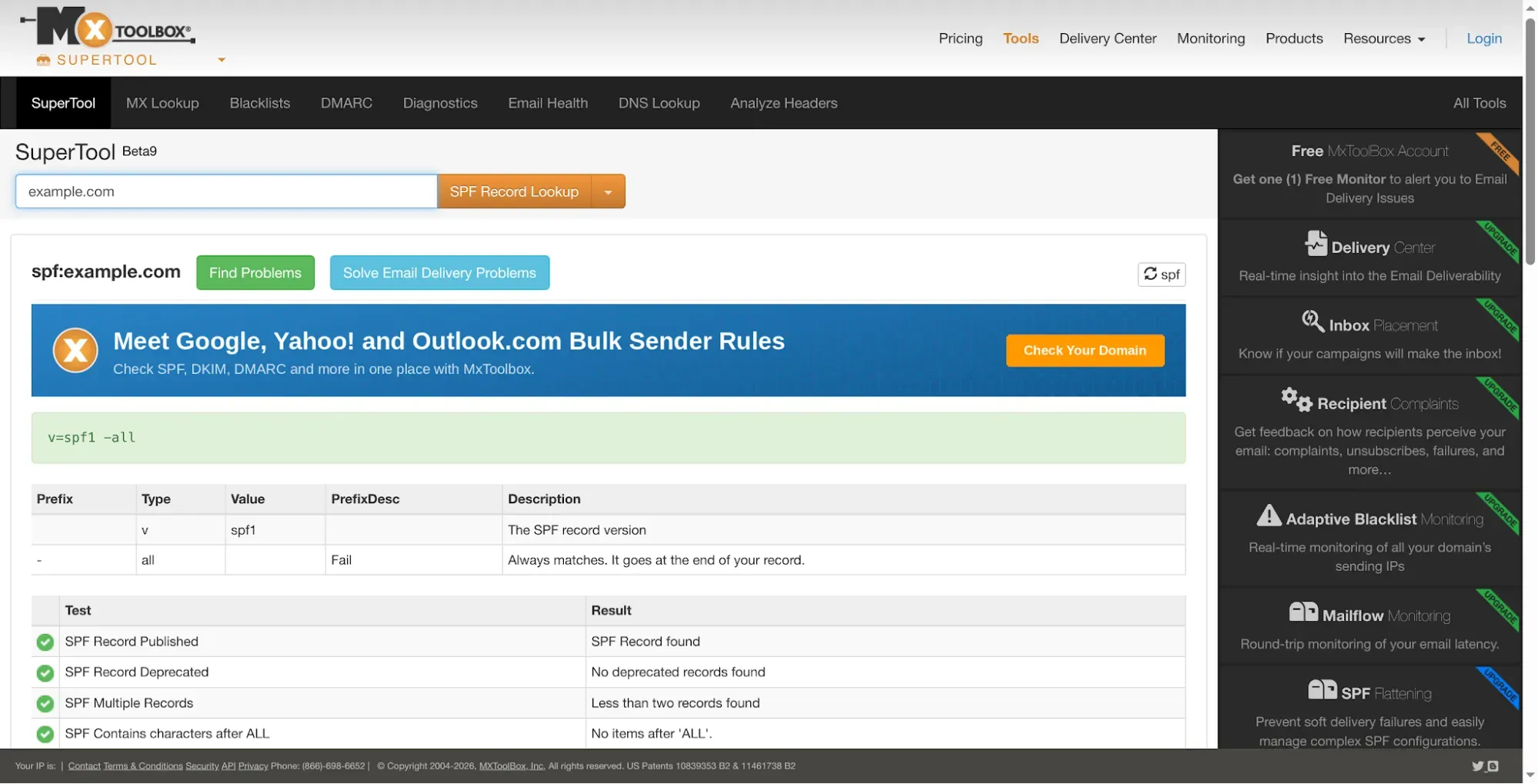
Inside MXToolbox, the SPF lookup shows a valid policy for a domain that sends no mail.
The catch is the jump from free investigation to ongoing monitoring. Delivery Center includes 30 inbox-placement analyses per month, alongside its broader monitoring features, but that makes it a different purchase. I'd skip the paid suite for a one-off DNS investigation and consider it when someone will actually use the alerts and reports.
MXToolbox pricing
Free public diagnostic tools. Delivery Center costs $129/month; Delivery Center Plus costs $399/month. Twelve monthly payments total $1,548 and $4,788 respectively.
4. Google Postmaster Tools: Best for Gmail-specific diagnosis
Google Postmaster Tools pros:
-
Free first-party information about mail sent to personal Gmail accounts
-
Compliance, authentication, spam-rate and delivery-error views
-
Useful alongside your sender's own bounce and delivery logs
Google Postmaster Tools cons:
-
Doesn't cover Outlook or other mailbox providers
-
Low-volume days may have missing data, and updates aren't immediate
Google Postmaster Tools is the first monitoring service I'd add when personal Gmail addresses make up a meaningful part of your audience. You get Google's view of parts of your sending activity, rather than asking a third-party score to stand in for it. The price makes that an easy recommendation: it's free.
The setup guide requires you to verify a sending domain before email data appears. Once that's in place, the useful habit is to check patterns across days and relate them to changes in your sending. You won't get a meaningful instant verdict on a brand-new domain that hasn't sent mail.
My favorite detail is also the easiest to misread: the spam-rate dashboard reflects user-reported spam. Google explains that a low rate can coexist with poor placement when many messages go straight to spam, leaving fewer in the inbox for recipients to flag. A reassuring number still needs context.
The catch is coverage. I'd skip it as your only monitor if you need to diagnose Microsoft business mail or a mixed-provider list. And if a small program has blank charts, don't increase volume just to fill them. Use message-level diagnostics while you build legitimate traffic.
Google is also moving toward Postmaster Tools v2. Its current notice postpones retirement of the legacy interface and changes the role of the old reputation dashboards. I wouldn't build a new workflow around a screenshot from an older tutorial.
Google Postmaster Tools pricing
Free; a Google account and verified sending domain are required to access your domain's email data.
5. dmarcian: Best for understanding DMARC reports
dmarcian pros:
-
Helps identify sending sources and authentication alignment problems
-
Basic covers up to 2 active domains and 100,000 DMARC-capable messages/month
-
Thirty-day business trial without a credit card
dmarcian cons:
-
Requires a reporting setup to collect meaningful data
-
The free Personal plan is for non-business use
I'd choose dmarcian when several services send on your behalf and you're struggling to work out which ones authenticate correctly. DMARC reports can show you those sending sources and their authentication results. Turning that information into a manageable view is its main appeal.
This matters when your newsletter, invoices and support messages come from different systems. A domain-level policy change can affect all of them, so I'd want an inventory before tightening enforcement. dmarcian's source-focused reporting is a better match for that job than repeatedly scoring a single newsletter.
The Basic plan is appealing for a small business with a straightforward setup: up to two active domains, one user and 100,000 DMARC-capable messages a month. I also like that the pricing separates business use from its free Personal plan. Don't budget a company workflow around the word “free” and discover the restriction later.
Things I Noted — dmarcian
When I checked dmarcian’s trial setup, the first form already required a primary domain. I’d line up access to the domain’s DNS before starting the 30-day clock. The free trial is useful when you’re ready to set up reporting, rather than just collect another empty account.
The catch is what DMARC reports can tell you. They help you investigate authentication and impersonation; they don't reveal whether a legitimate message went to a recipient's inbox or spam folder. Skip dmarcian as a substitute for placement testing. Buy it when you need to understand who is sending for your domain and what needs fixing.
dmarcian pricing
Basic costs $24/month or $19.99/month equivalent billed $239.88 yearly. The business trial lasts 30 days; the free Personal plan is restricted to non-business use.
6. Mailtrap Email Sandbox: Best for checking application emails before release
Mailtrap Email Sandbox pros:
-
Captures staging messages for inspection without delivering them to customers
-
Combines message previews, HTML/CSS checks and spam analysis
-
Basic includes 3 users and 500 test messages/month
Mailtrap Email Sandbox cons:
-
Sandbox results aren't Gmail or Outlook placement results
-
Message retention is much smaller than the monthly testing allowance
Mailtrap Email Sandbox is my pick for developers checking password resets, receipts or other application emails before release. It captures the messages your development environment produces so you can inspect them in one place. You can check what your app generated before a customer becomes your test recipient.
I opened the free Sandbox and clicked the Email tab, expecting an address I could send a test to. That shortcut sits behind an upgrade; Free uses SMTP or API integration. I’d start with those integration instructions instead of looking for an inbox address. I didn’t send a message.
Keep the product distinction in mind, too: production Email API/SMTP is separate from Sandbox, so its entry price doesn’t tell you what testing costs.
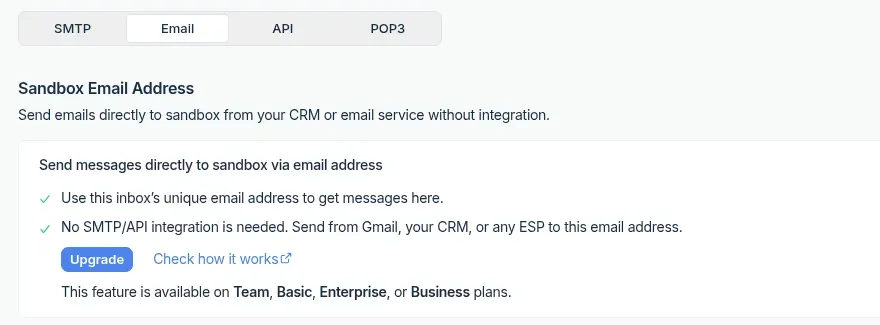
Inside Mailtrap, the direct Sandbox Email Address is a paid feature; Free users can use SMTP or API integration.
The detail I'd budget around is retention. The free Sandbox plan allows 50 test messages a month but keeps only 10 messages in a sandbox. Basic raises the monthly allowance to 500 and retained messages to 50. If you need to revisit older examples during a release review, the monthly total alone won't tell you whether they'll still be there.
The catch is the test environment itself. You're inspecting captured messages, not measuring how real mailbox providers treat your production sender. I'd skip Sandbox if your application already sends correctly and your only question is why Outlook puts those emails in junk. For that, move to placement and sender diagnostics.
Mailtrap Email Sandbox pricing
Free for 50 test messages/month. Basic is $17/month or $14/month equivalent billed $168 annually, with 500 test messages/month and 3 users.
7. Validity Engage: Best for complex email programs
Validity Engage pros:
-
Brings placement testing, reputation and authentication monitoring together
-
Helps compare issues across sending IPs, domains and providers
-
Sits alongside broader email testing and data-quality capabilities
Validity Engage cons:
-
No public fixed entry price for this configuration
-
Features, credits and API access depend on the purchased scope
Validity Engage belongs on your shortlist when email performance spans multiple domains, IPs and teams. I'd look here when the cost of a recurring delivery problem outweighs the overhead of a larger platform. An occasional newsletter doesn't need this much machinery.
If you've been researching Everest, the name change matters: its inbox-placement and monitoring capabilities now sit within Engage. That makes older Everest price tables a poor buying shortcut. Compare the current deliverability scope you need, rather than assuming a historical package is still available unchanged.
What I like is the opportunity to investigate placement alongside reputation, authentication and blocklist signals. For a team managing several mail streams, that can make a provider-specific problem easier to isolate than collecting screenshots from separate tools. The broader platform also covers other email workflows, but I'd choose the capabilities deliberately instead of treating every bundle feature as a reason to buy.
The catch is the buying process. Your volume, domains, IPs and chosen features affect the proposal; some functions consume credits, and API access has eligibility conditions. Get the required workflow priced together. I'd skip Engage if a self-service checkout and a small, predictable testing allowance are your priorities.
Validity Engage pricing
Custom pricing based on program requirements; no verified public fixed starting price for the inbox-placement and deliverability configuration.
What three realistic workloads cost
The cheapest useful option depends on the job you're buying. I priced three fixed workloads using current list prices, in US dollars before taxes. Monthly totals below mean 12 monthly payments; annual totals mean the yearly commitment. These calculations assume an existing sending or development setup and exclude its mailbox, hosting and staff costs.
Scenario 1: 24 inbox-placement tests every month
| Configuration | Annual subscription cost | Capacity | Extra cost for this workload | Limit to watch |
|---|---|---|---|---|
| GlockApps Essential, monthly | $1,020 | 30 credits/month | $0 | Unused monthly credits don't roll over |
| GlockApps Essential, annual | $708 | 360 credits/year | $0 | 288 planned tests leave 72 credits; unused credits expire at term end |
| MXToolbox Delivery Center, monthly | $1,548 | 30 analyses/month | $0 | Includes broader monitoring; provider coverage and reports differ |
A standard GlockApps test uses one credit, including a test sent to its selected seed list. Automated tests also consume credits, so the 288-test calculation leaves them out. Retesting counts toward your allowance too.
I'd choose GlockApps annual billing for a stable placement-testing routine: it's $312 less than 12 monthly payments. MXToolbox costs $840 more than that configuration, but its broader monitoring may be the reason you buy it. The shared workload makes the budgets comparable; it doesn't make the bundles identical.
Scenario 2: Three developers checking 400 staging messages a month
This workload uses one shared sandbox and needs no more than 50 messages retained at once.
| Configuration | Annual subscription cost | Capacity | Extra cost for this workload | Limit to watch |
|---|---|---|---|---|
| Mailtrap Sandbox Basic, monthly | $204 | 3 users; 500 messages/month | $0 | 1 sandbox; only 50 messages retained |
| Mailtrap Sandbox Basic, annual | $168 | 3 users; 500 messages/month | $0 | Same retention limit; $36 saving needs annual commitment |
I'd choose the billing term after checking how your team reviews old messages. Both options fit the monthly volume, but neither keeps all 400 examples available in the sandbox at once. If you need a long review history, solve that requirement before celebrating the annual discount.
Scenario 3: Two active domains with 80,000 DMARC-capable messages a month
This workload has one user and two active sending domains or subdomains in total. Additional sending subdomains count toward the limit.
| Configuration | Annual subscription cost | Capacity | Extra cost for this workload | Limit to watch |
|---|---|---|---|---|
| dmarcian Basic, monthly | $288 | 2 active domains; 100,000 messages/month | $0 | 1 user; 3 months of history |
| dmarcian Basic, annual | $239.88 | 2 active domains; 100,000 messages/month | $0 | Same limits; $48.12 saving needs annual commitment |
This assumes your legitimate traffic falls within dmarcian's DMARC-capable message count and the reports reach the service. I'd stay on monthly billing while you're mapping a new setup, then consider annual billing once the domain count and traffic are predictable. A placement tester isn't a cheaper substitute for this reporting job.
Check your existing stack first
Your current email service may already contain the first clue. Before paying for another tool, check its bounce reasons, authentication status, suppression records and recent sending changes. A campaign that stops because addresses were suppressed needs a different investigation from one that was accepted and filtered.
For Gmail-heavy programs, add Postmaster Tools alongside those logs. For a development team, check whether your existing test environment already captures generated messages safely. You may only need a better inspection workflow.
Keep address discovery separate, too. An email finder helps you locate contact details; it doesn't verify recipient interest or tell you which folder a future message will reach. I'd finish those upstream decisions before trying to improve a downstream score.
Do you need a warm-up tool as well?
Warm-up is a separate decision, not an automatic next purchase. Google recommends gradually increasing legitimate sending volume to engaged recipients and monitoring the response. That's different from assuming an automated exchange network can fix every reputation problem.
Warmy and Warmup Inbox are options I considered for the category's warm-up side. Their purpose is different from the diagnostic and monitoring tools ranked here, and I haven't measured whether their automated activity improves placement for real subscribers. I wouldn't choose either on a guaranteed-inbox promise.
First find the bottleneck. If authentication is broken, repair it. If recipients don't want the email, revisit the audience and permission. If you're introducing a new sending stream, plan a gradual increase and watch real feedback. An extra subscription won't make those decisions for you.
Which email deliverability tool should you choose?
| Your scenario | My pick | What decides it |
|---|---|---|
| An occasional message or DNS problem | mail-tester and MXToolbox | Inspect the message and investigate its DNS before committing to recurring software. |
| Repeated provider-level placement samples | GlockApps | You need recurring samples of inbox placement. |
| Several sending sources and DMARC reports | dmarcian | You need to understand the reports for those sources. |
| Personal Gmail is a meaningful share of your audience | Google Postmaster Tools | Add it alongside the other checks; it complements them. |
| Application email development | Mailtrap Email Sandbox | Use it before release, then investigate production placement separately. |
| A larger program needing several types of deliverability intelligence | Validity Engage | Put it on the demo shortlist when you need those capabilities together. |
You don't need all seven. You need a clear question, a tool that measures it, and someone who can act on the answer.