The 8 best help desk software in 2026 (Compared)
Floating blue support headset, purple ticket and glass stopwatch illustrating help desk software

What a help desk really costs

The $19 on a help desk's pricing page is almost never what you'll pay. It buys email and ticketing for one person. Add live chat, a phone line and an SLA timer for a team of ten, and the bill lands somewhere between $2,760 and $13,800 a year—before anyone picks up the phone. Shopping for a help desk is mostly the job of finding out which plan you actually need, and the pricing page is built to hide that from you.

How I compared these tools

I signed up for trial workspaces in Zoho Desk, Help Scout, HelpDesk.com and Jira Service Management and ran the same small ticket through each: create it, leave an internal note, assign it, change its status, reload. I got as far as the agent workspace in a Zendesk trial, and for Freshdesk, HubSpot and Front I compared the pricing pages and help docs instead. I also priced three real team setups against every tool and read what people running these desks say on Reddit.

Here are my picks.

What is help desk software?

Help desk software turns customer requests from email, chat, phone and social channels into tickets that a team can assign, prioritize, answer and close from one shared inbox. The better tools add automation rules, a knowledge base, SLA timers that flag late replies and reports on how fast your team responds.

The best help desk software at a glance

ToolBest forStandout featureStarting priceMain trade-off
ZendeskSLAs, routing and phone in one suiteSkills-based routing, IVR and SLA policies on one price listFrom $19/agent/month, billed annuallySLAs start at $115; voice billed by usage
FreshdeskEmail-first teams that may add channelsClear ladder from email-only to omnichannelFrom $19/agent/month, billed annuallyTwo price lists; no free plan
Zoho DeskBudget teams and Zoho usersTelephony and round robin at $23From $7/user/month, billed annuallyPricing page doesn't say which plan has SLAs
HubSpot Service HubCompanies already on HubSpot CRMTickets on the same record as sales and marketingFree for up to 2 users$1,500 onboarding fee on Professional
Help ScoutEmail-first teams that want SLAs without heavy setupSLA policies on every paid planFrom $25/user/month, billed annuallyPhone only through an integration
HelpDesk.comSmall email-plus-chat teamsEmail, chat, Messenger and SMS at $19From $19/user/month, billed yearlyThree rules on Essential; no phone or SLA targets
FrontCollaborative shared-inbox teamsEmail-like inbox the team learns in minutesFrom $25/seat/month, billed annuallyStarter is single-channel; no phone on the plan table
Jira Service ManagementAtlassian shops and internal IT requestsFree for 3 agents with SLA targets on requestsFree; Standard from $21.50/agent/month, billed monthlyNo phone or social channel

What makes the best help desk software?

Every tool on this list can turn an email into a ticket. The differences show up when you add a second channel, a second SLA policy or a tenth agent, so that's where I looked.

  • Which plan unlocks each channel: Live chat, phone and social are rarely on the entry plan, and "omnichannel" on a pricing page can mean a chat widget, a bring-your-own-carrier phone integration or native voice billed by the minute. I mapped each channel to the plan that includes it.

  • What an SLA really is: A real SLA policy has a target, a running timer and an action when it's breached. Some tools sell reporting-only SLAs; some don't say which plan has them. I counted policies per plan and, where I had a workspace, opened the editor.

  • How tickets reach the right person: Rules, round robin or skills-based routing, and on which plan. A team of five can live on rules; a desk with phone and chat can't.

  • The real annual number: I priced the same three setups on every tool, mandatory extras like onboarding fees included.

  • What the inbox is like to work in: Where I had a trial, I ran one ticket through it and noted what the first screen asks for, how the internal note behaves and the one thing that annoyed me.

If there's a tool you'd expect here that isn't, it's either in the "check your existing stack" section or it's an IT service management product rather than a customer help desk; three of those are in "Other tools I considered."

1. Zendesk: Best for SLAs, routing and phone in one suite

Zendesk pros

  • SLA policies, skills-based routing, IVR and omnichannel routing on one price list

  • Every channel and routing feature is mapped to a plan, so you can see where your requirement lands

  • 14-day trial runs on Suite Professional features

Zendesk cons

  • The Support Team plan is email and ticketing only, with no SLA row

  • Voice usage beyond plan allowances is billed by consumption, and the page doesn't say how much

  • Extra AI agent resolutions cost $1.50 each on committed volume, $2.00 pay-as-you-go

Zendesk is the tool I'd point a support lead at when they already know they need SLA policies, skills-based routing and a phone line, and have someone with time to configure them. When I signed up for the trial, the first thing I saw was the agent workspace with a 14-day countdown and a "Buy your trial" button in the header, which tells you how the trial is meant to end.

What I like about Zendesk is that nothing is vague. Live chat, messaging, telephony, a knowledge base and omnichannel routing all arrive on Suite Team; skills-based routing, IVR and SLA policies arrive on Suite Professional. You don't have to guess which plan carries your must-have, and that's rarer on this list than it should be.

The catch is the distance between Support Team and Suite Professional: the headline price buys email only.

What the same team really pays per year — Zendesk

  • 10 agents, chat + phone + SLA tracking → Suite Professional, $13,800 before voice usage (at the headline price it would be $2,280)

  • 5 agents, email + chat → Suite Team, $3,300, and you'd use about a third of it

Skip Zendesk if

  • you're a five-person team on email and chat — it's overkill

  • you expect to shrink the contract later

Reddit
r/Zendesk
Zendesk won't let me reduce seats despite me starting account review conversations 2+ months before my end date. ... Finally my renewal comes along and I request to reduce the number of seats (not even cancel) and they're saying too bad."

— u/Tricky-Handle8468, r/Zendesk. A Zendesk employee replied that the company was working with the author; the outcome wasn't reported.

Zendesk pricing

From $19/agent/month, billed annually, for the Support Team plan; 14-day trial of Suite Professional.

  • Support Team — $19/agent/month, billed annually — email and ticketing

  • Suite Team — $55/agent/month, billed annually — live chat, messaging and telephony

  • Suite Professional — $115/agent/month, billed annually — SLA policies

  • Monthly billing — $25 / $69 / $149

2. Freshdesk: Best for email-first teams that may add channels later

Freshdesk pros

  • Multiple SLA policies from Pro, well below Zendesk's SLA tier

  • One vendor from email-only Growth to omnichannel Omni Enterprise

  • 500 free Freddy AI Agent sessions on every paid plan

Freshdesk cons

  • Two price lists, Freshdesk and Freshdesk Omni, with different entry prices

  • Telephony is bring-your-own, so carrier costs sit on top of Omni Pro

  • No permanent free plan; the trial is 14 days of Enterprise

Freshdesk is my pick for a small team that starts with email and wants a vendor it won't outgrow when chat or phone arrives. The standard list climbs from Growth through Pro to Enterprise, and SLA policies—several of them, not one—show up on Pro, the middle step. That's the cheapest route on this list to multiple SLA policies from a vendor that can also sell you a phone channel later.

Before you budget, know that two pricing pages carry the Freshdesk name. I compared them side by side: the standard page treats Growth as an email plan, while the Omni page opens higher and is where chat and phone live. Round robin and bring-your-own telephony start on Omni Pro, skill-based routing on Enterprise. Price your channels on the Omni page first, add your carrier's charges, and treat Copilot as a separate per-agent line; the ten-agent total is in the scenario table below.

The catch is renewals, and here it's the users talking.

Reddit
r/msp
We've been using FreshDesk for 10 years now. We have it customized perfectly for our company and customer base. It works well, is efficient, and we rarely have a problem with it. Our annual renewal came up this month and the reseller has given us a 35% price increase."

— u/hongkong-it, r/msp. A ten-year customer who still likes the product is the best and worst thing you can say about a renewal.

Skip Freshdesk if

  • you want a free plan — look elsewhere

  • you're counting on chat and social at the Omni entry price — ask Freshworks which channels Omni Growth includes first, because the page says "omnichannel" without naming them

Things I Noted — Freshdesk

Don't trust old roundups on the free plan. Some still say Freshdesk is free for up to 10 agents, or free for 2, with paid plans from $15; today the pricing page has no free plan and starts with the paid Growth plan. u/AvailableShoulder713 on r/sysadmin, September 10, 2026: "it used to be 10 users, 1 helpdesk for FREE. Then they reduced it to 2 users, 1 helpdesk and limited some other features, which again was fine, I just cut the rarely used users. But now, this is just stupid."

Freshdesk pricing

From $19/agent/month, billed annually, for the Growth plan; 14-day trial of the Enterprise plan, no permanent free plan.

  • Growth — $19/agent/month, billed annually — email

  • Pro — $55/agent/month, billed annually — multiple SLA policies (Enterprise, $89, adds skill-based routing)

  • Omni Pro — $79/agent/month, billed annually, on the second price list (Freshdesk Omni, from $29) — round robin and bring-your-own telephony

  • Copilot — $29/agent/month extra

3. Zoho Desk: Best for budget teams and existing Zoho users

Zoho Desk Enterprise trial SLA templates with annotated priority resolution targets

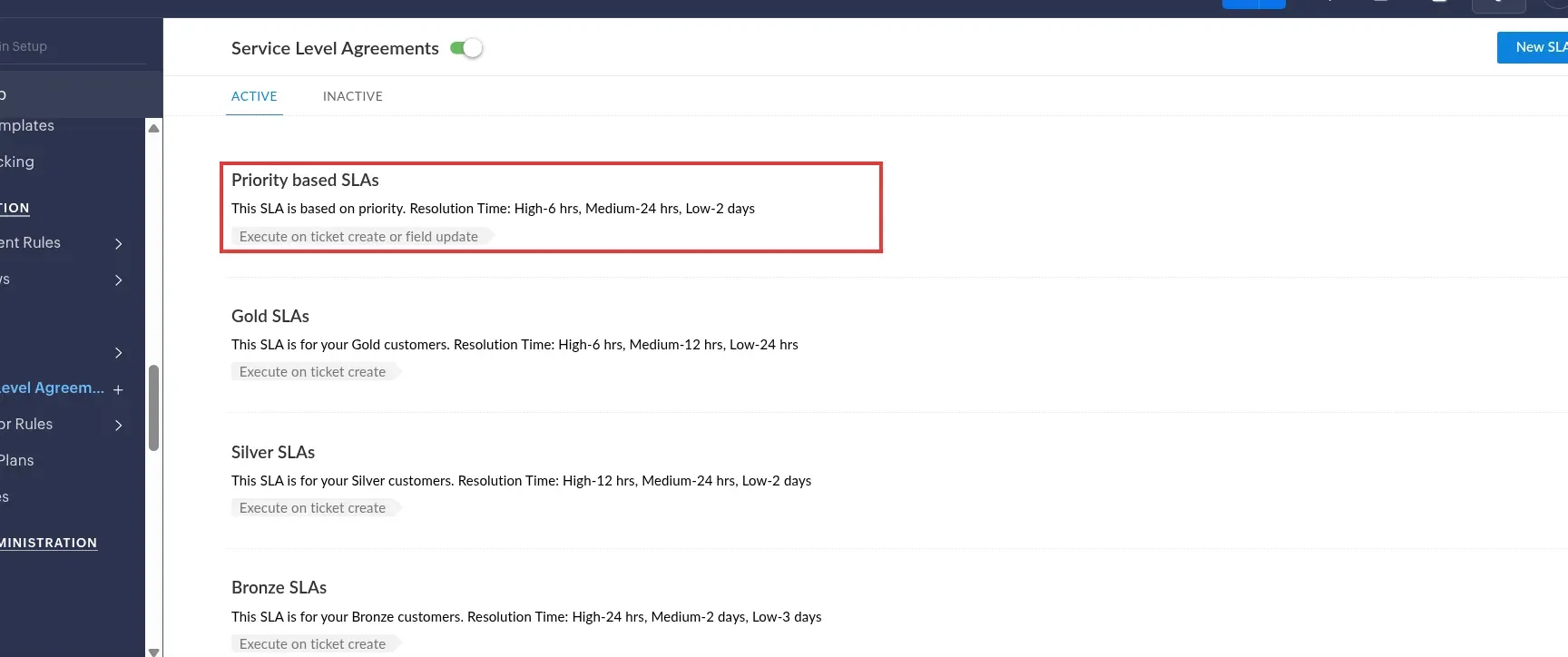
Inside Zoho Desk, the Enterprise trial ships with ready-made SLA templates: the priority-based one resolves High in 6 hours, Medium in 24 and Low in 2 days, and you edit the numbers rather than build from scratch. (Image source: Zoho Desk)

Zoho Desk pros

  • Express, the cheapest paid entry plan on this list, includes email, Instagram, Facebook, X and web forms

  • Telephony and round robin on Professional, the cheapest phone route here

  • Free plan for 3 users; the 15-day trial falls back to it

Zoho Desk cons

  • The pricing page doesn't say which plan carries SLA policies

  • Plan FAQ mentions a five-user limit on Standard

  • Telephony provider charges, light agents at $6/user/month and local taxes come on top

When I signed up for the Zoho Desk trial, it asked for a phone number and texted me a code before it let me in, then dropped me into an Enterprise trial that expires in 15 days. From there the ticket workflow was quick: I created a ticket, added a private note, hit Close Ticket, and the owner, the Private label and the Closed status were all still there after a reload. Nothing clever, but nothing fought me either.

Zoho's tiers line up with channels, which I appreciate. Express is email, social and forms. Chat and messaging start on Standard. Telephony and round robin start on Professional, which makes Zoho the cheapest phone route in my ten-agent scenario by a wide margin. The SLA settings were what I most wanted to see. They're under Setup → Automation → Service Level Agreements, and the trial comes with four templates already active—Priority based, Gold, Silver and Bronze—plus a New SLA button. Nobody wants to write "High: 6 hours" from a blank form, so that's a good default.

The catch is that I saw those SLAs on an Enterprise trial, and the pricing page never says which lower plan includes them.

What ten agents really pay per year — Zoho Desk

  • phone on Professional → $2,760 plus call charges

  • if the SLAs turn out to need Enterprise → $4,800, which still undercuts every other tool that covers the setup

The other thing to weigh is Zoho's reputation.

Reddit
r/Zoho
You don't want to pay the money for Zendesk or Helpscout? Zoho Desk is great.... except for this bunch of issues that people have been flagging for 7 years. ... Everyone complainings about Zoho support but they are great once you get past the first gatekeeper."

— u/BangCrash, r/Zoho. Zoho is for the team that wants the lowest bill and will tolerate rough edges; it isn't for a service that needs polish on every channel.

Zoho Desk pricing

From $7/user/month, billed annually, for the Express plan; free plan for 3 users and a 15-day Enterprise trial.

  • Express — $7/user/month, billed annually ($9 monthly) — email, social and web forms

  • Standard — $14/user/month, billed annually ($20 monthly) — chat and messaging

  • Professional — $23/user/month, billed annually ($35 monthly) — telephony and round robin

  • Enterprise — $40/user/month, billed annually ($50 monthly) — the plan my SLA trial ran on

4. HubSpot Service Hub: Best for companies already on HubSpot CRM

HubSpot Service Hub pros

  • Free for up to 2 users, no card, with ticketing and team email

  • Tickets sit on the same record as HubSpot's sales and marketing data

  • Professional adds the help desk workspace, SLA management and call tracking with IVR

HubSpot Service Hub cons

  • Professional requires a one-time $1,500 onboarding fee; Enterprise $3,500

  • The pricing page shows two seat prices per tier without saying which is annual

  • Calling minutes are priced separately

HubSpot Service Hub is the right answer to exactly one question: do your sales and marketing already live in HubSpot? If yes, putting tickets on the same customer record is worth a lot, and the free tier—ticketing and team email for up to two users—is a genuinely useful way for a one- or two-person team to start. If no, don't come here for the help desk alone.

The feature story is fine: Starter brings live chat, simple ticket automation and multiple pipelines; Professional brings the help desk workspace, a customer agent, a knowledge base, SLA management and call tracking with IVR. What I can't give you is a clean price. I read both HubSpot pages and they disagree. The pricing page lists two figures per tier without labeling which is annual and which is monthly, and the product page shows other numbers (Starter from $10, Professional from $100, Enterprise from $175). So I priced ten Professional seats as a range, onboarding fee included; it's in the scenario table below.

The catch is that fee. It's mandatory on Professional, and it changes a first-year comparison against any vendor that doesn't charge one. The pricing model also moves. u/333hmb on r/hubspot, August 6, 2026, a team that left Zendesk about a year and a half earlier: "Zendesk to HubSpot for around 1.5yrs now, it was challenging & continues to be for a few reasons but we wouldn't go back • Help Desk didn't have half the features it now has • HubSpot changed their pricing model which changed our expense drastically so the savings of getting rid of Zendesk weren't as material." I'd get a written quote before comparing it with anything else on this list.

HubSpot Service Hub pricing

Free for up to 2 users; paid tiers show two seat prices each on the pricing page, billing period unlabeled.

  • Free — up to 2 users — ticketing and team email

  • Starter — $7 and $20/seat/month, billing period unlabeled — live chat and simple ticket automation

  • Professional — $90 and $100/seat/month, billing period unlabeled, plus a one-time $1,500 onboarding fee — help desk workspace and SLA management

  • Enterprise — $150/seat/month, plus a one-time $3,500 onboarding fee

5. Help Scout: Best for email-first teams that want SLAs without heavy setup

Help Scout SLA policy editor with annotated first-response, next-response and resolution targets

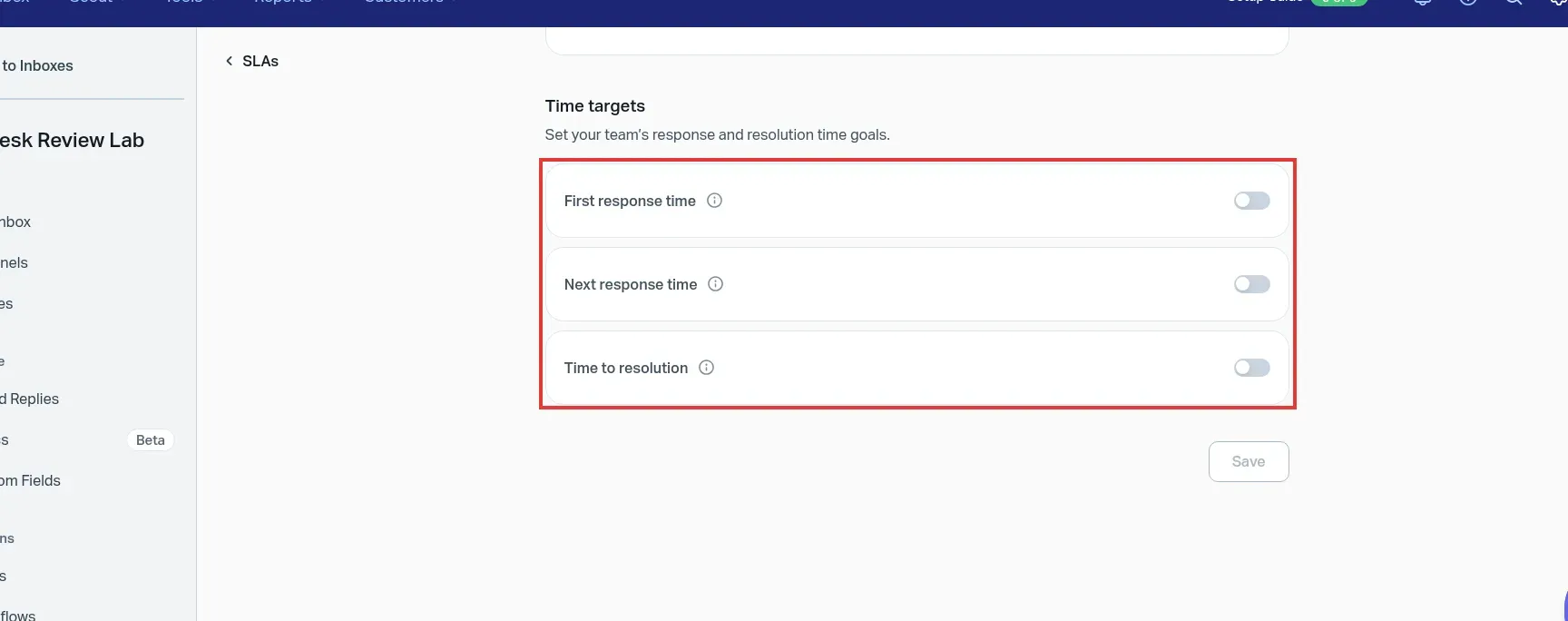
Inside Help Scout, an SLA policy lets you switch on first-response, next-response and resolution targets separately, so you can promise a fast first reply without promising a resolution time. (Image source: Help Scout)

Help Scout pros

  • SLA policies on every paid plan: one basic on Standard, two advanced on Plus, unlimited on Pro

  • Live chat, WhatsApp, Instagram, Messenger and a knowledge base on Standard, the entry plan

  • Free plan for 5 users, 1 inbox and 1 Docs site; 15-day trial, no card

Help Scout cons

  • Phone only through an integration such as Aircall, with its own subscription

  • AI Answers cost $0.75 per resolution on top of the seat price

  • Extra inboxes cost $10/month on annual billing

When I signed up for Help Scout's Plus trial, I was met with a six-step setup guide in the header and an inbox that looks like email. I logged a conversation by hand, assigned it to myself, set it to Pending and left an internal note, and all of it survived a reload. The note is labeled Note rather than Reply, in a different color, so nobody mistakes it for something the customer saw. My one gripe: the Create button stayed greyed out until I gave the customer an email address, so you can't log a quick phone note against a name alone.

The feature that puts Help Scout on this list is SLAs on the entry plan. Standard gives you one basic policy, Plus two advanced ones with round robin, Pro unlimited. I opened the editor in the Plus trial and it's the clearest one I saw: first response, next response and time to resolution are three separate switches, and a policy with no conditions applies to every conversation. I'd switch on first response alone for the first month and add resolution targets once you know your numbers.

The catch is phone: calls come through an integration with its own bill.

Skip Help Scout if

  • voice is your main channel — Help Scout isn't for you

For an email-first team it earns its reputation.

Reddit
r/Zendesk
Help Scout just .. worked. I didn't feel like I was fighting it constantly. It had annoyances too, for sure, but not to the level where I feel like I want to throw my computer out the window like with Zendesk."

— u/LuckyPeace663, a frontline agent on r/Zendesk whose team moved the other way. Zendesk admins in the same thread blamed configuration, which is fair; Help Scout wins out of the box, Zendesk wins once tailored.

Things I Noted — Help Scout

I caught Kayako's March 2026 roundup listing "no SLA management" as a Help Scout con and Standard at $20 per user. The pricing page shows a higher Standard price and SLA policies on every paid plan, and I saw the editor myself. When a roundup's number matches none of the vendor's current plans, trust the vendor.

Help Scout pricing

From $25/user/month, billed annually, for the Standard plan; free plan available, 15-day trial.

  • Free — 5 users, 1 inbox and 1 Docs site

  • Standard — $25/user/month, billed annually — one basic SLA policy

  • Plus — $45/user/month, billed annually — two advanced SLA policies

  • Pro — $75/user/month — unlimited SLA policies

6. HelpDesk.com: Best for small email-plus-chat teams

HelpDesk.com ticket thread showing an annotated internal note and activity log

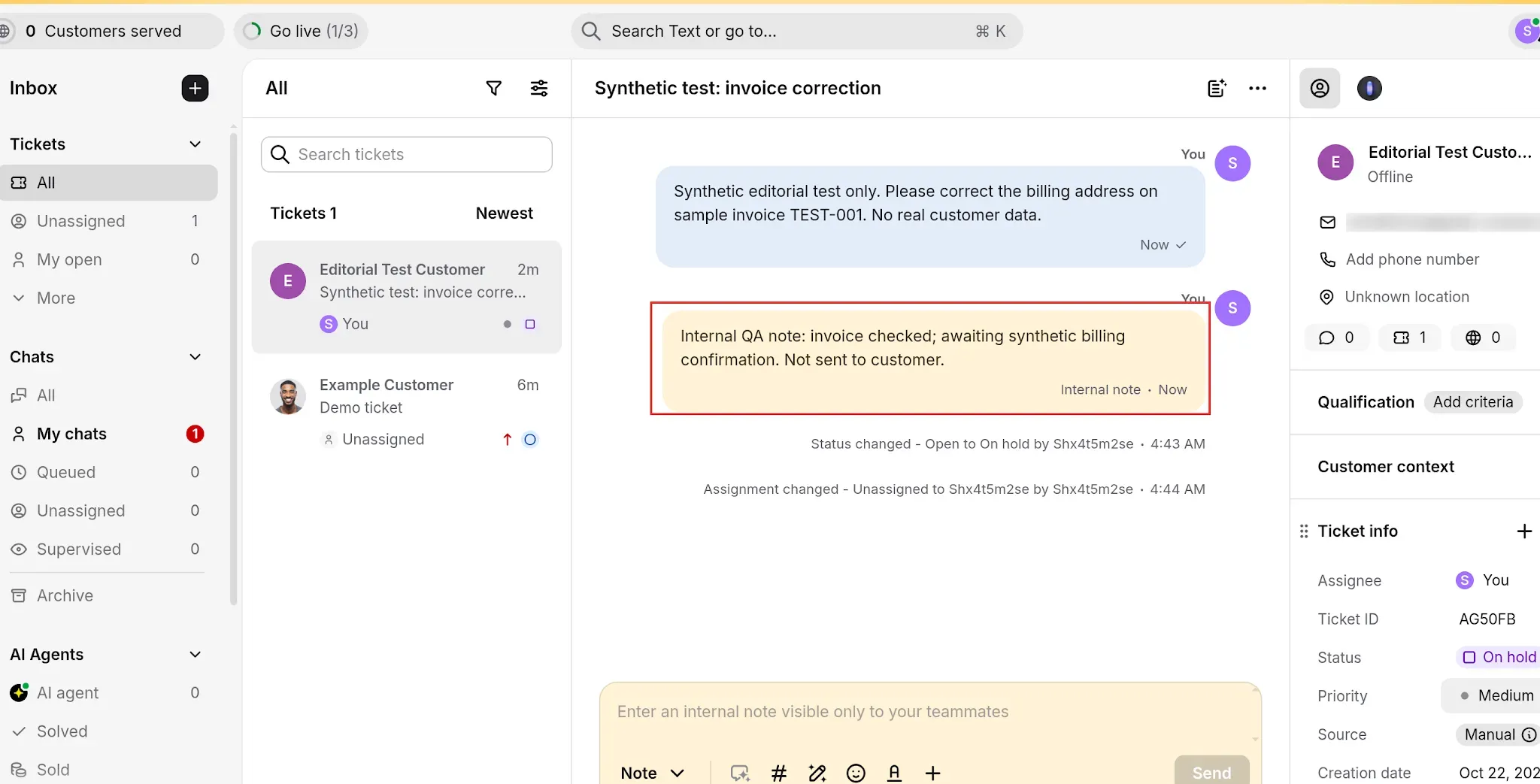
Inside HelpDesk.com, switching the composer from Message to Note drops a yellow internal note into the thread that the customer never sees; the activity log underneath records the status and assignment changes. (Image source: HelpDesk.com)

HelpDesk.com pros

  • Essential covers email, website chat, Messenger and SMS in one inbox

  • Automated assignment and canned responses on the entry plan

  • Internal notes, status and assignment changes all land in the thread's activity log, as tested

HelpDesk.com cons

  • Essential caps ticketing rules at three; Growth raises it to ten

  • No phone channel and no customer-SLA targets on the public page

  • Signup lands you in the Text inbox, a second interface for the same account

HelpDesk.com is the cheapest way on this list to get email and website chat into one inbox for a small team. When I signed up, the first screen wasn't HelpDesk at all but Text, a sibling inbox with a 14-day countdown, a seeded demo ticket and a banner asking me to forward customer emails. One account, two interfaces: the ticket I created in Text showed up in HelpDesk's own ticket list with the same assignee and status, so it works, but it's confusing for the first ten minutes.

The ticket itself was easy. I switched the composer from Message to Note, left an internal note that the thread labels "Internal note" in yellow, moved the status from Open to On hold and assigned the ticket to myself, and the activity log recorded each change. I also opened the rule builder: the subject-based assignment template splits trigger conditions (Ticket created, Subject contains) from actions (set the team and agent, add a tag), and the template list includes round-robin assignment and priority escalation. I didn't activate a rule, but it's a builder a non-admin can read.

The catch is the rule cap and what's missing above it: Essential allows three ticketing rules, which a five-person team will hit in a week.

What the same five people really pay per year — HelpDesk.com

  • email + chat with a couple of rules → Essential, $1,140, hard to beat

  • more than three rules → Growth, $4,740, a different proposition entirely

Skip HelpDesk.com if

  • you need a phone channel — there isn't one

  • you need customer SLA targets — none on the public page; SLAs appear only as an Enterprise line

HelpDesk.com pricing

From $19/user/month, billed yearly, for the Essential plan; 14-day trial, no card.

  • Essential — $19/user/month, billed yearly ($25 billed monthly) — email, chat, Messenger and SMS with three ticketing rules

  • Growth — $79/user/month, billed yearly ($99 monthly) — ten ticketing rules

  • Enterprise — custom quote — the only line on the public page that mentions SLAs

  • AI resolutions — 50 extra cost $49.50

7. Front: Best for collaborative shared-inbox teams

Front pros

  • Email-like shared inbox that a team learns in minutes

  • Omnichannel, 20 rules and up to 5 workspaces on Professional

  • 14-day trial with Professional features

Front cons

  • Starter allows one channel type, so email plus web chat needs Professional

  • Seat caps of 10 on Starter and 50 on Professional

  • No phone channel on the plan table; SLAs appear only as reporting

Front is for teams that treat support as a shared inbox with internal collaboration rather than a ticket queue, and it's honest about that. The plan table reads like a collaboration tool's: Starter gives you one channel type and a short rule allowance; Professional is where omnichannel, advanced reporting and separate workspaces for teams arrive.

What sells Front is how little training it needs. u/Thin_Extension2584 on r/ChoosingVendors, June 26, 2026: "Front is pretty good if u treat support like a shared inbox. UI is basically just email so the team learns it in liek 5 mins." I'd take that over a feature list for a team where support is a rotating duty rather than a department. The add-ons are where Front gets modern: Copilot is a per-seat add-on, Autopilot is billed per conversation, and native WhatsApp is billed by Meta plus a 20% fee.

The catch is the single-channel Starter: a team that wants email and web chat in one inbox needs Professional.

What the same team really pays per year — Front

  • 5 seats, email + web chat → Professional, $3,900 (on the Starter headline price it would be $1,500)

  • 10 agents, my multichannel scenario → $7,800 on seats alone, and Front only partly meets it, because phone isn't on the plan table and SLAs appear only as reporting

Skip Front if

  • you need a phone-and-SLA desk

If your team already lives in email and wants to keep it that way with rules and shared drafts, Front is worth a close look.

Front pricing

From $25/seat/month, billed annually, for the Starter plan; 14-day trial with Professional features.

  • Starter — $25/seat/month, billed annually, up to 10 seats — one channel type, 10 rules

  • Professional — $65/seat/month, billed annually, up to 50 seats — omnichannel

  • Enterprise — $105/seat/month

  • Add-ons — Copilot $20/seat/month; Autopilot from $0.05 per conversation

8. Jira Service Management: Best for Atlassian shops and internal IT requests

Jira Service Management Free request showing annotated first-response and resolution targets

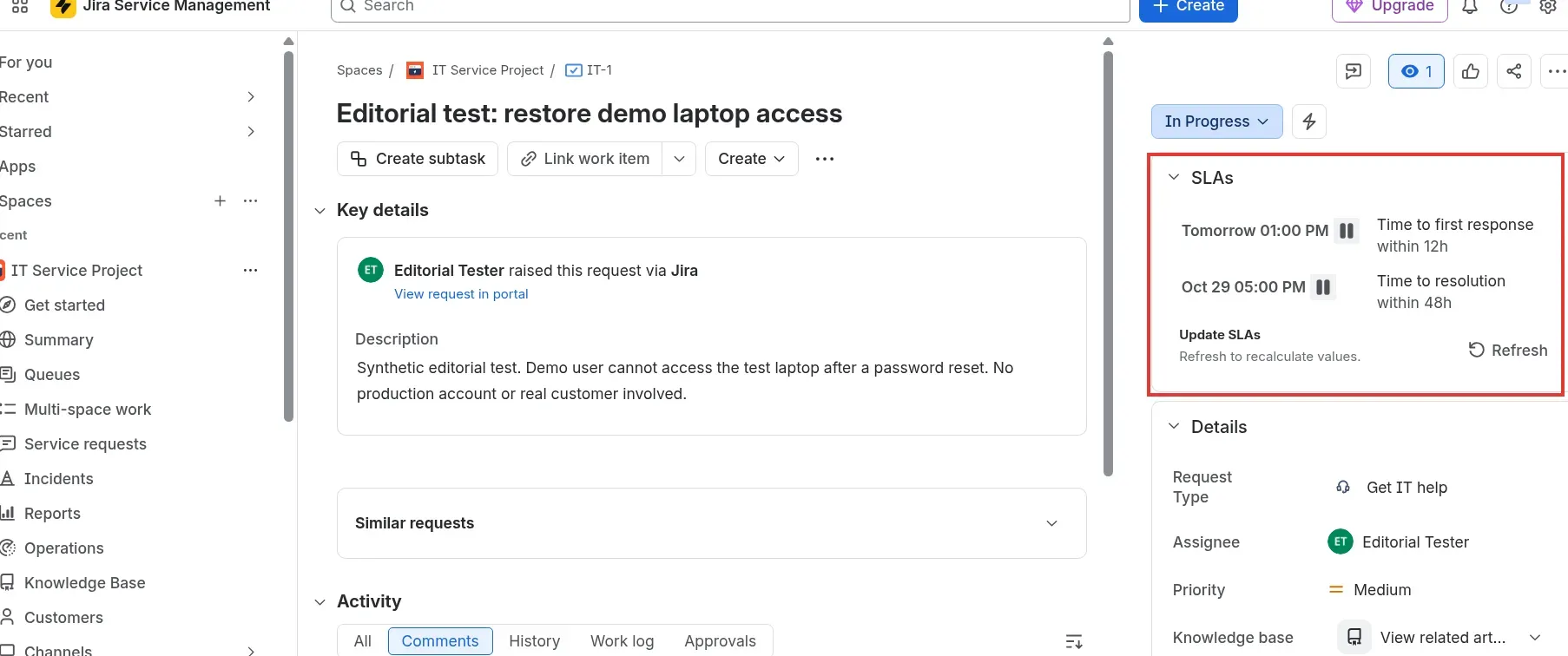
Inside Jira Service Management, even a Free-plan request carries first-response and resolution targets with due dates, so you get SLA tracking before you pay anything. (Image source: Jira Service Management)

Jira Service Management pros

  • Free for up to 3 agents and 2 GB, confirmed in-app

  • Request portal, email, chat, Microsoft Teams, Slack and an embeddable widget as channels

  • First-response and resolution targets showed on my Free-plan request

Jira Service Management cons

  • No native phone or social channel

  • Annual billing is listed only as "save up to 17%", with no figure

  • Customer-facing email templates read like enterprise IT

Jira Service Management is a request-management tool that sits next to Jira, not a multichannel customer-support desk, and that's who it's for: IT and operations teams handling internal requests through a portal, and anyone whose developers already live in Jira. When I signed up for the Free plan, the in-app panel confirmed it plainly—"You're on the Free plan," one of three agents used, 0.0 of 2.0 GB—and an IT Service Project was waiting with request types already set up.

The part I didn't expect was SLAs on a free plan. I created request IT-1, assigned it to myself, left an internal note (a locked yellow card after reload) and moved it from Waiting for support to In Progress. The whole time, the SLA panel showed "Time to first response within 12h" and "Time to resolution within 48h" with due dates. Nobody else on this list gives you SLA targets for $0. My gripe: when I tried to resolve the request, the dialog insisted on a Resolution value and the dropdown in my fresh project had nothing to offer, so I parked it at In Progress. Budget an hour for workflow setup before your first real ticket.

The catch is the channel list: portal, email, chat, Teams, Slack and a widget, with no phone or social, so it can't cover a customer service desk with a phone line. The customer-facing side is also Jira-shaped.

Reddit
r/SaaS
I've gone from Gmail to Jira Services Management for my customer support, but it seems like my customers are confused by Jira's email templates (since it's more enterprise focused) and are not responding to follow up messages."

— u/s7orm, r/SaaS, a solo developer who moved from Gmail.

Skip Jira Service Management if

  • your requesters are customers, not employees — pick something else

  • you need a phone or social channel

If your requesters are employees, start here; Atlassian now sells this under the name Service Collection.

Jira Service Management pricing

Free for up to 3 agents; Standard from $21.50/agent/month, billed monthly, at the calculator's 75-user default.

  • Free — up to 3 agents and 2 GB — SLA targets on requests

  • Standard — $21.50/agent/month, billed monthly — 14-day trial, extendable to 30 days

  • Premium — $55.28/agent/month, billed monthly — same 14-day trial

  • Annual billing — listed only as "save up to 17%", and the only option on Enterprise

What the same workload costs

A pricing page can't tell you what your setup costs, so I defined three team setups and priced the plan that meets each one in every tool. These are list prices multiplied out on October 15, 2026, in US dollars before tax, cloud-hosted, with no implementation partner and no migration. Annual cost is seats times the monthly per-seat price times 12 on annual billing unless stated.

  • Scenario A, one specialist (1 seat): one shared support address turned into tickets with status, priority, tags and notes, saved replies, customer history and at least one simple automation. No chat, phone, SLA, knowledge base or AI.

  • Scenario B, team of 5 agents: A plus website live chat in the same inbox, automatic assignment, internal notes, a knowledge base and basic reporting. No phone, no SLA tracking.

  • Scenario C, service with several channels and SLAs, 10 agents: B plus phone logged as tickets, one social or messaging channel, at least two SLA policies with breach reporting, queue or skill routing and reporting.

Scenario A: one specialist

ToolPlanAnnual costMandatory extrasLimit that bites
ZendeskSupport Team, $19$228NoneEmail and ticketing only
FreshdeskGrowth, $19$228NoneEmail plan; no permanent free plan
Zoho DeskExpress, $7$84NoneUSD from Zoho's own price list
HubSpot Service HubFree$0NoneUp to 2 users; ticketing and team email
Help ScoutStandard, $25 (Free plan also exists)$300NoneFree plan is limited to 1 inbox
HelpDesk.comEssential, $19$228NoneThree ticketing rules
FrontStarter, $25$300NoneSingle channel type
Jira Service ManagementFree$0NoneUp to 3 agents, 2 GB storage
Existing Google Workspace or Microsoft 365 seatStarter or Business Basic, $7$84NoneEmail-only inbox, no ticket SLA; $0 extra if you already pay

Scenario B: team of five with chat and a knowledge base

ToolPlanAnnual costMandatory extrasLimit that bites
ZendeskSuite Team, $55$3,300None for this scopeChat, telephony, knowledge base and omnichannel routing included
FreshdeskOmni Growth, $29$1,740None for this scopeChannels aren't named on the page; auto-assignment by rules only, round robin is Omni Pro
Zoho DeskStandard, $14$840NoneLive chat widget and knowledge base; plan FAQ mentions a five-user limit
HubSpot Service HubStarter$420 to $1,200NoneLive chat and simple ticket automation; the range reflects the two seat prices on the page
Help ScoutStandard, $25$1,500NoneLive chat, knowledge base and workflows included
HelpDesk.comEssential, $19$1,140NoneEmail, website chat and automated assignment; three rules; $1,500 on monthly billing
FrontProfessional, $65$3,900NoneStarter is single-channel, so email plus chat needs Professional
Jira Service ManagementStandard, $21.50$1,290NoneMonthly billing; the annual price isn't on the page

Scenario C: ten agents with several channels and SLAs

ToolPlanAnnual costMandatory extrasLimit that bites
ZendeskSuite Professional, $115$13,800Voice usage billed by consumption, no price on the pageSLA policies, skills routing and IVR included
FreshdeskOmni Pro, $79$9,480Carrier costs (bring your own telephony)Multiple SLA policies and round robin; native phone and social channels aren't listed
Zoho DeskProfessional, $23$2,760Telephony provider chargesTelephony and round robin included; $4,800 if SLA policies need Enterprise at $40
HubSpot Service HubProfessional$12,300 to $13,500 first yearRequired $1,500 onboarding (included in the range); calling minutesSLA management and call tracking on the product page; the range reflects the two seat prices
Help ScoutPlus, $45$5,400Telephony vendor's own subscription (for example Aircall)Two advanced SLA policies and round robin; phone only through an integration
HelpDesk.comDoesn't meet the setupn/an/aNo voice channel or customer-SLA targets on the public page
FrontProfessional, $65$7,800 on seats alonePhone isn't on the plan tableSLAs appear only as reporting, so Front only partly meets this setup
Jira Service ManagementDoesn't meet the setupn/an/aChannels are portal, email, chat, Teams, Slack and widget; no phone or social

How I read these numbers

Scenario A is the one the headlines are built for: $19 buys a specialist a ticket queue at Zendesk, Freshdesk and HelpDesk.com, and HubSpot and Jira give it away. If you're one or two people, I wouldn't pay for it at all.

Scenario B is where the list separates. Five people with chat and a knowledge base run from $840 on Zoho Desk Standard to $3,900 on Front Professional, with HubSpot Starter possibly lower at $420 to $1,200 depending on which of its two seat prices you get. I'd shortlist Zoho, Help Scout and HelpDesk.com here and treat Zendesk's $3,300 as paying for channels you don't use yet.

Scenario C is where you find out what "omnichannel" costs: $2,760 on Zoho Desk Professional to $13,800 on Zendesk Suite Professional before anyone makes a call, and two of the eight—HelpDesk.com and Jira Service Management—can't meet it from their public pages. I wouldn't pick Zoho over Zendesk just because $2,760 is less than $13,800; one gives you SLA policies on a plan it won't name, the other gives you skills-based routing and IVR on a plan it does. But if Zoho's answer is "Enterprise, $40," $4,800 is still a third of Zendesk's bill.

Phone is never fully inside any of these prices. Zendesk bills voice by usage, Freshdesk Omni expects your own carrier, Zoho Desk and Help Scout connect third-party providers, and HubSpot prices calling minutes separately. The tables show plan cost, not phone cost, with fixed seat counts: no light agents, volume discounts or negotiated rates.

Triage, SLA and channel coverage by plan

ToolChatPhoneSLAAssignment and triage
ZendeskSuite TeamSuite Team, usage-billedSuite ProfessionalOmnichannel routing on Suite Team; skills-based routing on Suite Professional
FreshdeskOmni listOmni, bring your own telephony from ProMultiple policies from Pro on both listsRules on Growth; round robin on Omni Pro; skill-based on Enterprise
Zoho DeskStandardProfessionalPlan not stated; templates seen on the Enterprise trial; multi-level escalations on ExpressRound robin on Professional
HubSpot Service HubStarterCall tracking and IVR on Professional (product page)SLA management on Professional (product page)Pipelines on Starter; help desk workspace on Professional
Help ScoutStandardVia integration onlyOne basic (Standard), two advanced (Plus), unlimited (Pro)Round robin from Plus
HelpDesk.comEssentialNot listedNo targets on the public page; SLAs on EnterpriseAutomated assignment on Essential; rules capped at 3 then 10
FrontSingle channel type on Starter; omnichannel on ProfessionalNot on the plan tableReporting onlyRules (10 on Starter, 20 on Professional)
Jira Service ManagementChat includedNot listedFirst-response and resolution targets seen on Free; advanced scope not testedJira workflows and queues

Check your existing stack first

Before you pay for a help desk, look at what you already own. For a very small team these give you one shared support address at no extra licence cost.

  • Google Workspace Collaborative Inbox: A Google Group can be turned into a shared inbox where members assign a conversation to themselves or a colleague and mark it resolved or a duplicate. The cost is the Workspace seat; Business Starter was $7 per user per month with an annual commitment when I checked, though Google shows euros and short-term discounts in some regions. No SLA timers, no priority fields.

  • Microsoft 365 shared mailbox: Holds up to 50 GB without its own licence, but everyone who uses it needs a licensed Exchange Online mailbox. Business Basic, which includes Exchange, is $7.00 per user per month paid yearly. No assignment, status or SLA features.

  • FreeScout, osTicket and Hesk (free, self-hosted): FreeScout is open source under AGPL v3 with unlimited agents, tickets and mailboxes on PHP and MySQL; you supply the server and the admin time, and some modules are paid. osTicket has a hosted edition from $12 per agent per month with a 30-day trial. Hesk is free, with an optional one-time $49.99 licence that removes branding and includes a year of email support, plus a Hesk Cloud plan at $29.99 per month for up to 10 agents.

All of these stop at email. If you need live chat, a knowledge base, SLA timers or phone, pick one of the eight tools above.

Which help desk software should you choose?

If you're one or two people with email-only support, don't buy anything yet: HubSpot's free tier, Jira Service Management's free plan or the shared mailbox you already pay for will do. If you want email and chat at the lowest list price, pick Zoho Desk Standard at $14, after checking the five-user note in its plan FAQ. If you want email, chat, Messenger and SMS in one inbox for under $1,200 a year and can live with three rules, pick HelpDesk.com Essential.

If SLA policies matter and you don't want Zendesk prices, pick Help Scout: one policy at $25, two at $45, with the clearest editor I saw. If you want several SLA policies and will bring your own phone carrier, pick Freshdesk Omni Pro. If you need SLA policies, skills-based routing and native phone on one price list and have an admin to run it, pick Zendesk Suite Professional and budget for voice usage on top.

If your sales and marketing already live in HubSpot, pick Service Hub and get the onboarding fee in writing first. If your requesters are employees and your developers are in Jira, pick Jira Service Management; it gives you SLA targets for free and the wrong email templates for customers. If your team thinks of support as a shared inbox and wants to keep it that way, pick Front Professional.

Other tools I considered

  • Hiver: a help desk that runs inside Gmail, with plans from $25 per user per month on annual billing.

  • HaloITSM: an IT service management platform aimed at internal IT teams, sold at a single per-agent price instead of tiers.

  • Freshservice: Freshworks' IT service management product, at $19, $49 and $99 per agent per month on annual billing for its first three plans.

Four of the eight. HubSpot Service Hub is free for up to 2 users with ticketing and team email. Zoho Desk's free plan covers 3 users with limited features. Help Scout's covers 5 users, 1 inbox and 1 Docs site. Jira Service Management is free for 3 agents with 2 GB of storage and shows SLA targets on requests. Freshdesk, Zendesk, HelpDesk.com and Front offer 14-day trials instead.

Try Linked Helper free for 14 days

The most technically advanced platform for LinkedIn automation with a focus on security, a wide range of features, and exceptional customer support. Trusted by over 10,000 businesses worldwide.