
 Updated: October 26, 2026
 23 min read
A prospect asks for a quote. You send it, make a mental note to follow up, and find the conversation again three weeks later. That's the small-business CRM problem I care about: making the next action obvious before a deal goes quiet.
Which CRM fits your team?
My first pick for a sales-focused team is Pipedrive. I'd choose Bigin when the budget is tight, Less Annoying CRM when straightforward monthly billing matters, and HubSpot when your leads already arrive through its ecosystem. Zoho CRM and Freshsales deserve a close look if you want a free starting point for three people.
I created a contact and deal in Bigin, checked live plan tables and product guides across the shortlist, read public user accounts, and calculated three small-team workloads. Linked Helper, which publishes this blog, makes a LinkedIn automation tool and isn't one of the picks. Amounts are in US dollars before tax.
A small business CRM is software that keeps customer details, sales opportunities and follow-up tasks in one shared place. It helps you see who owns a conversation, where a deal stands and what happens next. The useful upgrade from a spreadsheet is a dependable daily sales process, not merely more fields.
The best small business CRMs at a glance
Choose by the work you need to do every week, then check the plan that includes it.
| Tool | Best for | Standout feature | Starting price | Main trade-off |
|---|---|---|---|---|
| Pipedrive | Sales-focused pipeline management | Deals and next activities | Lite: $14/seat/month, billed annually | Automation needs Growth |
| Bigin | A low-cost shared pipeline | Small-team pipelines and workflows | Express: $7/user/month, billed annually; Free available | Free has 500 total records |
| Less Annoying CRM | Simple monthly administration | Status-triggered follow-up tasks | $15/user/month, billed monthly | Narrower automation action set |
| Zoho CRM | Customization as you grow | Multiple pipelines and custom modules | Standard: $14/user/month, billed annually; Free available | Free lacks email integration |
| HubSpot | An existing inbound ecosystem | Shared contact and deal context | Starter: $20/seat/month standard monthly rate; Free available | Free stops at two users |
| Freshsales | Communication and basic workflows | Email, phone and event workflows | Growth: $9/user/month, billed annually; Free available | Calling usage costs extra |
HubSpot's live page also displays a discounted Starter offer. The comparison uses its standard catalog rate because offer eligibility and renewal terms affect the real bill.
What makes the best small business CRM?
The right CRM gives every live deal an owner and a next step without turning you into a full-time administrator. I care more about that than the number of features on the pricing page.
Follow-up visibility. Can you find the person, the opportunity and the next task together? A pipeline full of colorful cards won't help if your reps still keep reminders in a private notebook. Start with the part of your process that currently slips.
A usable entry plan. I look at what your actual team can use: one person, three editors or five people sharing follow-up. A free plan for two users doesn't cover a three-person team. A trial with every feature enabled also doesn't show what you'll retain on the cheaper plan.
The exact automation you need. “Create a task when a deal changes stage” is a smaller job than “run a branching email sequence.” Several inexpensive plans can handle the first. Don't buy the second unless it's part of your sales process.
Room for your information. Count contacts, deals and activity history before importing. Bigin's free allowance, for example, includes several types of records. A customer list that fits on day one can run out of space as you add notes and tasks.
The cost of keeping your stack. Email, calendars, forms and delivery software already hold parts of the customer relationship. Check whether your CRM plan includes the connection you need, and whether the other app requires its own subscription. Moving everything can cost more time than the new seat price saves.
These six picks cover those decisions from different angles. I haven't treated a longer feature list as an automatic win.
1. Pipedrive: Best for a sales-focused pipeline
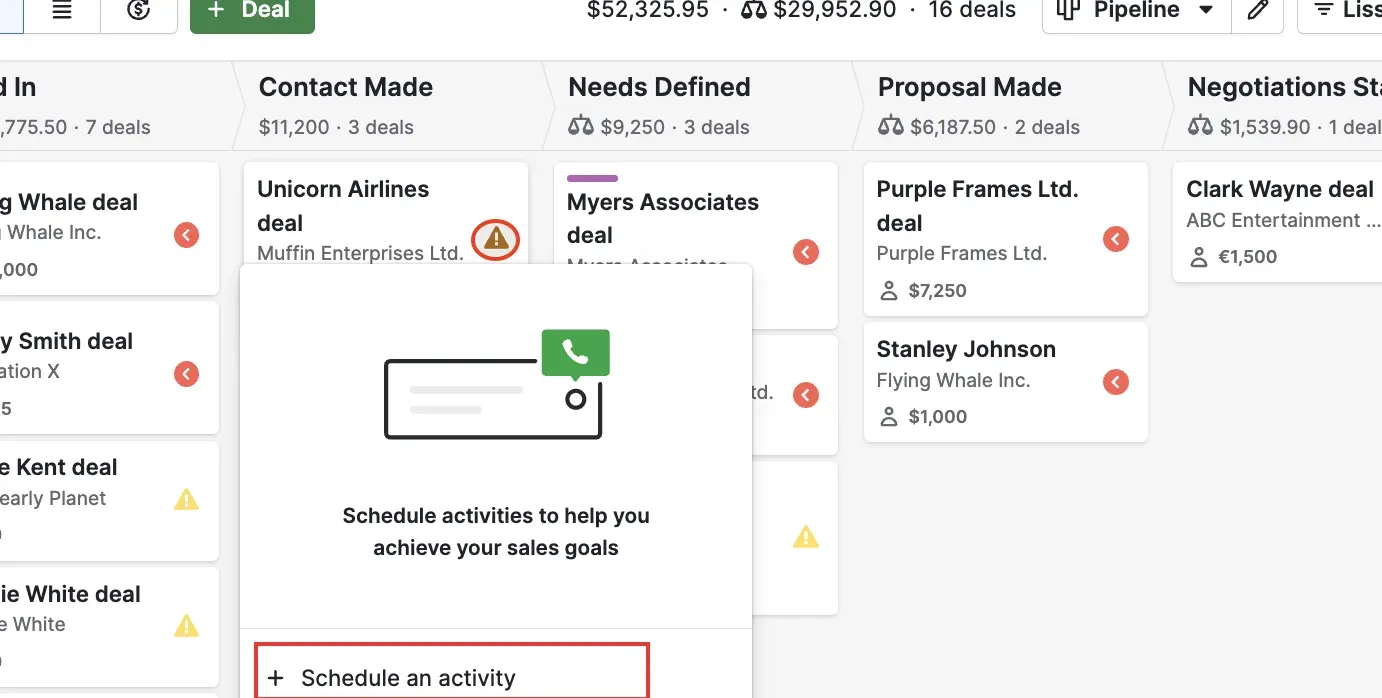
Inside Pipedrive, the activity menu lets you schedule a follow-up directly from a deal card. (Image source: Pipedrive)
Pipedrive pros
-
Lite includes contacts, deals and activity management
-
Growth adds email sync and automation
-
Four paid tiers offer a clear upgrade path
Pipedrive cons
-
No permanent free plan
-
Lite excludes full email sync and automations
-
Unassigned paid seats still count toward your bill
Pipedrive is my starting point for a team whose main job is moving opportunities toward a decision. Contacts, deals and activities give you a direct way to organize that work without making marketing or customer support the center of the purchase.
The useful distinction is between the deal and its next activity. “Proposal sent” tells you where the sale stands; “call Thursday” tells you what to do. I'd build the habit of assigning a next action before adding more fields or dashboards. That's a practical fit for a small agency, consultancy or B2B sales team with several opportunities in flight.
One August 2026 Reddit post by u/Far_Engineering_9576, from a 15-person team comparing three CRMs, captures the appeal: “set it up in an afternoon, the pipeline made sense, the reps didn't complain.” The same team still had separate tools for delivery. I'd make that handoff part of your trial if a won deal becomes a project.
The catch is the Lite-to-Growth boundary. Lite can organize your pipeline and manual follow-ups, but full email sync and native automations sit in Growth. If your essential requirement is a task created automatically after a stage change, compare Growth with the other tools' qualifying plans.
I'd skip Pipedrive if your first priority is keeping three users on a free plan. I'd also count paid seats after staff changes: an empty assigned position isn't automatically a removed subscription seat.
Pipedrive pricing
Pipedrive pricing: From $14/seat/month, billed annually, for Lite; 14-day free trial.
-
Growth — $39/seat/month, billed annually — email sync and automations
-
Premium — $59/seat/month, billed annually — bundles LeadBooster, Projects and Smart Docs
2. Bigin: Best for a low-cost shared pipeline
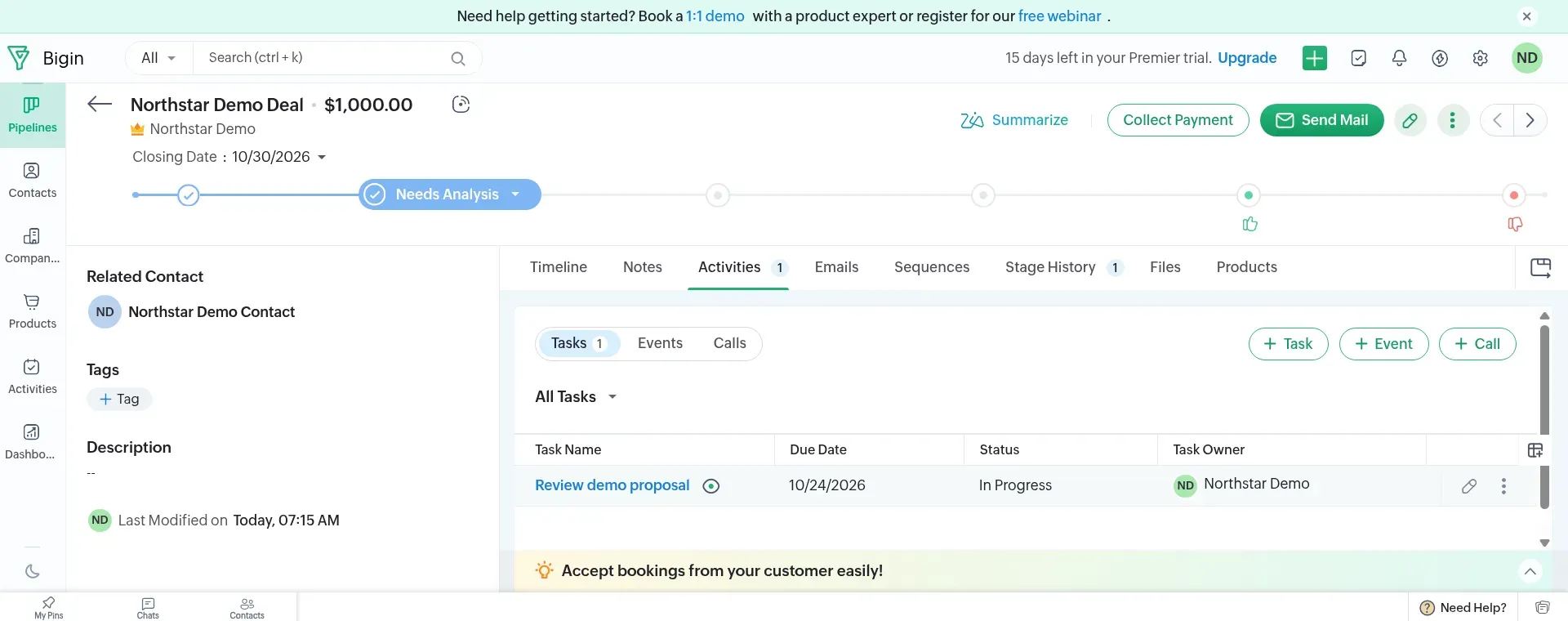
Inside Bigin, the deal keeps its linked contact and follow-up task after moving to Needs Analysis. Captured October 23, 2026.
Bigin pros
-
Express includes three team pipelines
-
Express includes 30 automations
-
Free lets one person start with a pipeline
Bigin cons
-
Free's 500 records include activities and notes
-
Date-based workflows need Premier or above
-
Third-party integrations can require separate subscriptions
I created a contact inside the deal form in Bigin's Premier trial, added a manual follow-up task and moved the deal to Needs Analysis. The task stayed attached with its owner and due date. I like that the sale and the next action remain together. My small gripe is the board: long stage names get cut off, and later stages need horizontal scrolling.
I like that you don't have to jump to Premier for every useful automation. On Express, use a record-edit rule filtered to the target stage to create the task. Watching a specific field change requires Premier or Bigin 360; the one-time scenario here uses the simpler rule. For a team that wants “proposal moved to follow-up, create the next task,” that's a meaningful distinction. Premier matters when the process needs features such as a date-field trigger or stage transition rules.
The catch is the word “records.” Free's allowance doesn't mean you can store 500 contacts and then add unlimited notes and activities around them. Those rows share the allowance. I'd use Free to organize a genuinely small book of business, then budget for Express when the history becomes valuable enough that you don't want to prune it.
Things I Noted — Bigin
I counted a small example: 100 contacts, 20 pipeline records and 100 tasks or notes already use 220 records before you add company records. That's why I prefer comparing the paid team plan with other paid CRMs instead of treating Free as an unlimited address book.
There's also a workflow detail worth carrying into any integration setup: API or integration updates need the automation trigger enabled to run the relevant Bigin workflow. If a task appears after a manual edit but not an imported change, inspect that setting before rebuilding the rule.
I'd skip Bigin if you're already designing a complex, multi-team CRM with lots of custom data structures. Zoho CRM gives that ambition a more suitable home; Bigin earns its place by keeping the starting job smaller.
Bigin pricing
Bigin pricing: From $7/user/month, billed annually, for Express; Free available.
-
Free — one user, one pipeline and 500 total records
-
Premier — $12/user/month, billed annually — date-based workflows and stage transition rules
3. Less Annoying CRM: Best for straightforward monthly administration
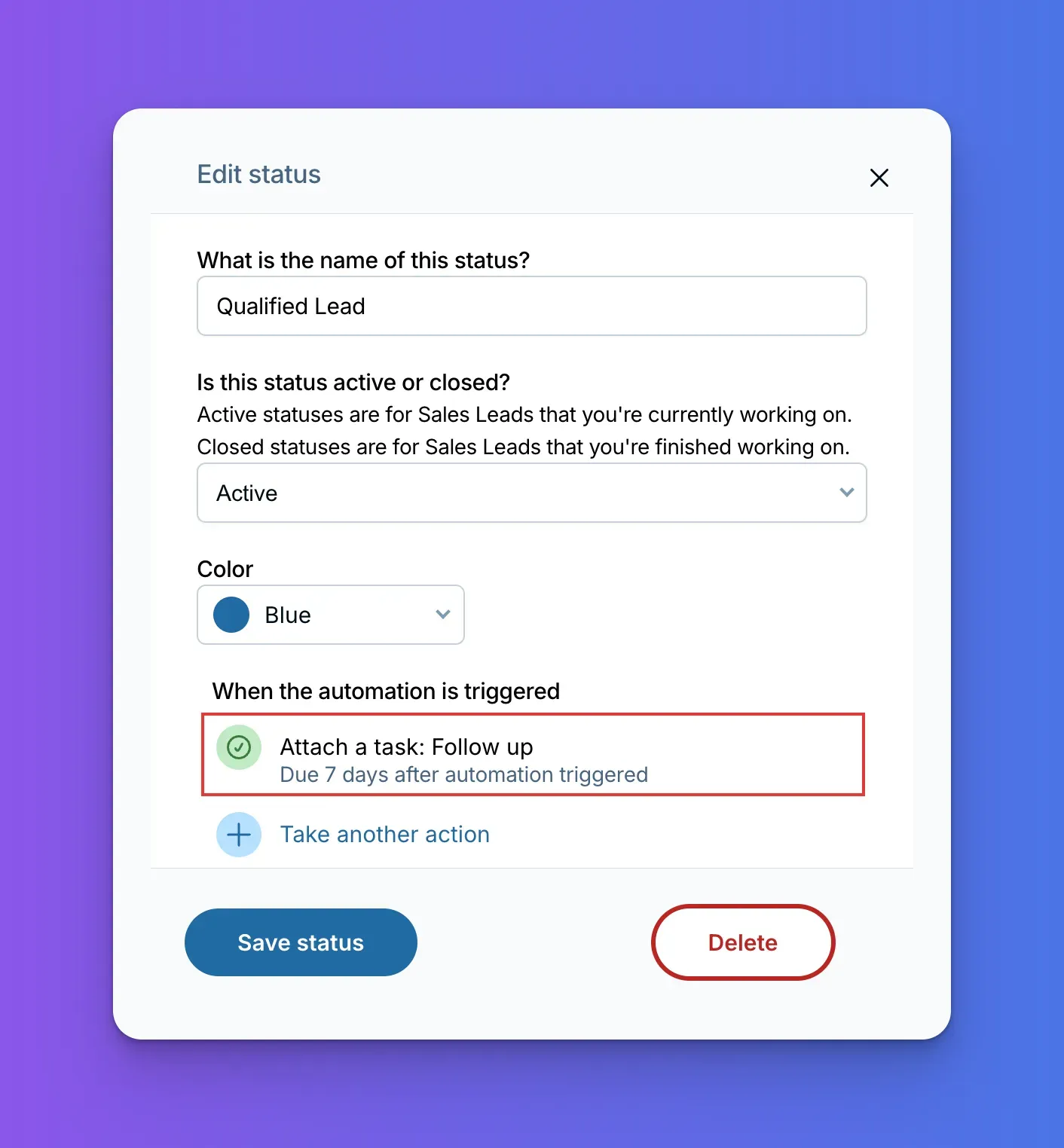
Inside Less Annoying CRM, a pipeline status can trigger a follow-up task. (Image source: Less Annoying CRM)
Less Annoying CRM pros
-
One monthly plan includes native automations
-
Phone and email support included
-
Pipelines, tasks and permissions share one plan
Less Annoying CRM cons
-
No annual-payment discount in the listed price
-
Task automation isn't an email-sequence engine
-
Practical guidance recommends staying below 50,000 contacts and companies
Less Annoying CRM is my pick if you want to know what every added teammate will cost without comparing a ladder of feature gates. Its single monthly plan includes the contact, pipeline and follow-up work that many small businesses actually need.
I particularly like the fit for an owner who does sales alongside another job. You can keep a task attached to the customer, see due work on the calendar or workspace, and use a pipeline status to trigger the next task. That last point matters: older advice that treats this CRM as entirely manual will steer you toward unnecessary upgrades elsewhere.
The automation action set includes tasks, notes, groups, pipeline changes and user assignment. I'd use it to make a repeatable process less dependent on memory: qualify an inquiry, create the next follow-up and keep the customer's record current. I wouldn't choose it on the assumption that those actions also provide an outbound email campaign system.
Things I Noted — Less Annoying CRM
In Less Annoying CRM's setup guide, the controls live in two places. Reusable automations sit under Settings → Automations, while the automatic status trigger is attached to the pipeline status under Customize CRM. I like the distinction once the process is clear: define the work, then decide which status should start it. Keep that map handy when you first configure follow-up.
The catch is scope, rather than a hidden higher tier. If your requirements already include complex sales-email sequences, I'd compare a broader sales platform before committing. For a business that mainly needs consistent relationship follow-up and included human support, this is one of my favorite fits on the list.
Less Annoying CRM pricing
Less Annoying CRM pricing: $15/user/month, billed monthly, for its single plan; 30-day free trial without a card.
4. Zoho CRM: Best for customization as your team grows
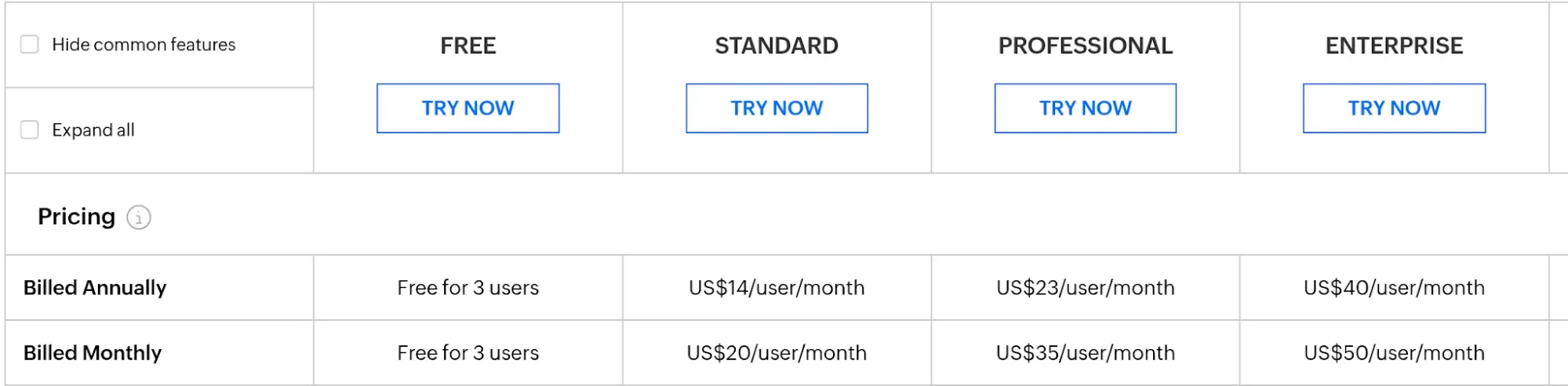
Zoho CRM's edition comparison puts annual and monthly rates alongside the three-user Free plan. Captured October 23, 2026.
Zoho CRM pros
-
Free supports three users
-
Standard includes multiple pipelines and custom modules
-
Basic workflow tasks don't require Professional
Zoho CRM cons
-
Free excludes email integration
-
Higher-tier process features add configuration decisions
-
Separate Zoho products can require separate licenses
Zoho CRM is the option I'd choose when you can already see your sales process becoming more specific than a single pipeline. Standard adds multiple pipelines and custom modules, so you're buying room to model the business instead of only adding seats to a contact list.
That matters when you sell different services with different stages or need to keep a particular type of business record alongside your deals. I like having that room early, provided somebody owns the setup. Start with the fields and stages your team will actually maintain; you don't need to build the eventual organization on day one.
I compared the annual and monthly rows in Zoho's edition table: Standard costs $6 less per user per month when paid annually. Free is also a credible starting point for three people. It includes contacts, activities and limited workflows. For the five-user scenario later in this comparison, Standard is the qualifying step because of the team size, not because every workflow requires Professional. That difference can save a small team from buying a plan for the wrong reason.
The catch is the amount of configuration you can choose to take on. A Reddit user comparing Zoho with Pipedrive and HubSpot in August 2026 said their team “bounced straight off it.” That's one team's adoption experience, and I'd take it as a reason to put the people doing the daily work into the trial early.
I'd skip Zoho CRM if your team only wants one simple pipeline and nobody wants to own the setup. Bigin is the more focused option in that case. If you're already using other Zoho apps, inspect the licenses you have before adding CRM seats; a familiar logo doesn't by itself mean the product is included.
Zoho CRM pricing
Zoho CRM pricing: From $14/user/month, billed annually, for Standard; Free available for three users.
-
Free — contact and activity management with limited workflows
-
Standard — multiple pipelines, custom modules and email integration
5. HubSpot: Best for a team already using its inbound tools
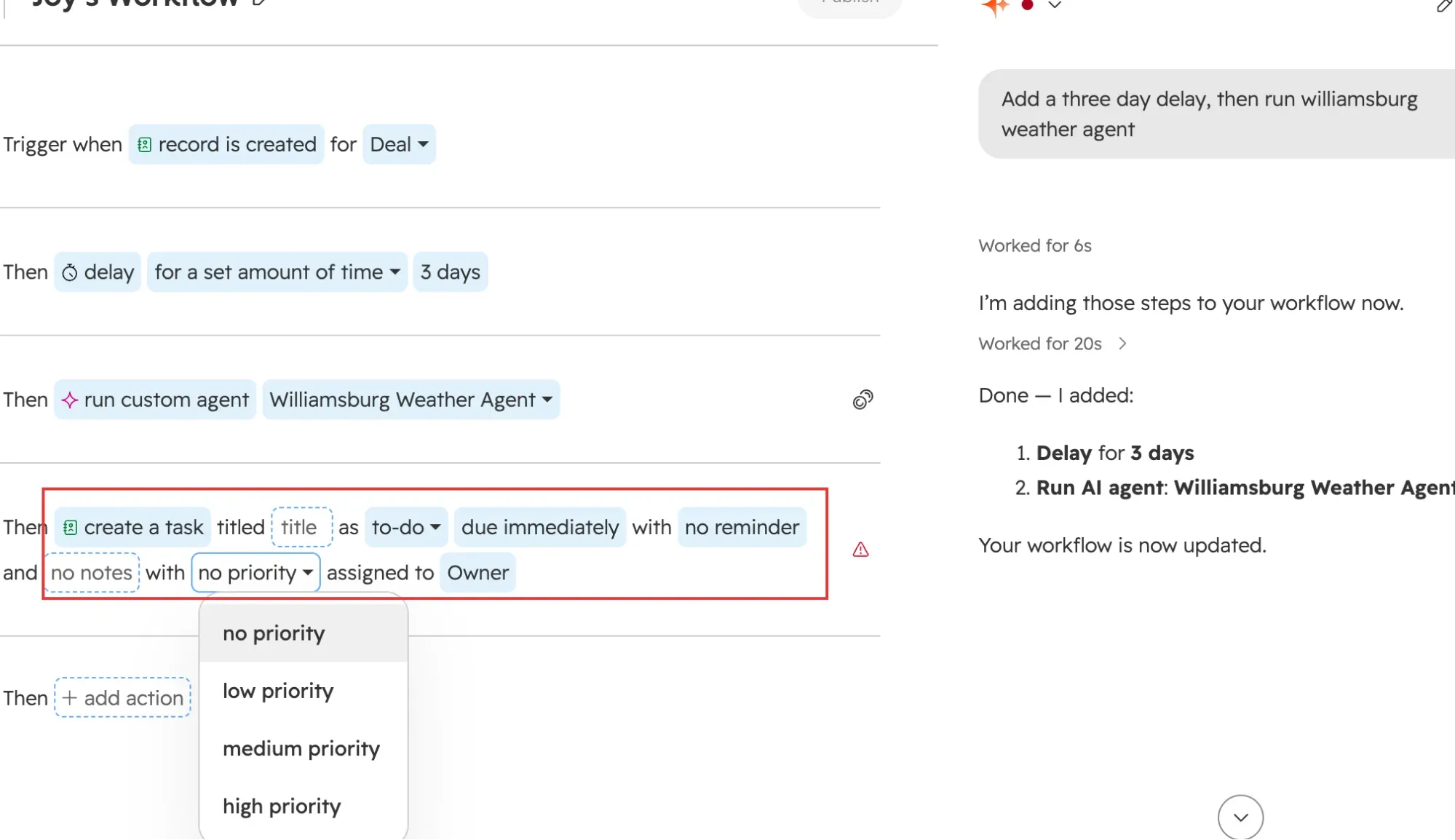
Inside HubSpot, the Create task action lets you set the follow-up title, due time, priority and owner. (Image source: HubSpot)
HubSpot pros
-
Free includes contact and deal management
-
Starter supports simple stage-triggered task automation
-
Sales records can stay with your existing inbound setup
HubSpot cons
-
Free is limited to two users and 1,000 contacts
-
The full workflow editor needs Professional or Enterprise
-
Promotional pricing requires checking the offer terms
HubSpot is my pick when your forms, marketing activity or service history already live in its ecosystem. Keeping that context around the contact can matter more than saving a few dollars on a separate sales tool.
I'd start with the workflow you already have. If an inquiry comes through a HubSpot form and your team follows it into a deal, another CRM introduces a handoff to maintain. Keeping one record can be a sensible choice. If you're starting from a blank slate, though, I wouldn't buy the wider ecosystem just to get a basic pipeline.
The upgrade boundary deserves a fresh look. Free supports two users and 1,000 contacts. Starter can create a task when a deal stage changes through simple automation; the full workflow editor is a different, higher-tier capability. I like that a small team can automate the next action without immediately committing to Professional. There is a useful boundary: each record can enter that simple automation only once. If you repeatedly reopen the same deal, don't expect the same rule to keep creating tasks.
A February 2026 post by u/LiraVast, who was running HubSpot alongside JobTread and Dialpad, praised its dashboards and reports but added: “That said, HubSpot is becoming too expensive.” The useful question is which part of that stack earns its cost. Replacing a working form, phone connection and reporting setup isn't the same purchase as starting a contact database.
The catch is that “HubSpot pricing” isn't one bill. Seats, purchased products and plan-specific features affect the configuration. I'd skip it for a three-person team whose sole requirement is a permanently free shared CRM. Zoho CRM and Freshsales both deserve a look first.
HubSpot pricing
HubSpot pricing: Standard Sales Hub Starter rate is $20/seat/month, billed monthly; Free available.
-
Free — up to two users and 1,000 contacts
-
Starter — simple automation; the live page also displays a conditional discounted offer
-
Professional — the broader workflow tier; unnecessary for the basic task scenario compared here
6. Freshsales: Best for communication and low-cost workflows
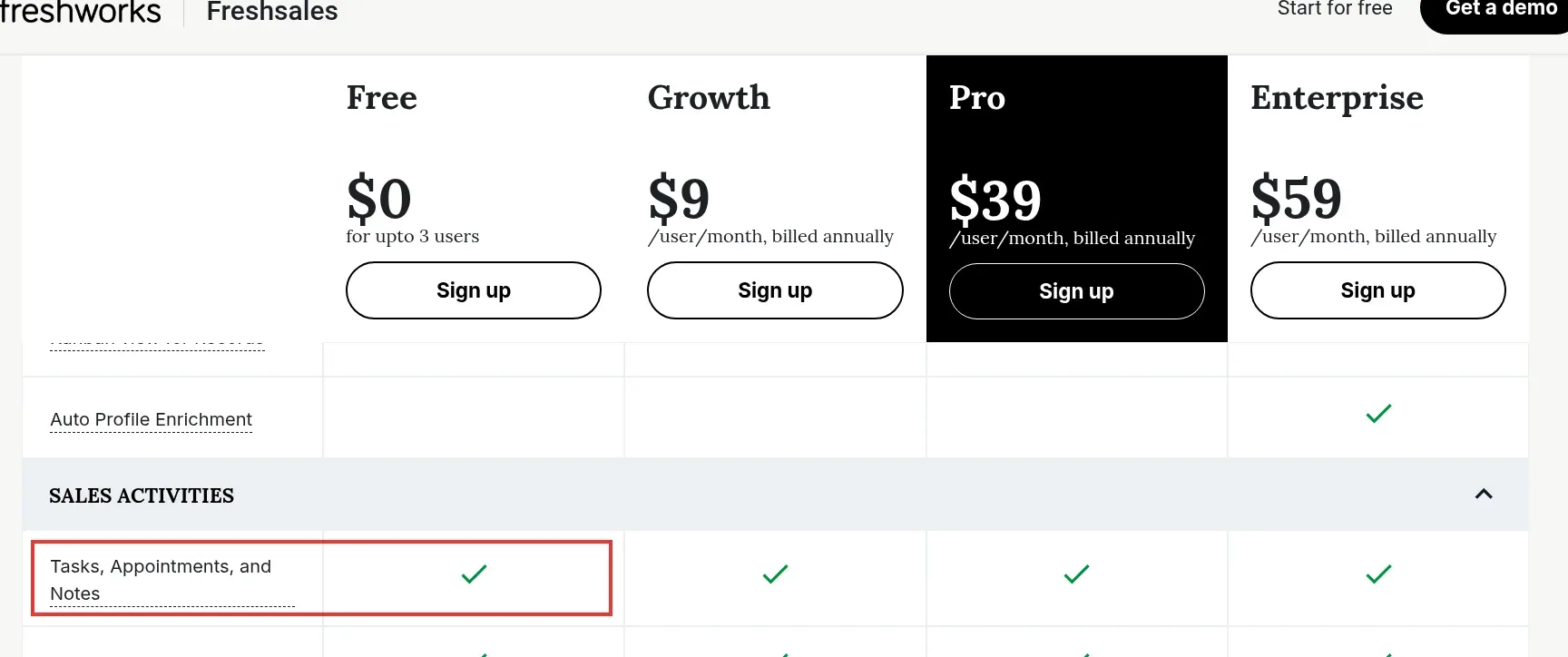
Freshsales includes tasks, appointments and notes in Free for up to three users. Captured October 23, 2026.
Freshsales pros
-
Free supports up to three users
-
Growth includes email, phone and basic workflows
-
Pro adds sales sequences when you need them
Freshsales cons
-
Phone numbers and usage can add costs
-
Sales sequences require Pro
-
Free continuation requires selecting the Free plan
Freshsales is worth a close look when you want contact and deal management alongside email, phone and basic workflows. I'd put it on the shortlist for a small team that wants to handle daily sales activity in one place without starting on a high-priced automation plan.
Growth is the useful paid baseline here. Its basic workflows can create a task from a record event, while Pro adds sales sequences and more advanced capabilities. If your immediate problem is remembering the next follow-up, I wouldn't jump to Pro merely because “automation” appears on the wish list.
I checked the Free column in Freshsales' live comparison table: Tasks, Appointments, and Notes has a check alongside the paid plans. Its Free plan also includes contact, account and deal management with a Kanban view for up to three users. That makes it a reasonable option to evaluate alongside Zoho CRM Free for a small shared pipeline. Keep the distinction between what the trial unlocks and what the retained plan includes.
Things I Noted — Freshsales
I switched the billing selector from annual to monthly and watched Growth rise to $11 per user. For five people, that makes annual payment $120 cheaper over a year. I'd still choose monthly if you're unsure the team will stick with it.
One workflow detail matters more than the discount: give the created task a due date. Freshsales won't create it when that field is empty. Also select Free deliberately in Plans and Billing if that's the plan you intend to keep after the trial.
The catch is the word “built-in” beside phone features. It tells you where the calling work happens; it doesn't make numbers and minutes free. The cost tables here leave calling out because the shared scenario doesn't require it. If calling is central to your team, add your expected usage before deciding.
I'd skip Freshsales if what you really need is a full sales-sequence setup on the entry plan. Compare Pro against the other qualifying plans, rather than expecting Growth to cover every kind of automated outreach.
Freshsales pricing
Freshsales pricing: From $9/user/month, billed annually, for Growth; Free available for up to three users.
-
Pro — $39/user/month, billed annually — sales sequences and additional sales insights
-
Trial — 21 days; select the ongoing plan deliberately
What the same workload costs
Bigin is the least expensive paid configuration in this comparison for five people sharing a simple stage-to-task workflow. Free plans can cover the smaller cases, but their user and record limits matter more than a zero-dollar label.
These are my subscription calculations for a fixed workload: one pipeline, 100 contacts, 20 deals and up to 100 stored tasks or notes for the basic cases. All users can edit their own sales work. The five-person case adds one rule that creates an immediate follow-up task after a stage change, used for the first qualifying transition of 20 distinct deals a month. It doesn't require repeat enrollment of the same deal, an email sequence, a delayed date trigger or an external automation service. The free-plan budgets apply while you remain within their storage ceilings; they don't assume unlimited accumulated history.
Annual plans use the advertised annual-payment rate. Less Annoying CRM and HubSpot use twelve monthly payments; HubSpot uses its standard catalog rate rather than an eligibility-dependent promotion. Taxes, phone usage, optional AI, migration services and separate apps are excluded. No mandatory add-on was identified for these particular configurations.
One owner managing contacts, deals and manual follow-up
| Tool | Qualifying plan | Annual budget | Mandatory extras | Limit to watch |
|---|---|---|---|---|
| Pipedrive | Lite | $168 | None for this workload | No full email sync |
| Bigin | Free | $0 | None for this workload | 500 total records |
| Less Annoying CRM | Single plan | $180; 12 monthly payments | None for this workload | Monthly billing |
| Zoho CRM | Free | $0 | None for this workload | No email integration |
| HubSpot | Free | $0 | None for this workload | 1,000 contacts |
| Freshsales | Free | $0 | None for this workload | Select Free after trial |
Three people sharing a pipeline and follow-up tasks
| Tool | Qualifying plan | Annual budget | Mandatory extras | Limit to watch |
|---|---|---|---|---|
| Pipedrive | Lite, three seats | $504 | None for this workload | Automation excluded |
| Bigin | Express, three users | $252 | None for this workload | Three team pipelines |
| Less Annoying CRM | Three users | $540; 12 monthly payments | None for this workload | No annual discount assumed |
| Zoho CRM | Free | $0 | None for this workload | Three-user ceiling |
| HubSpot | Starter, three seats | $720; standard monthly rate | None for this workload | Free cannot cover three editors |
| Freshsales | Free | $0 | None for this workload | Three-user ceiling |
Five people with a task created after a stage change
| Tool | Qualifying plan | Annual budget | Mandatory extras | Limit to watch |
|---|---|---|---|---|
| Pipedrive | Growth, five seats | $2,340 | None for this workload | Lite doesn't include automations |
| Bigin | Express, five users | $420 | None for this workload | Instant trigger; not date-based |
| Less Annoying CRM | Five users | $900; 12 monthly payments | None for this workload | Task actions, not email sequences |
| Zoho CRM | Standard, five users | $840 | None for this workload | Configure the workflow rule |
| HubSpot | Starter, five seats | $1,200; standard monthly rate | None for this workload | One enrollment per deal |
| Freshsales | Growth, five users | $540 | None for this workload | Basic event-triggered workflow |
The five-person arithmetic is seats × monthly rate × 12: Bigin is 5 × $7 × 12, while Pipedrive Growth is 5 × $39 × 12. That gap doesn't mean Pipedrive is poor value. Growth also buys capabilities such as full email sync that this narrowly defined task doesn't require.
I'd choose the cheapest qualifying plan only after deciding what the team will use next. If you're going to need email sequences, several pipelines or more elaborate process controls soon, price that second step before you commit to the first.
Check your existing stack first
An existing subscription can change the choice more than a small per-seat discount. Start by writing down where contacts, forms, email history and delivery work already live.
-
HubSpot: Check the seats and Starter products already included in your account. Don't buy a second CRM just to duplicate a contact and deal workflow you already have.
-
Zoho: Check the exact bundle and user licenses. Other Zoho apps can make CRM adoption attractive, but owning one app doesn't automatically include every product.
-
monday: Treat work management and monday CRM as distinct product purchases. Familiar boards can reduce learning time without removing the CRM subscription bill.
-
Email and spreadsheets: If one owner can reliably track a small customer list and every next action, a migration can wait. A shared CRM becomes more useful when ownership, history or follow-up starts getting lost.
For leads coming from LinkedIn, inspect the fields and permissions needed to pass information into your chosen CRM. Linked Helper's LinkedIn CRM integration guide explains that part of the workflow; the CRM should remain the place your team manages the relationship.
Related reading:
Which small business CRM should you choose?
| Situation | Recommendation and conditions |
|---|---|
| Sales-focused team | Pick Pipedrive if your sales team wants its daily work organized around deals and activities. I'd start with Lite for manual follow-up, then move to Growth when email sync or the specific automation earns its cost. |
| Low-cost pipeline or simple monthly billing | Pick Bigin if you want a low-cost shared pipeline with useful task automation. Pick Less Annoying CRM if you prefer one monthly plan and included support to a longer menu of upgrades. |
| Three people on a free plan | For three people trying to keep the subscription at zero, compare Zoho CRM Free and Freshsales Free using your actual contacts and task process. Choose Zoho when you want room for more custom structure; look at Freshsales when communication tools and its Growth plan are the likely next step. |
| Existing HubSpot setup | If HubSpot already ties your inbound work together, I'd first improve that setup rather than create another handoff. A working process that your team maintains is worth more than a nominal saving on seats. |
Other tools I considered
monday CRM is a relevant option for teams that want configurable boards around their sales work. Its three-user minimum makes it a different proposition for a solo owner. I kept it outside the main six to focus the comparison on the distinct pipeline, free-team and follow-up choices above.