
 Updated: October 26, 2026
 19 min read
Your spreadsheet has the right names. Your email looks fine. Then you realize the cheaper plan can't send the whole list today—or the follow-up you wanted requires another subscription tier. That's where choosing a Gmail mail merge tool gets awkward: most can insert a first name, but they don't solve the same job.
Quick picks
My picks are Gmail's built-in mail merge for eligible Workspace users, GMass for automatic follow-ups, YAMM for working from a Google Sheet, Mailmeteor for moving between Gmail and Sheets, and Digital Inspiration's Mail Merge with Attachments for reviewing individual PDF messages as drafts. Start with the workflow you need after the first message, then compare prices.
I compared official guides, checked live billing selectors, read customer discussions, and calculated three workloads; the product walkthroughs below use vendor guides and images, without a sending or inbox-placement test. Linked Helper, which publishes this blog, makes LinkedIn automation software and isn't one of the picks.
What is Gmail mail merge?
Gmail mail merge creates separate, personalized emails from one template and a recipient list. Each row supplies values such as a first name, company or renewal date. Depending on the tool, you can also personalize subjects, attach different files, schedule messages, track responses or automatically follow up with people who haven't replied.
The best Gmail mail merge tools at a glance
| Tool | Best for | Standout feature | Starting price | Main trade-off |
|---|---|---|---|---|
| Gmail mail merge | Existing eligible Workspace users | Custom fields from Sheets | $0 extra on eligible subscription | No subject merge or scheduling |
| GMass | Automatic follow-up campaigns | Reply-aware sequences in Gmail | Premium: $349/user/year, paid annually | Standard excludes automatic follow-ups |
| YAMM | Running campaigns from Sheets | Gmail draft plus spreadsheet tracking | $6/user/month, billed annually | Separate Workspace plan; conditional quotas |
| Mailmeteor | Moving between Gmail and Sheets | Multiple composing options | $4.49/user/month, billed annually | Premium required for follow-up sequences |
| Mail Merge with Attachments | Reviewing personalized PDF messages | Create individual Gmail drafts | Standard: $49.95/user/year, paid annually | Dynamic file matching needs Enterprise |
GMass's price above is for the feature I'm recommending it for. Mailmeteor's rounded monthly headline corresponds to a $53.99 annual Starter bill. Gmail's zero is an incremental cost, not a free Workspace subscription.
What makes the best mail merge software for Gmail?
I wouldn't buy a campaign tool until I'd written down one representative message and the steps that follow it. An event notice with a first name needs less software than an invoice with a different PDF for every customer. A reminder you send manually is different from a sequence that stops when someone replies.
The message you need to personalize. Body fields are the baseline. Subject fields, conditional text, individual attachments and generated PDFs are separate capabilities. If your renewal date belongs in the subject, check that specific feature before importing the list.
A review step you can trust. A preview helps you catch an empty greeting. Creating individual drafts lets you inspect each finished message and attachment. Those are different levels of control; I'd favor drafts when the wrong file would be expensive to fix.
The follow-up you actually want. Can you filter nonresponders and start another campaign, or will the tool send the next message automatically? Does a reply stop it? Don't pay for a larger daily quota when the missing feature is automation.
Both sets of sending limits. The add-on's allowance and Google's account limits apply together. Your ordinary email also uses capacity, and a follow-up is another message. A paid plan's advertised maximum isn't a promise that a new account can send that volume immediately.
A price for the whole job. I compare one sender on the plan that supports the required workflow, using the actual annual bill. Existing mailbox costs stay separate. That prevents a low entry price from winning a comparison it doesn't qualify for.
These five choices cover built-in merge, Gmail-centered campaigns, spreadsheet workflows and attachment review. I haven't added a full CRM just to make the list longer.
1. Gmail mail merge: Best for an eligible Workspace subscription you already have
Gmail mail merge pros:
-
Custom spreadsheet columns become body merge tags
-
Unsubscribe links included in merged messages
-
No extra add-on subscription for eligible users
Gmail mail merge cons:
-
No merge tags in subject lines
-
Schedule send isn't available in mail merge
-
Business Starter isn't an eligible edition
Gmail's own mail merge is my first choice for a straightforward notice when you already pay for an eligible Workspace edition. You can link a Google Sheet and personalize separate messages without adding another vendor to your workflow. For a membership renewal notice, that's often enough.
The useful distinction is custom fields. You're not limited to a person's name: a spreadsheet column can supply a renewal date or membership level in the body. If that's all your message needs, I'd keep the extra subscription money. An extension becomes more interesting when the same value must appear in the subject or you need the campaign to go out later.
The catch is that native merge stops short of campaign automation. It doesn't support Schedule send, and you can't use merge tags in the subject. Linking recipients from Sheets also rules out CC/BCC for that merge. I'd skip it for a repeatable outreach sequence, even if you already have access.
Things I Noted — Gmail mail merge
Google's quota wording changes how I'd plan a busy day. On a typical eligible account with a 2,000-message daily limit, regular email and merged messages together can reach the 1,500 threshold that stops further mail merge. The remaining capacity is for regular email. You can't reserve 1,500 merge sends while ignoring the ordinary messages you already sent.
Gmail mail merge pricing
$0 extra with an eligible subscription.
-
Business Standard — $14/user/month on an annual commitment, billed monthly
-
Other eligible editions — Workspace Individual, Business Plus, Enterprise Standard/Plus and Education Standard/Plus
2. GMass: Best for automatic follow-ups without leaving Gmail
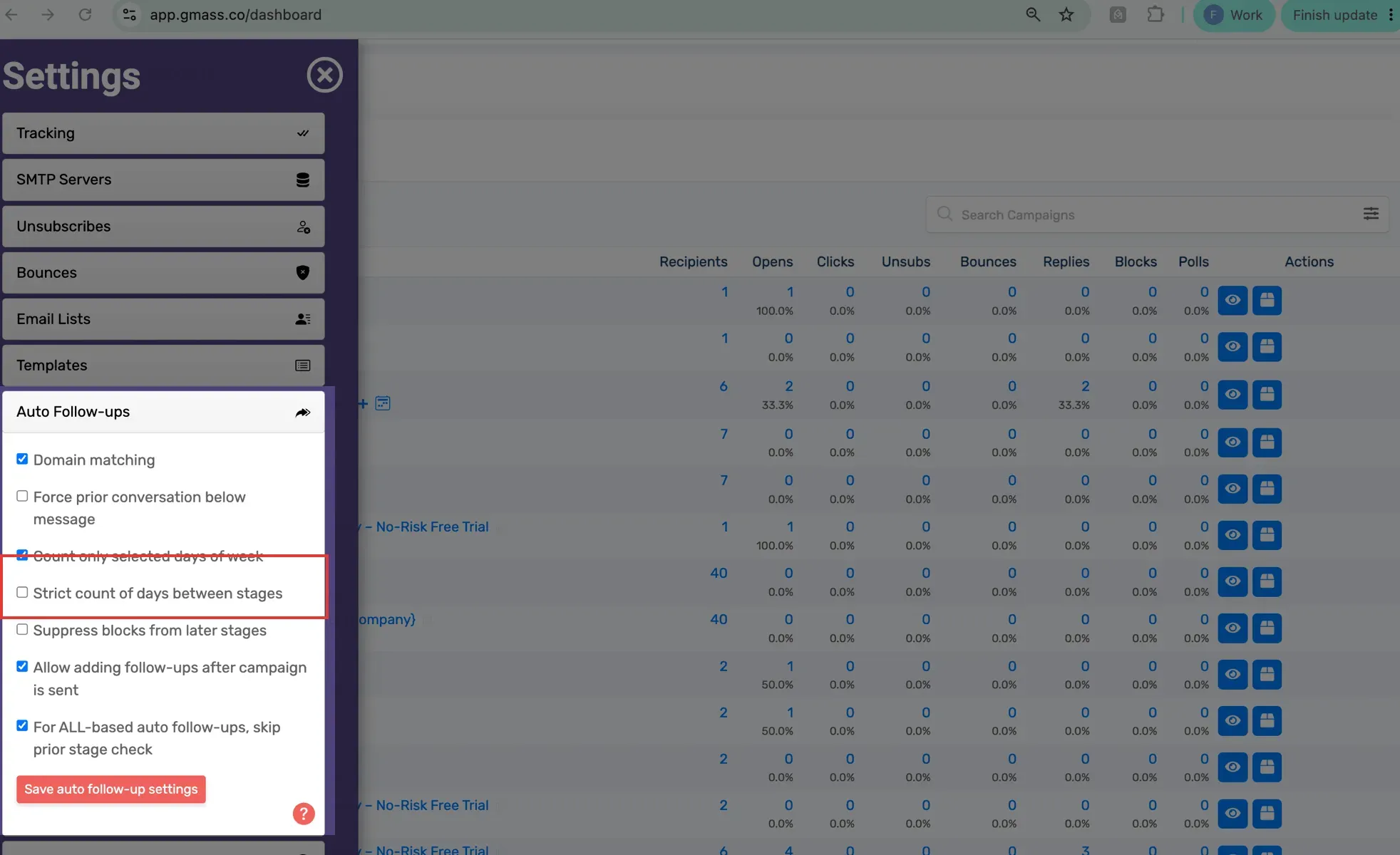
Inside GMass, strict spacing keeps delayed follow-ups from crowding together. (Image source: GMass)
GMass pros:
-
Premium adds reply-aware automatic follow-ups
-
Google Sheets supplies campaign recipients and fields
-
Account-level controls refine follow-up timing
GMass cons:
-
Standard excludes automatic follow-ups
-
Professional required for MultiSend inbox rotation
-
Gmail sending constraints still matter
GMass suits you if Gmail is where you want to write and manage campaigns, but sending the first message is only the start. Its Chrome extension brings mail merge into that familiar composing workflow. Premium adds the automatic follow-ups that make it worth considering over a basic merge add-on.
I like the amount of control behind those reminders. You can stop follow-ups after a reply and adjust how later stages behave. That's useful for a small team sending a carefully spaced sequence: you don't have to remember which contacts need another message, and responders can leave the sequence.
The catch is the plan boundary. Standard covers mail merge, but it doesn't include automatic follow-ups. I'd choose Premium for the workflow in this card and skip GMass if all you need is one occasional announcement. Its higher price buys campaign control; a simple spreadsheet merge may do your job for less.
Things I Noted — GMass
The setting I'd check first is Strict count of days between stages. In GMass's guide, a delayed stage can otherwise leave less space before the next one. Strict spacing anchors the next interval to when the previous stage actually went out. If a quota delay pushes a reminder back, I'd rather preserve the intended breathing room than rush to catch up with the original calendar.
GMass pricing
Premium is $349/user/year, paid annually; a seven-day trial allows 50 emails/day.
-
Standard — $249/user/year, paid annually — basic mail merge
-
Professional — $599/user/year, paid annually — MultiSend inbox rotation
-
Monthly billing — Standard $29.95; Premium $39.95; Professional $59.95 per user
3. YAMM: Best for keeping your campaign list and results in Google Sheets
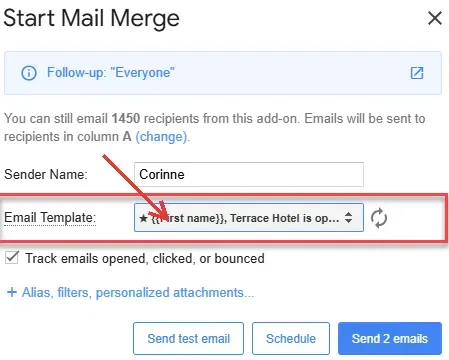
Inside YAMM, the draft picker lets you choose a Gmail template for your spreadsheet recipients. (Image source: YAMM)
YAMM pros:
-
Gmail drafts become spreadsheet-driven email templates
-
Personalized subjects, attachments and CC/BCC
-
Campaign tracking stays beside recipient rows
YAMM cons:
-
Free plan limited to 20 recipients/day
-
Workspace's 1,500-recipient ceiling has account conditions
-
Multiple Google logins can complicate setup
YAMM is my pick if your Google Sheet is already the place you organize the campaign. You prepare a Gmail draft, choose it from the add-on and use spreadsheet fields to personalize the messages. The recipient list and tracking results then stay close together, which suits event organizers and small teams who don't want a separate campaign database.
I particularly like that the workflow starts with a normal Gmail draft. You can work on the message where you already write email, while the Sheet supplies the changing details. Personalized subjects and attachments give you room to handle more than a name-only announcement. Filtered follow-ups are useful too, but I wouldn't equate starting a follow-up campaign with an unattended, reply-aware sequence.
The catch is account handling. In a December 2025 Reddit discussion, u/Vegetable-Big2553 wrote, “I found Yamm to be complicated when I have two Gmail accounts in the same browser.” YAMM's self-identified CEO replied with a practical workaround: a separate Chrome profile for each account. I'd use that setup from the start if you switch between personal and work Gmail.
There's another small template detail worth getting right: YAMM's guide puts starred drafts first in the picker. If you create your email from Google Docs and later edit the Doc, regenerate the Gmail draft so you're choosing the revised message. I'd skip YAMM if managing templates and recipient rows in Sheets already feels like the problem you're trying to escape.
YAMM pricing
From $6/user/month, billed annually, for Pro Gmail; free plan available.
-
Free — 20 recipients/day
-
Pro Gmail — up to 400 recipients/day
-
Pro Workspace — $12/user/month, billed annually — up to 1,500 recipients/day, subject to account limits
4. Mailmeteor: Best for switching between Gmail and spreadsheet campaigns
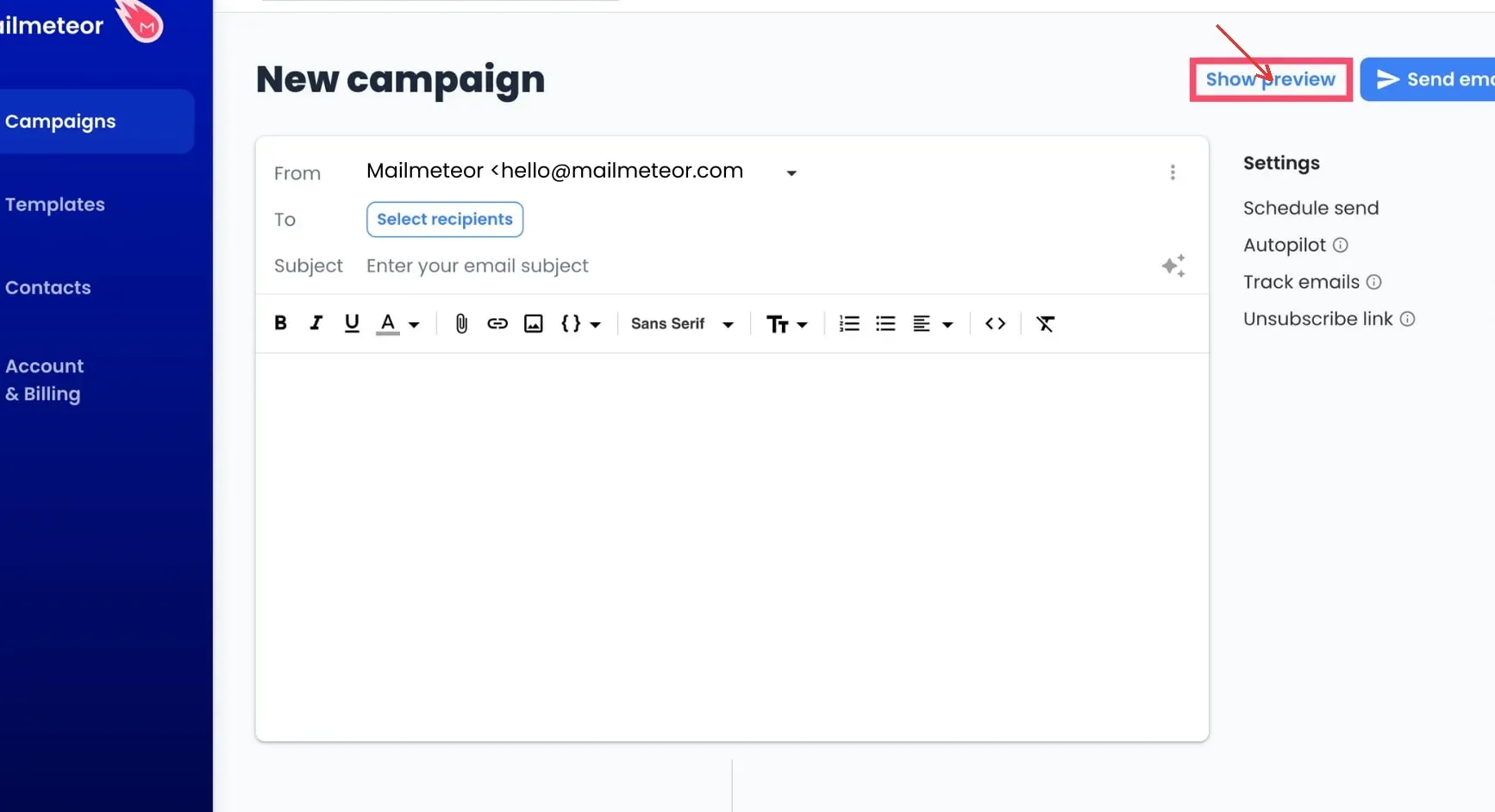
Inside Mailmeteor, Show preview lets you check personalized messages before sending. (Image source: Mailmeteor)
Mailmeteor pros:
-
Compose through Gmail, Sheets or its dashboard
-
Premium includes five follow-up stages
-
Preview lets you step through recipients
Mailmeteor cons:
-
Starter stops at 250 emails/day
-
Per-recipient attachments need public file URLs through Sheets
-
Monthly quota figures differ between pricing and help pages
Mailmeteor is worth a close look if you want to choose where you compose rather than commit to one spreadsheet-only workflow. Gmail, Sheets and the dashboard give you different ways into a campaign. Premium adds automatic follow-ups, so you can grow beyond one-off merges without moving to a full sales platform.
Its preview deserves attention before any automation. The guide says an empty spreadsheet value becomes an empty string in the message. That means a message can look technically valid while still missing the name you expected. I'd preview an incomplete row as well as the first, perfectly filled-in contact.
The customer accounts show why that matters. In September 2024, Reddit user u/SnooCheesecakes1346 praised its pacing: “I use the autopilot feature to send the emails every 60-120 seconds depending on how many I’m sending.” In October 2025, u/saltysourandfast reported, “It’s not reading the names from any of the lists we provided”. That complaint makes a concrete preview check more useful than an assumption that imported names will always appear.
The catch for attachment-heavy work is the route. Dashboard attachments go to every recipient; different files per recipient use Sheets and publicly accessible file links. I'd skip this attachment route if your files must stay restricted in Drive.
Things I Noted — Mailmeteor
The billing selector separates the rounded monthly headline from the actual annual charge. I used the annual charge in the comparisons below. For volume planning, I also used the lower Starter monthly allowance on the pricing page; the help page shows a different figure. Check your account's allowance before scheduling a full month.
Mailmeteor pricing
From $4.49/user/month, billed annually, for Starter; Hobby is free.
-
Hobby — 500 emails/month, up to 50/day; three-campaign allowance
-
Starter — 5,000/month, up to 250/day
-
Premium — $13.49/user/month, billed annually — five follow-ups and up to 1,000 emails/day
5. Mail Merge with Attachments: Best for reviewing individual PDF emails before sending
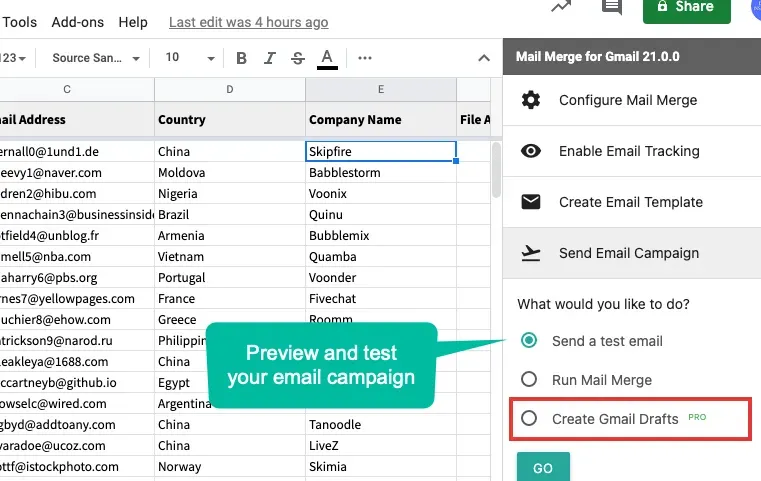
Inside Mail Merge with Attachments, creating drafts gives you a review step before sending individual messages. (Image source: Digital Inspiration)
Mail Merge with Attachments pros:
-
Creates individual Gmail drafts for review
-
Different existing files can accompany each recipient
-
Standard includes row-level scheduling and personalized attachments
Mail Merge with Attachments cons:
-
Dynamic filename matching requires Enterprise
-
Standard tops out at 400 recipients/day
-
One license covers one Google Account
Digital Inspiration's Mail Merge with Attachments is the option I'd choose when reviewing each finished message matters more than automating the next reminder. It combines a Google Sheet with a Gmail draft or editor, then lets you create personalized drafts instead of immediately sending the campaign. For invoices, certificates or account statements, that changes the job from “trust the merge” to “inspect the result.”
The useful feature is control over the files. Different recipients can receive different existing attachments, so you don't have to put every customer's PDF into the same message. I'd use a small synthetic sample first: two recipients, two distinct files and one common brochure. Check the mapping before loading the real batch.
The catch is the difference between assigning files and matching them dynamically. Standard supports personalized attachments, but finding files through a filename pattern or variable requires Enterprise. If your process already has each customer's file link, Standard may be enough. If you want the tool to find files from a naming convention, budget for the higher tier.
Things I Noted — Mail Merge with Attachments
The draft-first workflow and dynamic file matching solve separate problems. Paying for file matching doesn't remove the need to review which PDF belongs to which person. I'd keep the review step for sensitive files, especially after changing a naming convention. And I'd skip this tool for an automatic sales follow-up sequence: its distinctive strength here is preparing individualized messages for inspection.
Mail Merge with Attachments pricing
Standard is $49.95/user/year, paid annually; free use allows 25 recipients/day.
-
Standard — up to 400 recipients/day, including personalized attachments and drafts
-
Enterprise — $79.95/user/year, paid annually — dynamic file matching and up to 1,500 recipients/day with Workspace
What the same workload costs
These are calculations from current list prices, not delivery tests. Each scenario uses one sender for 12 months, before tax, without promotions or external SMTP. Annual bills use the vendor's exact total. A Gmail account's actual sending allowance can still be lower than the tool's ceiling.
Scenario 1: 40 messages in one batch each month, using personal Gmail
The message needs body personalization, with no automatic follow-up or individual attachments. This compares ongoing plans, so a seven-day trial doesn't count as a year of free use.
| Tool | Suitable plan | Annual software cost | Mandatory extras or condition |
|---|---|---|---|
| Gmail native | Not eligible on ordinary free Gmail | Not comparable | Requires an eligible paid subscription |
| GMass | Standard | $249 | Existing Gmail account |
| YAMM | Pro Gmail | $72 | Free tier cannot do all 40 in one day |
| Mailmeteor | Starter | $53.99 | Ongoing paid plan; 40 fits daily cap |
| Mail Merge with Attachments | Standard | $49.95 | Free tier cannot do all 40 in one day |
Digital Inspiration is the lowest-priced verified paid option for this year-long workload. Mailmeteor's Hobby allowance fits a 40-message batch, but its three-campaign allowance doesn't specify a reset period, so I haven't priced a full year as free. If you can split batches across days, YAMM and Digital Inspiration's free daily allowances are worth checking too.
Scenario 2: 500 messages in one day each month, using existing Business Standard
The sender already has a mature, eligible Workspace mailbox. The message needs body fields, with no subject merge, scheduled sending or unique attachments. The annual costs below are additions to the existing mailbox bill.
| Tool | Suitable plan | Annual add-on cost | Limit or mandatory condition |
|---|---|---|---|
| Gmail native | Included mail merge | $0 | Shared daily quota must have capacity |
| GMass | Standard | $249 | Google's account limit still applies |
| YAMM | Pro Workspace | $144 | Eligible account for up to 1,500/day |
| Mailmeteor | Premium | $161.99 | Starter's 250/day isn't enough |
| Mail Merge with Attachments | Enterprise | $79.95 | Standard's 400/day isn't enough |
Native Gmail wins this simple case on incremental cost. The mailbox itself still costs money: Business Standard at the normal US annual-commitment rate totals $168 for 12 months, billed monthly. That existing cost is common to every row here. Add subject personalization or scheduling and native Gmail no longer meets the same brief.
Scenario 3: The same 500 recipients, plus one automatic no-reply follow-up
Send the initial batch on one day and the reminder on another. Allow up to 1,000 messages in the month if nobody replies. Use the primary sender address, not an alias: Mailmeteor's no-reply condition doesn't work with aliases. The mailbox assumption stays the same; a manually filtered follow-up campaign doesn't meet this unattended requirement.
| Tool | Suitable plan | Annual add-on cost | Limit or mandatory condition |
|---|---|---|---|
| GMass | Premium | $349 | Automatic reply-aware follow-ups; account quota applies |
| Mailmeteor | Premium | $161.99 | Five follow-up stages; 1,000/day and 30,000/month caps |
| Gmail native | No equivalent built-in sequence | Not comparable | Manual reminders don't meet the brief |
| YAMM | No verified equivalent in this comparison | Not comparable | Filtered follow-up workflow isn't the same requirement |
| Mail Merge with Attachments | No verified equivalent in this comparison | Not comparable | Draft review isn't automatic sequencing |
Mailmeteor is the cheaper qualifying configuration here. I'd pay more for GMass when its Gmail-centered sequence controls solve a specific problem, such as preserving intervals after a delayed stage. Neither price tells you which messages will land in an inbox or earn a reply.
Check your existing stack first
Before buying another tool, check both your Workspace edition and how you already track conversations. A Business Standard subscription may cover a simple merge, while Business Starter doesn't include Google's native feature. That difference is easy to miss when both accounts look like Gmail.
If your team already uses CRM sequences, compare that entitlement with the automatic-follow-up scenario before adding another sending workflow. Keep one owner for reply handling and avoid enrolling the same person in overlapping campaigns.
Linked Helper belongs earlier in a LinkedIn prospecting workflow; it doesn't replace Gmail mail merge. Choose the email tool for the actual message and follow-up job, rather than treating every outreach product as interchangeable.
Related reading:
Which Gmail mail merge tool should you choose?
If you already have eligible Workspace and just need a personalized notice, start with Gmail. Its custom spreadsheet fields cover more than names, and you won't add a subscription. Move on when a concrete requirement—such as subject personalization or scheduled sending—outgrows it.
If you're happiest managing recipients in a Sheet, choose YAMM. If you'd rather move between Gmail, Sheets and a separate campaign editor, Mailmeteor gives you that choice and a lower-cost qualifying plan in the automatic-follow-up scenario above.
Choose GMass when the sequence controls justify its Premium price. Choose Mail Merge with Attachments when inspecting each personalized message and file is the deciding factor. My final check would be the same for all five: take one representative message, include a deliberately incomplete recipient row, and confirm the exact workflow before committing the whole list.