

 19 min read

TL;DR: recruiting automation in November 2026
- LinkedIn recruiting: Linked Helper automates candidate sourcing and outreach from a desktop app, with a personal workspace for managing accounts and team access.
- Simple handoffs: Breezy HR fits a team working through a fixed hiring pipeline. Its stage actions run on first entry, so returning a candidate to a stage needs care.
- Conditional records: Zoho Recruit gives agencies more control over which records qualify. Field updates and delayed actions require Professional in the Staffing Agency edition.
- Interview coordination: Ashby connects interview stages with booking and availability requests. Paradox handles scheduling conversations at volume, with staff needed for unresolved exceptions.
- Agency costs: Recruit CRM meters connector actions and shares credits across features. Its LinkedIn sequences require manual removal after a reply.
- Existing staffing systems: Bullhorn Automation belongs in an existing staffing operation. Compare the automation edition and compatible ATS together.
Recruiting automation software at a glance
Linked Helper handles LinkedIn sourcing and outreach, Breezy HR handles stage handoffs, and Zoho Recruit adds record conditions. The table compares all seven tools by workflow and setup.
| Tool | Use case | Standout control | Setup or limit to check |
|---|---|---|---|
| Linked Helper | LinkedIn candidate sourcing and outreach | Desktop campaigns and workspace access | Account roles and campaign reply checks |
| Breezy HR | Simple stage handoffs | Tasks attached to pipeline stages | First-entry behavior |
| Zoho Recruit | Conditional record work | Record events, criteria, and actions | Edition and plan gates |
| Recruit CRM | Agency recipes across apps | Metered connector operations | Shared credits and manual removal from LinkedIn sequences after a reply |
| Ashby | In-house interview coordination | Interview-plan Automated Activities | Immediate execution |
| Bullhorn Automation | Existing staffing operations | Enrollment and suppression lists | Automation edition and ATS prerequisites |
| Paradox | High-volume scheduling | Candidate scheduling conversations | Calendar setup and exception handling |
What recruiting automation should handle before you buy
Recruiting automation software should handle the trigger, the hiring task, and the rule that stops further action. That task might assign work, update a candidate record, send a follow-up, or arrange an interview. Writing the email is only part of the handoff.
Start with a process your recruiters already repeat. When a candidate reaches Review, who gets the task? What happens if screening is already complete? Which record should the next step update? Those details determine whether a workflow saves work or creates another queue to watch.
I look for a clear exception path, too. A reply, an opt-out, or a calendar with no available slots should change what happens next. And check the paid plan before you get attached to a trial feature. It's frustrating to configure a workflow, then find that the subscription you've budgeted for leaves out the action you need.
1. Linked Helper: automate candidate sourcing and outreach
Linked Helper automates the LinkedIn side of a recruiter's work: collecting candidate profiles, sending personalized outreach, following up, and organizing conversations. Its desktop approach is Desktop. Safety first. LinkedIn actions run on your computer, using your session and IP; your LinkedIn password isn't handed to a third-party automation cloud.
Recruiting features
- Collect candidates from LinkedIn search, Recruiter Search, and Recruiter Projects
- Personalize messages with custom variables and AI-generated text
- Build outreach sequences with a Check for replies step before further follow-ups
- Keep candidate history, tags, and conversations together
- Export candidate data through CSV or connect workflows through webhooks
For a new vacancy, collect a shortlist, review the profiles, and then start outreach. The Check for replies action checks a candidate's response to the previous campaign message when that step runs. The campaign Inbox brings conversations together, while the Dashboard shows activity and profiles that need attention. That gives recruiters a place to move from automated follow-up to a personal conversation.
Linked Helper account manager: organize recruiters and LinkedIn accounts
Linked Helper's Account Manager groups LinkedIn accounts, licenses, and billing under workspaces. A personal workspace is created when you register; teams can add colleagues and assign roles and access to individual LinkedIn accounts.
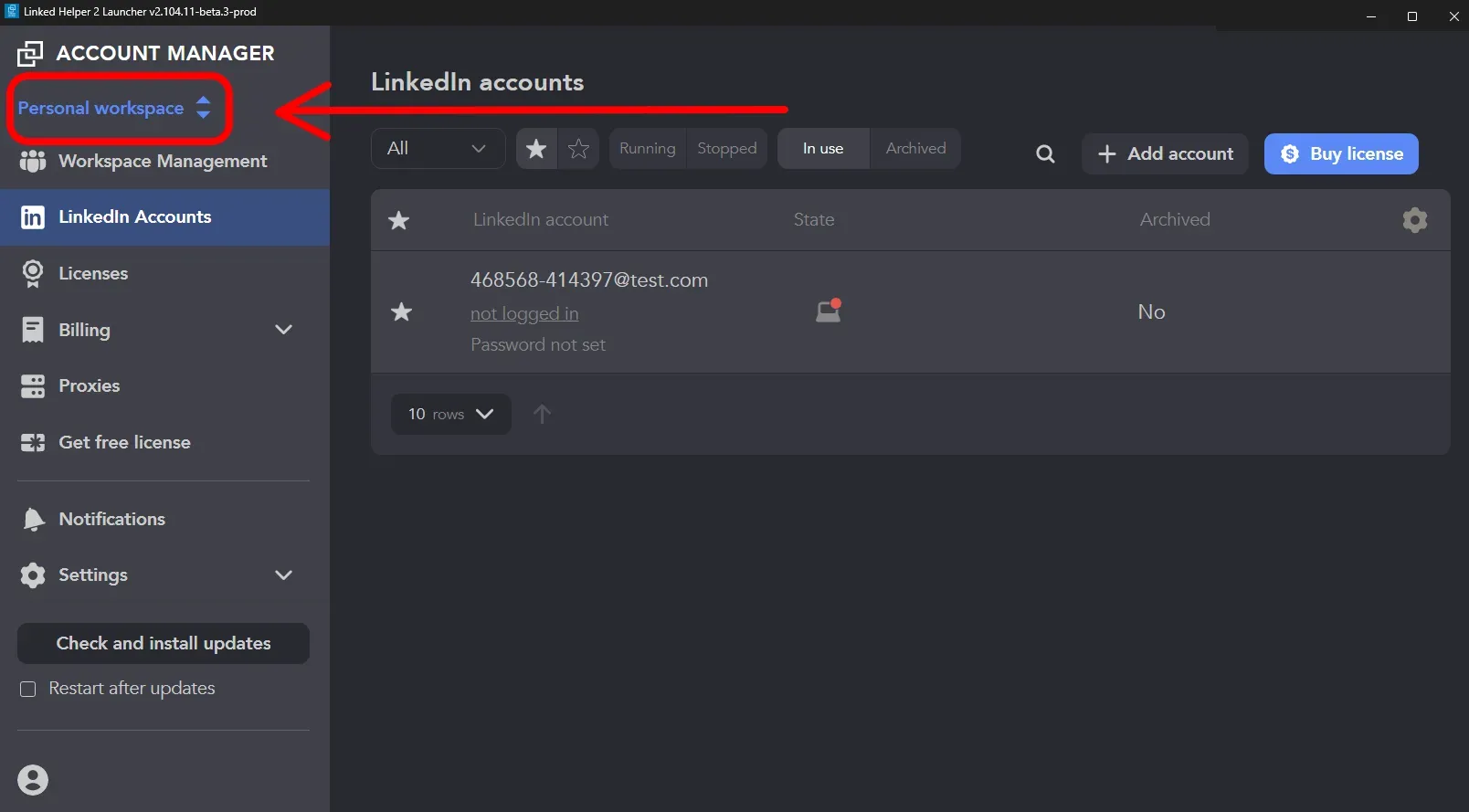
Inside Linked Helper, the personal workspace selector sits above Workspace Management, LinkedIn Accounts, Licenses, and Billing. (Image source: Linked Helper Help Center)
Workspace management and access to a LinkedIn account are separate controls. For a recruiting team, assign each colleague the accounts they should work with, then manage campaigns within those accounts. This keeps the account setup and the candidate conversations in distinct parts of the interface.
2. Breezy HR: Best for simple stage-based handoffs
Breezy HR fits groups whose hiring process is predetermined and that require every phase to trigger the following task. Along that pipeline, candidates can be tracked with tasks, messages, questionnaires, and feedback requests.
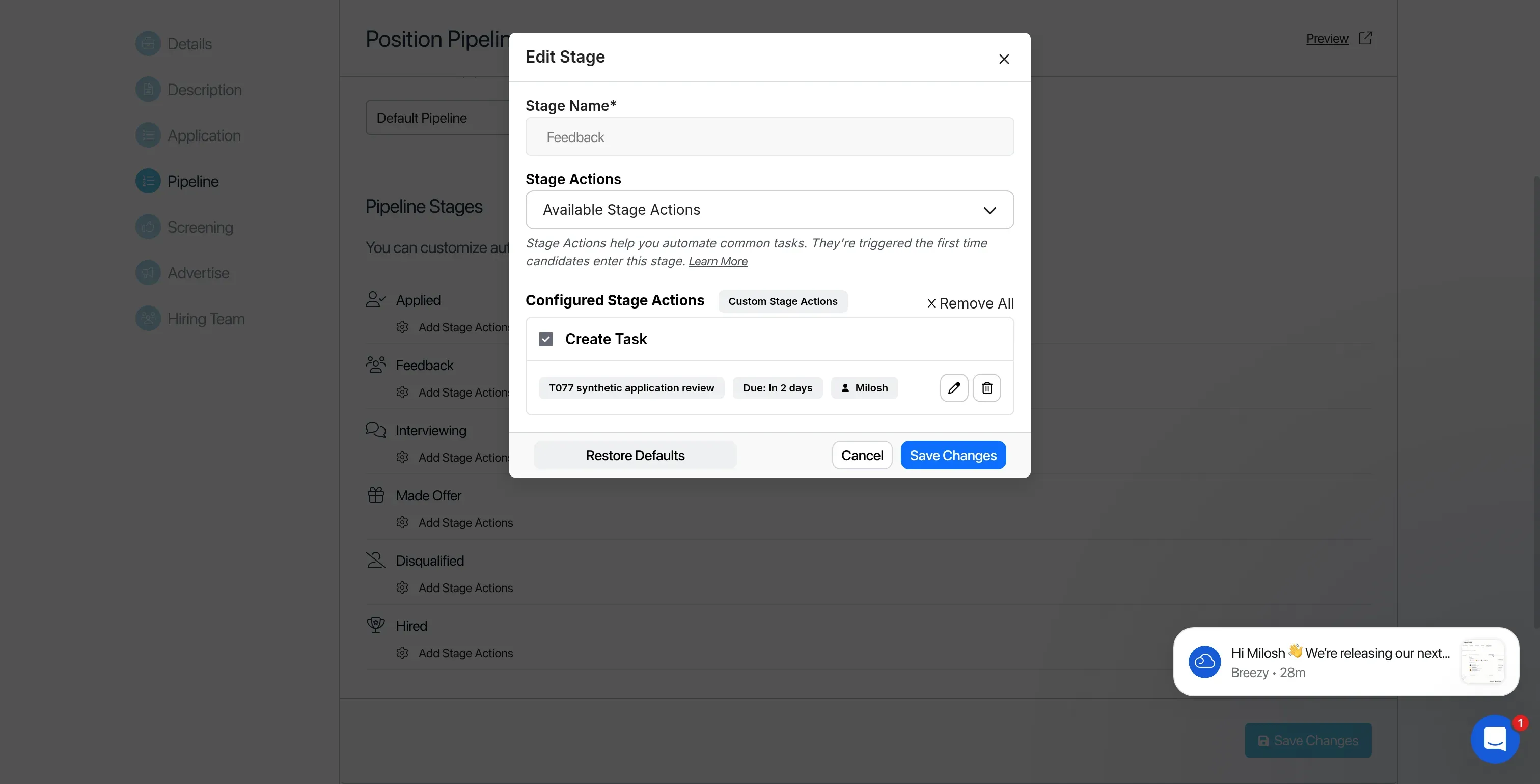
Inside Breezy HR, the draft Feedback task has an assignee and a two-day deadline.
Breezy HR pros
- Candidate automations included on Startup
- Actions at the position level can override pipeline defaults.
- The task editor contains a due date and an assignee.
Breezy HR cons
- Actions for a stage execute solely upon first entry.
- Sourced or referred candidates get left out of actions at the Applied stage.
- SMS needs separate credits
A due date had to be selected before the editor would accept the draft task I built for Feedback. I picked two days, and I assigned an existing user. That small requirement is something I like: it's easy to let a task sit there when it has no deadline.
Saving takes attention. After Save Task, you're back in the stage editor, looking at another Save Changes control, so checking a colleague's setup means going past the task itself to see whether those changes were saved.
When an individual job requires an additional review, I like the position-level settings. You can change that position's actions without routing each job through the same detour (even when they share a pipeline). However, moving a person back into a stage won't trigger the first-entry action again, and sourced or referred candidates need a handoff that differs from the Applied-stage flow.
Breezy HR pricing
Breezy HR pricing: Startup starts at $157 per company per month, billed annually, with candidate automations and unlimited users and positions. Bootstrap is free for one active position or pool but excludes paid stage automation. Growth costs $273 per company per month on annual billing and adds multiple pipelines. SMS credits start separately at $41 per month.
3. Zoho Recruit: Best for conditional record workflows
Zoho Recruit fits agencies whose workflows depend on record conditions as well as hiring stages. A candidate-creation event can qualify through a condition, then create a task or run another action allowed by the plan.
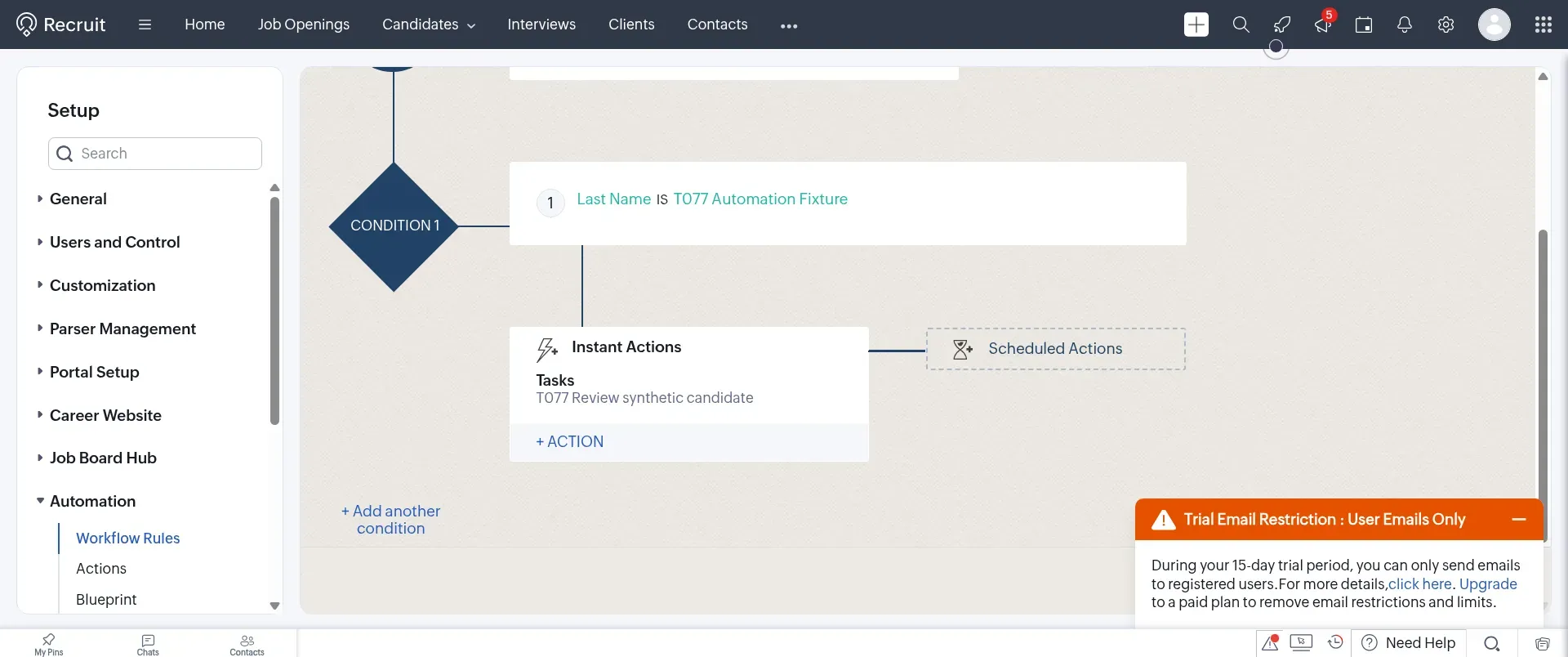
Inside Zoho Recruit's staffing trial, an exact synthetic surname limits the draft rule to the intended record.
Zoho Recruit pros
- Distinct controls exist for conditions, triggers, and actions.
- Reusable internal task actions
- Reminders and assignee notifications each have their own toggle.
Zoho Recruit cons
- Timed actions and field updates need Professional.
- Blueprint requires Enterprise
- Staffing Agency and Corporate HR have different plans
I applied an exact synthetic surname as the condition for the draft rule, which I set to candidate creation. The reusable task action was saved with a deadline of one day following the workflow trigger. Both Notify Assignee and Remind Assignee were disabled — an internal task doesn't invariably require an additional email.
I appreciate the separate controls for a task's deadline and its action timing. You can create work now and make it due tomorrow, or wait until tomorrow to create it. Those aren't interchangeable. Zoho's builder puts instant and scheduled actions in separate places, so it's worth deciding which behavior you need before filling in the fields.
Conditions run in order. The first match wins. If you've written overlapping branches, their order needs as much attention as their criteria. Blueprint is useful for a different problem: it governs transitions when a recruiter can't advance a record until the required steps are complete.
Zoho Recruit pricing
Zoho Recruit pricing: Staffing Agency Standard starts at $25 per recruiter per month on annual billing and includes five custom workflow rules per module. Professional costs $50 and adds timed actions and field updates; Enterprise costs $75 and adds Blueprint. The corresponding monthly-billing rates are $30, $60, and $90 per recruiter.
Also verify the edition (it's simple to miss). Zoho One's included Corporate HR scope won't necessarily provide you with Staffing Agency. Removing a workflow rule erases its scheduled actions, and rules that were disabled following a downgrade or lapse aren't automatically reenabled upon renewal.
4. Recruit CRM: agency recipes with shared credits
Recruit CRM bills for connector actions, yet its LinkedIn sequences leave reply removal to the recruiter. An agency assessing such workflows must budget for actions and assign someone to halt LinkedIn follow-ups once a response arrives.
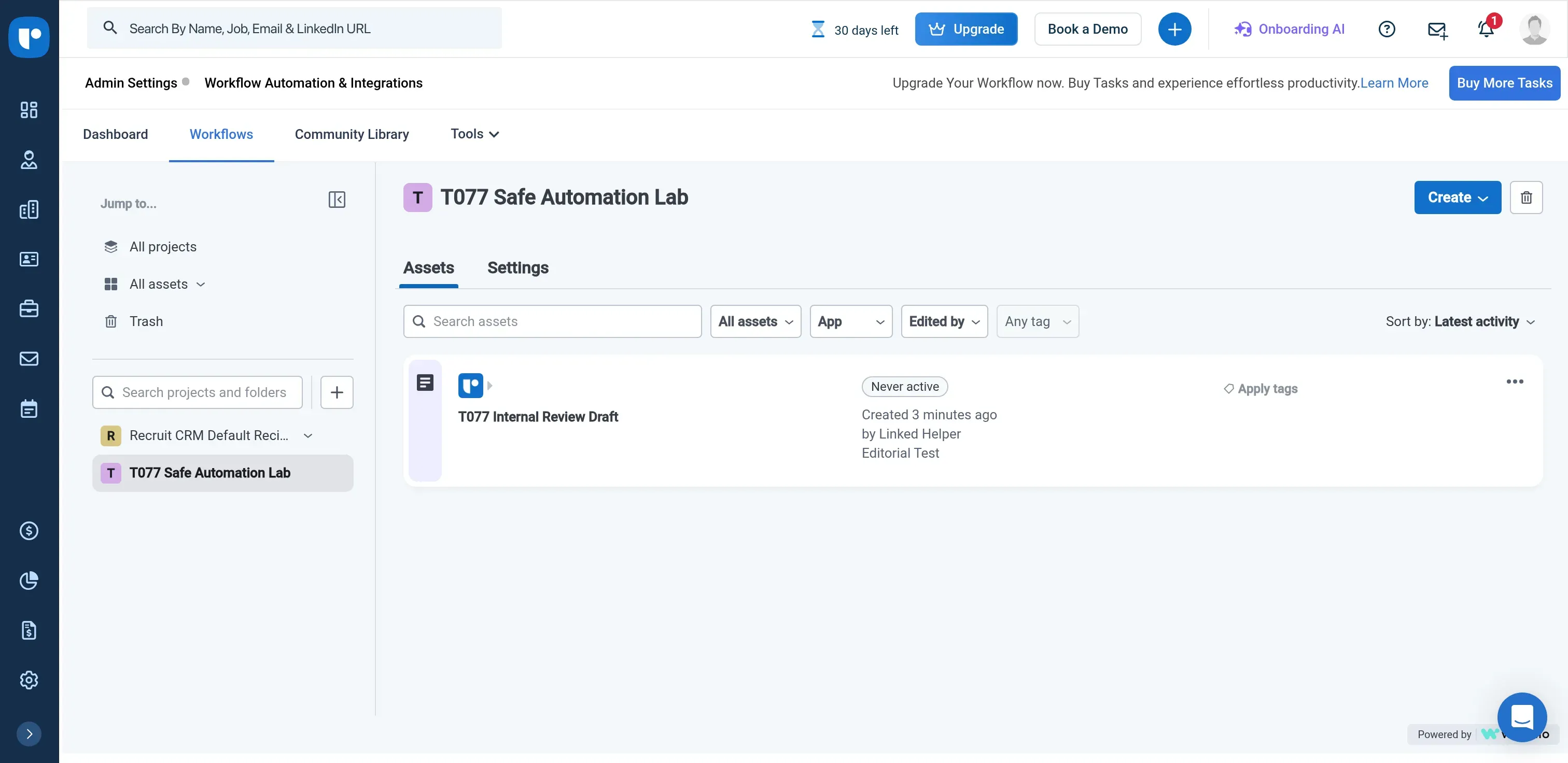
Inside Recruit CRM, the saved draft recipe appears in the project list with the status “Never active.”
Where it falls short
- Search, update, and create actions each consume tasks separately.
- Workflow capacity draws on credits shared with other features
- LinkedIn replies require manual removal from sequences
I saved and reopened a recipe with a real-time New event trigger. The next screen required an API-key connection. My advice is to settle that connection early. You don't want to spend an afternoon mapping a long recipe around an account you can't connect.
Workflow tasks aren't consumed by triggers, conditions, or control steps. Connector searches, updates, and record creation do consume them. Though supported batch operations may act differently, a loop repeats those charges. If the trigger already provides the candidate's identifier, then searching for that same record consumes tasks unnecessarily.
Rules for replies differ depending on the channel as well. Opt-outs and SMS replies halt the SMS sequence. Replies via LinkedIn don't—you need to remove that person manually. Since edits to sequences affect future enrollments, after a change someone must review candidates already in progress.
Recruit CRM pricing
Recruit CRM pricing: Pro starts at $95 per user per month, billed annually, with 1,200 pooled credits per user per year. Business costs $135 with 2,400 credits. Enterprise costs $215 with 24,000 credits. Workflow Automation includes 50 free tasks per account per month (not per user).
Larger task buckets use shared credits. A 1,000-task monthly bucket costs 500 credits. Other features also use that pool, so spending the allowance on workflows reduces what's available elsewhere. The agency workload calculation shows how that changes an annual budget.
5. Ashby: Best for automating an in-house interview plan
Ashby ties the next scheduling action to a candidate's interview stage. Stage entry can send a booking link, collect availability, send a questionnaire or email, or start an assessment.
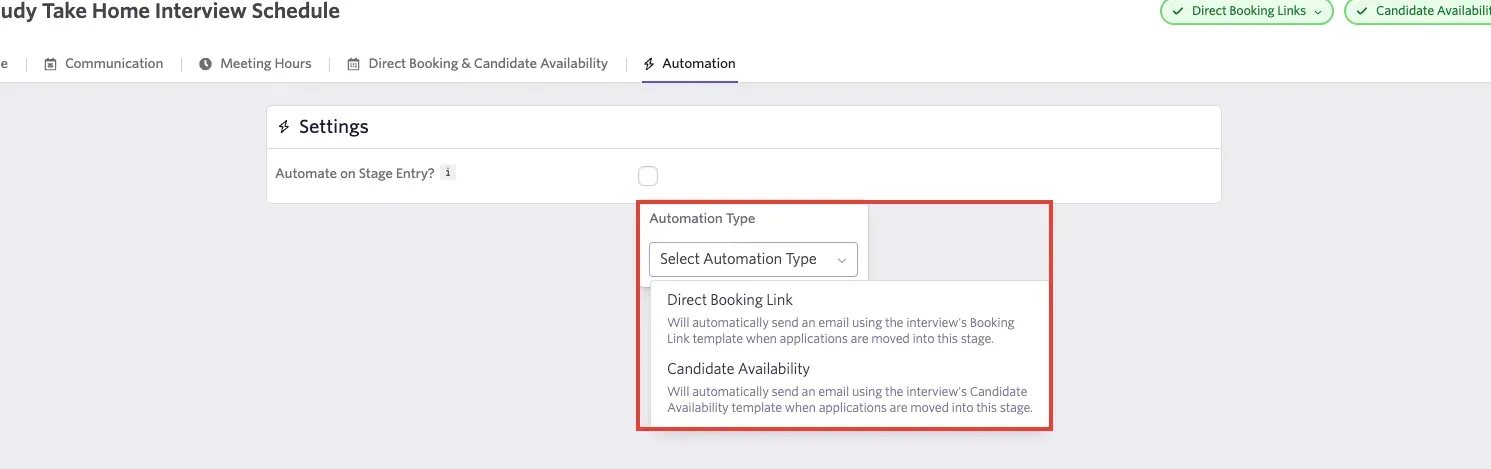
Inside Ashby, direct booking and candidate availability are separate automation choices. (Image source: Ashby)
Ashby pros
- Automated Activities included on Foundations
- Requests for booking and availability that are integrated into interview stages
- Separate sourcing sequences handle follow-up cadences
Ashby cons
- Automated Activities have no delay setting
- Interview activities can't move candidates between stages.
- Advanced Scheduling can add to the quote.
I prefer direct booking when the calendar setup allows it. If you've asked a candidate for availability, you're still coordinating a meeting after they send their times back, especially when a panel has to agree. With a booking link, they can finish that step themselves.
Timing is less flexible. An Automated Activity runs as the candidate enters the stage, and you've got a 15-second Undo window for an individual trigger. Bulk stage moves let you opt out of starting automatic activities. That gives a recruiter a brief escape from an unintended send, rather than an approval queue.
Ashby's sourcing sequences handle cadence and reply-related lead stages separately. The automatic reply move depends on the sequence's job connection and expects Reached Out. If you've moved the lead to a custom stage in the meantime, the reply may no longer move them to Replied. Keep those stage rules in the sourcing sequence instead of expecting an interview activity to advance the candidate.
For AI/Automation, you can easily use their workflow tools to add automation around feedback reminders, offer letters, etc.
— u/CapnJackAlexander, March 2026
The commenter said they had used Ashby extensively. That account supports checking the workflow tools closely, while the exact activity and plan still determine what you can automate.
Ashby pricing
Ashby pricing: Foundations starts at $270 per company per month, billed annually, for 1–10 employees, or $300 on monthly billing. At 26–50 employees, the annual commitment is $450 per month equivalent. Plus and Enterprise have custom pricing. Advanced Scheduling needs a separate scope check.
6. Bullhorn Automation: Best for an existing staffing operation
Bullhorn Automation fits staffing teams that already use its database and need rules for enrollment, follow-ups, and stopping work. The useful unit may be a candidate's submission rather than the person alone.
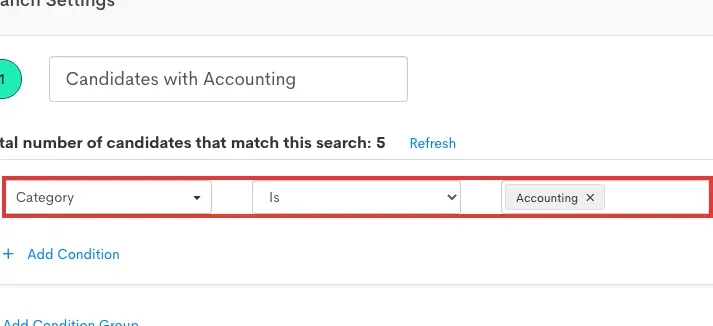
Inside Bullhorn Automation, branch order determines which matching condition takes effect. (Image source: Bullhorn)
Bullhorn Automation pros
- Suppression lists and enrollment lists determine who advances.
- Following completion, screening recipes halt further follow-ups.
- Settings for re-entry differentiate submissions from people.
Bullhorn Automation cons
- Automation capacity that's active is edition-dependent.
- Actions besides matching—and matching itself—are gated by edition.
- The full automation quote isn't included in the ATS price.
The screening recipe enrolls relevant submissions, waits between follow-ups, and suppresses candidates who have completed screening. I like the stopping rule: a completed screening should end the reminder process even when the candidate never replies to the email.
One individual may submit multiple times. Before copying a recipe between jobs, you need to determine if it ought to execute per submission or once per person — those decisions produce differing results whenever the same candidate returns. The sequence of branches matters too, since the first matching branch takes precedence.
Re-entry also requires attention. According to Bullhorn, a loop may arise from zero-day re-entry if the automation alters the fields that originally caused the record to qualify. Begin with a small population and examine the exit condition together with the re-entry setting.
Bullhorn Automation pricing
Bullhorn Automation pricing: The automation edition and compatible staffing stack need a custom quote. Automation Starter, included with Front Office Growth, permits three active automations. Corporate, Enterprise, and Amplify permit unlimited active automations with different capabilities. Include any required onboarding, messaging, or matching products in the same quote.
7. Paradox: Best for high-volume candidate scheduling
Paradox handles candidate scheduling conversations when the job, interview structure, and calendars are already configured. It can offer times and handle scheduling changes across a larger hiring operation.
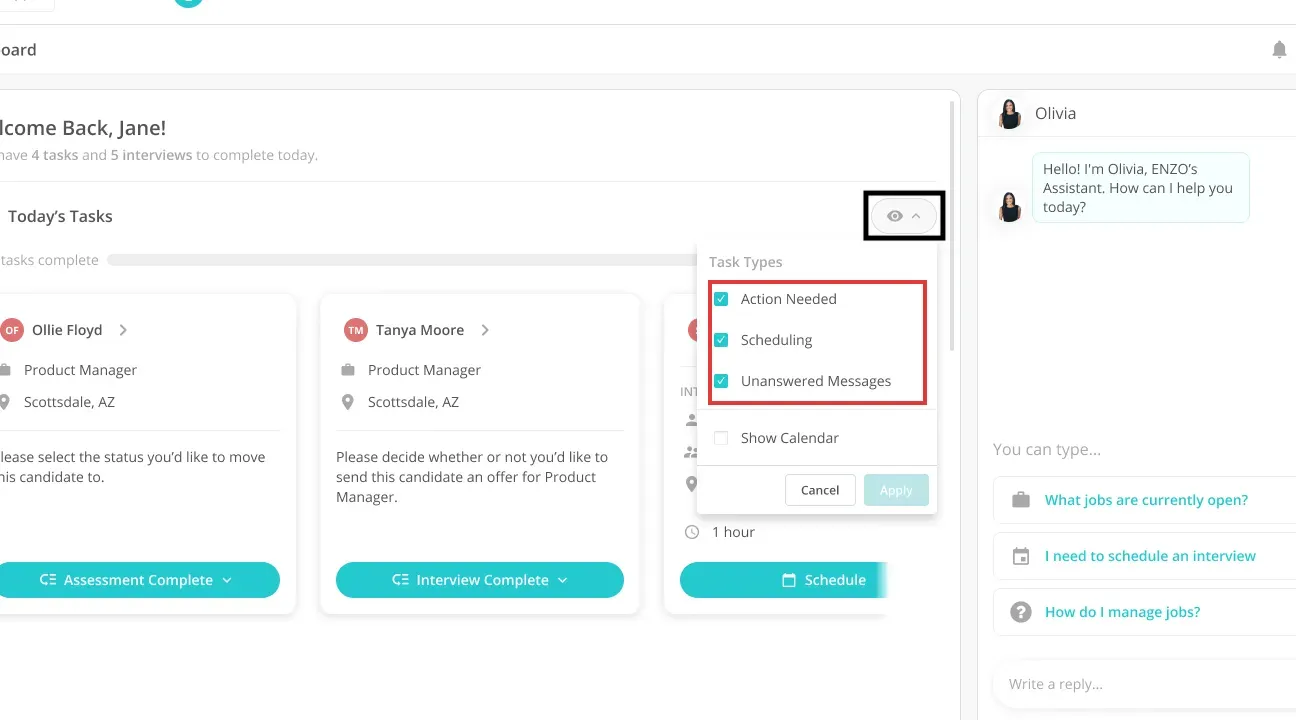
Inside Paradox, separate filters expose scheduling tasks and items needing action. (Image source: Paradox)
Paradox pros
- Candidate conversations handle scheduling and rescheduling.
- Panel and group scheduling configurations
- Separate views for scheduling exceptions
Paradox cons
- Custom subscription and implementation scope
- Interviewer availability remains a prerequisite
- When availability hasn't been resolved, scheduling may need to be handled by hand.
The work starts before a candidate reaches the scheduling stage. The relevant job and interview information must already exist; adding missing details afterward doesn't reliably retrigger the earlier transition. You can spend plenty of time improving the conversation and still have no times to offer if the interviewers' calendars aren't set up. That's where I'd start an implementation check.
Paradox's No Availability flow has an exception deadline. If availability remains unresolved for 14 days, staff need to create a new request. Manually selected slots are excluded from automatic re-engagement even within that window. My main concern is who owns that exception queue. Put a named person in charge.
Assist asks for confirmation before it changes data (it's the internal feature). You can't extend that assurance to every candidate-facing message. Changes to scheduling-expiration settings also apply to new requests, so existing requests need a separate review.
Paradox pricing
Paradox pricing: Paradox quotes the selected solution and implementation scope. Specify the ATS connection or standalone ATS scope, screening, scheduling, locations, and channels together. Keep implementation charges separate from the ongoing subscription.
What the same workload costs
Zoho Recruit costs less than Breezy HR for the defined internal task workload, while the larger agency example adds Recruit CRM usage costs and a Bullhorn quote. These calculations use the checked annual USD rates before tax and exclude managed implementation.
Breezy HR and Zoho Recruit: two recruiters assigning review work
Breezy HR Startup costs $1,884 a year for this workload, compared with $600 for two Zoho Recruit Staffing Agency Standard users. Assume five open jobs and 100 inbound applicants a month, each needing an internal review task. No SMS, external integration, enrichment, or delayed follow-up is included.
The following table shows the annual subscription costs for the defined workload:
| Tool | Suitable plan | Annual subscription | Required extras | Limit to check |
|---|---|---|---|---|
| Breezy HR | Startup | $1,884: 12 × Startup monthly rate | None for the defined task workflow | First stage entry. Sourced candidates differ. |
| Zoho Recruit | Staffing Agency Standard, two users | $600: 2 users × 12 × Standard monthly rate | None for the defined task workflow | Five custom workflow rules per module |
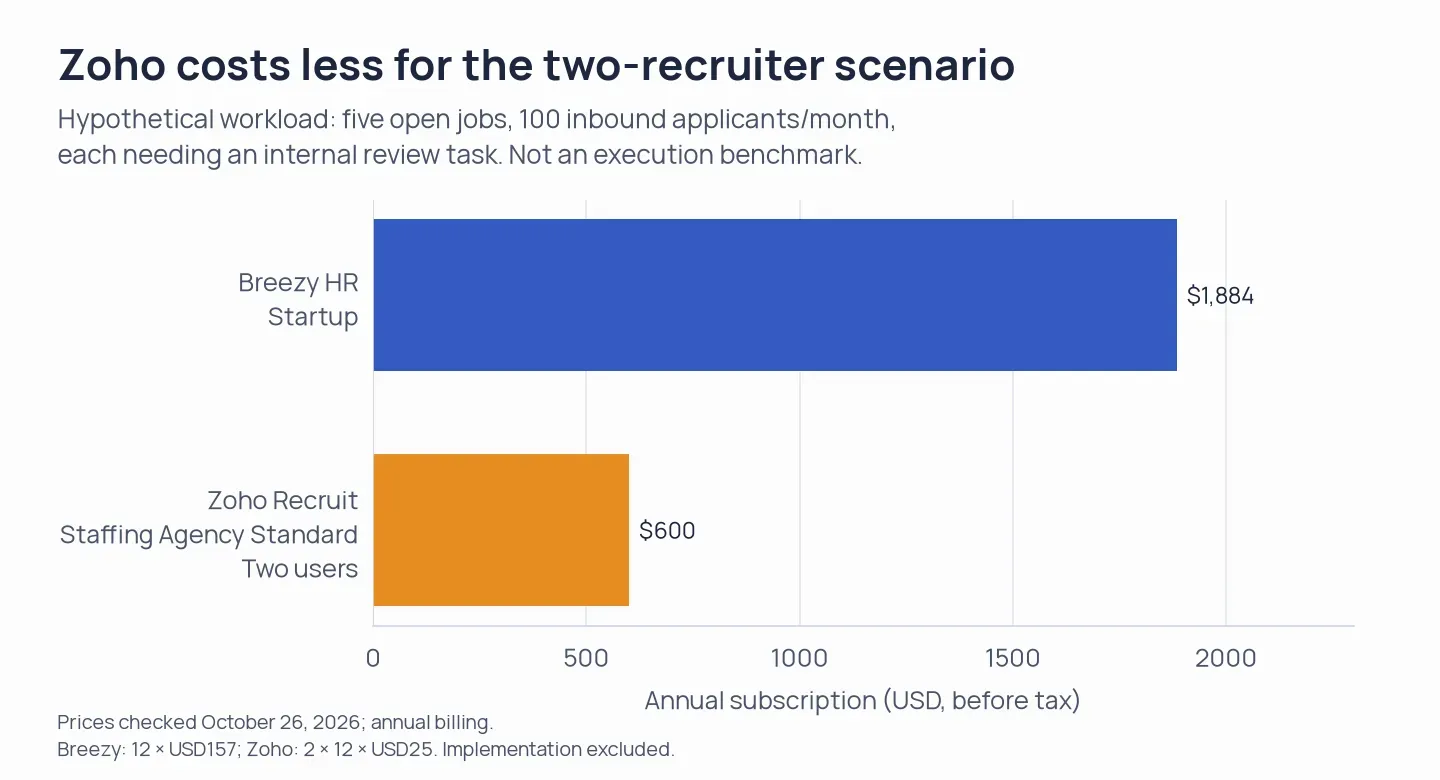
Annual subscriptions for the hypothetical task workload, before tax and implementation. The table retains the inputs and plan limits.
Zoho costs less for these two users. But if you're adding colleagues, Breezy's company-wide subscription deserves another look: Startup includes unlimited users and positions, so the team's growth changes how you read that comparison.
Zoho Recruit, Recruit CRM, and Bullhorn: five agency users
Zoho Recruit Professional costs $3,000 a year for five users in this scenario. Recruit CRM Pro has a $5,700 seat base plus workflow capacity, and Bullhorn needs a custom quote. Assume 1,000 eligible records each month, with one field update and one task per record. The trigger supplies the record identifier, so the recipe doesn't search for it again. Candidate messages and external paid data services are excluded.
Subscription and usage requirements for that agency workload:
| Tool | Configuration | Annual subscription | Required extras or capacity | Limit to check |
|---|---|---|---|---|
| Zoho Recruit | Staffing Agency Professional, five users | $3,000: 5 users × 12 × Professional monthly rate | No separately priced connector tasks for these native actions | 25 rules per module. Choose the correct matching branch. |
| Recruit CRM | Five Pro seats plus workflow capacity | $5,700 base: 5 users × 12 × Pro monthly rate | 2,000-task bucket: 1,000 credits on monthly workflow billing. Fund any credit shortfall. | Shared credits |
| Bullhorn Automation | Compatible ATS plus suitable automation edition | Custom | Include the field-update/task process in the quote | Active automation and action entitlements |
Recruit CRM consumes 2,000 workflow tasks per month in this example. Adding a search step raises that figure to 3,000. The bucket in the table uses 12,000 credits over twelve months under monthly workflow billing. Five annual Pro seats supply 6,000 credits, leaving a shortfall of 6,000 before any other credit use. The calculation shifts with an annual workflow offer, so before settling on the term, compare the actual credit checkout.
Zoho's native record actions avoid that extra task bucket. With Bullhorn, you'll need a quote for the surrounding staffing setup, and switching an existing operation just to save on a task rule could leave you paying for work elsewhere.
Which recruiting automation software should you choose?
Choose Linked Helper for LinkedIn candidate sourcing and outreach. Breezy HR is my choice for a clear pipeline with simple handoffs. Zoho Recruit fits agencies that need conditions on records. Choose Ashby when the interview plan should carry the scheduling work. Paradox suits a larger volume of candidate conversations, provided someone owns the exception queue.
For an existing Bullhorn operation, compare the automation edition before buying another system. Recruit CRM requires closer scrutiny of connector consumption and manual removal of candidates from LinkedIn sequences after a reply. It fits only when those controls and costs match the agency's process.
Check your current ATS first. You may already have the task or booking link you need, and you'll have another set of candidate records to keep synchronized if you add a second tool. Map a real handoff from trigger to completion, including the person who handles exceptions, before comparing subscriptions.
How we tested
In October 2026, I checked draft setups in Breezy HR, Zoho Recruit, and Recruit CRM, and reviewed documentation for Ashby, Bullhorn, and Paradox; Linked Helper's features and account interface were checked against its documentation in November. No candidate campaigns were run, and Linked Helper was not hands-on tested.