Boosting LinkedIn Posts: How to Increase Impressions and Engagement

Let’s delve into the world of social media analytics, where the pulse of your content is measured by something called the engagement rate.

For every post, or the entirety of your content (think of your profile as a whole), this metric can be a game-changer. It essentially reflects the relationship between your overall audience or the number of eyeballs your content caught (your reach) and those who actively engaged with it – be it through likes, comments, or shares.

It’s not uncommon for posts to reach thousands of people, only to receive a handful of comments. Why does this matter?

Well, social media algorithms are in the business of understanding engagement levels. It’s their way of deciding whether your content deserves more visibility and if it aligns with the interests of their users.

That’s why we’ll show you the proven and insider LinkedIn boost method via Linked Helper.
Key takeaways

  • The average LinkedIn engagement rate varies depending on the industry in which you create content. Below, you’ll find a link to a study.
  • Boosting posts on LinkedIn through Linked Helper is possible using the built-in feature called “Boost Post.” This feature allows you to tag people under the post in the comments by inserting a link to the post. This organically increases impressions or potential actions on the post if it resonates with people.
  • LinkedIn engagement pods are specialized services that create communities where individuals mutually boost activity under each other’s posts. However, such tools can pose security risks, especially if they operate as extensions.
  • You can boost posts on LinkedIn through hashtags, creating carousels and videos, activity from your profile, and delivering text and content effectively. Inauthentic likes and comments won’t help you in the long run because algorithms won’t recommend your content to potential target audiences.

What is the engagement rate on LinkedIn?

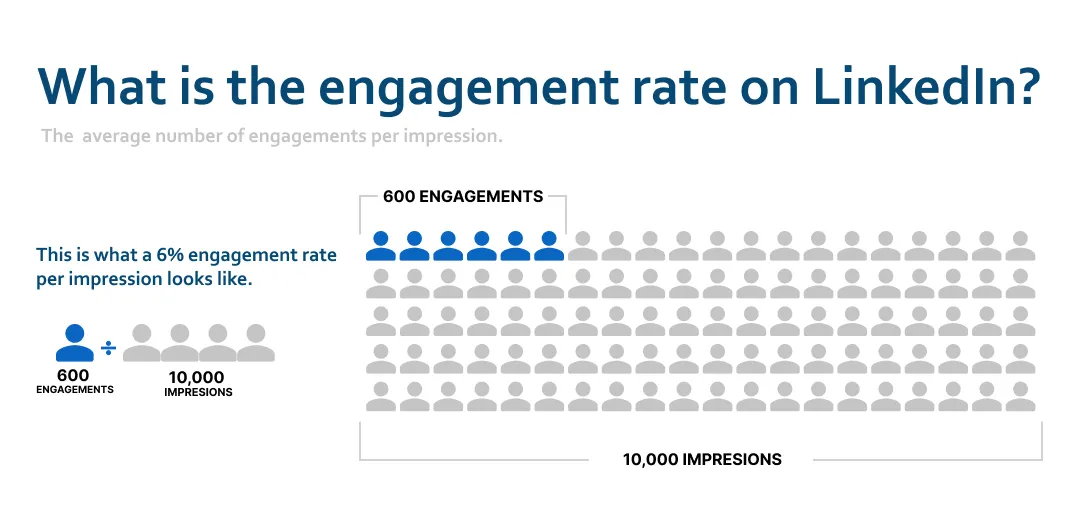
Let’s break it down with an example. If a post racks up 100 likes, 20 comments, and 10 shares, the total engagement stands at 130. To get the engagement rate, we take this total engagement, divide it by the post’s total impressions, and then multiply it by 100 to present it as a percentage.

what is the engagement rate on linkedin

Both metrics can be viewed in the analytics of your LinkedIn page.

Understanding this dynamic can be a game-changer for content creators, influencers, and businesses alike. It’s not just about the sheer number of eyes on your content; it’s about the quality of interaction and the resonance it creates. Social media algorithms are getting smarter, and knowing how to play the engagement game can significantly impact the reach and impact of your content.

What is a good engagement rate on LinkedIn?

If you’re curious about how effectively your posts are garnering likes and comments in relation to overall views, turn to the statistics. This will give you a clearer understanding of whether your engagement level is optimal or if it’s worth considering the advice you’ll find later in this article.

As of the latest whispers from November 2023, the average engagement rates perform their unique dance across various platforms.

  • Instagram: 2.49%
  • Facebook: 1.65%
  • Twitter: 1.33%
  • LinkedIn (median): 0.41%

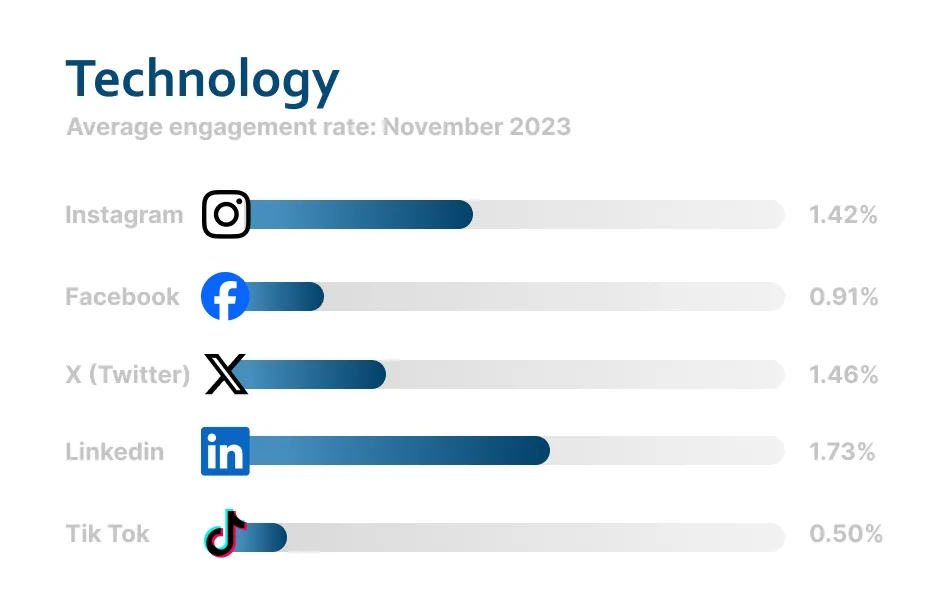
These rates can vary in different industries, and the graph below provides an example for the technology niche. The complete study is available at the following link.

engagement rate in technology on LinkedIn

You can compare your engagement rate with the industry average on LinkedIn.

Explore 2024’s Best LinkedIn Analytics Tools with Use Cases and Pro Tips.

How to increase engagement: Default methods on LinkedIn

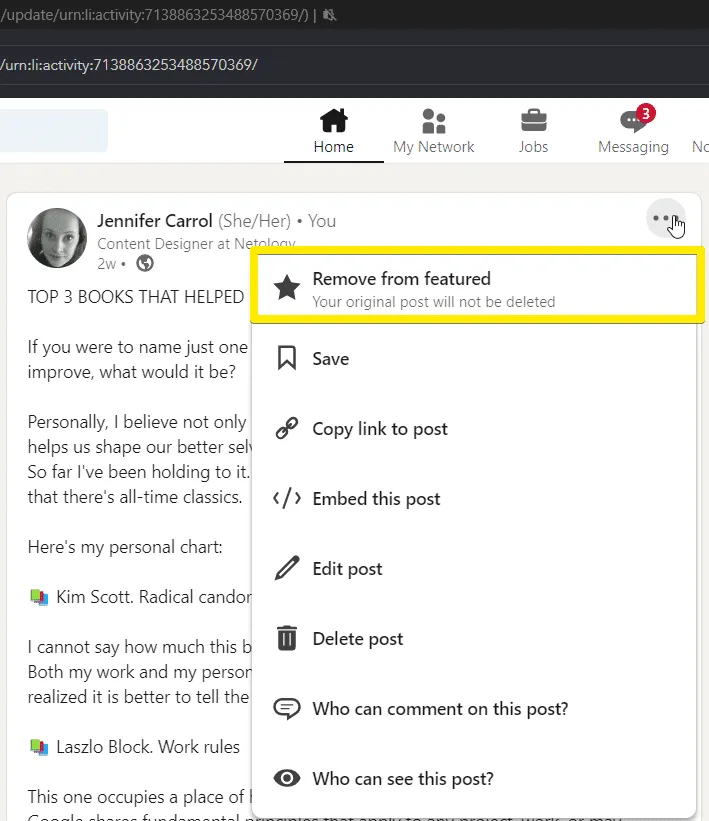
Pin any post to the top of your profile to enhance visibility. This is beneficial because when visitors land on your profile, they’ll encounter it right away, increasing the likelihood of it being read and, in turn, amplifying reach and potential engagement. Simply click the three dots on the post, select “feature on top,” and unpin when necessary.

Utilize the Featured section linkedin section screenshot

Posts at the top of your profile will garner more organic views.

#2 Enable Creator mode

This unique feature provides several advantages:

  1. The connect button on your profile transforms into “follow,” prompting users to subscribe to your content rather than focusing on expanding your network.
  2. A Featured section emerges at the top of your profile, showcasing your posts, articles, and videos.
  3. You have the ability to assign up to 5 tags in your profile header to better categorize yourself.
  4. Even if you reject a friend request, those individuals will still remain subscribed to your content.

The purpose? Elevating the discoverability of your posts and content, reaching a wider audience. And the best part – it’s completely free. Find more details about it.

#3 Boost post on LinkedIn

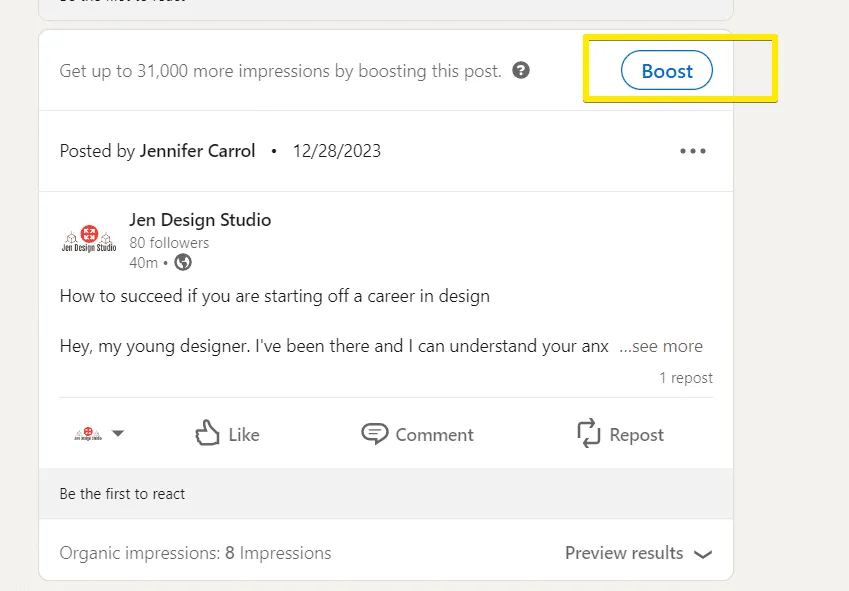
Boost post on LinkedIn button

Despite the presence of built-in promotion, advertising on LinkedIn is quite expensive.

Remember, you can write posts not only from your personal page but also from your company page if you have one. For these posts, the Boost post feature is available, allowing paid promotion. Clicking on Boost directs you to the ad settings page, where you can choose:

  • Campaign objective (increase impressions or likes and engagement)
  • Budget and duration (e.g., one week and $350)
  • Audience (create your own or choose from categorized lists)

It’s an investment, but there’s good news – Linked Helper offers the “Boost post” feature even for personal posts at a reasonable cost (details below). Keep reading to discover how to increase post reach for free!

#4 Hashtags

There are two types of hashtags – personal and niche. Personal ones you create for your brand to label posts (e.g., #Jenny_is_reading for posts about the books you read). Niche hashtags are for your industry. We need niche ones like #design career, #b2b, #job interview.

In LinkedIn, there isn’t a dedicated tool for searching tags within the network. To conduct effective research on LinkedIn hashtags, consider these steps:

Start by identifying hot topics in your industry using Google Trends. This will help you discover relevant hashtags that are currently trending.

Keyword research

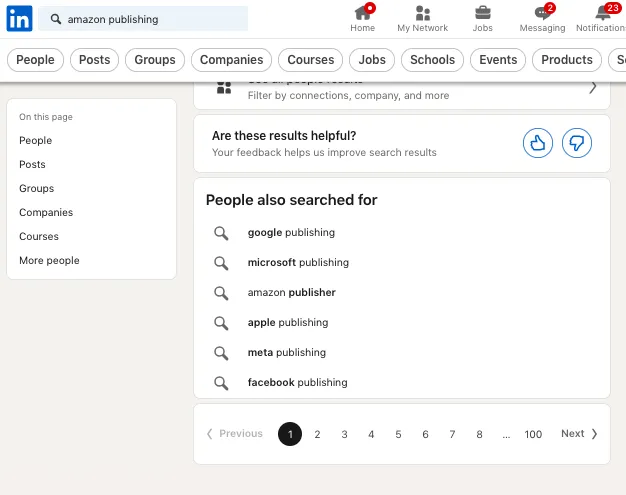
Perform keyword research to find trending hashtags on LinkedIn. You can find related searches by entering your query in the search bar and scrolling to the end of the page.

How to increase engagement on LinkedIn with keyword research.

To increase engagement on LinkedIn, you can do keyword research.

Hashtag analyzer tools

Make use of hashtag analyzer tools to research and enhance your hashtag strategy. Tools like Mention and Predis.ai can help you discover relevant and popular hashtags to increase your post’s reach.

Followed hashtags

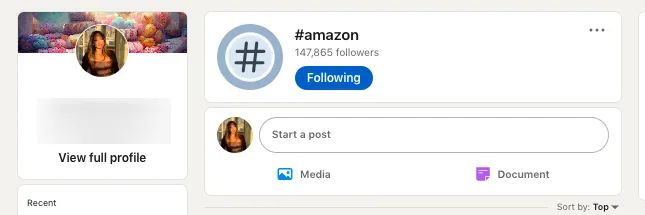
On LinkedIn, you have the option to subscribe to the most popular hashtags. By doing so, posts featuring these hashtags will appear in your feed. Additionally, you can gauge the popularity of each individual hashtag by checking the number of followers. Simply click on the hashtag to view its dedicated page.

How to increase engagement on LinkedIn with hashtags.

To increase engagement on LinkedIn, use hashtags and follow the most relevant ones.

Ways to craft your content for better engagement

#1 Make the conversation about your audience

Tailor your conversations to your audience’s interests and experiences.

Example:

Celebrating Achievements

Kudos to everyone who recently implemented innovative onboarding strategies! What achievements are you most proud of in your HR journey? Let’s share our successes and inspire each other!

Navigating Challenges

We all know HR comes with its unique set of challenges. Whether it’s [List some, for example – adapting to remote work or fostering a diverse and inclusive workplace], let’s open up about the hurdles we face and brainstorm solutions together. Your experiences matter!

How long should a LinkedIn post or message be?

#2 Use open-ended questions

Open-ended questions can act as conversation starters, encouraging others to join the conversation and share their thoughts on the topic.

Example:

Question of the day: What’s been your most effective strategy for fostering a positive company culture, especially in these remote work times?

Bonus Round: How do you ensure that your company’s values are not just words on paper but a lived experience by every team member, regardless of their location?

#3 Lead with “Give”

Initiate interactions by offering something valuable to your target audience. This could be insights, resources, or solutions to common challenges they face.

Insider Insight: Have you explored the potential of gamification in employee training? It’s a game-changer in enhancing engagement and knowledge retention. I’ve put together a quick guide on how to seamlessly integrate gamification into your training programs.

{Link to Gamification Guide}

#4 Generate catchy carousels with AI

Utilize AI-driven tools like Taplio to effortlessly create engaging carousels. These tools can convert content from YouTube or articles into visually appealing LinkedIn posts. Presenting information in this format that captures attention and encourages your audience to swipe through for more insights.

#5 CTAs

Whether it’s inviting comments, encouraging shares, or directing users to a specific link, a well-crafted CTA guides your audience on the desired action.

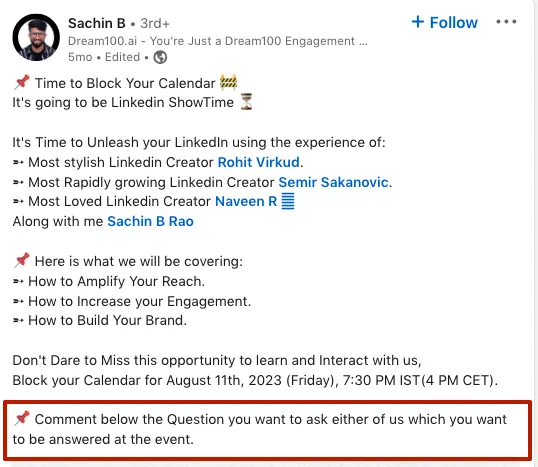
Example of how to increase engagement on LinkedIn with your CTA.

To increase engagement on LinkedIn, encourage comments.

Keep the ball rolling: Engage yourself and engage others

After crafting your content, leverage LinkedIn’s tools to give it the spotlight it deserves. Then, the magic lies in stepping into the realm of discussions and drawing others into the conversation.

#1 Engage

  • Comment: Actively participate in discussions on your posts and others in your network. Respond thoughtfully to comments on your content to nurture ongoing conversations.
  • Respond to Comments: Acknowledge and respond to comments promptly. Show appreciation for insights shared and address any questions or concerns.
  • Connect: Extend your network by connecting with individuals who align with your professional interests. Craft personalized connection requests to enhance the likelihood of acceptance.
  • Direct Message (DM): Use direct messages strategically to initiate one-on-one conversations. Share relevant content, ask for opinions, or explore potential collaborations through personalized messages.

#2 How to increase engagement on LinkedIn with engagement pods

Examples: Lempod, Linkboost.

These extensions are designed to increase likes and comments on your LinkedIn posts by leveraging engagement from other users. Here’s how it works:

  • Create or Join Pods: Users form or join engagement pods, groups of individuals interested in mutually boosting each other’s content.
  • Specify Target Audience: When participating in a pod, you can specify the audience characteristics you want engagement from, allowing for a more targeted approach.
  • Engagement Exchange: Members of the pod engage with each other’s posts by liking and commenting, fostering organic interactions.

Pros:

Diverse engagement from different LinkedIn users.

Cons:

  • Your account will also participate in putting automatic likes and comments to others’ posts.
  • Users may face warnings or restrictions from LinkedIn due to automated engagement.
  • Chrome extension may be not safe.

#3 Keep the momentum by posting consistently

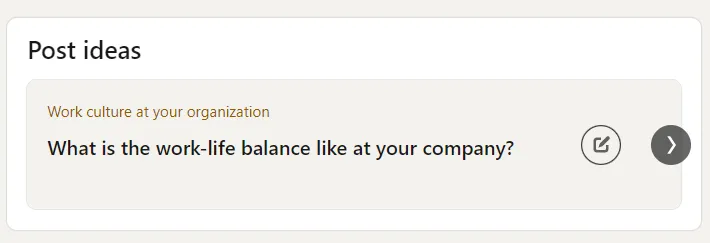
According to LinkedIn’s insights, those who share content weekly enjoy a fivefold increase in followers. If the creative well runs dry, tap into LinkedIn’s ”Post ideas” feature – a nifty guide to spark inspiration on what to share. It’s a fantastic resource that might just surprise you with its suggestions.

Post ideas section on Linkedin

LinkedIn offers various tools and methods to generate content ideas.

How to measure LinkedIn engagement

How does LinkedIn calculate engagement rate?

Normal posts

LinkedIn calculates engagement rate by measuring the interactions a post receives relative to its total impressions. The formula is to divide the sum of likes, comments, and shares by the total impressions of the post.

Boosted posts

LinkedIn has this nifty way of handling engagements if we refer to boosted posts. So, for every impression each member makes, LinkedIn counts only for that initial engagement. If someone decides to spice it up with a like and then follows it up with a comment, LinkedIn plays it smart. They charge only for the like, keeping it all tidy. But here’s the twist – they still spill the beans on both the like and the comment in their report. Sneaky, right? This little maneuver can make the total engagement look like it’s moonwalking past the clicks count.

You can explore all the metrics on LinkedIn that are visible after launching advertising posts by following this link: LinkedIn Analytics Metrics

How to find the LinkedIn engagement metrics list

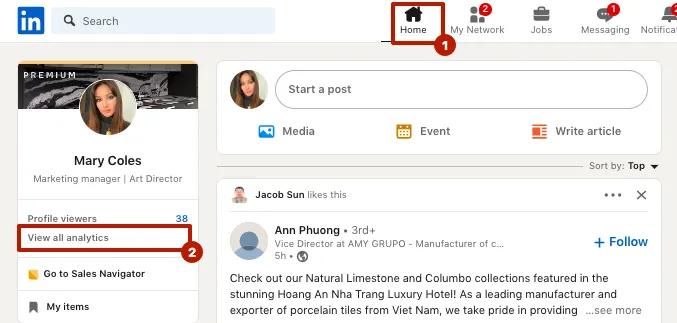
You can view the basic metrics of your content on your LinkedIn page. This is available on any subscription. To do this, go to the Home page and select “View all analytics.”

How to measure LinkedIn engagement, the view of all analytics buttons.

To measure LinkedIn engagement, navigate to your home page.

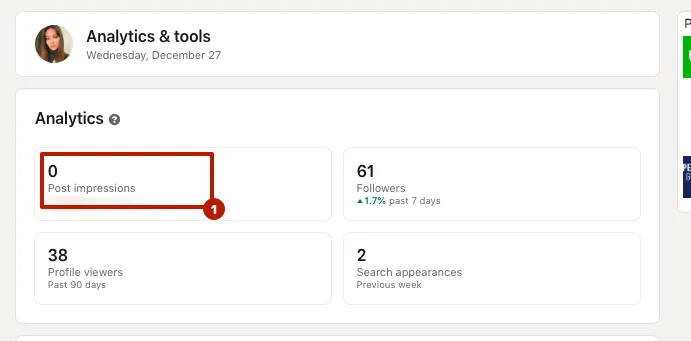
Next, you need to click on “Post impressions.”

How to measure LinkedIn engagement, the analytics & tools menu.

To measure LinkedIn engagement, click on “Post impressions.”

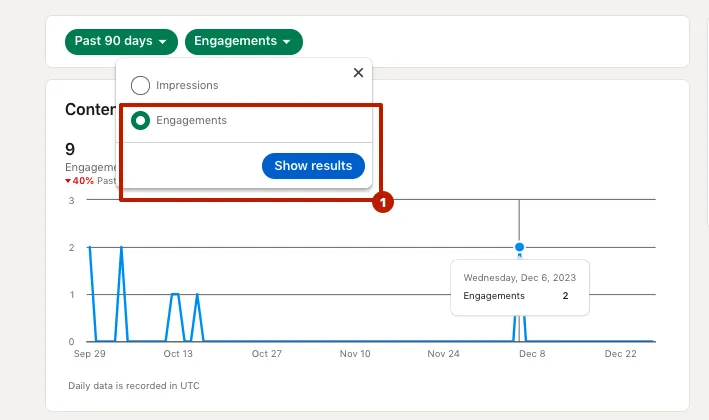
On the next screen, you can choose statistics on impressions (total views) or engagement. You can also select a period for the report.

How to measure LinkedIn engagement, the metrics menu

LinkedIn allows you to choose either impressions or engagement separately in analytics.

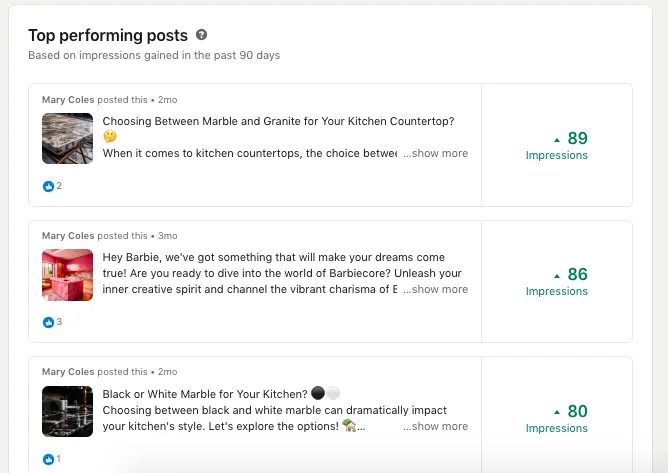
Scrolling down, you will see the top posts by engagement and impressions. From these analytics, you can draw conclusions about the direction to follow in content creation and which posts to exclude. To understand and test content on a new profile, try to post as often as possible to figure out what works best.

How to measure LinkedIn engagement and view top-performing posts

LinkedIn shows top posts in terms of reach or engagement.

Tools for measurement

Consider tools like LinkedIn itself or apps like:

Inlytics: Explore Inlytics for in-depth analytics, offering insights into LinkedIn profile and content performance.

Keyhole: Keyhole is a comprehensive social media analytics tool that covers various platforms, including LinkedIn. It provides data on reach, engagement, and popular hashtags.

SocialPilot: SocialPilot is a versatile social media management tool with analytics features, allowing you to track the performance of your LinkedIn posts.

Vaizle: Vaizle focuses on social media analytics, offering insights into content performance, audience engagement, and competitive analysis.

Finally, constantly tweak your strategy to understand what content resonates best with your audience. Adaptability is key – by analyzing and adjusting your approach, you can fine-tune your content strategy for optimal engagement on LinkedIn.

Frequently Asked Questions

Linked Helper offers a myriad of possibilities to automate tasks on LinkedIn and also increase LinkedIn engagement organically. However, what sets it apart from other automation tools is its unique feature – the “Boost Post” action. This feature allows you to gain the following benefits through tagging individuals under posts:

Try Linked Helper free for 14 days

The most technically advanced platform for LinkedIn automation with a focus on security, a wide range of features, and exceptional customer support. Trusted by over 10,000 businesses worldwide.