Linked Helper vs. Dux-Soup 2026: Which LinkedIn Automation Tool Wins?
Wordless 3D comparison of a desktop automation app, Chrome extension, security shield, and pricing controls

Linked Helper and Dux-Soup are built on different architectures, and they price their features very differently. This article compares Linked Helper vs. Dux-Soup based on their pricing options, functionality, advantages, and limitations.

TL;DR: Linked Helper vs. Dux-Soup Review

Linked Helper is a desktop app with multi-step campaigns, AI-personalized messaging, and 11 native CRM integrations. At $15/month for the lowest-tier plan, you get most of the tool’s functionality. It’s suitable for users who need more advanced features at a lower cost.

Dux-Soup is a Chrome extension whose cheapest plan, at $14.99/month, sends one action at a time. Sequencing, CRM sync, and AI messaging only arrive at its $55-a-month Turbo tier or higher. It suits someone who just wants basic outreach actions.
Linked Helper vs. Dux-Soup at a Glance

Below, we compare Linked Helper vs. Dux-Soup based on the aspects that matter most to real users: how the software is built, how much you’d need to pay for the real “does what you'd expect from an automation tool” tier, how you can get support, and more.

FeatureLinked HelperDux-Soup
ArchitectureStandalone desktop app (cloud-based data storage + web controls also available)Chrome extension (Cloud plan adds a hosted option)
Cheapest plan with multi-step campaigns$15/month (Standard)$55/month (Turbo)
Free trial14 days, no card
Native CRM integrations11 (from Standard)9 (only from Turbo)
Messaging history exportCSV/webhook on Pro tierCSV on all tiers; webhook/CRM sync from Turbo
Support24/7 live chat, email, help centerLive chat, help center, email (contact form)

What Is Dux-Soup?

Dux-Soup is a LinkedIn outreach tool that works through a Chrome extension. It’s sold in three tiers: Pro ($14.99/month), Turbo ($55/month), and Cloud ($99/month), plus team plans with collaborative features (same pricing) and Cloud Agency ($371/month).

Dux-Soup runs in your browser session and is tied to your Chrome account. Linked Helper, by comparison, is a separate desktop app.

Security & Architecture: Desktop App vs. Chrome Extension

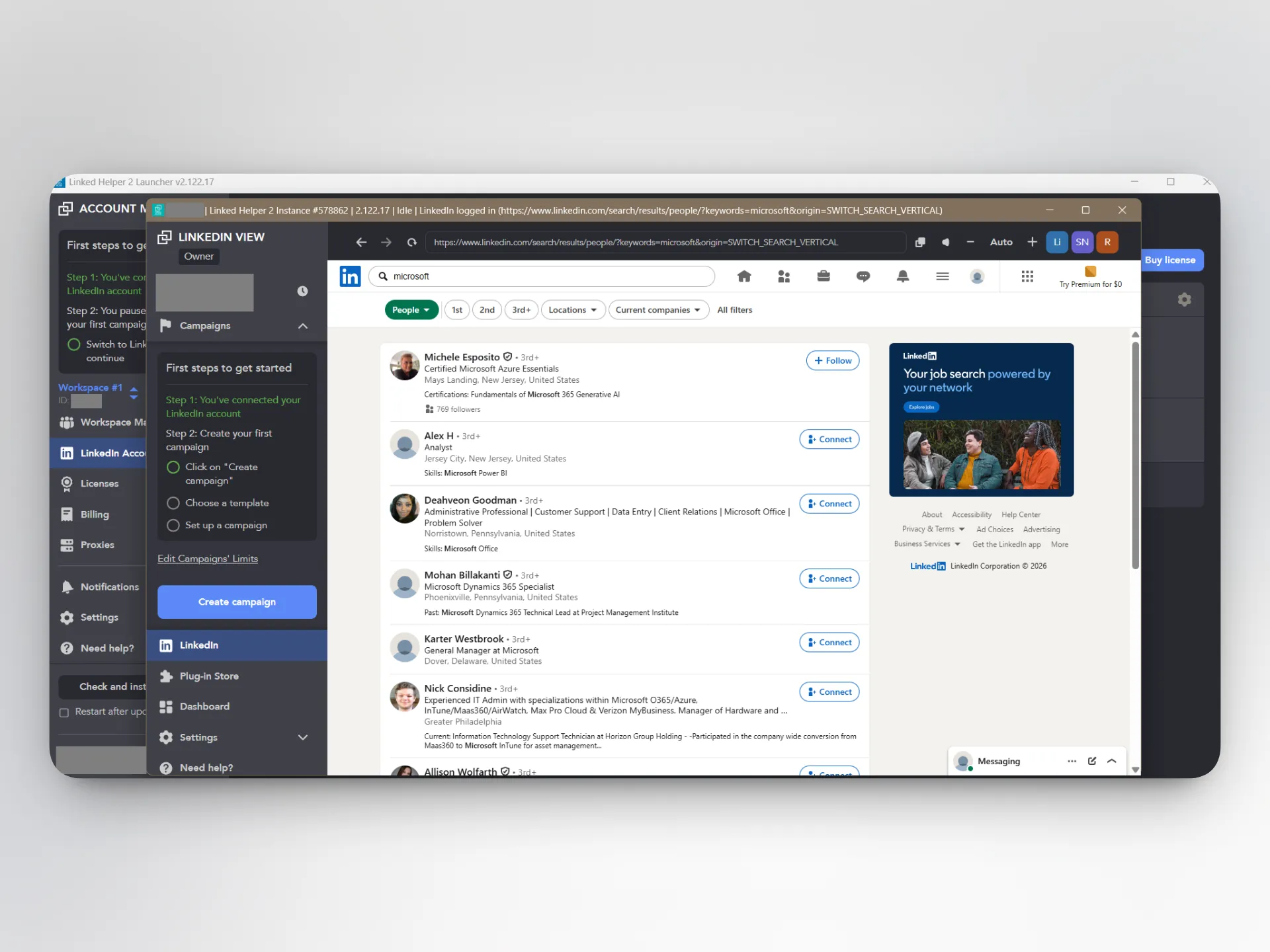
Linked Helper is a desktop application that includes a built-in browser. This means that there is no Chrome Web Store ID (nothing for LinkedIn to scan for), and no code is injected into the LinkedIn page. It also doesn’t use the LinkedIn API, and each account's session, cookies, and cache stay on the machine that runs it. These features help to avoid LinkedIn automation detection, although no tool can guarantee a 100% success rate.

You have to install the software and keep your computer or VPS on for the campaign to run — and you can’t use the LinkedIn account in a different browser at the same time. The app opens a browser session for LinkedIn access and emulates clicks, scrolls, and other usage patterns.

Linked Helper desktop application showing its built-in LinkedIn browser and campaign controls

But is Linked Helper safe? Customer reviews confirm that it’s safer than many alternatives:

What Users Say About Linked Helper’s Safety

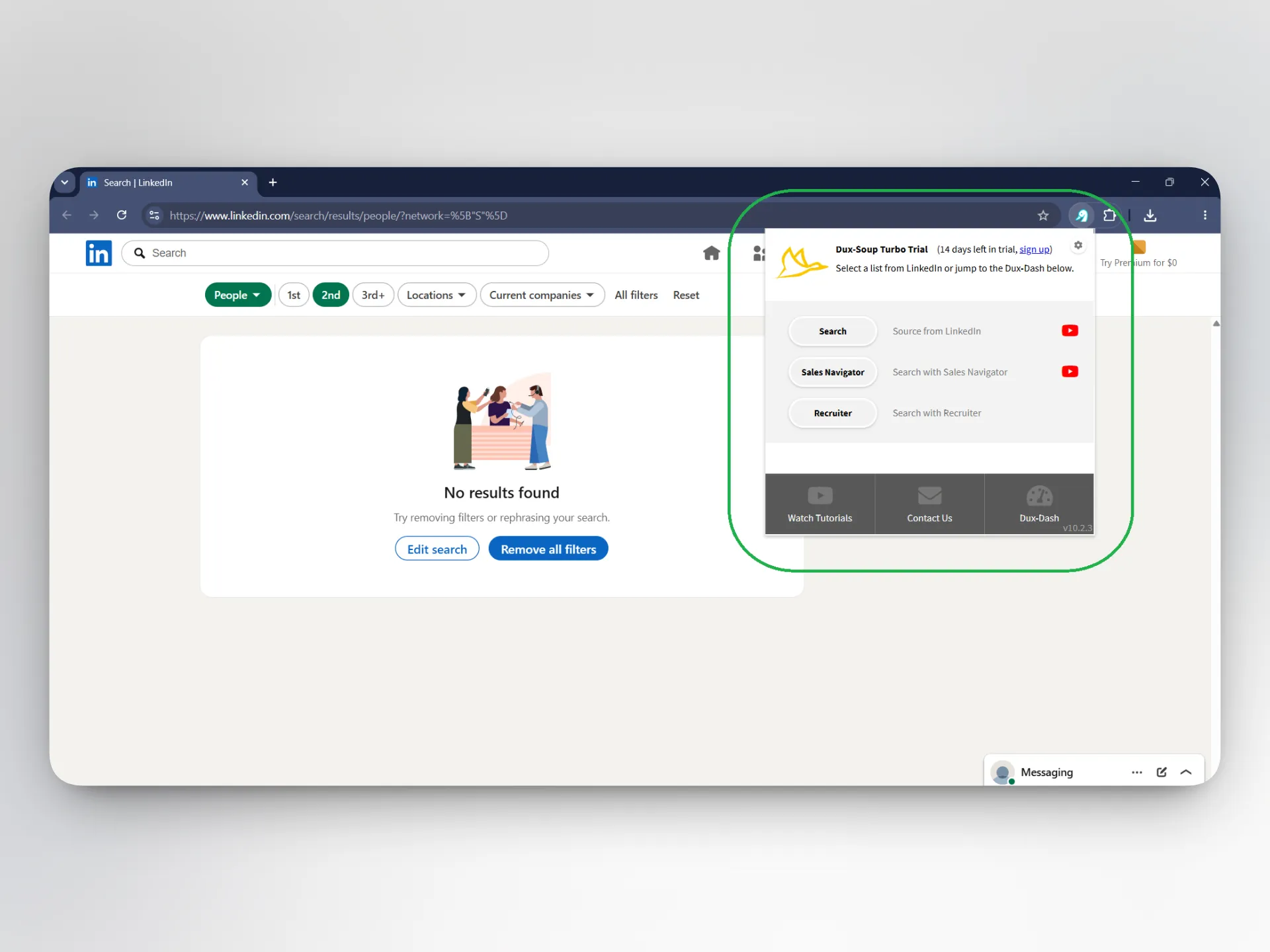
Dux-Soup offers a browser extension, a cloud-hosted solution, and a web app for campaign settings and account management. The Dux-Soup Chrome extension operates through your browser window.

Dux-Soup Turbo Chrome extension popup displayed over LinkedIn search

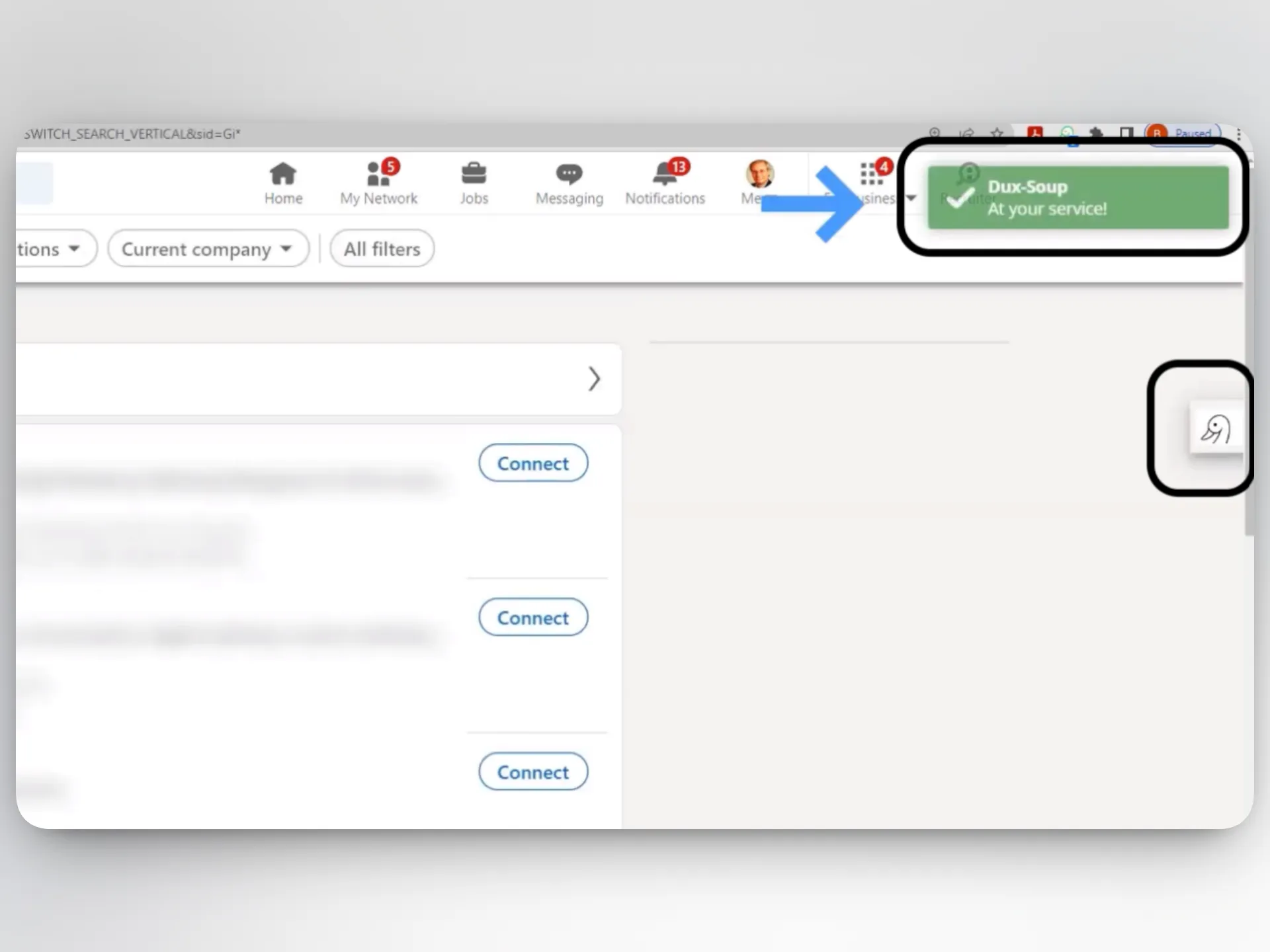
It embeds its code into the LinkedIn page’s HTML (evident from the buttons and pop-ups that appear on the page once you activate the extension):

Dux-Soup buttons injected into the LinkedIn interface beside search results

Plus, it’s in LinkedIn’s AED (Active Extension Detection) probe list. AED is LinkedIn's hardcoded extension probe list, so an installed extension is visible to LinkedIn before automation starts. This comes with well-documented risks, with some users reporting LinkedIn account bans:

I got banned for using this Chrome extension.

Read the full review on G2

G2
Rating: 0.5 out of 5
G2
VU
Verified User in Utilities
Mid-Market reviewer · November 11, 2020

The extension can’t run your campaign if your computer sleeps. The Cloud plan offers EU-hosted cloud infrastructure that works without an open browser. It’s available at the most expensive tier ($99/month for individuals; $371/month for agencies).

Feature Comparison: Automation, CRM & Messaging

Dux’s list of features looks similar to Linked Helper’s at first. But once you consider what is available in each plan, you see that most of the useful features are limited to the higher-tier subscription, which costs 3.7 times more than the widely advertised Pro option.

Automation & Campaign Building

Dux-Soup’s cheapest tier has no multi-step campaigns, while Linked Helper’s Standard plan, which comes at essentially the same price, offers multi-step automations, unlimited concurrent campaigns, and auto-stop-on-reply.

Dux only becomes useful for automated campaigns if you pay for a Turbo account. Its Pro plan is suitable for the initial steps in campaign building, such as data collection. Even at the more expensive tier, the tool doesn’t automate the following actions:

  • Generic and AI-personalized comments under posts
  • Invites to groups, events, or to follow a company page
  • Mentioning a profile in comments
  • Extracting company data from LinkedIn
  • Collecting employees with certain titles from a list of companies
  • Scraping messaging history from profiles that the tool has not previously processed

When comparing Linked Helper vs. Dux-Soup on the cheapest plans, the former has significant advantages: more actions, campaign targeting, templates, and scheduling.

CRM & Data Export

The Dux-Soup LinkedIn tool has no CRM or Zapier integration in its cheapest plan. Nine completely native integrations, including Salesforce, HubSpot, Zapier, and Make, appear starting at Turbo. Lower-tier accounts have access to full LinkedIn data exports to CSV — a feature that Linked Helper only offers in its higher-priced tier. Users often praise the integrations and data export features in this tool:

I appreciate the fact that I can integrate Dux-Soup with multiple CRMs. [...] Also, I can share or import lists from outside, which is fantastic because I have lists of emails, people's names, or LinkedIn URLs.

Read the full review on G2

G2
Rating: 5 out of 5
G2
TG
Tyron G.
Founder · March 17, 2026

Despite the data export limitation, the $15 plan from Linked Helper comes with a more comprehensive toolset for LinkedIn campaign management. You get 11 native CRM integrations (HubSpot, Pipedrive, Salesforce, Zoho CRM, Zoho Recruit, Close, ActiveCampaign, Capsule, Streak, HighLevel, Instantly) plus outgoing webhooks.

Messaging & Personalization

Linked Helper runs its own AI engine with a monthly credit allowance, 250 credits on Standard and 500 on Pro, covering message drafting, profile-based personalization, and a reply assistant. AI drafts land in a review queue by default, with an optional auto-approve toggle once you trust the output.

Aside from AI personalization, the tool offers a message template editor with spintax support, IF-THEN-ELSE clauses, custom and built-in variables, and multiple message variations in the same step. This helps create randomized messages without using AI. Plus, templates can be paired with AI message generation for hybrid template creation.

Customer reviews mention that the system handles personalization well even at scale:

It allows me to run personalized LinkedIn campaigns at scale, without compromising on quality or getting flagged as spam.

Read the full review on Capterra

Capterra
Rating: 5 out of 5
Capterra
PD
Patrick D.
Webmaster · May 28, 2025

Dux's AI personalization works differently: it connects to your AI API key and is only available on Turbo or Cloud, not Pro. That means no extra Dux fee for AI usage but a separate API cost on top of the plan's price.

Is Linked Helper or Dux-Soup Safer for Your LinkedIn Account?

Any claim that a tool can't be detected deserves a skeptical read. What each tool actually controls is how closely its default behavior resembles a person clicking around and how much room it gives you to slow that down. Campaign settings should account for LinkedIn automation limits.

Linked Helper caps total activity at 150 actions per rolling 24 hours by default, rather than a calendar-day count that resets at midnight. You can set limits per action type, add roughly 10 percent randomization so daily numbers vary, and schedule working hours with a randomized start-time delay.

For an additional safety layer, Linked Helper emulates mouse movements, scrolling, button clicking, and typing — and you can see these actions as the tool is working. There are random micro delays between each action (for example, a 3-second pause between scrolling and clicking a button, then a 7-second delay before typing, and so on), which mimic the way humans browse.

Public reviews prove the effectiveness of these measures:

What Users Say About Linked Helper’s Safety

A user who has switched from Dux to Linked Helper highlights safety as the main reason for the move:

Dux Soup is not as safe as Linked Helper 2.

Read the full review on Capterra

Capterra
Rating: 5 out of 5
Capterra
MK
Mattias K.
Marketing and Sales Manager · December 23, 2025

So, is Dux-Soup safe at all? It comes with comparable controls, including daily limits and customizable delays between actions. However, the tool has a considerable gap: no adaptive response to risk signals beyond its own static thresholds.

The company claims that there have been zero bans among users on its recommended settings, but public reviews tell a mixed story. Some describe years of trouble-free use; others link bans directly to running the extension:

Reports About Dux-Soup Restrictions

Our analysis shows that Dux uses several automation approaches for different plans. When using the extension, there’s the AED list risk we mentioned above. But the cloud version also has its caveats. For instance, users cannot control the quality of the AP assigned to their account when using Cloud Dux.

Most recent reviews don’t mention Dux-Soup account ban issues, but a careful approach is always recommended when working with extensions.

Linked Helper vs. Dux-Soup Pricing (2026)

As of July 2026, Linked Helper pricing includes two plan types, Standard and Pro, with local and cloud storage variations, plus Linked Helper data, email, and AI credits. Data and email credits never expire, and AI credits bought separately do as well. AI credits purchased with a license expire when that license expires.

Discounts for 3-, 6-, and 12-month prepays and bulk license purchases are also available. Bulk discounts start from 10 licenses (10% off) and go up to 45% off for 1,000 licenses. These offers also add up. For example, when you purchase 20 yearly standard licenses, you get a 56% discount compared to individual monthly plans.

PlanMonthly Price12-Month Prepay (Per Month)
Standard$15.00$8.25
Pro$45.00$24.75
Standard (Cloud storage)$29.90$16.50
Pro (Cloud storage)$59.90$33.00

Dux-Soup pricing covers three plan tiers (Pro, Turbo, Cloud), team plans with the same cost per seat as individual ones, and a cloud-hosted agency plan. It also sells email-lookup credits, called Dux-Soup Points, separately on every tier, including Pro, with pricing visible only inside its own store. Here are all subscription options, verified in July 2026:

PlanMonthly Price12-Month Prepay (Per Month)
Pro Dux$14.99$11.25
Turbo Dux$55.00$41.25
Cloud Dux$99.00$74.17
Cloud Agency$371.00No discount

Comparing the tiers that include sequencing and CRM sync, Linked Helper Pro at $297 a year is $198 less than Turbo Dux at $495 a year.

Which Should You Choose?

The choice depends on your architecture preferences, campaign complexity, tech savviness, and budget:

  • The Dux-Soup LinkedIn workflow is browser-centric, with an optional managed cloud offering. Most useful features are available only on higher tiers.
  • Linked Helper is a more advanced Dux-Soup alternative with broader automation capabilities and more granular controls available at a lower price point.

Check out our list of the best LinkedIn automation tools to compare more options.

For supporting context used in the FAQ, see Dux-Soup’s safety guidance and our analysis of architecture types and their safety.

FAQ

Dux-Soup pricing starts at $14.99/month for the Pro plan. Multi-step automation features, integrations, and analytics are available on Turbo ($55/month).

Final Verdict

In a direct Linked Helper vs. Dux-Soup comparison, Linked Helper's feature-packed Standard plan and software architecture make it a more cost-effective and safer option. Dux may be suitable for those who need simpler workflows and don't want to spend time learning a complex tool.

Try Linked Helper free for 14 days

The most technically advanced platform for LinkedIn automation with a focus on security, a wide range of features, and exceptional customer support. Trusted by over 10,000 businesses worldwide.