
 Updated: September 18, 2026
 32 min read
Quick Answer: Linked Helper is our recommended Meet Alfred alternative for users who prioritize account control, lower cost, and deeper built-in LinkedIn workflow settings. It runs locally on your own machine or VPS rather than through vendor cloud infrastructure, so LinkedIn activity uses your own environment or an assigned proxy setup. Pricing starts at $15/mo versus Meet Alfred’s roughly $59/mo entry plan, while Linked Helper includes 11 direct CRM connectors and a built-in proxy checker.
The alternatives reviewed in this comparison are:
- Linked Helper: desktop LinkedIn automation tool with local session handling.
- Expandi: cloud conditional sequences with vendor-side session handling.
- Dripify: cloud LinkedIn sequences with vendor-side session handling.
- Waalaxy: LinkedIn and email prospecting with a Chrome-extension-led setup.
- SalesRobot: cloud outreach with AI-assisted personalization.
- Closely: cloud LinkedIn and email outreach.
- PhantomBuster: cloud automation and data extraction.
- La Growth Machine: cloud multichannel sequences.
Key takeaways
- Linked Helper is our recommendation because it is the only desktop tool in this lineup. It runs LinkedIn activity through the user’s machine, VPS, or assigned proxy setup rather than a vendor-run cloud environment.
- Our June 2026 live checks showed different cloud footprints across tools. Meet Alfred’s two observed IPs returned IPQualityScore fraud scores of 0, while Dripify’s assigned IP scored 94/100 and one of Expandi’s two observed IPs scored 100/100 with proxy and recent-abuse flags. IPQS is an independent IP-quality signal, not LinkedIn’s enforcement verdict.
- In our wider audit, Dripify, Skylead, and We-Connect used HostRoyale infrastructure in some tested sessions, sometimes within nearby network blocks. That does not prove identical risk across those products, but it shows that different tools can share provider-level infrastructure signals.
- The Expandi, Waalaxy, and PhantomBuster connector extensions we reviewed accessed the li_at LinkedIn session cookie and passed session data to vendor infrastructure. That makes cloud-side account use from a vendor-controlled environment highly likely.
- Waalaxy and PhantomBuster were present on LinkedIn’s Active Extension Detection list in our checked snapshot. That means the installed extension itself can become a visible signal before any campaign action runs.
The rest of this comparison looks at where Meet Alfred performs well, where buyers start comparing alternatives, and how each tool differs by architecture, price, workflow depth, and account-control options.
Try Linked Helper free for 14 days No credit card required. Start free trial
What Is Meet Alfred?
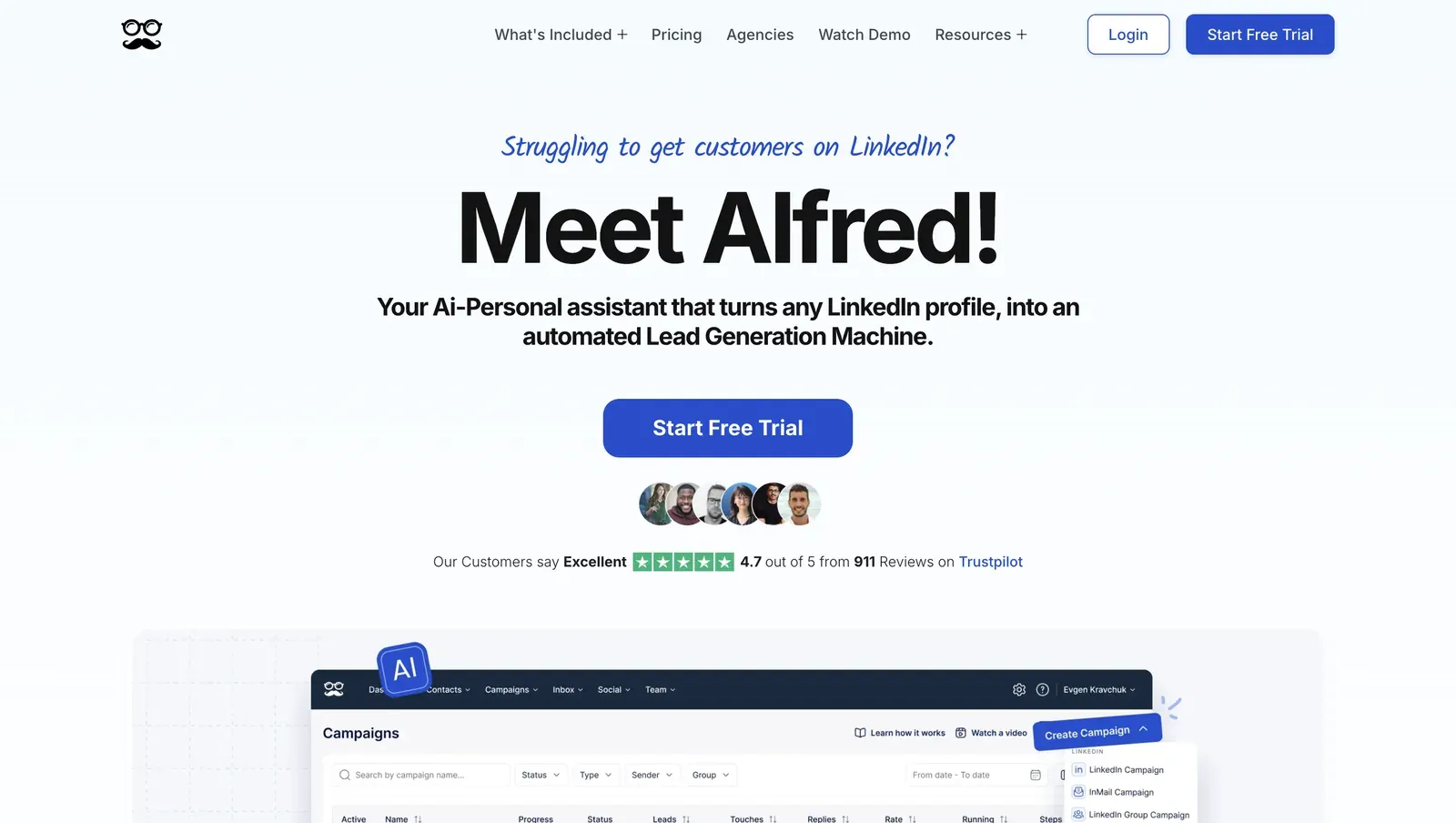 Meet Alfred is a cloud-based LinkedIn automation and multichannel outreach tool for sales teams, recruiters, agencies, and founders. It supports LinkedIn actions, email, and X/Twitter steps from one campaign builder, with features such as connection requests, follow-up messages, profile visits, campaign templates, tags, lists, and team campaign management.
The main architecture difference is that Meet Alfred runs LinkedIn activity through vendor-controlled cloud infrastructure. That gives users a hosted dashboard and campaigns that can keep running without the local computer staying on, while also shifting session-origin and IP-control questions into the vendor environment.
Why Users Look For Meet Alfred Alternatives
Across 5,000+ reviews on G2, Capterra, and Trustpilot and 350+ Reddit threads about these tools, the same frustrations recur:
- Account-safety and session-custody concerns led the Meet Alfred pain cluster, with about 50 safety or restriction-related review mentions.
- Reliability problems and bugs interrupting campaigns appeared in about 69 negative mentions.
- Pricing and transparency concerns appeared in roughly 47 and 34 mentions respectively, including per-seat cost and multichannel plan gating.
- Support responsiveness drew about 40 negative mentions.
- Users also cited a shallow built-in CRM and the absence of a consolidated smart inbox.
These themes appeared consistently across G2, Capterra, Trustpilot, and Reddit discussions.
What Meet Alfred Does Well
Meet Alfred is a cloud-based LinkedIn automation and multichannel outreach tool. Users connect a LinkedIn account to the vendor’s infrastructure, where campaigns can continue running without the user’s computer staying on. The product supports LinkedIn actions, email, and X/Twitter steps in one campaign builder. Its workflow includes connection requests, follow-up messages, profile visits, campaign templates, tags, lists, and team-oriented campaign management. Email and X/Twitter access depends on the selected plan. Meet Alfred differs from desktop tools because LinkedIn activity runs through vendor-controlled cloud infrastructure rather than only through the user’s own machine or VPS.
Where Meet Alfred Starts To Feel Limited
Meet Alfred’s cloud-credential-login architecture places the active LinkedIn session on vendor-controlled infrastructure, reducing the operator’s direct control over session origin, IP behavior, and browser signals. Review themes also point to campaign reliability problems, support delays, billing and refund friction, and per-seat cost as teams grow. The built-in lead-management layer is based mainly on tags and lists rather than a fuller visual sales pipeline. Multichannel features also depend on plan level, so the real comparison often starts above the entry plan.
How We Researched Meet Alfred Alternatives
This was a manual review, not a copied feature roundup. We spent roughly two hours per tool checking product pages, pricing, setup model, CRM and integration claims, review patterns, and safety-related architecture signals. Where access allowed it, we also tested the product setup or reviewed the extension package to verify what could be observed directly.
Research scope
The research covered 12+ tools, including the eight compared here; 5,903 reviews from G2, Capterra, and Trustpilot; and 358 Reddit threads. We also checked vendor feature and pricing pages in June 2026 and ran two first-hand test types: live cloud and IP observation for cloud tools, and source-code teardown for products that ship a public Chrome extension.
Product and feature analysis
We scored the same product dimensions across the set: architecture, session and IP handling, pricing and value, workflow depth, conditional logic, CRM connectors and webhooks, channel scope, Sales Navigator and Recruiter support, and account-scale controls. AI personalization was treated as a 2025–2026 parity axis rather than proof that one tool had a unique advantage.
First-hand testing
In June 2026, we observed how cloud tools connected accounts and what network and fingerprint signals they exposed. For tools with public extensions, we also downloaded and read the shipped source code.
Live IP and Cloud Test
The core signals were the assigned IP’s residential or datacenter status, whether two accounts shared an IP, /24 block, provider, or ASN, and whether users could control location, timezone, and their own proxy. We also checked whether the product included a proxy-quality checker. Supporting signals covered the operating system, user agent, browser, and fingerprint consistency presented for each account.
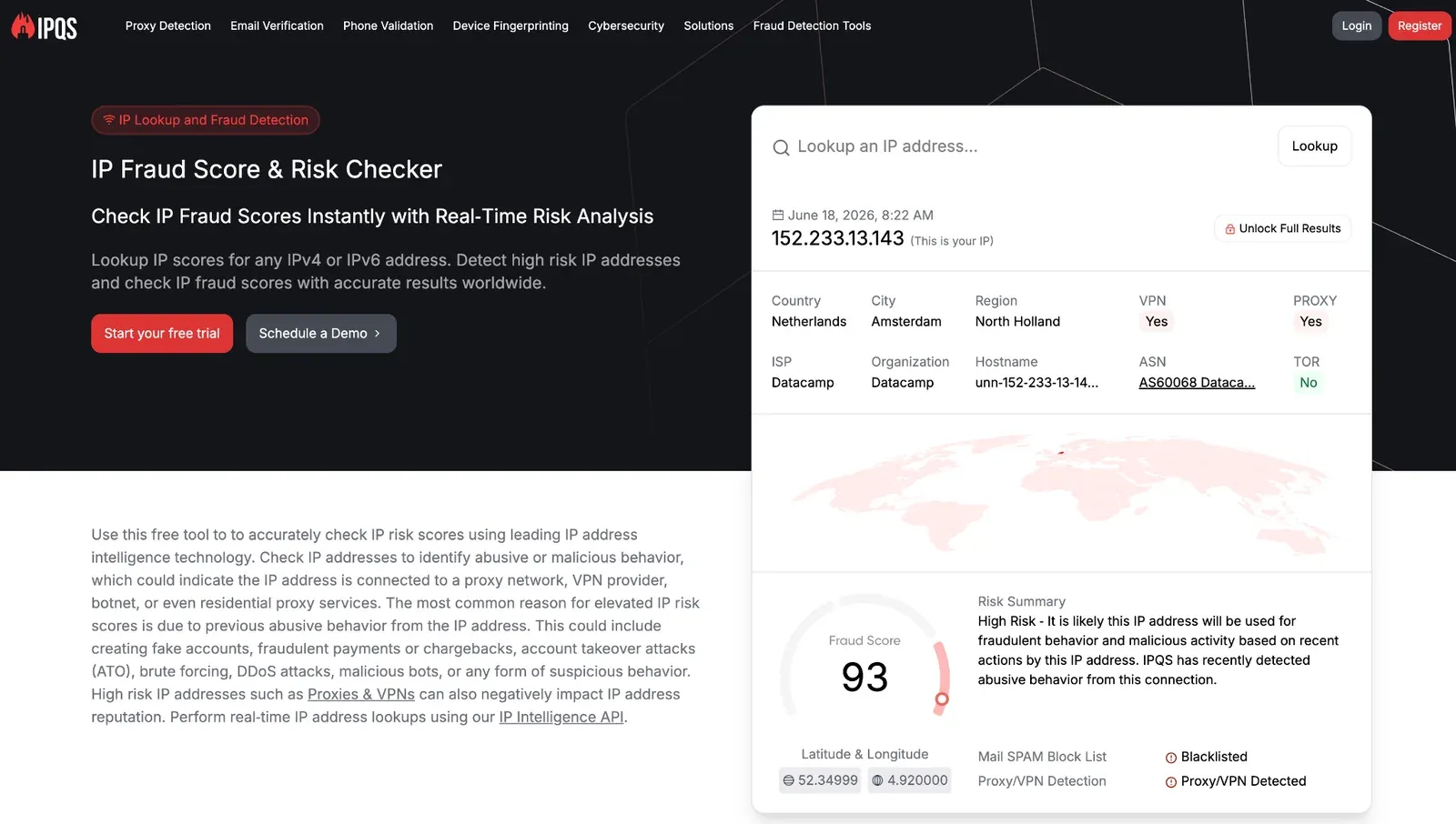 We used IPQualityScore to check IP reputation and abuse flags. IPQS is an independent IP-quality signal, not LinkedIn’s enforcement verdict.
Chrome Extension Teardown
The core question was: where does the user’s session go? We traced whether an extension kept li_at and JSESSIONID on the device or sent them to vendor infrastructure.
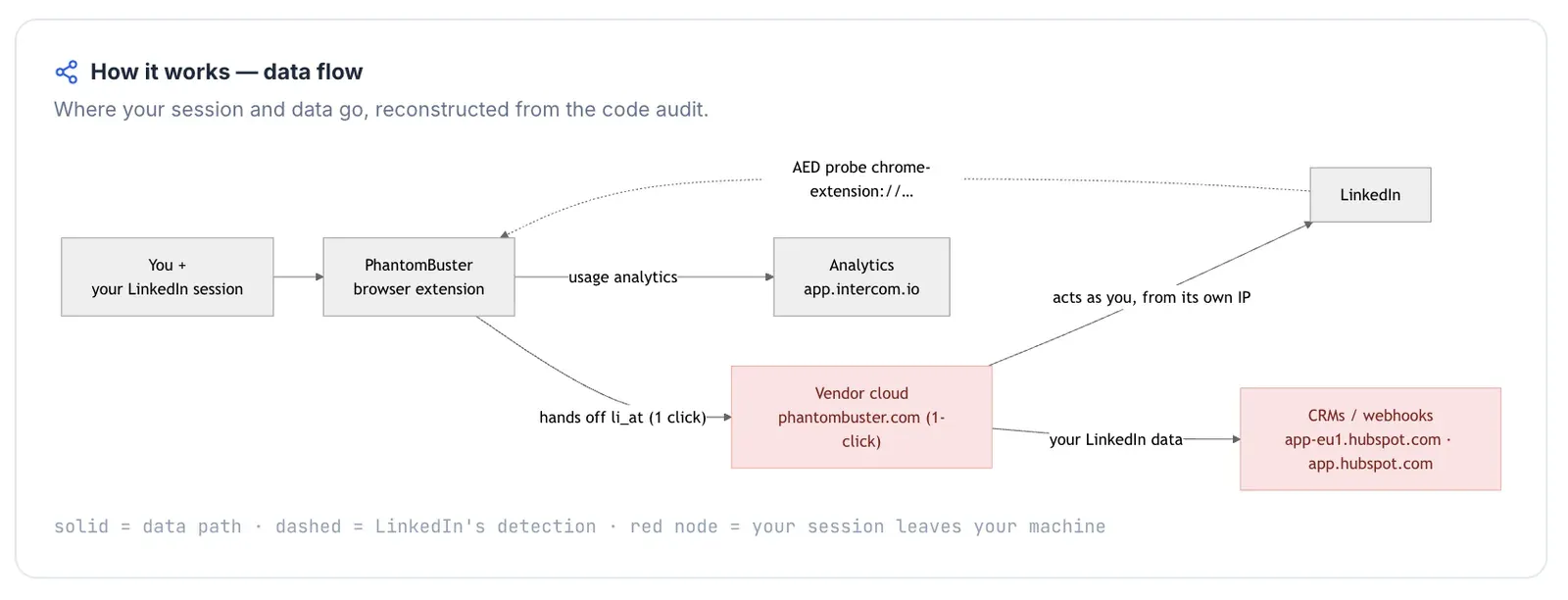
We also checked direct Voyager API calls, telemetry behavior, permission scope, DOM injection, Spectroscopy exposure, synthetic events, and LinkedIn’s Active Extension Detection list where relevant. Being present on that list means the installed extension itself can become visible before the extension acts.
What These Tests Can And Cannot Prove
The findings are snapshots of the tested versions and infrastructure in May to June 2026. We can observe what leaves an extension, which IPs appear in active sessions, and what setup controls are exposed. We cannot fully inspect what happens inside a vendor’s backend after a LinkedIn session reaches the cloud.
No tool removes LinkedIn restriction risk. The comparison focuses on controllable mechanisms: session origin, IP behavior, browser exposure, pacing controls, proxy options, workflow depth, and user-side configuration.
How We Compared Meet Alfred Alternatives
The evaluation criteria were:
- Session and IP control.
- Pricing and value.
- Workflow depth and conditional logic.
- CRM connectors and webhooks.
- Sales Navigator and Recruiter support.
- Account-scale controls.
- Channel scope.
- AI personalization as a parity axis.
First-Hand Meet Alfred Setup Review
Meet Alfred is a cloud-credential-login product, not a browser-extension product. It had no public extension in our test corpus, so there was no shipped extension source to tear down and no AED-list result to report.
In our June 2026 test, Meet Alfred connected LinkedIn accounts through its cloud environment. Two test accounts registered from France received different IPs in different /24 blocks, although both used WS Telecom infrastructure. IPQualityScore returned a fraud score of 0 for both addresses; one was classified as datacenter and the other as residential. Meet Alfred exposed 247 location choices, an account-level timezone setting, and support for adding a user-controlled proxy, but it did not include a built-in proxy-quality checker.
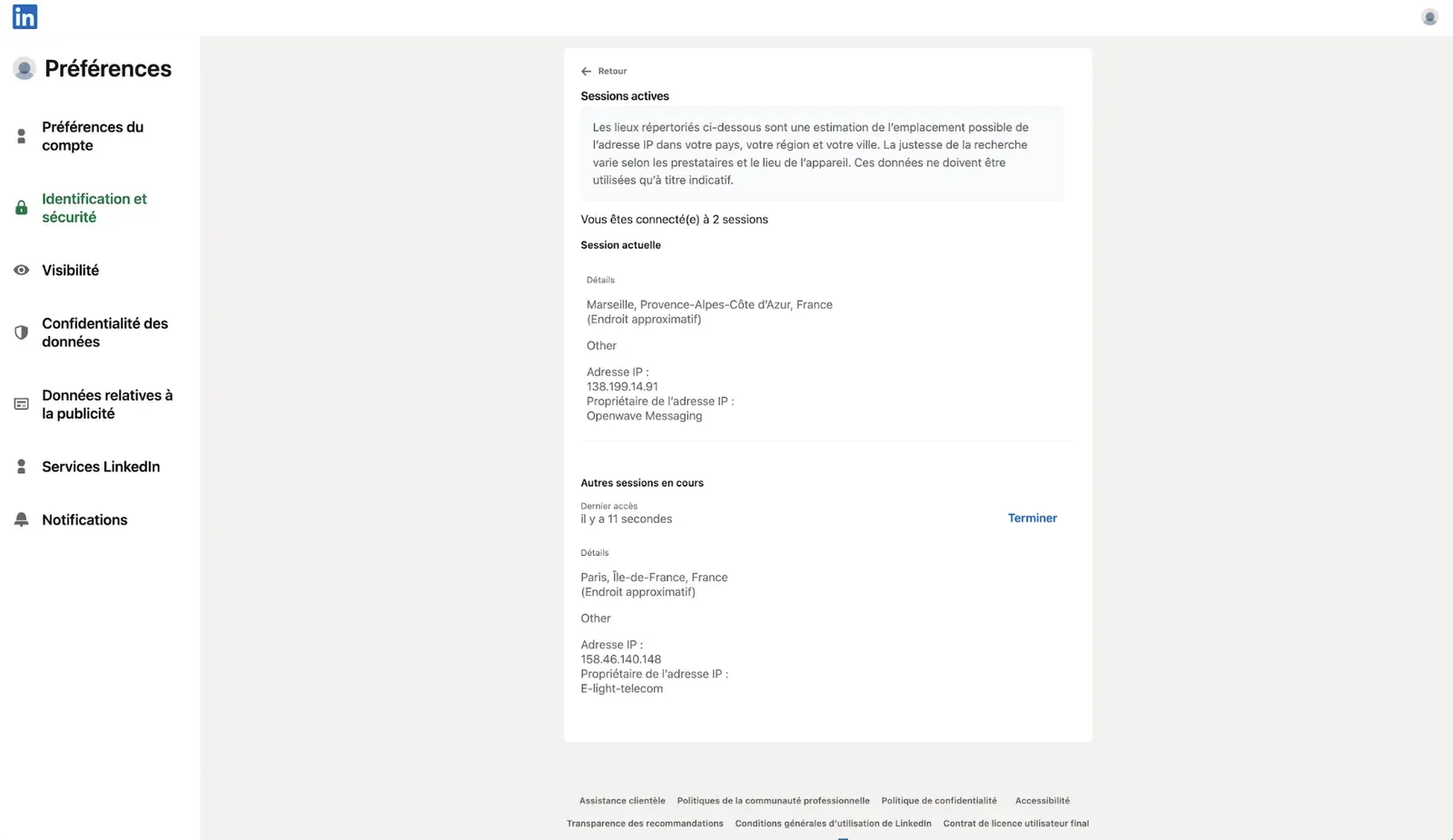 Meet Alfred cloud test, June 2026, declared location France. LinkedIn active-session view showing assigned session IP 158.46.140.148 and Chrome Mobile on Android for the second connected test account.
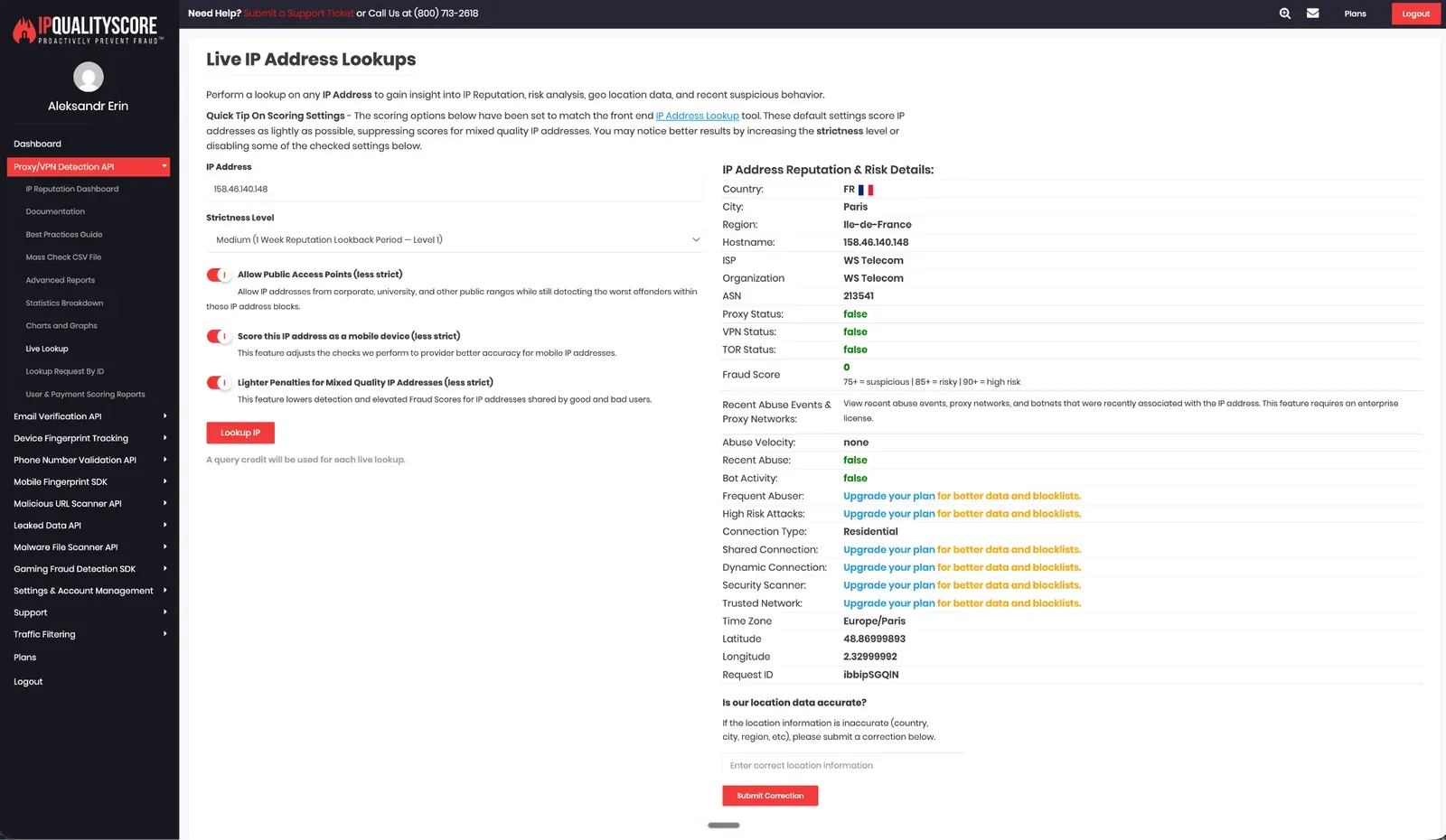 IPQualityScore check for Meet Alfred IP 158.46.140.148 from the June 2026 cloud test. We used IPQS to record connection type, proxy/VPN flags, and abuse or fraud-risk signals. IPQS is an independent IP-quality signal, not LinkedIn’s own enforcement verdict.
The reported mobile user agents also differed between the two accounts. The narrow takeaway is that clean observed IPs reduce one visible signal, but the session still runs from a vendor-controlled environment rather than the user’s own hardware.
Top 8 Meet Alfred Alternatives Compared
Use this table as a fast scan before reading the full tool sections. Linked Helper appears first as the disclosed publisher recommendation, while Meet Alfred is included as the anchor row for direct comparison.
Top Meet Alfred alternatives compared, as of June 2026
| Tool | Architecture | Entry Price | Trial | Reviews / Avg Rating* | Custom proxy |
|---|---|---|---|---|---|
| Linked Helper | Desktop app with built-in browser engine | $15/mo | 14 days | 825 / 4.84★ | Yes (per account) |
| Expandi | Cloud | $99/mo | 7 days | 331 / 4.11★ | Yes |
| Dripify | Cloud | $59/mo | 7 days | 1,172 / 4.63★ | No |
| Waalaxy | Chrome extension | €19/mo | 14 days | 2,025 / 4.64★ | No (own browser IP) |
| SalesRobot | Cloud | $59/mo** | 14 days | 57 / 4.8★ | Yes |
| Closely | Cloud | $49/mo | Free trial listed | 267 / 4.31★ | No |
| PhantomBuster | Cloud automation platform | $56/mo billed annually | Free trial | 209 / 3.97★ | No |
| La Growth Machine | Cloud | €60/mo per identity | 14 days | 102 / 4.62★ | No |
| Meet Alfred | Cloud | $59/mo | 7 days | 927 / 4.65★ | Yes |
**Reviews = total reviews we classified across G2, Trustpilot, and Capterra in June 2026. Avg rating is the review-count-weighted average across those platforms. These ratings are a credibility signal, not the basis for ranking or a safety claim.
Architecture matters because it affects where LinkedIn activity runs and who controls the session environment. No setup removes LinkedIn restriction risk, so the comparison focuses on controllable factors such as session origin, proxy options, pacing, limits, and workflow behavior.
Top LinkedIn Automation Alternatives to Meet Alfred
The tools below are included because buyers often compare them with Meet Alfred when they question cost, session custody, LinkedIn workflow depth, CRM handoff, or multichannel setup.
Linked Helper is the publisher’s disclosed recommendation and appears first. The competitor sections are factual trade-off references. We focus on how each tool handles LinkedIn execution, session custody, IP setup, workflow controls, and data handoff rather than treating every feature list as equally important.
1. Linked Helper
 Linked Helper is built for teams that treat LinkedIn as a primary outreach channel, not just one step inside a broader cloud sequence. It gives SDRs, recruiters, founders, growth marketers, and agencies a desktop setup with deeper campaign control.
The app runs on Windows, macOS, or Ubuntu through its own built-in browser engine. It is not a Chrome extension, and it does not move the active LinkedIn session into a vendor cloud.
Compared with Meet Alfred, the main difference is session control. Linked Helper runs actions through the user’s authenticated LinkedIn session and IP address, or through a proxy assigned per account. Users can also run it on a VPS or dedicated server when campaigns need to stay active without keeping the main computer on. The campaign builder is built around LinkedIn-first outreach. Users can run profile visits, connection requests, follow-ups, InMails, group and event workflows, post engagement, Sales Navigator workflows, and Recruiter workflows without forcing everything into a generic multichannel sequence.
For teams and agencies, Workspaces help separate client accounts, teammates, permissions, licenses, proxies, and data credits, so operators are not managing every campaign from one shared workspace. Linked Helper has served 500,000+ users since 2016, which gives it a longer product track record than many newer LinkedIn automation tools.
Pricing
- 14-day free trial
- Standard: $15/month, $13.33/month on 3 months, $10/month on 6 months, or $8.25/month on 12 months
- Pro: $45/month, $40/month on 3 months, $30/month on 6 months, or $24.75/month on 12 months One license equals one LinkedIn account, but you can switch the license between accounts when needed.
Key Features
- Desktop app with its own built-in browser engine
- Message sequences, follow-ups, reply detection, and stop conditions
- Custom campaign builder with action limits, timeouts, and working hours
- CRM tags, notes, auto-tagging, campaign history, and CSV export
- Sales Navigator, Recruiter Lite, Recruiter, groups, events, and post-engagement actions
- Webhook exports to CRMs, Zapier, Make, and other third-party systems
- Contact Data Enrichment credits for emails, phones, and richer lead data
- Custom variables, spintax, proxies per account, Workspaces, and team oversight through the Personal Cabinet
What Reviewers Highlight
Reviewers usually highlight Linked Helper’s LinkedIn workflow depth, price-to-feature value, and support experience. One Trustpilot reviewer, Simon Cross, wrote in March 2026: “Excellent product, really simplifies the process of growing your network.”
Limitations
Linked Helper gives users more control, so setup and campaign pacing require more care than a lighter cloud dashboard. The main trade-offs are desktop installation, one active LinkedIn account per license, and no native non-LinkedIn email sequences.
Safety and Setup Notes
Linked Helper runs as a desktop app with its own built-in browser engine, so it was not part of the Chrome extension teardown. Try Linked Helper free for 14 days, no credit card required.
Expandi
 Expandi is a cloud-first Meet Alfred alternative for teams that want LinkedIn and email outreach in one hosted system. It fits agencies and sales teams that prefer centralized dashboards, campaign controls, and team features over local desktop execution.
The product’s pricing page positions Expandi as cloud-based software with a dedicated country-based IP address, smart limit ranges, auto warm-up, multichannel outreach, dynamic placeholders, templates, blacklists, and agency support.
For Meet Alfred users, the comparison is less about simplicity and more about campaign management depth. Expandi gives teams a fuller hosted outreach stack, but the LinkedIn session still moves into a cloud workflow.
Pricing
- Business: $99/month
- Annual billing lowers the rate to $79/month
- Free trial: 7 days
- Agency pricing is custom for 10+ seats and white-label needs
Key Features
- Cloud-based LinkedIn and email outreach
- Smart sequences with conditional if/then logic
- Dedicated country-based IP address
- Warm-up controls and adjustable daily limit ranges
- Dynamic placeholders, templates, tags, and notes
- Blacklist and duplicate-prevention tools
- Centralized dashboard and campaign reporting
What Reviewers Highlight
Reviewers often praise Expandi’s campaign depth, personalization controls, and team management.
A G2 reviewer described the ability to tag connections, sort by recent activity, create custom searches, and manage the CRM “the way you want.”
Limitations
Some review complaints mention account restrictions, upload or campaign-creation issues, and cancellation friction, so teams should vet onboarding, workflow complexity, and billing expectations before moving high-value accounts.
Safety and Setup Notes
We unpacked the Expandi Connector extension in June 2026. The extension ID was ohcplcfdejgopgcaegjlkkacoaplnaam, version 1.1, Manifest V3. The extension requested the cookies permission, read the li_at cookie, stored it in profileData, read JSESSIONID for CSRF handling, injected a content script into LinkedIn pages, intercepted Voyager-style API responses, made a direct contact-info call, and sent session data to app.expandi.io. We found no /uas/logout block.
 Expandi Connector Chrome Extension Data Flow, reconstructed by code audit. Red nodes show your LinkedIn session or data leaving for a vendor’s cloud. Grey nodes show data that stays in your browser.
In the live cloud test from France, our two accounts received 91.165.182.32, a Scaleway cloud-hosting address, and one IPv6 address from Orange. One observed IP returned a 100/100 IPQualityScore fraud score with proxy and recent-abuse flags, while the other result was cleaner. Expandi supports bring-your-own proxy across 96 locations, so proxy quality and setup consistency should be checked before moving active LinkedIn accounts into the tool.
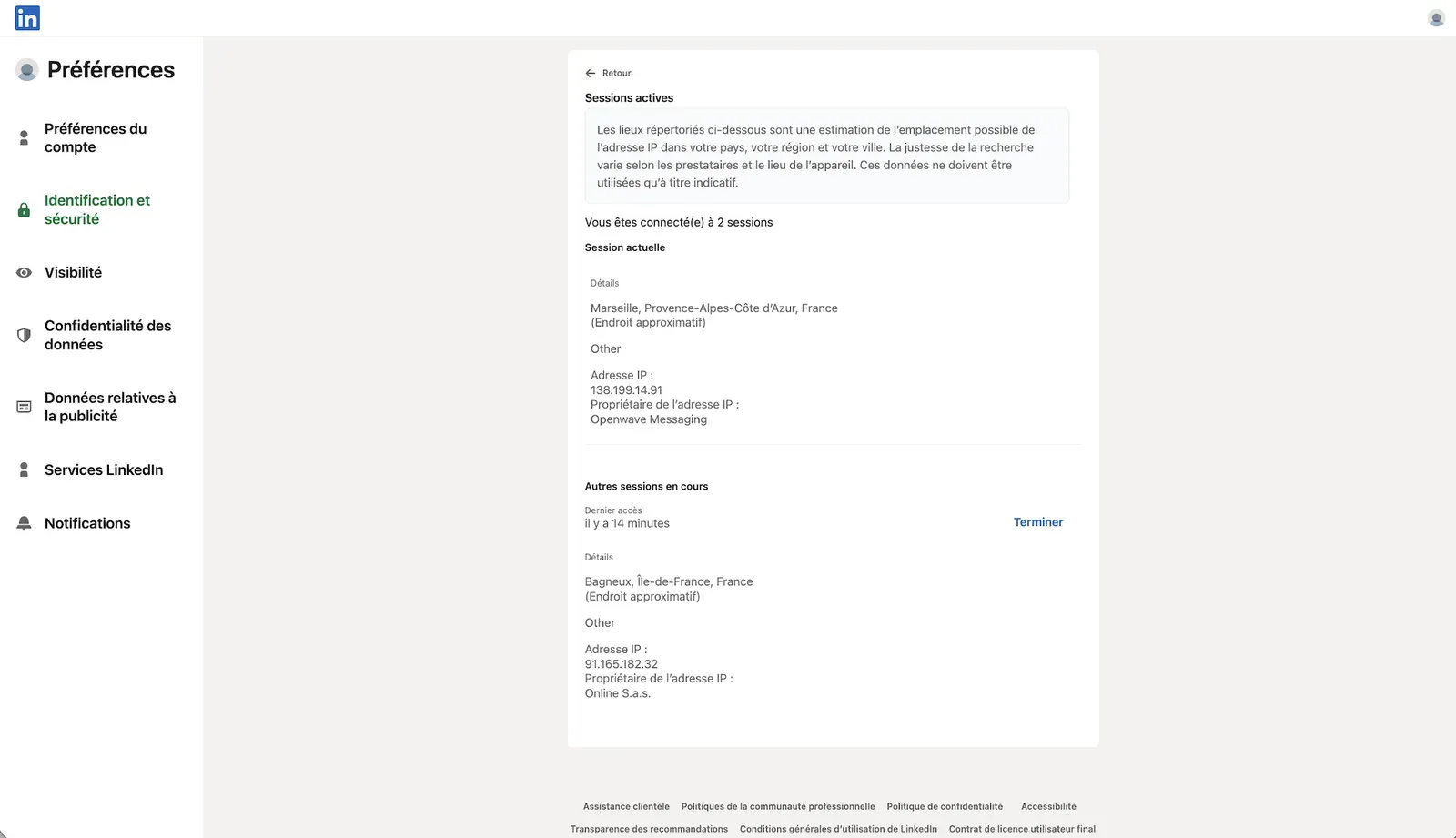 Expandi cloud test, June 2026, declared location France. LinkedIn active-session view showing assigned session IP 91.165.182.32 for the connected test account.
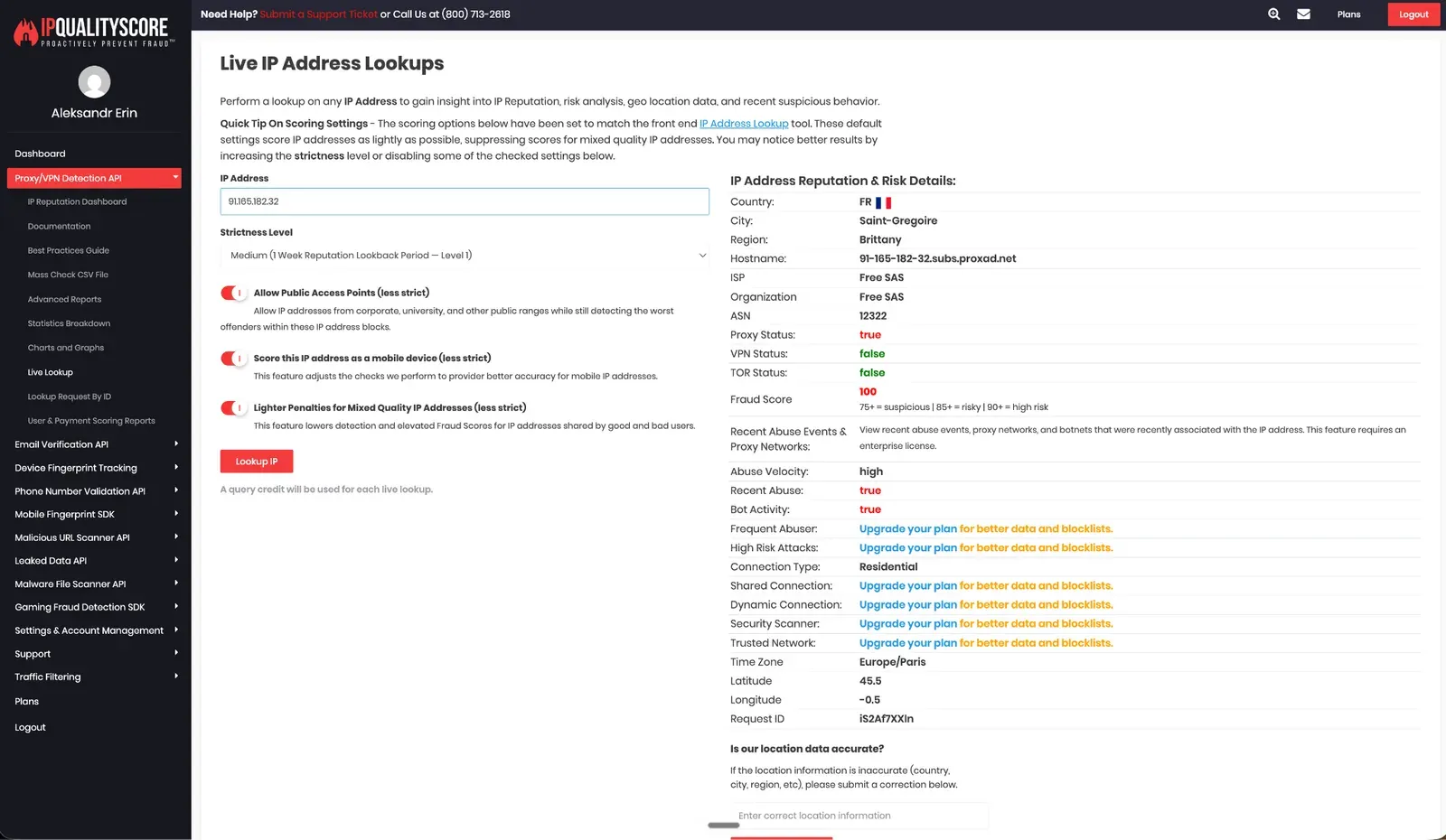 IPQualityScore screenshot for the observed Expandi IP. We used IPQS to check connection type, provider, and abuse or fraud-risk signals. IPQS is an independent IP-quality signal, not LinkedIn’s own enforcement verdict.
Dripify
 Dripify is a cleaner fit for teams that want a fast cloud setup and a visual LinkedIn sequence builder. It is less agency-heavy than Expandi and more beginner-friendly for users moving from manual Sales Navigator searches into automated follow-ups.
The public pricing page confirms a 7-day free trial, Basic at $59/month, Pro at $79/month, and Advanced at $99/month, with lower annual rates.
Dripify also lists LinkedIn and email sequences, inbox management, team management, analytics, webhook integration, and compatibility with all LinkedIn account types. Dripify belongs in this list because it answers a different buyer need than Linked Helper or PhantomBuster. It prioritizes speed, campaign setup, and a hosted dashboard over local session control.
Pricing
- Basic: $59/month, or $39/month billed annually
- Pro: $79/month, or $59/month billed annually
- Advanced: $99/month, or $79/month billed annually
- Free trial: 7 days, with no credit card required
Key Features
- Cloud LinkedIn and email sequences
- Visual sequence builder
- Sales Navigator-friendly lead import workflows
- Dedicated inbox on Pro
- Advanced analytics and campaign reports
- Webhook integration on Pro
- Lead tagging on Advanced
- Team management and account performance tracking
What Reviewers Highlight
Reviewers often praise Dripify for easy setup, clean campaign flow, and automatic reply handling. Trustpilot reviewer Mijeong Kim wrote in April 2026: “Was easy to set it up.”
Limitations
G2 feedback we reviewed mentions Sales Navigator friction, upgrade pressure, inbox limitations, and integration-depth concerns, so heavier operators should check the exact plan features before switching.
Safety and Setup Notes
Dripify ships no public LinkedIn extension, so there was no extension package to inspect and no Chrome-extension AED result to report. Our June 2026 research focused on the live cloud IP test. From France, two fresh accounts received datacenter IPs in the same /24 range: 209.20.164.225 and 209.20.164.94. IPQualityScore flagged both addresses for proxy and spam signals, with one assigned IP scoring 94/100 for fraud risk in our check.
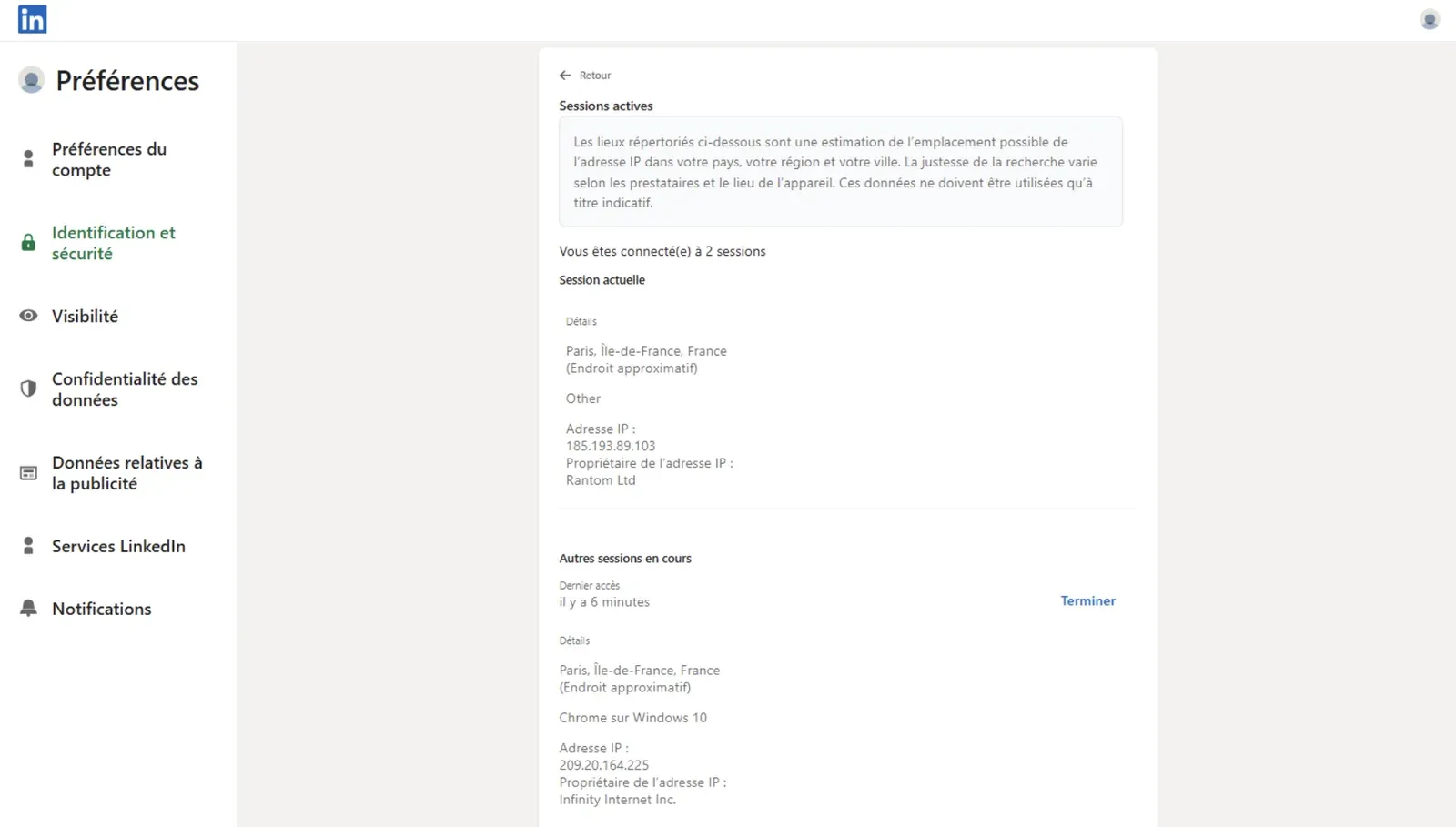
Dripify cloud test, June 2026, declared location France. LinkedIn active-session view showing assigned session IP 209.20.164.225 for the connected test account.
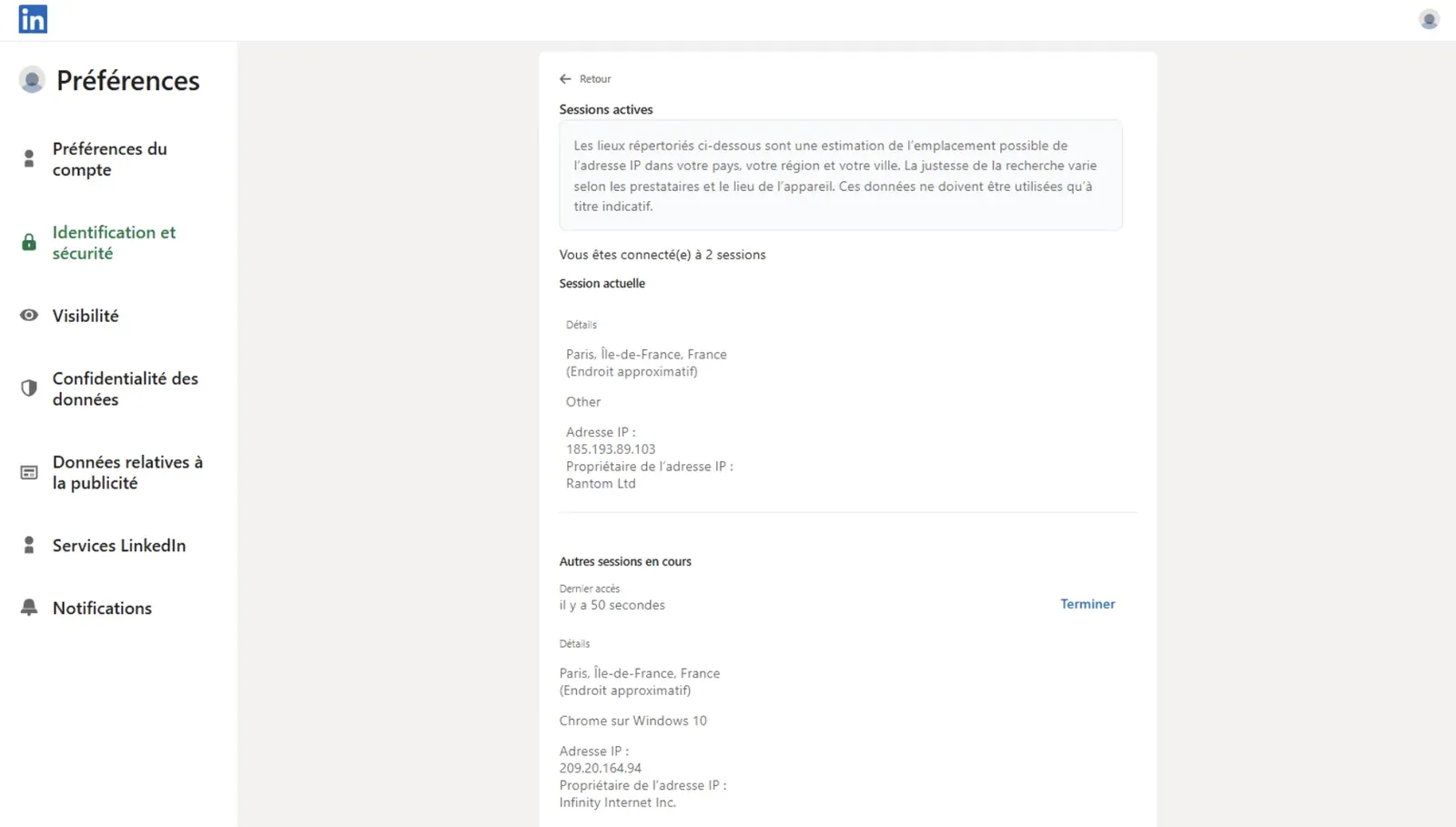 Dripify cloud test, June 2026, declared location France. LinkedIn active-session view showing assigned session IP 209.20.164.94 for the second connected test account.
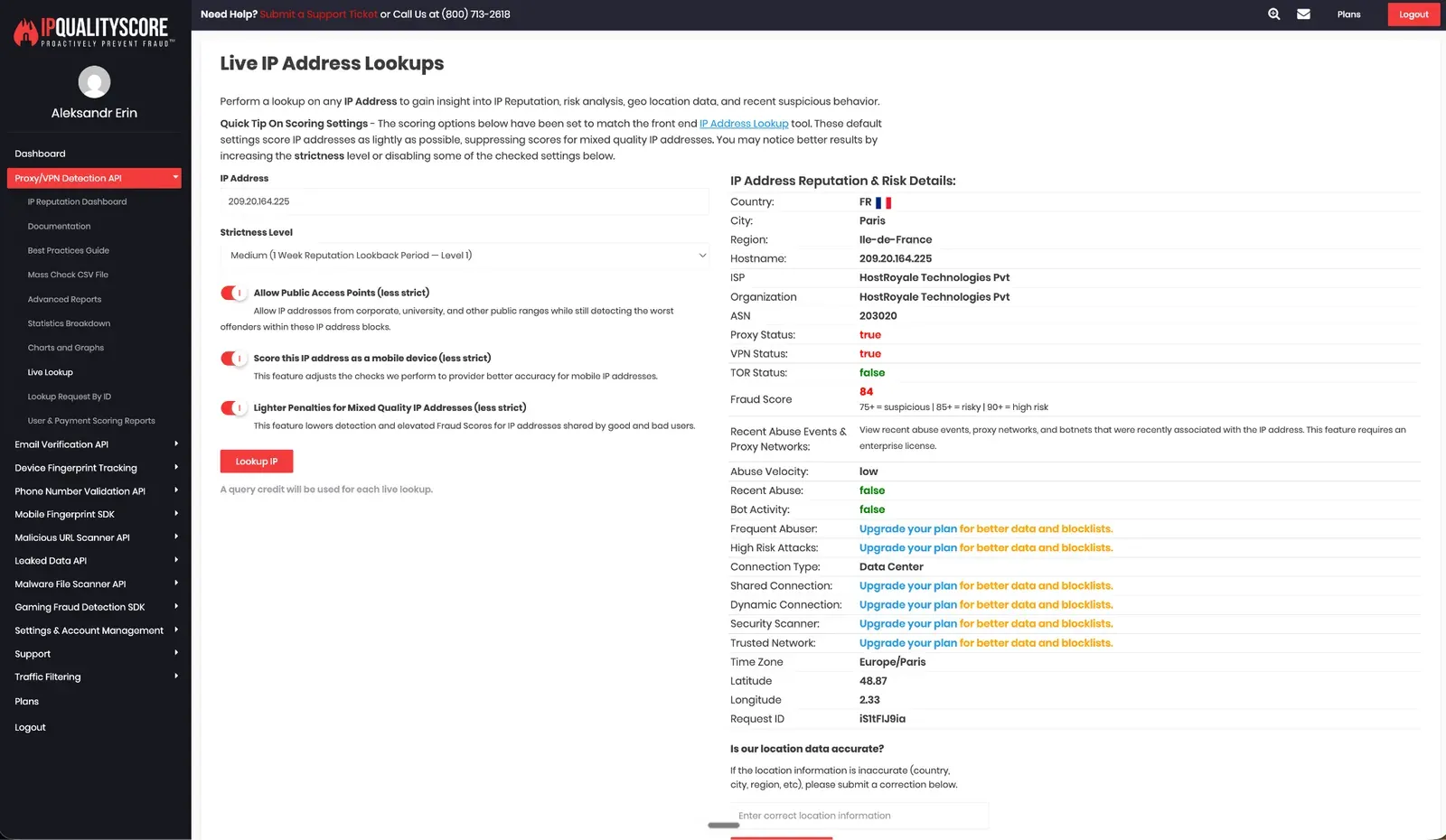
IPQualityScore check for Dripify IP 209.20.164.225 from the June 2026 cloud test. IPQS classified the tested IP as a datacenter/proxy IP and showed high spam or abuse-risk signals. IPQS is an independent IP-quality signal, not LinkedIn’s own enforcement verdict.
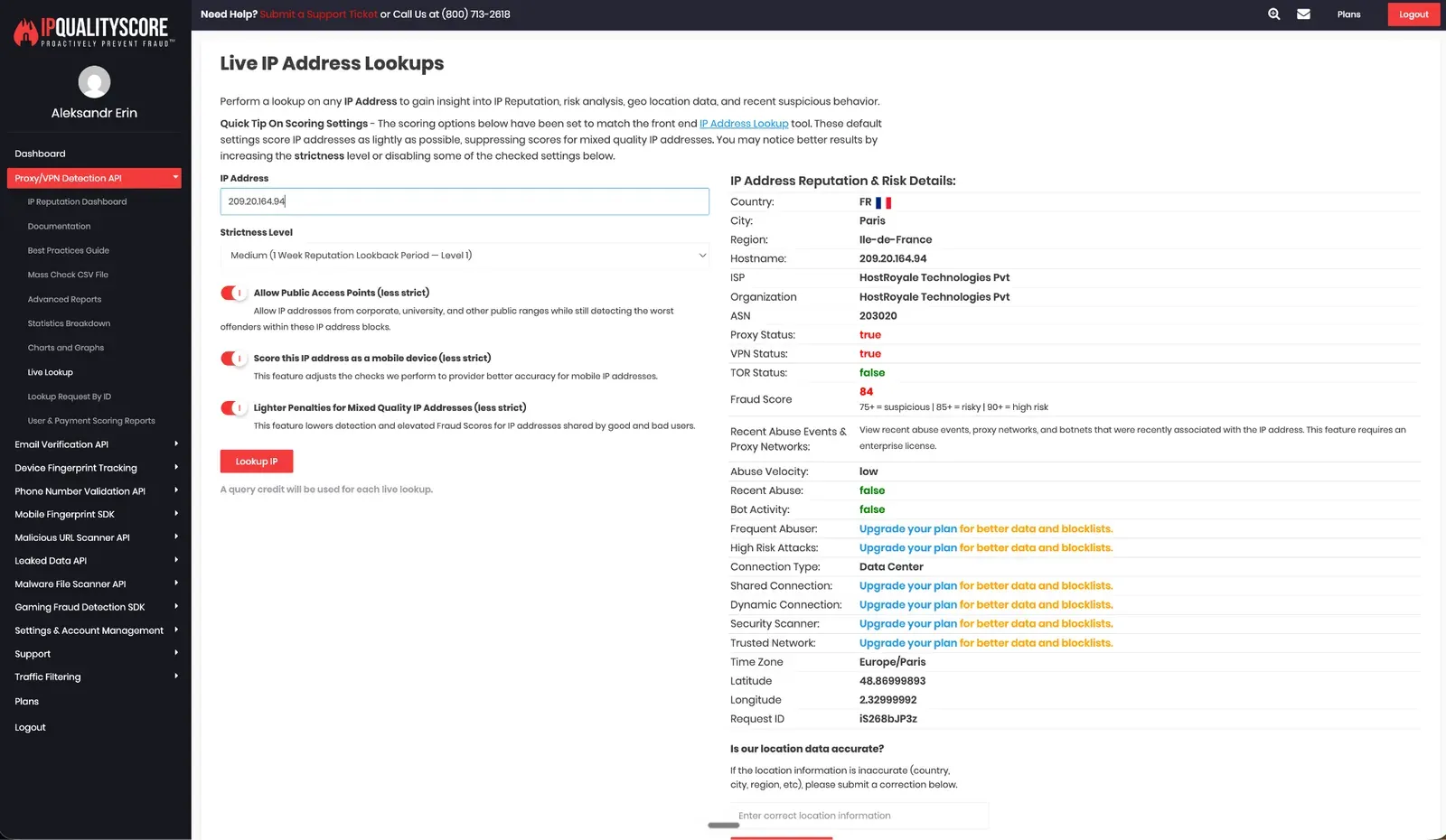
IPQualityScore check for Dripify IP 209.20.164.94 from the June 2026 cloud test. IPQS classified the tested IP as a datacenter/proxy IP and showed high spam or abuse-risk signals. IPQS is an independent IP-quality signal, not LinkedIn’s own enforcement verdict.
Dripify offered no bring-your-own-proxy option in the tested setup, so users depended on the vendor IP pool by default. That does not prove account restriction by itself, but it makes IP quality and shared infrastructure a key review point before moving high-value LinkedIn accounts into the tool.
Waalaxy
 Waalaxy is the easy-entry LinkedIn-plus-email option in this comparison. It suits solo users and small teams that want a quick start, pre-built sequences, CRM sync, and a wide integration layer without a heavy setup process.
Waalaxy starts at €19 per user per month for Pro, with Advanced at €49 and Business at €69. The 14-day trial gives users a way to test the workflow before moving into paid LinkedIn or LinkedIn-plus-email campaigns. The feature set is strongest for simple prospecting workflows. Waalaxy supports CSV imports and exports, Sales Navigator and Recruiter Lite imports, smart reply detection, CRM Sync with 2,000+ tools, and Make, Zapier, and n8n modules on higher plans. Business adds LinkedIn and email campaigns.
Waalaxy’s trade-off comes from its setup model. It is easier to start than many tools, but the Chrome-extension-led workflow creates different session-handling questions than a desktop application or pure cloud platform.
Pricing
- Pro: €19/user/month
- Advanced: €49/user/month
- Business: €69/user/month
- Free trial: 14 days
Key Features
- Chrome-extension-led LinkedIn automation with cloud mode
- Unlimited campaigns
- Pre-built prospecting sequences
- Automated LinkedIn follow-ups
- CRM Sync with 2,000+ tools
- Imports from LinkedIn Basic, Sales Navigator, and Recruiter Lite
- Make, Zapier, and n8n modules on higher plans
- Cold email sequences and multichannel campaigns on Business
What Reviewers Highlight
Reviewers often praise Waalaxy’s simple interface, easy setup, and beginner-friendly campaign flow. Trustpilot reviewer Daniel Kunz praised the support experience in March 2026, and Waalaxy’s own pricing page says 75% of users had never done LinkedIn outreach before.
Limitations
One Trustpilot reviewer reported an account restriction after buying premium. Treat that as one user report, not proof of cause. Safety and Setup Notes
We unpacked the Waalaxy extension in June 2026. The extension ID was hlkiignknimkfafapmgpbnbnmkajgljh, version 1.3.259, Manifest V3. The extension requested the cookies permission, read the LinkedIn cookie jar, including li_at and JSESSIONID, mapped JSESSIONID into a CSRF token, and uploaded cookies as authDataFromExtension:{cookie} to Waalaxy’s cloud backend. It also injected a content script into LinkedIn pages, called Voyager locally, exposed externally_connectable to vendor domains, and showed no /uas/logout block in our check.
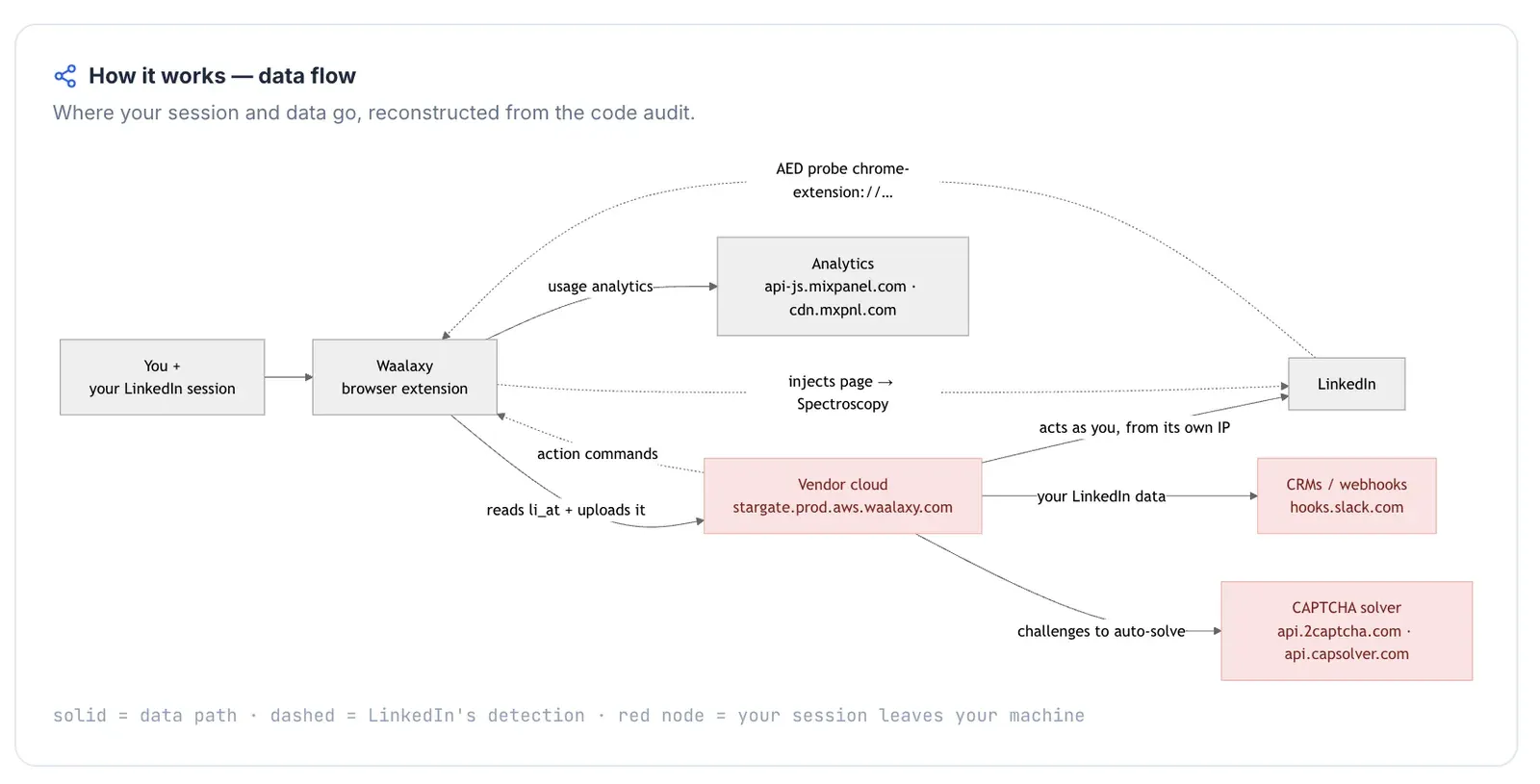 Waalaxy Chrome Extension Data Flow, reconstructed by code audit. Red nodes show your LinkedIn session or data leaving for a vendor’s cloud. Grey nodes show data that stays in your browser.
We did not run a live IP test on Waalaxy, so these findings come from the static extension teardown only.
SalesRobot
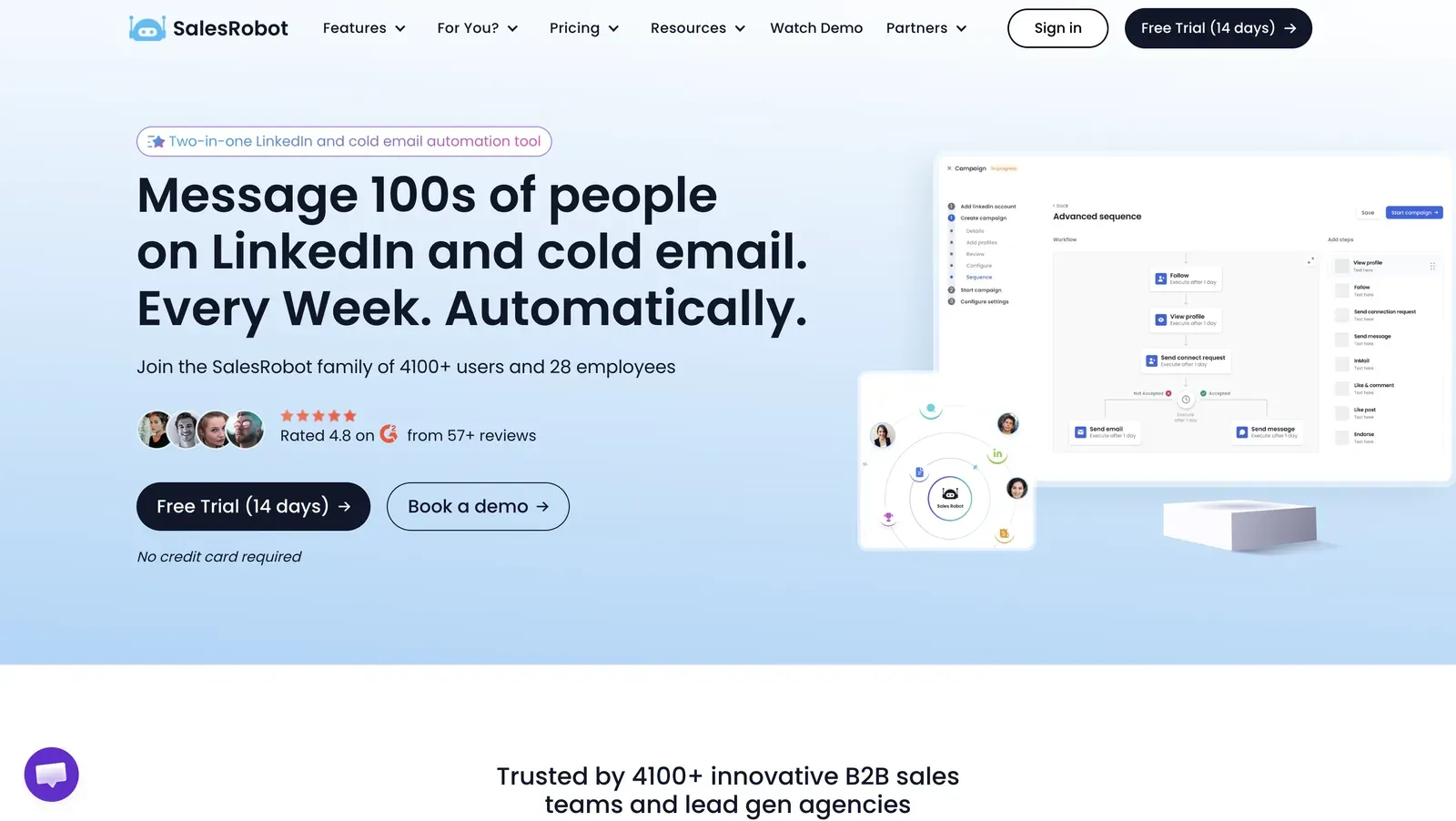 SalesRobot is a cloud LinkedIn and email automation platform for teams that want AI-assisted outreach, CRM sync, warm-up settings, and role-based campaign management. It fits small sales teams and growth marketers who want a hosted system for LinkedIn outreach without building custom workflows from scratch.
The product leans harder into AI than most Meet Alfred alternatives. Its pricing page shows an AI Appointment Setter Agent on Basic, plus higher-tier features such as unlimited active campaigns, full daily quotas, A/B testing, a personal inbox, and Webhook and Zapier integration.
SalesRobot also gives teams a 14-day free trial across the visible self-serve plans. The main caution is evidence depth: its public review base is smaller than that of larger competitors, so buyer feedback should be read alongside official pricing, feature details, and direct product testing.
Pricing
- Basic: $59/LinkedIn account/month
- Advanced: $79/LinkedIn account/month
- Professional: $99/LinkedIn account/month
- Enterprise: Custom pricing
- Free trial: 14 days
Key Features
- Cloud LinkedIn outreach
- Email campaigns
- AI message generation
- AI appointment setter
- Team roles and access controls
- Warm-up settings
- Webhook and Zapier integration
- Native CRM syncs with HubSpot, Pipedrive, Salesforce, Zoho, Copper, and GoHighLevel
What Reviewers Highlight
G2 feedback is positive around support, ease of use, UI, and AI-driven workflows. Natasha Odeyemi wrote that SalesRobot lets users automate LinkedIn outreach and gives them more time for other tasks.
Limitations
Trustpilot shows a smaller and weaker review base in the research snapshot, and Gerard said, “I cancelled my subscription, and they still charged me.”
Safety and Setup Notes
We did not test SalesRobot end to end. There is no extension teardown and no live IP test on file. From our matrix and review corpus, SalesRobot is a cloud LinkedIn outreach dashboard with AI messaging and custom proxy support. We have not independently verified its IP origin or session handling, so the article should not imply first-hand runtime verification.
Closely
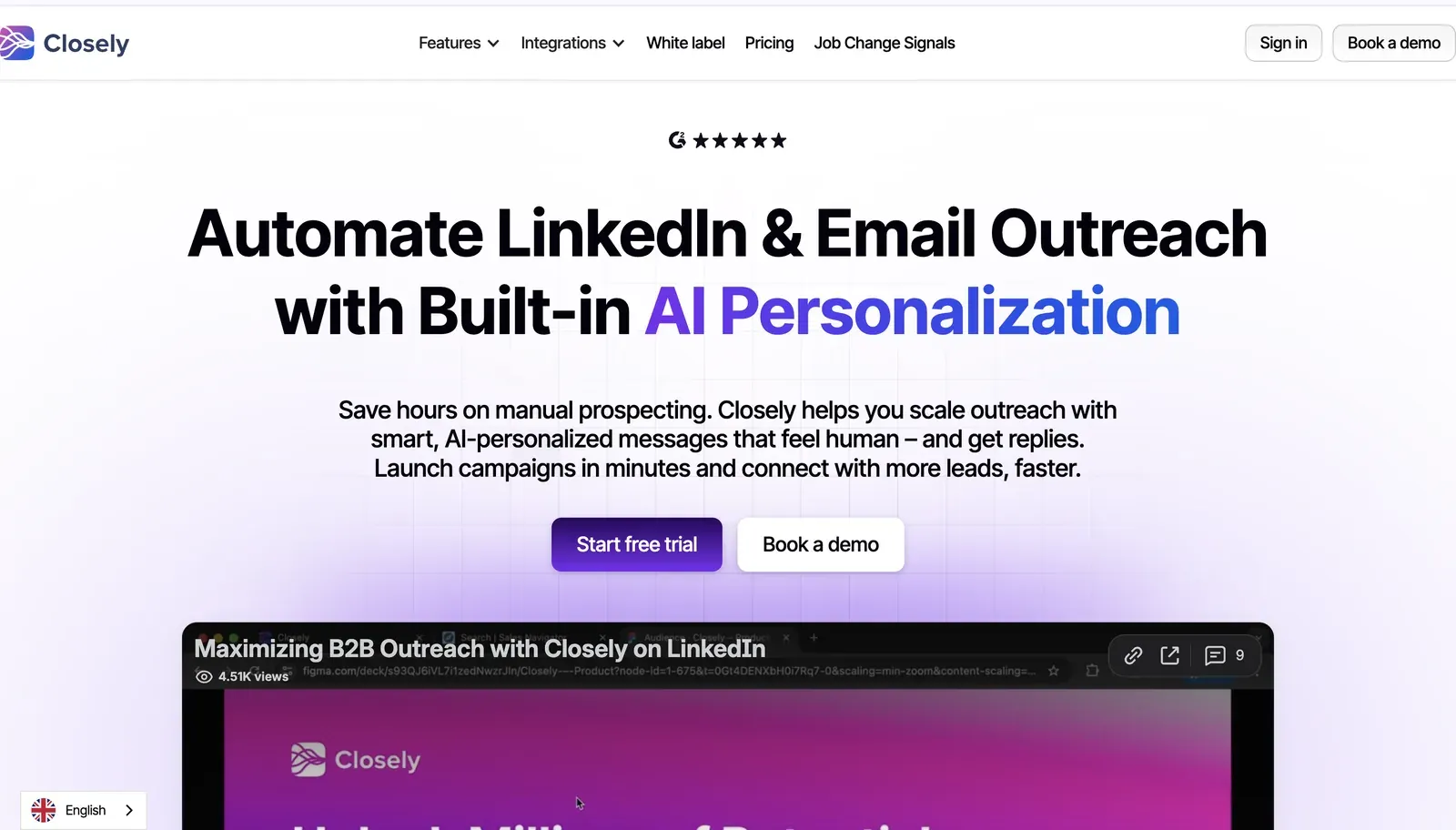 Closely is an AI-powered outreach platform for running LinkedIn and email campaigns from one cloud workspace. It combines campaign automation, sender management, enrichment credits, Smart Inbox, CRM integrations, and white-label options.
The pricing model is built around senders. Starter includes 1 LinkedIn account, Growth includes 3, and Essential includes 5. Each sender combines 1 LinkedIn account with 1 email inbox, while all plans include unlimited email accounts and white-label.
Closely fits this comparison because it is closer to a packaged outbound system than a pure LinkedIn automation product. Teams get LinkedIn campaigns, email campaigns, enrichment, AI personalization, CRM integrations, and webhooks in one setup, but the real cost depends on sender count, credits, plan limits, and how much of the white-label layer they actually need.
Pricing
- Starter: $49/month, or $29/month annually
- Growth: $127/month, or $87/month annually
- Essential: $205/month, or $145/month annually
- A free trial is available
Key Features
- Cloud LinkedIn and email prospecting
- Sender bundles for LinkedIn accounts and email inboxes
- List building and campaign organization
- Message campaigns and multichannel workflows
- Email and phone credits on higher plans
- AI personalization credits
- Salesforce, Pipedrive, HubSpot, and GoHighLevel integrations
- White-label options for agencies
What Reviewers Highlight
G2 reviewers praise easy setup, LinkedIn integration, support, and the ability to combine LinkedIn and email outreach. A Trustpilot reviewer said Closely helped them connect with prospects on LinkedIn and manage LinkedIn accounts.
Limitations
G2 complaints mention plan limitations, integration issues, no Google Calendar integration, paid appointment upgrades, and at least one cancellation or refund complaint, while Trustpilot shows a much weaker score than G2.
Safety and Setup Notes
We did not test Closely end to end. There is no extension teardown and no live IP test on file. Closely is a cloud prospecting platform with vendor-side LinkedIn session handling, no confirmed bring-your-own custom proxy, and credit-based enrichment. We do not present its IP origin or session handling as first-hand verified.
PhantomBuster
 PhantomBuster is a cloud automation platform for lead extraction, enrichment, and workflow building across LinkedIn, Sales Navigator, and other public data sources.
It belongs in this comparison because some Meet Alfred users need more than outreach sequences. They need a way to collect, enrich, export, and route lead data into other systems. Pricing starts with a free trial, but paid plans are built around automation volume, execution time, AI credits, exports, and the number of workflows a team needs to run.
PhantomBuster is strongest when the workflow starts with data collection. It includes 100+ automations and workflows, covers 15+ platforms, supports LinkedIn and Sales Navigator automation, and runs in the cloud after setup.
Pricing
- Free trial plan available
- Start: $56/month, billed annually
- Grow: $128/month, billed annually
- Scale: $352/month, billed annually
Key Features
- Cloud web automation across 15+ platforms
- 100+ automations and workflows
- LinkedIn and Sales Navigator automation
- Profile and email enrichment
- AI filtering and writing
- Multiple LinkedIn account support
- CRM integrations, including HubSpot and other CRMs
- Zapier, Make, n8n, API, and webhook connections
What Reviewers Highlight
Reviewers value PhantomBuster’s automation breadth, documentation, and hands-off extraction. One G2 review on the pricing page says it is easy to automate LinkedIn outreach and lead generation without code.
Limitations
G2 and Trustpilot themes mention learning curve, pricing issues, setup confusion, trial reliability complaints, and support concerns, so it may be too technical for a team that only needs outreach sequences.
Safety and Setup Notes
We unpacked PhantomBuster’s Chrome extension in June 2026. The extension ID was mdlnjfcpdiaclglfbdkbleiamdafilil, version 1.3.9, Manifest V3. Its manifest description said, “Retrieve session cookies.” In our teardown, the extension read the LinkedIn li_at cookie and uploaded it into PhantomBuster’s setup flow so cloud phantoms could run as the user. We also saw direct Voyager calls and broad cookie access across 15 platforms.
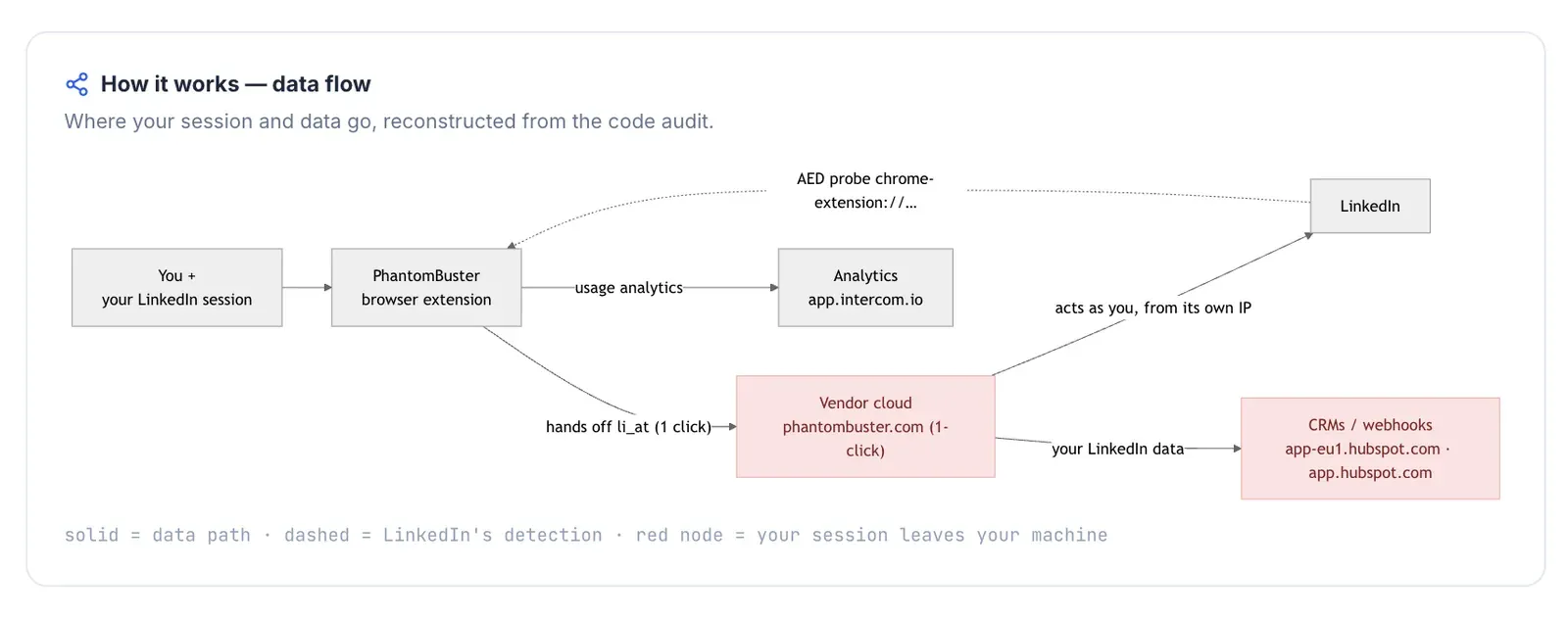 Phantombuster Chrome Extension Data Flow, reconstructed by code audit. Red nodes show your LinkedIn session or data leaving for a vendor’s cloud. Grey nodes show data that stays in your browser.
We found no /uas/logout block and no in-extension daily caps, randomized delays, or working-hours controls. We did not run a live IP test, so the note focuses on session custody, not IP reputation.
La Growth Machine
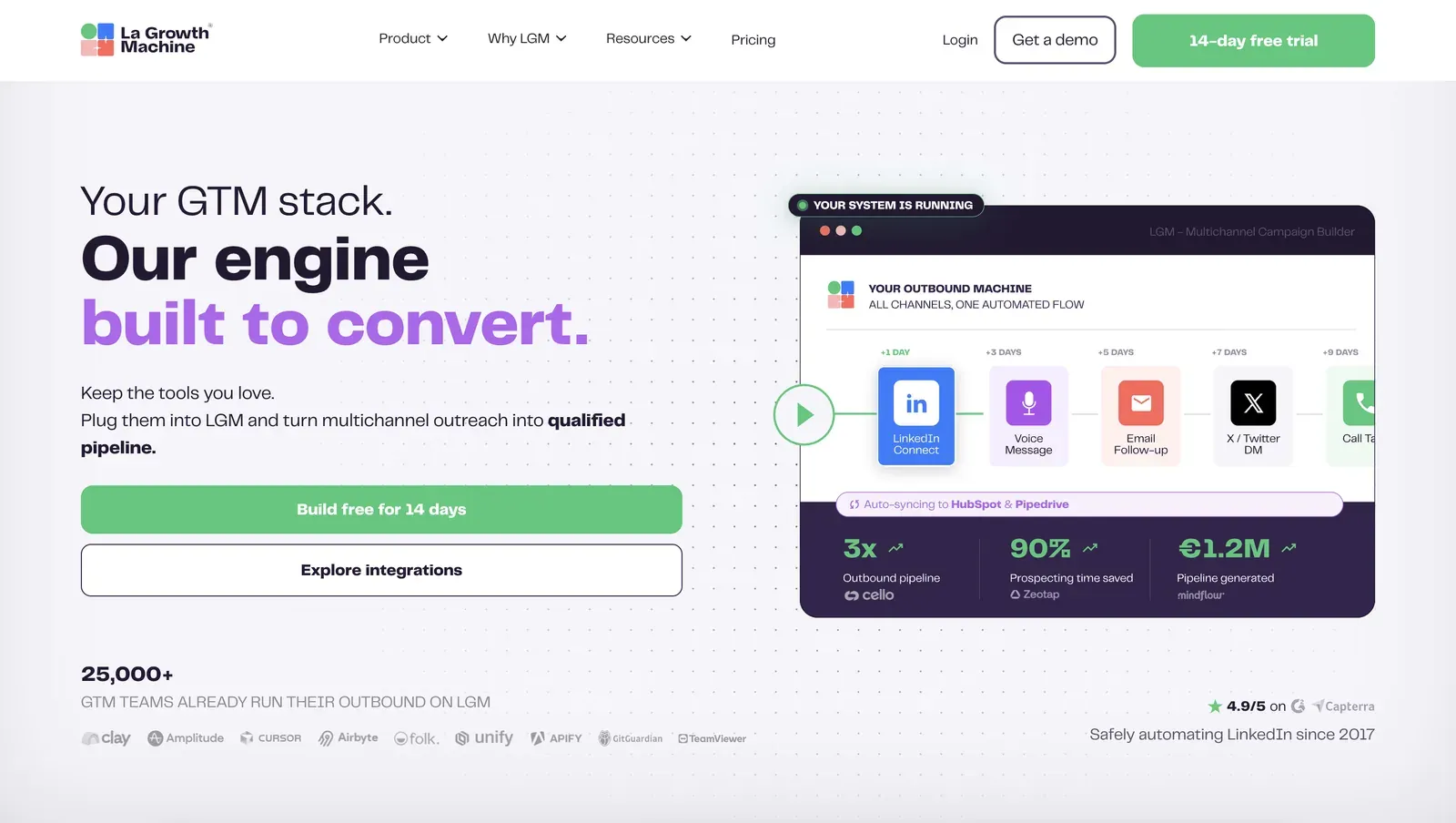 La Growth Machine is a cloud platform for multichannel outbound campaigns across LinkedIn, email, calls, and X. It is built for sales and growth teams that want prospecting, enrichment, sequencing, inbox work, and CRM sync in one system.
The workflow starts with lead data, then moves into outreach and follow-up across several channels. La Growth Machine supports LinkedIn automation, email automation, LinkedIn voice messages, AI copywriting, company lookalikes, team management, HubSpot and Pipedrive sync, Make, Slack, API, and webhooks.
For Meet Alfred users, La Growth Machine is the broader CRM-led alternative. It fits teams that want a more connected outbound workflow, but it will usually feel too heavy if the main need is lower-cost LinkedIn automation.
Pricing
- Basic: €60/month per identity
- Pro: €120/month per identity
- Ultimate: €120/month per identity
- Agency: Custom pricing
- Free trial: 14 days
Key Features
- LinkedIn and email outreach on Basic
- Calls and X on higher tiers
- Visual multichannel sequence builder
- Unified or multichannel inbox
- Waterfall email enrichment
- Verified emails and enriched lead data
- HubSpot and Pipedrive sync
- Make, Slack, API, and webhook integrations
What Reviewers Highlight
G2 reviewers often praise La Growth Machine for support, message personalization, CRM connections, and flexible sequence building. One G2 reviewer, JB J., praised the sequence builder as intuitive with many options.
Limitations
G2 downside themes include bugs, technical issues, email issues, and data inaccuracy, while Trustpilot shows a smaller and weaker review base.
Safety and Setup Notes
We did not test La Growth Machine end to end. There is no extension teardown and no live IP test on file. From our matrix and review corpus, La Growth Machine is a cloud multichannel platform with vendor-side LinkedIn session handling, credit-based quotas, and no confirmed user-controlled custom proxy in our data.
Desktop vs Cloud vs Browser Extension: Architecture Differences Before Switching
Architecture decides where LinkedIn activity runs and which environment LinkedIn sees. That matters because LinkedIn can evaluate signals such as session origin, IP behavior, action volume, browser activity, extension presence, and account consistency.
Cloud tools such as Meet Alfred, Expandi, Dripify, SalesRobot, Closely, and La Growth Machine run outreach from hosted infrastructure. That gives teams browser-based access and 24/7 execution, but the account environment depends on vendor-side infrastructure unless the tool supports a stable user-controlled proxy setup. Browser-extension workflows use the user’s browser session, but they add an extension surface inside LinkedIn. Depending on the tool, that surface can involve cookie access, page injection, session transfer, or local calls to LinkedIn endpoints.
Desktop tools use a different model. Linked Helper runs on the user’s computer, VPS, or dedicated server through its own built-in browser engine. It uses the authenticated LinkedIn session and the user’s IP address, or a proxy assigned per account.
| Factor | Desktop App | Cloud | Browser Extension |
|---|---|---|---|
| Runs 24/7 | With an always-on computer, VPS, or dedicated server | Yes | Usually only with the browser open, unless paired with cloud mode |
| Computer required | Yes, locally | No | Yes |
| IP used | User machine IP or assigned proxy | Vendor/server IP unless proxy controls differ | User browser IP or cloud IP |
| Session storage | Local session, not uploaded to vendor servers | Often vendor-hosted | Inside the browser or extension context |
| Main control point | Stable session origin and user-controlled pacing | Vendor infrastructure, proxy quality, and campaign settings | Extension behavior, browser exposure, and session handling |
| Examples | Linked Helper | Meet Alfred, Expandi, Dripify, SalesRobot, Closely, La Growth Machine | Waalaxy |
Cloud tools and browser-extension workflows can still fit some teams. The practical question is how much control each setup gives you over IP quality, session handling, browser exposure, and pacing.
Bring-your-own proxy support can improve a cloud setup when the proxy is stable and reputable. It can also create new problems if the proxy has abuse, VPN, or datacenter flags, so proxy quality needs its own check before switching tools.
How to Choose the Right Meet Alfred Alternative
Choose the tool by workflow fit first, then compare pricing. Meet Alfred alternatives can look similar on feature pages, but they differ in how they run LinkedIn sessions, manage IPs, support teams, and move lead data.
Use these checks before switching:
- Session model: Does LinkedIn activity run from your machine, a vendor cloud, or a browser extension? -IP control: Can you keep one stable IP per account, or assign a dedicated proxy when needed?
- Campaign depth: Do you get reply detection, stop conditions, randomized delays, daily limits, and working hours?
- Lead workflow: Can you import from LinkedIn, Sales Navigator, Recruiter, groups, events, or CSV?
- CRM handoff: Do you need HubSpot, Salesforce, Pipedrive, Zapier, Make, webhooks, or CSV export?
- Team setup: Can you separate accounts, operators, clients, permissions, and campaign ownership?
- Real cost: Are the features you need included in the entry plan, or locked behind a higher tier?
If LinkedIn is the main channel, choose a LinkedIn-first tool with deeper account and campaign controls. If email, calls, X, enrichment, and CRM sync all matter equally, a multichannel platform may be the better fit.
LinkedIn Automation Safety Before Switching Tools
No Meet Alfred alternative can remove the LinkedIn restriction risk. LinkedIn’s User Agreement limits scraping, copying, browser plugins, bots, and unauthorized automated actions such as messaging, connecting, commenting, liking, or sharing. That means every automation tool should be judged by controllable risk signals rather than broad safety claims.
The practical question is how many unusual signals a setup can create. LinkedIn may evaluate IP origin, location consistency, parallel sessions, action speed, daily volume, pending invitations, reply handling, browser behavior, cookie handling, direct API calls, and session transfer.
A clean IP helps, but it does not solve the whole problem.
In our Meet Alfred test, the observed IPs returned clean IPQS scores, which is a positive network signal. The account still ran inside a vendor-side environment, so session origin remained a separate architecture factor. Linked Helper’s advantage is control, not immunity. It runs through its own local browser engine, uses the authenticated session and user IP or assigned proxy, and keeps the session off vendor servers.
To reduce controllable risk, keep limits conservative, increase volume gradually, use working hours and randomized delays, avoid parallel tools, keep IP location stable, and stop automation when leads reply.
Our Recommendation: Linked Helper for LinkedIn-First Teams
Linked Helper publishes this article, so this recommendation is disclosed. After comparing Meet Alfred and the alternatives above, Linked Helper is our pick for teams that want LinkedIn outreach to stay controlled, affordable, and focused.
Linked Helper runs as a desktop app on Windows, macOS, and Ubuntu. It uses its own built-in browser engine, the user’s IP address, and the authenticated LinkedIn session instead of running LinkedIn actions from a vendor cloud or Chrome extension.
That architecture gives users more control over session origin, pacing, working hours, daily limits, randomized delays, and proxies per account. It also keeps the entry price lower than most cloud alternatives, with Standard starting at $15/mo.
Linked Helper is not a native all-in-one platform for email, calls, and X. It is built for LinkedIn-first teams that want deeper campaign control without paying for channels they do not need.