

 20 min read

I compared current vendor pricing and product help with five alternatives roundups and selected user reviews to separate plan boundaries from marketing labels.
TL;DR: Pipedrive alternatives in November 2026
- Best starting points: Zoho CRM and HubSpot both have free plans, but their user limits differ: three for Zoho and two for HubSpot.
- Lowest published paid entry: Freshsales Growth is $9 per user/month billed annually. That plan includes email, chat, and phone, while sales sequences start in Pro at $39.
- Calling built into the workflow: Close includes calling and SMS tools, but usage is billed separately. Its Solo plan is limited to one user and 10,000 leads.
- Google Workspace fit: Copper connects with Gmail and Calendar, but workflow automation starts at Professional, currently $59 per seat/month billed annually.
- Visual workflows: monday CRM has a $12 Basic tier and a three-seat minimum. Check the seat bucket before comparing a five-person bill.
- Flexible CRM data: Attio's Free plan supports three users, while five seats on Plus cost $2,160/year at current annual rates. Sequences require Pro.
- Complex sales requirements: Salesforce has a $25 Starter Suite and $100 Pro Suite. Compare edition requirements before migrating records or custom processes.
A Pipedrive alternative is a customer relationship management (CRM) platform that replaces some or all of Pipedrive’s sales workflow, such as lead and deal records, pipeline stages, follow-up, email activity, reporting, or calling. The right replacement depends on what you need to keep, what you can drop, and how many seats or add-ons the new workflow needs.
At a glance: which Pipedrive alternative fits your sales workflow?
Choose Close for phone-led sales, Copper for Google Workspace, monday CRM for board-based work, and Attio for flexible records; the table compares each CRM’s entry point and main limit.
| CRM | Best for | Current entry point | Main catch |
|---|---|---|---|
| HubSpot Sales Hub | Sales teams that already use HubSpot’s customer platform | Free for 2 users; Starter promo from $7/seat/month annually | Sequences and forecasting are Professional features; onboarding is extra |
| Zoho CRM | Small teams that want several sales tools at a low per-seat price | Free for 3 users; Standard $14/user/month annually | Higher process depth moves to Professional |
| Freshsales | Teams that want email, chat, and calling in one CRM | Free for 3; Growth $9/user/month annually | Sequences start at Pro; some customer-facing features cost extra |
| Close | Phone-led sales teams | Solo $9/user/month annually | One-user and 10,000-lead caps; usage charges for calling and SMS |
| Copper | Google Workspace-centric teams | Basic $23/seat/month annually | Workflow automation starts at Professional ($59/seat/month annually) |
| monday CRM | Teams connecting sales work to customizable boards | Basic $12/seat/month annually | Three-seat minimum and seat buckets; CRM is a separate product |
| Attio | Teams that want flexible records and a modern data model | Free for 3 users; Plus starts at $40/workspace/month annually | Workspace base plus added seats; sequences are on Pro |
| Salesforce Sales Cloud | Organizations with more complex sales requirements | Free Suite for 2 users; Starter $25/user/month | Edition boundaries and configuration needs can raise the bill and setup effort |
Prices are US-dollar list prices checked November 15, 2026. Promotions, taxes, billing commitments, seat buckets, usage, and required onboarding affect the final bill. They aren't interchangeable plan quotes: compare a plan only after confirming it includes the same workflow.
Why teams compare Pipedrive alternatives
Teams usually start looking when a CRM’s price, included automation, call handling, reporting, or surrounding customer tools no longer match the sales process. A low entry price can still mean paying for a higher tier once a team needs shared email activity, sequences, or more users. A broader platform can also add setup and administration work that a pipeline-focused team doesn't need.
What makes the best Pipedrive alternative for your sales team?
- Pipeline and record fit: Check deal stages, multiple pipelines, record limits, and whether the plan supports the objects your team tracks.
- Follow-up depth: Separate task reminders and basic workflows from automated email sequences, call logging, and multi-step processes.
- Routing and qualification: Look for lead assignment, required fields, scoring, and spam controls. A CRM that only stores incoming leads may leave qualification to another tool.
- Calling and messaging: Does the team need live calling or only logged activity? You'll need to confirm whether minutes, phone numbers, SMS, and recordings are included or billed by use.
- Total team cost: Multiply the correct plan by billable seats for a year, then add onboarding, seat minimums, usage, and any required add-ons.
- Migration and connected tools: Check import formats and whether existing email, calendar, marketing, or LinkedIn workflows still connect to the CRM after the move.
1. HubSpot Sales Hub: Best for teams using a wider customer platform
HubSpot Sales Hub fits teams that want sales records alongside HubSpot’s marketing, service, and content tools, but the step from Starter to Professional can get expensive. The current US pricing page lists Free for up to two users, a limited-time Starter offer, and Professional from $90 per seat/month annually, while Professional and Enterprise require onboarding that the pricing FAQ doesn't price. You won't have a full first-year estimate until the quote includes that fee.
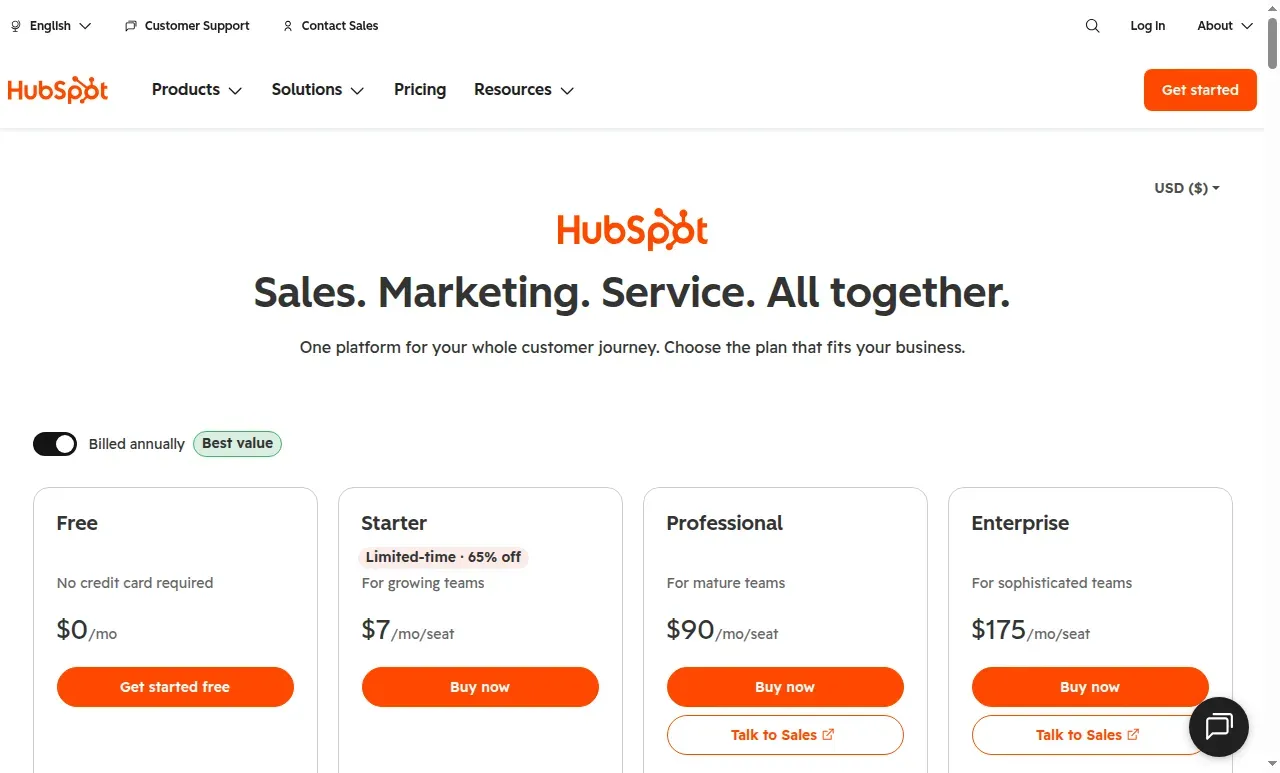
The annual price view shows a limited-time Starter discount beside the paid Sales plans.
Pros
- HubSpot Free includes sales tools for up to two users without a credit card.
- The shared platform can reduce the number of disconnected customer records when sales, marketing, and service already work in HubSpot.
- Professional adds sequences and forecasting for teams that need repeatable follow-up and pipeline views.
Cons
- Starter pricing is currently promotional. Confirm eligibility and the post-promotion rate before budgeting.
- A five-seat Professional team starts at $5,400/year before the required onboarding fee and any applicable taxes.
- Starter isn't a low-cost substitute for Professional if the workflow depends on sequences or forecasting.
A 5-star G2 reviewer in October praised HubSpot’s deal stages but said already-qualified records needed manual enrollment after a workflow was enabled. Test existing-record behavior before relying on automation. I like HubSpot for teams that already use its customer platform or plan to use multiple hubs. But if all you need is a visual deal pipeline, the jump to Professional is hard to justify.
Product pricing — HubSpot Sales Hub
Free for 2 users; Starter from $7/seat/month billed annually on a new-customer promotion ($10/seat/month on the monthly promo); Professional from $90/seat/month billed annually; Enterprise from $175/seat/month billed annually. Professional and Enterprise require onboarding at a quote-specific fee.
2. Zoho CRM: Best for small teams that want more tools per dollar
Zoho CRM is the lowest-cost paid option here for a sales team that needs multiple pipelines, email integration, calling, forecasting, and workflows: Standard is $14 per user/month billed annually, or $20 monthly. Its free edition is available forever for up to three users.
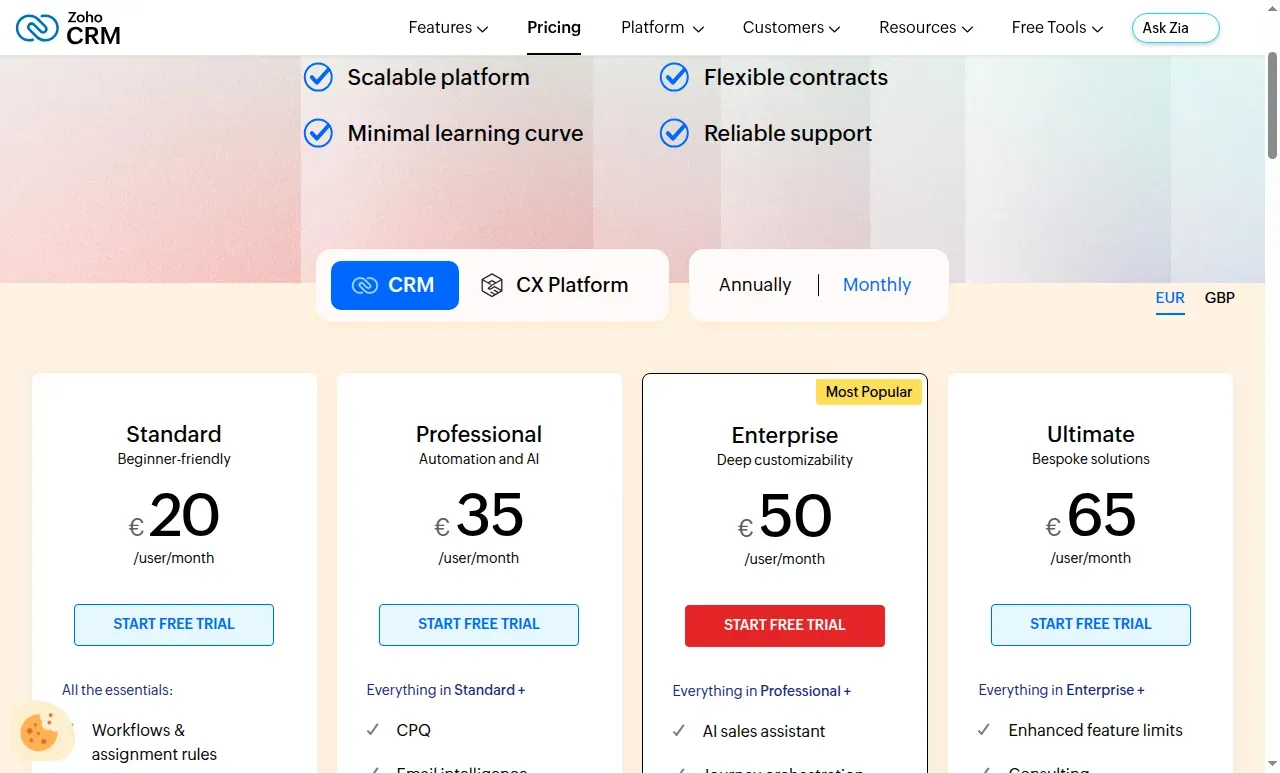
The edition comparison makes the Standard-to-Professional feature step visible. Displayed prices vary by selected currency and billing cycle.
Pros
- Zoho Standard includes multiple pipelines, email integration, calling, forecasting, reports, and workflows.
- The Free plan supports three users, which is one more than HubSpot’s and Salesforce’s free tiers.
- Professional adds process management, inventory, and CPQ for teams that sell configured products.
Cons
- Zoho Professional rises to $23 per user/month annually. Enterprise is $40. Confirm which process features the team needs before migrating.
- Zoho separates regular CRM users from partial-access Team Users. Those roles can't own organization records or access reports.
- That's a lot of modules to configure if all you want is a clean sales board.
The live US price page has an annual/monthly switch and lists Standard and Professional separately. A 5-star Capterra reviewer in May praised lead and deal handling but reported missing fields after a migration. Map a sample import before you move the full pipeline. If your leads come from LinkedIn, test the LinkedIn lead sync with Zoho CRM on that sample too. I like Standard as the starting point when a team needs a functional CRM without a high per-seat bill. Professional deserves its own requirements check before you upgrade. Don't treat the tier jump as automatic.
Product pricing — Zoho CRM
Free for 3 users; Standard $14/$20, Professional $23/$35, Enterprise $40/$50, and Ultimate $52/$65 per user/month billed annually/monthly. Local taxes may apply.
3. Freshsales: Best for small teams that want phone and email in the CRM
Freshsales Growth includes email, chat, and phone; Pro adds sales sequences. The trial form asks for a business email and lets you choose a US data center. The comparison page also lists Free for up to three users, while the trial FAQ says accounts are suspended if you don't choose a paid plan at expiry. The free-plan and trial terms don't line up clearly, so confirm which applies before you start.
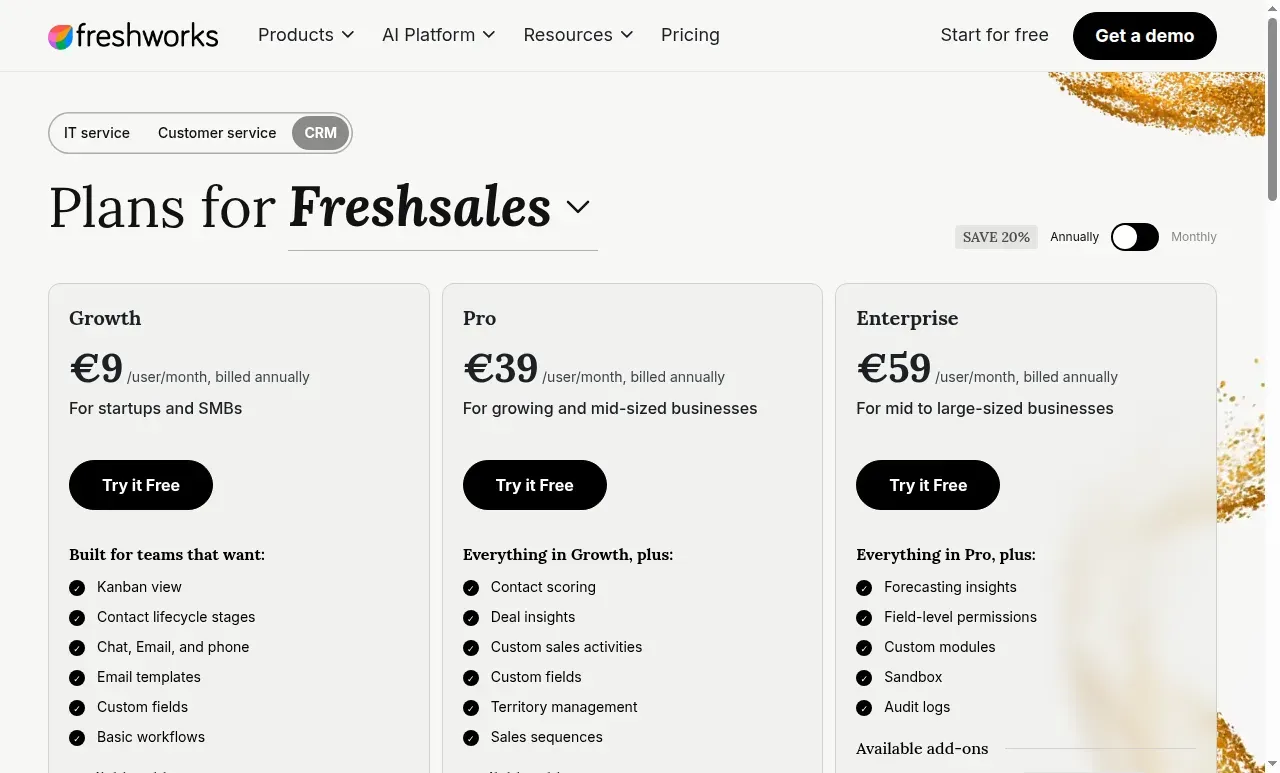
Growth includes basic workflows. Sales sequences appear in Pro. The displayed currency can vary by region.
Pros
- Freshsales Growth includes email, chat, and phone.
- The free tier supports up to three users, and the trial is advertised as 21 days.
- Pro adds sequences and contact scoring for teams that need repeatable follow-up.
Cons
- Freshsales sequences require Pro: five annual seats cost $2,340 before add-ons.
- Branded document creation costs $19 per user/month. Freddy AI Agent starts at $49 per 100 sessions.
- Pricing pages can localize currency. Verify the US rate and account region before checkout.
The pricing page localized to euros in the test browser even after a United States data-center choice. A 4.5-star Capterra reviewer in October cited guest-access, reporting, and webhook gaps in a specific creator-client setup. Verify those exact needs rather than assuming the gaps apply to every team. I'd pick Freshsales when calling and basic communication belong in the CRM. The published $9 rate is a starting point, not the price for automated sales sequences.
Product pricing — Freshsales
Free for up to 3 users; Growth $9/user/month, Pro $39/user/month, and Enterprise $59/user/month, all billed annually. Branded documents and AI sessions are extra.
4. Close: Best for sales teams that work by phone
Close combines lead records with calling, SMS, email, and follow-up tools, but calling and messaging remain usage-based. Solo is limited to one user and 10,000 leads. It can't replace a shared team CRM at that tier. Essentials supports shared team use, and Growth adds workflows.
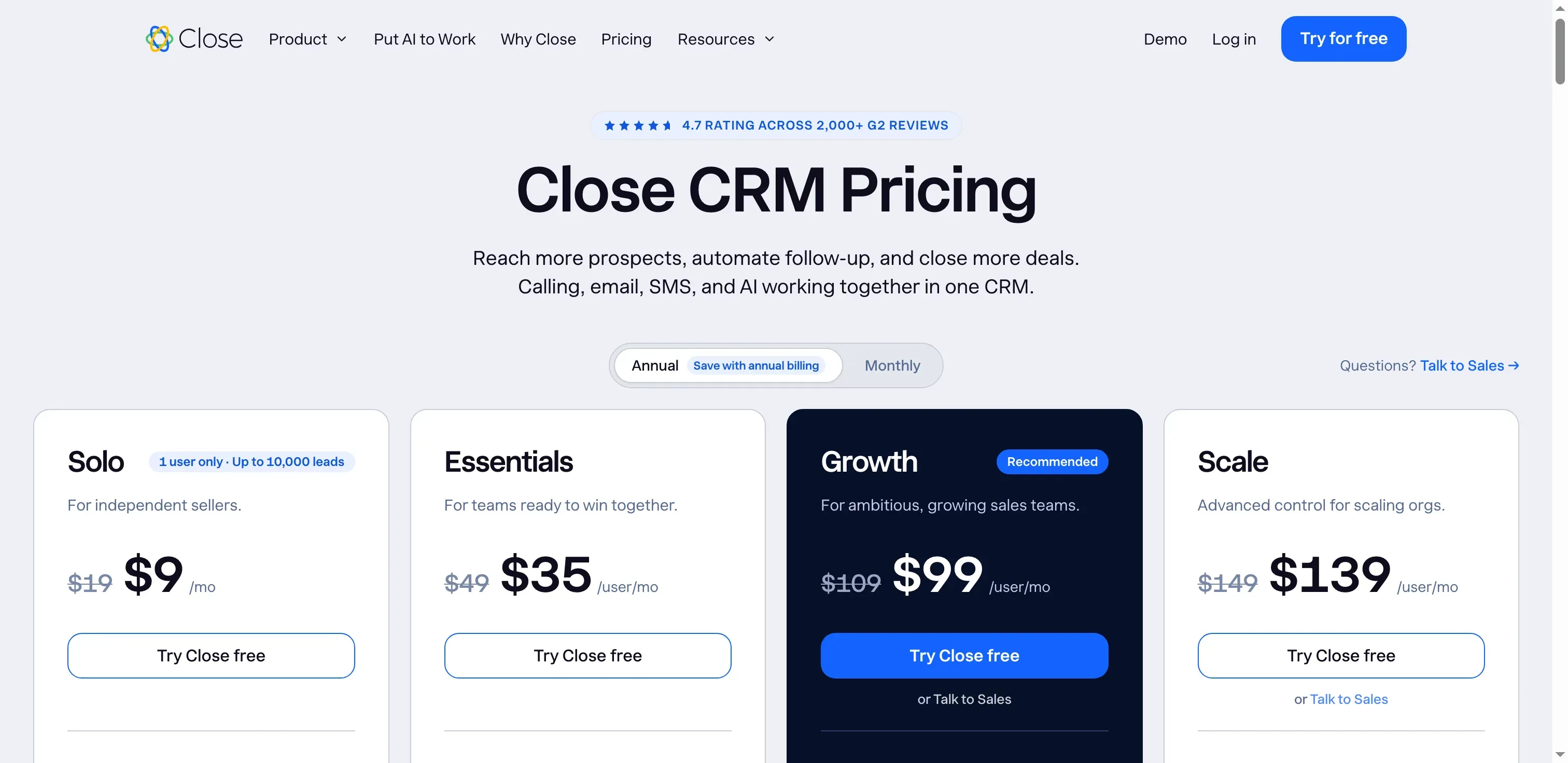
Close separates its single-user Solo plan from shared team plans.
Pros
- Close calling and SMS sit within the sales workspace, and the trial includes $5 of calling and enrichment credits.
- Essentials includes follow-up reminders and supports small teams that need shared CRM access.
- Growth adds workflows and more advanced AI features.
Cons
- Close Solo is capped at one user and 10,000 leads, so it doesn't price a team replacement.
- Calls and SMS are charged by usage. Close estimates most outbound calls at about $0.02/minute and phone numbers from about $1/month.
- Growth costs $99 per user/month annually before telephony, so five seats start at $5,940/year plus usage.
A 4.5-star G2 reviewer in October praised API reliability but noted occasional incomplete batch operations and difficulty finding contact IDs. Teams planning a data sync should test those exact operations. I like Close only when the team will use its calling and messaging workflow enough to offset those usage charges. But if the team only calls now and then, a cheaper CRM plus its existing phone tool may cost less.
Product pricing — Close
Solo $9/user/month billed annually ($19 billed monthly); Essentials $35/user/month annually ($49 monthly); Growth $99/user/month annually ($109 monthly); Scale $139/user/month annually ($149 monthly), plus calling/SMS usage.
5. Copper: Best for teams that work in Google Workspace
Copper is built for Gmail and Google Workspace accounts. Basic costs $23 per seat/month billed annually; Professional costs $59. Basic includes pipelines and task automation for up to 2,500 contacts. Professional adds workflow automation, bulk email, reporting, and integrations. The free-trial signup routes through Google sign-in.
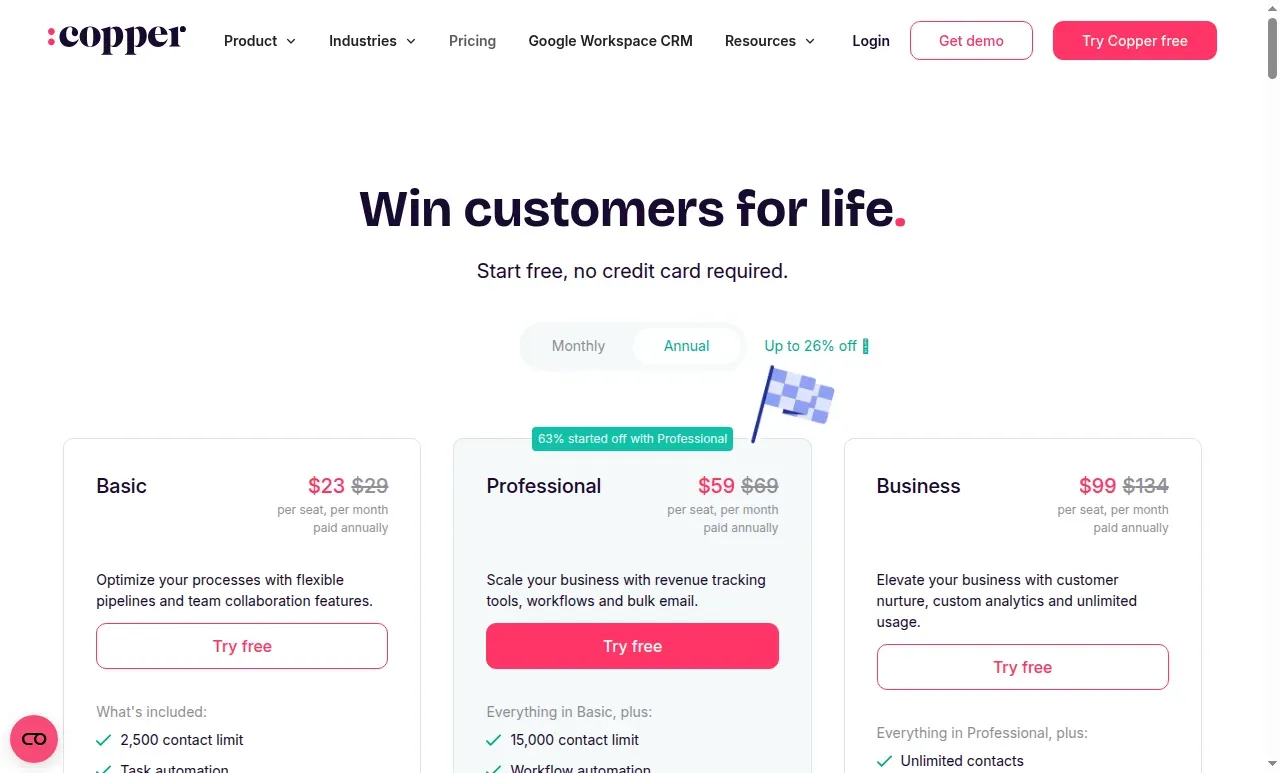
Copper’s annual pricing cards show the per-seat price and contact allowance by plan.
Pros
- Copper’s Gmail and Calendar connection suits teams that want customer records close to their daily inbox and meetings.
- Basic includes pipelines and task automation.
- Professional adds workflows and reporting when the team needs more than task reminders.
Cons
- Copper Basic’s 2,500-contact cap may become a migration constraint for a growing database.
- Workflow automation is on Professional, taking the five-seat annual cost from $1,380 on Basic to $3,540 on Professional.
- Copper makes the most sense when the team already works in Google Workspace. Teams on another email system lose the Gmail and Calendar context that defines its appeal.
A 5-star G2 reviewer in May liked pipeline visibility and automated follow-up but worried about copying live fields without an easy undo. Confirm how field edits can be recovered. Copper would be my choice for a Google-first team that values Gmail context over a long list of CRM customization features. I wouldn't pay for Professional before confirming the team needs its workflows and reporting.
Product pricing — Copper
Basic $23/seat/month billed annually ($29 monthly); Professional $59/$69 and Business $99/$134 per seat/month billed annually/monthly.
6. monday CRM: Best for teams connecting sales to board-based work
monday CRM turns a pipeline into configurable boards and adds sales-specific features by tier. Annual prices are $12 for Basic, $17 for Standard, and $28 per seat/month for Pro. It’s a separate subscription from monday Work Management, starts at three seats, and bills in buckets: five users fit five seats, while a sixth requires ten.
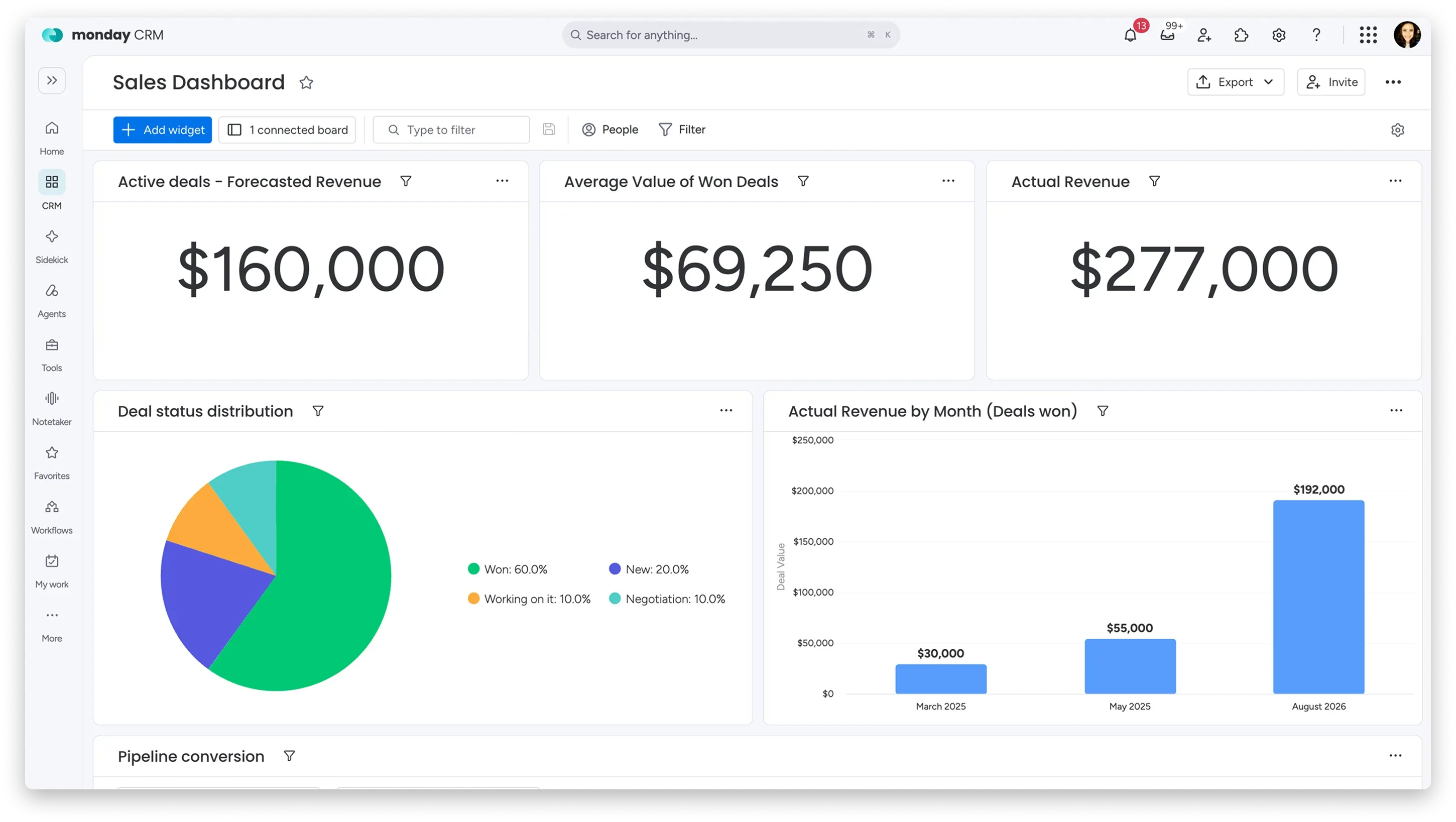
The Sales Dashboard combines revenue widgets and deal-status charts in one view. (Image source: monday.com)
Pros
- monday CRM Basic provides a visual CRM board with 1,000 active contacts and deals.
- Standard adds a centralized communication timeline and 250 custom automations per month.
- Pro adds email sequences and supports more complex sales workflows.
Cons
- monday CRM doesn't offer a permanent free plan beyond the 14-day trial.
- Three seats are the minimum. The five-seat bucket covers exactly five users, while a sixth jumps the account to ten seats and $2,040/year on Standard.
- Work Management and CRM are separate subscriptions. An existing monday account doesn't automatically include CRM features.
A 5-star G2 reviewer in August liked the daily workflow but wanted a direct way to link related opportunities. Model that relationship before choosing a board structure. I like monday CRM when a sales process needs to connect visibly to delivery or project boards. Six seats? Check the billable bucket before you budget.
Product pricing — monday CRM
Basic $12/$18, Standard $17/$25, and Pro $28/$41 per seat/month billed annually/monthly; 3-seat minimum and seat-bucket pricing apply.
7. Attio: Best for teams that need flexible customer records
Attio fits teams that need flexible customer records beyond a standard lead-and-deal model. Its 14-day Pro trial combines a workspace fee with per-seat pricing. During setup, external-meeting recording was on by default; I turned call intelligence off. The trial warns that skipping email/calendar setup removes automatic contact syncing and email sequences. On annual Plus, the first seat is $40/month and each added seat is $35. Pro is $100 for the first seat and $79 for each added seat, and includes sequences and call intelligence.
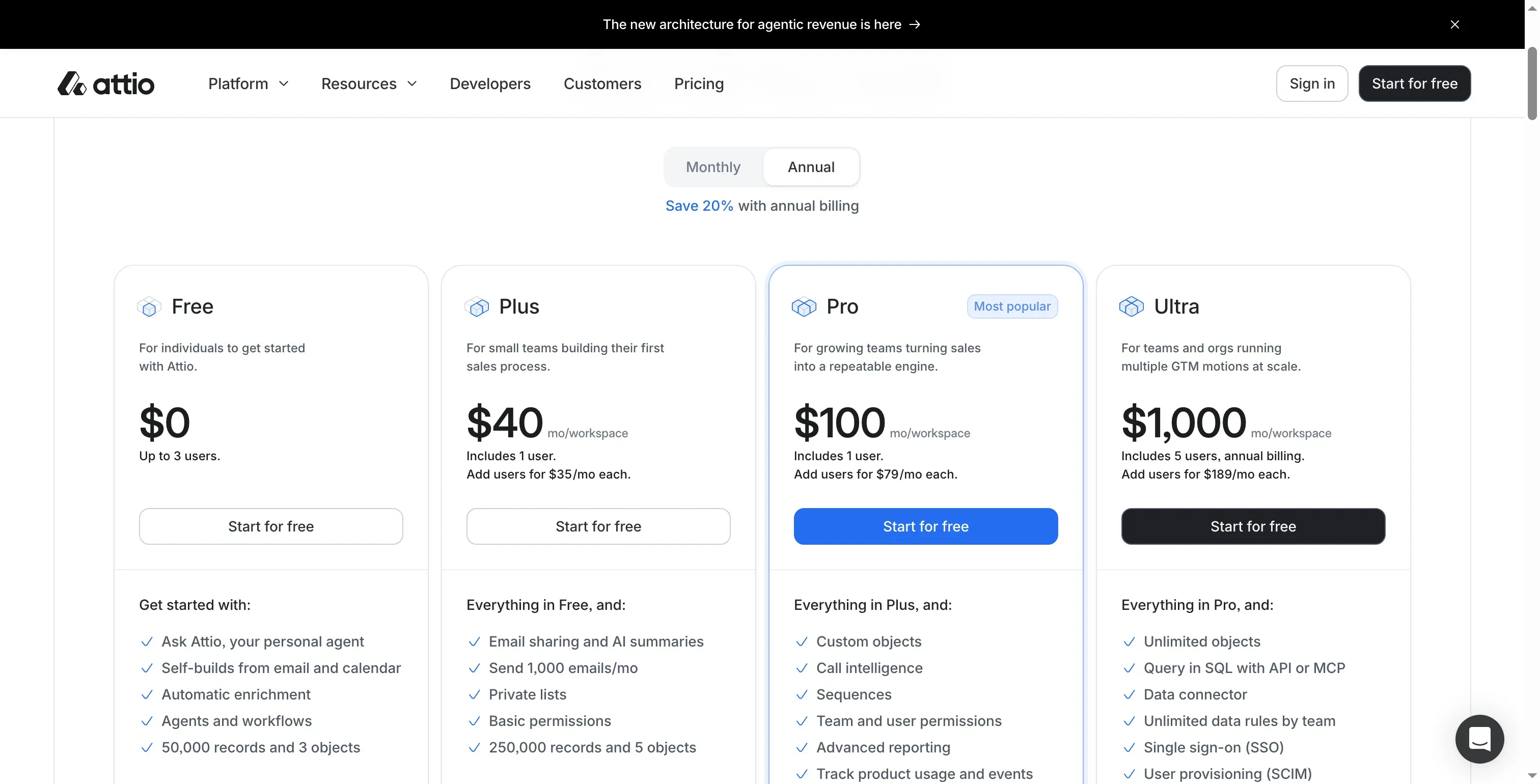
Attio includes one user in Plus and Pro, then charges for each added seat.
Pros
- Attio Free supports up to three users, 50,000 records, three objects, enrichment, and basic reporting.
- Teams can model different customer records rather than forcing every relationship into a standard opportunity pipeline.
- Pro includes sequences, call intelligence, and advanced reporting.
Cons
- The workspace base makes a five-seat team’s bill higher than multiplying the added-seat rate by five.
- Pro includes monthly AI/workspace credits. Teams that exceed the allowance pay for added credits.
A 4-star G2 reviewer in October liked the clean interface but found that related deals, contacts, and activity took more navigation than expected. Verify the record path for the team’s common task. I'd pick Attio only when the team's customer model is genuinely non-standard. If it only needs a conventional sales pipeline, the workspace base and Pro jump add cost without solving a unique problem.
Product pricing — Attio
Free for up to 3 seats; Plus $40 workspace/month annually plus $35 per additional seat; Pro $100 plus $79 per additional seat. Monthly rates are higher; extra workspace credits cost more.
8. Salesforce Sales Cloud: Best for teams with complex sales requirements
I'd pick Salesforce only when the team can name a process, reporting, or integration need that justifies its setup work. Its current lineup ranges from Free Suite to Starter Suite at $25 per user/month and Pro Suite at $100, with different reporting, customization, and sales-management features.
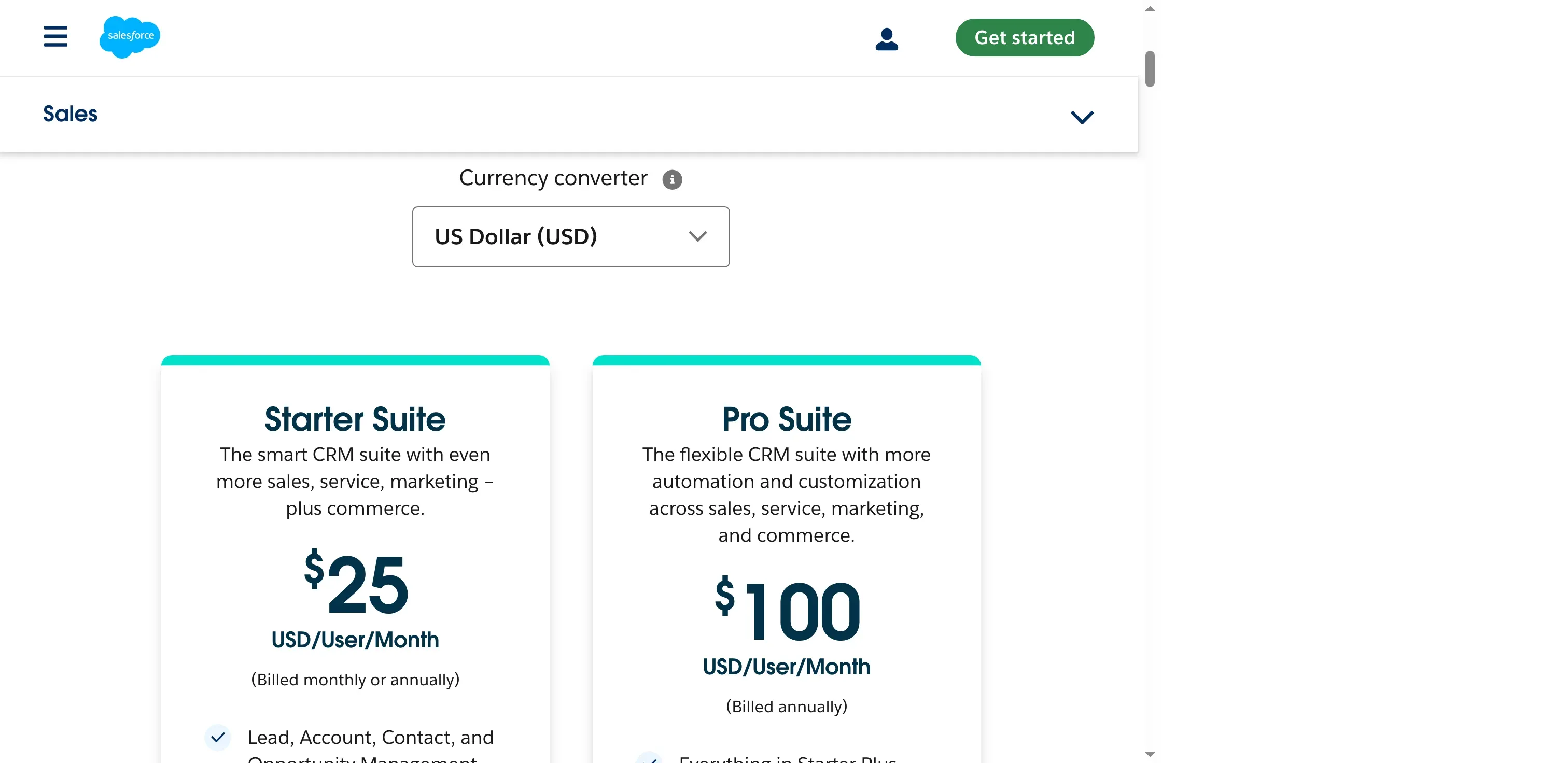
Sales Cloud pricing distinguishes Starter from Pro by plan price and included features. (Image source: Salesforce)
Pros
- Salesforce Free Suite supports up to two users, while a 30-day Starter trial is advertised for up to ten.
- Starter combines sales with service, marketing, and commerce tools for smaller organizations.
- Pro adds forecasting, quotes, customization, and AppExchange access for organizations with requirements Starter doesn't meet.
Cons
- Five Salesforce Pro Suite seats cost $6,000/year at the current list price, before any additional products or services.
- Free and Starter don't include custom objects. Pro allows 50, so edition choice affects how a team models its data.
- Salesforce Free Suite requires an active login at least every 60 days. A broad feature set can also require more administration than a small pipeline team expects.
A 4-star Capterra reviewer in June valued CRM visibility but said licenses, extras, and integrations reduced value for their organization. Price the actual connected workflow, including LinkedIn lead sync with Salesforce, before switching. Salesforce earns my shortlist when the team can name the customization, reporting, or integration requirement that justifies it. “Room to grow” alone isn't enough reason to take on a heavier implementation.
Product pricing — Salesforce Sales Cloud
Free Suite $0; Starter Suite $25/user/month; Pro Suite $100/user/month; Core $195, Advanced $395, and Max $550 per user/month, billed annually. Confirm term and edition at checkout.
What do eight Pipedrive alternatives cost for the same team?
For a five-seller pipeline-and-email workflow, annual plans range from HubSpot’s limited-time $420 offer to Attio Plus at $2,160, while Close adds variable call and SMS charges.
The one-seller scenario covers contact and deal records in a basic pipeline, without email synchronization, automated sequences, or shared access. The five-seller scenario adds email and shared access but still excludes sequences, so the comparison doesn't silently pair a high-tier feature set with a basic CRM. The table uses annual vendor prices, excludes tax, and includes published minimum-seat requirements.
| CRM | 1 seller: lowest plan meeting the workflow | Annual cost | 5 sellers: lowest plan meeting the workflow | Annual cost | Cost conditions and limits |
|---|---|---|---|---|---|
| HubSpot | Free | $0 | Starter | $420 at the current $7 promotion; renewal rate unverified | Free is capped at 2 users; annual $7 Starter is a limited-time new-customer offer. Confirm renewal pricing; it is not included in this estimate. |
| Zoho CRM | Free | $0 | Standard | $840 | Free supports 3 users; Standard $14/user/month annual. |
| Freshsales | Free | $0 | Growth | $540 | Free is listed for up to 3 users; Growth $9/user/month annual. Verify post-trial account status. |
| Close | Solo | $108 | Essentials | $2,100 plus call/SMS usage | Solo supports only one user; phone numbers and usage add to the bill. |
| Copper | Basic | $276 | Basic | $1,380 | 2,500-contact limit on Basic; workflow automation is not included. |
| monday CRM | Basic, 3-seat minimum | $432 | Standard, 5-seat bucket | $1,020 | Basic covers the pipeline-only scenario; Standard adds email and activities for the five-seller workflow. CRM is separate from Work Management. |
| Attio | Free | $0 | Plus | $2,160 | Free is capped at 3 seats; five-seat Plus = ($40 workspace + 4 × $35 extra seats) × 12. |
| Salesforce | Free Suite | $0 | Starter Suite | $1,500 | Free email/calendar integration is limited to Google; Starter supports broader sync. |
For five sellers, the annual fixed costs shown run from $420 for HubSpot Starter at its current promotion to $2,160 for Attio Plus. Close is $2,100 before variable telephony, and HubSpot’s promotion isn’t a guaranteed renewal rate. I multiplied annual per-seat prices by seats and 12, except for Attio’s workspace base and monday’s seat minimum or bucket. Close’s total leaves calls and SMS unpriced because no common usage volume was specified. If the team needs sequences, scoring, territories, custom objects, or high-volume calling, recalculate with plans that include the same capabilities. The cheapest plan won't always fit.
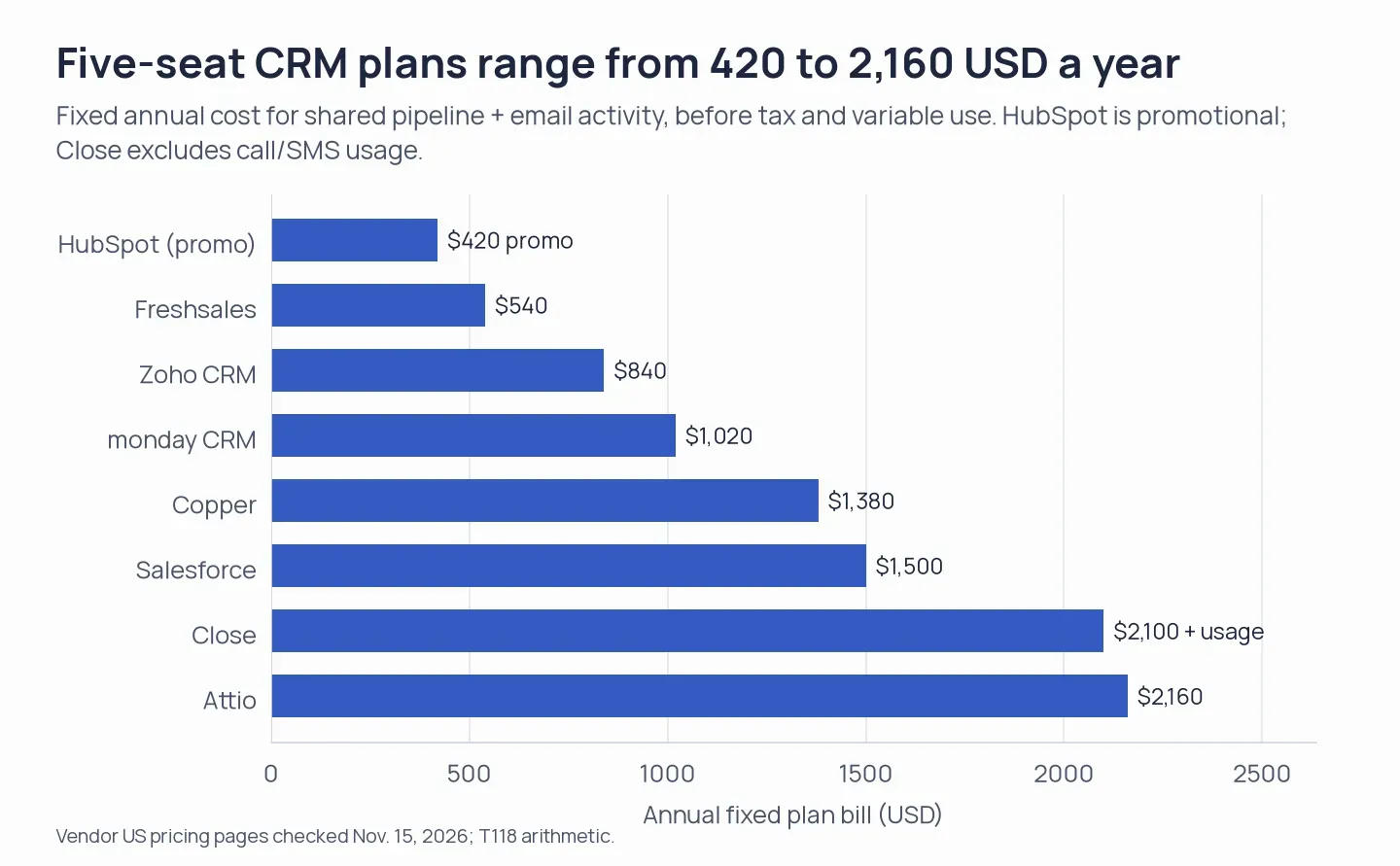
The lowest published fixed bill is promotional, and Close telephony adds usage charges.
Which Pipedrive alternative should you choose?
Choose Zoho CRM if a small team wants multiple pipelines, email, calls, and workflows at a low published per-seat price. Choose Close if phone and SMS activity are central and the team can budget usage. Copper is the clearest Google Workspace match. Monday CRM connects sales boards to delivery work. Attio fits teams that need flexible records. HubSpot fits teams already using the broader customer platform. Salesforce fits more complex sales requirements. If your team already pays for Microsoft 365, count the email and calendar sync a replacement CRM must handle; the subscription itself does not replace a deal pipeline.
If the CRM is only one step in a prospecting workflow, check the handoff before migrating. Linked Helper’s support materials document LinkedIn lead sync with Pipedrive, plus transfers to HubSpot, Zoho CRM, Salesforce, and Close. Test the target CRM’s field mapping and duplicate rules with a safe sample before relying on the connector in production.