
 Updated: October 26, 2026
 20 min read
A hiring manager wants the shortlist. An interviewer has feedback in a private note. Your recruiter has the latest résumé, but nobody remembers which version went to the panel. An applicant tracking system should put those pieces together before you buy another sourcing tool or start another spreadsheet.
My ATS picks at a glance
My picks are Workable for recruiting with the option to add HR, Breezy HR for teams that want unlimited collaborators, and Zoho Recruit for keeping recruiter-seat costs low. Greenhouse earns its place when you need a consistent interview process, Ashby when recruiting analytics drive your decisions, and Lever when you want to keep relationships alive between vacancies. The right choice depends on what keeps breaking in your hiring process.
I compared official pricing and workflow guides, created unpublished test jobs in Workable and Breezy HR, and calculated three hiring workloads against the plans. Linked Helper, which publishes this blog, makes a LinkedIn automation tool and isn't one of the ATS picks. Here's what I'd pay attention to before buying.
What is an applicant tracking system?
An applicant tracking system, or ATS, is software that keeps job openings, candidate records, applications, interview stages and hiring feedback in one place. It gives your team a shared hiring process, from receiving an application to recording a decision. Some systems also include sourcing, candidate relationship management, onboarding and HR records.
The best applicant tracking systems at a glance
Workable is my starting point for a team that wants recruiting now and the option to add HR later; the other picks suit more specific problems.
| Tool | Best for | Standout feature | Starting price | Main trade-off |
|---|---|---|---|---|
| Workable | Recruiting with optional HR | Recruiting and HR modules | $299/month, billed annually; Recruiting, 1–20 employees | HR adds to the bill |
| Breezy HR | Collaborative small hiring teams | Unlimited users on paid plans | Free; Startup $157/month, billed annually | Free candidate access has an age limit |
| Zoho Recruit | Controlling recruiter-seat costs | Separate employer and agency editions | Free; Standard $25/recruiter/month, billed annually | Seats and edition affect the bill |
| Greenhouse | Consistent interviews | Interview kits and scorecards | Custom | Advanced automation needs Plus |
| Ashby | Recruiting analytics | Custom dashboards on Plus | Plus: custom | Foundations excludes custom dashboards |
| Lever | Long-term candidate relationships | ATS and CRM together | Custom | Total depends on scope and add-ons |
What makes the best applicant tracking system?
The best ATS makes your next hiring decision easier without creating another administrative job. I'd start with a real vacancy and follow it from application to decision, keeping these five questions in view.
Can your team agree on the next step? A candidate record needs more than a résumé attachment. Interview feedback, ownership and stage history should help someone picking up the role understand what happened and what needs doing. If you're switching systems, bring a difficult example with multiple interviewers to the demo.
Will occasional interviewers actually use it? Recruiters work in the ATS every day; a hiring manager might visit twice a month. Check what each person can see and whether their participation needs a paid seat. Saving on recruiter licenses won't help if the rest of your team keeps feedback outside the system.
Does the price match your workload? Recruiter seats, active jobs and total employee headcount measure different things. I want the bill for the team doing the work, including the plan that unlocks the feature you're buying. A low entry price for a ten-person company isn't a quote for a company of fifty.
Can you explain the reports? A time-in-stage chart is useful only if you know which candidates it includes. Check filters, permissions and the difference between standard reports and custom dashboards. More charts don't automatically mean better answers.
Can you control the workflow? Look at approvals, candidate access, duplicate handling and when automated messages or stage changes fire. If high application volume is the problem, compare screening and fraud controls separately from basic record storage. Keep the hiring decision with your team.
I chose six tools with distinct strengths rather than filling the list with near-identical pipelines. There's also a good chance your existing HR subscription already covers a simpler hiring process.
1. Workable: Best for recruiting with room to add HR
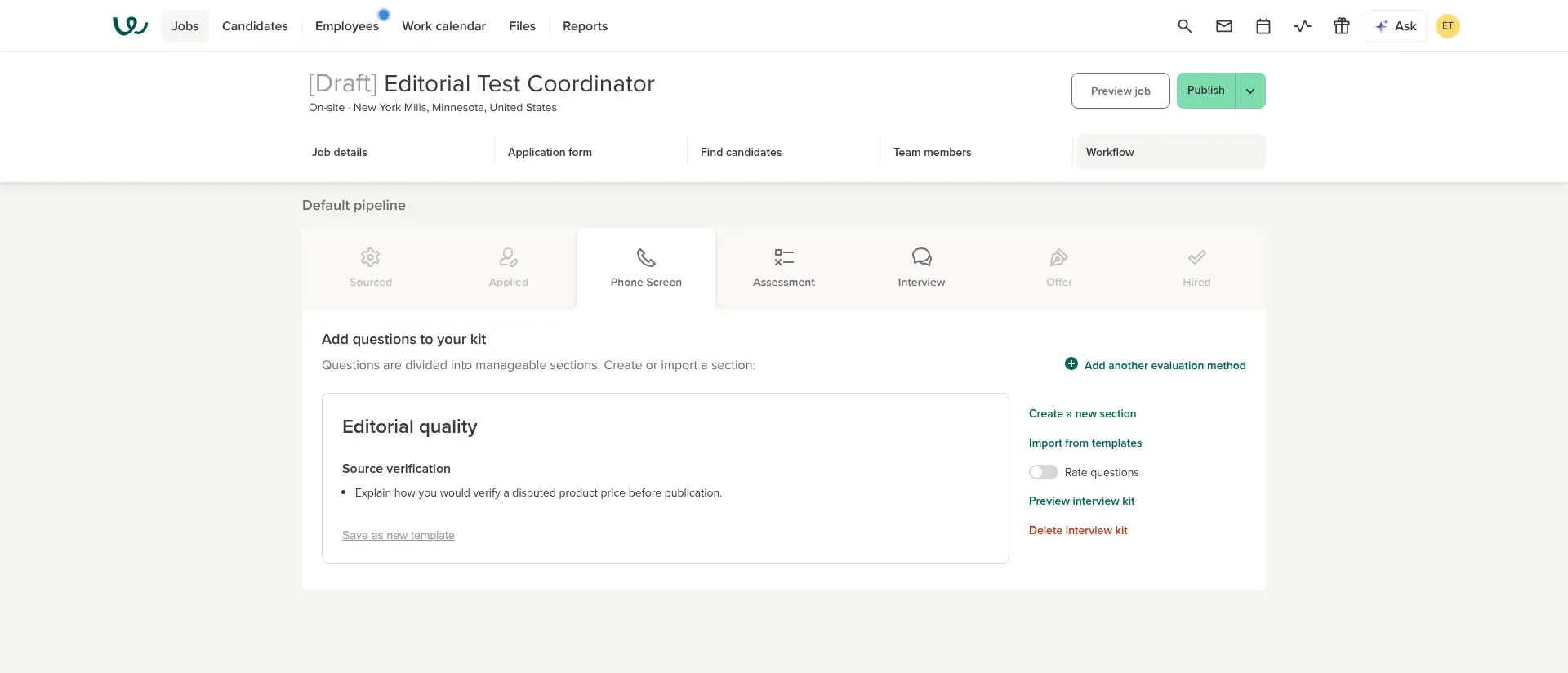
Inside Workable, I saved a phone-screen interview kit while the test job was still a draft.
Workable pros:
-
Separate Recruiting and HR modules
-
Unlimited active jobs, subject to fair usage
-
Custom report builder on Standard
Workable cons:
-
Pricing rises with employee headcount
-
Standard charges extra for texting, video interviews and assessments
Workable is my pick if you want an ATS now and the option to add HR in the same platform later. Recruiting and HR are separate selections: the entry price buys Recruiting, while employee records, onboarding and time-off management belong to HR. I like having that expansion path, as long as you price it honestly.
I created an unpublished test job, opened its Phone Screen stage and saved a source-verification question in an interview kit. I like being able to agree on the questions before the vacancy goes live. The job stayed in draft throughout; I didn't test sourcing or screen real applicants.
For a small company where one person owns recruiting and HR, the bundle is worth a close look. If you already have an HR system, keep that module switched off in the calculator. And if you only need to track two open jobs, I'd compare Breezy HR or Zoho Recruit before paying for Workable's wider recruiting toolkit.
The catch is that the starting price means Recruiting only, annual billing and a company with 1–20 employees. Don't multiply that figure by twelve and call it your budget if your headcount falls into another band. Texting, video interviews and assessments also sit outside Standard's base subscription; Premier includes those capabilities.
Workable pricing:
From $299/month, billed annually, for Standard Recruiting at 1–20 employees.
-
Standard Recruiting + HR — from $359/month, billed annually, at 1–20 employees
-
Premier Recruiting — from $599/month, billed annually, at 1–20 employees; includes texting, video interviews and assessments
-
Standard add-ons — texting $89/month, video interviews $109/month, assessments $59/month at the displayed entry configuration
2. Breezy HR: Best for bringing the whole hiring team into the pipeline
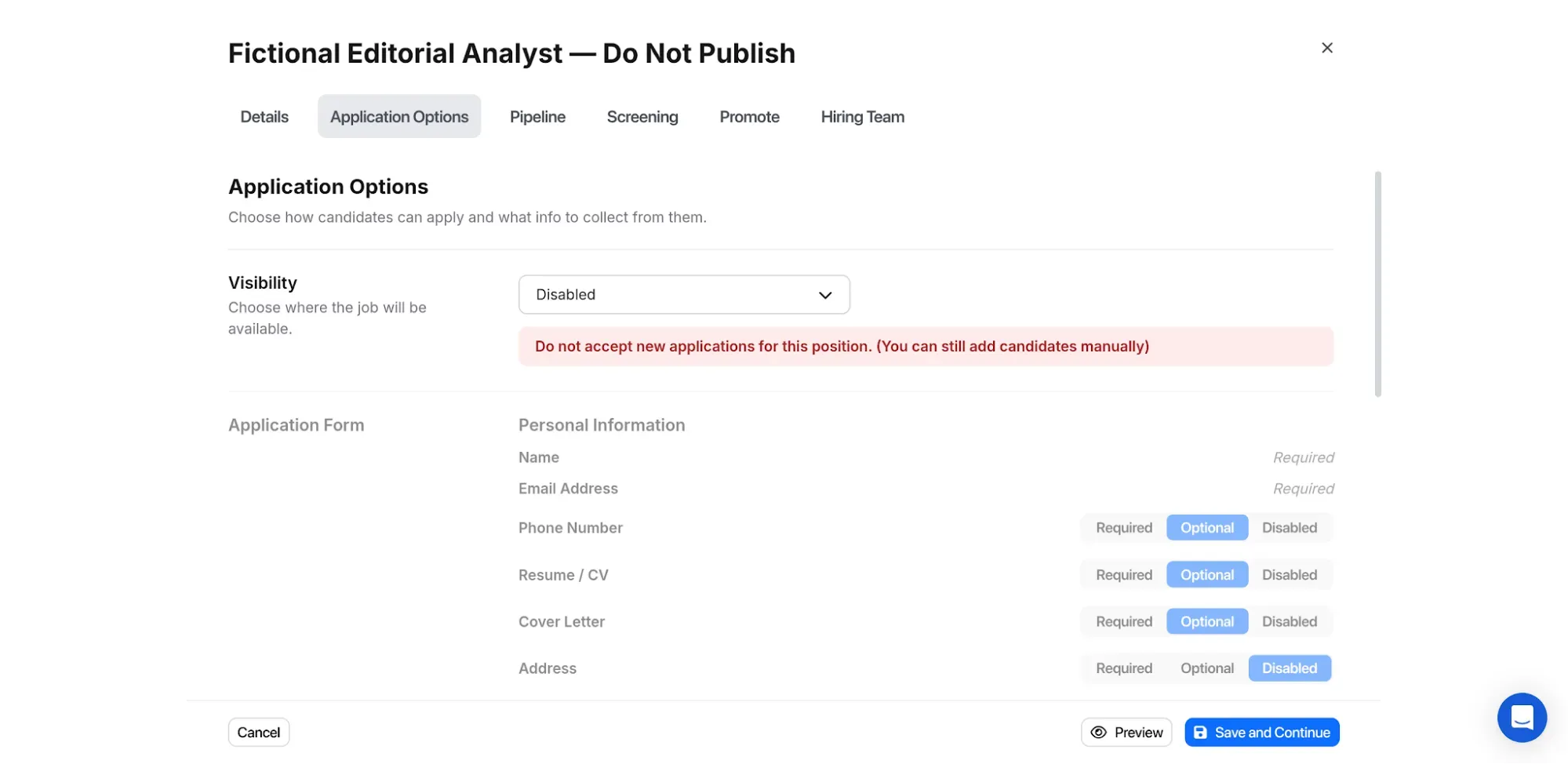
Inside Breezy HR, disabling applications keeps a position closed to incoming applicants while letting you add candidates manually.
Breezy HR pros:
-
Unlimited users, including on Bootstrap
-
Startup removes the active-position cap
-
Free Bootstrap supports one position or pool
Breezy HR cons:
-
Bootstrap limits full access to recently added candidates
-
Custom scorecards and multiple pipelines require Growth
Breezy HR is worth a close look when several people need to collaborate but you don't want each person added to the bill. Unlimited users changes the conversation: you can judge whether a hiring manager needs access without first working out what another license will cost. For a small company, that's a practical advantage over pricing everything by recruiter seat.
The free Bootstrap plan gives you one active position or candidate pool. Startup moves you to unlimited active positions, so the paid entry tier can handle several vacancies at once. I'd use the free plan to understand the workflow, then decide whether the paid features fit the way your team hires. A free account and a complete long-term recruiting database aren't the same purchase.
The catch is Bootstrap's candidate-access window. You get unlimited access to candidates added within the last 30 days. If a role takes longer to fill, or you want to revisit a strong applicant months later, that limit matters more than the word “free.” I'd skip Bootstrap as the foundation for an ongoing talent pool.
Things I Noted — Breezy HR
In the trial, I created a draft position, set application visibility to Disabled and still added a fictional candidate manually, without an email address. I like that separation: closing the incoming application flow doesn't stop you working on candidate records. The trial has paid features enabled, so check the purchased tier before treating every visible control as free.
Breezy HR pricing:
Free plan available; Startup from $157/month, billed annually.
-
Bootstrap — one active position or pool; 30-day candidate-access window
-
Startup — $157/month, billed annually; unlimited positions
-
Growth — $273/month, billed annually; custom scorecards and multiple pipelines
-
Business — $439/month, billed annually; advanced hiring controls
3. Zoho Recruit: Best for keeping recruiter-seat costs low
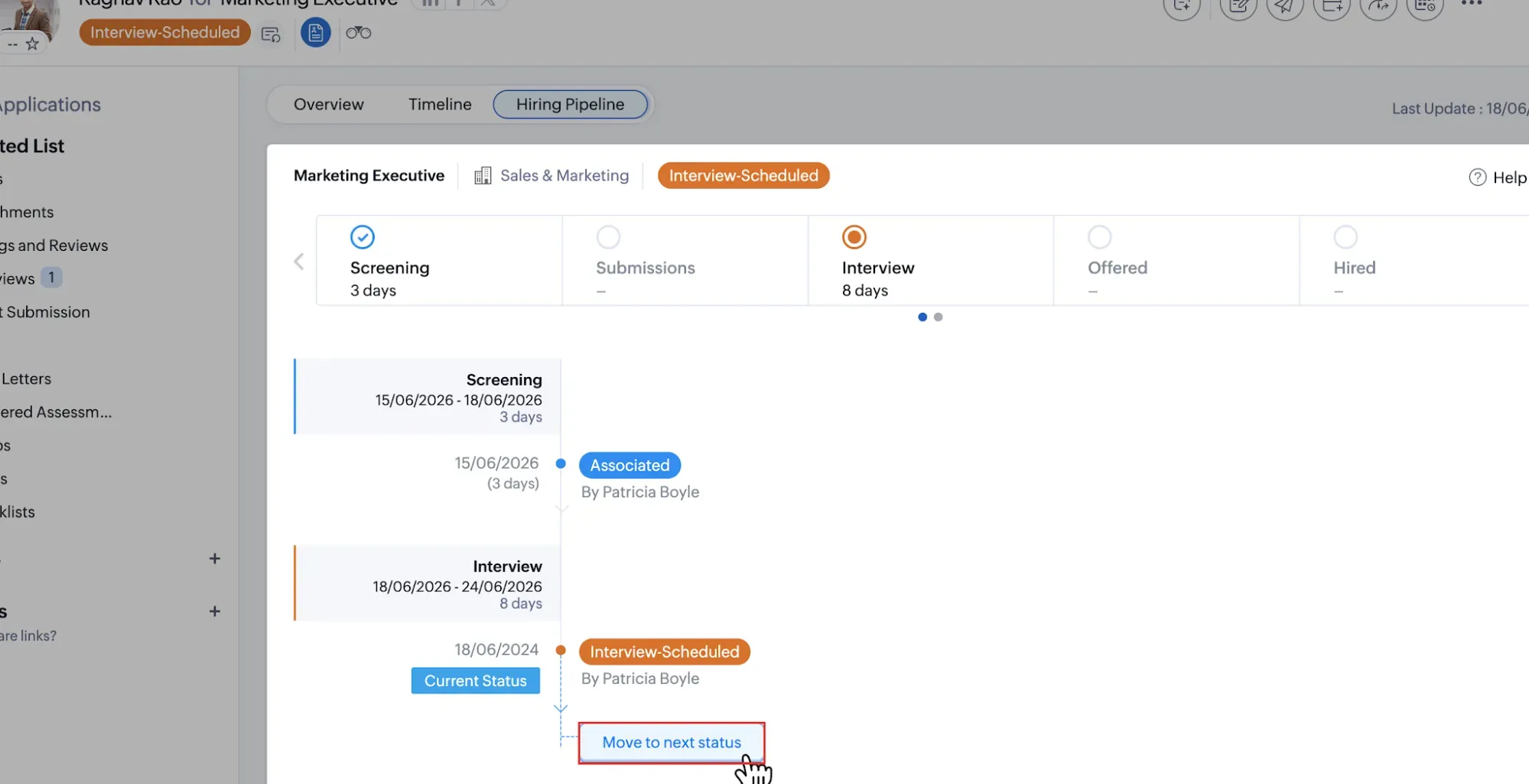
Inside Zoho Recruit, you can move an application to its next status from the hiring-pipeline view. (Image source: Zoho Recruit)
Zoho Recruit pros:
-
Standard starts at $25/recruiter/month with annual billing
-
Separate editions for employers and staffing agencies
-
Corporate Standard allows 10 active jobs per recruiter
Zoho Recruit cons:
-
Recruiter seats increase the subscription total
-
Employer and agency limits aren't interchangeable
Zoho Recruit is my budget pick for a small number of people doing most of the recruiting. Corporate Standard makes a one-recruiter setup much less expensive than a flat subscription designed for a larger team. The important word is “recruiter”: count the people who need those permissions before comparing the headline prices.
I like that Zoho separates corporate HR from staffing agencies. An employer hiring its own staff and an agency managing client vacancies have different needs, even though both move candidates through a pipeline. Start with the correct edition, then compare the features and limits. Otherwise, it's easy to take a generous job allowance from one pricing table and combine it with a feature from the other.
For the employer edition used in my calculations, Standard allows 10 active jobs per recruiter. That's enough capacity for the small hiring workloads here without buying a higher plan just to unlock more vacancies. A recruiter managing several open roles can therefore spend less while keeping the basic workflow in one system.
The catch is license planning. Recruiters and other employees don't necessarily need the same access, and employee-license options deserve a separate check when you involve hiring managers. I'd skip a quick per-person estimate until you've mapped their roles. A staffing agency should also price the agency edition directly, rather than borrowing my employer scenario totals.
If you're already comfortable with Zoho's approach to configuring business software, this is worth a close look. If your priority is giving a broad team the same access with very little license planning, I'd compare Breezy HR's flat-rate model alongside it.
Zoho Recruit pricing:
Free plan available; Standard from $25/recruiter/month, billed annually.
-
Corporate Standard — 10 active jobs per recruiter
-
Staffing Agency Standard — a separate edition with different job allowances
-
Employee access and optional add-ons — price against the roles and features you need
4. Greenhouse: Best for making interviews consistent
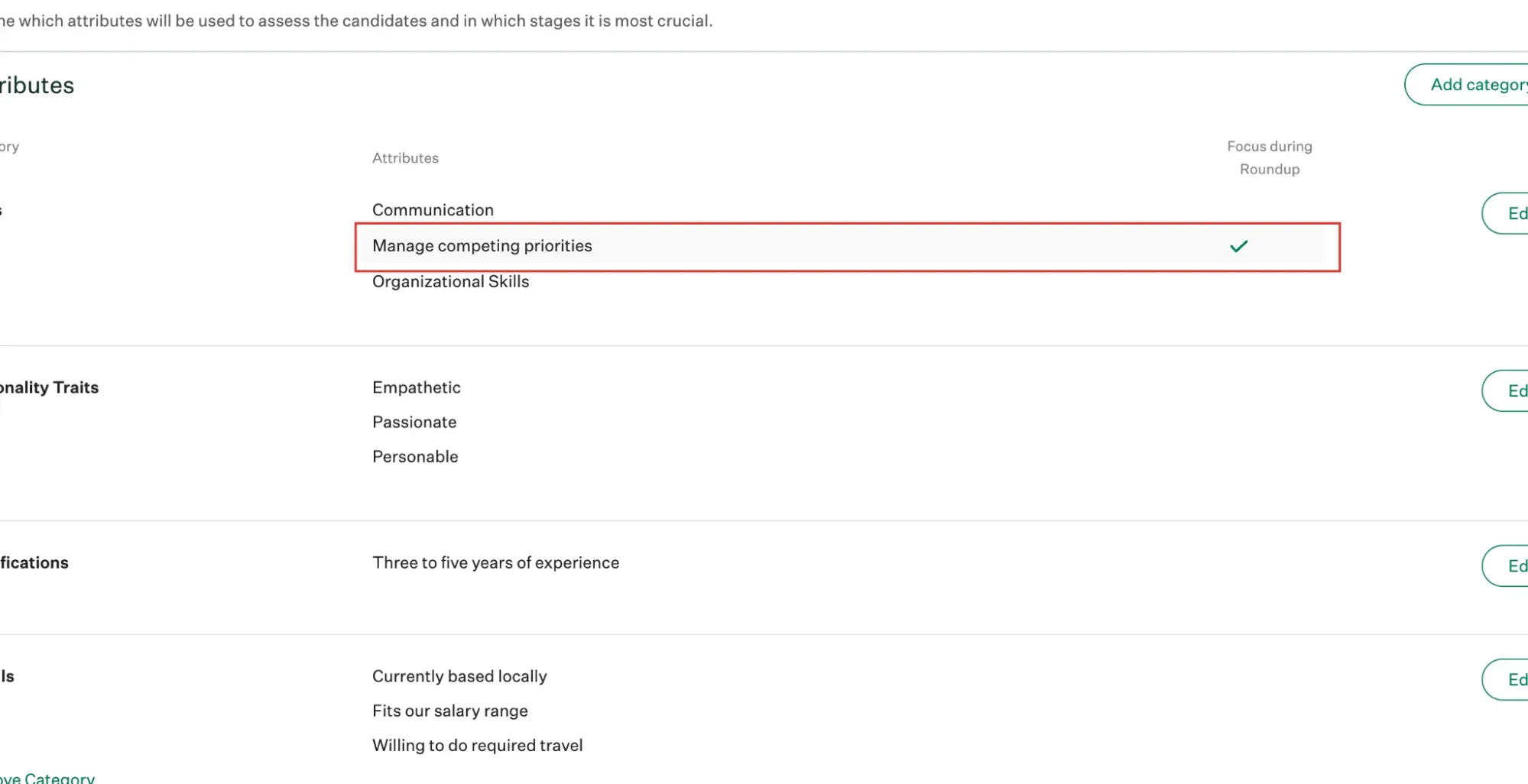
Inside Greenhouse, you can choose which scorecard attributes to focus on during the candidate roundup. (Image source: Greenhouse)
Greenhouse pros:
-
Interview kits and scorecards included in Core
-
Feedback can be assigned without scheduling an interview
-
Scorecard visibility has permission controls
Greenhouse cons:
-
No self-serve dollar price
-
Sourcing Automation and deeper reporting sit in Plus
Greenhouse is the tool I'd put first on the demo list when interviews keep producing opinions your team can't compare. Its structured interview kits and scorecards let you agree on the attributes you're assessing before the debrief. That gives a hiring manager something more useful than five variations of “seemed good.”
In the scorecard guide, the practical detail I like is the ability to assign feedback without scheduling an interview. You can bring another colleague into the evaluation without inventing a calendar event just to collect their input. Permissions also control access to submitted scorecards; those settings deserve attention before you invite the wider team.
Those features suit a company that already has an interview process worth making repeatable. They won't decide what a good answer looks like for you. Your team still needs to choose relevant criteria, brief interviewers and use the feedback when it makes the decision. I'd skip this level of process if one person handles a handful of straightforward hires and nobody needs coordinated panels.
The catch is the distance between a core hiring workflow and a more automated operation. Core includes interview kits, scorecards, scheduling and reporting; Plus adds capabilities such as Sourcing Automation and the Business Intelligence Connector. Pro focuses on more complex governance and configuration. I'd take the actual workflow to the demo and ask for one itemized quote covering the capabilities it needs.
Greenhouse makes sense when consistency is the problem you're paying to solve. It would be overkill to buy it solely because a longer feature table looks more reassuring.
Greenhouse pricing:
Custom, based on plan, hiring needs and organizational complexity.
-
Core — structured hiring tools, scheduling and reporting
-
Plus — additional automation and deeper reporting
-
Pro — advanced governance, security and extensibility
5. Ashby: Best for recruiting teams that need custom analytics
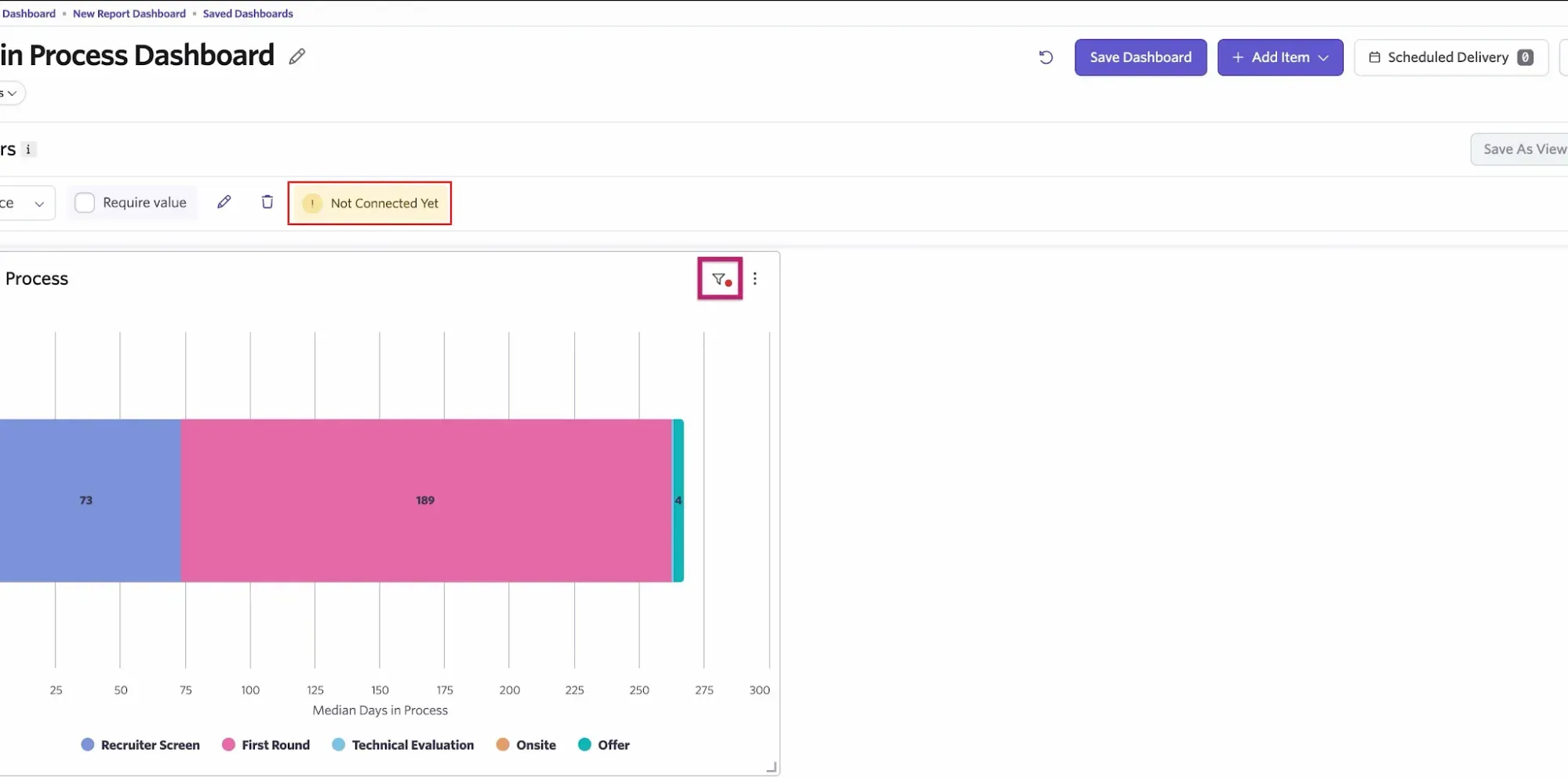
Inside Ashby, a dashboard filter must be connected to the reports it should control. (Image source: Ashby)
Ashby pros:
-
Reports and recruiting workflows share one platform
-
Plus supports custom dashboards and connected filters
-
Separate analytics option for an existing ATS
Ashby cons:
-
Foundations excludes custom dashboards
-
Plus has optional scheduling and AI Notetaker add-ons
Ashby is my pick when the recruiting team needs to answer questions that a standard dashboard can't settle. Think about comparing time in stage across departments, then understanding which candidates sit behind a slow result. The appeal is bringing recruiting activity and analysis together, rather than rebuilding every answer in a spreadsheet.
I'd be careful about which Ashby plan you compare. Foundations is the entry option for companies with up to 100 employees, but custom dashboards belong to Plus and Enterprise. If the dashboard is the reason you want Ashby, the Foundations starting price isn't the price of your intended setup. Price the feature you came for.
Things I Noted — Ashby
The dashboard guide shows a small detail that can change a big decision: adding a filter doesn't automatically apply it to every report. You connect the filter to each report, and a colored indicator tells you whether all, some or none of the dashboard filters apply. I'd check that before presenting a filtered chart as a department-wide result. A tidy dashboard can still contain differently scoped reports.
The catch is that flexibility gives someone work to own. If nobody on your team will maintain report definitions and check filters, I'd start with a simpler reporting setup. Ashby is worth a close look when you have recurring analytical questions and someone responsible for answering them, not just a wish for more charts.
A May 7, 2024 comment from u/My0pinion on r/recruiting captures the appeal and the work: “The reporting is fantastic but honestly the learning curve for reporting is steep simply because you can report on basically anything and the filtering language takes some getting use to.”
For organizations with 100+ employees, Ashby also offers Analytics alongside an existing ATS. I'd consider that route if reporting is the problem and the hiring system itself works.
Ashby pricing:
Custom for Plus, the plan to compare for custom dashboards.
-
Foundations — for up to 100 employees; no custom dashboards
-
Plus — custom dashboards and broader analytics
-
Enterprise — larger, more complex organizations
-
Plus add-ons — Advanced Scheduling and AI Notetaker
6. Lever: Best for keeping candidate relationships between vacancies
Lever pros:
-
ATS and candidate CRM in one core platform
-
Reporting connects hiring activity and pipeline health
-
Candidate history supports longer-term recruiting
Lever cons:
-
No self-serve dollar price
-
Onboarding and additional screening have separate add-ons
Lever is worth considering when your next hire may already be someone you've spoken to. Its ATS-and-CRM combination suits teams that source candidates, keep conversations organized and return to prospects when a suitable opening appears. I like that focus more than treating every vacancy as a completely new search.
A candidate relationship doesn't always fit neatly into an active application. Someone may be interested in your company but unavailable now, or promising for a role you haven't opened yet. Bringing CRM and applicant tracking together gives the recruiting team a way to handle that longer timeline without treating every person as a current applicant.
The October 21 product walkthrough adds a useful scheduling detail: Assisted Scheduling can hold up to three slots for 72 hours and draft the email, while the recruiter reviews and sends it. I like that division of work. You can reduce calendar chasing while keeping the final invitation under human control; include that feature explicitly in your quote.
The catch is that the subscription needs a scoped quote. Lever's core platform includes ATS, CRM and reporting, while Candidate Insights, AI Screening by VONQ and onboarding are listed separately as add-ons. Don't assume every feature you see in a demonstration belongs to the base package.
I'd skip Lever if you only need a low-cost applicant list for occasional vacancies. Its relationship features matter more when reconnecting with past prospects is routine.
In a July 9, 2024 r/recruiting discussion, u/nnank76 called Lever “Very simple to use.” In the same discussion, u/Ecstatic-Repair-6389 wrote: “Might just be our instance, but it’s down constantly and our integrations need to be reset on a regular basis.” The second commenter also allowed that their team might be using stages incorrectly. I'd take that account-specific complaint as a reason to test your actual integration and stage mapping, rather than a verdict on today's reliability.
Lever pricing:
Custom, based on team size and hiring needs.
-
Core platform — ATS, CRM and reporting
-
Candidate Insights — optional add-on
-
AI Screening by VONQ — optional add-on
-
Onboarding — optional add-on
What the same hiring workload costs
Zoho Recruit's per-recruiter model and Breezy HR's flat subscription produce very different bills for the same basic hiring workload.
These are calculations from list prices, not vendor quotes. Each scenario uses a US employer with 50 employees, annual billing in USD, and basic applicant records, pipelines and collaboration among the named recruiters. Taxes, optional AI, paid job advertising, texting, migration services and extra employee licenses are excluded. They aren't needed for the narrowly defined workload.
| Workload | Zoho Recruit Corporate Standard | Breezy HR Startup | Workable Standard Recruiting |
|---|---|---|---|
| 1 recruiter, 1 active job | $300/year: 1 × $25 × 12 | $1,884/year: $157 × 12 | $5,028/year: $419 × 12 |
| 3 recruiters, 5 active jobs | $900/year: 3 × $25 × 12 | $1,884/year: $157 × 12 | $5,028/year: $419 × 12 |
| 5 recruiters, 15 active jobs | $1,500/year: 5 × $25 × 12 | $1,884/year: $157 × 12 | $5,028/year: $419 × 12 |
Zoho Corporate Standard allows 10 active jobs per recruiter; Breezy Startup has unlimited positions; Workable Standard has unlimited active jobs subject to fair usage. No mandatory subscription add-on was identified for these basic configurations. If you need hiring-manager access beyond the named recruiters, map those roles before using the Zoho totals. If you need custom scorecards or multiple recruiting pipelines, compare Breezy Growth and the matching higher-tier capabilities elsewhere.
Zoho is cheaper in all three examples. But the gap narrows as you add recruiters: seven Standard recruiter seats would cost $2,100 a year, while Breezy HR Startup stays at $1,884. That's a subscription-price crossover, not proof that the feature sets are identical. I'd use it to decide which two plans deserve a closer workflow comparison.
Greenhouse and Lever need quotes for these workloads. Ashby Plus also needs a quote for the custom-dashboard use case. For Workable, I selected the 21–50 employee band: that moves Standard from the entry price to $419/month with annual billing. That's Recruiting only. Selecting Recruiting + HR raises the same 50-employee configuration to $579/month, or $6,948 a year. I'd only pay for the bundle if my team will use the HR module too.
Check your existing HR system first
Your current HR subscription may already include enough applicant tracking for occasional hiring. BambooHR, for example, includes an ATS with different job-opening allowances across Core, Pro and Elite. If you already use it for employee records, test that hiring workflow before paying for another system and another data handoff.
A general CRM or shared spreadsheet can hold contacts and stages, but your team would need to maintain the hiring-specific workflow around it. I'd check permissions, feedback collection, duplicate records and the move from candidate to employee before deciding that an existing contact database is enough.
Sourcing is a separate question. LinkedIn outreach can help you find people, but it doesn't replace interview records or hiring decisions. Our recruiting-agency case study looks at that sourcing side; use an ATS to manage what happens once someone enters your hiring process.
Related reading:
Which applicant tracking system should you choose?
Choose the system that fixes your current hiring bottleneck, then test the next stage you expect to grow into.
| Your scenario | My pick | What decides it |
|---|---|---|
| Recruiting now with the option to add HR | Workable | Price both configurations. |
| Lots of colleagues need access | Breezy HR | Compare its predictable subscription. |
| One or two recruiters do most of the work; cost matters most | Zoho Recruit | Give it the first look. |
| Interviews are inconsistent | Greenhouse | Bring a sample scorecard to the demo. |
| Reporting questions send you back to spreadsheets | Ashby Plus | Compare against the actual dashboards you need. |
| Recruiters regularly return to past prospects | Lever | Walk through that full candidate relationship. |
Before committing, take one fictional vacancy through the workflow with a recruiter and a hiring manager. Check the candidate record, feedback permissions and the bill for that exact setup. The best applicant tracking system software is the one your team can use consistently after the demo ends.