The 9 best appointment scheduling apps in 2026
Floating calendar, clock and checkmark representing appointment scheduling

Every booking link looks the same from the outside: pick a slot, type your name, done. The differences show up the moment you connect a second calendar, take a deposit, hand an appointment to a colleague, or sell six sessions in one go—and that's usually the moment a free plan quietly turns into a paid one. Nine apps made my list, and they're priced in nine different units: per seat, per location, per staff calendar, per booking, per feature you switch on. The cheapest app for a solo coach can be the priciest for a two-location salon.

How I chose these apps

I looked at what each app offers for solo consultants, sales teams and service businesses—not just its starting price. I signed up for Calendly, Cal.com and Setmore and booked a test appointment through each. For the other six, I reviewed official pricing and help pages. I also compared the cost of three real setups and read user experiences to understand where each app fits—and where it falls short.

This guide is published by Linked Helper, a LinkedIn automation tool that isn't among the apps compared here. The recommendations reflect the booking workflows, features and trade-offs covered in this guide.

Prices are in US dollars, as of late October 2026. Annual rates require an annual commitment; taxes, payment processing and purchased text-message credits are extra.

What is an appointment scheduling app?

An appointment scheduling app is software that turns your free time into a booking page: a client or prospect picks a slot, and the app blocks the calendar, sends the confirmation and reminders, and lets them reschedule or cancel without emailing you. Paid plans add intake questions, deposits, recurring series, and distributing bookings across a team.

The best appointment scheduling apps at a glance

ToolBest forStandout featureStarting priceMain trade-off
CalendlySales calls distributed across a teamRound robin and qualification routingFree plan; Teams from $16/seat/month, billed annuallyRound robin needs Teams, not Standard
Acuity SchedulingPaid client services with intake and packagesClients book a recurring series themselvesFrom $16/month, billed annually, for StarterPackages and text reminders start at Standard
Square AppointmentsBooking plus in-person checkoutScheduling and the register in one systemFree plan; Plus is $49/location/monthPaid plans are charged per location
SetmoreA small team that wants to start freeFour users and unlimited appointments on FreeFree for four users; Pro $5/user/month, billed annuallyTwo-way calendar sync needs Pro
SimplyBook.meA configurable multi-provider booking sitePick-and-mix premium featuresFree plan; Basic $11.90/month, billed annuallyThree separate quotas set your plan
Zoho BookingsTeams already on Zoho CRMRound robin on the $6 Basic planFree for one user; Basic $6/user/month, billed annuallyPayments and SMS need Premium
Google Calendar appointment schedulesA basic booking page you already ownOne free page inside Google CalendarFree for one page; Business Standard $14/user/monthFeatures depend on the exact subscription
Microsoft BookingsUnpaid appointments inside Microsoft 365Included with eligible licensesIncluded; Business Basic $7/user/month, paid yearlyNo payment support
Cal.comA solo user with several event typesUnlimited event types and calendars on FreeFree for one user; Teams $12/user/month, billed annuallyTeam features need paid seats

What makes the best appointment scheduling app?

Start with the booking you need to complete, then find the plan that completes it. "Free scheduling" means nine different things across this list, and the headline price rarely covers the feature you came for. Here's what I looked for.

  • Selling time or arranging meetings: A discovery call needs availability, a video link and a reminder. A paid consultation needs intake questions, a deposit, a cancellation policy and maybe a package of sessions. A salon needs checkout and staff schedules on top. A sales team needs something else again: a rule that assigns each inbound meeting to the right rep. I judged every app against the job it claims, not against a master feature list.

  • The billing unit: Calendly and Cal.com charge per seat, Square per location, Acuity per staff-calendar allowance, SimplyBook.me per booking, provider and premium feature. The same five-person team can cost $360 or $960 a year depending on which unit the vendor picked, so I priced three real setups further down instead of comparing entry prices.

  • Whether the free plan checks your other calendar: Unlimited appointments and "don't double-book me against my work calendar" are different features, and the second one is the first thing free plans drop. I counted connected calendars on every free tier.

  • Round robin, collective, or group: Round robin gives each meeting to one host from a pool. Collective finds a time when several hosts are free together. A group appointment lets several customers attend one session. Vendors use "team scheduling" for all three, so I checked which plan actually includes which.

  • Qualification and junk control: A public booking page accepts whoever finds it. If sales time is the scarce resource, you want routing forms that decide who may book with whom. I noted which plans have them; I didn't test spam protection on any of these pages, so throw a few junk bookings at your trial and see what reaches your calendar.

If there's a tool you'd expect here that isn't, it's either in the "check your existing stack" section or it leans toward staff shifts and field operations rather than client booking.

1. Calendly: Best for sales calls distributed across a team
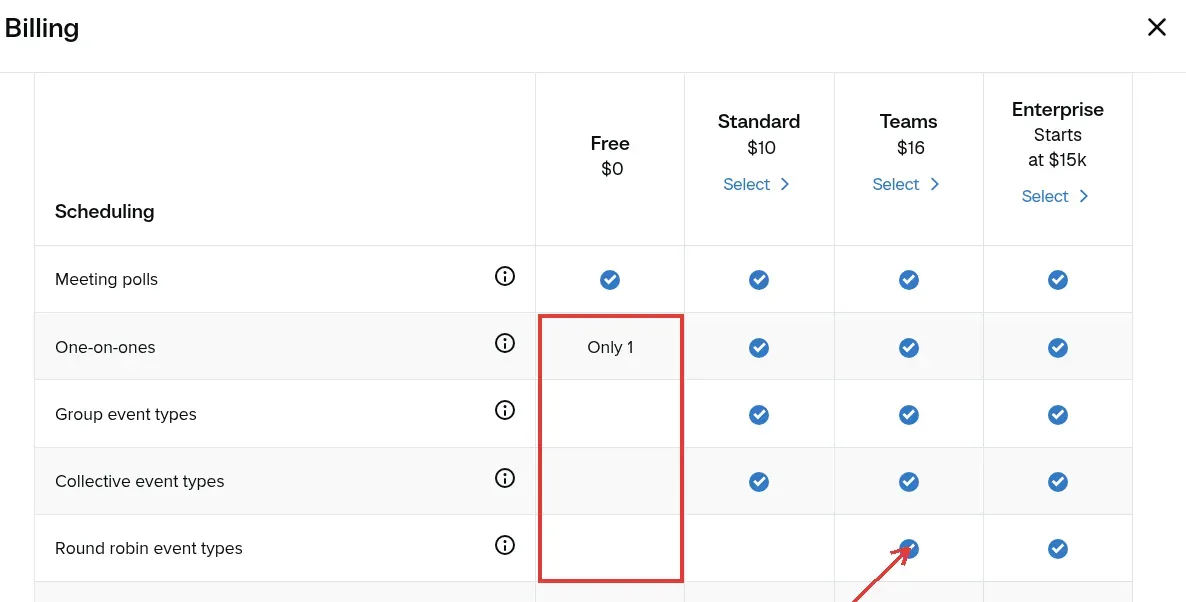
Calendly billing comparison showing Free, Standard, Teams and Enterprise event types, with round robin highlighted under Teams.

Inside Calendly, the Billing plan table shows what Free keeps once the trial ends: one one-on-one event type and no group, collective or round robin types, with round robin starting at Teams rather than Standard. (Image source: Calendly)

Calendly pros

  • Unlimited one-to-one meetings on the Free plan

  • Standard connects six calendars and adds reminders and a cancellation policy

  • Teams adds round robin and routing by qualification answers

Calendly cons

  • Free allows one event type and one connected calendar

  • Round robin and routing need Teams, not Standard

  • Automated reminders and a cancellation policy aren't on Free

When I signed up, Calendly put my account on a 14-day Teams Plus trial, so the first screen was a Scheduling page with one "30 Minute Meeting" card, a Create button and an "Upgrade plan" button in the sidebar—and a second event type went through without an upgrade prompt. The Free limits in this card come from the in-app plan table and the pricing page, not from hitting them: one one-on-one event type and one connected calendar once the trial ends. So the moment you want a 15-minute intro link next to a 45-minute consultation, you're on Standard.

Booking my own test link as an invitee took three screens—date and slot, name and email, confirmation—and the confirmation email landed about a minute later.

That matches what u/EntertainmentFair414 wrote in a March 2026 r/smallbusiness thread:

"Calendly is super easy and intuitive for people booking".

My only small gripe is on that last screen: the confirmation page my invitee saw carried a "POWERED BY Calendly" ribbon, even on the trial.

What makes it worth the seat price is Teams. Round robin spreads inbound meetings across your reps, and routing asks a qualification question first and decides who the prospect may book with—so the enterprise lead doesn't land on the intern's calendar. Standard ($10/seat/month, billed annually) is the solo version: unlimited event types, six calendar connections, automated reminders, a cancellation policy, and Stripe and PayPal for paid sessions. I like that invitees never need a seat; you only pay for hosts.

Team distribution needs Teams

The catch is that the plan everyone quotes isn't the plan a team needs: only Teams distributes meetings.

Skip Calendly if

  • you're a solo consultant selling paid sessions — Acuity's intake forms and packages do more for the money

If you run inbound sales, this is the cleanest distribution story on the list.

Things I Noted — Calendly

The five-person-team row in the cost table below prices Calendly at the Teams rate, not Standard's, and puts it next to Zoho for the same job. That's the reason I compare the tier that meets the requirement before comparing seat prices, and why the per-seat figures in this card live in the pricing block alone.

Calendly pricing

From $16/seat/month, billed annually, for the Teams plan; free plan available.

  • Free — one event type, one connected calendar

  • Standard — $10/seat/month, billed annually — unlimited event types, reminders

  • Teams — $16/seat/month, billed annually, first 30 seats — round robin and qualification routing

2. Acuity Scheduling: Best for paid client services with intake and packages

Acuity Scheduling pros

  • Starter includes intake forms, deposits and email reminders

  • Clients can book a recurring series themselves

  • Standard covers six staff or location calendars

Acuity Scheduling cons

  • No permanent free plan; a 7-day trial

  • Packages, memberships and text reminders start at Standard

  • "Six calendars" means staff schedules, not external calendar connections

Acuity is my pick when the booking needs client information and money before the session happens: a therapist, a coach, a consultant selling blocks of hours. Even Starter gives you intake forms, email reminders, payments and deposits, unlimited appointments and one staff or location calendar.

The feature I'd build a service business around is recurring client booking. A client can reserve a weekly slot as a series instead of booking each visit, which is the gap Calendly users keep describing.

On June 4, 2026, Calendly Community member Samantha30014 wrote:

"I have several clients whom I see weekly and I have to hold a spot in my personal calendar".

The rest of her post walks through releasing those holds and booking each session by hand, then deciding to move to Acuity.

Standard ($27/month, billed annually) adds packages and memberships, so you can sell ten sessions up front, plus text reminders and up to six calendars. Premium ($55/month, billed annually) stretches that to 36.

The catch is that the entry plan isn't the package plan, so if packages are the point, budget for Standard from day one. And read "six calendars" carefully: it's six staff or location schedules, not six external calendars for one person, which is what the same word means on Calendly's page. If you're arranging unpaid sales calls, Acuity is overkill; Calendly or Cal.com get you there with less setup.

Things I Noted — Acuity Scheduling

Acuity lets clients book recurring appointments, but unavailable occurrences are dropped from the completed series. A client who asks for six weekly sessions can end up with fewer confirmed visits, so I'd check the final dates on every series before treating the schedule as done. The recurring option also can't mix appointment types or run through the classes template.
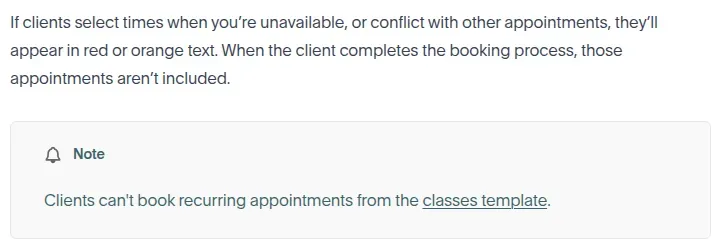
Acuity help text explaining that unavailable appointments are omitted from a recurring series.

Inside Acuity's recurring-booking guide, the paragraph that matters: conflicting dates are left out of the series, not flagged for later, so check the confirmed list before you tell a client their six weeks are booked. (Image source: Acuity Scheduling)

Acuity Scheduling pricing

From $16/month, billed annually, for the Starter plan; 7-day free trial, no permanent free plan.

  • Starter — $16/month, billed annually ($20 billed monthly) — intake forms, deposits and email reminders

  • Standard — $27/month, billed annually ($34 billed monthly) — packages and text reminders

3. Square Appointments: Best for booking plus in-person checkout

Square Appointments pros

  • Free plan with no monthly subscription fee

  • Scheduling, staff calendars, customer records and checkout in one system

  • Automatic email and text reminders

Square Appointments cons

  • Plus and Premium are charged per location, per month

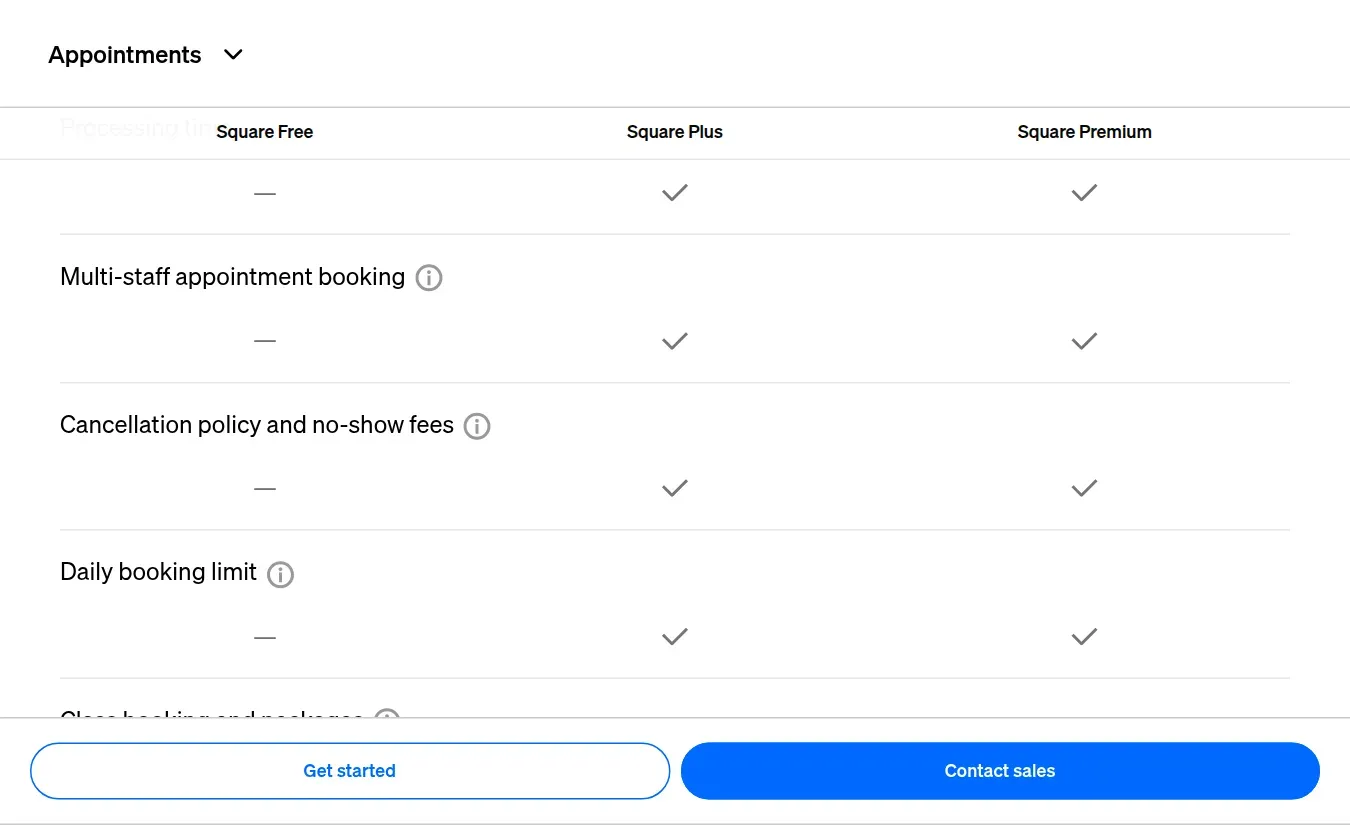
  • Multi-staff booking, no-show fees and Google Calendar sync start at Plus

  • Payment processing is charged on every transaction, Free plan included

Square Appointments is where I'd send a salon, studio or clinic that already takes payments at the counter, because the scheduler, the customer record and the checkout live in one system. You're not integrating a booking tool with a register; it's the same account.

The Free plan is the interesting part. For $0 a month you get online booking, automatic email and text reminders and payment-related booking options, with no subscription at all; what you pay is the processing fee on each transaction. Square's scheduling comparison is organized around what's gated, and the gates sit at Plus: multi-staff booking, cancellation and no-show fees, and Google Calendar sync. For a one-chair business that needs bookings to flow straight into the register, Free is a real option, not a demo.

The catch is the billing unit: Plus is charged per location.

What a two-site shop really pays

  • Plus, two locations → $98 a month before processing; multiplied out in the service-business scenario below, it's the most expensive line in that table

Skip Square if

  • all you need is a link for the occasional video call — a meeting-focused scheduler is the shorter route

The booking journey deserves a look too. u/yasonkh, a longtime Calendly user who tried Square, wrote:

Reddit
smallbusiness
Instead of doing everything within my site, it opens a new tab as soon as you select a service."

— u/yasonkh, r/smallbusiness

That's one business owner's setup, not a verdict on Square, but it's the reason I'd book through your own website during the trial rather than through the vendor's hosted page.

Square Appointments comparison showing multi-staff booking and no-show fees in Plus and Premium.

Inside Square's scheduling plan comparison, the columns run Free, Plus, Premium from left to right: multi-staff booking and no-show fees begin at Plus, so a two-stylist shop is a paid-plan shop. (Image source: Square)

Square Appointments pricing

From $49/location/month for the Plus plan; free plan available.

  • Free — no monthly fee; payment processing is charged separately on every plan

  • Plus — $49/location/month — multi-staff booking, no-show fees and Google Calendar sync

  • Premium — $149/location/month

  • Paid plans — 30-day trial

4. Setmore: Best for a small team that wants to start free

Setmore Connect calendar menu showing Pro badges beside Google and Microsoft integrations.

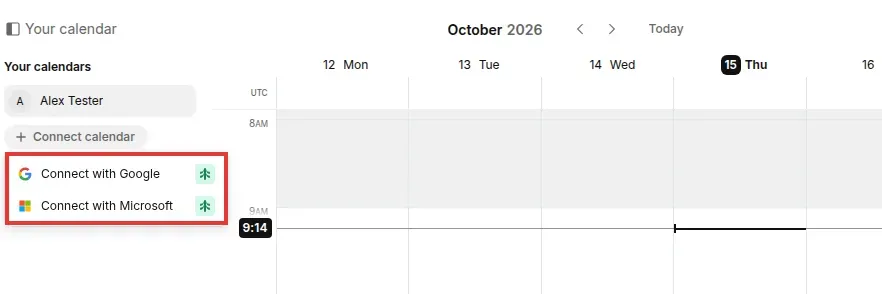
Inside Setmore, the Connect calendar menu on the Free plan puts a Pro badge on both Google and Microsoft, so nothing from your existing work calendar blocks time on the booking page until you upgrade. (Image source: Setmore)

Setmore pros

  • Up to four users and unlimited appointments on Free

  • Cancellation policy, lead time and slot size are configurable on Free

  • Customers reschedule or cancel online without creating an account

Setmore cons

  • Two-way Google and Outlook sync needs Pro

  • Text reminders, recurring appointments and branding removal are Pro

  • Invitees must enter a phone number by default

I set up a free Setmore account to see how much of a small team's workflow fits on $0, and the honest answer is most of the booking and none of the calendar sync. Free gives you up to four users, unlimited appointments, a hosted booking page, payment acceptance, and email confirmations and reminders. That's a different proposition from the one-host free plans elsewhere on this list.

Setup was quick. Editing a service is one form—title, duration, buffer, price, team member—and the booking preferences page lets you set lead time, scheduling window, slot size and a cancellation policy without paying for anything. Then I booked a test appointment through my own booking page: pick a date, pick a 15-minute slot, enter name, phone and email, confirm. About four clicks, no account needed, and the cancellation policy sits right above the Confirm button, which I'd want my clients to see. My small gripe is the last screen: the confirmation page upsells Setmore to the invitee, and the phone field is required by default. At this price I'd live with the first and switch off the second.

Calendar sync needs Pro

The catch is that Connect calendar menu: on Free, your existing Google or Outlook calendar doesn't sync, so a busy afternoon at work is still bookable on the public page.

What four people who already live in Google Calendar really pay per year

  • Pro, billed annually → $240 a year for four — the real starting point, with two-way sync, text reminders, recurring appointments, video appointments and branding removal

Skip Setmore Free if

  • everyone on your team has a busy calendar elsewhere

Take it if Setmore can be your calendar.

One workflow it didn't fit: an athletic trainer reviewing the iOS app in March 2025 (Barlowka, App Store) wrote:

"I can only have one person at a time book an appointment in each appointment slot."

They wanted six people at 1 p.m. and six more at 1:15 without building a class every 15 minutes.

If staggered group slots are your business, make that your first test.

Things I Noted — Setmore

"Unlimited appointments" and "check my existing calendar for conflicts" are different benefits, and Setmore's free tier is generous on the first and silent on the second. I didn't connect an external calendar, so my test covered the booking, not the sync. When you trial any scheduler, create a conflicting event in your work calendar as well as a new booking, and see which one the public page respects.

Setmore pricing

From $5/user/month, billed annually, for the Pro plan; free plan available.

5. SimplyBook.me: Best for a configurable multi-provider booking site

SimplyBook.me pros

  • Free plan: 50 bookings a month, one provider, one premium feature

  • Basic adds five providers, payments, deposits and POS

  • Email reminders on every plan

SimplyBook.me cons

  • Three separate quotas—bookings, providers, premium features—set your plan

  • SMS credits are sold separately, $8 per 100

  • The free subscription has to be renewed every month

SimplyBook.me is the one I'd pick if you want to build a booking website around several providers and a specific set of extras rather than a single link. Its pricing is unusually explicit about that: every plan has a booking limit, a provider limit and a count of premium custom features you're allowed to switch on at once.

Basic is where it gets useful: 100 bookings a month, five providers, three premium features, and the payment, deposit and point-of-sale options arrive here too. Standard ($24.90/month, billed annually, or $29.90 billed monthly) lifts that to 500 bookings, 15 providers and eight features. Email reminders come on every plan, which I appreciate; plenty of apps on this list make you pay for them.

The catch is that the quota you hit first is often not the one you planned for. A single practitioner with 60 bookings a month who wants four premium features running at the same time is already past Basic, even though 100 bookings looked like plenty. Count the features you'll actually switch on before you count appointments. Text reminders are credits on top, so a reminder-heavy business should price those too. If you want a plain link for sales calls, this is more website than you need; look at Calendly or Cal.com instead.

SimplyBook.me pricing

From $11.90/month, billed annually, for the Basic plan; free plan available.

  • Free — 50 bookings a month, one provider, one premium feature

  • Basic — $11.90/month, billed annually ($13.90 billed monthly) — 100 bookings, five providers and payments

  • SMS credits — $8 per 100, sold separately

6. Zoho Bookings: Best for teams already on Zoho CRM

Zoho Bookings pros

  • Round robin and collective booking from Basic

  • Bookings land on Zoho CRM leads and contacts

  • Zoho One customers get Bookings Premium

Zoho Bookings cons

  • Payments, routing forms and SMS gateway integration need Premium

  • Recurring individual and group bookings are Premium too

  • Resource bookings are separate add-ons

Zoho Bookings is the obvious pick if your contacts already live in Zoho CRM, or you're on Zoho One, where Bookings Premium comes with the bundle. The CRM connection gets deeper as you go up the tiers, and for a team that wants the booking on the contact record without a separate integration project, that's the whole argument.

What I like is where Zoho puts round robin. Basic includes unlimited event types, round-robin distribution and collective appointments. Calendly makes you buy Teams for the same job; the five-person-team row in the cost table below shows what that gap adds up to. Premium adds routing forms, payments, SMS gateway integration and recurring individual or group bookings.

The catch is that Basic's price buys unpaid calls only. The moment a consultation needs a deposit or a text reminder, you're on Premium, and SMS through a gateway still means paying your SMS provider for the messages. Resource bookings—rooms, equipment—are add-ons again. If you don't use Zoho CRM, I wouldn't pick Bookings on price alone: the low number assumes you already pay for the CRM, and you'd be mapping fields and routing rules in a suite you don't otherwise need.

Zoho Bookings pricing

From $6/user/month, billed annually, for the Basic plan; free plan available.

  • Free — one user

  • Basic — $6/user/month, billed annually ($8 billed monthly) — round robin and collective booking

  • Premium — $9/user/month, billed annually ($12 billed monthly) — payments, routing forms and SMS

7. Google Calendar appointment schedules: Best for a basic booking page you already own

Google Calendar appointment schedules pros

  • One booking page free with a personal Google Account

  • Lives inside the calendar you already check

  • Eligible Workspace plans add multiple schedules, reminders and multi-calendar checks

Google Calendar appointment schedules cons

  • Features depend on the exact subscription, not one upgrade

  • Payments come with eligible Workspace plans, not Google One

  • Co-hosts aren't round robin

Google Calendar is the right first stop if your schedule already lives there and all you need is one booking page. A personal Google Account or Workspace Business Starter gets you a single page for free, and for a lot of solo professionals that's the whole requirement.

The useful part is the upgrade path inside a subscription you may already pay for. Eligible paid plans add multiple appointment schedules, automatic email reminders and the ability to check several calendars for conflicts—which matters more than it sounds, because a work calendar that looks free while your personal calendar is busy is how double-bookings happen. Business Standard is one route, with a one-year commitment and monthly billing; it isn't the only one.

The catch is that "premium appointment scheduling" isn't one feature bundle: some of it reaches Google One plans, and payment acceptance is reserved for eligible Workspace plans.

Check your actual tier before assuming it takes money or adds co-hosts. And co-hosts aren't round robin: adding people to a schedule doesn't distribute leads among them.

Skip Google Calendar if

  • you run a sales team — don't come here for distribution

If you're a solo consultant already on Business Standard, you may not need another scheduler at all. u/ComparisonSolid770, who had switched entirely from Calendly, put it this way:

Reddit
smallbusiness
Been working great for me and one less tool to pay for!"

— u/ComparisonSolid770, r/smallbusiness

They weren't sure which Google subscription had unlocked the features, which is exactly the tier check above, and I think the instinct is right.

Google Calendar appointment schedules pricing

From $14/user/month with a one-year commitment, billed monthly, for Workspace Business Standard; free for one booking page.

  • Free — one booking page with a personal Google Account

  • Eligible paid plans — more schedules, reminders and multi-calendar checks

  • Business Standard — $14/user/month, one-year commitment, billed monthly — one eligible plan, not the only one

8. Microsoft Bookings: Best for unpaid appointments inside Microsoft 365

Microsoft Bookings pros

  • Included in eligible Microsoft 365 licenses, Business Basic among them

  • Services, staff, booking policies and a customer-facing page

  • Customers don't need a Microsoft account to book

Microsoft Bookings cons

  • No payment support at all

  • "Any available staff member" assigns at random, not evenly

  • Your administrator has to make it available

Microsoft Bookings is the free-with-what-you-have option for a Microsoft 365 business that schedules consultations, support sessions or anything else nobody pays for at booking. You get services, staff, booking policies and a public page, and customers book without a Microsoft account.

The number that matters is $0 on top of an eligible license. Business Basic with Teams works out to $84 a year per user, paid yearly, and Bookings comes with it, so a ten-person firm already on Microsoft 365 has a scheduler before it finishes reading this card. For an accountant's intake calls or an internal IT help desk, I'd try it before buying anything.

No payments at booking

The catch is money and fairness. Microsoft's own FAQ says Bookings has no payment support, so deposits and prepaid sessions are off the table.

And when a customer picks "any available staff member," Bookings assigns at random, and Microsoft says it can't guarantee equal distribution. If you need leads spread evenly across reps, this isn't round robin; look at Calendly Teams, Zoho Basic or Cal.com Teams. If you need to charge at booking, look at Acuity or Square.

Things I Noted — Microsoft Bookings

Before you plan a migration around a license you already own, make sure your organization's administrator has made Bookings available. It's switched on for the organization, not by you, and finding that out after you've told clients about the new booking page is the wrong order.

Microsoft Bookings pricing

From $7/user/month, paid yearly, for Business Basic with Teams; included in eligible Microsoft 365 licenses.

  • Eligible Microsoft 365 licenses — Bookings included, no separate Bookings subscription

  • Business Basic with Teams — $7/user/month, paid yearly — one eligible license

9. Cal.com: Best for a solo user with several event types

Cal.com Add a new link dialog with Round robin and Collective team meeting types highlighted.

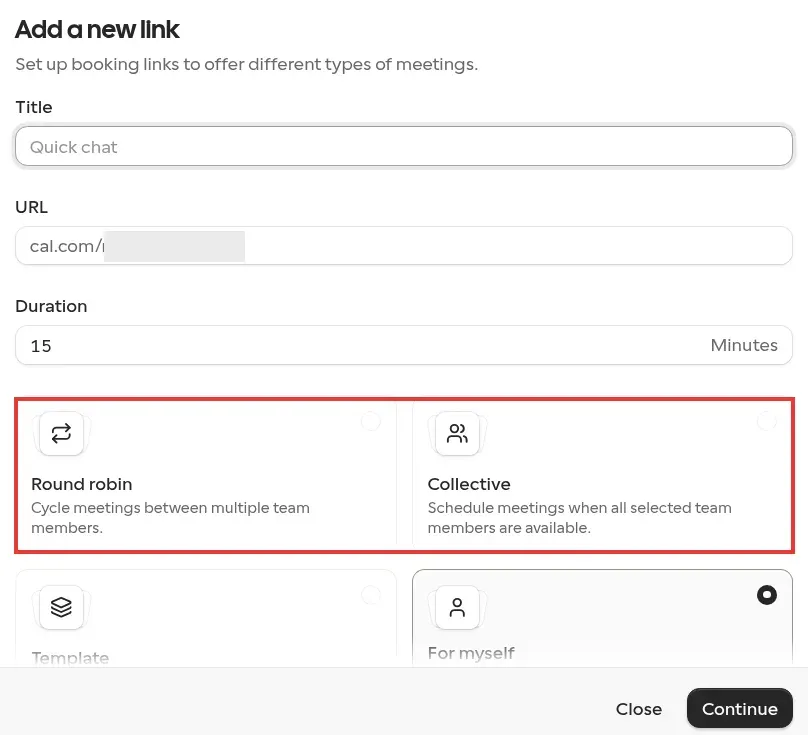
Inside Cal.com, the new-link dialog on a free account opens with "For myself" selected; Round robin and Collective are team types, and you'll need a Teams seat before either becomes an option. (Image source: Cal.com)

Cal.com pros

  • Unlimited event types and unlimited connected calendars on Free

  • Stripe and PayPal payments on the free plan

  • Teams adds round robin, routing forms and recurring events

Cal.com cons

  • Free is one user; team features need paid seats

  • SMS isn't a workflow action on Free; the help page puts SMS reminders on purchased credits

  • Branding removal is Teams

Cal.com has the most generous free plan on this list for one person: unlimited event types, unlimited connected calendars, and Stripe and PayPal payments, all on the Individuals plan at $0. When I opened the new-link dialog on the free plan, "For myself" was the only type I could pick; Round robin, Collective and Template sit right there with an Upgrade label. Where Calendly Free stops at one event type and one calendar, Cal.com doesn't count either.

I booked a 15-minute test slot on my own Cal.com page as a guest: pick a day, pick a slot, name and email, Confirm. The invite with an .ics file arrived about three minutes later, Cal Video was the default location, and the confirmation page didn't try to sell my guest anything. That makes it my default answer for a freelancer who sells a free intro call and a paid hour and has a personal calendar, a work calendar and a client's shared calendar to keep clear. Teams—$144 a year per seat, billed annually, with a 14-day trial—is where the team features live: round robin, shared availability, collective and managed event types, recurring events, routing forms and branding removal. Organizations adds sub-teams and company-wide controls.

My one gripe is the Workflows page. It lists a "Send SMS reminder" template, but when I set up a reminder workflow on the free plan, the action menu offered email to the host, the attendees or a specific address, and no SMS option at all; the help page puts SMS reminders on credits you buy.

The catch is that the generous solo plan doesn't make team scheduling free: the Teams page on my free account is one upgrade wall listing routing, round robin and branding removal as Teams and Orgs features. If three of you need distribution, you're on Teams, which puts Cal.com next to Zoho Basic rather than next to free. Don't buy Teams until you know which members actually host and how meetings should be assigned. For a solo consultant, this is the plan I'd start on and possibly never leave.

Cal.com pricing

From $12/user/month, billed annually, for the Teams plan; free plan available.

  • Free (Individuals) — free forever for one user, unlimited event types and calendars

  • Teams — $12/user/month, billed annually, 14-day trial — round robin and routing forms

  • Organizations — $28/user/month, billed annually — sub-teams and company-wide controls

What the same three setups cost per year

I priced three real setups on the plans each app offers for them, using the annual-billing rates above. Only configurations that cover every listed requirement are in the table; subscription fees exclude tax and payment processing. These are list prices multiplied out, not quotes.

  • Solo consultant: several meeting types, two external calendars checked for conflicts, online payment.

  • Five-person team: meetings distributed among five hosts, email reminders, a CRM connection.

  • Service business: four specialists (two at each of two locations), deposits, text and email reminders.

SetupApp and planCost per yearRequired extrasLimits and conditions
Solo consultantCal.com Individuals$0Stripe or PayPal feesSMS reminders aren't a free workflow action; the help page puts them on purchased credits
Solo consultantZoho Bookings Premium$108Payment processor fees; SMS gateway provider chargesPayments start at Premium; Basic ($72) does not take payment
Solo consultantCalendly Standard$120Stripe or PayPal feesSix calendar connections; one seat
Solo consultantGoogle Workspace Business Standard$168Payment processor feesA full Workspace subscription, not a scheduler-only plan; one-year commitment
Five-person teamZoho Bookings Basic$360Zoho CRM subscription if you do not have oneRound robin and collective booking; two calendar sync connections on Basic; payments need Premium
Five-person teamCalendly Teams$960None for the scheduler itselfSalesforce is the CRM connection on Teams; $192 per seat
Service businessAcuity Standard$324Payment processor feesSix calendars included: four specialists fit; adding more staff or location calendars can require Premium ($660)
Service businessSquare Plus (2 locations)$1,176Payment processing on each transaction$49 per location per month; Google Calendar sync, no-show fees, and multi-staff booking start at Plus

The solo column is the one that surprised me. Cal.com does the whole job for $0, Calendly wants $120 for the same three requirements, and the Google route costs $168 because you're buying a Workspace seat, not a scheduler—fine if you'd pay for Workspace anyway, silly if you wouldn't. I'd start a solo practice on Cal.com and move only when a client asks for something it can't do.

For the five-person team, the $600 gap between Zoho Basic and Calendly Teams is really a question about your CRM. Zoho's $360 assumes you already pay for Zoho CRM; if you don't, you're adding a CRM to save on a scheduler, which is backwards. If your CRM is Salesforce, Calendly's $960 is the honest number and it buys the better routing.

The service business shows the billing unit at work. Acuity's $324 comes from a calendar allowance—six schedules, four specialists, room to spare—while Square's $1,176 comes from two locations at $49 each per month. I wouldn't call Square overpriced for a shop that runs its register through it, but if checkout already lives elsewhere, Acuity does the booking side for a quarter of the money.

Four apps are missing from the table because I couldn't confirm a required item from their pages: Setmore (external calendar count, round robin, locations), SimplyBook.me (whether a second location uses a feature slot), Cal.com Teams (CRM connection) and Microsoft Bookings (no payments).

Check your existing stack first

Before you add a scheduler subscription, look at what your current tools already do.

  • Google Workspace: one free booking page on personal accounts and Business Starter; eligible paid tiers add multiple schedules, reminders and multi-calendar checks. Details in card 7.

  • Microsoft 365: Bookings comes with eligible licenses and handles services, staff and policies—but no payments. Card 8.

  • HubSpot: the meetings tool is part of Sales Hub, and the free scheduler page lists multiple meeting lengths and group meeting links. The page doesn't say which edition adds round robin or team booking, so settle that for your seats before you rely on it.

  • Pipedrive: the Scheduler needs the Growth plan or higher, and Growth allows one general-availability link. Pipedrive's round robin lives in Automatic assignment (Professional and up) and distributes deals and leads, not meeting bookings.

A scheduler built into the CRM you already pay for keeps the booking on the contact record without another subscription. It rarely matches a dedicated tool on intake forms, deposits or recurring series, so use this list for meetings and the cards above for services.

Recurring appointments deserve their own test

Recurring availability, repeated client bookings and prepaid packages solve three different problems. Having a slot open every Tuesday doesn't mean a client can reserve the next eight Tuesdays in one action, and selling a package doesn't schedule its sessions. The Calendly Community thread quoted in the Acuity card is what that gap costs in practice: a personal-calendar hold, released and rebooked by hand, every week.

If recurring services are your business, make the full series your trial case: book one with a known conflict, check which dates survive, try mixing two service types, and cancel one occurrence to see what happens to the rest. A tool that's perfect for occasional sales calls can still cost you an hour a week here.

Which appointment scheduling app should you choose?

Your scenarioMy pickWhat decides it
Solo work with several meeting types and calendarsCal.comStart with the free plan.
One booking page, already using Google CalendarGoogle Calendar appointment schedulesUse the appointment schedule you already own.
Paid sessions with intake forms, deposits and packagesAcuity SchedulingStart on Standard if packages are the point.
Appointments plus an in-person registerSquare AppointmentsPrice it per location before committing.
A booking website with extras for several providersSimplyBook.meCount the premium features you need first.
A small team using Setmore as its calendarSetmore FreeIf everyone has a busy calendar elsewhere, budget for Setmore Pro or consider Cal.com Teams.
Inbound sales calls distributed across a teamCalendly Teams or Zoho Bookings BasicZoho is the lower-cost option if your CRM is already Zoho.
Unpaid appointments inside Microsoft 365Microsoft BookingsTry the scheduler included with your existing subscription before buying another.

Two checks fall out of the user threads quoted above: count the steps a customer takes to finish a booking on your site, and look at what the subscriptions you already pay for include before adding a new one. The right upgrade is the one that removes a specific obstacle in your workflow. Write that obstacle down before you compare prices.

Acuity Scheduling lets the client pick a recurring series at booking, drops any conflicting dates from the series, and can't mix appointment types. Zoho Bookings lists recurring individual and group bookings on Premium, Cal.com lists recurring events on Teams, and Setmore lists recurring appointments on Pro. For those three, the plan pages don't say whether the client or the host builds the series, so run that exact booking in the trial.

Try Linked Helper free for 14 days

The most technically advanced platform for LinkedIn automation with a focus on security, a wide range of features, and exceptional customer support. Trusted by over 10,000 businesses worldwide.