

 16 min read

Pricing pages and help articles show where these plans split on billing; user reviews and Reddit discussions surface setup friction that a rate card misses.
TL;DR: Call Tracking Software in November 2026
These five picks for call tracking software cover local attribution, agency lead reporting, call handling, usage-based pricing, and revenue attribution.
- Best for a small team that wants a familiar call-attribution workflow: CallRail. Its Lead Tracking plan starts at $50 per month with annual billing or $55 month to month, with five local numbers and 250 minutes; local overage is $0.06 per minute.
- Best for agencies comparing calls with forms and other leads: WhatConverts. Its $30 monthly individual plan includes a $30 usage credit; richer reporting and call flows sit on higher plans.
- Best for teams that need call handling as well as attribution: CallTrackingMetrics (CTM). Its Marketing Pro plan adds routing and marketing integrations, while Sales Engage is the tier for agent-oriented tools.
- Best for pay-per-answered-call pricing: Nimbata. It combines a $0 subscription with usage charges; Entry has one call flow but no DNI.
- Best for teams joining call data to broader revenue attribution: Ruler Analytics. Its pricing starts at $400 per month or $360 per month on annual billing, and the cost of a connected call-tracking service may be separate.
What is call tracking software?
Call tracking software assigns unique numbers to marketing sources or uses dynamic number insertion (DNI) to show a visitor a source-specific number; when someone calls, it logs the source and call details. Some tools also record or transcribe calls, score leads, route callers, or send outcomes to advertising and CRM reports. Those features aren't bundled alike, so two starter prices can buy different setups.
Call tracking software at a glance: fit, billing, and limits
Call tracking software uses different meters: Nimbata charges per answered call, Ruler prices by website-traffic tier, and other plans combine subscriptions, numbers, and minutes. CallRail covers local attribution, WhatConverts combines lead types, CTM handles live calls, and Ruler connects calls to revenue attribution. The table compares their billing units and key limits.
| Tool | Best fit | Main billing meter | Watch for |
|---|---|---|---|
| CallRail | Local-service marketing teams | Subscription plus usage | Usage after included local minutes; confirm CRM-routing fit |
| WhatConverts | Agencies reporting calls and other lead types | Subscription plus monthly usage credit | Which report and workflow features require Pro or Elite |
| CallTrackingMetrics | Marketing and sales teams with routing needs | Subscription plus numbers and minutes | Paid balance is required for usage; this is not a no-card trial |
| Nimbata | Teams that prefer answered-call pricing | Subscription plus number and answered-call charges | Free Entry has no DNI; average calls over 3.5 minutes can trigger a fair-use adjustment |
| Ruler Analytics | Revenue teams using multi-touch attribution | Website-traffic tier and phone tracking | Current public pricing does not quantify number or minute allowances |
What makes the best call tracking software?
Choose call tracking software by checking attribution coverage, spam prevention, lead qualification, live call operations, reporting and integrations, cost at your expected workload, and setup and support risk.
- Attribution coverage: do you need source-level tracking or visitor-level dynamic number insertion (DNI)? Check how it'll connect repeat interactions, too.
- Spam prevention: Check whether the service screens, blocks, or challenges unwanted callers. Then find out what happens if a rule catches a legitimate caller and whether each check is billed.
- Lead qualification: can you distinguish raw calls from qualified leads, sales value, or scored conversations? Check which plan you'll need.
- Live call operations: compare forwarding, IVR, routing, recording, transcription, and agent tools. You'll need to look past a shared label such as “routing” to the workflow it includes.
- Reporting and integrations: check what's included in each plan and what you can send to ads, analytics, or a CRM.
- Cost at a defined workload: add the annual subscription to published number, minute, answered-call, website-traffic, and transcription charges (including the allowances and billing conditions).
- Setup and support risk: read the setup guidance and look for recurring issues in accessible user reviews. Check how recent the reviews are and how many you've got.
I assess spam prevention, lead qualification, and live routing separately. Blocking a robocall before it rings won't qualify a lead for you. Scoring a finished call and sending a live caller to the right rep are different jobs, too.
1. CallRail call tracking software: Best for straightforward local-service attribution
I like CallRail for local-service attribution, where five local numbers and call handling sit in one plan. Its pricing page lists Lead Tracking at $50 per month with annual billing or $55 month to month, including 250 local minutes. The 14-day trial doesn't require a card.
Pros — CallRail call tracking software
- Five local numbers and 250 local minutes cover light campaigns; the page lists $0.06 per extra local minute, including transcription.
- Recording, call flows, and screening for common robocall patterns are included. You'll need Premium Conversation Intelligence or Voice Assist for lead scoring.
- The 14-day window gives you time to assess whether the workflow fits a small campaign before adding business lines.
Cons — CallRail call tracking software
- The five-person scenario exceeds the included minutes, so the total depends on usage and CRM-routing costs.
- CallRail lists the yearly price as a monthly equivalent, while its annual base fee is due upfront; usage is billed monthly.
- Geo/Responsive Routing is a $15-per-company add-on, and Voice Assist calls can count toward usage even when a spam caller reaches it.
The five-number allowance is a useful starting point for a small local-service campaign; a Capterra administrator review dated February 25, 2026, says costs can grow across campaigns. A Trustpilot reviewer updated August 15 alleged cancellation and refund friction; CallRail disputed the complaint and said it couldn't locate the account. CallRail suits a few local lines; confirm the CRM handoff and number-transfer terms before moving a larger campaign.
Product pricing — CallRail call tracking software
Lead Tracking is $50/month effective with annual billing or $55 month to month; five local numbers and 250 minutes are included, then local minutes cost $0.06 each. Trial: 14 days, no card.
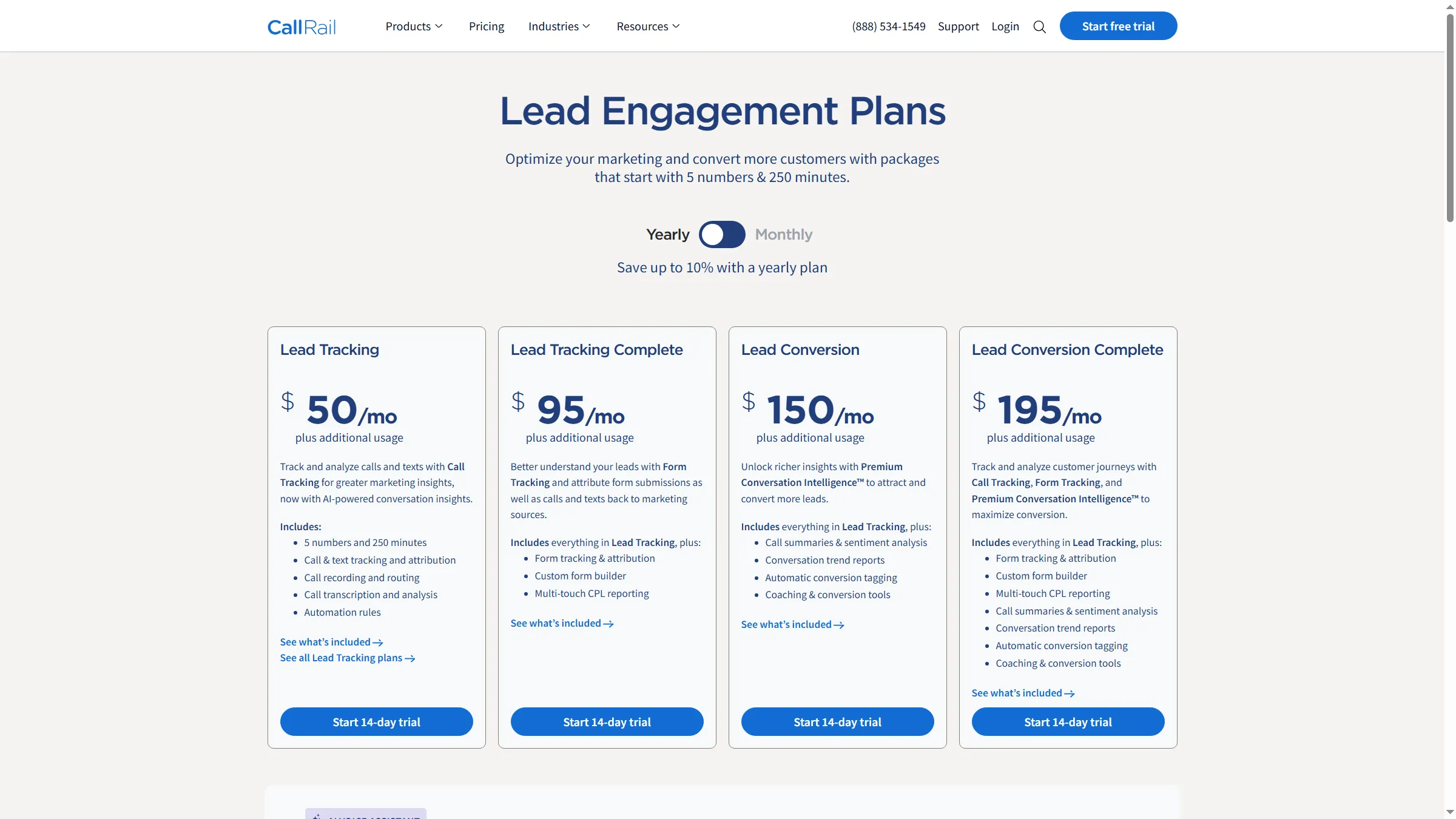
CallRail's annual pricing separates the base subscription from additional usage.
2. WhatConverts call tracking software: Best for agencies comparing calls with other lead types
WhatConverts puts calls, forms, chats, and sales value in one lead report. I prefer it when an agency needs those lead types in one view. Pro adds call flows and report building; Elite adds customer-journey reporting and lead-qualification rules. Reddit user u/stjduke objected to five touchpoints appearing as five leads: “That's not 5 leads to me. That's 1 lead with 5 touch points.” WhatConverts now groups leads into unique and repeat categories. Check those filters against the reports you need. I'd skip Pro or Elite if call logging is your only requirement.
Pros — WhatConverts call tracking software
- The monthly credit offsets eligible usage. If you're running a light account, the Call Tracking plan can cost less than a straight subscription-plus-usage calculation suggests.
- Plus adds forms and chat alongside calls. You can move to Pro and Elite for deeper reporting and qualification controls.
- Customer Journey can join a contact's conversions by email or phone, and you can distinguish unique and repeat leads in the dashboard.
Cons — WhatConverts call tracking software
- You can't get every workflow on the entry plan. Call flows and the report builder require Pro, while Lead Intelligence rules require Elite.
- Spam Challenge can make selected callers press 1 to continue (including legitimate callers). Use it only if you're comfortable losing callers who won't complete the challenge.
- WhatConverts' public setup guide lists a credit card requirement, but its numbered signup steps show no payment step. The trial's payment terms conflict within the guide.
Product pricing — WhatConverts call tracking software
Individual plans are $30, $60, $100, and $160/month, each with a $30 monthly usage credit (eligible overages are deducted from that credit first). The setup guide lists a card requirement for the trial.
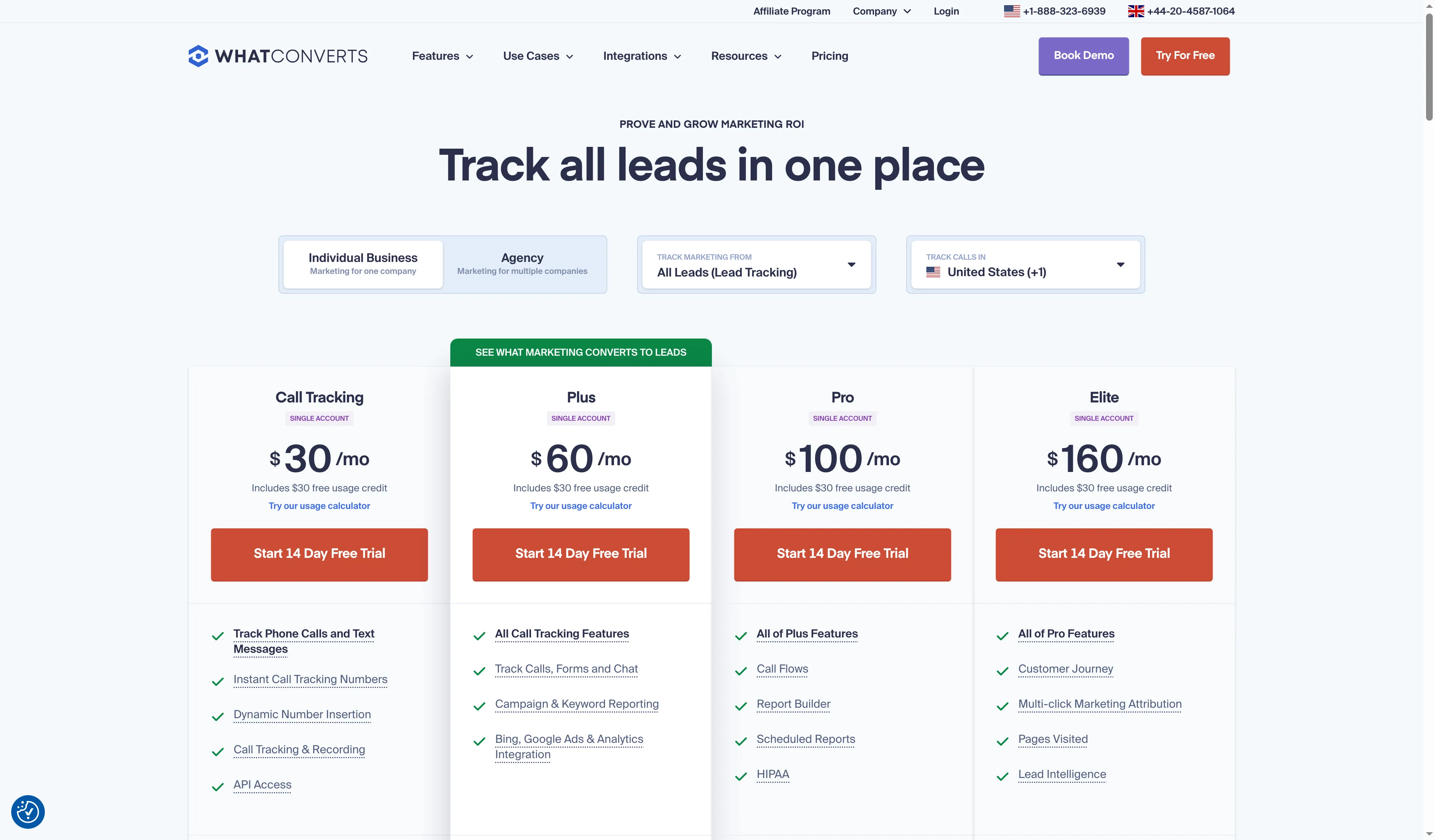
All four WhatConverts individual-business tiers show a monthly usage credit; report-building features sit on higher tiers.
3. CallTrackingMetrics call tracking software: Best for combining marketing attribution with call handling
CTM suits teams that need configurable phone workflows, such as skills-based routing, softphone calls, or coaching. Marketing Lite starts at $65/month and Marketing Pro at $149/month with annual billing, plus numbers and minutes. Sales Engage adds agent tools.
Pros — CallTrackingMetrics call tracking software
- Marketing Pro includes unlimited users, call flows, automation triggers, HubSpot, and API access. You'll pay $0.01 per question for AskAI.
- With Sales Engage, your team can handle calls inside the platform using softphone, skills and weighted routing, Salesforce, and coaching tools.
- You get standard recording, and Spam Detective costs $0.01 per lookup. Skills-based routing requires Sales Engage.
Cons — CallTrackingMetrics call tracking software
- You'll pay for numbers and minutes on top of the subscription, so budget beyond the headline price.
- You still pay usage during the first month's subscription waiver. You'll need a funded balance backed by a payment method to sign up.
- Julia M. reported occasional audio loss when switching between browser and phone in a five-star Capterra review dated November 11, 2026. That's worth checking if your reps switch devices mid-call.
I prefer CTM for teams that need to track the campaign and manage the call. If you're only attributing calls before forwarding them to an existing phone system, you may end up paying for a broader package and spending more time on setup than you need.
Product pricing — CallTrackingMetrics call tracking software
Marketing Lite is $79/month or $65/month effective with annual billing. Marketing Pro is $179/month or $149/month effective annually. Add numbers, minutes, and any paid balance requirements.
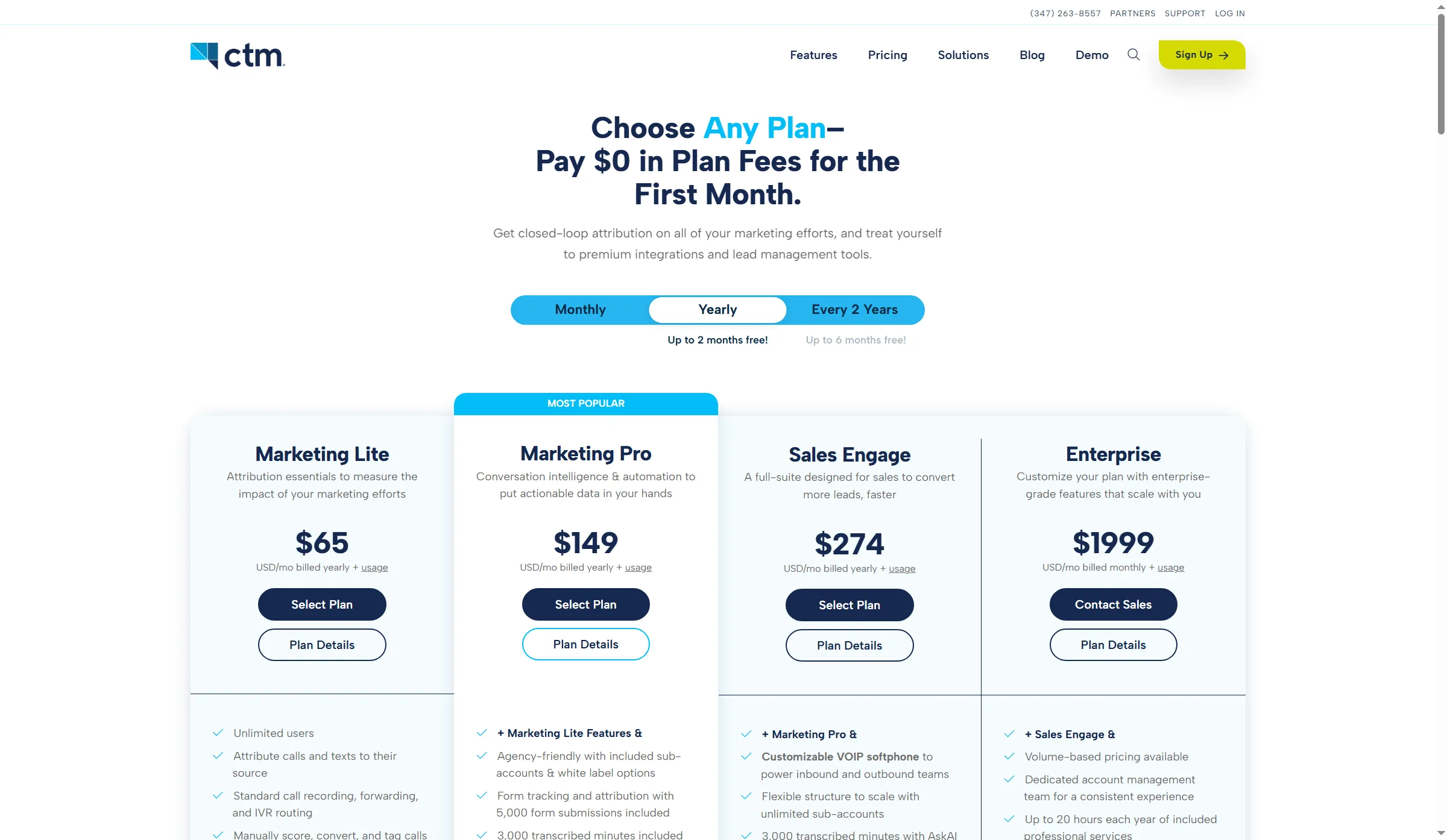
CTM separates marketing attribution plans from its sales and enterprise tiers, with usage billed on top.
4. Nimbata call tracking software: Best for teams that prefer per-answered-call usage
Nimbata lets marketers budget around answered calls instead of call duration. Entry costs $0 plus usage, while Pro, Marketing, and Agency start at $35, $80, and $120 per month on the displayed annual rates; numbers and answered calls cost extra. Pro adds AI tagging, scoring, unlimited call flows, and DNI; Entry includes one call flow and a spam filter.
Pros — Nimbata call tracking software
- You can price US local numbers at $1.60–$4.60/month and answered calls at $0.03–$0.10 each, depending on your plan.
- Marketing includes 25 seats and five projects. Your five-person team won't need extra seat charges within that allowance.
- You can try Agency features for 14 days without a card, with a cap of two tracking numbers and 50 answered calls.
Cons — Nimbata call tracking software
- You don't get DNI on Entry. The free base subscription will only suit you if source-level tracking is enough.
- Long calls can change the economics: Nimbata may apply a fair-use adjustment when average duration exceeds 3.5 minutes per destination.
- You can block specific numbers on every plan, but you'll need higher tiers for caller-ID prefix filtering and greeting/keypad screening. Transcription adds $0.02/minute, and call-start flow events add $0.01 per call.
Nimbata is my pick for short campaigns with predictable call lengths. If you need DNI, start with Pro rather than Entry; I'd price long calls before choosing a per-call plan.
Product pricing — Nimbata call tracking software
Entry is $0/month plus usage. Pro, Marketing, and Agency are $35, $80, and $120/month effective with annual billing, plus usage and applicable add-ons. Trial: 14 days, no card, capped at two numbers and 50 answered calls.
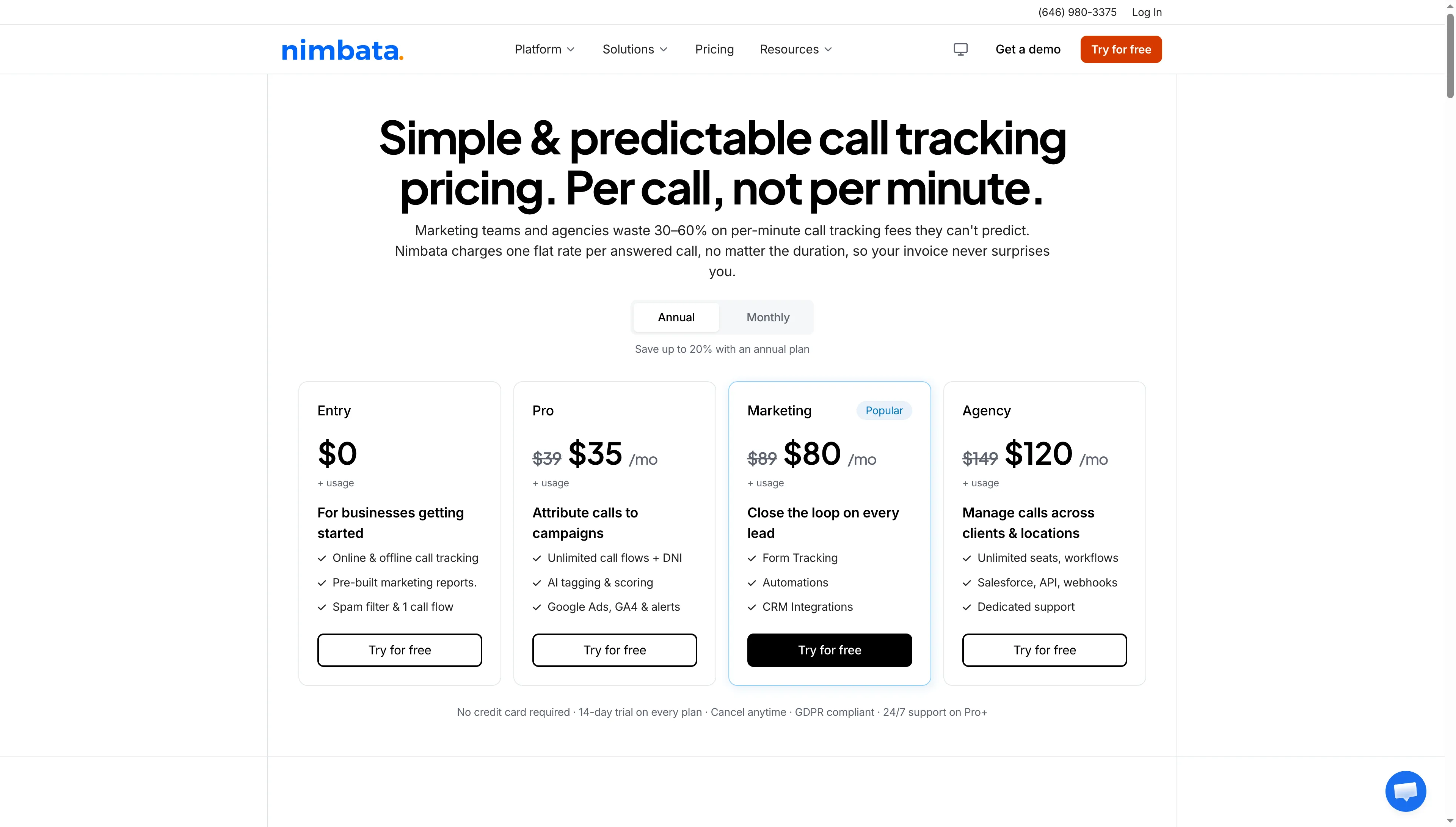
Nimbata lists subscription tiers separately from usage charges.
5. Ruler Analytics call tracking software: Best for broader revenue attribution that includes calls
Ruler combines phone tracking with broader marketing attribution so you can connect call outcomes to revenue. Its public Small plan costs $400/month or $360/month on annual billing for up to 10,000 website visits. But you won't find a number or minute allowance on the current pricing page.
Pros — Ruler Analytics call tracking software
- You can connect call events with other marketing touchpoints and revenue attribution, going beyond the questions you can answer from calls alone.
- You can use the public website-traffic tiers to gauge scale before requesting a quote.
Cons — Ruler Analytics call tracking software
- You'll pay $4,320 per year for the smallest displayed tier at the annual rate, without a stated phone-number or call-minute allowance on the current pricing page.
- Old 2018–2019 help pages mention bundled phone tracking, but the current rate card doesn't specify number or minute allowances.
- You'll need the quote to specify call allowances, spam screening, post-call qualification, and live routing.
I like Ruler for tracing pipeline or revenue back to marketing across channels. If you care more about call handling than revenue attribution, I'd compare a call-first platform instead.
Product pricing — Ruler Analytics call tracking software
Small is $400/month or $360/month effective with annual billing, for up to 10,000 site visits. The current pricing page doesn't list phone-number or minute allowances.
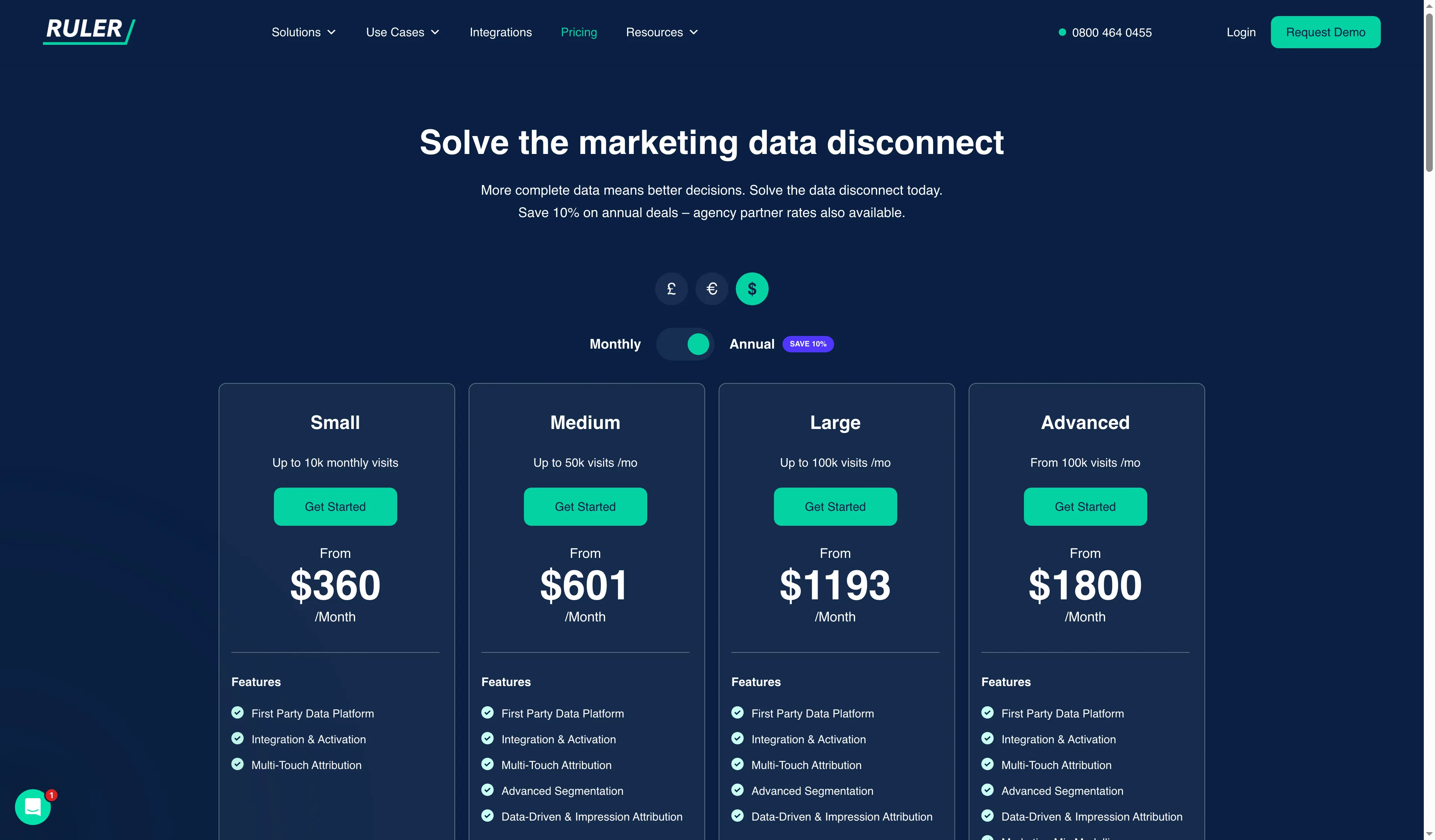
Ruler prices its plans by monthly website-visit tier, with annual rates selected.
Quick picks
Call tracking software buyers can start with CallRail for local-service campaigns. If you're an agency combining lead types, compare WhatConverts. Teams routing calls should price CTM, short-call marketers should price Nimbata, and revenue teams should evaluate Ruler.
| Scenario | Tool | Why it fits | Main limitation |
|---|---|---|---|
| Local-service marketer starting with a few numbers | CallRail | Five-number allowance at the displayed entry price | Confirm billing basis and conflicting overage rates |
| Agency reporting calls, forms, and sales value | WhatConverts | One lead-reporting view with monthly usage credits | Report builder and lead rules require higher tiers |
| Team answering and routing calls in the platform | CTM | Sales Engage adds softphone, skills routing, and coaching | Numbers and minutes are billed separately |
| Short-call campaigns with a predictable answer count | Nimbata | Per-answered-call rates are published by plan | DNI starts above Entry, and long calls can trigger fair-use adjustment |
| Revenue team joining calls to multi-touch attribution | Ruler Analytics | Broader cross-channel revenue view | Current public price does not quantify the call allowance |
What call tracking software costs for three workloads
Annual cost depends on call volume and billing unit. The table compares call tracking software costs for three defined workloads across all five products.
| Call tracking software scenario and assumptions | CallRail | WhatConverts | CTM | Nimbata | Ruler |
|---|---|---|---|---|---|
| Solo: 1 number, 100 answered calls × 2 min/month. | $600/year: $50/mo annual equivalent; 200 minutes fit the included allowance. | $360/year; eligible $11.50 usage is covered by the monthly credit. | $900/year: $65/mo + $2 number + $8 minutes. | $175.20/year: $4.60 number + $10 calls/mo; no DNI. | $4,320/year; phone capacity is unlisted. |
| Five-person team: 5 numbers, 500 calls × 2 min/month; CRM reporting. | $1,140/year: $50/mo + 750 extra minutes at the listed local rate; CRM routing costs are unconfirmed. | $1,050/year: $60/mo + $27.50 over credit. | $2,388/year: $149 + $10 numbers + $40 minutes/mo. | $1,338/year: $80 + $11.50 numbers + $20 calls/mo. | $4,320/year up to 10,000 visits; phone capacity is unlisted. |
| Three locations: 3 numbers, 300 calls × 5 min/month; transcription and spam checks. | $2,700/year: $150/mo Lead Conversion + 1,250 extra minutes at the listed local rate; subject to CRM and spam-workflow fit. | $2,820/year on Elite, after $30 credit; includes Lead Intelligence. | $2,616/year before transcription; 1,500 minutes need plan confirmation. | $1,546.80/year before fair-use adjustment; includes $30 transcription/mo. | $4,320/year base; phone and add-on allowances need confirmation. |
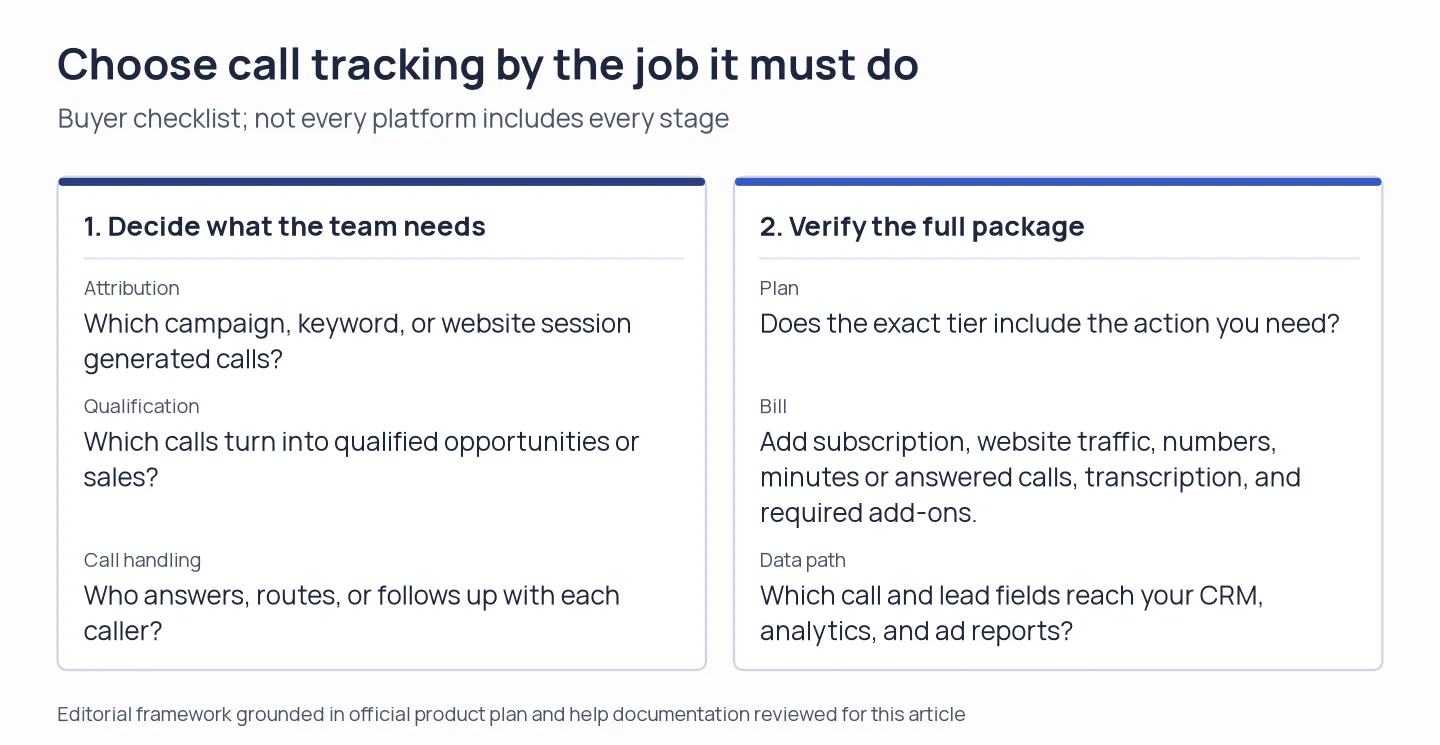
Start with the decision the team needs the software to make; a plan name alone does not show the full workflow or bill.
Check your existing stack before paying for another tool
Check which features of call tracking software you're already paying for before adding a dedicated tracker. Your existing tools may report ad calls, log CRM conversations, or route callers, though you'll still need to check whether they include visitor-level attribution across campaigns.
| Existing tool | What it can already do | Where a dedicated tracker may still help |
|---|---|---|
| Google Ads | Call reporting uses Google forwarding numbers on call and location assets, routes calls to your business number, and reports call details and duration. | Google’s reporting is tied to its ads; compare it with website-session DNI and other channels before replacing it with a broader tracker. |
| HubSpot | The CRM call index can show inbound and outbound calls, including calls made through third-party providers. | Check your hub/seat and telephony setup before expecting call attribution, transcription, or call handling to match a dedicated platform. |
| Pipedrive | You can call through marketplace apps and log completed calls in CRM records. | Pipedrive says it does not offer built-in calling; the calling provider remains a separate integration. |
| Microsoft Teams | Teams Phone queues include caller routing and real-time or historical queue reporting. | Queue and agent reporting does not by itself attribute a website visitor or ad campaign to a call. |
If you've already got routing or call logs, only pay for call tracking when you need something your setup lacks, such as cross-channel source attribution, call scoring, number pools, or exportable call outcomes. If LinkedIn is one of your channels, Linked Helper's Post Booster can bring selected people into the conversation around a LinkedIn post before direct outreach.