

 14 min read
I compared official product pages and pricing with current G2, Capterra, and Trustpilot feedback and search results. Account-verification and workspace-setup requirements limited authenticated workflows; I did not configure a live bot or score answer accuracy.
TL;DR
- Tidio combines website chat, automation, and Lyro AI, but AI conversations and human-handled conversations have separate limits.
- Crisp prices its shared inbox by workspace and includes a small monthly pool of Hugo AI credits.
- Botpress gives teams a flexible builder and a free starting tier. It takes more setup than adding an agent to an existing helpdesk.
- Intercom Fin charges per eligible AI outcome on top of support seats, so budget for both.
- Zendesk AI fits teams already operating Zendesk Suite and needing a support platform around the bot.
- Freshdesk Freddy AI Agent has a low annual seat price and an included session pool, but sessions aren’t resolved cases.
- Gorgias AI Agent is built around ecommerce support, with ticket-volume and automated-interaction meters.
What is chatbot software?
Chatbot software such as Tidio, Crisp, Botpress, and Intercom lets a business answer customer questions through a website or messaging channel, either with scripted flows, an AI agent, or both. Business tools also connect answers to a helpdesk or inbox, route requests to people, and measure usage. The underlying billing unit can be a conversation, session, credit, or successful outcome, and you can’t treat those units as interchangeable.
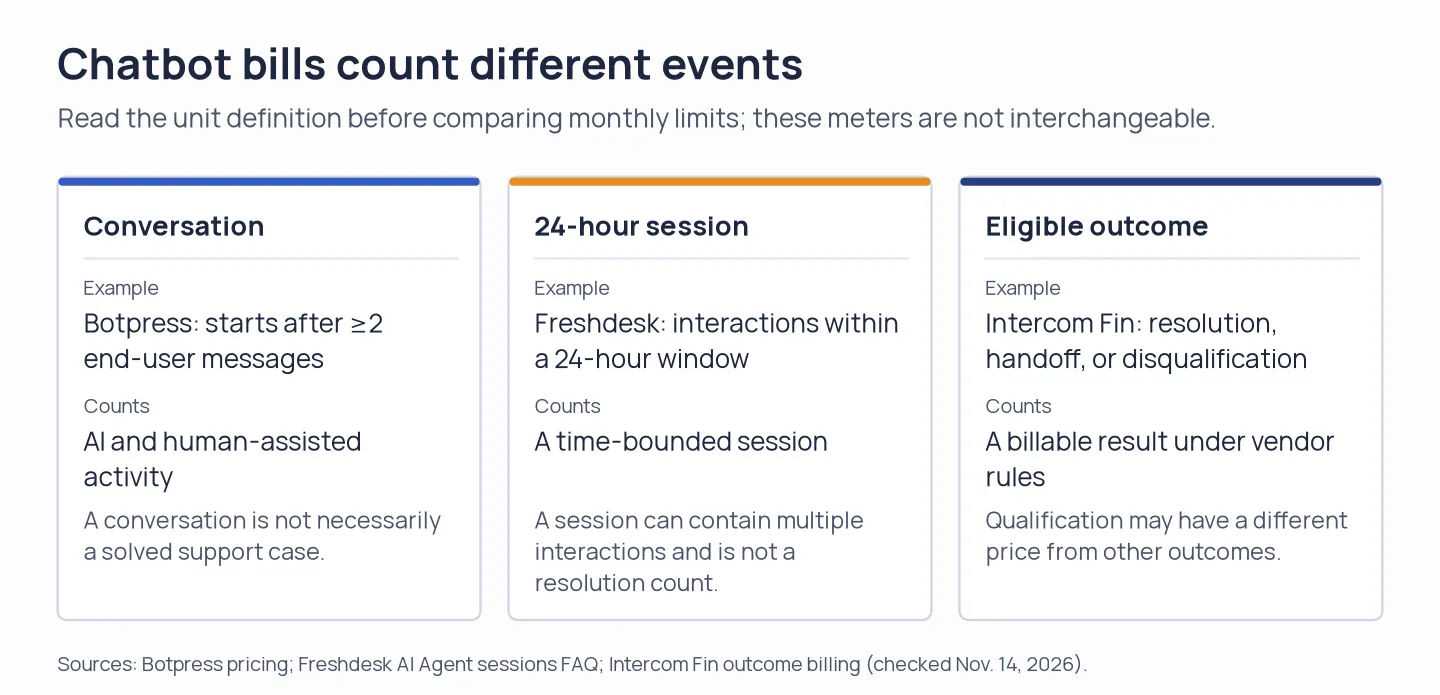
Check what each vendor counts before comparing chatbot usage limits.
At a glance
Tidio and Crisp cover website chat. Botpress builds custom agents, while Intercom, Zendesk, Freshdesk, and Gorgias add AI to support workflows.
| Tool | Best fit | Pricing shape | Main trade-off |
|---|---|---|---|
| Tidio / Lyro | Website chat plus optional AI | Inbox plan + separate AI allowance | Multiple conversation meters |
| Crisp | Shared inbox with predictable seats | Flat workspace price + AI credits | Credits cap AI usage |
| Botpress | Custom bot and agent building | Free tier, then plan + usage | More configuration. Usage can trigger add-ons |
| Intercom Fin | AI agent in a support suite | Per seat + per outcome | Outcomes add up at volume |
| Zendesk AI | Existing Zendesk Suite teams | Per agent + resolution allowance/overage | Suite cost matters more than bot headline |
| Freshdesk Freddy | Lower-cost support suite | Per agent + AI sessions | A session doesn’t mean a resolution |
| Gorgias AI Agent | Ecommerce support teams | Ticket plan + AI interactions | Store and ticket volume shape total cost |
What makes the best chatbot software?
For customer-service teams, start with the agent in the helpdesk they already use; Tidio or Crisp fit website chat, while Botpress suits a custom build. The best chatbot software matches your customer channel, knowledge source, human handoff, billing meter, and support stack.
- Channel: Website widgets, social messaging, and support inboxes start in different places. Choose where customers already ask for help.
- Knowledge: Check which help articles or product data the bot can use, and how updates reach it.
- Handoff: Decide what happens when the bot can’t answer and whether a person sees the conversation history.
- Billing meter: Count conversations, sessions, credits, or successful outcomes using each vendor’s definition.
- Existing stack: If you already pay for HubSpot Service Hub or a support suite, check its included agent and credit meter before adding another inbox and seat plan.
1. Tidio: Best for adding AI to website chat
Tidio earns a shortlist spot if you want website chat, automation, and Lyro under one roof. I like that you can buy Lyro alone or with Help Desk; Starter’s human-support quota is a poor proxy for a Lyro budget, because the AI agent has its own allowance.
Pros — Tidio
- The Lyro-only option has a separate recurring allowance for AI conversations; Starter also counts human-handled conversations.
- The pricing page separates Lyro conversations from human-agent conversations and Flow visitors. I switched it to annual billing and saw distinct choices for Lyro with Help Desk or Lyro alone.
Cons — Tidio
- Starter’s one-time Lyro allowance won’t renew. Add the standalone option if you need recurring Lyro capacity.
- “Conversation” and “visitor” limits refer to different features, so the headline plan price doesn’t tell you how many AI answers you can deliver.
Tidio makes the most sense when a team will use both its inbox and Lyro. Starter is a poor fit for an AI-only budget: its 100 human-handled conversations don’t increase Lyro’s separate allowance.
Product pricing — Tidio
Starter $24.17/month billed annually, including 100 billable conversations. Standalone Lyro AI starts at $32.50/month for 50 recurring AI conversations. (Tidio pricing; Lyro billing)
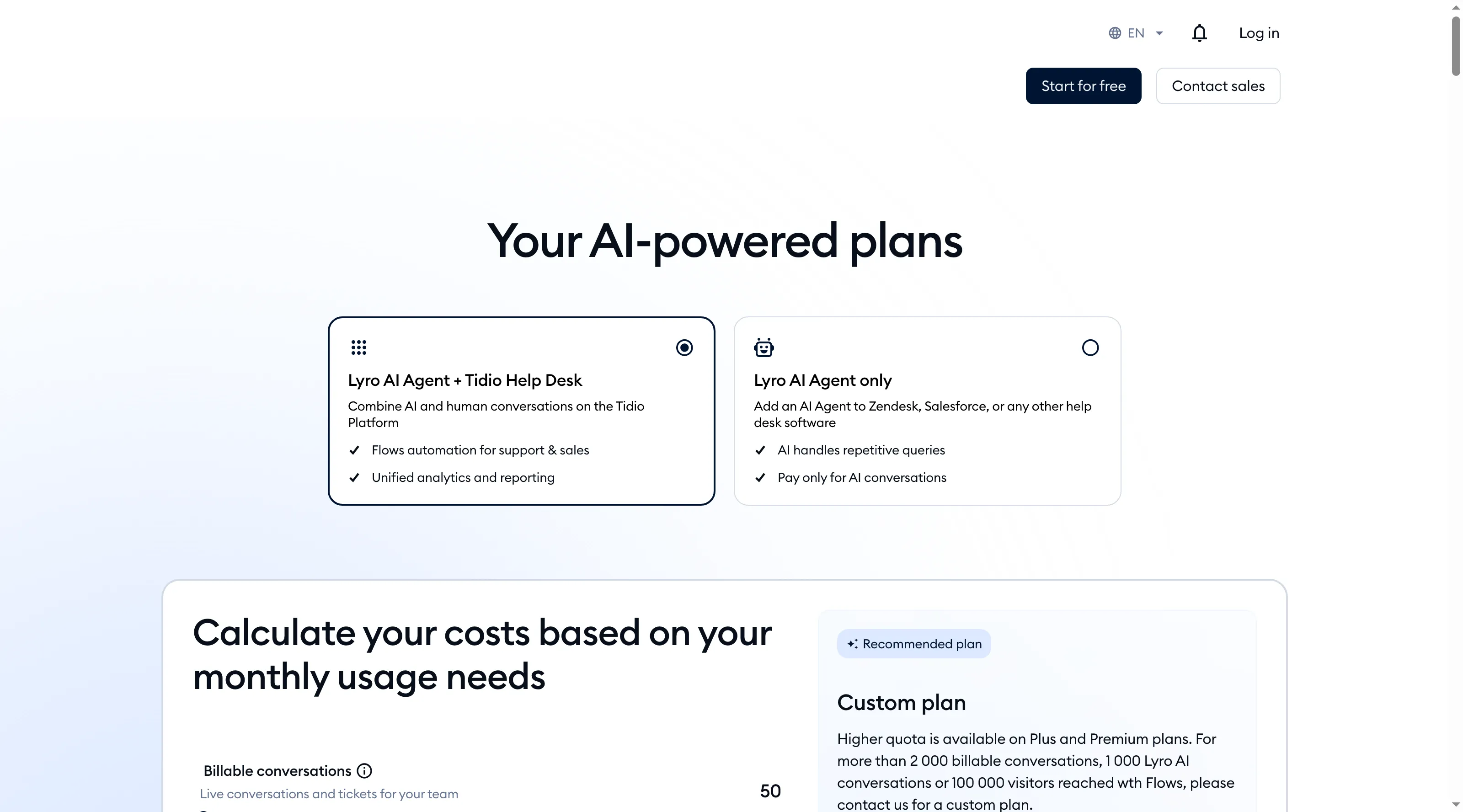
Tidio offers Lyro alongside its helpdesk or as a standalone AI plan.
2. Crisp: Best for a shared inbox with workspace pricing
Crisp gives a small team an unusually simple seat decision: Mini’s workspace price covers up to four people. The less tidy part is Hugo’s shared credit pool; it pays for AI actions beyond customer conversations, so the seat bill is predictable while bot volume is not.
Pros — Crisp
- Mini covers four seats; Crisp estimates Essentials at about 450 automated conversations, though other AI actions also draw from the credit pool.
- The 14-day trial includes paid-workspace access, giving a team time to compare the credit pool with its expected use before routing customer questions through it.
Cons — Crisp
- Repeated setup tests also use the included credits, so they reduce what remains for customer conversations.
- A workspace price doesn’t make AI usage unlimited. Higher included credit pools require Essentials at $95 or Plus at $295 per month.
Crisp is my pick for a four-person team that values one shared inbox over a low AI cost. Mini’s $5 credit pool makes it a weak bot-only buy.
Product pricing — Crisp
Free is $0 for two seats. Mini costs $45/workspace/month with $5 in monthly AI credits; Essentials is $95 with $25 in credits, and Plus is $295 with $75 in credits. Credit pools also cover other AI actions. (Crisp pricing; Hugo AI billing)
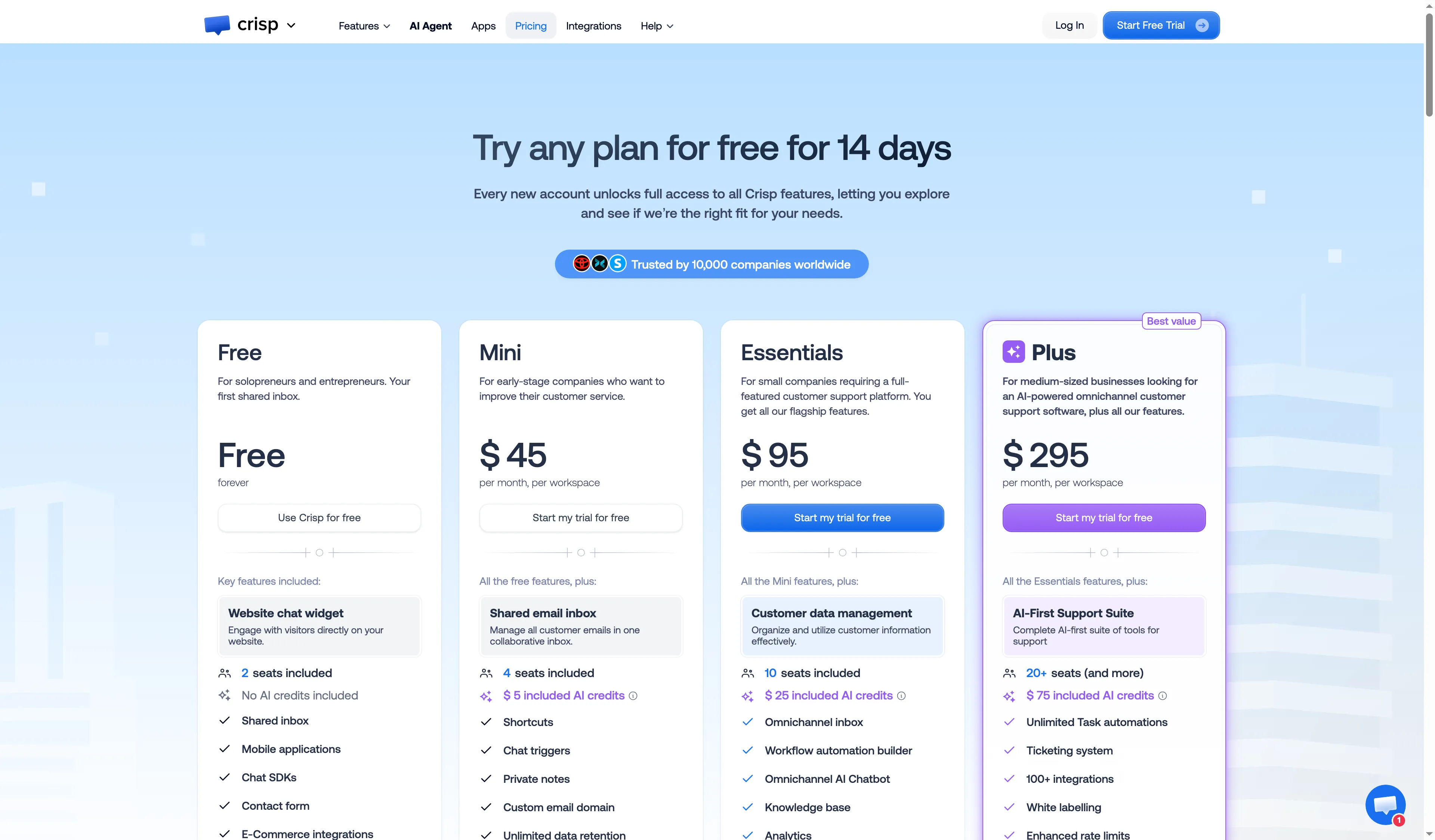
Crisp prices its Mini, Essentials, and Plus plans per workspace.
3. Botpress: Best for building a custom chatbot
Botpress puts control ahead of convenience. I prefer its visual builder for teams that need to shape bot behavior and integrations; if all they need is an agent inside a ready-made support inbox, the extra setup is hard to justify.
Pros — Botpress
- Free includes three seats, three AI agents, and 100 conversations per month.
- Plus includes a larger conversation allowance and AI-usage pool than Free.
- Its published conversation definition is concrete: a conversation starts after at least two end-user messages.
Cons — Botpress
- Human-assisted and AI-only chats can both count, so the published conversation total is not a count of solved support cases.
- Paid usage can add 10-dollar AI-credit grants and conversation packs automatically. Review those purchase settings before launch.
- The catch: Botpress asks more of a team that wants a ready-made support inbox with little configuration.
Product pricing — Botpress
Free. Plus $150/month billed annually with 250 conversations and $25 AI usage; Team $750/month billed annually with 1,500 conversations and $150 AI usage. Additional conversation packs and AI usage can cost extra. (Botpress pricing)
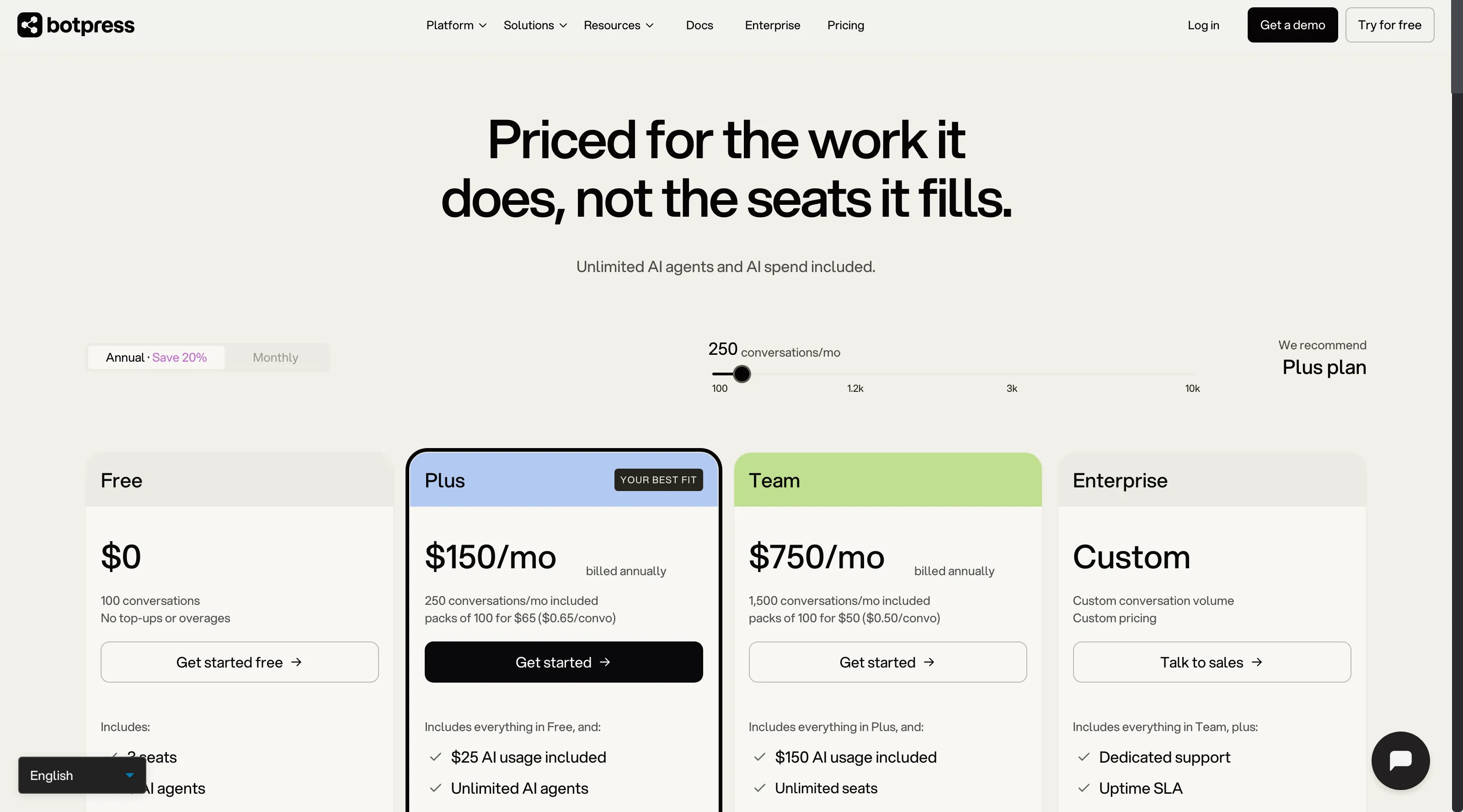
The Free plan has 100 conversations; paid plans add conversation packs and AI usage.
4. Intercom Fin: Best for AI inside a support helpdesk
Among support-suite chatbot platforms, Intercom Fin fits teams already using Intercom; Zendesk AI and Freshdesk Freddy suit teams already on their respective platforms. Fin hands work into the same system, and each eligible outcome has a defined fee.
Pros — Intercom Fin
- Fin bills for eligible outcomes alongside Intercom seat pricing.
- The vendor distinguishes resolutions, procedure handoffs, disqualifications, and full qualifications rather than treating every interaction as the same result.
- Intercom says a conversation triggers at most one outcome fee, even if more than one eligible outcome applies. Match your expected outcomes to its fee definitions before modeling the bill.
Cons — Intercom Fin
- A team pays the platform seat cost in addition to outcome fees unless it adds Fin to an existing eligible setup. If you already pay for Intercom, count those seats only once.
- Full qualification costs more than a resolution, handoff, or disqualification. Recent G2 reviewers also flag repeated procedure tuning after incorrect answers, so allow time for review before scaling.
I like Fin’s outcome pricing for a team that already runs Intercom. Compare a pilot with your own outcome mix before expanding; full qualifications cost more than resolutions or handoffs, so a high qualification rate can change the economics quickly.
Product pricing — Intercom Fin
Essential $29/seat/month billed annually (promotional offers may lower the first-year price). Fin: $0.99 per resolution, procedure handoff, or disqualification; $9.99 per full qualification. (Intercom pricing; Fin outcome definitions)
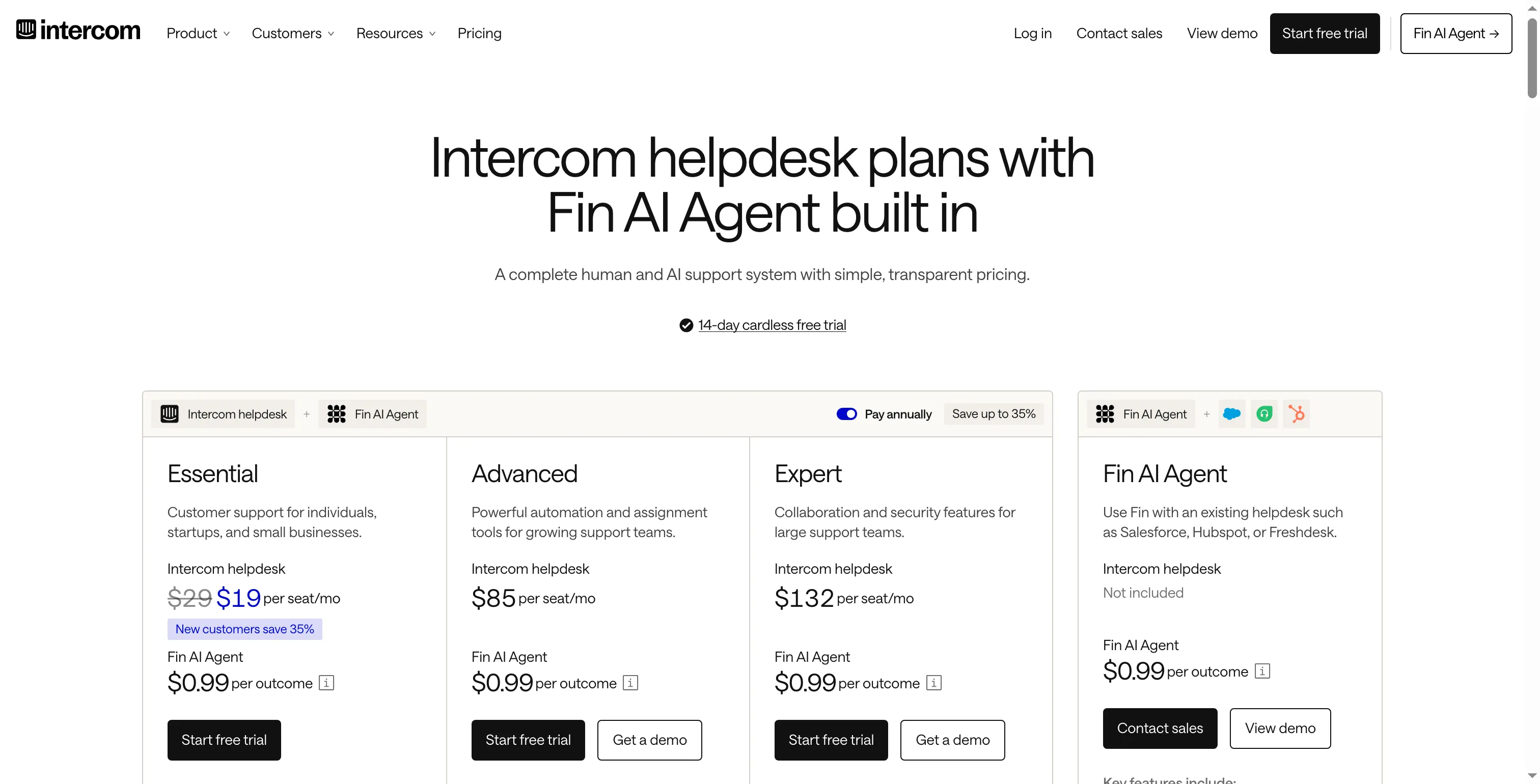
The visible promotion lowers the displayed seat price; compare it with the annual list rate.
5. Zendesk AI: Best for teams already using Zendesk Suite
I consider Zendesk AI only if Suite already runs the team’s tickets, messaging, and help center. The included resolution allowance doesn’t make a new support-platform purchase worthwhile by itself.
Pros — Zendesk AI
- Suite Team includes AI agents with its per-agent support plan.
- Included automated resolutions vary by plan and seat count.
- The vendor prices extra automated resolutions through commitments or pay-as-you-go use.
Cons — Zendesk AI
- The $19 Support Team plan is not the same package as Suite Team with AI agents. Compare the right suite before using the lower entry price.
- At five seats, the included 25 resolutions are small next to a monthly workload of 500 outcomes, and usage charges can dominate. G2 reviewers also mention AI setup and fine-tuning effort.
For a team already using Suite, the bundled ticketing and messaging make the extra platform cost easier to justify. The catch: the bot alone doesn’t justify a new support-platform subscription.
Product pricing — Zendesk AI
Suite Team $55/agent/month and Suite Professional $115/agent/month, billed annually. Extra automated resolutions are $1.50 committed or $2 pay as you go. (Zendesk pricing; automated-resolution tiers)
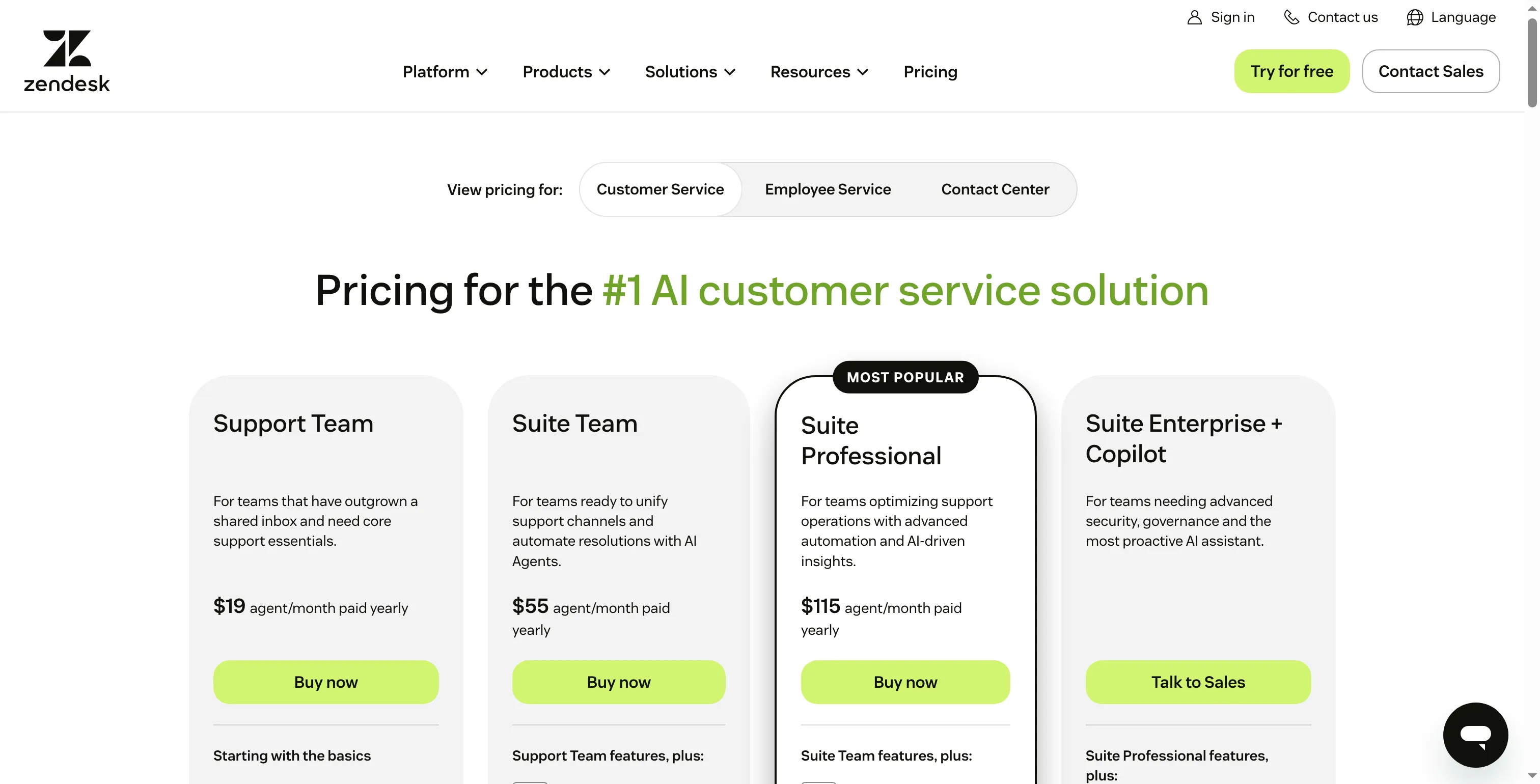
Suite tiers bundle support tools with AI agent access.
6. Freshdesk Freddy AI Agent: Best for a lower-cost support suite
Freshdesk’s seat price is attractive; the 500-session allowance deserves a closer look before I call it a bargain. A session lasts 24 hours, so Growth is a low-cost fit only when that meter tracks your customers’ return pattern reasonably well.
Pros — Freshdesk Freddy AI Agent
- Growth uses per-agent pricing with annual billing.
- Growth includes an AI Agent session pool, while additional sessions are billed separately.
- Pro adds features such as advanced routing.
Cons — Freshdesk Freddy AI Agent
- A session covers interactions in a 24-hour window. It isn’t a completed-resolution count, and one support issue may span more than one session depending on when the customer returns, so your monthly session volume may exceed your solved-case count.
- Five Growth seats cost $1,140 per year, but that figure doesn’t tell you the price of 500 successful AI resolutions because Freshdesk bills sessions.
- Freshdesk suite reviews don’t isolate Freddy AI Agent, so check how well the summaries handle your escalation workflow. A recent Capterra reviewer praised ticket organization but said summaries missed context in long conversations.
Freshdesk is my pick when a fixed session pool matches your traffic. Its predictable cap is appealing; calling those sessions “resolutions” would overstate what the allowance buys.
Product pricing — Freshdesk Freddy AI Agent
Growth is $19/agent/month billed annually with 500 AI sessions; each extra 100 sessions costs $49. Pro is $55/agent/month billed annually. (Freshdesk pricing; session definitions)
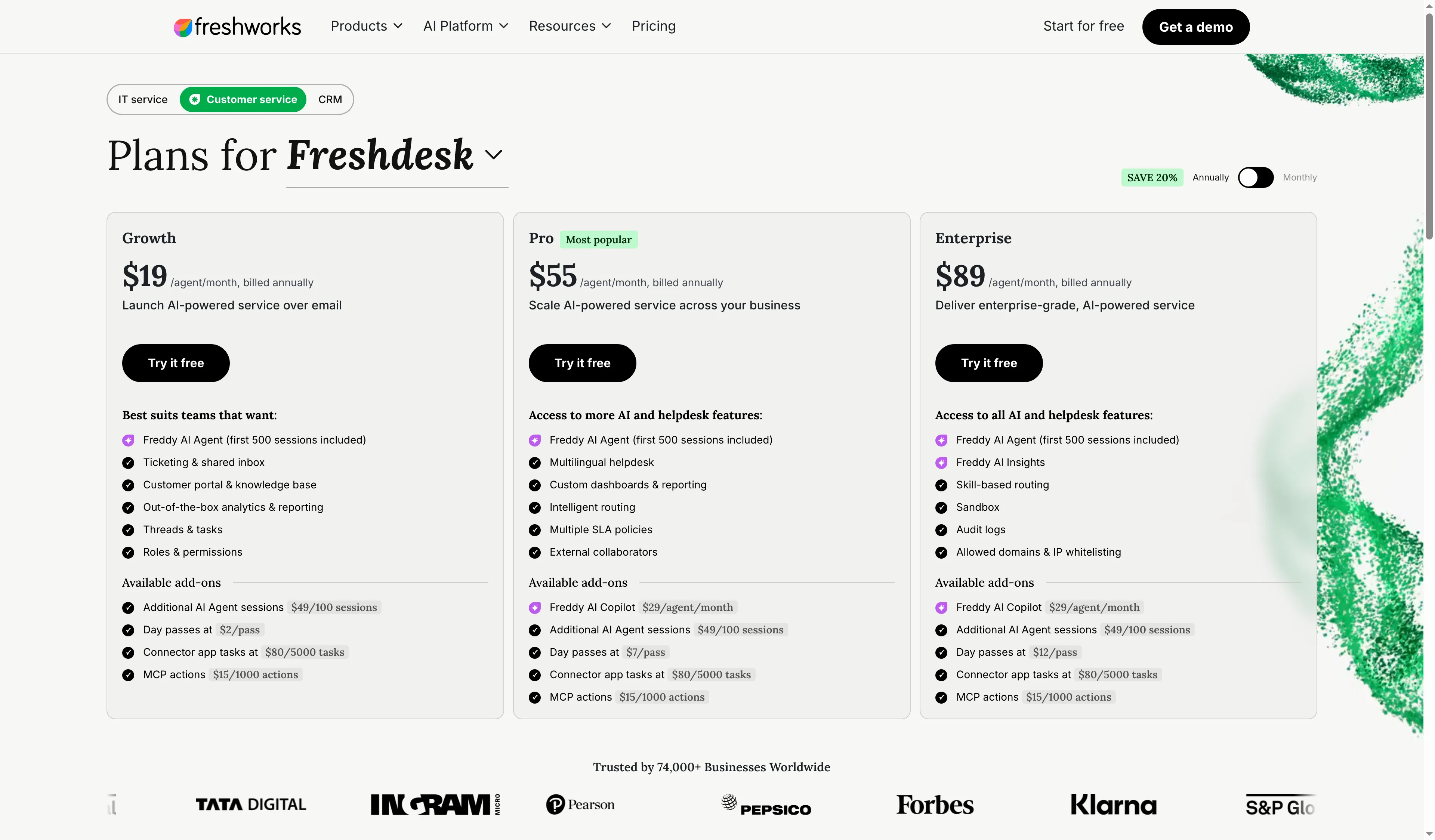
Growth includes 500 AI Agent sessions, with additional sessions priced separately.
7. Gorgias AI Agent: Best for ecommerce support teams
Gorgias is the clearest fit for a store that wants support tickets and ecommerce context in one place. I’d pass on it for a general B2B helpdesk; the ticket plan and AI Agent add-on are easier to justify when store workflows drive the support queue.
Pros — Gorgias AI Agent
- The annual pricing page separates ticket plans from AI Agent usage.
- AI Agent is an add-on rather than an assumption that every ticket plan includes unlimited automation.
- The billing guide ties automated interactions to its attribution rules and the annual or monthly plan term.
Cons — Gorgias AI Agent
- The ticket plan and AI interaction meter are separate, so the AI unit price alone isn't the full cost you'll pay.
- Gorgias generally attributes an interaction as automated when no human joins within 72 hours. That timing affects what the meter means, especially when your team reviews a bot reply before stepping in to handle the customer’s question.
- Its ecommerce focus is less relevant to a general B2B support desk.
I like Gorgias for stores that want support tickets and ecommerce context together. Its ecommerce focus makes it a weak fit for general B2B support.
Product pricing — Gorgias AI Agent
Annual ticket plans start at $10/month for Starter, followed by Basic at $50, Pro at $300, and Advanced at $750. AI Agent is an add-on; automated interactions are $0.90 each with annual billing or $1 monthly. (Gorgias pricing; AI billing rules)
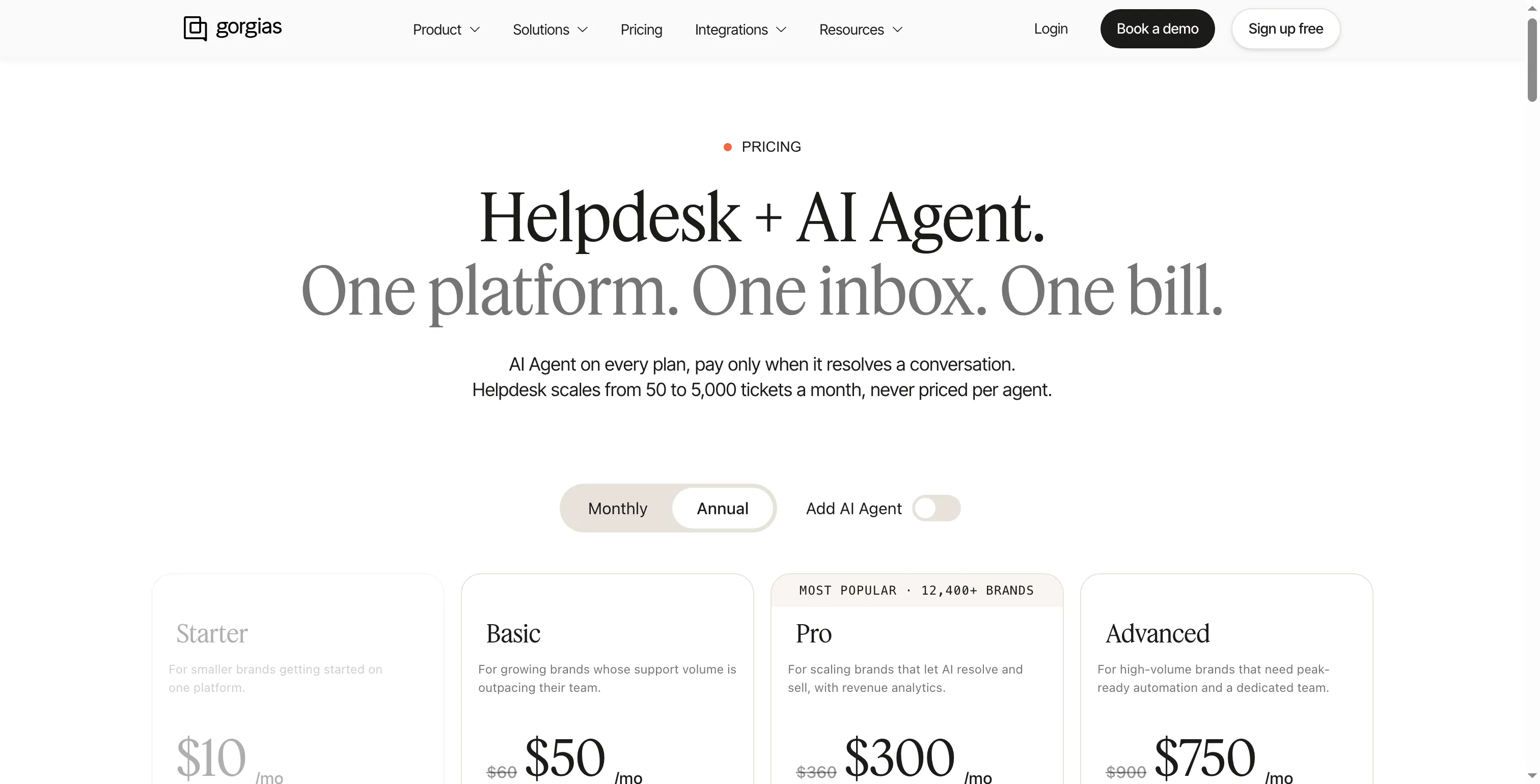
The AI Agent is an add-on to Gorgias ticket plans.
Chatbot software pricing depends on each vendor’s meter
Chatbot software pricing depends on the billing meter: Crisp bundles workspace seats with AI credits, Tidio separates inbox and Lyro allowances, and support suites bill by outcomes, resolutions, or sessions. The example annual totals range from $540 for a small website inbox to $12,300 for a five-agent support team; the tables show each configuration and meter.
One operator, about 50 AI chats monthly
For one operator with about 50 AI chats a month, Crisp Mini totals $540 a year and Tidio Starter with recurring Lyro totals $680.04; the table shows what each vendor counts.
| Product | Configuration | Annual estimate | What the unit means |
|---|---|---|---|
| Crisp | Mini workspace | $540 | Vendor-estimated capacity is about 90 automated conversations; credits also cover other AI actions. |
| Tidio | Starter + 50 recurring Lyro AI conversations | $680.04 | Excludes tax; assumes annual Starter and recurring Lyro at the displayed rates. |
Five agents, 500 AI outcomes or sessions monthly
For five agents handling 500 AI outcomes or sessions monthly, annual estimates are $7,680 for Intercom Fin, about $12,300 for Zendesk AI, and $1,140 for Freshdesk Freddy; their billing meters remain distinct.
| Product | Configuration | Annual estimate | Meter caveat |
|---|---|---|---|
| Intercom Fin | Five Essential seats + 500 base outcomes/month | $7,680 | Assumes the standard outcome fee; excludes full qualifications. |
| Zendesk AI | Five Suite Team seats + 500 committed extra resolutions/month | About $12,300 | Includes 25 monthly resolutions through five seats; modeled commitment rounds to 500 extra units. Pay as you go at 500/month is about $14,700. |
| Freshdesk Freddy | Five Growth seats | $1,140 | Includes 500 sessions monthly; a session is a 24-hour window, not a resolved case. |
Intercom Fin, Zendesk AI, and Freshdesk Freddy estimates exclude taxes and custom contract terms. Compare the billing units and add mandatory seat, platform, or usage charges before using the totals as a budget.