

 17 min read

Current vendor pricing, product help, user reviews, agency discussions, and public signup/billing flows show that agency CRM spans three jobs: sales, delivery, and client workspaces.
TL;DR
- Use a sales CRM to manage your agency’s own leads and client relationships. A platform for managing each client’s marketing accounts solves a different job.
- HubSpot and Zoho let a small team start for free, while Pipedrive keeps sales stages and follow-ups in focus. Their automation and seat limits differ.
- Productive covers delivery budgets and profit. HighLevel supports agency-run client subaccounts and marketing workflows.
- Compare the price of the plan that includes the feature you need, then add seat floors, onboarding, and messaging costs before choosing.
An agency CRM stores prospects, clients, contacts, and relationship history so your team can follow up and win new business. Some products connect sales to marketing activity. Others handle project budgets or give you a separate CRM workspace for each client. Those extra jobs change who gets access and what you pay each year.
At a glance: quick picks for agency CRM jobs
Pick HubSpot for inbound leads, Productive for delivery budgets, or HighLevel for agency-operated client CRMs; use Pipedrive, Zoho CRM, and monday CRM when your sales team needs their workflows.
| If your agency needs… | Pick | Why it fits | Limitation to know |
|---|---|---|---|
| Inbound leads and sales activity in one customer record | HubSpot | Sales records share the HubSpot customer platform with its marketing and service products | Professional adds required onboarding before five seat charges |
| A sales team that lives in its deal pipeline | Pipedrive | The pipeline and activity tools center on open deals and follow-ups | Email sync and nurturing begin on Growth, automatic assignment requires Professional |
| Custom fields and multiple sales processes without enterprise pricing | Zoho CRM | Paid editions add automation and portal options in steps | CRM setup can take time; assignment rules only act on imported, webform, and API records |
| A visual board handoff from prospect to work | monday CRM | Custom boards, dashboards, and automations can show the sales process in a format the team already uses | CRM and Work Management are separate subscriptions, and seat buckets can exceed team size |
| Delivery budgets and retainer profitability | Productive | Deals can connect to budgets, time, costs, and margins | It is an agency operations platform; separate client CRM accounts are a different job |
| Separate marketing CRM accounts you operate for clients | HighLevel | Agency subaccounts let you separate client systems and permissions | Budget for usage charges and confirm the current tier name and billing amount before committing |
What makes the best agency CRM a good fit?
Start with the work you need the CRM to do
Need to win clients for your agency? Compare HubSpot, Pipedrive, Zoho CRM, and monday CRM as sales systems. Productive comes into its own after a deal closes and your team has to plan budgets and capacity, especially when retainer hours and costs can drift between renewal dates. HighLevel serves agencies that run a marketing CRM inside a separate account for each client.
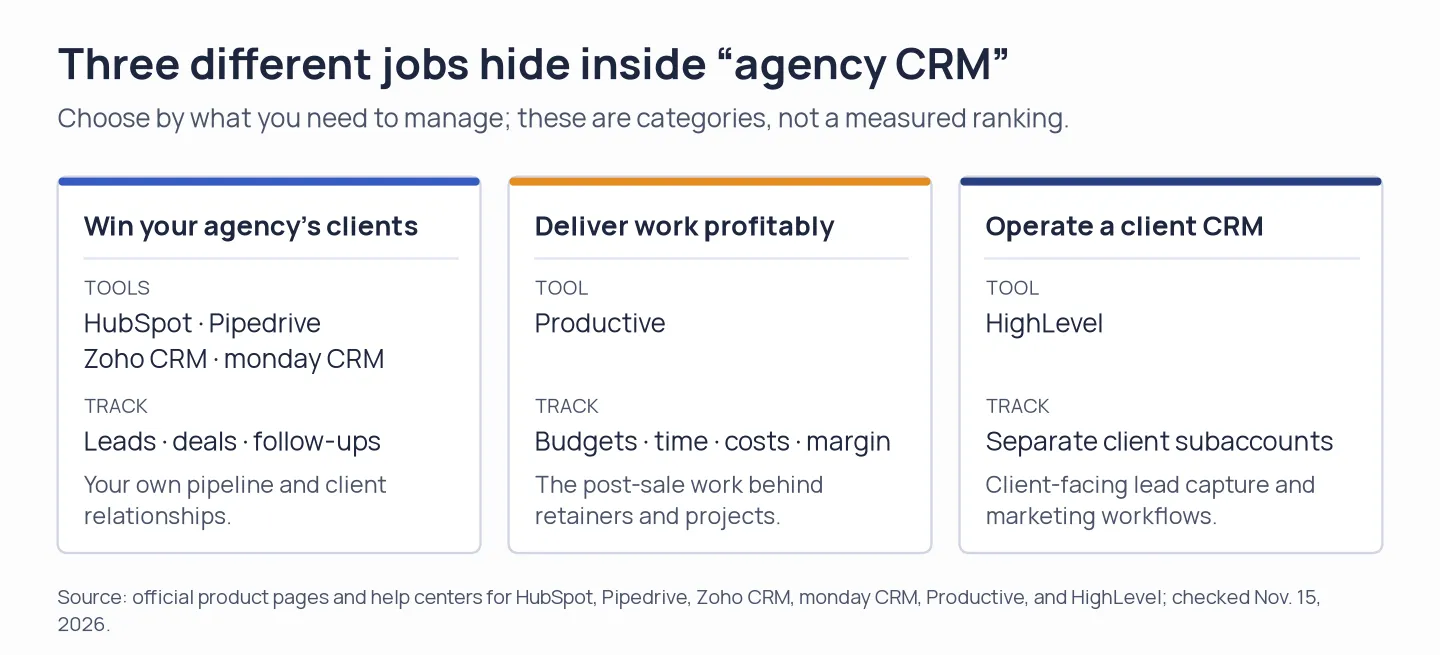
Agency sales, delivery, and client CRM work are different jobs, so their software costs aren’t one like-for-like ranking.
Check the handoff after a deal closes
When a deal closes, the next team needs the scope, client contacts, delivery owner, and next action. Productive can connect a won sales deal to a delivery budget. monday CRM can carry sales data into boards. However, its CRM and Work Management products have separate bills. For other systems, check what your project tool can accept before you assume the CRM handles delivery.
Treat client access as a security and billing question
Client access affects privacy and seat costs. Productive lets you invite clients without paying for a client seat, while employees and contractors are paid users. HighLevel offers client subaccounts with separate feature and user permissions. Zoho’s custom portals appear on higher plan levels (and work differently from a reseller workspace). Check the record permissions before sharing an account.
Check lead routing and data quality separately
If several sellers handle leads, check how an inquiry reaches the right person and what happens to duplicates or spam. Zoho’s assignment rules can match an imported, webform, or API record to a user by criteria. Pipedrive’s automatic assignment supports conditions and round-robin distribution, starts on Professional, and has no cap for each rep’s open deals. A “round robin” label alone doesn’t tell you whether the rule checks capacity, availability, or record source.
Reuse a subscription before adding another CRM
Google Workspace or Microsoft 365 can cover lightweight contact and activity tracking, while an existing HubSpot or Pipedrive subscription may already include a sales CRM. Check your current seats and permissions before you pay for another app. monday CRM also bills separately from Work Management.
Which agency CRM should you choose?
For your agency’s own sales pipeline, choose HubSpot, Pipedrive, Zoho CRM, or monday CRM. Pick Productive when delivery budgets and margins are the gap, or HighLevel when you operate a separate CRM workspace for each client. If two jobs matter, keep their costs and access rules separate in your comparison.
How much does agency CRM software cost?
For the best CRM for agencies, expect to pay from $0 for a solo owner’s basic setup to $6,900 for a five-seat sales team using automation and reporting, before tax. The scenarios use US-dollar annual charges from vendor selectors. I omit entry plans when they lack a required feature such as timed sequences or lead routing.
Scenario 1: one owner needs a simple sales list
A basic one-person setup costs $0 with free HubSpot or Zoho, $168/year on Pipedrive Lite, or $432/year at monday CRM’s three-seat minimum.
| Product/configuration | Annual cost | What the price includes | Important limit |
|---|---|---|---|
| HubSpot Free, 1 user | $0 | Contact and deal basics for up to 2 users | Paid automation and advanced sales reporting are in higher tiers |
| Zoho CRM Free, 1 user | $0 | Free CRM edition for up to 3 users | Advanced assignment and portal features require a paid edition |
| Pipedrive Lite, 1 seat | $168 | $14 × 1 seat × 12 months, billed annually | Email sync and nurturing sequences begin on Growth |
| monday CRM Basic, minimum 3 seats | $432 | $12 × 3 seats × 12 months, billed annually | The three-seat floor applies even if only one or two staff use it |
Move to a higher tier when you need timed sequences or lead routing, since those features change the comparison.
Scenario 2: a five-person sales team needs email sync, follow-up automation, and reports
The five-seat automated sales setup costs $1,380–$6,900 in first-year annual charges, with HubSpot’s total including required onboarding.
| Product/configuration | Annual first-year cost | Calculation and required extras | Limits to compare |
|---|---|---|---|
| Zoho CRM Professional | $1,380 | $23 × 5 seats × 12 months | Local taxes may apply; assignment rules only apply to imported, webform, and API records |
| monday CRM Pro | $1,680 | $28 × 5 seats × 12 months | Charges for seats in groups of five; CRM does not include Work Management |
| Pipedrive Growth | $2,340 | $39 × 5 seats × 12 months | Email sync and nurturing are included, advanced automatic assignment is a Professional feature |
| HubSpot Sales Hub Professional | $6,900 | $90 × 5 seats × 12 months + required $1,500 onboarding | Sales Hub pricing is per seat; verify the right seat type and any package discount in checkout |
If you pay monthly instead, the totals are higher for these plans: Zoho Professional is $2,100 across 12 monthly payments, monday CRM Pro is $2,460, Pipedrive Growth is $2,940, and HubSpot Professional is $7,500 including onboarding. HubSpot’s displayed $7 Starter rate is a new-customer annual offer, so it isn’t the list price to use for this more advanced workflow.
Scenario 3: five agency operators need post-sale delivery or client CRM workspaces
Five paid Productive seats cost $1,500/year; HighLevel Unlimited costs $3,564/year when its $297 monthly subscription is multiplied by 12.
| Platform and job | Annual baseline | Calculation | What the total does not include |
|---|---|---|---|
| Productive Professional for agency delivery | $1,500 | $25 × 5 paid employee/contractor seats × 12 months | Client collaborators are free, employee and contractor seats are billed. This manages delivery budgets and margin, not separate CRM accounts for resale. |
| HighLevel Unlimited for client subaccounts | $3,564 | $297 monthly subscription × 12 months, paid month-to-month | Usage-based telephony, messaging, and paid AI products can add to the bill. This tracks client CRMs rather than delivery margins. |
Productive and HighLevel solve different agency jobs. Productive charges by paid seat for internal delivery operations. HighLevel charges for an agency account that can hold client workspaces. Its public pricing page showed annual amounts under mismatched tier cards during this check, so I’ve multiplied the monthly subscription by 12. If you’re comparing them for a five-person team, count paid seats on one side and client locations plus usage on the other. Check the bill preview before you buy.
1. HubSpot: Best for agencies connecting inbound marketing and sales
HubSpot fits an agency that wants sales activity beside inbound marketing and customer records. Its free CRM covers up to two users, while Sales Hub adds team sales tools as you grow. I prefer HubSpot when shared marketing and sales context matters most; paid automation and reporting are where the bill climbs.
Pros — HubSpot
- Free CRM lets a solo owner organize contacts and deals before adding a paid seat.
- Sales records sit in HubSpot’s broader customer platform, which can connect sales with marketing and service activity.
- Professional includes sales automation and reporting features for an agency with a structured inbound process.
Cons — HubSpot
- Sales Hub Professional is $90 per seat/month when billed annually, and HubSpot requires $1,500 one-time onboarding.
- G2 reviewers in 2026 raise setup work and the cost of automation and reporting tiers alongside the platform’s unified customer record.
- One recent G2 Sales Hub reviewer says they built a separate routing form because round-robin booking did not handle territory assignment.
Onboarding fees and signup
HubSpot’s Professional and Enterprise plans show onboarding fees; its signup flow requests email verification before setup, and the Sales Hub selector lists separate annual and monthly rates.
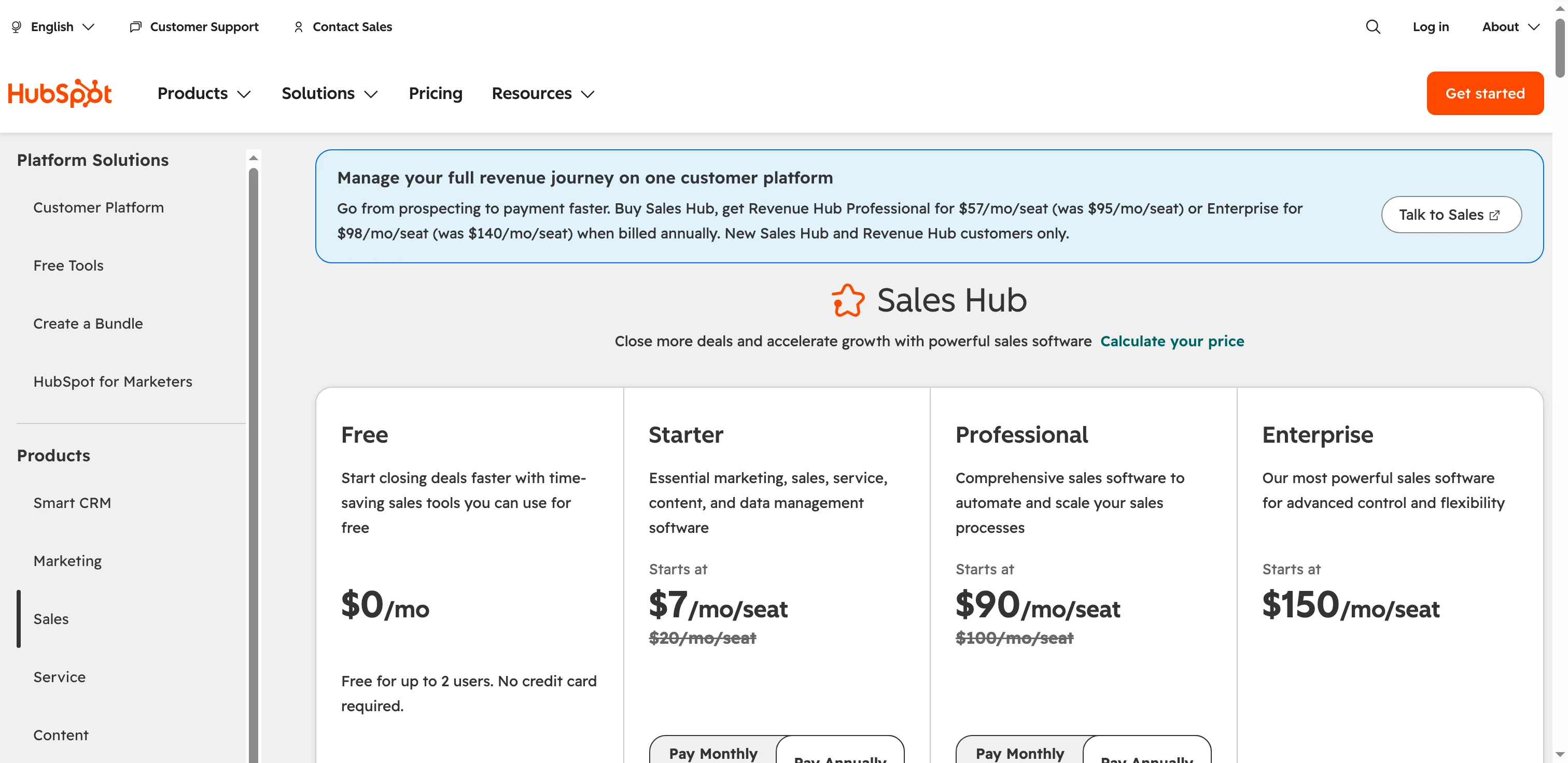
HubSpot shows separate Sales Hub seat rates for Free, Starter, Professional, and Enterprise.
Product pricing — HubSpot
Free for up to 2 users. Sales Hub Starter is shown from $7/seat/month billed annually for new customers or $20 monthly. Professional starts at $90/seat/month billed annually, plus $1,500 onboarding.
2. Pipedrive: Best for agencies that need a visible new-business pipeline
If your sales team lives in a deal pipeline, Pipedrive keeps prospects, deals, and follow-ups moving in one sales-first CRM. Growth is the first plan with full email sync and nurturing sequences, and a five-seat setup costs $2,340 per year with annual billing. My pick for a team that lives in deals is Pipedrive: its activity view keeps next steps attached to each opportunity, so sellers can spot stalled follow-ups without rebuilding the pipeline.
Pros — Pipedrive
- The visual deal pipeline and activity view keep next steps attached to a specific opportunity.
- Growth includes two-way email sync, tracking, and automated nurturing sequences.
- The 14-day trial requires no credit card. I’d still check the paid-plan gate because the signup modal includes some higher-tier tools during trial. Those tools may make the trial view look more capable than the plan you select.
Cons — Pipedrive
- The full email-sync and nurturing workflow begins on Growth, so a Lite quote won’t cover the setup in this comparison.
- Automatic assignment starts on Professional, with no cap for reps’ open leads or deals.
- Some recent G2 reviewers find advanced reporting and automation take setup. Selected complaints on Trustpilot about billing and support are individual reports and cannot estimate a product-wide failure rate.
Billing and trial signup
A five-person Pipedrive Growth team costs $245 per month before optional add-ons on monthly billing. Trial signup also asks for your phone number.
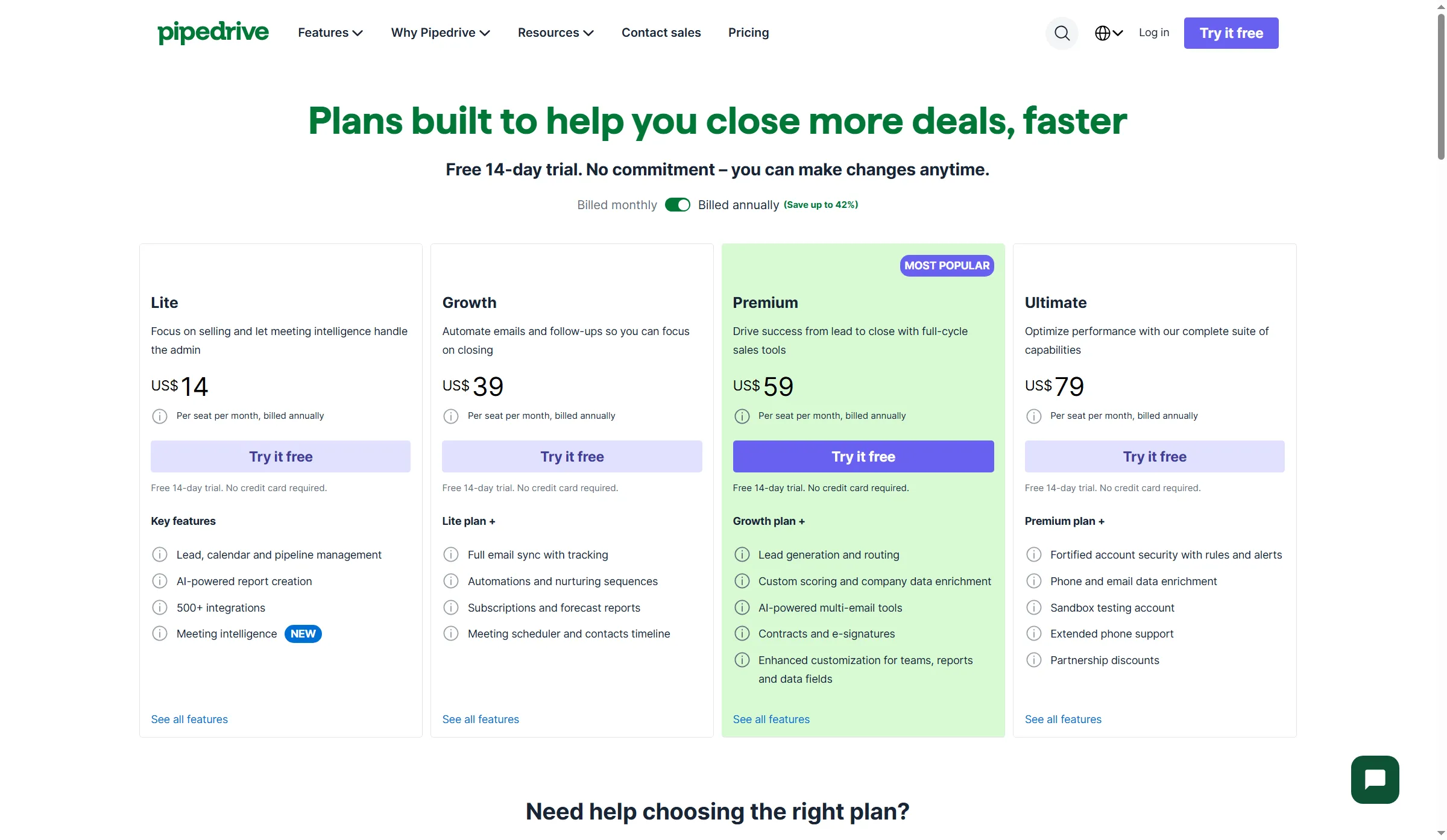
Pipedrive puts full email sync and automated nurturing on Growth.
Product pricing — Pipedrive
Lite is $14/seat/month billed annually or $24/seat/month billed monthly. Growth is $39/seat/month billed annually or $49/seat/month billed monthly. Premium is $59/seat/month annually or $79/seat/month monthly. Ultimate is $79/seat/month annually or $99/seat/month monthly. A 14-day trial is available without a credit card.
3. Zoho CRM: Best for agencies that need customizable sales processes
Zoho CRM suits an agency willing to configure its sales process for custom fields, modules, and reports in exchange for a low entry price. The free edition covers up to three users, while Professional makes the better five-seat comparison when your team needs assignment rules and advanced workflow tools. Recent CRM reviews praise its flexibility and mention an initial learning curve, so give the person configuring it time to shape the records and rules.
Pros — Zoho CRM
- Free CRM supports up to three users and includes contacts, follow-up reminders, workflow automation, tasks, calls, and standard reports.
- Professional adds assignment rules and custom portals, which can support a more structured handoff or model for client access.
- Professional adds a lower-cost paid tier for agencies that need assignment rules and structured sales workflows.
Cons — Zoho CRM
- I like that Zoho lets you shape fields and modules, but I’d budget configuration time before inviting the team. G2 and Capterra reviews from 2026 mention a learning curve, slow page changes, and support friction.
- Assignment rules handle imported, webform, and API records. Manually created records need a separate way to assign an owner.
- A custom portal gives clients access to selected CRM data and actions. An agency-operated subaccount gives each client a separate workspace.
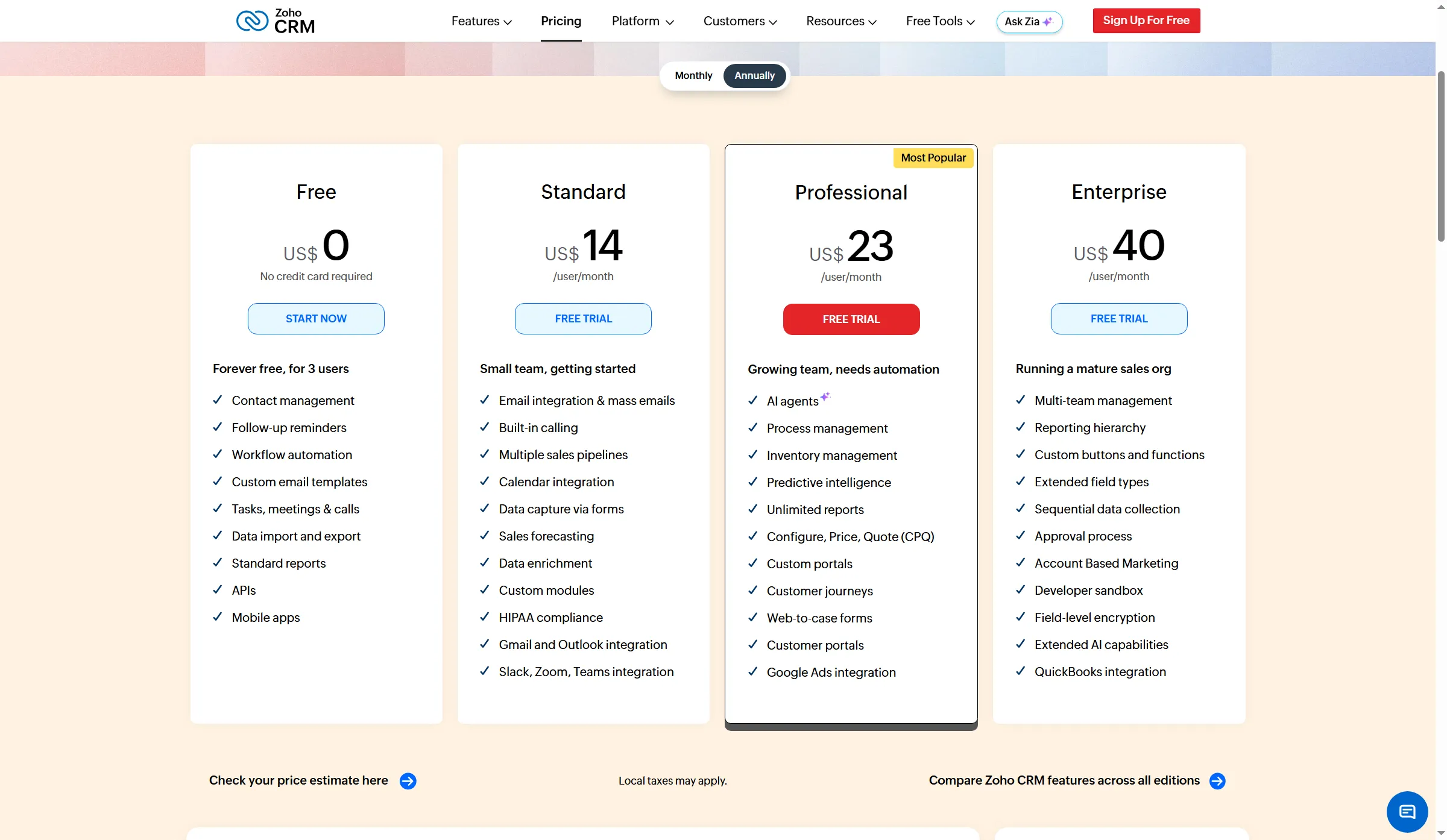
Zoho’s paid editions add features in steps, so compare the tier that covers your routing and portal needs.
Product pricing — Zoho CRM
Free for up to 3 users. Standard is $14/user/month billed annually or $20/user/month billed monthly. Professional is $23/user/month billed annually or $35/user/month billed monthly. Enterprise is $40/user/month billed annually or $50/user/month billed monthly. Local taxes may apply.
4. monday CRM: Best for agencies that want a board-based sales handoff
monday CRM is a visual sales workspace for agencies that want a board-based view of deals and follow-ups. Standard and Pro add a unified communication timeline, automations, and email sequences, while six users need a ten-seat bucket under current pricing rules. The best part is the board handoff: I prefer monday CRM when sales already works comfortably in it, though seat math can erase that convenience. If you also need delivery tracking, the separate bills for CRM and Work Management are harder to justify.
Pros — monday CRM
- Boards and dashboards can display sales stages, owners, deal value, and expected close date in a format a cross-functional team can scan.
- Pro adds mass email and email sequences, so the workflow can go beyond reminders and board updates.
- A 14-day CRM trial lets a team inspect the sales workspace before subscribing.
Cons — monday CRM
- monday CRM starts at three seats, then moves in groups of five. A six-person team selects ten seats.
- Even when both products use the monday.com platform, CRM is billed separately from monday Work Management. An existing account won’t bundle them automatically.
- G2 reviewers in 2026 mention setup work, limits in connecting related records, and slower performance on complex boards. Teams that need sales and delivery in shared records may find the separate subscriptions hard to justify.
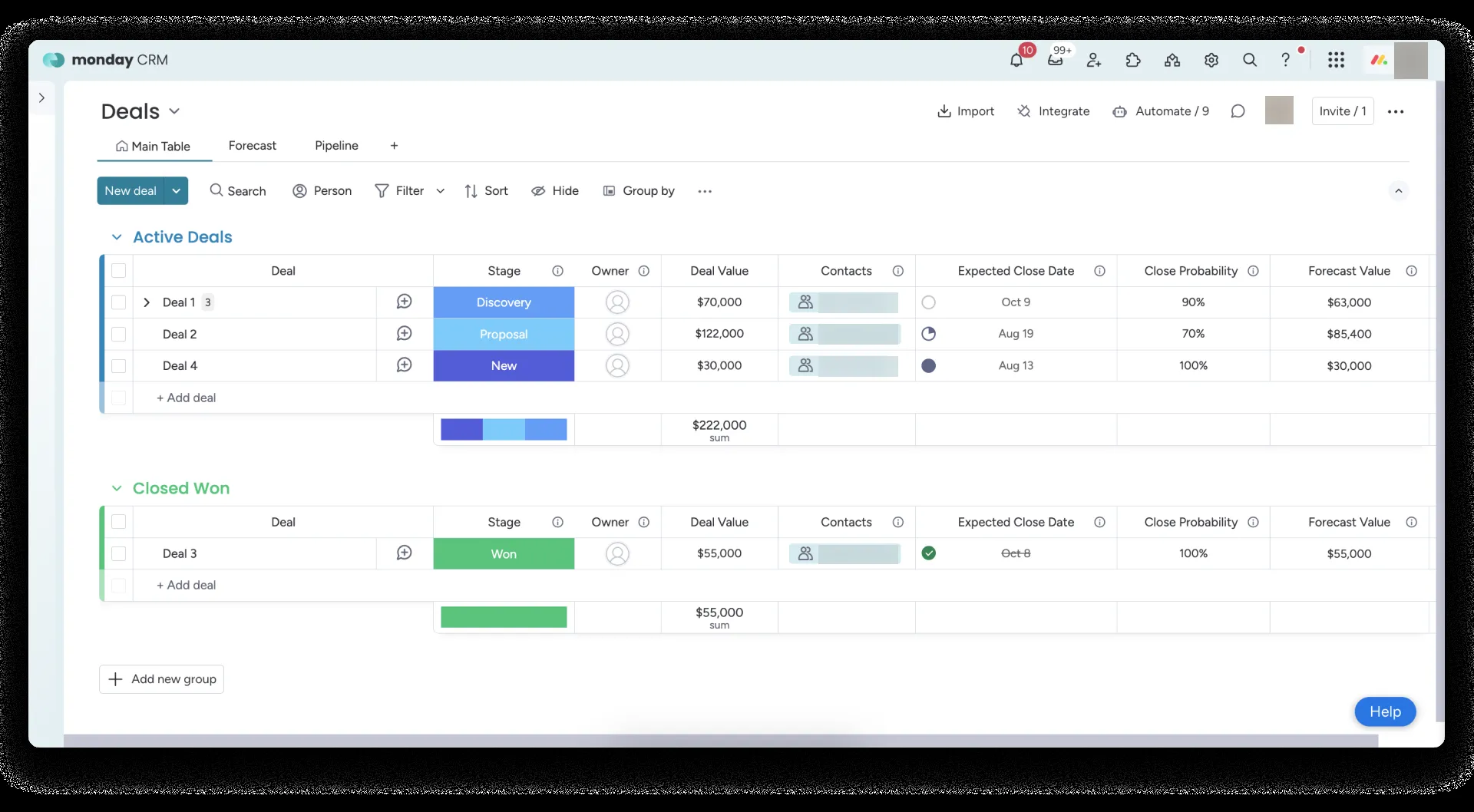
The Deals board keeps stage, owner, contact, and forecast fields together in one view.
Product pricing — monday CRM
Basic starts at $12/seat/month billed annually, Standard at $17, and Pro at $28. Month-to-month rates are $18, $25, and $41. Paid plans start at three seats, then use seat buckets in multiples of five.
5. Productive: Best for agencies tracking delivery budgets and margins
Productive ties a won sales deal to its budget, resourcing, time, and margin. I prefer it when post-sale delivery and retainer economics need a home beside the client work; it does not replace the sales CRM your new-business team uses. Professional is the first plan with recurring budgets. Five paid operator seats cost $1,500 a year with annual billing. Clients can collaborate for free, while employees and contractors use paid seats.
Pros — Productive
- A won deal can create a budget with services, planned hours, expenses, and future retainer periods.
- Role permissions can restrict who sees margin data, useful when clients share the workspace.
- The three-seat minimum includes contractors, but clients do not consume paid seats.
Cons — Productive
- Productive tracks delivery and profitability. It doesn’t provide the separate client CRM accounts that an agency might resell or operate for customers.
- Every plan requires at least three paid seats, and contractors count as paid users. That minimum can change the math for a small agency.
- The available review sample is much smaller than those for larger sales CRMs, so agency-specific praise or complaints are harder to generalize.
Seat selection and billing
The Productive pricing calculator opens with ten users selected, so teams smaller than ten need to adjust the displayed total.
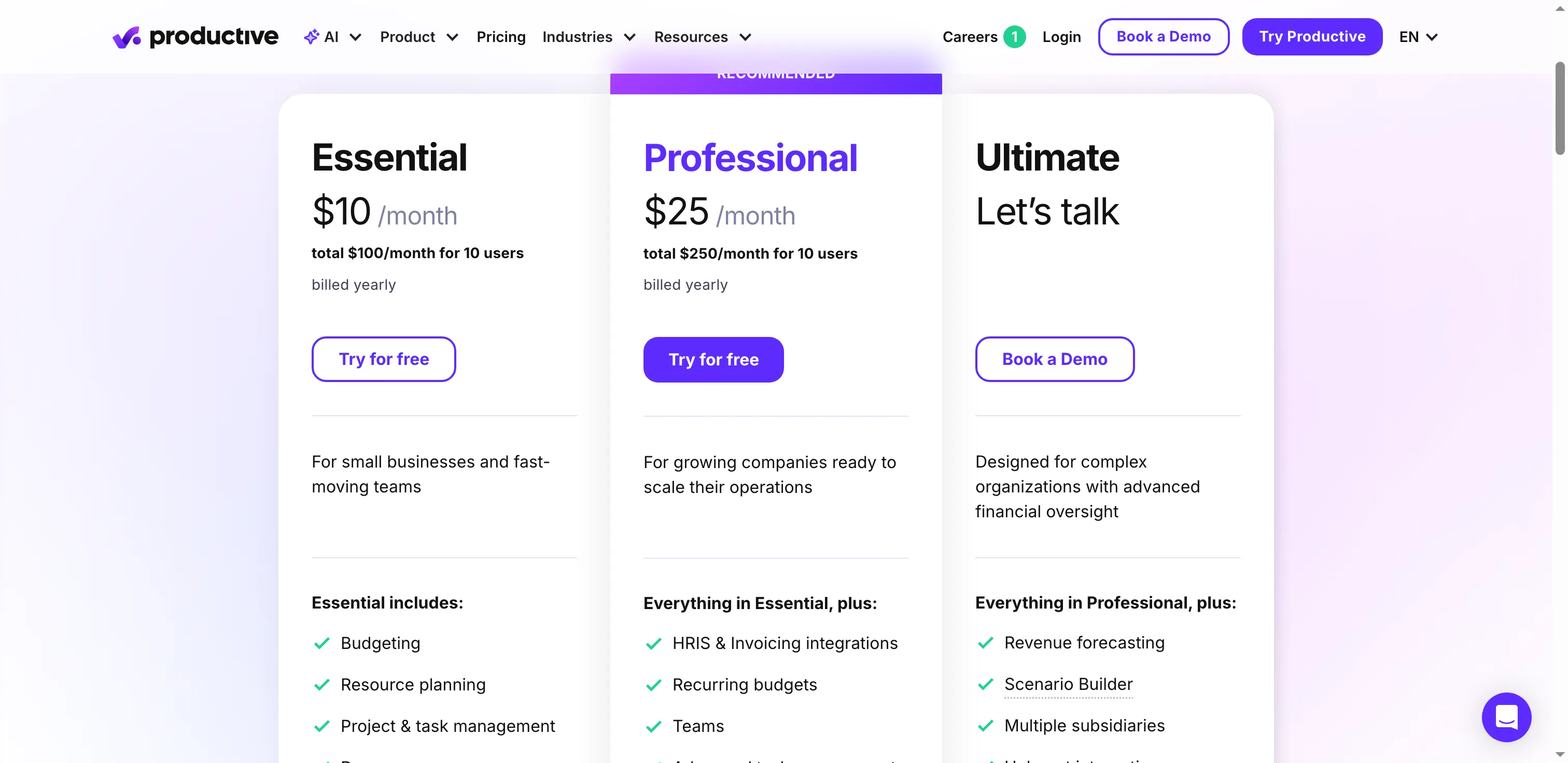
Productive puts recurring budgets on Professional. The calculator shows totals for ten users.
Product pricing — Productive
Essential is $10/paid seat/month billed annually or $12/paid seat/month billed monthly. Professional is $25/paid seat/month billed annually or $29/paid seat/month billed monthly. All plans have a three-seat minimum. Clients are free; employees and contractors count as paid users.
6. HighLevel: Best for agencies operating separate client CRM accounts
HighLevel is for agencies that run lead capture, pipelines, communications, and marketing workflows from client-specific subaccounts. Starter includes three subaccounts, while Unlimited adds unlimited subaccounts and a white-label desktop app for $297/month. The catch is that every subaccount adds permission setup and messaging costs, so I’d choose HighLevel only when distinct client workspaces are central to the service. Before you resell it, factor in who pays for each message.
Pros — HighLevel
- Starter includes up to three client subaccounts. Unlimited supports an unlimited number and adds a white-label desktop app.
- Agency admins can restrict staff to selected client subaccounts and manage feature access at both user and account levels.
- The platform includes pipelines, booking, email, and two-way SMS in its wider marketing CRM toolkit.
Cons — HighLevel
- Starter’s three-subaccount limit can be too small for an agency with several clients. Unlimited starts at a higher fixed fee.
- Messaging, phone, and paid AI features can add usage-based or per-location charges. Those costs won’t show up in the base subscription alone.
- The $497 offer currently uses the Founder name. Confirm the current plan and amount in checkout before signing up.
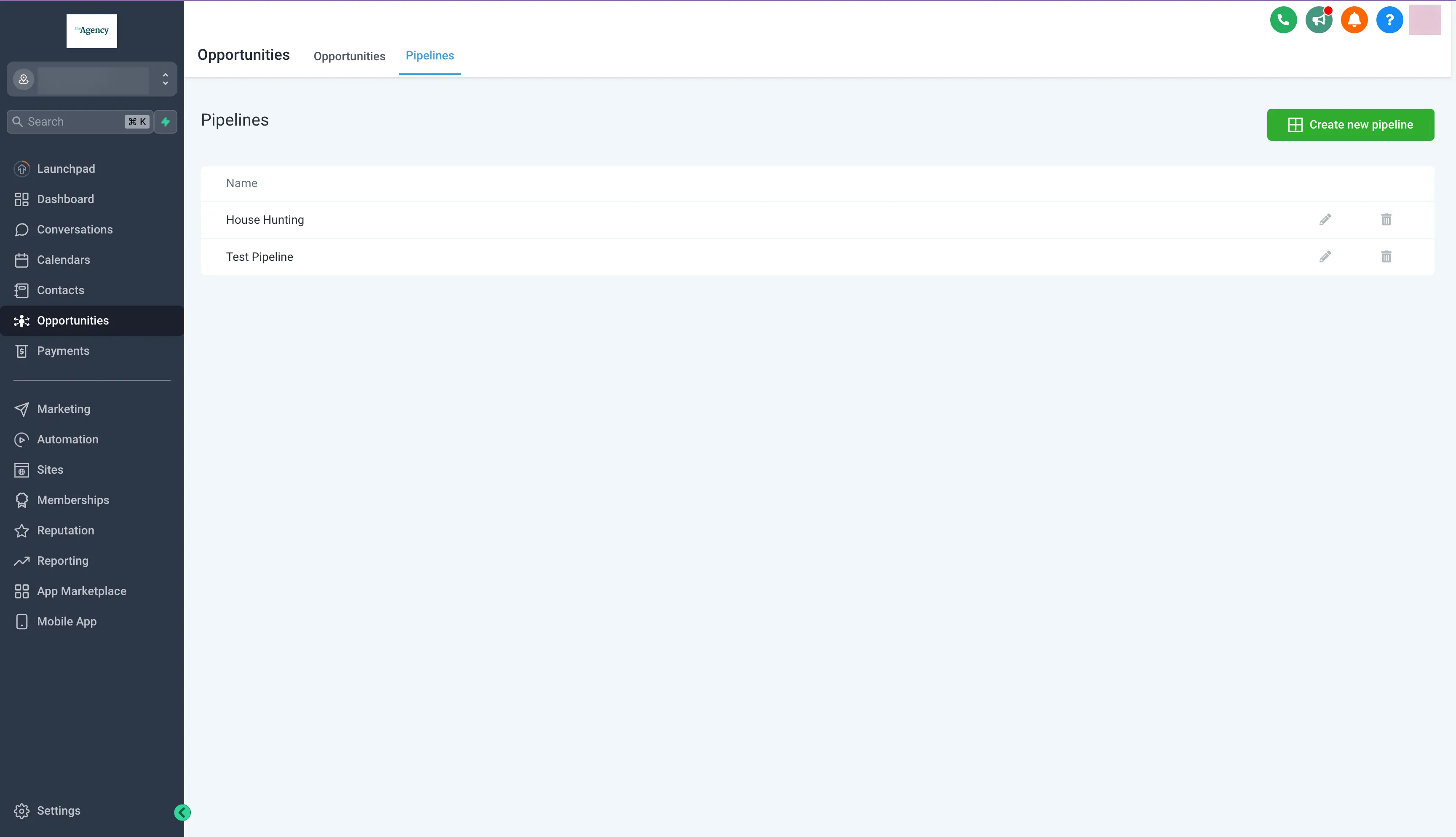
HighLevel lets an agency keep separate sales pipelines in the client workspace.
Product pricing — HighLevel
Starter is $97/month for up to 3 subaccounts. Unlimited is $297/month, and Founder is $497/month. Usage-based messaging, telephony, and AI products may add costs.