

 15 min read

Across pricing pages, product screens, and recent user reviews, the biggest differences are seat caps, workflow gates, and setup demands.
TL;DR: Startup CRM picks for 2026
- Best free starting point: HubSpot's free CRM supports up to two users, and I created a contact without connecting an inbox.
- Best for a flexible customer model: Attio's free plan allows three users. Its paid Plus plan starts at $40 per workspace monthly when billed annually, with added seats priced separately.
- Best for a visible sales pipeline: Pipedrive Lite is $14 per seat monthly with annual billing. Full email sync and automations require Growth at $39.
- Best for phone-led sales: Close gives one seller a Solo plan at $9 monthly on annual billing. Teams need Essentials at $35 per user monthly, before call and SMS usage.
- Best for a broad low-cost CRM: Zoho CRM is free for up to three users. Standard starts at $14 per user monthly on annual billing.
- Best low-cost sales CRM: Freshsales is free for up to three users, then Growth starts at $9 per user monthly on annual billing.
What makes the best CRM for startups? Five fit checks
Startups should compare five things first: seat cost and limits; record flexibility; pipeline and follow-up; email and calling; and lead routing with spam controls.
A startup CRM keeps contact and company records, sales opportunities, and follow-up work together, giving founders and their first sales hires a shared view of who owns each prospect and what should happen next. Your first CRM doesn't have to run the whole company. It should make the next sale, owner, and follow-up task easy to find. A low starting price only helps if the plan includes the workflow people will use.
At a glance: the best startup CRMs
For a founder validating a simple sales process, HubSpot is the best fit; the table matches each scenario with a CRM pick and its plan constraint.
| Startup scenario | CRM | Why it fits | Constraint to check |
|---|---|---|---|
| Founder validating a simple sales process | HubSpot CRM | Free for up to two users. Contacts and deals available | Advanced workflows and prospecting features require paid plans |
| Product-led or relationship-led startup | Attio | Flexible records and lists. Startup discount may reduce Pro cost | Eligibility for the startup offer and added-seat pricing |
| Founder-led pipeline with clear stages | Pipedrive | Simple deal board and activity focus | Email sync and automation sit above Lite |
| Team selling by phone | Close | Calling and sales communication sit near the pipeline | Call/SMS usage is extra. Team plan starts above Solo |
| Startup wanting a wider business suite | Zoho CRM | Free tier for three users and broad CRM features | Setup complexity and feature gates need a real workflow check |
| Small sales team watching per-seat spend | Freshsales | Free for three users, Growth from $9 per seat annually | Enrichment and higher-tier controls cost more |
Startup CRM costs for 1, 5, and 10 users
What each annual price includes
Each annual price covers contact or lead records, one shared deal pipeline, and a next follow-up task for each seat. The table shows the cheapest public plan for each team size; email sync, automation, calling, routing, export, reporting, and optional add-ons are separate because plan limits vary. “Free” means the published seat cap covers the scenario. Attio uses a workspace base fee plus additional seats. Prices are USD and use 12 months.
| CRM | 1 user / year | 5 users / year | 10 users / year | Cost basis and boundary |
|---|---|---|---|---|
| HubSpot | $0 | $420* | $840* | Free supports up to 2 users. *Uses the displayed $7 new-customer Starter offer as a simple annualized estimate. Exact billing toggle, duration, and eligibility need checkout confirmation. Standard displayed price is $20/seat/month. |
| Attio | $0 | $2,160 | $4,260 | Free up to 3 users. Plus annual billing: $40/month includes one seat, then $35/month per added seat. |
| Pipedrive | $168 | $840 | $1,680 | Lite at $14/seat/month, billed annually. Growth with full email sync and automations: $468 / $2,340 / $4,680. |
| Close | $108 | $2,100 | $4,200 | Solo at $9/month is one seat only. Essentials at $35/user/month for teams. Calling and SMS usage excluded. |
| Zoho CRM | $0 | $840 | $1,680 | Free for up to 3 users. Standard at $14/user/month, billed annually. |
| Freshsales | $0 | $540 | $1,080 | Free up to 3 users. Growth at $9/user/month, billed annually. |
Check plan boundaries before budgeting
Start with record limits, export caps, and admin controls before choosing a free plan. Pipeline, export, reporting, routing, and email features aren't scored in the price rows because they work differently across CRMs. HubSpot and Attio also advertise startup programs with eligibility rules and later price increases. Don't budget from year one alone; compare the renewal price before the team builds its process around a discount.
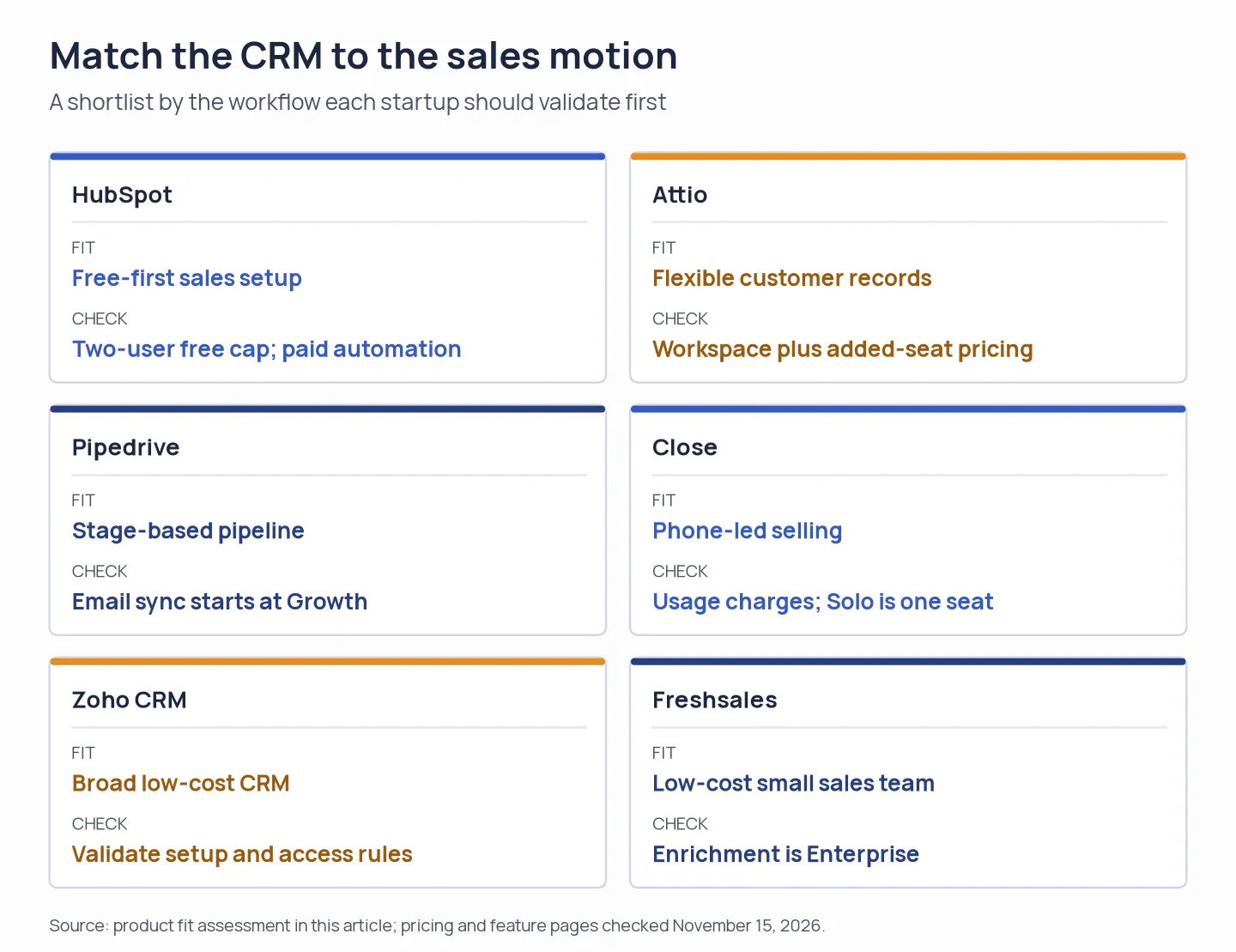
Match the CRM to the sales motion, then verify its seat, automation, and data-handling limits.
1. HubSpot CRM: Best for a startup beginning with a free pipeline
HubSpot gives a founder shared contacts and deals before paying for sales automation, but the two-user cap makes the free plan a short runway. I created a contact in a new workspace without connecting an inbox. I like that you can check the record flow before granting mailbox access.
Pros
- Free CRM access for up to two users, with no card required on the pricing page.
- You can access contacts and deal views before connecting a mailbox.
- The larger HubSpot suite can keep marketing and sales records together as a startup grows. That only pays off if the team will use both sides of the system.
Cons
- A three-person founding team needs to decide who owns CRM access once the sales group grows beyond the free seat allowance.
- Workflows and the Prospecting Agent opened upgrade routes in my free account.
- The $7 Starter offer is displayed alongside $20, but its billing selection, term, and eligibility need checkout confirmation. HubSpot's Startup Program discounts eligible new Professional or Enterprise customers and steps the offer down over time, so check renewal terms before budgeting.
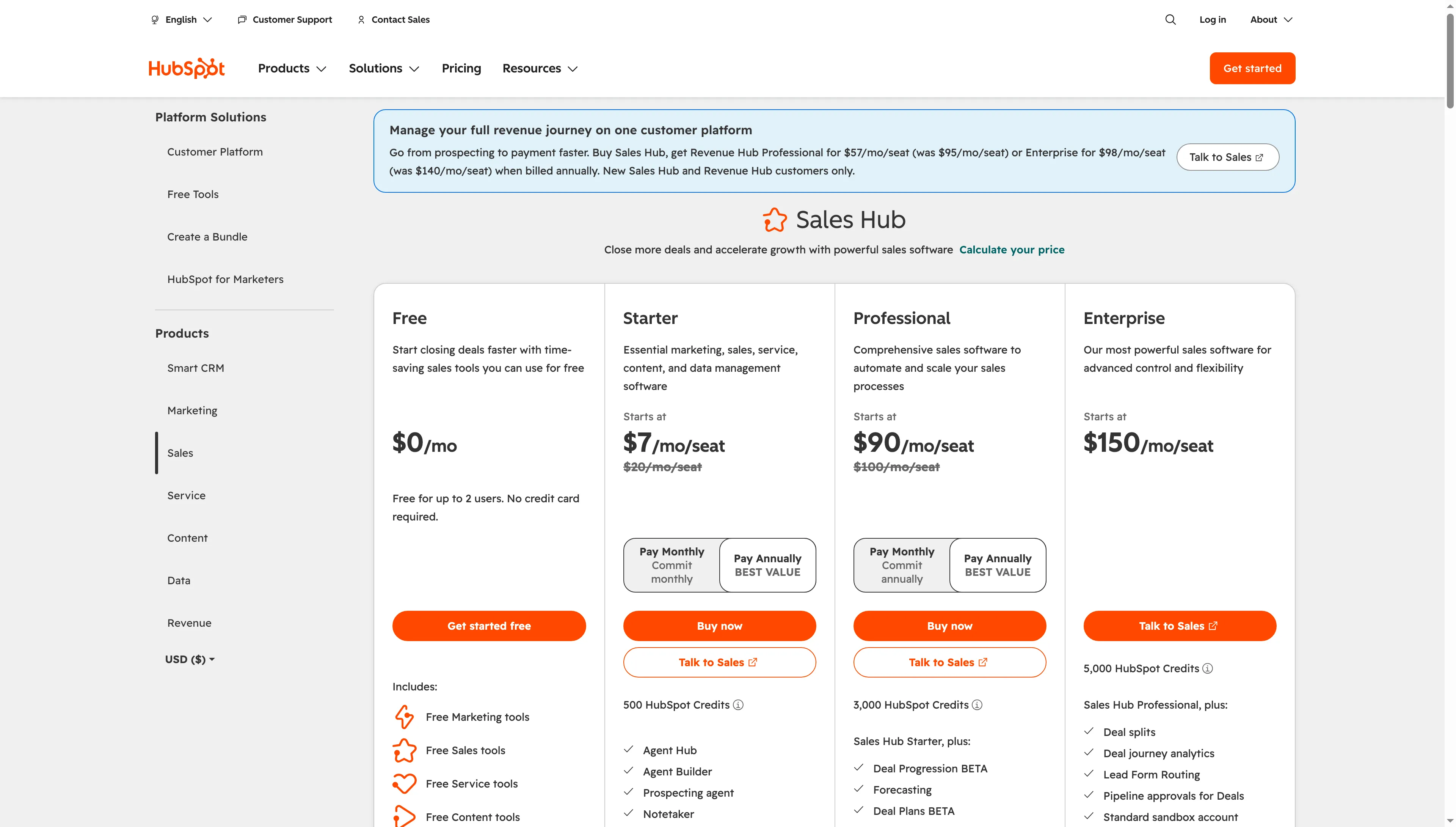
HubSpot lists the two-user Free plan beside paid Sales Hub tiers.
Product pricing — HubSpot CRM
Free for up to 2 users. Starter displays $7 promotional and $20 standard per seat monthly. Confirm billing and offer terms before purchase.
2. Attio: Best for a startup with a changing customer data model
Attio stands out to me when a startup's customer model keeps changing as it learns how to sell. You can reshape records and lists around the process, but you'll need to decide which reports and handoffs to build. Its free plan includes up to three users. Plus annual billing starts at $40 per month for one user, with added seats listed at $35 each per month.
Pros
- Plus and Pro are priced as a workspace base plus additional seats, so a founder can see how the next hire changes cost.
- Attio promotes an 80% first-year discount on annual Pro for eligible venture-backed startups with up to ten users, then 30% off in year two.
Cons
- The base fee and added-seat charge make a single “per-user” starting price misleading. Don't divide the workspace fee by a headcount you haven't hired yet.
- Startup pricing has conditions governing eligibility and when you can apply. Confirm them before choosing Pro.
- G2 reviewers have praised Attio’s flexible records and pipelines, while some recent reviews mention slower automation setup and reporting needs. Those are individual experiences. Check your reporting and handoffs in a trial before moving data; the public pricing page can't show whether your team will like the workflow.
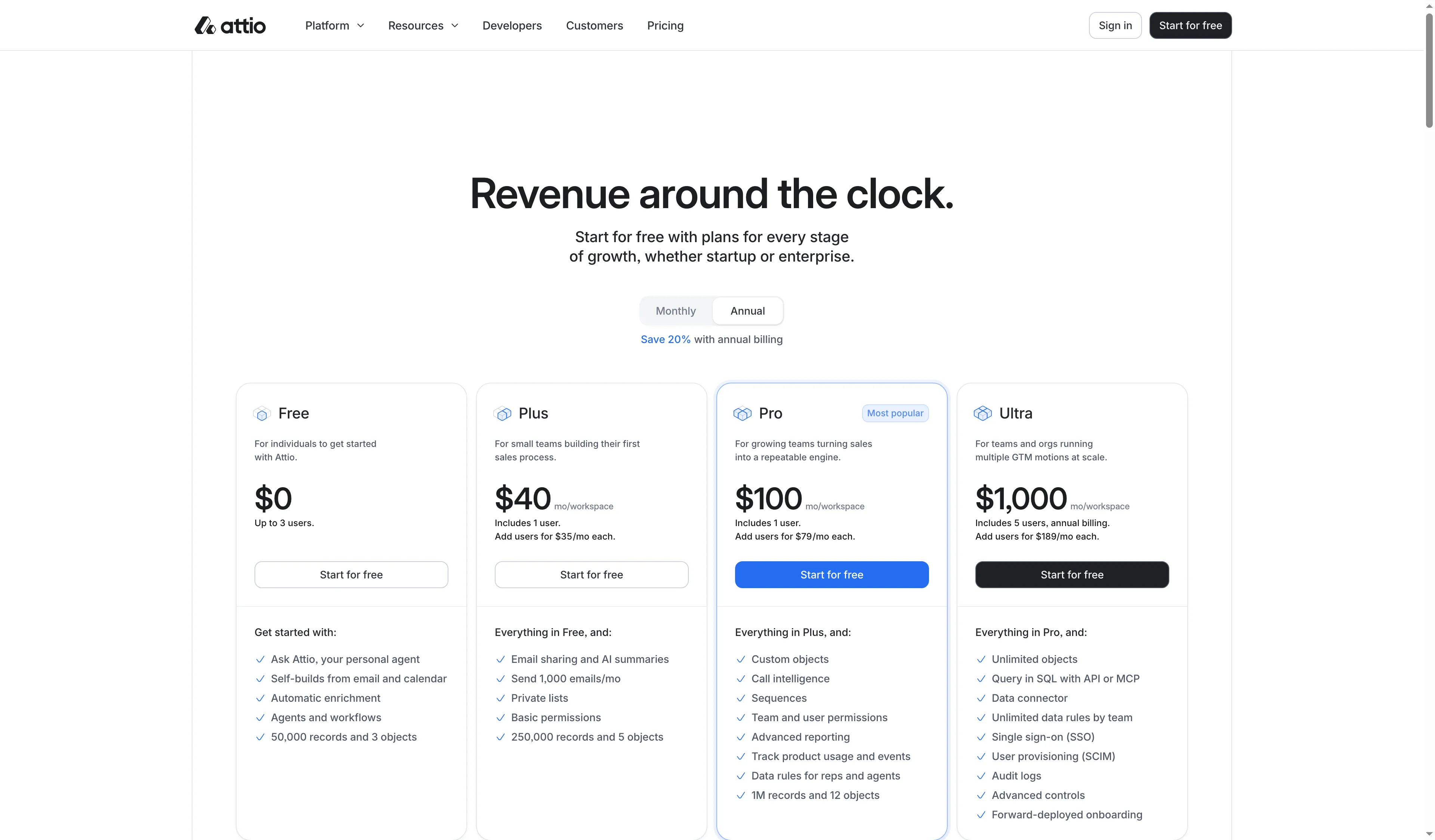
Attio combines a workspace fee with additional-seat pricing.
Product pricing — Attio
Free for up to 3 users. Plus annual billing is $40/month for one user plus $35/month per additional user. Pro is $100/month for one user plus $79/month per added user.
3. Pipedrive: Best for a startup that wants a stage-based sales pipeline
I prefer Pipedrive’s clear stage board if your team already sells with repeatable steps. Lite is the obvious starting point if your team already knows its stages and wants reminders tied to each deal. Email sync is the reason to price Growth. Lite costs $14 per seat per month with annual billing, while Growth at $39 adds full email sync and automations.
Pros
- Lite keeps the entry price predictable for a small deal-focused team. It won't give you Growth's full email sync.
- Growth adds connected email and automation for teams that need those steps inside the CRM.
- According to the pricing page, a 14-day trial is available without a payment card.
Cons
- Lite's starting price does not include the same email workflow as Growth.
- LeadBooster and other lead-generation features can add cost. Check the current quote if the startup needs forms, chat, or prospecting.
- A recent Capterra-linked review praised the pipeline’s clarity but wanted less manual data entry. That makes a sample import and activity workflow worth trying before rollout.
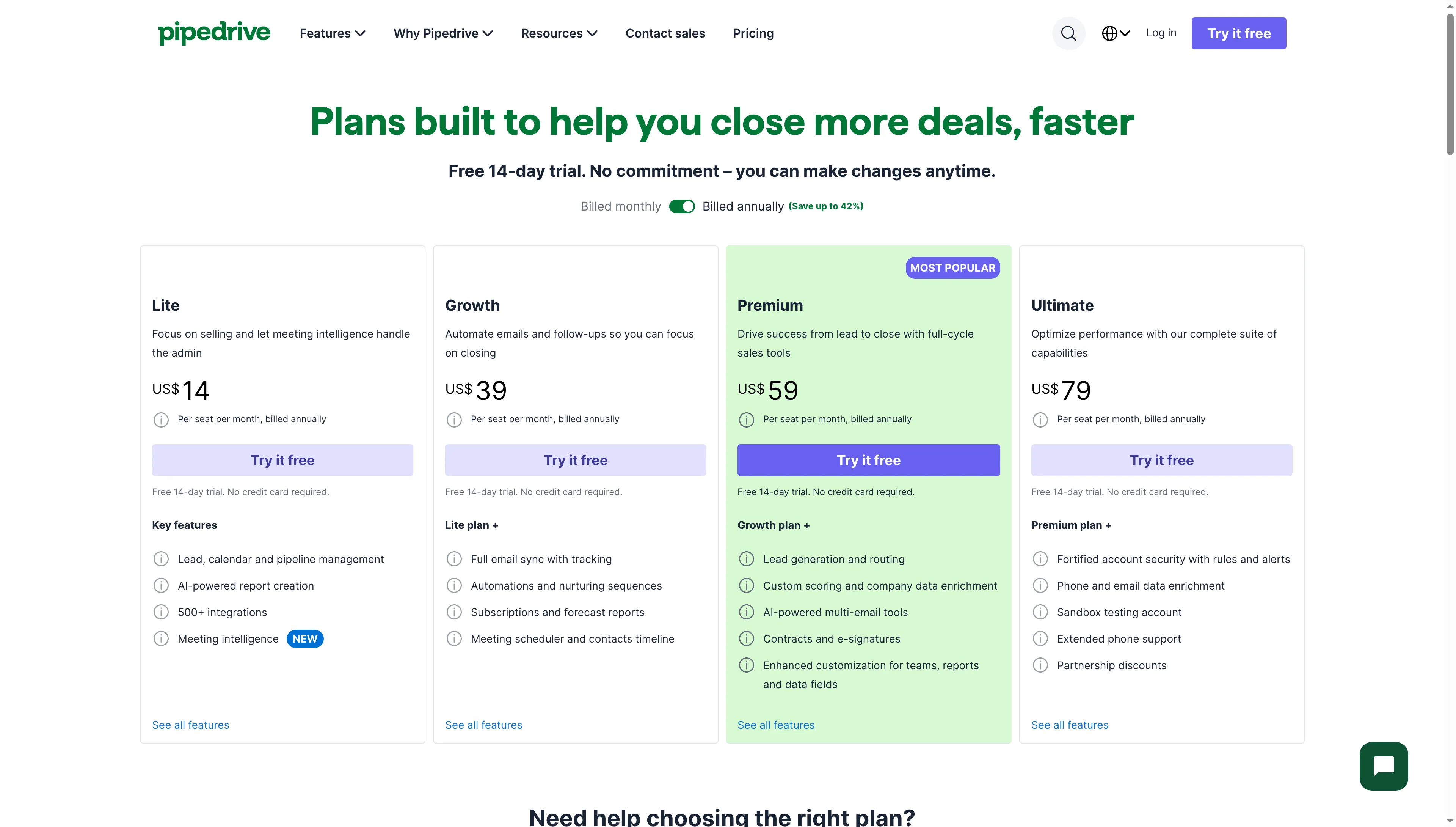
Pipedrive separates the lower-cost pipeline plan from email sync and automation.
Product pricing — Pipedrive
Lite from $14/user/month and Growth from $39/user/month when billed annually. Confirm add-on and monthly-billing prices at checkout.
4. Close: Best for a small team that sells by phone
My favorite phone-first CRM here is Close if the team can budget for usage charges and wants calls beside lead records. Solo looks inexpensive on a one-seat budget. The team price is a different calculation: Solo is $9 per month for one user with annual billing, while teams move to Essentials at $35 per user monthly.
Pros
- Solo offers a low-cost entry for one seller, with a stated 10,000-lead limit.
- Essentials supports teams and shared sales activity.
- Growth adds automated workflows, power dialing, and bulk email.
Cons
- Solo is for one user. It isn't a five-person alternative to Essentials.
- Calls and texts bring usage charges, and phone numbers can add a monthly fee. You'll want a usage estimate before choosing Close for a larger team, because the seat price alone leaves out part of the phone bill.
- If the team needs automated workflows or power dialing, Growth is $99 per user monthly on annual billing, a material jump from Essentials. A recent vendor-invited Capterra reviewer praised the dialer but wanted more lead-field customization, so check your required fields before rollout.
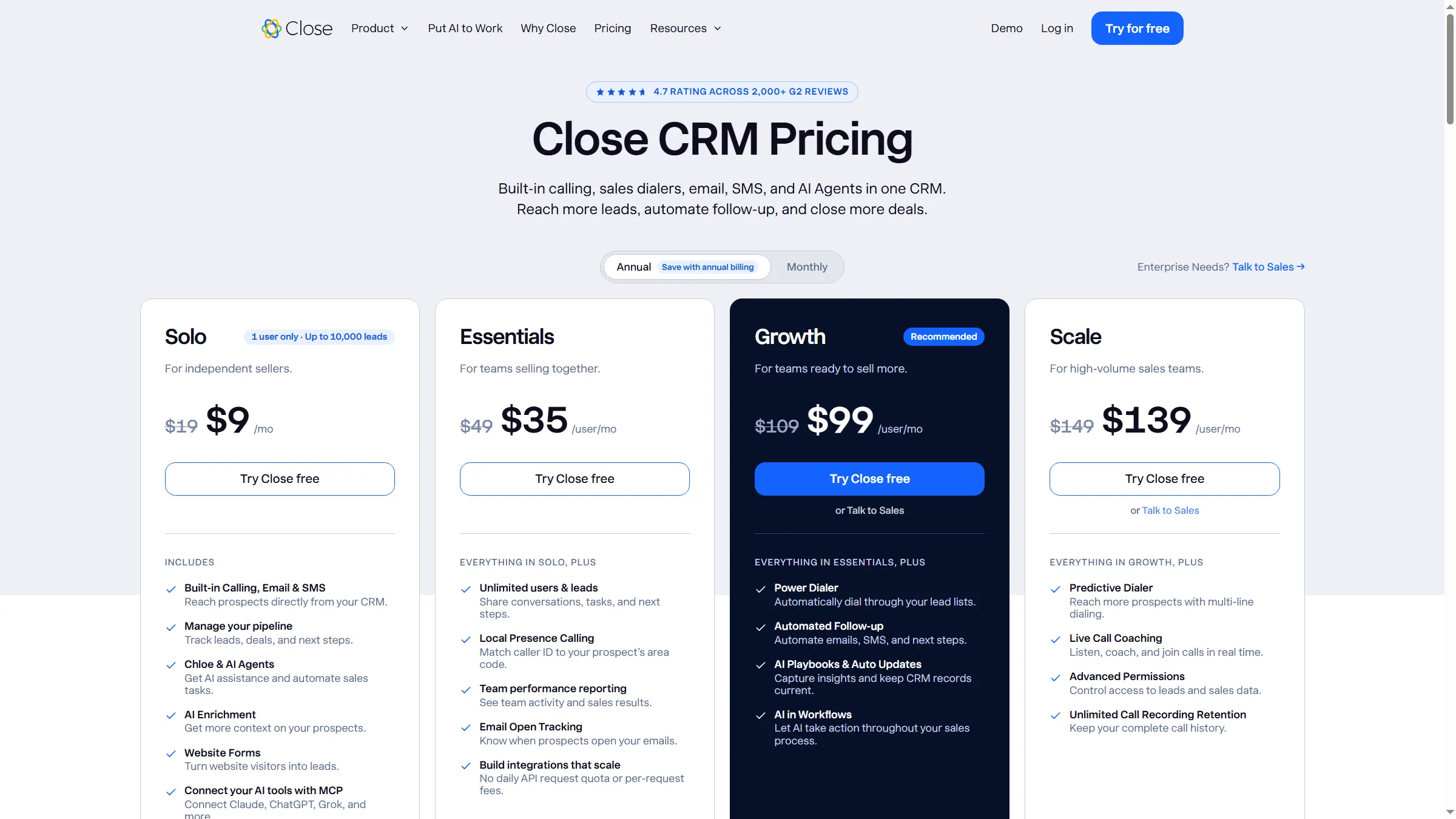
Close prices Solo for one seat and moves teams to Essentials.
Product pricing — Close
Solo $9/user/month for one user. Essentials $35/user/month. Growth $99/user/month, billed annually. Call/SMS and number charges extra.
5. Zoho CRM: Best for a startup that wants a broad CRM on a tight budget
My advice is to choose Zoho CRM when the startup already runs Zoho apps; a from-scratch team should test admin setup first. The free edition covers up to three users, and Standard starts at $14 per user monthly with annual billing. You'll still need to decide which parts your team can maintain; test one assignment and reporting workflow before inviting the team.
Pros
- According to the vendor's feature comparison, Standard includes multiple pipelines and sales features such as email integration, built-in calling, and forecasting.
- A large suite of Zoho products may suit startups that already use its apps.
Cons
- The low seat price doesn't show how much setup your process will need, and a startup without an operations hire may have to build its own rules and reports.
- One Capterra reviewer praised filtering and customization, while another criticized support, usability, and limits. The five-star review also mentioned refreshes, though the reviewer wasn't sure the connection caused them.
- Verify export caps, automation gates, and who can see records before inviting contractors or investors. You'll want to check those permissions before sharing a customer list outside the core sales team.
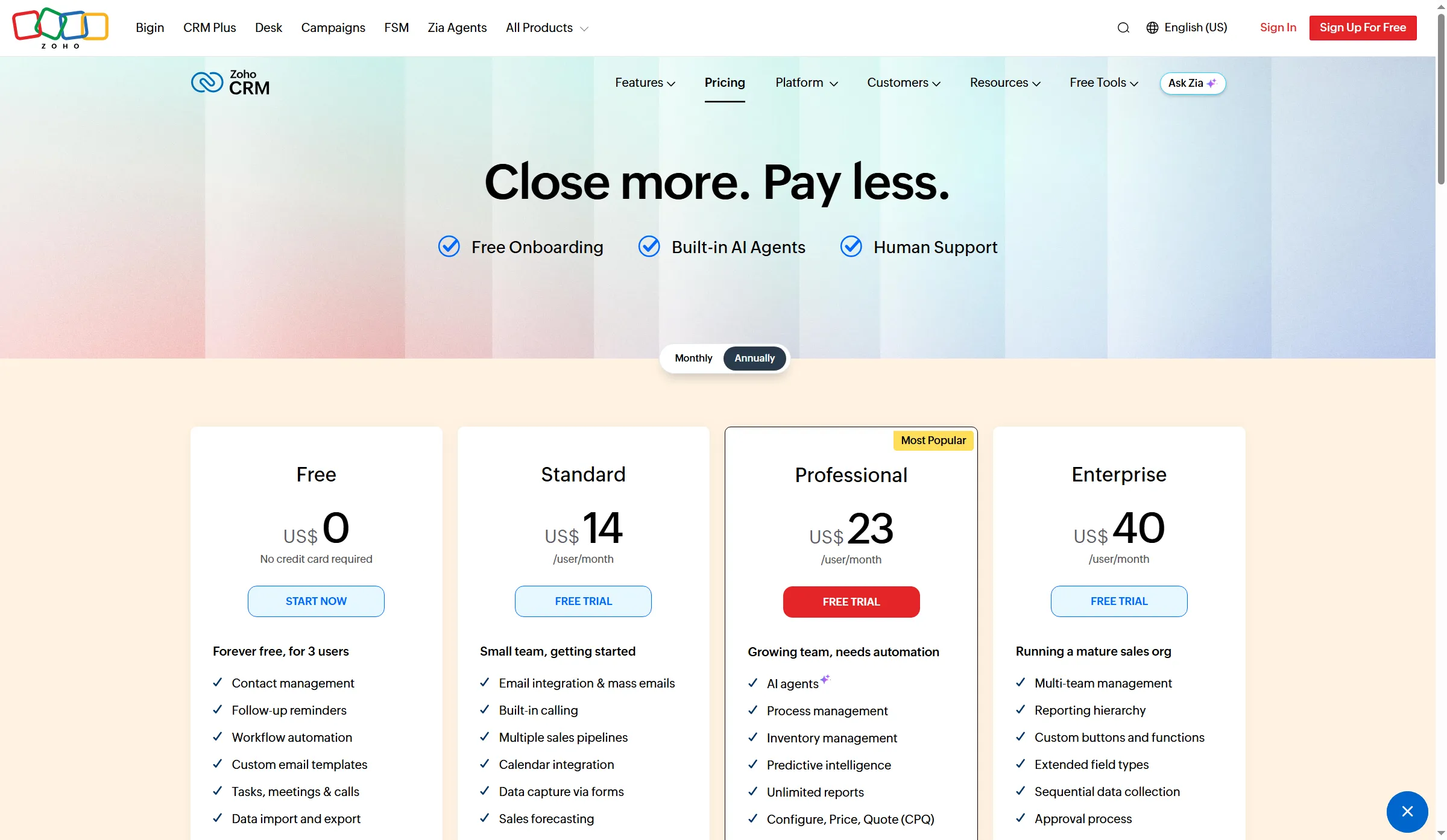
Zoho CRM lists Free for three users and annual seat pricing for paid editions.
Product pricing — Zoho CRM
Free for up to 3 users. Standard from $14/user/month billed annually.
6. Freshsales: Best for a small sales team that needs an inexpensive CRM
Freshsales is my pick for a small team shopping by seat price, provided it can live without contact enrichment on Growth. For a small team, that price puts it beside Zoho and HubSpot. You won't get contact enrichment at this tier; the pricing matrix places it on Enterprise.
Pros
- Free includes contact and account management, activity timeline, tasks, appointments, notes, and a Kanban view.
- Growth starts at $9 per seat monthly when billed annually.
- Pro and Enterprise provide higher-tier functions. Check the matrix for the specific controls the team needs.
Cons
- Growth's $9 rate doesn't include contact enrichment. You'll need Enterprise for that feature, so budget above Growth if the team wants enriched prospect records.
- G2 and Capterra reviewers mention duplicate or spam-created records as well as useful routing and pipelines. Those are individual reports. Test duplicate handling and form controls with the lead sources you plan to use. If junk contacts already reach the CRM, the cleanup work can eat into the low seat price.
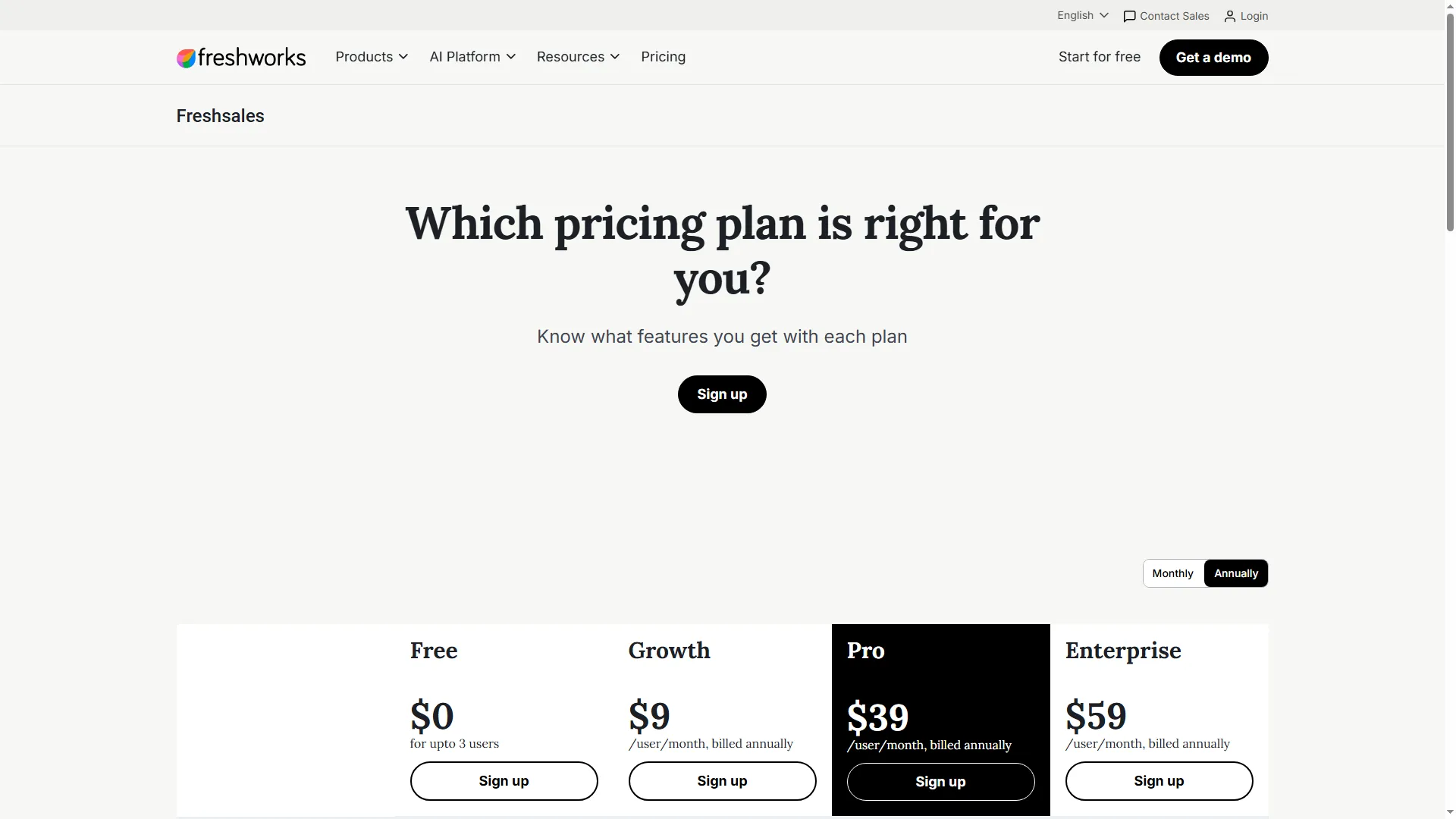
Freshsales separates its Growth, Pro, and Enterprise seat prices.
Product pricing — Freshsales
Free for up to 3 users. Growth from $9/user/month billed annually. Pro $39 and Enterprise $59/user/month billed annually.
Choosing a startup CRM around lead routing and spam
Choose by checking the full lead path: form or import, assignment, duplicate handling, and follow-up. Lead routing, qualification, and spam filtering have different plan gates.
HubSpot's round-robin owner assignment requires Sales Hub Professional or Enterprise, while its form tools list reCAPTCHA, bot filtering, and domain blocking across plans.
Pipedrive's automatic assignment starts at Professional, and its rules can route new leads or deals. LeadBooster forms are a separate add-on.
Zoho CRM applies assignment rules to imported, API, and webform records, not records created manually. Paid editions add webform spam detection.
Freshsales can auto-assign contacts, deals, accounts, and leads using conditions or territory rules. Its form capture lets admins choose whether repeat submissions update an existing contact or create another.
Close leans on manual assignment or a custom lead-owner field. Its native forms provide basic spam prevention but no email validation, while automation can require a workflow or third-party connection.
Qualification still depends on your fields and process: decide what makes a lead sales-ready, whether routing uses territory or fit, and who reviews uncertain submissions before a rep spends time on the wrong account. Before paying, run a test lead through your form or import, assignment rule, duplicate check, and follow-up task. Each product routes different record types, and a manual contact may follow different rules from a form submission. A workflow may not work for someone who creates a contact by hand even if it works for imported leads.
One seller with a few active opportunities may be fine with a spreadsheet and shared inbox. If the startup already pays for Google Workspace or Microsoft 365, compare its email/calendar connection and existing contact or sales tools before adding another subscription. A CRM becomes useful when ownership, follow-up, and reporting keep slipping.
Need LinkedIn automation with your CRM? Linked Helper connects to four picks
If LinkedIn prospecting is part of your sales process, Linked Helper can send processed profiles and campaign replies into HubSpot, Pipedrive, Close, or Zoho CRM through its workflow action. Linked Helper runs the outreach, while the CRM remains the system for records and pipeline; its LinkedIn integrations give you a lead handoff between the two.
For a broader overview, read Linked Helper's guide on connecting LinkedIn to a CRM.
The workflow sends selected Linked Helper data into the CRM, so treat it as a lead handoff rather than a two-way CRM sync. See the current setup guides for HubSpot, Pipedrive, Close, and Zoho CRM. Before importing a large list, configure LinkedIn IDs as matching fields: the guides note that email is the default identifier, and profiles without one can create duplicate records.
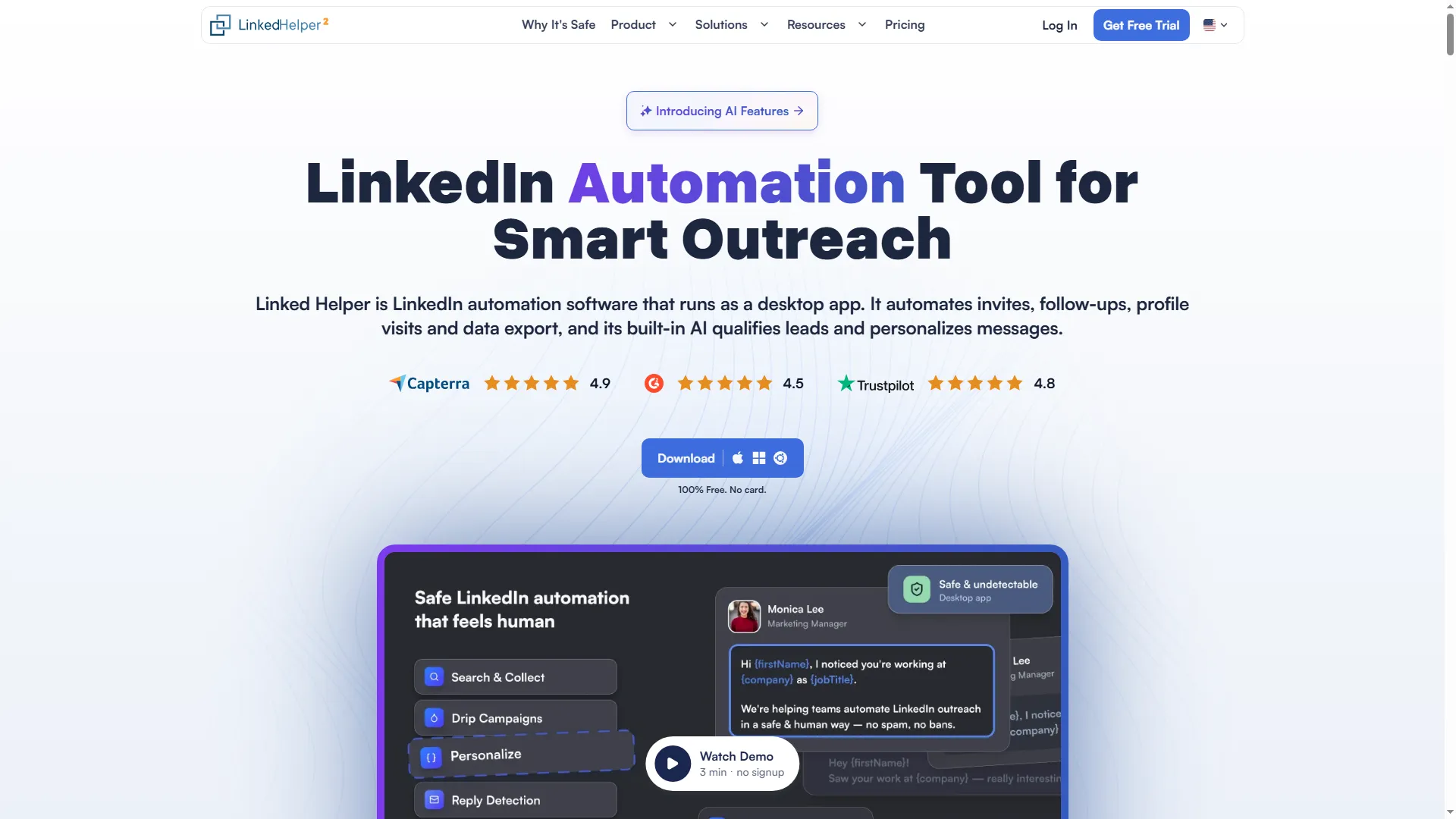
Linked Helper runs LinkedIn outreach from a desktop app and supports campaign follow-up.
Which startup CRM should you choose?
Choose HubSpot if two people need a free shared CRM. Attio gives a startup more freedom to shape customer records, while Pipedrive suits a team that already works from deal stages. Close fits phone-led sales if the team can cover usage charges. Compare Zoho CRM and Freshsales when seat cost sets the budget, then run a sample process before importing customer data.