

 21 min read

TL;DR: DMARC tools in October 2026
-
Investigation: dmarcian separates SPF/DKIM authentication from alignment, which helps you work out why an approved sender fails.
-
Budget: URIports Pebble starts at $6/month on annual billing, with a short reporting history. Size the incoming reports before subscribing.
-
History: PowerDMARC Basic includes one year of history, but CSV export requires a higher tier.
-
Client work: DMARC Report Framework has a customer portal. Its partner application needs approval.
-
Hands-on checks: I opened dmarcian, EasyDMARC, and URIports trials. EasyDMARC's lookup separated a valid reject policy from active reporting.
The table compares the seven picks, including the price of the plan that supplies each featured capability. Cheaper reporting plans exist where the recommendation focuses on Premium or MSP features.
| Tool | Best for | Standout feature | Price for featured plan | Main trade-off |
|---|---|---|---|---|
| dmarcian | Investigating sending sources | Separate alignment filters | $19.99/mo, annual Basic | One user on Basic |
| URIports | Economical technical monitoring | Reports-based billing | $6/mo, annual Pebble | 30-day history |
| PowerDMARC | Small teams needing history | One-year Basic retention | $12/mo, annual, 100k band | CSV export gated |
| EasyDMARC | Guided authentication management | EasySPF on Premium | $71.99/mo, annual Premium | Four domains on Premium |
| DMARC Digests | Simple recurring reviews | Weekly/monthly digests | $14/domain/mo, monthly | Per-domain cost adds up |
| Valimail | Free discovery, assisted enforcement | Monitor-to-Enforce progression | Free Monitor; Enforce custom | Export depends on tier |
| DMARC Report | MSP client reporting | Client portal on Framework | $100/mo, monthly Framework | Partner approval required |
Linked Helper, the publisher of this blog, makes LinkedIn automation software and sits outside this DMARC category. The testing method explains the work behind the recommendations.
What is a DMARC tool?
A DMARC tool turns reports from receiving mail servers into information about who sends using your domain and whether those messages authenticate and align. You can investigate an approved sender that fails, identify unauthorized sources, and decide when to strengthen policy. Some services also host authentication records or help with deployment.
Authentication alone can leave you with a misleading green check. A service may pass SPF or DKIM under its own domain while your message displays a different From domain. DMARC needs SPF or DKIM to pass with a domain aligned with the message's From domain. Forwarding can break SPF, though a surviving aligned DKIM signature can still allow DMARC to pass.
Receiver coverage varies, so report totals can differ from the volume in your sending platform. Aggregate reports show authentication results rather than inbox placement. Forensic reports add message-level detail, with privacy implications and uneven availability. DMARC also applies to the From domain itself: lookalike domains owned by an attacker require a separate approach.
What makes the best DMARC tool?
A useful DMARC tool lets you investigate an individual sender and keep the evidence long enough to act on it. Your invoices, support replies, and marketing campaigns may take different routes to the inbox, even when they share a From address. The payroll service still failing authentication deserves attention even if the overall pass rate looks healthy.
Investigation. Can you filter by domain or IP and distinguish failed authentication from failed alignment? I looked for those controls rather than a reassuring dashboard percentage.
Billing. Check what the vendor counts. A report file can summarize many messages, and an active sending subdomain can affect the domain allowance. A plan's smallest price and largest capacity may belong to different configurations.
History and exports. Decide whether you need a weekly review or a comparison with an earlier campaign. Raw XML, CSV, PDFs, and API access solve different jobs. A PDF summary won't give your analyst the same working data as a source-level export.
Ownership. Decide who fixes senders, who controls DNS, and which customers can see which domains. Deployment help may be worth paying for when nobody internally owns authentication. That choice also affects what you'll have to move when you leave the service.
1. dmarcian: Best for investigating your sending sources
dmarcian is my pick for an administrator who wants to investigate sending sources before tightening policy. When I opened its trial, a clearly labelled sample dashboard let me preview that workflow. I could start with a source and then look for the failure that needed attention.
Pros — dmarcian
-
Separate SPF/DKIM alignment and authentication filters
-
Forwarded and fraudulent traffic excluded from billed volume
-
Clearly labelled sample reporting before DNS setup
Cons — dmarcian
-
Basic allows one user and two active domains
-
Five domains require Plus or a custom configuration
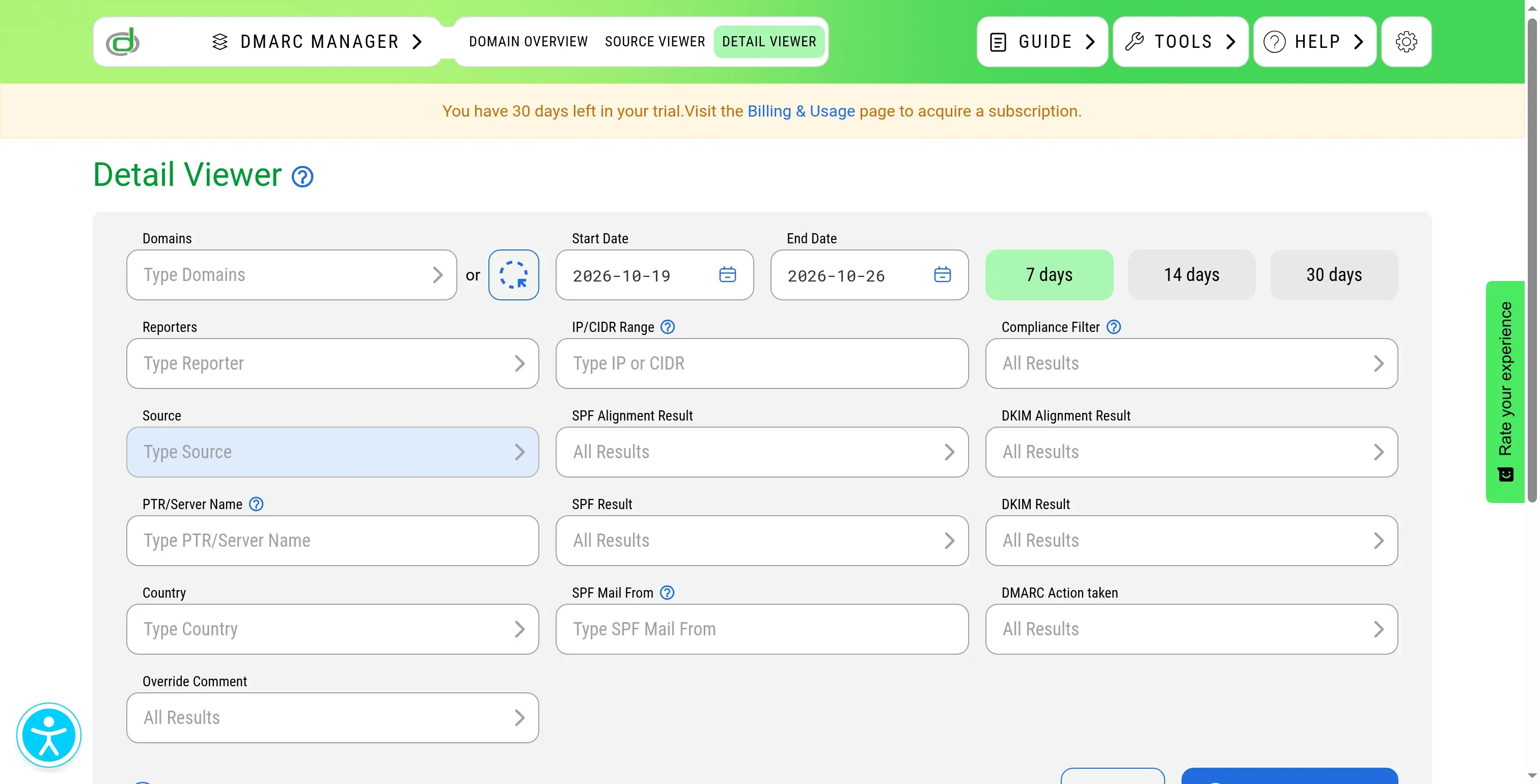
My favorite detail was in Detail Viewer. Expanding the advanced filters exposed SPF Alignment Result and DKIM Alignment Result separately from SPF Result and DKIM Result. That's useful when a sending service authenticates successfully under its own domain but doesn't align with your visible From address. You need to see the distinction before choosing the fix.
dmarcian's plan changes are less comfortable. Basic can cover a small business, but adding domains or colleagues can leave you paying for much more capacity than you need. I wouldn't put a company on Personal, however little mail it sends: that free plan is restricted to non-business domains.
dmarcian pricing
dmarcian pricing: From $19.99/month, billed annually, for Basic; 30-day trial.
-
Basic — two active domains, 100,000 DMARC-capable messages/month, one user, three months of history
-
Plus — $199/month, billed annually; eight active domains, three users, one year of history
-
Monthly billing — $24 for Basic or $240 for Plus
2. URIports: Best for economical monitoring with technical control
URIports is my budget pick for someone comfortable investigating email authentication. It charges for incoming reports while allowing unlimited email volume. For a busy sender, that can be economical. You'll still need to estimate how many reports arrive (including any website reporting you enable).
Pros — URIports
-
Five domains included with Pebble
-
JSON and CSV exports across subscriptions
-
Client-scoped access and API on Stone
Cons — URIports
-
Pebble and Stone retain 30 days of history
-
Website reports can consume the same allowance
-
No SPF flattening service
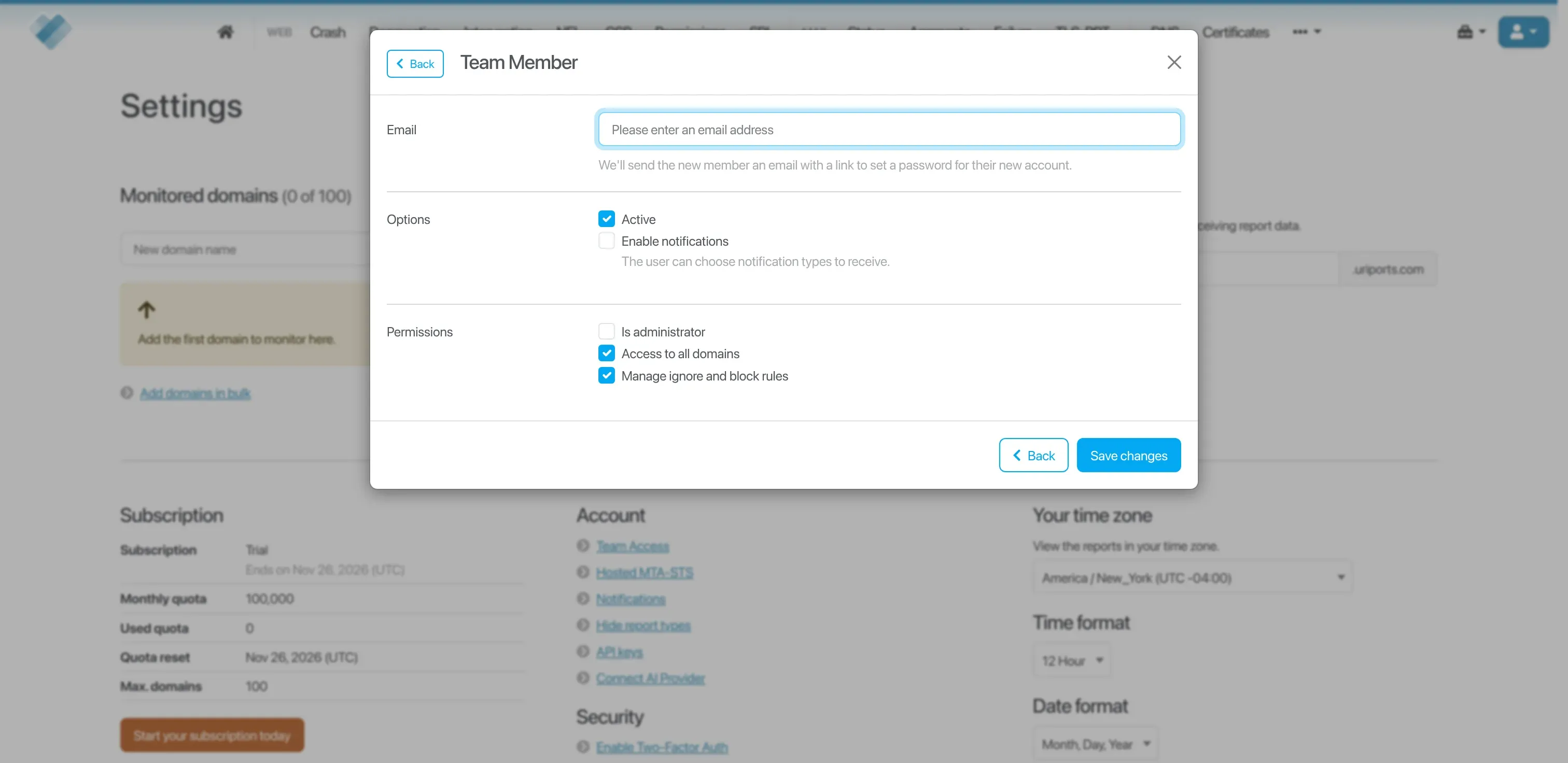
In the trial, I opened the team-member form and found separate controls for administrator access, all-domain access, and permission to manage ignore/block rules. I like having those permissions separated for client work: access to a customer's reports and permission to change filtering rules are different responsibilities.
URIports expects you to understand the mail system you're investigating. On r/sysadmin, u/Shibocat praised its “easy to use webinterface, good notification options” while making that same point about reading the logs. If you need a consultant to repair your senders, skip this as a standalone purchase.
URIports quota: ignored reports still count
URIports processes ignored reports, and reports can keep counting after you remove a domain if its DNS still points at your endpoint. Put that DNS cleanup on the checklist for offboarding a client. Otherwise, a domain can keep consuming your allowance even after you've stopped managing it. Its quota documentation adds a sharper warning: once the allowance runs out, new reports are discarded and can't be recovered later. Set alerts before combining website and email reporting in one subscription.
URIports pricing
URIports pricing: From $6/month, billed annually, for Pebble; one-month trial.
-
Pebble — five domains, 100,000 reports/month, 30-day history
-
Stone — $30/month, billed annually; 25 domains, 500,000 reports/month, team access
-
Monthly billing — $7 for Pebble or $33 for Stone
3. PowerDMARC: Best for small teams that need a year of history
PowerDMARC is worth a close look if five domains and two users cover your business. Its Basic plan combines reporting with a full year of history, and the 100,000-message configuration is inexpensive beside plans that reserve longer retention for much larger accounts.
Pros — PowerDMARC
-
One-year history on Basic
-
Five active domains in the 100,000-message configuration
-
Raw XML upload/download on Basic
Cons — PowerDMARC
-
Basic has two users and doesn't let you export reports as CSV
-
Hosted SPF is an add-on to Basic
-
MSP pricing requires a separate quote
I like the room that PowerDMARC gives you to investigate an intermittent problem. If a quarterly campaign introduces authentication failures, you can go back to the previous send and compare it with the one that went wrong. Raw XML access lets you keep the underlying reports too.
Basic isn't for a team that needs CSV exports or more investigators than its seat allowance permits. Set those requirements before you subscribe. Hosted SPF costs extra, so include the add-on when you're budgeting for that work.
PowerDMARC volume bands need separate pricing
PowerDMARC sells Basic in several volume bands. Its $8 entry point and two-million-message maximum belong to different selections. Choose the volume before comparing the price with another vendor. The pricing block uses the same selection as the workload calculations.
Learn what sends before moving policy. On r/sysadmin, u/Beefcrustycurtains said their team uses PowerDMARC while monitoring clients “for a month or two before we move them to the reject policy.” Their timing is a customer's example, and your senders may need a different monitoring period.
PowerDMARC pricing
PowerDMARC pricing: $12/month, billed annually, for Basic at 100,000 compliant messages/month; 15-day trial.
-
Basic — five active domains, two users, one-year history
-
Monthly billing — $15 for the same 100,000-message configuration
-
Partner — custom pricing for multitenancy and MSP operations
4. EasyDMARC: Best for teams that want guided authentication management
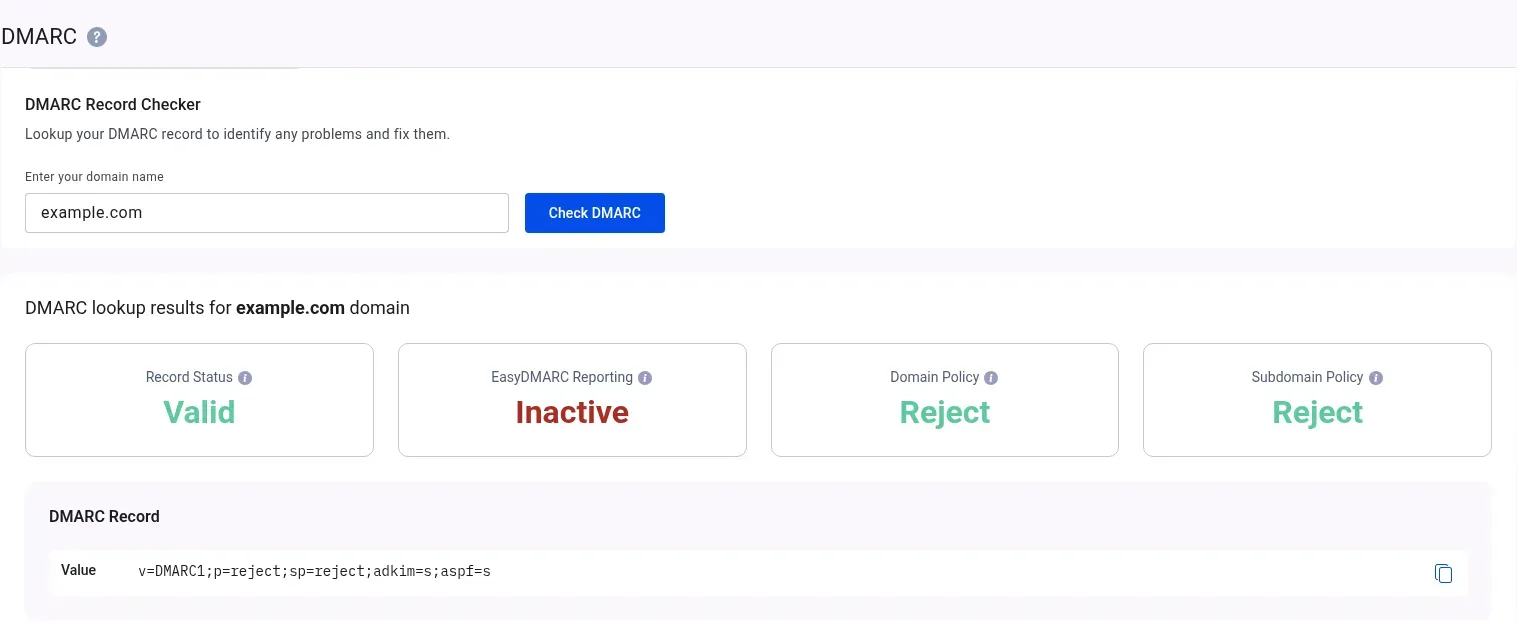
EasyDMARC Premium suits teams that want help managing SPF alongside their reporting. When I ran its lookup on example.com, the domain had a valid reject policy but EasyDMARC reporting was inactive. I like that separation. A domain can have the right DNS policy without sending reports to the tool you've just opened.
Pros — EasyDMARC
-
EasySPF and proactive alerts on Premium
-
Unlimited users on listed business plans
-
One-year history on Premium
Cons — EasyDMARC
-
Premium includes four domains
-
Dedicated customer-success manager requires annual Premium
-
Paid periods aren't refundable for early cancellation
EasyDMARC Premium is the plan to consider if managed SPF is part of the job. I like its unlimited-user allowance for a team that shares investigations: you can give colleagues access without deciding who gets the available seat. Plus handles a smaller reporting workload and leaves out that Premium feature bundle.
But domain count can force a different configuration while email volume still fits comfortably. Price the extra domain before committing to the Premium subscription; it can change the comparison with other vendors.
EasyDMARC annual billing still needs a monthly volume check
EasyDMARC's annual billing screen showed 1.2 million emails/year for the base allowance, while the public pricing page expresses it as 100,000/month. Don't assume that wording permits a large seasonal burst. Size the busiest month against the monthly allowance unless your order confirms pooling.
Put EasyDMARC's renewal date on your calendar. EasyDMARC's US terms require at least three business days' notice to stop monthly renewal; leaving partway through a paid period doesn't earn a refund. Use the trial to check the fit before taking the annual discount.
EasyDMARC pricing
EasyDMARC pricing: From $71.99/month, billed annually, for DMARC Premium; 14-day trial.
-
DMARC Plus — $35.99/month, billed annually; two domains, three months of history
-
DMARC Premium — four domains, one year of history, EasySPF
-
Monthly billing — $44.99 for Plus or $89.99 for Premium
5. DMARC Digests: Best for simple recurring authentication reviews
DMARC Digests suits a team that wants a review routine. You get a web dashboard with all reported mail sources and IPs, plus weekly or monthly summaries. I prefer that focused setup for someone who wants to review authentication regularly without spending the week in a security console.
Pros — DMARC Digests
-
Clear per-domain monthly pricing
-
Dashboard plus weekly and monthly summaries
-
Team access and 60-day history
Cons — DMARC Digests
-
Each added domain increases the bill
-
Free Postmark monitoring has no dashboard
-
Per-domain pricing can become expensive across clients
You can begin with the summary, then open the dashboard to investigate a source that needs attention. If you want to compare reports across quarters, though, you need a product that retains them longer. Decide how far back you need to look before you build the review routine around this one.
Don't confuse it with Postmark's free monitoring service. That sends weekly email reports covering seven days, the top ten sources, and five IPs per source. Paid DMARC Digests adds the dashboard, broader source visibility, and collaboration. A free Monday email and an investigation workspace serve different needs.
The per-domain bill grows with your portfolio. In a May 2024 r/sysadmin discussion, u/JwCS8pjrh3QBWfL wrote, “We used DMARC Digests until we hit enough domains that it made more sense to pay for DMARCLY.” Run that comparison before adding a portfolio of brands. For client work, you also need customers restricted to their own domains. General team access can leave that requirement unresolved.
DMARC Digests pricing
DMARC Digests pricing: $14/domain/month, billed monthly; 14-day trial.
-
Paid monitoring — dashboard, all mail sources/IPs, 60-day history, team access
-
Free Postmark monitoring — weekly email only, seven-day history, limited source detail
6. Valimail: Best for free sender discovery with an enforcement upgrade path
Valimail is my pick when you want to start with sender visibility and may later need more help managing authentication. Monitor is free; Enforce is the paid progression. I like that separation because it lets you understand the size of the problem before deciding how much automation and assistance to buy.
Pros — Valimail
-
Free Monitor with named sending-service discovery
-
Paid progression toward authentication management
-
Role-based access in the Monitor plan matrix
Cons — Valimail
-
Paid prices require a quote
-
Monitor lacks downloadable reports
-
Source-IP CSV downloads sit in Enterprise
Valimail's free dashboard won't suit every reporting workflow. If your security team needs to work with data outside the console, check the export tier before recommending Monitor. The plan matrix puts subdomain reports in Premium and above, which can also move the purchase beyond basic sender discovery.
In a June 2023 r/sysadmin discussion, u/skylinesora credited Valimail support with helping on novice questions. I like the prospect of that help when authentication isn't anyone's full-time job. The order still needs to specify the assistance you're buying.
Enforce is overkill for a simple domain if you can handle the investigation and want predictable public pricing. For a complex sender estate, ask how much deployment work the service takes on (and who will still own DNS and sender configuration).
Valimail pricing
Valimail pricing: Free Monitor; Enforce pricing is custom.
-
Monitor — free visibility; downloadable reports aren't included
-
Starter/Premium — quoted paid tiers; API is an add-on
-
Enterprise — quoted; source-IP CSV downloads and included API
7. DMARC Report: Best for MSPs that need a client portal
DMARC Report deserves a place on an MSP shortlist because its Framework package explicitly includes a portal for customer access. That's a more useful starting point than assuming a multi-domain business plan can serve unrelated customers. It's worth evaluating when client reporting is part of the service you sell.
Pros — DMARC Report
-
Framework lists 25 domains and a customer portal
-
Six months of history on Framework
-
Partner workflow includes client separation and branded reports
Cons — DMARC Report
-
Partner application requires approval
-
Published domain limits for business plans conflict
-
Managed deployment costs extra
The MSP package gives you a concrete starting configuration: domains, report allowance, retention, and client access. Price that configuration first. White labelling and additional managed services can come later if clients will actually use them.
DMARC Report's business pricing page contradicts itself: the cards show domain caps, while the FAQ says paid plans have unlimited domains. I wouldn't promise twenty-client coverage on the cheaper Guard plan. Framework gives you an explicit package to compare, with the final allowance settled in the order.
DMARC Report managed deployment targets quarantine
DMARC Report's managed compliance add-on targets quarantine at 100%, rather than promising to reach reject. Specify the deployment outcome before comparing fees. Its partner page also advertises a discount alongside the MSP prices. I used the listed Framework amount once (without applying that discount a second time).
Skip Framework if you only monitor your own domain and don't need client access. You're paying for an operational setup that simpler reporting tools can avoid.
DMARC Report pricing
DMARC Report pricing: $100/month, billed monthly, for MSP Framework; partner approval required.
-
MSP Secure — free; one domain, 10,000 reports/month, 30-day history, client portal
-
Framework — 25 domains, two million reports/month, six-month history, client portal
-
Sentinel — $250/month; one-year history and white-label domain
-
Business reporting — separate plans, including free Core; domain allowances need clarification
DMARC cost comparisons: domain, history, and access assumptions
DMARC subscription costs depend on domain count, retention, and access permissions. Using the recorded USD prices, these workload calculations compare reporting with a minimum 30-day history and no additional sending subdomains. In dmarcian, a sending subdomain counts as another active domain. They compare reporting, not paid deployment, SPF hosting, or inbox-placement testing.
Annual-billed prices mean an annual commitment. “12 monthly payments” is an annualized comparison, not a promise that the monthly price will stay unchanged. Taxes are extra where applicable; PowerDMARC's pricing FAQ says its listed prices include taxes. No optional add-on is required for these base workloads.
One business domain, 10,000 legitimate messages a month
DMARC Report Core has the lowest listed bill for this small workload; URIports is the lowest-priced paid option in the table if incoming reports fit its quota. These totals cover reporting for the stated domain and volume.
| Tool | Configuration | Cost for 12 months | Qualification |
|---|---|---|---|
| dmarcian | Basic, annual | $239.88 | One user; three-month history |
| URIports | Pebble, annual | $72 | Up to 100k reports/month |
| PowerDMARC | Basic 100k, annual | $144 | Conservative larger band; not minimum quote |
| EasyDMARC | Plus, annual | $431.88 | 100k/month; two domains included |
| DMARC Digests | One domain, monthly | $168 | 12 monthly payments |
| Valimail | Monitor | $0 advertised | Confirm retention/allowance fit |
| DMARC Report | Core | $0 | Exactly at 10k monthly cap |
Compare free DMARC Report Core with URIports first. Paying more for dmarcian makes sense if you prefer its investigation controls. Valimail Monitor's retention and quota terms need clarification before it can join this price ranking. PowerDMARC's 100k row deliberately avoids treating its personal-only Free plan as a business plan.
Five business domains, 100,000 legitimate messages a month
URIports has the lowest listed paid total here if incoming reports fit its quota, while PowerDMARC includes a longer investigation window. The table prices the same five-domain workload across the shortlist.
| Tool | Configuration | Cost for 12 months | Qualification |
|---|---|---|---|
| dmarcian | Plus, annual | $2,388 | Eight domains; three users |
| URIports | Pebble, annual | $72 | 30 days; report quota applies |
| PowerDMARC | Basic 100k, annual | $144 | Two users; one-year history |
| EasyDMARC | Custom configuration | Quote required | Premium stops at four domains |
| DMARC Digests | Five domains, monthly | $840 | Five domain subscriptions |
| Valimail | Monitor or paid tier | Fit/quote required | Export and retention decide |
| DMARC Report | Guard, monthly | $300 | Card lists five domains/250k messages |
PowerDMARC is my strongest value candidate here if two users are enough and you don't need CSV exports. You pay less for URIports but get a shorter investigation window. Paying for dmarcian Plus makes more sense when its reporting workflow, extra user, and larger capacity solve an actual problem for your team.
The URIports rows depend on incoming reports staying within the allowance, including any other report types you enable. For DMARC Report Guard, the calculation follows the capped pricing card. Resolve the conflicting domain terms before purchase.
Twenty client domains, 500,000 legitimate messages a month
URIports Stone costs $360 for 12 months on annual billing, compared with $1,200 in monthly payments for DMARC Report Framework. Both list client access and enough domains for this workload. Their fit also depends on report count; quote-only packages need separate sizing, as the table shows.
| Tool | Configuration | Cost for 12 months | Qualification |
|---|---|---|---|
| URIports | Stone, annual | $360 | Scoped client access; ≤500k reports/month |
| DMARC Report | Framework, monthly | $1,200 | Partner approval; ≤2m reports/month |
| dmarcian | Partner/custom | Quote required | Standard Enterprise stops at 15 domains |
| PowerDMARC | Partner | Quote required | Multitenancy beyond Basic |
| EasyDMARC | MSP/custom | Quote required | Client/domain terms need sizing |
| Valimail | MSP/paid configuration | Quote required | Confirm client isolation and retention |
| DMARC Digests | Twenty domains | Not ranked | $3,360 arithmetic; isolation unverified |
For client work, compare URIports Stone with DMARC Report Framework first: Stone offers the lower listed bill, while Framework adds a dedicated customer portal and a longer history. Neither quote-only alternatives nor Digests' arithmetic total can fairly join that price ranking until client-access requirements are matched. With a 90-day history requirement, the price order changes: URIports Mountain costs $1,440 annually, while DMARC Report Framework's annualized subscription is $1,200 and includes six months of history. Framework has the lower listed cost for that retention requirement, subject to partner approval and the actual report allowance.
Check Cloudflare before buying another DMARC subscription
Cloudflare DMARC Management is available on all plans for domains using Cloudflare DNS, so check your existing setup before buying basic monitoring elsewhere. Its reporting view covers periods up to 30 days; setup works with apex domains, and enabling it adds a reporting destination to DNS.
Google Workspace still needs correct sender authentication. Check the CRM, help desk, and marketing senders that use your domain too. Gmail's bulk-sender requirements allow a DMARC policy of none, so meeting that requirement can still leave unauthorized mail outside an enforced reject policy. A paid dashboard helps you investigate; someone still needs to make and maintain the configuration decisions.
Which DMARC tool should you choose?
Choose dmarcian for investigating individual sending sources, or URIports when economical monitoring fits a technical team. PowerDMARC is a stronger candidate when you need to revisit older campaigns, while DMARC Digests suits a regular summary-and-review routine.
For help managing authentication, compare EasyDMARC's feature bundle with the work included in a Valimail quote. For client reporting, compare URIports' scoped access with DMARC Report's customer portal. Price the history, exports, and people you need before adding deployment help.
Whichever tool you choose, assign an owner to investigate failures. Buying the report is the easy part; the value comes from deciding which sender to fix.
How we tested
In October 2026, I explored three DMARC tool trials and reviewed pricing and documentation for all seven picks. I didn't test the tools on production domains.