

 14 min read

I checked product plans and help materials, read customer reviews and Reddit discussions, and tested a Notion workspace and the pricing flows I could reach.
TL;DR
- Choose Notion if you want a flexible workspace that can start as a private wiki. I could see a page preview in native search; enterprise search and AI stayed outside my test.
- Choose Confluence if your team already works in Atlassian and needs wiki structure. Up to 10 people can use the free tier, but page and space permissions require a paid plan.
- Choose Slite or Guru when the job is keeping internal answers owned and current. Slite shows its per-seat price; Guru sends you to sales for a quote.
- Choose GitBook to publish product or API documentation. A site fee plus member fees makes it a different purchase from an internal wiki.
- Choose Glean when staff need to find information across existing work apps and your organization can handle an enterprise rollout. Consider it a search layer; teams still need a place where source material resides.
What is knowledge management software?
Knowledge management software tools help teams capture, organize, find, and maintain the information people need at work. A wiki holds linked internal pages; a knowledge base can add owners and review dates; a help center puts selected answers in front of customers. Enterprise search reaches connected apps. People use these labels loosely, but the products don’t all solve the same job or carry the same price.
At a glance: team wikis, maintained knowledge bases, customer docs, and cross-app search
Notion fits a flexible team workspace; Confluence, an Atlassian wiki; Slite, a maintained knowledge base; Guru, verified answers in team workflows; GitBook, customer documentation; and Glean, search across work apps.
| Situation | Tool | Why it fits | Main limitation |
|---|---|---|---|
| A flexible team workspace and wiki | Notion | Pages, databases, and native search in one workspace | Governance and cross-app search depend on plan; free-workspace limits need checking |
| An Atlassian-centered team wiki | Confluence | Structured pages and Jira context | Free lacks page/space permissions; annual billing can cost more for a small team |
| A curated internal answer hub | Slite | Verification and AI search over its own docs | No permanent free plan; cross-app search is on a higher plan |
| Verified answers surfaced in daily work | Guru | Cards, owners, and verification workflows | Quote-based pricing and setup make it hard to price before a sales conversation |
| Customer-facing product documentation | GitBook | Versioned docs sites with site-level publishing | Site and member fees; built for docs publishing rather than an internal team wiki |
| Search across a large company’s apps | Glean | Connectors and enterprise search across existing systems | Quote-based enterprise search rather than a source-of-truth authoring system |
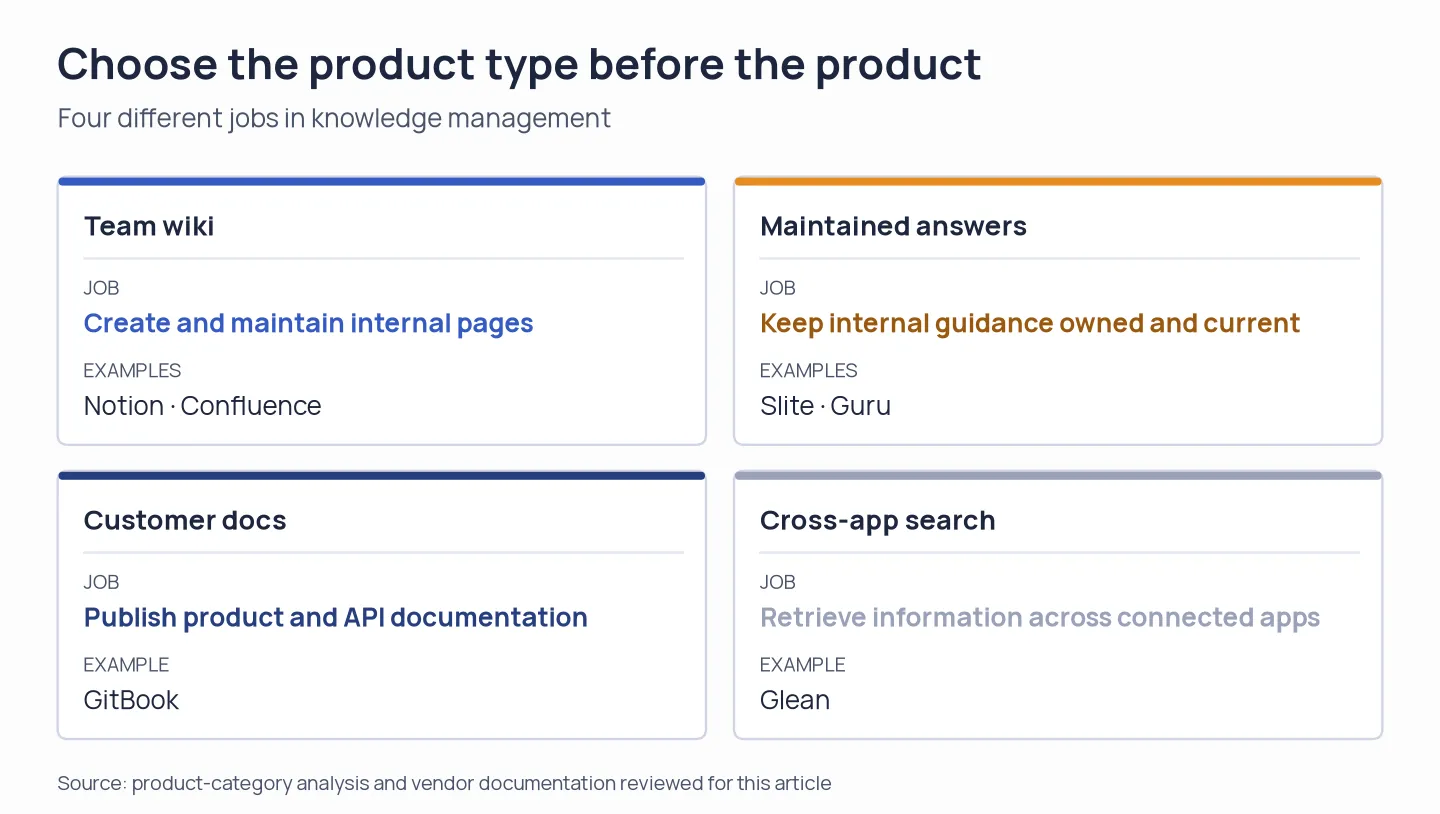
Start with two questions: where does the information live, and who needs to read it?
What makes the best knowledge management software?
Evaluate knowledge management software by how easily teammates can add and find answers, identify who owns them, and check what outside readers can access. Notion and Confluence fit teams writing pages in one home; Glean searches across work apps, while GitBook publishes manuals for customers. If useful answers already live across Slack, Drive, and other systems, test search or verification before moving everything.
Check your Microsoft 365 or Google Workspace plan
Before buying knowledge management software tools, check whether Microsoft 365 or Google Workspace already covers the job. Team documentation can be stored and shared through SharePoint, OneNote, and Drive. A separate tool justifies its place when its structure, review workflow, search, or publishing addresses a gap you’ve truly encountered. That same evaluation should include Slack, CRM, and support knowledge features.
1. Notion: Best for a flexible team workspace
Notion works for a team that wants wiki pages beside project notes and structured databases. I created a free workspace, set up a private knowledge page, and found it through built-in search. Its preview let me recognize the result before opening it.
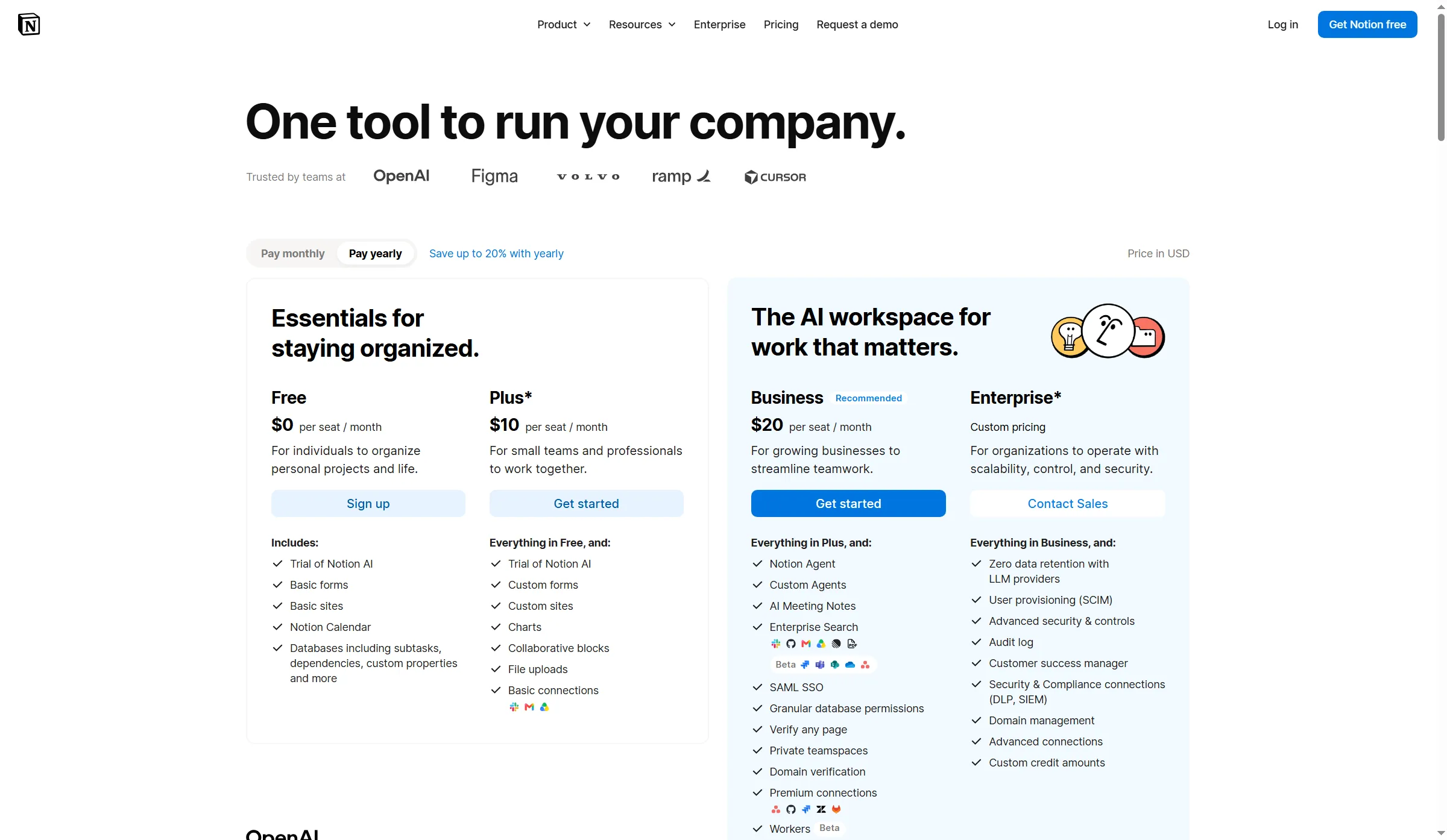
Notion’s plan page shows the yearly switch and its tier comparisons.
Pros — Notion
- Search previews help you recognize a page without opening every result.
- You can start with pages and databases in one workspace instead of committing to a rigid wiki hierarchy.
- The public Free plan gives you a low-friction way to try the basics, though the limits depend on whether your workspace is solo or collaborative.
Cons — Notion
- The Free option displayed a 1,000-block limit, under 5 MB for each file, and seven-day page history during my work-focused onboarding. Review the current plan terms for your workspace before you migrate a large corpus.
- During that same onboarding, a 30-day Business trial was prominently presented, featuring wider AI capabilities along with enterprise-search functions. Since I didn't evaluate those features, the search remark concerns solely a small workspace and the pages within it.
- Absent page owners, naming conventions, and a habit of archiving and reviewing, flexible pages can turn into a maze.
Product pricing — Notion
Free is available; Plus is listed at $10 per member per month billed annually and $12 billed monthly. My five-person comparison uses the published $10 yearly rate. Notion pricing
Who should skip it: If your team needs a tightly governed knowledge base from day one, compare permissions, history, and ownership before you make Notion the source of truth.
2. Confluence: Best for teams already using Atlassian
Confluence makes the most sense when documentation needs to sit beside Jira work and a team can maintain page structure. Its free plan is generous on seats, but it doesn’t include page and space permissions. I wouldn’t pick it for company-wide knowledge just to save on seats when the permission controls sit on a paid plan.
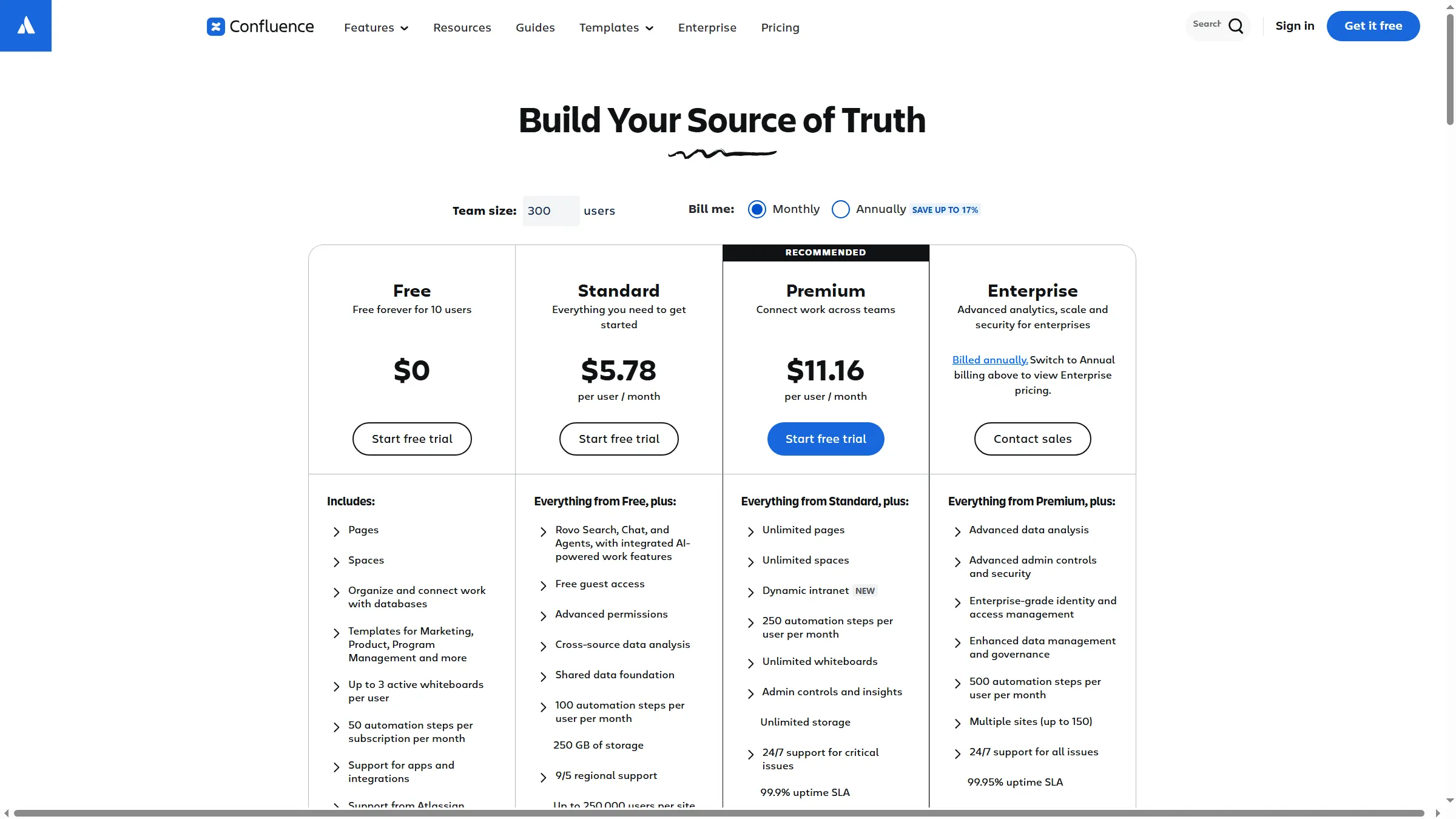
Confluence’s pricing calculator compares Free and paid plans and lets buyers set team size and billing cadence.
Pros — Confluence
- The free plan supports up to 10 users and includes 2 GB of storage, enough to try a basic team wiki.
- Standard provides archiving, page insights, page and space permissions, and audit logs—helpful controls for a maintained internal knowledge base.
- Paid users can invite up to five guests at no extra per-user charge; each guest is limited to one space.
Cons — Confluence
- The Free plan won't permit permission settings for pages or spaces, so don't place restricted material there, and don't assume that a small team can keep it private by folder alone.
- In the live calculator, five Standard users showed $7.15 per user monthly, or $429 over 12 months, while annual billing displayed a $720 tier price for 1–10 users. The “annual saves” banner does not mean a five-person team will always spend less by prepaying.
- A five-user team may need page owners and documentation rules to keep a large space navigable.
Product pricing — Confluence
Free for up to 10 users; the calculator displayed Standard at $720/year for the 1–10 annual user tier, before taxes. Confirm your country and exact user tier in Atlassian’s calculator. Confluence pricing
Who should skip it: Paid permissions and administration may be more structure than a small team needs without an Atlassian workflow to justify them.
3. Slite: Best for a maintained internal knowledge base
Slite suits teams that want one knowledge base where answers have owners and get checked over time. Check the plan split: maintaining internal knowledge and searching other apps are separate jobs. I like the clear verification workflow, but it still needs someone to keep the answers current.
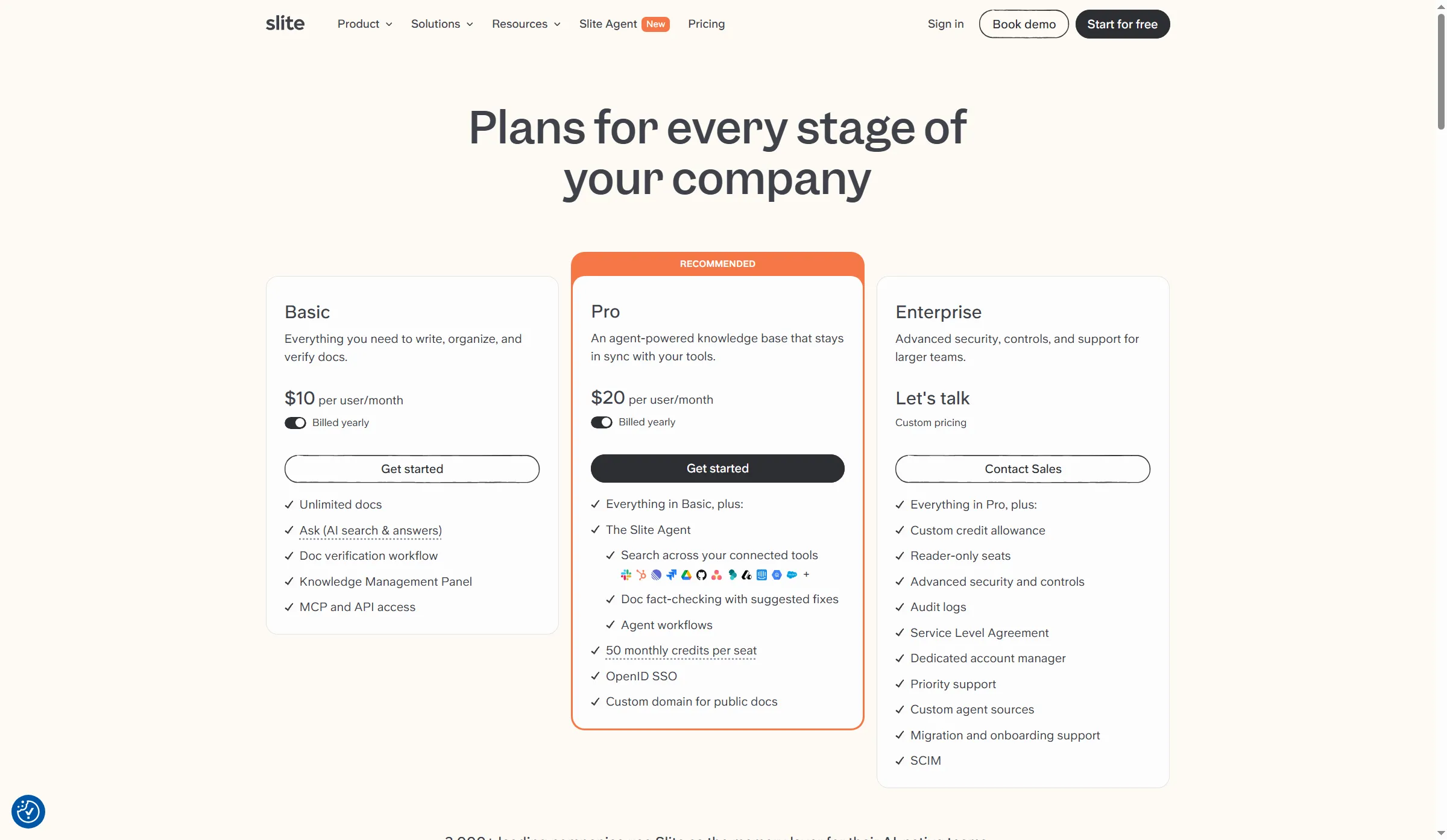
Slite’s plan page places verification on Basic and connected-app search on Pro.
Pros — Slite
- Slite’s Knowledge Management Panel groups controls such as ownership and verification, giving admins one place to spot review work.
- Basic is listed at $10 per member per month under annual billing and includes verification; Ask over Slite docs is part of the native knowledge workflow.
- The public plan page makes the price visible before a sales call.
Cons — Slite
- Absent any permanent no-cost tier, Slite promotes a 14-day trial—therefore, inside that window, you should trial the maintenance and migration workflow.
- Cross-tool agent search is on Pro, listed at $20 per member per month billed annually. Don’t compare it with a lower-tier wiki as though both searched the same sources.
- Precision hinges on someone taking responsibility for verifying answers; a reminder alone can't keep answers correct if nobody on the team agrees to be accountable.
Product pricing — Slite
Basic $10/member/month and Pro $20/member/month, billed yearly; trial terms are shown on Slite pricing.
Who should skip it: Compare an enterprise-search product instead if your source material already lives across many apps and you don’t plan to consolidate or maintain a separate Slite knowledge base.
4. Guru: Best for verified answers inside team workflows
Guru’s small knowledge cards have owners and verification. Reviews also raised a practical concern: search can surface old, untagged cards, so teams need to maintain them. Guru can suit teams that want dependable answers near the work rather than another blank wiki. I like the owner-and-card model for quick answers, though the review pattern makes tagging and archiving part of the buying test.
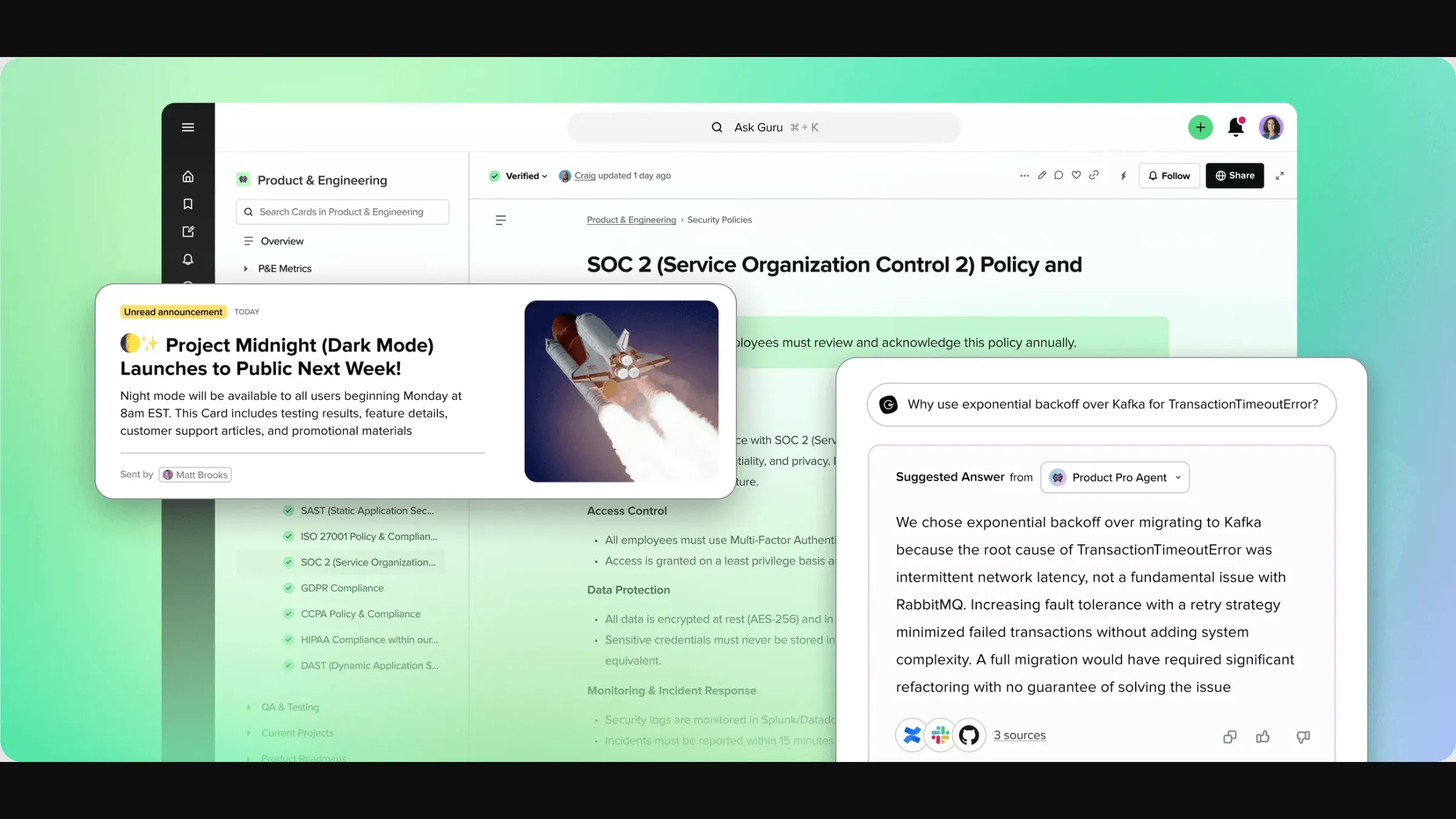
Guru’s product visual combines a verified policy card, team announcement, and answer with source links.
Pros — Guru
- Guru’s card model and verification workflow are designed to bind accountability to an answer rather than treat each page as permanently up to date.
- A Guru G2 review praised finding procedures during support work; other recent high-rated reviews also noted old, untagged cards cluttering results. That tension makes stale-content handling a useful evaluation task.
- Guru’s product materials focus on integrations and in-workflow access, so it can add answers to the tools where a team already works.
Cons — Guru
- Guru doesn’t publish a per-seat price. Ask for a quote based on your user count, integrations, and the verification features you need.
- A verification badge only helps when owners review answers and archive duplicates. Search can still get cluttered if tags and ownership are inconsistent.
- The evidence points to a setup question: confirm that integrations, card ownership, and review rules match the way your team works before you buy.
Product pricing — Guru
Contact Guru for a quote. Guru pricing
Who should skip it: A small group looking for the cheapest document repository may not need a separate card-and-verification layer.
5. GitBook: Best for customer-facing product documentation
GitBook is built for product, API, and technical documentation. Choose it when readers need a maintained docs site; meeting notes can stay in an internal wiki.
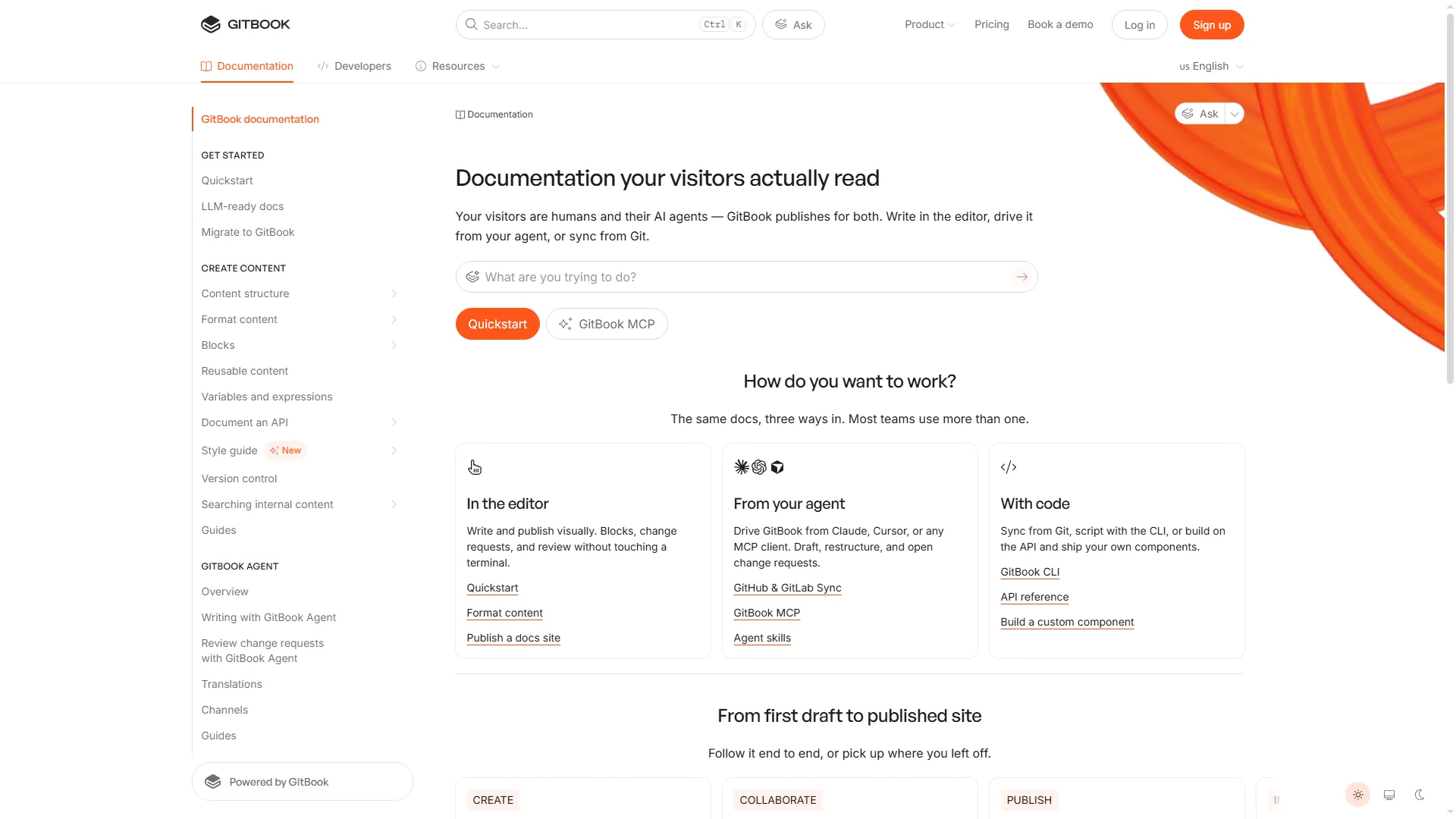
GitBook’s documentation site separates reader navigation from editing and publishing workflows.
Pros — GitBook
- GitBook’s site-based plans are built around publishing docs, with tools for collaboration and versioning.
- When billed annually, Essential pricing is a $65 monthly site fee, plus $12 per user per month, letting teams estimate the base configuration.
- Compared with a general team wiki, the publishing model provides the docs owner with a sharper separation between editing the source and the public reader experience.
Cons — GitBook
- At annual rates, one site with five members costs $125 a month, or $1,500 a year before tax. The site fee and member fees make this a different purchase from a per-seat wiki. I like that the billing unit follows the published docs site, but wouldn’t treat it as a default internal-wiki budget.
- Before relocating customer documentation, verify publishing requirements tied to the plan, custom-domain needs, and access-control rules.
- Don't purchase GitBook as a fix for searching across internal apps; it's not a federated search layer spanning company tools.
Product pricing — GitBook
Free for individual use; Essential starts at $65/site/month plus $12/user/month, billed annually. GitBook pricing
Who should skip it: Teams that need only a private internal wiki should compare per-seat wiki plans before paying a site fee.
6. Glean: Best for enterprise search across work apps
Glean helps employees find information across connected work systems rather than moving every document into a new wiki. I’d evaluate it as a retrieval layer and pay close attention to connector permissions and answer review. I like that source content can stay in its existing systems, but I’d want to see permission-aware results on the company’s own queries before rollout.
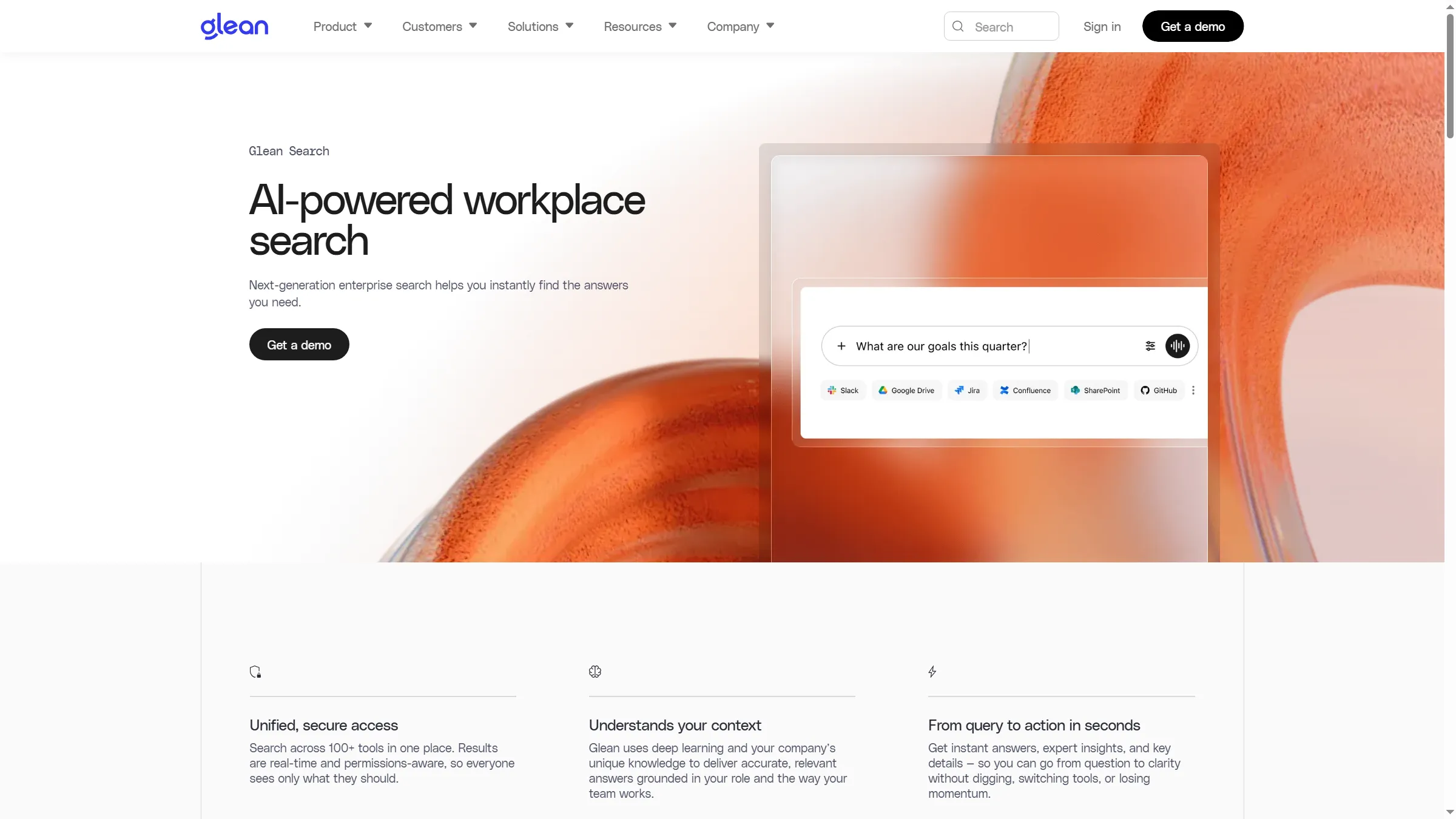
Glean’s search page puts a natural-language query above connected workplace sources.
Pros — Glean
- Glean’s enterprise search product searches connected workplace sources, addressing the familiar problem of finding information across apps.
- Recent Glean G2 reviews describe cross-system retrieval and answers grounded in company context. One reviewer notes that connector setup and less common queries can take extra work.
- Retaining source material within its current systems could shrink a migration effort, though access governance and connector configuration still require planning.
Cons — Glean
- Glean is quote-based and sales-led, so a small team can’t compare a public per-seat annual price.
- Search quality hinges on which sources are connected, what permissions they carry, and how a company deals with outdated or conflicting knowledge. A demo must include representative test queries along with source links.
- Before deployment, you should determine which location holds canonical information; Glean doesn’t substitute for the authoring workflows, nor the ownership workflows, of each connected source.
Product pricing — Glean
Contact Glean for an enterprise quote. Glean product overview
Who should skip it: Organizations with only a few shared folders should improve search in their current tools before pricing an enterprise rollout.
What does knowledge management software cost for a five-person team?
For a five-person team, annual prices before tax are $600 for Notion Plus, $600 for Slite Basic, $720 for Confluence Standard, and $1,500 for GitBook Essential with one site. The table shows the billing basis and feature limit for each total. Quotes are needed for Glean, and likewise Guru, so neither is included.
| Five-person setup | Annual price before tax | Billing basis | Important limit |
|---|---|---|---|
| Confluence Standard | $720 | Annual 1–10 user tier | Permissions included; monthly billing for five was $429 over 12 months at the observed calculator rate |
| Slite Basic | $600 | $10 × 5 × 12, annual rate | Verification; no permanent free plan |
| GitBook Essential, one site | $1,500 | ($65 site + $12 × 5 users) × 12 | Pricing for customer-doc sites differs from internal wiki plans |
| Notion Plus | $600 | $10 × 5 × 12, billed annually | Verify checkout and plan permissions; monthly billing costs more |
Confluence’s annual tier total is higher than 12 months of its five-user monthly calculator price. Compare the billing options rather than assuming annual prepayment saves money. GitBook charges site fees plus member fees, while the internal wiki totals use per-seat pricing. These figures help you assess your budget across different product types. Before buying, check the checkout totals and feature gates.
Which knowledge management software should you choose?
Match the tool to the source material and the reader. Notion gives you a flexible workspace; Confluence suits an Atlassian-centered wiki; Slite and Guru focus on maintained answers; GitBook publishes product docs; Glean searches across company apps. Before signing, ask employees to add an answer, find it later, check its owner, and see what an outside reader can access.
If your organization already pays for Microsoft 365 or Google Workspace, try its wiki and permission workflow first. A separate product is easier to justify when it solves a specific search or maintenance problem the tools you already use leave open.