

 23 min read

TL;DR
- For LinkedIn prospecting, Linked Helper automates LinkedIn prospecting and can hand leads off to a distinct CRM or marketing stack. This isn't an email or lifecycle platform — it's a specialist add-on.
- For teams seeking to combine CRM context with marketing workflows, HubSpot Marketing Hub is a good fit—yet Pro's mandatory onboarding inflates the first-year bill far beyond what its monthly price implies.
- Brevo serves as a practical starting point for a small company seeking email and simple automation without a steep initial bill.
- Although Klaviyo and Omnisend center on ecommerce, Customer.io centers on product messaging that's event-driven.
- ActiveCampaign is well suited for sales follow-up and conditional email journeys, while Mailchimp remains a familiar email-first choice.
- Whereas Zapier links tools you already use instead of substituting for a campaign sender, Adobe Marketo Engage is aimed at enterprise B2B operations.
What is marketing automation software?
Marketing automation tools use customer data, events, triggers, and rules to send campaigns, score or route leads, and coordinate follow-up without asking a person to start each action. Here are 10 marketing automation tools for those jobs, including ecommerce marketing platforms such as Omnisend and Klaviyo. Some platforms pair journeys with a CRM; others focus on email, online stores, product activity, or connecting separate apps. The label alone doesn't reveal which data a tool requires, which channels it can reach, or what it costs as your audience grows. Free marketing automation software includes HubSpot, Brevo, and Mailchimp, though their send, user, and automation limits differ. When you're comparing options, begin with the trigger that your customer data can support.
Tools, use cases, and limits at a glance
Match the tool to the trigger: Linked Helper for LinkedIn prospecting, HubSpot for CRM nurture, Omnisend or Klaviyo for store events, Customer.io for product events, and Zapier for app handoffs. Prices range from $8.25 per Local license/month to quote-only Marketo; several tools have free tiers. Check each limit before choosing.
| Tool | Choose it for | Important limit |
|---|---|---|
| Linked Helper | Automating LinkedIn prospecting before a CRM or workflow for email nurture | LinkedIn-focused. It doesn't replace lifecycle email, ecommerce, or product messaging |
| HubSpot Marketing Hub | CRM-connected lead capture, nurture, and reporting | Advanced automation and onboarding raise the cost |
| Brevo | Small-business email and multichannel basics | Contact and send limits vary by plan, SMS credits are separate |
| Omnisend | Ecommerce campaigns and store-triggered journeys | Billing counts recipients of automated messages as well as subscribers |
| ActiveCampaign | Conditional email journeys with sales handoff | Dynamic pricing and tier gates make an exact quote important |
| Klaviyo | Ecommerce segmentation across email and SMS | Active-profile pricing can climb as the audience grows |
| Customer.io | Event-driven SaaS and product lifecycle messaging | Needs a clean event stream and technical ownership |
| Mailchimp | Familiar email campaigns and approachable automation | Contact counting and send ceilings need attention as lists expand |
| Adobe Marketo Engage | Enterprise B2B lead management and campaign operations | Quote-only pricing and setup complexity |
| Zapier | Passing data between tools already in your stack | Tasks add up. It isn't a native platform for email campaigns |
What makes the best marketing automation software?
HubSpot Free, Brevo Free, and Mailchimp Free are the no-cost plans to compare first; the best marketing automation software still depends on the trigger, customer data, channel, and billable unit your job requires. For paid CRM nurture, small-business email, ecommerce journeys, and product-event messaging, compare HubSpot Marketing Hub, Brevo, Omnisend, and Customer.io, respectively. When evaluating B2B platforms, verify whether lead routing and qualification come included in the product or whether another system is needed. Although a connector that passes a record is helpful, it won't substitute for a CRM that scores and routes a lead.
I treat this category as connected jobs, not one interchangeable feature checklist. LinkedIn prospecting, ecommerce lifecycle messaging, and enterprise lead management solve different phases. A starting price only begins the comparison; the cost table uses stated workloads and flags where pricing units prevent a direct match.
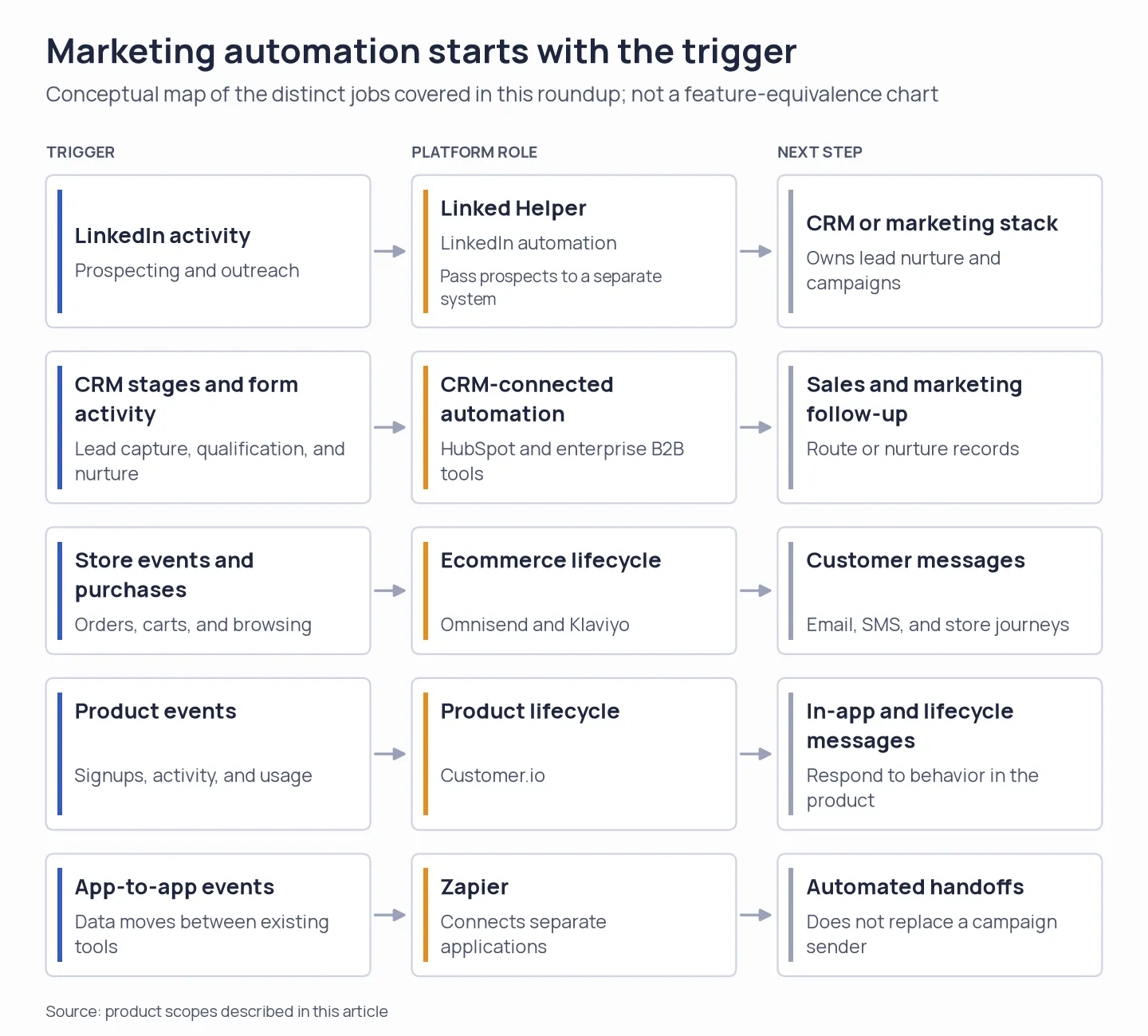
One label, four automation jobs: tools use different triggers and destinations, while Zapier connects apps across the stack.
1. Linked Helper: Best for LinkedIn prospecting with CRM handoff
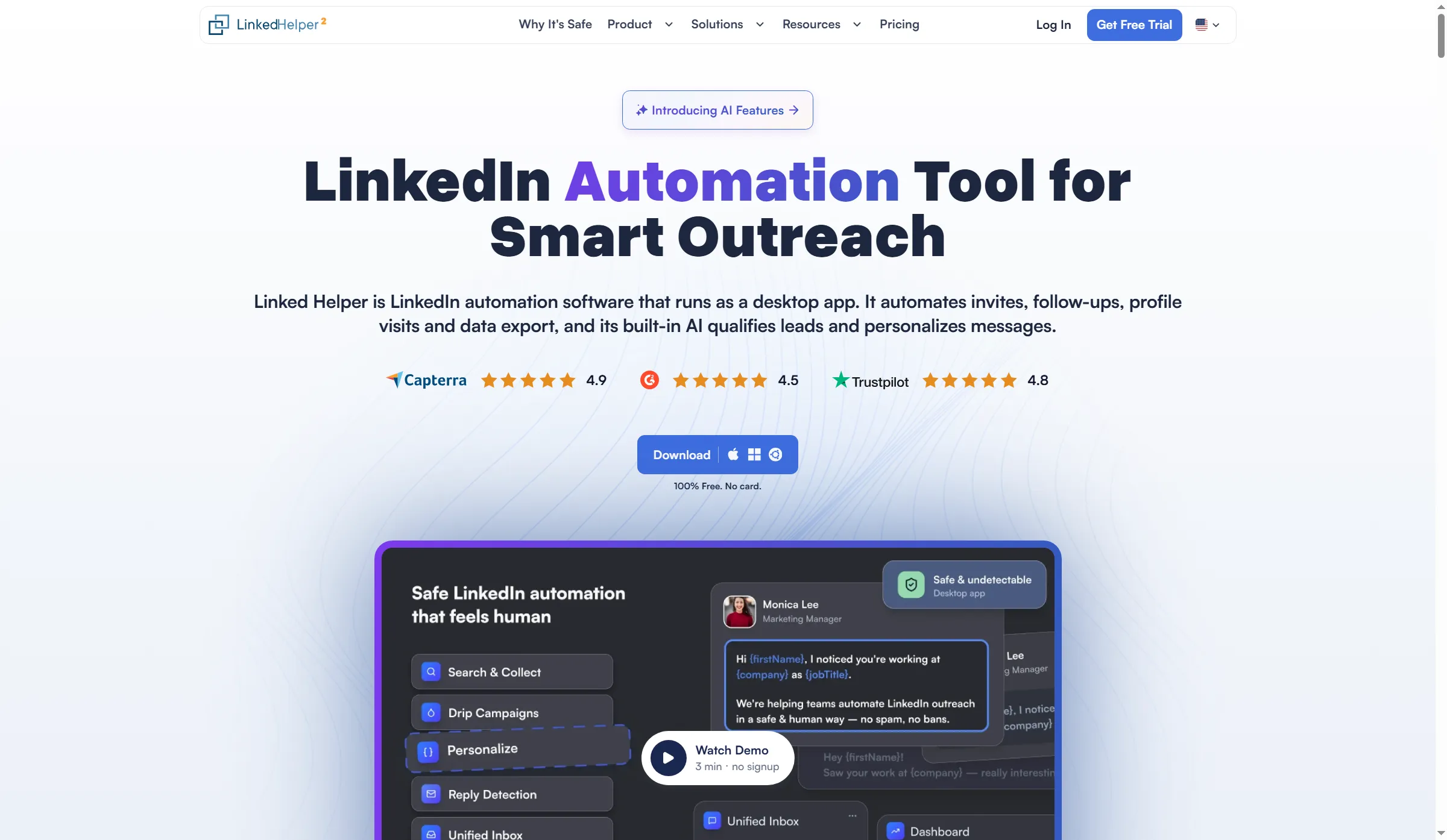
Linked Helper’s homepage highlights profile visits, follow-ups, invitations, and data export.
Linked Helper takes over LinkedIn prospecting tasks, and it can transfer gathered leads into a distinct CRM or marketing platform. It earns its place when LinkedIn outreach comes before email or CRM nurture; it does not replace either system.
Marketing teams can use Linked Helper to find and engage LinkedIn prospects, then move records into HubSpot, Salesforce, Pipedrive, ActiveCampaign, Google Sheets, or a webhook-based connector. Some listed connections match contacts by email or LinkedIn profile ID, so decide which record is authoritative before syncing. The destination platform handles multichannel campaigns after the handoff.
Linked Helper's present changelog covers AI ICP detection, assistance with personalized messages and comments, plus inbound cloud webhooks. These features can help qualify prospects and prepare outreach, but a person still needs to review targeting, copy, and account activity. The Local edition operates on your device, whereas Cloud operates on vendor servers. Data and webhooks are handled differently by each, so pick the deployment matching your security and workflow needs.
I'd turn to Linked Helper when LinkedIn serves as a genuine prospecting channel and a distinct CRM or email platform handles follow-up. Should your primary focus be cart recovery, subscriber newsletters, or product-event messaging, though, begin with whichever platform holds those customer records.
Pros — Linked Helper
- For the app, teams can pick where it operates through the Local and Cloud editions.
- Move Linked Helper’s prospecting handoff into your CRM, then let the CRM or email platform manage nurture.
My take: I like Linked Helper as a clearly scoped LinkedIn prospecting step. When you use it to find leads, let your CRM or email platform handle later follow-up. Product pricing: Standard Local starts at $8.25 per license/month on a 12-month term; Cloud starts at $16.50 per license/month on a 12-month term. Shorter terms cost more. Confirm the selected plan, term, and license count in the live calculator.
2. HubSpot Marketing Hub: Best for CRM-connected lead nurture
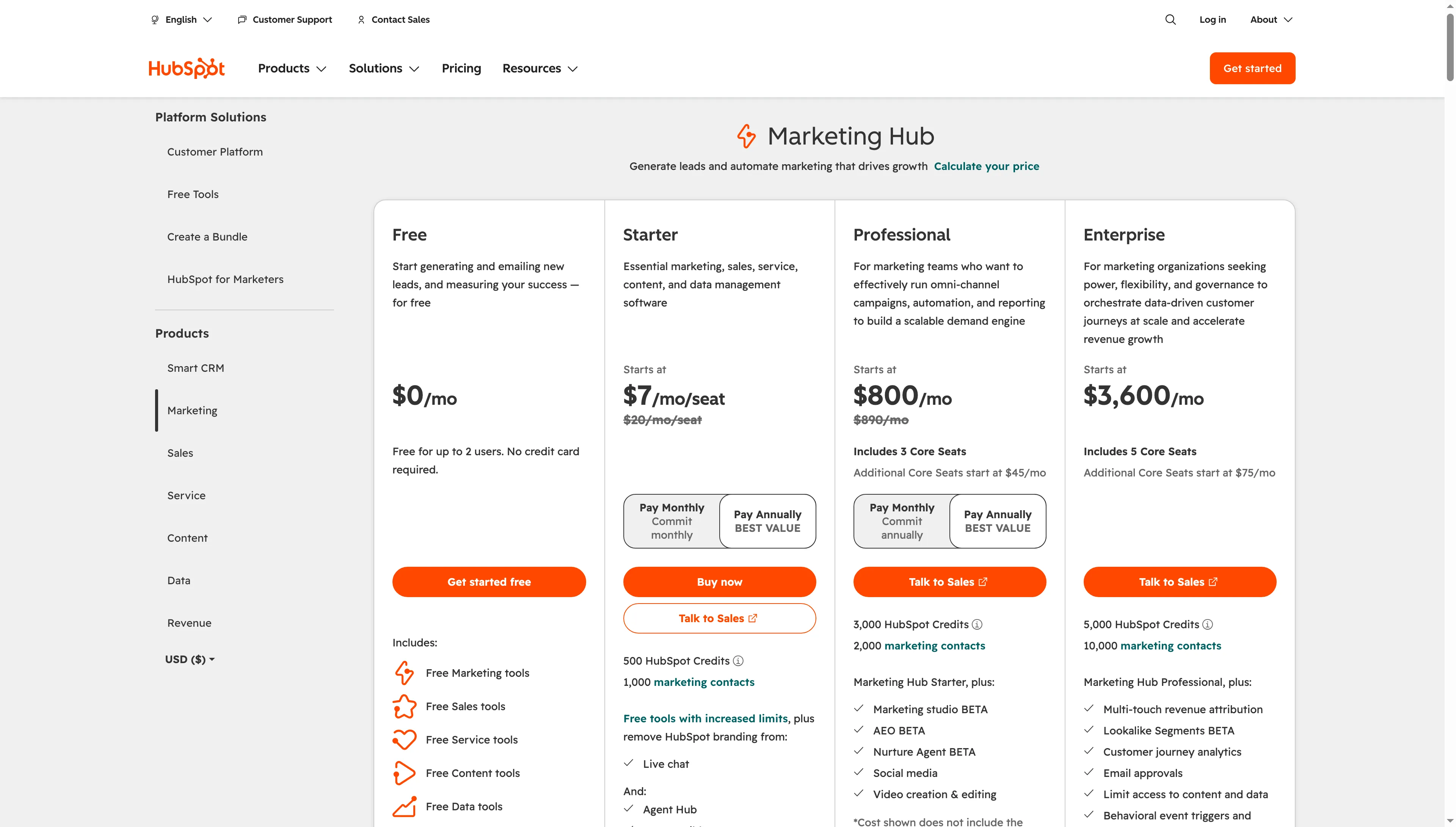
HubSpot Marketing Hub pricing shows plan features, seat prices, contact limits, and included seats.
When marketing and sales must operate from identical CRM records, HubSpot Marketing Hub proves most suitable. Free covers as many as two users, 2,000 email sends each calendar month, plus one automated action. You can use that to test basic follow-up, though you can't run a complete nurture program.
With annual billing, Starter currently starts at $7 per seat/month; under standard pricing, it's $20 per seat/month. The plan comes with 1,000 marketing contacts (that's the billable audience) and as many as 10 automation actions. HubSpot unlocks broader email and omnichannel automation at the Professional tier. Its starting price, though, is $800/month on an annual commitment, including three core seats and 2,000 marketing contacts. Add the mandatory $3,000 onboarding fee to the first-year bill. Additional core seats begin at $45/month. What counts more than the low-end seat figure is the contact tier and the required setup.
During my free-workspace onboarding at setup step four of eight, HubSpot presented a choice between Google and Outlook sync for CRM, along with a skip option. I skipped it, and then an AI setup assistant suggested a business description for me to review; I didn't approve it and halted at that point. That suggestion was just an onboarding draft, and I left it unapproved before setting up a campaign.
Pick HubSpot when sales and marketing need one CRM record for lead capture and follow-up. The tradeoff is the jump from a limited free account to Professional once you need lead scoring and broader automation.
HubSpot Professional earns the higher bill only when your team will use its lead scoring and broader automation.
Pros — HubSpot Marketing Hub
- With a shared CRM plus one restricted automated action, HubSpot Free equips a compact team.
- Professional combines lead scoring and omnichannel automation with the CRM record.
Cons — HubSpot Marketing Hub
- If you buy HubSpot Marketing Hub Professional, you must pay for onboarding, and make a substantial yearly commitment.
- Core seats and added marketing contacts can increase the bill.
The strongest reason to pay for HubSpot is continuity: sales and marketing can work from the same CRM record. If you already have that foundation, Professional adds room for richer nurture; basic follow-up doesn't justify the jump. Product pricing: Free, Starter from $7/seat/month on annual billing ($20 standard), Professional from $800/month billed annually plus $3,000 onboarding.
3. Brevo: Best for budget-conscious small-business email
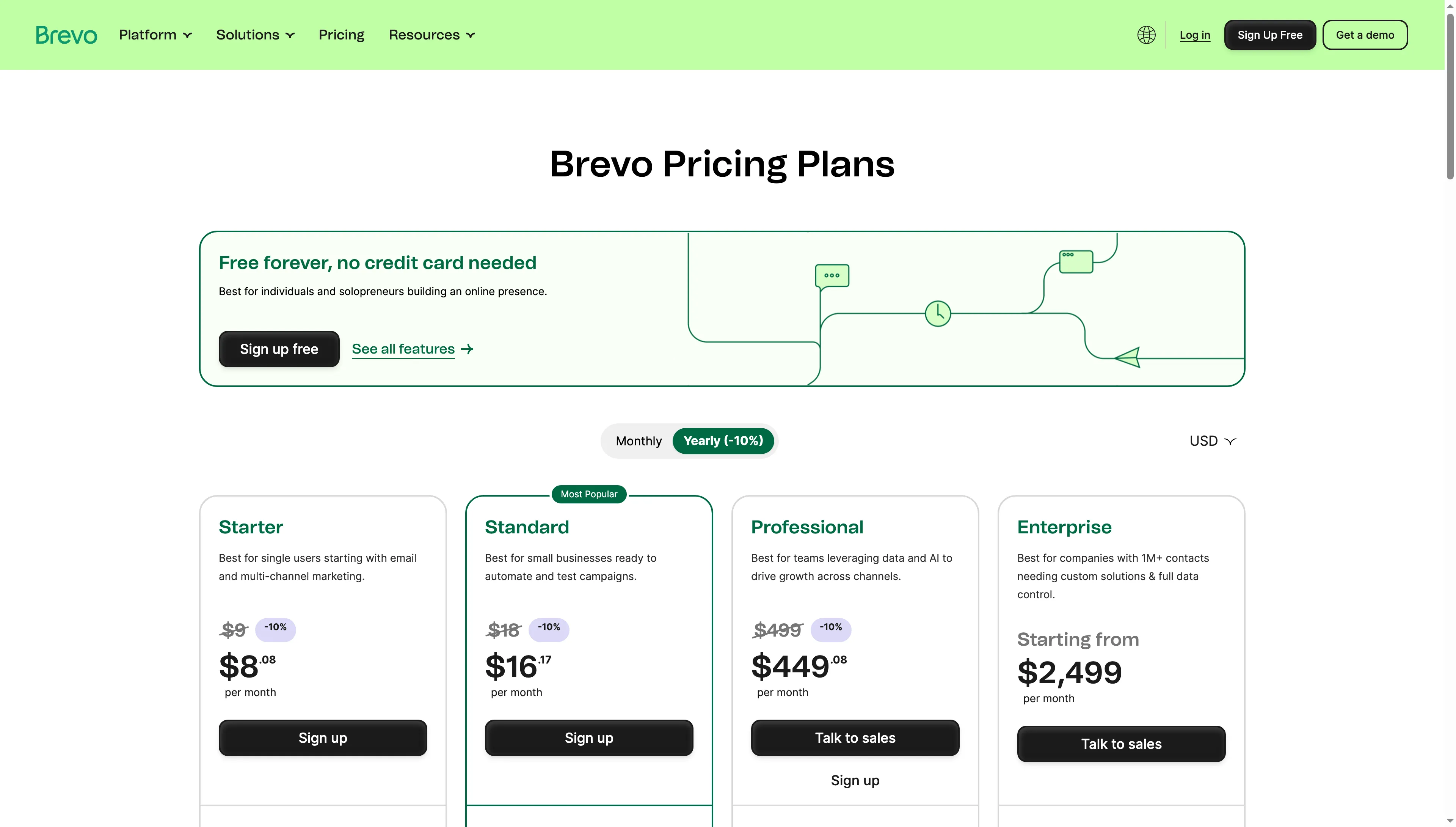
Brevo’s pricing page compares Free and paid marketing plans.
Brevo makes sense as a first alternative if you're after email campaigns, plus simple automation, without shelling out for a big CRM suite. Brevo Free lets you automate up to 2,000 contacts and send 300 emails a day. Starter starts at $9/month and Standard at $18/month.
Brevo separates contact, send, and feature limits. Starter removes the daily send cap but lacks the full automation set. Standard includes marketing automation for unlimited contacts and up to three marketing seats; extra seats cost $12/month. SMS credits are separate. Removing Brevo branding costs an extra $9/month on the applicable lower tier. Before importing a large audience, verify the exact monthly send tier.
I checked the plan information Brevo currently lists, though I didn't get into its product workspace—so I can't vouch for how fast someone finds its workflow builder or SMTP settings. If your team needs transactional email together with campaigns, that distinction matters: before you move a production sender, validate the setup path.
For budget-minded email plus an expanding range of channels, pick Brevo. It's less compelling if you require sophisticated lead scoring native to CRM or prefer all channels bundled into one predictable contact-based bill.
Pros — Brevo
- The Free plan includes a daily email allowance and stores a large contact list.
- Standard provides marketing automation free of per-seat fees, up to the seat count it includes.
Cons — Brevo
- Separate charges apply to SMS credits, plus certain branding options.
- Starter isn't a complete automation suite.
Brevo's low entry point is attractive, but its plan and add-on split deserves a real cost check before you make it the sole campaign and transactional sender. Product pricing: Free, Starter from $9/month, Standard from $18/month, Professional from $499/month. SMS credits and some branding options cost extra.
4. Omnisend: Best for store-triggered email journeys
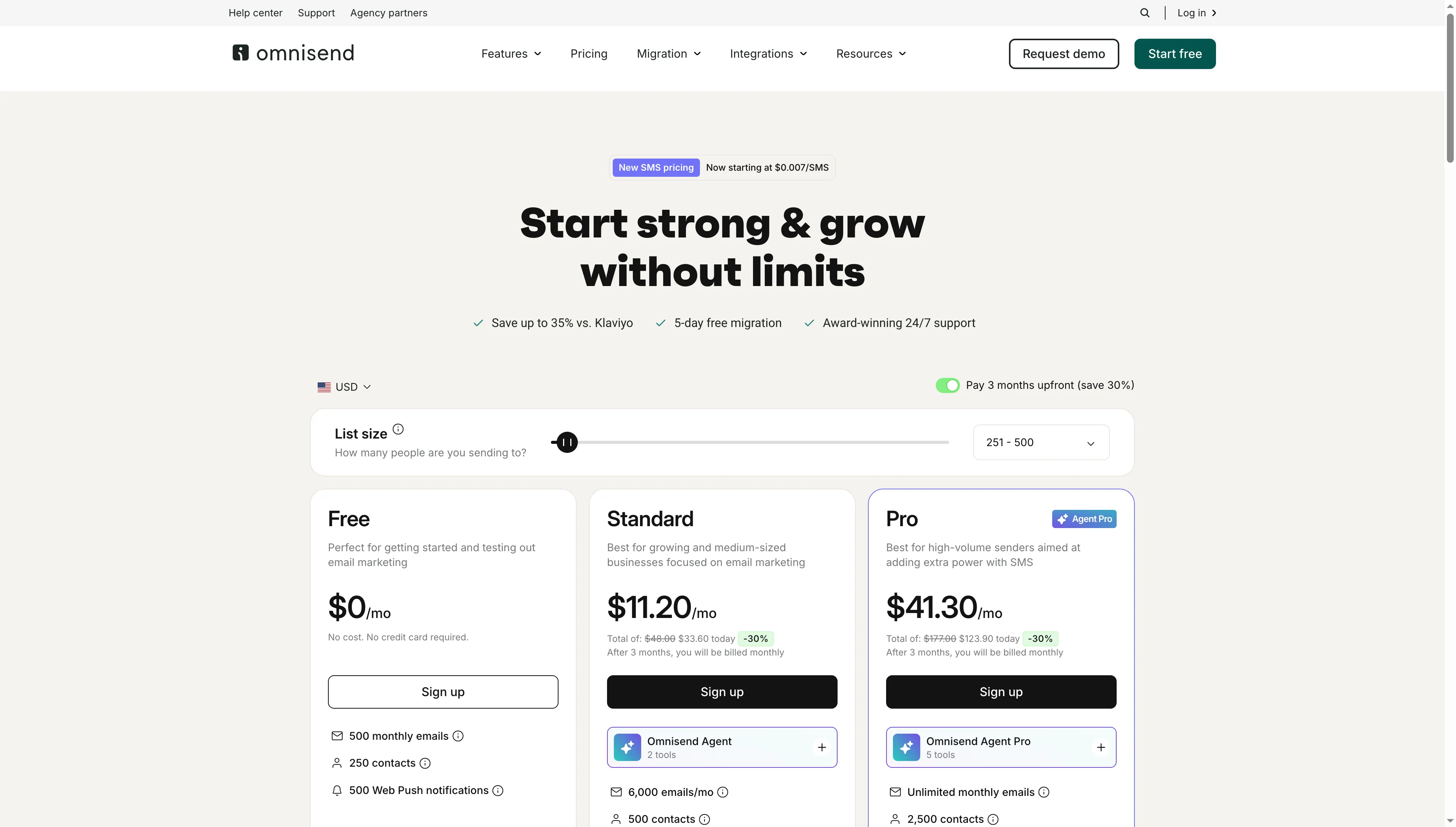
Omnisend’s pricing page lists Free, Standard, and Pro plans with contact and email allowances.
Omnisend targets online shops seeking campaigns plus automated messages driven by shopping behavior. Its free plan covers 250 contacts and 500 emails a month. Standard starts at $16/month for 500 contacts, while Pro starts at $59/month.
Omnisend counts subscribers and non-subscribers who receive automated messages as billable contacts; unsubscribed contacts do not count. That same contact total sets standard email volume. Exceeding a plan’s send allowance can stop a campaign or automation from reaching recipients. SMS isn't included on Standard with new plans anymore; it's a Pro add-on, priced separately according to message volume.
The model pays off when store-triggered flows earn enough to cover the contact cost. It can also surprise a shop that counts only newsletter subscribers. Check how your cart, order, and browse events affect billable recipients before comparing Omnisend with a general email platform.
Choose Omnisend when your store is the source of customer data and you need ecommerce templates and journeys. Customer.io is the better match for product events in a SaaS app.
Pros — Omnisend
- Automated journeys and campaigns can be driven by store events from one, an ecommerce-focused system.
- Standard email credits are proportional to billable contacts.
Cons — Omnisend
- People may count toward billing if they trigger an automation, even if they aren't subscribers.
- For SMS to be added, subscribers on New Standard must have Pro.
The billing detail I would check first is whether non-subscribers trigger messages in your planned journeys; those recipients can count toward the bill. Product pricing: Free, Standard from $16/month, Pro from $59/month, with SMS charged separately.
5. ActiveCampaign: Best for conditional email and sales follow-up
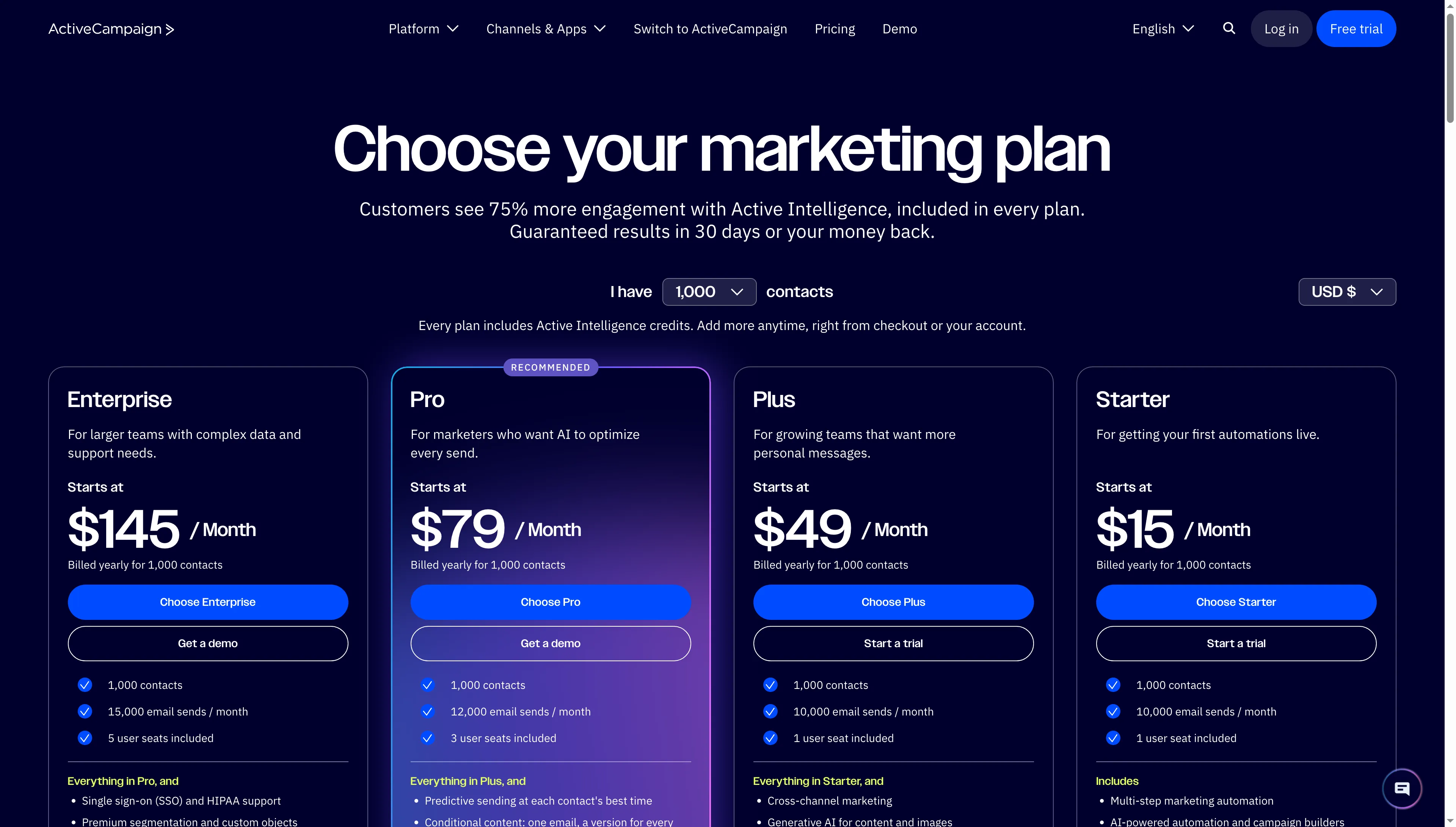
ActiveCampaign’s pricing page groups its platform features by plan.
ActiveCampaign suits teams that want conditional email automation tied to sales activity. Its pricing page distinguishes Starter, Plus, Pro, and Enterprise by contact-based sending limits and features that vary by tier.
The official pricing FAQ puts accounts with fewer than 1,000 contacts at a $15/month entry price. Professional-tier features can be accessed through a 14-day trial, which supports as many as 100 contacts and 100 email sends. Plan-specific seat counts and send limits are likewise displayed on the current price page; prices, though, are rendered dynamically by its live selector. Regard the $15 figure as a floor — not what a five-person team or a large audience would pay annually.
ActiveCampaign is worth evaluating when a sales team wants lead-attached follow-up and a marketing team needs branching journeys. Before migrating a CRM, identify the deal, reporting, and data-governance functions that the sales team truly needs. A pipeline view being there doesn't mean, on its own, that it fully replaces a CRM your organization already has.
Pros — ActiveCampaign
- Starter supports conditional email journeys alongside sales activity.
- The platform connects marketing automation with sales follow-up.
Cons — ActiveCampaign
- The live quote is shaped by tier, contact count, sends, and seats.
- A team’s CRM isn’t automatically replaced by a pipeline view.
I'd choose ActiveCampaign for branching journeys tied to sales follow-up, but keep the existing CRM if its reporting and deal history already matter to the team. Product pricing: From $15/month for fewer than 1,000 contacts. The exact bill depends on contacts, users, send volume, and tier (check a live quote before importing).
6. Klaviyo: Best for ecommerce segmentation across channels
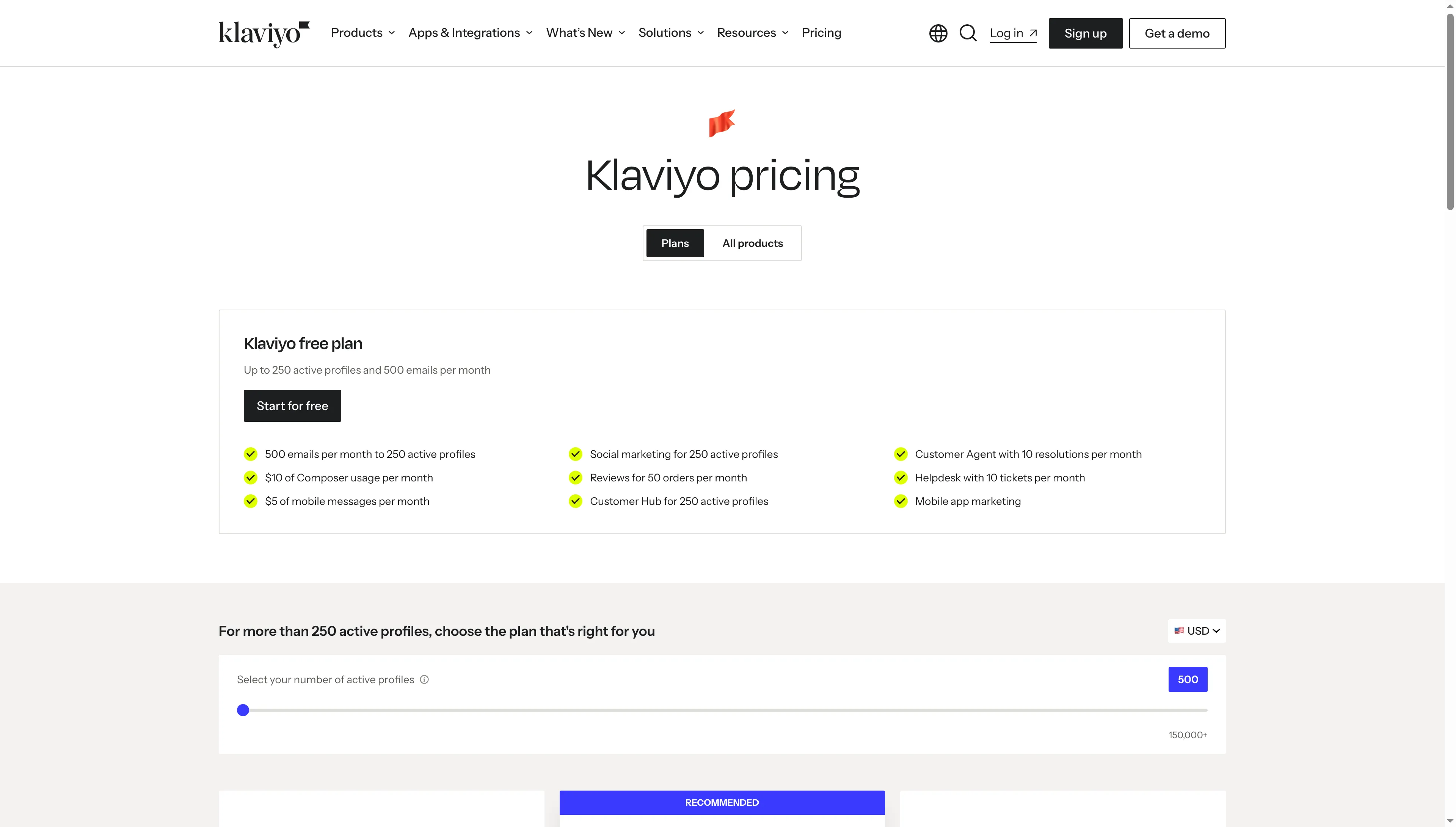
Klaviyo’s pricing page shows the free-plan limits and a selector for paid active-profile pricing.
Klaviyo stands out as a solid option for ecommerce teams seeking customer profiles, purchase behavior, and messaging within one lifecycle view. Its free Email plan permits up to 250 active profiles and 500 monthly email sends. As profile count and channel mix grow, so does paid pricing.
What the profile definition means is important. Suppressed profiles don't count toward the free plan's cap on active profiles, yet a store should still model how its imports, segments, and consent states will impact a paid tier. For 500 active profiles (billable people) and 5,000 sends, Klaviyo’s US pricing selector shows the Email plan at $20/month. The bill shifts with profile counts and channel mix.
Klaviyo fits a shop that will rely on segmentation plus purchase-triggered messaging regularly enough to warrant the profile-based charge. Should you just require several simple newsletters and post-purchase notes, then the data model and the cost might exceed what you need.
Pros — Klaviyo
- Data on profiles, along with buying behavior, can drive segmented lifecycle messaging.
- At the entry profile tier, the Email plan contains flow and campaign automation.
Cons — Klaviyo
- As a store expands, its bill is shaped by channel usage and the active profile.
- SMS isn't included in the basic Email plan—it's an add-on.
Klaviyo appeals to me when store data will serve purposes beyond a newsletter. If you send campaigns only occasionally, though, its profile model might amount to more system than you'd require. Product pricing: Free for up to 250 active profiles and 500 email sends/month, Email starts at $20/month for 500 profiles and 5,000 sends.
7. Customer.io: Best for event-driven product messaging
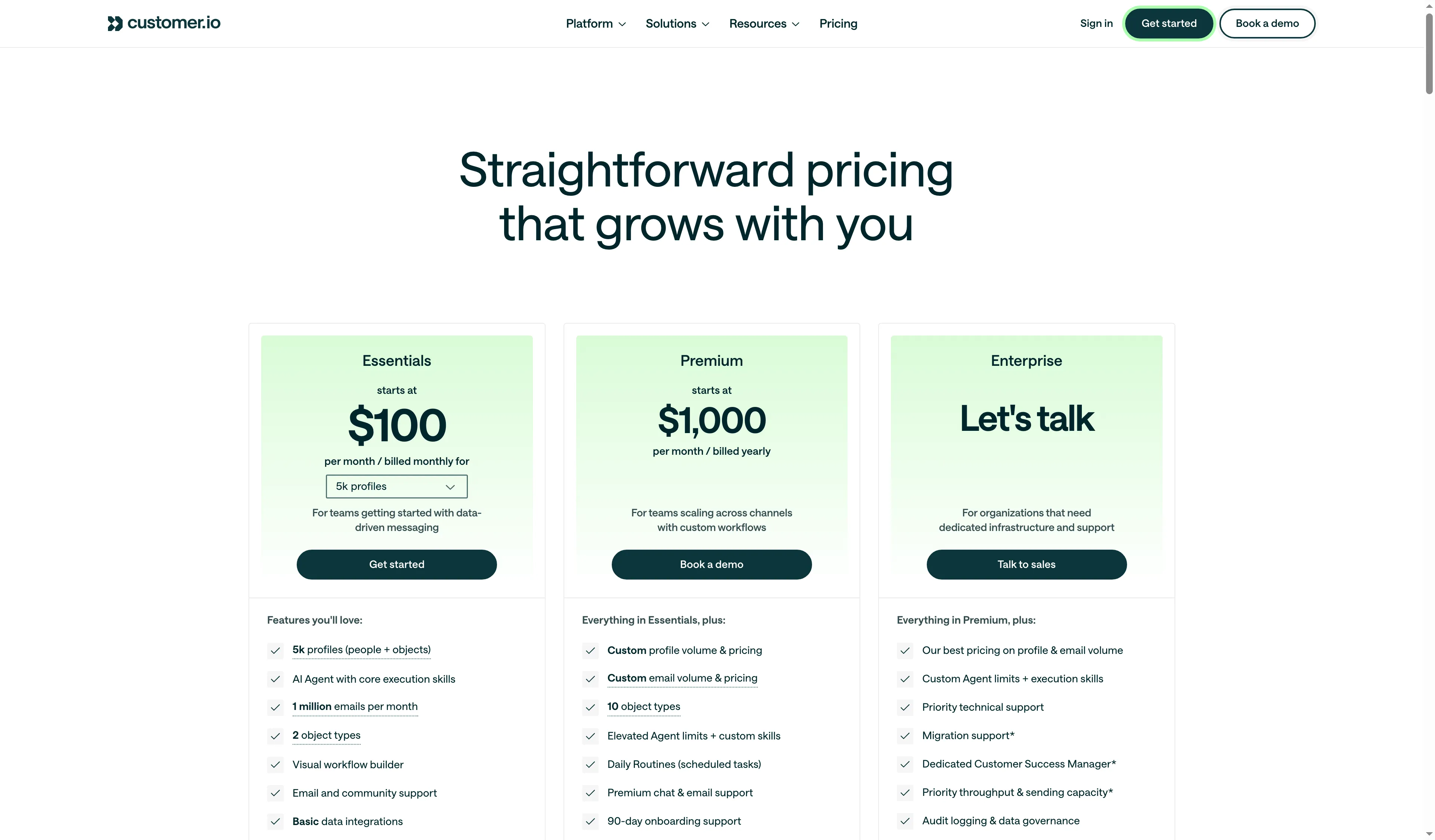
Customer.io’s pricing page groups plans by messaging needs.
Customer.io targets teams that trigger messages from activity inside a product, website, or connected system. Its Essentials tier begins at $100 per month when billed monthly; its upper tiers, plus usage fees tied to audience size and messaging volume, sit above that.
That event model is the key purchase consideration. A team must feed Customer.io clean events, plus identity data, and afterward provide marketing with a means to examine journeys that failed or behaved unexpectedly. Reviewers praise the flexibility and event tracking, while some ask for clearer debugging and more granular reporting. Such remarks indicate the proper demo task: trace one missed event from its source through a journey, instead of judging the platform by a template gallery.
Pick Customer.io if product behavior works as a stronger trigger than a CRM stage or a store order. A small team lacking an event pipeline may spend more time instrumenting the product than building campaigns. That engineering effort isn't covered by the $100 starting price.
Pros — Customer.io
- Conditional journeys can branch on contact behavior and sales activity.
- Higher tiers add more reporting and cross-channel options.
Cons — Customer.io
- Before journeys can be trusted, the team requires clean identity and event data.
- Premium begins at a substantially higher price, whereas Essentials restricts the kinds of objects.
I wouldn’t treat Customer.io as an email add-on: its $100 starting point makes sense only when product events are dependable and someone owns the data. Otherwise, implementation can outweigh the benefit of event-triggered campaigns. Product pricing: Essentials from $100/month, Premium from $1,000/month with annual billing. Additional profile and email volume can add charges.
8. Mailchimp: Best for familiar email campaigns and simple journeys
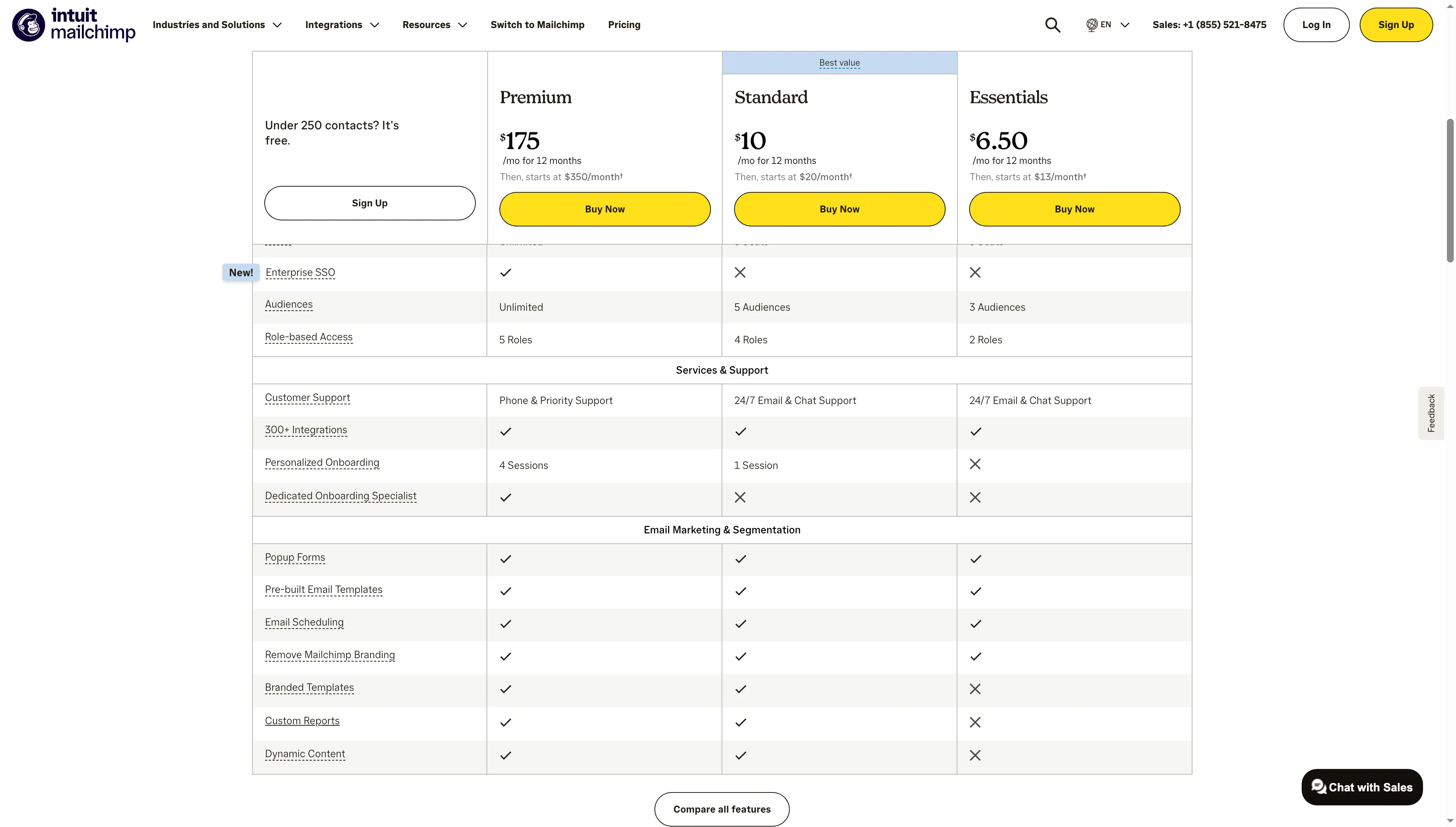
Mailchimp’s pricing page compares its marketing plans.
Mailchimp works well for a business run through email that needs automation, audience management, and campaign design inside one familiar product. For up to 500 contacts, Standard begins at $20/month. The listed configuration has a monthly sending allowance of 12 times the number of contacts and as many as five seats.
In my activated test account, Mailchimp scanned the supplied website and presented editable business details with “Looks good” and “Skip for now” options. I skipped those suggestions. The next onboarding step required a physical business address for the footer on outgoing emails, so I stopped before the dashboard. That is a reasonable compliance prompt, but it means I did not inspect the automation builder.
Mailchimp performs at its best if your team appreciates a well-known email process and can maintain a tidy audience. Before adding several lists, you should verify its contact-counting policies and sending limits. Duplicated or dormant records may render a cheap entry-level plan less cost-effective than it appears.
Pros — Mailchimp
- For teams that prioritize email, a well-known campaign builder plus an audience workflow is a good fit.
- A five-seat configuration is part of Standard, along with automation flows.
Cons — Mailchimp
- When lists grow, send ceilings and contact counting become important.
- Because it halted before the automation builder, I wasn't able to evaluate its workflow editor.
Mailchimp may feel familiar to teams that already know its audience model, but that judgment comes from its pricing and onboarding pages, not its campaign builder. I think the low-friction start is useful, but its audience rules deserve attention before import. Count billable contacts before migrating several audiences. Product pricing: Free plan: 500 monthly sends to 250 contacts, Standard starts at $20/month for up to 500 contacts (with five seats).
9. Adobe Marketo Engage: Best for enterprise B2B campaign operations
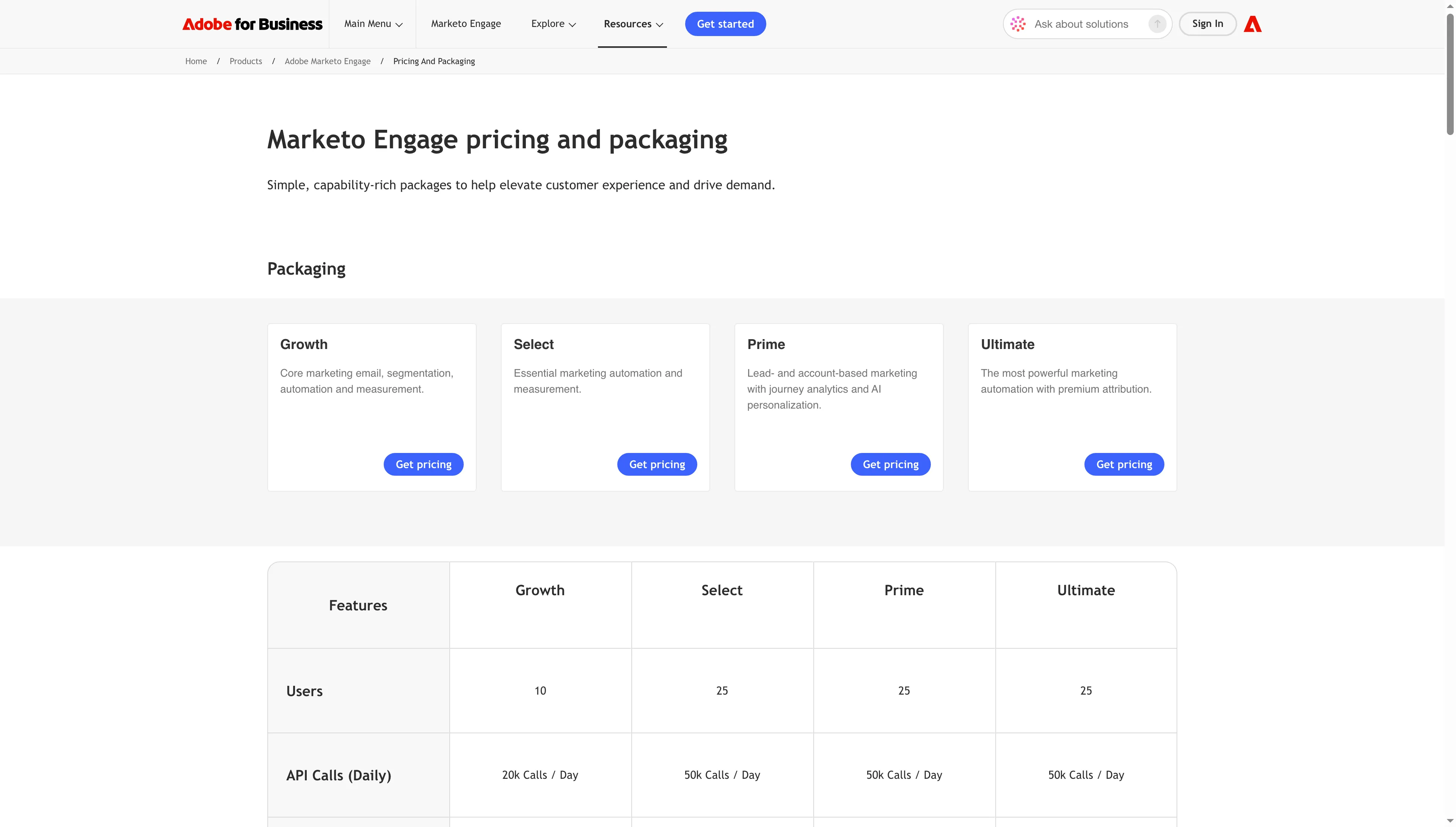
Marketo Engage lists Growth, Select, Prime, and Ultimate packages; buyers request pricing.
Adobe Marketo Engage targets enterprise B2B teams with an operations owner, complex lead workflows, and budget for setup and governance. Adobe offers four packages but publishes no dollar prices.
Marketo coordinates campaigns, lead management, and sales handoffs across a mature B2B process. Operationally, however, this carries a price: teams have to maintain data, segments, workflows, and reporting, and recent Marketo reviewers continue to raise UI and upkeep concerns. Ask the implementation team to show how your users will diagnose a stalled lead and how much specialist time ongoing changes require.
Opt for Marketo if its enterprise B2B workflow suits your company and if someone can own its upkeep. For a smaller group whose primary need is email sequences, however, the configuration effort might prove difficult to justify.
Pros — Adobe Marketo Engage
- For intricate B2B operations, lead management, campaigns, and sales handoff are a good fit.
- With Adobe, a buyer can scope enterprise needs through package choice.
Cons — Adobe Marketo Engage
- No publicly listed starting price is provided by Adobe.
- Critics point to maintenance demands and a steep learning curve — factors that may demand specialist time.
The catch is the operating burden: I'd remove Marketo from a small team's shortlist if email sequences are the main job. It becomes worthwhile only when someone owns its data model, workflows, and reporting. Product pricing: Quote only, Adobe doesn't list a public starting price.
10. Zapier: Best for marketing handoffs between existing apps
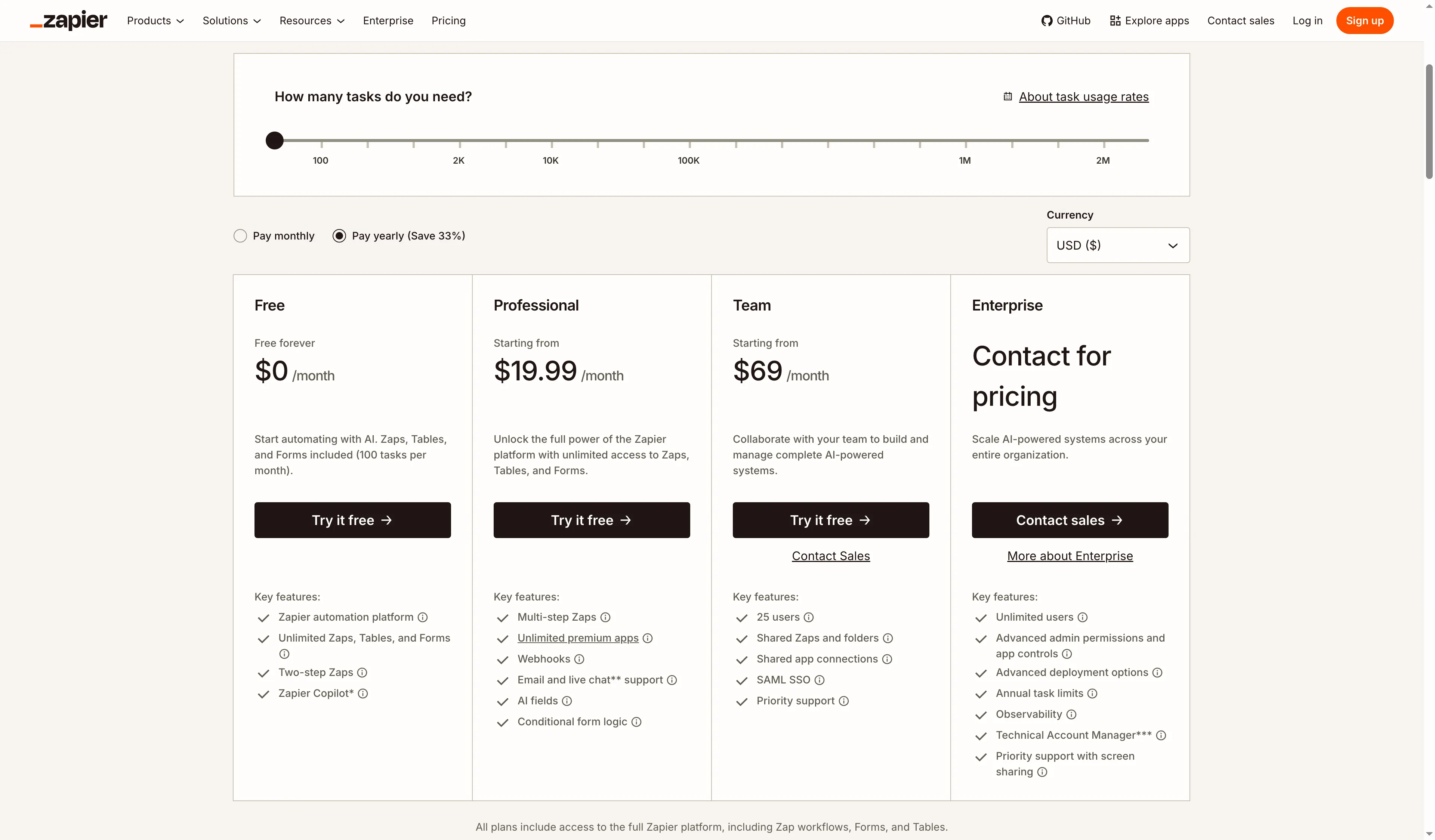
Zapier’s pricing page presents plans around task volume.
Zapier links marketing applications, allowing an occurrence within the one system to generate or modify a record in a different one. It's helpful when the tools you already possess are missing a connection. A separate product stays your email sender.
100 tasks per month come with the free plan. With annual billing, paid plans begin at $19.99/month. A workflow resembling one “handoff” may spend several tasks whenever it finds, updates, and logs a record because a successful action consumes a task. The connected CRM, form, or sender has its own subscription and limits.
To link current systems, I'd turn to Zapier after checking native integrations, duplicate handling, and safeguards against loops. One Trustpilot reviewer wrote about accidentally setting off a Zap loop and burning through unplanned tasks. In that instance, support agreed to waive the credits. This serves as a handy reminder to try out a workflow using a small sample alongside task alerts; it doesn't predict how support will treat every incident.
Pros — Zapier
- A narrow handoff can be prototyped by a team on the Free plan before they commit.
- It links tools, and no fresh campaign sender is needed.
Cons — Zapier
- Connected applications incur costs of their own, and each action that succeeds uses up tasks.
- One modest workflow may become more difficult to troubleshoot because of a loop or a connection that fails.
I wouldn't run a high-volume campaign workflow through Zapier by default: its task meter makes every successful action a cost to count. As a patch for one missing native connection, it is much easier to justify. Product pricing: Free includes 100 tasks/month. Paid plans from $19.99/month billed annually. Connected apps may require separate subscriptions.
What marketing automation costs for three real workloads
For the one-person shop workload, marketing automation software runs $192–$240 annually; the five-person HubSpot setup comes to $13,680 in the first year, and the Customer.io configuration as stated is $1,200/year. Every one of these examples is annualized before tax — they don't represent a market average. Quotes can shift depending on seats, add-ons, or how contacts are defined. Because contact, active-profile, send, seat, and task units aren't alike, you should compare plans only where they serve the same job and volume. Annual prices for three stated workloads appear in the cost table, along with the assumptions underlying each total.
| Workload | Comparable starting configuration | Annual software cost | Required extras or limits |
|---|---|---|---|
| One-person online shop: 500 billable contacts, up to 5,000 email sends/month, basic store-triggered email automation. No SMS | Omnisend Standard (500 contacts, 6,000 emails/month), Klaviyo Email (500 active profiles, 5,000 emails/month), Mailchimp Standard (500 contacts, 6,000 emails/month) | Omnisend: $192/year, Klaviyo: $240/year, Mailchimp: $240/year | Standard monthly list prices × 12. Taxes and optional SMS excluded. Omnisend's first-time three-month discount is excluded. Contact, active-profile, and billable-recipient definitions differ, so verify the same 500-person audience in each calculator. |
| Five-person B2B team: CRM-linked lead capture, nurture, and lead scoring | HubSpot Professional, 2,000 marketing contacts, five core seats | $13,680 first year ($9,600 subscription + $1,080 for two extra seats + $3,000 onboarding) | Three core seats are included. Two are added at $45/month each. Marketing contact overages, tax, and non-HubSpot systems are excluded. |
| Product-led SaaS: 5,000 people and objects, up to 60,000 email sends/month, event-triggered product journeys | Customer.io Essentials (5,000 profiles and up to 1 million emails/month) | $1,200/year | Billed monthly for 12 months. Includes two object types. Event instrumentation and implementation labor aren't included. |
The small-shop row provides a like-for-like email workload across the three entry configurations. You'd want each calculator to use identical audience size and send volume when comparing bills. The HubSpot row gives the cost of a CRM-led B2B setup, while the Customer.io row gives the cost of an event-driven product journey. Since those two workloads serve different jobs, ranking their totals against one another isn't appropriate.
Check your existing stack before buying
If your CRM already delivers basic nurture messages, check whether your present plan covers the trigger, branching, reporting, and volume you require. Marketing automation may already be part of your CRM or email subscription. Users of HubSpot and Pipedrive might already possess CRM automation; a LinkedIn Pipedrive integration can handle the separate lead sync. Google Workspace and Microsoft 365 can handle simple one-to-one follow-up, yet they aren't replacements for consent-managed campaigns. Newsletters may already be managed by an existing email service, while a native connector or Zapier fills a narrow gap. Are the trigger and branching you need covered by your current plan? Purchase a separate platform once you can name the workflow, the data owner, and the missing capability it will add.