

 17 min read

TL;DR
- Match the booking object: My main advice is to start with what the customer reserves—a staff appointment, a room, or a meeting routed to a host.
- A free plan can still carry a cost: Square Appointments Free charges card-processing fees; Fresha can add marketplace and processing charges.
- Compare the billable unit: Tools charge by provider, user, calendar, host seat, or location, so headcount alone won't predict the bill.
- Check the limits before setup: Booking volume, provider count, available features, and resource handling can change which plan fits.
- Try the tools already in your stack first: Google Workspace, Microsoft 365, or a CRM scheduler may cover simple meeting links.
What is an online booking system?
Online booking systems for business let customers select a service or meeting, view open times, and reserve a slot through a website or booking link. Depending on the business, it may additionally assign rooms and staff, gather a deposit, route a lead to the appropriate meeting host, send reminders, or process payments. Across products, those features aren't interchangeable.
Quick picks
For local-service checkout, I start with Square Appointments; for routed meetings, Calendly is the clearer fit. The table maps each job to a pick and its biggest constraint.
| If you need… | Start with… | Why | Watch for… |
|---|---|---|---|
| Bookings, deposits, and checkout for a local service business | Square Appointments | Free plan, unlimited staff calendars, payment tools, and a booking site | Shared rooms and equipment require Premium; processing fees still apply |
| Client forms, deposits, and packages for a service provider | Acuity Scheduling | Clear calendar tiers, payments on every plan, and packages/SMS on Standard | A shared resource limits capacity; customers cannot select a particular room through that resource |
| A five-person service team with predictable subscription cost | SimplyBook.me | Basic and Standard include multiple providers at a flat plan price | Booking volume, provider count, and premium-feature count all cap the plan |
| A no-cost start with several staff accounts | Setmore | Free includes up to four users and unlimited appointments | SMS, recurring appointments, and two-way sync are Pro features |
| A salon or spa that wants a discovery marketplace | Fresha | Combines booking, payments, staff calendars, and resources | Marketplace and payment fees can apply to new clients |
| One-to-one or round-robin business meetings | Calendly | Fast meeting links, calendar conflict checks, and team routing | Round-robin assigns meeting hosts; it does not allocate a service worker, room, or equipment |
Online booking systems at a glance
These systems reserve different things: Square and Fresha handle service resources, Acuity caps shared capacity, SimplyBook.me and Setmore schedule service providers, and Calendly routes meeting hosts.
| Product | What it schedules | Billing unit or limit | Key constraint |
|---|---|---|---|
| Square Appointments | Staff appointments and checkout | Per location | Shared resource management is Premium; card processing is extra |
| Acuity Scheduling | Service appointments and shared resource capacity | Per calendar | Customers cannot select a room from shared capacity |
| SimplyBook.me | Service menus and provider schedules | Providers, bookings, and features | All three plan limits apply; pricing page showed EUR |
| Setmore | Service appointments and staff calendars | Per user on Pro | Free stops at four users; SMS and sync require Pro |
| Fresha | Beauty appointments, staff, and resources | Per bookable member | Marketplace fees may apply to new clients; processing is extra |
| Calendly | Meetings routed among hosts | Per host seat | Free has one event type and calendar; paid seats unlock team routing |
What makes the best online booking system?
The best online booking system fits what the customer reserves—a person, room, class seat, or meeting with a host—and prevents two bookings from taking the same slot. I also check who picks that resource and how the system handles conflicts.
Check the payment flow. If you take deposits or full payment, add the processor fee to the subscription. A plan with payments may still rely on Stripe, Square, PayPal, or another processor.
Count what the plan bills. Booking tools charge by location, host seat, staff member, booking volume, or add-on. Compare your headcount and locations before weighing a per-user price against a per-site price.
Check subscriptions you already have. Google Workspace, Microsoft, or a CRM scheduler may cover simple meeting links. Add another tool when you need its booking page, payments, intake, routing, resource calendar, or brand controls.
Estimate a typical month. Count bookable staff, locations, appointments, add-ons, messages, and marketplace clients. A free tier may cover one provider but run out at 51 bookings or a fifth staff account.
Separate meeting routing from service assignment. Calendly and Zoho Bookings distribute meetings among hosts. Service schedulers assign staff, rooms, or equipment against calendars and capacity.
1. Square Appointments: Best for service businesses that take deposits
Square remains my first pick for a local service business that wants online booking, checkout, and staff calendars together. Free covers unlimited staff calendars and online booking; it can also request deposits. For staff-based services that don't book shared rooms or equipment, this is where I'd start.
Clients can book through a Square site or embedded widget. Free has no monthly subscription fee, but online card payments cost 3.3% + $0.30 each. Businesses that reserve rooms, chairs, stations, or equipment need Premium at $149/month per location; unlimited staff calendars do not cover shared inventory.
Square Appointments pros
- Free includes unlimited staff calendars and online booking.
- Free accounts can require a deposit when clients book online.
- The Free plan has no monthly subscription fee; hardware is not required for online payments.
Square Appointments cons
- Shared rooms, chairs, stations, or equipment require the Premium resource-management plan.
- Online processing costs 3.3% + $0.30 per transaction on Free, or 2.9% + $0.30 on Plus and Premium.
- Plus and Premium are charged per location, so a second site adds another subscription fee.
Consultants who only need meeting links may not need a POS-centered tool. A room-dependent business should price Premium before building its workflow around Free.
Product pricing — Square Appointments
Free is $0/month per location; Plus is $49/month/location ($588/year); Premium is $149/month/location ($1,788/year). Square Plus and Premium have 30-day trials. Card-processing fees are additional.
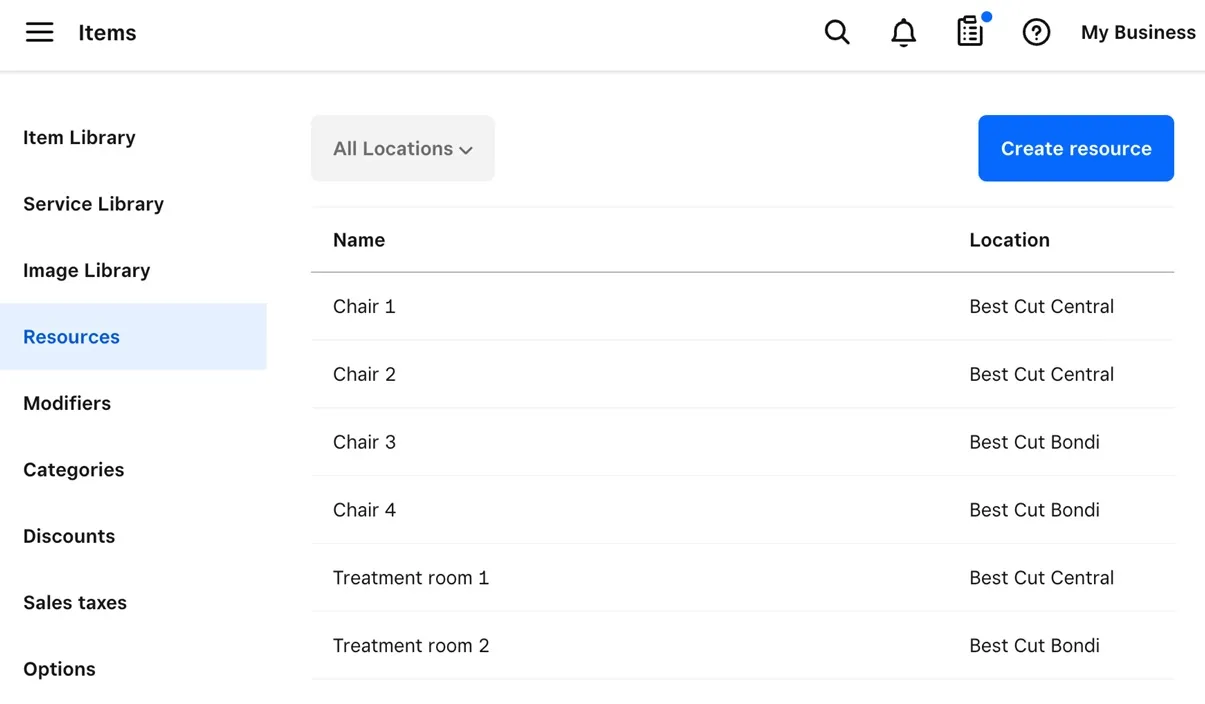
Square keeps appointment resources such as chairs and treatment rooms in a location-specific list.
2. Acuity Scheduling: Best for service bookings with forms and packages
I like Acuity best when a service business needs client forms, deposits, reminders, or packages alongside its calendars. Starter includes deposits and one calendar. Standard raises the limit to six calendars and adds waitlists, text reminders, gift certificates, and memberships. Five calendars fit Standard at $324/year on annual billing, before processor fees.
I found one important distinction in Acuity's resource guide: a shared resource caps capacity across calendars, but clients can't pick a named room from a menu. Selling a specific room requires a separate calendar and may raise the price. Resource rules also depend on the calendar and time zone.
Acuity Scheduling pros
- Each plan includes unlimited services, appointments, client self-scheduling, deposits, and payment integrations.
- Standard covers six calendars, SMS reminders, packages, memberships, a waitlist, and gift certificates.
- For a small team, calendar counts yield a predictable subscription cost rather than a per-employee charge.
Acuity Scheduling cons
- A five-provider team requires Standard or a different setup, while Starter includes one calendar.
- Acuity has no forever-free tier, and Starter has one calendar. A card isn't required for its seven-day trial.
Who should skip it: I don't see Acuity's shared-capacity setting as a workaround for named-room bookings. Choose a resource-first product if customers need to reserve a specific sauna, room, or piece of equipment.
Product pricing — Acuity Scheduling
Starter is $16/month on annual billing ($192/year) or $20 month-to-month; Standard is $27/month annual ($324/year) or $34 monthly; Premium is $55/month annual ($660/year) or $69 monthly. Prices exclude applicable taxes and payment processor fees.
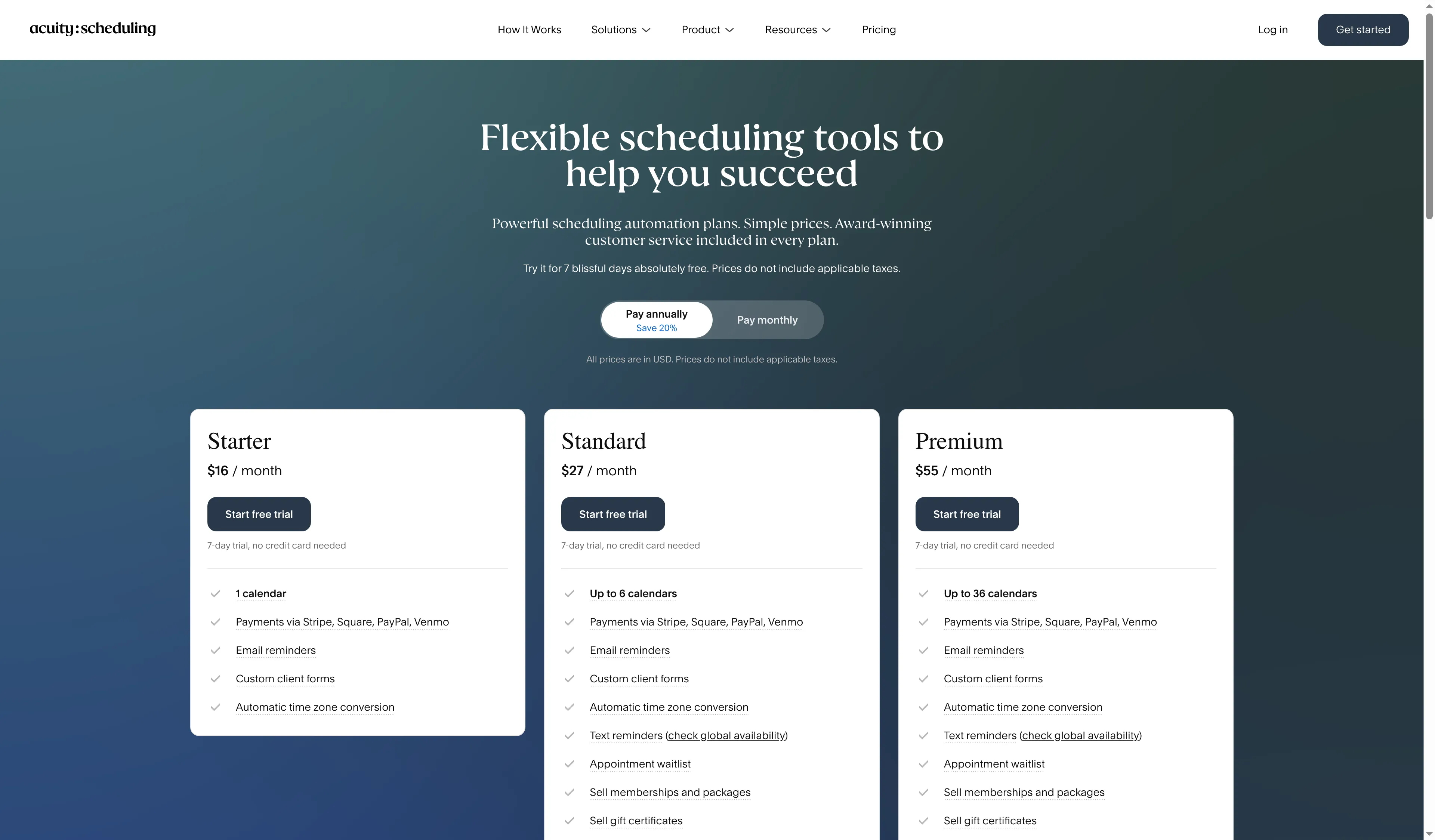
Acuity's plan choice changes both calendar capacity and reminders.
3. SimplyBook.me: Best for service teams that need booking controls
SimplyBook.me is my pick for a growing provider team that wants one branded booking page for different services, intake, and payment options. Standard is a flat subscription for 15 providers, 500 monthly bookings, and eight premium features. That gives a five-person team room to grow if it stays within those caps.
The flat fee keeps the bill predictable, but only if the plan covers the team's booking volume and active features. Before buying, count the features you need at the same time, such as intake forms, deposits, memberships, and custom notifications. The pricing page showed EUR when I checked; confirm the checkout currency before budgeting in US dollars.
SimplyBook.me pros
- Basic bills one flat annual subscription for up to five providers, so the price doesn't multiply with the team.
- The system brings together scheduling controls, booking websites/widgets, reminders, and several service providers.
- Standard covers 15 providers, 500 bookings a month, and eight premium features.
SimplyBook.me cons
- The free plan allows up to 50 bookings, one provider, and one premium custom feature.
- Payment processing fees still apply; SMS credits and payment gateways are sold separately.
- Only Enterprise includes the Cluster Interface for managing multiple locations, and its price requires a sales quote. Standard's 15-provider allowance doesn't include centralized multi-location management.
I don't recommend SimplyBook.me for a business that wants low-maintenance setup; its booking, provider, and feature caps need regular attention.
Product pricing — SimplyBook.me
Free is €0; Basic is €11.90/month on annual billing (€142.80/year) or €13.90 month-to-month; Standard is €24.90/month annual (€298.80/year) or €29.90 monthly; Premium is €49.90/month annual (€598.80/year) or €59.90 monthly. Enterprise pricing is custom. Prices are shown as displayed on SimplyBook.me's pricing page and exclude external processor fees and optional SMS credits.
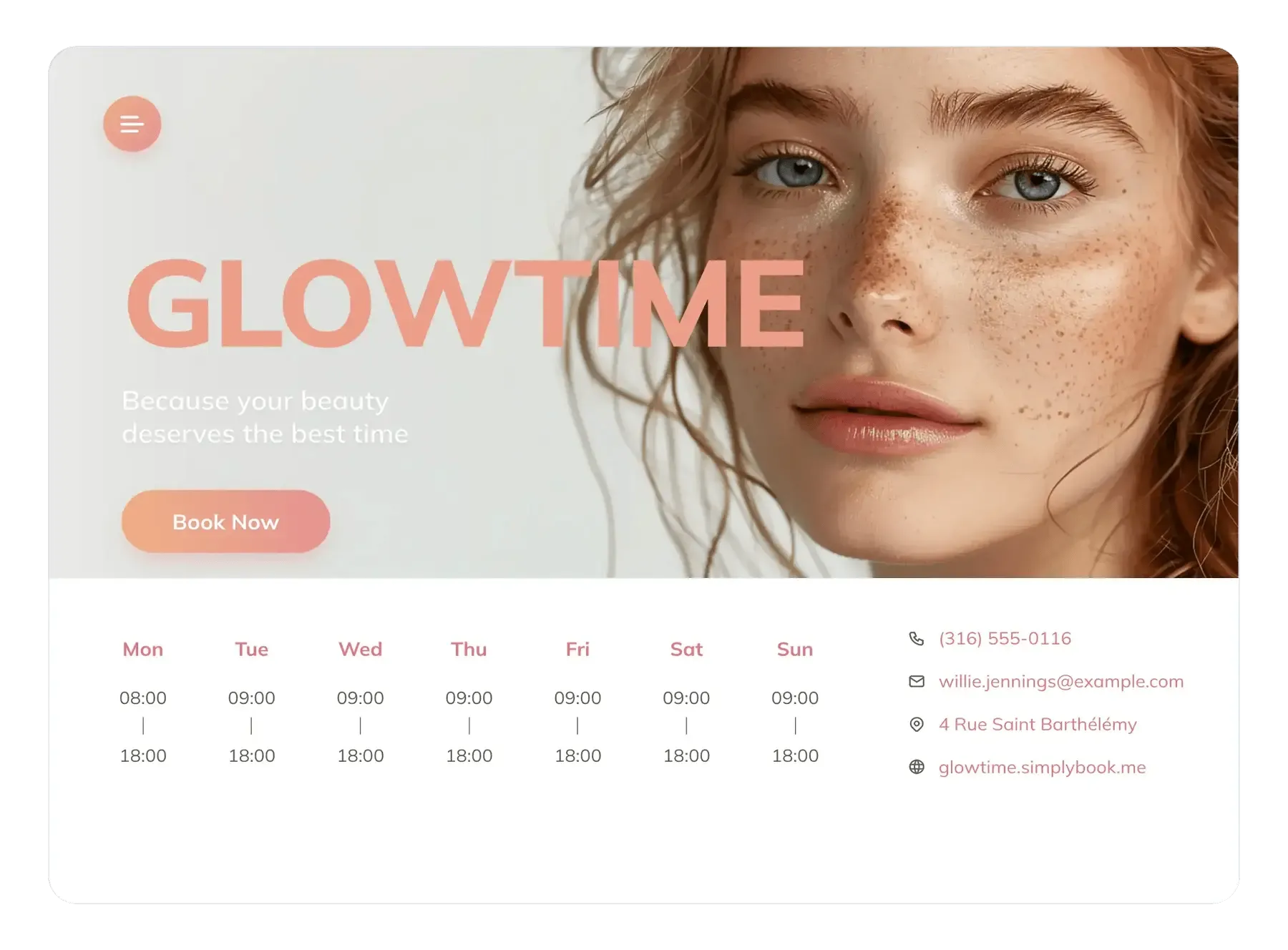
SimplyBook.me combines a branded booking button with business hours on a public booking website.
4. Setmore: Best for small teams that need a free start
My pick for a small service team is Setmore Free when four users, email reminders, and unlimited appointments cover the job. A fifth user, SMS reminders, recurring bookings, or two-way calendar sync requires Pro.
Setmore's “double booking” setting sounds broader than it is: it allows overlaps on the admin calendar, but customers still can't pick occupied times on the public Booking Page. Recurring bookings ignore the setting, too. I wouldn't treat the toggle as a customer-facing way to reopen a booked slot.
Setmore pros
- Free supports unlimited appointments, a shareable booking page, email notifications, and up to four users.
- Pro includes recurring appointments, SMS, and two-way calendar synchronization; it also eliminates Setmore branding.
- You can configure lead time, slot spacing, advance booking, and cancellation notice separately to align the page with how the business really runs.
Setmore cons
- The free tier comes with a four-user cap, so Pro is required for a five-person team.
- Older FAQs and app-store listings show different prices, so check the current website before signing up.
For Setmore, test moved appointments before using the override for overlapping bookings. A Trustpilot reviewer mentioned confusion about time zones and double booking; Setmore's current guide says invitees see moved appointments in their own time zone. A business that reserves equipment or rooms alongside staff needs a resource scheduler.
Product pricing — Setmore
Free is $0 for up to four users. Pro is $5/user/month with annual billing ($60/user/year), or $12/user/month when billed monthly. Card processing fees come from the payment service you connect.
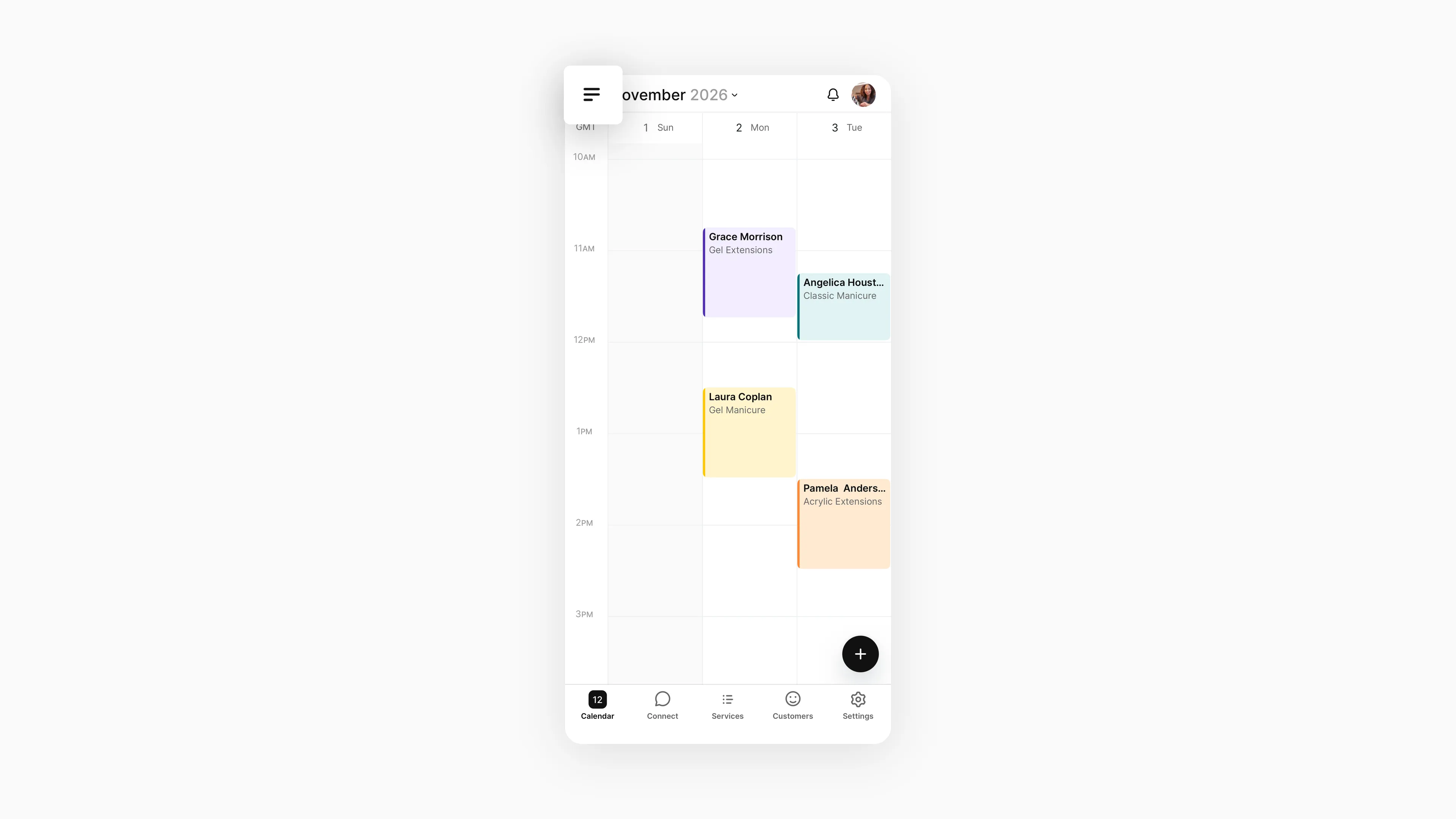
Setmore lays out booked services and times in its mobile calendar.
5. Fresha: Best for salons that want marketplace discovery
I like Fresha for salons that want marketplace discovery and resource scheduling, provided they track the fees new clients trigger. It combines client records, checkout, and a service calendar, and it can book rooms or equipment without assigning a staff member.
Fresha charges a one-time 20% marketplace fee, with a $6 minimum, when a new client discovers the business through Fresha. Direct booking links and returning clients do not trigger that fee. Online card processing is separate, so compare both the acquisition source and the payment method.
Fresha pros
- Fresha handles deposits, staff calendars, resource management, payments, and online booking within a beauty/wellness workflow.
- Team pricing is per bookable member; plans include unlimited bookings and multiple calendar columns.
- A salon can appear to nearby customers browsing Fresha's marketplace, while direct booking links reach the business's own audience.
Fresha cons
- Team pricing rises with each bookable member, so headcount changes the monthly bill.
- A new client who finds the business through Fresha's Marketplace triggers a one-time 20% commission, with a $6 minimum. Online card processing adds 2.79% plus $0.20 per transaction.
- I only count marketplace discovery as a win when a new Fresha client is worth more than the fee; direct links avoid the acquisition charge.
Professional-services firms that only book consultations gain little from a beauty-and-wellness marketplace.
Product pricing — Fresha
Independent is $19.95/month for one calendar column. Team is $14.95 per bookable team member/month; five bookable members cost $74.75/month or $897/year. A seven-day trial is listed. Marketplace and payment fees are separate.
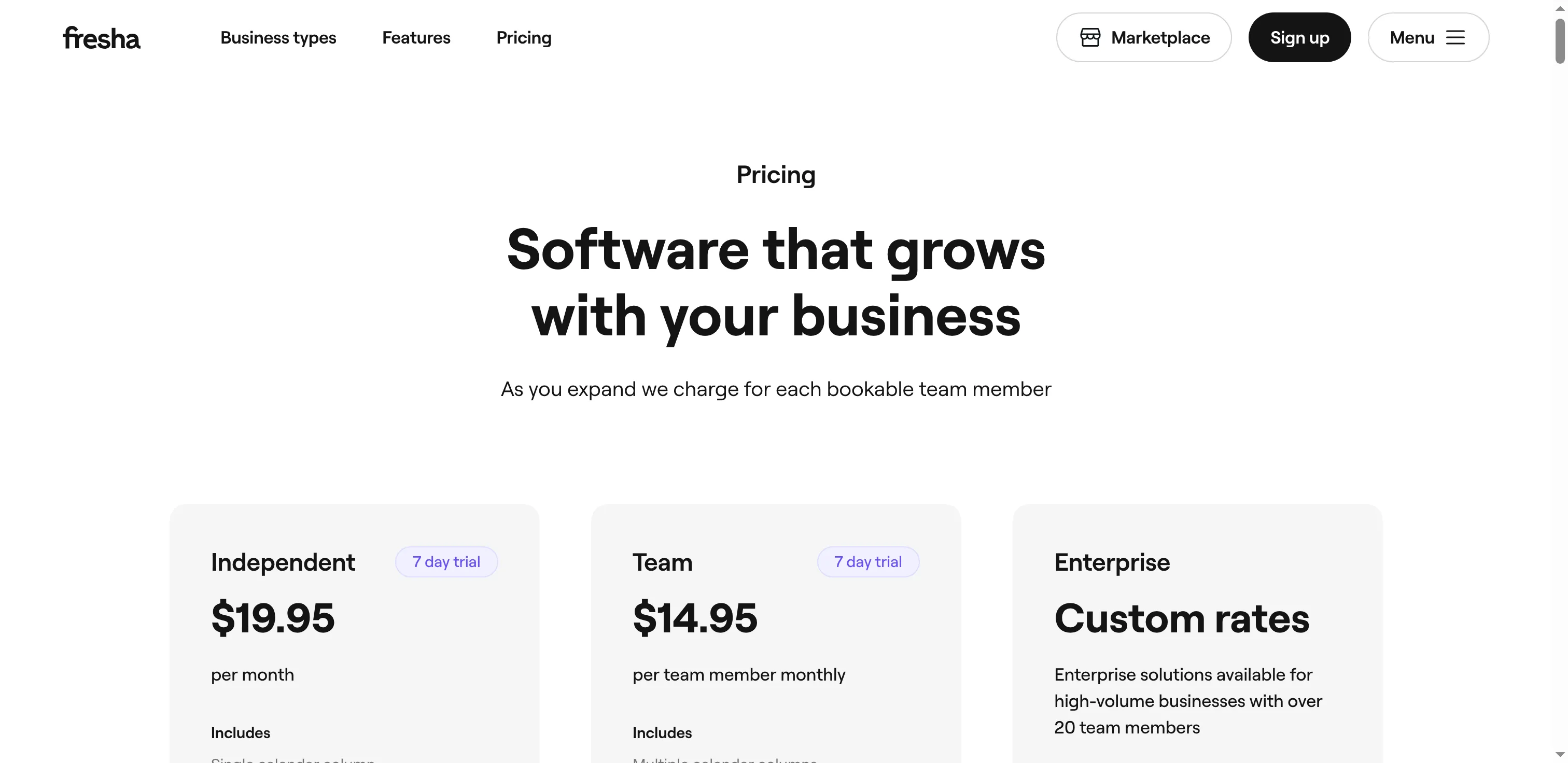
Fresha prices Independent per business and Team per bookable member.
6. Calendly: Best for consultants and B2B meeting routing
I prefer Calendly for consultant and sales meetings when host routing matters most. Its booking model centers on meetings rather than treatment rooms, stylists, or equipment. Free includes one event type and one connected calendar; Teams adds lead routing and round-robin assignment.
I reached Calendly's availability settings without connecting an outside calendar. Weekdays were set to 9 a.m.–5 p.m. Eastern, with separate controls to add intervals or copy hours to other days. I like that split, but check each day before sharing a booking link.
Calendly pros
- Free supports one-to-one meeting links for one host with one connected calendar.
- Standard brings in several calendars, reminders, automations, plus Stripe/PayPal integrations.
- Teams now includes round-robin scheduling plus lead qualification and routing, with clear per-seat pricing.
Calendly cons
- Free already supports one event type and one connected calendar. Hosts need Standard or Teams for paid features such as multiple event types or team routing.
- Five Teams seats cost $960/year ($16 × 5 × 12), not $16 for the whole team.
- Calendly routes meeting hosts, not service staff or rooms, and it doesn't take treatment deposits or run a POS. One five-star Trustpilot reviewer on October 4 reported an unexpected €107 annual charge. Confirm renewal terms before choosing an annual plan.
Local service businesses need a scheduler that can handle staff calendars, service menus, deposits, and shared resources.
Product pricing — Calendly
Free is $0; Standard is $10/seat/month billed yearly ($120/host/year); Teams is $16/seat/month billed yearly ($192/host/year). Monthly prices are higher; check the billing toggle before signup.
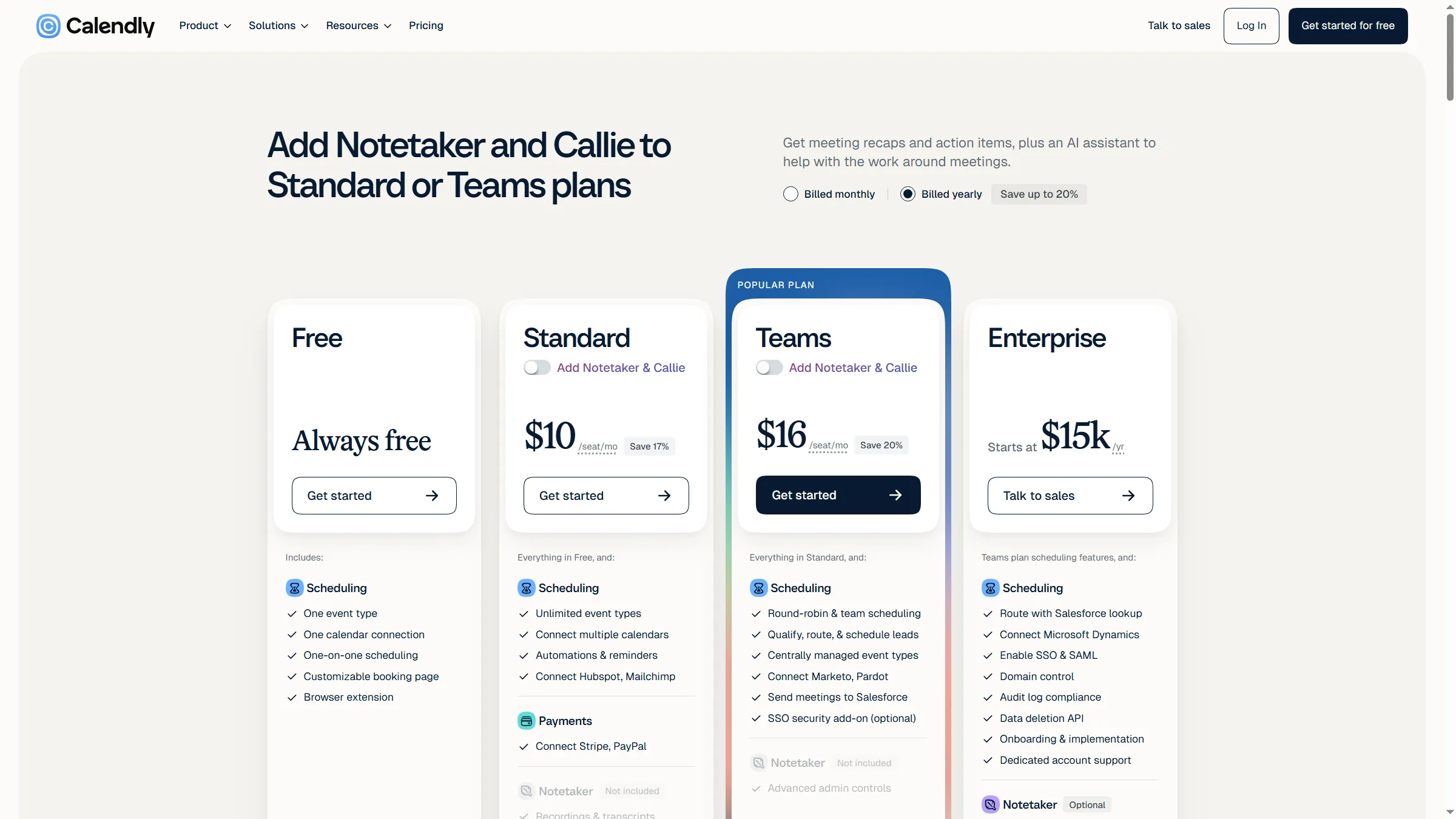
Calendly's Teams plan adds meeting routing and shared scheduling features for hosts.
What the same booking workload costs
The cost depends on the booking job: Setmore Free, SimplyBook.me Free, and Square Appointments Free each charge no subscription for 40 solo appointments a month; the tables also compare five service providers and five meeting hosts. Prices exclude taxes and processor fees unless noted.
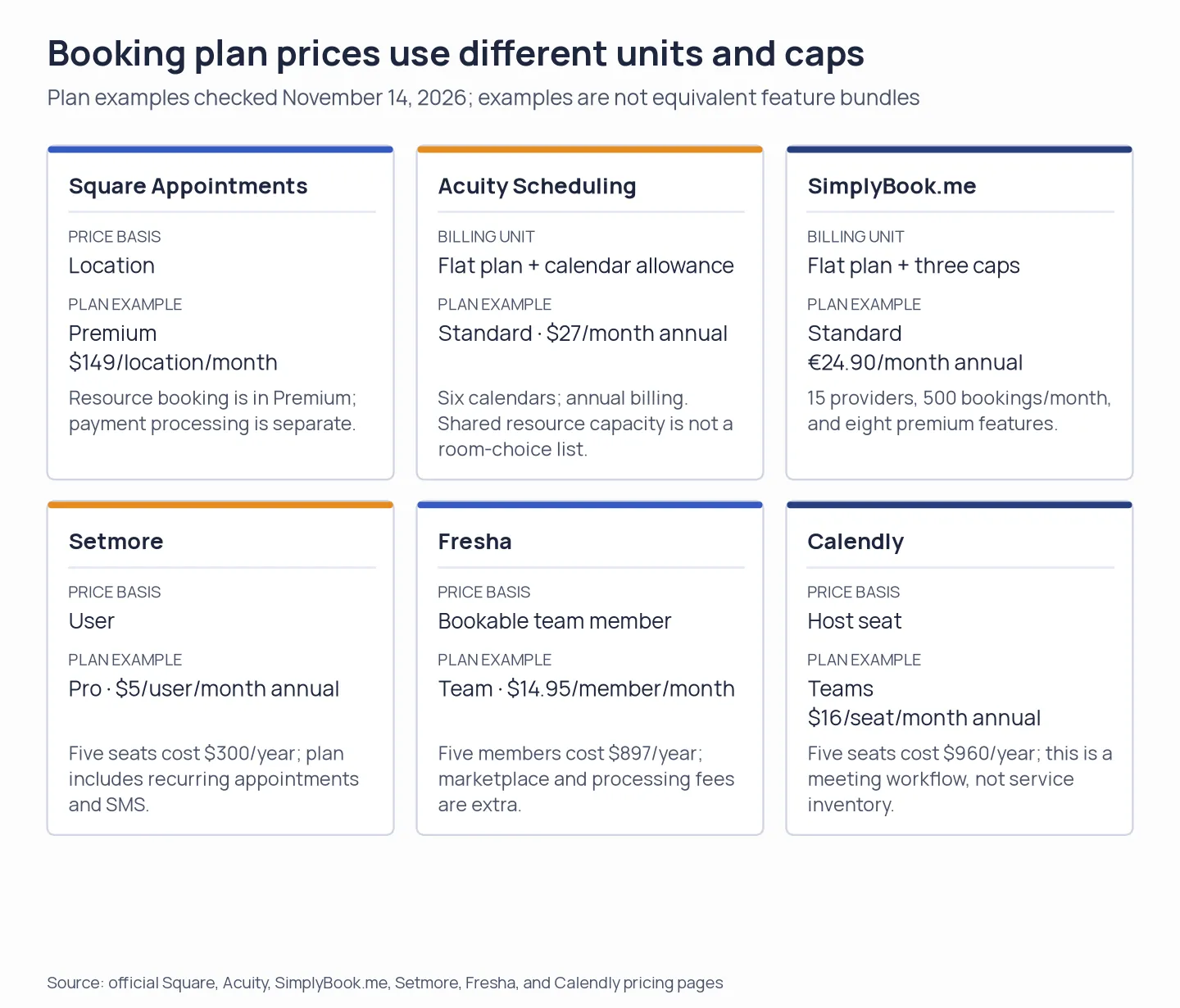
For five service providers booking 300 appointments a month, Square Free costs $0 in subscription, SimplyBook.me Standard €298.80/year, Setmore Pro $300/year, Acuity Standard $324/year, and Fresha Team $897/year. Calendly Teams is a separate meeting-host setup at $960/year for five seats.
These annual totals cover the listed subscriptions. They exclude tax and payment processing unless noted. Square Free charges 3.3% + $0.30 per online payment, so the annual total depends on ticket size and booking volume.
Solo service provider: 40 appointments a month
For a solo provider, Setmore Free, SimplyBook.me Free, and Square Appointments Free each have a $0 subscription; SimplyBook.me displays its prices in euros. Booking caps and payment fees differ.
| Solo workload | Plan | Annual subscription | What it includes or adds |
|---|---|---|---|
| 40 monthly self-booked appointments, no paid reminders | Setmore Free | $0 | Up to four users and unlimited appointments; processor fees depend on the connected service |
| Same workload, within a 50-booking cap | SimplyBook.me Free | €0 | One provider and one premium custom feature |
| Same workload with online card payments | Square Appointments Free | $0 | No subscription; 3.3% + $0.30 per online payment |
Five service providers: 300 appointments a month
For five service providers and 300 monthly appointments, SimplyBook.me Standard costs €298.80/year, Setmore Pro $300, Acuity Standard $324, Square Free $0 before processing, and Fresha Team $897 before marketplace or processing fees.
| Five-provider workload | Plan | Annual subscription | Capacity and extra costs |
|---|---|---|---|
| 300 appointments/month, direct booking and deposits | Square Appointments Free | $0 | Unlimited staff calendars; online payment processing is extra; no shared room management |
| Same workload | SimplyBook.me Standard | €298.80 | 15 providers, 500 bookings/month, and eight premium features; external SMS credits and payment fees extra |
| Same workload | Setmore Pro, annual | $300 | Five seats × $5/month × 12; SMS and two-way sync included |
| Same workload | Acuity Standard | $324 | Up to six calendars, SMS, deposits, and packages; processor fees extra |
| Same workload, with beauty-service resources | Fresha Team | $897 | Five members × $14.95/month × 12; Marketplace and payment fees extra |
Five meeting hosts: round-robin routing
For five business meeting hosts who need round-robin routing, Calendly Teams costs $960/year; the plan routes meetings, not service staff or physical resources.
| Meeting workload | Plan | Annual subscription | Included capacity and limits |
|---|---|---|---|
| Five hosts, round-robin meetings, and lead routing | Calendly Teams | $960 | Five seats × $16/month × 12; does not reserve service resources or run a POS |
What an additional booking location costs
Square bills $49/month for Plus or $149/month for Premium at each location. SimplyBook.me reserves its centralized multi-location Cluster Interface for custom-priced Enterprise.
Check the scheduler you already pay for
Before choosing among online booking systems for business, check whether Google Workspace or Microsoft 365 already includes a booking tool that fits your needs. Google Workspace includes appointment schedules, and eligible Microsoft 365 plans include Microsoft Bookings. Zoho Bookings also links up with Zoho products, yet its routing forms, extra workspaces, and resources carry plan or add-on requirements. An existing suite may handle a personal booking page or a few internal meetings; it is not automatically a substitute for deposits, POS, resource inventory, or a client marketplace.
Which online booking system should you choose?
Start with the suite you already pay for if you only need simple meeting links. For a dedicated booking page, choose a service scheduler for staff or room inventory and Calendly when meetings must route among hosts.