

 20 min read

TL;DR
- SurveyMonkey is my pick for routine feedback if you want a familiar builder and a clear annual response pool; its plans make seat costs easy to compare.
- Tally is my free choice for a lightweight survey if its fair-use terms and “Made with Tally” branding fit the job.
- Typeform puts presentation first, but the shared monthly response pool may matter more than its annual billing label.
- For five seats, SurveyMonkey Team Advantage costs $1,800/year and Typeform Business is $1,092/year annualized. They include different response limits and features.
- If your organization already pays for Google Workspace or Microsoft 365, look at Forms before purchasing another basic tool for internal feedback.
What is online survey software?
Online survey software lets organizations create questionnaires, distribute them, and collect or analyze answers. Free builders handle basic forms; research suites add branching, quotas, exports, and team administration. The best websites for taking online surveys as a participant recruit respondents through separate panels. SurveyMonkey is my default for routine customer feedback.
I compared current vendor pricing and help pages, read individual review posts, and built a question in the free editors for Tally and Jotform before checking response limits and seat costs.
At a glance
SurveyMonkey is the broad customer-feedback pick, Typeform is the conversational option, and Tally is the free lightweight choice; the table adds the other four tools and their review snapshots.
| Tool | Best fit | Starting configuration checked | Capterra snapshot | G2 snapshot |
|---|---|---|---|---|
| SurveyMonkey | Broad customer feedback | Advantage Annual, one user | 4.6/5 (10,503) | 4.4/5 (24,053) |
| Typeform | Conversational customer-facing forms | Basic, one seat, annual billing | 4.7/5 (981) | 4.5/5 (1,027) |
| Jotform | Forms with operational add-ons | Bronze, annual billing | 4.7/5 (2,972) | 4.6/5 (5,909) |
| Qualtrics | Advanced research teams | Free account; paid online pricing starts at $420/month | 4.7/5 (429) | 4.4/5 (3,027) |
| QuestionPro | Research tools with a free on-ramp | Essentials free; Advanced, annual billing | 4.8/5 (553) | 4.5/5 (1,165) |
| Zoho Survey | Low-cost solo projects | Basic, annual billing | 4.6/5 (458) | 4.4/5 (1,047) |
| Tally | Lightweight free surveys | Free, subject to fair use | 4.9/5 (43) | 4.9/5 (163) |
Ratings are separate snapshots of every review platform's product profile, gathered on November 12, 2026; they don't form a combined score or a ranking. Review sets and counts change. A complete chronological six-month history wasn't supplied by the review pages I could inspect for most products. Consequently, instead of claiming trends, I use individual reviews to identify questions.
Quick picks
I recommend SurveyMonkey for broad feedback, Tally for a free simple form, or Typeform for a conversational customer survey; the table shows each pick’s main limitation.
| Scenario | Tool | Why it fits | Limitation to check |
|---|---|---|---|
| Broad customer feedback | SurveyMonkey | Annual response allowances and team plans are easy to compare | Team plans start at three seats; advanced branding and logic cost more |
| Free, lightweight form | Tally | The free editor let me build and preview a question before signup | Fair use has no published numeric response threshold; advanced styling is Pro |
| Branded, conversational survey | Typeform | The one-question-at-a-time format emphasizes respondent presentation | Free and Basic quotas are shared monthly across the account |
| A form that does more than collect opinions | Jotform | A broad element tray supports operational form types as well as survey questions | Monthly submissions, views, and stored submissions are separate limits |
| Enterprise or academic research | Qualtrics | Built for complex research and experience-management workflows | The public starting price doesn't define a seat or response bundle |
| Free research exploration | QuestionPro | Essentials exposes survey features before a paid license | Only 200 responses per survey are viewable on the free plan |
| Budget solo paid plan | Zoho Survey | Basic is listed at a low monthly equivalent on annual billing | Seat, monthly, and annual response rules differ by plan |
What makes the best survey software?
Check what the product counts
A “response” can mean a completed answer, a submission attempt, or a billable event. Typeform pools responses monthly across an account; Jotform separates submissions, stored answers, and form views; SurveyMonkey and QuestionPro use annual pools on relevant plans; Zoho sets different limits for monthly and annual billing. Check what happens at the cap: a form may stop taking answers, hide results, or charge an overage.
Match the question logic to the project
SurveyMonkey, Typeform, and Tally can handle a basic satisfaction pulse with multiple choice and a text field. A research study may need branching, quotas, piping, randomization, multilingual questions, or crosstabs. Check that the plan includes the specific control you need; “logic” means different things across products.
Separate survey creation from respondent recruitment
SurveyMonkey, Typeform, Jotform, Qualtrics, QuestionPro, Zoho Survey, and Tally let you create surveys and distribute them through your own channels. Respondent panels are separate services, so budget for recruitment apart from the survey software. If you share surveys through LinkedIn, Linked Helper’s Post Booster lets you add selected profile mentions in comments under an existing post.
Verify exports and analysis before collecting data
Before collecting responses, verify that your plan lets you view and export the results you need. SurveyMonkey, Jotform, and QuestionPro offer different ways to review answers; a spreadsheet export isn’t a crosstab, statistical package export, or report dashboard.
Count named seats and branding controls
A five-seat label doesn’t tell you whether five colleagues can edit the same form. Check for named editors, a shared workspace, and permission controls; also check the price of removing vendor branding. I use published seat counts in the cost comparison and flag plans without a public team price or verified seat count.
1. SurveyMonkey: Best for broad customer feedback
I start with SurveyMonkey for routine customer or employee feedback. Its individual and team plans make seat counts and annual response pools easy to compare; the familiar name still doesn’t make every tier a fit for research-heavy work.
Pros — SurveyMonkey
- Advantage Annual covers one user and 15,000 responses/year for $468. Premier Annual raises the allowance to 40,000 and adds advanced analysis features for $1,668/year.
- Team Advantage starts at three full-access seats and includes a shared 50,000-response annual pool. The five-seat price is public, but a three-seat minimum may be wasteful for a smaller team.
- Paid response overages cost $0.15 each, which makes occasional over-cap costs possible to estimate.
Cons — SurveyMonkey
- Team Advantage costs $30/user/month on annual billing and requires at least three seats. Five seats cost $1,800/year before tax.
- The free plan limits how many responses you can view; branding, logic, and collaboration features require higher tiers.
- SurveyMonkey is built for general feedback and analysis; respondent panels and enterprise research programs need separate planning.
A November 6, 2026 Capterra reviewer liked how easily they created surveys and collected feedback, but said useful features cost extra and design control was limited. That’s one review, not a trend. I take it as a prompt to check the exact features I need.
Who should skip it: A solo user who only needs a handful of simple forms should compare free options first. A research team needing a fixed enterprise bundle should request a scoped quote rather than treating the public individual starting price as a complete package.
Product pricing — SurveyMonkey
Advantage Annual — $468/year for one user; Team Advantage — $30/user/month billed annually, three-seat minimum; Premier Annual — $1,668/year for one user. Checked November 12, 2026; tax and overages excluded.
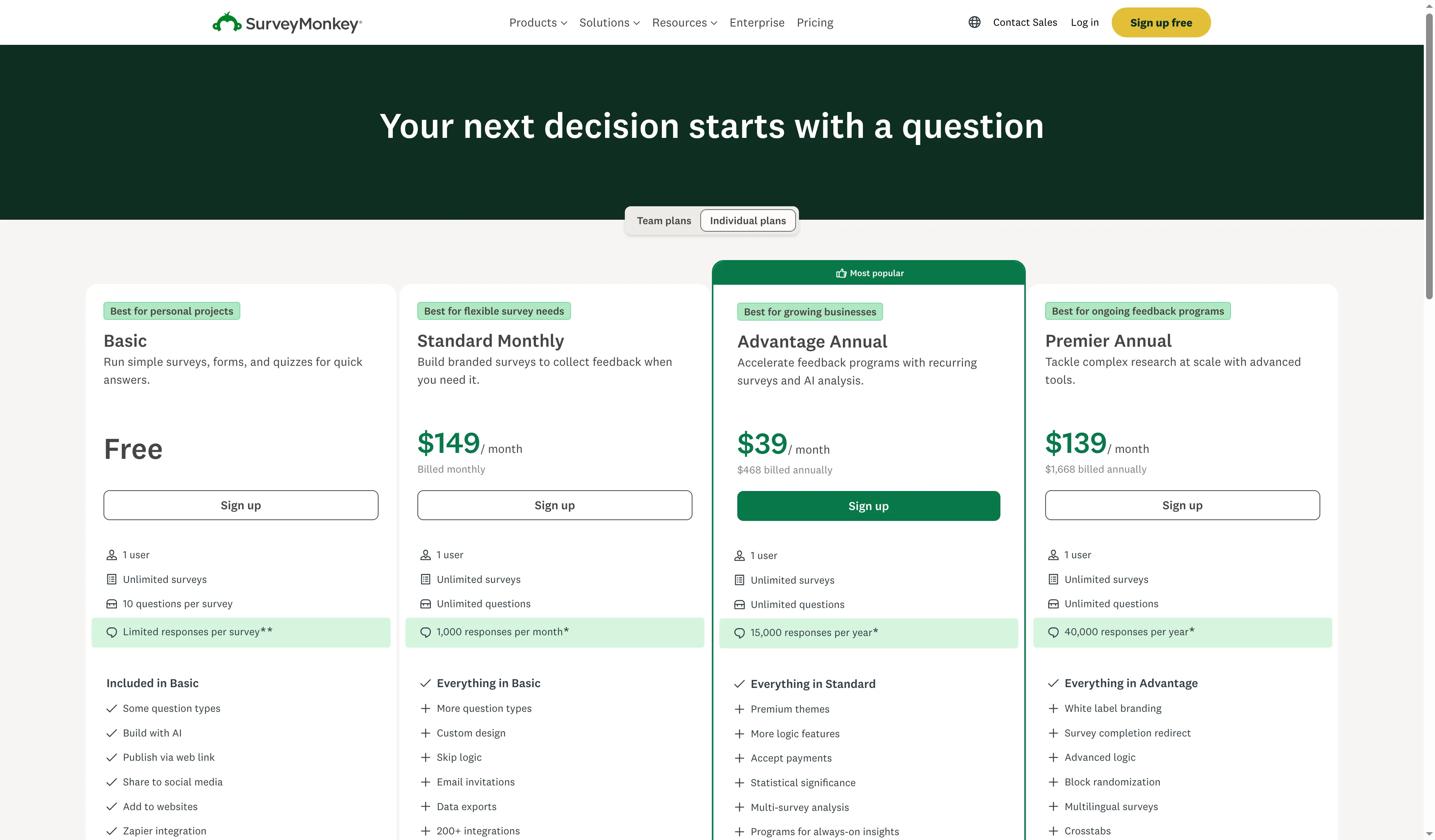
SurveyMonkey’s individual plan cards pair annual prices with response allowances.
2. Typeform: Best for conversational customer-facing surveys
Typeform suits customer-facing surveys where the format should feel conversational. I like the idea of its one-question-at-a-time flow, but the shared monthly pool can matter more than the annual billing label.
Pros — Typeform
- Basic includes one seat and 100 responses/month, Plus has three seats and 1,000/month, and Business has five seats and 10,000/month.
- You can create unlimited forms, but each plan’s response allowance is shared across every form in the account.
Cons — Typeform
- Free allows 10 responses/month across the account. Unused monthly responses don’t roll over, even with annual billing.
- Typeform says forms become private when the account reaches its monthly limit. They stay private until the reset or an upgrade; deleting answers doesn’t restore quota.
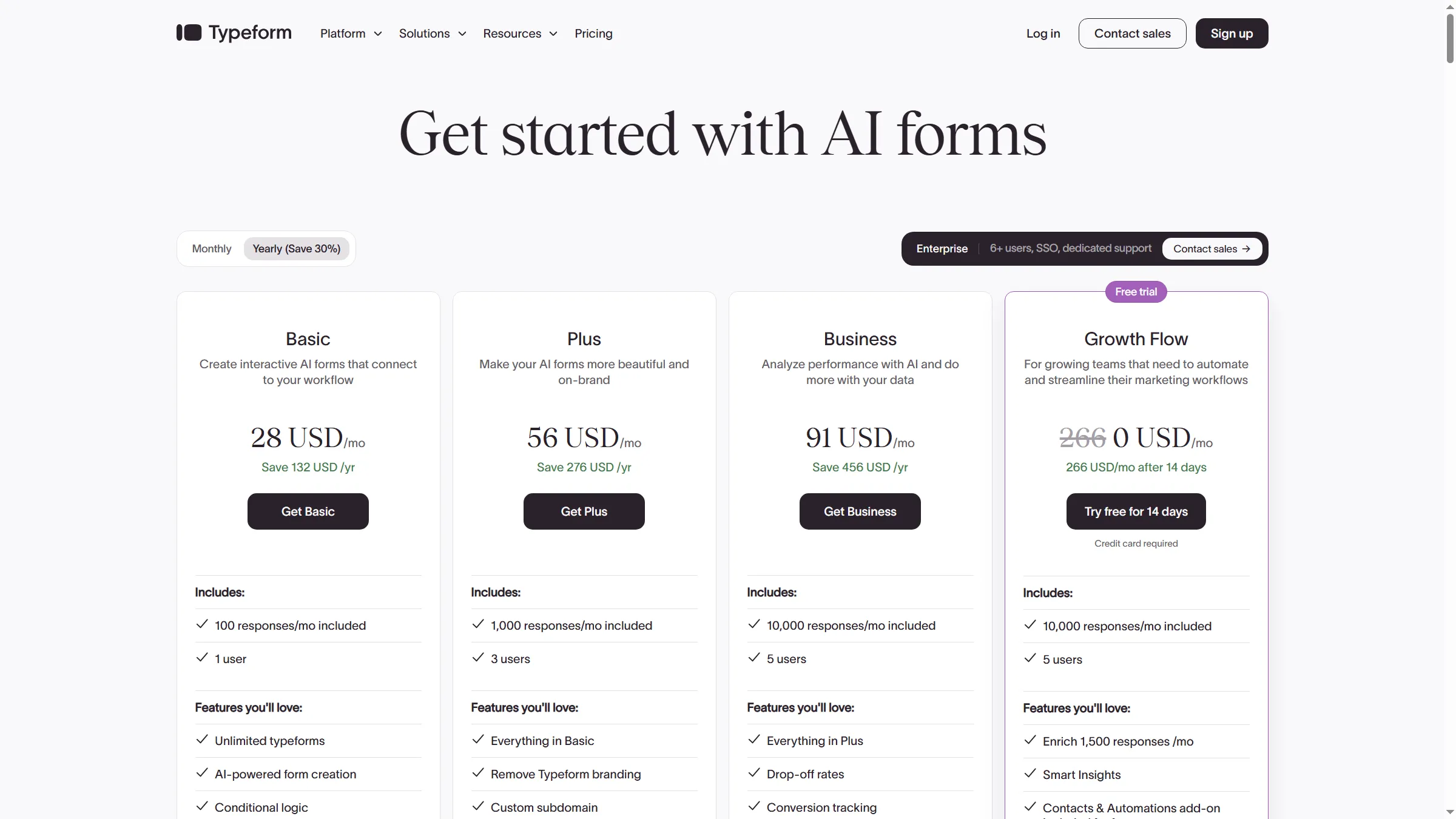
Typeform’s annual plans pair monthly response allowances with seat counts.
A Capterra reviewer on October 30, 2026, called out tight response caps on lower plans. I like Typeform when its presentation helps the customer experience; a polished template alone doesn’t sway me. Compare the shared limit with your busiest month before you send a survey.
Who should skip it: If you have unpredictable monthly volume or many small forms, compare the shared ceiling against your peak month. A low annual total doesn't carry unused quota from a quiet month into a busy one.
Product pricing — Typeform
Basic — $28/month billed yearly ($336 annualized), one seat and 100 responses/month. Typeform notes that pricing may vary during experiments, so verify the displayed amount before purchase. Tax excluded.
3. Jotform: Best for forms tied to business workflows
Jotform makes sense when a survey question belongs inside an intake, order, payment, or file-upload form. In its guest editor, I added a single-choice feedback question with four options. Its pricing table separately counts monthly submissions, stored submissions, and form views.
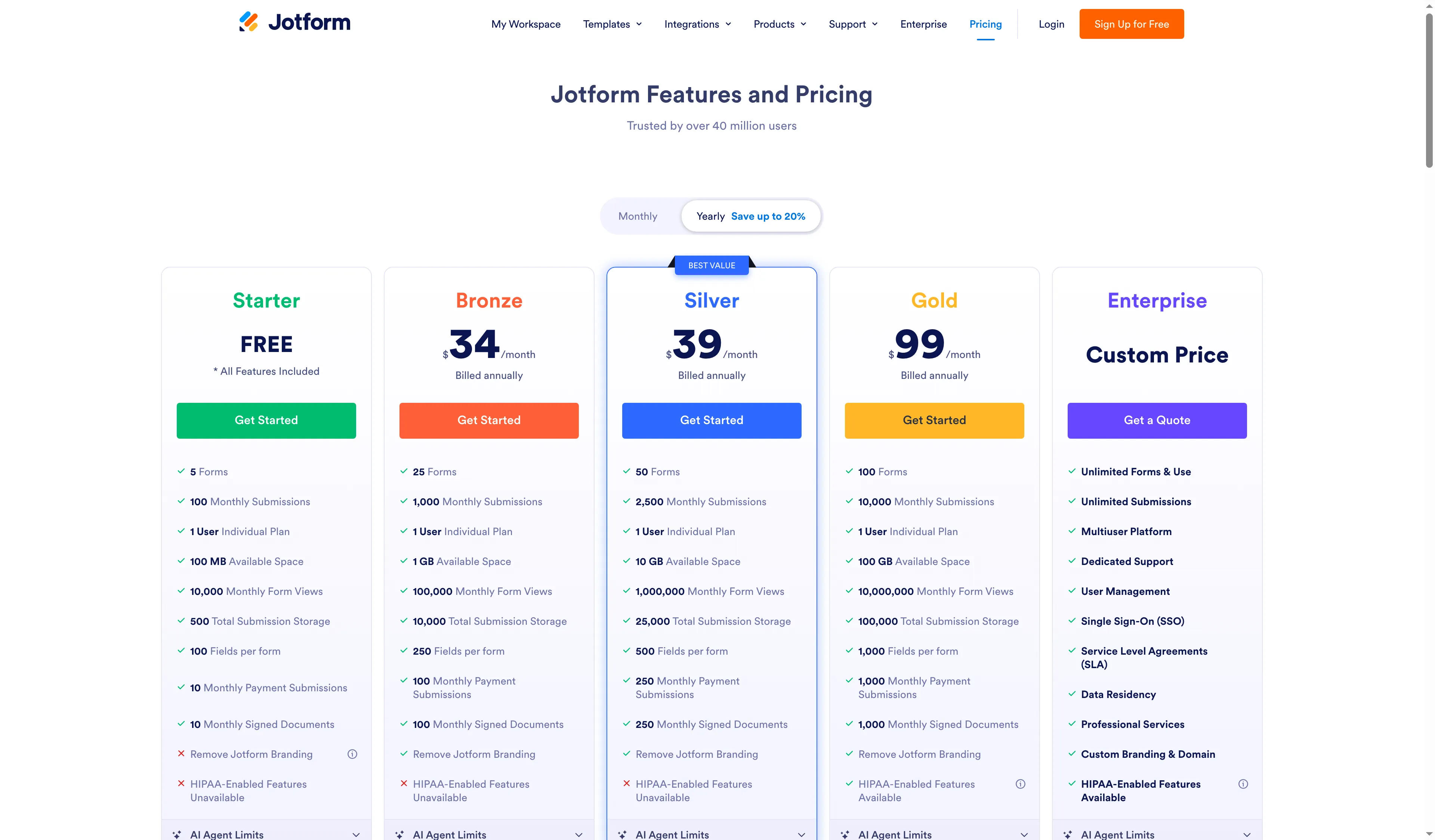
Jotform lists monthly submissions separately from total submission storage and form views.
Pros — Jotform
- Bronze includes one user, 1,000 monthly submissions, and 10,000 total stored submissions.
- Single Choice and Multiple Choice are separate fields, so you can decide whether respondents pick one answer or several.
- The plan matrix separates monthly submissions, total stored submissions, and form views; one quota number won’t tell you how much capacity remains.
Cons — Jotform
- Starter is free, with a 100-submission monthly limit and 500 stored submissions. A busy month can run into the storage cap too.
- Bronze is for one user. I couldn’t find a public self-serve option for five editors.
- Jotform tracks submissions, stored answers, form views, and payment features separately; check the limit that matches your workflow.
For an intake that needs an upload or payment, I like having Jotform’s survey fields in the same builder. For a quick poll, that breadth adds setup. A November 10 Capterra reviewer also raised submission caps and collaboration costs; check the tier before adding editors.
Who should skip it: If you only need a short poll, Jotform’s broad form toolkit may be more than you need. If five people must edit the same survey, confirm the seat bundle before comparing it with a team license.
Product pricing — Jotform
Bronze — $34/month billed annually ($408 annualized), one user, 1,000 submissions/month, and 10,000 stored submissions. Tax and paid extras excluded.
4. Qualtrics: Best for advanced research teams
Qualtrics belongs on a research shortlist when survey design, analysis, or experience management outweighs the simplicity of a basic form. Its free account has clear caps, while the paid starting price doesn’t tell you which package covers your study’s seats or response volume.
Pros — Qualtrics
- The free account allows three active surveys, 30 questions per survey, and 500 recorded responses per user.
- Qualtrics combines survey work with experience-management features for teams running structured research.
- Paid use is quote-led once you need a package scoped to your study.
Cons — Qualtrics
- The $420/month starting price doesn’t say how many seats, interactions, or responses a particular study includes.
- The free account doesn’t include email distribution, so it can’t cover a complete licensed research workflow.
- A five-star Capterra reviewer on November 4, 2026, still found programming difficult. The added flexibility can take time to learn.
I shortlist Qualtrics when a team can name the research and analysis work that justifies a quote. For an occasional feedback form, a simpler builder fits better; the starting price isn’t a useful comparison with a self-serve one-user plan.
Who should skip it: A small team running occasional feedback forms should first check whether branching and analysis needs can be met by a lower-cost survey builder. Don't compare a quote-led enterprise suite with a public self-serve total as if the packages were identical.
Product pricing — Qualtrics
Free account: up to three active surveys, 30 questions each, and 500 recorded responses/user. Paid online pricing starts at $420/month, with scope to confirm.
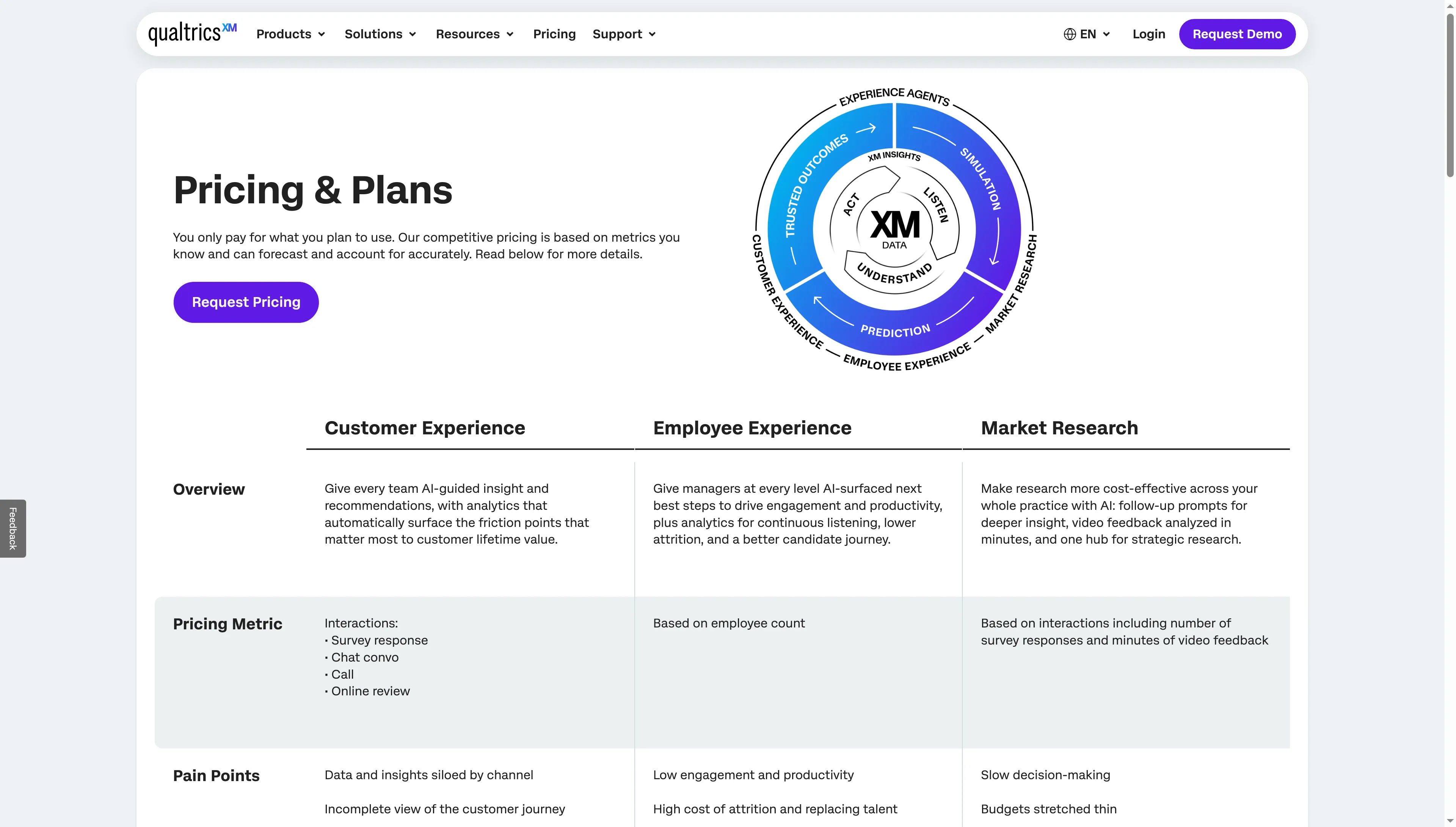
Qualtrics groups its quote-led offering by Customer Experience, Employee Experience, and Market Research.
5. QuestionPro: Best for exploring research tools free
QuestionPro offers a free way to review its research-oriented survey features, then a published Advanced plan for a larger annual response volume. The free plan limits which results you can view, so check that cap before using Essentials for a live study.
Pros — QuestionPro
- Essentials is free for up to 10 surveys and 200 viewable responses per survey.
- Advanced includes one user and 25,000 completed responses/year on an annual license.
- Responses above the free viewing cap may still be collected, but results stay inaccessible until you upgrade.
Cons — QuestionPro
- Team Edition lists five or more users and says “Contact us.” Its 100,000-response limit conflicts with a Help Center page, so I wouldn’t treat either the seat math or capacity as a confirmed offer.
- Advanced is a steep jump from basic solo survey plans.
- A November 5, 2026 Capterra reviewer said new staff needed time to learn some features. Expect a ramp-up if your team won’t use the full feature set often.
QuestionPro’s free tier gives you a way to review its feature set, but the 200-answer viewing cap is a real boundary for a live study. For a larger team, get the seat count and response unit in the quote.
Who should skip it: For a short internal poll, QuestionPro’s set of research features and annual price may be more than you need. For a larger team, don't price Team Edition by multiplying the displayed per-user figure until the vendor confirms the quoted terms.
Product pricing — QuestionPro
Essentials — free, up to 10 surveys and 200 viewable responses per survey; Advanced — $99/user/month billed annually, one user and 25,000 completed responses/year.
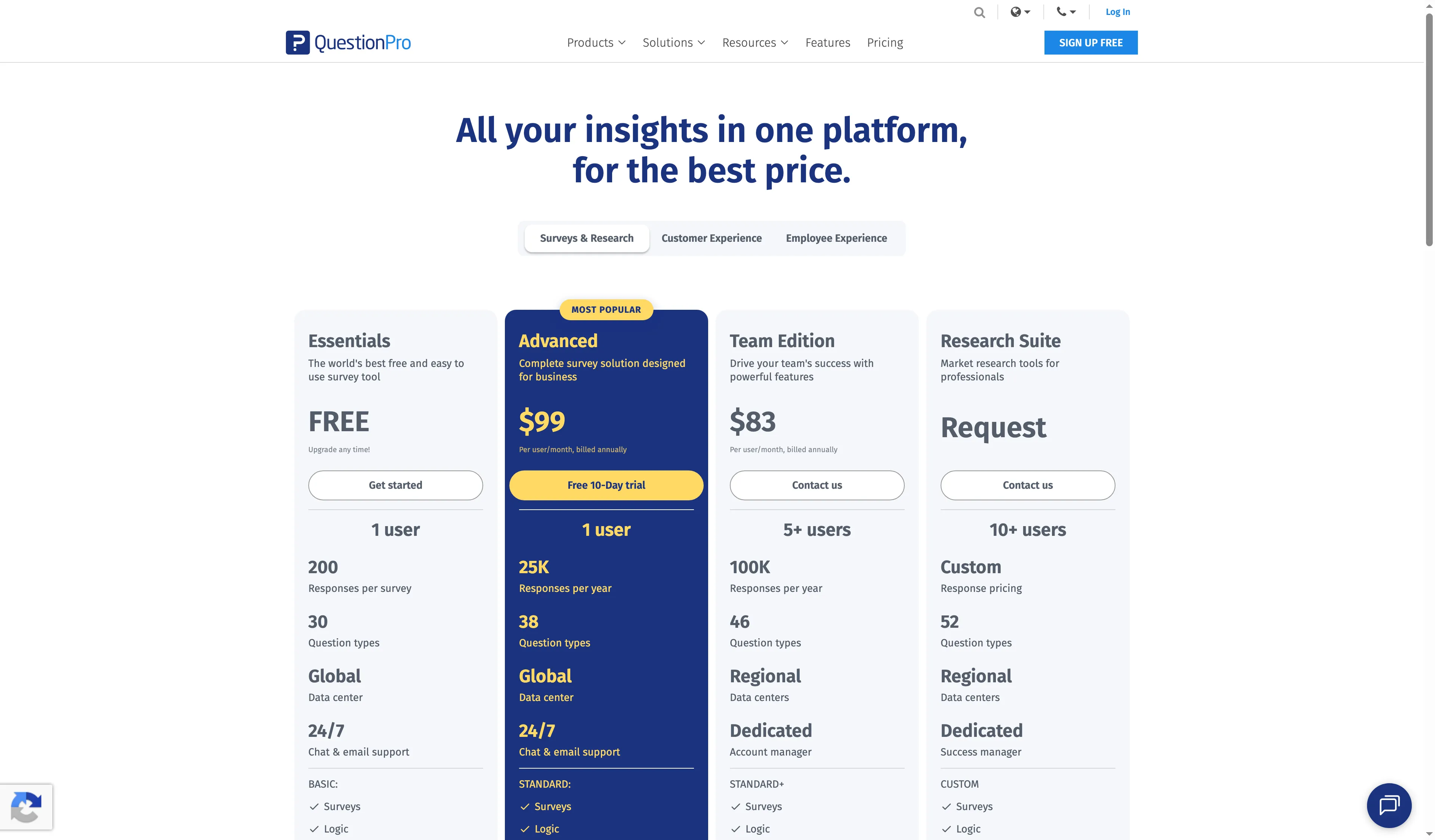
QuestionPro lists free and paid plans with response limits and team sizes.
6. Zoho Survey: Best for low-cost solo survey projects
Zoho Survey is my budget pick for a solo project that needs annual response capacity or branching. Basic is listed at $7.42/month on annual billing; Pro costs $35/month and adds skip logic, filters, cross-tabs, and spreadsheet export.
Pros — Zoho Survey
- Basic includes one user, unlimited questions, and 12,000 responses/year.
- Pro adds skip logic, filters, cross-tabs, and spreadsheet export for one user.
- Monthly and annual plans use different response rules, so compare the quota with your expected workload before choosing a billing cadence.
Cons — Zoho Survey
- The self-serve Enterprise tier lists three users; the public plan matrix doesn’t show a five-seat configuration.
- Basic’s 12,000-response annual cap is separate from the “unlimited” language on higher tiers and from monthly-plan limits.
- A Capterra reviewer on September 30, 2026, liked the branching workflow but said the mobile preview didn’t always match the phone experience. Test the respondent view on an actual phone before using Zoho for a mobile-first survey.
I like Zoho Survey for a one-person project, but its low monthly equivalent doesn’t tell the whole budget story. The annual and monthly plans use different response limits.
Who should skip it: A team needing five named editors shouldn't assume Enterprise can add two more seats at the displayed price. If you rely on mobile completion, test a real device rather than trusting a preview alone.
Product pricing — Zoho Survey
Basic — $7.42/month billed annually ($89.04 annualized), one user and 12,000 responses/year; Pro — $35/month billed annually ($420 annualized). Tax excluded.
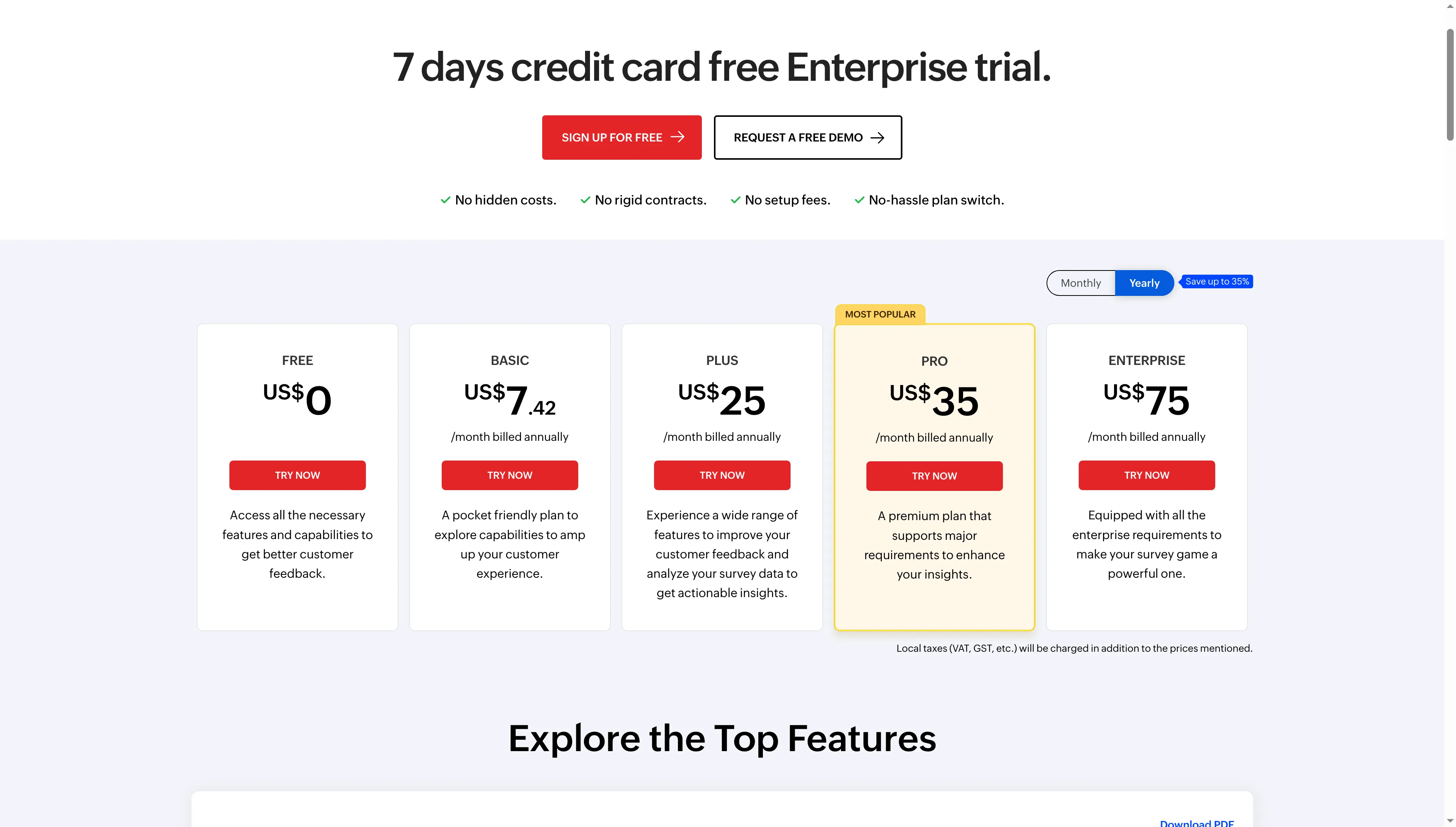
Zoho Survey’s annual pricing cards show prices for its five self-serve tiers.
7. Tally: Best for free lightweight surveys
Tally is my pick for a short, simple survey when its branding and fair-use terms suit the job. In my free account, I built and previewed a three-answer question without publishing it; the Customize panel marked advanced layout controls and Custom CSS as Pro.
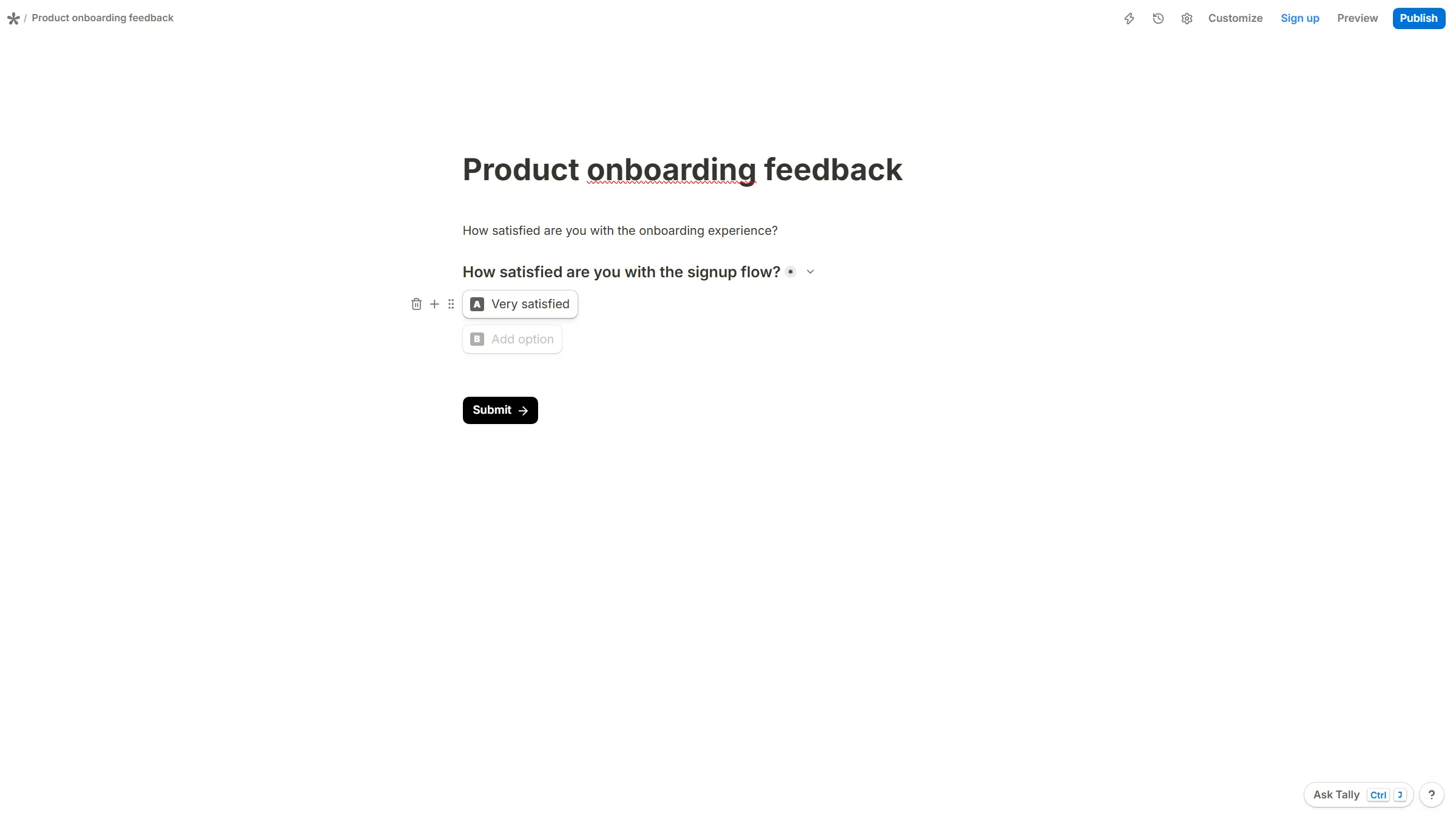
In Tally’s guest editor, the unpublished survey contains a multiple-choice signup-flow question.
Pros — Tally
- The free plan lists unlimited forms and submissions under fair-use guidelines, with no published numeric cap.
- I built and previewed a question in my free account without publishing the survey.
- Pro adds advanced customization, unlimited team members, custom domains, partial submissions, and branding removal.
Cons — Tally
- “Unlimited” submissions still fall under fair-use rules, and Tally doesn’t publish a numeric response ceiling.
- The free preview showed “Made with Tally”; advanced layout controls and Custom CSS are Pro features.
A Capterra reviewer on November 7, 2026, gave Tally five stars but still wanted more design control. That matches the Pro boundary I saw in the Customize panel. Tally is my pick for a lightweight pulse; for a large public campaign, the nonnumeric fair-use terms make volume harder to plan.
Who should skip it: If a guaranteed response ceiling, custom styling on the free tier, or research-grade analysis is essential, Tally’s nonnumeric fair-use promise isn't enough for budgeting.
Product pricing — Tally
Free — unlimited forms and submissions subject to fair use; Pro — $290/year or $29 month-to-month. No numeric free response threshold is published.
Cost comparison: the same workloads, different limits
For one author collecting 600 answers a year, the four comparable public plans range from $89.04 annualized for Zoho Survey Basic to $1,188 for QuestionPro Advanced. Team and higher-volume scenarios require different plans or a quote. I count completed answers only, with no extra quota-counting partial events and no month above 100; taxes, respondent panels, and paid extras are excluded.
| Product | Solo pulse: 600/year, ≤100/month | Five-person team: 10,000/year, branded | Solo branching study: 25,000/year, ≤2,500/month |
|---|---|---|---|
| SurveyMonkey | Advantage Annual — $468/year; one user, 15,000/year | Team Advantage — $1,800/year for five seats; 50,000/year | Premier Annual — $1,668/year; 40,000/year; $0.15/response over cap |
| Typeform | Basic — $336/year annualized at current rendered rate; one seat, 100/month; verify checkout variant | Business — $1,092/year annualized for five seats and 10,000/month | Plus — $672/year annualized base; up to 2,500/month with add-ons, add-on price not public |
| Jotform | Bronze — $408/year annualized; one user, 1,000/month, and 10,000 stored | No public five-user self-serve match verified | Silver — $468/year annualized; 2,500/month and 25,000 stored, with no spare storage capacity |
| Qualtrics | Quote-led; public starting price annualizes to $5,040, but no defined bundle | Quote-led; seat and response scope not public | Quote-led; the starting price doesn't confirm capacity for 25,000 responses |
| QuestionPro | Advanced — $1,188/year annualized; one user, 25,000/year | Team Edition: displayed $83/user/month, 5+ users, “Contact us”; quote and cap unit need confirmation | Advanced — $1,188/year annualized; 25,000/year |
| Zoho Survey | Basic — $89.04 annualized; one user, 12,000/year | Public Enterprise tier lists three users; five-seat match not verified | Pro — $420/year annualized; one user, annual responses listed as unlimited |
| Tally | Free — $0 listed; fair-use response threshold is not numeric | Pro — $290/year flat rate with unlimited members; volume remains under fair-use terms | Free — no numeric 25,000-response guarantee; Pro buys team/design features, not a published volume increase |
For five people and 10,000 responses a year, SurveyMonkey costs $1,800/year and Typeform is $1,092/year annualized. The other vendors require a quote, a verified seat count, or a fair-use caveat. I label annualized monthly rates as estimates, not invoices; no one tool is cheapest for every requirement.
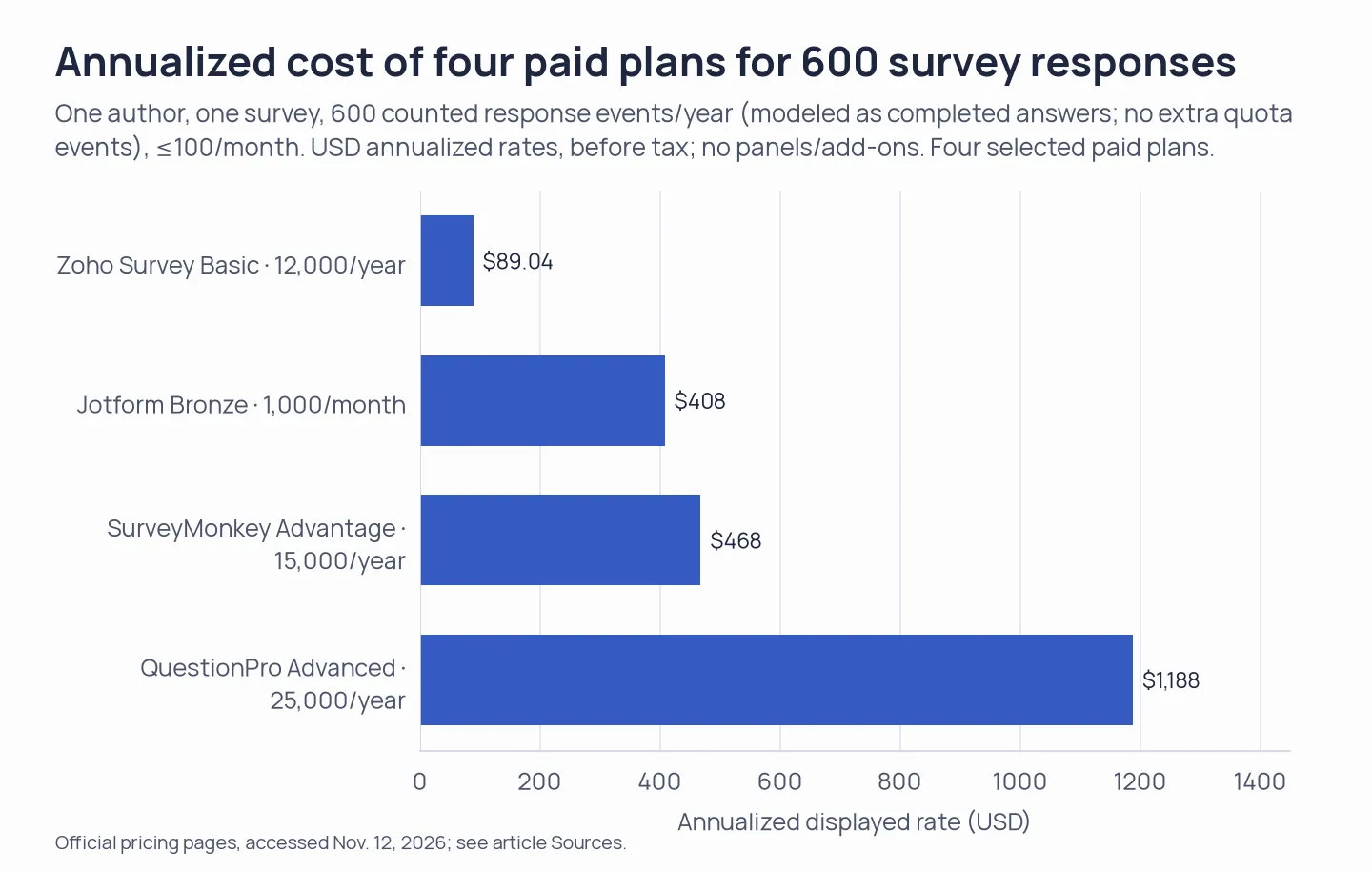
Annualized displayed rates for four public paid plans, one author and one survey, 600 counted response events/year (modeled as completed answers with no extra quota events), no month above 100. USD, annual billing, before tax; no respondent panels or add-ons. Typeform notes that plan pricing may vary during experiments; Tally’s free fair-use offer and Qualtrics’ undefined starting bundle are not numeric bars. Source: vendor pricing pages, checked November 12, 2026.
Already paying for Google Workspace or Microsoft 365?
When the suite is already paid for by your organization, Google Forms or Microsoft Forms might be the top survey tool for basic internal feedback. For customer feedback beyond simple polls, SurveyMonkey is the default. Google Forms' current help page gives large response and storage limits, while Microsoft Forms sets account-specific limits: specified Microsoft 365 plans allow up to 50,000 responses per form, and personal accounts have lower caps. Neither tool becomes a substitute for every customer-research feature because of those limits; you should check sign-in controls, branching, permissions, exports, and the account type you actually have.
Other tools we considered
Alchemer is another enterprise survey platform with workflow and reporting tools. I left it in “Other tools we considered” because the seven picks already cover self-serve builders and research suites.
Which survey software should you choose?
For everyday customer feedback, I’d choose SurveyMonkey. Use Google or Microsoft Forms for a basic internal poll if your organization already pays for the suite. Choose Tally for a free, lightweight survey if its fair-use terms fit your volume; choose Typeform when presentation matters and your peak month fits its shared quota. Jotform fits broader form workflows, Zoho fits a one-person budget, and QuestionPro or Qualtrics make sense when research features justify the price or quote.
For five editors, SurveyMonkey Team Advantage and Typeform Business publish five-seat prices; Tally Pro has a flat member price but no numeric response cap. Confirm the seat count and response terms before comparing the other plans.