

 16 min read

TL;DR: Project portfolio tools in 2026
- Asana: Advanced costs $24.99 per user/month with annual billing and gives teams portfolios plus workload within one portfolio. Organization-wide capacity planning requires Enterprise.
- monday.com: Enterprise is the relevant plan for portfolio and resource management, but its price is quote-based. The free account I opened did not expose those PPM features.
- Smartsheet: Portfolio and Scenario Planning are Enterprise features. Resource Management is a separate paid add-on, so Business pricing is not the full portfolio cost.
- Wrike: Business lists resource and capacity planning at $25 per user/month; advanced capacity and budgeting sit in custom-priced Pinnacle.
- Celoxis: Essentials costs $25 per Standard user/month annually and has a five-full-user minimum. That makes five planners $1,500 a year before tax.
- Meisterplan: Pricing follows planned resources, not logins. Its lowest Basic package covers 50 resources and costs $8,400 a year; the Pro trial lasts 30 days without a card.
PPM software lets a PMO evaluate and manage several projects together as one portfolio. Status can be aggregated, incoming work ranked, capacity modeled, and investment tracked by a PPM platform, which also shows whether a proposed mix matches strategic goals. Rollups are the focus of some products, whereas others add financial and resource planning.
At a glance: six PPM tools and their plan gates
Asana starts with Advanced for portfolios and one-portfolio Workload, while monday.com requires Enterprise for Portfolio and Resource Management. The table shows where PPM capabilities begin and which prices are public.
| Tool | Best for | Where PPM starts | Annual price signal |
|---|---|---|---|
| Asana | Cross-functional teams that need portfolio health and workload in one program | Advanced for portfolios and one-portfolio Workload; Enterprise for organization-wide capacity | Public seat rate; Enterprise quote |
| monday.com | Teams that want configurable boards and portfolio rollups | Enterprise for Portfolio and Resource Management | Custom quote |
| Smartsheet | Spreadsheet-oriented PMOs that need portfolio and scenario controls | Enterprise for Portfolios and Scenario Planning; Resource Management costs extra | Custom quote plus any required add-on |
| Wrike | PMOs connecting execution workflows to advanced staffing and budgeting | Pinnacle for advanced capacity and portfolio budgeting | Custom quote |
| Celoxis | PMOs that want published rates and mixed planner/contributor licenses | Essentials for explicit resource planning; Professional/Business for deeper cost and governance controls | Public rate; five full-user minimum |
| Meisterplan | Resource-first portfolio planning across a defined workforce | Edition depends on required capacity, scenarios, and governance | Resource-based monthly package; 50-resource minimum |
Project portfolio management software should cover six controls beyond status rollups
Project portfolio management software ought to address portfolio visibility, intake and prioritization, capacity planning, financial control, execution and reporting, and adoption and licensing.
- Portfolio visibility: Can leaders compare projects and spot a status change without opening every plan?
- Intake and prioritization: Can a PMO rank proposed work before teams commit dates and people?
- Capacity planning: Does the product model named people, roles, available time, or just task assignments?
- Financial control: Can teams compare estimates, budgets, costs, and scenarios at the plan they can actually buy?
- Execution and reporting: Do project updates flow into portfolio views, and can managers share useful reports?
- Adoption and licensing: What counts as a paid seat or resource, and what setup, add-ons, or quote-only gates affect the total?
Quick picks: match PPM software to the team's planning constraint
Asana Advanced fits a cross-functional program with five planners, but organization-wide capacity requires Enterprise. The table pairs each workflow with its plan boundary.
| Scenario | Tool | Reason | Limitation |
|---|---|---|---|
| Track a cross-functional program with five planners | Asana Advanced | Portfolios, goals, and workload for one portfolio have a public annual price | Organization-wide capacity requires Enterprise |
| Build visual team boards and add portfolio rollups | monday.com Enterprise | Configurable boards feed a native portfolio view | PPM tools require a custom Enterprise quote |
| Turn an existing spreadsheet workflow into portfolio reporting | Smartsheet | Familiar sheet-based plans can roll up under an Enterprise portfolio | Portfolio/scenario planning is quote-only; Resource Management is extra |
| Tie request workflows to staffing and project budgets | Wrike Pinnacle | Advanced resource planning and budgeting are packaged together | Pinnacle price and 20+ user deployment cost are not public |
| Budget a PMO that needs transparent planner and contributor pricing | Celoxis | Essentials and Business publish different user rates and minimums | The right license mix depends on who needs full project access |
| Model workload by staff count rather than software logins | Meisterplan | Unlimited users and resource-based billing separate access from planned capacity | Even a 20-person resource plan starts at a 50-resource package |
1. Asana: Best for a cross-functional portfolio with clear workload views
For $24.99 per user/month on annual billing, Asana Advanced delivers rollups of projects for a cross-functional team, workload, and goals within a portfolio. Before budgeting, verify the scope: projects in one portfolio come with Workload, whereas capacity planning and organization-wide resource management need Enterprise.
Pros — Asana
- Advanced plans come with unlimited portfolios, and Workload inside one portfolio.
- Goals link daily projects to wider objectives.
- No charge card is required to begin the Advanced trial.
Cons — Asana
- Custom-priced Enterprise is required for capacity planning across the organization.
- Budgets, along with Timesheets, constitute a distinct add-on. Don't regard Advanced's portfolio view as a complete financial PPM system.
- Workload becomes simpler to assess after a team enters realistic project and staffing data.
Things I Noted
Asana's seeded Workload example launched into a date grid covering one sample project—sufficient for locating that capability, though not for assessing capacity across projects at scale. Without a payment card, I started Asana's Advanced trial, which runs 14 days, then set up a portfolio and examined Workload.
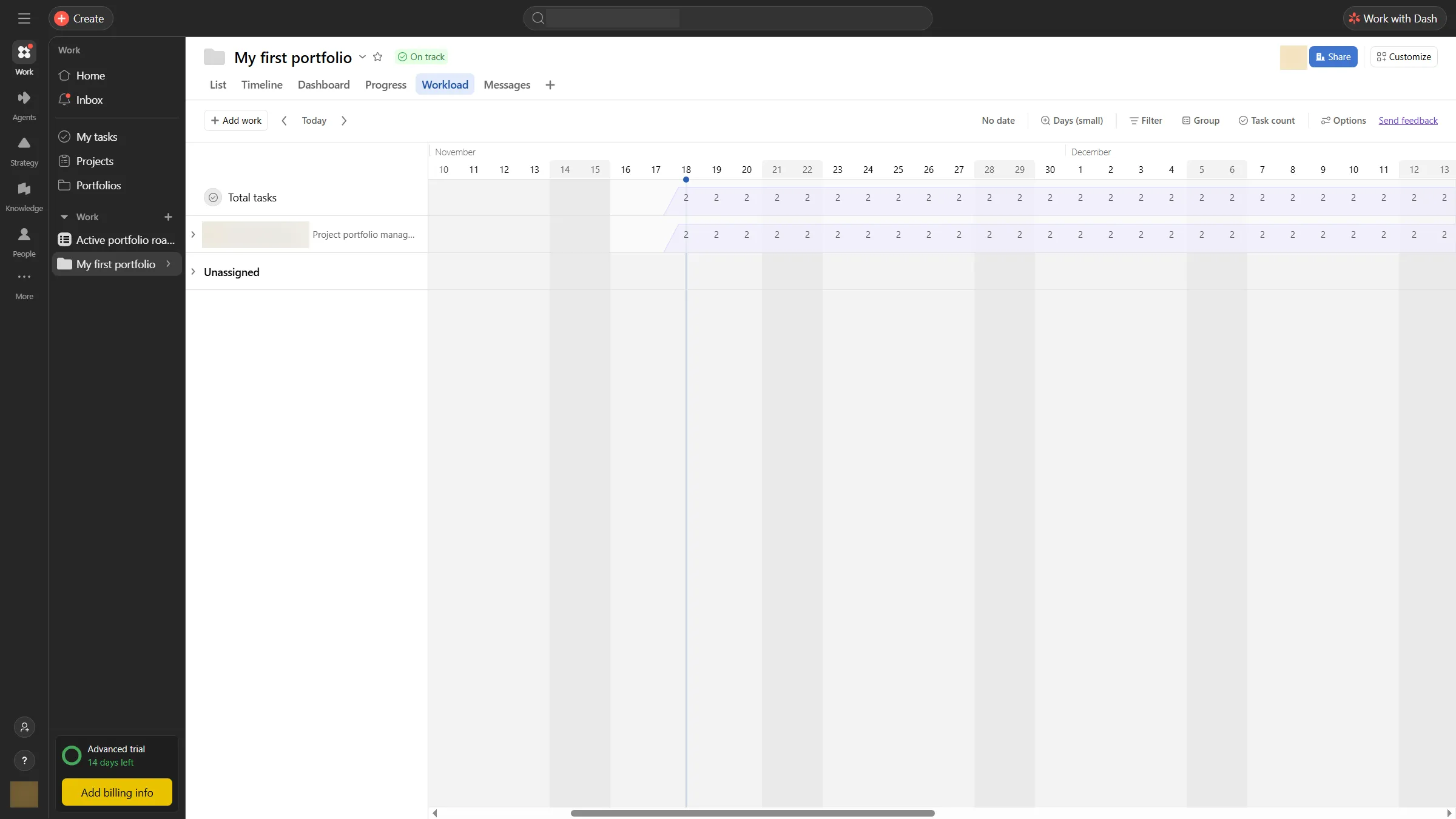
The Workload tab sits inside a portfolio, so managers can check staffing alongside project health.
Product pricing — Asana
Advanced is $24.99/user/month billed annually or $30.49 monthly. Enterprise pricing is custom; Budgets and Timesheets are a separate add-on.
2. monday.com: Best for teams building portfolio views from familiar work boards
With native PPM sitting behind an Enterprise quote, monday.com provides teams with configurable work boards, along with executive rollups. For general work management, Basic, Standard, and Pro appear on the public pricing page; Portfolio and Resource Management are on Enterprise. This workflow won't be priced by those visible $9–$19 seat rates.
Pros — monday.com
- The free workspace supports basic work tracking with three boards and up to two seats.
- Dashboards for the Standard portfolio can aggregate projects from connected boards.
- At scale beta, a bigger Portfolio accommodates as many as 5,000 projects, yet access is still rolling out.
Cons — monday.com
- Pricing for Enterprise, along with the pertinent resource features and portfolio, isn't publicly available.
- With a per-project cap too, 200 projects and 20,000 total portfolio items are the maximum for the standard portfolio solution.
- What I got with the free account was a basic board rather than the Enterprise PPM workflow.
Things I Noted
The no-cost monday.com sample board showed simple work tracking through three task rows with owners, dates, and statuses, but nothing for Enterprise portfolio or resource management. I verified the workspace by email and opened the board.
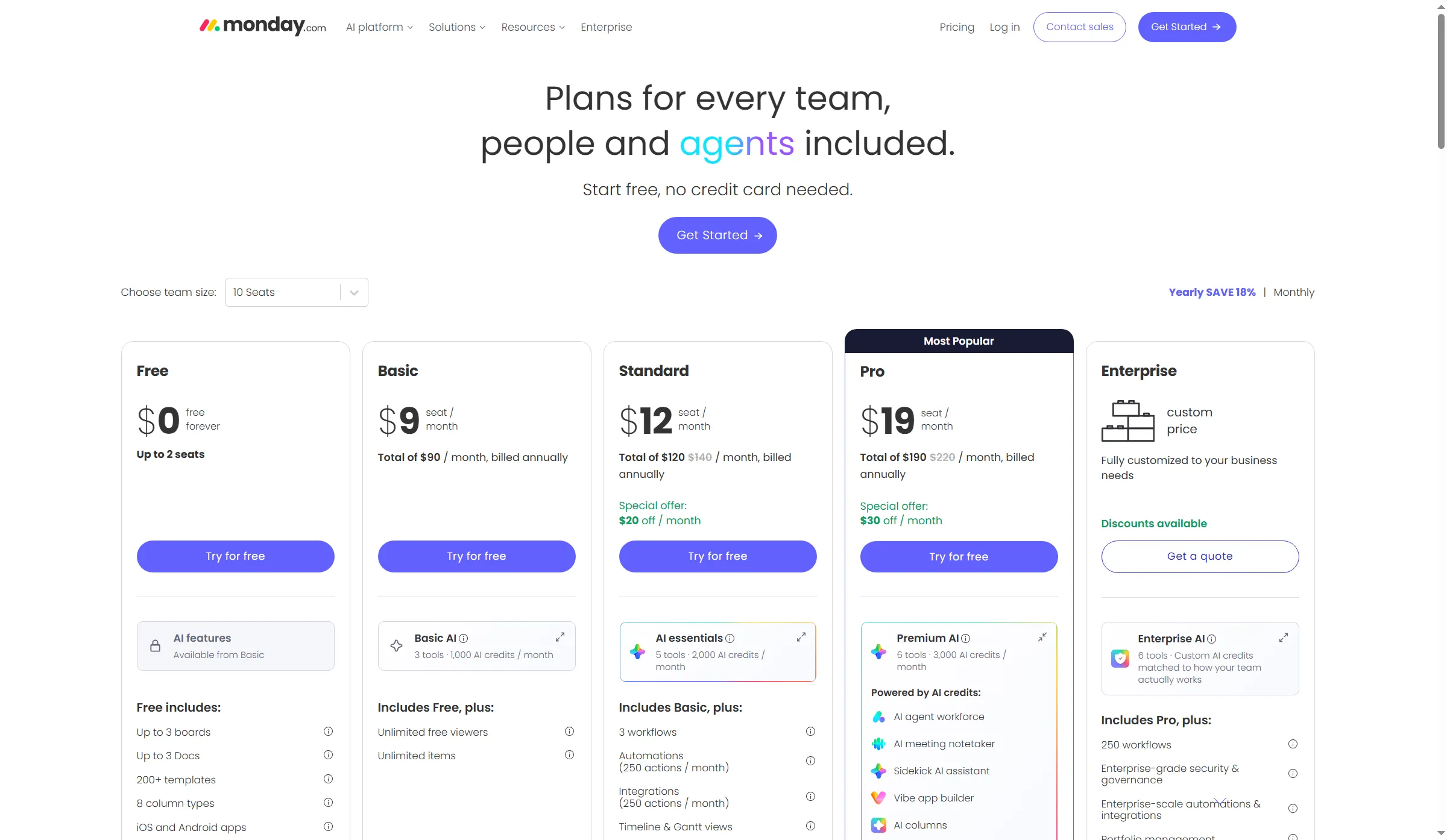
The annual selector prices Basic, Standard, and Pro; Enterprise remains a custom quote for PPM features.
Product pricing — monday.com
At the 10-seat selector, Basic is $9, Standard $12, and Pro $19 per seat/month with annual billing ($12/$14/$22 monthly). Enterprise PPM pricing is custom.
3. Smartsheet: Best for spreadsheet-oriented portfolio governance
Smartsheet allows a spreadsheet-oriented PMO to add scenario and portfolio controls to structured project sheets. Its Business plan covers workload tracking. Scenario Planning and Portfolios need Enterprise, and Resource Management is sold separately as a paid product. So a Business seat rate omits key costs for a complete resource-planning setup.
Pros — Smartsheet
- Both Business and Pro make seat prices clear, and each permits free Contributors.
- Business introduces unlimited automations, workload tracking, plus admin features.
- Enterprise now includes portfolio controls and scenario-planning controls for organizations requiring added governance.
Cons — Smartsheet
- Enterprise begins with 10 members, and a custom quote is required.
- On Enterprise, Resource Management is an add-on, as is Advanced Portfolios unless it's bundled in Advanced Work Management.
- A dependable rollup still requires consistent project fields, reporting rules, and a familiar sheet layout.
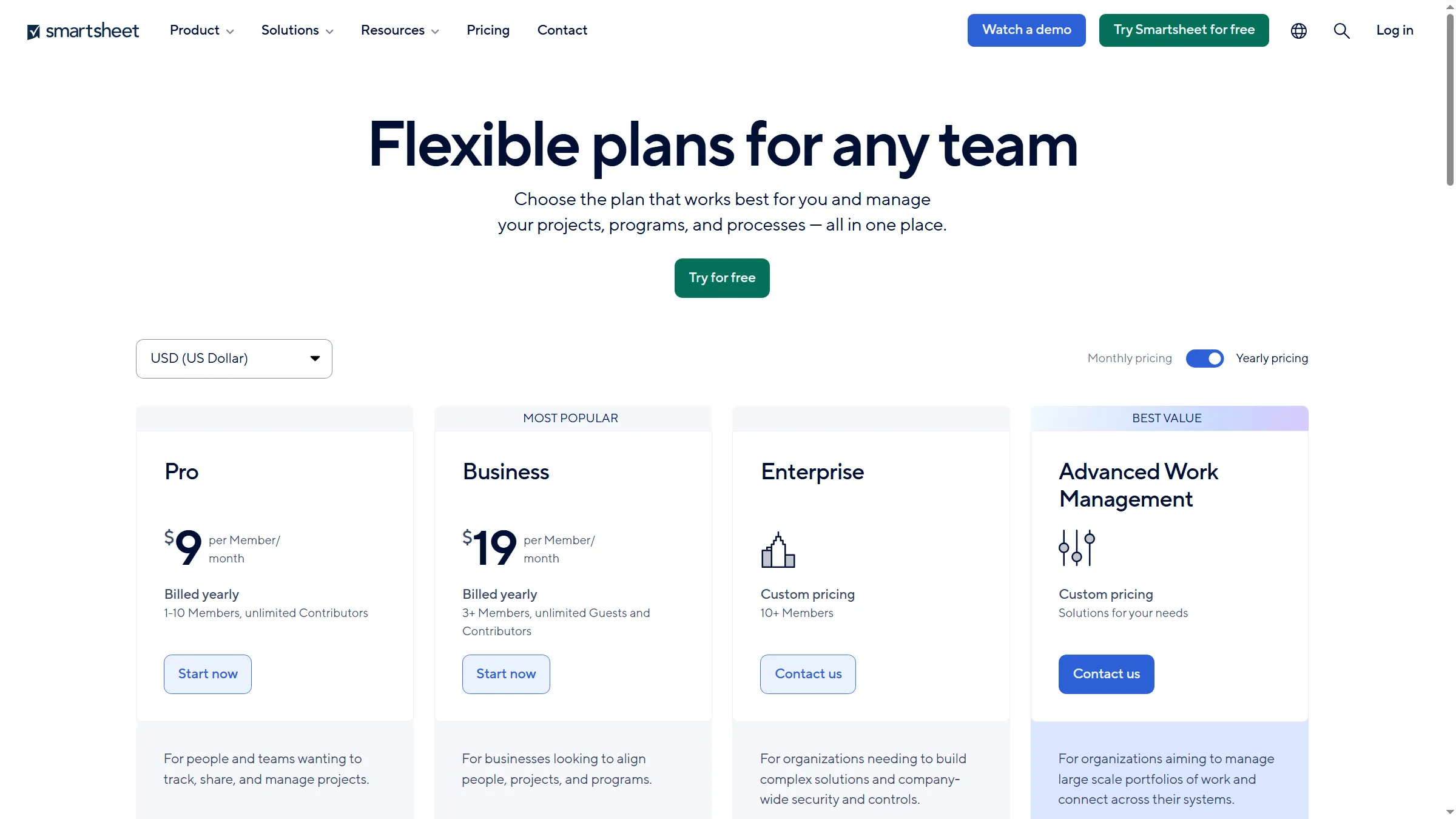
The visible Business rate stops short of Smartsheet’s Enterprise portfolio and scenario-planning tier.
Product pricing — Smartsheet
Pro is $9/member/month billed annually ($12 monthly), for 1–10 members. Business is $19/member/month annually ($24 monthly), with a three-member minimum. Enterprise and Advanced Work Management are custom-priced.
4. Wrike: Best for connecting work delivery to advanced capacity and budgets
Wrike links configurable project workflows to staffing, budgeting, and reporting. $25/user/month is what Business costs, and resource and capacity planning come included; Pinnacle adds the advanced planning and budgeting this PMO may need. Ask for a quote keyed to the planners and contributors who need full access because Wrike keeps Pinnacle pricing private.
Pros — Wrike
- Business covers dashboards along with custom workflows, resource planning, and capacity planning.
- Pinnacle incorporates sophisticated reporting, financial budgeting, and advanced capacity planning.
- Since Business and the team publish rates on a per-user basis, a PMO can estimate the lower-tier workflow.
Cons — Wrike
- Pinnacle pricing is custom, even though that's the relevant tier for budgeting and advanced capacity.
- Any team having 20 users or more has to adopt guided deployment, and Wrike doesn't display that fee on its public pricing page.
- It's not appropriate to treat the $25 Business price as a stand-in for Pinnacle's advanced PPM bundle.
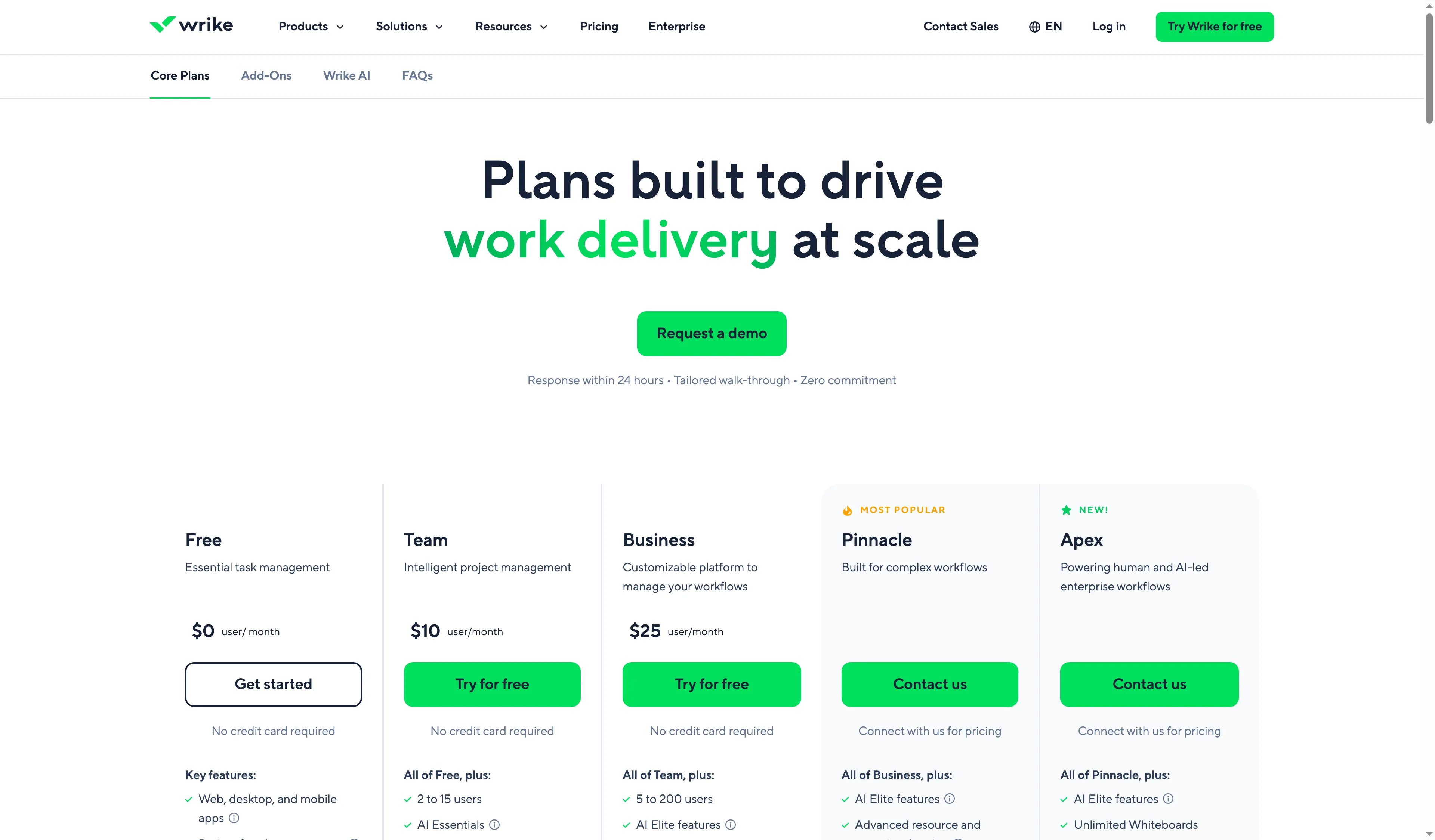
Wrike places advanced resource planning and budgeting in Pinnacle, above its public Business price.
Product pricing — Wrike
Free is $0; Team is $10/user/month for 2–15 users; Business is $25/user/month for 5–200 users. Pinnacle and Apex are custom-priced. Paid plan prices are billed annually.
5. Celoxis: Best for PMOs that want published prices and contributor license choices
Celoxis publishes rates for a PMO comparing portfolio visibility and resource planning before a sales call. Billed annually, Essentials runs $25 for each Standard user every month, and it covers resource workload plus capacity planning, job roles, calendars, timesheets, and conflict visibility. The bill for contributors can be reduced by Team Member licenses; before that mix goes into a budget, check their permissions.
Pros — Celoxis
- Annual pricing is published by Core through Business; five full-access users is the minimum.
- Essentials incorporates timesheets, capacity planning, work calendars, and roles.
- Professional incorporates costing, project intake, and risk management; Business adds strategic portfolio management and billing.
Cons — Celoxis
- The five-full-user minimum puts even a solo operator on par with a team in terms of pricing.
- That per-seat minimum might not suit every role because contributor seats come with distinct permissions and pricing.
- Use Essentials as the clearer plan match for capacity planning: the pricing summary promotes it as an Essentials capability, although the detailed feature matrix also checks it in Core.
- On October 26, 2026, a 5-star Capterra reviewer nonetheless remarked that configuring reports along with resource views takes time.
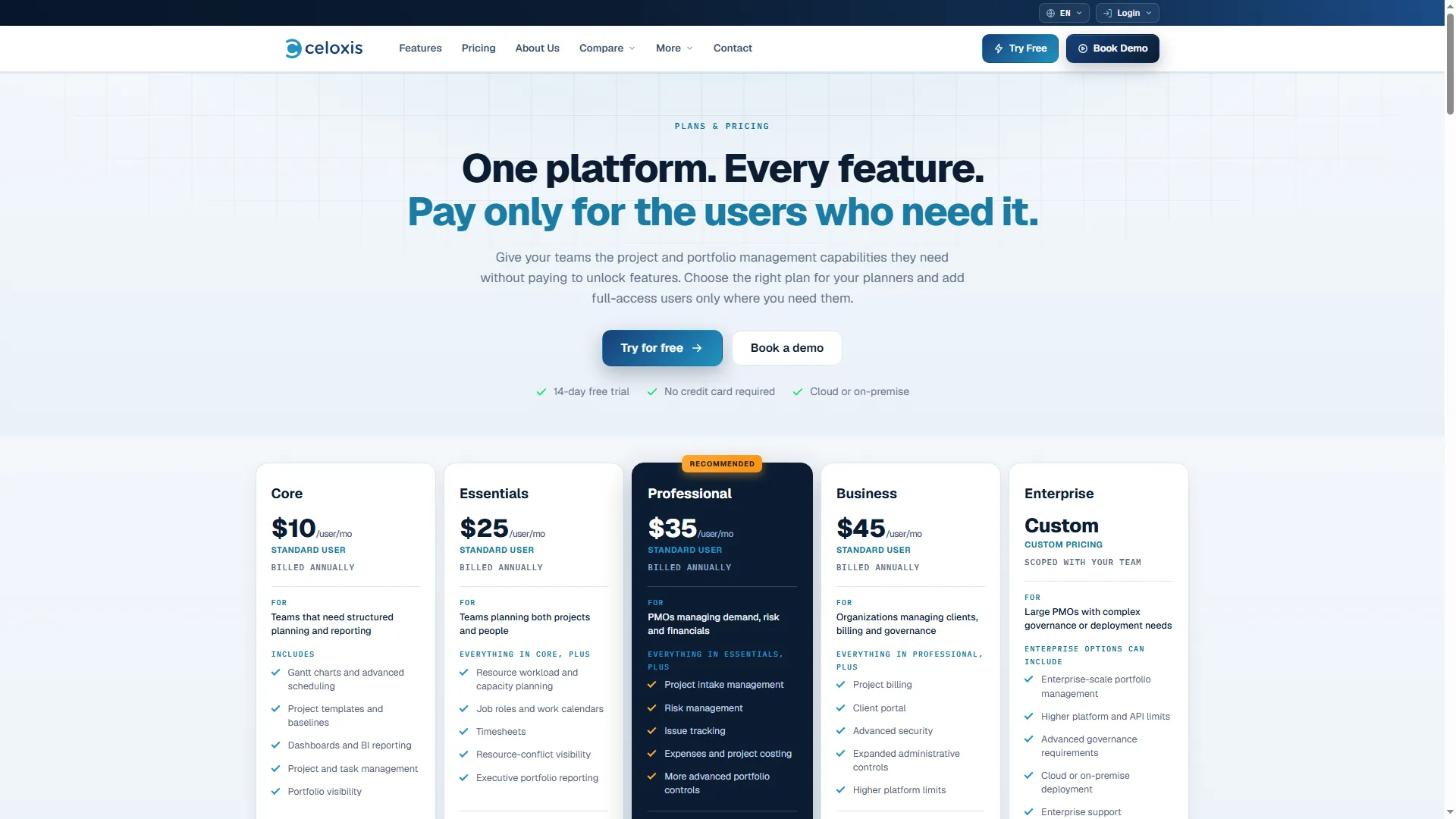
Celoxis publishes the price and feature boundary for each user tier.
Product pricing — Celoxis
Core is $10, Essentials $25, Professional $35, and Business $45 per Standard user/month, billed annually. Five full-access users are required; Team Member and Timesheet licenses have separate rates.
6. Meisterplan: Best for resource-first planning across a known workforce
Meisterplan comes with unlimited user logins and permits a PMO to plan named individuals and role capacity according to resource count. Stakeholder access stays unlimited, though its bill tracks the planned resources. Pro adds what-if scenarios; Premium adds enterprise services and administration.
Pros — Meisterplan
- Separate from billing based on resources, view-only access persists for unlimited users.
- Covered by Basic: balancing workload across teams, visibility into the portfolio, and resource planning.
- With the public calculator, Pro introduces integrations, plus what-if scenarios, thereby exposing the edition boundary.
Cons — Meisterplan
- The capacity bundled with Basic and Pro can exceed a PMO's actual planned staffing level.
- Named employees, upcoming hires, and extra role FTE are included in the resource total, though team labels aren't.
- The Premium plan calls for a bigger resource bundle, and it's a major jump up compared with Basic or Pro.
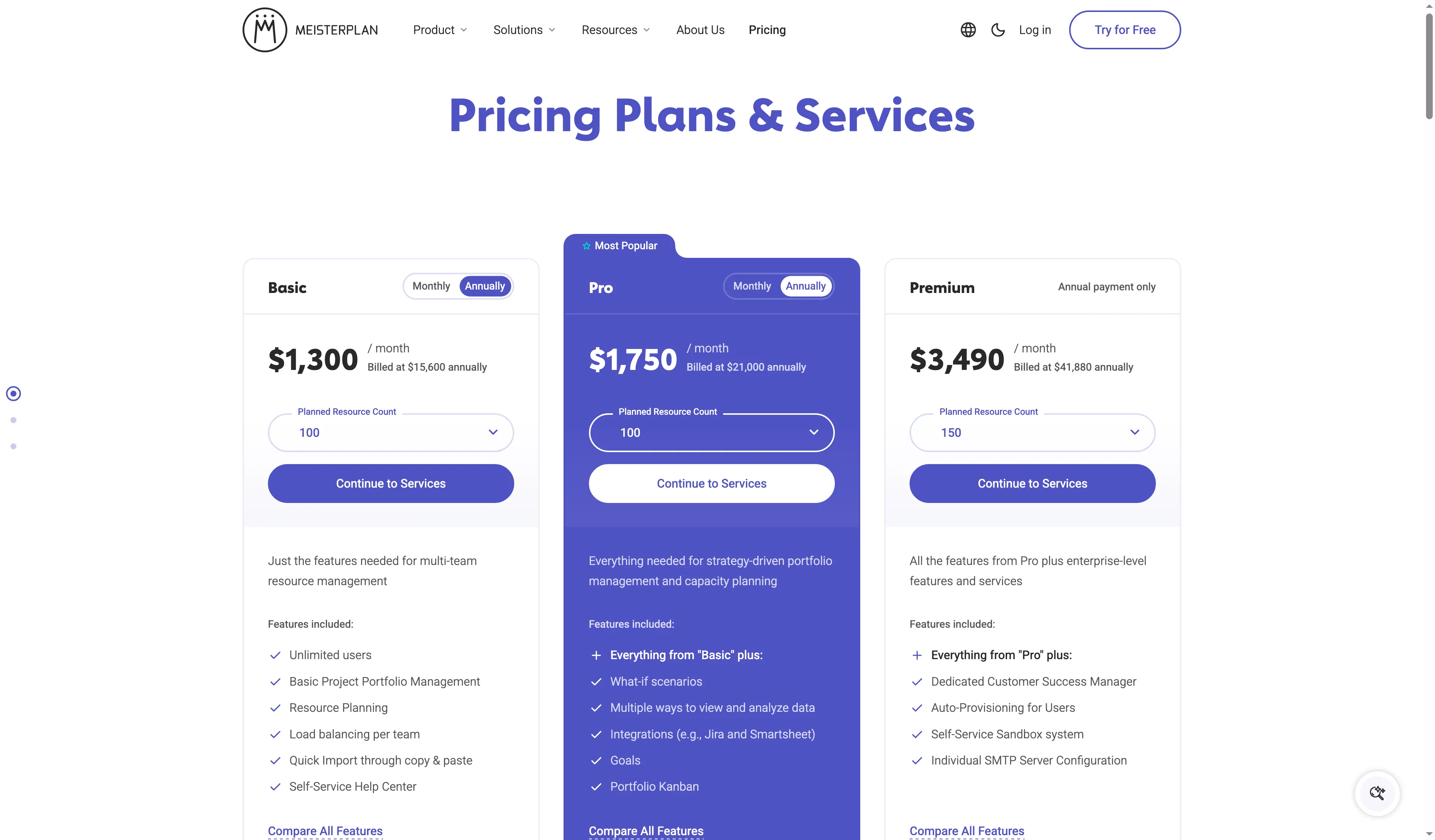
Meisterplan bills planned capacity, so teams can compare resource packages independently of login counts.
Product pricing — Meisterplan
Basic starts at $700/month and Pro at $900/month for the entry resource package. Taxes and services are extra; Premium is custom-priced.
A PMO's annual PPM cost depends on scope and billing unit
For a five-planner, 20-project PMO, Asana Advanced and Celoxis Essentials have public annual totals. The remaining PPM tiers require a quote, and Meisterplan charges by planned resources. The tables show the relevant plan, annual cost when public, and limits that affect your total; they exclude taxes, discounts, implementation, services, and unpriced add-ons. Before budgeting a contributor mix, verify the permissions for Celoxis Team Member licenses.
Five planners and 20 projects: only two tools show public seat-based totals
In this small-PMO scenario, the table compares the entry PPM plan for five planners, one workload portfolio, and 20 active projects. Only Asana Advanced and Celoxis Essentials show public annual seat totals.
| Tool and configuration | Annual price | What changes the total |
|---|---|---|
| Asana Advanced, 5 seats | $1,499.40 | Workload is limited to one portfolio; Enterprise is needed for organization-wide capacity. |
| monday.com Enterprise | Custom quote | Enterprise PPM features; public rate unavailable. |
| Smartsheet Enterprise | Custom quote + Resource Management add-on if needed | Portfolio/Scenario Planning are Enterprise; Resource Management is extra. |
| Wrike Pinnacle | Custom quote | Advanced capacity and budgeting; public Business price is not equivalent. |
| Celoxis Essentials, 5 Standard users | $1,500 | Five-seat minimum; billed annually. |
| Meisterplan Basic for 20 planned staff | $8,400 | The entry package covers 50 resources; logins are unlimited. |
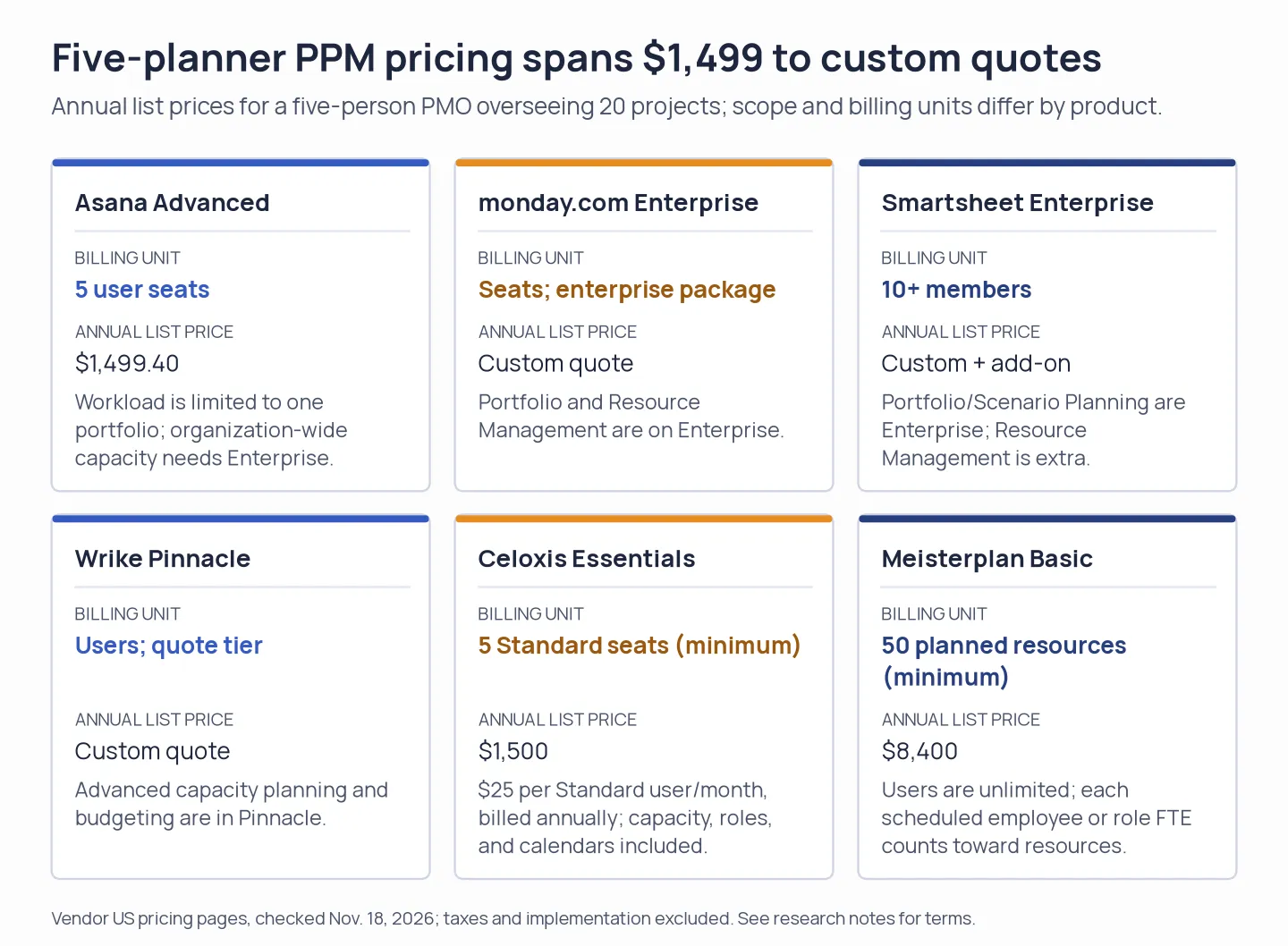
Public annual prices cover different plan scopes; three tools require a custom quote for comparable PPM features.
25 participants and 100 projects: enterprise capacity tiers need a quote
With 100 active projects and resource planning, this table shows the relevant enterprise tier or contributor mix for the larger PMO. Asana Enterprise and monday.com Enterprise require a custom quote; Celoxis publishes a Business contributor mix.
| Tool and configuration | Annual price | What changes the total |
|---|---|---|
| Asana Enterprise, 25 participants | Custom quote | Needed for organization-wide resource management and capacity. |
| monday.com Enterprise, 25 participants | Custom quote | Portfolio and Resource Management are Enterprise features. |
| Smartsheet Enterprise, 25 members | Custom quote + Resource Management add-on if needed | Scenario/portfolio tools are Enterprise; add-on pricing is not public. |
| Wrike Pinnacle, 25 users | Custom quote + guided deployment | Advanced planning and budgeting; deployment fee is undisclosed. |
| Celoxis Business mix, 5 Standard + 20 Team Member users | $9,660 | Annual billing; five full-access seats minimum. |
| Meisterplan Basic / Pro, 100 planned resources | $15,600 / $21,000 | Choose the resource package; users are unlimited. |
100 resources across 500 projects: large PMOs still face quote tiers
For 500 projects, 100 planned resources, and 10 planners plus 90 contributors, this table compares the closest public configuration with quote-only enterprise tiers. Celoxis publishes a Business contributor mix, Asana Enterprise requires a quote, and Meisterplan keeps its resource-based price from the prior scenario.
| Tool and configuration | Annual price | What changes the total |
|---|---|---|
| Asana Enterprise, 100 participants | Custom quote | Organization-wide resource management and capacity are quote-tier features. |
| monday.com Enterprise, 100 participants | Custom quote | Enterprise quote required. |
| Smartsheet Enterprise / Advanced Work Management | Custom quote + applicable add-ons | Portfolio scenario package and resource tools require enterprise configuration. |
| Wrike Pinnacle or Apex, 100 users | Custom quote + guided deployment | 20+ users require guided deployment; price is not public. |
| Celoxis Business mix, 10 Standard + 90 Team Member users | $36,720 | Annual billing; five full-access seats minimum. |
| Meisterplan Basic / Pro, 100 planned resources | Same as the 100-resource setup | Project count does not change resource-based price. |
Existing subscriptions cover simple tracking; PPM adds capacity and governance
Existing subscriptions cover basic status tracking, but project portfolio management software adds capacity planning, financial trade-offs, and governance. Basic Microsoft Planner comes as part of Microsoft 365, whereas Planner and Project Plan 3 costs $30/user/month annually, and it includes portfolios, resource capabilities, and costing. A small portfolio can be handled by Google Sheets provided the PMO keeps up project fields and a status cadence. Post-sale onboarding and delivery are carried by Pipedrive Projects; that is included on Premium and higher plans, or it's sold as an add-on on lower tiers. Lead pipelines and handoffs are organized by HubSpot Sales tools. Basic schedules or CRM-linked delivery can be covered by these built-in tools, yet workforce capacity across a project portfolio isn't planned by a CRM pipeline.
Which project portfolio management software should you choose?
Go with Asana when you require a priced view of portfolios and workloads for the one program, and you can do without capacity across the whole organization. Pick monday.com or Smartsheet if an enterprise quote works for you and rollups built on boards or sheets match the way your teams already update work. Select Wrike when advanced resourcing plus budgets need to sit in one workflow, and you're prepared to price Pinnacle and deployment. Budgeting is simpler with Celoxis because of its public rate card; Meisterplan fits most clearly when the main planning object is capacity across people and roles.