

 17 min read
TL;DR: Six quoting tools for small businesses in 2026
- For field service: Jobber turns a quote into a scheduled job and invoice, and its five-user Connect plan is $1,788 a year when billed annually.
- For a solo contractor: Joist Pro covers unlimited estimates and invoices for $170 a year on annual billing.
- For sales proposals: PandaDoc Business adds quote blocks, approval workflows, branding, and a content library at $49 per seat monthly, billed annually.
- For straightforward quotes: Quotient charges $28 a month for one member and 100 quotes, or $48 for up to five members and unlimited quotes.
- For interactive proposals: Qwilr Growth starts at five seats, so a small team pays $3,300 a year before usage overages.
- For product catalogs: QuoteWerks uses concurrent-user licensing, so confirm the exact edition and add-ons before comparing it with per-seat tools.
Quoting software helps a business assemble prices, products, labor, and terms into a customer-facing estimate or proposal, then collect approval or a signature. Some products stop at the document, while others connect accepted quotes to scheduling, job records, invoices, or a configured product catalog. That difference matters more than a shared “quote” label: a contractor estimate, a signed B2B proposal, and a distributor’s multi-item quote solve different work.
At a glance: Match the quoting tool to the work
Jobber handles service work from quote to job, Joist fits solo estimates, PandaDoc and Qwilr serve proposals, Quotient focuses on simple quotes, and QuoteWerks covers catalog-based B2B pricing. The table pairs each job with its main limitation.
| Your job | Tool | Why it fits | Main limitation |
|---|---|---|---|
| Quote, schedule, and invoice field work | Jobber | Quote-to-job workflow with five-user Connect plan | Solo Core is one user; quote follow-ups require Connect |
| Send estimates from a solo contracting business | Joist | Unlimited estimates and invoices on Pro | Scheduling and job organization sit on Run |
| Build formal B2B proposals and collect signatures | PandaDoc | Editor, e-signature, approvals, and content library | Per-seat pricing; team size sets the bill |
| Send simple quotes without a full sales suite | Quotient | Flat $28 Solo and $48 Team pricing | Solo limit is 100 quotes/month; auto-upgrade begins Dec. 1, 2026 |
| Share an interactive proposal page | Qwilr | Web proposals with e-sign, analytics, and quote blocks | Growth requires five seats and annual billing |
| Quote products from a catalog | QuoteWerks | Configurator, item lookup, and concurrent licenses | Edition, integrations, and add-ons make the total less obvious |
What to compare before buying quoting software
First determine whether what you require is an estimate, a proposal, or a configured product quote. Typically, a service estimate supports a job and an invoice, whereas a proposal explains a wider project and may need signature and approval controls. Product quoting relies on accurate catalogs, pricing rules, and integrations. I'd contrast products within those workflows and then verify whether the plan covers the people and volume you need.
Compare each product on five points:
- Workflow fit: estimates, proposals, or configured product quotes.
- After approval: scheduling and invoicing, a sales handoff, or only a signed document.
- Controls: signatures, approvals, and pricing rules.
- Capacity and billing: user count, concurrent access, or monthly quote volume.
- Full cost: annual commitment, required integrations, and paid add-ons.
Billing units change what a price means. Jobber’s team tiers include set user counts; PandaDoc and Qwilr charge by seat; QuoteWerks bills concurrent access, and Quotient’s price varies with quote volume and team size. Compare the full annual cost and included capacity, not just the smallest number on a pricing page.
1. Jobber: Best for quotes that become field-service jobs
Jobber is the most direct fit for a service company that wants an estimate to lead into assigned field work, scheduling, and invoicing. Core covers the solo version of that workflow; Connect supports up to five users and adds automated quote and invoice follow-ups plus accounting sync. A five-person crew needs Connect, so the one-user entry price is a poor proxy for its bill.
Jobber pros
- Core includes quotes, invoices, and scheduling for one user
- Connect supports up to five users and quote follow-ups
- Client Hub enables clients to examine and sign off on estimates.
Jobber cons
- Core is one user; Connect is the five-user tier
- Quote and invoice follow-ups start on Connect
- You must pay for a full year in advance to get the lowest yearly cost.
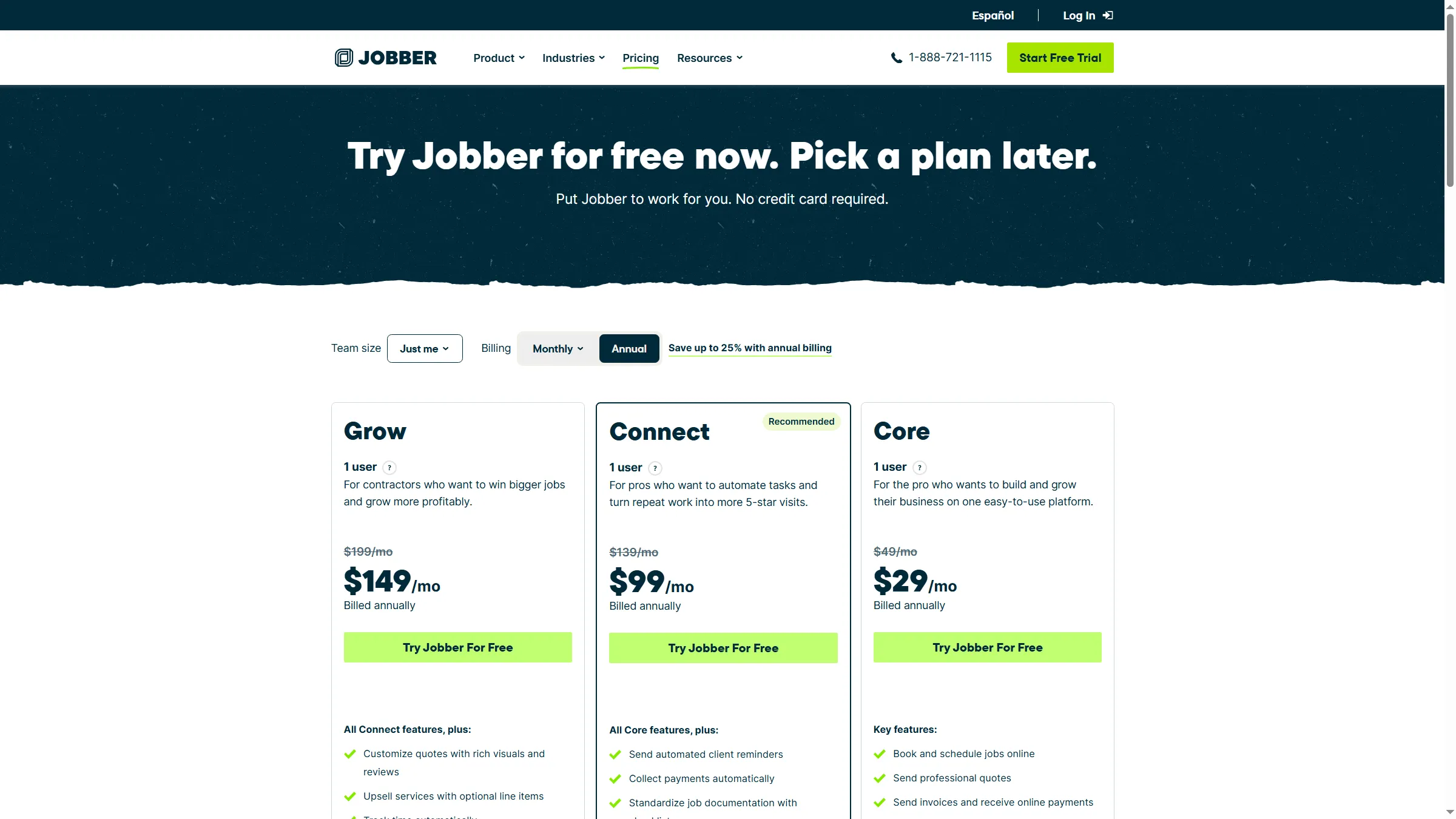
I opened Jobber’s trial signup and pricing screens. The signup page said no card was needed and let me choose a plan later; I didn’t reach workspace setup. The public pricing page showed separate monthly and annual choices, so the starting price depends on both team size and billing commitment. Treat any introductory discount as a first-term offer and budget from the regular rate.
I appreciate Jobber's quote-to-job workflow since estimates remain alongside scheduling and invoicing rather than turning into a separate PDF you'd have to track. For a five-person team, Connect is the practical entry-level tier. That bundle might be more software than you need, though, if you just send the occasional estimate and don't require follow-ups or job scheduling. You can plan more easily around the regular price than around a new-customer deal, but with annual billing you'd still pay the term upfront.
Product pricing — Jobber
Core starts at $29/month for one user, billed annually; Connect for up to five users is $149/month billed annually. Monthly no-commitment rates start at $49 and $199, respectively; taxes and payment processing are extra.
2. Joist: Best for a solo contractor sending estimates and invoices
Joist Pro is the leaner pick for a contractor who mainly prepares estimates, converts them to invoices, and manages customers from a phone or browser. The live pricing page lists unlimited documents and clients on Pro, along with a company logo, line items, document photos, client activity, and work orders. At $17 a month, the annual plan effectively costs ten monthly payments.
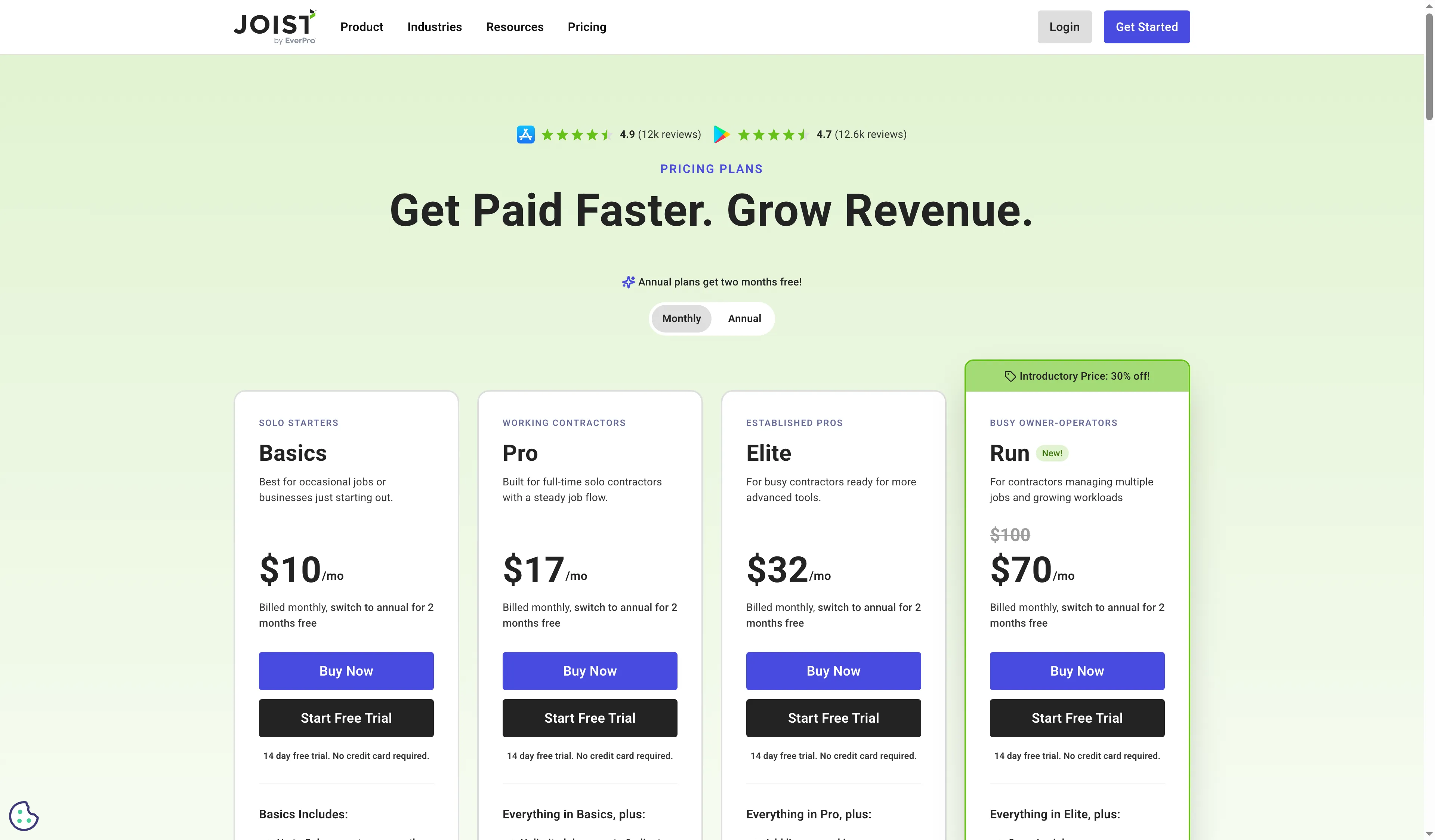
Joist shows its four monthly plans and the option to switch to annual billing.
Joist pros
- Pro includes unlimited estimates, invoices, and clients
- Pro includes work orders, document photos, and a company logo
- Fourteen-day trial needs no credit card
Joist cons
- Basics stops at five sends a month
- Scheduling visits and organizing jobs call for Run
- Payments made via Joist incur separate processing fees.
I looked at Joist’s public pricing controls, and next to a clear five-document cap on Basics, I saw the monthly/annual switch. Because of that ceiling, the nominal $10 monthly plan suits occasional paperwork rather than a full-time contractor sending estimates every week. The old free plan is now gone, the site says, although a 14-day trial gives all Run features with no card required.
I like Joist Pro’s direct step up from the five-file Basics allowance to unlimited estimates and invoices. Run adds job organization and scheduling. That distinction matters if you want an accepted quote to create a calendar workflow. For that need, compare Run with a field-service platform instead of assuming Pro is a dispatch system. Run is broader than a quote app, and its current discount shouldn’t be mistaken for a permanent annual rate.
Product pricing — Joist
Basics starts at $10/month ($8.34/month billed annually); Pro is $17/month or $14.17/month billed annually; Elite is $32/month or $26.67/month billed annually. Run is listed at $70/month or $58.33/month billed annually before its time-limited promotion. Online payment processing and the optional $49/month AI Receptionist are extra.
3. PandaDoc: Best for formal proposals with approvals and signatures
I like PandaDoc for a proposal-first workflow: reusable content, quote blocks, approvals, and e-signature stay together in one customer-facing package. Business is the relevant tier. Starter costs less at $19 per user monthly on annual billing, but it lacks several of those controls, so comparing only the entry price understates the cost of a formal sales workflow.
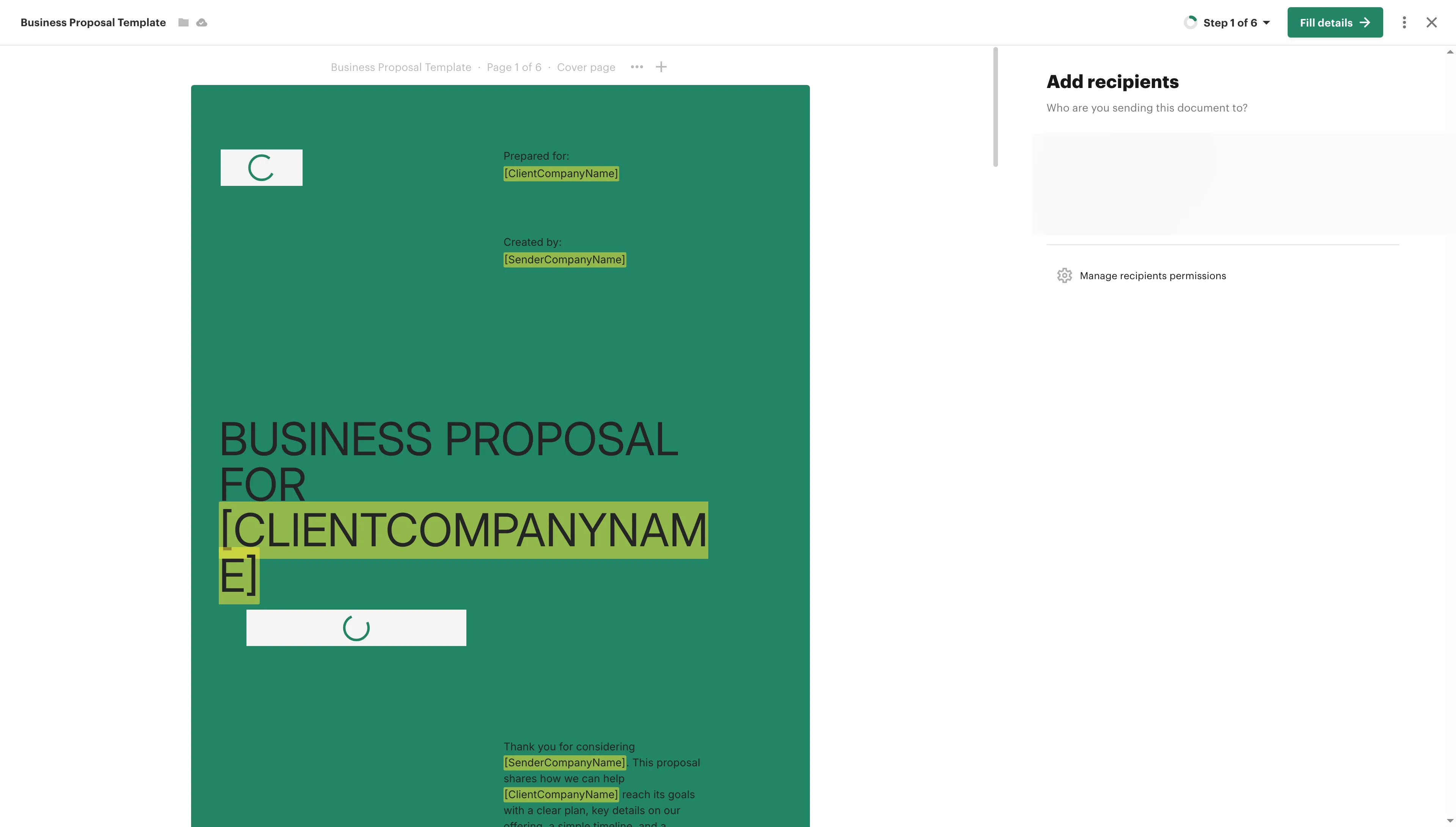
PandaDoc begins from a proposal template and separates recipient setup from the document content.
PandaDoc pros
- Business adds quote blocks, approval workflows, and content library
- E-signatures and document tracking stay in the proposal workflow
- Free plan allows five sends each month
PandaDoc cons
- Business costs $49 per seat each month with yearly billing.
- Annual billing commits each licensed seat for a full year
- Sending from a fresh account may require email verification.
I created a free account, chose a Business Proposal template, and reached step one of its six-step flow. The first screen asked for recipient and proposal details; the account displayed an email-verification prompt before sending. I didn’t send a proposal, so this confirms the setup path—not the end-to-end signature experience. The free tier’s allowance of five sends a month helps with low-volume use but falls short of a regular sales process.
The tradeoff is seat math. Five Business seats require five annual licenses before optional usage or integration costs. PandaDoc makes sense when reusable proposal content and approvals save enough manual work to justify those seats. A one-person contractor who only needs estimates and invoices should start with a service-focused tool instead.
Product pricing — PandaDoc
Free is $0 for up to five sends/month; Starter is $19/user/month billed annually; Business is $49/seat/month billed annually. Monthly billing costs more; optional usage and integration costs are separate.
4. Quotient: Best for straightforward quotes for a small team
Quotient is built around sending and tracking quotes without buying a broader field-service platform or proposal suite. Solo costs $28 a month for one member and up to 100 quotes; Team costs $48 for as many as five members, unlimited quotes, and quote tracking by team member. Its pricing is unusually easy to compare because the team limit and volume allowance sit right beside the monthly price.
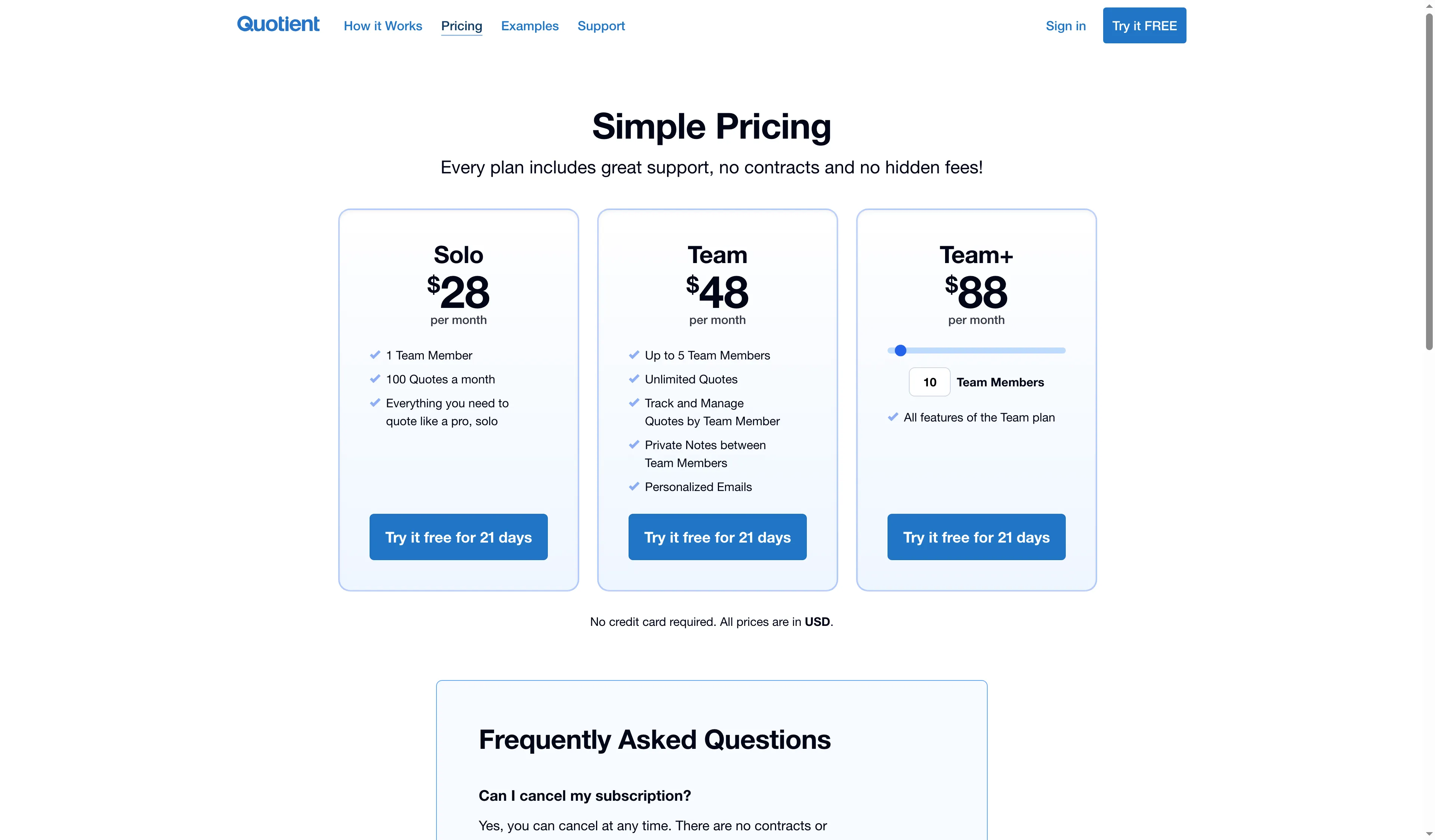
Quotient keeps the quote cap for Solo and five-member Team plan on the same price page.
Quotient pros
- Solo includes one member and 100 quotes a month for $28.
- For $48, Team covers five members and unlimited quotes.
- The 21-day trial doesn’t require a card
Quotient cons
- Starting Dec. 1, 2026, Solo accounts are set to shift to Team if they exceed 100 quotes
- Custom email domain adds $8/month
- The quote-first pitch doesn't include any job-management or dispatch workflow.
I reviewed the release notes about the rule on quote volume for Solo, and I also checked the plan page, including its 21-day no-card trial. Per Quotient, Solo accounts will shift automatically to Team starting Dec. 1, 2026, if they exceed 100 quotes within a month. That upcoming change is significant if your workload sits near the cap: the present monthly gap is $20. Once the announced date arrives, the system—not a manual plan choice—will apply the higher tier.
Quotient suits a compact team whose main deliverable is a quote. It won’t schedule staff or build a multi-page proposal. I like how clearly the plans separate one member and 100 quotes on Solo from five members and unlimited quotes on Team. The announced auto-upgrade makes it harder to budget for Solo as quote volume rises. The optional custom email domain costs $8 a month and is excluded from the base comparison. If you regularly approach 100 quotes a month, budget for Team after the announced change.
Product pricing — Quotient
Solo is $28/month ($336/year) for one member and 100 quotes/month; Team is $48/month ($576/year) for up to five members and unlimited quotes. No annual discount is listed; custom email domain is an optional $8/month.
5. Qwilr: Best for interactive web proposals
I like Qwilr’s web-page format when a proposal should feel like a guided offer rather than an attachment. Starter includes one seat, e-signature, quote blocks, analytics, and 40 free proposals each year. Billed annually, it runs $35 per user per month. Automations, custom branding, and enhanced reporting come with Growth, yet it begins at five seats and requires annual billing.
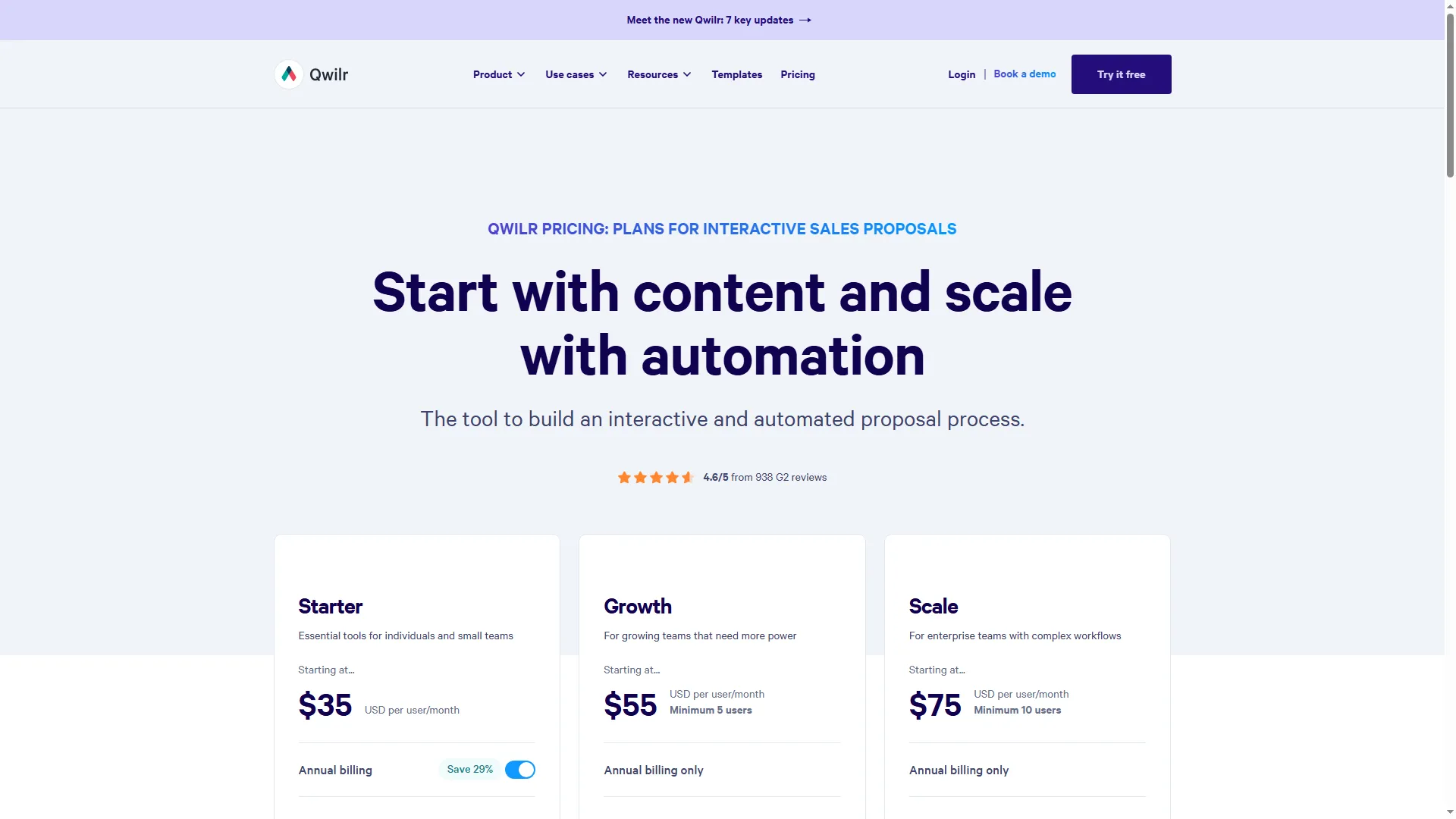
Qwilr’s pricing page makes the five-seat Growth minimum visible beside Starter.
Qwilr pros
- Starter includes e-signature, analytics, and interactive quote blocks
- Growth adds custom branding and proposal automations
- Five-seat Growth includes 200 proposal pages a year
Qwilr cons
- Growth has a five-seat minimum
- Annually, Starter costs $35 per user each month, whereas Growth requires annual billing.
- Extra document automation starts at $2.50 per document.
I checked Qwilr’s pricing page and found a seat minimum for each tier: one for Starter, five for Growth, and ten for Scale. Growth includes 200 proposals a year, and extra proposal automation is billed separately. The five-seat minimum drives subscription cost; usage fees apply when proposal volume exceeds the included allowance.
I like Qwilr when the proposal itself should feel like part of the sales experience. Its interactive pricing page can do more than another static PDF. A solo consultant who needs one proposal editor is a poor match for the five-seat minimum. Starter works if its branding and automation limits are enough. Growth makes sense when the team will use its added controls; a signature-ready proposal alone doesn’t require it.
Product pricing — Qwilr
Starter is $35/user/month billed annually; Growth is $55/user/month with a five-seat minimum; Scale is $75/user/month with a ten-seat minimum. Growth and Scale are annual-only; extra proposals are billed separately, with 200 included each year on Growth.
6. QuoteWerks: Best for catalog-based B2B quoting
I like QuoteWerks for sales teams that require product lookup, bundles, and pricing rules within the quote itself. A product lookup and item grid are brought into the quote by its workbook, and concurrent licensing allows a business to purchase for the number of employees online at once rather than for every person who might log in during a week. That can make the license count cheaper than named-user pricing for a rotating sales group—but only if simultaneous use is low.
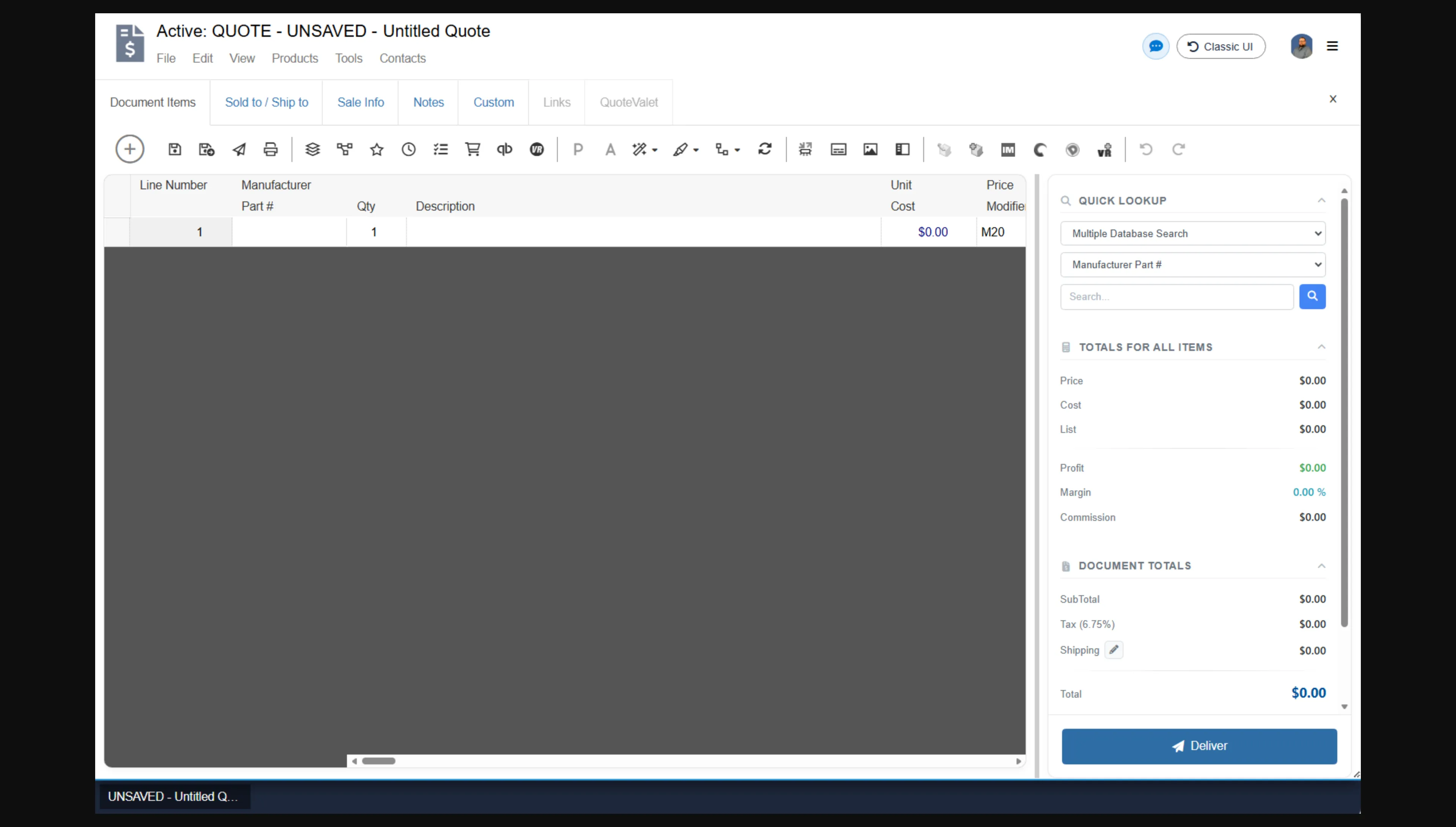
The quote workbook keeps item lookup and quote totals beside the line-item grid.
QuoteWerks pros
- Catalog-driven quotes are supported by product lookup and the configurator.
- Concurrent licenses can serve more named employees than the number of purchased seats.
- Balanced now includes QuoteValet acceptance, e-signature, and payment capabilities.
QuoteWerks cons
- Essential is listed at $50 monthly for each concurrent user.
- For each site, every month, the QuickBooks integration costs an additional $20.
- The included acceptance tools depend on the edition and add-ons
I reviewed QuoteWerks’s official help image of the quote workbook. Beside line items, product lookup appears, along with quote totals. Concurrent-user rates are what the public pricing page uses: Essential is listed at $50 monthly, or, on annual billing, $45.83 per month. $49 has also been shown in the vendor’s recent blog, so the controlling figure should be the current checkout price. For customer acceptance, e-signature, payments, and view tracking, Balanced adds QuoteValet; QuickBooks is a separate monthly add-on, at $20 per site.
QuoteWerks belongs on this list for B2B sellers who need catalog-level detail and can size concurrent licenses. Although enterprise manufacturing platforms stay beyond this roundup, its terminology and configuration depth are closer to a lightweight configure, price, and quote (CPQ) process than to a one-page contractor's estimate. Before taking the base license as the entire purchase cost, I'd weigh edition, connection type, and accounting integrations. You shouldn't treat each employee as a paid seat, yet do size the subscription around the heaviest overlap in quoting work.
Product pricing — QuoteWerks
Essential is listed at $50/month per concurrent user ($45.83 per month billed annually, $550/year); Balanced is $78 monthly or $71.50 annually; Pinnacle is $102 monthly or $93.50 annually. QuickBooks is $20/site/month; VendorRFQ is $20/user/month. The vendor has also published a $49 Essential rate, so the live checkout price can differ.
What does quoting software cost for the same workload?
Joist Pro costs $170/year, and Jobber Core costs $348/year for the defined one-person service workflow. Jobber Connect and Housecall Pro Essentials each cost $1,788/year for five-person field work. Five-seat proposals cost $2,940 with PandaDoc or $3,300 with Qwilr. The table compares recurring subscriptions for those defined workflows and excludes taxes, payment processing, optional add-ons, and usage beyond included proposal allowances.
| Workflow | Product and plan | Annual subscription | Included capacity / cost boundary |
|---|---|---|---|
| One-person service estimates with unlimited documents and invoice conversion; no scheduling required | Joist Pro, annual | $170 | Unlimited estimates/invoices; payment processing extra |
| Same solo service workflow | Jobber Core, annual | $348 | One user; annual prepaid; no-commitment is $588/year |
| Five-person field team: quote → scheduled job → invoice | Jobber Connect, annual | $1,788 | Up to five users; follow-ups included |
| Same five-person field workflow | Housecall Pro Essentials, annual | $1,788 | Five users; proposal tool excluded from scenario |
| Five sellers using branded proposals, signatures, and approval controls | PandaDoc Business, annual | $2,940 | Five seats; optional usage costs excluded |
| Same five-seat proposal workflow | Qwilr Growth, annual | $3,300 | Five seats and 200 free proposal pages; additional usage is billed separately |
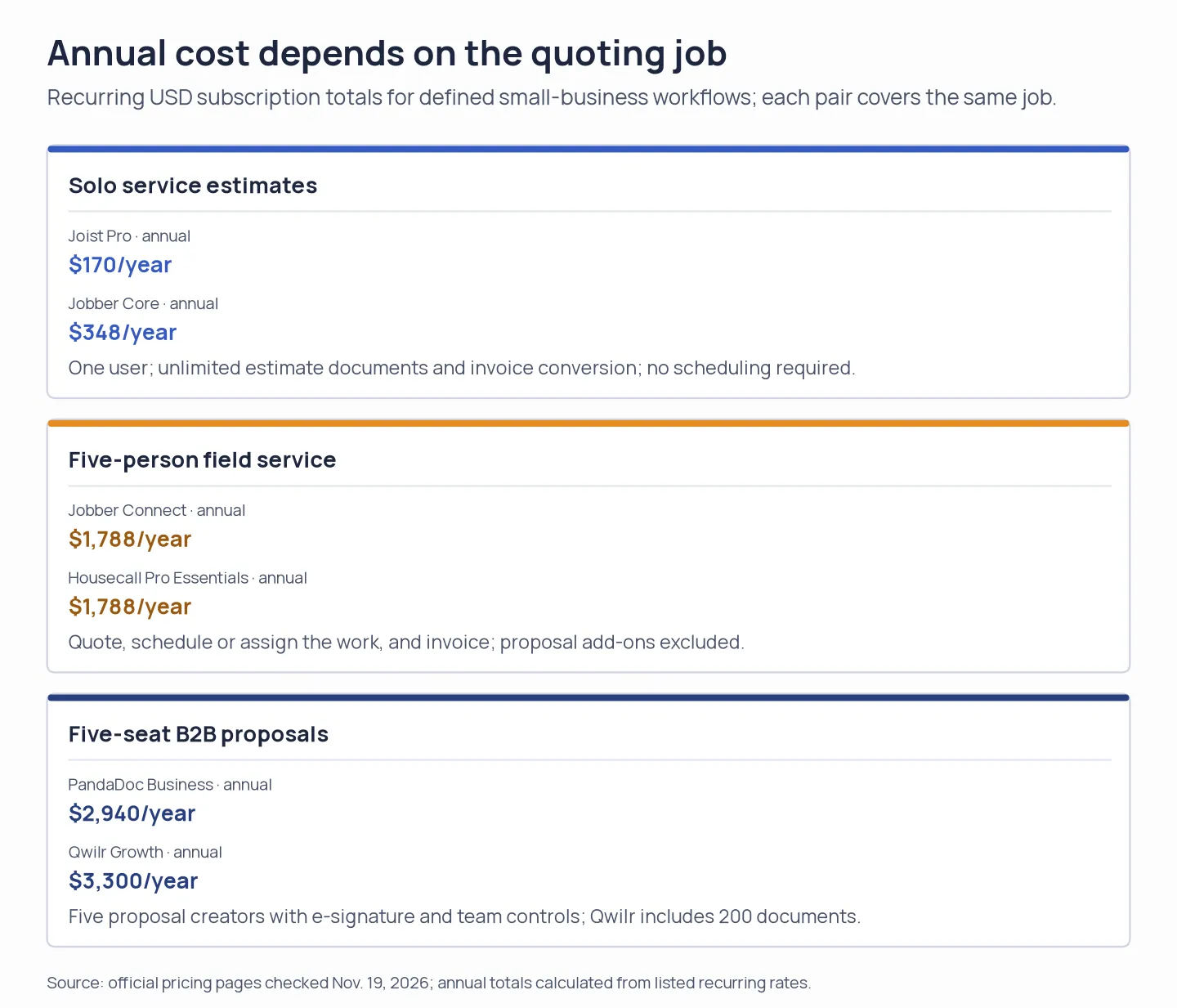
Annual totals are comparable within each defined workflow; they do not rank the three different jobs.
Check the software you already pay for
Before adding quoting software, check whether your existing CRM or office suite already covers the step you need. HubSpot and Zoho CRM can create quotes within eligible paid plans, but quote, approval, and signature entitlements depend on the subscription and connected products. If you already use either CRM, compare the paid upgrade or signing add-on with a separate proposal seat before moving customer records. If LinkedIn is one of your prospecting channels, Linked Helper’s AI ICP matching can check whether profiles fit your ideal customer profile before outreach.
Google Docs, Sheets, and Microsoft Office templates can produce a basic estimate with no dedicated quoting subscription if one person prepares each form. They won’t automatically provide quote status, customer acceptance, staff scheduling, usage limits, or a shared catalog. A template is enough when you need a basic price sheet; software earns its cost when it removes repeated handoffs or prevents pricing mistakes.
Housecall Pro service quoting: another field-service option
Housecall Pro is the closest unlisted alternative to Jobber for home-service companies. Essentials includes five users, but the visual Sales Proposal Tool is a separate or higher-tier capability, so confirm the add-on before treating it as equivalent to a standard estimate workflow.
Which quoting software should you choose?
Choose Jobber if an accepted estimate should move into field scheduling, assignments, and invoicing; choose Joist if you’re a solo contractor who mainly needs unlimited estimates and invoices. For a formal B2B proposal with signature and approvals, compare PandaDoc Business with Qwilr Growth by seat count and document volume. Quotient is the leanest quote-first choice for a small team, while QuoteWerks suits catalog-based product pricing and concurrent users.
If your quote depends on complex product configuration, approval rules, and manufacturing systems, look for a full CPQ platform instead of stretching this small-business shortlist. If you already pay for a CRM, first price the quote and signature features inside that subscription. The cheapest new tool can still be an unnecessary second system.