

 20 min read

TL;DR: Recruiting CRM choices in October 2026
- Small agency budget: Manatal Professional starts at $15/user/month on annual billing. Its account cap matters before you import a large spreadsheet.
- Shared agency records: Zoho Recruit Professional includes configurable sharing and two-way IMAP. Buying the cheaper Standard tier changes the email workflow.
- Keeping your ATS: Gem adds rediscovery around an existing hiring system. Lever combines ATS and CRM for a team considering a replacement.
- Trial results: Recruit CRM preserved a candidate after I removed hotlist membership; Manatal recovered a saved folder member; Zoho Recruit narrowed a city filter to the intended record in the October tests.
- Team cost: The five-recruiter scenario costs $3,000/year for Zoho Recruit and $3,300 for Manatal. Custom permissions make the cheapest advertised tiers a poor comparison.
The quick picks distinguish agency client work from in-house sourcing, with the configuration issue that can change each purchase.
| Tool | Use case / scope | What to examine |
|---|---|---|
| Recruit CRM | Candidate and client CRM | Business gates, pooled credits, and outreach configuration |
| Manatal | A smaller recruiting desk | Candidate capacity and custom-permission tier |
| Zoho Recruit | Configurable agency teamwork | Agency edition and mailbox synchronization |
| Loxo | A unified recruiting database | Private-database search versus external sourcing |
| Bullhorn | A mature agency ecosystem | Sales pipeline and access entitlements in the quote |
| Gem | Rediscovery alongside your ATS | Depth of access to past applicants |
| Lever | Replacing an in-house ATS and CRM | Migration and nurture configuration |
The testing section separates our trial actions from product-guide analysis.
Recruiting CRM selection: recover the relationship before buying more automation
Before choosing a recruiting CRM, check whether you can save a person without inventing a vacancy, add useful context, and find the same record again. A recruiting CRM stores candidate relationships, contact history, talent pools, and follow-up context so recruiters can find people for future roles. Agency versions also manage clients and sales opportunities. An ATS primarily tracks applications against vacancies, although many of these products combine both jobs.
The candidate you need might already be in your database. You spoke months ago, the timing was wrong, and someone saved a note. Now the role is open, but finding that conversation takes longer than starting another LinkedIn search.
That was my starting point for this shortlist. Could I save a person without inventing a vacancy, add useful context, and find the same record again? Could a pool change without taking the candidate's history with it? Recruit CRM, Manatal, and Zoho Recruit each gave me a small, concrete workflow to examine.
Ownership needs its own check. The recruiter who owns a candidate, the person who maintains a list, and the colleagues allowed to read email history can be different people. Look for the controls your team will actually use, then price the tier containing them. A long feature list won't help a colleague cover an absence if the relevant history is hidden.
1. Recruit CRM: candidate and client records with paid outreach and access tiers
Recruit CRM keeps candidates and client relationships together, but its custom roles and multichannel sequences require Business rather than Pro. The entry subscription also leaves you with pooled usage credits to monitor.
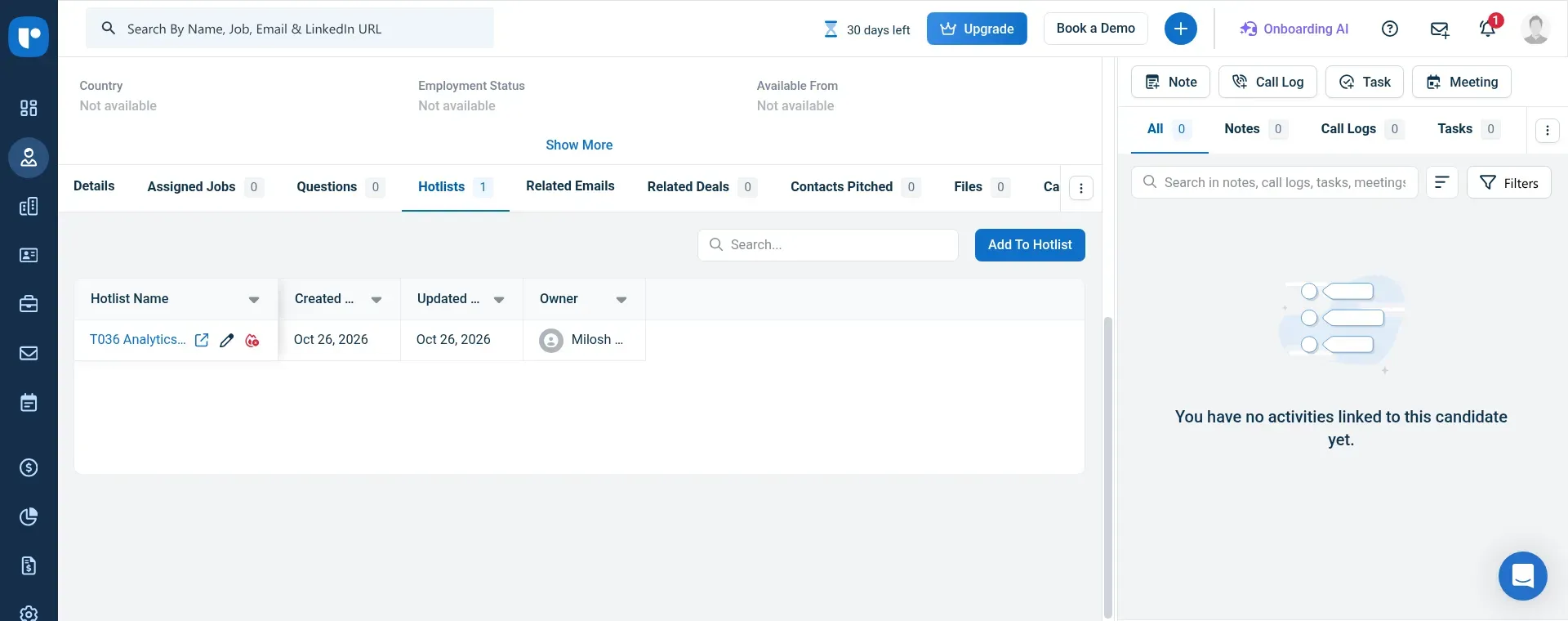
Inside Recruit CRM, the Hotlists tab shows a candidate's pools and the owner of each list.
Where it falls short — Recruit CRM
- Custom roles and multichannel sequences require Business
- Several AI, enrichment, and outreach actions consume pooled credits
- Public subscription prices show a dollar sign without identifying the currency
I created a synthetic candidate, added it to a new hotlist, and removed its membership. The candidate stayed in the database. Removing someone from a pool should be a separate decision from deleting their relationship record. I found that distinction useful when considering how a team reuses people across shortlists.
When I followed the hotlist link, the experience was less tidy. The first view showed the broader candidate list, then narrowed to my pool after a reload. The saved membership was there. A trial is a useful place to catch that sort of navigation friction before the saved view becomes part of your daily routine.
Pro includes companies, contacts, deals, and two-way email and calendar synchronization. Business adds custom roles, API access, and multichannel sequences. Several recruiters sharing relationships may need that access configuration even when the entry plan has enough room for their records. Price the work you need to control, as well as the people who need seats.
A recruiter on Reddit, u/Cold-Letterhead6559, wrote about “using Zapier to integrate it with Lemlist for outreach campaigns.” Their comment praised avoiding manual contact transfers while calling the workflows basic. Compare any native sequence purchase with the outreach system your team already uses, including the effort needed to keep contact data consistent.
Recruit CRM pricing
Pro is displayed at $95/user/month on annual billing. Confirm the subscription currency in your quote before comparing it with a USD budget.
- Business — $135/user/month, annually — custom roles, API, and sequences
- Enterprise — $215/user/month, annually — higher allowances and enterprise features
- Monthly billing — $109 / $159 / $259 per user for Pro / Business / Enterprise
2. Manatal: Best for a smaller recruiting desk with a limited budget
Manatal handles a small desk's candidate notes and reusable pools without requiring a job first. I found its basic relationship workflow easier to justify than buying a larger platform simply to get away from a spreadsheet.
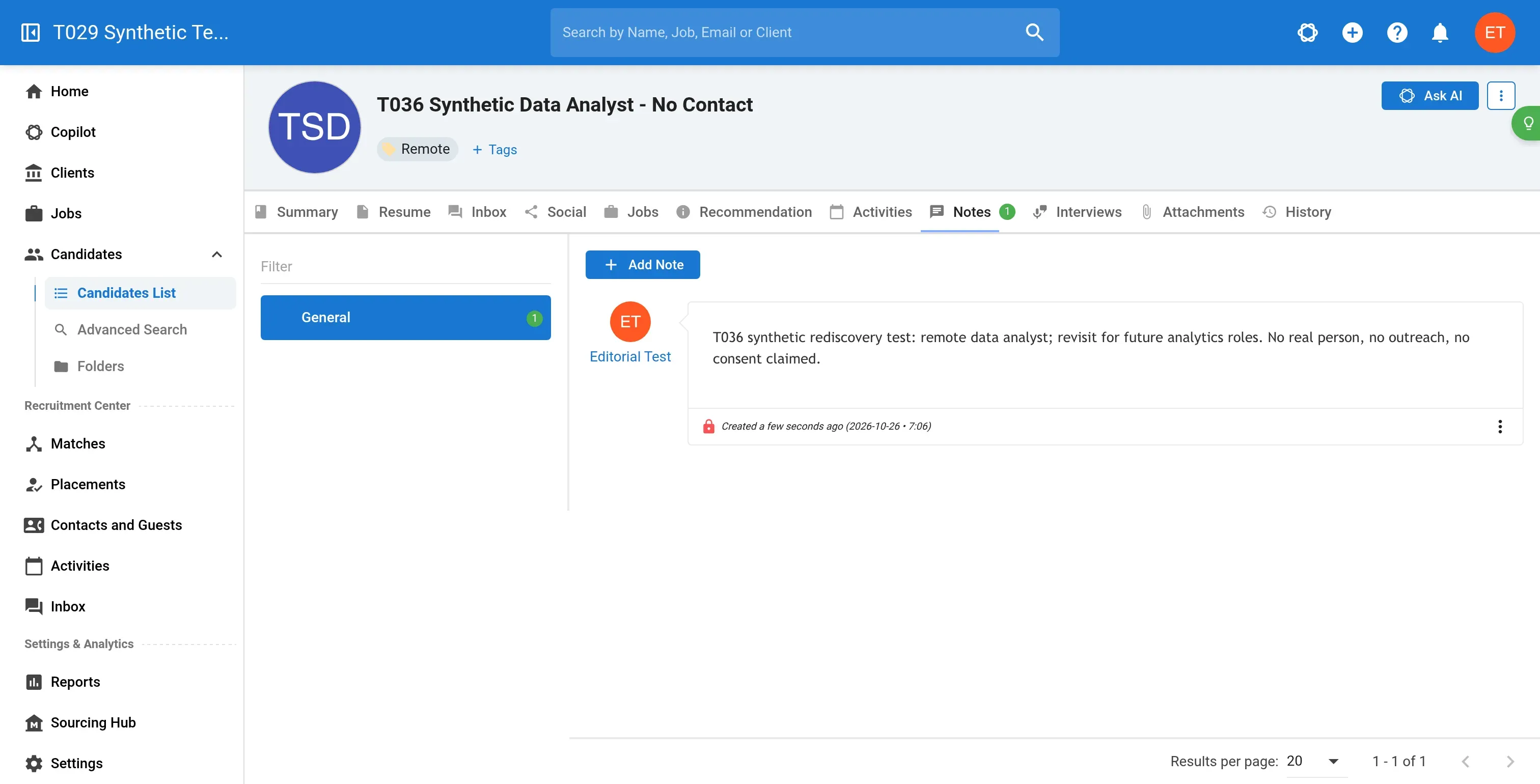
Inside Manatal, notes and tags preserve a candidate's context before you add them to a job.
Pros — Manatal
- Candidate records work independently of vacancies
- Folders organize existing records into reusable pools
- Low subscription cost for a smaller database
Cons — Manatal
- Entry plan has an account-wide candidate cap
- Custom permissions require Enterprise Plus
- Trial excludes some sending and automation actions
I added a candidate without a job, tagged it Remote, saved a future-role note, and put the existing record in a talent folder. Later, an exact-keyword search found it again. I didn't need to duplicate the person for a second pool or create a hiring process just to keep the note.
The folder initially stayed empty on screen after I added the candidate. Reopening it showed the saved membership. That small interruption, along with the number of profile tabs, is something to try yourself: can you open the person, understand the last conversation, and record the next step without hunting through the interface?
My synthetic candidate also showed consent pending. I left it that way. A visible status is useful for organizing work, but you still need to set up the process for requesting and recording consent.
Professional covers a manageable database. Enterprise removes the capacity caps and adds workflow automation, while Plus is the tier for custom permissions and user groups. A shared recruiting desk can therefore need the top tier before it needs unlimited capacity.
Manatal pricing
Professional starts at $15/user/month on annual billing, with a 14-day trial.
- Professional — 15 jobs and 10,000 candidates per account
- Enterprise — $35/user/month, annually — unlimited jobs and candidates
- Enterprise Plus — $55/user/month, annually — custom permissions, user groups, and API
- Monthly rates — $19 for Professional, $39 for Enterprise, and $59 for Plus
3. Zoho Recruit: Best for agencies that need configurable sharing and records
Zoho Recruit Professional suits an agency that needs to configure record sharing and capture mailbox conversations. I think its edition and email gates deserve attention before you compare the seat price with another CRM.
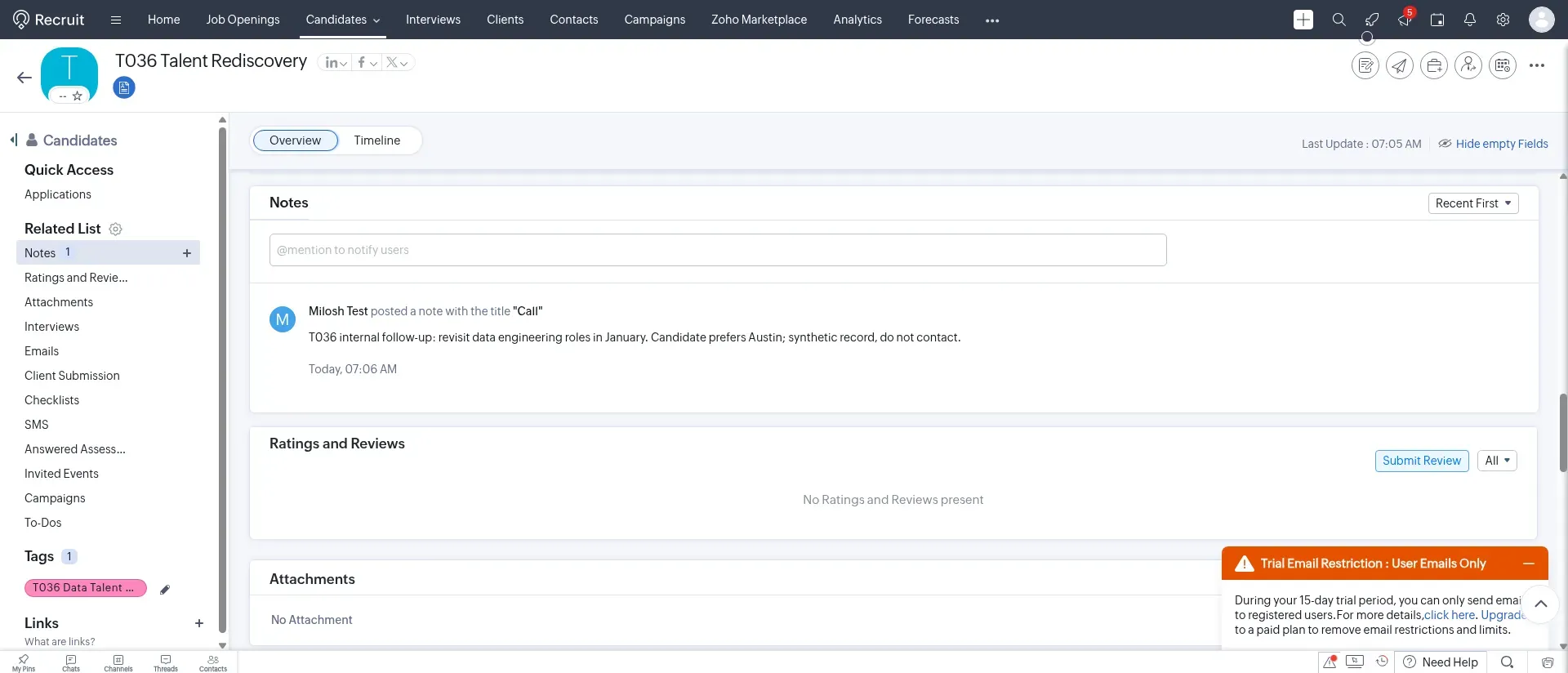
Inside Zoho Recruit, the candidate record keeps a future-role note and talent-pool tag together.
Pros — Zoho Recruit
- Custom profiles and sharing rules on Professional
- Candidate filters include ownership and contact-history fields
- Agency edition includes client-facing recruitment workflows
Cons — Zoho Recruit
- Standard lacks two-way IMAP synchronization
- Agency and Corporate HR editions differ
- Long menus add navigation overhead
I saved a future-role prospect, added a note and a talent-pool tag, then filtered the candidate list by city. The two-record list narrowed to the Austin candidate I wanted. Opening that result returned me to the saved context. The basic loop worked.
I had to pay more attention as I navigated. The candidate sidebar has a long set of related lists, and the filter menu needs scrolling. During a trial, follow the path from opening a candidate to updating a note (the path a recruiter repeats throughout the day). The dashboard alone gives you very little sense of that work.
Zoho's agency edition includes custom views and record fields. Professional adds custom profiles, field-level security, sharing rules, and groups, so colleagues can have different access to a shared database. Those are useful controls when someone needs to cover a relationship during an absence.
If LinkedIn is one of your sourcing channels, consider Linked Helper's Zoho Recruit LinkedIn integration for sending profile data into candidate records.
Two-way IMAP synchronization also starts on Professional. Standard costs less, but buying it changes the mailbox workflow assumed in our cost comparison. There is a separate edition issue for existing Zoho customers: Zoho One includes Corporate HR, while the agency edition is an add-on.
Zoho Recruit pricing
The US agency Professional plan is $50/recruiter/month on annual billing or $60 monthly.
- Free — 1,000 records per module
- Standard — $25/recruiter/month, annually — custom views and basic search
- Professional — two-way IMAP, custom profiles, and sharing rules
4. Loxo: private-database search with a separate external-sourcing tier
Loxo Core combines ATS, CRM, and search of your own recruiting records. Access to the external talent graph belongs to Professional, so a team buying sourcing alongside its database needs a different quote.
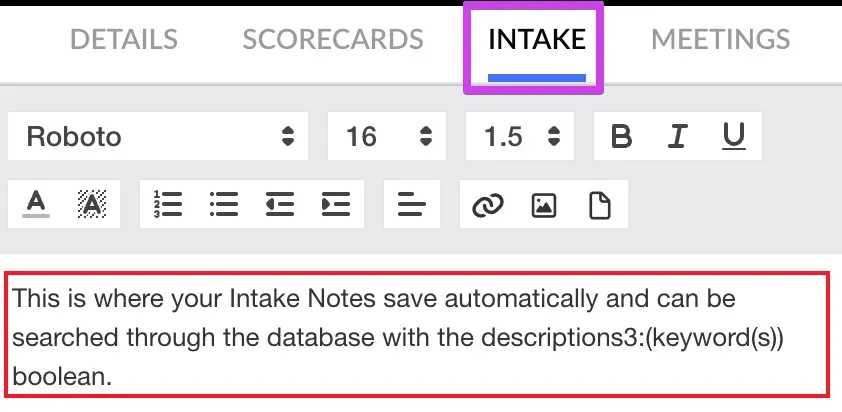
Inside Loxo, the Intake tab keeps general notes searchable beyond one job. (Image source: Loxo Help Center)
Where it falls short — Loxo
- External sourcing requires custom-priced Professional
- Annual plans are paid upfront
- Routine CSV exports omit relationship history
Core's natural-language search works on the records you already own. Professional adds the wider sourcing platform and agent features, with pooled credits. Keep that distinction in the buying conversation: a database search and a search for new people solve different problems.
The note-taking guide has a useful distinction too. Activity notes can be general or tied to a job, while internal candidate-card notes stay with that job. A person's long-term preferences can remain on the relationship record, and a client's assessment can stay attached to the relevant search. I like that separation because it gives the next recruiter a chance to understand both.
Things I Noted — Loxo
Loxo's routine CSV export leaves out activity history, resumes, work history, and education profiles. It exports the displayed People or Companies fields; attachments need individual export. A complete export follows a separate support process at contract fulfillment or termination, and the guide says records are removed 30 days after nonrenewal.
Rehearse that exit before committing. A list of candidate names is easy to recognize in a CSV, but the conversations are what make the database worth moving. Check the support process and which parts of the relationship record it returns.
Loxo pricing
Core starts at $149/user/month, billed annually and paid upfront. The advertised Professional trial lasts seven days and requires no card.
- Core — ATS, CRM, private-database search, and email/calendar sync
- Professional — custom annual pricing — external sourcing and agent features
- Enterprise — custom agreement — advanced roles, permissions, and SSO
- Migration — free for Core teams of three or more seats; complex work scoped separately
5. Bullhorn: Best for agencies building around a mature recruiting ecosystem
Bullhorn fits an agency evaluating connected candidate, contact, and client workflows, with the configuration agreed in a quote. Its smaller packages and Pro sales-pipeline offering are different purchases.
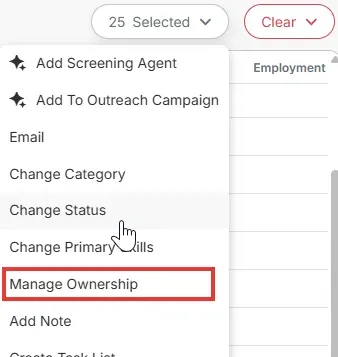
Inside Bullhorn, the candidate action menu includes ownership changes alongside notes and tasks. (Image source: Bullhorn)
Pros — Bullhorn
- Candidate, contact, and client workflows in one ecosystem
- Tearsheets organize several types of people records
- Entitlements control candidate visibility across teams
Cons — Bullhorn
- CRM sales pipeline requires custom-priced Pro
- Tearsheets need manual maintenance
- Bulk actions have their own limits and permissions
Bullhorn calls its hotlists tearsheets. They are static lists of candidate, contact, or lead records, with public and private visibility. Colleagues can add or remove people from public lists, and administrators with the relevant permission can manage other users' lists.
Ownership transfer takes work. The guide walks you through copying records into a new tearsheet rather than simply reassigning the existing list. I think that creates an unwelcome handover task if one recruiter has maintained several pools and a colleague is taking over the desk.
Even when you select more matching results, the new Candidate List guide also caps a bulk add to a tearsheet at 2,000 records. Visibility follows user entitlements. Before treating a missing colleague's candidate as a database problem, check which records the user can access and whether the action's limit has affected the selection.
Bullhorn places ownership controls alongside notes and tasks in the vendor screen. These are everyday operational decisions, so include them in a demonstration of your own handover scenario, along with the integrations your agency relies on. A separate tour of each module can hide the work involved in moving between them.
Bullhorn pricing
Pro with the CRM sales pipeline is custom-priced. Starter includes client management; confirm the required sales pipeline, access entitlements, implementation, and integrations in the same quote.
6. Gem: ATS-connected rediscovery with integration and filter gates
Gem brings past applicants and CRM prospects into sourcing for an in-house team keeping its ATS. The depth of that connection determines how much previous hiring context recruiters can recover.

Inside Gem, the vendor's search example separates CRM prospects and past applicants from net-new profiles. (Image source: Gem)
Where it falls short — Gem
- Past applicants require ATS Deep Integration or Gem ATS
- Gem for Startups excludes AI Rediscovery
- Company-size pricing complicates seat-price comparisons
Gem uses skill fit as the main ranking factor and past engagement as a secondary one. The rediscovery guide includes previous applications and interview scorecards in the candidate context. For a former finalist, that history can make the next conversation much more useful than a fresh approach with no reference to what happened last time.
Things I Noted — Gem
Gem excludes profiles sourced within the last 14 days from AI Rediscovery. Its default “Last in process” filters also exclude people processed within the past three months; you can change that date window. If you remember a recent candidate, inspect the filter before trying a different search query.
Then check the integration. The Past applicants tab needs an ATS Deep Integration or Gem ATS, so a lighter connection won't provide the same coverage. My main concern is whether the connected system will supply the interview history your rediscovery workflow needs.
Gem for Startups excludes AI Rediscovery. Even if the rest of the plan looks suitable for the team, don't use the startup offer as the budget for this particular workflow. Get the required integration and rediscovery configuration priced together.
Gem pricing
Custom, based on company size and whether Gem runs alongside another ATS or as an all-in-one platform. The quote needs to include the rediscovery configuration discussed here.
7. Lever: Best for combining in-house sourcing and hiring in one platform
Lever combines ATS and CRM for a team considering a replacement hiring platform. I think it makes more sense in that decision than as a small addition to an ATS you're happy to keep.
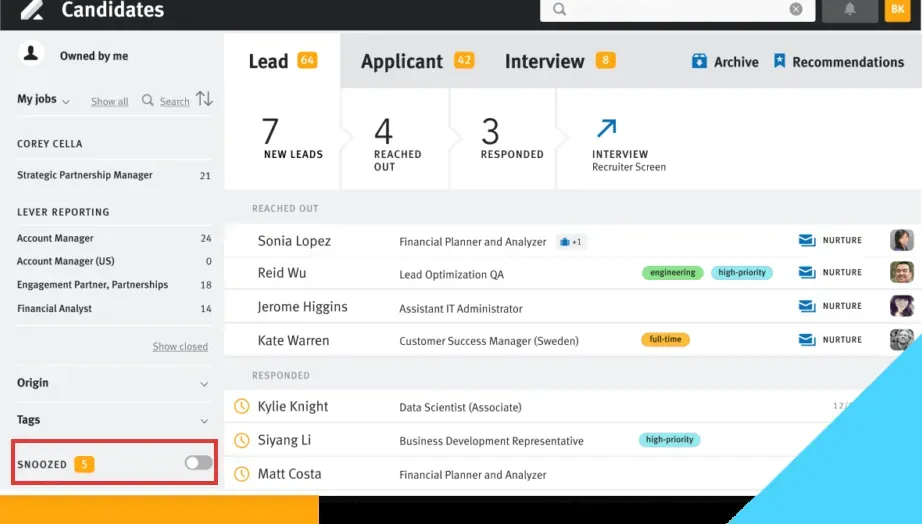
Inside Lever, an earlier vendor walkthrough groups leads, applicants, and nurture activity in one candidate workspace. (Image source: Lever)
Pros — Lever
- ATS and CRM share the hiring workflow
- Talent pools support resurfacing past applicants
- Nurture campaigns connect prospects with later openings
Cons — Lever
- Custom quote required
- Replacing an ATS adds migration and process work
- Candidate nurture doesn't cover agency client sales
Lever lets you evaluate the handoff from sourcing to hiring within the same system. A prospect's relationship context remains useful as they become an applicant, and separate nurture campaigns can serve different talent-pool segments. Its recruitment-marketing page includes Advanced Nurture and tools for resurfacing past applicants.
The vendor's earlier walkthrough illustrates why that arrangement appeals to me: leads, applicants, and nurture activity occupy the same candidate workspace. Keeping those relationships together is a reasonable reason to consider a platform change. It also commits the team to a larger migration than adding rediscovery around the existing ATS.
Search needs a realistic demonstration. In a Reddit post, u/maunilparikh called Lever's search “pretty limited.” Use your hardest saved search during the evaluation, with the expected result written down, and watch the presenter recover it. A familiar candidate with a slightly unusual history is more revealing than a polished demo profile.
The same demonstration should follow that candidate into the hiring workflow. Check where the old context appears, who can act on it, and how the team records a new conversation without losing the earlier one. Those are the handoffs you'll have to agree on during a replacement project.
Lever pricing
Custom. The core platform combines ATS and CRM, with additional products quoted separately.
What the same recruiting workload costs
Manatal has the lowest subscription total in the solo scenario; Zoho Recruit is slightly cheaper for the shared team needing custom access. The calculations use annual list rates from the dated pricing checks, with existing Google Workspace or Microsoft-hosted email accounts.
Taxes, calling, SMS, enrichment, additional AI usage, and migration work are excluded unless the vendor includes them. Recruit CRM totals retain the public page's unidentified dollar currency. Confirm that currency before treating its amounts as USD. Custom configurations remain quote-dependent.
One agency recruiter with 5,000 candidate records
Manatal Professional covers the smaller workload at the lowest listed total. This scenario requires candidate and client records, searchable context, and two-way email synchronization, without custom team permissions or automated multichannel sequences.
The table prices the suitable configuration for one recruiter over a year.
| Tool | Suitable plan | Annual subscription | Additional cost to check | Main boundary |
|---|---|---|---|---|
| Manatal | Professional | $180 | Migration or optional services | Cap on candidates per account |
| Zoho Recruit | Agency Professional | $600 | Migration services | Standard lacks two-way IMAP |
| Recruit CRM | Pro | $1,140 | Usage beyond included credits | Advanced sequences require Business |
| Loxo | Core | $1,788 | Migration below three seats | External sourcing excluded |
| Bullhorn | Confirm configuration | Quote needed | Implementation and integrations | Starter has client management; Pro adds sales pipeline |
You have little reason to buy the most expensive configuration just to store a modest database. The extra subscription needs to pay for work you'll use: client deals, a shared relationship process, or the replacement of tools that are currently separate.
Five agency recruiters with 25,000 records and custom access controls
Zoho Recruit Professional and Manatal Enterprise Plus are only $300 apart over a year for this team. Each total is five seats multiplied by the monthly annual-plan rate and 12 months, with a shared candidate/client database and two-way email synchronization.
The table adds configurable access beyond a single default owner to the workload.
| Tool | Suitable plan | Annual subscription | Additional cost to check | Main boundary |
|---|---|---|---|---|
| Zoho Recruit | Agency Professional | $3,000 | Migration and configuration | Design profiles and sharing rules |
| Manatal | Enterprise Plus | $3,300 | Migration or optional services | Enterprise lacks custom permissions |
| Recruit CRM | Business | $8,100 | Usage beyond pooled credits | Model actual sequence and AI usage |
| Loxo | Enterprise | Custom | Migration and configuration | Advanced roles aren't Core |
| Bullhorn | Confirm access configuration | Quote needed | Implementation and integrations | Verify entitlements; Pro adds sales pipeline |
Spend the evaluation time on whether a colleague can find the record and see the right history. The subscription difference between the first two options is small beside a workflow the team will repeat all day. Recruit CRM's higher total needs a clear use for its agency features and included allowances.
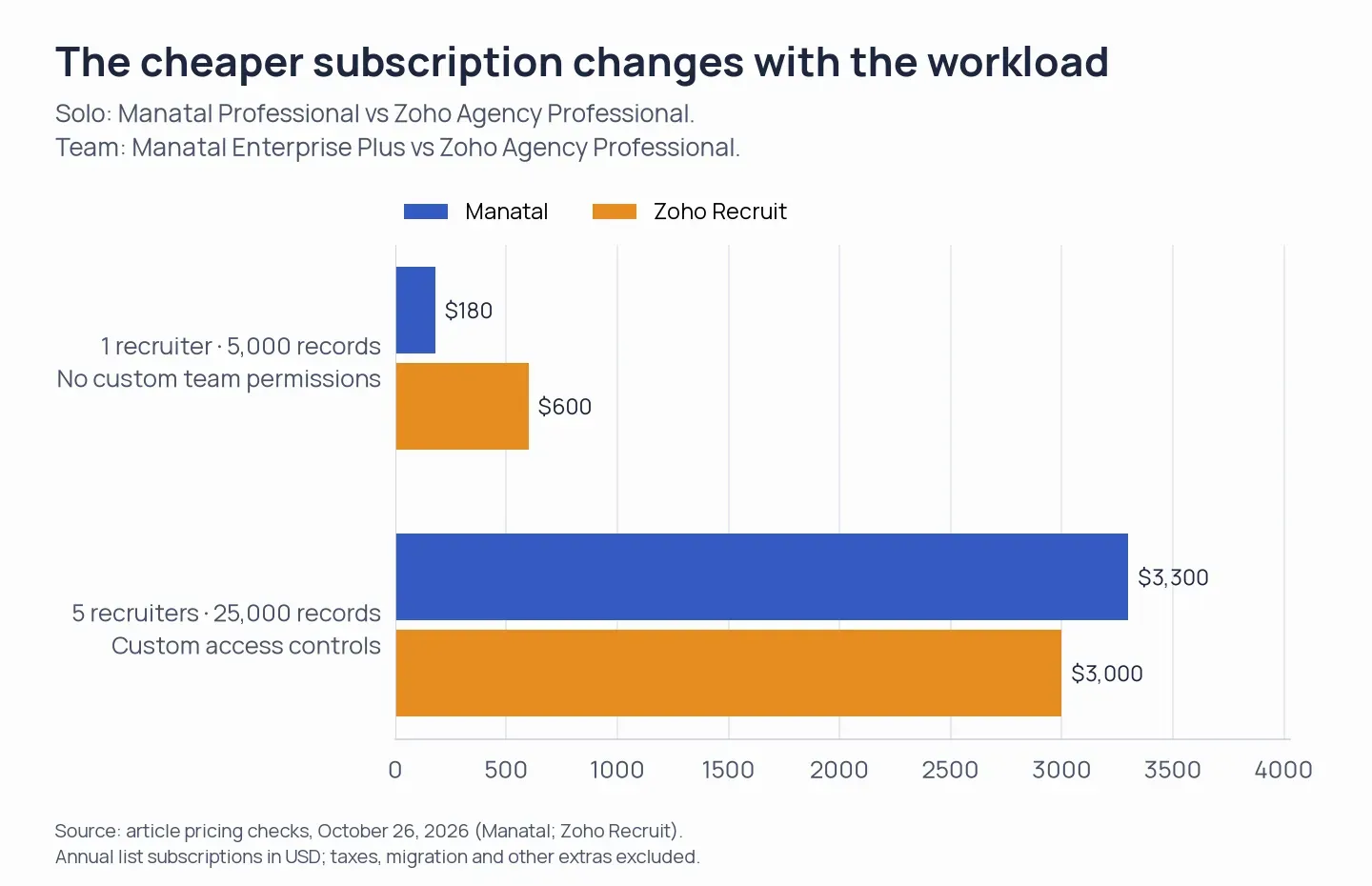
Manatal has the lower annual subscription for the solo workload; Zoho Recruit is $300 lower for the five-recruiter workload requiring custom access controls.
Which recruiting CRM should you choose?
Manatal is my starting point for a smaller agency database, while Zoho Recruit Professional suits a team that will use configurable sharing. The trial scenes in their cards give you a modest workflow to reproduce before deciding.
For an in-house team, settle whether you're keeping the ATS. Gem’s rediscovery configuration requires an integration check around the existing system; Lever belongs in a replacement-platform evaluation. A company-size quote and the history available through an integration can change that comparison more than an agency seat rate.
Loxo consolidates private-database work, but the annual commitment and incomplete routine export need scrutiny before moving your records. For an agency with connected workflows and specialist integrations, discuss how to configure Bullhorn. For Recruit CRM, examine the candidate/client workflow against the tier and usage gates in its card before committing to outreach features.
Check what you already own. Existing Lever users can examine their CRM and nurture configuration before adding another candidate database. Zoho One customers need to identify the Recruit edition included in their subscription. With a general sales CRM, try representing the same person across jobs and clients, then decide whether that arrangement preserves the context you need.
For LinkedIn sourcing handoffs, the LinkedIn CRM integration guide covers transfer routes. Check the chosen destination and field mapping before building your process around one.
Avature also came up in the research for enterprise talent communities, regional portals, and configurable consent workflows. Its implementation-oriented scope goes beyond the everyday relationship workflows emphasized in this shortlist.
How we tested
In October 2026, I tested candidate record management in three recruiting CRM trials and researched the shortlisted tools. I didn’t test email delivery.