

 19 min read

TL;DR: recruiting software in October 2026
- Hiring by employers: Workable combines sourcing and applicant tracking; between vacancies, Teamtailor fits employers who are building a talent pool.
- Agency work: Manatal is the budget starting point. Recruit CRM adds a stronger emphasis on client delivery and outreach workflows.
- Maintain your ATS: LinkedIn Recruiter introduces passive sourcing, and Paradox handles application and interview coordination at scale.
- Hands-on evidence: I created test records in Manatal and Recruit CRM, then used vendor guides, pricing, and terms for the remaining comparisons.
- Budget: Annual commitments, API tiers, and usage credits can change which plan fits. Custom quotes remain unknown.
The quick picks compare the six products by buyer, starting price, and the primary limitation to check.
| Tool | Best for | Standout feature | Starting price | Main trade-off |
|---|---|---|---|---|
| Workable | Employer hiring in one place | Sourcing plus applicant tracking | $299/month, billed annually; 1–20 employees | Agent credits and add-ons cost extra |
| Teamtailor | Employer brand and nurture | Connect plus Nurture campaigns | Custom annual quote | Approval flows are Premium |
| Manatal | Lean recruiting teams | Candidate and client CRM | $15/user/month, billed annually | Professional caps jobs and candidates |
| Recruit CRM | Agency client workflows | ATS and client pipeline | $95/user/month, billed annually | Open API needs Business |
| LinkedIn Recruiter | Passive sourcing alongside an ATS | Full-network search and InMail | Custom quote | Existing ATS remains a separate cost |
| Paradox | High-volume frontline hiring | Conversational apply and scheduling | Custom quote | Implementation needs its own scope |
Linked Helper publishes this blog and makes LinkedIn outreach software. This comparison covers recruiting platforms and sourcing tools; the test scope explains the evidence behind the picks.
What makes the best recruiting software?
Choose a hiring platform such as Workable to manage applications, or a sourcing tool such as LinkedIn Recruiter to find prospects for an ATS that already works. It helps employers and agencies find candidates, manage applications, coordinate interviews, and move people toward a hire. An applicant tracking system (ATS) holds the hiring record. Sourcing tools reach people outside it, while recruitment CRMs manage longer relationships with candidates or agency clients.
Begin with what your present system is missing. LinkedIn Recruiter’s sourcing subscription and Workable’s wider hiring platform address separate problems — even where one recruiter employs both. Swapping out a working ATS won’t assist if all your team requires is additional suitable prospects.
Using five criteria, I separated the options: the weekly workflow, plan limits, connections to existing systems, the cost of a workable configuration, and the export procedure. After that, try the automation on a real workflow. Does a reply halt the sequence? Can someone join a talent pool without applying? Such details influence what your recruiters must clean up later.
When it comes to agencies, that check should also cover client development. Contacts can live in a general CRM, yet candidate submissions and placement history require a clear home as well. An example of outreach alongside the wider hiring workflow appears in the Linked Helper blog's recruiting agency case study.
1. Workable: Best for employers consolidating recruiting
Workable is my first pick for an employer buying sourcing and applicant tracking together. It makes most sense when recruiters currently find someone in one tool and rebuild the record elsewhere. For an agency whose day revolves around client sales and placements, Manatal and Recruit CRM are closer fits.
Workable pros
- Standard combines sourcing and applicant tracking
- Unlimited active jobs, subject to fair usage.
- Pricing based on company size sidesteps any calculation done per recruiter.
Workable cons
- Assessments and texting are distinct add-ons
- Agents for sourcing, screening, and engagement use up credits.
- With annual self-service billing, you pay upfront.
Standard includes the sourcing suite. Workable Agent has its own usage budget: sourcing, screening, and engagement agents consume credits. I like that breadth for a small internal team. Before buying, estimate how much automated work you'll request; access to the platform alone won't cover it.
Workable additionally splits texting, assessments, and video interviews away from the core subscription. Before adding everything to the order, choose the channels your candidates actually use. A team running assessments on every applicant and a recruiter who needs basic application tracking won't end up with the same bill.
Things I Noted — Workable
The 3,000 starter AI credits arrive once. Purchased credits expire after a year. Buy around the work you expect to finish during that period.
You pay upfront for yearly self-service billing. Add-ons, along with company-size changes, likewise fall outside the capped same-plan renewal adjustment — therefore, before renewal, a growing employer ought to revisit its headcount assumptions. While account access remains available, export your records.
Workable pricing
Workable Standard Recruiting begins at $299 per month—billed yearly—when a company has 1–20 employees. Company size, not how many recruiters there are, drives what you pay.
- At this configuration, texting contributes an additional $89 per month.
- Video interviews cost an extra $109/month, and assessments run $59/month more.
- For 5,000 credits, agent credit packs begin at $600.
Workable pricing: Annual commitment; add-ons and Agent usage are separate.
2. Teamtailor: Best for building a warm talent pool for an employer
Teamtailor fits an employer whose career site draws people in before the correct vacancy exists. Its Connect feature allows visitors to show interest and sign up for upcoming openings. Rather than beginning anew each time a role becomes available, you can maintain that connection.
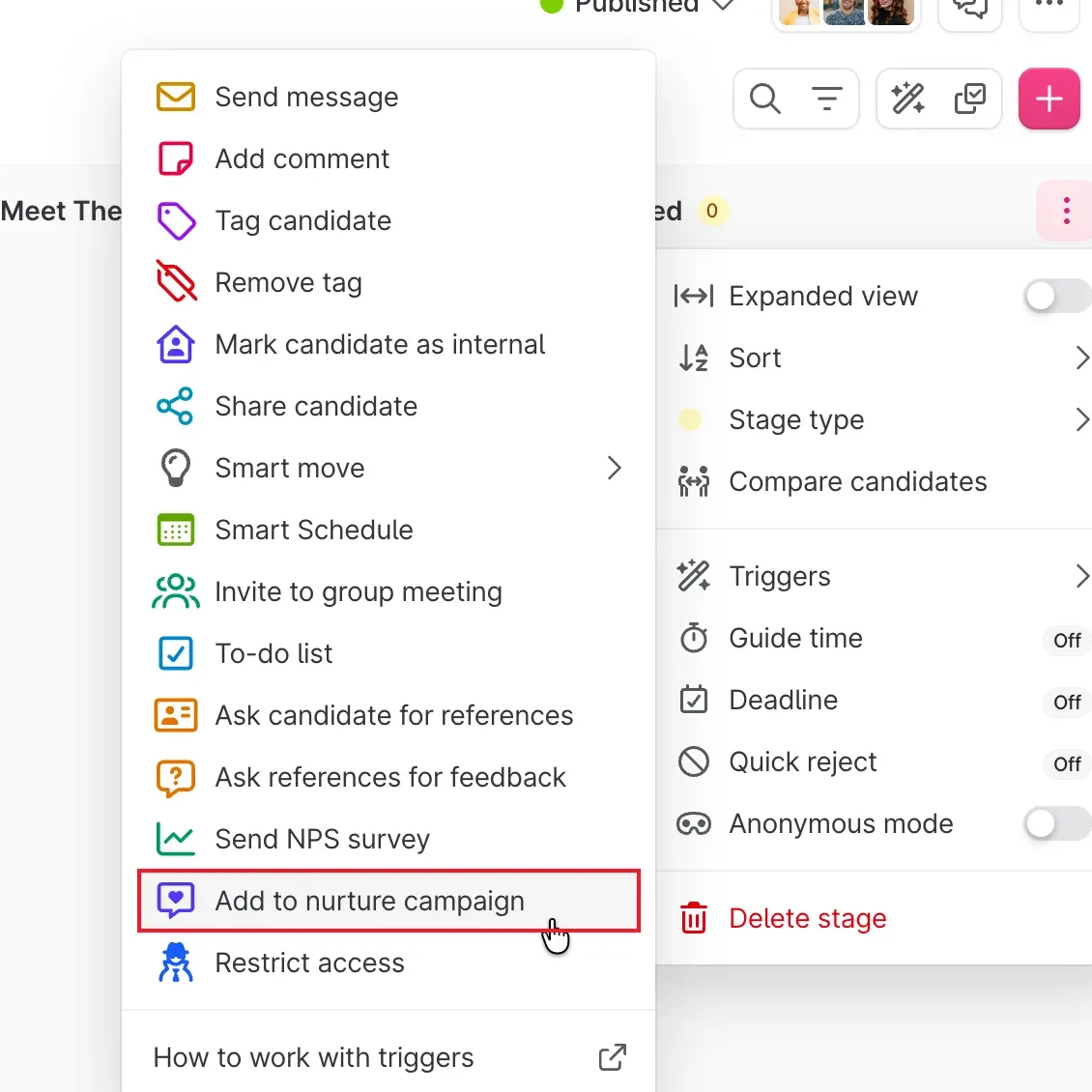
Within Teamtailor, candidates may be added automatically to a nurture campaign by a stage trigger. (Image credit: Teamtailor)
Teamtailor pros
- Connect captures interest before a job application
- Nurture supports reply and application exit rules
- Unlimited users and job postings
Teamtailor cons
- Saved Nurture touchpoints can't be edited
- Multi-brand management, along with requisitions, is Premium.
- Annual pricing requires a quote
During the walkthrough for Teamtailor, Add to nurture campaign appears in the stage's Triggers menu. A recruiter can bring prior finalists into a campaign straight from the pipeline, avoiding the need to enroll every person one at a time. Combine this with the reply rules and the application exit rules so that candidates who move forward no longer get those same follow-ups.
Prepare the campaign carefully. Once you finalize it, the touchpoints, send time, and waits can't be edited. And the test option sends every message immediately with placeholders unfilled. You still need to review timing and personalization before enrolling anyone (a test email won't check those for you).
For sustaining interest in your employer brand between openings, I like Teamtailor. An agency seeking client-development tools or a sourcer attempting to locate strangers beyond an existing audience has less reason to pick it.
Teamtailor support and scheduling feedback
One recruiter praises Teamtailor’s support; another describes a learning curve for scheduling. On r/recruiting, u/JuanPablue wrote on February 10, 2025, “Their customer support is amazing.” In an otherwise positive comment in the same thread, u/Shot-Possession-6559 wrote on May 30, 2025, “I don’t love their scheduling feature, it’s a bit confusing until you get the hang of it.” Bring the panel interview your team actually runs, including the awkward calendar combinations.
Teamtailor pricing
Teamtailor requires a custom annual quote and includes unlimited users and job postings. Requisitions/approval flows and divisions/multi-brand management belong to Premium. Compare the ongoing renewal price with any first-year discount.
Teamtailor pricing: Quote required; include the Premium features your hiring process needs.
3. Manatal: Best for lean teams managing candidates and clients
Manatal is my pick for a lean agency on a tight budget that needs candidates and clients together. During the October trial, I created a synthetic client, an unpublished recruiter vacancy, and a test candidate. When I opened the job form, the client was already selected. That's useful when several clients have similar roles open.
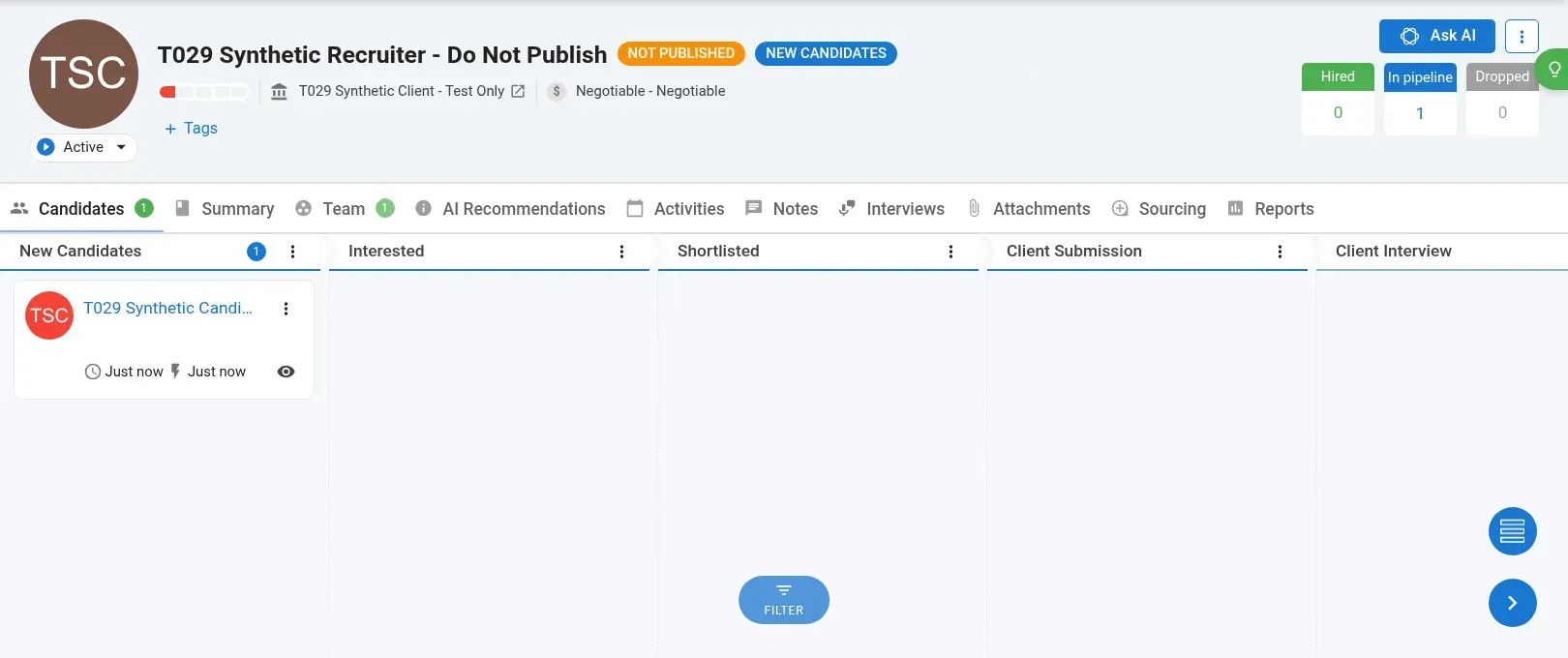
My test candidate in Manatal’s New Candidates column, with Client Submission and Client Interview stages further along the same board. The vacancy is unpublished.
Manatal pros
- Professional includes unlimited hiring managers
- Recruitment CRM covers clients and placements
- Enterprise removes job and candidate caps
Manatal cons
- Professional: 15 jobs and 10,000 candidates
- Open API requires Enterprise Plus
- You need an active, paid-up account for the free yearly export.
I added the candidate to the vacancy, and its card appeared in New Candidates, next to the Client Submission and Client Interview stages. That relationship was displayed by the candidate's Jobs tab as well, so I could verify the association from either direction.
Creating the profile and attaching it were separate steps in my run. I used Jobs → Add to job to finish. Before you move on to another search, check the vacancy's candidate count; the profile being saved doesn't necessarily mean you've put it on the board.
Professional remains inexpensive provided your database and number of vacancies remain inside its bounds. The agency-related work in the price comparison calls for Enterprise, though you'll need Enterprise Plus if you connect through the Open API. A small agency can outgrow the least expensive plan.
Manatal reporting and exports
Things I Noted — Manatal
Manatal offers one free CSV/Excel export a year to subscribers with active, paid-up accounts. Cancellation stops renewal, with access lasting to the end of the billing cycle. Request and inspect the export before access expires; prepaid subscription and add-on fees remain committed for the term.
Check Manatal’s reporting and export fields before migrating. In a February 3, 2025 r/recruiting post, u/lionbug26 wrote, “I’ve been using Manatal as our ATS, but I’ve been struggling with its reporting and data export features.” Bring your placement report and required export fields into the trial, rather than relying on an advanced-reporting label.
Manatal pricing
Manatal gives a 14-day trial. For each user, yearly pricing runs $15/month on Professional, $35/month on Enterprise, and $55/month on Enterprise Plus. Enterprise removes job and candidate limits; Enterprise Plus brings in the Open API along with an advanced report builder.
Manatal pricing: Per recruiter seat, billed annually at these rates.
4. Recruit CRM: Best for agencies managing client and candidate pipelines
Recruit CRM fits agencies that spend as much time presenting candidates and managing clients as finding people. In the trial, I saved a synthetic candidate with a job title and no personal contact details. Assigned Jobs and Contacts Pitched were separate tabs, with notes, calls, and tasks beside the record.
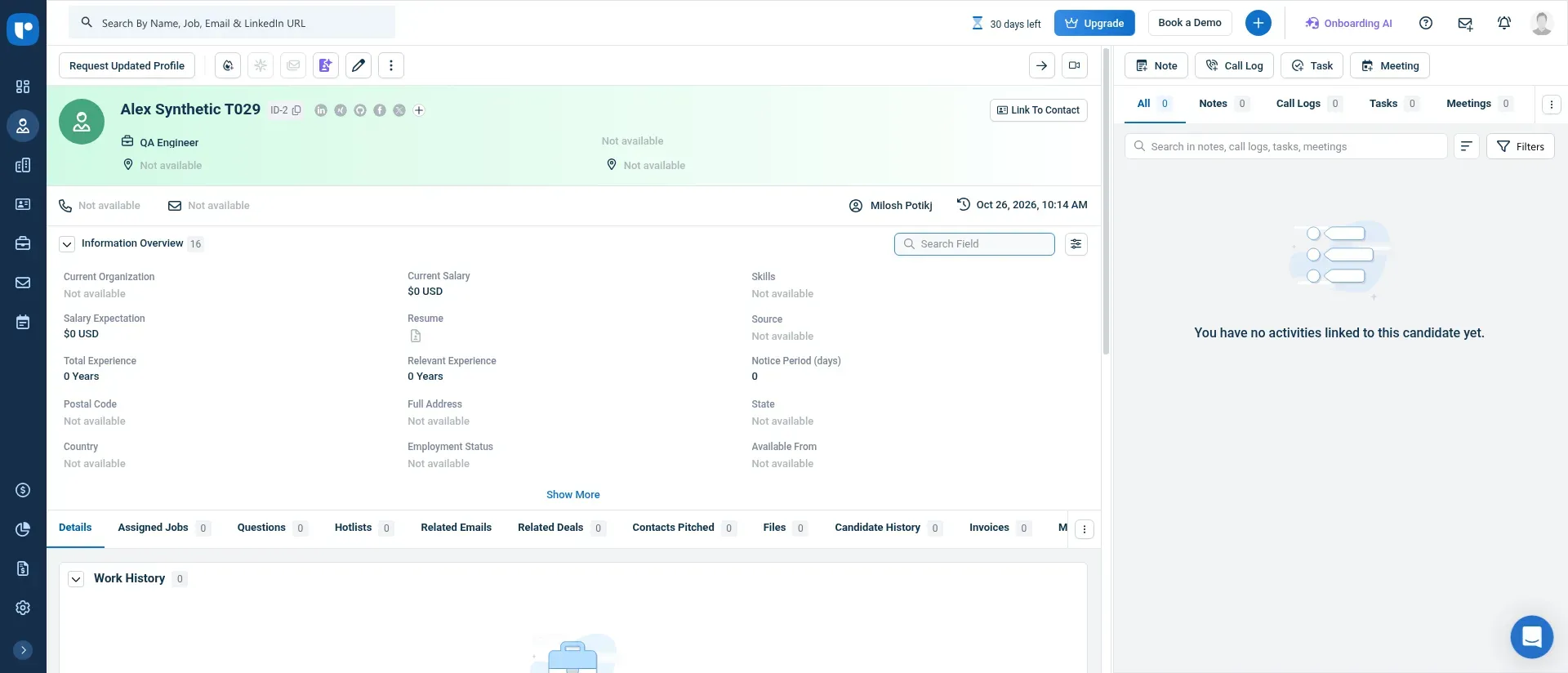
In Recruit CRM, my saved test candidate: job assignments, pitched contacts, and activity history, all reachable from that one record.
Recruit CRM pros
- ATS and client CRM in one platform
- Business expands sequences and adds Open API access
- Agencies are well served by processes for submitting candidates, along with resume workflows.
Recruit CRM cons
- Pro has one hiring pipeline
- Restrictions on records don't match from one official page to another.
- Credits sit alongside subscription fees
I like that separation for consultants who alternate between filling a vacancy and introducing someone to a client. There was also a clear empty state in the sample job's client preview: no assigned candidates had been made visible. Someone can exist in your database without showing up in that client view.
Still, Pro offers one hiring pipeline and one outreach sequence. Business expands flexibility in pipelines and sequences and also introduces the Open API. You should price out the workflow that your consultants will actually use — additional-capability credits included. A lot of this client-centric configuration would sit idle for an employer that hires only now and then.
Things I Noted — Recruit CRM
Recruit CRM's official capacity pages disagree. The pricing page says candidate and contact records are unlimited, while the billing guide gives pooled per-user allowances. Under the stricter guide, three Pro seats cover 30,000 candidates. Keep the final entitlement in your order terms before a large import.
Annual billing requires upfront payment, and refunds aren't issued for unused seats or leftover subscription time. Before committing for the year, then, the seat plan is worth a close look if your agency brings in contractors on a regular basis. A separate budget is also required for assisted migration.
Recruit CRM pricing
Recruit CRM's annual rates start at $95/user/month for Pro and $135/user/month for Business. Business is the relevant tier when the workflow needs the Open API or expanded sequences.
Recruit CRM pricing: Annual per-user subscription, with credits and assisted migration budgeted separately.
5. LinkedIn Recruiter: Best for passive sourcing beside an existing ATS
For reaching people who haven't applied, LinkedIn Recruiter is what I'd choose. Buy Recruiter to gain access to the candidate market, and keep the hiring record inside your ATS. Sourcers can dodge contacting the identical person twice when projects are shared.
LinkedIn Recruiter pros
- Access to the full network, along with 40+ search filters
- 150 monthly InMail credits per seat
- Shared projects, along with supported ATS integrations
LinkedIn Recruiter cons
- A sales quote is needed for Full Recruiter pricing.
- Hiring Assistant is an add-on
- Recruiter Lite has no ATS integration
One easy-to-overlook cap applies to the ATS connection: each user gets 300 exports a month under 1-Click Export at Recruiter System Connect, and a candidate’s privacy settings may block an export. Downloading applicants as XLSX/PDF is a distinct action, and it has no download limit. Before you estimate handoff capacity, check which action your sourcers will use.
Industry fit comes first. In an April 21, 2026 r/Recruitment discussion, u/mynameisgiles wrote, “I was in software, and it’s LinkedIn recruiter or nothing. My brother is in food and drink, and they barely use it - it’s all CV Library.” Where do the people you've successfully hired respond? That answer should carry more weight than a broad promise of network access.
Things I Noted — LinkedIn Recruiter
Recruiter Lite supports shared projects for up to five seats. Its narrower reach and lack of ATS integration still matter: Lite covers third-degree connections and includes 30 monthly InMails per seat. It can fit a team that accepts manual handoff, but full-network search plus ATS integration calls for full Recruiter.
If your team already possesses sufficient qualified applicants along with past finalists, then an additional sourcing contract is excessive. Before you bring in a separate subscription, work the candidate pool you've got.
LinkedIn Recruiter pricing
A custom quote is required for LinkedIn Recruiter, while Hiring Assistant comes as a separate add-on. In the proposal, you should specify the seats, renewal terms, the AI add-on, and which ATS connection is supported.
LinkedIn Recruiter pricing: Quote required for full Recruiter; Lite checkout pricing remains unverified in this comparison.
6. Paradox: Best for high-volume frontline application and scheduling
For frontline employers who lose applicants between application and interview, Paradox is what I'd choose. Candidates can apply via channels like SMS and WhatsApp through Conversational Apply, and information then flows back into the system of record. Alternatively, you might select Conversational ATS, which turns replacing the current system into a separate project from enhancing its application flow.
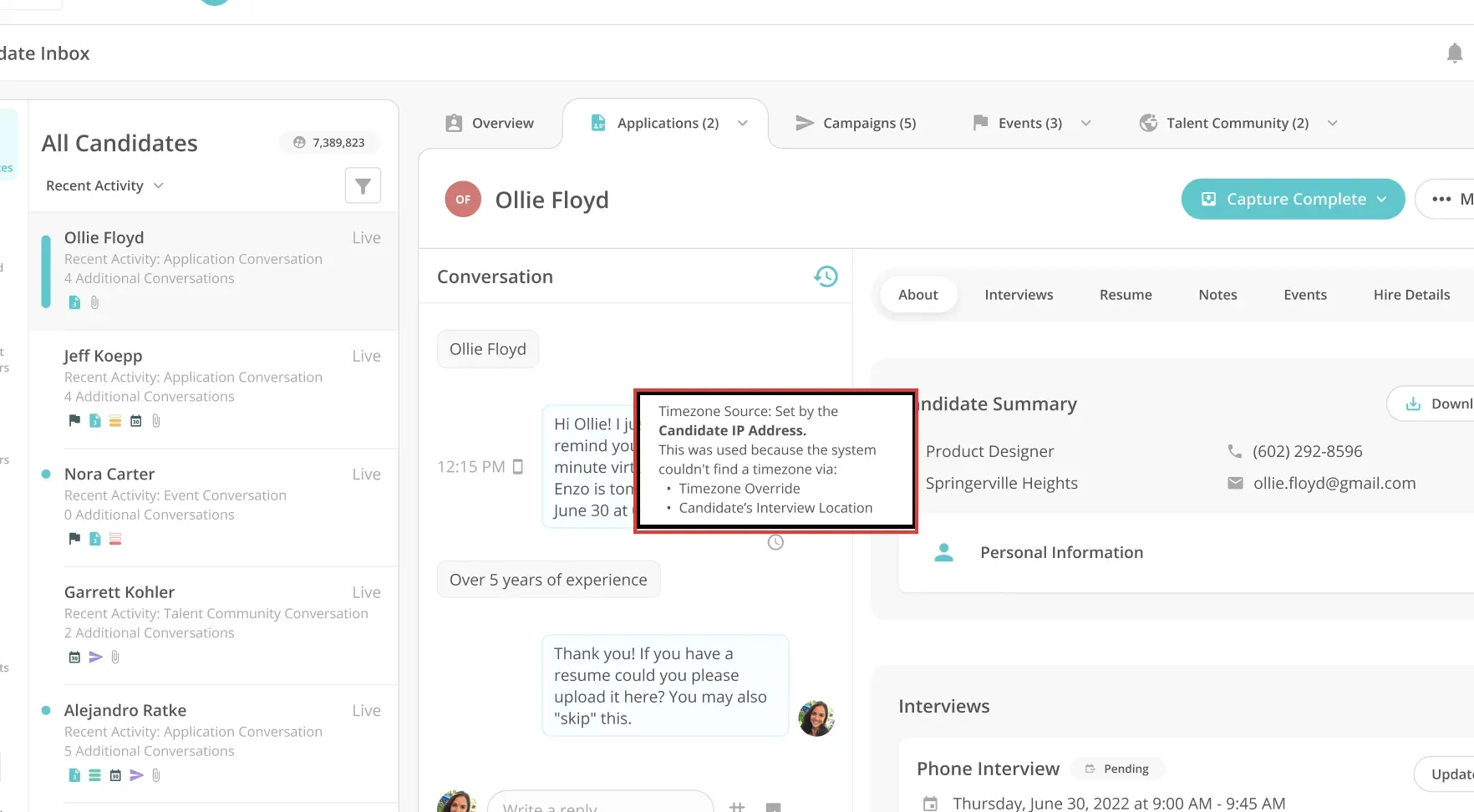
Within Paradox, a tooltip for the time zone clarifies the source that determined the interview time zone of the candidate. (Image credit: Paradox)
Paradox pros
- Conversational Apply supports text and chat applications
- An existing ATS can have scheduling placed alongside it.
- Conversational ATS is another deployment option
Paradox cons
- Separate scope is required for both implementation and integration.
- Subscription pricing requires a quote
- Standard terms require 30 days' nonrenewal notice
The scheduling walkthrough has a detail worth putting into manager training. In Choose Time, several selected slots become options for the candidate, while a single slot books the interview immediately. The Candidate Inbox example also explains the time-zone source in a tooltip. That's where I'd look when an appointment time seems wrong.
Set up Paradox before moving candidates into the interview stage. Auto-scheduling may not trigger if a candidate reaches the interview stage before the job and interview details exist. Set up the roles and interview rules before loading applicants across locations.
For teams managing frequent openings at scale, I appreciate the emphasis on finishing an application and on getting an interview scheduled. Should you be filling a handful of niche positions and need to uncover passive candidates, then a sourcing tool fits better.
In October 2025, Workday completed its acquisition of Paradox. Be sure the proposal spells out the needed ATS and calendar links, together with the candidate questions and the stage at which a recruiter deals with an exception. Human oversight of consequential automated decisions is mandated under Paradox's terms.
Paradox pricing
Paradox requires a custom quote. Professional services, covering integration and configuration, are separate from the software subscription. Standard terms provide a 30-day window for data export following termination.
Paradox pricing: Price the subscription and implementation separately, with the deployment scope specified.
Recruiting software costs for matched teams
Manatal has the lowest disclosed annual base cost in both the employer and agency scenarios below. Workable and Recruit CRM cost more for their respective workloads. These calculations use the checked list prices in USD, excluding taxes; custom quotes remain unknown. Optional ads, messaging, AI usage, migration, and third-party subscriptions aren't bundled into the base totals.
Employer: 20 employees, two recruiters, five active jobs
At Manatal, this employer pays an annual base of $360, and at Workable, $3,588; a quote is needed for Teamtailor. Paid sourcing databases fall outside this scope, and it's assumed that no more than 10,000 candidates are stored.
| Tool | Suitable plan | Annual base | Required extras for this brief | Limit or condition |
|---|---|---|---|---|
| Workable | Standard Recruiting, 1–20 employees | $3,588 | None identified for core brief | Texting, assessments, and Agent usage extra |
| Teamtailor | Quoted annual subscription | Quote required | Include any required Premium approvals | Unlimited jobs/users; contract total unknown |
| Manatal | Professional, two recruiter seats | $360 | None identified for core brief | Professional capacity limits apply; API excluded |
Manatal is cheaper for this workload. When you need Workable's broader recruiting reach, its higher base price makes more sense. If the career site and long-term candidate relationship matter enough to justify the quote, then Teamtailor earns a place.
Agency: three recruiters, 20 jobs, 15,000 candidates
For this agency, the annual base is $1,260 for Manatal Enterprise and $3,420 for Recruit CRM Pro, including candidate and client CRM. The base scenario excludes multichannel sequences and custom API work, so their upgrade costs stay visible.
| Tool | Suitable plan | Annual base | Required extras for this brief | Limit or condition |
|---|---|---|---|---|
| Manatal | Enterprise, three seats | $1,260 | None identified for base brief | Open API raises plan to Enterprise Plus |
| Recruit CRM | Pro, three seats | $3,420 | None identified for base brief | Pro workflow and capacity limits apply |
If the agency needs Open API access, three Manatal Enterprise Plus seats total $1,980 a year. Three Recruit CRM Business seats total $4,860 a year and also expand sequence capacity; credit consumption remains separate. Check the connection and outreach workflow before choosing between those upgrades.
Existing ATS: two recruiters sourcing passive candidates
Retaining your ATS alters the math: you'd need to plan for the sourcing tool's cost in addition to that of the system you keep.
| Configuration | Annual sourcing cost | Existing cost retained | Capacity | Scope condition |
|---|---|---|---|---|
| Two full LinkedIn Recruiter seats | Quote required | Current ATS subscription | 300 included InMail credits/month across two seats | Full-network access; verify your ATS partner |
| Two Recruiter Lite seats | Checkout price requires verification | Current ATS subscription | 60 included InMails/month across two seats | Third-degree access; no ATS integration |
Lite works for teams that are fine with manual handoffs and its smaller network reach. It's ruled out if you need ATS integration or access to the full network. Nail down those needs before you talk about discounts.
Which recruiting software should you choose?
Choose Workable or Teamtailor when the employer's hiring process needs a home, and compare Manatal with Recruit CRM when client delivery belongs in that same system. If your ATS already works, focus the evaluation on the missing task: LinkedIn Recruiter for passive sourcing or Paradox for application and scheduling work at volume.
Begin the trial using a small allowed sample, along with the report your team requires. Trace the sample's candidate-to-job relationship, verify who can view the sample, and examine the export. You can find a bad fit before importing years of history.
If LinkedIn is a sourcing channel, consider Linked Helper's recruiting automation for candidate collection and follow-ups that stop when someone replies.
How we tested
I tested Manatal and Recruit CRM with synthetic records in October 2026 and researched the other recruiting tools through vendor materials and recruiter comments. I didn't use the tools for live hiring.