

 16 min read

TL;DR: Residential proxy providers by buying pattern
- Best for irregular workloads: DataImpulse charges $1/GB for prepaid traffic that does not expire; its standard $50 top-up buys 50 GB.
- Best for steady monthly traffic: Decodo lists 10 GB at $35/month, while Webshare lists 10 GB at $27.50/month; both require comparing package terms, not just the allowance.
- Best for location-sensitive work: SOAX makes country-tier costs visible, but its US Builder plan starts at $200/month.
- Best for advanced controls: Oxylabs offers protocol and session options from a $15/month Starter plan; Bright Data adds city and ZIP targeting but requires compliance review.
- Price and review date: Provider prices and review metrics here reflect November 18, 2026; IPRoyal suits small non-expiring purchases, while its 100 GB annual figure is an estimate based on the displayed 10 GB package.
What are residential proxies?
Residential proxies route a request through an IP address associated with a residential internet connection. A rotating residential service changes exit IPs across requests or sessions, while a static ISP proxy keeps an address longer. These products bill by traffic or package, and their location, session, and expiry rules differ.
At a glance: 7 residential proxy providers by use case
DataImpulse and IPRoyal suit prepaid buyers; Decodo and Webshare publish clear monthly tiers, while SOAX varies prices by location and Bright Data and Oxylabs offer more controls with higher account hurdles. The table routes common buying situations to a provider and shows its entry configuration, strongest feature, and main hurdle.
| Best for | Provider | Starting configuration | Standout detail | Main tradeoff |
|---|---|---|---|---|
| Broad geo-targeting and compliance-ready teams | Bright Data | $8/GB PAYG; $499/month packages | Country, state, city, and ZIP targeting; spend controls | Compliance review before residential use |
| Protocol and session controls | Oxylabs | $15/month for up to 2 GB | Rotating/sticky sessions and several protocols | Spending cap was off by default in the interface I opened |
| Predictable monthly allowances | Decodo | $35/month for 10 GB | Rotating and sticky sessions, HTTP(S), and SOCKS5 | Trial signup requires card details |
| US pricing by country tier | SOAX | $200/month Builder minimum | Calculator displays location-based rates | Monthly credits expire after 60 days |
| Small non-expiring purchases | IPRoyal | $7 for 1 GB | Subscription and PAYG packages | Small bundles cost more per GB than custom volume |
| Low-volume monthly bundles | Webshare Rotating Residential | $27.50/month for 10 GB | Selector scales to 3,000 GB | Free 10-proxy offer is datacenter only |
| Irregular prepaid batches | DataImpulse | $1/GB; 50 GB standard top-up | Traffic never expires; no monthly minimum | Standard purchase leaves unused traffic for very small jobs |
Residential proxy costs for 10 GB and 100 GB per month
For the same US traffic load, annual public-plan costs range from $150 in DataImpulse prepaid top-ups to $2,400 on SOAX Builder at 10 GB/month, and from $1,000 to $6,300 for 100 GB/month before tax. Each figure below uses the current plan or package that covers the stated annual traffic; equal allowances can still produce different IP availability, target-site success, and session persistence.
| Provider | 10 GB/month: annual cost | 100 GB/month: annual cost | Calculation and conditions |
|---|---|---|---|
| Bright Data | $960 list; $840 if the 3-month promotion applies | $5,988 | PAYG at $8/GB; half price for the first 3 months would make the 10 GB annual estimate $840. For 100 GB/month, the public billed package is $499/month and includes 141 GB. Coupon and KYC conditions apply; confirm the checkout total. |
| Oxylabs | $1,200 | $6,000 | Basic is $100/month for up to 20 GB; Flexible is $500/month for up to 125 GB. VAT may apply. |
| Decodo | $420 | $3,300 | 10 GB is $35/month; 100 GB is $275/month. VAT may apply. |
| SOAX | $2,400 | $3,600 | US Tier 1 Builder costs $200/month minimum; calculator shows $300/month at 100 GB ($200 plan + $100 extra credits). Monthly credits expire after 60 days. |
| IPRoyal | $630 | About $6,300* | 10 GB subscription is $52.50/month. *100 GB scales the displayed 10 GB package ten times; I could not verify a live 100 GB checkout total, so treat this as an estimate. |
| Webshare Rotating Residential | $330 | $2,700 | Current selector shows 10 GB at $27.50/month and 100 GB at $225/month. |
| DataImpulse | $150 | $1,000 | Prepaid, not a monthly subscription: three $50/50 GB top-ups cover 150 GB in the first scenario. One $800/1 TB pack plus four $50/50 GB top-ups covers the second. Unused traffic does not expire. |
For a fluctuating project, you can avoid paying for unused months by choosing PAYG or non-expiring prepaid traffic. If you need a steady monthly allowance, compare the actual commitment: an advertised low per-GB rate can sit behind a much larger plan minimum. I'd verify the checkout total and tax before buying, especially where a promotion or a non-published volume tier affects the estimate.
1. DataImpulse: Best for prepaid traffic without a subscription
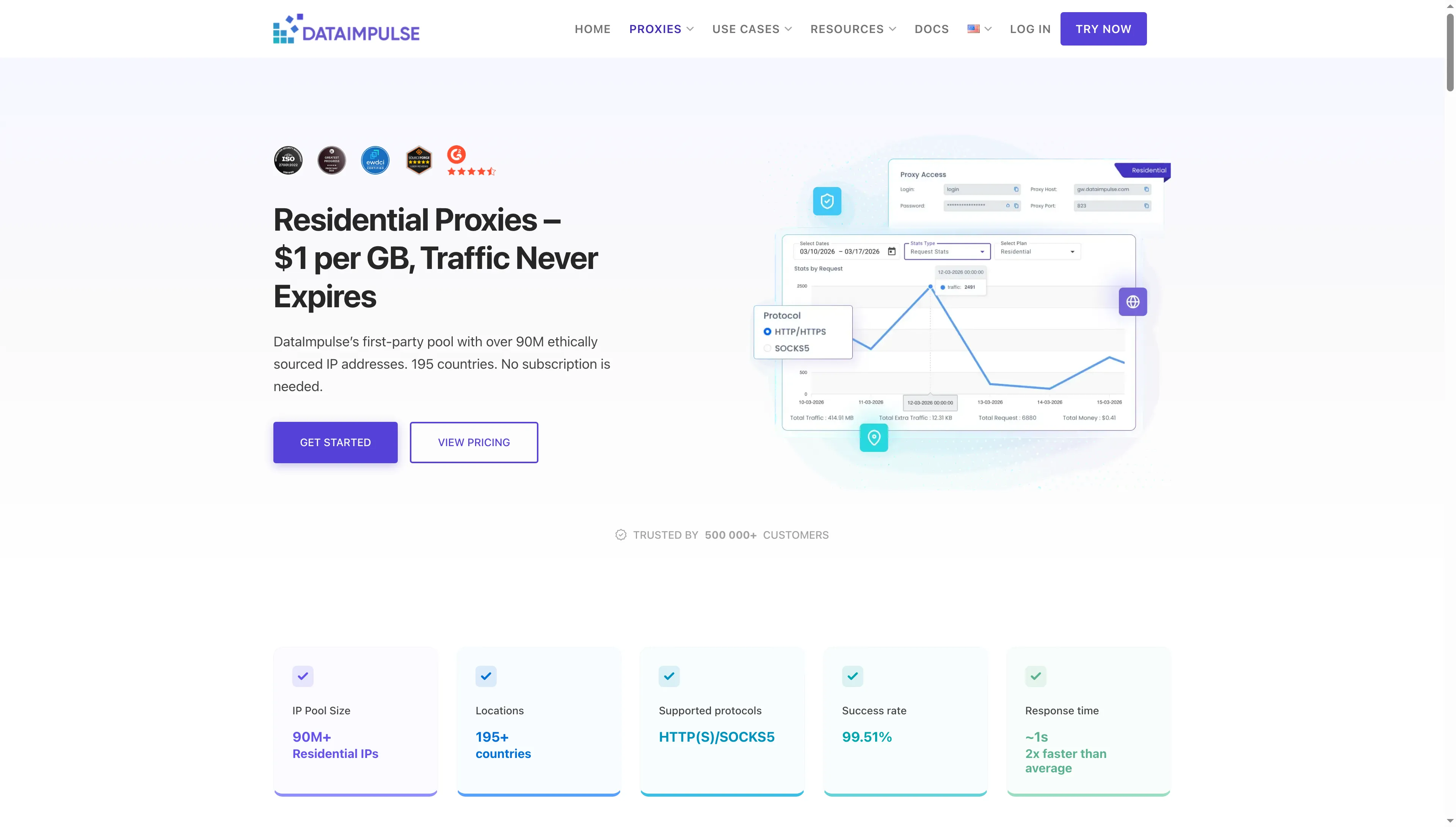
DataImpulse advertises prepaid residential traffic that does not expire.
DataImpulse pros
- $1/GB with no monthly minimum
- Traffic never expires
- HTTP(S), SOCKS5, and country targeting included
DataImpulse cons
- Basic top-up starts at $50 for 50 GB
- $5 welcome offer is a one-time purchase
DataImpulse is a strong fit if you want to buy residential bandwidth in advance and use it when a project needs it. Its official page lists residential traffic at $1 per GB, no subscription or monthly minimum, and traffic that does not expire.
The first-time $5 offer buys 5 GB once. After that, the published Basic package is $50 for 50 GB; the 1 TB package is $800. Country targeting is included, and the product page lists HTTP(S) and SOCKS5.
Non-expiring traffic suits stop-start jobs. The catch is the 50 GB pack, which leaves a lot unused if your batch needs only a few gigabytes. The distinction matters in a 10 GB-per-month budget: buying three 50 GB packages over the year costs $150 and leaves 30 GB unused. If you need 100 GB monthly, one 1 TB package plus four Basic top-ups totals $1,000 for 1.2 TB.
Product pricing — DataImpulse
$5 for 5 GB once for new customers; then $50 for 50 GB or $800 for 1 TB. See DataImpulse residential pricing.
2. Decodo: Best for clear monthly traffic tiers
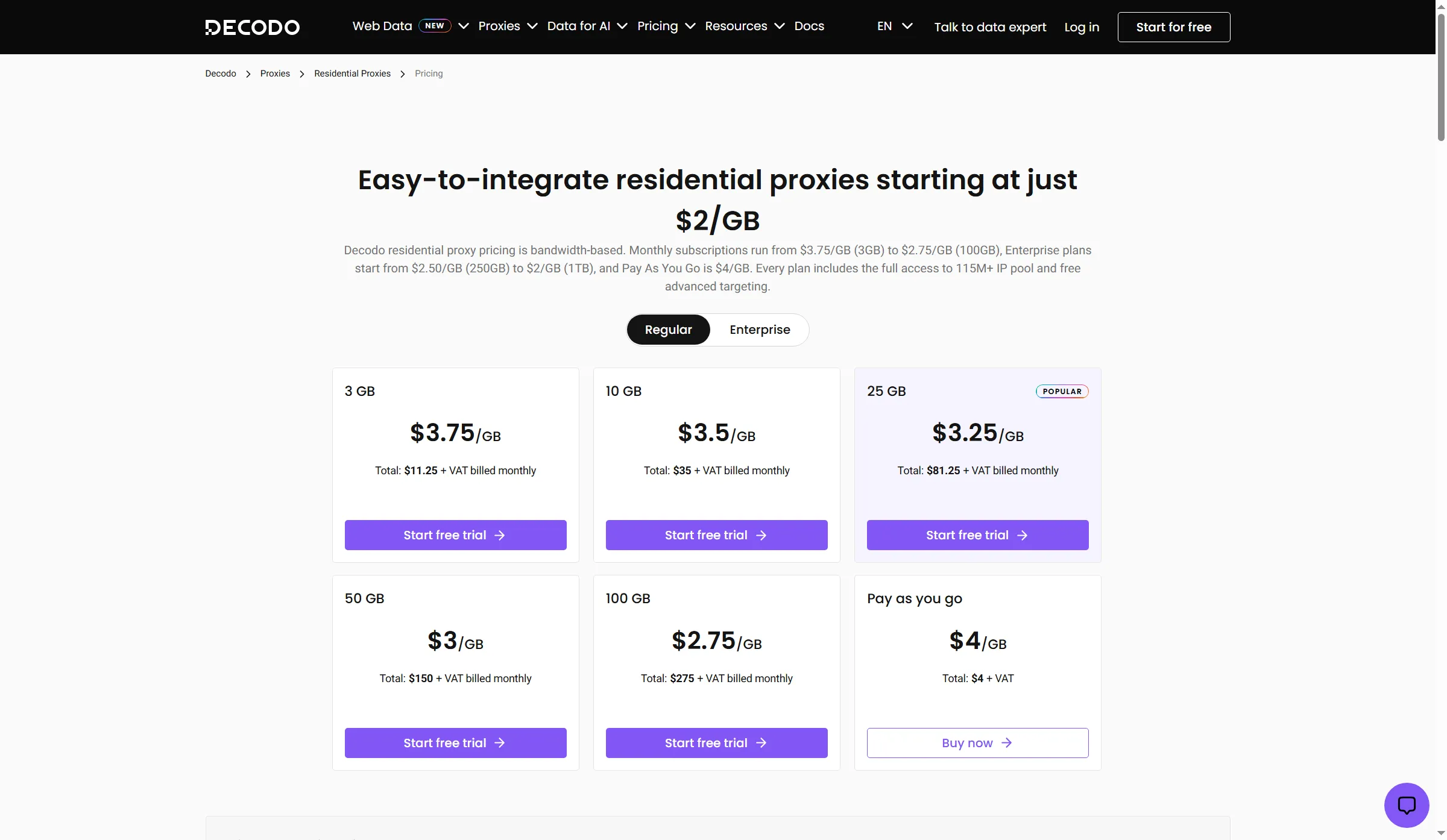
Decodo’s monthly allowance ladder makes 10–100 GB budgeting easy to scan, with PAYG beside the tiers.
Decodo pros
- 10 GB tier costs $35/month
- Rotating and sticky sessions included
- HTTP(S), SOCKS5, and advanced targeting
Decodo cons
- Trial signup requires card details
- 100 GB tier costs $275/month before VAT
Decodo’s residential plans start at 10 GB for $35/month and scale to 100 GB for $275/month; PAYG costs $4/GB if your volume varies.
The page includes the same residential pool and advanced targeting across those plans, plus HTTP(S), SOCKS5, rotating sessions, and sticky sessions. The allowance ladder is easiest to budget when you reliably use 25 or 100 GB each month. The trial requires a payment card. I'd skip Decodo if you need to test residential traffic before sharing card details.
Recent Trustpilot reviews mention account verification and static ISP products; those complaints don't tell you how Decodo's rotating residential pool performs.
Product pricing — Decodo
Before VAT, 10 GB monthly starts at $35; 100 GB is $275 per month; PAYG is $4/GB. See Decodo residential pricing.
3. Webshare Rotating Residential: Best for stepping up from small monthly bundles
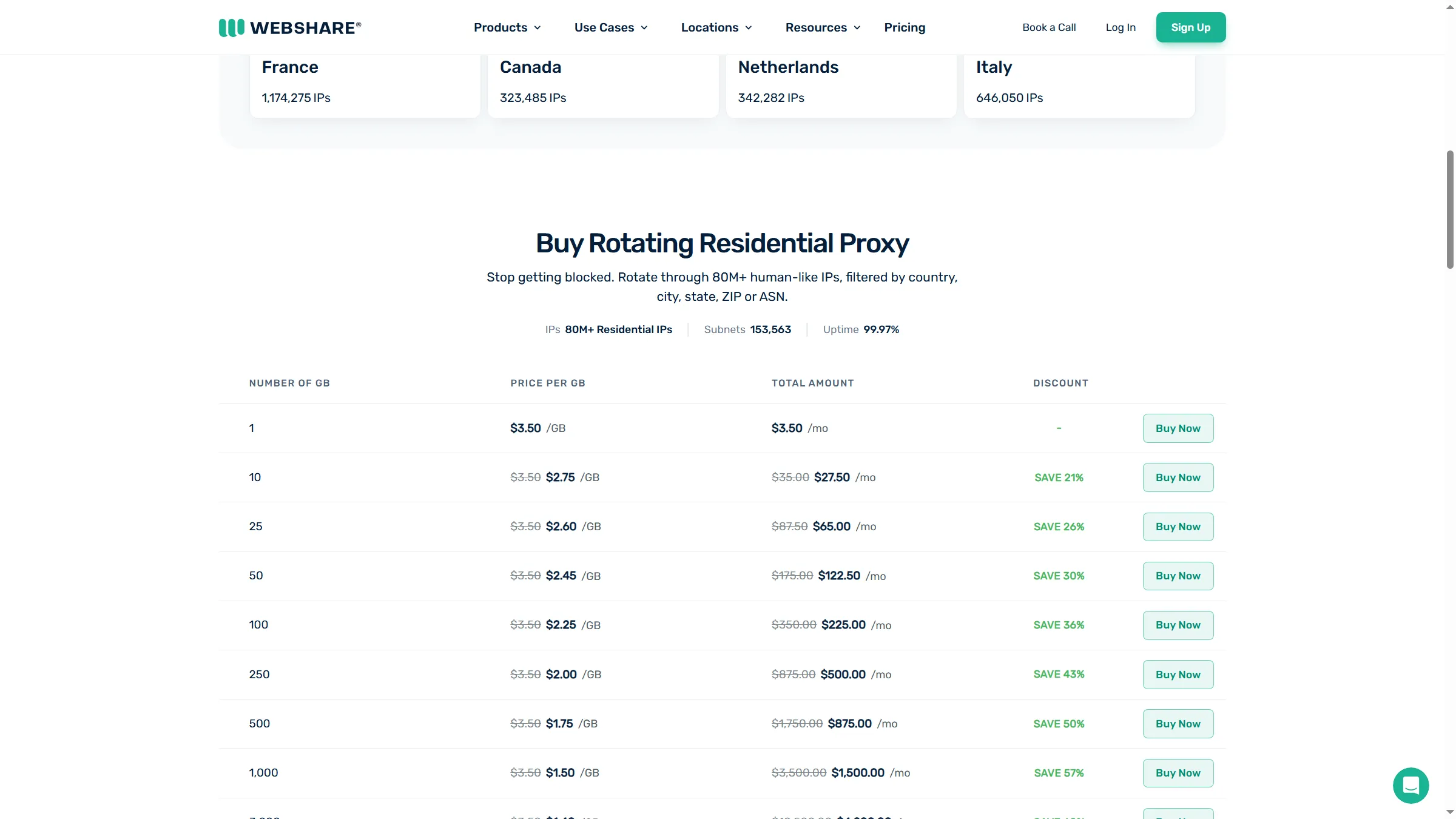
Webshare’s monthly selector starts at 1 GB and shows tiers through 1,000 GB, making small bundle costs easy to compare.
Webshare pros
- 10 GB costs $27.50/month
- 100 GB costs $225/month
- Selector scales to 3,000 GB
Webshare cons
- Free 10-proxy offer is datacenter only
- Static ISP addresses are a separate product
Webshare's rotating residential product starts at 1 GB per month and scales to 3,000 GB. The current selector shows 10 GB at $27.50 per month and 100 GB at $225 per month, with lower per-GB rates at larger bundles.
The product naming is the trap: Webshare sells datacenter Proxy Server plans, static residential ISP proxies, and rotating residential proxies. The free offer—10 shared proxies and 1 GB per month—is for Proxy Server, not for the rotating residential product. Static residential is priced per IP and keeps a different kind of address; it is not a substitute for a rotating pool when a task needs varied exits.
Recent Webshare reviews mention cancellation confusion and static-IP expectations, so check renewal settings and make sure you're buying rotating residential traffic.
Product pricing — Webshare Rotating Residential
Rotating Residential starts at $3.50/GB for 1 GB, with current selector discounts at larger monthly sizes. The 10 GB tier is $27.50, and 100 GB is $225. See Webshare Rotating Residential pricing.
4. SOAX: Best for comparing country-tier rates before you commit
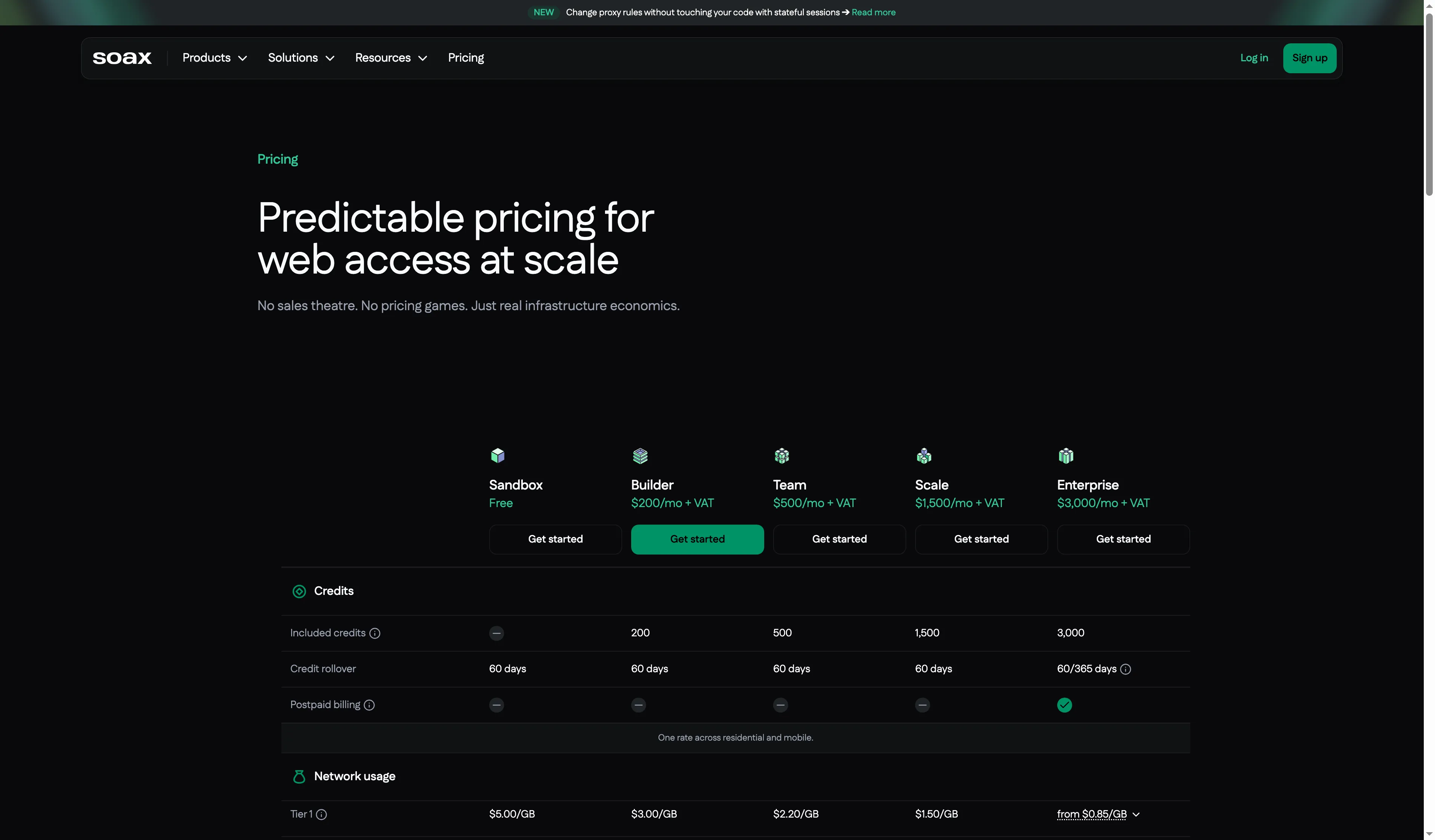
SOAX pairs country-based rates with monthly credits, helping buyers compare location-sensitive costs.
SOAX pros
- US Builder rate is $3/GB
- Builder includes $200 monthly credits
- Credits roll over for 60 days
SOAX cons
- Builder minimum is $200/month
- Sandbox includes no traffic credits
SOAX’s US Builder rate is $3/GB, but the plan has a $200 monthly floor; that makes it a better fit for steady location-sensitive work than a small 10 GB test. At 100 GB, the calculator reaches $300/month by adding $100 in credits to the base plan.
I found the US location premium easy to spot in SOAX’s calculator, but the $200 monthly minimum matters more than its $3/GB US rate for a 10 GB workload. The free Sandbox has no traffic credits. Builder includes $200 in monthly credits, while Team is $500 and Scale is $1,500; monthly credits expire after 60 days.
Trustpilot shows 3.3 across 148 SOAX company reviews and no recent invitations; recent complaints about usage accounting and rapid rotation make me watch the billing meter and confirm session behavior before a paid test.
Product pricing — SOAX
Sandbox is free but has no traffic credits; Builder starts at $200/month, with US Tier 1 traffic at $3/GB and usage credits expiring after 60 days. See SOAX pricing and calculator.
5. Oxylabs: Best for a control-heavy setup with a free welcome credit
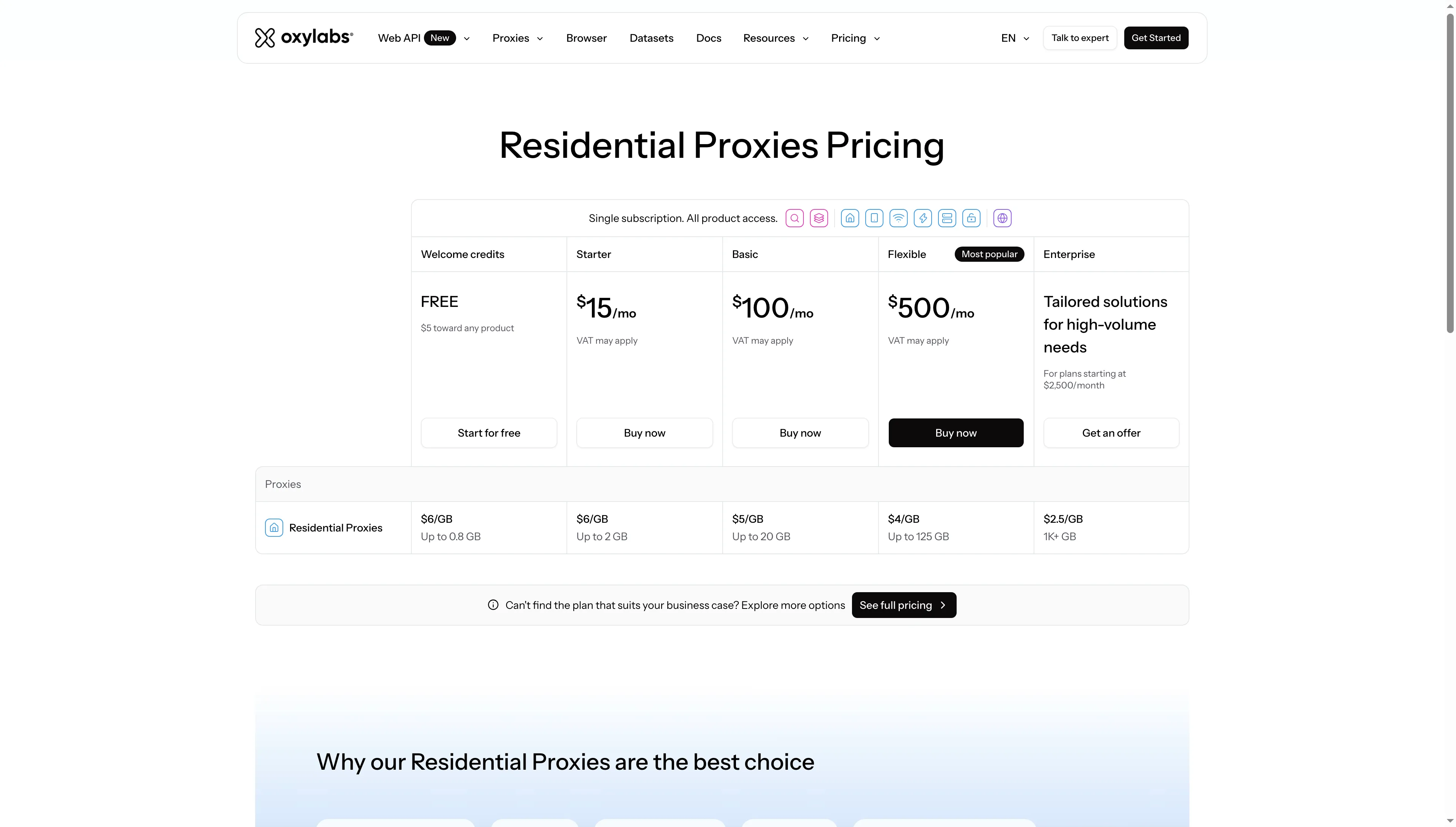
Oxylabs pairs a $5 welcome credit with clear Starter, Basic, and Flexible traffic limits.
Oxylabs pros
- $5 welcome credit for residential traffic
- Starter includes up to 2 GB for $15/month
- HTTP(S), HTTPS, SOCKS5, and sticky options
Oxylabs cons
- Residential spend cap was off by default
- Basic plan starts at $100/month
Oxylabs pairs a one-time $5 welcome credit with protocol and session controls; the Starter plan is $15/month for up to 2 GB. Basic is $100 for 20 GB, Flexible is $500 for 125 GB, and Enterprise starts at $2,500/month for 1 TB or more. VAT may apply.
I signed up, verified my email, and opened a residential instance without adding a card or completing KYC. The generator showed HTTP, HTTPS, and SOCKS5 plus rotating and sticky options. My main gripe is that the spending cap was disabled by default. I'd turn it on before sending requests so an unfinished job does not keep consuming bandwidth.
One recent Oxylabs Trustpilot reviewer edited a checkout complaint to say the refund arrived. Scraper API reviews speak to that product and tell you little about Residential Proxy Pool performance.
Product pricing — Oxylabs
$15/month for up to 2 GB; $100 for up to 20 GB; $500 for up to 125 GB; enterprise starts at $2,500/month for 1 TB+. See Oxylabs residential pricing.
6. IPRoyal: Best for small one-off purchases that can wait
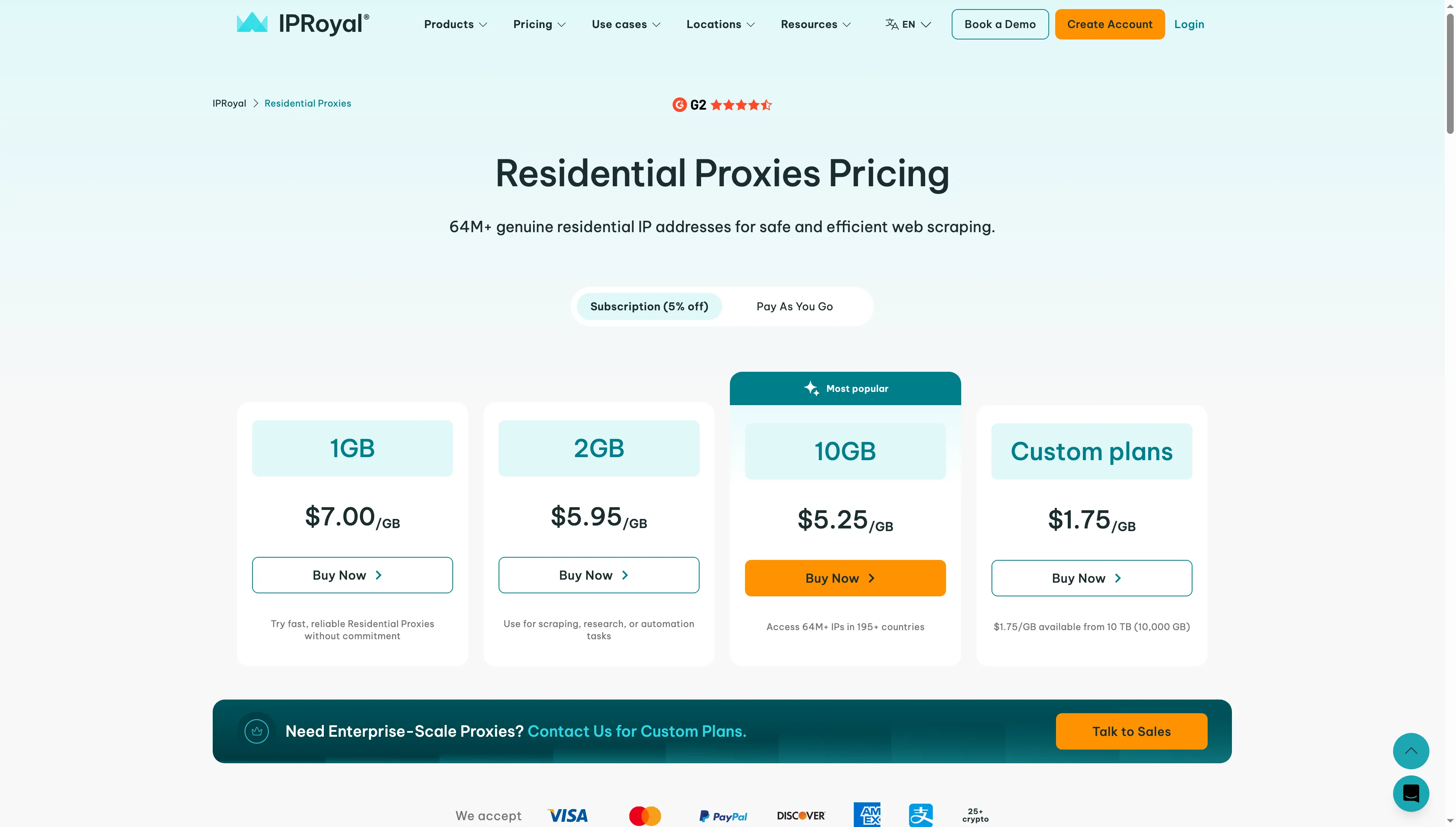
IPRoyal’s $7 one-gigabyte package suits small purchases, and the PAYG selector sits beside subscription pricing.
IPRoyal pros
- Traffic does not expire
- 1 GB subscription package costs $7
- Subscription and PAYG options available
IPRoyal cons
- 10 GB subscription package costs $52.50
- 10 TB minimum for the $1.75/GB rate
IPRoyal lets you buy 1 GB of residential traffic for $7 on subscription or $7.35 PAYG, and the traffic does not expire. The subscription rate falls to $5.95/GB for 2 GB and $5.25/GB for 10 GB. PAYG prices are slightly higher at those sizes.
IPRoyal’s side-by-side price selector lets you compare subscription and PAYG before choosing. It's worth a look for small batches that may sit unused, but the $1.75 rate requires a 10 TB order. I'd skip IPRoyal if low per-GB cost matters more than non-expiring traffic.
Product pricing — IPRoyal
1 GB is $7/GB on subscription or $7.35/GB PAYG; 10 GB is $5.25/GB on subscription or $5.51/GB PAYG. Traffic does not expire. See IPRoyal residential pricing.
7. Bright Data: Best for broad geo controls when compliance is not a blocker
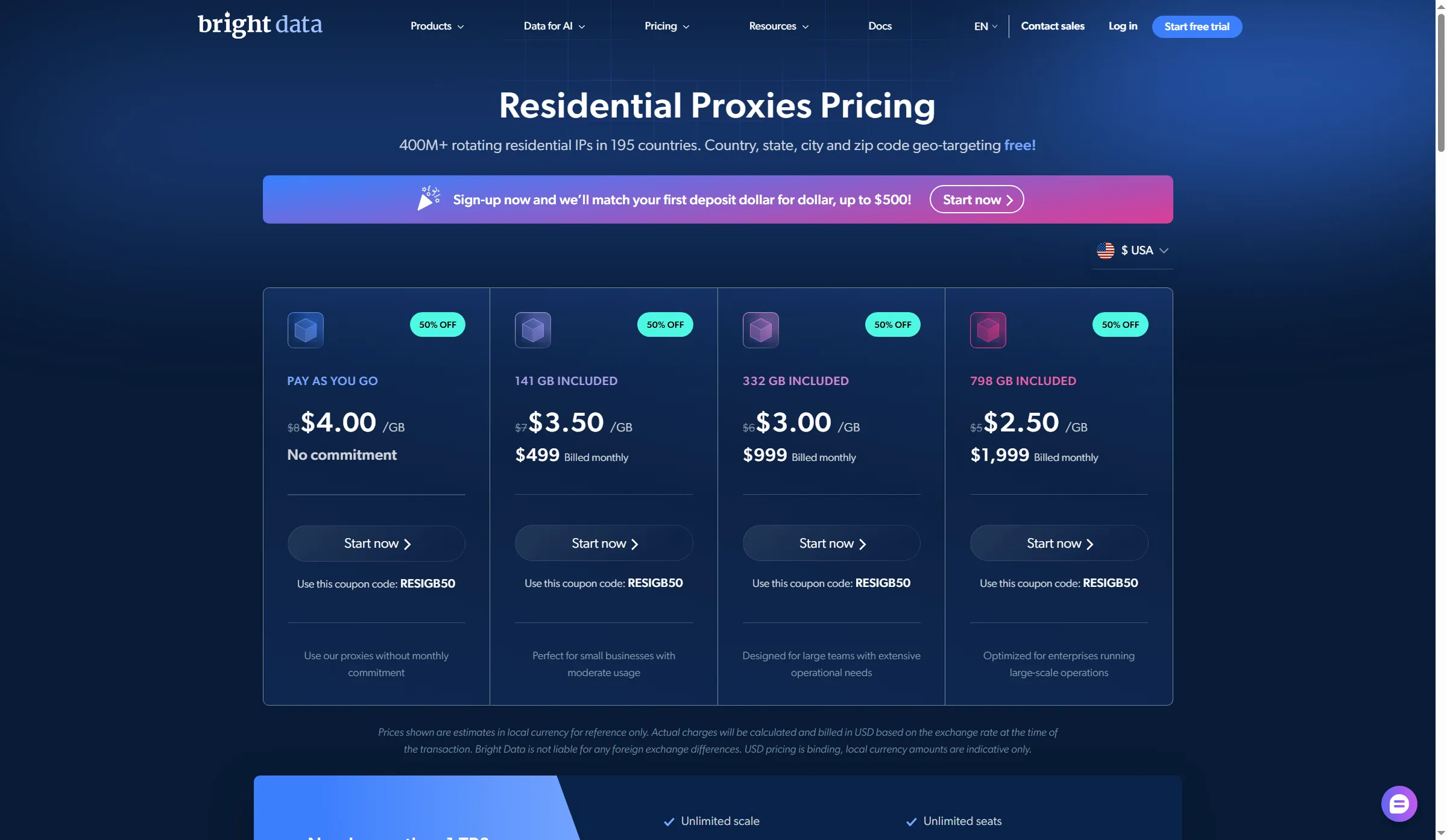
Bright Data’s city and ZIP targeting suits narrow-geo work, with PAYG and monthly packages on the same pricing page.
Bright Data pros
- Country, state, city, and ZIP targeting
- PAYG option has no monthly commitment
- Spend controls for recurring workflows
Bright Data cons
- Compliance review required before use
- Monthly packages start at $499
Bright Data offers country, state, city, and ZIP targeting on $8/GB PAYG, but residential access requires a compliance review. Its pricing page currently displays a 50% promotion using code RESIGB50. The monthly packages start at $499 for 141 GB, then $999 for 332 GB, and $1,999 for 798 GB. The page's list-price and promotion labels do not line up cleanly with every displayed allowance, so use the billed package total—not a back-calculated per-GB estimate—when budgeting.
I wouldn't pick Bright Data for a quick test. Residential access requires compliance review before use, so its broad geo controls pay off when a team can clear onboarding and run a repeatable workload.
One Bright Data Trustpilot reviewer praised a human support fix and criticized the AI-support gate. A separate complaint concerned ISP classification, a different proxy product, so it says little about residential traffic.
Product pricing — Bright Data
PAYG lists at $8/GB; RESIGB50 currently advertises 50% off residential proxies for 3 months; monthly plans start at $499 for 141 GB. KYC is required before residential use. See Bright Data residential pricing.
What makes the best residential proxy provider?
The best residential proxy provider is the one whose billing fits your traffic, whose exits cover your target location, whose sessions fit the task, and whose access terms you can meet.
Billing and traffic expiry
Match the billable unit to your workload: recurring monthly bundles suit steady demand, while pay-as-you-go or non-expiring traffic can suit irregular batches. Check the minimum purchase as well as the per-GB rate.
Location targeting and price
Confirm that the provider covers the country or city you need and whether those exits use a higher pricing tier. Bright Data lists city and ZIP targeting, while SOAX prices US traffic above lower-cost geo tiers.
Session and protocol controls
Choose rotating exits for changing residential IPs and static ISP addresses when a longer-lived address matters. Compare sticky-session limits and supported HTTP(S) or SOCKS5 access before relying on a workflow.
Account, spend, and compliance gates
Check whether signup requires a card, identity review, or a recurring commitment, and look for a spending cap before requests run. Bright Data requires compliance review; Oxylabs showed its spending cap turned off by default. Also review Linked Helper's Safety Kit.
Which residential proxy provider should you choose?
Choose DataImpulse for irregular batches, Decodo or Webshare for predictable monthly traffic, SOAX for location-priced US workloads, Oxylabs for protocol controls, IPRoyal for non-expiring small purchases, or Bright Data when you need broad targeting and can clear compliance. Start with the task's expected traffic and egress locations, then compare the billable unit, package floor, and expiry. If you need a handful of US requests, paying a $200 monthly minimum for a country-tier plan is a poor match. If work arrives in irregular batches, non-expiring prepaid traffic may beat a subscription even when its per-GB rate is higher.
Pick rotating residential proxies when you need a pool of changing residential exits. Choose static ISP proxies when the same address needs to persist; check the provider's actual session rules because a “sticky” session usually sets a maximum, not a promise that a peer IP will remain connected for that full time.
For ordinary site checks, first see whether your existing cloud, datacenter, or proxy subscription already provides the location and session behavior you need. A residential pool is not automatically better: it costs more per GB and does not guarantee access to a target site or make scraping compliant with that site's terms. Do not use proxy rotation to evade account restrictions or platform rules.
If you manage LinkedIn accounts, choose a proxy for stable, dedicated account separation and follow the platform's rules. A residential IP does not make automation safe. Linked Helper's guide to proxies for LinkedIn automation covers that separate account-management question.
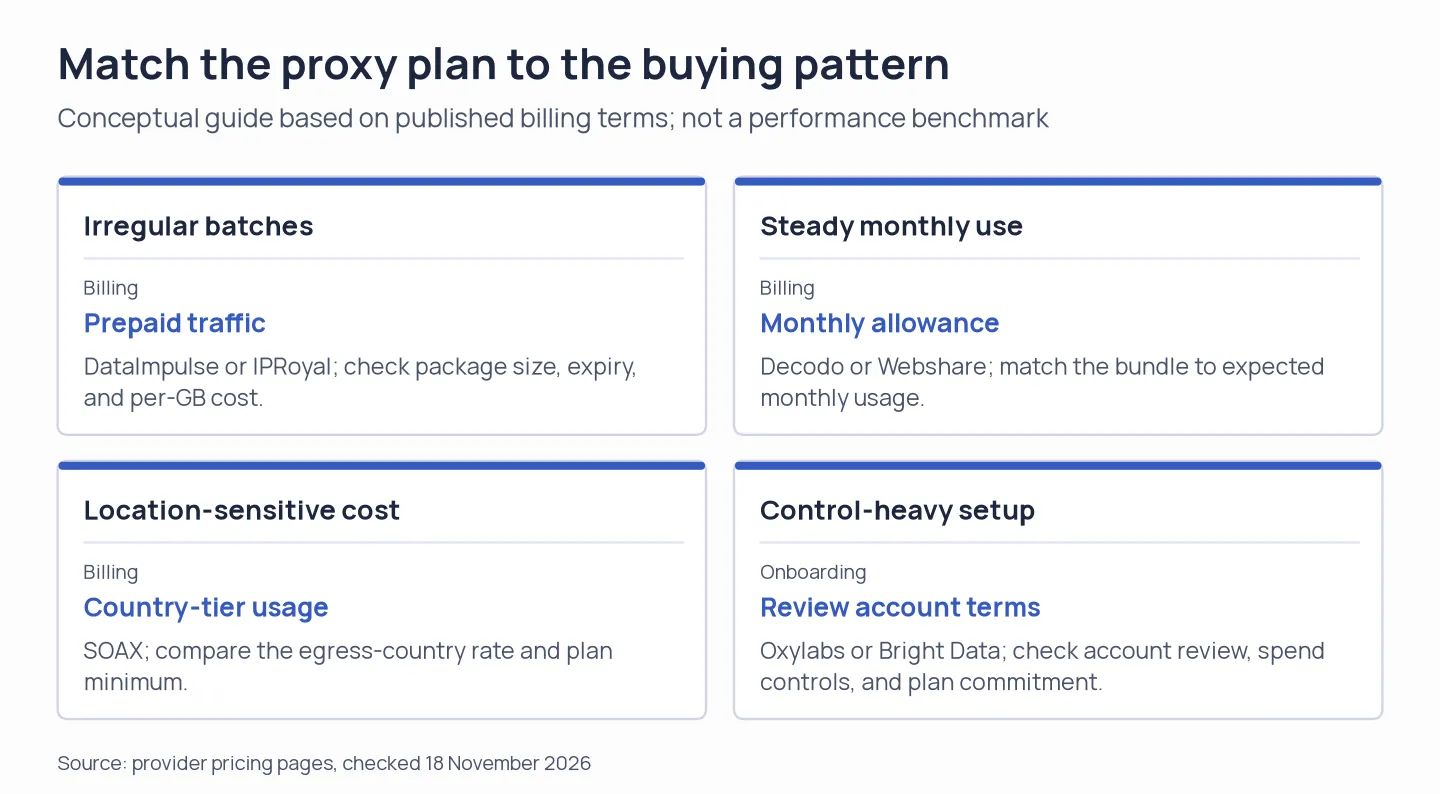
Choose a residential proxy by billing pattern and onboarding requirements, not a headline rate alone.