

 18 min read

TL;DR: 7 sales CRMs compared in November 2026
- A free start: HubSpot covers two users; Zoho CRM and Freshsales cover three, while monday CRM starts with a paid three-seat minimum.
- A visual pipeline: Pipedrive Lite is $168 per seat per year, but LeadBooster routing is an add-on below Premium.
- A call-heavy workflow: Close includes calling, but its minute and number charges sit outside the annual seat price; Freshsales phone credits are also separate.
- A larger sales process: Salesforce Pro Suite lists forecasting and quoting at $100 per user monthly; HubSpot Professional currently displays $90 per Sales Seat, plus $1,500 onboarding.
- A board-based workflow: monday CRM Standard currently displays $17 per seat monthly on annual billing ($25 standard), with a three-seat minimum and 250 custom automations per month.
What is a sales CRM?
Sales CRM software keeps prospect and customer records, tracks deals through a pipeline, and provides reps with a shared history of calls, meetings, and follow-ups. Teams in sales rely on it to assign leads, forecast revenue, and coordinate work. Some products add email sequences, dialers, or marketing tools, but those features can require a higher plan or usage fees.
At a glance: the best sales CRM by team need
Choose HubSpot for shared sales and marketing records, Salesforce for complex sales processes, or Pipedrive for a visual deal pipeline. The table matches each CRM to its strongest sales use and the cost detail that could change your shortlist.
| Sales CRM | Best for | Starting point | Watch for |
|---|---|---|---|
| HubSpot Sales Hub | Teams that share sales and marketing records | Free for up to 2 users; paid Starter from $20/Core Seat/month standard | Professional adds $1,500 onboarding and uses Sales Seats |
| Salesforce Sales Cloud | Teams with complex sales processes | Starter Suite at $25/user/month | Forecasting and quoting are listed in Pro Suite at $100/user/month |
| Pipedrive | Reps who want a visual deal pipeline | Lite at $14/seat/month billed annually | LeadBooster routing is an add-on below Premium |
| Zoho CRM | Small teams seeking a low-cost CRM | Free for up to 3 users | Standard and higher tiers unlock different email, calling, and pipeline tools |
| Close | Call-heavy teams | Solo at $9/user/month billed annually | Calling and SMS add usage costs; Solo is limited to one user and 10,000 leads |
| Freshsales | Smaller teams combining CRM and phone tools | Free for up to 3 users; Growth at $9/user/month billed annually | Phone credits are separate, and sequences start at Pro |
| monday CRM | Teams that prefer configurable boards | Basic currently $12/seat/month on annual billing ($18 standard) | Minimum of 3 seats, then blocks of 5 |
What makes the best sales CRM?
Choose a sales CRM by pipeline fit, email and calendar work, calling, lead qualification, lead assignment, and total cost. I compared one-, five-, and ten-seat configurations. Lead routing can mean qualifying an inquiry or assigning a captured lead, and products can implement those jobs differently.
Sales CRM pricing for 1, 5, and 10 seats
For one rep, annual prices range from $0 on free tiers to $648 for monday CRM's three-seat minimum at standard rates. At standard rates, five-seat plans range from $540 to $5,940; ten-seat totals range from $2,760 to $13,500 including required onboarding. monday currently displays lower annual offers, and HubSpot Professional's offer reduces its first-year total to $12,300. Taxes and usage fees are excluded.
| Team setup | HubSpot Sales Hub | Salesforce Sales Cloud | Pipedrive | Zoho CRM | Close | Freshsales | monday CRM |
|---|---|---|---|---|---|---|---|
| 1 rep: contacts, deals, one pipeline | Free: $0/year, up to 2 users | Starter Suite: $300/year | Lite: $168/year | Free: $0/year, up to 3 users | Solo: $108/year; one user, up to 10,000 leads | Free: $0/year, up to 3 users | Basic: $648/year standard ($432 at displayed offer); billed for 3 seats |
| 5 reps: shared pipeline, synced email, basic automation or assignment | Starter standard: $1,200/year; current new-customer offer displays $420/year | Starter Suite: $1,500/year | Growth: $2,340/year; LeadBooster routing costs extra | Standard: $840/year | Essentials: $2,100/year, but no workflows; Growth is $5,940/year | Growth: $540/year; phone credits cost extra | Standard: $1,500/year standard ($1,020 at displayed offer) |
| 10 reps: reporting, forecasting, and workflow automation | Professional: $13,500 standard first year or $12,300 at displayed offer, including mandatory $1,500 onboarding | Pro Suite: $12,000/year | Premium: $7,080/year; LeadBooster included | Professional: $2,760/year | Growth: $11,880/year; calling, SMS, and AI usage extra | Enterprise: $7,080/year; phone credits extra | Pro: $4,920/year standard ($3,360 at displayed offer); not a direct match for a CRM forecasting hierarchy |
At standard rates, annual totals are $0–$648 for one rep, $540–$5,940 for five reps, and $2,760–$13,500 for ten reps, including HubSpot Professional onboarding. The calculations multiply the annual-billing seat rate by paid seats and 12. monday CRM bills a one-rep team for three seats, then sells seats in blocks of five. HubSpot Professional uses Sales Seats; its first-year total is $13,500 standard or $12,300 at the displayed offer.
Phone and SMS usage can add to the seat totals. Close's published per-minute rate means 1,000 outbound minutes each month add about $240 a year before phone numbers; the actual bill depends on use.
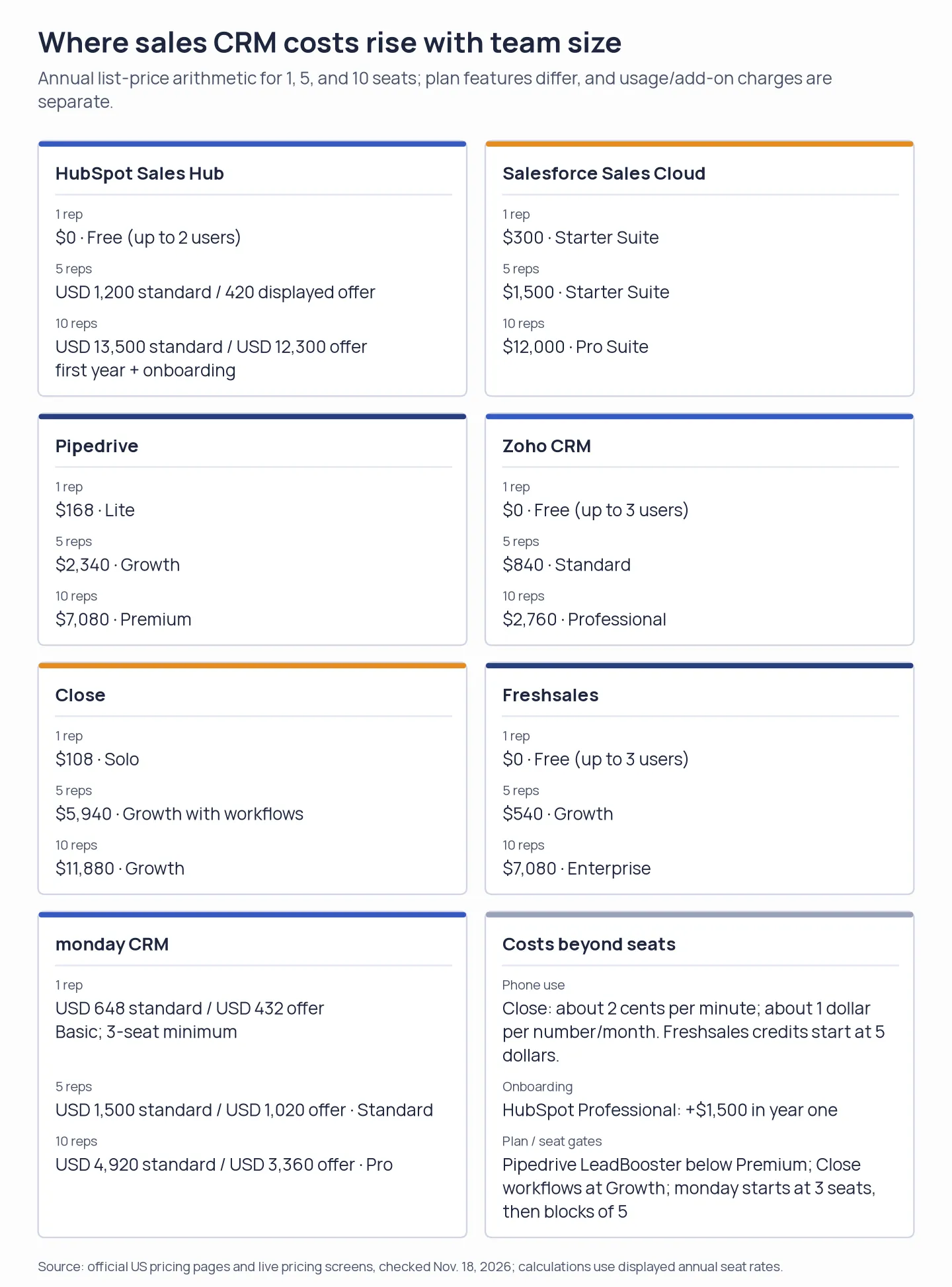
Seat price is only the starting point: workflow tiers, onboarding, minimum seats, and phone usage can change the annual bill.
1. HubSpot Sales Hub: Best for teams sharing sales and marketing data
If your team already runs marketing or service on HubSpot, Sales Hub keeps sales records alongside that activity. You can try the basic CRM with as many as two free users.
Pros
- Free tools support as many as two users, and no card is required.
- Basic sales tools remain available through Starter in one account, along with wider customer-platform utilities.
- Professional introduces conversation intelligence, forecasting, and sequences, while the free tier gives a small team a low-risk place to organize contacts. Before you label HubSpot an inexpensive team CRM, though, price out the seat types you'd need.
Cons
- At $20, the normal Core Seat pricing for starters differs from the $7 promotion for new customers.
- Professional requires a one-time $1,500 onboarding fee, while Enterprise requires $3,500.
- Before you estimate for a bigger team, tally the seat categories, since Sales Seats and Core Seats carry different prices.
In a 5/5 G2 review from October 27, 2026, Akash G. appreciated that customer context plus integrations were already in one place. In a separate 1.5/5 review from October 9, Dannielle M. doubted whether sequences offered value next to workflows. For your process, that difference counts: rep follow-up gets handled by sequences, whereas wider automation could call for a higher tier.
Begin with the free plan before purchasing seats. Then estimate the work your reps will handle weekly. Although a shared customer record helps, a growing team can soon encounter separately priced seat types, onboarding, and other costs.
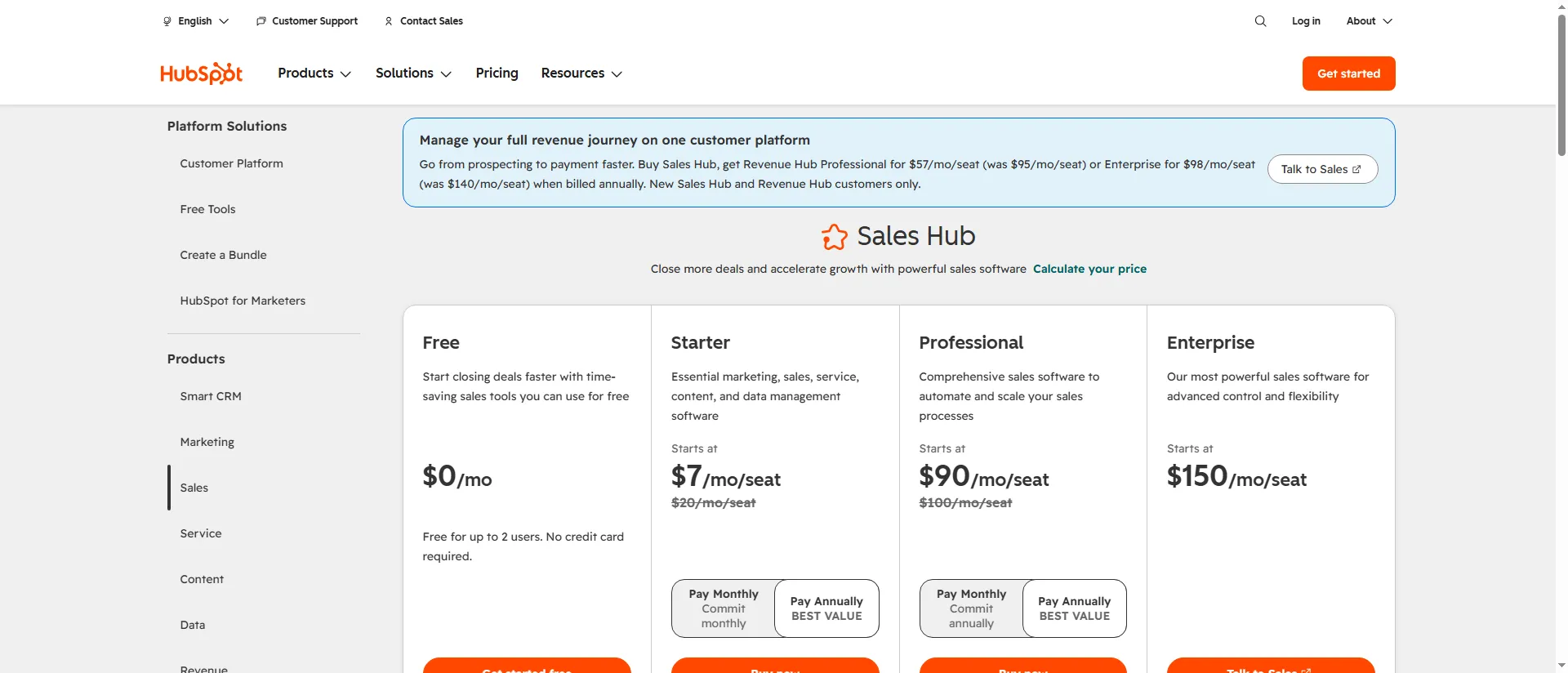
HubSpot Sales Hub shows its free, Starter, Professional, and Enterprise pricing cards; Starter and Professional list discounts below standard prices.
Product pricing — HubSpot Sales Hub
Free for up to 2 users; Starter is $20 per Core Seat/month standard, with an offer currently displayed at $7 for eligible new customers; Professional is $100 per Sales Seat/month standard (currently $90 displayed for eligible customers) plus $1,500 required onboarding.
2. Salesforce Sales Cloud: Best for configurable sales operations
Salesforce Sales Cloud suits groups requiring a CRM that they can shape around a sales process which is documented, featuring lead routing inside Starter Suite and forecasting along with quoting, as listed in Pro Suite.
Pros
- Lead routing is covered by Starter Suite, and so are lead, account, contact, and opportunity management.
- Pro Suite delivers more automation, customization, and quoting, along with forecasting. That versatility justifies its cost when managers require formal forecasts or multiple teams need distinct processes.
- For its Sales Cloud editions, Salesforce promotes a trial lasting 30 days.
Cons
- At an annual commitment, Pro Suite costs $100 each month for every user — that's four times the per-seat price of Starter.
- Setting up and maintaining more configurable sales processes can require greater administrative effort.
The Agentforce Sales page now receives redirects from Salesforce's G2 Sales Cloud profile—therefore, before relying on any review for a purchasing choice, verify that the review concerns Sales Cloud. In 2017, reviewer Eddie P. (One 5/5, first) posted, and the review was updated in September 2026. That update doesn't turn a long-running account into a new 2026 experience. The review praises centralized pipeline and reporting but also mentions the effort that customization requires.
Pick Salesforce if reps require shared ownership of records, forecasting, and sales processes that differ by team. On Pro Suite, a small team with one pipeline, plus light reporting, will pay for flexibility it might not use. For such a small team with one pipeline and light reporting, though, the administrative work outweighs that flexibility. Test LinkedIn export to Salesforce against record-ownership rules.
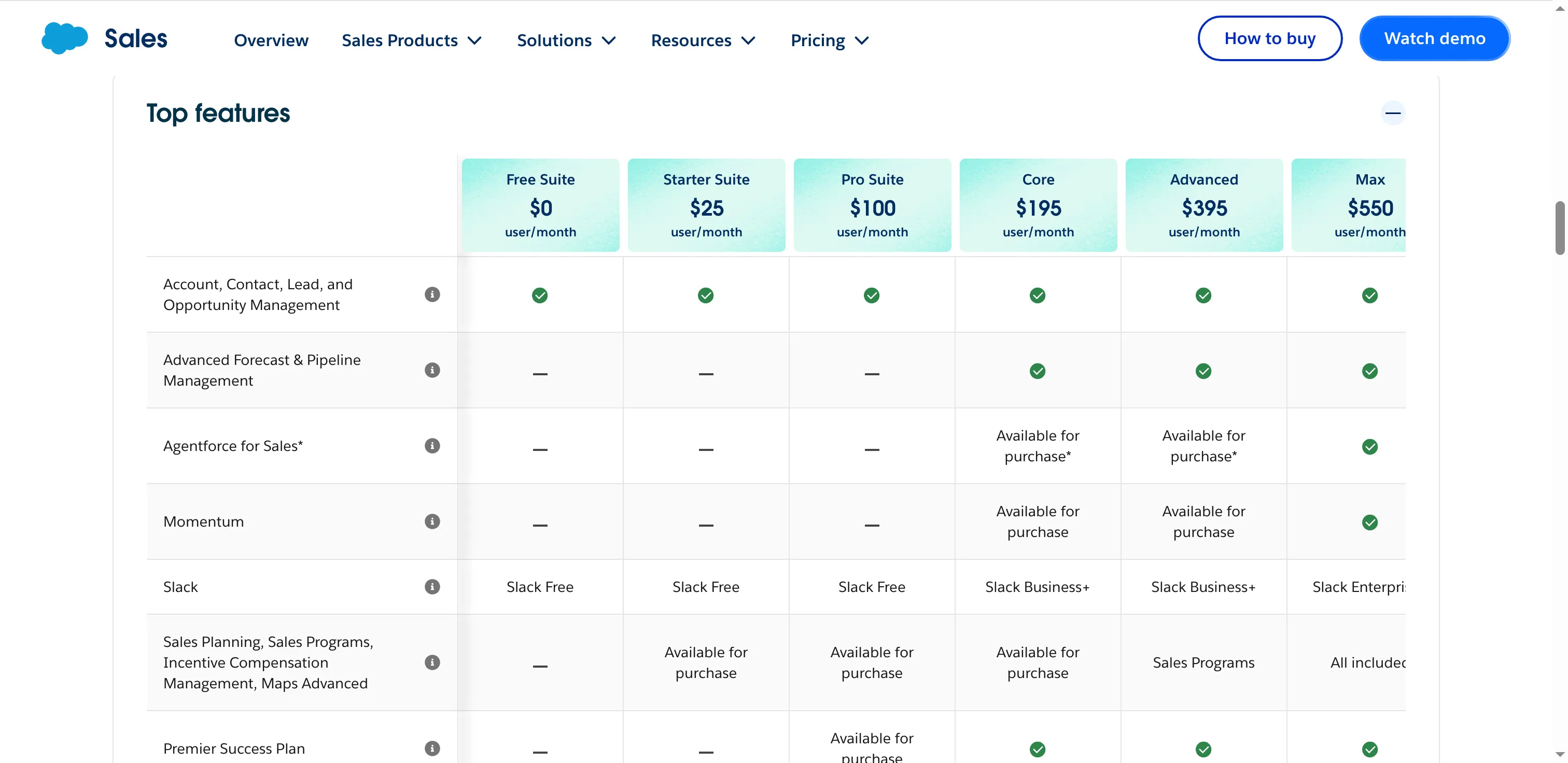
Salesforce lists its Starter Suite and Pro Suite entry plans on the sales pricing page.
Product pricing — Salesforce Sales Cloud
Starter Suite is $25 per user/month, billed monthly or annually; Pro Suite is $100 per user/month, billed annually; higher Sales Cloud editions start at $195 per user/month.
3. Pipedrive: Best for visual pipeline management
Pipedrive suits reps who want to see deal ownership and follow-ups in a visual pipeline; its Lite plan costs $168 per seat per year when paid annually.
Pros
- Each strategy comes with management of leads, pipelines, and calendars.
- Growth now includes complete email synchronization, bulk email with tracking, and sequences for following up.
- Through LeadBooster, Premium introduces lead routing and generation, plus enrichment and scoring capabilities. The pipeline-first simplicity appeals to me; I'd price that add-on before rolling Pipedrive out across a team.
Cons
- For each seat, the $168 is billed as an upfront charge under the $14 Lite annual-billing price.
- LeadBooster sits beneath Premium as an add-on; consequently, the advertised entry price can be increased by routing.
- Sandbox access, phone and email enrichment, plus extended support differ by tier.
G2, in its November 15 snapshot, shows Pipedrive rated 4.3/5 based on 5,123 reviews. Jeremy B.'s Capterra review — posted on November 12 — gave it 4.5/5, lauding the pipeline as easy to explain, though he noted uncertainty about automating data input. That review first appeared on G2, and it's flagged as having gotten a gift card.
Things I Noted
Pipedrive Lite's $14 label is a monthly equivalent, while $168 is the upfront invoice. I found annual billing already selected on the pricing page, so compare the one-time charge with your cash-flow plan before choosing a tier.
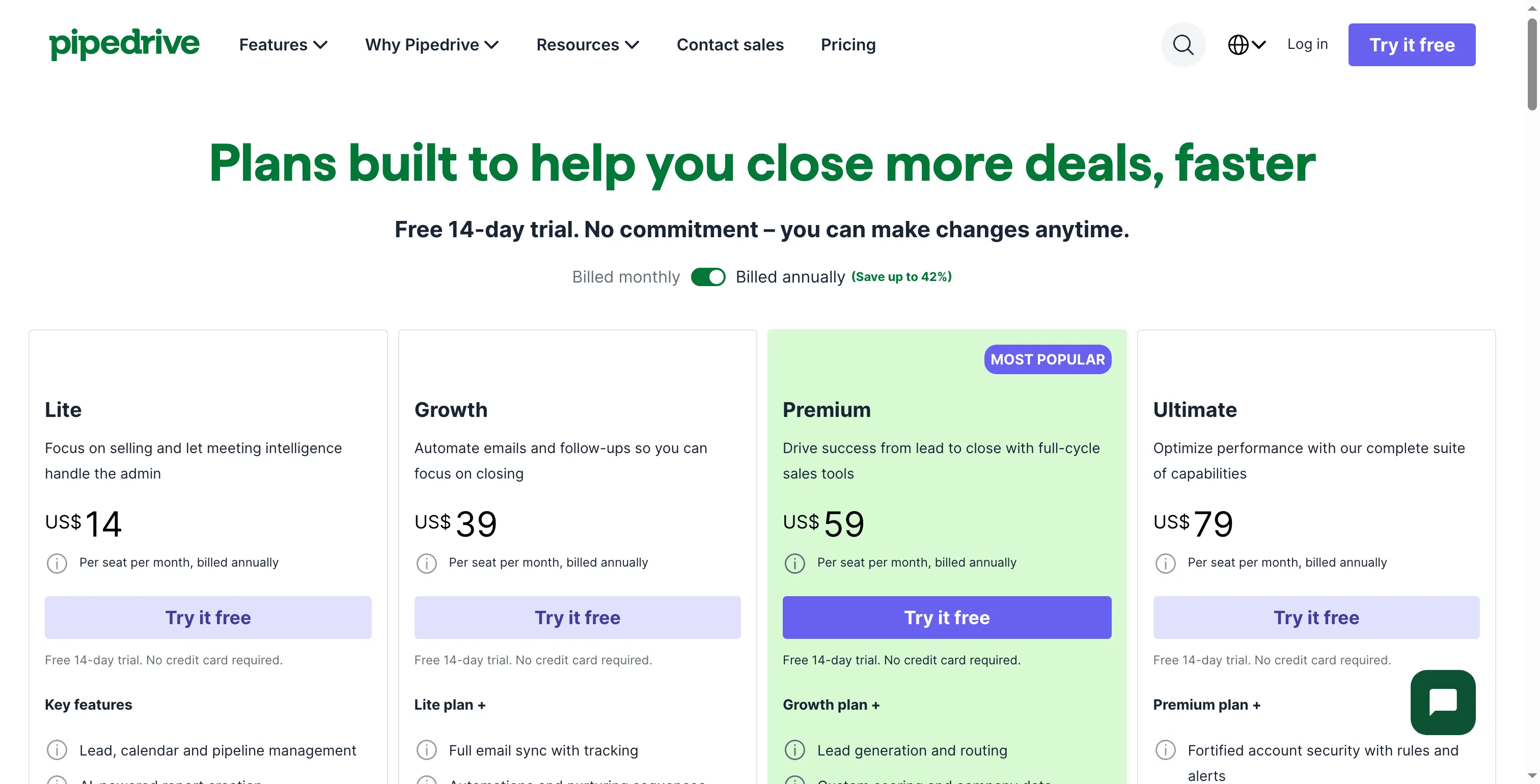
Pipedrive lists per-seat prices for its four plans when annual billing is selected.
Product pricing — Pipedrive
Lite $14/seat/month billed annually ($168/year); Growth $39 ($468/year); Premium $59 ($708/year); Ultimate $79 ($948/year). LeadBooster is included in Premium and Ultimate and sold as an add-on on lower plans.
4. Zoho CRM: Best for low-cost customization
Zoho CRM suits teams that want affordable customization beyond a shared contact list: its free plan supports three users, and Standard adds multiple pipelines and workflow tools for $14 per user monthly on annual billing.
Pros
- For as many as three users, the free plan provides leads, contacts, deals, tasks, and standard reports.
- Standard includes email integration, built-in calling, several pipelines, calendar integration, and forecasting—so before picking the free tier, you'll want to verify those entitlements.
- Professional includes process management plus wider automation, yet doesn't leap to enterprise pricing—an appealing balance between features and cost. Before picking Zoho for a heavily customized process, I'd test one with a real approval flow.
Cons
- On top of the plan price shown, local taxes might be added.
- Zoho’s no-cost plan caps data export at 10 exports, while API access is restricted to 5,000 calls each day.
- Before migrating, confirm the edition and test lead sync through the Zoho CRM LinkedIn integration—plan names by themselves won't reveal what customization or process-control capabilities your team requires.
On November 5, 2026, Greg R. posted a Zoho CRM 2/5 review via Capterra and he cited considerable work around setup & support. Before you move data over, confirm the workflow that your team intends to customize.
Things I Noted
Zoho's signup form asks for a name, email, password, phone number, and location before opening a workspace. I found the no-card free plan easy to locate, though those upfront contact fields may not fit every team's signup policy.
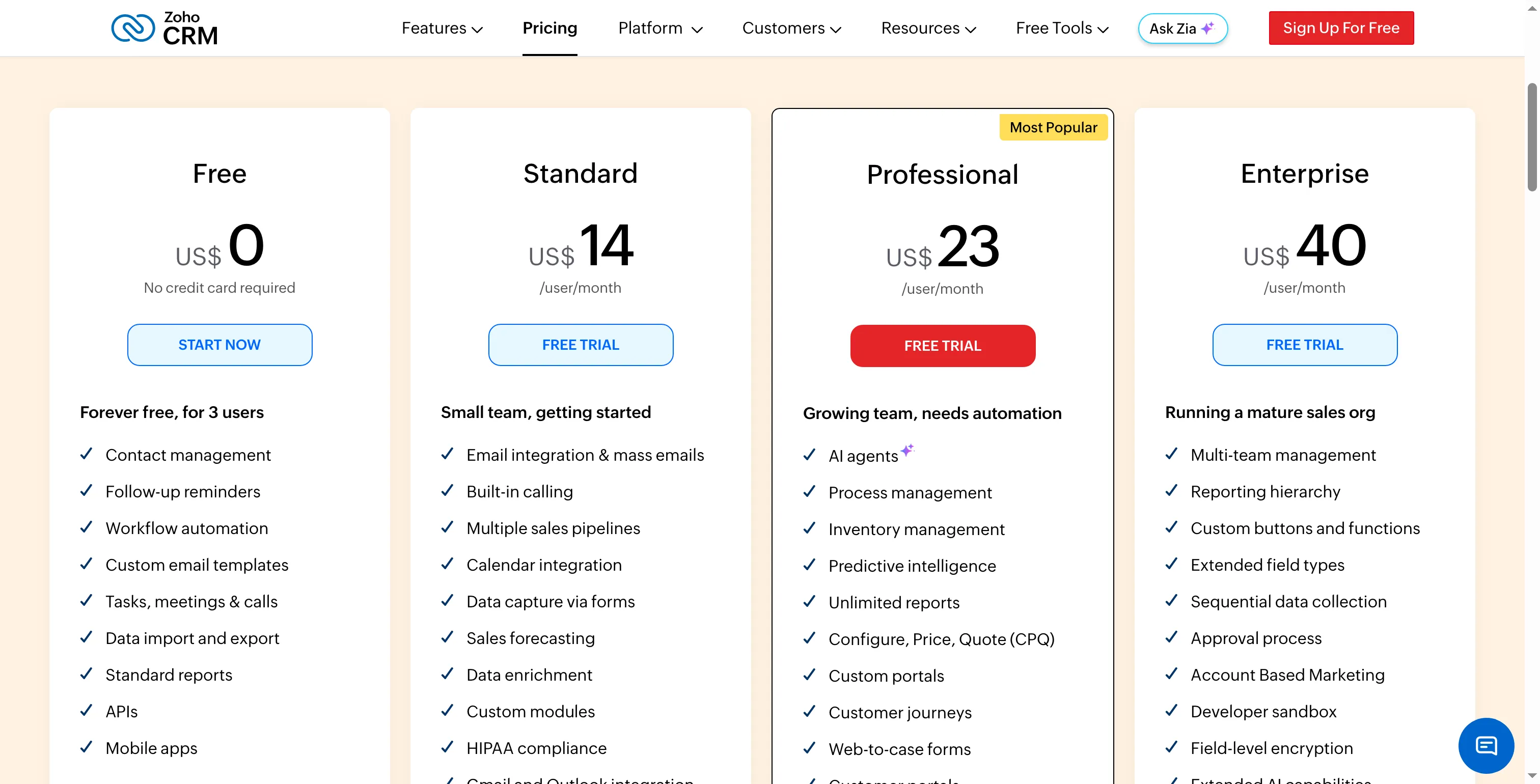
Zoho CRM's annual pricing page shows Free, Standard, Professional, and Enterprise tiers.
Product pricing — Zoho CRM
Free for up to 3 users; Standard $14/user/month; Professional $23; Enterprise $40; and Ultimate $52, all listed with annual billing. Local taxes may apply.
5. Close: Best for calling-led sales teams
Close is a good fit for a sales team that spends most of the day making calls and doing follow-ups. Yet you should weigh its cost per seat against expected phone usage and check which plan unlocks workflows.
Pros
- Integrated directly into the product are calling, email, and SMS—not handled as stand-alone CRM components.
- With Growth you get bulk email, a power dialer, and automated workflows. Yet a low-call team might end up paying for capacity it seldom taps. Meanwhile, Close suits reps who log enough call time to warrant the usage bill.
- You can test it for 14 days without a credit card.
Cons
- Solo is capped at one user plus 10,000 leads, and workflows remain excluded from Essentials.
- On annual billing, Growth runs $99 a month for each seat, with phone and SMS usage charged separately.
- Close shows outbound calling priced from roughly $0.02 per minute, along with phone numbers starting at about $1 monthly. Therefore, teams handling large volumes ought to estimate their usage costs.
One 5/5 Capterra reviewer Stefan D. praised the pipeline and dialer on November 10, 2026 — yet he noted that custom lead fields were limited. For a phone-heavy team, that's a useful tension: quick call logging helps less when reps can't capture the fields their handoff requires. I'd rather choose Close where calling is central enough to warrant a workflow tier and metered usage.
Things I Noted
Close's no-card trial starts with an email address and password, so a rep can begin without a payment step. The signup form gives no hint about the setup your pipeline will require.
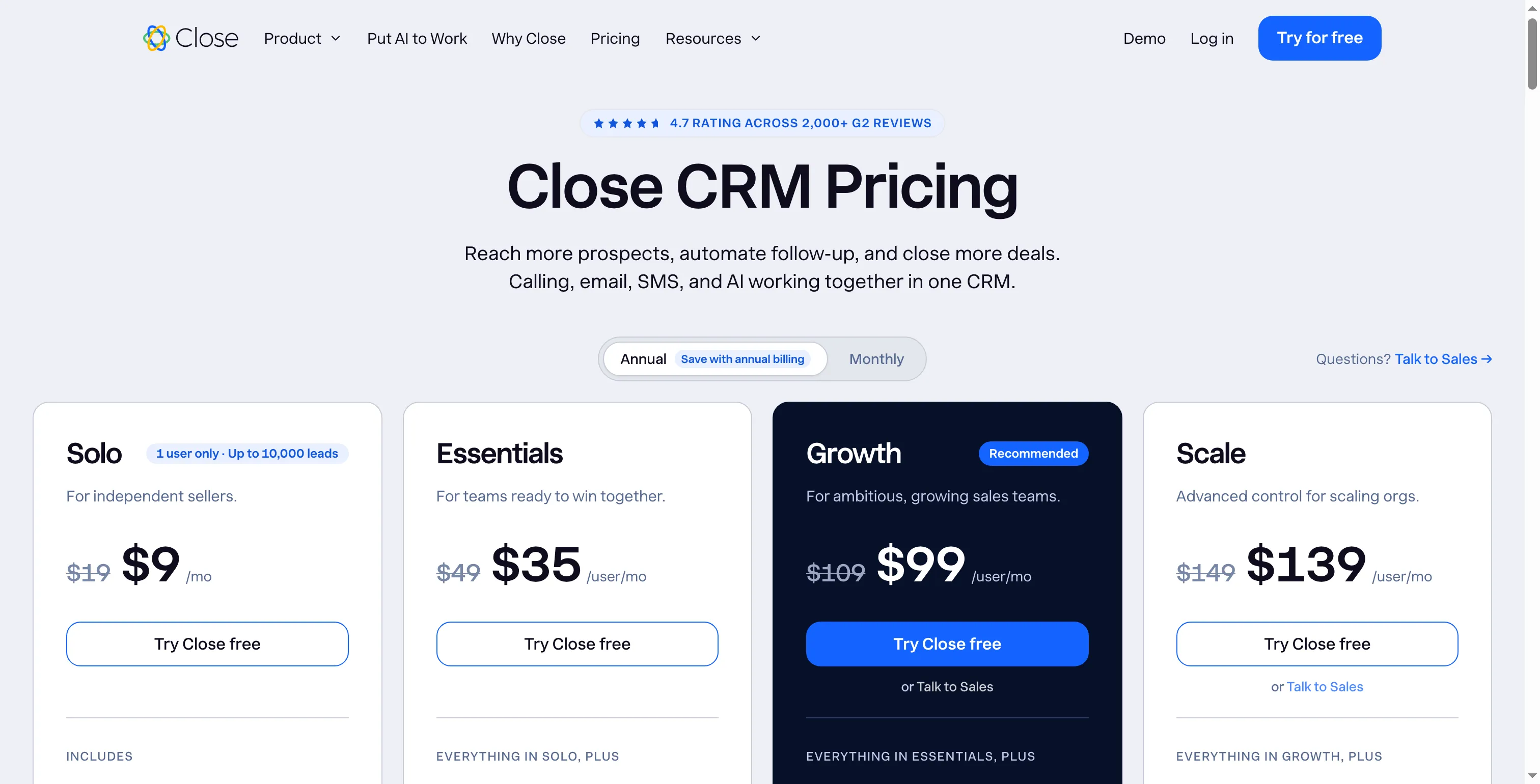
Close lists annual per-seat prices for Solo, Essentials, Growth, and Scale.
Product pricing — Close
Solo $9/user/month; Essentials $35; Growth $99; Scale $139, all on annual billing. Phone, SMS, and AI usage can add charges.
6. Freshsales: Best for smaller teams adding phone and sales sequences
With built-in phone tools and contact management for a smaller sales team, Freshsales offers a path via paid upgrade to sequences. The entry price is low.
Pros
- Growth begins at $9 per user, monthly, with annual billing, while the free tier supports as many as three users.
- Growth covers chat, phone, email, and basic workflows, too.
- Growth begins at $9; nonetheless, sequences require Pro. Pro includes territory management, advanced workflows, and sales sequences, while Enterprise provides audit logs and forecasting insights.
Cons
- Telephone credits begin at $5; consequently, a balance separate from the seat price is depleted by calls.
- On Pro, sequences and multiple pipelines are available at $39 per user each month, but aren't included in Growth.
- Came across a registration page, and it wants an email tied to a company.
On October 28, 2026, Matthias N. gave Freshsales a 4.5/5 rating on Capterra, noting that he ran a creator-client workflow through follow-up and stages. Check out Pro if your team requires multiple pipelines or sequences: Pro includes both, while Growth's $9 price covers basic workflows.
Things I Noted
Before it opened the workspace, Freshsales requested a business email. That's an operational hurdle for a freelancer or consultant using a personal mailbox, even though the product lists a free three-user plan on its plan-comparison page.
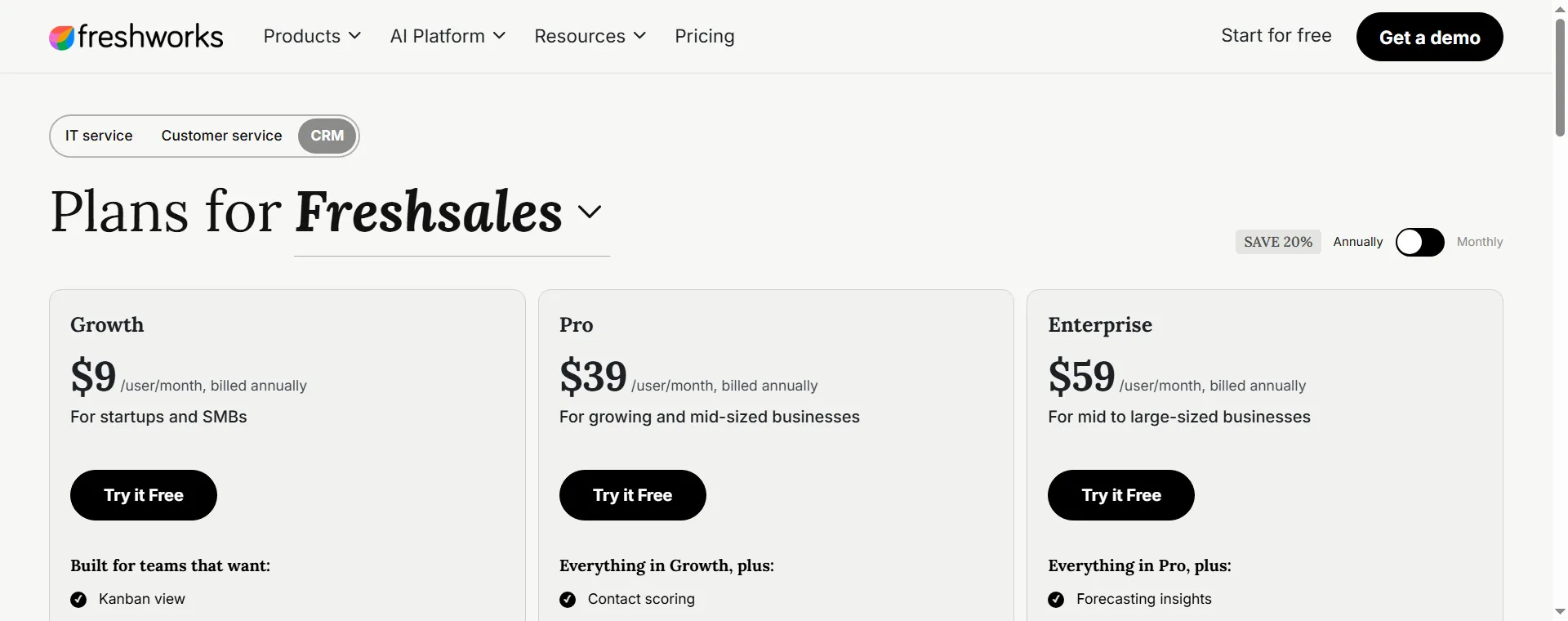
Freshsales shows annual per-seat prices for Growth, Pro, and Enterprise, with optional add-ons beneath each tier.
Product pricing — Freshsales
Free for up to 3 users; Growth $9/user/month; Pro $39; Enterprise $59, billed annually. Phone credits start at $5.
7. monday CRM: Best for sales teams that work from customizable boards
monday CRM fits teams that want configurable boards and collaborative tasks, and its Standard plan currently displays $17 per seat monthly on annual billing ($25 standard). The three-seat minimum makes the advertised per-seat figure a poor estimate for a solo buyer.
Pros
- Basic arranges deals, contacts, and leads via customizable boards.
- Standard includes 250 custom automations per month and a centralized communication timeline.
- On the annual pricing page, you can adjust the team size and watch the per-seat prices refresh.
Cons
- A one-person team pays for three seats; subsequent seat selections advance in increments of five.
- A permanent free CRM plan isn't offered; instead, there's a 14-day trial.
- You should instead compare the annual totals shown because the annual discount percentage differs between the help page and the pricing page.
On G2's November page, you'll see a 4.5/5 score derived from 1,988 reviews. Asya P. wrote an incentivized 5/5 review—seller-invited, dated November 12—which praises the configurable workflows, yet requests WhatsApp messages via automations. Verify whichever channels your team needs.
Things I Noted
monday CRM's five-seat calculator displays Standard at $17 per seat monthly on offer, or $25 standard. I selected five seats in the annual calculator; a six-seat team moves into the ten-seat block, so its bill jumps to ten seats. Choose monday when adaptable boards matter more than a conventional forecasting hierarchy.
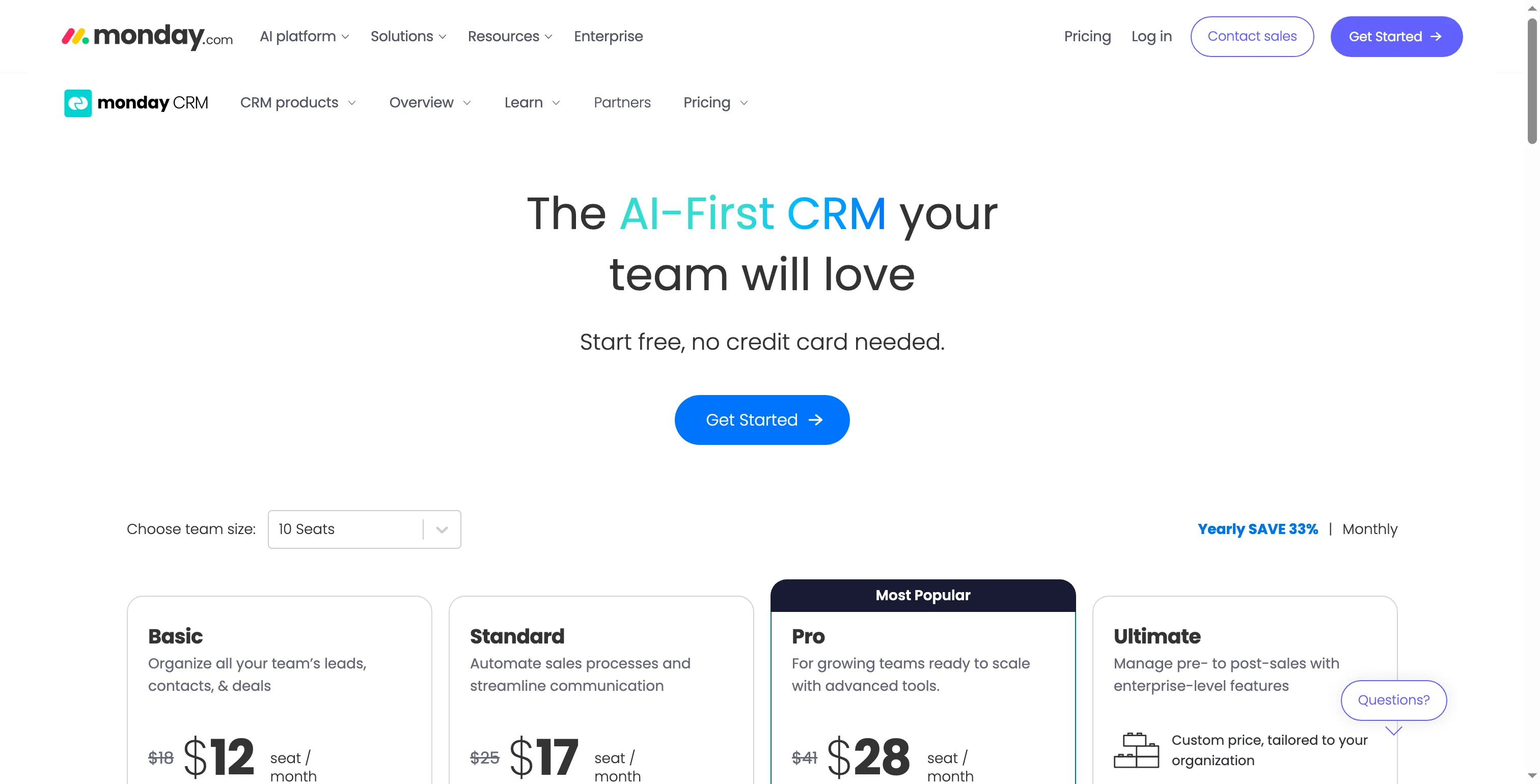
monday CRM's pricing calculator displays annual Basic, Standard, and Pro prices for a five-seat selection.
Product pricing — monday CRM
Basic $12/seat/month, Standard $17, and Pro $28 at the currently displayed annual offer; standard rates are $18/$25/$41. Annual billing; 3-seat minimum, then blocks of 5.
Check your existing CRM or calendar before buying another sales CRM
You might already have meeting booking covered by your existing subscription—so verify that first, before introducing yet another tool. One-on-one scheduling pages are among the free tools from HubSpot, though team scheduling pages need an assigned Sales or Service seat. From its availability settings, Pipedrive's Scheduler builds a shareable link. A single appointment schedule comes with Google Calendar when you have Workspace Business Starter, and Microsoft Bookings ships with Microsoft 365 Business Standard. Those booking pages can reduce scheduling effort, but they won't automatically provide your team with a shared deal pipeline, lead assignment, or revenue forecast.
Which sales CRM should you choose?
For a free start, shortlist HubSpot, Zoho CRM, or Freshsales; choose Pipedrive for a visual pipeline, and compare Salesforce Pro Suite when forecasting needs justify its higher cost. A second database should solve a defined reporting, assignment, or pipeline gap.
- One rep tracking a simple pipeline: start with HubSpot, Zoho CRM, or Freshsales's free plans if their user and feature limits fit. Close Solo is the paid option if a one-person dialer matters.
- A five-person team that needs email sync and simple automation: compare HubSpot Starter, Zoho Standard, Freshsales Growth, and monday Standard against the workflow you need. Pipedrive Growth adds email sequences, while Close Essentials doesn't include workflows.
- A call-heavy team: compare Close Growth's seat price plus minutes and numbers with Freshsales phone credits. “Built-in phone” still leaves the monthly usage bill to calculate.
- A ten-person team with forecasting requirements: check who owns forecast setup and what managers need to see. Salesforce Pro Suite, HubSpot Professional, and Freshsales Enterprise publish relevant features at higher tiers; Zoho and monday offer lower-cost alternatives with different reporting models.
- Already paying for a CRM or productivity suite: keep the existing pipeline if it handles contact ownership and reporting; add a new CRM only for a specific gap. A calendar booking page is useful for meetings, but it isn't a replacement for a deal pipeline or team forecast.