

 15 min read

TL;DR
- For a smaller sales team, Pipedrive serves as the practical starting point. A forecast view is included in Growth, whereas Premium is required by deal-revenue forecast reports.
- HubSpot Sales Hub places manager forecasts alongside HubSpot deals; however, Professional begins at $90 monthly per Sales seat when billed annually, plus a $1,500 onboarding fee.
- Salesforce Sales Cloud bundles fundamental forecasting within Pro Suite, priced at $100 monthly per user when billed yearly. Before you accept that as a full quote, confirm which edition and fields you require.
- Weflow brings forecast rollups and submissions into Salesforce; because it has a ten-user minimum, its true floor comes to $4,680 annually.
- Forecastio brings forecast tracking, along with scenario planning, into HubSpot, starting at $249 monthly when billed yearly for two seats.
- Clari Forecast suits organizations requiring structured summaries and pipeline review. Cost: quote-only.
What is sales forecasting software?
Sales forecasting software uses open deals, past results, seller judgment, or some combination to project bookings or revenue. CRM tools keep forecasts beside the pipeline, while overlays gather rep commits, track deal movement, and build manager rollups. Forecast quality depends on sound assumptions and regular deal updates from the team.
At a glance
Pipedrive costs less for a basic CRM forecast. HubSpot adds onboarding, Weflow has a seat minimum, and Clari requires a quote. The table compares each tool’s fit and price basis, including the main constraint that can change what you pay.
| Tool | Best for | Forecast-capable price basis | Main constraint |
|---|---|---|---|
| Pipedrive | Small teams that want a forecast beside their deals | Growth $39/seat/month annually, Premium $59 for deal-revenue reports | Monthly billing costs more, and report access varies by plan |
| HubSpot Sales Hub | Teams already working in HubSpot | Professional $90/Sales seat/month annually | $1,500 onboarding fee, plus an eligible paid seat for forecasters |
| Salesforce Sales Cloud | Teams configuring CRM and forecast together | Pro Suite $100/user/month annually | Higher tiers and advanced capabilities need separate validation |
| Weflow | Salesforce teams collecting rep submissions and rollups | $39/user/month annually, 10-seat minimum | $4,680 annual minimum plus Salesforce |
| Forecastio | HubSpot teams that need scenarios and forecast history | $249/month annually for two seats | Adds to HubSpot, and edition compatibility needs confirmation |
| Clari Forecast | Multi-team rollups and pipeline inspection | Quote | Public list pricing is unavailable |
What makes the best sales forecasting software?
The best sales forecasting software gives managers a clear view of forecast inputs, rollups, CRM fit, history, and total commitment. Before you compare dashboards, I'd check these five things:
- Forecast inputs: Does the total use deal amount, close date, stage probability, a model, seller commit, or a mix? A weighted pipeline and a rep-submitted commit answer different questions, so the forecast view should name which number it shows.
- Rollups and overrides: Can managers see rep submissions and their own adjustments separately? A team total is less useful when you can’t trace how it changed from the rep’s commit to the manager’s override.
- CRM fit and data freshness: Confirm the CRM edition, objects, fields, sync direction, and history the product needs. A logo in an integrations list doesn’t tell you which pipeline data are included.
- History and accuracy: Look for saved forecast snapshots at the same horizon as your review cadence. Compare a prior forecast with its result, because a current pipeline total can’t show what the team expected last month.
- Total commitment: Price every person who needs to submit or inspect the forecast; then add onboarding, minimum seats, and the existing CRM. A starting price isn’t a team budget.
1. Pipedrive: Best for a smaller team forecasting from its CRM
Pipedrive has no free sales forecasting plan beyond its 14-day trial; Growth gives you a forecast beside your deal pipeline. The current plan matrix lists Forecast view on Growth and higher tiers, whereas deal-revenue forecast reports remain a Premium capability.
I switched the billing selector from annual to monthly, and Growth rose from $39 to $49 per seat while Premium moved from $59 to $79. The 14-day trial doesn’t require a card. I'd choose Pipedrive for a modest team that needs a basic CRM forecast. (Pipedrive pricing)
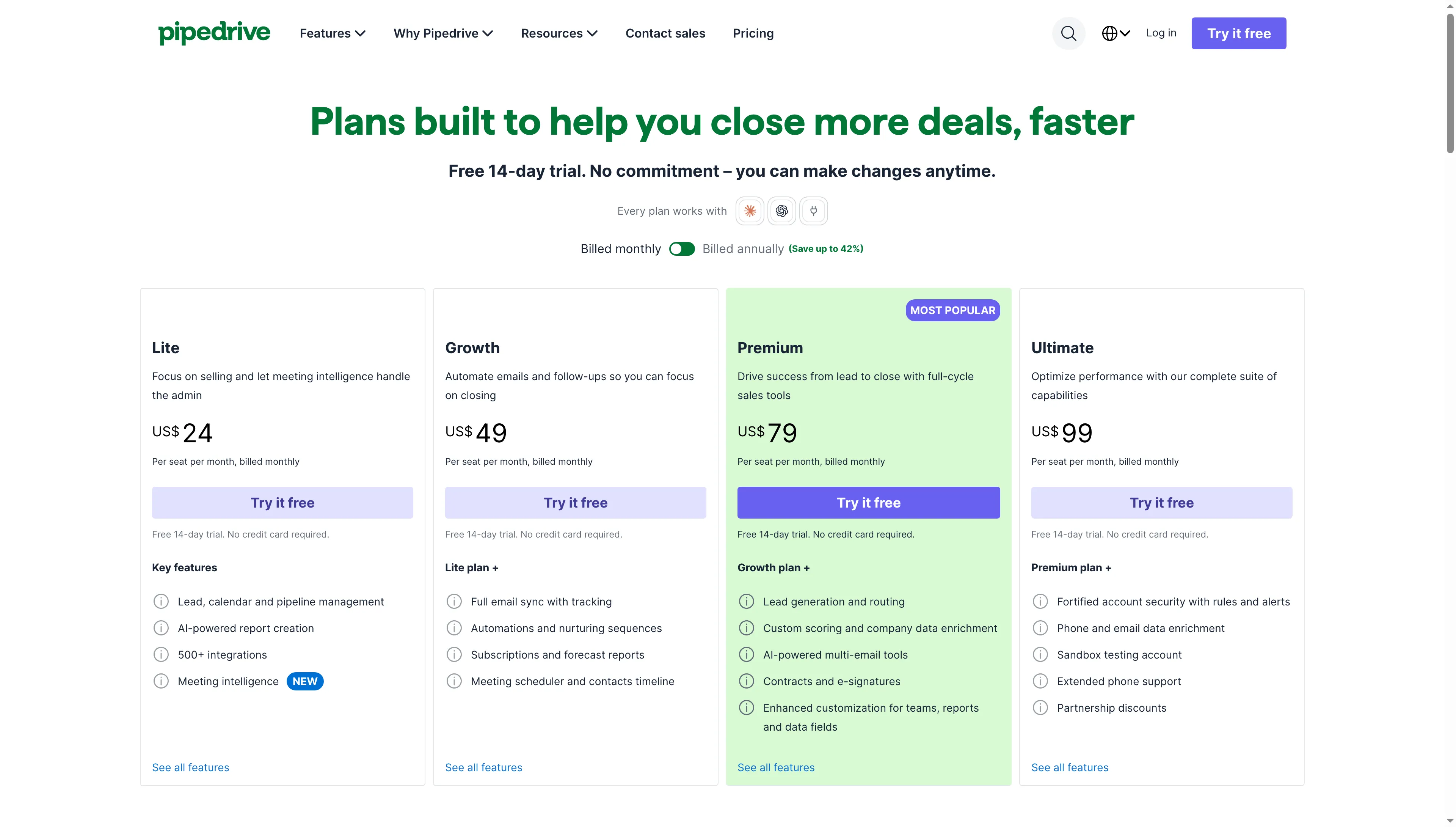
Growth’s monthly price is $10 per seat above its annual-billing rate.
Pros — Pipedrive
- The forecast view starts on Growth, at $39 per seat per month with annual billing.
- Premium adds deal-revenue forecast reports for teams that need them.
- The site advertises a 14-day trial without a payment card.
Cons — Pipedrive
- For a single Growth seat, monthly billing costs more than annual billing.
- Forecast view and deal-revenue reporting are distinct capabilities. Before you pick Growth, align the plan with the report you require.
Product pricing — Pipedrive
Growth $39/seat/month and Premium $59/seat/month, billed annually. Monthly rates are $49 and $79, respectively. No mandatory add-on is listed.
2. HubSpot Sales Hub: Best for teams already managing deals in HubSpot
HubSpot Sales Hub isn’t free sales forecasting software: its forecast tool requires Professional or Enterprise and an eligible assigned seat for every forecaster. The workflow keeps forecast submissions and team goals beside the CRM records managers already review, while categories can differ from deal stages so managers can keep a rep's commit separate from pipeline probability. (HubSpot forecast setup)
Professional costs $90 per Sales seat per month with annual billing, and required onboarding adds $1,500. Year one therefore costs $2,580 for one seat and $6,900 for five, before tax. I like the in-CRM placement, though the onboarding fee makes it expensive for a team that only needs a lightweight rollup. (HubSpot Sales Hub pricing)
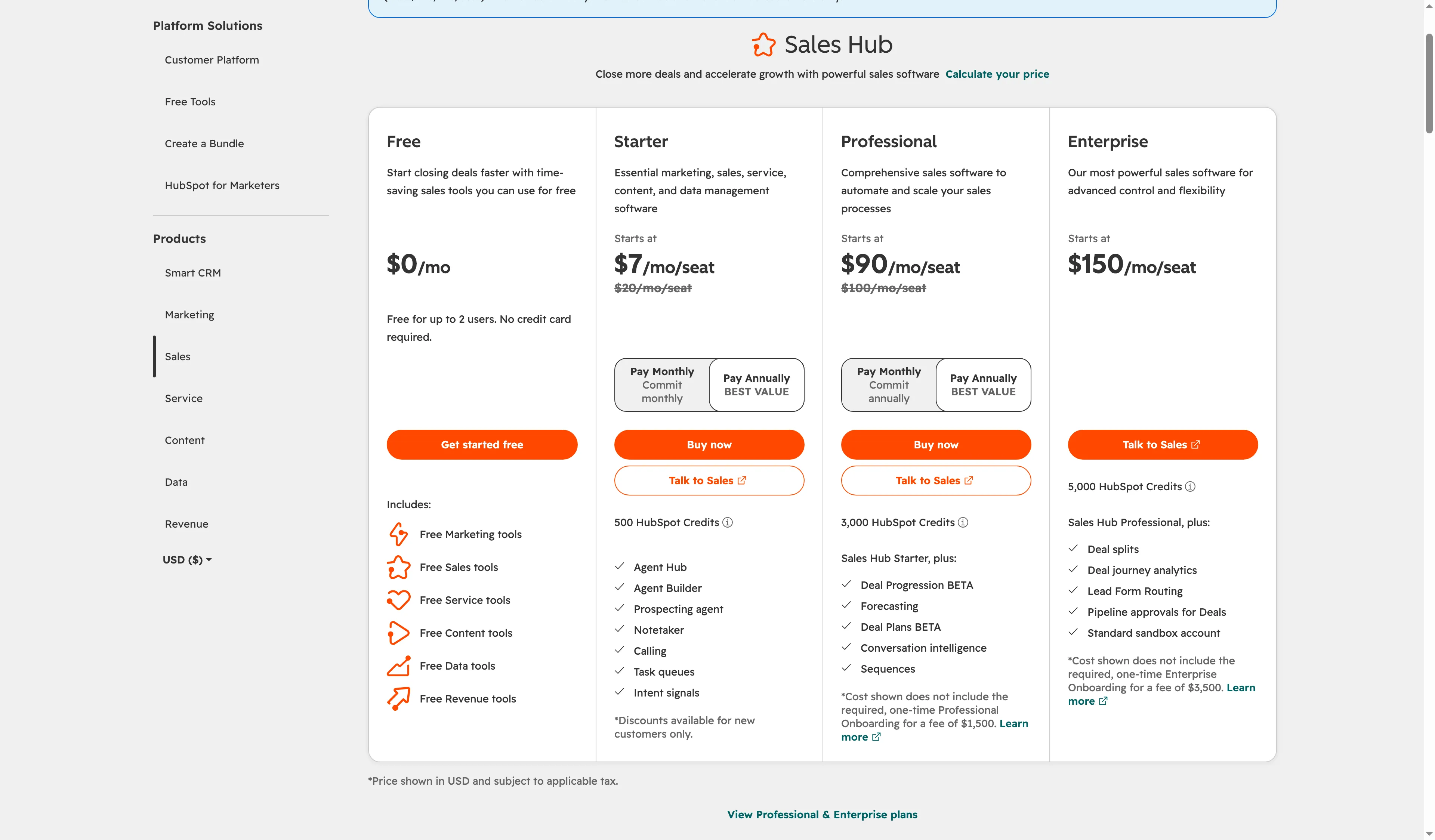
Professional combines forecasting with a $90 price per seat with annual billing and required onboarding.
Pros — HubSpot Sales Hub
- Managers can review team forecasts alongside HubSpot deals and goals.
- Forecast categories can differ from deal stages, giving teams room to record seller judgment separately.
- The workflow fits teams that already maintain clean HubSpot deal records.
Cons — HubSpot Sales Hub
- Professional starts at $90 per Sales seat per month billed annually, with required onboarding of $1,500.
- Each person who forecasts needs an eligible seat, so free CRM access doesn’t include the forecast tool.
- Before the forecast workflow becomes visible, you might need to complete workspace setup or account verification.
Product pricing — HubSpot Sales Hub
Sales Hub Professional $90/Sales seat/month billed annually, with $1,500 required onboarding. Enterprise pricing varies by configuration.
3. Salesforce Sales Cloud: Best for teams configuring forecasts around a complex CRM
Salesforce Sales Cloud fits teams that want to shape CRM fields, sales processes, and forecast categories together. Pro Suite includes sales quoting and forecasting at $100 per user per month billed annually. Core costs $195 per user per month, Advanced $395, and Max $550 per user per month. (Sales Cloud pricing)
When I checked Salesforce’s current pricing cards, Pro Suite looked like a more sensible start than the $25 Starter tier when forecasting is part of the job. Core includes Advanced Forecast & Pipeline Management, with customizable KPIs and historical charts, at $195 per user per month and above. I'd pick Pro Suite only if the basic forecast is enough. Core earns its higher price when your managers need those views.
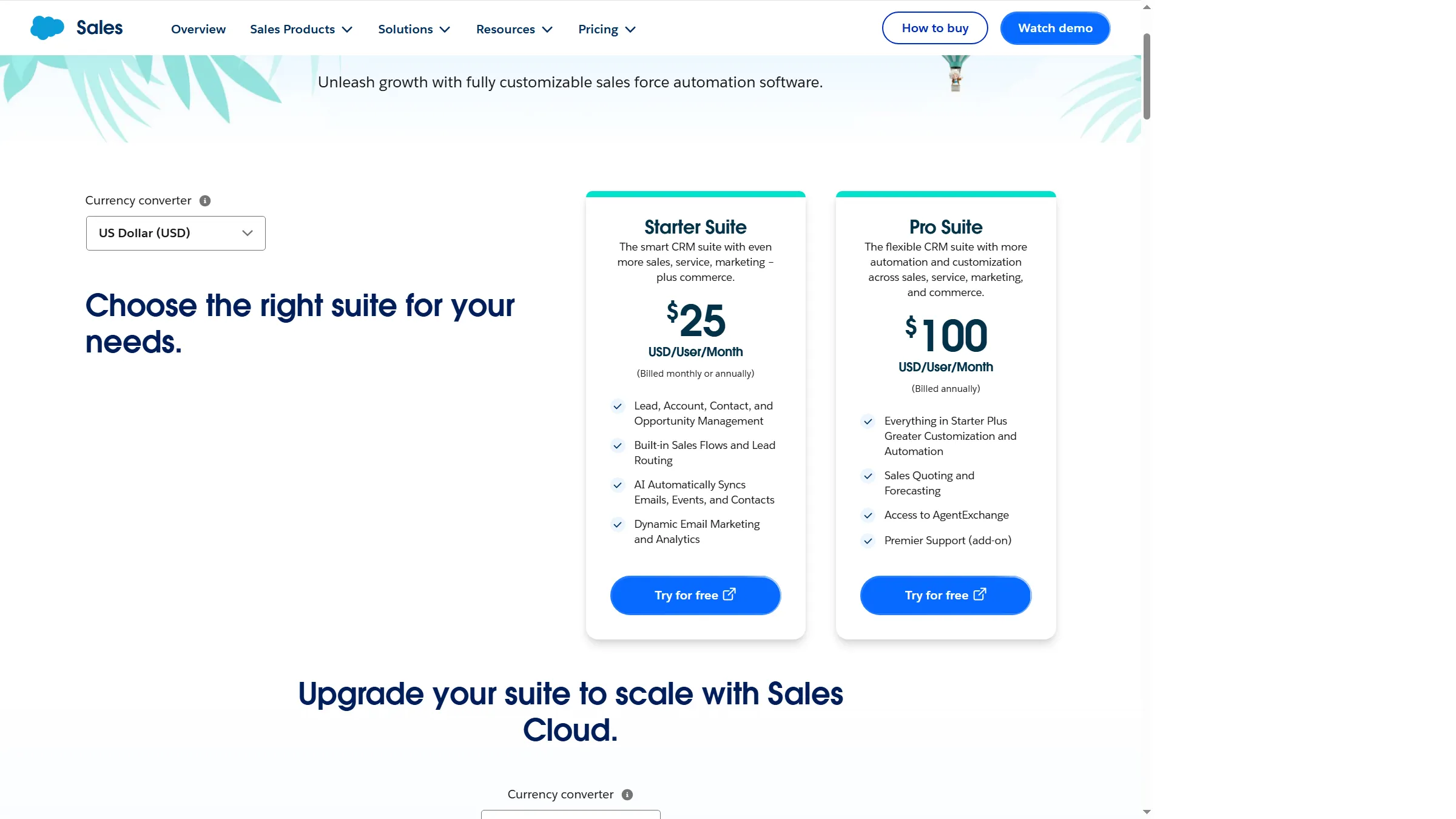
Pro Suite includes Sales Quoting and Forecasting at $100 per user per month billed annually.
Pros — Salesforce Sales Cloud
- Pro Suite’s listed price includes sales quoting and forecasting.
- The tier range gives larger teams room to choose a broader CRM configuration.
- Salesforce’s forecast categories can be organized around the company’s sales process.
Cons — Salesforce Sales Cloud
- Pro Suite costs $100 per user per month with annual billing, or $1,200 per seat per year.
- Advanced Forecast & Pipeline Management comes with Core at $195 per user per month. Pro Suite includes the basic Sales Quoting and Forecasting feature.
- It takes configuration discipline to keep fields, categories, and close dates useful for forecast reviews.
Product pricing — Salesforce Sales Cloud
Pro Suite $100/user/month billed annually. Current higher tiers: Core $195, Advanced $395, and Max $550/user/month billed annually.
4. Weflow: Best for Salesforce teams that need forecast submissions and rollups
Weflow adds forecast submissions, rollups, and pipeline snapshots to Salesforce. It’s an overlay, so you’ll pay for Salesforce too. I like it for a five-person team only if submissions and rollups solve a real weekly management problem. Its annual per-user price has a ten-user minimum before the Salesforce license.
For a manager, rep submissions give a weekly review something to compare with pipeline movement, while snapshots show how the total changed. If your managers already get the views they need in Salesforce, Weflow’s minimum seats are harder to justify. (Weflow pricing)
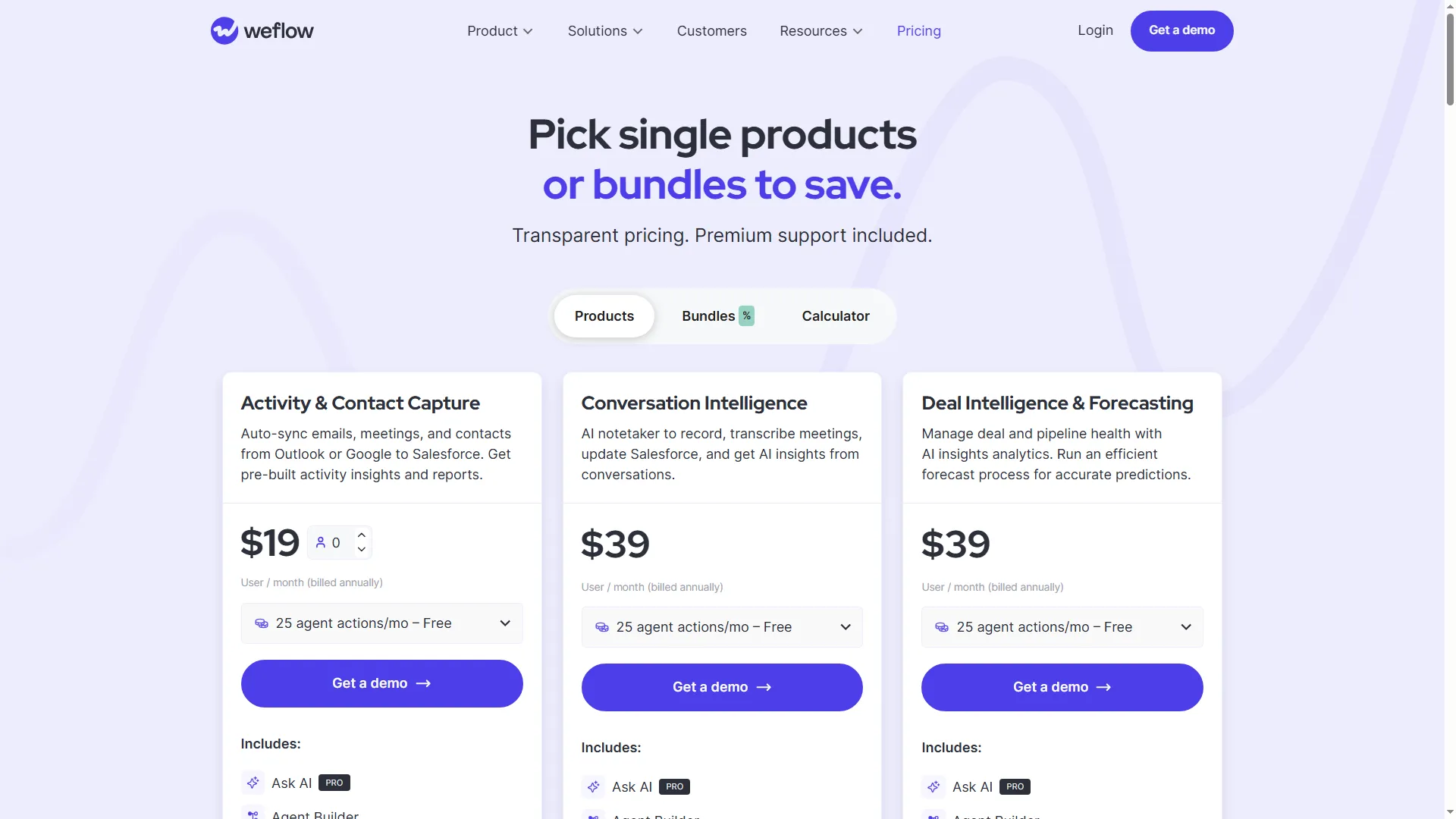
The listed price is billed annually, and the ten-seat minimum raises the starting commitment.
Pros — Weflow
- Forecast submissions and manager rollups are designed to sit on Salesforce data.
- Pipeline snapshots can help a team compare movement over time instead of relying on the latest total.
- The listed per-seat price makes the subscription arithmetic easier to estimate.
Cons — Weflow
- The ten-seat minimum means a one-person team still pays for more seats than it uses.
- Salesforce remains a separate required cost.
- A G2 reviewer praised Salesforce activity logging, but that isn’t evidence of forecast accuracy. Check the forecast workflow itself in a guided demo. (Weflow reviews)
Product pricing — Weflow
Deal Intelligence & Forecasting $39/user/month billed annually, ten-user minimum. Salesforce subscription is extra.
5. Forecastio: Best for HubSpot teams that want scenarios and forecast history
Forecastio adds forecast submissions, what-if scenarios, and an audit trail to HubSpot. Its Sales Forecasting plan costs $249 per month billed annually for two seats, then $49 for each additional seat. You’ll keep paying for HubSpot too, and the two-seat minimum suits a manager plus one forecast owner better than a solo seller. I like the public price, but check the HubSpot edition before you budget the stack.
What-if scenarios let a manager compare alternate outcomes, while the audit trail records submitted changes. Those controls are more useful when a team revises its call during a forecast meeting than when it only needs a pipeline total. (Forecastio pricing)
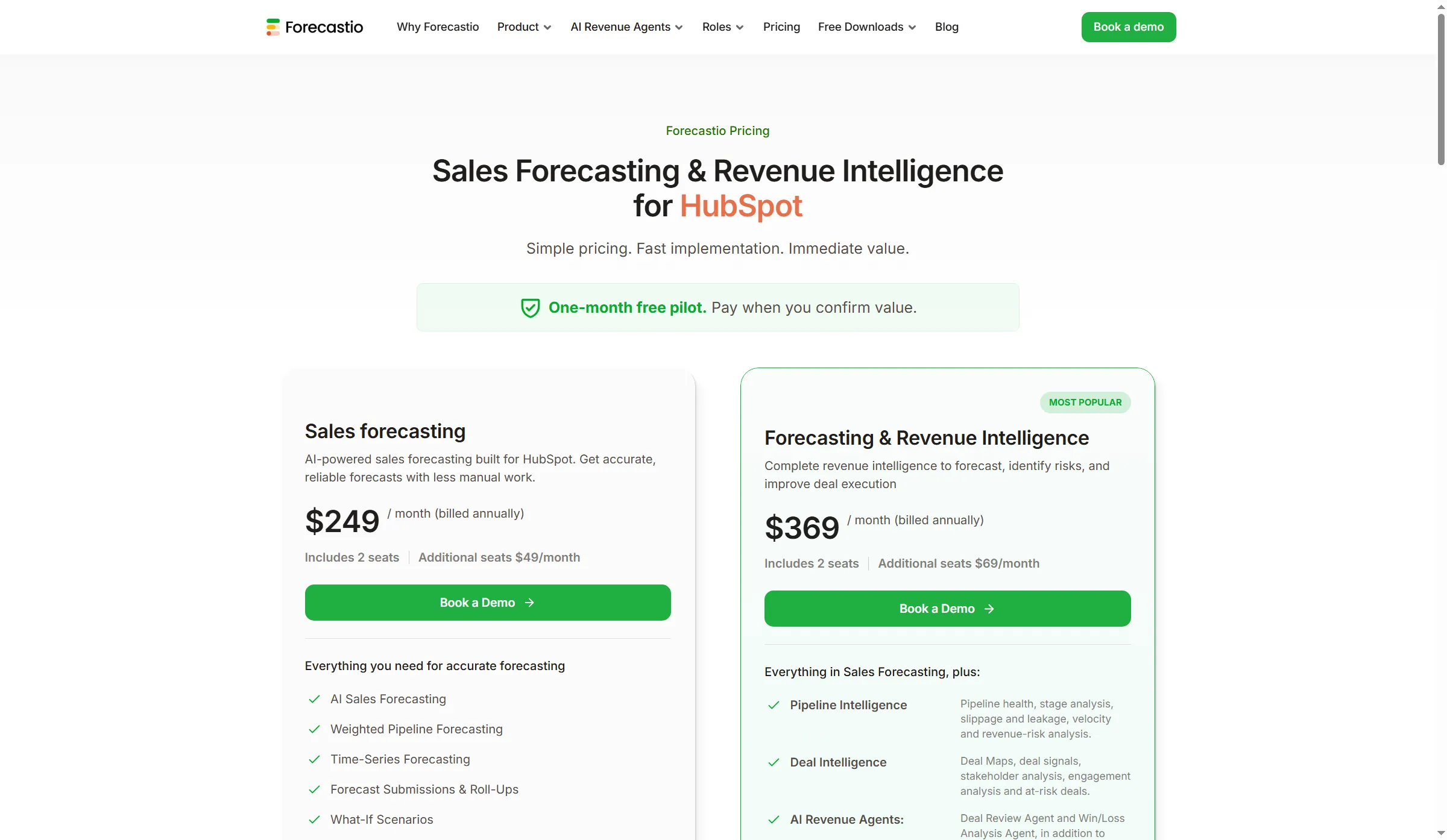
The base plan includes two users, so extra forecasters increase the annual total.
Pros — Forecastio
- The base price includes two seats and is public, unlike quote-only enterprise options.
- Scenario planning, submissions, and an audit trail address forecast governance rather than just pipeline display.
- Teams can add seats without moving to a different listed price tier.
Cons — Forecastio
- Excluding HubSpot costs, every extra forecaster increases yearly overlay expenses.
- The pricing page doesn't say which HubSpot editions are required, so verify compatibility before budgeting.
- The visible review sample is old and incomplete. It raises questions about CRM setup and load time, but doesn't show current performance.
Product pricing — Forecastio
Sales Forecasting $249/month billed annually for two seats, then $49/month for each additional seat. HubSpot is extra.
6. Clari Forecast: Best for formal rollups across sales teams
Clari Forecast, now presented within Salesloft, suits teams that inspect pipeline changes and consolidate rep, team, and executive forecasts. The product page shows filters for region, segment, and time period. Pricing is quote-only, so buyers need to speak with sales for a per-seat total.
Those filters give sales leaders a way to compare forecast totals across parts of the business. That suits formal review meetings where managers need to explain which segment moved. If your team only watches weighted pipeline, a dedicated rollup layer may be more work than value. I like the focus on inspection, but implementation cost belongs in the quote before you compare Clari with CRM add-ons. (Salesloft sales forecasting)
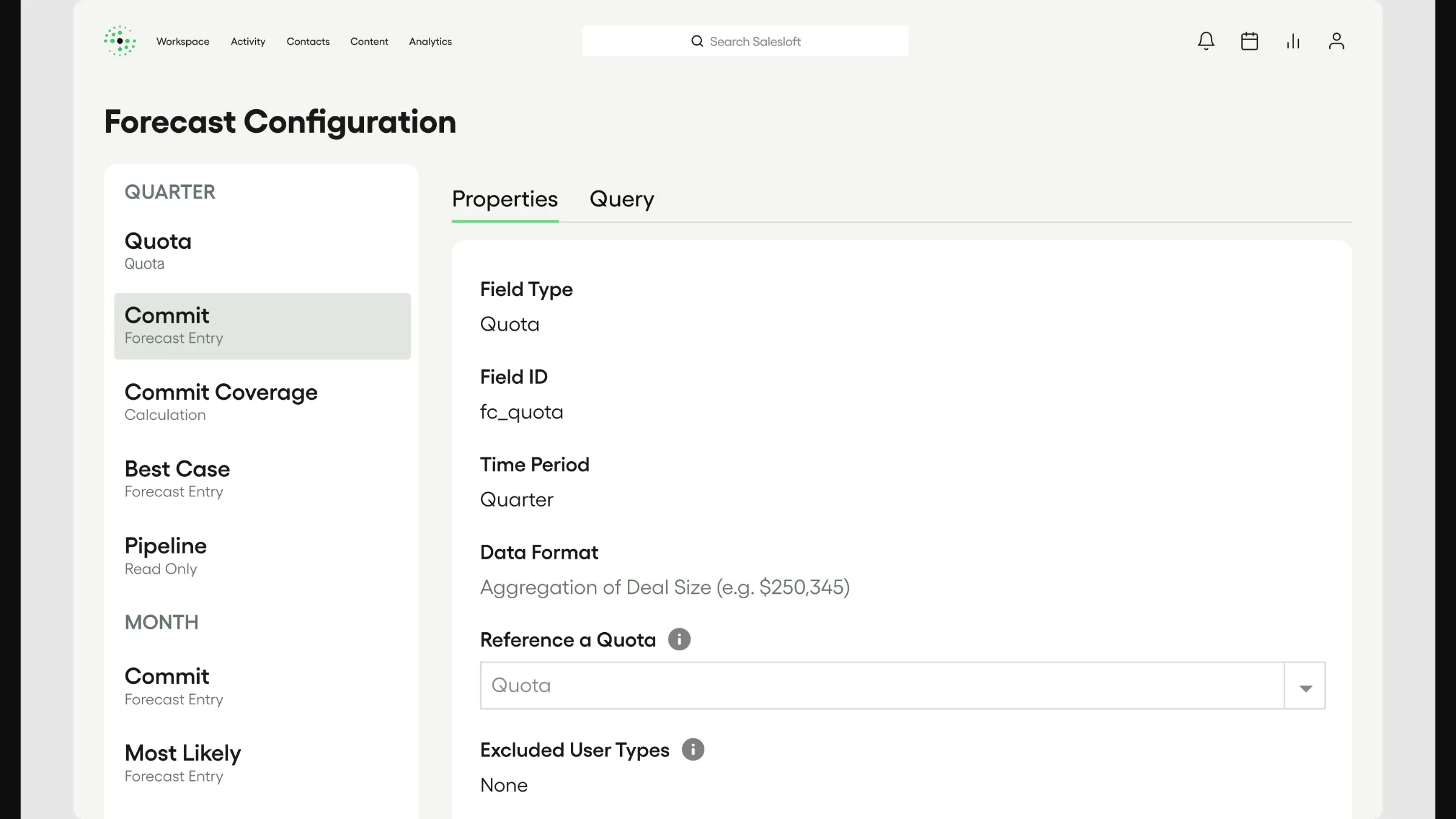
Forecast fields and time periods need to match the way your managers run reviews.
Pros — Clari Forecast
- The product is built around forecast inspection and rollups, not just a CRM’s weighted pipeline view.
- Filters for region, segment, and time period can help managers inspect different slices of a forecast.
- A guided sales process can surface implementation and data requirements before a quote.
Cons — Clari Forecast
- Pricing is quote-only. Request the forecast module, seat count, onboarding, CRM requirements, and contract term in the same quote.
- Someone must still own the forecast definitions and get managers to use them.
Product pricing — Clari Forecast
Quote required, with no public per-seat price; include implementation, CRM, and platform fees.
What sales forecasting software costs for comparable teams
In these examples, recurring CRM subscriptions cost $2,340 to $6,000 annually for five paid forecast users. HubSpot's first year costs $6,900 including required onboarding. The CRM-native comparison counts every paid forecaster, including the manager, and uses annual U.S. list rates before tax or discounts. It compares basic deal-pipeline forecasting, not equivalent predictive or hierarchy features. The recurring column excludes onboarding.
| Paid forecast users | Pipedrive Growth: recurring / year one | HubSpot Professional: recurring / year one | Salesforce Pro Suite: recurring / year one |
|---|---|---|---|
| 1 | $468 / $468 | $1,080 / $2,580 | $1,200 / $1,200 |
| 5 | $2,340 / $2,340 | $5,400 / $6,900 | $6,000 / $6,000 |
| 20 | $9,360 / $9,360 | $21,600 / $23,100 | $24,000 / $24,000 |
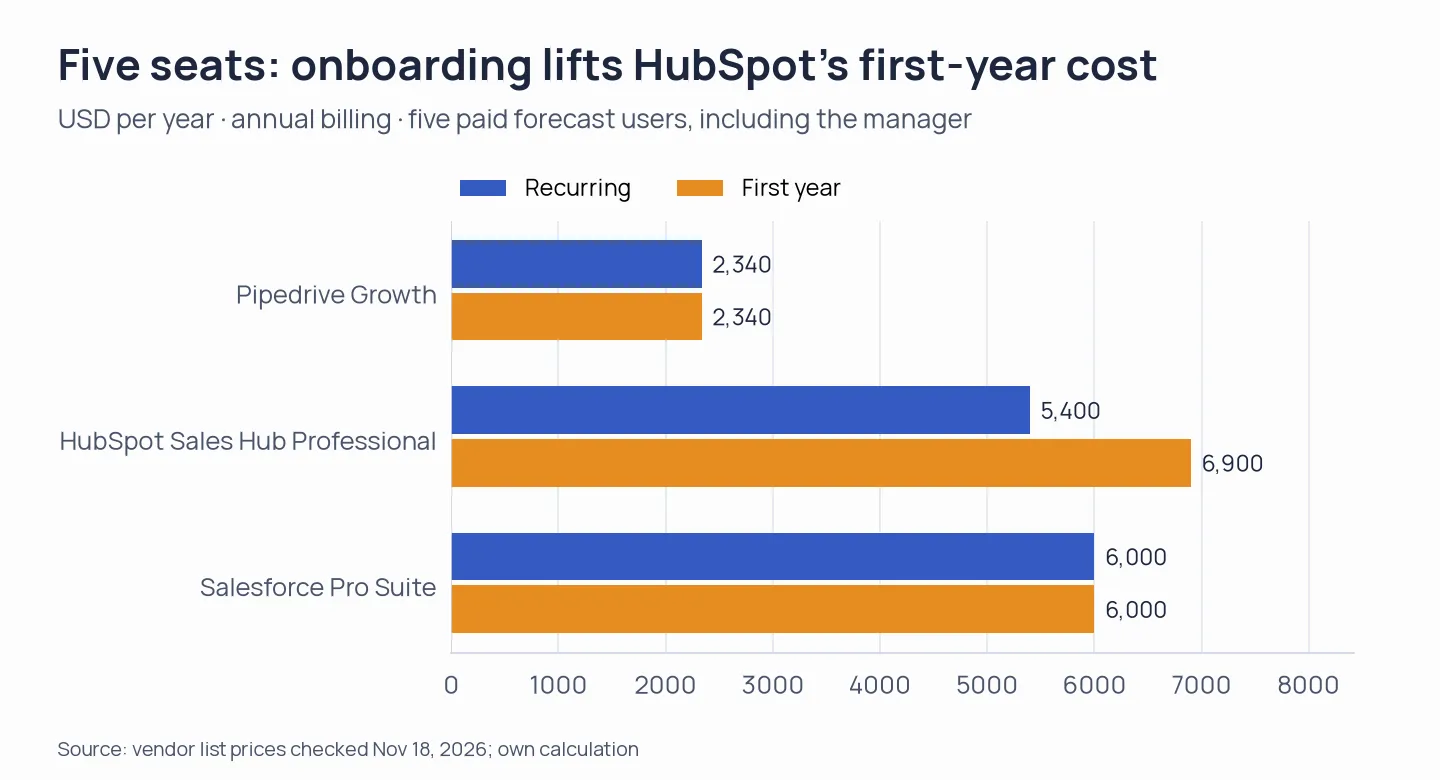
HubSpot’s required $1,500 onboarding fee raises the first-year total; Pipedrive and Salesforce use their recurring list prices in this scenario.
For this comparison, Pipedrive Growth handles the basic CRM forecasting task. Such totals are based on every product's yearly per-seat price, and they factor in mandatory onboarding or minimums.
This table shows annual overlay costs added to your existing CRM subscription, so treat the figures as extra budget:
| Overlay | 1 user | 5 users | 20 users | Dependency |
|---|---|---|---|---|
| Weflow Deal Intelligence & Forecasting | $4,680/year | $4,680/year | $9,360/year | Salesforce; 10-seat minimum |
| Forecastio Sales Forecasting | $2,988/year | $4,752/year | $13,572/year | HubSpot; verify required edition |
| Clari Forecast | Quote | Quote | Quote | Confirm modules, implementation, and CRM |
Weflow’s total reflects its minimum seat commitment, and Forecastio includes two seats before extra users are charged. Both totals exclude the CRM subscription. Clari requires a quote, so that row isn’t a full team budget.
Check the CRM you already pay for
Before you add another subscription, check whether your CRM plan already covers the forecast job: Pipedrive Growth includes a forecast view, HubSpot requires Professional or Enterprise, and Salesforce lists forecasting in Pro Suite. Google Sheets or Excel can handle a small manual forecast, but CRM-linked submissions and history take extra setup.
Which sales forecasting software should you choose?
- Choose Pipedrive if your team requires an uncomplicated CRM forecast and can operate within the separation between its Growth forecast view and Premium deal-revenue reports.
- Choose HubSpot Sales Hub if your deals and manager reviews already live in HubSpot and the paid seats plus onboarding fit your budget.
- Choose Salesforce Sales Cloud if you want to configure the CRM process and forecast together, and can validate the right edition before signing.
- Choose Weflow if Salesforce is your platform, you need submissions plus rollups, and ten paid seats pose no issue.
- Choose Forecastio if you use HubSpot and need scenarios, submissions, or forecast history beyond the native workflow.
- Shortlist Clari Forecast if you run formal multi-team reviews and are ready to evaluate an enterprise quote and implementation plan.
Other tools we considered
Sales forecasting software buyers may also consider Gong Forecast, which ties CRM forecasts to conversation data and charges a platform fee plus user licenses. Its deal-likelihood feature requires a history of won and lost deals. Aviso offers customizable hierarchies and opportunity scoring at a quote-only price. Avoma combines forecasting with conversation intelligence, so it fits a broader buying need than a CRM forecast or dedicated rollup product.