

 25 min read

TL;DR: AI social media management tools in November 2026
-
Solo publishing: Buffer is my starting pick for AI writing and scheduling across three free channels.
-
Reusable content and reporting: SocialBee suits a maintained content library. Metricool suits client reporting and brand-level permissions.
-
Caption accuracy: My October 22 checks caught SocialBee losing price qualifications and ContentStudio adding workshop benefits absent from the brief. Review offer terms before publishing.
-
AI versus saved work: ContentStudio's manual composer reopened my corrected draft after AI Chat declined to save it. Vista Social's useful correction stayed in chat.
-
Team costs: Hootsuite gates approvals behind Advanced. Sprout Social gates post AI behind Professional. Count the workflow's seats and client reviewers before judging entry prices.
The nine tools divide by the work surrounding the AI writer:
| Tool | Where I'd start | Detail that changes the choice |
|---|---|---|
| Buffer | Straightforward publishing | Saved Ideas and a small Free queue |
| SocialBee | Reusable libraries | Categories, requeue, and expiry |
| Metricool | Client reporting | Brand roles and external reviews |
| Publer | Flexible small-team costs | Separate account/member calculator |
| ContentStudio | Editorial production | AI Chat beside a manual composer |
| Vista Social | Conversational changes | Related-version reminders and variable credits |
| Predis.ai | Visual production | Media creation plus a content calendar |
| Hootsuite | An existing social operation | Brand context, inbox, and an approval upgrade |
| Sprout Social | Reporting and social care | Tags, approvals, and per-seat costs |
What makes an AI social media management tool worth buying?
AI social media management tools earn their place when accurate copy reaches your calendar, approval queue, or reports with less work from you. A standalone caption writer can help with wording, but you'll still need somewhere to take the result. I looked at that whole journey when comparing these tools.
These are the details I looked for:
-
Facts that survive rewriting. A shorter caption still needs the right price, date, time zone, and conditions. A confident extra promise is a mistake.
-
A path from draft to calendar. Saving a reusable idea, scheduling a network-specific post, and obtaining approval are different jobs.
-
Control over who can publish. A client who can approve and publish has broader access than one who can only review.
-
Pricing at your actual size. Count profiles, brands, operators, and client reviewers separately, then include the required AI capacity.
-
A reason to come back after posting. Analytics, inbox handling, reuse, or asset creation should justify the platform beyond its caption generator.
For LinkedIn engagement alongside publishing, consider Linked Helper's AI Comments, which uses the post and its author's profile to generate a comment aligned with your goal and tone.
1. Buffer: Best for straightforward AI writing and scheduling
Buffer is my pick for getting a few social accounts organized without much setup. The Free plan includes its AI Assistant alongside three channels, so you can try the writing workflow before deciding whether you need paid collaboration.
Buffer pros
-
AI writing is available on the Free plan alongside three channels.
-
Team includes unlimited users and channel-specific permissions.
-
Volume pricing reduces the cost per channel as an agency grows.
Buffer cons
-
Free's queue needs refilling if you plan more posts than it holds.
-
Clients who can approve can also publish.
Buffer generated an 84-word LinkedIn caption from my fictional workshop brief, keeping the required event details and exact registration line. I changed the duration to 60 minutes myself, saved the text as an Idea, and reopened it. The edit was still there. I could keep working on the copy in Ideas before deciding where it belonged in the publishing calendar.
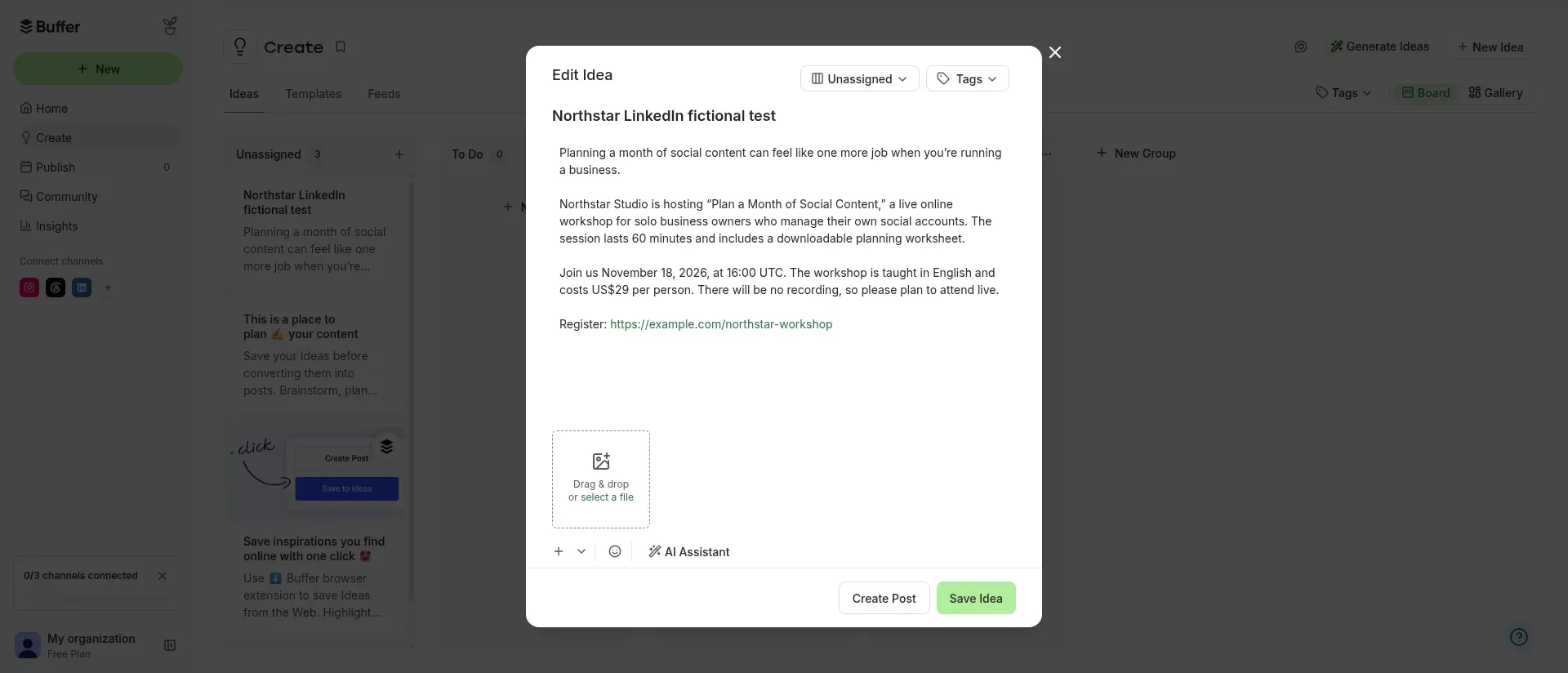
Inside Buffer, the saved Idea kept my manual change from 45 to 60 minutes when I reopened it.
Ideas don't carry a social network's context, so I used a fresh prompt with the source text for my Instagram adaptation. Buffer handles channel-aware writing in the publishing composer. And if you're working from a web page, paste the material itself: the AI Assistant can't read the URL.
In an August 2026 Reddit comparison, Reddit user u/General-Coyote-4651 called Buffer “a really good publishing/scheduling tool.” That matches my experience with its writing and Ideas workflow. For detailed client reporting, my search would start elsewhere.
Buffer pricing and workflow costs
Buffer pricing: Free includes three channels and ten queued posts per channel, refilled as posts go out. Essentials starts at $5/channel/month billed annually ($60/year). Team includes unlimited users and costs $120/year for each of the first ten channels, $40 for each of the next fifteen, and $30 for each of the next 25. Under the comparison workloads, solo can use Free. Team's ten-channel subscription is 10 × $120 = $1,200/year, and 30 channels cost (10 × $120) + (15 × $40) + (5 × $30) = $1,950/year.
Buffer's agency figure is a subscription subtotal. An approver needs Full Access on the relevant channels, which also permits publishing, and organization users can see tagged posts across channels. Buffer's agency guide recommends managing no more than five Instagram accounts. The agency workload has ten, so the low subtotal comes with an operating constraint.
2. SocialBee: Best for organizing and reusing a content library
SocialBee suits a calendar that mixes recurring advice, product posts, and dated promotions. You can organize that library into categories, then use requeue and expiry controls to keep reusable content circulating while retiring offers that have ended.
SocialBee pros
-
Categories, requeue, and expiry controls sit in the post composer.
-
Plans include AI content generation without a stated limit on the number of generations.
-
Pro supports 25 profiles across five workspaces.
SocialBee cons
-
Bootstrap and Accelerate each include one user per workspace.
-
The AI output dropped the currency and per-person price qualifications.
I tried SocialBee's caption generator through its internal Universal Posting account. The first LinkedIn result kept the workshop date, UTC time, worksheet, no-recording condition, and registration URL. The Instagram adaptation also retained the no-recording condition and changed the call to action to the requested “link in bio” wording.
But I had to check the price wording. The result also promised “practical insights,” which hadn't appeared in the brief. For an event or offer, you need to check those details even when the rest of the caption reads well.
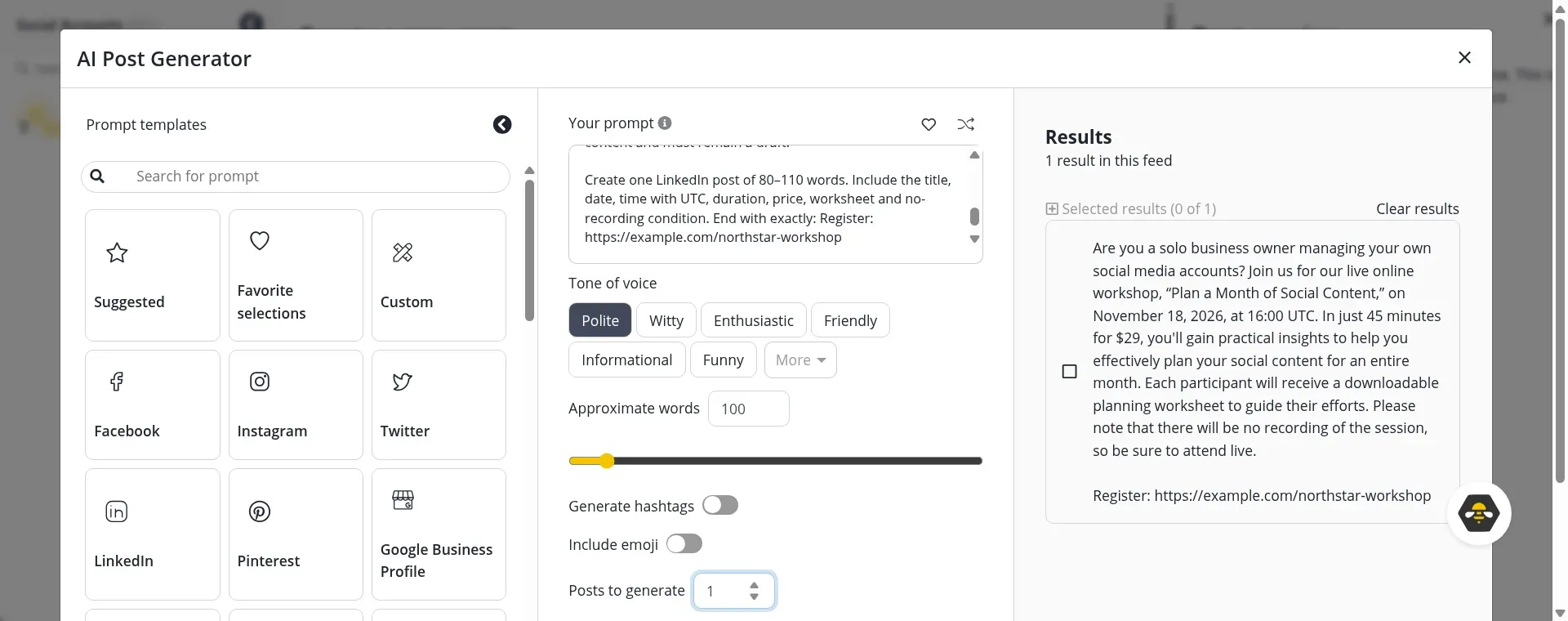
Inside SocialBee, the first result kept the event details but reduced “US$29 per person” to “$29.”
I preferred the library controls to the generated wording. Both expiry and requeue sat beside the post in the composer, so I could treat a workshop announcement differently from an evergreen planning tip without moving elsewhere. If you only write occasional posts, maintaining categories may be more work than you need.
SocialBee pricing and workflow costs
SocialBee pricing: Bootstrap costs $290/year for five profiles. Accelerate costs $490/year for ten. Pro costs $990/year for 25 profiles, five workspaces, and three users per workspace. Monthly billing is $29, $49, and $99 respectively. For the comparison workloads, Bootstrap covers solo and Pro covers the internal team. Pro50's $1,790/year base covers 50 profiles, ten workspaces, and five users per workspace, before extra client access.
SocialBee's Publisher role can approve and publish. Contributor cannot approve. The agency base leaves additional client-user billing unresolved, so it isn't a complete client-approval quote.
3. Metricool: Best for client reporting alongside content planning
Metricool is my pick for freelancers and agencies whose clients want to know what happened after a post went out. Its brand-based setup keeps that reporting work alongside content planning. “What happened across these accounts?” is the question to take into its trial.
Metricool pros
-
Paid plans organize accounts by brand, with one account per network in each brand.
-
Advanced includes unlimited users, brand-level permissions, and approval workflows.
-
External reviewers can approve without creating their own Metricool account.
Metricool cons
-
Free excludes LinkedIn and allows 20 posts a month.
-
AI credits are allocated per brand and depend on the amount of text processed.
I opened a free Metricool workspace, worked through onboarding, and inspected the plan options. The planner's next step was a social-account connection. For AI writing, Starter includes 20 credits per brand and Advanced includes 35. The amount of text processed determines consumption.
For client work, I like being able to send a post to an external reviewer. You can require approval from one reviewer or everyone, and brand-level roles restrict collaborators to the accounts they handle. When three people share a calendar, those permissions deserve as much attention as the writing assistant.
The reporting emphasis also appears in user feedback. In August 2026, Reddit user u/General-Coyote-4651 called Metricool “more like a marketing analytics platform,” contrasting it with Buffer's scheduling focus.
Metricool makes sense for that combined planning-and-reporting job. For high-volume caption writing alone, look more closely at the allowance: credits reset, don't roll over, and aren't sold as standalone top-ups.
Metricool pricing and workflow costs
Metricool pricing: Free covers one brand with restrictions and 20 monthly posts, excluding LinkedIn. Starter's five-brand plan costs $20/month billed annually ($240/year). Advanced's 15-brand plan costs $53/month billed annually ($636/year). In the comparison workloads, Starter covers solo's brand/profile setup. Advanced's unlimited users, brand roles, and external reviewers cover both larger setups. These are platform subtotals: you still need to check the text-dependent, per-brand AI allowances against your workload.
4. Publer: Best for paying for the accounts and teammates you need
Publer is my pick for a small team whose accounts and headcount don't fit a fixed bundle. On Business, you choose social accounts and additional members separately in the calculator. You can price the people you have now.
Publer pros
-
Business includes unlimited AI prompts.
-
The calculator separates the owner from additional members.
-
Draft Ideas let me generate and save text before connecting a social account.
Publer cons
-
The durable unlimited-AI entitlement belongs to Business, rather than Free or Professional.
-
Literal Markdown formatting remained in my saved Idea and needed a final presentation check.
Publer's first LinkedIn caption kept all eight required facts from my fictional workshop brief without adding benefits I'd never supplied. Its Instagram adaptation kept the terms too, including the exact “Register via the link in bio” instruction. After asking for the duration change, I saved the corrected Idea and reopened it. It still said 60 minutes.
One small annoyance survived saving: literal double asterisks around the labels. Check the final network preview before publishing (Markdown in a chat answer can leave you with cleanup work).
Pay attention to the member field in Publer's calculator. The owner is already included, so enter only additional members or you'll price an extra person you don't need.
I could try AI in Publer's free workspace. But ongoing unlimited prompts belong to Business. That's the plan to compare for regular generation. For deeper reporting or social care, spend more time with Metricool or Sprout.
Publer pricing and workflow costs
Publer pricing: Business includes unlimited AI prompts. Its annual calculator returned $201.60 for three profiles and the owner, $662.40 for ten profiles with the owner plus two additional members, and $2,188.80 for 30 profiles with 15 people. Those match the account and people counts in the comparison workloads. Free supports three accounts, excluding X, with ten queued posts per account and limited AI trial access.
Publer's Client role offers read-only access and approval rights for assigned accounts. But its guide also says clients see drafts from all team members. The agency number is a calculator subtotal: you need to check draft visibility and repeated staff billing across separate workspaces before it becomes a client-isolated configuration.
5. ContentStudio: Best for combining AI production with an editorial workflow
ContentStudio is my pick for teams that want to produce text, images, and video alongside their publishing work. The generated output has somewhere to go: into the composer and a saved draft, then through approvals if you're on Advanced or above.
ContentStudio pros
-
AI Chat works before you connect a live social account.
-
The manual composer saved and reopened my corrected draft without a connected profile.
-
Agency includes unlimited users and workspaces.
ContentStudio cons
-
Media generation adds allowance decisions alongside the text workflow.
-
A simple correction prompted extra claims about the workshop's curriculum.
ContentStudio's first LinkedIn caption kept my required facts, including the full price wording. But it added that the planning process could be used “the same afternoon.” I then asked to change 45 minutes to 60. Along with that correction came extra details about choosing themes, spacing formats, and building a buffer. Plausible enough. None came from my brief.
Saving took a detour. AI Chat told me it couldn't create a draft without a connected social account, so I copied the corrected text into the normal composer, chose Draft, and saved it there. When I reopened the draft, the 60-minute duration and registration URL were intact. The editor did the job the chat had declined.
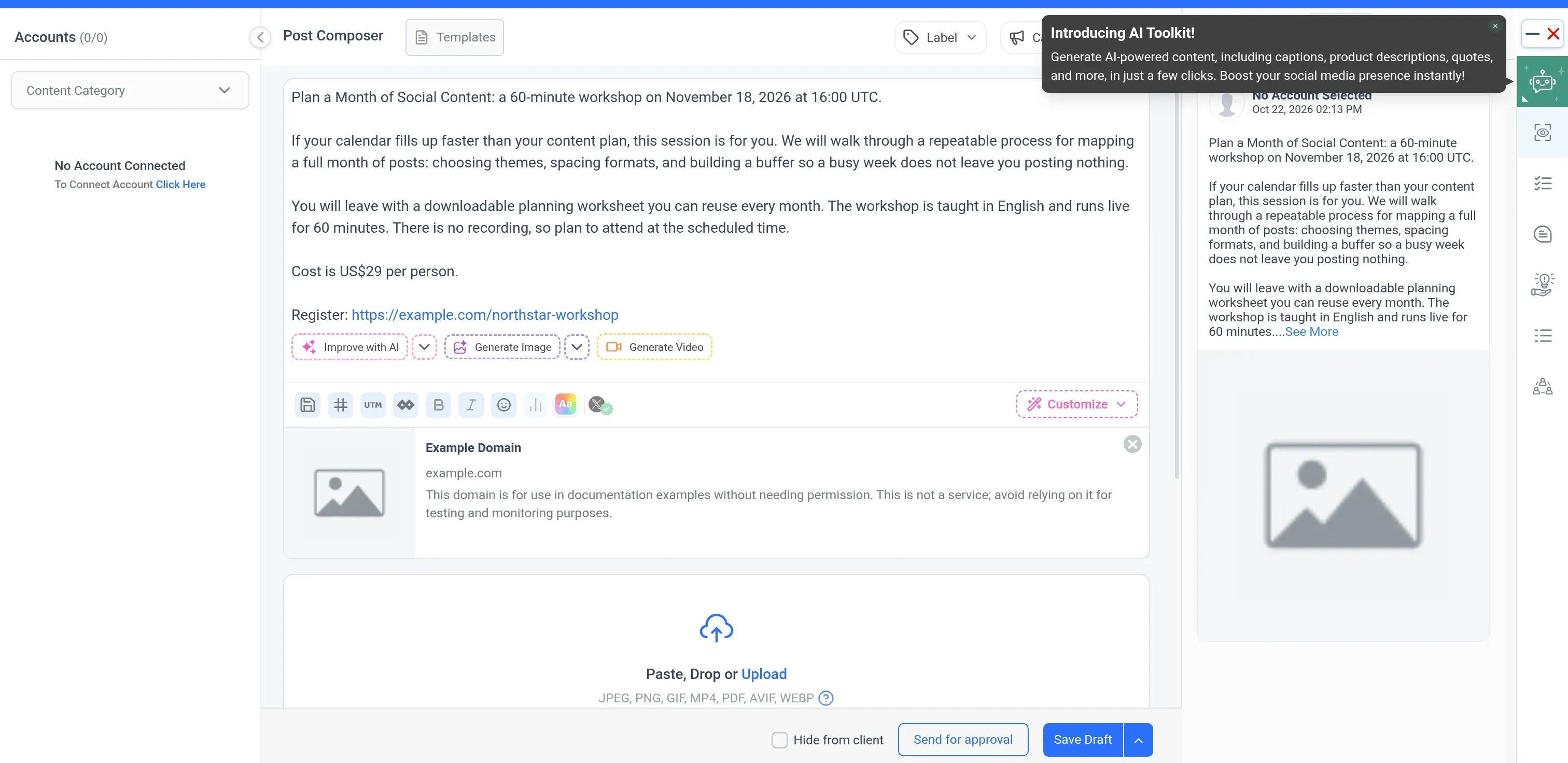
Inside ContentStudio, the manual composer reopened the saved draft even though AI Chat had declined to save it without a social connection.
Though it's more than you need for occasional rewrites, ContentStudio gives several people a shared place to turn ideas into finished posts. Budget for text, images, and video separately. Text credits are labeled as words (check how input and output count against them before estimating your generation volume).
ContentStudio pricing and workflow costs
ContentStudio pricing: Standard costs $228/year for five accounts and one user. Advanced costs $588/year for ten accounts and two users, with an extra user costing $10/month. Agency starts at $1,188/year for 25 accounts, with unlimited users and workspaces. The no-card trial lasts seven days.
For the comparison workloads, Standard covers solo's platform capacity and the team subtotal is $588 + ($10 × 12) = $708/year using the included workspaces. An extra workspace adds $120/year if needed, while the agency requires five accounts on top of the Agency base, priced in tiers that need a current quote for the complete annual amount. Client roles can hide billing and internal comments, offer approval with optional draft editing, and limit workspace access. AI capacity remains a separate check.
6. Vista Social: Best for working through content changes in an AI chat
Vista Social suits people who prefer to work through changes in conversation with an assistant. Ask Vista handles drafting and revisions within a wider workspace for publishing, engagement, and reporting. I found its handling of related versions particularly useful.
Vista Social pros
-
Ask Vista generated and revised my brief without a connected social profile.
-
Its correction response noticed a related version still had the old duration.
-
A usage dashboard exposes the credits consumed by the conversation.
Vista Social cons
-
Generating text in chat didn't create a saved publishing draft in my unconnected workspace.
-
Credit consumption varies with the work. One message doesn't equal one credit.
-
The first LinkedIn result fell short of the requested length.
Vista Social caught something useful on my third request. I'd already asked for LinkedIn copy and an Instagram version when I changed the workshop duration to 60 minutes. Ask Vista corrected the LinkedIn text, noticed that Instagram still said 45 minutes, and asked whether I wanted that version changed too.
I appreciated that reminder during the correction. Ask Vista found another place with the old fact and left the change to me. Its first LinkedIn draft was 72 words, shorter than I'd requested. The 69-word Instagram adaptation kept the required facts and its different registration instruction.
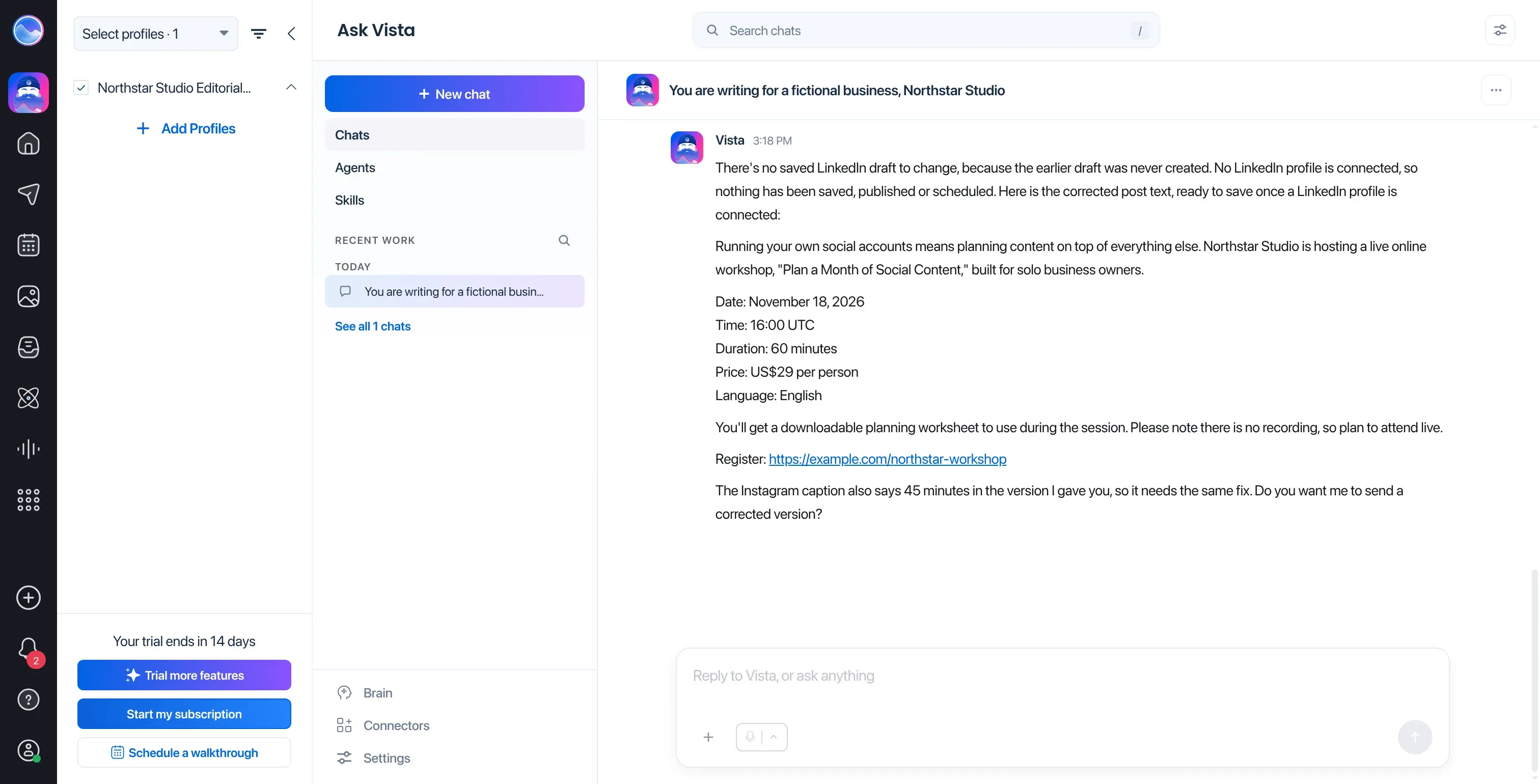
Inside Vista Social, Ask Vista corrected the LinkedIn duration and flagged that the Instagram version still needed the same change.
Vista belongs on a shortlist for conversational help across a team's social work. It's harder to justify if you want a small, predictable caption allowance and won't use the rest of the workspace.
Vista Social's chat answer still needed a route into publishing: Ask Vista declined to save a draft without a connected profile, so the result remained in chat. Vista Social's trial usage screen showed 27 credits used across three answers, from a fixed 500-credit trial pool. Consumption varies with the work, so watch the usage balance as you refine a post.
Vista Social pricing and workflow costs
Vista Social pricing: Professional costs $950/year for 15 profiles and two users. Advanced costs $1,910/year for 30 profiles and three users. Scale costs $4,310/year for 70 profiles and four users. Monthly billing is $99, $199, and $449 respectively. The no-card trial lasts 14 days. Professional and Advanced cover the solo and team people/profile counts in the comparison workloads, before variable AI consumption. The agency's five staff exceed Scale's included users and need a custom arrangement.
7. Predis.ai: Best for turning ideas into visual content
Predis.ai is worth a close look when posts are waiting for images or video. You can generate visual content and put it on a calendar in the same product. That combination is more relevant to that bottleneck than another caption writer.
Predis.ai pros
-
Video setup supports AI images, stock footage, or your own media.
-
Content creation and scheduling sit in the same product.
-
The review workflow lets recipients accept, reject, or comment on a post.
Predis.ai cons
-
Credit consumption depends on the content and model you choose.
-
Core excludes Auto Posting. Recurring automated creation needs a different plan.
I like having a choice of source media. If you already have product photography, bring those assets into a video instead of asking a model to recreate the product (and checking how closely it matches). In the vendor's walkthrough, you choose the media before moving to the calendar step.
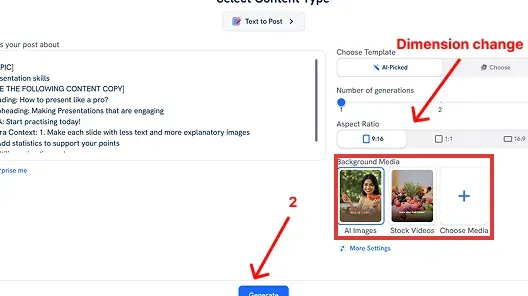
Inside Predis.ai, the video setup lets you choose AI images, stock videos, or your own media. (Image source: Predis.ai)
Predis uses Auto Posting to mean automated creation and publishing from products, services, or ideas. Ordinary calendar scheduling is separate. So Core's “No Auto Posting” label shouldn't rule it out if you're happy to create and schedule your own posts.
Choose Predis for help producing visual assets. For mostly text posts, inbox work, or detailed client reports, other tools here are closer to the job.
Predis.ai pricing and workflow costs
Predis.ai pricing: The annual offers checked on October 22, 2026 were $230 for Core, $474 for Rise, and $2,540 for Enterprise+. Renewal prices may differ. Monthly billing was $32, $79, and $249 respectively. Core includes one brand, ten channels, and 1,300 monthly credits. The three-day trial requires a card. Media/model-dependent credit use and reviewer entitlements prevent a like-for-like total for the comparison workloads.
8. Hootsuite: Best for bringing AI into an existing social operation
Hootsuite is worth considering for a team that already handles a publishing calendar, incoming messages, and trend research. Its current assistant, Wisdom, can draw brand context from a connected account's recent posts, then pass the generated copy into the composer.
Hootsuite pros
-
Standard includes AI post and image generation, an inbox, and ten social accounts.
-
Professional supports unlimited social accounts and inbox automation.
-
Wisdom's Brand voice option can draw on a connected account's recent content.
Hootsuite cons
-
Workflows for approving posts require the Advanced upgrade.
-
The 100 monthly AI credits don't translate into a guaranteed number of finished posts.
Hootsuite's Brand voice feature uses up to 30 posts from the selected account's previous three months. For a brand that already posts regularly, that's a more specific starting point than choosing a generic tone. You can supply a document as context too, then use Create post to move the answer into the composer.
I like that connection between channel history and the composer, though campaign copy still needs editing. Last month's posts can have different terms and a different voice from the offer you're writing today.
Does your team need sign-off before publishing? Budget for Advanced, because Professional's unlimited social accounts don't include approval workflows.
Hootsuite makes more sense when you'll use its inbox and research alongside publishing. For captions across three accounts, start by comparing Buffer or Publer.
Hootsuite pricing and workflow costs
Hootsuite pricing: Standard costs $99/user/month billed annually ($1,188/year). Professional costs $199 ($2,388/year). Advanced costs $399 ($4,788/year). Enterprise has custom pricing, and the no-card trial lasts 14 days. For the comparison workloads, Standard is the solo platform base. Three internal users needing Advanced approvals cost 3 × $399 × 12 = $14,364/year. AI capacity remains conditional, and the agency reviewer configuration needs a quote.
9. Sprout Social: Best for teams that need reporting and social customer care
Sprout Social suits a team with regular reporting work and a busy social inbox. It's overkill for writing a few captions. Before paying per seat, work out how often those people will use reporting, tagging, and social care alongside the calendar.
Sprout Social pros
-
Professional combines unlimited profiles, post enhancement, tagging, and approval workflows.
-
Approver permissions can be separate from full publishing access.
-
AI Assist doesn't consume the Trellis Chat and Skills credit allowance.
Sprout Social cons
-
AI post enhancement starts on Professional. Reply enhancement requires Advanced.
-
Listening and Premium Analytics are separate add-ons.
Sprout Social separates AI Assist from Trellis in its allowances. The 100 monthly agent credits per seat apply to Trellis Chat and Skills, so rewriting a caption with AI Assist won't eat into that pool. Even so, check the subscription tier for the feature you need.
I find the work around writing more persuasive here. On Professional, your team can organize content with tags and reports and a reviewer can approve a post without receiving full publishing control. Those are useful differences when several people share responsibility for content.
A useful counterpoint comes from Reddit user u/iamkalijo in April 2026. After four years at a large company using Sprout, they wrote that they “loved it, honestly.” After moving to a small business with three platforms and perhaps two users, their verdict changed: “Sprout doesn't make sense for us. It's far too big.” They particularly valued internal tags and reports filtered by those tags.
Sprout Social earns its place when several people use tags, reporting, and social care regularly. For scheduling alone, the price is hard to justify.
Sprout Social pricing and workflow costs
Sprout Social pricing: Essentials starts at $79/seat/month billed annually ($948/year). Standard is $199, Professional $299, and Advanced $399. Post AI starts with Professional, reply AI with Advanced. Listening and Premium Analytics cost extra. The no-card trial lasts 30 days.
For the comparison workloads, Professional with AI Assist costs 1 × $299 × 12 = $3,588/year for solo, 3 × $299 × 12 = $10,764 for the team, and 15 × $299 × 12 = $53,820 for the agency when all client reviewers have paid seats. Professional can separate approval rights from full publishing access. Advanced's external-approver guide allows up to three free reviewers. The calculation therefore pays for every client rather than assuming ten free guests. This explicit configuration excludes Listening and Trellis analysis.
AI social media management costs depend on people and permissions
The cost of AI social media management tools depends on how many accounts and people you need, what those people may do, and how much AI work the plan covers. I modeled three annual workloads using USD prices checked on October 22, 2026 (excluding taxes). You'll pay upfront with annual billing.
I used the following workload assumptions, counting social profiles, brands, staff, and client reviewers separately:
| Requirement | Solo | Team | Agency |
|---|---|---|---|
| Brands | 1 | 4 | 10 |
| Profiles | 3 | 10 | 30 |
| Internal operators | 1 | 3 | 5 |
| Additional client reviewers | 0 | 0 | 10 |
| Destination posts/month | 30 | 100 | 300 |
| AI text operations/month | 60 | 200 | 600 |
| Approval requirement | None | Internal review | Review with client access restricted by brand |
A profile is one network account or Page. The mix includes LinkedIn company pages, Instagram professional accounts, and Facebook Pages, excluding X. The agency has one of each network per brand. The team has three brands with all three networks and a fourth with LinkedIn only. Each destination post gets an AI draft and a revision, with up to 180 input words and 110 output words per operation. A cross-post to several networks counts as several destination posts, and queues can be refilled during the month.
If your team also runs LinkedIn outreach, consider Linked Helper's Workspaces for delegating account access with role-based permissions without sharing passwords.
Plans for the workloads used to compare AI social media management tools
Buffer Free covers the solo workload, while teams needing approvals can compare SocialBee Pro, Metricool Advanced, and Publer Business. The table links to each product's prices, calculations, and access conditions:
| Tool | Solo plan | Internal team plan | Agency configuration and remaining condition |
|---|---|---|---|
| Buffer | Free | Team | Team subscription subtotal. Approvers can publish, tagged posts cross channel boundaries, Instagram scale needs attention |
| SocialBee | Bootstrap | Pro | Pro50 base plus unresolved extra client-user charges. Reviewers can publish |
| Metricool | Starter | Advanced | Advanced covers users and brands. Check per-brand AI capacity |
| Publer | Business | Business | Business calculator subtotal. Check client draft visibility and workspace billing |
| ContentStudio | Standard | Advanced plus user | Agency plus tiered extra accounts. Check the complete quote and AI allowance |
| Vista Social | Professional | Advanced | Custom staff configuration. Variable AI consumption |
| Predis.ai | Not normalized | Not normalized | Media-dependent credits and reviewer entitlements prevent an equivalent total |
| Hootsuite | Standard base | Advanced base | Reviewer configuration needs a quote. AI capacity unresolved |
| Sprout Social | Professional | Professional | Professional with every reviewer paid. AI Assist captions, excluding Listening and Trellis analysis |
A platform subtotal buys room for the accounts and people. Will it also cover the AI work and let each reviewer do what you need? Include extra seats, profiles, workspaces, and approval charges when you price the complete setup. Vendors meter credits differently, so you can't turn the operation model into an exact allowance by counting each credit as a caption.
Which AI social media management tool should you choose?
Buffer, SocialBee, and Metricool are my starting points for straightforward publishing, reusable content, and client reporting respectively. If the mix of accounts and members drives your cost, compare Publer too. ContentStudio gives a team a shared editorial workflow, while Vista Social lets you work through changes to related copy in conversation.
Predis.ai belongs on your shortlist when visual production is the bottleneck. Hootsuite and Sprout Social make more sense when an inbox, reporting workload, or social-care team earns its place alongside writing. For approvals, SocialPilot is another candidate with manager and client features across different plans. Agorapulse is another option for inbox handling and reporting.
For a team trial, follow an actual post from brief to publication, naming the writer, reviewer, and person allowed to publish as you check what the plan charges for each of them. Try a dated offer with a precise price alongside an evergreen tip. Include a reply that needs human judgment too. Then save and reopen your work, check its facts, and take it through approval. You'll learn more than you would from a fast caption demo.
LinkedIn's native Page scheduler or Meta Business Suite for Facebook and Instagram may already cover your calendar if it's simple. If you're using an AI writing assistant already, weigh the copying and formatting it leaves you against the cost of an integrated subscription. The LinkedIn marketing tools guide covers the wider stack, while the LinkedIn analytics tools comparison focuses on measurement.
If LinkedIn is one of your channels, consider Linked Helper's Post Booster to mention selected profiles in comments under your post.
How we tested
In October 2026, I tested AI caption writing and reviewed social media management workflows and pricing. I didn't publish live posts.