

 25 min read

TL;DR: Best virtual business phone systems in 2026
Grasshopper is my solo-line pick; Quo suits a shared inbox, Ooma a staffed queue, and Aircall a CRM-led sales or support team.
- A solo line and a sales queue are different purchases. Number limits, simultaneous ringing, callback, and CRM logging change what a plan can actually handle.
- A shared number can still mean several paid seats. Quo bills by user, while Grasshopper's team plans charge by plan and cap included extensions.
- “Queue” is not a standard feature. Ooma's staffed queue has a wait limit and no callback; ring groups elsewhere may simply send calls to several phones.
- Check the phone licenses in your existing suite first. Google Voice and Teams Phone can fit when the company already runs Workspace or Microsoft 365, though PSTN calling may need a separate plan.
An office phone system can look like a simple line item until customers reach voicemail, ring the wrong person, or land in a queue no one monitors. The right setup depends on who answers, when they answer, and whether calls should ring one phone, several people, or a team queue.
Billing makes comparisons uneven. Some services charge for every user, Grasshopper sells flat-rate plans with extension caps, and Aircall has a three-license minimum. A team that shares one number can still pay for every seat.
The monthly sticker price can hide carrier fees, usage charges, plan-gated queues, or annual commitments. Those terms matter most when the business number becomes the main way customers reach the team. I start with the call path, then calculate a full year for the actual headcount. Workspace and Microsoft 365 licenses can change the choice, too. The table gives quick starting points; the cards explain where each plan stops fitting.
What is a virtual business phone system?
Virtual business phone systems give a company a business number and route calls through hosted software instead of relying on an office PBX. Some are lightweight second lines with voicemail and forwarding; others add extensions, queues, texting, analytics, and CRM connections. The term covers different products, so compare the call flow, seat rules, and features your team needs.
The best virtual business phone systems at a glance
Grasshopper fits a solo business line from $14/month billed annually, Quo fits a small team sharing a number from $15 per user/month, and Aircall suits CRM teams from $30 per license/month with a three-seat minimum.
| System | Best for | Standout feature | Starting price | Main trade-off |
|---|---|---|---|---|
| Grasshopper | Solo business line | Flat-rate team tiers | From $14/month, annual | True Solo is one user; trial checkout asked for a card |
| Quo | Shared number for a small team | Shared call/text inbox | $15/user/month, annual | Each teammate is a paid seat; registration and usage add cost |
| Ooma Office | Small office phone setup | Virtual receptionist | $19.95/user/month, monthly | Call queues require Pro Plus |
| Zoom Phone | Teams already using Zoom | Metered calling option | $10.50/user/month, annual | SMS needs registration; metered use varies |
| Dialpad Connect | Teams wanting transcripts | AI recaps and transcription | $15/user/month, annual | Sell and Support are separate products |
| RingCentral RingEX | Growing team communications | Calls, meetings, and messaging | $20/user/month, annual | Core includes 25 SMS per user/month |
| Nextiva | Phone plus customer workflows | Skills-based routing | $15/user/month, annual | Eligible small-business rate requires a 12-month term |
| Aircall | CRM-centered sales and support | CRM and help-desk links | $30/license/month, annual | Three-license minimum |
What makes the best virtual business phone system?
Best virtual business phone systems cover different call paths: Grasshopper for a solo line, Quo for a shared inbox, Ooma Office for an office queue, Zoom Phone for teams on Zoom, Dialpad for call recaps, RingCentral for a broader communications suite, Nextiva for phone plus customer workflows, and Aircall for CRM-connected sales and support. Compare them by seat and number charges, inbound call handling, business texting and registration, routing, spam controls, and required commitments. A shared label such as “call routing” does not mean the same thing across providers: a ring group, a queue, skills-based routing, and an IVR solve different jobs.
1. Grasshopper: Best for a solo owner who needs a separate business line
For a solo operator, Grasshopper provides a second number, voicemail, and forwarding. The entry tier allows one user; its flat-rate team plans add extensions, not a seat fee for every coworker. That flat-rate model is the simplest to budget here, as long as your team can work within the extension limits.
Product pros — Grasshopper
- Grasshopper's plan structure is easy to understand. You pay by plan rather than adding a charge for each teammate on Solo Plus or Small Business, which can work for a small group sharing a main line.
- Forwarding can be enough for a one-person business. Its guide shows scheduled, sequential, and simultaneous ringing across extensions. That covers a basic “ring me here, then there” setup without a desk phone.
- The trial reveals an important restriction early. I selected a local number and saw the 617 area code marked as premium; switching to 415 let me continue.
Product cons — Grasshopper
- True Solo supports one user and one extension. The flat-rate team tiers include only one number and three extensions on Solo Plus, while extra extensions cost more.
- The trial path I reached required a card. Pricing advertises no-card signup, but checkout showed card fields and a seven-day trial that converts to an annual charge after the promotion.
- Grasshopper does not provide a managed queue or CRM calling platform. Basic forwarding and extensions lack staffed queues, skills-based routing, and automatic CRM call logging.
Best for: I'd pick it for a solo consultant or very small business that values a separate public number and simple call forwarding.
Skip it if: your team needs a staffed queue, CRM call logging, or several direct numbers.
Product pricing — Grasshopper
True Solo costs $14/month billed annually ($168/year); Solo Plus costs $25/month billed annually ($300/year); Small Business costs $55/month billed annually ($660/year). Taxes, extra numbers, extensions, and texting may add cost.
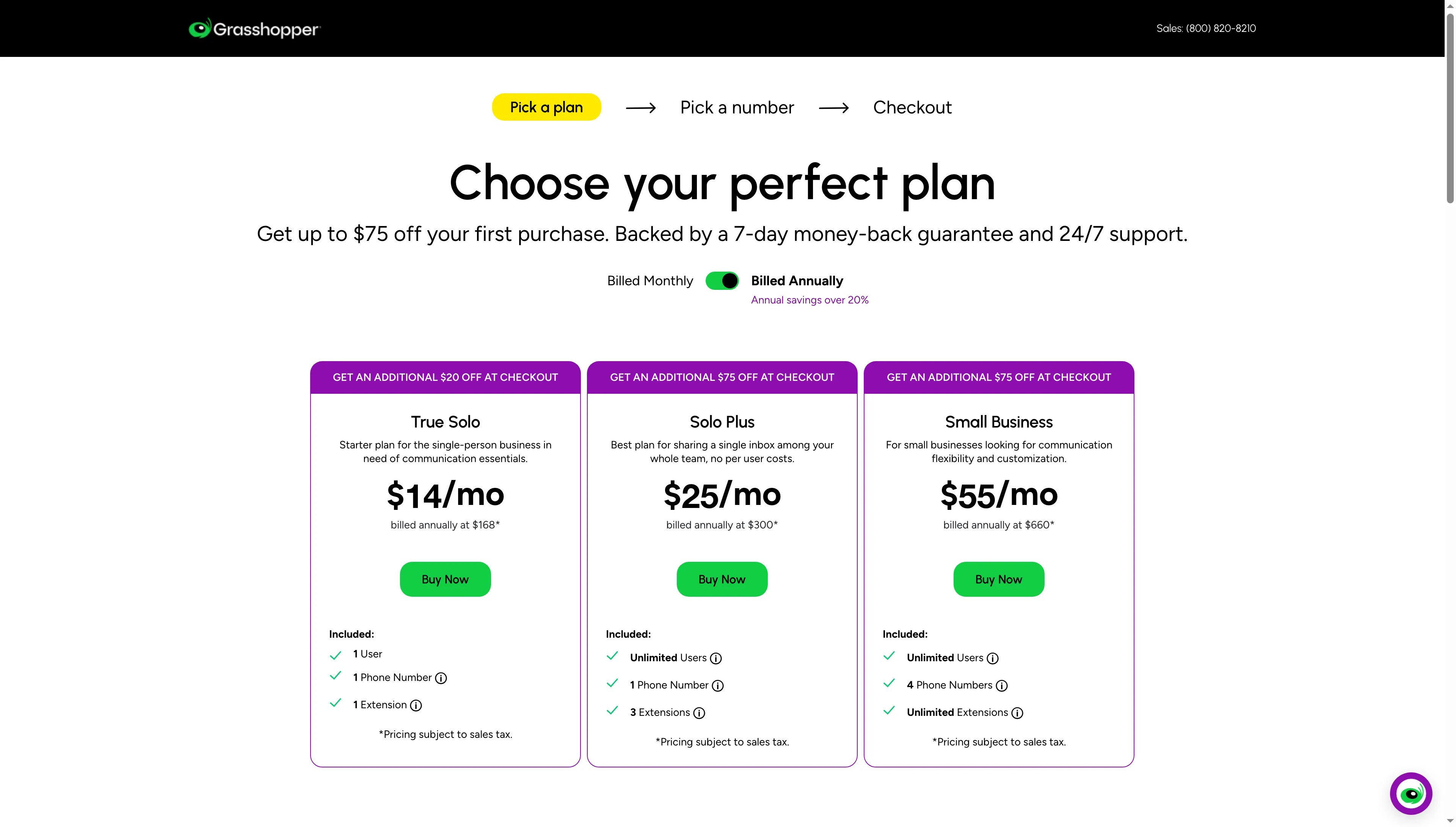
Grasshopper prices True Solo at $14 a month billed annually; number and extension limits vary by plan.
2. Quo: Best for a small team sharing one business number
Quo, formerly OpenPhone, organizes calls and texts around one shared business number. Its annual plans still bill by user, while the higher tiers add menus, ring order, and automation. A shared inbox can solve the handoff problem, but the per-seat bill makes that convenience more expensive as the team grows.
Product pros — Quo
Quo’s main advantage is a shared call-and-text inbox with routing for a team that answers one number together.
- A shared number does not mean one shared license. The pricing page charges by user, so the five-person team pays five seats even if everyone handles one number. That is clear enough to model before signup.
- The higher plan adds meaningful call handling. Quo places phone menus, custom ring orders, and call transfers in Business. Starter is a simpler shared calling and messaging option.
- Automation is metered separately. The plan includes 1,000 automation credits (10 calls); extra credit bundles are available. That is useful to know if you are evaluating automated call handling rather than only human calls.
Product cons — Quo
- The displayed seat price is not the whole messaging cost. Quo lists a $19.50 one-time carrier setup fee and $1.50–$3 per month for messaging registration, with automated SMS charged by segment. Taxes and carrier approval can also affect use.
- Workspace access depends on account verification. That extra setup step matters if several teammates need to start using the shared inbox at once.
- The shared-number model can get expensive as a team grows. At Business pricing, each additional teammate adds $276 per year before messaging costs.
Best for: I like Quo for a small service or sales team that needs one shared call-and-text inbox and simple routing.
Skip it if: you need a low-cost solo line or every user needs a separate direct number.
Product pricing — Quo
Starter is $15/user/month ($180 per user/year), Business is $23/user/month ($276 per user/year), and Scale is $35/user/month ($420 per user/year), billed annually. Business texting registration and usage may add cost.
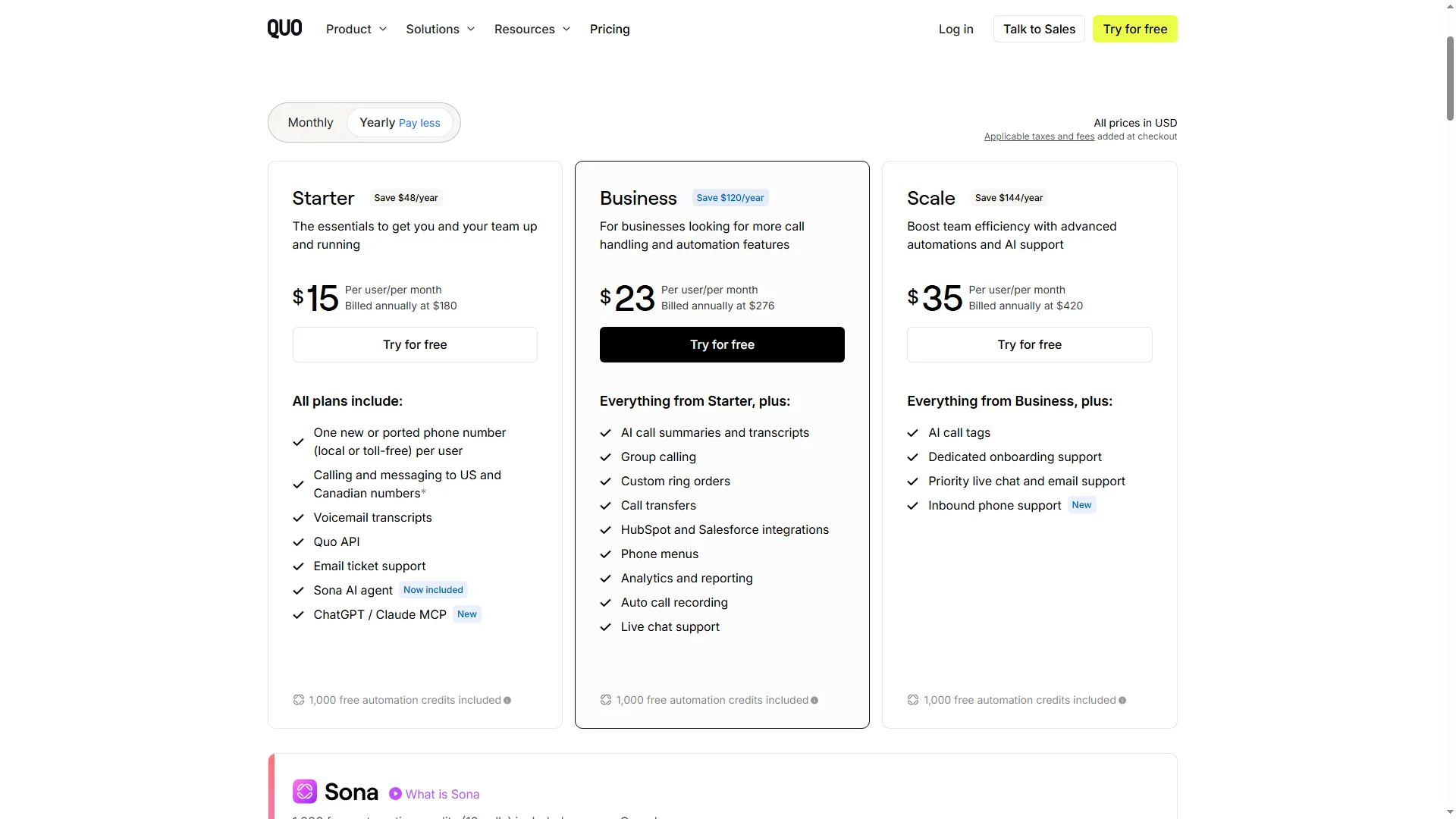
Quo bills Starter, Business, and Scale per user on annual plans.
3. Ooma Office: Best for a small office that needs a receptionist and phone extensions
Ooma Office starts with a virtual receptionist and extensions, then adds desk-phone and queue features at higher tiers. The monthly plans have no contract, but taxes and fees are extra. I like the receptionist-first setup for a small front desk; the queue sits behind the top tier, so that distinction changes the price quickly.
Product pros — Ooma Office
- Ooma Office includes a receptionist and ring groups at the entry tier. Essentials also includes a mobile app, digital fax, and one toll-free number, so a small office can route calls without immediately buying the top plan.
- The tiers make the queue trade-off visible. Pro adds desktop calling, recording, and up to 250 texts per month; Pro Plus adds call queues, CRM integration, and up to 1,000 texts per month.
- Queue limits are documented. Ooma allows up to 10 employees and 30 callers in a queue, with a 15-minute maximum wait. It offers no queue callback, so callers must remain on hold.
Product cons — Ooma Office
- Ooma Office's queue tier costs more than the entry price suggests. A five-person Pro Plus setup is $1,797 a year before taxes and fees, versus $1,197 for Essentials.
- Additional numbers are billed separately. Ooma’s pricing chart lists extra local numbers at $9.95 per month. The first number assigned to each user is included, but additional ones are not.
- Texting allowances are limited by tier. Pro includes up to 250 messages a month and Pro Plus up to 1,000; larger bundles require a quote.
Best for: I'd choose Ooma for an office that wants receptionist-led routing and a basic staffed queue without a contact-center suite.
Skip it if: callers need callback or advanced queue controls.
Product pricing — Ooma Office
Essentials $19.95/user/month, Pro $24.95/user/month, and Pro Plus $29.95/user/month, billed monthly; taxes, additional numbers, equipment, and optional services can add cost.
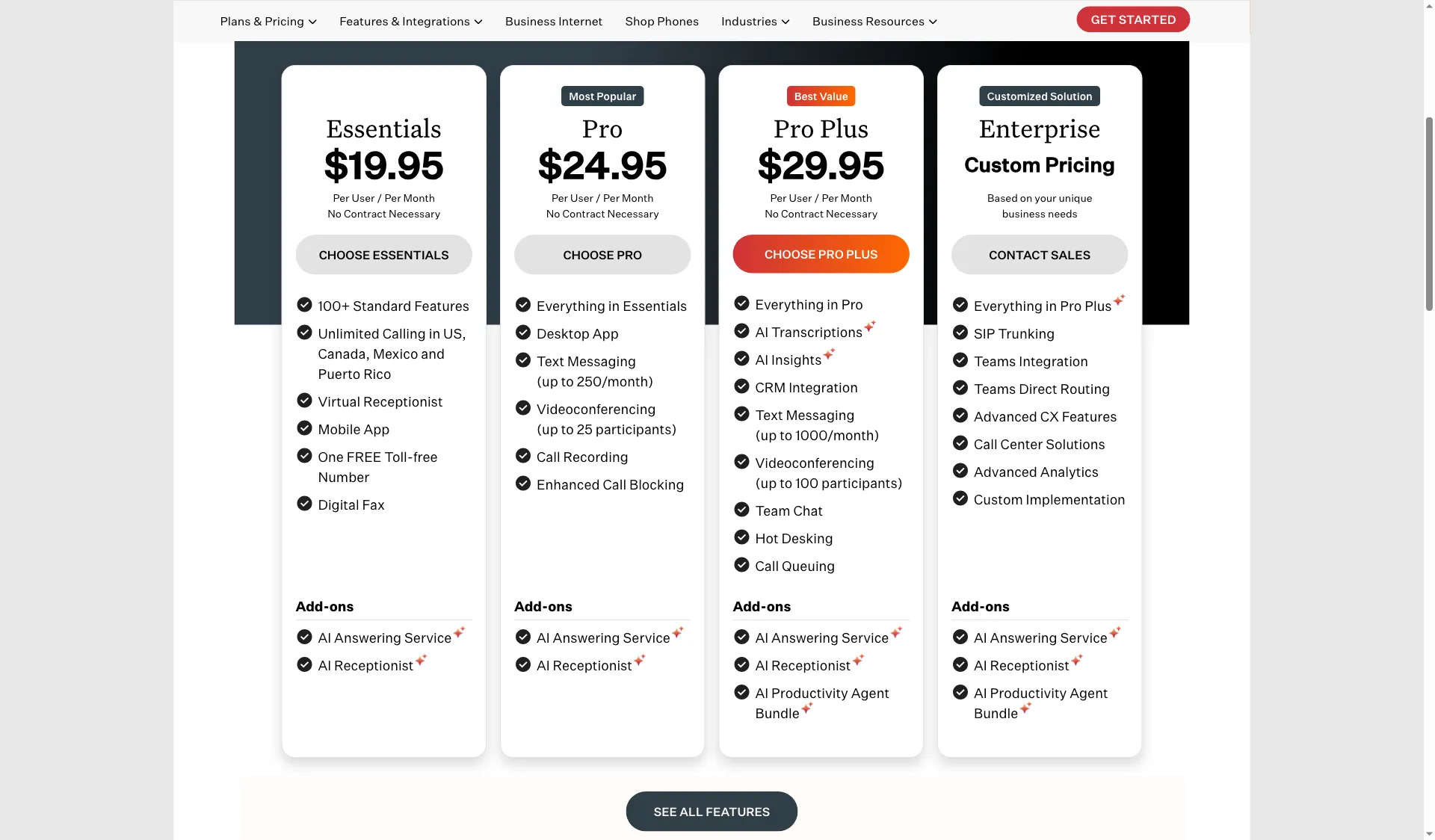
Ooma lists Essentials at $19.95 per user per month; call queues are on Pro Plus.
4. Zoom Phone: Best for teams already using Zoom
For a company already using Zoom, Phone adds PSTN calling to its collaboration stack. The choice is between metered use, unlimited calling, and bundles that combine Phone with Zoom Workplace. The metered option gives a quiet phone line a real low-cost path; it stops being a bargain if the team makes frequent calls.
Product pros — Zoom Phone
- Zoom Phone's metered and unlimited choices let call volume shape the bill. A light-calling team can consider metered service, while regular domestic callers may prefer unlimited calling.
- Phone service sits alongside familiar Zoom collaboration tools. This can reduce app switching for teams already using Zoom Workplace; meeting volume alone does not make it the right phone plan.
- The listed license range is clear for smaller accounts. The pricing comparison shows 1–99 licenses for the two US & Canada standalone plans.
Product cons — Zoom Phone
- Zoom Phone texting requires additional steps. Domestic SMS/MMS requires registration, and message rates depend on the numbers and use case.
- Do not compare the metered rate with an unlimited plan as if they were equivalent. Estimate monthly minutes first, then confirm the calling markets and included usage.
- A familiar parent app still leaves number reputation and call routing to verify. Before porting a sales number, test outbound caller ID with your main carriers and evaluate whether the queue/auto-receptionist behavior fits your team.
Best for: I like Zoom Phone for a company already using Zoom, especially when light calling makes the metered option worthwhile.
Skip it if: your team does not use Zoom or needs contact-center routing.
Product pricing — Zoom Phone
US & Canada Metered starts at $10.50/user/month and US & Canada Unlimited at $16/user/month billed annually; higher bundles are listed at $20.50 and $24.50. SMS rates, registration, and taxes are separate considerations.
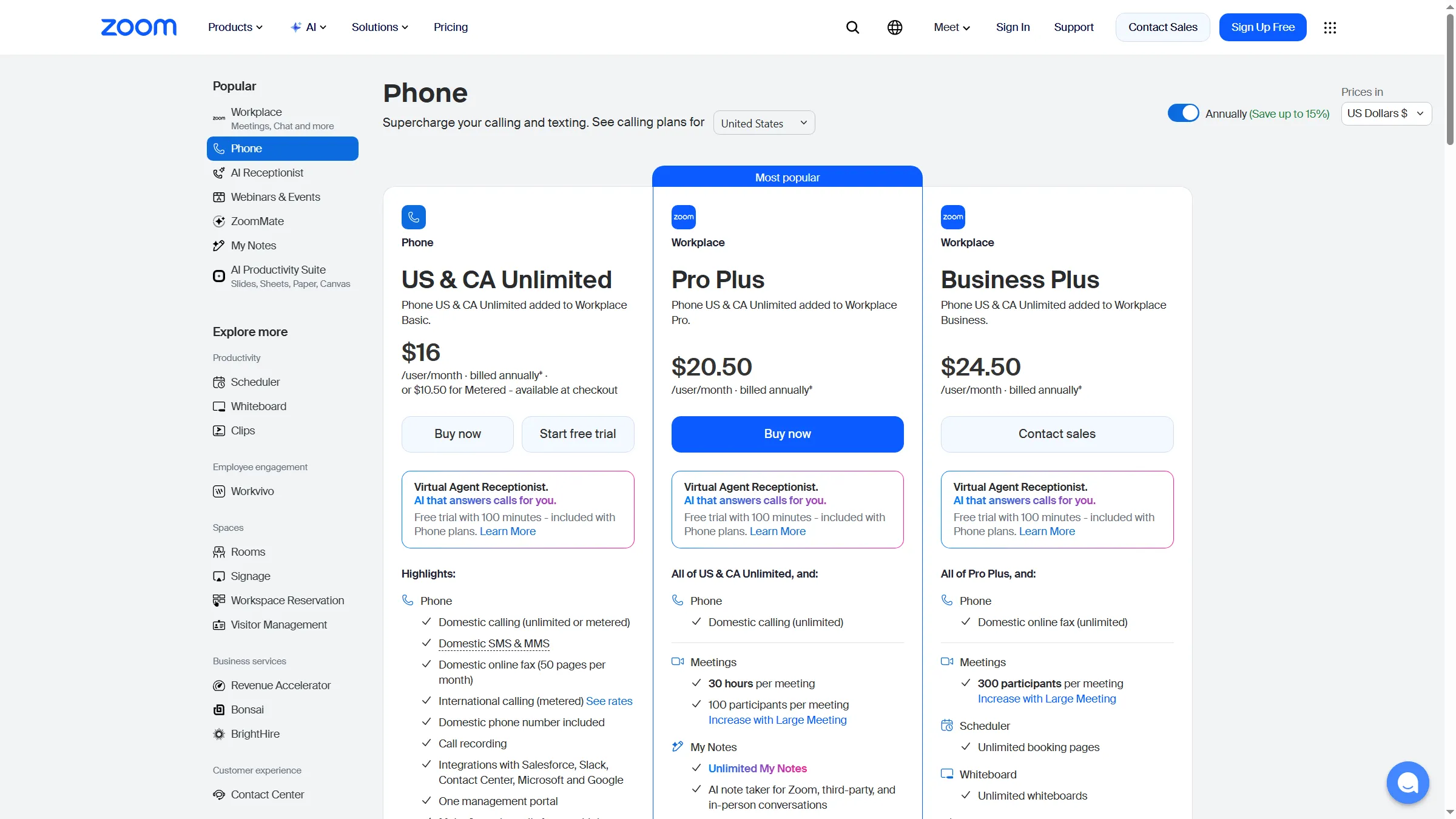
Zoom shows US and Canada unlimited pricing, a metered-at-checkout option, and Workplace bundles.
5. Dialpad Connect: Best for teams that want call transcripts and recaps
Dialpad Connect is best for teams that want business calling with AI recaps and transcripts in the same general communications product. Connect has a Standard and a Pro tier, and Dialpad advertises a 14-day trial. The useful question is whether those recaps will change the team's follow-up; if no one reads them, the AI label adds little.
Product pros — Dialpad Connect
- Dialpad Connect Standard includes the core calling app. The plan adds messaging, meetings, and AI-powered transcripts and recaps.
- Pro adds operational features rather than just more seats. Dialpad lists CRM integrations, 24/7 support, and multi-office management on Pro.
- The product boundaries are legible. Connect is distinct from Dialpad Sell and Dialpad Support, which target outbound sales and contact-center teams and have separate prices.
Product cons — Dialpad Connect
- Dialpad Connect's headline price covers general business calling, not the sales-dialer workflow. Local-presence dialing, coaching, and contact-center controls belong to Sell or Support, which cost more.
- The $15 rate is annual. Dialpad's monthly price and contract terms change the economics for a team that avoids yearly commitments.
- AI output needs an operational check. If call notes drive CRM records or regulated workflows, test transcript access, correction, retention, and export on the specific plan before making it part of a process.
Best for: I prefer Dialpad Connect when a small team needs transcripts and recaps without a dedicated sales dialer or contact-center product.
Skip it if: you need power-dialing or contact-center controls in the same plan.
Product pricing — Dialpad Connect
Connect Standard is $15/user/month and Pro is $25/user/month when billed annually; Enterprise pricing is custom. Dialpad lists a 14-day Connect trial.
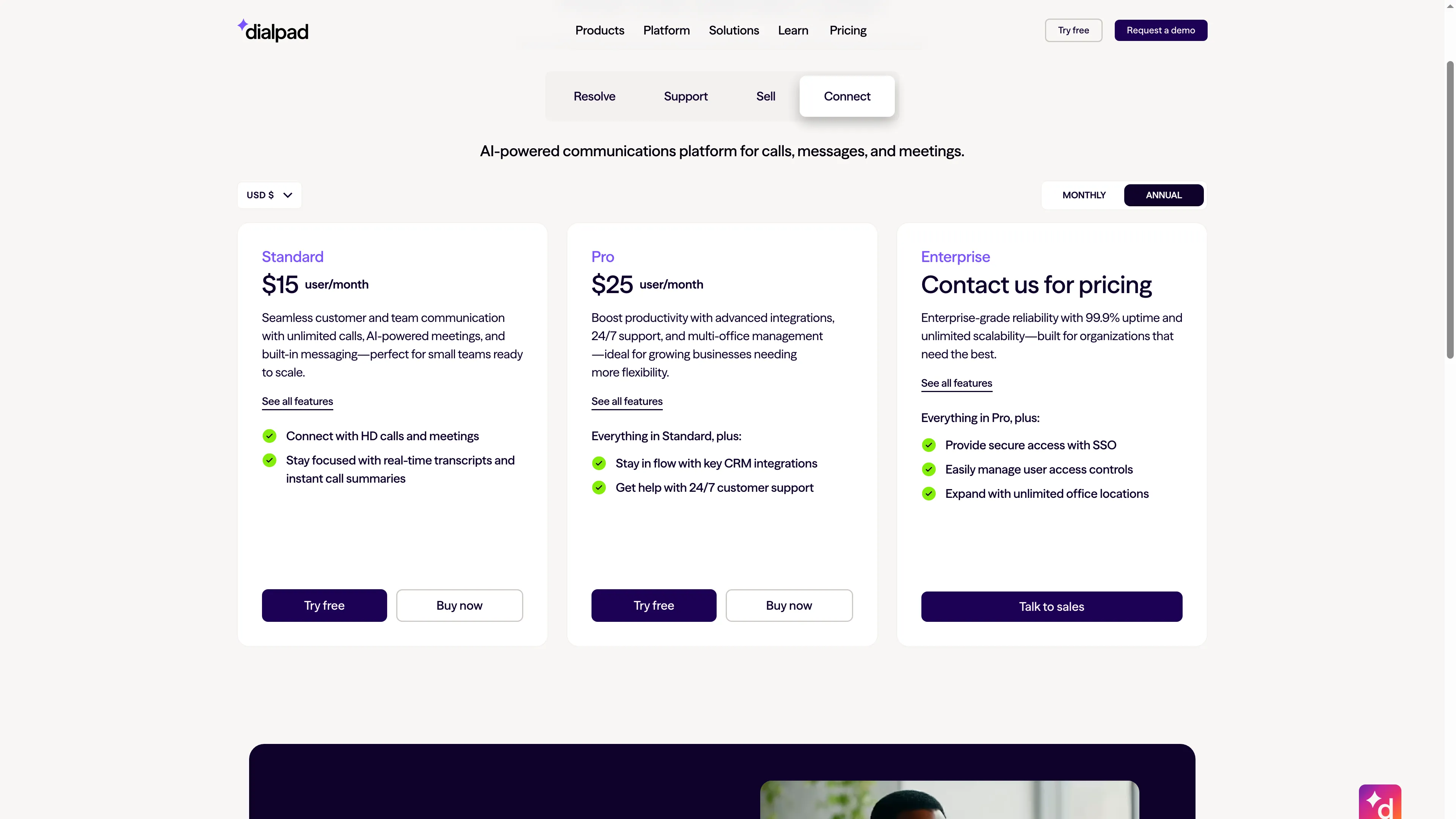
Dialpad lists Connect plans separately from its Sell and Support products.
6. RingCentral RingEX: Best for a growing team that needs a broader communications suite
RingCentral RingEX is best for a growing team that wants calling, messaging, meetings, and team administration in a broader communications suite. For 1–5 users, Core is $20 per user per month billed annually ($30 monthly), and Advanced is $25 annually ($35 monthly). I'd pay for the broader bundle only if the team will actually use its meetings and administration tools alongside calling.
Product pros — RingCentral RingEX
- RingCentral RingEX Core combines several work modes. It includes domestic calling, meetings, messaging, and on-demand recording.
- The price changes with billing and user band. The public page separates annual and monthly prices and lets buyers select user counts. That makes an exact quote important for a team outside the 1–5 tier.
- The wider platform can suit teams with more routing needs. RingCentral publishes higher-tier and add-on options for call queues, reception, and integrations; map each requirement to an actual plan rather than assume every feature is in Core.
Product cons — RingCentral RingEX
- RingCentral RingEX Core’s texting allowance is small. The tier includes 25 SMS per user per month; a texting-heavy sales team should model its volume and registration needs.
- The public band stops at five users. Larger teams need a different price, so a small team's annual rate is a poor budget proxy.
- Company-wide reviews need careful reading. RingCentral’s public Trustpilot profile covers more than RingEX. Its low displayed score and billing complaints are a reason to read current terms; it does not isolate call quality for RingEX.
Best for: I'd consider RingCentral only if its collaboration bundle and routing tier justify the bill for a growing team.
Skip it if: you only need one basic business line or a small shared inbox.
Product pricing — RingCentral RingEX
RingEX Core for 1–5 users is $20/user/month annually or $30 monthly; Advanced is $25 annually or $35 monthly. The published band covers up to five seats; add-ons and taxes change the total.
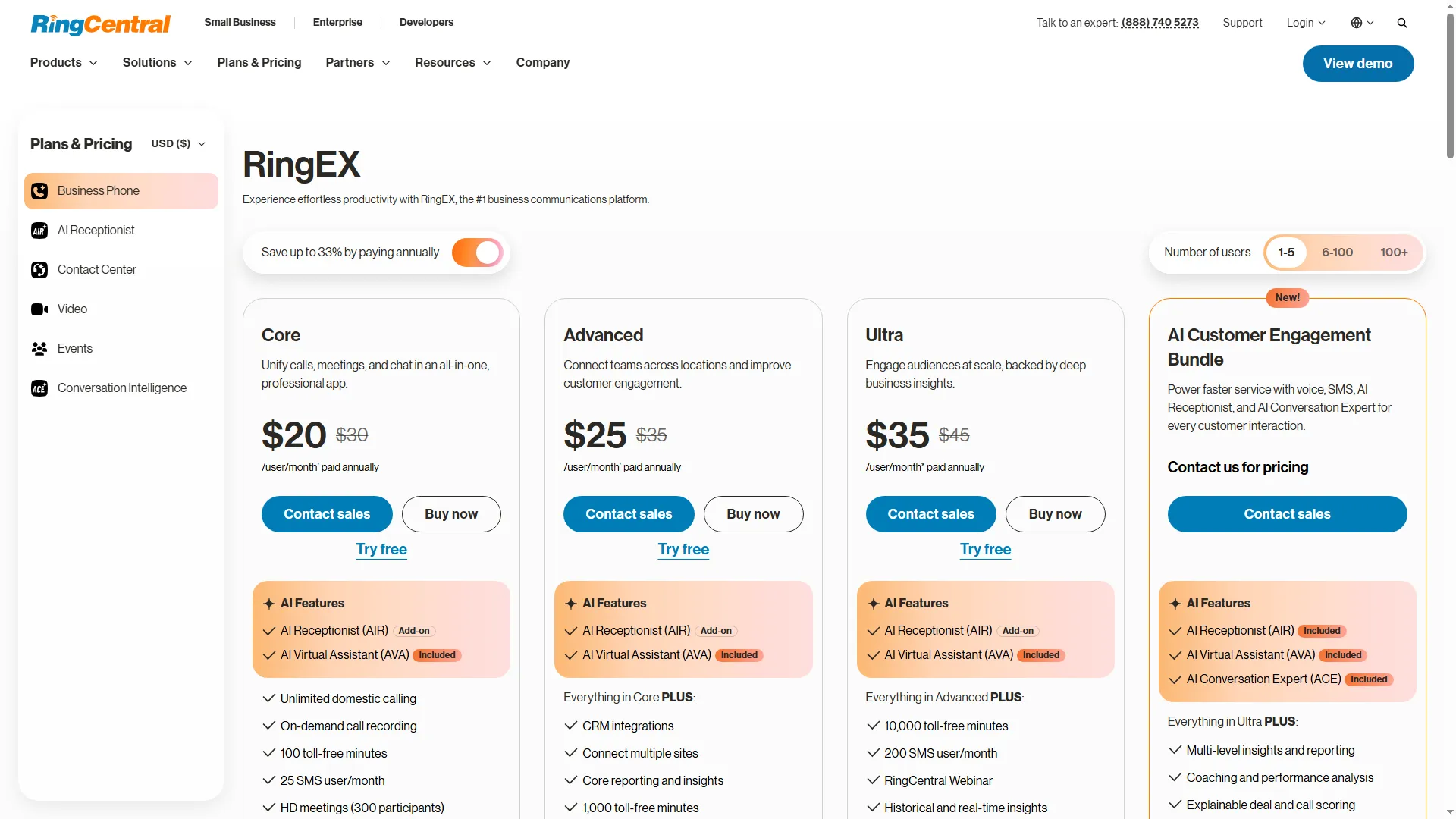
RingCentral lists Core at $20 and Advanced at $25 per user monthly when paid annually for 1–5 users.
7. Nextiva: Best for teams combining phone service with basic customer workflows
Nextiva is best for a small team that wants calling alongside shared inboxes, basic CRM/ticketing, and skills-based routing. NEXT Core has separate annual and monthly rates; the advertised small-business annual rate applies only to eligible new customers on a paid 12-month or longer agreement. The bundled inbox and CRM can replace a lightweight tool, but demo-led buying makes it harder to price the final setup at a glance.
Product pros — Nextiva
- Nextiva Core already includes skills-based routing. That is more specific than simply ringing a group of extensions.
- The phone plan includes basic customer-workflow tools. Nextiva lists a basic CRM and ticketing system plus one shared team inbox and one personal inbox on Core.
- The feature tiers show the likely upgrade points. Engage raises the price to $25 per user monthly on annual billing and adds 500 texts per user, 2,000 toll-free inbound minutes, and more shared inboxes.
Product cons — Nextiva
- Nextiva's annual discount carries a commitment. Eligible new small businesses need a paid term of at least 12 months.
- Some useful capacity is an add-on. Core lists toll-free minutes and fax as add-ons, so a business relying on either should compare the final configuration rather than the entry price.
- Signup is demo-led. I found a “Get a Demo” path rather than a self-serve purchase flow, so buyers should get plan, term, and add-on details in the quote.
Best for: I lean toward Nextiva when its built-in inbox and basic CRM replace a separate lightweight tool.
Skip it if: you cannot commit to the required annual term.
Product pricing — Nextiva
NEXT Core is $15/user/month annually ($23 monthly); Engage is $25 annually ($50 monthly); Scale is $75 annually. Eligible small-business annual pricing requires a paid term of 12 months or more.
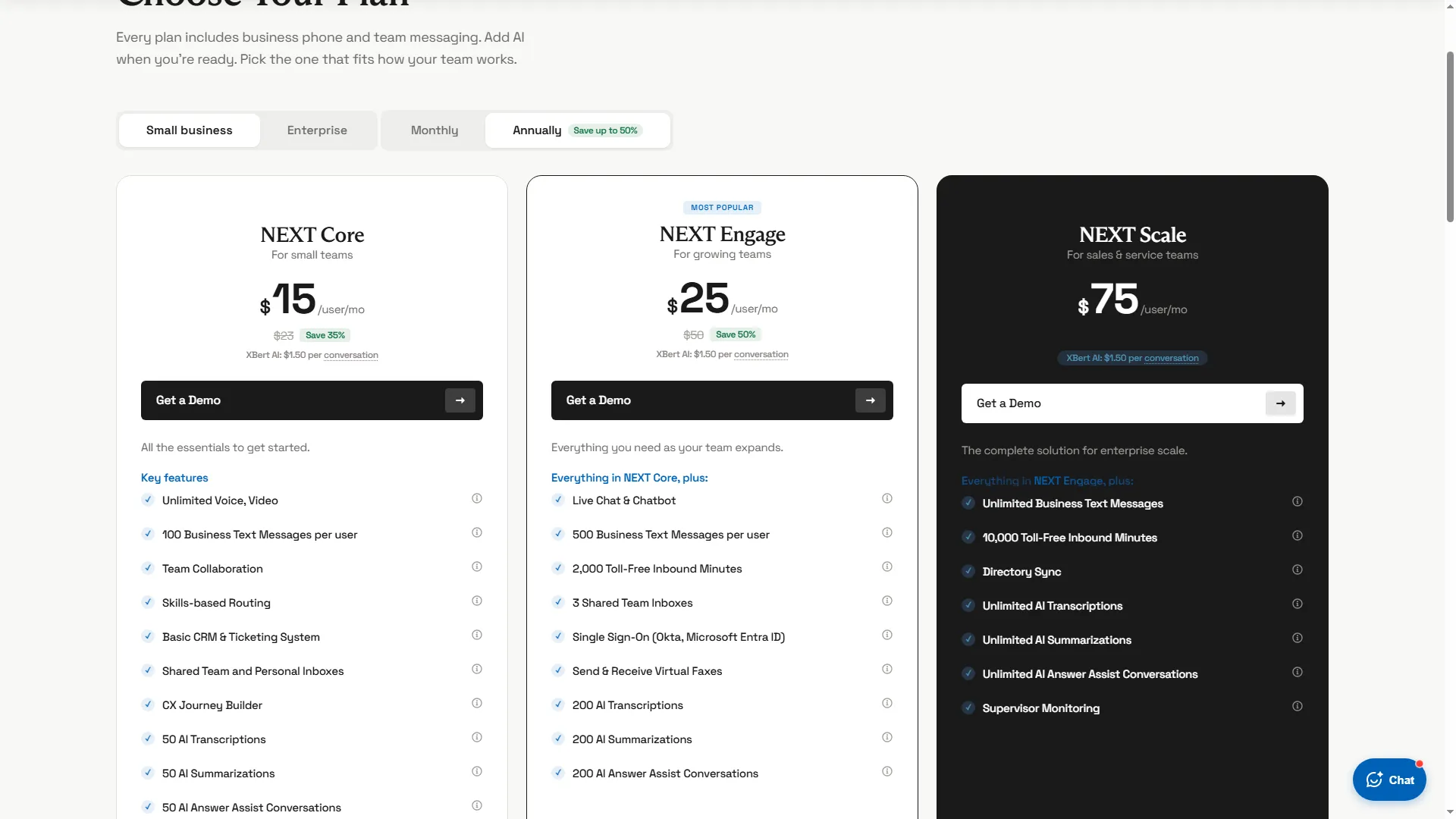
Nextiva shows the Core, Engage, and Scale plan prices in its annual pricing view.
8. Aircall: Best for CRM-centered sales and support teams
Aircall is best for a sales or support team that handles calls inside a CRM or help desk and needs integrations, call routing, and team analytics. Essentials is $30 per license per month billed annually; Professional is $50. Both have a three-license minimum, so the practical annual floor is $1,080 for Essentials or $1,800 for Professional. That floor makes sense if CRM links save agents time every day; it is hard to justify for a basic second line.
Product pros — Aircall
- Aircall is built around shared team calling. Essentials includes IVR, integrations, analytics, and call recording, with more advanced routing and analytics on Professional.
- The minimum commitment is published. Essentials and Professional require at least three licenses; the included plan has one local or toll-free number, with additional numbers listed at $6 a month.
- It makes its US SMS pricing caveat visible. The pricing table says US business texting rates are available by contacting Aircall, rather than presenting SMS as unlimited at a fixed included rate.
Product cons — Aircall
- Aircall is expensive for a one- or two-person business. Its three-seat minimum means Essentials starts at $1,080 a year before tax and add-ons.
- SMS and some usage need a quote. Domestic texting rates are not fixed on the public pricing table; international calls also require rates or a bundle.
- The company’s Trustpilot profile is mixed and not a product-only score. Use it as a prompt to check support and cancellation terms, not as a direct measure of call quality.
Best for: Aircall fits a sales or support team of at least three people that needs call activity connected to a CRM or help desk.
Skip it if: your team has fewer than three users or only needs an occasional second line.
Product pricing — Aircall
Essentials is $30/license/month ($360/license/year) and Professional is $50/license/month ($600/license/year), billed annually, with a three-license minimum. Additional numbers cost $6/month; US SMS rates are quote-based.
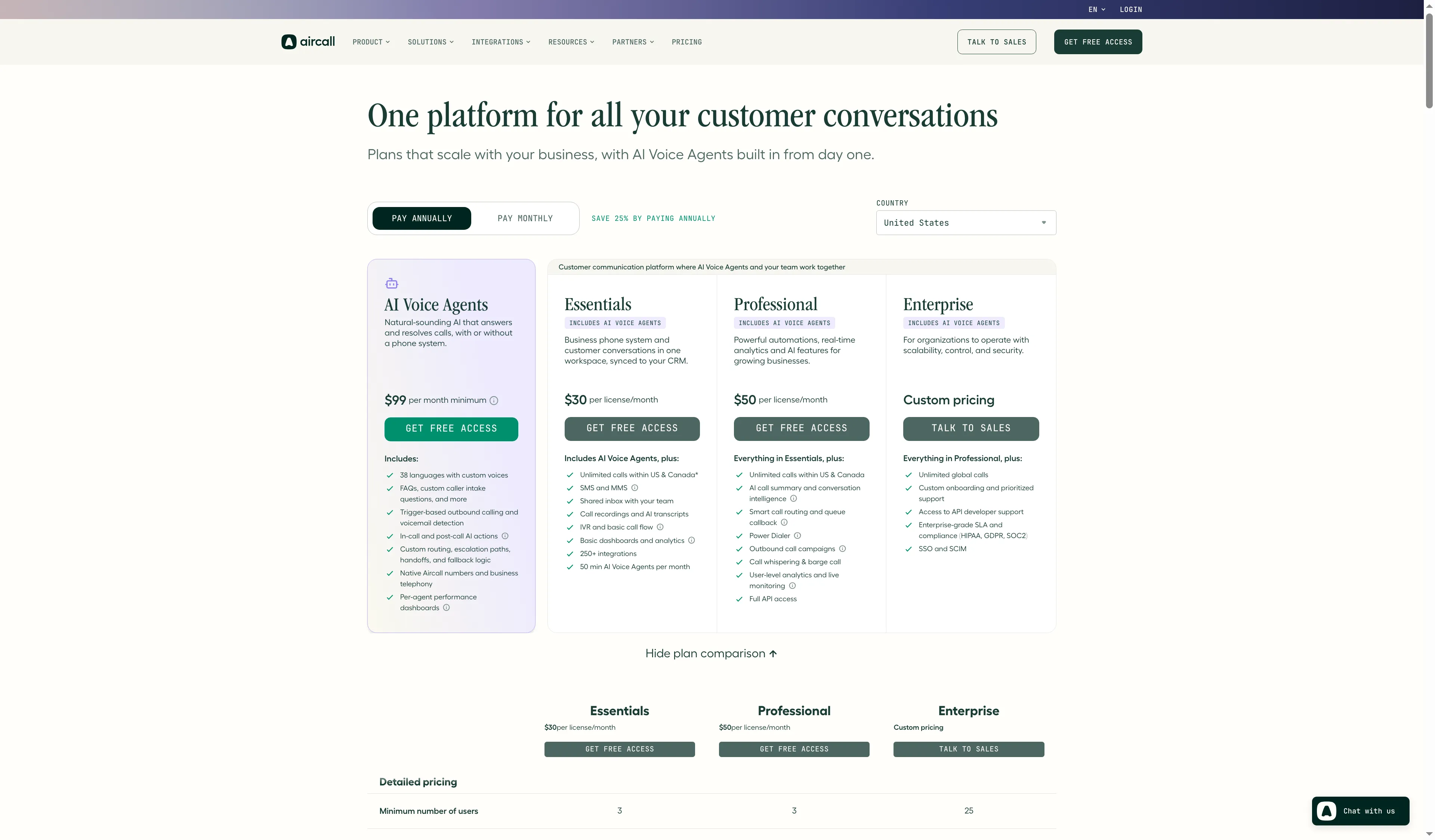
Aircall lists Essentials and Professional beside a custom-priced Enterprise tier.
Existing subscriptions for virtual business phone systems
Virtual business phone systems can overlap with phone licenses in a company's existing suite. If you already pay for Google Workspace or Microsoft 365, check those entitlements before buying standalone seats.
Google Voice for Google Workspace
Google Voice is one of the virtual business phone systems available to Workspace teams, with calling, SMS, voicemail, and admin controls. If you only need one US number, personal Google Voice is free for a single user, but it is a different product from managed business plans. The Workspace add-on starts at $10 per user per month for Starter, $20 for Standard, and $30 for Premier. You need a paid Workspace subscription; Standard and Premier add call recording and other higher-tier controls, while Premier supports additional numbers outside the user’s home country.
This is not automatically cheaper than a standalone provider: add the Workspace subscription and Voice license together if comparing total spend. Also confirm number availability, emergency-calling details, and whether your desired call flow requires Standard or Premier.
Microsoft Teams Phone
Microsoft Teams Phone is one of the virtual business phone systems available to Microsoft 365 organizations, but PSTN calling needs a paid phone license; a standard Teams subscription does not include it by itself. Microsoft lists Teams Phone Standard at $10 per user per month; outbound and inbound PSTN service also needs a calling plan, Operator Connect, or Direct Routing. For the US, Microsoft’s Teams Phone with pay-as-you-go calling option is listed separately. If the organization already has Microsoft 365 E5, check its included phone entitlements before buying duplicate licenses.
Microsoft’s US Teams Phone with Calling Plan bundle is listed at $17 per user per month annually and includes a phone number with 3,000 domestic outbound minutes. The $13 pay-as-you-go bundle is another option, with metered outbound minutes. That is a clearer price comparison than adding the $10 Standard license to a separate PSTN plan and assuming the carrier cost.
Teams is most attractive when Microsoft 365 is already the collaboration layer and the administrator can manage number assignment, emergency locations, and carrier setup. A small company that just needs a number may find a simpler provider easier to price and operate.
What does a business phone system cost for the same team size?
For one user, published annual totals run from $126 for Zoom Phone Metered to $1,080 for Aircall’s three-license floor. For five users, they range from $372 with Grasshopper Solo Plus and two extra extensions to $1,800 with Aircall Essentials; Grasshopper provides shared-line extensions rather than five direct seats.
One-person annual price example
For one person, Zoom Phone Metered is the lowest listed subscription at $126 a year; Aircall requires three licenses, for a $1,080 annual floor. The table shows recurring subscription totals before taxes and usage charges.
| Product | One-person configuration | Annual subscription | Required costs or terms | Fit limit |
|---|---|---|---|---|
| Grasshopper | True Solo, 1 user | $168 | Annual billing; taxes and add-ons extra | One number and one extension |
| Quo | Starter, 1 user | $180 | $19.50 carrier setup; monthly registration, SMS usage, and tax may add cost | Shared number still bills by user |
| Ooma Office | Essentials, 1 user | $239.40 | Taxes, fees, and equipment extra | Monthly billing; no contract |
| Zoom Phone | US & Canada Metered, 1 user | $126 | Metered use; SMS registration, usage, and tax extra | Calling allowance differs from unlimited plan |
| Dialpad Connect | Standard, 1 user | $180 | Annual billing; tax extra | Sell and Support are separate products |
| RingCentral RingEX | Core, 1 user | $240 | Annual billing; tax and add-ons extra | Core includes 25 SMS per month |
| Nextiva | NEXT Core, 1 user | $180 | Eligible buyer; paid 12-month term; taxes extra | Advertised small-business rate has eligibility rules |
| Aircall | Essentials, 3-license minimum | $1,080 | Annual term; SMS quote and tax extra | Cannot buy a single license |
Zoom’s total assumes the metered license for a light-calling user; check usage charges and included markets before comparing it with unlimited calling. Aircall’s total is its three-license minimum, not a one-person quote.
Five-person annual price example
For five users, the published subscription totals run from $372 for Grasshopper Solo Plus plus two extensions to $1,800 for Aircall Essentials. The table compares each vendor’s closest published configuration; it does not treat shared extensions as five individual phone seats.
| Five-person team configuration | Plan used | Annual subscription | Mandatory or likely extra costs | Important limits |
|---|---|---|---|---|
| Grasshopper shared main line | Solo Plus plus 2 extra extensions | $372 | Two extra extensions at $3/month each; extra numbers or texting if needed | One number; three extensions included, then $3/month each |
| Quo shared call/text team | Business, 5 users | $1,380 | $19.50 one-time messaging setup; $1.50–$3 monthly registration; text usage and tax | Each user is billed even for one shared number |
| Ooma office with queues | Pro Plus, 5 users | $1,797 | Taxes/fees; extra numbers; phones/equipment if wanted | Queueing is included; queue has 10-agent/30-caller maximum and no callback |
| Zoom unlimited domestic calling | US & Canada Unlimited, 5 users | $960 | SMS registration and use; tax | Annual price; confirm which Zoom bundle and routing setup apply |
| Dialpad basic calling | Connect Standard, 5 users | $900 | Tax; separate Sell/Support seats if needed | Does not include all contact-center or outbound sales features |
| RingCentral broad suite | RingEX Core, 5 users | $1,200 | Taxes/fees, extra SMS, numbers, or add-ons | 25 SMS per user/month on Core; 1–5-seat price band |
| Nextiva phone and workflows | NEXT Core, 5 users | $900 | Taxes and any selected add-ons | Eligible annual small-business price requires 12+ month term |
| Aircall CRM phone team | Essentials, 5 licenses | $1,800 | US SMS quote, extra numbers, taxes | Three-seat minimum; one number included |
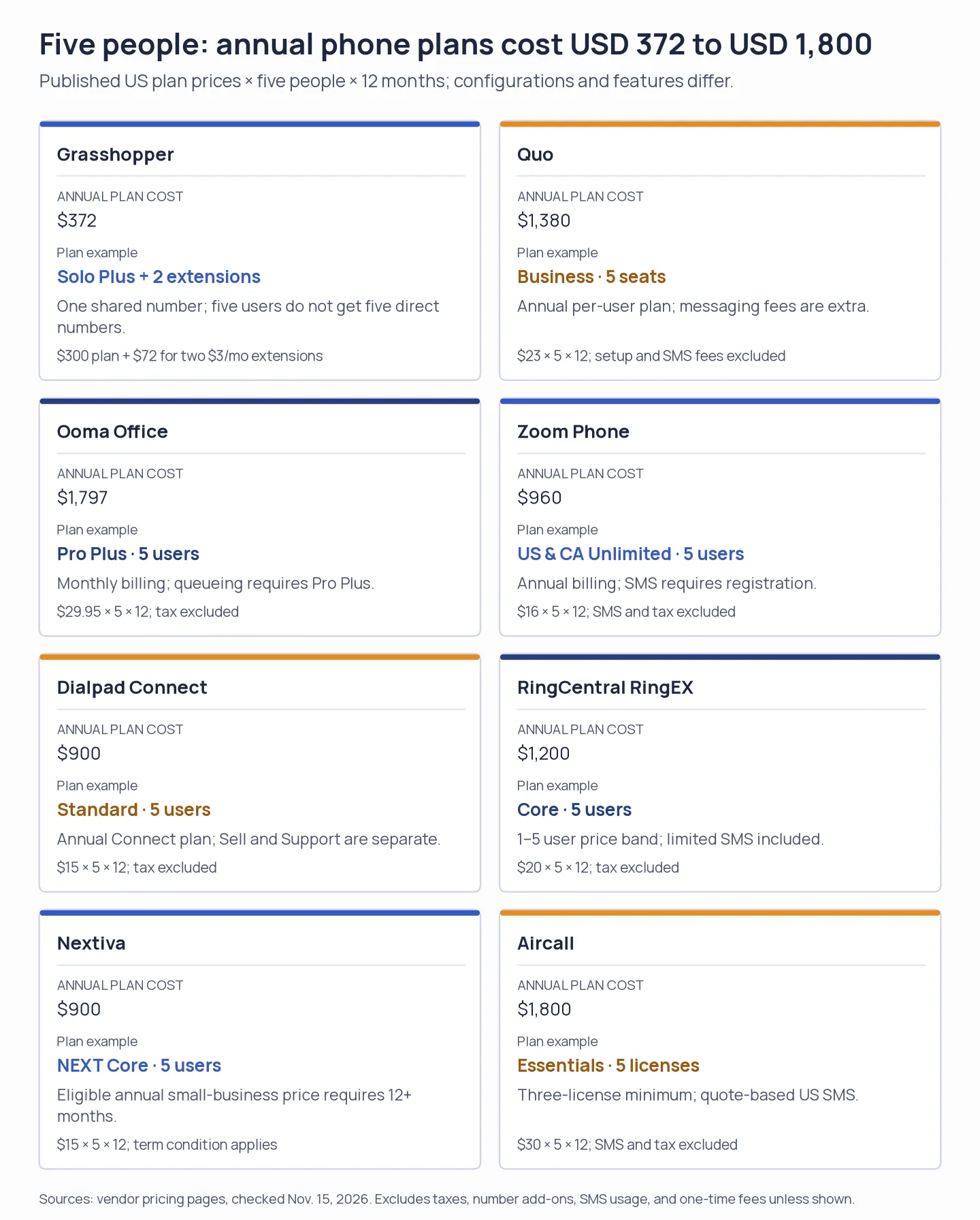
Five-person annual subscriptions run from $372 to $1,800, but the plans are not interchangeable; Grasshopper's shared extensions are not five direct seats.
For one owner, Grasshopper True Solo costs $168 per year, Zoom Phone Metered starts at $126 per year, and Dialpad Connect Standard at $180 per year when billed annually. Their calling allowances, features, and ecosystem requirements differ, so the lowest figure alone cannot decide the fit. For a ten-person multi-location operation, do not multiply a small-team price blindly; recheck the seat band, number count, queue implementation, emergency calling, and any enterprise quote.
Which virtual business phone system should you choose?
Choose by the feature your team cannot lose: Grasshopper for extensions, Quo for a shared inbox, Ooma for queues, or Aircall for CRM links. A low headline rate can grow once teammates, numbers, messaging, and routing features are included.
- Choose a simple second line when one owner mainly needs voicemail and forwarding. Compare flat-rate plan pricing with a single-user plan, and decide whether the number and extension limits are enough.
- Choose a shared inbox when several people need to see the same call and text history. Ask whether every teammate needs a paid seat, and whether the shared number can route simultaneous calls.
- Choose a queue or CRM-connected suite when calls need wait handling, team assignment, recording, or logging inside a help desk. Confirm which plan unlocks that behavior and whether a separate contract, seat minimum, or messaging registration changes the total.
Before porting your main number, test caller ID with the carriers your customers use and confirm spam-label remediation, port-out steps, and emergency-address handling. A low introductory quote is not useful if the operational path is hard to reverse.