
 Updated: October 26, 2026
 19 min read
Getting a page into a spreadsheet sounds like a small job. Then you discover that the price lives on a second page, the free plan won't run while your laptop is shut, and “10,000 credits” doesn't mean 10,000 usable records. I'd choose a scraper around those details before comparing the size of its feature list.
My picks at a glance
For recurring tables without code, my pick is Browse AI; for a developer who wants HTML through an API, it's ScrapingBee. Apify suits ready-made cloud jobs, Firecrawl suits content for AI applications, Octoparse gives you visual desktop workflows with a paid cloud option, and Scrapy gives Python developers control over the crawl and output.
How I checked these tools and publisher disclosure
I tried ScrapingBee's HTML playground and Firecrawl's public preview, opened Octoparse's free AI workflow, ran a synthetic catalogue through Scrapy, and compared official guides, pricing and public user discussions. These small checks cover setup and output, not production reliability. Linked Helper publishes this blog and makes a separate LinkedIn automation tool; it isn't one of the picks.
What is a web scraping tool?
A web scraping tool retrieves web pages and extracts content into a usable format, such as HTML, Markdown, CSV or JSON. Some tools let you select fields visually; others give developers an API or a coding framework. Crawling discovers pages, while extraction turns their contents into the records you need.
The best web scraping tools at a glance
| Tool | Best for | Standout feature | Starting price | Main trade-off |
|---|---|---|---|---|
| Browse AI | Recurring tables without code | Visual robots and monitoring | $19/month, billed annually; Free available | Rows and runs consume credits |
| Apify | Ready-made cloud jobs | Actor marketplace and datasets | $19/month, billed monthly; Free available | Actor charges vary |
| ScrapingBee | HTML through an API | Rendering and proxy options | $19/month, billed monthly | You build the data workflow |
| Firecrawl | Content for AI applications | Markdown and structured formats | $19/month, billed monthly; Free available | JSON uses extra credits |
| Octoparse | Visual desktop-to-cloud workflows | Local extraction, paid cloud scheduling | $69/month, billed annually; Free available | Classic cloud scheduling needs paid plan |
| Scrapy | Custom Python crawls | Selectors, pipelines and feed exports | $0 software licence | You maintain the system |
What makes the best web scraping tools?
A useful scraper gets the right fields into your next step at a cost you can predict. I'd start with one representative page, including the awkward part of the job: pagination, missing prices or a field that only appears after a click.
The output you actually need. HTML is useful when you're writing a parser. Markdown is useful when an AI application needs readable page content. A spreadsheet needs stable columns. Don't pay for a format conversion you'll immediately undo.
Where the data lives. Twenty products on one listing page and twenty individual product pages create different workloads. Check whether the tool must open each detail page, render JavaScript or follow another set of links.
Who keeps it running. A free desktop tool can be enough for a monthly export you supervise. A daily job needs somewhere to run, a schedule and a way to notice missing results. Cloud hosting removes some work; it doesn't remove the need to check your data.
A bill you can reconstruct. Look for the charge per request, row, event or unit of compute. Then check the extras attached to the settings you'll use. A cheap base request can become a more expensive browser or AI operation.
A small, inspectable result. I want to compare a few returned fields against the source before scheduling anything. An HTTP success code tells you that a request completed; it doesn't tell you that every expected product arrived.
The six picks cover visual tools, hosted APIs and custom code. Enterprise data-delivery contracts and specialist social-platform tools solve narrower procurement problems, so I haven't treated them as interchangeable options here.
1. Browse AI: Best for recurring tables without code
Pros — Browse AI
-
Visual robots can feed monitoring and repeatable extraction workflows.
-
Table Studio proposes fields from a URL without requiring a browser extension.
Cons — Browse AI
-
Separate detail-page runs can use far more credits than one listing-page extraction.
-
The 50-credit Free allowance is small for daily monitoring.
Browse AI is my pick when your end goal is a refreshed table and you don't want to maintain selectors in code. Its Table Studio starts from a page URL and proposes columns and sample rows. You review the fields, choose how many items to capture, then save the robot for repeat runs.
I like that separation between building a table and scheduling it. If you're watching a supplier catalogue, you can think in terms of the columns you need rather than the request that fetches each page. Table Studio is still in beta, though, and interactive journeys belong in Robot Studio: clicking through a form is a different task from reading an already visible list.
Things I Noted — Browse AI
I'd count page visits before counting rows. Under the standard credit rules, 20 items on one listing page cost two credits. Running a robot separately on 20 detail pages costs at least 20 credits, before any run used to discover those links. That's a tenfold difference for the same number of items.
The catch is how quickly repeated runs use the free allowance. A daily 20-row list extraction uses 60 credits in a 30-day month, just beyond Free's 50. I'd skip this if your team already wants to write its own parser and control every request; you're paying for a visual workflow you may not need.
Browse AI pricing
From $19/month, billed annually, for Personal; Free available.
-
Free — 50 credits/month across two websites.
-
Personal — $19/month, billed annually, with 12,000 credits supplied upfront each year.
-
Professional — $69/month, billed annually, with 60,000 annual credits and ten websites.
2. Apify: Best for ready-made cloud scraping jobs
Pros — Apify
-
Website-specific Actors can save you from building an extractor from scratch.
-
Datasets support formats including CSV, JSON and Excel.
Cons — Apify
-
Each Actor has its own input requirements and charging model.
-
Platform credit doesn't translate into a fixed number of rows.
Apify is worth a look when a ready-made Actor already covers your target site or workflow. An Actor is a program you can run on Apify's cloud; it may be a specialised scraper or a more general tool that needs additional configuration. The useful question is whether that particular Actor returns the fields you need.
I like having execution and dataset access in the same platform. You can start with a matching Actor, inspect its sample output, and arrange for another application to consume the dataset. That's a more useful starting point than buying infrastructure before you've found a working extractor.
Choosing the Actor still takes care. In a September 2026 r/scrapingtheweb discussion, u/Heiswasistocome wrote: “I am looking at Apify and feeling overwhelmed at the number of actors who can do what I want them to do.” I'd narrow that search by output fields, recent maintenance and a small sample run, rather than popularity alone.
The catch is pricing at two levels. Actors can charge for events or usage, with platform costs included or separate depending on the Actor. Apify's compute unit measures a gigabyte of RAM used for an hour; it doesn't tell you how many products you'll get. I'd skip Apify if you want one universal per-page price across unrelated scrapers.
One export detail is worth checking before you design a downstream spreadsheet: selecting dataset fields accepts top-level names, while omitting fields can use nested paths. A nested result may need reshaping before it becomes the flat table you pictured.
Apify pricing
From $19/month, billed monthly, for Starter, plus usage beyond the included amount; Free available.
-
Free — $5 of platform usage each month.
-
Starter — the subscription payment becomes included usage credit.
-
Actor charges — check the selected Actor's events, usage and included platform costs separately.
3. ScrapingBee: Best for getting HTML through an API
Pros — ScrapingBee
-
Plain HTML requests can cost one credit each.
-
Rendering, proxy choices and extraction options sit behind one API.
Cons — ScrapingBee
-
Settings change the credit cost per request.
-
Scheduling, storage and downstream validation remain your job.
ScrapingBee is my pick for a developer who wants the page-fetching part handled without buying a complete visual data platform. You send a URL and configuration, then work with the response in your own application. That fits an existing pipeline where you already know how the results should be parsed, stored and checked.
I tried its HTML Playground on one page of the Books to Scrape sandbox. With Auto mode off and JavaScript rendering disabled, the request returned HTTP 200 and the interface showed one credit withdrawn. That was a useful configuration check; a simple demo page says little about difficult sites.
Things I Noted — ScrapingBee
The switches matter before you press the button. The Playground started with Auto mode enabled. When I disabled it, JavaScript rendering was checked separately; turning that off produced the one-credit configuration I wanted. The API's JavaScript-rendering default costs five credits, while a plain request without it costs one.
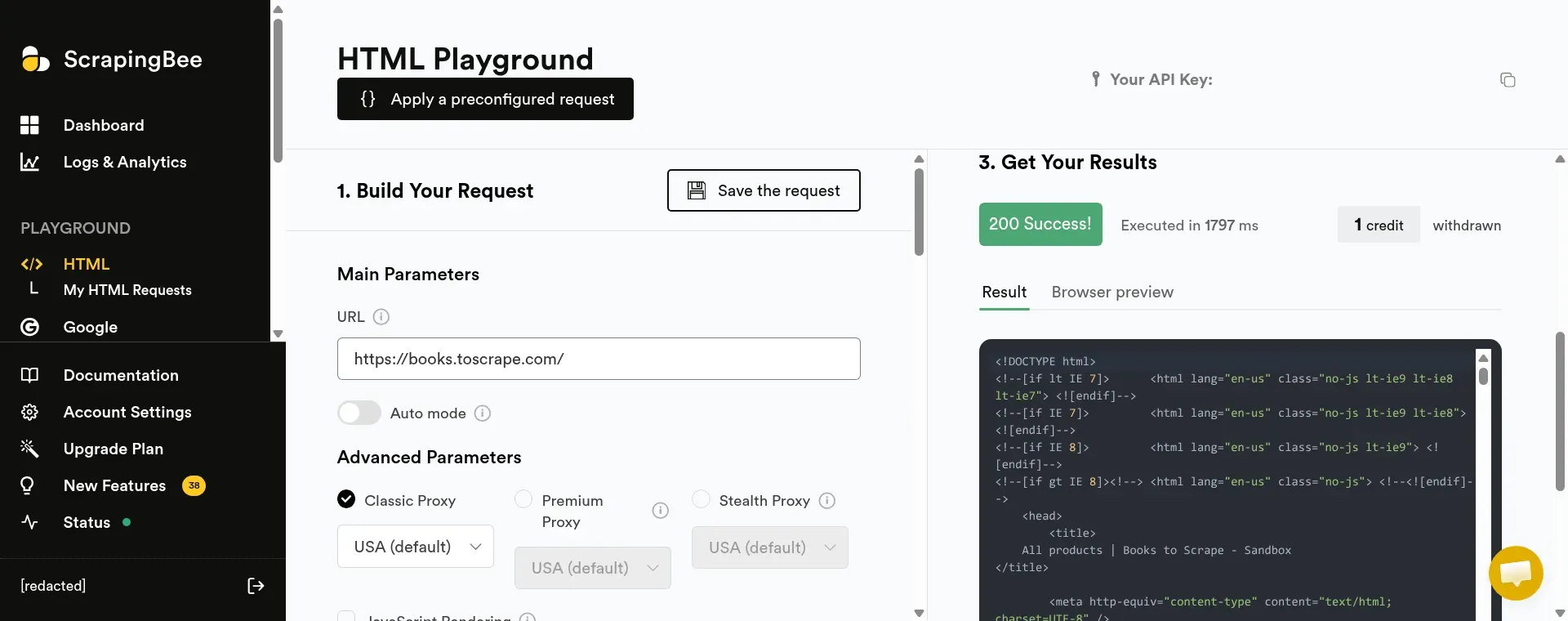
Inside ScrapingBee's HTML Playground, the plain-page request returned a result and showed one credit withdrawn.
I like this control when your pages don't need a browser, because you can avoid paying for unnecessary rendering. The catch is that you'll still need to turn the fetched page into dependable records. I'd skip this if you want a finished monitoring spreadsheet without building a workflow around the API.
ScrapingBee pricing
From $19/month, billed monthly, for Hobby; a 1,000-credit trial is available.
-
Hobby — $19/month for 75,000 credits and 25 concurrent requests.
-
Freelance — $49/month for 250,000 credits and 50 concurrent requests.
-
Request settings — standard HTML costs one credit; JavaScript rendering costs five; premium options cost more.
4. Firecrawl: Best for content that feeds AI applications
Pros — Firecrawl
-
Returns Markdown, HTML and structured extraction formats.
-
A public Playground lets you try a page and inspect a preview.
Cons — Firecrawl
-
Structured JSON extraction adds credits to the base page cost.
-
A successful preview doesn't replace checking the complete output.
Firecrawl is my pick when your next step needs readable page content rather than raw HTML. Markdown makes sense for retrieval and AI workflows; structured JSON makes sense when a downstream process expects named fields. I like having those choices in one place, but I'd decide which output you need before estimating the bill.
I submitted the Books to Scrape sandbox page in the public Playground and received a successful Markdown preview. It kept the Home link and All products heading. Full output required an account, so my check stopped at that preview rather than a verified export of all the products.
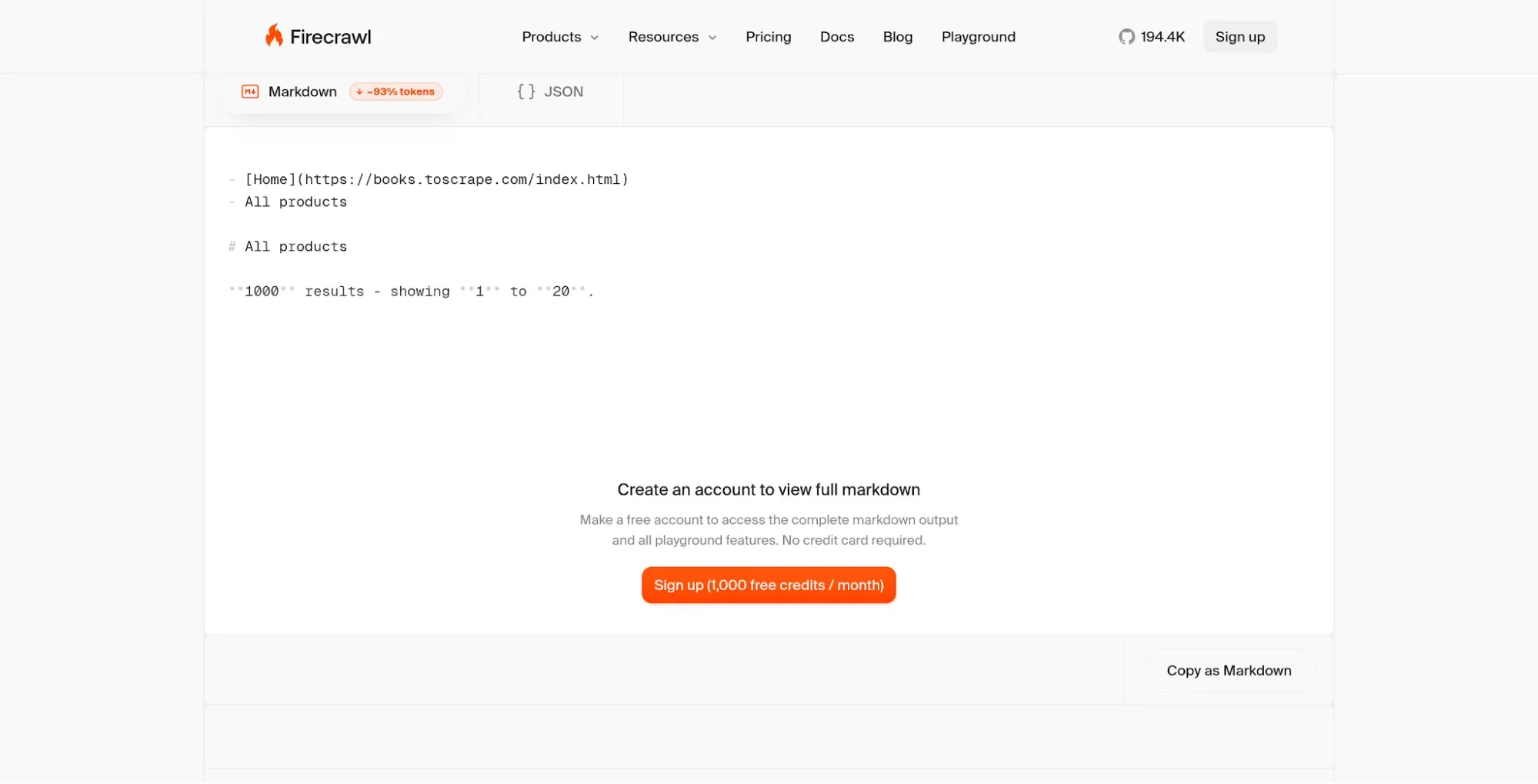
Inside Firecrawl's public Playground, the Markdown preview keeps navigation and a page heading; full output requires an account.
That small detail matters: readable Markdown isn't automatically a table of clean product fields. If you're feeding a catalogue into a database, you'll still want a schema and checks for missing values. If you're feeding page context into an AI application, a broader text representation may be exactly what you want.
The catch is the output multiplier. A basic scrape costs one credit per page; adding JSON extraction brings it to five. In a September 2026 r/automation post, u/Rankspartanben praised Firecrawl's support but called it “quite expensive.” I'd treat that as a prompt to price your own format and volume, rather than a reason to reject the tool.
I'd skip Firecrawl if all you need is occasional point-and-click CSV extraction. Its conversion and API features make more sense when you're building a repeatable content pipeline.
Firecrawl pricing
From $19/month, billed monthly, for Hobby; Free available.
-
Free — 1,000 credits refreshed monthly.
-
Hobby — $19/month for 5,000 monthly credits; extra credits cost $5 per 1,000.
-
Standard — $99/month for 100,000 monthly credits.
5. Octoparse: Best for visual workflows that move from desktop to cloud
Pros — Octoparse
-
Free local extraction gives you a way to start without a subscription.
-
Standard adds cloud extraction, scheduling and a data-export API.
Cons — Octoparse
-
Classic cloud scheduling requires a paid plan; AI beta allowances differ.
-
Optional proxy and setup services can add to the plan price.
Octoparse is worth considering when you want to build extraction workflows visually and keep the option of running them in the cloud. You can start from templates, its AI Assistant or the desktop application. Paid classic plans add cloud capacity and scheduling for jobs you don't want tied to your own machine.
I like the distinction between local and cloud work because it gives you a practical buying test. If you're exporting a catalogue once a month while you're at your desk, the free local option may be enough. If that same catalogue must refresh every morning, Standard's scheduling is the feature you're actually buying.
For the classic desktop route, Free includes ten tasks, one device and 50,000 export rows per month, with up to 10,000 rows per export. Standard raises the task allowance to 100 and includes up to three concurrent cloud processes. Those numbers measure different things: a task is a saved workflow, while exported rows are the data it produces.
Things I Noted — Octoparse
The free console offered more than the desktop route I expected. Its AI Assistant let me choose a Cloud Agent beta that writes and runs a custom scraper. I opened that route without buying a plan. I'd keep it separate from the classic scheduling comparison: I haven't verified a recurring allowance for the beta.
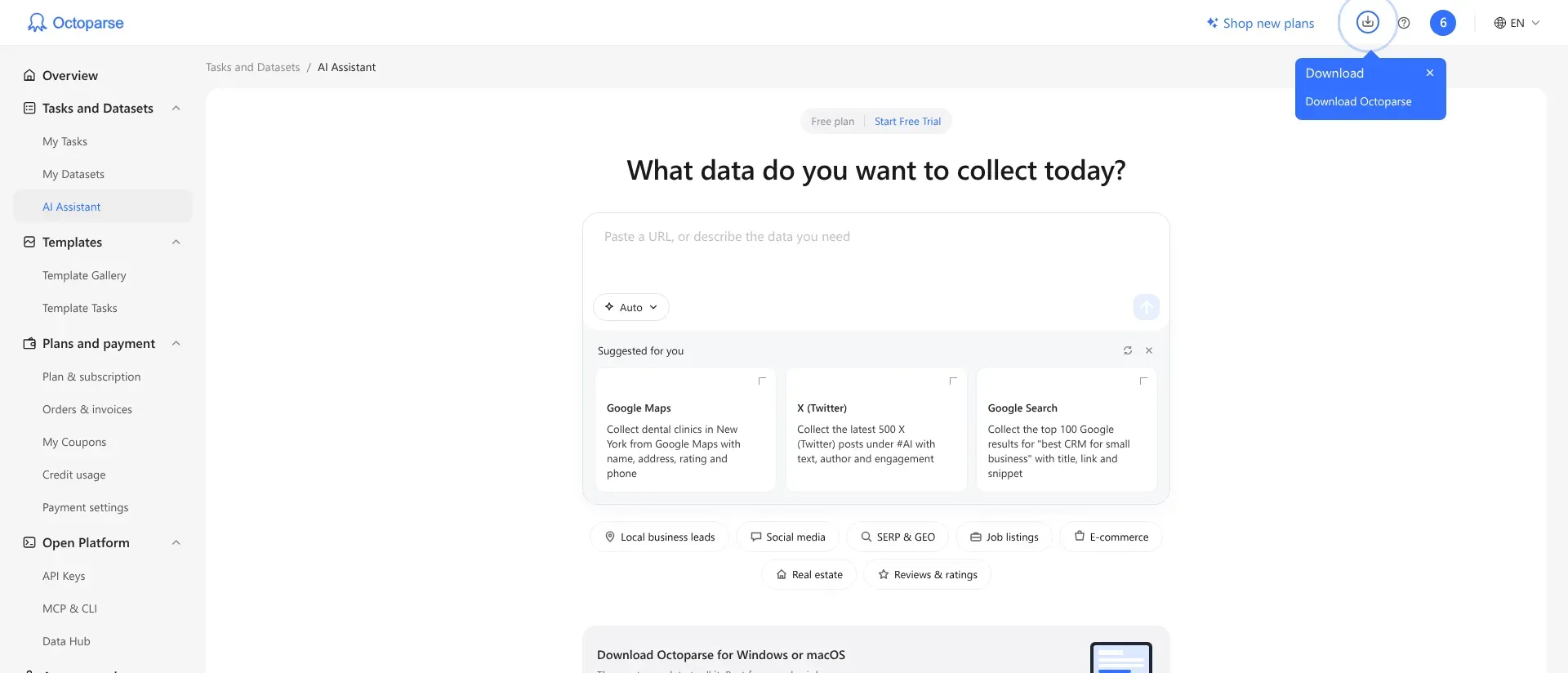
Inside Octoparse's Free plan, the AI Assistant offers a prompt-based starting point alongside the desktop route.
The catch is that “no code” doesn't remove workflow maintenance. When a page changes, someone still needs to check the selected fields and the returned data. I'd skip this if you prefer an API-first integration and already have a parser; ScrapingBee is the more direct fit for that job.
Octoparse pricing
From $69/month, billed annually, for Standard; Free available.
-
Free — local extraction, ten tasks and 50,000 monthly export rows.
-
Standard — $69/month, billed annually, with cloud extraction and scheduling.
-
Professional — $249/month, billed annually, with 20 concurrent cloud processes.
6. Scrapy: Best for custom Python crawls
Pros — Scrapy
-
No software licence charge, with control over selectors and processing.
-
Built-in feed exports include CSV and JSON.
Cons — Scrapy
-
You supply the code, execution environment and maintenance.
-
Browser rendering needs a separate integration when the page requires it.
Scrapy is my pick when the extraction logic belongs in your codebase. You write a spider to select the fields and follow the links you need, then use pipelines and feeds to process and export the results. That gives you room to handle exceptions deliberately rather than squeezing every site into a visual template.
I ran Scrapy 2.19.0 against a local, synthetic catalogue containing three products. The spider exported both CSV and JSON, and the product with zero stock kept its zero. I also fixed the CSV field order to title, price and stock. Nothing in that check required an account or a paid service.
Things I Noted — Scrapy
A successful export still leaves data-type decisions to you. My selectors returned prices and stock as strings: “12.50” and “0” were preserved, but the spider didn't turn them into numeric fields by itself. I like that explicitness for a maintained pipeline. You'll want conversion and validation rules before doing calculations downstream.
The catch is everything around the spider. You own hosting, scheduling, retries appropriate to the site and alerts when the output changes. Scrapy also doesn't render arbitrary JavaScript pages on its own; you may need another data source or a browser integration.
I'd skip Scrapy if nobody on your team wants to maintain Python. Free software can be a good deal, but it doesn't make engineering time disappear.
Scrapy pricing
$0 software licence; execution and maintenance are separate costs.
-
Framework — open source, with no per-page software charge.
-
Operations — budget for your own hosting, monitoring and development work.
What the same workload costs
The cheapest choice changes with the output and who runs the job. These are calculations from the checked plans, not large-scale test results. Prices are USD before tax, with no premium sites, paid proxies or optional setup services. Engineering time is excluded.
Scenario 1: One visual, scheduled catalogue check each day
Assume one supported, standard public page containing 20 rows, fetched once a day for 30 days each month. That's 600 rows and 30 runs monthly. The comparison requires unattended cloud scheduling and a configured table. Octoparse's classic Free local runs don't meet that requirement; the AI beta's recurring allowances weren't verified, so it isn't priced as an equivalent scheduled service.
| Tool | Suitable plan | Annual subscription | Mandatory extras for this scenario | Limit to watch |
|---|---|---|---|---|
| Browse AI | Personal, annual billing | $228 upfront | None under stated assumptions | 60 credits/month; 720/year from 12,000 |
| Octoparse | Standard, annual billing | $828 upfront | None under stated assumptions | One of 100 tasks; three cloud processes |
I'd start with Browse AI for this small, regular table if the page trains cleanly. Octoparse's higher price makes more sense when you also need its broader desktop-to-cloud workflow. Before committing to either, check that your required fields sit on that one page: detail-page visits change the job.
Scenario 2: 10,000 plain HTML page requests per month
Assume 10,000 successful page requests with raw HTML output, no JavaScript rendering, premium proxies or AI field extraction. Your application supplies scheduling, parsing and storage. The totals use twelve monthly payments, so there's no annual prepayment discount mixed into the comparison.
| Tool | Suitable plan | Cost over 12 months | Mandatory extras included | Limit to watch |
|---|---|---|---|---|
| ScrapingBee | Hobby, monthly billing | $228 | None; 10,000 credits fit the plan | 75,000 credits/month; disable JS |
| Firecrawl | Hobby plus pay-as-you-go | $528 | $25/month for 5,000 extra credits | Enable PAYG with enough monthly allowance |
ScrapingBee uses 10,000 monthly credits here. Firecrawl reaches $44 a month once the extra credits are included; moving up to Standard is unnecessary for this workload.
I'd choose ScrapingBee on these assumptions. If the output changes to AI-extracted JSON, recalculate: Firecrawl uses five credits per page, and ScrapingBee's AI extraction adds five credits to the underlying request. The cheap HTML comparison no longer answers your question.
Apify and Scrapy need a different estimate. An Apify Actor's billing rules and runtime determine its total; Scrapy's licence is free but its hosting and labour aren't. I wouldn't attach a made-up annual total to either without a representative run and an execution plan.
Check your existing stack first
A spreadsheet function or a source-provided export may cover a small job before you add another subscription. Google Sheets' IMPORTHTML can pull an HTML table or list by index. Excel's Power Query From Web connector lets you select detected tables and transform the results.
I'd try those routes for an occasional, straightforward table. Once the workflow needs browser interactions, multiple page templates or dependable unattended execution, a dedicated scraper becomes more useful. Also check whether the source offers a suitable API or downloadable file: a ready-made data feed can save you from rebuilding its structure from a page.
For LinkedIn-specific outreach workflows, see Linked Helper's Sales Navigator automation guide. That's a separate use case from collecting arbitrary public web pages.
Related reading:
Which web scraping tool should you choose?
| Your scenario | My pick | What decides it |
|---|---|---|
| Regularly refreshed table | Browse AI | Choose around the output you need and the work your team is willing to own. I'd start with Browse AI for a regularly refreshed table. |
| Visual desktop configuration and paid cloud execution | Octoparse | Consider Octoparse when these fit the way you work. |
| A maintained Actor already does the specific job | Apify | Check its sample dataset and billing rules before deciding that the platform's starting price is your total budget. |
| HTML fetching is the missing piece in a developer pipeline | ScrapingBee | I'd choose ScrapingBee when HTML fetching is the missing piece. |
| Content conversion is central | Firecrawl | I'd choose Firecrawl when content conversion is central. |
| Extraction logic, data types and maintenance should stay in Python | Scrapy | Scrapy is the option I'd choose when these should stay under my team's control. |
Whichever route you take, compare a small result with the source before scheduling a larger run. The most useful test is whether the fields you need arrive correctly, including missing values and the last page of results.
Other tools I considered
Playwright is worth considering when you need to write custom browser interactions. It's a browser automation framework, so you'll still build the extraction and storage around it.